contour-deck 0.1.0 → 0.2.0
This diff represents the content of publicly available package versions that have been released to one of the supported registries. The information contained in this diff is provided for informational purposes only and reflects changes between package versions as they appear in their respective public registries.
- package/README.md +107 -5
- package/dist/astro/Deck.astro +8 -1
- package/dist/astro/host.d.ts +7 -0
- package/dist/astro/host.js +58 -4
- package/dist/core/deck.js +16 -5
- package/dist/core/labels.js +1 -0
- package/dist/core/types.d.ts +12 -0
- package/dist/remote/clock.d.ts +35 -0
- package/dist/remote/clock.js +48 -0
- package/dist/remote/guest.d.ts +41 -0
- package/dist/remote/guest.js +223 -0
- package/dist/remote/index.d.ts +18 -0
- package/dist/remote/index.js +11 -0
- package/dist/remote/ink.d.ts +11 -0
- package/dist/remote/ink.js +74 -0
- package/dist/remote/labels.d.ts +72 -0
- package/dist/remote/labels.js +68 -0
- package/dist/remote/links.d.ts +2 -0
- package/dist/remote/links.js +12 -0
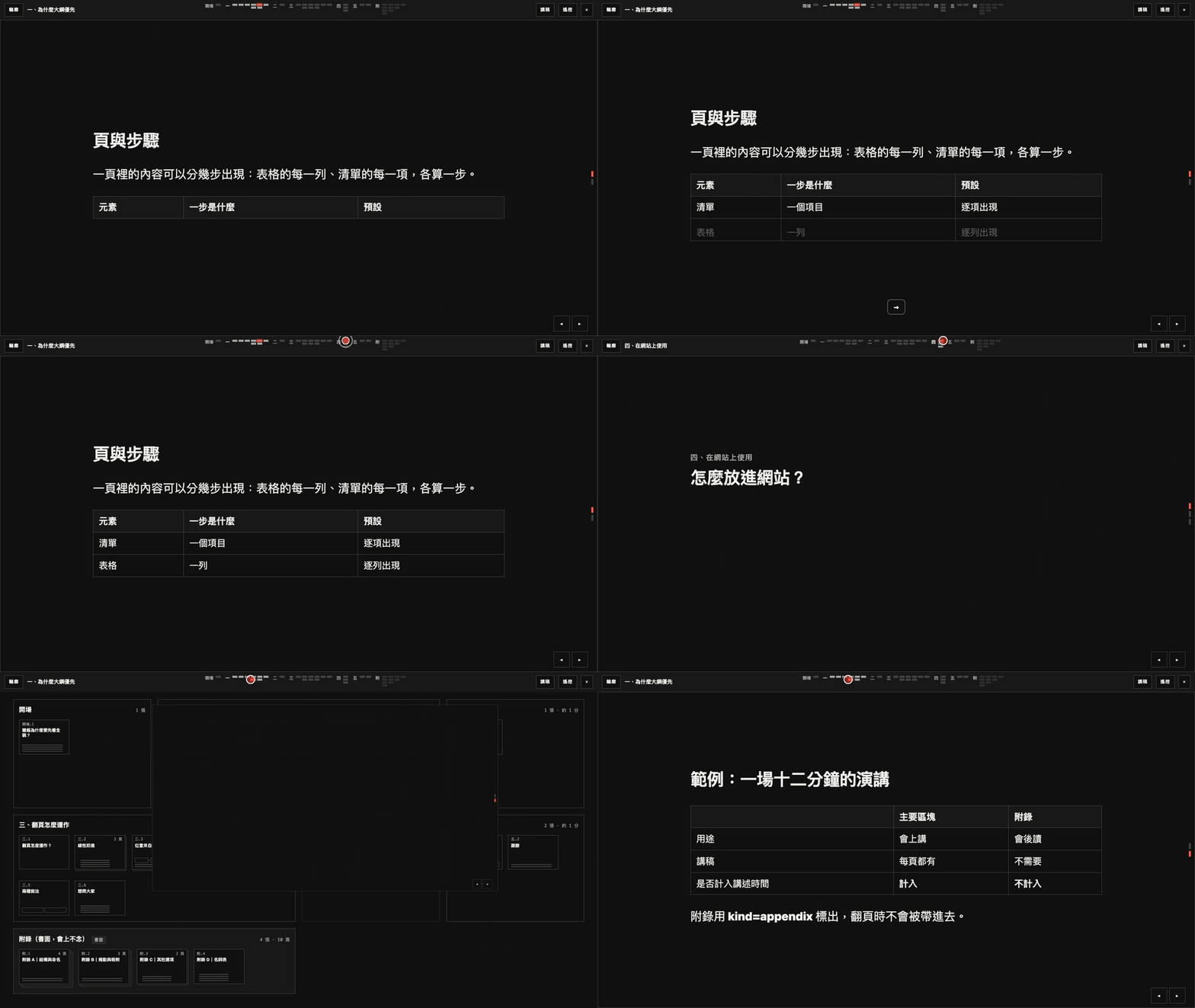
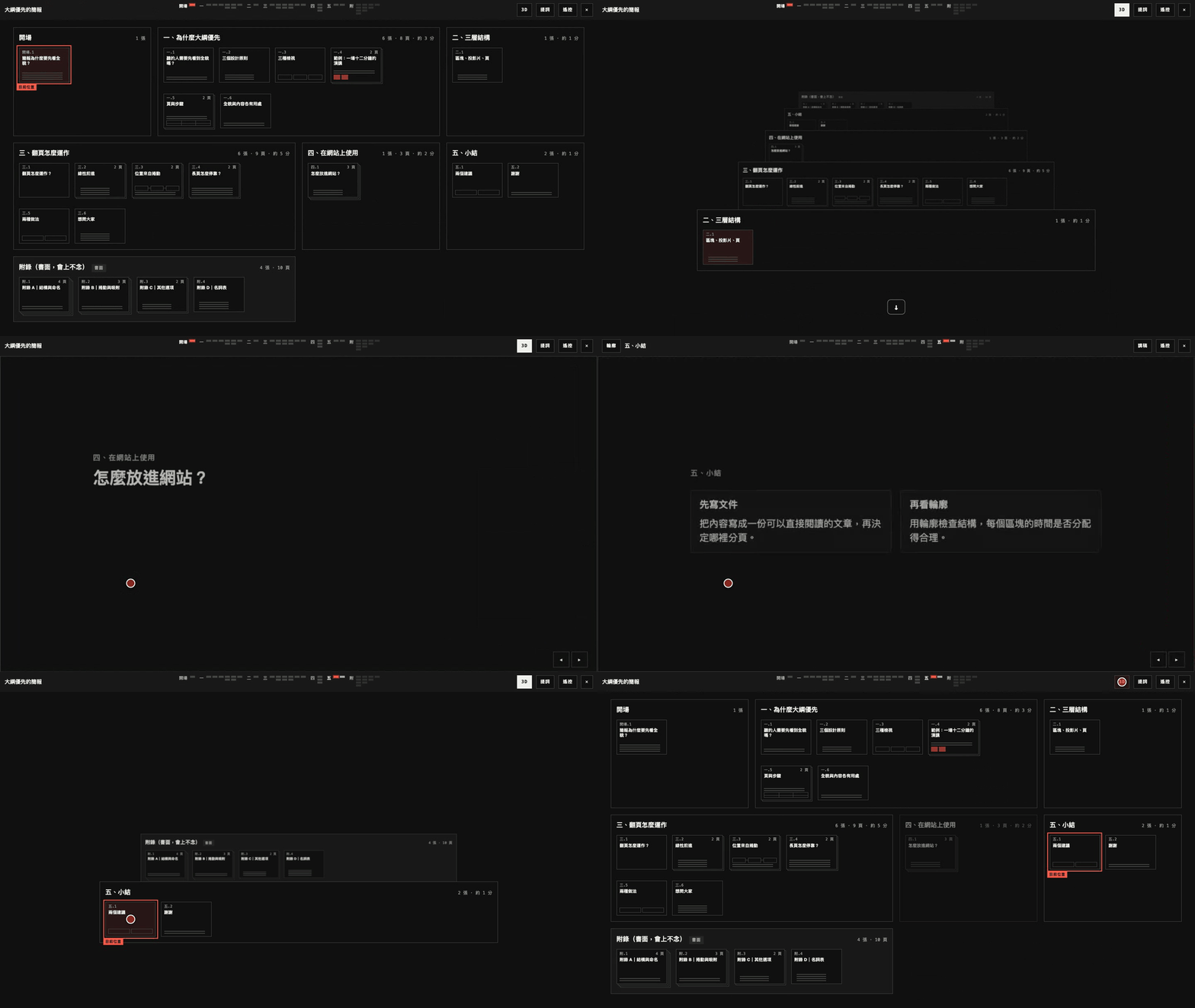
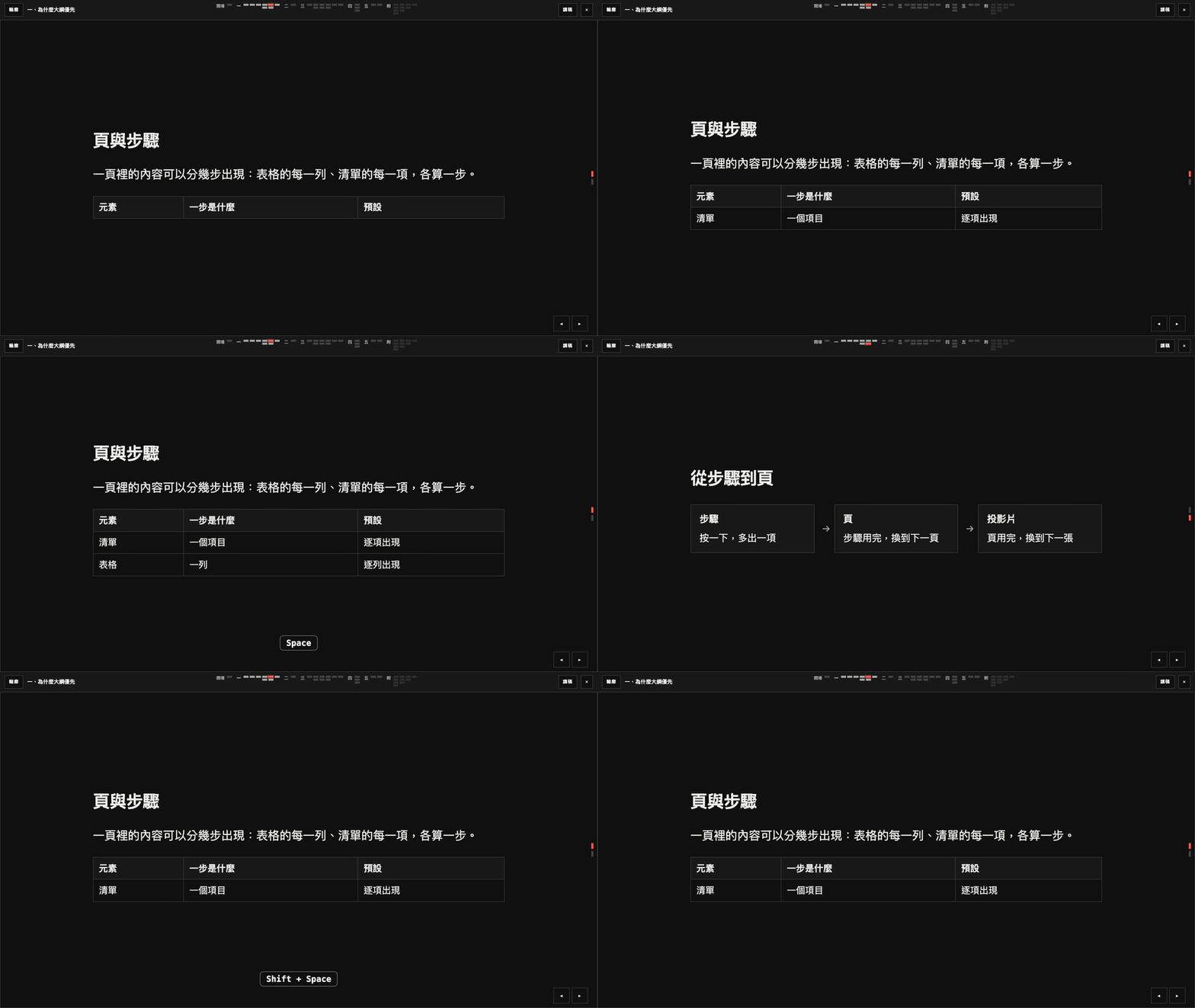
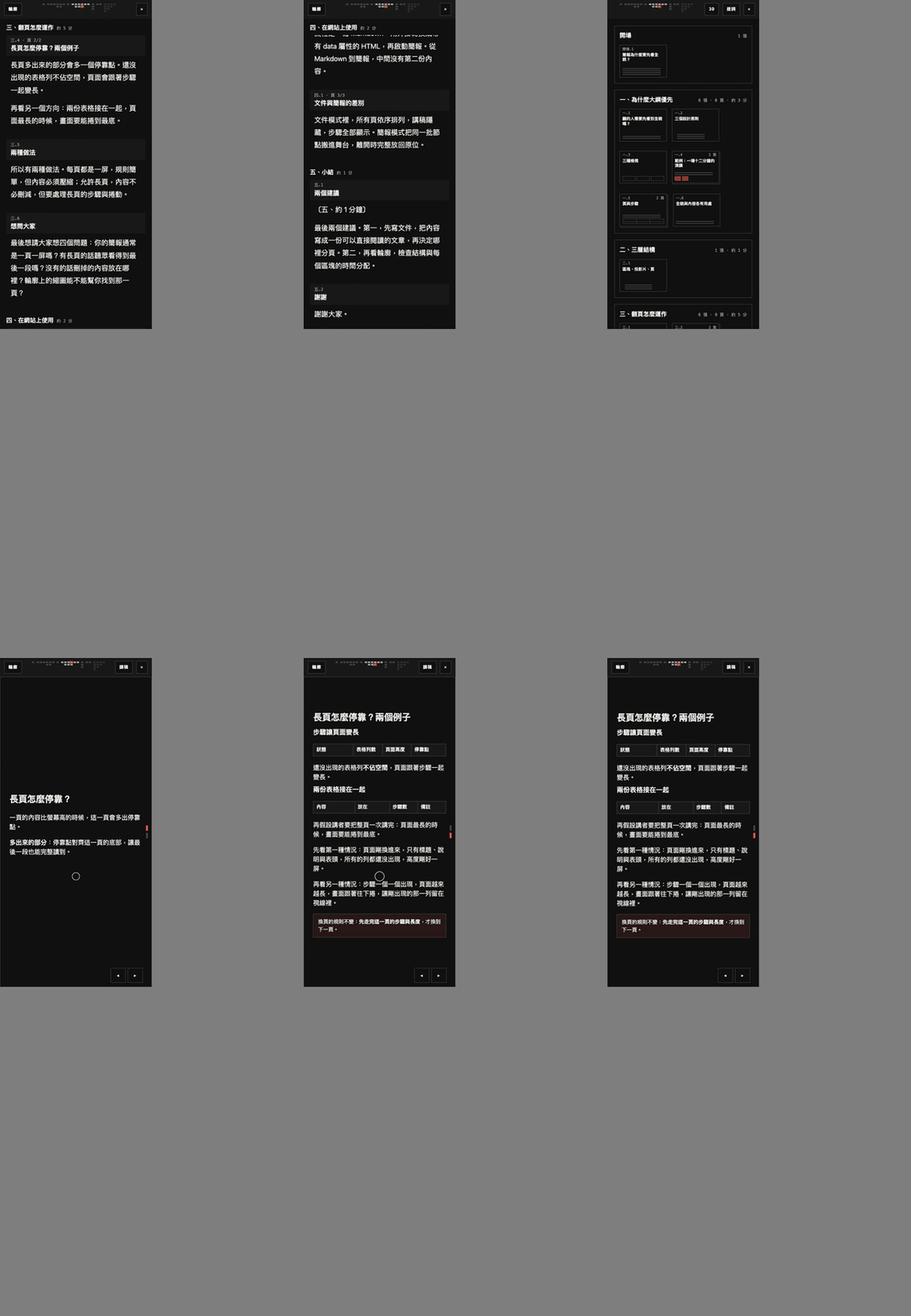
- package/dist/remote/overlay.d.ts +11 -0
- package/dist/remote/overlay.js +63 -0
- package/dist/remote/pairing.d.ts +40 -0
- package/dist/remote/pairing.js +97 -0
- package/dist/remote/panel.d.ts +38 -0
- package/dist/remote/panel.js +131 -0
- package/dist/remote/phone.d.ts +10 -0
- package/dist/remote/phone.js +407 -0
- package/dist/remote/presenter.d.ts +2 -0
- package/dist/remote/presenter.js +126 -0
- package/dist/remote/protocol.d.ts +106 -0
- package/dist/remote/protocol.js +123 -0
- package/dist/remote/qr.d.ts +8 -0
- package/dist/remote/qr.js +266 -0
- package/dist/remote/sensor.d.ts +9 -0
- package/dist/remote/sensor.js +50 -0
- package/dist/remote/session.d.ts +39 -0
- package/dist/remote/session.js +287 -0
- package/dist/remote/store.d.ts +9 -0
- package/dist/remote/store.js +27 -0
- package/dist/remote/style.d.ts +2 -0
- package/dist/remote/style.js +131 -0
- package/dist/remote/tilt.d.ts +78 -0
- package/dist/remote/tilt.js +148 -0
- package/dist/remote/transport.d.ts +35 -0
- package/dist/remote/transport.js +162 -0
- package/dist/remote/view.d.ts +48 -0
- package/dist/remote/view.js +119 -0
- package/docs/CONTRACT.md +14 -0
- package/docs/PROTOCOL.md +99 -0
- package/package.json +9 -2
package/README.md
CHANGED
|
@@ -1,12 +1,40 @@
|
|
|
1
1
|
# contour-deck
|
|
2
2
|
|
|
3
|
+
<p align="center">
|
|
4
|
+
<a href="https://wayne930242.github.io/contour-deck/">
|
|
5
|
+
<picture>
|
|
6
|
+
<source media="(prefers-color-scheme: light)" srcset="https://raw.githubusercontent.com/wayne930242/contour-deck/main/docs/media/tour-light.gif">
|
|
7
|
+
<img src="https://raw.githubusercontent.com/wayne930242/contour-deck/main/docs/media/tour.gif" alt="Open a slide from the outline, move left and right, scroll down its pages, and return to the outline" width="800">
|
|
8
|
+
</picture>
|
|
9
|
+
</a>
|
|
10
|
+
</p>
|
|
11
|
+
|
|
3
12
|
Outline-first slide decks on real DOM.
|
|
4
13
|
A deck is blocks, slides, and pages: it opens on an outline of every block, a block opens into a left-right track of slides, and each slide scrolls down one page at a time.
|
|
5
|
-
The core is plain TypeScript with no runtime dependency (7 KB of JavaScript and 3 KB of CSS, gzipped).
|
|
14
|
+
The core is plain TypeScript with no runtime dependency (7 KB of JavaScript and 3 KB of CSS, gzipped); the phone remote is a separate module that loads on first use.
|
|
6
15
|
|
|
7
|
-
Status: M1
|
|
16
|
+
Status: 0.1.0 on npm (M1). The M2 client is on `main`, not yet released: phone remote, laser pointer, drawing, tilt pointing, and a presenter window ([Remote](#remote)); the relay it talks to is a separate small service ([docs/PROTOCOL.md](docs/PROTOCOL.md)). Live demo: https://wayne930242.github.io/contour-deck/
|
|
8
17
|
The design is in [docs/DESIGN.md](docs/DESIGN.md) (Traditional Chinese); the HTML the core reads is in [docs/CONTRACT.md](docs/CONTRACT.md).
|
|
9
18
|
|
|
19
|
+
## 看看它怎麼動
|
|
20
|
+
|
|
21
|
+
[線上示範](https://wayne930242.github.io/contour-deck/)可以直接操作;[影片與截圖頁](https://wayne930242.github.io/contour-deck/media.html)有每一段的 mp4 與原尺寸截圖。
|
|
22
|
+
下面的動畫是真實的鍵盤與滑鼠操作(圓圈是滑鼠,黑底小標是按下的鍵),用 `pnpm media` 重錄。
|
|
23
|
+
|
|
24
|
+
| | |
|
|
25
|
+
| --- | --- |
|
|
26
|
+
|  |  |
|
|
27
|
+
| 跨區塊移動:拉遠再推進,位置列的圓點直接飛到別的區塊 | 3D 結構:按 3,頁疊成層 |
|
|
28
|
+
|  |  |
|
|
29
|
+
| 步驟:空白鍵讓表格一列一列出現 | 手機:講稿檢視與往上滑換頁 |
|
|
30
|
+
|
|
31
|
+
| | |
|
|
32
|
+
| --- | --- |
|
|
33
|
+
| 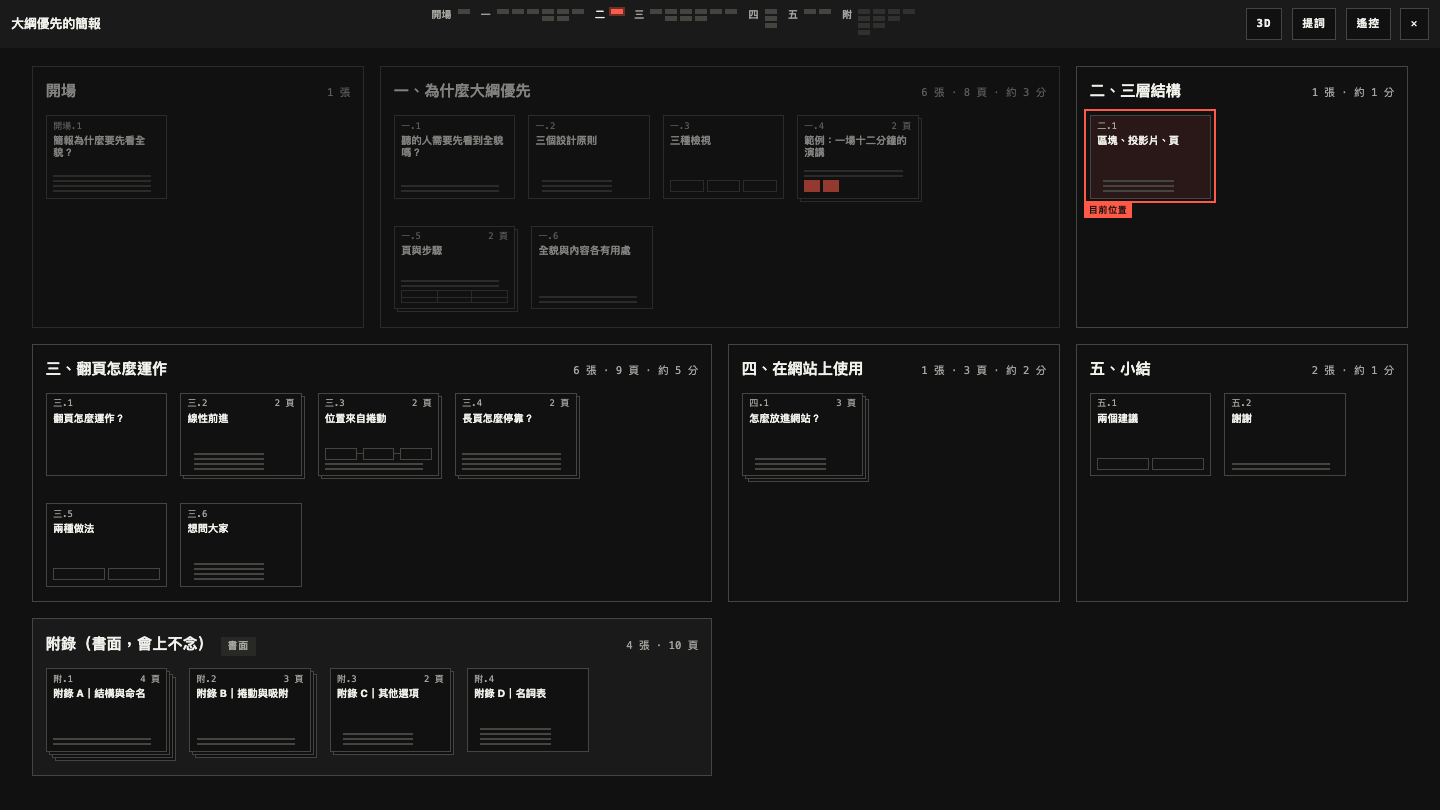 | 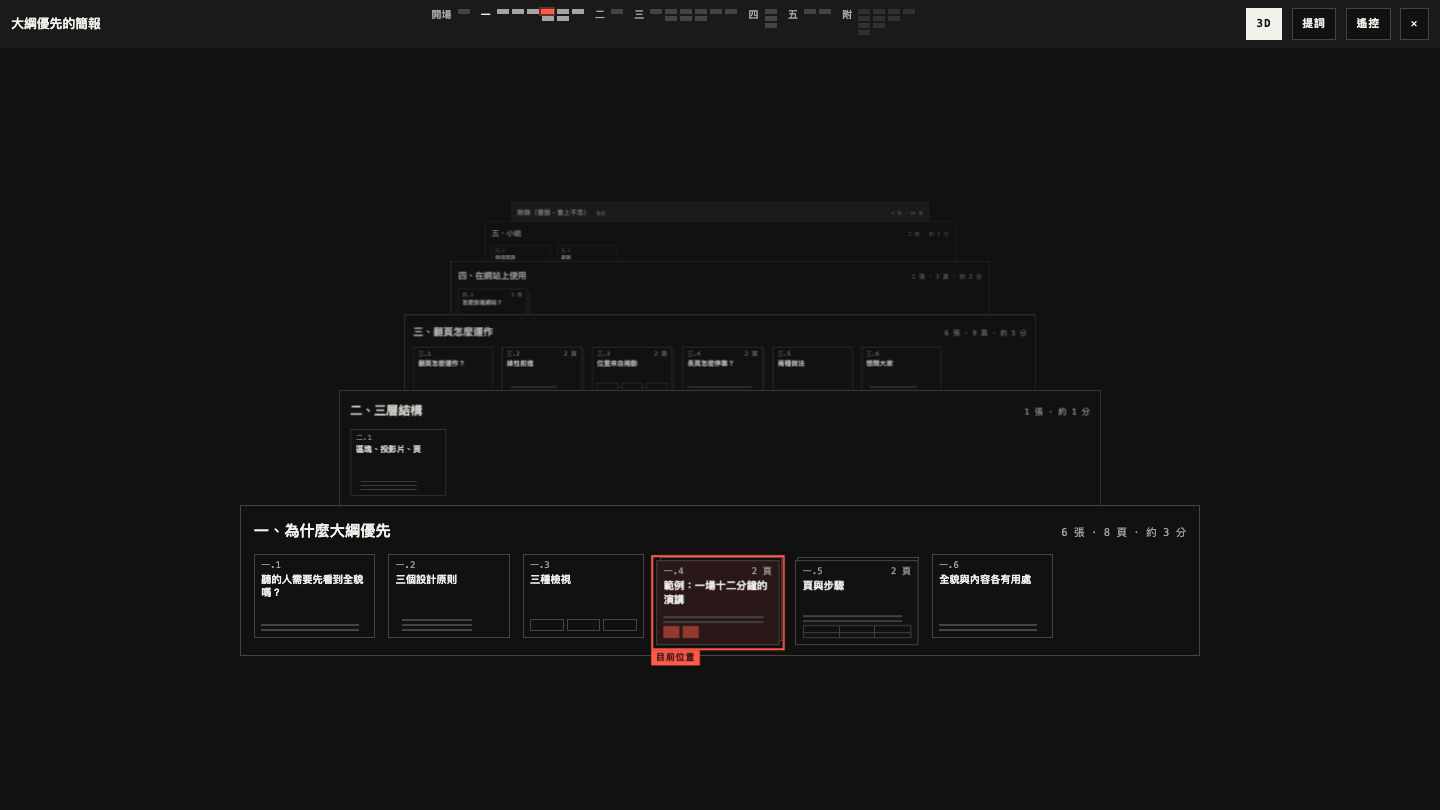 |
|
|
34
|
+
| 輪廓 | 3D 結構 |
|
|
35
|
+
| 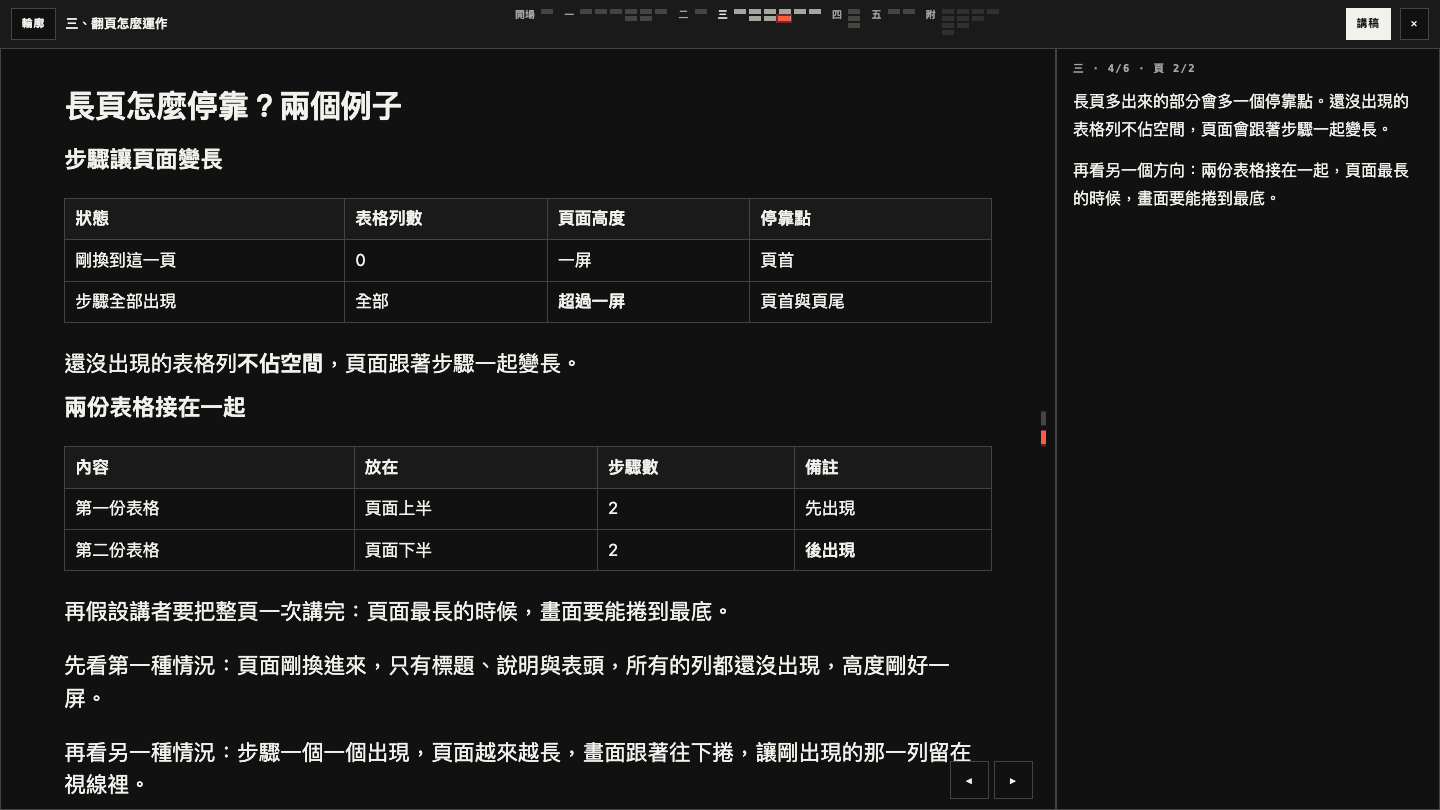 | 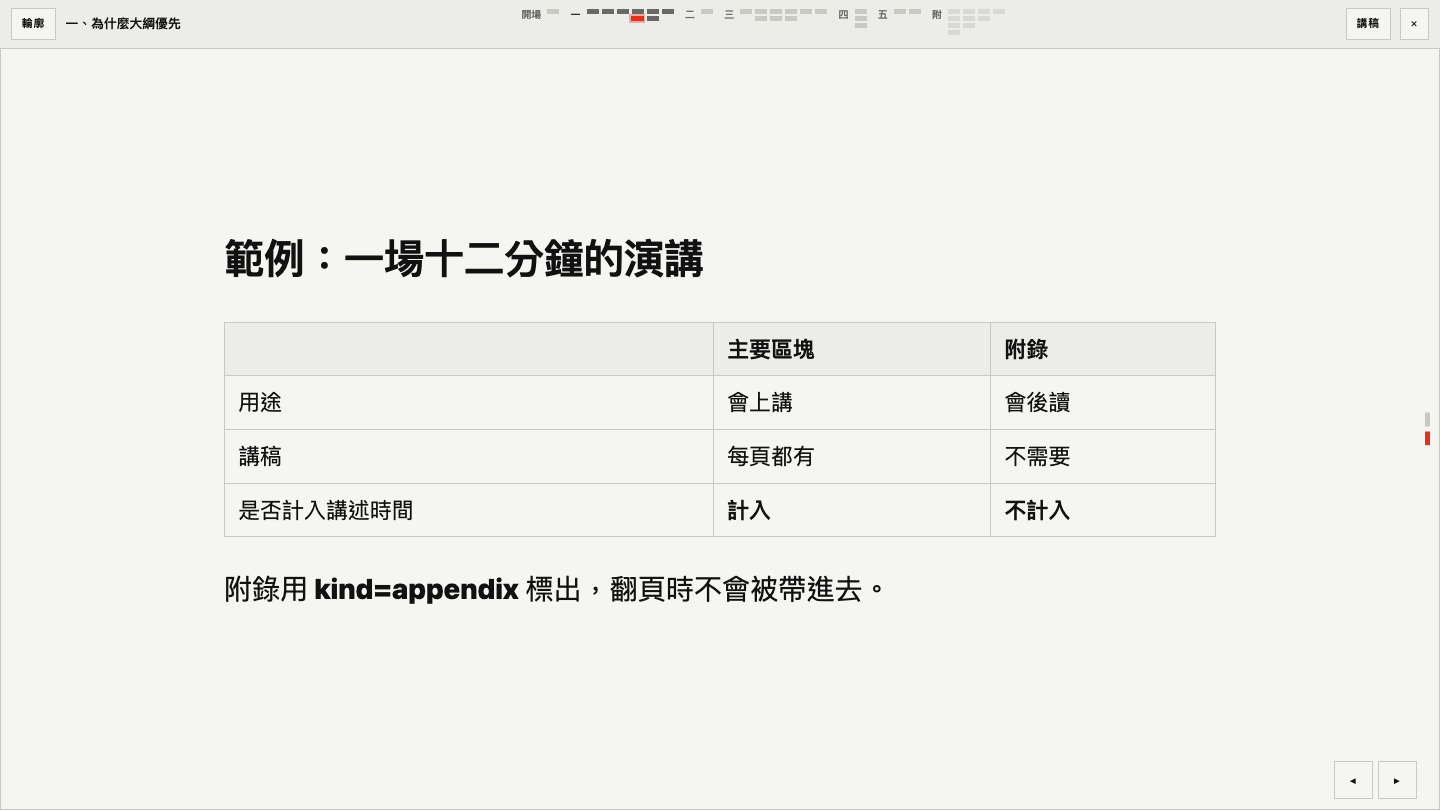 |
|
|
36
|
+
| 講稿面板(按 N) | 淺色主題 |
|
|
37
|
+
|
|
10
38
|
## Use
|
|
11
39
|
|
|
12
40
|
```ts
|
|
@@ -73,6 +101,7 @@ A page that is not Astro gets the same behaviour from `mountAll()` in `contour-d
|
|
|
73
101
|
| `at` | from the URL | Entry position, such as `"4.4.2"` or a slide id. |
|
|
74
102
|
| `url` | `true` | Read and write `?view=` and `?at=`. |
|
|
75
103
|
| `labels` | Traditional Chinese | Interface text; pass the entries to replace. |
|
|
104
|
+
| `remote` | none | A function the remote button and the `R` key call with the deck; it usually loads `contour-deck/remote`. Without it the deck has neither. See [Remote](#remote). |
|
|
76
105
|
|
|
77
106
|
### API
|
|
78
107
|
|
|
@@ -82,9 +111,12 @@ deck.prev();
|
|
|
82
111
|
deck.open("4.2"); // put a block on the stage
|
|
83
112
|
deck.go("4.4.2"); // or deck.go("slide-id")
|
|
84
113
|
deck.overview(); // back to the outline
|
|
114
|
+
deck.slideBy(1); // the next slide, as the right arrow key; -1 for the one before
|
|
115
|
+
deck.pageBy(1); // one stop down inside the slide, as the down arrow key
|
|
85
116
|
deck.state; // { mode, block, slide, page, step }; ordinals are 1-based
|
|
86
117
|
deck.on("change", ({ mode, at, step }) => {});
|
|
87
118
|
deck.on("exit", () => deck.destroy()); // Esc on the outline, or the ✕ button of the bar
|
|
119
|
+
deck.on("destroy", () => {}); // once, at the start of destroy()
|
|
88
120
|
deck.destroy();
|
|
89
121
|
```
|
|
90
122
|
|
|
@@ -92,6 +124,72 @@ On opening, the focus moves into the shell: to the stage, to the current thumbna
|
|
|
92
124
|
|
|
93
125
|
Each page receives `ct:enter` when it becomes the current page and `ct:leave` when it stops; both bubble.
|
|
94
126
|
|
|
127
|
+
### Remote
|
|
128
|
+
|
|
129
|
+
A phone controls the deck, points at it, and draws on it; a second window on the same computer shows the presenter's view.
|
|
130
|
+
The code is `contour-deck/remote`, loaded on first use, so a reader who never presses `R` downloads none of it.
|
|
131
|
+
|
|
132
|
+
```ts
|
|
133
|
+
import { createDeck } from "contour-deck";
|
|
134
|
+
|
|
135
|
+
const options = { relay: "wss://relay.example" }; // see "The relay" below
|
|
136
|
+
const load = () => import("contour-deck/remote");
|
|
137
|
+
const view = new URLSearchParams(location.search).get("view");
|
|
138
|
+
|
|
139
|
+
if (view === "remote") load().then(remote => remote.remoteView(root, options)); // the phone
|
|
140
|
+
else if (view === "presenter") load().then(remote => remote.presenterView(root, options)); // the presenter window
|
|
141
|
+
else if (view) {
|
|
142
|
+
const deck = createDeck(root, { remote: deck => load().then(remote => remote.remoteHost(deck, root, options)).then(host => host.toggle()) });
|
|
143
|
+
deck.on("exit", () => deck.destroy());
|
|
144
|
+
}
|
|
145
|
+
```
|
|
146
|
+
|
|
147
|
+
With Astro, `<Deck relay="wss://relay.example">` does all of this (`<Deck remote>` without a relay); so does `data-ct-relay` or `data-ct-remote` on a `[data-ct-host]` wrapper.
|
|
148
|
+
|
|
149
|
+
How to connect:
|
|
150
|
+
|
|
151
|
+
1. On the deck, press `R` (or the 遙控 button). The panel shows two QR codes.
|
|
152
|
+
2. Scan 手機遙控 with the phone. It opens the same page as `?view=remote&room=…` and shows a 4-digit code.
|
|
153
|
+
3. The deck shows the same code under 有手機要求控制. Compare the two screens and press 允許.
|
|
154
|
+
4. The phone now has: position and clocks (whole talk and current block, from `data-minutes`), the notes, what the next step shows, 下一步 / 上一步 / 上一張 / 下一張 / 輪廓, and three pointing tools: 紅點 (drag on a small copy of the page), 畫筆 (draw on it; a page change clears the ink), and 傾斜 (hold a button and aim the phone like a laser pointer).
|
|
155
|
+
5. 講稿, the other QR, is `?view=notes`: the script on the phone, turned by hand, with no connection at all.
|
|
156
|
+
|
|
157
|
+
開啟講者視窗 in the panel opens `?view=presenter` in a second window of the same browser: the current page, the next step, the notes, and the clocks. It follows over `BroadcastChannel`, needs no relay, and takes the deck's keys; the mouse over its current page is the laser pointer.
|
|
158
|
+
|
|
159
|
+
Tilt pointing reads the phone's orientation sensor (iOS asks for permission on the tap that enables it).
|
|
160
|
+
校正 guides through five aims: the screen's centre, then its four corners, each marked by the dot on the deck. From these the phone knows where the screen is from where you stand, and keeps it for the session.
|
|
161
|
+
Without calibration, the direction of the first press is the centre of a screen ±20° wide and ±12° high.
|
|
162
|
+
When the pointer drifts, aim at the centre and press 重新置中; aiming past an edge also drags the calibration along, as a mouse at the edge of a screen.
|
|
163
|
+
|
|
164
|
+
Security, in three lines: the relay only forwards small messages (position, commands, pointer coordinates) between the deck and at most four phones; notes, block titles, and slide content never pass through it, because the phone loads the page itself.
|
|
165
|
+
The room in the QR lets a phone ask; only the deck's tab holds the key the room is hashed from, so nobody else can take the deck's seat at the relay and hear what the phones send.
|
|
166
|
+
Control belongs to the one phone the presenter allowed on the deck after comparing the code; everything any other guest sends is ignored, and the relay removes a denied guest, so a QR photographed from the projector yields only a request to deny.
|
|
167
|
+
|
|
168
|
+
| Option of `remoteHost`, `remoteView`, `presenterView` | Default | Meaning |
|
|
169
|
+
| --- | --- | --- |
|
|
170
|
+
| `relay` | none | Base URL of the relay, `wss://…` or `https://…`. Without it the remote stays on this computer: presenter window and notes link only. |
|
|
171
|
+
| `qr` | built-in | `(text) => svgString`, for a site that already ships a QR library: `text => QRCode.toString(text, { type: "svg" })`. The built-in encoder takes links up to 287 bytes; a longer link shows as text. |
|
|
172
|
+
| `skip` | `["appendix"]` | Block kinds whose minutes are not planned time; keep it equal to `linear.skip`. |
|
|
173
|
+
| `labels` | Traditional Chinese | Interface text of the panel, the phone, and the presenter window. |
|
|
174
|
+
| `nonce` | none | Nonce for the `<style>` the module injects, for a page with a `style-src` policy. |
|
|
175
|
+
| `room` (views only) | `?room=` | The room to join. |
|
|
176
|
+
|
|
177
|
+
`remoteHost(deck, root, options)` resolves to the session of that deck, creating it once: `toggle()` shows or hides the panel, `end()` takes control back and closes the room, `room` is its name.
|
|
178
|
+
It is a promise because the room is the SHA-256 of the session's key (`crypto.subtle`, so with a relay the page needs https or localhost).
|
|
179
|
+
The key, the paired phone's token, and the clock live in `sessionStorage`, so a reload of the deck or of the phone continues the same session; the Astro host and the demo restart it by themselves after a reload.
|
|
180
|
+
With the Astro component, pass a QR encoder or labels through `configureRemote({ qr })` from `contour-deck/host`.
|
|
181
|
+
The remote follows the first deck of a page.
|
|
182
|
+
|
|
183
|
+
The clock starts with the first move on the stage (not when a slide is opened from the outline) and is reset from the panel.
|
|
184
|
+
The laser dot eases towards its target and fades when released; with `prefers-reduced-motion` it jumps and does not fade.
|
|
185
|
+
|
|
186
|
+
#### The relay
|
|
187
|
+
|
|
188
|
+
The relay is a WebSocket forwarder, one room per talk, specified in [docs/PROTOCOL.md](docs/PROTOCOL.md): rooms, the pairing messages, close codes, and limits (2 KB frames, 60 messages a second, 4 guests).
|
|
189
|
+
`relay(url, { room, role, key })` and `broadcast(room)` are the two `Transport`s (`send`, `subscribe`, `watch`, `reconnect`, `close`, `status`); the relay one reconnects with backoff, except after `4003` (removed by the host) and `4009` (another tab of the session took the host seat).
|
|
190
|
+
The demo takes a relay from the query string, the deployed one or one on this machine: `https://wayne930242.github.io/contour-deck/?relay=wss://contour-relay.wayne930242.workers.dev&view=deck`, or `?relay=ws://localhost:8787`; it ignores any other.
|
|
191
|
+
The phone must be able to open the page's URL, so a deck on `localhost` needs a tunnel or the LAN address for the phone part.
|
|
192
|
+
|
|
95
193
|
### Keys
|
|
96
194
|
|
|
97
195
|
| Key | On the stage | On the outline |
|
|
@@ -102,6 +200,7 @@ Each page receives `ct:enter` when it becomes the current page and `ct:leave` wh
|
|
|
102
200
|
| `↑` `↓` | previous, next stop | move between thumbnails |
|
|
103
201
|
| `Home`, `End` | first, last slide of the block | |
|
|
104
202
|
| `N` | notes panel | |
|
|
203
|
+
| `R` | remote panel (with the `remote` option) | remote panel |
|
|
105
204
|
| `Esc`, `O` | outline | `Esc` leaves the deck (`exit`) |
|
|
106
205
|
| `3` | | 3D structure |
|
|
107
206
|
|
|
@@ -127,13 +226,15 @@ The core removes both parameters in `destroy()` and leaves the others alone.
|
|
|
127
226
|
|
|
128
227
|
```text
|
|
129
228
|
src/core/ the core: model, stops, gestures, navigator, outline, rail, notes, transitions, deck
|
|
229
|
+
src/remote/ contour-deck/remote: protocol, transports, pairing, clock, tilt math, QR, and the three views
|
|
130
230
|
src/remark/ Markdown directives (block, vertical, summary, build)
|
|
131
231
|
src/rehype/ builds the deck > block > slide > page HTML
|
|
132
232
|
src/astro/ Deck.astro and the host script it runs (also contour-deck/host)
|
|
133
233
|
styles/ index.css is the entry of contour-deck/style.css
|
|
134
|
-
demo/ a plain-HTML deck that follows the contract
|
|
234
|
+
demo/ a plain-HTML deck that follows the contract, and media.html (clips and stills)
|
|
235
|
+
docs/media/ GIF, mp4, and PNG made by scripts/media.mjs (not in the npm package)
|
|
135
236
|
tests/unit/ Vitest, tests/unit/**/*.test.ts
|
|
136
|
-
tests/browser/ Playwright, tests/browser/**/*.spec.ts, run against demo/
|
|
237
|
+
tests/browser/ Playwright, tests/browser/**/*.spec.ts, run against demo/; relay-stub.ts is the relay of docs/PROTOCOL.md in the test process
|
|
137
238
|
```
|
|
138
239
|
|
|
139
240
|
Every module under `src/` is compiled to the same path under `dist/`, so a new subpath export only needs an entry in `package.json`.
|
|
@@ -150,8 +251,9 @@ Every module under `src/` is compiled to the same path under `dist/`, so a new s
|
|
|
150
251
|
| `pnpm test` | Unit tests. |
|
|
151
252
|
| `pnpm test:browser` | Build, then run the browser tests against the demo in Chromium. |
|
|
152
253
|
| `CT_BROWSERS=all pnpm test:browser` | The same in Chromium, Firefox, and WebKit (`pnpm exec playwright install firefox webkit` once). |
|
|
153
|
-
| `pnpm size` | Minified gzip size of the core and the CSS against the budgets (12 KB, 6 KB). |
|
|
254
|
+
| `pnpm size` | Minified gzip size of the core and the CSS against the budgets (12 KB, 6 KB), and of the parts of the remote. |
|
|
154
255
|
| `pnpm demo` | Build and serve the demo on `http://127.0.0.1:41731/demo/`. |
|
|
256
|
+
| `pnpm media` | Record the clips and stills in `docs/media/` (needs `ffmpeg` and Chromium); the Pages workflow publishes the mp4 and png files next to the demo. |
|
|
155
257
|
|
|
156
258
|
The demo also opens straight from the file system: `demo/index.html` after `pnpm build`.
|
|
157
259
|
|
package/dist/astro/Deck.astro
CHANGED
|
@@ -8,6 +8,7 @@
|
|
|
8
8
|
* <a href="?view=notes" data-ct-start="notes">Notes</a>
|
|
9
9
|
*
|
|
10
10
|
* `?view=deck` and `?view=notes` open the deck on load; so does any `[data-ct-start]` control.
|
|
11
|
+
* With `remote` or `relay`, the deck has a remote (R): `?view=remote` is the phone, `?view=presenter` the presenter window.
|
|
11
12
|
*
|
|
12
13
|
* The build copies this file to dist/astro/, and the import paths are the ones that hold there:
|
|
13
14
|
* ../style.css is dist/style.css, ./host.js the compiled src/astro/host.ts.
|
|
@@ -28,9 +29,13 @@ interface Props {
|
|
|
28
29
|
overview?: "flat" | "3d";
|
|
29
30
|
/** Accept old reveal.js links, `?view=slides&slide=h.v`, through `data-legacy`. */
|
|
30
31
|
legacy?: boolean;
|
|
32
|
+
/** The remote button and the `R` key: presenter window and notes link. Implied by `relay`. */
|
|
33
|
+
remote?: boolean;
|
|
34
|
+
/** Base URL of the relay (`wss://…`), so a phone can pair and control the deck. See docs/PROTOCOL.md. */
|
|
35
|
+
relay?: string;
|
|
31
36
|
}
|
|
32
37
|
|
|
33
|
-
const { class: className, docClass, paging, overview, legacy = false } = Astro.props;
|
|
38
|
+
const { class: className, docClass, paging, overview, legacy = false, remote = false, relay } = Astro.props;
|
|
34
39
|
---
|
|
35
40
|
|
|
36
41
|
<div
|
|
@@ -40,6 +45,8 @@ const { class: className, docClass, paging, overview, legacy = false } = Astro.p
|
|
|
40
45
|
data-ct-paging={paging}
|
|
41
46
|
data-ct-overview={overview}
|
|
42
47
|
data-ct-legacy={legacy ? "" : undefined}
|
|
48
|
+
data-ct-remote={remote ? "" : undefined}
|
|
49
|
+
data-ct-relay={relay}
|
|
43
50
|
>
|
|
44
51
|
<slot />
|
|
45
52
|
</div>
|
package/dist/astro/host.d.ts
CHANGED
|
@@ -1,4 +1,11 @@
|
|
|
1
1
|
import type { Deck, DeckOptions } from "../core/index.js";
|
|
2
|
+
import type { RemoteOptions } from "../remote/index.js";
|
|
3
|
+
/**
|
|
4
|
+
* Options of the remote for every deck of the page, such as a QR encoder the site already ships:
|
|
5
|
+
* `configureRemote({ qr: text => QRCode.toString(text, { type: "svg" }) })`.
|
|
6
|
+
* A `data-ct-relay` on a wrapper wins over `relay` given here.
|
|
7
|
+
*/
|
|
8
|
+
export declare function configureRemote(options: RemoteOptions): void;
|
|
2
9
|
export interface Host {
|
|
3
10
|
/** The open deck, or `null` while the page shows the document. */
|
|
4
11
|
readonly deck: Deck | null;
|
package/dist/astro/host.js
CHANGED
|
@@ -10,10 +10,32 @@
|
|
|
10
10
|
* | `data-ct-paging`, `data-ct-overview` | the `paging` and `overview` options of the core |
|
|
11
11
|
* | `data-ct-legacy` | accept `?view=slides&slide=h.v` |
|
|
12
12
|
* | `[data-ct-start]`, `[data-ct-start="notes"]` | a control that opens the deck or its notes view: inside a host for that deck, elsewhere for the first deck of the page |
|
|
13
|
+
* | `data-ct-remote`, `data-ct-relay="wss://…"` | the remote button and the `R` key; with a relay URL a phone can pair (docs/PROTOCOL.md) |
|
|
14
|
+
*
|
|
15
|
+
* The remote (`contour-deck/remote`) is loaded on first use: on `R`, on `?view=remote` (the phone),
|
|
16
|
+
* and on `?view=presenter` (the presenter window).
|
|
13
17
|
*/
|
|
14
18
|
import { createDeck } from "../core/index.js";
|
|
19
|
+
import { hostKey } from "../remote/store.js";
|
|
15
20
|
import { legacyAt, parseLegacy, readLegacy } from "./legacy.js";
|
|
21
|
+
let remoteDefaults = {};
|
|
22
|
+
/**
|
|
23
|
+
* Options of the remote for every deck of the page, such as a QR encoder the site already ships:
|
|
24
|
+
* `configureRemote({ qr: text => QRCode.toString(text, { type: "svg" }) })`.
|
|
25
|
+
* A `data-ct-relay` on a wrapper wins over `relay` given here.
|
|
26
|
+
*/
|
|
27
|
+
export function configureRemote(options) {
|
|
28
|
+
remoteDefaults = { ...remoteDefaults, ...options };
|
|
29
|
+
}
|
|
16
30
|
const mounted = new WeakMap();
|
|
31
|
+
function stored(key) {
|
|
32
|
+
try {
|
|
33
|
+
return sessionStorage.getItem(key) !== null;
|
|
34
|
+
}
|
|
35
|
+
catch {
|
|
36
|
+
return false;
|
|
37
|
+
}
|
|
38
|
+
}
|
|
17
39
|
function optionsOf(host) {
|
|
18
40
|
const { ctPaging, ctOverview } = host.dataset;
|
|
19
41
|
return {
|
|
@@ -48,10 +70,21 @@ export function mount(host) {
|
|
|
48
70
|
const docClasses = (host.dataset.ctDocClass ?? "").split(/\s+/).filter(Boolean);
|
|
49
71
|
const abort = new AbortController();
|
|
50
72
|
let deck = null;
|
|
73
|
+
let view = null;
|
|
51
74
|
let opener = null;
|
|
75
|
+
const relayUrl = host.dataset.ctRelay;
|
|
76
|
+
const hasRemote = "ctRemote" in host.dataset || !!relayUrl;
|
|
77
|
+
const remoteOptions = () => ({ ...remoteDefaults, ...(relayUrl ? { relay: relayUrl } : {}) });
|
|
78
|
+
/** Starts the remote session of the open deck, or returns the one it has; `null` when the deck closed while the module loaded. */
|
|
79
|
+
const remoteOf = async (open) => {
|
|
80
|
+
const { remoteHost } = await import("../remote/session.js");
|
|
81
|
+
return deck === open ? remoteHost(open, root, remoteOptions()) : null;
|
|
82
|
+
};
|
|
52
83
|
function close() {
|
|
84
|
+
view?.destroy();
|
|
85
|
+
view = null;
|
|
53
86
|
if (!deck)
|
|
54
|
-
return;
|
|
87
|
+
return void host.classList.add(...docClasses);
|
|
55
88
|
deck.destroy();
|
|
56
89
|
deck = null;
|
|
57
90
|
host.classList.add(...docClasses);
|
|
@@ -64,13 +97,31 @@ export function mount(host) {
|
|
|
64
97
|
// Document-view classes (a prose class, say) would restyle the shell and the stage, so they wait outside.
|
|
65
98
|
host.classList.remove(...docClasses);
|
|
66
99
|
try {
|
|
67
|
-
deck = createDeck(root, {
|
|
100
|
+
deck = createDeck(root, {
|
|
101
|
+
...optionsOf(host),
|
|
102
|
+
...(hasRemote ? { remote: (open) => void remoteOf(open).then(remote => remote?.toggle()) } : {}),
|
|
103
|
+
...options,
|
|
104
|
+
});
|
|
68
105
|
}
|
|
69
106
|
catch (error) {
|
|
70
107
|
host.classList.add(...docClasses);
|
|
71
108
|
throw error;
|
|
72
109
|
}
|
|
73
110
|
deck.on("exit", close);
|
|
111
|
+
// A remote session of this tab (a paired phone, a running clock) continues after a reload.
|
|
112
|
+
if (hasRemote && stored(hostKey()))
|
|
113
|
+
void remoteOf(deck);
|
|
114
|
+
}
|
|
115
|
+
/** The phone remote or the presenter window: this page as a view of a deck open elsewhere. */
|
|
116
|
+
async function openView(kind) {
|
|
117
|
+
host.classList.remove(...docClasses);
|
|
118
|
+
const made = kind === "remote"
|
|
119
|
+
? (await import("../remote/phone.js")).remoteView(root, remoteOptions())
|
|
120
|
+
: (await import("../remote/presenter.js")).presenterView(root, remoteOptions());
|
|
121
|
+
if (abort.signal.aborted)
|
|
122
|
+
made.destroy();
|
|
123
|
+
else
|
|
124
|
+
view = made;
|
|
74
125
|
}
|
|
75
126
|
// In the capture phase: a client-side router that listens on the document would otherwise
|
|
76
127
|
// take a start link as a navigation before this handler sees it.
|
|
@@ -90,9 +141,12 @@ export function mount(host) {
|
|
|
90
141
|
}, { capture: true, signal: abort.signal });
|
|
91
142
|
if ("ctLegacy" in host.dataset)
|
|
92
143
|
adoptLegacyUrl(root);
|
|
93
|
-
const
|
|
94
|
-
if (
|
|
144
|
+
const asked = new URLSearchParams(location.search).get("view");
|
|
145
|
+
if (asked === "deck" || asked === "notes")
|
|
95
146
|
open();
|
|
147
|
+
// The remote views follow the first deck of the page.
|
|
148
|
+
else if ((asked === "remote" || asked === "presenter") && document.querySelector("[data-ct-host]") === host)
|
|
149
|
+
void openView(asked);
|
|
96
150
|
const api = {
|
|
97
151
|
get deck() {
|
|
98
152
|
return deck;
|
package/dist/core/deck.js
CHANGED
|
@@ -25,7 +25,7 @@ export function createDeck(root, options = {}) {
|
|
|
25
25
|
const smooth = () => (reduced() ? "auto" : "smooth");
|
|
26
26
|
const abort = new AbortController();
|
|
27
27
|
const { signal } = abort;
|
|
28
|
-
const listeners = { change: new Set(), exit: new Set() };
|
|
28
|
+
const listeners = { change: new Set(), exit: new Set(), destroy: new Set() };
|
|
29
29
|
let mode = "overview";
|
|
30
30
|
let pos = { b: 0, s: 0, p: 0 };
|
|
31
31
|
let busy = false;
|
|
@@ -52,7 +52,10 @@ export function createDeck(root, options = {}) {
|
|
|
52
52
|
const rail = buildRail(blocks, labels);
|
|
53
53
|
const threeDButton = button("3d", labels.threeD);
|
|
54
54
|
const notesButton = button("notes", labels.notes);
|
|
55
|
-
bar.append(button("overview", labels.overview), titleEl, rail.el, threeDButton, button("script", labels.script), notesButton
|
|
55
|
+
bar.append(button("overview", labels.overview), titleEl, rail.el, threeDButton, button("script", labels.script), notesButton);
|
|
56
|
+
if (options.remote)
|
|
57
|
+
bar.append(button("remote", labels.remote));
|
|
58
|
+
bar.append(button("exit", "✕", labels.exit));
|
|
56
59
|
const viewport = app.appendChild(h("main", "ct-vp"));
|
|
57
60
|
const overview = buildOverview(blocks, labels);
|
|
58
61
|
const stage = h("div", "ct-stage", "", { tabindex: -1 });
|
|
@@ -446,7 +449,8 @@ export function createDeck(root, options = {}) {
|
|
|
446
449
|
}
|
|
447
450
|
/** Leaving is the host's move: it usually answers `exit` with `destroy()`. */
|
|
448
451
|
const exit = () => busy || listeners.exit.forEach(listener => listener());
|
|
449
|
-
const
|
|
452
|
+
const remote = () => options.remote?.(api);
|
|
453
|
+
const actions = { overview: toOverview, "3d": toggle3d, script: toScript, notes: toggleNotes, remote, prev, next, exit };
|
|
450
454
|
app.addEventListener("click", event => {
|
|
451
455
|
const target = event.target;
|
|
452
456
|
const action = target.closest("[data-ct-act]")?.dataset.ctAct;
|
|
@@ -482,7 +486,9 @@ export function createDeck(root, options = {}) {
|
|
|
482
486
|
const onControl = !!target.closest?.("button,a");
|
|
483
487
|
const activates = key === " " || key === "Enter";
|
|
484
488
|
let run;
|
|
485
|
-
if (
|
|
489
|
+
if (key === "r" && options.remote && mode !== "notes")
|
|
490
|
+
run = remote;
|
|
491
|
+
else if (mode === "overview") {
|
|
486
492
|
if (key === "3")
|
|
487
493
|
run = toggle3d;
|
|
488
494
|
else if (key === "Escape")
|
|
@@ -552,6 +558,7 @@ export function createDeck(root, options = {}) {
|
|
|
552
558
|
if (!alive)
|
|
553
559
|
return;
|
|
554
560
|
alive = false;
|
|
561
|
+
listeners.destroy.forEach(listener => listener());
|
|
555
562
|
abort.abort();
|
|
556
563
|
cancelAnimationFrame(frame);
|
|
557
564
|
clearTimeout(idle);
|
|
@@ -568,12 +575,15 @@ export function createDeck(root, options = {}) {
|
|
|
568
575
|
document.documentElement.removeAttribute("data-ct-open");
|
|
569
576
|
writeUrl(true);
|
|
570
577
|
}
|
|
571
|
-
|
|
578
|
+
const onStage = (move) => void (busy || mode !== "stage" || move());
|
|
579
|
+
const api = {
|
|
572
580
|
overview: toOverview,
|
|
573
581
|
open: at => goTo(resolve(at)),
|
|
574
582
|
go: at => goTo(resolve(at)),
|
|
575
583
|
next,
|
|
576
584
|
prev,
|
|
585
|
+
slideBy: direction => onStage(() => slideBy(direction)),
|
|
586
|
+
pageBy: direction => onStage(() => stepV(direction)),
|
|
577
587
|
on(type, listener) {
|
|
578
588
|
const set = listeners[type];
|
|
579
589
|
set.add(listener);
|
|
@@ -584,4 +594,5 @@ export function createDeck(root, options = {}) {
|
|
|
584
594
|
},
|
|
585
595
|
destroy,
|
|
586
596
|
};
|
|
597
|
+
return api;
|
|
587
598
|
}
|
package/dist/core/labels.js
CHANGED
package/dist/core/types.d.ts
CHANGED
|
@@ -22,6 +22,7 @@ export interface Labels {
|
|
|
22
22
|
prev: string;
|
|
23
23
|
next: string;
|
|
24
24
|
exit: string;
|
|
25
|
+
remote: string;
|
|
25
26
|
here: string;
|
|
26
27
|
appendix: string;
|
|
27
28
|
rail: string;
|
|
@@ -49,6 +50,11 @@ export interface DeckOptions {
|
|
|
49
50
|
/** Read and write `?view=` and `?at=`. Default `true`. */
|
|
50
51
|
url?: boolean;
|
|
51
52
|
labels?: Partial<Labels>;
|
|
53
|
+
/**
|
|
54
|
+
* The remote: with this option the bar has a remote button, and the button and the `R` key call it.
|
|
55
|
+
* It usually loads `contour-deck/remote` on first use. Without it the deck has neither.
|
|
56
|
+
*/
|
|
57
|
+
remote?: (deck: Deck) => void;
|
|
52
58
|
}
|
|
53
59
|
export interface Deck {
|
|
54
60
|
/** Back to the outline. */
|
|
@@ -61,9 +67,15 @@ export interface Deck {
|
|
|
61
67
|
prev(): void;
|
|
62
68
|
/** Go to a position (`"4.4.2"` or an element id), with the transition that fits the distance. */
|
|
63
69
|
go(at: string): Promise<void>;
|
|
70
|
+
/** The slide before or after, as the left and right arrow keys: it leaves the block at its ends. */
|
|
71
|
+
slideBy(direction: 1 | -1): void;
|
|
72
|
+
/** One stop up or down inside the slide, as the up and down arrow keys. */
|
|
73
|
+
pageBy(direction: 1 | -1): void;
|
|
64
74
|
on(type: "change", listener: (change: DeckChange) => void): () => void;
|
|
65
75
|
/** `exit` fires when the reader leaves: Esc on the outline, or the close button of the bar. The host usually calls `destroy()`. */
|
|
66
76
|
on(type: "exit", listener: () => void): () => void;
|
|
77
|
+
/** `destroy` fires once, at the start of `destroy()`, while the shell is still in the document. */
|
|
78
|
+
on(type: "destroy", listener: () => void): () => void;
|
|
67
79
|
readonly state: DeckState;
|
|
68
80
|
/** Puts the deck element back where it was and removes everything the core added. */
|
|
69
81
|
destroy(): void;
|
|
@@ -0,0 +1,35 @@
|
|
|
1
|
+
/** The talk clock: time since the first move on the stage, and the time spent in each block. No DOM. */
|
|
2
|
+
/** What the clock keeps; plain data, so the host can put it in `sessionStorage` and survive a reload. */
|
|
3
|
+
export interface ClockState {
|
|
4
|
+
/** `Date.now()` of the start, or `null` while the talk has not started. */
|
|
5
|
+
started: number | null;
|
|
6
|
+
/** 0-based index of the block the deck is in. */
|
|
7
|
+
block: number;
|
|
8
|
+
/** When the deck entered that block. */
|
|
9
|
+
since: number;
|
|
10
|
+
/** Milliseconds already spent in each block before `since`, by block index. */
|
|
11
|
+
spent: Record<number, number>;
|
|
12
|
+
}
|
|
13
|
+
export interface ClockReading {
|
|
14
|
+
/** Seconds since the start, one decimal; 0 before the start and at least 0.1 after it. */
|
|
15
|
+
elapsed: number;
|
|
16
|
+
/** Seconds spent in the current block since the start, all visits together. */
|
|
17
|
+
blockElapsed: number;
|
|
18
|
+
}
|
|
19
|
+
export interface Clock {
|
|
20
|
+
readonly running: boolean;
|
|
21
|
+
readonly state: ClockState;
|
|
22
|
+
start(block: number, now: number): void;
|
|
23
|
+
/** The deck is in `block` now; a no-op before the start. */
|
|
24
|
+
enter(block: number, now: number): void;
|
|
25
|
+
reset(): void;
|
|
26
|
+
read(now: number): ClockReading;
|
|
27
|
+
}
|
|
28
|
+
export declare function createClock(restored?: ClockState | null): Clock;
|
|
29
|
+
/** Planned seconds of the talk: the minutes of every block the linear advance enters, or `null` when none has any. */
|
|
30
|
+
export declare function plannedSeconds(blocks: {
|
|
31
|
+
minutes: number;
|
|
32
|
+
kind: string;
|
|
33
|
+
}[], skip: string[]): number | null;
|
|
34
|
+
/** `m:ss`, or `h:mm:ss` from one hour. */
|
|
35
|
+
export declare function formatClock(totalSeconds: number): string;
|
|
@@ -0,0 +1,48 @@
|
|
|
1
|
+
/** The talk clock: time since the first move on the stage, and the time spent in each block. No DOM. */
|
|
2
|
+
const idle = () => ({ started: null, block: 0, since: 0, spent: {} });
|
|
3
|
+
const seconds = (ms) => Math.round(ms / 100) / 10;
|
|
4
|
+
export function createClock(restored) {
|
|
5
|
+
let state = restored ? { ...restored, spent: { ...restored.spent } } : idle();
|
|
6
|
+
return {
|
|
7
|
+
get running() {
|
|
8
|
+
return state.started !== null;
|
|
9
|
+
},
|
|
10
|
+
get state() {
|
|
11
|
+
return state;
|
|
12
|
+
},
|
|
13
|
+
start(block, now) {
|
|
14
|
+
state = { started: now, block, since: now, spent: {} };
|
|
15
|
+
},
|
|
16
|
+
enter(block, now) {
|
|
17
|
+
if (state.started === null || block === state.block)
|
|
18
|
+
return;
|
|
19
|
+
state.spent[state.block] = (state.spent[state.block] ?? 0) + now - state.since;
|
|
20
|
+
state.block = block;
|
|
21
|
+
state.since = now;
|
|
22
|
+
},
|
|
23
|
+
reset() {
|
|
24
|
+
state = idle();
|
|
25
|
+
},
|
|
26
|
+
read(now) {
|
|
27
|
+
if (state.started === null)
|
|
28
|
+
return { elapsed: 0, blockElapsed: 0 };
|
|
29
|
+
return {
|
|
30
|
+
elapsed: Math.max(0.1, seconds(now - state.started)),
|
|
31
|
+
blockElapsed: seconds((state.spent[state.block] ?? 0) + now - state.since),
|
|
32
|
+
};
|
|
33
|
+
},
|
|
34
|
+
};
|
|
35
|
+
}
|
|
36
|
+
/** Planned seconds of the talk: the minutes of every block the linear advance enters, or `null` when none has any. */
|
|
37
|
+
export function plannedSeconds(blocks, skip) {
|
|
38
|
+
const minutes = blocks.reduce((sum, block) => sum + (skip.includes(block.kind) ? 0 : block.minutes), 0);
|
|
39
|
+
return minutes > 0 ? Math.round(minutes * 60) : null;
|
|
40
|
+
}
|
|
41
|
+
/** `m:ss`, or `h:mm:ss` from one hour. */
|
|
42
|
+
export function formatClock(totalSeconds) {
|
|
43
|
+
const whole = Math.max(0, Math.floor(totalSeconds));
|
|
44
|
+
const two = (value) => String(value).padStart(2, "0");
|
|
45
|
+
const hours = Math.floor(whole / 3600);
|
|
46
|
+
const minutes = Math.floor((whole % 3600) / 60);
|
|
47
|
+
return hours ? `${hours}:${two(minutes)}:${two(whole % 60)}` : `${minutes}:${two(whole % 60)}`;
|
|
48
|
+
}
|
|
@@ -0,0 +1,41 @@
|
|
|
1
|
+
import type { Command, StateMessage } from "./protocol.js";
|
|
2
|
+
import type { Transport } from "./transport.js";
|
|
3
|
+
/**
|
|
4
|
+
* `connecting`: no answer from the room yet. `pairing`: showing a code, waiting for the presenter.
|
|
5
|
+
* `granted`: in control. `denied`, `revoked`: the presenter said no; the connection is closed until `retry()`.
|
|
6
|
+
* `offline`: the connection ended and is being retried.
|
|
7
|
+
*/
|
|
8
|
+
export type GuestPhase = "connecting" | "pairing" | "granted" | "denied" | "revoked" | "offline";
|
|
9
|
+
export interface Stroke {
|
|
10
|
+
add(x: number, y: number): void;
|
|
11
|
+
end(): void;
|
|
12
|
+
}
|
|
13
|
+
export interface Guest {
|
|
14
|
+
readonly phase: GuestPhase;
|
|
15
|
+
/** The pairing code to show, while `phase` is `pairing`. */
|
|
16
|
+
readonly code: string;
|
|
17
|
+
/** Close code of the last connection (4004: no host, 4029: room full), 0 when none ended. */
|
|
18
|
+
readonly closeCode: number;
|
|
19
|
+
/** The last `state` from the host, and when it arrived on `performance.now()`. */
|
|
20
|
+
readonly state: StateMessage | null;
|
|
21
|
+
readonly stateAt: number;
|
|
22
|
+
command(c: Command, at?: string): void;
|
|
23
|
+
/** The laser pointer; at most one message every 33 ms, the last position always goes out. */
|
|
24
|
+
point(x: number, y: number, on: boolean): void;
|
|
25
|
+
/** Starts an ink stroke; its points go out in batches. */
|
|
26
|
+
stroke(): Stroke;
|
|
27
|
+
clearInk(): void;
|
|
28
|
+
/** After `denied` or `revoked`: connects again and asks anew. */
|
|
29
|
+
retry(): void;
|
|
30
|
+
/** Calls `listener` after every change of phase, code, or state. */
|
|
31
|
+
subscribe(listener: () => void): () => void;
|
|
32
|
+
close(): void;
|
|
33
|
+
}
|
|
34
|
+
export interface GuestOptions {
|
|
35
|
+
room: string;
|
|
36
|
+
/** Opens the transport; called again by `retry()`. */
|
|
37
|
+
open(): Transport;
|
|
38
|
+
/** Same browser as the host (BroadcastChannel): no pairing, control from the start. */
|
|
39
|
+
trusted?: boolean;
|
|
40
|
+
}
|
|
41
|
+
export declare function createGuest({ room, open, trusted }: GuestOptions): Guest;
|