context 1.1.1 → 2.0.0-next-03ba92
This diff represents the content of publicly available package versions that have been released to one of the supported registries. The information contained in this diff is provided for informational purposes only and reflects changes between package versions as they appear in their respective public registries.
- package/CHANGELOG.md +60 -0
- package/README.md +77 -374
- package/dist/cjs/context.development.js +81 -0
- package/dist/cjs/context.production.js +1 -0
- package/dist/cjs/package.json +1 -0
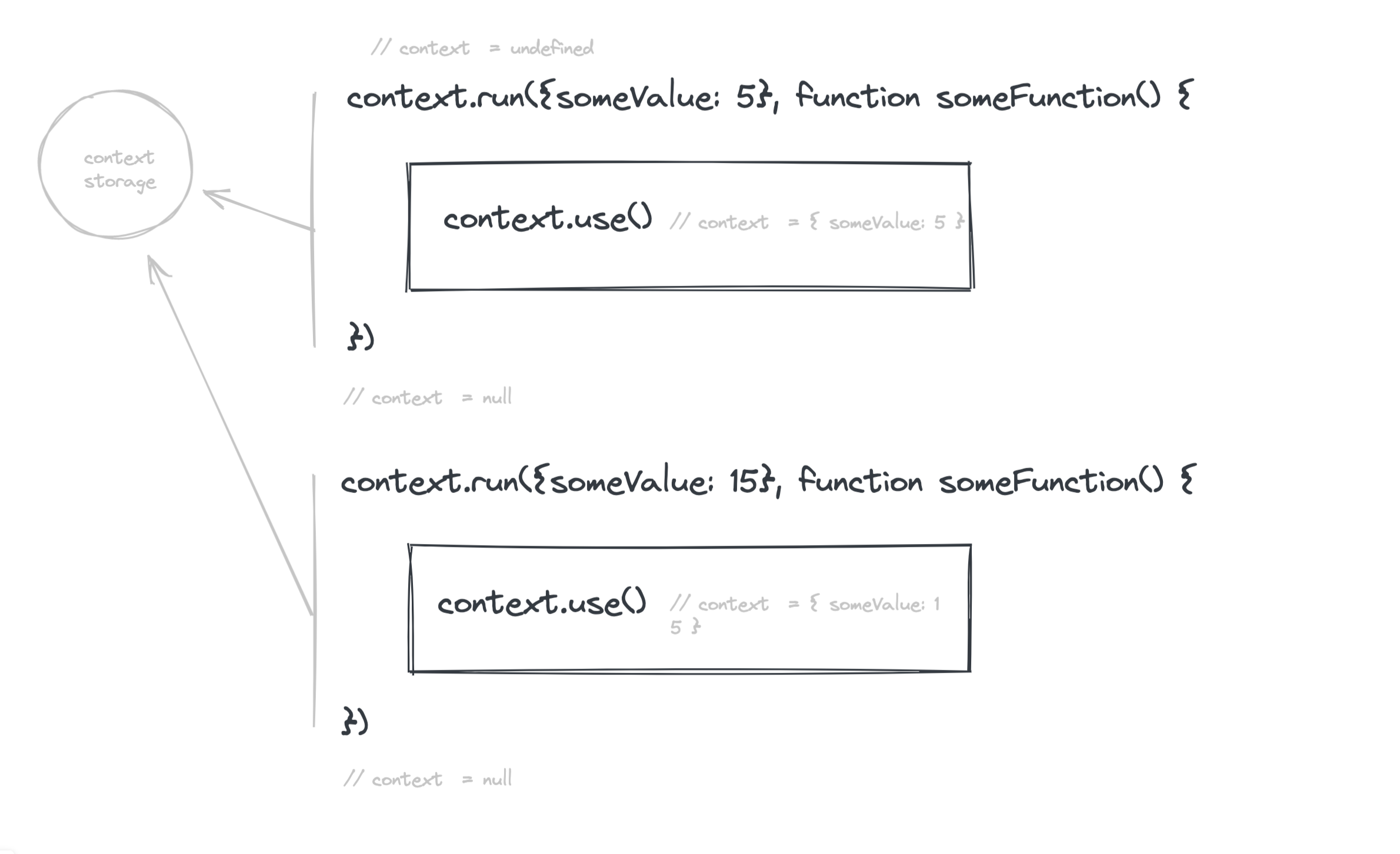
- package/dist/es/context.development.js +77 -0
- package/dist/es/context.production.js +1 -0
- package/dist/es/package.json +1 -0
- package/dist/umd/context.development.js +87 -0
- package/dist/umd/context.production.js +1 -0
- package/package.json +37 -36
- package/tsconfig.json +8 -0
- package/types/context.d.ts +7 -0
- package/dist/context.cjs.development.js +0 -180
- package/dist/context.cjs.development.js.map +0 -1
- package/dist/context.cjs.production.min.js +0 -2
- package/dist/context.cjs.production.min.js.map +0 -1
- package/dist/context.esm.js +0 -176
- package/dist/context.esm.js.map +0 -1
- package/dist/index.d.ts +0 -39
- package/dist/index.js +0 -8
- package/src/index.ts +0 -173
package/CHANGELOG.md
ADDED
|
@@ -0,0 +1,60 @@
|
|
|
1
|
+
# context - Changelog
|
|
2
|
+
|
|
3
|
+
All notable changes to this project will be documented in this file.
|
|
4
|
+
|
|
5
|
+
The format is based on [Keep a Changelog](http://keepachangelog.com/en/1.0.0/) and this project adheres to [Semantic Versioning](http://semver.org/spec/v2.0.0.html).
|
|
6
|
+
|
|
7
|
+
## 2.0.0 - 2021-11-20
|
|
8
|
+
### Changed or removed
|
|
9
|
+
- 7c43eab major(context): used named export in context (ealush)
|
|
10
|
+
- e8652bc breaking(vest, enforce): prepare next major (ealush)
|
|
11
|
+
- dab8e00 breaking(vest, enforce): prepare next major (ealush)
|
|
12
|
+
|
|
13
|
+
### Added
|
|
14
|
+
- 220127b added(n4s): partial rule modifier (undefined)
|
|
15
|
+
- b5ce72d feat(n4s): context propagation within enforce (undefined)
|
|
16
|
+
|
|
17
|
+
### Fixed and improved
|
|
18
|
+
- f721b2d patch(vest): replace warns boolean flag with enum (ealush)
|
|
19
|
+
- bed7040 vx: add back to workspace (ealush)
|
|
20
|
+
- f2d458d update build artifacts (ealush)
|
|
21
|
+
- package.json
|
|
22
|
+
- .eslintrc.js
|
|
23
|
+
- packages/anyone/README.md
|
|
24
|
+
- packages/anyone/package.json
|
|
25
|
+
- packages/anyone/package.json
|
|
26
|
+
- 4d88c04 patch: add nodejs exports (undefined)
|
|
27
|
+
- packages/anyone/package.json
|
|
28
|
+
- 26af06b chore: reduce complexity, remove all lint errors (undefined)
|
|
29
|
+
- packages/anyone/.npmignore
|
|
30
|
+
- .github/PULL_REQUEST_TEMPLATE.md
|
|
31
|
+
- ba68539 lint: handling lint of all packages (ealush)
|
|
32
|
+
- .gitignore
|
|
33
|
+
|
|
34
|
+
## 1.1.16 - 2021-07-02
|
|
35
|
+
|
|
36
|
+
### Fixed and improved
|
|
37
|
+
|
|
38
|
+
- 34e0414 improved conditions (undefined)
|
|
39
|
+
- 33f4e46 release (undefined)
|
|
40
|
+
- 6fe40c7 better bundle (undefined)
|
|
41
|
+
- c6387ab before ts settings (undefined)
|
|
42
|
+
- c0e9708 generate correct d.ts file (undefined)
|
|
43
|
+
- 8e01b8e x (undefined)
|
|
44
|
+
- afb3960 x (undefined)
|
|
45
|
+
- e0a8463 add changelog support (undefined)
|
|
46
|
+
- cc46c38 current (undefined)
|
|
47
|
+
|
|
48
|
+
## 1.1.15 - 2021-07-02
|
|
49
|
+
|
|
50
|
+
### Fixed and improved
|
|
51
|
+
|
|
52
|
+
- 34e0414 improved conditions (undefined)
|
|
53
|
+
- 33f4e46 release (undefined)
|
|
54
|
+
- 6fe40c7 better bundle (undefined)
|
|
55
|
+
- c6387ab before ts settings (undefined)
|
|
56
|
+
- c0e9708 generate correct d.ts file (undefined)
|
|
57
|
+
- 8e01b8e x (undefined)
|
|
58
|
+
- afb3960 x (undefined)
|
|
59
|
+
- e0a8463 add changelog support (undefined)
|
|
60
|
+
- cc46c38 current (undefined)
|
package/README.md
CHANGED
|
@@ -1,434 +1,137 @@
|
|
|
1
1
|
# Context
|
|
2
2
|
|
|
3
|
-
Simple utility
|
|
4
|
-
It allows you to keep reference for shared variables, and access them
|
|
3
|
+
Simple utility for context propagation within Javascript applications and libraries. Loosely based on the ideas behind React's context, allows you to achieve the same goals (and more) without actually using react.
|
|
4
|
+
It allows you to keep reference for shared variables, and access them down in your function call even if not declared in the same scope.
|
|
5
5
|
|
|
6
|
-
|
|
6
|
+
## How Context Works?
|
|
7
|
+
The way context works is quite simple. Creating a context initializes a closure with a context storage object. When you run your context call, it takes your values, and places them in the context storage object. When your function finishes running, the context is cleared.
|
|
7
8
|
|
|
8
|
-
|
|
9
|
+
|
|
9
10
|
|
|
10
|
-
|
|
11
|
+
The reason the context is cleared after its run is so that items can't override one another. Assume you have two running the same async function twice, and it writes to the context, expecting to read the value somewhere down the line. Now you have two competing consumers of this single resource, and one eventually get the wrong value since they both read from and write to the same place.
|
|
11
12
|
|
|
12
|
-
|
|
13
|
-
import createContext from 'context';
|
|
14
|
-
|
|
15
|
-
const context = createContext();
|
|
16
|
-
|
|
17
|
-
context.run({ name: 'Sam' }, sayMyName);
|
|
18
|
-
context.run({ name: 'David' }, sayMyName);
|
|
19
|
-
|
|
20
|
-
function sayMyName() {
|
|
21
|
-
const { name } = context.use();
|
|
22
|
-
console.log(`My Name is ${name}`);
|
|
23
|
-
}
|
|
24
|
-
```
|
|
25
|
-
|
|
26
|
-
This will print:
|
|
27
|
-
|
|
28
|
-
My Name is Sam
|
|
29
|
-
My Name is David
|
|
30
|
-
|
|
31
|
-
So as we see 'run' allows us to run a function and access the specific variable we assigned to the object.
|
|
32
|
-
|
|
33
|
-
Why is this useful? Why not just do
|
|
34
|
-
|
|
35
|
-
```js
|
|
36
|
-
sayMyName('Sam');
|
|
37
|
-
sayMyName('David');
|
|
38
|
-
|
|
39
|
-
function sayMyName(name) {
|
|
40
|
-
console.log(`My Name is ${name}`);
|
|
41
|
-
}
|
|
42
|
-
```
|
|
43
|
-
|
|
44
|
-
We will be getting the same results. Right?
|
|
45
|
-
|
|
46
|
-
It's the next feature that illustrates context's power.
|
|
47
|
-
Instead of using 'run'. we will use 'bind'
|
|
48
|
-
|
|
49
|
-
```js
|
|
50
|
-
// getNames.js
|
|
51
|
-
|
|
52
|
-
import createContext from 'context';
|
|
53
|
-
|
|
54
|
-
const context = createContext();
|
|
55
|
-
|
|
56
|
-
const samName = context.bind({ name: 'Sam' }, sayMyName);
|
|
57
|
-
const davidName = context.bind({ name: 'David' }, sayMyName);
|
|
58
|
-
|
|
59
|
-
function sayMyName() {
|
|
60
|
-
const { name } = context.use();
|
|
61
|
-
console.log(`My Name is ${name}`);
|
|
62
|
-
}
|
|
63
|
-
|
|
64
|
-
export { samName, davidName };
|
|
65
|
-
|
|
66
|
-
//index.js
|
|
67
|
-
|
|
68
|
-
samName();
|
|
69
|
-
davidName();
|
|
70
|
-
```
|
|
71
|
-
|
|
72
|
-
This will once again print
|
|
73
|
-
|
|
74
|
-
My Name is Sam
|
|
75
|
-
My Name is David
|
|
76
|
-
|
|
77
|
-
Except now, because context is a singleton anywhere we run these functions they will print those values.
|
|
13
|
+
## API Reference
|
|
78
14
|
|
|
79
|
-
|
|
80
|
-
We can initialize createContext with a value
|
|
15
|
+
Context tries to mimic the behavior of Javascript scopes without actually being in the same scopes, and the API is built around context initialization, setting of values within the context and retrieving values.
|
|
81
16
|
|
|
82
|
-
|
|
83
|
-
// getNames.js
|
|
84
|
-
|
|
85
|
-
import createContext from 'context';
|
|
86
|
-
|
|
87
|
-
const context = createContext((ctx, parentCtx) => {
|
|
88
|
-
return Object.assign({}, ctx, { lastName: 'Smith' });
|
|
89
|
-
});
|
|
90
|
-
|
|
91
|
-
const samName = context.bind({ name: 'Sam' }, sayMyName);
|
|
92
|
-
const davidName = context.bind({ name: 'David' }, sayMyName);
|
|
93
|
-
|
|
94
|
-
function sayMyName() {
|
|
95
|
-
const { name, lastName } = context.use();
|
|
96
|
-
console.log(`My Name is ${name} ${lastName}`);
|
|
97
|
-
}
|
|
98
|
-
|
|
99
|
-
export { samName, davidName };
|
|
100
|
-
|
|
101
|
-
//index.js
|
|
102
|
-
|
|
103
|
-
samName();
|
|
104
|
-
davidName();
|
|
105
|
-
```
|
|
106
|
-
|
|
107
|
-
will print
|
|
108
|
-
|
|
109
|
-
My Name is Sam Smith
|
|
110
|
-
My Name is David Smith
|
|
111
|
-
|
|
112
|
-
These example are pretty contrived
|
|
113
|
-
|
|
114
|
-
Lets try something a little more real world.
|
|
115
|
-
|
|
116
|
-
# Real World Example
|
|
17
|
+
### createContext()
|
|
117
18
|
|
|
118
|
-
|
|
119
|
-
We want to create an environment where we pass the function we want to track and receive exactly the same function.
|
|
120
|
-
The only difference is that the function is going to have a count property which we will be able to call at any time.
|
|
121
|
-
|
|
122
|
-
So lets start
|
|
123
|
-
|
|
124
|
-
```js
|
|
125
|
-
//counter.js
|
|
126
|
-
import createContext from 'context';
|
|
127
|
-
|
|
128
|
-
const context = createContext();
|
|
129
|
-
```
|
|
130
|
-
|
|
131
|
-
We've seen this before, we are creating the context object.
|
|
132
|
-
|
|
133
|
-
Now I want to have a main context that will store the values of all the functions that are running.
|
|
134
|
-
in context world it will look like this.
|
|
135
|
-
Just a parent function called counter.
|
|
19
|
+
Context's default export, it creates a context singleton object that can later be referenced.
|
|
136
20
|
|
|
137
21
|
```js
|
|
138
|
-
//
|
|
139
|
-
import createContext from 'context';
|
|
140
|
-
|
|
141
|
-
const context = createContext();
|
|
22
|
+
// ctx.js
|
|
23
|
+
import { createContext } from 'context';
|
|
142
24
|
|
|
143
|
-
|
|
25
|
+
export default createContext(); // { run: ƒ, bind: ƒ, use: ƒ, useX: ƒ }
|
|
144
26
|
```
|
|
145
27
|
|
|
146
|
-
|
|
147
|
-
|
|
28
|
+
createContext also accepts an initialization function that's run every time ctx.run is called. It allows intercepting the context initialization and adding custom logic, or default values.
|
|
29
|
+
The init function is passed the context object run was called with, and the parent context if it was called within a previously created context. The init function needs to return the desired context object.
|
|
148
30
|
|
|
149
31
|
```js
|
|
150
|
-
|
|
151
|
-
|
|
152
|
-
|
|
153
|
-
|
|
154
|
-
|
|
155
|
-
|
|
156
|
-
|
|
157
|
-
|
|
158
|
-
function add(val) {
|
|
159
|
-
if (!values[val]) {
|
|
160
|
-
values[val] = 0;
|
|
161
|
-
}
|
|
162
|
-
|
|
163
|
-
values[val] += 1;
|
|
32
|
+
createContext((ctx, parentContext) => {
|
|
33
|
+
if (parentContext === null) {
|
|
34
|
+
// we're at the top level
|
|
35
|
+
// so let's add a default cart object
|
|
36
|
+
return Object.assign(ctx, {
|
|
37
|
+
cart: [],
|
|
38
|
+
});
|
|
164
39
|
}
|
|
165
40
|
|
|
166
|
-
|
|
167
|
-
|
|
168
|
-
|
|
169
|
-
}
|
|
41
|
+
// we're in a sub context, so we already have those default values.
|
|
42
|
+
return ctx;
|
|
43
|
+
});
|
|
170
44
|
```
|
|
171
45
|
|
|
172
|
-
|
|
173
|
-
What I want counter to return is a function that holds 'values' in its context. We will use context.bind for that.
|
|
174
|
-
So imagine a box and counter is the outer most box. In it is the values object and anything I put into the box will have access to that object.
|
|
175
|
-
and what do I want to put in the box? The function I want to count.
|
|
46
|
+
### run()
|
|
176
47
|
|
|
177
|
-
|
|
178
|
-
This will be the function we want to count.
|
|
179
|
-
I create a ref object which I will then pass to the function.
|
|
180
|
-
This object is accessible to the the function thanks to context.
|
|
48
|
+
Runs a callback function within the context. It takes an object referencing the data you want to store within your context, and a callback function to run.
|
|
181
49
|
|
|
182
50
|
```js
|
|
183
|
-
//
|
|
184
|
-
import
|
|
185
|
-
|
|
186
|
-
const context = createContext();
|
|
187
|
-
|
|
188
|
-
function counter(func) {
|
|
189
|
-
const values = {};
|
|
190
|
-
|
|
191
|
-
function add(val) {
|
|
192
|
-
if (!values[val]) {
|
|
193
|
-
values[val] = 0;
|
|
194
|
-
}
|
|
195
|
-
|
|
196
|
-
values[val] += 1;
|
|
197
|
-
}
|
|
198
|
-
|
|
199
|
-
function getVals() {
|
|
200
|
-
return values;
|
|
201
|
-
}
|
|
51
|
+
// myFunction.js
|
|
52
|
+
import ctx from './ctx';
|
|
53
|
+
import sayUsername from './sayUsername';
|
|
202
54
|
|
|
203
|
-
|
|
204
|
-
return
|
|
55
|
+
function myFunction(username) {
|
|
56
|
+
return ctx.run({ username }, sayUsername);
|
|
205
57
|
}
|
|
206
58
|
```
|
|
207
59
|
|
|
208
|
-
|
|
60
|
+
If `run` is called within a different `run` call, the context values will be merged when the callback is run. When we exit our callback, the context will be reset to the values it had before the call.
|
|
209
61
|
|
|
210
|
-
|
|
62
|
+
### use() and useX()
|
|
211
63
|
|
|
212
|
-
|
|
64
|
+
These are the main ways to access the context within your code. They return the current object that stored within the context, and differ in the way they handle calls outside of the context.
|
|
213
65
|
|
|
214
|
-
|
|
215
|
-
|
|
66
|
+
- use() returns the current object stored within the context, or null if we're not within a `run` call.
|
|
67
|
+
- useX() returns the current object stored within the context, or throws an error if we're not within a `run` call.
|
|
68
|
+
- useX also takes an optional argument that will be used as the error message if the context is not found.
|
|
216
69
|
|
|
217
70
|
```js
|
|
218
|
-
//
|
|
219
|
-
|
|
220
|
-
const { ref } = context.use();
|
|
221
|
-
|
|
222
|
-
|
|
223
|
-
function holder(args) {
|
|
224
|
-
ref.add(func.name);
|
|
225
|
-
holder.count = ref.getVals()[func.name];
|
|
226
|
-
holder.getAll = () => {
|
|
227
|
-
return ref.getVals();
|
|
228
|
-
};
|
|
229
|
-
return func(args);
|
|
230
|
-
}
|
|
231
|
-
|
|
232
|
-
return holder;
|
|
233
|
-
}
|
|
234
|
-
|
|
235
|
-
|
|
236
|
-
|
|
237
|
-
```
|
|
71
|
+
// sayUsername.js
|
|
72
|
+
import ctx from './ctx';
|
|
238
73
|
|
|
239
|
-
|
|
240
|
-
|
|
241
|
-
I pull out ref which holds the reference to values.
|
|
242
|
-
|
|
243
|
-
The function 'holder' is going to run 'add' from ref and since functions in javascript are object we are going to pass the resulting value into a 'count' property.
|
|
244
|
-
We are also creating a getAll function to the function.
|
|
245
|
-
Then our function will run and the result will return as if no change was ever made.
|
|
246
|
-
|
|
247
|
-
```js
|
|
248
|
-
//counter.js
|
|
249
|
-
import createContext from 'context';
|
|
74
|
+
function sayUsername() {
|
|
75
|
+
const context = ctx.use(); // { username: 'John Doe' }
|
|
250
76
|
|
|
251
|
-
|
|
252
|
-
|
|
253
|
-
|
|
254
|
-
const { ref } = context.use();
|
|
255
|
-
|
|
256
|
-
function holder(args) {
|
|
257
|
-
ref.add(func.name);
|
|
258
|
-
holder.count = ref.getVals()[func.name];
|
|
259
|
-
holder.getAll = () => {
|
|
260
|
-
return ref.getVals();
|
|
261
|
-
};
|
|
262
|
-
return func(args);
|
|
77
|
+
if (!context) {
|
|
78
|
+
// we're not within a `run` call. This function was called outside of a running context.
|
|
79
|
+
return "Hey, I don't know you, and this is crazy!";
|
|
263
80
|
}
|
|
264
81
|
|
|
265
|
-
return
|
|
82
|
+
return `Hello, ${context.username}!`;
|
|
266
83
|
}
|
|
267
|
-
|
|
268
|
-
function counter(tracker) {
|
|
269
|
-
const values = {};
|
|
270
|
-
|
|
271
|
-
function add(val) {
|
|
272
|
-
if (!values[val]) {
|
|
273
|
-
values[val] = 0;
|
|
274
|
-
}
|
|
275
|
-
|
|
276
|
-
values[val] += 1;
|
|
277
|
-
}
|
|
278
|
-
|
|
279
|
-
function getVals() {
|
|
280
|
-
return values;
|
|
281
|
-
}
|
|
282
|
-
|
|
283
|
-
const ref = { add, getVals };
|
|
284
|
-
|
|
285
|
-
return context.bind({ ref }, tracker); //
|
|
286
|
-
}
|
|
287
|
-
|
|
288
|
-
export { counter, track };
|
|
289
84
|
```
|
|
290
85
|
|
|
291
|
-
Lets see how we use this.
|
|
292
|
-
|
|
293
86
|
```js
|
|
294
|
-
//
|
|
295
|
-
import
|
|
296
|
-
|
|
297
|
-
const countIt = counter(func => {
|
|
298
|
-
return track(func);
|
|
299
|
-
});
|
|
87
|
+
// handleCart.js
|
|
88
|
+
import ctx from './ctx';
|
|
300
89
|
|
|
301
|
-
function
|
|
302
|
-
|
|
303
|
-
|
|
90
|
+
function handleCart() {
|
|
91
|
+
const context = ctx.useX(
|
|
92
|
+
'handleCart was called outside of a running context'
|
|
93
|
+
); // { cart: { items: [ 'foo', 'bar' ] } }
|
|
94
|
+
// This throws an error if we're not within a `run` call.
|
|
95
|
+
// You should catch this error and handle it somewhere above this function.
|
|
304
96
|
|
|
305
|
-
|
|
306
|
-
console.log('readingFile ' + file);
|
|
97
|
+
return `You have ${context.cart.items.length} items in your cart.`;
|
|
307
98
|
}
|
|
308
|
-
const dReadFile = countIt(readFile);
|
|
309
|
-
const dgoToServer = countIt(goToServer);
|
|
310
|
-
|
|
311
|
-
readFile('important.docx');
|
|
312
|
-
|
|
313
|
-
dReadFile('mainfile.js');
|
|
314
|
-
dReadFile('secondary.js');
|
|
315
|
-
console.log(dReadFile.count);
|
|
316
|
-
|
|
317
|
-
dgoToServer();
|
|
318
|
-
console.log(dgoToServer.count);
|
|
319
|
-
|
|
320
|
-
console.log(dReadFile.getAll());
|
|
321
99
|
```
|
|
322
100
|
|
|
323
|
-
|
|
324
|
-
|
|
325
|
-
We don't want to modify them but create a wrapper function to keep track
|
|
326
|
-
of how many times it runs.
|
|
327
|
-
|
|
328
|
-
So to create our first box we have the counter function.
|
|
329
|
-
It stores the values and receives a deferred anonymous function.
|
|
330
|
-
We are passing our function the anonymous function which then gets passed to the tracker function.
|
|
331
|
-
The tracker function receives our function runs the count returns the result of our function
|
|
332
|
-
|
|
333
|
-
We assign this wrapper to the variable countIt.
|
|
101
|
+
### bind()
|
|
334
102
|
|
|
335
|
-
|
|
336
|
-
|
|
337
|
-
When we run dReadFile it will behave like readFile but will store the count within.
|
|
338
|
-
|
|
339
|
-
Since context is a singleton anywhere we run this function within our project it will keep correct track of our count.
|
|
340
|
-
|
|
341
|
-
# Other Examples
|
|
342
|
-
|
|
343
|
-
```js
|
|
344
|
-
// myContext.js
|
|
345
|
-
import createContext from 'context';
|
|
346
|
-
|
|
347
|
-
export default createContext();
|
|
348
|
-
```
|
|
103
|
+
Bind a function to a context. It takes an object referencing the data you want to store within your context, and a callback function to run. It returns a function that can be called with the same arguments as the original function. The function will then internally call `run` with the same arguments, and return the result of the callback function, so it is useful if you want to reference a context after it was closed, for example - when running an async function.
|
|
349
104
|
|
|
350
105
|
```js
|
|
351
|
-
//
|
|
106
|
+
// getProductData.js
|
|
107
|
+
import ctx from './ctx';
|
|
352
108
|
|
|
353
|
-
|
|
109
|
+
function getProductData(productId) {
|
|
110
|
+
return ctx.bind({ productId }, handleProductData);
|
|
354
111
|
|
|
355
|
-
|
|
356
|
-
|
|
357
|
-
|
|
358
|
-
|
|
359
|
-
function group(name, groupTests) {
|
|
360
|
-
const { suiteId } = context.use();
|
|
361
|
-
|
|
362
|
-
context.run(
|
|
363
|
-
{
|
|
364
|
-
group: name,
|
|
365
|
-
},
|
|
366
|
-
() => groupTests()
|
|
367
|
-
);
|
|
368
|
-
}
|
|
369
|
-
|
|
370
|
-
function test(message, cb) {
|
|
371
|
-
const { suiteId, group } = context.use();
|
|
372
|
-
|
|
373
|
-
const testId = Math.random(); // 0.8418151199238901
|
|
374
|
-
|
|
375
|
-
const testData = context.run({ test: testId }, () => cb()); // ...
|
|
112
|
+
fetchProduct(productId).then(data => {
|
|
113
|
+
handleProductData(data);
|
|
114
|
+
// will run the function handleProductData within our context, even though there is no context running at the moment.
|
|
115
|
+
});
|
|
376
116
|
}
|
|
377
|
-
|
|
378
|
-
export { suite, group, test } from './framework';
|
|
379
117
|
```
|
|
380
118
|
|
|
381
|
-
|
|
382
|
-
import testFramework from './framwork.js';
|
|
383
|
-
|
|
384
|
-
suite('some_id', () => {
|
|
385
|
-
/*
|
|
386
|
-
context now is:
|
|
387
|
-
{
|
|
388
|
-
suiteId: 'some_id'
|
|
389
|
-
}
|
|
390
|
-
*/
|
|
391
|
-
|
|
392
|
-
group('some_group_name', () => {
|
|
393
|
-
/*
|
|
394
|
-
context now is:
|
|
395
|
-
{
|
|
396
|
-
group: 'some_group_name',
|
|
397
|
-
parentContext: {
|
|
398
|
-
suiteId: 'some_id',
|
|
399
|
-
}
|
|
400
|
-
}
|
|
401
|
-
*/
|
|
402
|
-
|
|
403
|
-
test('blah blah', () => {
|
|
404
|
-
/*
|
|
405
|
-
context now is:
|
|
406
|
-
{
|
|
407
|
-
test: 0.8418151199238901,
|
|
408
|
-
parentContext: {
|
|
409
|
-
group: 'some_group_name',
|
|
410
|
-
parentContext: {
|
|
411
|
-
suiteId: 'some_id',
|
|
412
|
-
}
|
|
413
|
-
}
|
|
414
|
-
}
|
|
415
|
-
*/
|
|
416
|
-
});
|
|
417
|
-
});
|
|
418
|
-
});
|
|
419
|
-
```
|
|
119
|
+
## Troubleshooting
|
|
420
120
|
|
|
421
|
-
|
|
121
|
+
### Working with async functions/promises
|
|
422
122
|
|
|
423
|
-
|
|
123
|
+
Working with context inside within async code may lead to unexpected results when we don't fully consider what's happening. Trying to call your context from the async part of your code will probably return `null` instead of your values.
|
|
424
124
|
|
|
425
|
-
|
|
426
|
-
const boundFunction = ctx.bind(ctxRef, fn, ...args);
|
|
125
|
+
This is known and expected behavior. Context is a synchronous context propagation tool that completely relies on the synchronous nature of function calls in JS - this is exactly what allows context to run.
|
|
427
126
|
|
|
428
|
-
|
|
429
|
-
|
|
127
|
+
#### But my function is still running. Why did the context clear?
|
|
128
|
+
The async parts of your function are actually not executed along with your sync code, and even though you "await" it, the browser carries on and allows other code to run in between instead of blocking execution until your async code is complete.
|
|
430
129
|
|
|
431
|
-
|
|
130
|
+
#### Ok, so what do I do?
|
|
131
|
+
There are multiple strategies of handling async functions with context.
|
|
432
132
|
|
|
433
|
-
|
|
133
|
+
1. Pulling your values from context right before your async call
|
|
134
|
+
This is the most obvious and easiest to achieve, though not always what you need. The basic idea is that you take whatever you need from the context when it is still available to you.
|
|
434
135
|
|
|
136
|
+
2. context.bind or context.run your async function to the context you extracted
|
|
137
|
+
This is the next logical step - you have a function that you know should run later with your context. You can bind your context to it for delayed execution. When your function runs later down the line within your asynchronous code, internally it will still have access to whatever you bound to it.
|
|
@@ -0,0 +1,81 @@
|
|
|
1
|
+
'use strict';
|
|
2
|
+
|
|
3
|
+
Object.defineProperty(exports, '__esModule', { value: true });
|
|
4
|
+
|
|
5
|
+
var assign = Object.assign;
|
|
6
|
+
|
|
7
|
+
function isFunction(value) {
|
|
8
|
+
return typeof value === 'function';
|
|
9
|
+
}
|
|
10
|
+
|
|
11
|
+
function optionalFunctionValue(value) {
|
|
12
|
+
var args = [];
|
|
13
|
+
for (var _i = 1; _i < arguments.length; _i++) {
|
|
14
|
+
args[_i - 1] = arguments[_i];
|
|
15
|
+
}
|
|
16
|
+
return isFunction(value) ? value.apply(void 0, args) : value;
|
|
17
|
+
}
|
|
18
|
+
|
|
19
|
+
function defaultTo(callback, defaultValue) {
|
|
20
|
+
var _a;
|
|
21
|
+
return (_a = optionalFunctionValue(callback)) !== null && _a !== void 0 ? _a : defaultValue;
|
|
22
|
+
}
|
|
23
|
+
|
|
24
|
+
/**
|
|
25
|
+
* Throws a timed out error.
|
|
26
|
+
*/
|
|
27
|
+
function throwError(devMessage, productionMessage) {
|
|
28
|
+
throw new Error(devMessage );
|
|
29
|
+
}
|
|
30
|
+
|
|
31
|
+
// eslint-disable-next-line max-lines-per-function
|
|
32
|
+
function createContext(init) {
|
|
33
|
+
var storage = { ancestry: [] };
|
|
34
|
+
return {
|
|
35
|
+
bind: bind,
|
|
36
|
+
run: run,
|
|
37
|
+
use: use,
|
|
38
|
+
useX: useX
|
|
39
|
+
};
|
|
40
|
+
function useX(errorMessage) {
|
|
41
|
+
var _a;
|
|
42
|
+
return ((_a = storage.ctx) !== null && _a !== void 0 ? _a : throwError(defaultTo(errorMessage, 'Context was used after it was closed')));
|
|
43
|
+
}
|
|
44
|
+
function run(ctxRef, fn) {
|
|
45
|
+
var _a;
|
|
46
|
+
var parentContext = use();
|
|
47
|
+
var out = assign({}, parentContext ? parentContext : {}, (_a = optionalFunctionValue(init, ctxRef, parentContext)) !== null && _a !== void 0 ? _a : ctxRef);
|
|
48
|
+
var ctx = set(Object.freeze(out));
|
|
49
|
+
storage.ancestry.unshift(ctx);
|
|
50
|
+
var res = fn(ctx);
|
|
51
|
+
clear();
|
|
52
|
+
return res;
|
|
53
|
+
}
|
|
54
|
+
function bind(ctxRef, fn) {
|
|
55
|
+
// eslint-disable-next-line @typescript-eslint/ban-ts-comment
|
|
56
|
+
// @ts-ignore - this one's pretty hard to get right
|
|
57
|
+
var returnedFn = function () {
|
|
58
|
+
var runTimeArgs = [];
|
|
59
|
+
for (var _i = 0; _i < arguments.length; _i++) {
|
|
60
|
+
runTimeArgs[_i] = arguments[_i];
|
|
61
|
+
}
|
|
62
|
+
return run(ctxRef, function () {
|
|
63
|
+
return fn.apply(void 0, runTimeArgs);
|
|
64
|
+
});
|
|
65
|
+
};
|
|
66
|
+
return returnedFn;
|
|
67
|
+
}
|
|
68
|
+
function use() {
|
|
69
|
+
return storage.ctx;
|
|
70
|
+
}
|
|
71
|
+
function set(value) {
|
|
72
|
+
return (storage.ctx = value);
|
|
73
|
+
}
|
|
74
|
+
function clear() {
|
|
75
|
+
var _a;
|
|
76
|
+
storage.ancestry.shift();
|
|
77
|
+
set((_a = storage.ancestry[0]) !== null && _a !== void 0 ? _a : null);
|
|
78
|
+
}
|
|
79
|
+
}
|
|
80
|
+
|
|
81
|
+
exports.createContext = createContext;
|
|
@@ -0,0 +1 @@
|
|
|
1
|
+
"use strict";Object.defineProperty(exports,"__esModule",{value:!0});var n=Object.assign;function t(n){return"function"==typeof n}function r(n){for(var r=[],e=1;e<arguments.length;e++)r[e-1]=arguments[e];return t(n)?n.apply(void 0,r):n}function e(n,t){var e;return null!==(e=r(n))&&void 0!==e?e:t}exports.createContext=function(t){function u(e,u){var i,f,a=o();return e=n({},a||{},null!==(i=r(t,e,a))&&void 0!==i?i:e),i=c.ctx=Object.freeze(e),c.ancestry.unshift(i),u=u(i),c.ancestry.shift(),c.ctx=null!==(f=c.ancestry[0])&&void 0!==f?f:null,u}function o(){return c.ctx}var c={ancestry:[]};return{bind:function(n,t){return function(){for(var r=[],e=0;e<arguments.length;e++)r[e]=arguments[e];return u(n,(function(){return t.apply(void 0,r)}))}},run:u,use:o,useX:function(n){var t;return null!==(t=c.ctx)&&void 0!==t?t:function(n,t){throw Error(e(t,n))}(e(n,"Context was used after it was closed"))}}};
|
|
@@ -0,0 +1 @@
|
|
|
1
|
+
{"type":"commonjs"}
|