comarkserv 0.1.0
This diff represents the content of publicly available package versions that have been released to one of the supported registries. The information contained in this diff is provided for informational purposes only and reflects changes between package versions as they appear in their respective public registries.
- package/LICENSE +21 -0
- package/README.md +389 -0
- package/dist/THIRD_PARTY_LICENSES.md +932 -0
- package/dist/build-CsToYJrU.mjs +2 -0
- package/dist/build-Cv5aO0CB.mjs +205 -0
- package/dist/cli.d.mts +1 -0
- package/dist/cli.mjs +894 -0
- package/dist/cloudflared-6f_lzz4F.mjs +181 -0
- package/dist/dist-B-IALNns.mjs +2 -0
- package/dist/dist-BK-bpLWg.mjs +2 -0
- package/dist/dist-BQzCbTko.mjs +1693 -0
- package/dist/dist-BWcWG5YB.mjs +671 -0
- package/dist/dist-BiVw4ojz.mjs +592 -0
- package/dist/dist-BnmL9jeq.mjs +538 -0
- package/dist/dist-BtedNLrc.mjs +276 -0
- package/dist/dist-BvdNTrap.mjs +2710 -0
- package/dist/dist-ByijHttv.mjs +69 -0
- package/dist/dist-C2E4zSX1.mjs +347 -0
- package/dist/dist-CWYRQLUT.mjs +2 -0
- package/dist/dist-CXQ7eTfT.mjs +417 -0
- package/dist/dist-CfsjQ0o8.mjs +905 -0
- package/dist/dist-CsTXDvwi.mjs +300 -0
- package/dist/dist-CtONMLh4.mjs +283 -0
- package/dist/dist-DMftjyxU.mjs +370 -0
- package/dist/dist-Dr9uTCX7.mjs +2 -0
- package/dist/dist-Dxvc11TH.mjs +339 -0
- package/dist/dist-GmbcGEAc.mjs +3 -0
- package/dist/dist-V1rkISnf.mjs +220 -0
- package/dist/dist-ZoN94PJ0.mjs +76 -0
- package/dist/dist-fh99cWMN.mjs +524 -0
- package/dist/editor-CHDyOp-8.mjs +721 -0
- package/dist/index.d.mts +301 -0
- package/dist/index.mjs +6 -0
- package/dist/languages-C0kEygG_.mjs +119 -0
- package/dist/markdown-BqKed1Vq.mjs +710 -0
- package/dist/markdown-DWuqfzps.mjs +2 -0
- package/dist/rolldown-runtime-CMFfr-1z.mjs +26 -0
- package/dist/server-Dkjk_D1Y.mjs +2628 -0
- package/dist/terminal-aKr5Xlp3.mjs +169 -0
- package/dist/themes-mEufQ_3e.mjs +2194 -0
- package/dist/twinkleplop.production-Coccf2Q9.mjs +2 -0
- package/dist/twinkleplop.production-DekYmX6O.mjs +4697 -0
- package/dist/twinkleplop.tokens-CgBUTCSg.mjs +76 -0
- package/package.json +133 -0
package/LICENSE
ADDED
|
@@ -0,0 +1,21 @@
|
|
|
1
|
+
MIT License
|
|
2
|
+
|
|
3
|
+
Copyright (c) 2026 Rigo-m
|
|
4
|
+
|
|
5
|
+
Permission is hereby granted, free of charge, to any person obtaining a copy
|
|
6
|
+
of this software and associated documentation files (the "Software"), to deal
|
|
7
|
+
in the Software without restriction, including without limitation the rights
|
|
8
|
+
to use, copy, modify, merge, publish, distribute, sublicense, and/or sell
|
|
9
|
+
copies of the Software, and to permit persons to whom the Software is
|
|
10
|
+
furnished to do so, subject to the following conditions:
|
|
11
|
+
|
|
12
|
+
The above copyright notice and this permission notice shall be included in all
|
|
13
|
+
copies or substantial portions of the Software.
|
|
14
|
+
|
|
15
|
+
THE SOFTWARE IS PROVIDED "AS IS", WITHOUT WARRANTY OF ANY KIND, EXPRESS OR
|
|
16
|
+
IMPLIED, INCLUDING BUT NOT LIMITED TO THE WARRANTIES OF MERCHANTABILITY,
|
|
17
|
+
FITNESS FOR A PARTICULAR PURPOSE AND NONINFRINGEMENT. IN NO EVENT SHALL THE
|
|
18
|
+
AUTHORS OR COPYRIGHT HOLDERS BE LIABLE FOR ANY CLAIM, DAMAGES OR OTHER
|
|
19
|
+
LIABILITY, WHETHER IN AN ACTION OF CONTRACT, TORT OR OTHERWISE, ARISING FROM,
|
|
20
|
+
OUT OF OR IN CONNECTION WITH THE SOFTWARE OR THE USE OR OTHER DEALINGS IN THE
|
|
21
|
+
SOFTWARE.
|
package/README.md
ADDED
|
@@ -0,0 +1,389 @@
|
|
|
1
|
+
<div align="center">
|
|
2
|
+
|
|
3
|
+
# comarkserv
|
|
4
|
+
|
|
5
|
+
**See your markdown as a web page while you write it.**
|
|
6
|
+
|
|
7
|
+
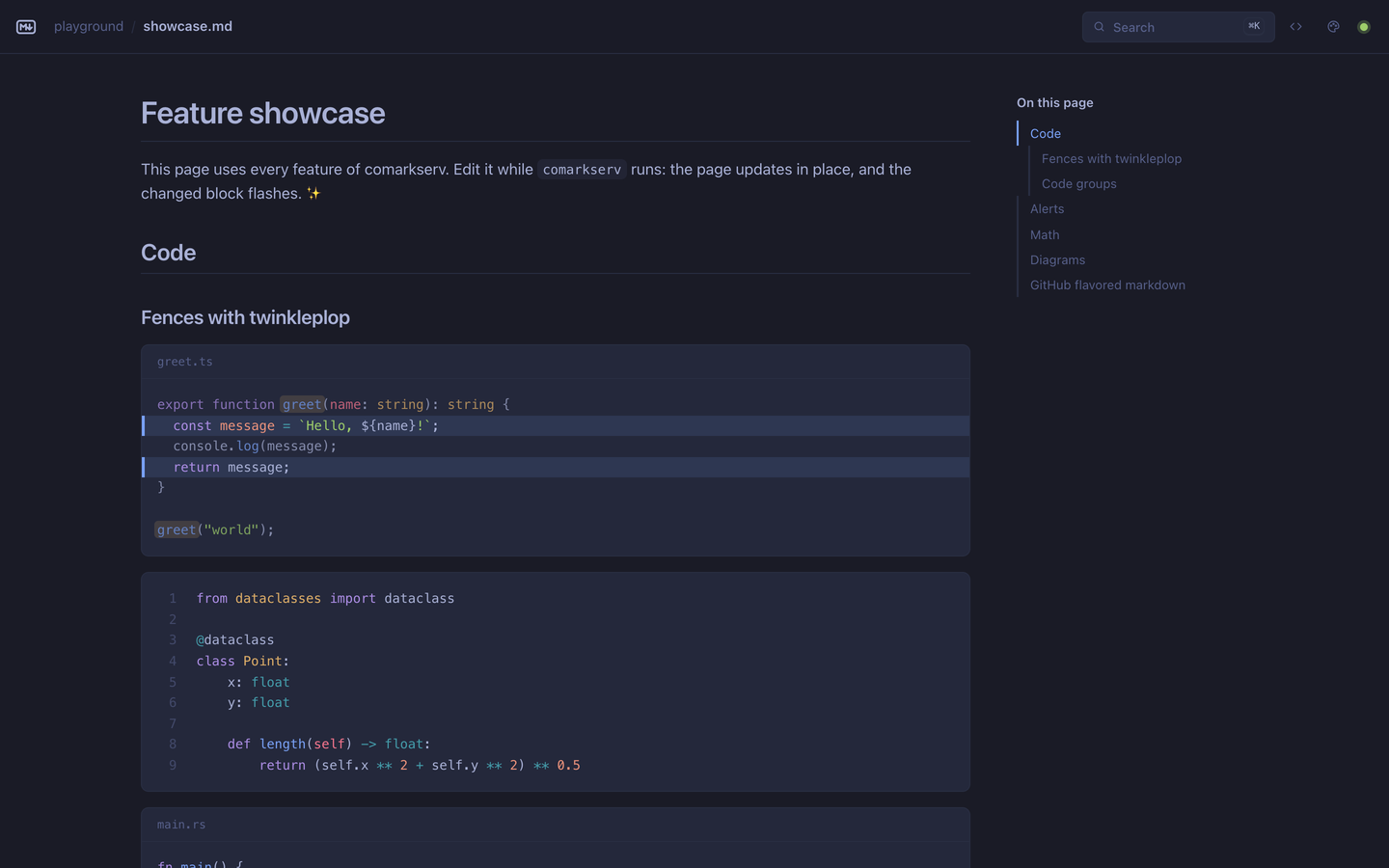
comarkserv serves a folder of markdown as HTML pages that update block by block while you type.
|
|
8
|
+
It is a modern [markserv](https://github.com/markserv/markserv), built on [Comark](https://comark.dev), [twinkleplop](https://twinkleplop.pngwn.at) and [srvx](https://srvx.h3.dev).
|
|
9
|
+
|
|
10
|
+
[](https://www.npmjs.com/package/comarkserv)
|
|
11
|
+
[](https://nodejs.org)
|
|
12
|
+
[](./LICENSE)
|
|
13
|
+
|
|
14
|
+
</div>
|
|
15
|
+
|
|
16
|
+
```bash
|
|
17
|
+
npx comarkserv ./docs
|
|
18
|
+
```
|
|
19
|
+
|
|
20
|
+
|
|
21
|
+
|
|
22
|
+
## Why comarkserv
|
|
23
|
+
|
|
24
|
+
- **Fast.** The server is ready in about 130 ms. A repeated page takes less than 1 ms, and the throughput is about 9× that of markserv. See the [benchmarks](#benchmarks).
|
|
25
|
+
- **Small.** 23 MB and 29 packages installed, 12× less than markserv.
|
|
26
|
+
- **Live.** When you save, the page replaces only the blocks that changed and flashes them. The scroll position stays.
|
|
27
|
+
- **Modern markdown.** GFM, GitHub alerts, Comark components, code with titles and line highlights, math and Mermaid diagrams. The server renders math and diagrams, so the browser loads no JavaScript for them.
|
|
28
|
+
- **Search.** <kbd>⌘</kbd> <kbd>K</kbd> finds pages and headings in the whole folder.
|
|
29
|
+
- **580+ themes.** All base16, base24 and Omarchy themes, loaded when you choose one. comarkserv can also follow your Omarchy theme live.
|
|
30
|
+
- **Edit in place.** The Edit button, or <kbd>E</kbd>, opens the file in your editor at the section on the screen.
|
|
31
|
+
- **Share.** The Share button, or `--share`, gives your colleagues a public URL and a QR code, through a Cloudflare tunnel.
|
|
32
|
+
- **Terminal.** `comarkserv cat` shows a markdown file in the terminal, with colored code and diagrams.
|
|
33
|
+
- **Static sites.** `comarkserv build` makes a site that works on any static host.
|
|
34
|
+
- **A library too.** A web-standard `fetch` handler for srvx, Bun, Deno or any server.
|
|
35
|
+
|
|
36
|
+
## Quick start
|
|
37
|
+
|
|
38
|
+
```bash
|
|
39
|
+
npx comarkserv # serve the current directory
|
|
40
|
+
npx comarkserv ./docs --open # serve a directory and open the browser
|
|
41
|
+
npx comarkserv ./docs/guide.md # serve the directory of a file, and open that file
|
|
42
|
+
npx comarkserv readme # open the closest README, from here or a parent directory
|
|
43
|
+
npx comarkserv ./docs --share # share the folder with a public URL
|
|
44
|
+
npx comarkserv cat README.md # show a file in the terminal
|
|
45
|
+
```
|
|
46
|
+
|
|
47
|
+
Or install it:
|
|
48
|
+
|
|
49
|
+
```bash
|
|
50
|
+
pnpm add -g comarkserv # or: npm install -g comarkserv
|
|
51
|
+
```
|
|
52
|
+
|
|
53
|
+
comarkserv needs Node.js 20.19 or later.
|
|
54
|
+
|
|
55
|
+
## comarkserv and markserv
|
|
56
|
+
|
|
57
|
+
### Features
|
|
58
|
+
|
|
59
|
+
| Feature | markserv 1.20 | comarkserv |
|
|
60
|
+
| --------------------------------------------------------- | -------------------------- | ---------------------------------------------------------------- |
|
|
61
|
+
| Markdown | GFM (markdown-it) | GFM and Comark components |
|
|
62
|
+
| Syntax highlighting | highlight.js | twinkleplop, 15 languages, loaded on first use |
|
|
63
|
+
| Code block titles, line and word highlights, line numbers | — | ✓ |
|
|
64
|
+
| GitHub alerts (`> [!NOTE]`) | — | ✓ |
|
|
65
|
+
| Components: alerts, code groups, details | — | ✓ |
|
|
66
|
+
| Math | MathJax, in the browser | KaTeX, on the server |
|
|
67
|
+
| Mermaid diagrams | — | SVG, on the server |
|
|
68
|
+
| Table of contents | `[[toc]]` in the page | Sidebar that marks the current section |
|
|
69
|
+
| Heading anchors | ✓ | ✓ |
|
|
70
|
+
| Directory listing | ✓ | ✓, with the README below it |
|
|
71
|
+
| Live reload | Replaces the whole content | Replaces only the changed blocks, flashes them, keeps the scroll |
|
|
72
|
+
| Search of pages and headings | — | ✓ |
|
|
73
|
+
| Themes | 4 | GitHub light and dark, 580+ base16, base24 and Omarchy themes |
|
|
74
|
+
| Live Omarchy theme sync | — | ✓ |
|
|
75
|
+
| Includes and templates (Markdown, HTML, LESS) | ✓ (`--templates`) | — |
|
|
76
|
+
| Open the closest README | ✓ (`readme`) | ✓ (`comarkserv readme`) |
|
|
77
|
+
| Open the file in your editor, at the current section | — | ✓ |
|
|
78
|
+
| Share with a public URL and a QR code | — | ✓ (Share button, `--share`) |
|
|
79
|
+
| Show markdown in the terminal | — | ✓ (`comarkserv cat`) |
|
|
80
|
+
| Static site build | — | ✓ |
|
|
81
|
+
| Library API | — | ✓ |
|
|
82
|
+
|
|
83
|
+
### Benchmarks
|
|
84
|
+
|
|
85
|
+
<!-- bench:start -->
|
|
86
|
+
|
|
87
|
+
| | comarkserv 0.1.0 | markserv 1.20.0 | comarkserv |
|
|
88
|
+
| ------------------------------- | -----------------: | -------------------: | -------------- |
|
|
89
|
+
| Install size | 23 MB, 29 packages | 277 MB, 277 packages | 12.1× less |
|
|
90
|
+
| Startup, to the first response | 132 ms | 239 ms | 1.8× faster |
|
|
91
|
+
| Memory at idle (RSS) | 90 MB | 112 MB | 1.2× less |
|
|
92
|
+
| First render of a page | 22 ms | 33 ms | 1.5× faster |
|
|
93
|
+
| Page, repeated request (median) | 0.3 ms | 1.7 ms | 6.3× faster |
|
|
94
|
+
| Page after an edit (median) | 1.6 ms | 1.3 ms | about the same |
|
|
95
|
+
| Large page, 301 KB (median) | 4.2 ms | 39 ms | 9.1× faster |
|
|
96
|
+
| Throughput, 16 connections | 10981 req/s | 1152 req/s | 9.5× faster |
|
|
97
|
+
| Peak memory under load (RSS) | 327 MB | 371 MB | 1.1× less |
|
|
98
|
+
|
|
99
|
+
_macOS 26.2 (arm64), Apple M4 Pro, 24 GB, Node.js 24.21.0, 2026-09-25. Run `vp run bench` to measure on your machine._
|
|
100
|
+
<!-- bench:end -->
|
|
101
|
+
|
|
102
|
+
**How the benchmark works** ([bench/run.ts](./bench/run.ts)):
|
|
103
|
+
|
|
104
|
+
- Both servers run as installed from npm: markserv from the registry, comarkserv from a packed tarball. They use the same Node.js and their default options, with live reload on.
|
|
105
|
+
- The corpus has 100 GFM pages of about 4 KB each, with code in four languages, and one large page. It uses no comarkserv syntax, so both servers do the same work.
|
|
106
|
+
- "Startup" and "First render" are medians of five fresh processes. The other rows come from one process: 200 repeated requests, 20 edits, and 5 seconds of load on 16 keep-alive connections over all 100 pages. The client runs on the same machine and asks for no compression.
|
|
107
|
+
- comarkserv keeps each rendered page until the file changes, and markserv renders the page on each request. That is the main reason for the difference in the "repeated request" and "throughput" rows. The "after an edit" row shows the real render cost. It is close for both servers, and it changes a little between runs.
|
|
108
|
+
- Peak memory under load changes more between runs than the other rows.
|
|
109
|
+
|
|
110
|
+
## Command line
|
|
111
|
+
|
|
112
|
+
### Serve
|
|
113
|
+
|
|
114
|
+
```bash
|
|
115
|
+
comarkserv [path] [options]
|
|
116
|
+
```
|
|
117
|
+
|
|
118
|
+
| Option | Default | Effect |
|
|
119
|
+
| --------------------- | ----------- | ------------------------------------------------------------------------------------- |
|
|
120
|
+
| `-p`, `--port <port>` | `8642` | The port. When it is in use, comarkserv uses the next free port. |
|
|
121
|
+
| `--strict-port` | off | Stop when the port is in use. |
|
|
122
|
+
| `-H`, `--host <host>` | `localhost` | The host. Use `0.0.0.0` to accept connections from the network. |
|
|
123
|
+
| `-o`, `--open` | off | Open the page in the browser. |
|
|
124
|
+
| `--theme <name>` | `github` | The default theme. See [Themes](#themes). |
|
|
125
|
+
| `--no-livereload` | on | Do not watch the files. |
|
|
126
|
+
| `--line-numbers` | off | Show line numbers on all code blocks. |
|
|
127
|
+
| `--dotfiles` | off | Serve and list dotfiles, such as `.github/`. |
|
|
128
|
+
| `--share` | off | Share the pages at a public URL. See [Share with colleagues](#share-with-colleagues). |
|
|
129
|
+
| `-s`, `--silent` | off | Do not print the requests. |
|
|
130
|
+
|
|
131
|
+
Add `?raw` to the URL of a markdown file to get its source. The code button in the top bar does the same.
|
|
132
|
+
|
|
133
|
+
### Build a static site
|
|
134
|
+
|
|
135
|
+
```bash
|
|
136
|
+
comarkserv build ./docs --out site --theme base16:nord
|
|
137
|
+
```
|
|
138
|
+
|
|
139
|
+
The build writes one HTML page for each markdown file, a listing page for each directory without an `index.md`, the search index, the theme list, and the assets. It copies all other files.
|
|
140
|
+
|
|
141
|
+
- All links are relative, so the site works on any static host, in a subdirectory too.
|
|
142
|
+
- Links to `.md` files change to `.html`.
|
|
143
|
+
- You can open the pages from `file://`, but the search needs a server.
|
|
144
|
+
- The build deletes an earlier build in the output directory. It does not write to a directory that has other files.
|
|
145
|
+
|
|
146
|
+
### Open the closest README
|
|
147
|
+
|
|
148
|
+
```bash
|
|
149
|
+
comarkserv readme # from the current directory
|
|
150
|
+
comarkserv readme ./src # from another directory
|
|
151
|
+
```
|
|
152
|
+
|
|
153
|
+
`comarkserv readme` looks for a README in the directory, then in each parent directory, and serves the first one that it finds. It opens the browser. Use `--no-open` to stop that. It accepts the same options as `comarkserv`.
|
|
154
|
+
|
|
155
|
+
### Share with colleagues
|
|
156
|
+
|
|
157
|
+
Click the Share button in the top bar, or start comarkserv with `--share`:
|
|
158
|
+
|
|
159
|
+
```bash
|
|
160
|
+
comarkserv ./docs --share
|
|
161
|
+
```
|
|
162
|
+
|
|
163
|
+
Both start a [Cloudflare quick tunnel](https://developers.cloudflare.com/cloudflare-one/connections/connect-networks/do-more-with-tunnels/trycloudflare/) with [untun](https://github.com/unjs/untun), and show a public URL and a QR code.
|
|
164
|
+
|
|
165
|
+
- Anyone with the URL can read the files in the folder, until you stop sharing or stop comarkserv. Dotfiles stay hidden.
|
|
166
|
+
- The dialog of the Share button shows the link to the page that you read, a QR code of it, and **Stop sharing**. The button turns green while the folder is shared.
|
|
167
|
+
- Visitors do not see the Edit and Share buttons, and the server refuses both actions for them. You keep both.
|
|
168
|
+
- The first share installs `cloudflared`, and you must accept the Cloudflare license first. The Share button shows the links and asks you. `--share` asks in the terminal. With no terminal, comarkserv stops, unless you set `UNTUN_ACCEPT_CLOUDFLARE_NOTICE=1` to accept the license.
|
|
169
|
+
|
|
170
|
+
For a colleague on the same network, `--host 0.0.0.0` is enough. comarkserv then prints the network URL and a QR code for your phone.
|
|
171
|
+
|
|
172
|
+
### Show markdown in the terminal
|
|
173
|
+
|
|
174
|
+
```bash
|
|
175
|
+
comarkserv cat README.md
|
|
176
|
+
comarkserv cat docs/guide.md --no-pager | head
|
|
177
|
+
```
|
|
178
|
+
|
|
179
|
+
`comarkserv cat` uses the same parser and the same twinkleplop grammars as the server. It colors code, draws Mermaid diagrams as text, and shows alerts, tables and footnotes. A long file opens in `less`. Use `--no-pager` to print it, and `--no-color` to remove the colors.
|
|
180
|
+
|
|
181
|
+
### List the themes
|
|
182
|
+
|
|
183
|
+
```bash
|
|
184
|
+
comarkserv themes # all themes
|
|
185
|
+
comarkserv themes gruvbox # the themes with "gruvbox" in the id or the name
|
|
186
|
+
comarkserv theme base16:nord # the colors of one theme
|
|
187
|
+
```
|
|
188
|
+
|
|
189
|
+
Add `--json` to both commands for output that other tools can read.
|
|
190
|
+
|
|
191
|
+
### Keyboard shortcuts
|
|
192
|
+
|
|
193
|
+
| Keys | Effect |
|
|
194
|
+
| ----------------------------------------------------------------------- | -------------------------------------------------------------------------------------------- |
|
|
195
|
+
| <kbd>⌘</kbd> <kbd>K</kbd>, <kbd>Ctrl</kbd> <kbd>K</kbd> or <kbd>/</kbd> | Search the pages and headings |
|
|
196
|
+
| <kbd>↑</kbd> <kbd>↓</kbd>, <kbd>↵</kbd> | Move in the results and open one |
|
|
197
|
+
| <kbd>⌘</kbd> <kbd>↵</kbd> | Open the result in a new tab |
|
|
198
|
+
| <kbd>E</kbd> | Open the file in your editor, at the section at the top of the screen |
|
|
199
|
+
| The palette button in the top bar | Choose a theme: <kbd>↑</kbd> <kbd>↓</kbd> preview, <kbd>↵</kbd> keep, <kbd>esc</kbd> restore |
|
|
200
|
+
|
|
201
|
+
### Raycast
|
|
202
|
+
|
|
203
|
+
The [Raycast extension](./extras/raycast-extension) has three commands:
|
|
204
|
+
|
|
205
|
+
- **Preview Markdown** opens the file or folder that is selected in Finder.
|
|
206
|
+
- **Markdown Previews** shows the running previews and the recent folders. You can open, copy, stop and restart them.
|
|
207
|
+
- **Search Markdown Themes** searches the 580+ themes, shows their colors, and sets the default theme for new previews.
|
|
208
|
+
|
|
209
|
+
The extension is not in the Raycast Store yet. To use it now, run `npm install && npm run dev` in `extras/raycast-extension`. Raycast then loads it.
|
|
210
|
+
|
|
211
|
+
Two [Raycast script commands](https://github.com/raycast/script-commands) in [extras/raycast](./extras/raycast) do the basic part with no extension:
|
|
212
|
+
|
|
213
|
+
- **Preview Markdown** opens the file or folder that you select in Finder, or a path that you type. Each folder gets its own server, and a second preview of the same folder uses the server that runs.
|
|
214
|
+
- **Stop Markdown Previews** stops these servers.
|
|
215
|
+
|
|
216
|
+
To install them, put the two scripts in a folder, and add the folder in Raycast: **Settings → Extensions → Script Commands → Add Directories**.
|
|
217
|
+
|
|
218
|
+
```bash
|
|
219
|
+
mkdir -p ~/.config/raycast/comarkserv && cd ~/.config/raycast/comarkserv
|
|
220
|
+
curl -fsSLO https://raw.githubusercontent.com/Rigo-m/comarkserv/main/extras/raycast/comarkserv-preview.sh \
|
|
221
|
+
-fsSLO https://raw.githubusercontent.com/Rigo-m/comarkserv/main/extras/raycast/comarkserv-stop.sh
|
|
222
|
+
chmod +x *.sh
|
|
223
|
+
```
|
|
224
|
+
|
|
225
|
+
The scripts use `comarkserv` when it is installed, and else `npx comarkserv`. To give more options, such as a theme, edit the `COMARKSERV_ARGS` line at the top of `comarkserv-preview.sh`, for example `COMARKSERV_ARGS="--theme omarchy"`.
|
|
226
|
+
|
|
227
|
+
## Writing markdown
|
|
228
|
+
|
|
229
|
+
comarkserv uses [Comark syntax](https://comark.dev): CommonMark, GFM, frontmatter and components. The [feature showcase](./playground/showcase.md) uses all of it.
|
|
230
|
+
|
|
231
|
+
### Code
|
|
232
|
+
|
|
233
|
+
````md
|
|
234
|
+
```ts {2} /total/ [math.ts]
|
|
235
|
+
const total = add(1, 2);
|
|
236
|
+
export { total };
|
|
237
|
+
```
|
|
238
|
+
````
|
|
239
|
+
|
|
240
|
+
- `{1,3-5}`: highlight lines
|
|
241
|
+
- `/word/`: highlight a word
|
|
242
|
+
- `[file.ts]` or `title="file.ts"`: a title
|
|
243
|
+
- `:line-numbers`, `:line-numbers=10`, `:no-line-numbers`: line numbers
|
|
244
|
+
- `` `const a = 1{:ts}` ``: highlighted inline code
|
|
245
|
+
|
|
246
|
+
The languages are Bash, CSS, Go, HTML, JavaScript, JSON, Markdown, Python, Rust, SQL, Svelte, TOML, TSX, TypeScript and YAML, with the common aliases (`sh`, `js`, `ts`, `py`, `yml`, `rs`, …). Other languages show as plain text. A fence with incorrect meta, such as a line number that is not in the block, shows the error on the page.
|
|
247
|
+
|
|
248
|
+
### Components
|
|
249
|
+
|
|
250
|
+
````md
|
|
251
|
+
> [!WARNING]
|
|
252
|
+
> GitHub alerts: NOTE, TIP, IMPORTANT, WARNING, CAUTION.
|
|
253
|
+
|
|
254
|
+
::tip{title="Optional title"}
|
|
255
|
+
Also ::note, ::info, ::warning, ::caution, ::danger, ::success, ::callout, ::alert{type="…"}.
|
|
256
|
+
::
|
|
257
|
+
|
|
258
|
+
::code-group
|
|
259
|
+
|
|
260
|
+
```bash [pnpm]
|
|
261
|
+
pnpm add comarkserv
|
|
262
|
+
```
|
|
263
|
+
|
|
264
|
+
```bash [npm]
|
|
265
|
+
npm install comarkserv
|
|
266
|
+
```
|
|
267
|
+
|
|
268
|
+
::
|
|
269
|
+
|
|
270
|
+
::details{summary="More"}
|
|
271
|
+
Hidden content.
|
|
272
|
+
::
|
|
273
|
+
````
|
|
274
|
+
|
|
275
|
+
Code groups remember the tab that you select, on all pages.
|
|
276
|
+
|
|
277
|
+
### Math and diagrams
|
|
278
|
+
|
|
279
|
+
Write math between `$…$` or `$$…$$`, and diagrams in a `mermaid` fence. The server renders both, so the browser loads no Mermaid or KaTeX JavaScript. The page loads the KaTeX stylesheet only when it has math.
|
|
280
|
+
|
|
281
|
+
## Themes
|
|
282
|
+
|
|
283
|
+
|
|
284
|
+
|
|
285
|
+
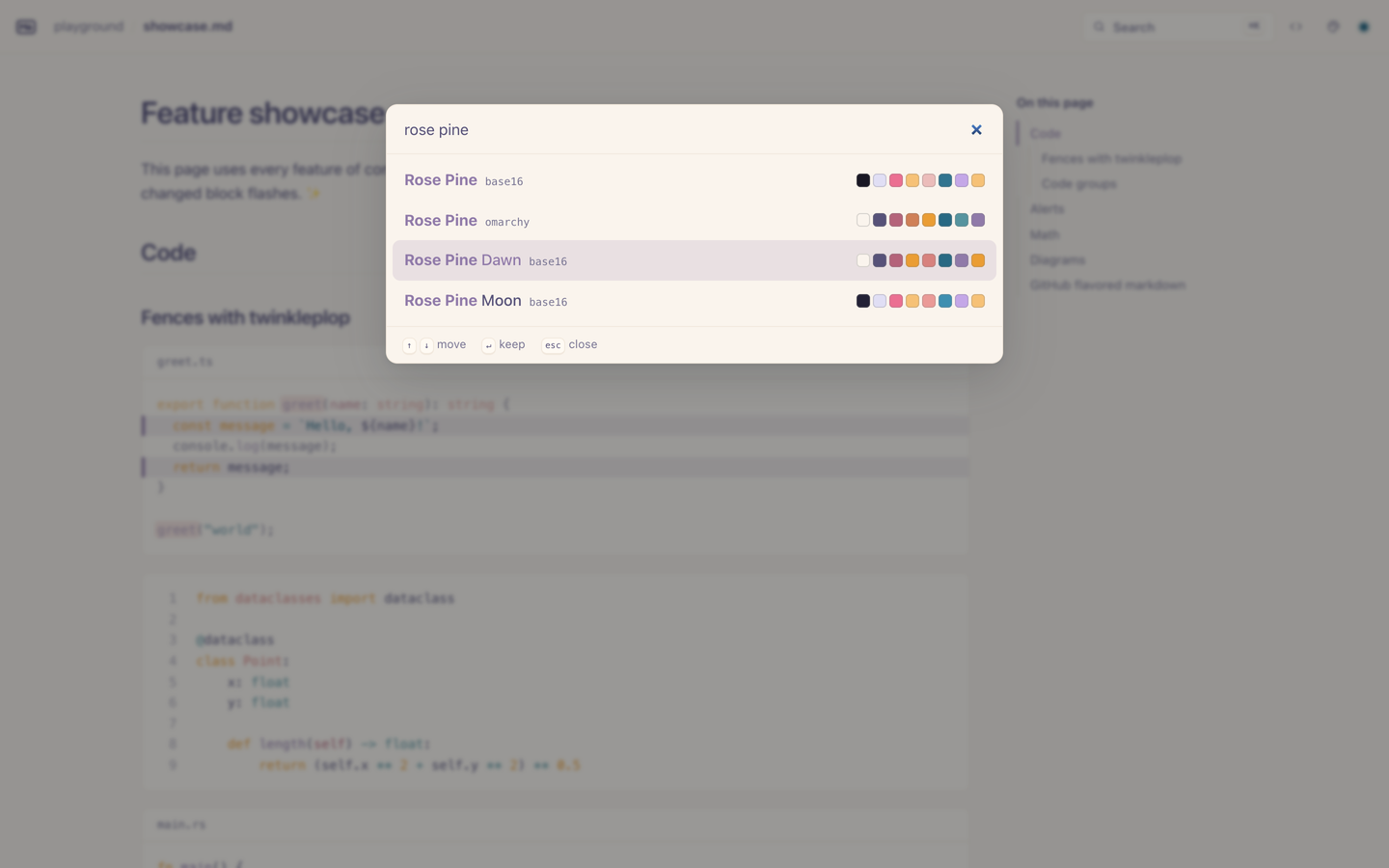
The GitHub theme is built in, with light, dark and system modes. comarkserv also loads more than 580 themes from their own repositories, when you choose one:
|
|
286
|
+
|
|
287
|
+
| `--theme` value | Themes |
|
|
288
|
+
| ----------------------------------- | ------------------------------------------------------------------------------------------- |
|
|
289
|
+
| `github` (default) | Built in |
|
|
290
|
+
| `base16:<id>` | 351 base16 schemes from [tinted-theming/schemes](https://github.com/tinted-theming/schemes) |
|
|
291
|
+
| `base24:<id>` | 209 base24 schemes from the same repository |
|
|
292
|
+
| `omarchy:<id>` | The 22 themes of [Omarchy](https://github.com/basecamp/omarchy) |
|
|
293
|
+
| `omarchy` | The current Omarchy theme of this machine, live |
|
|
294
|
+
| `./my-scheme.yaml`, `./colors.toml` | A local base16 or base24 scheme, or an Omarchy `colors.toml`, live |
|
|
295
|
+
| `https://…` | A scheme at a URL |
|
|
296
|
+
|
|
297
|
+
- **The picker.** Click the palette button in the top bar, and type a part of a name. The arrow keys preview each theme on the whole page. <kbd>↵</kbd> keeps the theme in this browser, and <kbd>esc</kbd> restores the theme from before. **Default** follows the server again.
|
|
298
|
+
- **How it works.** A theme is 16 base16 colors. comarkserv maps the page colors and the syntax colors to the 16 slots, so each base16 and base24 scheme works. The keys of an Omarchy `colors.toml` map one-to-one to the slots, and its `accent` is used too.
|
|
299
|
+
- **Just in time.** comarkserv contains no theme data. The server downloads a theme the first time it is needed: the lists from [UNGH](https://ungh.cc), the files from `raw.githubusercontent.com`. It keeps them in `~/.cache/comarkserv/themes` (or `$XDG_CACHE_HOME`) and serves them to the browser. So the browser contacts no other server, and a theme works offline after its first use. The browser keeps the chosen palette, so each later page gets its theme before the first paint, with no request.
|
|
300
|
+
- **Omarchy sync.** With `--theme omarchy`, or with **Omarchy (live)** in the picker, open pages change their theme when you run `omarchy-theme-set`.
|
|
301
|
+
- **For theme authors.** With `--theme ./my-scheme.yaml`, comarkserv watches the file. Each save updates the open pages.
|
|
302
|
+
- **Static builds** contain the default theme in each page. Their picker loads the other themes from GitHub directly.
|
|
303
|
+
|
|
304
|
+
## Library
|
|
305
|
+
|
|
306
|
+
```ts
|
|
307
|
+
import { serve } from "srvx";
|
|
308
|
+
import { createHandler } from "comarkserv";
|
|
309
|
+
|
|
310
|
+
const app = createHandler({ root: "./docs", theme: "base16:nord" });
|
|
311
|
+
serve({ fetch: app.fetch });
|
|
312
|
+
```
|
|
313
|
+
|
|
314
|
+
`createHandler` returns a web-standard `fetch` handler, so it works with srvx, Bun, Deno, or any server that uses `Request` and `Response`.
|
|
315
|
+
|
|
316
|
+
| Export | Use |
|
|
317
|
+
| --------------------------------------------------------- | ---------------------------------------------------------------------------------------- |
|
|
318
|
+
| `createHandler(options)` | The request handler: pages, listings, assets, search, themes and live reload. |
|
|
319
|
+
| `startServer(options)` | Starts a server with srvx: port search, request log, clean shutdown. |
|
|
320
|
+
| `build(options)` | Builds a static site. |
|
|
321
|
+
| `createMarkdownRenderer(options)` | Markdown to HTML, with the title, the TOC, the frontmatter and the features of the page. |
|
|
322
|
+
| `createCodeHighlighter(options)` | The twinkleplop components for Comark, for your own renderer. |
|
|
323
|
+
| `createThemeStore(options)`, `parseTheme(text, id, name)` | Load, cache and read base16, base24 and Omarchy themes. |
|
|
324
|
+
| `loadLanguage`, `resolveLanguage` | The lazy grammar registry. |
|
|
325
|
+
|
|
326
|
+
`createHandler`, `startServer` and `build` accept these options:
|
|
327
|
+
|
|
328
|
+
- `root`: the directory to serve or build
|
|
329
|
+
- `plugins`: more Comark plugins
|
|
330
|
+
- `components`: more Comark components, or replacements for the built-in ones
|
|
331
|
+
- `lineNumbers`, `dotfiles`, `livereload`
|
|
332
|
+
- `theme`: the default theme, as for `--theme`
|
|
333
|
+
- `themeStore`: replaces the store that downloads and caches the themes, for example to use no network
|
|
334
|
+
- `omarchyPath`: the `colors.toml` of the current Omarchy theme
|
|
335
|
+
- `editor`: show the Edit button (default `true`). Turn it off when other machines can reach the server.
|
|
336
|
+
- `share`: show the Share button (default `true`). Turn it off when other machines can reach the server.
|
|
337
|
+
- `shareService`: replaces the service that starts and stops the tunnel
|
|
338
|
+
- `openEditor`: replaces the function that opens a file in the editor
|
|
339
|
+
|
|
340
|
+
## How it stays fast
|
|
341
|
+
|
|
342
|
+
- The server listens before it imports Comark. The renderer loads right after that, before the first request needs it.
|
|
343
|
+
- Each twinkleplop grammar, KaTeX and the Mermaid renderer load only when a page needs them.
|
|
344
|
+
- A rendered page stays in memory until its file changes. A repeated request gets `304 Not Modified`.
|
|
345
|
+
- Pages are compressed with brotli or gzip one time, and the compressed bytes are cached.
|
|
346
|
+
- The assets have content hashes in their URLs, so browsers cache them for one year.
|
|
347
|
+
- Live reload sends only the changed paths. The page fetches itself and replaces only the changed blocks.
|
|
348
|
+
- The search index reads only titles and headings, with no full parse. After a change, it reads only the changed files.
|
|
349
|
+
- Mermaid SVGs are cached by source, so an edit elsewhere on the page does not render the diagram again.
|
|
350
|
+
- Themes load on first use, and from a disk cache after that. The theme list loads only when the picker opens, and each row loads its colors only when it comes into view.
|
|
351
|
+
|
|
352
|
+
Each response has a `Server-Timing` header with the render time.
|
|
353
|
+
|
|
354
|
+
## Security
|
|
355
|
+
|
|
356
|
+
comarkserv is a tool for your own files. It binds to `localhost` by default, and it does not serve dotfiles or files outside the root. Markdown can contain raw HTML and scripts, as on markserv. Do not serve markdown that you do not trust on a network.
|
|
357
|
+
|
|
358
|
+
The Edit and Share buttons act on your machine, so their endpoints accept only a POST from a comarkserv page on this machine:
|
|
359
|
+
|
|
360
|
+
- The host name must be local, against DNS rebinding.
|
|
361
|
+
- The origin must match, and a custom header must be present. So another site needs a preflight, and the server answers no preflight.
|
|
362
|
+
- The request must not come through a tunnel or a proxy. cloudflared connects from `127.0.0.1`, so the server also refuses each request with `Cf-Ray`, `Cf-Connecting-Ip`, `X-Forwarded-For`, `Forwarded` or `X-Real-Ip`. Cloudflare adds these headers, and a visitor cannot remove them.
|
|
363
|
+
- The page shows the buttons only after the server confirms that the viewer is local.
|
|
364
|
+
- The Edit endpoint opens only a visible file in the root.
|
|
365
|
+
|
|
366
|
+
The CLI turns both buttons off for a host that is not local, such as `--host 0.0.0.0`.
|
|
367
|
+
|
|
368
|
+
Theme files come from the network, and their colors go into CSS. So comarkserv accepts only hex colors from a theme, in the server and in the browser. The theme endpoint of the server downloads files only from the two theme repositories, so it is not an open proxy.
|
|
369
|
+
|
|
370
|
+
## Development
|
|
371
|
+
|
|
372
|
+
```bash
|
|
373
|
+
vp install # install the dependencies
|
|
374
|
+
vp test # run the tests
|
|
375
|
+
vp check # format, lint and type check
|
|
376
|
+
vp pack # build dist/
|
|
377
|
+
vp run playground # serve playground/ from the source
|
|
378
|
+
vp run bench # compare with markserv
|
|
379
|
+
```
|
|
380
|
+
|
|
381
|
+
To write a new benchmark table into this README, run `vp pack && node bench/run.ts --update-readme`.
|
|
382
|
+
|
|
383
|
+
## Credits
|
|
384
|
+
|
|
385
|
+
comarkserv builds on [markserv](https://github.com/markserv/markserv), [Comark](https://github.com/comarkdown/comark), [twinkleplop](https://github.com/pngwn/twinkleplop), [srvx](https://github.com/h3js/srvx), [KaTeX](https://katex.org), [beautiful-mermaid](https://github.com/lukilabs/beautiful-mermaid), [chokidar](https://github.com/paulmillr/chokidar), [tinyglobby](https://github.com/SuperchupuDev/tinyglobby), [citty](https://github.com/unjs/citty), [get-port-please](https://github.com/unjs/get-port-please), [pathe](https://github.com/unjs/pathe) and [UNGH](https://github.com/unjs/ungh). The themes come from [tinted-theming](https://github.com/tinted-theming/schemes) and [Omarchy](https://github.com/basecamp/omarchy).
|
|
386
|
+
|
|
387
|
+
## License
|
|
388
|
+
|
|
389
|
+
[MIT](./LICENSE)
|