colored-table 0.0.2 → 0.1.0
This diff represents the content of publicly available package versions that have been released to one of the supported registries. The information contained in this diff is provided for informational purposes only and reflects changes between package versions as they appear in their respective public registries.
- package/LICENSE +2 -2
- package/README.md +14 -2
- package/index.cjs +20 -1
- package/index.mjs +16 -1
- package/package.json +31 -21
- package/src/build/buildBody.cjs +85 -0
- package/src/build/buildBody.mjs +83 -0
- package/src/build/buildHeader.cjs +63 -0
- package/src/build/buildHeader.mjs +61 -0
- package/src/build/computerMaxLen.cjs +48 -0
- package/src/build/computerMaxLen.mjs +46 -0
- package/src/build/createPen.cjs +25 -0
- package/src/build/createPen.mjs +23 -0
- package/src/build/index.cjs +56 -0
- package/src/build/index.mjs +54 -0
- package/src/core.cjs +51 -0
- package/src/core.mjs +49 -0
- package/src/ele/rowEle.cjs +12 -0
- package/src/ele/rowEle.mjs +10 -0
- package/src/ele/tableEle.cjs +13 -0
- package/src/ele/tableEle.mjs +11 -0
- package/src/global.cjs +53 -0
- package/src/global.mjs +49 -0
- package/src/lines.cjs +19 -0
- package/src/lines.mjs +17 -0
- package/src/parse/parse.cjs +44 -0
- package/src/parse/parse.mjs +42 -0
- package/src/parse/parseCell.cjs +27 -0
- package/src/parse/parseCell.mjs +25 -0
- package/src/parse/parseRow.cjs +35 -0
- package/src/parse/parseRow.mjs +32 -0
- package/src/proto/createHeaderProto.cjs +33 -0
- package/src/proto/createHeaderProto.mjs +31 -0
- package/src/proto/setPro.cjs +74 -0
- package/src/proto/setPro.mjs +72 -0
package/LICENSE
CHANGED
|
@@ -1,7 +1,7 @@
|
|
|
1
1
|
# MIT License
|
|
2
|
-
|
|
3
|
-
Copyright (c) <2025> <earthnut.dev>
|
|
4
2
|
|
|
3
|
+
Copyright (c) <2025> <earthnutDev>
|
|
4
|
+
|
|
5
5
|
Permission to use, copy, modify, and/or distribute this software for any
|
|
6
6
|
purpose with or without fee is hereby granted, provided that the above
|
|
7
7
|
copyright notice and this permission notice appear in all copies.
|
package/README.md
CHANGED
|
@@ -12,6 +12,10 @@
|
|
|
12
12
|
|
|
13
13
|
```bash
|
|
14
14
|
npm install --save colored-table
|
|
15
|
+
|
|
16
|
+
# 亦可 (两包以后将同步版本发布)
|
|
17
|
+
|
|
18
|
+
npm install --save @qqi/table
|
|
15
19
|
```
|
|
16
20
|
|
|
17
21
|
## 使用
|
|
@@ -35,7 +39,7 @@ table.addRow(['我在第三行第一列', '我在第三行第二列']);
|
|
|
35
39
|
table();
|
|
36
40
|
```
|
|
37
41
|
|
|
38
|
-
|
|
42
|
+
格式效果:
|
|
39
43
|
|
|
40
44
|
| 第一列 | 第二列 |
|
|
41
45
|
| :--------------- | :--------------- |
|
|
@@ -43,6 +47,14 @@ table();
|
|
|
43
47
|
| 我在第二行第一列 | 我在第二行第二列 |
|
|
44
48
|
| 我在第三行第一列 | 我在第三行第二列 |
|
|
45
49
|
|
|
50
|
+
在浏览器效果:
|
|
51
|
+
|
|
52
|
+
[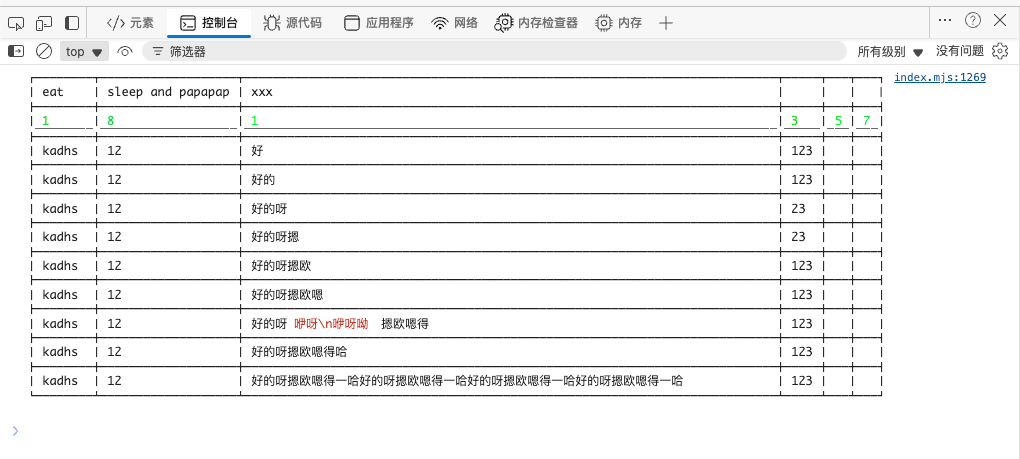](https://github.com/earthnutDev/qqi/blob/main/media/浏览器表格.png)
|
|
53
|
+
|
|
54
|
+
带表情的效果
|
|
55
|
+
|
|
56
|
+
[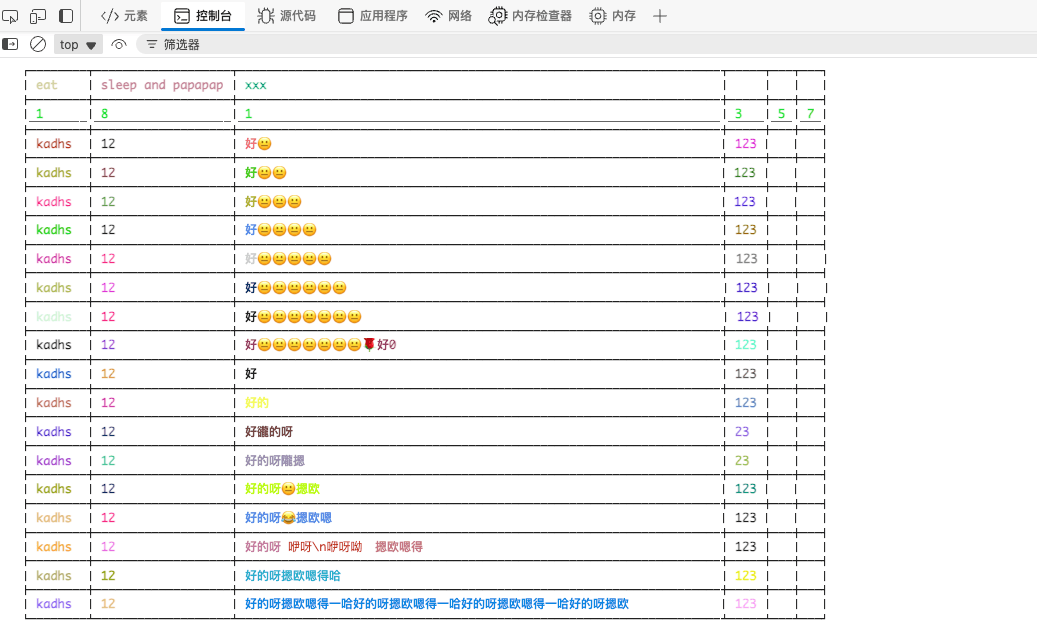](https://github.com/earthnutDev/qqi/blob/main/media/浏览器表格-with-emoji.png)
|
|
57
|
+
|
|
46
58
|
### setFontSize
|
|
47
59
|
|
|
48
60
|
除了 `addRow` 和 `setHeader` 两个方法,实例上还存在 `setFontSize` 方法。该方法将控制最终渲染的表格的字符大小。当然,这仅可在浏览器环境使用
|
|
@@ -58,4 +70,4 @@ table.setFontSize(16); // 渲染表格会在控制台显示更大
|
|
|
58
70
|
|
|
59
71
|
## 文档地址
|
|
60
72
|
|
|
61
|
-
[colored-table](https://earthnut.dev/colored-table)
|
|
73
|
+
[colored-table](https://earthnut.dev/nmp/colored-table)
|
package/index.cjs
CHANGED
|
@@ -1 +1,20 @@
|
|
|
1
|
-
|
|
1
|
+
'use strict';
|
|
2
|
+
|
|
3
|
+
var aJsTools = require('a-js-tools');
|
|
4
|
+
var core = require('./src/core.cjs');
|
|
5
|
+
var global = require('./src/global.cjs');
|
|
6
|
+
|
|
7
|
+
/**
|
|
8
|
+
*
|
|
9
|
+
* # 构建 DIY 表单
|
|
10
|
+
*
|
|
11
|
+
* 使用 console.table 构建的表单默认不支持彩色文本(目前我没找到支持的方法),遂花几日写该方法
|
|
12
|
+
*
|
|
13
|
+
*
|
|
14
|
+
*
|
|
15
|
+
*/
|
|
16
|
+
const tableClass = aJsTools.createConstructor(core.table);
|
|
17
|
+
|
|
18
|
+
exports.ColoredTableGlobalData = global.globalData;
|
|
19
|
+
exports.ColoredTable = tableClass;
|
|
20
|
+
exports.Table = tableClass;
|
package/index.mjs
CHANGED
|
@@ -1 +1,16 @@
|
|
|
1
|
-
import
|
|
1
|
+
import { createConstructor } from 'a-js-tools';
|
|
2
|
+
import { table } from './src/core.mjs';
|
|
3
|
+
export { globalData as ColoredTableGlobalData } from './src/global.mjs';
|
|
4
|
+
|
|
5
|
+
/**
|
|
6
|
+
*
|
|
7
|
+
* # 构建 DIY 表单
|
|
8
|
+
*
|
|
9
|
+
* 使用 console.table 构建的表单默认不支持彩色文本(目前我没找到支持的方法),遂花几日写该方法
|
|
10
|
+
*
|
|
11
|
+
*
|
|
12
|
+
*
|
|
13
|
+
*/
|
|
14
|
+
const tableClass = createConstructor(table);
|
|
15
|
+
|
|
16
|
+
export { tableClass as ColoredTable, tableClass as Table };
|
package/package.json
CHANGED
|
@@ -1,24 +1,26 @@
|
|
|
1
1
|
{
|
|
2
|
+
"main": "index.cjs",
|
|
3
|
+
"module": "index.mjs",
|
|
4
|
+
"types": "index.d.ts",
|
|
2
5
|
"name": "colored-table",
|
|
6
|
+
"version": "0.1.0",
|
|
3
7
|
"type": "module",
|
|
4
|
-
"
|
|
5
|
-
"description": "一个简单的在控制台及控制台构建彩色文本表格的工具 🔧",
|
|
8
|
+
"description": "一个简单的在控制台及控制台构建彩色文本表格的工具",
|
|
6
9
|
"license": "MIT",
|
|
7
10
|
"dependencies": {
|
|
8
|
-
"@color-pen/static": "^1.0.
|
|
9
|
-
"a-js-tools": "^1.0.
|
|
10
|
-
"a-type-of-js": "^1.0.
|
|
11
|
-
"color-pen": "^2.0.
|
|
11
|
+
"@color-pen/static": "^1.0.1",
|
|
12
|
+
"a-js-tools": "^1.0.10",
|
|
13
|
+
"a-type-of-js": "^1.0.7",
|
|
14
|
+
"color-pen": "^2.0.13"
|
|
12
15
|
},
|
|
13
|
-
"
|
|
14
|
-
"
|
|
15
|
-
"
|
|
16
|
-
"url": "https://earthnut.dev"
|
|
16
|
+
"publishConfig": {
|
|
17
|
+
"access": "public",
|
|
18
|
+
"registry": "https://registry.npmjs.org/"
|
|
17
19
|
},
|
|
18
20
|
"files": [
|
|
21
|
+
"index.d.ts",
|
|
19
22
|
"index.mjs",
|
|
20
23
|
"index.cjs",
|
|
21
|
-
"index.d.ts",
|
|
22
24
|
"src"
|
|
23
25
|
],
|
|
24
26
|
"exports": {
|
|
@@ -33,20 +35,28 @@
|
|
|
33
35
|
}
|
|
34
36
|
}
|
|
35
37
|
},
|
|
38
|
+
"repository": {
|
|
39
|
+
"type": "git",
|
|
40
|
+
"url": "git+https://github.com/earthnutDev/colored-table.git"
|
|
41
|
+
},
|
|
42
|
+
"author": {
|
|
43
|
+
"name": "花生亻",
|
|
44
|
+
"email": "earthnut.dev@outlook.com",
|
|
45
|
+
"url": "https://earthnut.dev"
|
|
46
|
+
},
|
|
47
|
+
"browserslist": [
|
|
48
|
+
"node>=18.0.0"
|
|
49
|
+
],
|
|
50
|
+
"engines": {
|
|
51
|
+
"node": ">=18.0.0"
|
|
52
|
+
},
|
|
36
53
|
"keywords": [
|
|
54
|
+
"colored-table",
|
|
37
55
|
"colored-table"
|
|
38
56
|
],
|
|
39
|
-
"homepage": "https://earthnut.dev/colored-table",
|
|
57
|
+
"homepage": "https://earthnut.dev/npm/colored-table",
|
|
40
58
|
"bugs": {
|
|
41
|
-
"url": "https://github.com/earthnutDev/
|
|
59
|
+
"url": "https://github.com/earthnutDev/colored-table/issues",
|
|
42
60
|
"email": "earthnut.dev@outlook.com"
|
|
43
|
-
},
|
|
44
|
-
"repository": {
|
|
45
|
-
"type": "git",
|
|
46
|
-
"url": "git+https://github.com/earthnutDev/qqi.git"
|
|
47
|
-
},
|
|
48
|
-
"publishConfig": {
|
|
49
|
-
"access": "public",
|
|
50
|
-
"registry": "https://registry.npmjs.org/"
|
|
51
61
|
}
|
|
52
62
|
}
|
|
@@ -0,0 +1,85 @@
|
|
|
1
|
+
'use strict';
|
|
2
|
+
|
|
3
|
+
var aTypeOfJs = require('a-type-of-js');
|
|
4
|
+
var createPen = require('./createPen.cjs');
|
|
5
|
+
var colorPen = require('color-pen');
|
|
6
|
+
var lines = require('../lines.cjs');
|
|
7
|
+
var _static = require('@color-pen/static');
|
|
8
|
+
|
|
9
|
+
/** 构建表头 */
|
|
10
|
+
function buildBody(body, lineList, hasHeader) {
|
|
11
|
+
/** 结果 */
|
|
12
|
+
let result = '';
|
|
13
|
+
/** 最大的下标 */
|
|
14
|
+
const lineMaxIndex = lineList.length - 1;
|
|
15
|
+
const { fine } = lines.lines;
|
|
16
|
+
lineList.forEach((e, i) => {
|
|
17
|
+
if (i === 0) {
|
|
18
|
+
result += _static.terminalResetStyle;
|
|
19
|
+
result += hasHeader ? fine.lc : fine.lt;
|
|
20
|
+
}
|
|
21
|
+
result += _static.terminalResetStyle;
|
|
22
|
+
result += fine.l.repeat(e + 2);
|
|
23
|
+
if (i === lineMaxIndex) {
|
|
24
|
+
result += _static.terminalResetStyle;
|
|
25
|
+
result += hasHeader ? fine.rc : fine.rt;
|
|
26
|
+
}
|
|
27
|
+
else {
|
|
28
|
+
result += _static.terminalResetStyle;
|
|
29
|
+
result += hasHeader ? fine.c : fine.ct;
|
|
30
|
+
}
|
|
31
|
+
});
|
|
32
|
+
result += '\n';
|
|
33
|
+
body.forEach((row, index) => {
|
|
34
|
+
/** 默认的画笔 (用于绘制空值时的表格) */
|
|
35
|
+
const defaultPen = createPen.createPen(row);
|
|
36
|
+
lineList.forEach((e, i) => {
|
|
37
|
+
result += _static.terminalResetStyle;
|
|
38
|
+
result += fine.v;
|
|
39
|
+
/** 当前的元素 */
|
|
40
|
+
const ele = row.data[i];
|
|
41
|
+
// 元素为空则输出默认的样式
|
|
42
|
+
if (aTypeOfJs.isUndefined(ele) || aTypeOfJs.isNull(ele)) {
|
|
43
|
+
result += defaultPen `${'\u2002'.repeat(e + 2)}`;
|
|
44
|
+
}
|
|
45
|
+
else {
|
|
46
|
+
/** 默认的画笔 (用于绘制空值时的表格) */
|
|
47
|
+
const cellPen = createPen.createPen(ele);
|
|
48
|
+
let str = ele.content?.toString() || '';
|
|
49
|
+
str = str
|
|
50
|
+
.replace(/[\n]/g, '\\n')
|
|
51
|
+
.replace(/\r/g, '\\r')
|
|
52
|
+
.replace(/\t/g, '\\t');
|
|
53
|
+
result += _static.terminalResetStyle;
|
|
54
|
+
result += cellPen `\u2002${colorPen.cutoffStringWithChar(str, e)}\u2002`;
|
|
55
|
+
}
|
|
56
|
+
if (i === lineMaxIndex) {
|
|
57
|
+
result += _static.terminalResetStyle;
|
|
58
|
+
result += fine.v;
|
|
59
|
+
}
|
|
60
|
+
});
|
|
61
|
+
result += '\n';
|
|
62
|
+
const isLastRow = body.length - 1 === index;
|
|
63
|
+
lineList.forEach((e, i) => {
|
|
64
|
+
if (i === 0) {
|
|
65
|
+
result += _static.terminalResetStyle;
|
|
66
|
+
result += isLastRow ? fine.lb : fine.lc;
|
|
67
|
+
}
|
|
68
|
+
result += _static.terminalResetStyle;
|
|
69
|
+
result += fine.l.repeat(e + 2);
|
|
70
|
+
if (i === lineMaxIndex) {
|
|
71
|
+
// 最后一行的最后一个
|
|
72
|
+
result += _static.terminalResetStyle;
|
|
73
|
+
result += isLastRow ? fine.rb : fine.rc;
|
|
74
|
+
}
|
|
75
|
+
else {
|
|
76
|
+
result += _static.terminalResetStyle;
|
|
77
|
+
result += isLastRow ? fine.cb : fine.c;
|
|
78
|
+
}
|
|
79
|
+
});
|
|
80
|
+
result += '\n';
|
|
81
|
+
});
|
|
82
|
+
return result;
|
|
83
|
+
}
|
|
84
|
+
|
|
85
|
+
exports.buildBody = buildBody;
|
|
@@ -0,0 +1,83 @@
|
|
|
1
|
+
import { isUndefined, isNull } from 'a-type-of-js';
|
|
2
|
+
import { createPen } from './createPen.mjs';
|
|
3
|
+
import { cutoffStringWithChar } from 'color-pen';
|
|
4
|
+
import { lines } from '../lines.mjs';
|
|
5
|
+
import { terminalResetStyle } from '@color-pen/static';
|
|
6
|
+
|
|
7
|
+
/** 构建表头 */
|
|
8
|
+
function buildBody(body, lineList, hasHeader) {
|
|
9
|
+
/** 结果 */
|
|
10
|
+
let result = '';
|
|
11
|
+
/** 最大的下标 */
|
|
12
|
+
const lineMaxIndex = lineList.length - 1;
|
|
13
|
+
const { fine } = lines;
|
|
14
|
+
lineList.forEach((e, i) => {
|
|
15
|
+
if (i === 0) {
|
|
16
|
+
result += terminalResetStyle;
|
|
17
|
+
result += hasHeader ? fine.lc : fine.lt;
|
|
18
|
+
}
|
|
19
|
+
result += terminalResetStyle;
|
|
20
|
+
result += fine.l.repeat(e + 2);
|
|
21
|
+
if (i === lineMaxIndex) {
|
|
22
|
+
result += terminalResetStyle;
|
|
23
|
+
result += hasHeader ? fine.rc : fine.rt;
|
|
24
|
+
}
|
|
25
|
+
else {
|
|
26
|
+
result += terminalResetStyle;
|
|
27
|
+
result += hasHeader ? fine.c : fine.ct;
|
|
28
|
+
}
|
|
29
|
+
});
|
|
30
|
+
result += '\n';
|
|
31
|
+
body.forEach((row, index) => {
|
|
32
|
+
/** 默认的画笔 (用于绘制空值时的表格) */
|
|
33
|
+
const defaultPen = createPen(row);
|
|
34
|
+
lineList.forEach((e, i) => {
|
|
35
|
+
result += terminalResetStyle;
|
|
36
|
+
result += fine.v;
|
|
37
|
+
/** 当前的元素 */
|
|
38
|
+
const ele = row.data[i];
|
|
39
|
+
// 元素为空则输出默认的样式
|
|
40
|
+
if (isUndefined(ele) || isNull(ele)) {
|
|
41
|
+
result += defaultPen `${'\u2002'.repeat(e + 2)}`;
|
|
42
|
+
}
|
|
43
|
+
else {
|
|
44
|
+
/** 默认的画笔 (用于绘制空值时的表格) */
|
|
45
|
+
const cellPen = createPen(ele);
|
|
46
|
+
let str = ele.content?.toString() || '';
|
|
47
|
+
str = str
|
|
48
|
+
.replace(/[\n]/g, '\\n')
|
|
49
|
+
.replace(/\r/g, '\\r')
|
|
50
|
+
.replace(/\t/g, '\\t');
|
|
51
|
+
result += terminalResetStyle;
|
|
52
|
+
result += cellPen `\u2002${cutoffStringWithChar(str, e)}\u2002`;
|
|
53
|
+
}
|
|
54
|
+
if (i === lineMaxIndex) {
|
|
55
|
+
result += terminalResetStyle;
|
|
56
|
+
result += fine.v;
|
|
57
|
+
}
|
|
58
|
+
});
|
|
59
|
+
result += '\n';
|
|
60
|
+
const isLastRow = body.length - 1 === index;
|
|
61
|
+
lineList.forEach((e, i) => {
|
|
62
|
+
if (i === 0) {
|
|
63
|
+
result += terminalResetStyle;
|
|
64
|
+
result += isLastRow ? fine.lb : fine.lc;
|
|
65
|
+
}
|
|
66
|
+
result += terminalResetStyle;
|
|
67
|
+
result += fine.l.repeat(e + 2);
|
|
68
|
+
if (i === lineMaxIndex) {
|
|
69
|
+
// 最后一行的最后一个
|
|
70
|
+
result += terminalResetStyle;
|
|
71
|
+
result += isLastRow ? fine.rb : fine.rc;
|
|
72
|
+
}
|
|
73
|
+
else {
|
|
74
|
+
result += terminalResetStyle;
|
|
75
|
+
result += isLastRow ? fine.cb : fine.c;
|
|
76
|
+
}
|
|
77
|
+
});
|
|
78
|
+
result += '\n';
|
|
79
|
+
});
|
|
80
|
+
return result;
|
|
81
|
+
}
|
|
82
|
+
|
|
83
|
+
export { buildBody };
|
|
@@ -0,0 +1,63 @@
|
|
|
1
|
+
'use strict';
|
|
2
|
+
|
|
3
|
+
var aTypeOfJs = require('a-type-of-js');
|
|
4
|
+
var createPen = require('./createPen.cjs');
|
|
5
|
+
var colorPen = require('color-pen');
|
|
6
|
+
var lines = require('../lines.cjs');
|
|
7
|
+
var _static = require('@color-pen/static');
|
|
8
|
+
|
|
9
|
+
/** 构建表头 */
|
|
10
|
+
function buildHeader(header, lineList) {
|
|
11
|
+
/** 结果 */
|
|
12
|
+
let result = '';
|
|
13
|
+
/** 最大的下标 */
|
|
14
|
+
const lineMaxIndex = lineList.length - 1;
|
|
15
|
+
const { fine } = lines.lines;
|
|
16
|
+
/** 默认的画笔 (用于绘制空值时的表格) */
|
|
17
|
+
const defaultPen = createPen.createPen(header);
|
|
18
|
+
lineList.forEach((e, i) => {
|
|
19
|
+
if (i === 0) {
|
|
20
|
+
result += fine.lt;
|
|
21
|
+
}
|
|
22
|
+
result += _static.terminalResetStyle;
|
|
23
|
+
result += fine.l.repeat(e + 2);
|
|
24
|
+
if (i === lineMaxIndex) {
|
|
25
|
+
result += _static.terminalResetStyle;
|
|
26
|
+
result += fine.rt;
|
|
27
|
+
}
|
|
28
|
+
else {
|
|
29
|
+
result += _static.terminalResetStyle;
|
|
30
|
+
result += fine.ct;
|
|
31
|
+
}
|
|
32
|
+
});
|
|
33
|
+
result += '\n';
|
|
34
|
+
lineList.forEach((e, i) => {
|
|
35
|
+
result += _static.terminalResetStyle;
|
|
36
|
+
result += fine.v;
|
|
37
|
+
/** 当前的元素 */
|
|
38
|
+
const ele = header.data[i];
|
|
39
|
+
// 元素为空则输出默认的样式
|
|
40
|
+
if (aTypeOfJs.isUndefined(ele) || aTypeOfJs.isNull(ele)) {
|
|
41
|
+
result += _static.terminalResetStyle;
|
|
42
|
+
result += defaultPen('\u2002'.repeat(e + 2));
|
|
43
|
+
}
|
|
44
|
+
else {
|
|
45
|
+
/** 默认的画笔 (用于绘制空值时的表格) */
|
|
46
|
+
const cellPen = createPen.createPen(ele);
|
|
47
|
+
let str = ele.content?.toString() ?? '';
|
|
48
|
+
str = str
|
|
49
|
+
.replace(/[\n]/g, '\\n')
|
|
50
|
+
.replace(/\r/g, '\\r')
|
|
51
|
+
.replace(/\t/g, '\\t');
|
|
52
|
+
result += _static.terminalResetStyle;
|
|
53
|
+
result += cellPen `\u2002${colorPen.cutoffStringWithChar(str, e)}\u2002`;
|
|
54
|
+
}
|
|
55
|
+
if (i === lineMaxIndex) {
|
|
56
|
+
result += fine.v;
|
|
57
|
+
}
|
|
58
|
+
});
|
|
59
|
+
result += '\n';
|
|
60
|
+
return result;
|
|
61
|
+
}
|
|
62
|
+
|
|
63
|
+
exports.buildHeader = buildHeader;
|
|
@@ -0,0 +1,61 @@
|
|
|
1
|
+
import { isUndefined, isNull } from 'a-type-of-js';
|
|
2
|
+
import { createPen } from './createPen.mjs';
|
|
3
|
+
import { cutoffStringWithChar } from 'color-pen';
|
|
4
|
+
import { lines } from '../lines.mjs';
|
|
5
|
+
import { terminalResetStyle } from '@color-pen/static';
|
|
6
|
+
|
|
7
|
+
/** 构建表头 */
|
|
8
|
+
function buildHeader(header, lineList) {
|
|
9
|
+
/** 结果 */
|
|
10
|
+
let result = '';
|
|
11
|
+
/** 最大的下标 */
|
|
12
|
+
const lineMaxIndex = lineList.length - 1;
|
|
13
|
+
const { fine } = lines;
|
|
14
|
+
/** 默认的画笔 (用于绘制空值时的表格) */
|
|
15
|
+
const defaultPen = createPen(header);
|
|
16
|
+
lineList.forEach((e, i) => {
|
|
17
|
+
if (i === 0) {
|
|
18
|
+
result += fine.lt;
|
|
19
|
+
}
|
|
20
|
+
result += terminalResetStyle;
|
|
21
|
+
result += fine.l.repeat(e + 2);
|
|
22
|
+
if (i === lineMaxIndex) {
|
|
23
|
+
result += terminalResetStyle;
|
|
24
|
+
result += fine.rt;
|
|
25
|
+
}
|
|
26
|
+
else {
|
|
27
|
+
result += terminalResetStyle;
|
|
28
|
+
result += fine.ct;
|
|
29
|
+
}
|
|
30
|
+
});
|
|
31
|
+
result += '\n';
|
|
32
|
+
lineList.forEach((e, i) => {
|
|
33
|
+
result += terminalResetStyle;
|
|
34
|
+
result += fine.v;
|
|
35
|
+
/** 当前的元素 */
|
|
36
|
+
const ele = header.data[i];
|
|
37
|
+
// 元素为空则输出默认的样式
|
|
38
|
+
if (isUndefined(ele) || isNull(ele)) {
|
|
39
|
+
result += terminalResetStyle;
|
|
40
|
+
result += defaultPen('\u2002'.repeat(e + 2));
|
|
41
|
+
}
|
|
42
|
+
else {
|
|
43
|
+
/** 默认的画笔 (用于绘制空值时的表格) */
|
|
44
|
+
const cellPen = createPen(ele);
|
|
45
|
+
let str = ele.content?.toString() ?? '';
|
|
46
|
+
str = str
|
|
47
|
+
.replace(/[\n]/g, '\\n')
|
|
48
|
+
.replace(/\r/g, '\\r')
|
|
49
|
+
.replace(/\t/g, '\\t');
|
|
50
|
+
result += terminalResetStyle;
|
|
51
|
+
result += cellPen `\u2002${cutoffStringWithChar(str, e)}\u2002`;
|
|
52
|
+
}
|
|
53
|
+
if (i === lineMaxIndex) {
|
|
54
|
+
result += fine.v;
|
|
55
|
+
}
|
|
56
|
+
});
|
|
57
|
+
result += '\n';
|
|
58
|
+
return result;
|
|
59
|
+
}
|
|
60
|
+
|
|
61
|
+
export { buildHeader };
|
|
@@ -0,0 +1,48 @@
|
|
|
1
|
+
'use strict';
|
|
2
|
+
|
|
3
|
+
var colorPen = require('color-pen');
|
|
4
|
+
var global = require('../global.cjs');
|
|
5
|
+
|
|
6
|
+
/** 计算得到最大的值 */
|
|
7
|
+
function computerMaxLen(data) {
|
|
8
|
+
const result = [];
|
|
9
|
+
/** 计算 */
|
|
10
|
+
if (data.header) {
|
|
11
|
+
data.header.data.forEach((e, i) => {
|
|
12
|
+
const current = e?.content?.toString() ?? '';
|
|
13
|
+
result[i] = Math.max(result[i] ?? 0, global.browserEnv ? strInBrowserLength(current) : colorPen.strInTerminalLength(current));
|
|
14
|
+
});
|
|
15
|
+
}
|
|
16
|
+
if (data.body) {
|
|
17
|
+
data.body.forEach(row => {
|
|
18
|
+
row.data.forEach((e, i) => {
|
|
19
|
+
const current = e?.content?.toString() ?? '';
|
|
20
|
+
result[i] = Math.max(result[i] ?? 0, global.browserEnv
|
|
21
|
+
? strInBrowserLength(current)
|
|
22
|
+
: colorPen.strInTerminalLength(current));
|
|
23
|
+
});
|
|
24
|
+
});
|
|
25
|
+
}
|
|
26
|
+
return result;
|
|
27
|
+
}
|
|
28
|
+
/** 字符串在浏览器环境的字符长度 */
|
|
29
|
+
function strInBrowserLength(str) {
|
|
30
|
+
/** */
|
|
31
|
+
let result = 0;
|
|
32
|
+
[...str].forEach(e => {
|
|
33
|
+
global.data.emojiRegex.lastIndex = 0;
|
|
34
|
+
global.data.chineseRegex.lastIndex = 0;
|
|
35
|
+
if (e.match(global.data.emojiRegex)) {
|
|
36
|
+
result += global.data.emojiLength;
|
|
37
|
+
}
|
|
38
|
+
else if (e.match(global.data.chineseRegex)) {
|
|
39
|
+
result += global.data.chineseLength;
|
|
40
|
+
}
|
|
41
|
+
else {
|
|
42
|
+
result++;
|
|
43
|
+
}
|
|
44
|
+
});
|
|
45
|
+
return Math.ceil(result);
|
|
46
|
+
}
|
|
47
|
+
|
|
48
|
+
exports.computerMaxLen = computerMaxLen;
|
|
@@ -0,0 +1,46 @@
|
|
|
1
|
+
import { strInTerminalLength } from 'color-pen';
|
|
2
|
+
import { browserEnv, data } from '../global.mjs';
|
|
3
|
+
|
|
4
|
+
/** 计算得到最大的值 */
|
|
5
|
+
function computerMaxLen(data) {
|
|
6
|
+
const result = [];
|
|
7
|
+
/** 计算 */
|
|
8
|
+
if (data.header) {
|
|
9
|
+
data.header.data.forEach((e, i) => {
|
|
10
|
+
const current = e?.content?.toString() ?? '';
|
|
11
|
+
result[i] = Math.max(result[i] ?? 0, browserEnv ? strInBrowserLength(current) : strInTerminalLength(current));
|
|
12
|
+
});
|
|
13
|
+
}
|
|
14
|
+
if (data.body) {
|
|
15
|
+
data.body.forEach(row => {
|
|
16
|
+
row.data.forEach((e, i) => {
|
|
17
|
+
const current = e?.content?.toString() ?? '';
|
|
18
|
+
result[i] = Math.max(result[i] ?? 0, browserEnv
|
|
19
|
+
? strInBrowserLength(current)
|
|
20
|
+
: strInTerminalLength(current));
|
|
21
|
+
});
|
|
22
|
+
});
|
|
23
|
+
}
|
|
24
|
+
return result;
|
|
25
|
+
}
|
|
26
|
+
/** 字符串在浏览器环境的字符长度 */
|
|
27
|
+
function strInBrowserLength(str) {
|
|
28
|
+
/** */
|
|
29
|
+
let result = 0;
|
|
30
|
+
[...str].forEach(e => {
|
|
31
|
+
data.emojiRegex.lastIndex = 0;
|
|
32
|
+
data.chineseRegex.lastIndex = 0;
|
|
33
|
+
if (e.match(data.emojiRegex)) {
|
|
34
|
+
result += data.emojiLength;
|
|
35
|
+
}
|
|
36
|
+
else if (e.match(data.chineseRegex)) {
|
|
37
|
+
result += data.chineseLength;
|
|
38
|
+
}
|
|
39
|
+
else {
|
|
40
|
+
result++;
|
|
41
|
+
}
|
|
42
|
+
});
|
|
43
|
+
return Math.ceil(result);
|
|
44
|
+
}
|
|
45
|
+
|
|
46
|
+
export { computerMaxLen };
|
|
@@ -0,0 +1,25 @@
|
|
|
1
|
+
'use strict';
|
|
2
|
+
|
|
3
|
+
var aTypeOfJs = require('a-type-of-js');
|
|
4
|
+
var colorPen = require('color-pen');
|
|
5
|
+
|
|
6
|
+
/** 默认的笔 */
|
|
7
|
+
function createPen(options) {
|
|
8
|
+
let defaultPen = colorPen.pen;
|
|
9
|
+
if (aTypeOfJs.isType(options)) {
|
|
10
|
+
if (options.bold)
|
|
11
|
+
defaultPen = defaultPen.bold;
|
|
12
|
+
if (!aTypeOfJs.isBusinessEmptyString(options.bgColor) &&
|
|
13
|
+
!aTypeOfJs.isUndefined(options.bgColor))
|
|
14
|
+
defaultPen = defaultPen.bgColor(options.bgColor);
|
|
15
|
+
if (!aTypeOfJs.isBusinessEmptyString(options.color) && !aTypeOfJs.isUndefined(options.color))
|
|
16
|
+
defaultPen = defaultPen.color(options.color);
|
|
17
|
+
if (options.italic)
|
|
18
|
+
defaultPen = defaultPen.italic;
|
|
19
|
+
if (options.underline)
|
|
20
|
+
defaultPen = defaultPen.underline;
|
|
21
|
+
}
|
|
22
|
+
return defaultPen;
|
|
23
|
+
}
|
|
24
|
+
|
|
25
|
+
exports.createPen = createPen;
|
|
@@ -0,0 +1,23 @@
|
|
|
1
|
+
import { isType, isBusinessEmptyString, isUndefined } from 'a-type-of-js';
|
|
2
|
+
import { pen } from 'color-pen';
|
|
3
|
+
|
|
4
|
+
/** 默认的笔 */
|
|
5
|
+
function createPen(options) {
|
|
6
|
+
let defaultPen = pen;
|
|
7
|
+
if (isType(options)) {
|
|
8
|
+
if (options.bold)
|
|
9
|
+
defaultPen = defaultPen.bold;
|
|
10
|
+
if (!isBusinessEmptyString(options.bgColor) &&
|
|
11
|
+
!isUndefined(options.bgColor))
|
|
12
|
+
defaultPen = defaultPen.bgColor(options.bgColor);
|
|
13
|
+
if (!isBusinessEmptyString(options.color) && !isUndefined(options.color))
|
|
14
|
+
defaultPen = defaultPen.color(options.color);
|
|
15
|
+
if (options.italic)
|
|
16
|
+
defaultPen = defaultPen.italic;
|
|
17
|
+
if (options.underline)
|
|
18
|
+
defaultPen = defaultPen.underline;
|
|
19
|
+
}
|
|
20
|
+
return defaultPen;
|
|
21
|
+
}
|
|
22
|
+
|
|
23
|
+
export { createPen };
|