codex-ringside 0.1.1 → 0.3.0
This diff represents the content of publicly available package versions that have been released to one of the supported registries. The information contained in this diff is provided for informational purposes only and reflects changes between package versions as they appear in their respective public registries.
- package/CHANGELOG.md +16 -0
- package/README.md +82 -47
- package/README.zh-CN.md +90 -48
- package/bin/codex-ringside.cjs +23 -1
- package/native/bridge.swift +4 -0
- package/package.json +9 -3
- package/src/agent.cjs +3 -0
- package/src/card.js +258 -40
- package/src/install.cjs +18 -6
- package/src/launchd.cjs +15 -1
- package/src/limits.cjs +30 -2
- package/src/standalone.cjs +30 -0
- package/src/update.cjs +271 -0
package/CHANGELOG.md
CHANGED
|
@@ -1,5 +1,21 @@
|
|
|
1
1
|
# Changelog
|
|
2
2
|
|
|
3
|
+
## 0.3.0 (2026-11-03)
|
|
4
|
+
|
|
5
|
+
- Replace the native sidebar usage icon with Ringside meters in place, preserving its usage menu, management actions and keyboard controls. Restore the native icon when the add-on is removed.
|
|
6
|
+
- Show plan, credit balance (including zero/unlimited), reset times and reset cards in the hover details. Clear all account-specific values on expiry, disconnection and account changes.
|
|
7
|
+
- Preserve the original background-settings action on ring click, Enter and Space, including interception of the native pointerdown menu. Keep the native usage menu under a separate hover-details action and ArrowDown; right-click and Shift+F10 still open background settings.
|
|
8
|
+
- Add Chromium interaction coverage for native replacement, remounting, cleanup, menu actions, background settings and stale/credit-only states.
|
|
9
|
+
|
|
10
|
+
## 0.2.0 (2026-10-31)
|
|
11
|
+
|
|
12
|
+
- Automatically check stable GitHub releases every six hours, verify and install newer standalone bundles, and retry failures after one hour. Preserve settings, back up and roll back failed updates without closing the desktop client.
|
|
13
|
+
- Add `update`, `update --check`, `update --enable`, `update --disable` and update diagnostics in `status`; serialize updates with installation/uninstallation and cancel stale downloads.
|
|
14
|
+
- Add a one-command macOS 13+ installer that verifies release checksums and selects native Apple Silicon or Intel bundles, including when Terminal runs under Rosetta.
|
|
15
|
+
- Ship private Node 22.23.4 and precompiled Swift helpers so users do not need Node, Homebrew or Xcode Command Line Tools. LaunchAgents and the installed CLI use the private Node.
|
|
16
|
+
- Preserve settings, migration backups and transactional rollback across standalone upgrades; uninstall removes the private runtime too.
|
|
17
|
+
- Build/check standalone bundles on both macOS architectures in CI, publish both archives and the installer with checksums, and update English/Chinese installation and release documentation.
|
|
18
|
+
|
|
3
19
|
## 0.1.1
|
|
4
20
|
|
|
5
21
|
- Add copyable English and Chinese AI installation prompts to the README, covering prerequisites, installation, existing settings and status verification.
|
package/README.md
CHANGED
|
@@ -4,7 +4,9 @@ English · [简体中文](README.zh-CN.md)
|
|
|
4
4
|
|
|
5
5
|
Usage rings and customizable backgrounds for the Codex desktop sidebar on macOS.
|
|
6
6
|
|
|
7
|
-
|
|
7
|
+
Rings replace the native sidebar usage icon in place. Hover for your plan, remaining allowance, credit balance, reset times and reset cards; click to open the original background settings and configure a wallpaper, image or glass background. Image controls include cropping, positioning, zoom, blur and color adjustments. The hover details' usage-menu button preserves the native menu and its management actions.
|
|
8
|
+
|
|
9
|
+
Credit balances are grouped and rounded to whole credits, including zero; unlimited balances are labeled explicitly, and missing balances are omitted. Credit-only accounts show a balance summary instead of a percentage ring. Account changes, connection failures and data older than 150 seconds clear old account values. On older clients without a compatible usage button, a separate ring opens background settings on click. Removing the add-on restores the native icon.
|
|
8
10
|
|
|
9
11
|
**Unofficial community add-on. Not affiliated with or endorsed by OpenAI.** Parts are adapted from [Codex Usage Card](https://github.com/Lorie7813/codex-usage-card); see [NOTICE](NOTICE).
|
|
10
12
|
|
|
@@ -12,78 +14,97 @@ See your remaining allowance at a glance, hover for reset times, and click a rin
|
|
|
12
14
|
|
|
13
15
|
## Install
|
|
14
16
|
|
|
15
|
-
|
|
17
|
+
One-command installation requires **macOS 13+** (Apple Silicon or Intel) and a signed-in compatible desktop client. **You do not need Node.js, npm, Homebrew or Xcode Command Line Tools.** The release includes a private Node runtime and a precompiled helper. The development host is `/Applications/ChatGPT.app`, version `26.1027.30824`; other host versions depend on compatible internal interfaces. CLI and panel labels currently use Chinese.
|
|
16
18
|
|
|
17
|
-
### Option 1:
|
|
19
|
+
### Option 1: One-command install (recommended)
|
|
18
20
|
|
|
19
|
-
|
|
21
|
+
Paste into Terminal:
|
|
20
22
|
|
|
21
|
-
```
|
|
22
|
-
|
|
23
|
+
```bash
|
|
24
|
+
curl -fsSL https://github.com/tccpc/codex-ringside/releases/latest/download/install.sh | /bin/bash
|
|
25
|
+
```
|
|
26
|
+
|
|
27
|
+
Available starting with release **0.2.0**. The script selects your native architecture (including Apple Silicon terminals running under Rosetta), downloads a release bundle over HTTPS, checks its SHA-256, and installs under your user account. It does not use or change your system Node, shell configuration or Homebrew installation; no `sudo` is required. The background task also uses the private runtime. Installation leaves an already-open desktop session running.
|
|
23
28
|
|
|
24
|
-
|
|
25
|
-
Check macOS, Node.js 22+, Xcode Command Line Tools and a compatible signed-in desktop client.
|
|
26
|
-
If this is not macOS, explain that it is unsupported and stop.
|
|
27
|
-
Help resolve missing prerequisites, and tell me when a system dialog needs my input.
|
|
29
|
+
If rings do not appear, save your work, quit the desktop app with ⌘Q, and reopen its original icon. The add-on may reopen a freshly launched client once, subject to the safeguards below.
|
|
28
30
|
|
|
29
|
-
|
|
30
|
-
npx --yes --registry=https://registry.npmjs.org/ codex-ringside@latest install
|
|
31
|
+
Observe mode disables that startup handoff:
|
|
31
32
|
|
|
32
|
-
|
|
33
|
-
|
|
33
|
+
```bash
|
|
34
|
+
curl -fsSL https://github.com/tccpc/codex-ringside/releases/latest/download/install.sh | /bin/bash -s -- --observe
|
|
35
|
+
```
|
|
34
36
|
|
|
35
|
-
|
|
36
|
-
npx --yes --registry=https://registry.npmjs.org/ codex-ringside@latest status
|
|
37
|
+
To inspect the installer before running it, download `install.sh` from [Releases](https://github.com/tccpc/codex-ringside/releases), read it, then run `/bin/bash install.sh`. Use `--version 0.2.0` to select an exact release. To set a custom host path, export it before running the one-command installer:
|
|
37
38
|
|
|
38
|
-
|
|
39
|
-
|
|
40
|
-
Do not close or force-quit the client I am using.
|
|
39
|
+
```bash
|
|
40
|
+
export CODEX_RINGSIDE_APP="/Applications/ChatGPT.app"
|
|
41
41
|
```
|
|
42
42
|
|
|
43
|
-
|
|
43
|
+
After installation, status and uninstall work without npm:
|
|
44
44
|
|
|
45
45
|
```bash
|
|
46
|
-
|
|
46
|
+
"$HOME/Library/Application Support/CodexRingside/bin/codex-ringside" status
|
|
47
|
+
"$HOME/Library/Application Support/CodexRingside/bin/codex-ringside" uninstall
|
|
47
48
|
```
|
|
48
49
|
|
|
49
|
-
|
|
50
|
+
### Option 2: Ask an AI assistant
|
|
50
51
|
|
|
51
|
-
|
|
52
|
+
Copy this prompt into an assistant that can run commands on your Mac:
|
|
53
|
+
|
|
54
|
+
```text
|
|
55
|
+
Please install Codex Ringside on my Mac: https://github.com/tccpc/codex-ringside
|
|
56
|
+
Read the README and explain what will be installed, including the local debug port.
|
|
57
|
+
Check macOS 13+ and a compatible signed-in desktop client. If unsupported, stop.
|
|
58
|
+
Use the README's one-command installer. It bundles Node and the helper; do not install Homebrew, Node or Xcode tools for this task.
|
|
59
|
+
Preserve existing settings. If the app is outside the default location, export CODEX_RINGSIDE_APP with its detected path.
|
|
60
|
+
After installation, run "$HOME/Library/Application Support/CodexRingside/bin/codex-ringside" status.
|
|
61
|
+
Report whether the agent is running and the ring is placed, and give the uninstall command.
|
|
62
|
+
If needed, ask me to save my work and reopen the client manually. Do not close or force-quit it.
|
|
63
|
+
```
|
|
64
|
+
|
|
65
|
+
### Option 3: npm / source installation
|
|
66
|
+
|
|
67
|
+
For developers who already have **Node.js 22+ and Xcode Command Line Tools**:
|
|
52
68
|
|
|
53
69
|
```bash
|
|
54
|
-
npx codex-ringside@latest install
|
|
70
|
+
npx codex-ringside@latest install
|
|
55
71
|
```
|
|
56
72
|
|
|
57
|
-
|
|
73
|
+
This path compiles the Swift helper locally. It requires a working system Node; if `npx` crashes with a missing Homebrew dynamic library, use Option 1. Downloading the npm package alone never installs or starts the agent: there are no install lifecycle hooks. npm users can continue using `npx codex-ringside@latest <command>` for status, background settings and uninstall.
|
|
58
74
|
|
|
59
75
|
| Location | Contents |
|
|
60
76
|
| --- | --- |
|
|
61
|
-
| `~/Library/Application Support/CodexRingside` |
|
|
77
|
+
| `~/Library/Application Support/CodexRingside` | Program, private Node and its license (one-command install), helper, settings and state |
|
|
62
78
|
| `~/Library/LaunchAgents/com.codexringside.agent.plist` | Background agent |
|
|
63
79
|
| `~/Library/Logs/CodexRingside` | Agent logs |
|
|
64
80
|
| `~/Library/Application Support/CodexRingside Backups` | Local installation/migration backups |
|
|
65
81
|
|
|
66
|
-
|
|
82
|
+
Host resolution order: `CODEX_RINGSIDE_APP`, legacy `CODEX_PLUS_APP`, saved path, then `/Applications/ChatGPT.app`.
|
|
67
83
|
|
|
68
|
-
|
|
69
|
-
CODEX_RINGSIDE_APP="/Applications/ChatGPT.app" npx codex-ringside@latest install
|
|
70
|
-
```
|
|
84
|
+
## Upgrade and migrate from Codex Plus
|
|
71
85
|
|
|
72
|
-
|
|
86
|
+
**Automatic updates are enabled by default.** About one minute after the agent starts, it checks the latest stable GitHub Release, then checks every six hours. Check times survive restarts. A newer release is downloaded for the running architecture, verified against its SHA-256 manifest, checked for the expected version/runtime, and installed with its private Node. Drafts, prereleases and downgrades are skipped. Failed checks or installations retry after one hour.
|
|
73
87
|
|
|
74
|
-
|
|
88
|
+
An independent update job restarts only the Ringside agent, leaving the desktop session open. The app path, observe mode, background, images and update preference are preserved. Files are backed up before replacement; if the new watcher fails to become ready, the installer restores previous files, runtime and service state. Uninstalling, reinstalling or disabling updates during a download cancels that automatic installation. A lock prevents overlapping installation, update replacement and uninstall operations.
|
|
75
89
|
|
|
76
|
-
|
|
90
|
+
```bash
|
|
91
|
+
"$HOME/Library/Application Support/CodexRingside/bin/codex-ringside" update
|
|
92
|
+
"$HOME/Library/Application Support/CodexRingside/bin/codex-ringside" update --check
|
|
93
|
+
"$HOME/Library/Application Support/CodexRingside/bin/codex-ringside" update --disable
|
|
94
|
+
"$HOME/Library/Application Support/CodexRingside/bin/codex-ringside" update --enable
|
|
95
|
+
```
|
|
96
|
+
|
|
97
|
+
These commands update immediately, check only, disable or enable automatic updates. `status` includes an `update` object with the installed/latest versions, preference, check times and last error; timestamps are Unix milliseconds. Update logs are in `~/Library/Logs/CodexRingside/update.log` and `update.err.log`. A version-pinned install still follows future stable releases; disable automatic updates to keep a pinned version or source changes.
|
|
77
98
|
|
|
78
|
-
|
|
99
|
+
Older versions need one manual reinstall to receive this feature. Existing Ringside settings take precedence over Codex Plus settings; first migration preserves the old settings and retires `com.codexplus.agent`.
|
|
79
100
|
|
|
80
101
|
Backups remain in `CodexRingside Backups/install-*`. `receipt.json` records original paths and service states; `0` contains the previous Ringside installation and `1` the previous Codex Plus installation. Backups can contain private paths and images. Keep them local and remove them manually when satisfied with the upgrade. Uninstall preserves backups.
|
|
81
102
|
|
|
82
|
-
Reinstalling preserves observe mode;
|
|
103
|
+
Reinstalling preserves observe mode; `--observe` explicitly disables startup handoff. To re-enable it, unload the agent, set `allowClientRestart` to `true` in the installed `settings.json`, then reinstall. npm/source users can use `npx codex-ringside@latest update`; a successful update switches the managed installation to the standalone bundle with private Node, without changing the source checkout. `npx codex-ringside@latest install` continues to require development tools.
|
|
83
104
|
|
|
84
105
|
## Background controls
|
|
85
106
|
|
|
86
|
-
Click a ring to open settings. Panel changes apply immediately; CLI changes apply within five seconds.
|
|
107
|
+
Click a ring, or press Enter or Space while focused, to open background settings. The hover details' background settings button, right-click and Shift+F10 also work. Open the native usage menu through the separate button in the hover details or ArrowDown while the ring is focused; this entry is hidden on clients without a compatible native usage button. Panel changes apply immediately; CLI changes apply within five seconds.
|
|
87
108
|
|
|
88
109
|
| Source | Behavior |
|
|
89
110
|
| --- | --- |
|
|
@@ -97,10 +118,10 @@ Transparency and blur control the effect. Images support cover, contain, stretch
|
|
|
97
118
|
The appearance switch uses the host's own system/light/dark setting and synchronizes with its settings page. It is hidden when compatible internal functions cannot be found.
|
|
98
119
|
|
|
99
120
|
```bash
|
|
100
|
-
|
|
101
|
-
|
|
102
|
-
|
|
103
|
-
|
|
121
|
+
"$HOME/Library/Application Support/CodexRingside/bin/codex-ringside" background image ~/Pictures/photo.jpg --transparency 50 --blur 8
|
|
122
|
+
"$HOME/Library/Application Support/CodexRingside/bin/codex-ringside" background --layout contain --zoom 120 --y 20
|
|
123
|
+
"$HOME/Library/Application Support/CodexRingside/bin/codex-ringside" background --crop 10,0,80,60
|
|
124
|
+
"$HOME/Library/Application Support/CodexRingside/bin/codex-ringside" background default
|
|
104
125
|
```
|
|
105
126
|
|
|
106
127
|
Options without a source keep the current source. `background` without arguments prints the saved configuration. Crop values are left, top, width and height in percentages; `--crop none` clears the crop. `--help` lists flags and `--version` prints the version; both work without an installed host.
|
|
@@ -113,15 +134,29 @@ Options without a source keep the current source. `background` without arguments
|
|
|
113
134
|
- Background cleanup uses host DOM heuristics. Terminals, code blocks, canvases and embedded web content are left alone; an unfamiliar page may retain opaque areas.
|
|
114
135
|
- Host updates can break rate-limit reading, placement or theme integration. Disable the background or uninstall if problems arise.
|
|
115
136
|
|
|
137
|
+
### Recommended wallpaper sites
|
|
138
|
+
|
|
139
|
+
Find a background image on these sites:
|
|
140
|
+
|
|
141
|
+
| Site | Highlights |
|
|
142
|
+
| --- | --- |
|
|
143
|
+
| [Wallhaven](https://wallhaven.cc/) | A broad wallpaper collection with keyword, resolution and aspect-ratio filters |
|
|
144
|
+
| [WallpaperHub](https://www.wallpaperhub.app/) | Windows, Surface and Fluent Design wallpapers in sizes for different devices |
|
|
145
|
+
| [Peapix](https://peapix.com/) | Bing daily wallpapers and Windows Spotlight images, including landscapes, architecture and nature photography |
|
|
146
|
+
| [Unsplash](https://unsplash.com/wallpapers) | HD photography wallpapers covering nature, travel, animals and more |
|
|
147
|
+
| [Pexels](https://www.pexels.com/search/desktop%20wallpaper/) | A photography library with desktop, 4K and dark wallpaper categories |
|
|
148
|
+
|
|
149
|
+
Download an image to your Mac, click a sidebar ring, then choose the `image` source and select the file. You can also set it as your macOS desktop wallpaper and choose the `wallpaper` source to align the background with your desktop.
|
|
150
|
+
|
|
116
151
|
## Status and troubleshooting
|
|
117
152
|
|
|
118
153
|
```bash
|
|
119
|
-
|
|
154
|
+
"$HOME/Library/Application Support/CodexRingside/bin/codex-ringside" status
|
|
120
155
|
```
|
|
121
156
|
|
|
122
|
-
Look for `agent: "running"`, `cdp.windows[].card.placed`, and `cdp.windows[].background.applied`. `nativeGlass: false` means the host disables native glass. `startup.event` explains skipped handoffs. Status may contain private paths and window URLs; redact it before sharing.
|
|
157
|
+
Look for `agent: "running"`, `cdp.windows[].card.placed`, and `cdp.windows[].background.applied`. `card.replacesNative` confirms replacement of the native usage icon; `card.credits` and `card.plan` show current allowance details. `nativeGlass: false` means the host disables native glass. `startup.event` explains skipped handoffs. Status may contain private paths and window URLs; redact it before sharing.
|
|
123
158
|
|
|
124
|
-
If no ring appears, verify the signed-in host, application path
|
|
159
|
+
If no ring appears, verify the signed-in host, application path and whether port 39222 is occupied. Node and Command Line Tools checks apply only to npm/source installations. A missing release asset means that version does not contain a standalone bundle; use 0.2.0 or later. A checksum or download failure stops before changing the installed app; retry when the network is available. Installing while the host is open does not trigger a restart. Save your work and reopen its original icon when convenient. Check `~/Library/Logs/CodexRingside` for errors.
|
|
125
160
|
|
|
126
161
|
Missing or expired allowance data is shown as unavailable. Account switches reset the app-server connection. The number of rings follows the valid allowance windows returned for your account.
|
|
127
162
|
|
|
@@ -134,10 +169,10 @@ An app already running when the agent starts is never handed off. Only normal sy
|
|
|
134
169
|
## Uninstall
|
|
135
170
|
|
|
136
171
|
```bash
|
|
137
|
-
|
|
172
|
+
"$HOME/Library/Application Support/CodexRingside/bin/codex-ringside" uninstall
|
|
138
173
|
```
|
|
139
174
|
|
|
140
|
-
This removes current and legacy agents, moves runtime/settings/logs to the Trash and removes injected UI. Backups remain. The desktop application bundle is unchanged. The debug port remains active until that desktop process exits; the next ordinary launch has no Ringside debug flag.
|
|
175
|
+
This removes current and legacy agents and the update job, moves the private Node runtime and program/settings/logs to the Trash and removes injected UI. Backups remain. The desktop application bundle is unchanged. The debug port remains active until that desktop process exits; the next ordinary launch has no Ringside debug flag.
|
|
141
176
|
|
|
142
177
|
## Security and privacy
|
|
143
178
|
|
|
@@ -145,7 +180,7 @@ Ringside starts the host's bundled `codex app-server`, reads `account/rateLimits
|
|
|
145
180
|
|
|
146
181
|
**The debug endpoint has no authentication.** Local software can execute JavaScript in the desktop renderer through it. Never expose, forward or proxy port 39222. Use this add-on only where you trust the other local software.
|
|
147
182
|
|
|
148
|
-
Ringside does not read project files, chat content or the conversation database, and has no telemetry. It checks only the modification time of `auth.json`. The host CLI makes its own network requests. Wallpaper and chosen image processing is local; images/configuration are not uploaded. See [SECURITY.md](SECURITY.md).
|
|
183
|
+
Ringside does not read project files, chat content or the conversation database, and has no telemetry. It checks only the modification time of `auth.json`. The host CLI makes its own network requests. Automatic updates request the public GitHub release API and assets without account tokens or local settings, paths or images; `update --disable` stops automatic requests. Wallpaper and chosen image processing is local; images/configuration are not uploaded. See [SECURITY.md](SECURITY.md).
|
|
149
184
|
|
|
150
185
|
## Development
|
|
151
186
|
|
|
@@ -156,7 +191,7 @@ npm ci --ignore-scripts
|
|
|
156
191
|
npm run verify
|
|
157
192
|
```
|
|
158
193
|
|
|
159
|
-
Verification runs syntax checks, unit tests and tests the actual packed CLI and Swift source. There are no runtime npm dependencies. CI covers Node.js 22/24/26 and compiles on Apple Silicon and Intel macOS. Full host compatibility requires a real signed-in client.
|
|
194
|
+
Development requires Node.js 22+ and Xcode Command Line Tools. Verification runs syntax checks, unit tests and tests the actual packed CLI and Swift source. `npm run build:standalone` builds a native release bundle; `npm run check:standalone` tests its real runtime, helper, installation and rollback with simulated services and unusable system development tools. There are no runtime npm dependencies. CI covers Node.js 22/24/26 and compiles on Apple Silicon and Intel macOS. Full host compatibility requires a real signed-in client.
|
|
160
195
|
|
|
161
196
|
For the browser-only fixture, run `python3 -m http.server 4173 --bind 127.0.0.1` from the checkout and open `http://127.0.0.1:4173/test/fixtures/card.html`. It uses simulated data and gradient images.
|
|
162
197
|
|
package/README.zh-CN.md
CHANGED
|
@@ -4,94 +4,116 @@
|
|
|
4
4
|
|
|
5
5
|
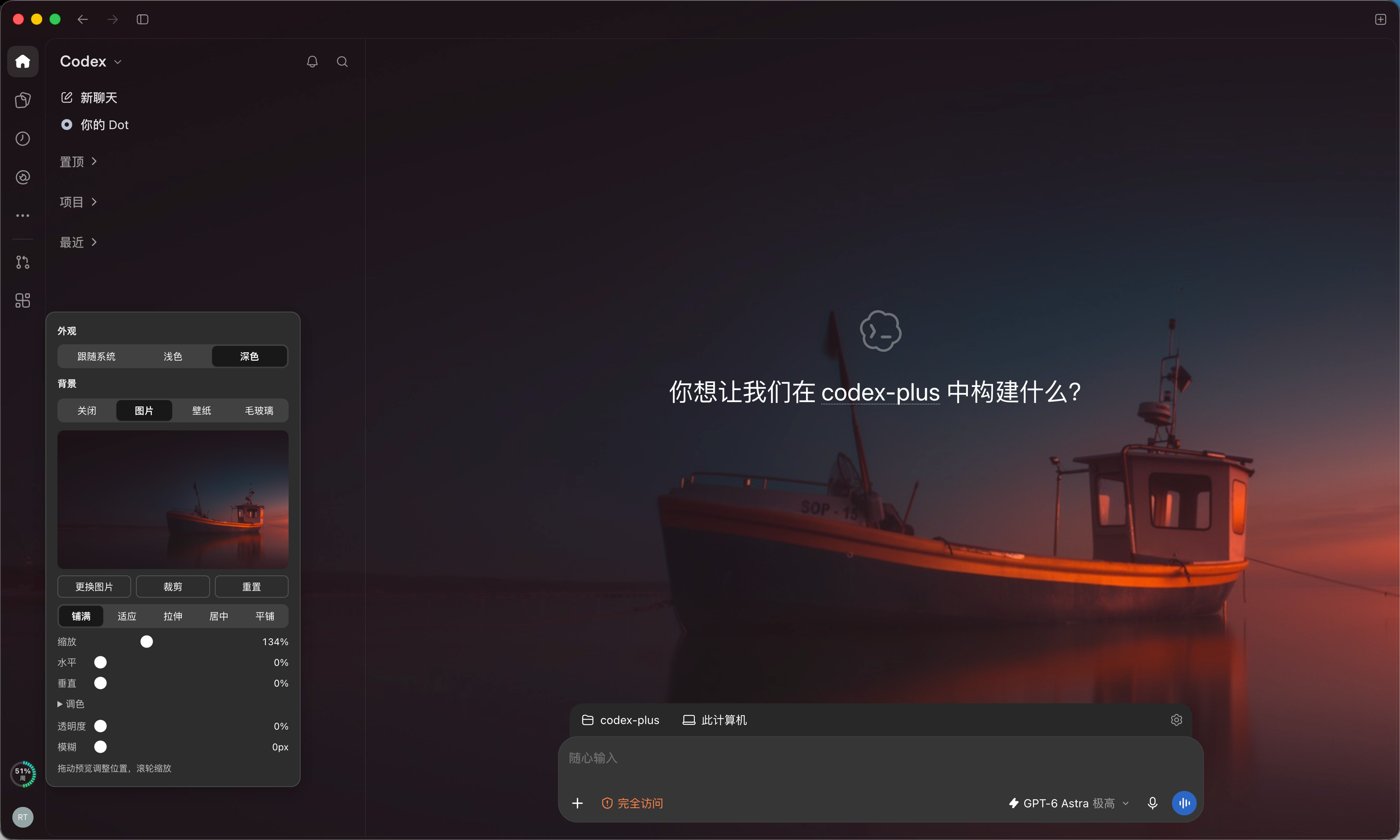
|
|
6
6
|
|
|
7
|
-
|
|
7
|
+
用剩余额度圆环替换 Codex 桌面端侧栏的官方用量图标,悬停可看套餐、余额和重置时间,点击圆环打开原有背景设置。可以自定义图片、壁纸或毛玻璃,透明度和模糊自由调节,图片还能裁剪、缩放和调整布局。悬停详情中的“用量菜单”保留官方“管理用量”等操作。仅支持 macOS。
|
|
8
8
|
|
|
9
9
|
这是非官方插件,与 OpenAI 无关。原理参考 [Codex Usage Card](https://github.com/Lorie7813/codex-usage-card),署名见 [NOTICE](NOTICE)。
|
|
10
10
|
|
|
11
11
|
## 工作原理
|
|
12
12
|
|
|
13
13
|
- **额度**:启动 Codex 内置的 `codex app-server`,通过 stdio 调用 `account/rateLimits/read`,每 60 秒刷新一次。
|
|
14
|
-
- **显示**:通过本机调试端口 `127.0.0.1:39222`
|
|
14
|
+
- **显示**:通过本机调试端口 `127.0.0.1:39222` 在侧栏官方用量按钮内替换图标,保留原生菜单、键盘操作和“管理用量”等账号功能。找不到兼容的官方按钮时,回退为独立圆环;卸载会恢复原图标。
|
|
15
15
|
- **背景**:同样通过调试端口,把 Codex 外壳层的背景清空,在页面最底层放一张图片。窗口属性由主进程控制,插件改不了,所以“透明”透出的是 Codex 自带的系统毛玻璃,壁纸来源显示的是对齐到屏幕位置的桌面壁纸。
|
|
16
16
|
- **启动**:Codex 的 `app.asar` 受完整性校验保护,不能修改,只能让它带调试端口启动。后台任务发现你从原图标打开 Codex 时,会在安全条件都满足的情况下有序退出,再带端口重开一次。
|
|
17
17
|
|
|
18
18
|
账号有几个额度窗口就显示几个圆环。圆环是分段刻度样式,环内显示剩余百分比和窗口名称(“5小时”或“周”)。额度充足时为青绿渐变,50% 及以下转为黄橙,低于 10% 转为橙红。
|
|
19
19
|
|
|
20
|
-
|
|
20
|
+
悬停详情显示套餐、各窗口的剩余百分比及重置时间、可用重置卡,以及接口提供的额度余额。余额按整数分组显示,例如 `12,346`;零余额显示 `0`,无限额度显示“不限额”,未返回余额时不猜测数值。只有余额、没有百分比窗口时,侧栏显示余额摘要。连接失败、数据超过 150 秒未更新或账号切换时,会清除旧数值并提示重试。重置、购买和管理操作继续由官方菜单处理。
|
|
21
21
|
|
|
22
|
-
|
|
22
|
+
## 安装
|
|
23
23
|
|
|
24
|
-
|
|
24
|
+
一键安装需要 **macOS 13 或更高版本**(Apple Silicon 或 Intel),以及已登录的兼容桌面客户端。**无需自行安装 Node.js、npm、Homebrew 或 Xcode Command Line Tools。** 安装包自带专用 Node 和预编译 helper。开发验证使用 `/Applications/ChatGPT.app`,版本 `26.1027.30824`;其他客户端版本依赖相同内部结构,未逐一验证。命令行和设置面板目前使用中文。
|
|
25
25
|
|
|
26
|
-
|
|
26
|
+
### 方式一:一键安装(推荐)
|
|
27
27
|
|
|
28
|
-
|
|
29
|
-
请帮我在这台 Mac 上安装 Codex Ringside,项目地址:https://github.com/tccpc/codex-ringside
|
|
28
|
+
在终端粘贴这一条命令:
|
|
30
29
|
|
|
31
|
-
|
|
32
|
-
|
|
33
|
-
|
|
34
|
-
缺少依赖时协助补齐,需要我处理系统弹窗时再提示我。
|
|
30
|
+
```bash
|
|
31
|
+
curl -fsSL https://github.com/tccpc/codex-ringside/releases/latest/download/install.sh | /bin/bash
|
|
32
|
+
```
|
|
35
33
|
|
|
36
|
-
|
|
37
|
-
npx --yes --registry=https://registry.npmjs.org/ codex-ringside@latest install
|
|
34
|
+
从 **0.2.0** 版本开始提供。脚本自动识别芯片架构(包括 Rosetta 下的终端),通过 HTTPS 下载对应安装包,校验 SHA-256 后安装到当前用户目录。安装和后台运行均使用插件自带的 Node,不依赖或更改系统 Node、Homebrew、终端配置,也不需要 `sudo`。安装过程不会关闭正在使用的客户端。
|
|
38
35
|
|
|
39
|
-
|
|
40
|
-
如果兼容桌面应用不在默认位置,用 CODEX_RINGSIDE_APP 指定检测到的应用路径。
|
|
36
|
+
如果圆环还没出现,保存工作,用 ⌘Q 退出客户端,再点原图标打开。后台可能在符合下文条件时将刚启动的客户端重开一次。
|
|
41
37
|
|
|
42
|
-
|
|
43
|
-
npx --yes --registry=https://registry.npmjs.org/ codex-ringside@latest status
|
|
38
|
+
只观察、不自动重开客户端:
|
|
44
39
|
|
|
45
|
-
|
|
46
|
-
|
|
47
|
-
不要主动关闭或强制结束我正在使用的客户端。
|
|
40
|
+
```bash
|
|
41
|
+
curl -fsSL https://github.com/tccpc/codex-ringside/releases/latest/download/install.sh | /bin/bash -s -- --observe
|
|
48
42
|
```
|
|
49
43
|
|
|
50
|
-
|
|
44
|
+
想先审阅脚本,可以从 [Releases](https://github.com/tccpc/codex-ringside/releases) 下载 `install.sh`,阅读后执行 `/bin/bash install.sh`。加上 `--version 0.2.0` 可指定发行版本。应用不在默认位置时,先设置路径,再执行一键安装命令:
|
|
51
45
|
|
|
52
|
-
|
|
46
|
+
```bash
|
|
47
|
+
export CODEX_RINGSIDE_APP="/Applications/ChatGPT.app"
|
|
48
|
+
```
|
|
49
|
+
|
|
50
|
+
安装后查看状态和卸载也不需要 npm:
|
|
53
51
|
|
|
54
52
|
```bash
|
|
55
|
-
|
|
53
|
+
"$HOME/Library/Application Support/CodexRingside/bin/codex-ringside" status
|
|
54
|
+
"$HOME/Library/Application Support/CodexRingside/bin/codex-ringside" uninstall
|
|
55
|
+
```
|
|
56
|
+
|
|
57
|
+
### 方式二:让 AI 帮你安装
|
|
58
|
+
|
|
59
|
+
把下面整段提示词复制给能在你的 Mac 上运行命令的 AI 助手:
|
|
60
|
+
|
|
61
|
+
```text
|
|
62
|
+
请帮我在这台 Mac 上安装 Codex Ringside:https://github.com/tccpc/codex-ringside
|
|
63
|
+
先阅读 README,说明安装内容和本机调试端口的用途。
|
|
64
|
+
检查 macOS 13+ 和已登录的兼容客户端,不支持时停止。
|
|
65
|
+
使用 README 的一键安装入口;安装包自带 Node 和 helper,不要为此安装 Homebrew、Node 或 Xcode 命令行工具。
|
|
66
|
+
保留已有设置;应用不在默认位置时,先 export CODEX_RINGSIDE_APP 为检测到的路径。
|
|
67
|
+
安装后运行:"$HOME/Library/Application Support/CodexRingside/bin/codex-ringside" status
|
|
68
|
+
告诉我后台是否正常、圆环是否显示,并给出卸载命令。
|
|
69
|
+
需要重开客户端时提醒我保存工作后手动操作,不要主动关闭或强制结束客户端。
|
|
56
70
|
```
|
|
57
71
|
|
|
58
|
-
|
|
72
|
+
### 方式三:npm / 源码安装
|
|
59
73
|
|
|
60
|
-
|
|
74
|
+
适用于已有 **Node.js 22+ 和 Xcode Command Line Tools** 的开发者:
|
|
61
75
|
|
|
62
76
|
```bash
|
|
63
|
-
npx codex-ringside@latest install
|
|
77
|
+
npx codex-ringside@latest install
|
|
64
78
|
```
|
|
65
79
|
|
|
66
|
-
|
|
80
|
+
此方式在本机编译 Swift helper,需要本机 Node 能正常运行。如果 `npx` 因 Homebrew 动态库缺失崩溃,直接使用方式一。仅下载 npm 包不会安装或启动后台;没有安装生命周期脚本。npm 用户仍可使用 `npx codex-ringside@latest <命令>` 查看状态、设置背景和卸载。
|
|
67
81
|
|
|
68
82
|
| 位置 | 内容 |
|
|
69
83
|
|---|---|
|
|
70
|
-
| `~/Library/Application Support/CodexRingside` |
|
|
84
|
+
| `~/Library/Application Support/CodexRingside` | 程序、专用 Node 及许可证(一键安装)、helper、设置和状态 |
|
|
71
85
|
| `~/Library/LaunchAgents/com.codexringside.agent.plist` | 后台任务 |
|
|
72
86
|
| `~/Library/Logs/CodexRingside` | 日志 |
|
|
87
|
+
| `~/Library/Application Support/CodexRingside Backups` | 安装和迁移备份 |
|
|
73
88
|
|
|
74
|
-
|
|
89
|
+
应用路径按 `CODEX_RINGSIDE_APP`、旧变量 `CODEX_PLUS_APP`、保存的应用路径、默认 `/Applications/ChatGPT.app` 的顺序选择。
|
|
75
90
|
|
|
76
91
|
## 升级和从 Codex Plus 迁移
|
|
77
92
|
|
|
78
|
-
|
|
79
|
-
|
|
80
|
-
备份保留在 `~/Library/Application Support/CodexRingside Backups/install-*`。`receipt.json` 记录原路径及后台运行状态,`0` 是原 Ringside 安装,`1` 是原 Codex Plus 安装。卸载不会删除备份,确认新版正常后可手动清理。
|
|
93
|
+
从本版起,**自动更新默认开启**。后台启动约一分钟后检查 GitHub 的最新正式发行版,之后每 6 小时检查一次;检查时间会保存,重启后台不会重复下载。发现更高版本后,自动下载对应架构的完整安装包,校验 SHA-256、版本及运行时,再升级程序和专用 Node。跳过草稿和预发行版,不会降级。网络或安装失败会记录原因,一小时后重试。
|
|
81
94
|
|
|
82
|
-
|
|
95
|
+
更新由独立任务执行,只重启插件后台,不关闭正在使用的客户端。现有应用路径、观察模式、背景、图片和自动更新开关都会保留;新后台未就绪时恢复原文件、运行时和运行状态。下载期间卸载、重新安装或关闭自动更新,会取消这次自动安装。
|
|
83
96
|
|
|
84
|
-
|
|
97
|
+
也可以立即更新、只检查或控制自动更新:
|
|
85
98
|
|
|
86
99
|
```bash
|
|
87
|
-
|
|
100
|
+
"$HOME/Library/Application Support/CodexRingside/bin/codex-ringside" update
|
|
101
|
+
"$HOME/Library/Application Support/CodexRingside/bin/codex-ringside" update --check
|
|
102
|
+
"$HOME/Library/Application Support/CodexRingside/bin/codex-ringside" update --disable
|
|
103
|
+
"$HOME/Library/Application Support/CodexRingside/bin/codex-ringside" update --enable
|
|
88
104
|
```
|
|
89
105
|
|
|
90
|
-
|
|
106
|
+
`status` 的 `update` 字段显示当前/最新版本、自动更新开关、检查时间、下次检查时间和失败原因;时间字段为 Unix 毫秒时间戳。更新日志在 `~/Library/Logs/CodexRingside/update.log` 和 `update.err.log`。指定版本安装后仍会跟随正式版;需要固定版本或保留源码改动时,运行 `update --disable`。
|
|
107
|
+
|
|
108
|
+
旧版用户先重新执行一次一键安装命令,获得自动更新功能。已有新版设置优先;首次从 Codex Plus 迁移会保留旧版设置,并停用 `com.codexplus.agent`。安装、更新切换和卸载共用互斥锁,不会互相覆盖。
|
|
109
|
+
|
|
110
|
+
备份保留在 `~/Library/Application Support/CodexRingside Backups/install-*`。`receipt.json` 记录原路径及后台运行状态,`0` 是原 Ringside 安装,`1` 是原 Codex Plus 安装。卸载不会删除备份,确认新版正常后可手动清理。
|
|
111
|
+
|
|
112
|
+
迁移和重装保留观察模式;`--observe` 可明确关闭自动接管。要重新开启,退出后台后将安装目录 `settings.json` 的 `allowClientRestart` 改为 `true`,再重新安装。备份包含本地路径及图片,不要上传。npm / 源码用户可用 `npx codex-ringside@latest update` 执行相同更新;更新成功后,已安装副本转为包含专用 Node 的独立安装,不修改源码工作区。继续用 `npx codex-ringside@latest install` 则仍需开发工具。
|
|
91
113
|
|
|
92
114
|
## 自定义背景
|
|
93
115
|
|
|
94
|
-
|
|
116
|
+
直接点击侧栏圆环打开原有背景设置面板,聚焦后按 Enter 或空格也可以打开。悬停面板中的“背景设置”、右键和 Shift+F10 仍可使用。官方用量菜单通过悬停面板中的“用量菜单”打开,也可以聚焦圆环后按向下键;没有兼容的官方按钮时,这个菜单入口隐藏。先选来源,再用效果调外观,所有调节都立即生效。
|
|
95
117
|
|
|
96
118
|
面板顶部还能切换 Codex 的**外观模式**:跟随系统、浅色、深色。它和设置页的“模式”是同一个设置,改动会保存,并在两边同步。这里用的是 Codex 内部的设置函数,找不到时控件自动隐藏。
|
|
97
119
|
|
|
@@ -118,22 +140,22 @@ CODEX_RINGSIDE_APP="/Applications/ChatGPT.app" npx codex-ringside@latest install
|
|
|
118
140
|
也可以用命令行设置,5 秒内生效:
|
|
119
141
|
|
|
120
142
|
```bash
|
|
121
|
-
|
|
143
|
+
"$HOME/Library/Application Support/CodexRingside/bin/codex-ringside" background image ~/Pictures/photo.jpg --transparency 50 --blur 8
|
|
122
144
|
```
|
|
123
145
|
|
|
124
146
|
```bash
|
|
125
|
-
|
|
147
|
+
"$HOME/Library/Application Support/CodexRingside/bin/codex-ringside" background --layout contain --zoom 120 --y 20
|
|
126
148
|
```
|
|
127
149
|
|
|
128
150
|
```bash
|
|
129
|
-
|
|
151
|
+
"$HOME/Library/Application Support/CodexRingside/bin/codex-ringside" background --crop 10,0,80,60
|
|
130
152
|
```
|
|
131
153
|
|
|
132
154
|
```bash
|
|
133
|
-
|
|
155
|
+
"$HOME/Library/Application Support/CodexRingside/bin/codex-ringside" background default
|
|
134
156
|
```
|
|
135
157
|
|
|
136
|
-
只写选项时保留当前来源,不带参数时打印当前设置。`--crop` 的四个数是左、上、宽、高的百分比,`--crop none`
|
|
158
|
+
只写选项时保留当前来源,不带参数时打印当前设置。`--crop` 的四个数是左、上、宽、高的百分比,`--crop none` 取消裁剪。完整选项见不带参数运行安装目录内的 `bin/codex-ringside` 的用法提示。
|
|
137
159
|
|
|
138
160
|
使用限制:
|
|
139
161
|
|
|
@@ -143,21 +165,37 @@ npx codex-ringside@latest background default
|
|
|
143
165
|
- **切换有延迟**:切换桌面空间后,壁纸最多 60 秒才更新;拖动窗口时壁纸有轻微跟随延迟。
|
|
144
166
|
- **页面自动适配**:内容区里方角、无边框、占满区域的不透明层会被当作页面背景清除,设置页这类圆角卡片变成半透明磨砂,文字依然清楚。终端、代码块和内嵌网页不处理。设计不同的页面可能漏掉,这时自带背景的地方保持原样。
|
|
145
167
|
|
|
168
|
+
### 壁纸网站推荐
|
|
169
|
+
|
|
170
|
+
可以从这些网站挑选背景图片:
|
|
171
|
+
|
|
172
|
+
| 网站 | 推荐内容 |
|
|
173
|
+
|---|---|
|
|
174
|
+
| [Wallhaven](https://wallhaven.cc/) | 综合壁纸图库,可按关键词、分辨率和宽高比筛选 |
|
|
175
|
+
| [WallpaperHub](https://www.wallpaperhub.app/) | Windows、Surface 和 Fluent Design 风格壁纸,提供多种设备尺寸 |
|
|
176
|
+
| [Peapix](https://peapix.com/) | Bing 每日壁纸与 Windows Spotlight 图片,适合寻找风景、建筑和自然摄影 |
|
|
177
|
+
| [Unsplash](https://unsplash.com/wallpapers) | 摄影类高清壁纸,涵盖自然、旅行、动物等主题 |
|
|
178
|
+
| [Pexels](https://www.pexels.com/search/desktop%20wallpaper/) | 摄影图库,提供桌面、4K 和深色壁纸等分类 |
|
|
179
|
+
|
|
180
|
+
下载图片到本机后,点击侧栏圆环,在背景设置面板中选择 `image` 图片来源并选取文件。也可以先将图片设为 macOS 桌面壁纸,再选择 `wallpaper` 壁纸来源,让背景与桌面对齐。
|
|
181
|
+
|
|
146
182
|
## 查看状态
|
|
147
183
|
|
|
184
|
+
下载失败或 SHA-256 校验失败时,安装器会在更改现有安装前停止,可在网络恢复后重试。发行版缺少安装包时,请选择 0.2.0 或更高版本。通过一键入口安装后,无需检查系统 Node 或编译工具。
|
|
185
|
+
|
|
148
186
|
```bash
|
|
149
|
-
|
|
187
|
+
"$HOME/Library/Application Support/CodexRingside/bin/codex-ringside" status
|
|
150
188
|
```
|
|
151
189
|
|
|
152
|
-
重点看 `cdp.windows[].card.placed
|
|
190
|
+
重点看 `cdp.windows[].card.placed`,`replacesNative` 为 `true` 表示已替换官方用量图标;`credits` 和 `plan` 显示当前余额和套餐。背景看 `background`(保存的设置)和 `cdp.windows[].background`:`applied` 表示已生效,`nativeGlass` 为 `false` 表示 Codex 此刻关闭了毛玻璃。输出可能包含本机路径,分享前请先脱敏。
|
|
153
191
|
|
|
154
192
|
## 卸载
|
|
155
193
|
|
|
156
194
|
```bash
|
|
157
|
-
|
|
195
|
+
"$HOME/Library/Application Support/CodexRingside/bin/codex-ringside" uninstall
|
|
158
196
|
```
|
|
159
197
|
|
|
160
|
-
|
|
198
|
+
新旧后台任务和自动更新任务会被移除,专用 Node 随程序一起卸载,程序、设置和日志进废纸篓,安装备份保留。当前窗口的注入界面会移除;调试端口会保持到客户端退出,下次正常启动后关闭。桌面应用文件未改动。
|
|
161
199
|
|
|
162
200
|
## 什么时候会重启 Codex
|
|
163
201
|
|
|
@@ -180,15 +218,19 @@ npx codex-ringside@latest uninstall
|
|
|
180
218
|
|
|
181
219
|
## 隐私
|
|
182
220
|
|
|
183
|
-
只读取额度数据,不读项目文件、对话内容和 Codex
|
|
221
|
+
只读取额度数据,不读项目文件、对话内容和 Codex 数据库,也没有遥测或数据上传。`auth.json` 只看修改时间,用来发现账号切换,不读内容。app-server 自身的网络请求由 Codex CLI 发出。自动更新会请求 GitHub 的公开发行接口并下载发行包,不使用账号令牌,不发送本机设置、路径或图片;可以用 `update --disable` 关闭自动请求。背景功能只读取系统壁纸和你选的图片,转换后存在本机的 `CodexRingside/background` 目录,不会上传。
|
|
184
222
|
|
|
185
223
|
## 开发
|
|
186
224
|
|
|
225
|
+
开发和源码构建仍需要 Node.js 22+ 与 Xcode Command Line Tools。一键安装的普通用户不需要这些工具。
|
|
226
|
+
|
|
187
227
|
```bash
|
|
188
228
|
npm ci --ignore-scripts
|
|
189
229
|
npm run verify
|
|
190
230
|
```
|
|
191
231
|
|
|
232
|
+
`npm run build:standalone` 构建本机架构的完整安装包,`npm run check:standalone` 使用包内真实 Node 和 helper,在系统开发工具不可用的隔离环境下验证安装、重装和回滚。CI 分别在 Apple Silicon 与 Intel 上运行此检查。
|
|
233
|
+
|
|
192
234
|
卡片样式可以用 `test/fixtures/card.html` 调试,不需要真实的 Codex。
|
|
193
235
|
|
|
194
236
|
完整开发和发布流程见 [贡献指南](CONTRIBUTING.md)、[发布指南](docs/RELEASING.md);漏洞请通过 [私密安全报告](https://github.com/tccpc/codex-ringside/security/advisories/new) 提交。
|
package/bin/codex-ringside.cjs
CHANGED
|
@@ -7,6 +7,7 @@ const { BackgroundStore, parseBackgroundArgs } = require('../src/background.cjs'
|
|
|
7
7
|
const { CDP_PORT, CdpSession, isMainWindow, listTargets } = require('../src/cdp.cjs');
|
|
8
8
|
const launchd = require('../src/launchd.cjs');
|
|
9
9
|
const installer = require('../src/install.cjs');
|
|
10
|
+
const updater = require('../src/update.cjs');
|
|
10
11
|
const { version } = require('../package.json');
|
|
11
12
|
|
|
12
13
|
const { installDir } = launchd.paths;
|
|
@@ -28,6 +29,7 @@ async function install({ observe }) {
|
|
|
28
29
|
? '如果圆环还没出现:保存工作后用 ⌘Q 退出 Codex,再点原图标打开。'
|
|
29
30
|
: '当前为观察模式:不会重启 Codex。');
|
|
30
31
|
console.log(`原安装备份:${result.backup}`);
|
|
32
|
+
console.log(result.settings.autoUpdate ? '自动更新已开启,每 6 小时检查正式发行版。' : '自动更新已关闭。');
|
|
31
33
|
}
|
|
32
34
|
|
|
33
35
|
// Reachable only if Codex is running with the port; without it there is no card to remove.
|
|
@@ -86,6 +88,7 @@ async function status() {
|
|
|
86
88
|
console.log(JSON.stringify({
|
|
87
89
|
agent: job ? job.match(/state = (\S+)/)?.[1] ?? 'loaded' : 'not installed',
|
|
88
90
|
settings: readJson(settingsFile),
|
|
91
|
+
update: fs.existsSync(settingsFile) ? updater.updateStatus(installDir) : null,
|
|
89
92
|
background: new BackgroundStore({ root: installDir }).config,
|
|
90
93
|
startup: state && { event: state.event, updatedAt: new Date(state.updatedAt).toISOString() },
|
|
91
94
|
listenAddresses: listeners(),
|
|
@@ -105,6 +108,23 @@ async function background(args) {
|
|
|
105
108
|
console.log(`背景来源:${config.source},5 秒内生效。`);
|
|
106
109
|
}
|
|
107
110
|
|
|
111
|
+
async function update(args) {
|
|
112
|
+
if (args.length > 1 || args.some(arg => !['--check', '--enable', '--disable'].includes(arg))) {
|
|
113
|
+
throw Error('用法:codex-ringside update [--check | --enable | --disable]');
|
|
114
|
+
}
|
|
115
|
+
if (args[0] === '--enable' || args[0] === '--disable') {
|
|
116
|
+
const enabled = args[0] === '--enable';
|
|
117
|
+
await updater.setAutoUpdate(enabled);
|
|
118
|
+
console.log(enabled ? '自动更新已开启,后台将在一分钟内检查。' : '自动更新已关闭。');
|
|
119
|
+
return;
|
|
120
|
+
}
|
|
121
|
+
console.log('正在检查 GitHub 正式发行版…');
|
|
122
|
+
const result = await updater.runUpdate({ checkOnly: args[0] === '--check' });
|
|
123
|
+
if (result.status === 'updated') console.log(`已更新到 ${result.installedVersion},后台已重启。`);
|
|
124
|
+
else if (result.status === 'available') console.log(`发现新版本 ${result.latestVersion}。`);
|
|
125
|
+
else console.log('当前没有更新的正式版本。');
|
|
126
|
+
}
|
|
127
|
+
|
|
108
128
|
async function main() {
|
|
109
129
|
const [command, ...args] = process.argv.slice(2);
|
|
110
130
|
if (command === '--version' || command === '-v') { console.log(version); return; }
|
|
@@ -116,8 +136,10 @@ async function main() {
|
|
|
116
136
|
else if (command === 'uninstall') await uninstall();
|
|
117
137
|
else if (command === 'status') await status();
|
|
118
138
|
else if (command === 'background') await background(args);
|
|
139
|
+
else if (command === 'update') await update(args);
|
|
119
140
|
else {
|
|
120
|
-
console.log('用法:codex-ringside <install [--observe] | uninstall | status | background [来源] [选项]>');
|
|
141
|
+
console.log('用法:codex-ringside <install [--observe] | uninstall | status | update [选项] | background [来源] [选项]>');
|
|
142
|
+
console.log('更新选项:--check 仅检查 | --enable 开启自动更新 | --disable 关闭自动更新;无选项立即更新');
|
|
121
143
|
console.log('背景来源:default | image <图片路径> | wallpaper | glass');
|
|
122
144
|
console.log('背景效果:--transparency <0-100> --blur <0-60>');
|
|
123
145
|
console.log('图片调整:--layout <cover|contain|stretch|center|tile> --zoom <10-400> --x <0-100> --y <0-100>');
|
package/native/bridge.swift
CHANGED
|
@@ -155,6 +155,10 @@ func wallpaper() -> [String: Any] {
|
|
|
155
155
|
}
|
|
156
156
|
|
|
157
157
|
let args = CommandLine.arguments
|
|
158
|
+
if args.count == 2 && args[1] == "version" {
|
|
159
|
+
emit(["protocol": 1])
|
|
160
|
+
exit(0)
|
|
161
|
+
}
|
|
158
162
|
guard args.count >= 3 else { fail("usage: bridge <command> <app> [...]") }
|
|
159
163
|
let command = args[1]
|
|
160
164
|
let appPath = canonical(args[2])
|
package/package.json
CHANGED
|
@@ -1,6 +1,6 @@
|
|
|
1
1
|
{
|
|
2
2
|
"name": "codex-ringside",
|
|
3
|
-
"version": "0.
|
|
3
|
+
"version": "0.3.0",
|
|
4
4
|
"description": "Usage rings and customizable backgrounds for the Codex desktop app. Unofficial macOS add-on.",
|
|
5
5
|
"license": "MIT",
|
|
6
6
|
"type": "commonjs",
|
|
@@ -15,12 +15,15 @@
|
|
|
15
15
|
],
|
|
16
16
|
"scripts": {
|
|
17
17
|
"test": "node --test test/*.test.cjs",
|
|
18
|
+
"test:card": "node --test test/card.browser.cjs",
|
|
18
19
|
"install-agent": "node bin/codex-ringside.cjs install",
|
|
19
20
|
"uninstall-agent": "node bin/codex-ringside.cjs uninstall",
|
|
20
21
|
"status": "node bin/codex-ringside.cjs status",
|
|
21
22
|
"check": "node scripts/check.cjs",
|
|
22
23
|
"check:package": "node scripts/check-package.cjs",
|
|
23
|
-
"verify": "npm run check && npm test && npm run check:package"
|
|
24
|
+
"verify": "npm run check && npm test && npm run check:package",
|
|
25
|
+
"build:standalone": "node scripts/build-standalone.cjs",
|
|
26
|
+
"check:standalone": "node scripts/check-standalone.cjs"
|
|
24
27
|
},
|
|
25
28
|
"repository": {
|
|
26
29
|
"type": "git",
|
|
@@ -51,5 +54,8 @@
|
|
|
51
54
|
"LICENSE",
|
|
52
55
|
"NOTICE",
|
|
53
56
|
"CHANGELOG.md"
|
|
54
|
-
]
|
|
57
|
+
],
|
|
58
|
+
"devDependencies": {
|
|
59
|
+
"playwright": "1.64.1"
|
|
60
|
+
}
|
|
55
61
|
}
|