codesyncer 2.7.6 → 3.0.1
This diff represents the content of publicly available package versions that have been released to one of the supported registries. The information contained in this diff is provided for informational purposes only and reflects changes between package versions as they appear in their respective public registries.
- package/README.ko.md +111 -61
- package/README.md +111 -61
- package/dist/commands/handoff.d.ts +6 -0
- package/dist/commands/handoff.d.ts.map +1 -0
- package/dist/commands/handoff.js +312 -0
- package/dist/commands/handoff.js.map +1 -0
- package/dist/commands/init.d.ts.map +1 -1
- package/dist/commands/init.js +77 -19
- package/dist/commands/init.js.map +1 -1
- package/dist/commands/validate.d.ts.map +1 -1
- package/dist/commands/validate.js +191 -0
- package/dist/commands/validate.js.map +1 -1
- package/dist/templates/en/claude.md +30 -18
- package/dist/templates/ko/claude.md +30 -18
- package/dist/types.d.ts +3 -0
- package/dist/types.d.ts.map +1 -1
- package/dist/types.js.map +1 -1
- package/dist/utils/messages.d.ts.map +1 -1
- package/dist/utils/messages.js.map +1 -1
- package/dist/utils/watch-logger.d.ts +6 -1
- package/dist/utils/watch-logger.d.ts.map +1 -1
- package/dist/utils/watch-logger.js +20 -1
- package/dist/utils/watch-logger.js.map +1 -1
- package/dist/utils/watcher.d.ts.map +1 -1
- package/dist/utils/watcher.js +7 -1
- package/dist/utils/watcher.js.map +1 -1
- package/package.json +2 -2
- package/src/templates/en/claude.md +30 -18
- package/src/templates/ko/claude.md +30 -18
package/README.ko.md
CHANGED
|
@@ -1,6 +1,6 @@
|
|
|
1
1
|
# CodeSyncer CLI
|
|
2
2
|
|
|
3
|
-
>
|
|
3
|
+
> **Claude는 세션이 끝나면 모든 것을 잊습니다. CodeSyncer가 기억하게 해줍니다.**
|
|
4
4
|
|
|
5
5
|
[](https://www.npmjs.com/package/codesyncer)
|
|
6
6
|
[](./LICENSE)
|
|
@@ -11,92 +11,142 @@
|
|
|
11
11
|
|
|
12
12
|
---
|
|
13
13
|
|
|
14
|
-
##
|
|
14
|
+
## ⚡ 문제 → 해결
|
|
15
|
+
|
|
16
|
+
| 문제 | CodeSyncer 없이 | CodeSyncer 사용 시 |
|
|
17
|
+
|------|----------------|-------------------|
|
|
18
|
+
| **맥락 손실** | 매 세션 = 처음부터 다시 | 코드 태그 = 영구 기억 |
|
|
19
|
+
| **결정 망각** | "왜 JWT 썼더라?" → 🤷 | `@codesyncer-decision` → 즉시 확인 |
|
|
20
|
+
| **위험한 추론** | AI가 가격, 엔드포인트, 인증 추측 | 중요 키워드 자동 일시정지 |
|
|
21
|
+
| **기록 없음** | AI의 추론 이유 없음 | `codesyncer watch`가 모든 것 포착 |
|
|
15
22
|
|
|
16
|
-
|
|
23
|
+
**결과**: 현재 프롬프트만 아는 AI가 아닌, 프로젝트를 진짜로 학습하는 AI
|
|
17
24
|
|
|
18
25
|
---
|
|
19
26
|
|
|
20
|
-
##
|
|
27
|
+
## 🎬 데모
|
|
21
28
|
|
|
22
|
-
|
|
29
|
+
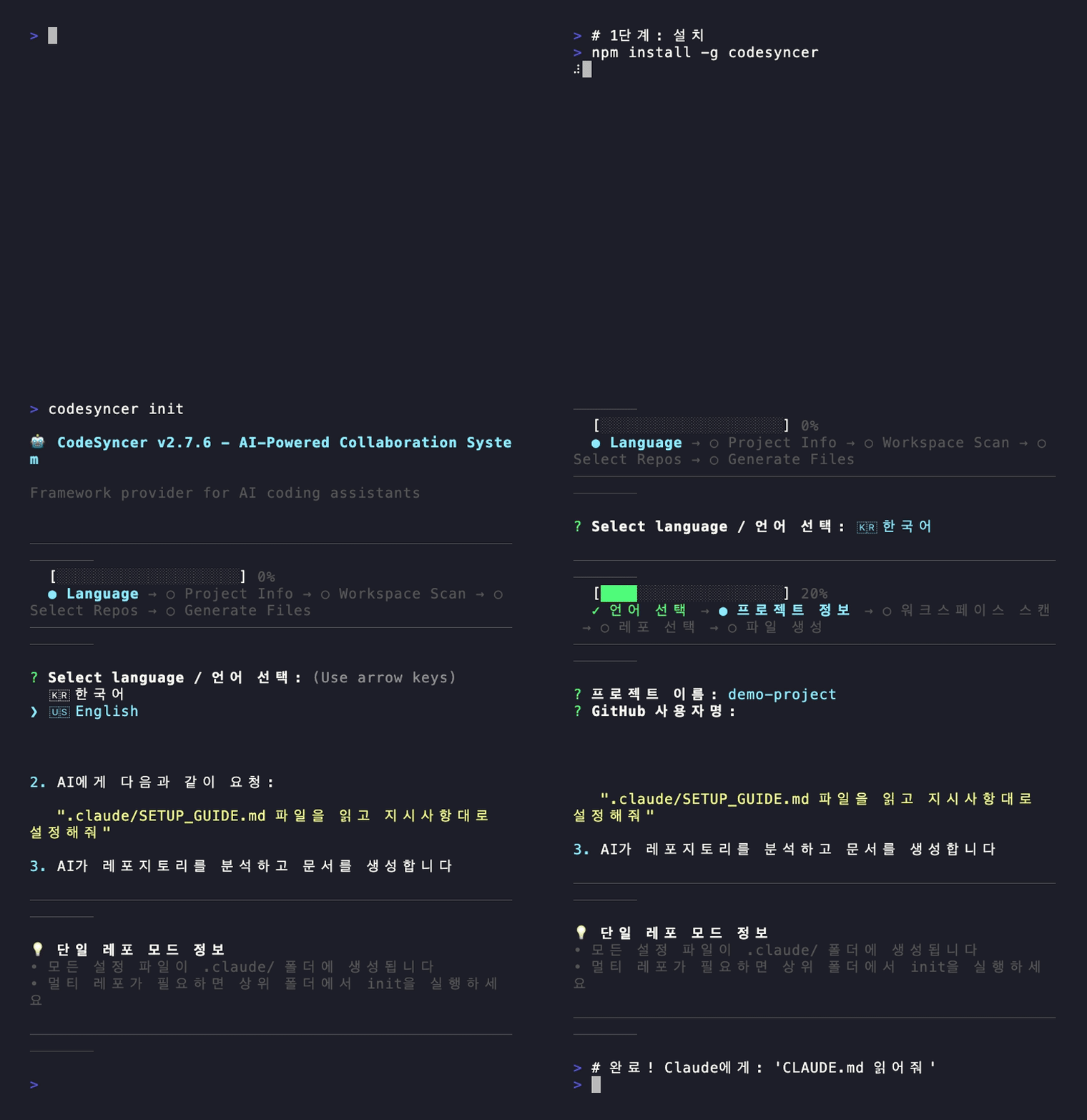
|
|
23
30
|
|
|
24
|
-
|
|
25
|
-
- 새 AI 세션 = 처음부터 다시 설명
|
|
26
|
-
- 같은 아키텍처 설명 반복
|
|
27
|
-
- "API 엔드포인트가 뭐였지?" "인증은 어떻게 하지?" - 매번. 물어봄.
|
|
31
|
+
---
|
|
28
32
|
|
|
29
|
-
|
|
30
|
-
|
|
31
|
-
|
|
32
|
-
|
|
33
|
-
|
|
34
|
-
|
|
33
|
+
## 🧠 작동 원리
|
|
34
|
+
|
|
35
|
+
**핵심 인사이트**: AI는 코드를 읽습니다. 그러니 맥락을 코드 안에 넣으세요.
|
|
36
|
+
|
|
37
|
+
```
|
|
38
|
+
┌─────────────────────────┐
|
|
39
|
+
│ 🧑💻 Claude와 코딩 │
|
|
40
|
+
└───────────┬─────────────┘
|
|
41
|
+
▼
|
|
42
|
+
┌──────────────┐
|
|
43
|
+
│ 결정함? │
|
|
44
|
+
└──────┬───────┘
|
|
45
|
+
▼
|
|
46
|
+
┌─────────────────────────┐
|
|
47
|
+
│ @codesyncer-decision │
|
|
48
|
+
│ @codesyncer-inference │
|
|
49
|
+
└───────────┬─────────────┘
|
|
50
|
+
▼
|
|
51
|
+
┌─────────────────────────┐
|
|
52
|
+
│ 📝 코드에 영구 저장 │
|
|
53
|
+
└───────────┬─────────────┘
|
|
54
|
+
▼
|
|
55
|
+
┌─────────────────────────┐
|
|
56
|
+
│ 🔄 다음 세션 │
|
|
57
|
+
│ Claude가 코드 읽음 │
|
|
58
|
+
└───────────┬─────────────┘
|
|
59
|
+
▼
|
|
60
|
+
┌─────────────────────────┐
|
|
61
|
+
│ ✅ 맥락 복구 완료! │
|
|
62
|
+
└─────────────────────────┘
|
|
35
63
|
```
|
|
36
|
-
- AI는 한 번에 한 레포만 봄
|
|
37
|
-
- 다른 레포의 컨텍스트 부족 → 부분적인 코드만 생성
|
|
38
|
-
- "로그인 추가해줘"는 백엔드 API + 프론트 UI 둘 다 필요한데 AI는 모름
|
|
39
64
|
|
|
40
|
-
|
|
41
|
-
-
|
|
42
|
-
-
|
|
43
|
-
-
|
|
65
|
+
```typescript
|
|
66
|
+
// @codesyncer-decision: [2024-01-15] JWT 선택 (세션 관리가 더 간단함)
|
|
67
|
+
// @codesyncer-inference: 페이지 크기 20 (일반적인 UX 패턴)
|
|
68
|
+
// @codesyncer-rule: httpOnly 쿠키 사용 (XSS 방지)
|
|
69
|
+
const authConfig = { /* ... */ };
|
|
70
|
+
```
|
|
44
71
|
|
|
45
|
-
|
|
72
|
+
다음 세션? Claude가 코드를 읽으면 **자동으로 모든 맥락이 복구됩니다**.
|
|
46
73
|
|
|
47
74
|
---
|
|
48
75
|
|
|
49
|
-
##
|
|
50
|
-
|
|
51
|
-
CodeSyncer는 AI에게 **전체 그림**을 제공합니다:
|
|
76
|
+
## 🔥 Watch 모드: 맥락을 절대 놓치지 마세요
|
|
52
77
|
|
|
53
|
-
|
|
54
|
-
2. **🗂️ 마스터 문서** - 레포 간 이동과 전체 규칙 관리
|
|
55
|
-
3. **📋 레포별 문서** - 각 레포만의 특별한 가이드라인
|
|
56
|
-
4. **🎯 키워드 시스템** - 중요한 결정(결제, 인증 등)에서 자동 일시정지
|
|
78
|
+
**문제**: Claude가 코딩하면서 태그 추가를 잊을 수 있습니다.
|
|
57
79
|
|
|
58
|
-
|
|
80
|
+
**해결**: `codesyncer watch`로 태그 없는 변경을 잡아내세요.
|
|
59
81
|
|
|
60
|
-
|
|
82
|
+
```bash
|
|
83
|
+
codesyncer watch
|
|
84
|
+
```
|
|
61
85
|
|
|
62
|
-
|
|
86
|
+
```
|
|
87
|
+
[14:32:10] 📝 변경됨: src/utils/api.ts
|
|
88
|
+
└── ⚠️ 태그 없음!
|
|
89
|
+
💡 힌트: 추론하면 @codesyncer-inference 추가
|
|
63
90
|
|
|
64
|
-
|
|
91
|
+
[14:33:22] 📝 변경됨: src/auth/login.ts
|
|
92
|
+
└── 🎯 발견: @codesyncer-decision
|
|
93
|
+
"SWR 대신 React Query 사용"
|
|
94
|
+
└── ✅ DECISIONS.md에 추가됨
|
|
95
|
+
```
|
|
65
96
|
|
|
66
|
-
|
|
67
|
-
1. **사용자가** CodeSyncer CLI 설치
|
|
68
|
-
2. **사용자가** AI 어시스턴트 실행 (Claude Code, Cursor 등)
|
|
69
|
-
3. **사용자가** `codesyncer init` 실행
|
|
70
|
-
4. **AI가** 프로젝트를 분석하고 CodeSyncer 구조에 따라 문서 생성
|
|
97
|
+
**왜 중요한가**: 모든 코드 변경은 맥락을 기록할 기회입니다. Watch 모드가 놓치는 것 없이 잡아냅니다.
|
|
71
98
|
|
|
72
|
-
|
|
99
|
+
---
|
|
73
100
|
|
|
74
|
-
|
|
101
|
+
## ✨ 전체 기능 목록
|
|
75
102
|
|
|
76
|
-
|
|
77
|
-
|
|
78
|
-
|
|
79
|
-
|
|
80
|
-
|
|
81
|
-
|
|
82
|
-
|
|
83
|
-
|
|
84
|
-
|
|
85
|
-
- 🔒 **보안 강화**: 경로 탐색 공격 방지 및 입력 검증 (v2.7.0)
|
|
103
|
+
| 기능 | 설명 |
|
|
104
|
+
|------|------|
|
|
105
|
+
| 🏷️ **태그 시스템** | `@codesyncer-decision`, `@codesyncer-inference`, `@codesyncer-rule` - 코드에 영구 맥락 |
|
|
106
|
+
| 🔄 **Watch 모드** | 실시간 모니터링, 태그 없는 변경 경고, DECISIONS.md 자동 동기화 |
|
|
107
|
+
| ✅ **Validate** | 태그 커버리지 확인, 누락된 문서 찾기, 수정 제안 |
|
|
108
|
+
| 🤝 **자동 일시정지** | 결제/보안/인증 키워드 감지 → 코딩 전 확인 |
|
|
109
|
+
| 📦 **모노레포** | Turborepo, pnpm, Nx, Lerna, npm/yarn workspaces 자동 감지 |
|
|
110
|
+
| 🌐 **다국어** | 한글/영문 완벽 지원 |
|
|
111
|
+
| 🔒 **보안** | 경로 탐색 방지 및 입력 검증 |
|
|
86
112
|
|
|
87
113
|
---
|
|
88
114
|
|
|
89
|
-
##
|
|
90
|
-
|
|
91
|
-
|
|
92
|
-
|
|
93
|
-
|
|
115
|
+
## 🔄 전체 워크플로우
|
|
116
|
+
|
|
117
|
+
```
|
|
118
|
+
┌─────────────────────────────────────────────────────────────┐
|
|
119
|
+
│ 1. 설정 (최초 1회) │
|
|
120
|
+
│ $ npm install -g codesyncer │
|
|
121
|
+
│ $ codesyncer init │
|
|
122
|
+
│ → CLAUDE.md, SETUP_GUIDE.md 생성 │
|
|
123
|
+
└─────────────────────────────────────────────────────────────┘
|
|
124
|
+
↓
|
|
125
|
+
┌─────────────────────────────────────────────────────────────┐
|
|
126
|
+
│ 2. AI 학습시키기 (세션마다 1회) │
|
|
127
|
+
│ Claude Code 열고 말하기: │
|
|
128
|
+
│ "CLAUDE.md 읽어줘" │
|
|
129
|
+
│ → Claude가 태그 시스템 학습 │
|
|
130
|
+
└─────────────────────────────────────────────────────────────┘
|
|
131
|
+
↓
|
|
132
|
+
┌─────────────────────────────────────────────────────────────┐
|
|
133
|
+
│ 3. 코딩 (watch 모드 실행 상태로) │
|
|
134
|
+
│ $ codesyncer watch ← 백그라운드 실행 │
|
|
135
|
+
│ Claude와 평소처럼 코딩 │
|
|
136
|
+
│ → Claude가 @codesyncer-* 태그 자동 추가 │
|
|
137
|
+
│ → Watch 모드가 태그 누락 시 알림 │
|
|
138
|
+
└─────────────────────────────────────────────────────────────┘
|
|
139
|
+
↓
|
|
140
|
+
┌─────────────────────────────────────────────────────────────┐
|
|
141
|
+
│ 4. 다음 세션 │
|
|
142
|
+
│ Claude가 코드 읽음 → 태그 확인 │
|
|
143
|
+
│ → 맥락 자동 복구 완료! │
|
|
144
|
+
└─────────────────────────────────────────────────────────────┘
|
|
145
|
+
```
|
|
146
|
+
|
|
147
|
+
**지원 AI 도구:**
|
|
94
148
|
- ✅ **Claude Code** (권장)
|
|
95
|
-
- 🚧 Cursor (곧 지원 예정)
|
|
96
|
-
- 🚧 GitHub Copilot (곧 지원 예정)
|
|
97
|
-
- 🚧 Continue.dev (곧 지원 예정)
|
|
98
|
-
|
|
99
|
-
**중요**: CodeSyncer를 사용하기 전에 AI 코딩 어시스턴트를 **실행하고 활성화**해주세요. AI가 프로젝트를 분석하고 정확한 문서를 생성하는 데 도움을 줍니다.
|
|
149
|
+
- 🚧 Cursor, GitHub Copilot, Continue.dev (곧 지원 예정)
|
|
100
150
|
|
|
101
151
|
---
|
|
102
152
|
|
package/README.md
CHANGED
|
@@ -1,6 +1,6 @@
|
|
|
1
1
|
# CodeSyncer CLI
|
|
2
2
|
|
|
3
|
-
>
|
|
3
|
+
> **Claude forgets everything when the session ends. CodeSyncer makes it remember.**
|
|
4
4
|
|
|
5
5
|
[](https://www.npmjs.com/package/codesyncer)
|
|
6
6
|
[](./LICENSE)
|
|
@@ -11,92 +11,142 @@
|
|
|
11
11
|
|
|
12
12
|
---
|
|
13
13
|
|
|
14
|
-
##
|
|
14
|
+
## ⚡ The Problem → The Solution
|
|
15
15
|
|
|
16
|
-
|
|
16
|
+
| Problem | Without CodeSyncer | With CodeSyncer |
|
|
17
|
+
|---------|-------------------|-----------------|
|
|
18
|
+
| **Context loss** | Every session = start from scratch | Tags in code = permanent memory |
|
|
19
|
+
| **Decision amnesia** | "Why did we use JWT?" → 🤷 | `@codesyncer-decision` → instant recall |
|
|
20
|
+
| **Dangerous inference** | AI guesses prices, endpoints, auth | Auto-pause on critical keywords |
|
|
21
|
+
| **Untracked changes** | No record of AI's reasoning | `codesyncer watch` catches everything |
|
|
22
|
+
|
|
23
|
+
**Result**: AI that actually learns your project, not just your current prompt.
|
|
17
24
|
|
|
18
25
|
---
|
|
19
26
|
|
|
20
|
-
##
|
|
27
|
+
## 🎬 Demo
|
|
21
28
|
|
|
22
|
-
|
|
29
|
+
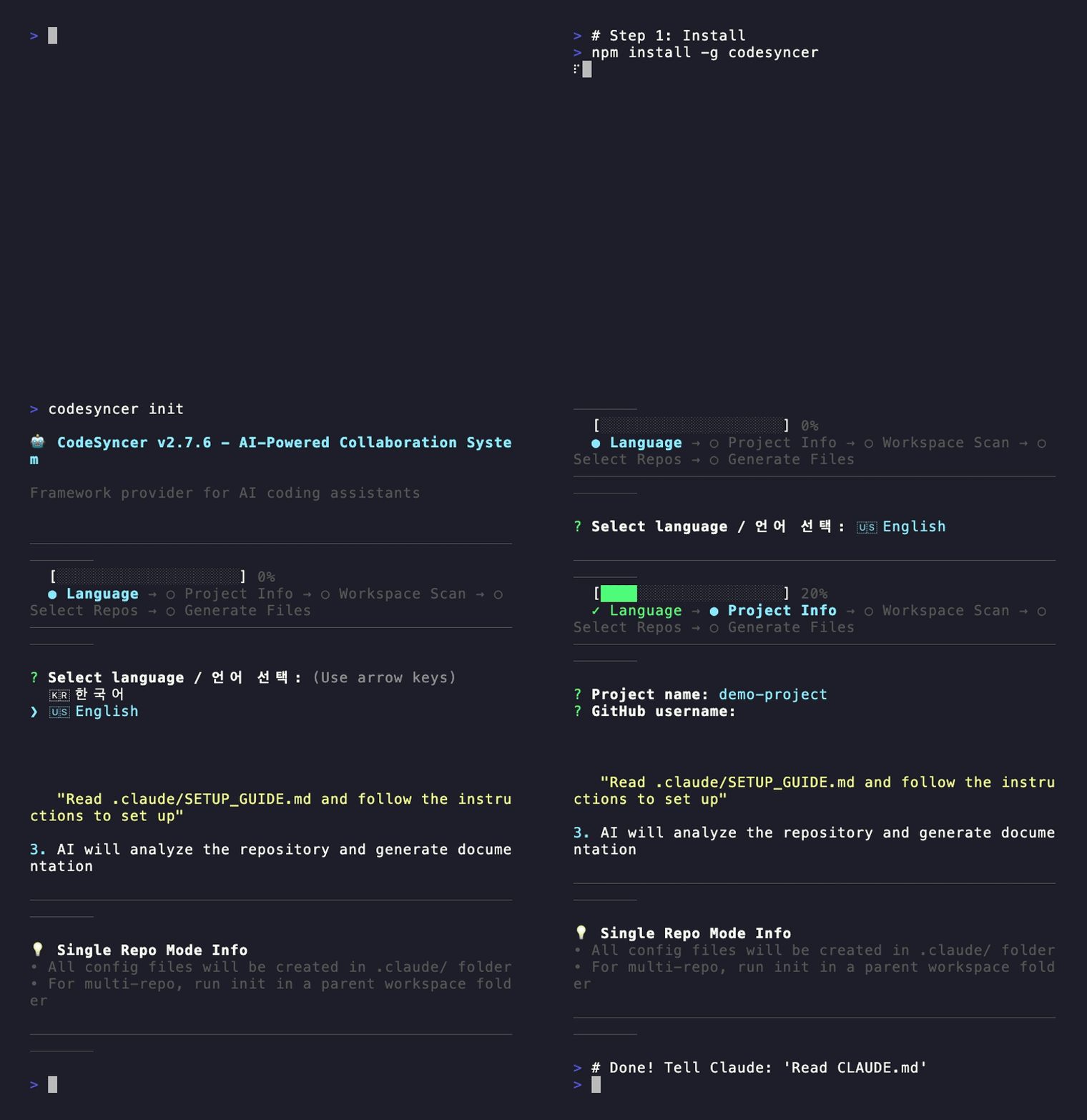
|
|
23
30
|
|
|
24
|
-
|
|
25
|
-
- New AI session = Start from scratch
|
|
26
|
-
- Explain the same architecture again and again
|
|
27
|
-
- "What's the API endpoint?" "How does auth work?" - Every. Single. Time.
|
|
31
|
+
---
|
|
28
32
|
|
|
29
|
-
|
|
33
|
+
## 🧠 How It Works
|
|
34
|
+
|
|
35
|
+
**The core insight**: AI reads code. So put your context IN the code.
|
|
36
|
+
|
|
37
|
+
```
|
|
38
|
+
┌─────────────────────────┐
|
|
39
|
+
│ 🧑💻 Code with Claude │
|
|
40
|
+
└───────────┬─────────────┘
|
|
41
|
+
▼
|
|
42
|
+
┌──────────────┐
|
|
43
|
+
│ Decision? │
|
|
44
|
+
└──────┬───────┘
|
|
45
|
+
▼
|
|
46
|
+
┌─────────────────────────┐
|
|
47
|
+
│ @codesyncer-decision │
|
|
48
|
+
│ @codesyncer-inference │
|
|
49
|
+
└───────────┬─────────────┘
|
|
50
|
+
▼
|
|
51
|
+
┌─────────────────────────┐
|
|
52
|
+
│ 📝 Saved in code │
|
|
53
|
+
└───────────┬─────────────┘
|
|
54
|
+
▼
|
|
55
|
+
┌─────────────────────────┐
|
|
56
|
+
│ 🔄 Next session │
|
|
57
|
+
│ Claude reads code │
|
|
58
|
+
└───────────┬─────────────┘
|
|
59
|
+
▼
|
|
60
|
+
┌─────────────────────────┐
|
|
61
|
+
│ ✅ Context recovered! │
|
|
62
|
+
└─────────────────────────┘
|
|
30
63
|
```
|
|
31
|
-
my-saas-project/
|
|
32
|
-
├── api-server/ (backend)
|
|
33
|
-
├── web-client/ (frontend)
|
|
34
|
-
└── mobile-app/ (mobile)
|
|
35
|
-
```
|
|
36
|
-
- AI only sees one repo at a time
|
|
37
|
-
- Missing context from other repos → Fragmented code
|
|
38
|
-
- "Add login" needs backend API + frontend UI, but AI doesn't know both
|
|
39
64
|
|
|
40
|
-
|
|
41
|
-
-
|
|
42
|
-
-
|
|
43
|
-
-
|
|
65
|
+
```typescript
|
|
66
|
+
// @codesyncer-decision: [2024-01-15] Using JWT (session management is simpler)
|
|
67
|
+
// @codesyncer-inference: Page size 20 (standard UX pattern)
|
|
68
|
+
// @codesyncer-rule: Use httpOnly cookies (XSS prevention)
|
|
69
|
+
const authConfig = { /* ... */ };
|
|
70
|
+
```
|
|
44
71
|
|
|
45
|
-
|
|
72
|
+
Next session? Claude reads your code and **automatically recovers all context**.
|
|
46
73
|
|
|
47
74
|
---
|
|
48
75
|
|
|
49
|
-
##
|
|
76
|
+
## 🔥 Watch Mode: Never Lose Context Again
|
|
50
77
|
|
|
51
|
-
|
|
78
|
+
**Problem**: Claude might forget to add tags while coding.
|
|
52
79
|
|
|
53
|
-
|
|
54
|
-
2. **🗂️ Master document** - Cross-repo navigation and rules
|
|
55
|
-
3. **📋 Per-repo docs** - Each repo's specific guidelines
|
|
56
|
-
4. **🎯 Keyword system** - Auto-pause for critical decisions (payment, auth, etc.)
|
|
80
|
+
**Solution**: Run `codesyncer watch` to catch untagged changes.
|
|
57
81
|
|
|
58
|
-
|
|
59
|
-
|
|
60
|
-
|
|
82
|
+
```bash
|
|
83
|
+
codesyncer watch
|
|
84
|
+
```
|
|
61
85
|
|
|
62
|
-
|
|
86
|
+
```
|
|
87
|
+
[14:32:10] 📝 Changed: src/utils/api.ts
|
|
88
|
+
└── ⚠️ No tags!
|
|
89
|
+
💡 Hint: Add @codesyncer-inference for inferences
|
|
63
90
|
|
|
64
|
-
|
|
91
|
+
[14:33:22] 📝 Changed: src/auth/login.ts
|
|
92
|
+
└── 🎯 Found: @codesyncer-decision
|
|
93
|
+
"Use React Query instead of SWR"
|
|
94
|
+
└── ✅ Added to DECISIONS.md
|
|
95
|
+
```
|
|
65
96
|
|
|
66
|
-
**
|
|
67
|
-
1. **You install** CodeSyncer CLI
|
|
68
|
-
2. **You launch** your AI assistant (Claude Code, Cursor, etc.)
|
|
69
|
-
3. **You run** `codesyncer init`
|
|
70
|
-
4. **AI analyzes** your projects and generates documentation following CodeSyncer's structure
|
|
97
|
+
**Why this matters**: Every code change is an opportunity to capture context. Watch mode ensures nothing slips through.
|
|
71
98
|
|
|
72
|
-
|
|
99
|
+
---
|
|
73
100
|
|
|
74
|
-
|
|
101
|
+
## ✨ Full Feature List
|
|
75
102
|
|
|
76
|
-
|
|
77
|
-
|
|
78
|
-
|
|
79
|
-
|
|
80
|
-
|
|
81
|
-
|
|
82
|
-
|
|
83
|
-
|
|
84
|
-
|
|
85
|
-
- 🔒 **Security**: Path traversal protection and input validation (v2.7.0)
|
|
103
|
+
| Feature | Description |
|
|
104
|
+
|---------|-------------|
|
|
105
|
+
| 🏷️ **Tag System** | `@codesyncer-decision`, `@codesyncer-inference`, `@codesyncer-rule` - permanent context in code |
|
|
106
|
+
| 🔄 **Watch Mode** | Real-time monitoring, warns on untagged changes, auto-syncs to DECISIONS.md |
|
|
107
|
+
| ✅ **Validate** | Check tag coverage, find missing documentation, get fix suggestions |
|
|
108
|
+
| 🤝 **Auto-Pause** | Detects payment/security/auth keywords → asks before coding |
|
|
109
|
+
| 📦 **Monorepo** | Auto-detects Turborepo, pnpm, Nx, Lerna, npm/yarn workspaces |
|
|
110
|
+
| 🌐 **Multi-Language** | Full Korean and English support |
|
|
111
|
+
| 🔒 **Security** | Path traversal protection and input validation |
|
|
86
112
|
|
|
87
113
|
---
|
|
88
114
|
|
|
89
|
-
##
|
|
90
|
-
|
|
91
|
-
|
|
92
|
-
|
|
93
|
-
|
|
115
|
+
## 🔄 Complete Workflow
|
|
116
|
+
|
|
117
|
+
```
|
|
118
|
+
┌─────────────────────────────────────────────────────────────┐
|
|
119
|
+
│ 1. SETUP (once) │
|
|
120
|
+
│ $ npm install -g codesyncer │
|
|
121
|
+
│ $ codesyncer init │
|
|
122
|
+
│ → Creates CLAUDE.md, SETUP_GUIDE.md │
|
|
123
|
+
└─────────────────────────────────────────────────────────────┘
|
|
124
|
+
↓
|
|
125
|
+
┌─────────────────────────────────────────────────────────────┐
|
|
126
|
+
│ 2. TEACH AI (once per session) │
|
|
127
|
+
│ Open Claude Code and say: │
|
|
128
|
+
│ "Read CLAUDE.md" │
|
|
129
|
+
│ → Claude learns the tagging system │
|
|
130
|
+
└─────────────────────────────────────────────────────────────┘
|
|
131
|
+
↓
|
|
132
|
+
┌─────────────────────────────────────────────────────────────┐
|
|
133
|
+
│ 3. CODE (with watch mode running) │
|
|
134
|
+
│ $ codesyncer watch ← Run in background │
|
|
135
|
+
│ Code with Claude as normal │
|
|
136
|
+
│ → Claude adds @codesyncer-* tags automatically │
|
|
137
|
+
│ → Watch mode alerts if tags are missing │
|
|
138
|
+
└─────────────────────────────────────────────────────────────┘
|
|
139
|
+
↓
|
|
140
|
+
┌─────────────────────────────────────────────────────────────┐
|
|
141
|
+
│ 4. NEXT SESSION │
|
|
142
|
+
│ Claude reads your code → sees the tags │
|
|
143
|
+
│ → Context automatically recovered! │
|
|
144
|
+
└─────────────────────────────────────────────────────────────┘
|
|
145
|
+
```
|
|
146
|
+
|
|
147
|
+
**Supported AI Tools:**
|
|
94
148
|
- ✅ **Claude Code** (Recommended)
|
|
95
|
-
- 🚧 Cursor (Coming soon)
|
|
96
|
-
- 🚧 GitHub Copilot (Coming soon)
|
|
97
|
-
- 🚧 Continue.dev (Coming soon)
|
|
98
|
-
|
|
99
|
-
**Important**: Make sure your AI coding assistant is **running and active** before using CodeSyncer. The AI will analyze your projects and help generate accurate documentation.
|
|
149
|
+
- 🚧 Cursor, GitHub Copilot, Continue.dev (Coming soon)
|
|
100
150
|
|
|
101
151
|
---
|
|
102
152
|
|
|
@@ -0,0 +1 @@
|
|
|
1
|
+
{"version":3,"file":"handoff.d.ts","sourceRoot":"","sources":["../../src/commands/handoff.ts"],"names":[],"mappings":"AAIA,OAAO,EAAE,cAAc,EAA4B,MAAM,UAAU,CAAC;AAuRpE;;GAEG;AACH,wBAAsB,cAAc,CAAC,OAAO,EAAE,cAAc,GAAG,OAAO,CAAC,IAAI,CAAC,CAgC3E"}
|