codeceptjs 4.0.0-rc.8 → 4.0.0
This diff represents the content of publicly available package versions that have been released to one of the supported registries. The information contained in this diff is provided for informational purposes only and reflects changes between package versions as they appear in their respective public registries.
- package/README.md +9 -10
- package/bin/codecept.js +15 -2
- package/bin/codeceptq.js +49 -0
- package/bin/mcp-server.js +751 -172
- package/docs/advanced.md +201 -0
- package/docs/agents.md +181 -0
- package/docs/ai.md +489 -0
- package/docs/aitrace.md +266 -0
- package/docs/api.md +332 -0
- package/docs/architecture.md +235 -0
- package/docs/assertions.md +415 -0
- package/docs/auth.md +318 -0
- package/docs/basics.md +424 -0
- package/docs/bdd.md +539 -0
- package/docs/best.md +240 -0
- package/docs/bootstrap.md +132 -0
- package/docs/commands.md +352 -0
- package/docs/community-helpers.md +63 -0
- package/docs/configuration.md +185 -0
- package/docs/continuous-integration.md +431 -0
- package/docs/custom-helpers.md +297 -0
- package/docs/data.md +448 -0
- package/docs/debugging.md +332 -0
- package/docs/detox.md +235 -0
- package/docs/docker.md +107 -0
- package/docs/effects.md +179 -0
- package/docs/element-based-testing.md +295 -0
- package/docs/element-selection.md +125 -0
- package/docs/els.md +328 -0
- package/docs/environment-variables.md +131 -0
- package/docs/examples.md +160 -0
- package/docs/heal.md +213 -0
- package/docs/helpers/ApiDataFactory.md +267 -0
- package/docs/helpers/Appium.md +1419 -0
- package/docs/helpers/Detox.md +665 -0
- package/docs/helpers/ExpectHelper.md +275 -0
- package/docs/helpers/FileSystem.md +152 -0
- package/docs/helpers/GraphQL.md +152 -0
- package/docs/helpers/GraphQLDataFactory.md +226 -0
- package/docs/helpers/JSONResponse.md +255 -0
- package/docs/helpers/MockRequest.md +377 -0
- package/docs/helpers/Playwright.md +2970 -0
- package/docs/helpers/Puppeteer-firefox.md +86 -0
- package/docs/helpers/Puppeteer.md +2583 -0
- package/docs/helpers/REST.md +289 -0
- package/docs/helpers/WebDriver.md +2639 -0
- package/docs/hooks.md +148 -0
- package/docs/index.md +111 -0
- package/docs/installation.md +121 -0
- package/docs/internal-test-server.md +89 -0
- package/docs/locators.md +355 -0
- package/docs/mcp.md +485 -0
- package/docs/migrate-from-cypress.md +98 -0
- package/docs/migrate-from-java.md +108 -0
- package/docs/migrate-from-protractor.md +101 -0
- package/docs/migrate-from-testcafe.md +99 -0
- package/docs/migration-4.md +743 -0
- package/docs/mobile.md +338 -0
- package/docs/pageobjects.md +399 -0
- package/docs/parallel.md +187 -0
- package/docs/playwright.md +714 -0
- package/docs/plugins/aiTrace.md +49 -0
- package/docs/plugins/analyze.md +66 -0
- package/docs/plugins/auth.md +241 -0
- package/docs/plugins/autoDelay.md +48 -0
- package/docs/plugins/browser.md +41 -0
- package/docs/plugins/coverage.md +39 -0
- package/docs/plugins/customLocator.md +119 -0
- package/docs/plugins/customReporter.md +16 -0
- package/docs/plugins/expose.md +75 -0
- package/docs/plugins/heal.md +44 -0
- package/docs/plugins/junitReporter.md +51 -0
- package/docs/plugins/pageInfo.md +34 -0
- package/docs/plugins/pause.md +43 -0
- package/docs/plugins/pauseOnFail.md +18 -0
- package/docs/plugins/retryFailedStep.md +75 -0
- package/docs/plugins/screencast.md +55 -0
- package/docs/plugins/screenshot.md +58 -0
- package/docs/plugins/screenshotOnFail.md +18 -0
- package/docs/plugins/stepTimeout.md +65 -0
- package/docs/plugins.md +87 -0
- package/docs/puppeteer.md +314 -0
- package/docs/quickstart.md +120 -0
- package/docs/reports.md +198 -0
- package/docs/retry.md +311 -0
- package/docs/secrets.md +150 -0
- package/docs/sessions.md +80 -0
- package/docs/shadow.md +68 -0
- package/docs/store.md +94 -0
- package/docs/test-structure.md +275 -0
- package/docs/timeouts.md +183 -0
- package/docs/translation.md +247 -0
- package/docs/tutorial.md +323 -0
- package/docs/typescript.md +159 -0
- package/docs/web-element.md +251 -0
- package/docs/webdriver.md +641 -0
- package/docs/within.md +55 -0
- package/lib/actor.js +1 -36
- package/lib/ai.js +3 -2
- package/lib/aria.js +260 -0
- package/lib/assertions.js +18 -0
- package/lib/codecept.js +7 -7
- package/lib/command/check.js +2 -1
- package/lib/command/dryRun.js +24 -5
- package/lib/command/generate.js +2 -0
- package/lib/command/gherkin/snippets.js +5 -4
- package/lib/command/init.js +248 -266
- package/lib/command/list.js +150 -10
- package/lib/command/query.js +218 -0
- package/lib/command/run-multiple.js +3 -2
- package/lib/command/run-workers.js +1 -14
- package/lib/command/run.js +3 -17
- package/lib/command/utils.js +14 -0
- package/lib/command/workers/runTests.js +11 -15
- package/lib/config.js +77 -4
- package/lib/container.js +97 -15
- package/lib/effects.js +17 -0
- package/lib/element/WebElement.js +195 -3
- package/lib/els.js +12 -6
- package/lib/globals.js +32 -19
- package/lib/heal.js +7 -4
- package/lib/helper/ApiDataFactory.js +2 -1
- package/lib/helper/FileSystem.js +3 -2
- package/lib/helper/GraphQLDataFactory.js +2 -1
- package/lib/helper/Playwright.js +96 -115
- package/lib/helper/Puppeteer.js +43 -131
- package/lib/helper/WebDriver.js +42 -52
- package/lib/helper/errors/NonFocusedType.js +8 -0
- package/lib/helper/extras/Download.js +45 -0
- package/lib/helper/extras/PlaywrightLocator.js +10 -0
- package/lib/helper/extras/elementSelection.js +58 -0
- package/lib/helper/extras/focusCheck.js +43 -0
- package/lib/helper/extras/richTextEditor.js +178 -0
- package/lib/history.js +3 -2
- package/lib/html.js +90 -16
- package/lib/index.js +9 -1
- package/lib/listener/config.js +6 -4
- package/lib/listener/emptyRun.js +2 -1
- package/lib/listener/helpers.js +4 -1
- package/lib/listener/mocha.js +2 -1
- package/lib/listener/pageobjects.js +43 -0
- package/lib/listener/result.js +3 -2
- package/lib/locator.js +126 -16
- package/lib/mocha/cli.js +4 -2
- package/lib/mocha/factory.js +7 -2
- package/lib/mocha/inject.js +1 -1
- package/lib/mocha/scenarioConfig.js +2 -1
- package/lib/mocha/ui.js +5 -6
- package/lib/parser.js +2 -2
- package/lib/pause.js +38 -4
- package/lib/plugin/aiTrace.js +96 -103
- package/lib/plugin/analyze.js +9 -9
- package/lib/plugin/auth.js +3 -3
- package/lib/plugin/browser.js +77 -0
- package/lib/plugin/expose.js +159 -0
- package/lib/plugin/heal.js +47 -3
- package/lib/plugin/junitReporter.js +303 -0
- package/lib/plugin/pageInfo.js +54 -52
- package/lib/plugin/pause.js +131 -0
- package/lib/plugin/pauseOnFail.js +11 -33
- package/lib/plugin/retryFailedStep.js +15 -13
- package/lib/plugin/screencast.js +289 -0
- package/lib/plugin/screenshot.js +558 -0
- package/lib/plugin/screenshotOnFail.js +9 -170
- package/lib/plugin/stepTimeout.js +3 -2
- package/lib/recorder.js +1 -1
- package/lib/rerun.js +2 -1
- package/lib/result.js +2 -1
- package/lib/step/base.js +10 -9
- package/lib/step/comment.js +2 -2
- package/lib/step/config.js +15 -2
- package/lib/step/helper.js +4 -4
- package/lib/step/meta.js +3 -3
- package/lib/step/record.js +5 -5
- package/lib/store.js +72 -3
- package/lib/translation.js +2 -1
- package/lib/utils/mask_data.js +2 -1
- package/lib/utils/pluginParser.js +151 -0
- package/lib/utils/trace.js +297 -0
- package/lib/utils.js +29 -3
- package/lib/workers.js +14 -22
- package/package.json +17 -14
- package/typings/index.d.ts +19 -5
- package/docs/webapi/amOnPage.mustache +0 -11
- package/docs/webapi/appendField.mustache +0 -16
- package/docs/webapi/attachFile.mustache +0 -24
- package/docs/webapi/blur.mustache +0 -18
- package/docs/webapi/checkOption.mustache +0 -13
- package/docs/webapi/clearCookie.mustache +0 -9
- package/docs/webapi/clearField.mustache +0 -14
- package/docs/webapi/click.mustache +0 -29
- package/docs/webapi/clickLink.mustache +0 -8
- package/docs/webapi/closeCurrentTab.mustache +0 -7
- package/docs/webapi/closeOtherTabs.mustache +0 -8
- package/docs/webapi/dontSee.mustache +0 -11
- package/docs/webapi/dontSeeCheckboxIsChecked.mustache +0 -10
- package/docs/webapi/dontSeeCookie.mustache +0 -8
- package/docs/webapi/dontSeeCurrentPathEquals.mustache +0 -10
- package/docs/webapi/dontSeeCurrentUrlEquals.mustache +0 -10
- package/docs/webapi/dontSeeElement.mustache +0 -12
- package/docs/webapi/dontSeeElementInDOM.mustache +0 -8
- package/docs/webapi/dontSeeInCurrentUrl.mustache +0 -4
- package/docs/webapi/dontSeeInField.mustache +0 -16
- package/docs/webapi/dontSeeInSource.mustache +0 -8
- package/docs/webapi/dontSeeInTitle.mustache +0 -8
- package/docs/webapi/dontSeeTraffic.mustache +0 -13
- package/docs/webapi/doubleClick.mustache +0 -13
- package/docs/webapi/downloadFile.mustache +0 -12
- package/docs/webapi/dragAndDrop.mustache +0 -9
- package/docs/webapi/dragSlider.mustache +0 -11
- package/docs/webapi/executeAsyncScript.mustache +0 -24
- package/docs/webapi/executeScript.mustache +0 -26
- package/docs/webapi/fillField.mustache +0 -21
- package/docs/webapi/flushNetworkTraffics.mustache +0 -5
- package/docs/webapi/focus.mustache +0 -13
- package/docs/webapi/forceClick.mustache +0 -28
- package/docs/webapi/forceRightClick.mustache +0 -18
- package/docs/webapi/grabAllWindowHandles.mustache +0 -7
- package/docs/webapi/grabAttributeFrom.mustache +0 -10
- package/docs/webapi/grabAttributeFromAll.mustache +0 -9
- package/docs/webapi/grabBrowserLogs.mustache +0 -9
- package/docs/webapi/grabCookie.mustache +0 -11
- package/docs/webapi/grabCssPropertyFrom.mustache +0 -11
- package/docs/webapi/grabCssPropertyFromAll.mustache +0 -10
- package/docs/webapi/grabCurrentUrl.mustache +0 -9
- package/docs/webapi/grabCurrentWindowHandle.mustache +0 -6
- package/docs/webapi/grabDataFromPerformanceTiming.mustache +0 -20
- package/docs/webapi/grabElementBoundingRect.mustache +0 -20
- package/docs/webapi/grabGeoLocation.mustache +0 -8
- package/docs/webapi/grabHTMLFrom.mustache +0 -10
- package/docs/webapi/grabHTMLFromAll.mustache +0 -9
- package/docs/webapi/grabNumberOfOpenTabs.mustache +0 -8
- package/docs/webapi/grabNumberOfVisibleElements.mustache +0 -9
- package/docs/webapi/grabPageScrollPosition.mustache +0 -8
- package/docs/webapi/grabPopupText.mustache +0 -5
- package/docs/webapi/grabRecordedNetworkTraffics.mustache +0 -10
- package/docs/webapi/grabSource.mustache +0 -8
- package/docs/webapi/grabTextFrom.mustache +0 -10
- package/docs/webapi/grabTextFromAll.mustache +0 -9
- package/docs/webapi/grabTitle.mustache +0 -8
- package/docs/webapi/grabValueFrom.mustache +0 -9
- package/docs/webapi/grabValueFromAll.mustache +0 -8
- package/docs/webapi/grabWebElement.mustache +0 -9
- package/docs/webapi/grabWebElements.mustache +0 -9
- package/docs/webapi/moveCursorTo.mustache +0 -16
- package/docs/webapi/openNewTab.mustache +0 -7
- package/docs/webapi/pressKey.mustache +0 -12
- package/docs/webapi/pressKeyDown.mustache +0 -12
- package/docs/webapi/pressKeyUp.mustache +0 -12
- package/docs/webapi/pressKeyWithKeyNormalization.mustache +0 -60
- package/docs/webapi/refreshPage.mustache +0 -6
- package/docs/webapi/resizeWindow.mustache +0 -6
- package/docs/webapi/rightClick.mustache +0 -14
- package/docs/webapi/saveElementScreenshot.mustache +0 -10
- package/docs/webapi/saveScreenshot.mustache +0 -12
- package/docs/webapi/say.mustache +0 -10
- package/docs/webapi/scrollIntoView.mustache +0 -11
- package/docs/webapi/scrollPageToBottom.mustache +0 -6
- package/docs/webapi/scrollPageToTop.mustache +0 -6
- package/docs/webapi/scrollTo.mustache +0 -12
- package/docs/webapi/see.mustache +0 -11
- package/docs/webapi/seeAttributesOnElements.mustache +0 -9
- package/docs/webapi/seeCheckboxIsChecked.mustache +0 -10
- package/docs/webapi/seeCookie.mustache +0 -8
- package/docs/webapi/seeCssPropertiesOnElements.mustache +0 -9
- package/docs/webapi/seeCurrentPathEquals.mustache +0 -10
- package/docs/webapi/seeCurrentUrlEquals.mustache +0 -11
- package/docs/webapi/seeElement.mustache +0 -12
- package/docs/webapi/seeElementInDOM.mustache +0 -8
- package/docs/webapi/seeInCurrentUrl.mustache +0 -8
- package/docs/webapi/seeInField.mustache +0 -17
- package/docs/webapi/seeInPopup.mustache +0 -8
- package/docs/webapi/seeInSource.mustache +0 -7
- package/docs/webapi/seeInTitle.mustache +0 -8
- package/docs/webapi/seeNumberOfElements.mustache +0 -11
- package/docs/webapi/seeNumberOfVisibleElements.mustache +0 -10
- package/docs/webapi/seeTextEquals.mustache +0 -9
- package/docs/webapi/seeTitleEquals.mustache +0 -8
- package/docs/webapi/seeTraffic.mustache +0 -36
- package/docs/webapi/selectOption.mustache +0 -26
- package/docs/webapi/setCookie.mustache +0 -16
- package/docs/webapi/setGeoLocation.mustache +0 -12
- package/docs/webapi/startRecordingTraffic.mustache +0 -8
- package/docs/webapi/startRecordingWebSocketMessages.mustache +0 -8
- package/docs/webapi/stopRecordingTraffic.mustache +0 -5
- package/docs/webapi/stopRecordingWebSocketMessages.mustache +0 -7
- package/docs/webapi/switchTo.mustache +0 -9
- package/docs/webapi/switchToNextTab.mustache +0 -10
- package/docs/webapi/switchToPreviousTab.mustache +0 -10
- package/docs/webapi/type.mustache +0 -21
- package/docs/webapi/uncheckOption.mustache +0 -13
- package/docs/webapi/wait.mustache +0 -8
- package/docs/webapi/waitForClickable.mustache +0 -11
- package/docs/webapi/waitForCookie.mustache +0 -9
- package/docs/webapi/waitForDetached.mustache +0 -10
- package/docs/webapi/waitForDisabled.mustache +0 -6
- package/docs/webapi/waitForElement.mustache +0 -11
- package/docs/webapi/waitForEnabled.mustache +0 -6
- package/docs/webapi/waitForFunction.mustache +0 -17
- package/docs/webapi/waitForInvisible.mustache +0 -10
- package/docs/webapi/waitForNumberOfTabs.mustache +0 -9
- package/docs/webapi/waitForText.mustache +0 -13
- package/docs/webapi/waitForValue.mustache +0 -10
- package/docs/webapi/waitForVisible.mustache +0 -10
- package/docs/webapi/waitInUrl.mustache +0 -9
- package/docs/webapi/waitNumberOfVisibleElements.mustache +0 -10
- package/docs/webapi/waitToHide.mustache +0 -10
- package/docs/webapi/waitUrlEquals.mustache +0 -10
- package/lib/helper/AI.js +0 -214
- package/lib/helper/Mochawesome.js +0 -96
- package/lib/helper/extras/PlaywrightReactVueLocator.js +0 -52
- package/lib/helper/extras/React.js +0 -65
- package/lib/plugin/stepByStepReport.js +0 -431
- package/lib/plugin/subtitles.js +0 -89
|
@@ -0,0 +1,314 @@
|
|
|
1
|
+
---
|
|
2
|
+
permalink: /puppeteer
|
|
3
|
+
title: Testing with Puppeteer
|
|
4
|
+
---
|
|
5
|
+
|
|
6
|
+
# Testing with Puppeteer
|
|
7
|
+
|
|
8
|
+
Among all Selenium alternatives the most interesting emerging ones are tools developed around Google Chrome [DevTools Protocol](https://chromedevtools.github.io/devtools-protocol/). And the most prominent one is [Puppeteer](https://github.com/puppeteer/puppeteer). It operates over Google Chrome directly without requiring additional tools like ChromeDriver. So tests setup with Puppeteer can be started with npm install only. If you want get faster and simpler to setup tests, Puppeteer would be your choice.
|
|
9
|
+
|
|
10
|
+
CodeceptJS uses Puppeteer to improve end to end testing experience. No need to learn the syntax of a new tool, all drivers in CodeceptJS share the same API.
|
|
11
|
+
|
|
12
|
+
Take a look at a sample test:
|
|
13
|
+
|
|
14
|
+
```js
|
|
15
|
+
I.amOnPage('https://github.com')
|
|
16
|
+
I.click('Sign in', '//html/body/div[1]/header')
|
|
17
|
+
I.see('Sign in to GitHub', 'h1')
|
|
18
|
+
I.fillField('Username or email address', 'something@totest.com')
|
|
19
|
+
I.fillField('Password', '123456')
|
|
20
|
+
I.click('Sign in')
|
|
21
|
+
I.see('Incorrect username or password.', '.flash-error')
|
|
22
|
+
```
|
|
23
|
+
|
|
24
|
+
It's readable and simple and works using Puppeteer API!
|
|
25
|
+
|
|
26
|
+
## Setup
|
|
27
|
+
|
|
28
|
+
To start you need CodeceptJS with Puppeteer packages installed
|
|
29
|
+
|
|
30
|
+
```bash
|
|
31
|
+
npm install codeceptjs puppeteer --save
|
|
32
|
+
```
|
|
33
|
+
|
|
34
|
+
Or see [alternative installation options](https://codecept.io/installation/)
|
|
35
|
+
|
|
36
|
+
> If you already have CodeceptJS project, just install `puppeteer` package and enable a helper it in config.
|
|
37
|
+
|
|
38
|
+
And a basic project initialized
|
|
39
|
+
|
|
40
|
+
```sh
|
|
41
|
+
npx codeceptjs init
|
|
42
|
+
```
|
|
43
|
+
|
|
44
|
+
You will be asked for a Helper to use, you should select Puppeteer and provide url of a website you are testing.
|
|
45
|
+
|
|
46
|
+
> Puppeteer can also work with Firefox. [Learn how to set it up](/helpers/Puppeteer-firefox)
|
|
47
|
+
|
|
48
|
+
## Configuring
|
|
49
|
+
|
|
50
|
+
Make sure `Puppeteer` helper is enabled in `codecept.conf.js` config:
|
|
51
|
+
|
|
52
|
+
```js
|
|
53
|
+
{ // ..
|
|
54
|
+
helpers: {
|
|
55
|
+
Puppeteer: {
|
|
56
|
+
url: "http://localhost",
|
|
57
|
+
show: true
|
|
58
|
+
}
|
|
59
|
+
}
|
|
60
|
+
// ..
|
|
61
|
+
}
|
|
62
|
+
```
|
|
63
|
+
|
|
64
|
+
> Turn off the `show` option if you want to run test in headless mode.
|
|
65
|
+
|
|
66
|
+
Puppeteer uses different strategies to detect if a page is loaded. In configuration use `waitForNavigation` option for that:
|
|
67
|
+
|
|
68
|
+
By default it is set to `domcontentloaded` which waits for `DOMContentLoaded` event being fired. However, for Single Page Applications it's more useful to set this value to `networkidle0` which waits for all network connections to be finished.
|
|
69
|
+
|
|
70
|
+
```js
|
|
71
|
+
helpers: {
|
|
72
|
+
Puppeteer: {
|
|
73
|
+
url: "http://localhost",
|
|
74
|
+
show: true,
|
|
75
|
+
waitForNavigation: "networkidle0"
|
|
76
|
+
}
|
|
77
|
+
}
|
|
78
|
+
```
|
|
79
|
+
|
|
80
|
+
When a test runs faster than application it is recommended to increase `waitForAction` config value.
|
|
81
|
+
It will wait for a small amount of time (100ms) by default after each user action is taken.
|
|
82
|
+
|
|
83
|
+
> ▶ More options are listed in [helper reference](https://codecept.io/helpers/Puppeteer/).
|
|
84
|
+
|
|
85
|
+
## Writing Tests
|
|
86
|
+
|
|
87
|
+
CodeceptJS test should be created with `gt` command:
|
|
88
|
+
|
|
89
|
+
```sh
|
|
90
|
+
npx codeceptjs gt
|
|
91
|
+
```
|
|
92
|
+
|
|
93
|
+
As an example we will use `ToDoMvc` app for testing.
|
|
94
|
+
|
|
95
|
+
### Actions
|
|
96
|
+
|
|
97
|
+
Tests consist with a scenario of user's action taken on a page. The most widely used ones are:
|
|
98
|
+
|
|
99
|
+
- `amOnPage` - to open a webpage (accepts relative or absolute url)
|
|
100
|
+
- `click` - to locate a button or link and click on it
|
|
101
|
+
- `fillField` - to enter a text inside a field
|
|
102
|
+
- `selectOption`, `checkOption` - to interact with a form
|
|
103
|
+
- `wait*` to wait for some parts of page to be fully rendered (important for testing SPA)
|
|
104
|
+
- `grab*` to get values from page sources
|
|
105
|
+
- `see`, `dontSee` - to check for a text on a page
|
|
106
|
+
- `seeElement`, `dontSeeElement` - to check for elements on a page
|
|
107
|
+
|
|
108
|
+
> ℹ All actions are listed in [Puppeteer helper reference](https://codecept.io/helpers/Puppeteer/).\*
|
|
109
|
+
|
|
110
|
+
All actions which interact with elements **support CSS and XPath locators**. Actions like `click` or `fillField` by locate elements by their name or value on a page:
|
|
111
|
+
|
|
112
|
+
```js
|
|
113
|
+
// search for link or button
|
|
114
|
+
I.click('Login')
|
|
115
|
+
// locate field by its label
|
|
116
|
+
I.fillField('Name', 'Miles')
|
|
117
|
+
// we can use input name
|
|
118
|
+
I.fillField('user[email]', 'miles@davis.com')
|
|
119
|
+
```
|
|
120
|
+
|
|
121
|
+
You can also specify the exact locator type with strict locators:
|
|
122
|
+
|
|
123
|
+
```js
|
|
124
|
+
I.click({ css: 'button.red' })
|
|
125
|
+
I.fillField({ name: 'user[email]' }, 'miles@davis.com')
|
|
126
|
+
I.seeElement({ xpath: '//body/header' })
|
|
127
|
+
```
|
|
128
|
+
|
|
129
|
+
### Interactive Pause
|
|
130
|
+
|
|
131
|
+
It's easy to start writing a test if you use [interactive pause](/basics#debug). Just open a web page and pause execution.
|
|
132
|
+
|
|
133
|
+
```js
|
|
134
|
+
Feature('Sample Test')
|
|
135
|
+
|
|
136
|
+
Scenario('open my website', ({ I }) => {
|
|
137
|
+
I.amOnPage('http://todomvc.com/examples/react/')
|
|
138
|
+
pause()
|
|
139
|
+
})
|
|
140
|
+
```
|
|
141
|
+
|
|
142
|
+
This is just enough to run a test, open a browser, and think what to do next to write a test case.
|
|
143
|
+
|
|
144
|
+
When you execute such test with `codeceptjs run` command you may see the browser is started
|
|
145
|
+
|
|
146
|
+
```
|
|
147
|
+
npx codeceptjs run --steps
|
|
148
|
+
```
|
|
149
|
+
|
|
150
|
+
After a page is opened a full control of a browser is given to a terminal. Type in different commands such as `click`, `see`, `fillField` to write the test. A successful commands will be saved to `./output/cli-history` file and can be copied into a test.
|
|
151
|
+
|
|
152
|
+
A complete ToDo-MVC test may look like:
|
|
153
|
+
|
|
154
|
+
```js
|
|
155
|
+
Feature('ToDo')
|
|
156
|
+
|
|
157
|
+
Scenario('create todo item', ({ I }) => {
|
|
158
|
+
I.amOnPage('http://todomvc.com/examples/react/')
|
|
159
|
+
I.dontSeeElement('.todo-count')
|
|
160
|
+
I.fillField('What needs to be done?', 'Write a guide')
|
|
161
|
+
I.pressKey('Enter')
|
|
162
|
+
I.see('Write a guide', '.todo-list')
|
|
163
|
+
I.see('1 item left', '.todo-count')
|
|
164
|
+
})
|
|
165
|
+
```
|
|
166
|
+
|
|
167
|
+
### Grabbers
|
|
168
|
+
|
|
169
|
+
If you need to get element's value inside a test you can use `grab*` methods. They should be used with `await` operator inside `async` function:
|
|
170
|
+
|
|
171
|
+
```js
|
|
172
|
+
import assert from 'assert'
|
|
173
|
+
Scenario('get value of current tasks', async ({ I }) => {
|
|
174
|
+
I.fillField('.todo', 'my first item')
|
|
175
|
+
I.pressKey('Enter')
|
|
176
|
+
I.fillField('.todo', 'my second item')
|
|
177
|
+
I.pressKey('Enter')
|
|
178
|
+
let numTodos = await I.grabTextFrom('.todo-count strong')
|
|
179
|
+
assert.equal(2, numTodos)
|
|
180
|
+
})
|
|
181
|
+
```
|
|
182
|
+
|
|
183
|
+
### Within
|
|
184
|
+
|
|
185
|
+
In case some actions should be taken inside one element (a container or modal window or iframe) you can use `within` block to narrow the scope.
|
|
186
|
+
Please take a note that you can't use within inside another within in Puppeteer helper:
|
|
187
|
+
|
|
188
|
+
```js
|
|
189
|
+
await within('.todoapp', () => {
|
|
190
|
+
I.fillField('.todo', 'my new item')
|
|
191
|
+
I.pressKey('Enter')
|
|
192
|
+
I.see('1 item left', '.todo-count')
|
|
193
|
+
I.click('.todo-list input.toggle')
|
|
194
|
+
})
|
|
195
|
+
I.see('0 items left', '.todo-count')
|
|
196
|
+
```
|
|
197
|
+
|
|
198
|
+
### Each Element <Badge text="Since 3.3" type="warning"/>
|
|
199
|
+
|
|
200
|
+
Usually, CodeceptJS performs an action on the first matched element.
|
|
201
|
+
In case you want to do an action on each element found, use the special function `eachElement` which comes from [eachElement](https://codecept.io/plugins/#eachelement) plugin.
|
|
202
|
+
|
|
203
|
+
`eachElement` function matches all elements by locator and performs a callback on each of those element. A callback function receives [ElementHandle instance](https://pptr.dev/#?product=Puppeteer&show=api-class-elementhandle) from Puppeteer API. `eachElement` may perform arbitrary actions on a page, so the first argument should by a description of the actions performed. This description will be used for logging purposes.
|
|
204
|
+
|
|
205
|
+
Usage example
|
|
206
|
+
|
|
207
|
+
```js
|
|
208
|
+
await eachElement(
|
|
209
|
+
'click all checkboxes',
|
|
210
|
+
'input.custom-checkbox',
|
|
211
|
+
async (el, index) => {
|
|
212
|
+
await el.click();
|
|
213
|
+
});
|
|
214
|
+
);
|
|
215
|
+
```
|
|
216
|
+
|
|
217
|
+
> ℹ Learn more about [eachElement plugin](/plugins/#eachelement)
|
|
218
|
+
|
|
219
|
+
## Mocking Network Requests <Badge text="Since 3.5.16" type="warning"/>
|
|
220
|
+
|
|
221
|
+
Network requests & responses can be mocked and modified. Use `mockRoute` which strictly follows [Puppeteer's `setRequestInterception` API](https://pptr.dev/next/api/puppeteer.page.setrequestinterception).
|
|
222
|
+
|
|
223
|
+
```js
|
|
224
|
+
I.mockRoute('https://reqres.in/api/comments/1', request => {
|
|
225
|
+
request.respond({
|
|
226
|
+
status: 200,
|
|
227
|
+
headers: { 'Access-Control-Allow-Origin': '*' },
|
|
228
|
+
contentType: 'application/json',
|
|
229
|
+
body: '{"name": "this was mocked" }',
|
|
230
|
+
});
|
|
231
|
+
})
|
|
232
|
+
|
|
233
|
+
I.mockRoute('**/*.{png,jpg,jpeg}', route => route.abort());
|
|
234
|
+
|
|
235
|
+
// To disable mocking for a route call `stopMockingRoute`
|
|
236
|
+
// for previously mocked URL
|
|
237
|
+
I.stopMockingRoute('**/*.{png,jpg,jpeg}'
|
|
238
|
+
```
|
|
239
|
+
|
|
240
|
+
To master request intercepting [use `HTTPRequest` object](https://pptr.dev/next/api/puppeteer.httprequest) object passed into mock request handler.
|
|
241
|
+
|
|
242
|
+
## Accessing Puppeteer API
|
|
243
|
+
|
|
244
|
+
To get Puppeteer API inside a test use [`I.usePupepteerTo`](/helpers/Puppeteer/#usepuppeteerto) method with a callback.
|
|
245
|
+
To keep test readable provide a description of a callback inside the first parameter.
|
|
246
|
+
|
|
247
|
+
```js
|
|
248
|
+
I.usePuppeteerTo('emulate offline mode', async ({ page, browser }) => {
|
|
249
|
+
await page.setOfflineMode(true)
|
|
250
|
+
})
|
|
251
|
+
```
|
|
252
|
+
|
|
253
|
+
> Puppeteer commands are asynchronous so a callback function must be async.
|
|
254
|
+
|
|
255
|
+
A Puppeteer helper is passed as argument for callback, so you can combine Puppeteer API with CodeceptJS API:
|
|
256
|
+
|
|
257
|
+
```js
|
|
258
|
+
I.usePuppeteerTo('emulate offline mode', async Puppeteer => {
|
|
259
|
+
// access internal objects browser, page, context of helper
|
|
260
|
+
await Puppeteer.page.setOfflineMode(true)
|
|
261
|
+
// call a method of helper, await is required here
|
|
262
|
+
await Puppeteer.click('Reload')
|
|
263
|
+
})
|
|
264
|
+
```
|
|
265
|
+
|
|
266
|
+
## Capturing Code Coverage
|
|
267
|
+
|
|
268
|
+
Code coverage can be captured, by enabling the `coverage` plugin in `codecept.config.js`.
|
|
269
|
+
|
|
270
|
+
```js
|
|
271
|
+
{
|
|
272
|
+
plugins: {
|
|
273
|
+
coverage: {
|
|
274
|
+
enabled: true
|
|
275
|
+
}
|
|
276
|
+
}
|
|
277
|
+
}
|
|
278
|
+
```
|
|
279
|
+
|
|
280
|
+
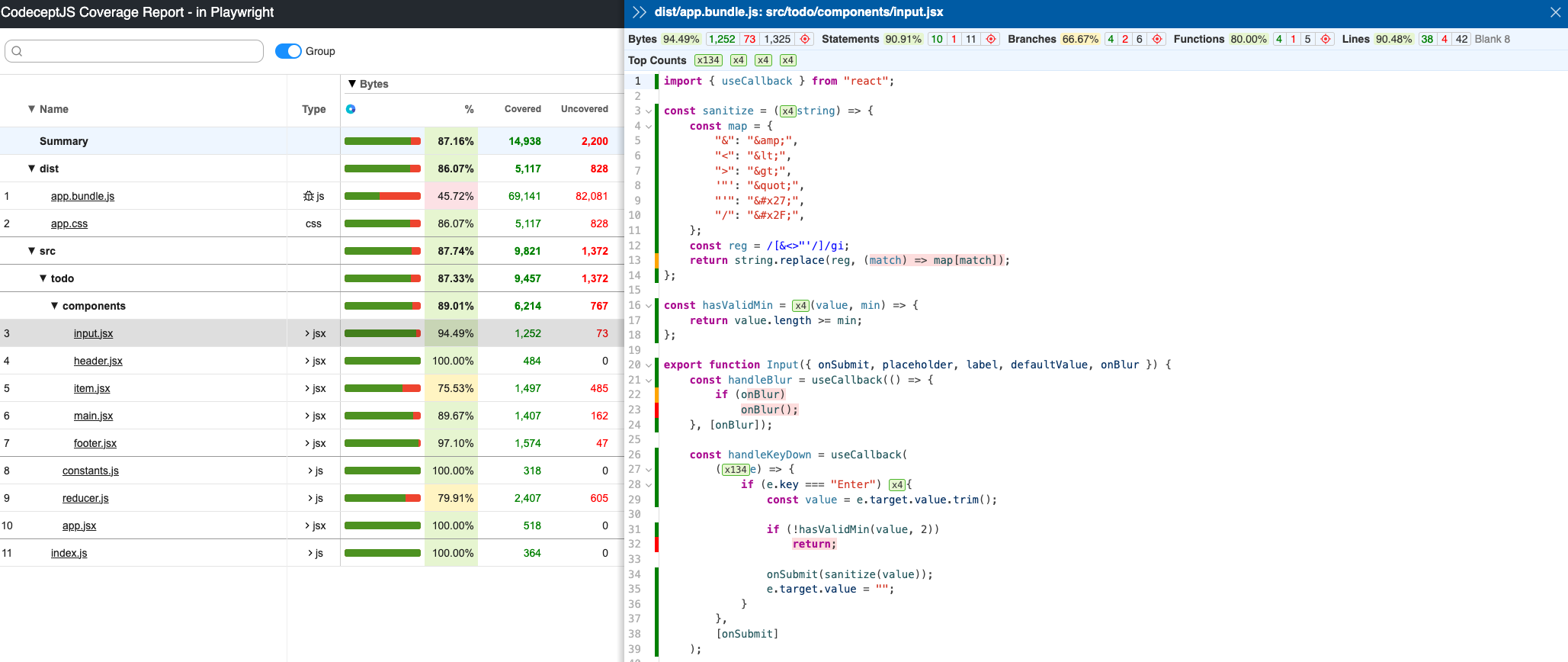
Once all the tests are completed, `codecept` will create and store coverage in `output/coverage` folder, as shown below.
|
|
281
|
+
|
|
282
|
+
>)
|
|
283
|
+
|
|
284
|
+
Open `index.html` in your browser to view the full interactive coverage report.
|
|
285
|
+
|
|
286
|
+

|
|
287
|
+
|
|
288
|
+
|
|
289
|
+
|
|
290
|
+
## Extending Helper
|
|
291
|
+
|
|
292
|
+
To create custom `I.*` commands using Puppeteer API you need to create a custom helper.
|
|
293
|
+
|
|
294
|
+
Start with creating an `MyPuppeteer` helper using `generate:helper` or `gh` command:
|
|
295
|
+
|
|
296
|
+
```sh
|
|
297
|
+
npx codeceptjs gh
|
|
298
|
+
```
|
|
299
|
+
|
|
300
|
+
Then inside a Helper you can access `Puppeteer` helper of CodeceptJS.
|
|
301
|
+
Let's say you want to create `I.renderPageToPdf` action. In this case you need to call `pdf` method of `page` object
|
|
302
|
+
|
|
303
|
+
```js
|
|
304
|
+
// inside a MyPuppeteer helper
|
|
305
|
+
async renderPageToPdf() {
|
|
306
|
+
const page = this.helpers['Puppeteer'].page;
|
|
307
|
+
await page.emulateMedia('screen');
|
|
308
|
+
return page.pdf({path: 'page.pdf'});
|
|
309
|
+
}
|
|
310
|
+
```
|
|
311
|
+
|
|
312
|
+
The same way you can also access `browser` object to implement more actions or handle events.
|
|
313
|
+
|
|
314
|
+
> [▶ Learn more about Helpers](https://codecept.io/helpers/)
|
|
@@ -0,0 +1,120 @@
|
|
|
1
|
+
---
|
|
2
|
+
permalink: quickstart
|
|
3
|
+
title: Quickstart
|
|
4
|
+
layout: Section
|
|
5
|
+
sidebar: true
|
|
6
|
+
---
|
|
7
|
+
|
|
8
|
+
# Quickstart
|
|
9
|
+
|
|
10
|
+
Install CodeceptJS into your project:
|
|
11
|
+
|
|
12
|
+
```
|
|
13
|
+
npm install codeceptjs playwright --save-dev
|
|
14
|
+
```
|
|
15
|
+
|
|
16
|
+
Then install the browser binaries:
|
|
17
|
+
|
|
18
|
+
```
|
|
19
|
+
npx playwright install --with-deps
|
|
20
|
+
```
|
|
21
|
+
|
|
22
|
+
The `--with-deps` flag also installs required system dependencies for the browsers.
|
|
23
|
+
|
|
24
|
+
> Prefer WebDriver or Appium? See [installation options](/installation/) for all supported helpers.
|
|
25
|
+
|
|
26
|
+
---
|
|
27
|
+
|
|
28
|
+
### Init
|
|
29
|
+
|
|
30
|
+
Initialize CodeceptJS to set up the config file and test directory:
|
|
31
|
+
|
|
32
|
+
```
|
|
33
|
+
npx codeceptjs init
|
|
34
|
+
```
|
|
35
|
+
|
|
36
|
+
This command walks you through a short setup wizard and creates `codecept.conf.js`, a sample test file, and any required browser binaries.
|
|
37
|
+
|
|
38
|
+
Answer the questions, accepting defaults to get started quickly:
|
|
39
|
+
|
|
40
|
+
| Question | Default Answer | Alternative
|
|
41
|
+
|---|---|---|
|
|
42
|
+
| Do you plan to write tests in TypeScript? | **n** (No) | or [learn how to use TypeScript](/typescript)
|
|
43
|
+
| Where are your tests located? | `**./*_test.js` | or any glob pattern like `**.spec.js`
|
|
44
|
+
| What helpers do you want to use? | **Playwright** | See options for [web testing](https://codecept.io/basics/#architecture), [mobile testing](https://codecept.io/mobile/), [API testing](https://codecept.io/api/)
|
|
45
|
+
| Where should logs, screenshots, and reports be stored? | `./output` | path to store artifacts and temporary files
|
|
46
|
+
|
|
47
|
+
For Playwright, you'll also be asked about the site and browser:
|
|
48
|
+
|
|
49
|
+
| Question | Default Answer | Alternative
|
|
50
|
+
|---|---|---|
|
|
51
|
+
| Base url of site to be tested | http://localhost | URL of the site you plan to test
|
|
52
|
+
| Show browser window | **y** Yes | or run in **headless mode**
|
|
53
|
+
| Browser | **chromium** | or `firefox`, `webkit` (open-source Safari), or `electron`
|
|
54
|
+
|
|
55
|
+
Sample output:
|
|
56
|
+
|
|
57
|
+
```
|
|
58
|
+
? Do you plan to write tests in TypeScript? No
|
|
59
|
+
? Where are your tests located? **./*_test.js
|
|
60
|
+
? What helpers do you want to use? Playwright
|
|
61
|
+
? Where should logs, screenshots, and reports be stored? ./output
|
|
62
|
+
? [Playwright] Base url of site to be tested http://localhost
|
|
63
|
+
? [Playwright] Show browser window Yes
|
|
64
|
+
? [Playwright] Browser in which testing will be performed chromium
|
|
65
|
+
```
|
|
66
|
+
|
|
67
|
+
When asked, create your first feature and test file.
|
|
68
|
+
|
|
69
|
+
---
|
|
70
|
+
|
|
71
|
+
### Write Your First Test
|
|
72
|
+
|
|
73
|
+
Open the generated test file. It will look like this:
|
|
74
|
+
|
|
75
|
+
```js
|
|
76
|
+
Feature('My First Test');
|
|
77
|
+
|
|
78
|
+
Scenario('test something', ({ I }) => {
|
|
79
|
+
|
|
80
|
+
});
|
|
81
|
+
```
|
|
82
|
+
|
|
83
|
+
Add a simple scenario:
|
|
84
|
+
|
|
85
|
+
```js
|
|
86
|
+
Feature('My First Test');
|
|
87
|
+
|
|
88
|
+
Scenario('test something', ({ I }) => {
|
|
89
|
+
I.amOnPage('https://github.com');
|
|
90
|
+
I.see('GitHub');
|
|
91
|
+
});
|
|
92
|
+
```
|
|
93
|
+
|
|
94
|
+
---
|
|
95
|
+
|
|
96
|
+
### Run Tests
|
|
97
|
+
|
|
98
|
+
```
|
|
99
|
+
npx codeceptjs run
|
|
100
|
+
```
|
|
101
|
+
|
|
102
|
+
Expected output:
|
|
103
|
+
|
|
104
|
+
```bash
|
|
105
|
+
My First Test --
|
|
106
|
+
test something
|
|
107
|
+
I am on page "https://github.com"
|
|
108
|
+
I see "GitHub"
|
|
109
|
+
✓ OK
|
|
110
|
+
```
|
|
111
|
+
|
|
112
|
+
Run in headless mode:
|
|
113
|
+
|
|
114
|
+
```
|
|
115
|
+
npx codeceptjs run --headless
|
|
116
|
+
```
|
|
117
|
+
|
|
118
|
+
See all available commands in the [CLI reference](https://codecept.io/commands/).
|
|
119
|
+
|
|
120
|
+
> [▶ Next: CodeceptJS Basics](/basics/)
|
package/docs/reports.md
ADDED
|
@@ -0,0 +1,198 @@
|
|
|
1
|
+
---
|
|
2
|
+
permalink: /reports
|
|
3
|
+
title: Reporters
|
|
4
|
+
---
|
|
5
|
+
|
|
6
|
+
# Reporters
|
|
7
|
+
|
|
8
|
+
CodeceptJS prints test results to the console by default (see [CLI output](#cli-output)). For an HTML report, a pull-request comment, JUnit XML, or a hosted dashboard, it is recommeded to use **[Testomat.io Reporter](https://github.com/testomatio/reporter)**. It sends results to whichever destinations you turn on with steps, screenshots, videos, traces, and logs.
|
|
9
|
+
|
|
10
|
+
### Install
|
|
11
|
+
|
|
12
|
+
```sh
|
|
13
|
+
npm install @testomatio/reporter --save-dev
|
|
14
|
+
```
|
|
15
|
+
|
|
16
|
+
Enable reporter plugin:
|
|
17
|
+
|
|
18
|
+
```js
|
|
19
|
+
// codecept.conf.js
|
|
20
|
+
plugins: {
|
|
21
|
+
testomatio: {
|
|
22
|
+
enabled: true,
|
|
23
|
+
require: '@testomatio/reporter/codecept',
|
|
24
|
+
html: true,
|
|
25
|
+
markdown: true,
|
|
26
|
+
csv: true,
|
|
27
|
+
reportDir: 'output/report',
|
|
28
|
+
},
|
|
29
|
+
}
|
|
30
|
+
```
|
|
31
|
+
|
|
32
|
+
The local reports above are enabled directly from CodeceptJS config. If `reportDir` is omitted, reports are written to `output/report` using the CodeceptJS `output` directory.
|
|
33
|
+
|
|
34
|
+
### Enable an output
|
|
35
|
+
|
|
36
|
+
Each output can also be enabled with environment variables. Run your tests as usual and one run feeds every output you enabled.
|
|
37
|
+
|
|
38
|
+
| To get… | Set | Details |
|
|
39
|
+
| --- | --- | --- |
|
|
40
|
+
| HTML report | `TESTOMATIO_HTML_REPORT_SAVE=1` | [HTML Report](#html-report) |
|
|
41
|
+
| Markdown report | `TESTOMATIO_MARKDOWN_REPORT_SAVE=1` | [Markdown Report](#markdown-report) |
|
|
42
|
+
| Run Result on [app.testomat.io](https://testomat.io) | `TESTOMATIO` (project API key) | [Cloud Report](#cloud-report) |
|
|
43
|
+
| A comment on a GitHub Pull Request | `GH_PAT` (`${{ github.token }}` in Actions) | [GitHub Report](#github-report) |
|
|
44
|
+
| A comment on a GitLab Merge Request | `GITLAB_PAT` (token with `api` scope) | [GitLab Report](#gitlab-report) |
|
|
45
|
+
| A comment on a Bitbucket Pull Request | `BITBUCKET_ACCESS_TOKEN` (repo access token) | [Bitbucket Report](#bitbucket-report) |
|
|
46
|
+
|
|
47
|
+
Screenshots and videos in these reports are uploaded to your own storage — see [Artifacts](#artifacts).
|
|
48
|
+
|
|
49
|
+
Put the variables on CI when running tests:
|
|
50
|
+
|
|
51
|
+
```yaml
|
|
52
|
+
- run: npx codeceptjs run
|
|
53
|
+
env:
|
|
54
|
+
TESTOMATIO_HTML_REPORT_SAVE: 1 # → output/reports/testomatio-report.html
|
|
55
|
+
TESTOMATIO_HTML_REPORT_FOLDER: output/reports # keep it with the rest of output/
|
|
56
|
+
GH_PAT: ${{ github.token }} # → PR comment
|
|
57
|
+
# TESTOMATIO: ${{ secrets.TESTOMATIO }} # → testomat.io run
|
|
58
|
+
- uses: actions/upload-artifact@v4
|
|
59
|
+
if: always()
|
|
60
|
+
with:
|
|
61
|
+
name: codeceptjs-output
|
|
62
|
+
path: output/
|
|
63
|
+
```
|
|
64
|
+
|
|
65
|
+
The GitHub pipe also needs the job to grant `permissions: pull-requests: write`.
|
|
66
|
+
|
|
67
|
+
|
|
68
|
+
### HTML Report
|
|
69
|
+
|
|
70
|
+
A single self-contained HTML file with the run summary and, per test, its steps, screenshots, logs, and error. It needs no API key and no service, so it works anywhere — open it locally or attach it to a CI build.
|
|
71
|
+
|
|
72
|
+

|
|
73
|
+
|
|
74
|
+
- Preferred in CodeceptJS 4: enable `html: true` in `plugins.testomatio` and run `npx codeceptjs run`
|
|
75
|
+
|
|
76
|
+
- `TESTOMATIO_HTML_REPORT_SAVE=1` — enable the report
|
|
77
|
+
- `TESTOMATIO_HTML_REPORT_FOLDER=output/reports` — keep it inside CodeceptJS's `output/` dir (default folder is `html-report`)
|
|
78
|
+
- `TESTOMATIO_HTML_FILENAME` — file name, must end in `.html` (default `testomatio-report.html`)
|
|
79
|
+
|
|
80
|
+
### Cloud Report
|
|
81
|
+
|
|
82
|
+
Sends the run to [app.testomat.io](https://testomat.io) — a hosted dashboard with run history, flaky-test detection, parallel-run merging, re-running failed tests, and notifications. Free for small teams.
|
|
83
|
+
|
|
84
|
+

|
|
85
|
+
|
|
86
|
+
- `TESTOMATIO` — project API key; enables the pipe
|
|
87
|
+
- `TESTOMATIO_CREATE=1` — create tests in Testomat.io that were not imported beforehand
|
|
88
|
+
- `TESTOMATIO_TITLE` — report title
|
|
89
|
+
- `TESTOMATIO_RUNGROUP_TITLE` — add the run to a group (e.g. `"Build ${BUILD_ID}"`)
|
|
90
|
+
- `TESTOMATIO_PUBLISH=1` — make the report publicly accessible
|
|
91
|
+
|
|
92
|
+
More options (shared runs, rungroups, run management): [Testomat.io pipe](https://github.com/testomatio/reporter/blob/master/docs/pipes/testomatio.md).
|
|
93
|
+
|
|
94
|
+
To view artifacts on cloud they must be uploaded to S3 storages. Images from [`screenshot`](/plugins#screenshot) plugin, videos from the [`screencast`](/plugins#screencast) plugin (or the Playwright helper's `video` and `trace`). Can be used with any S3 provider: AWS S3, Cloudflare R2, Google Cloud Storage (interoperability mode), DigitalOcean Spaces, MinIO.
|
|
95
|
+
|
|
96
|
+
### GitHub Report
|
|
97
|
+
|
|
98
|
+
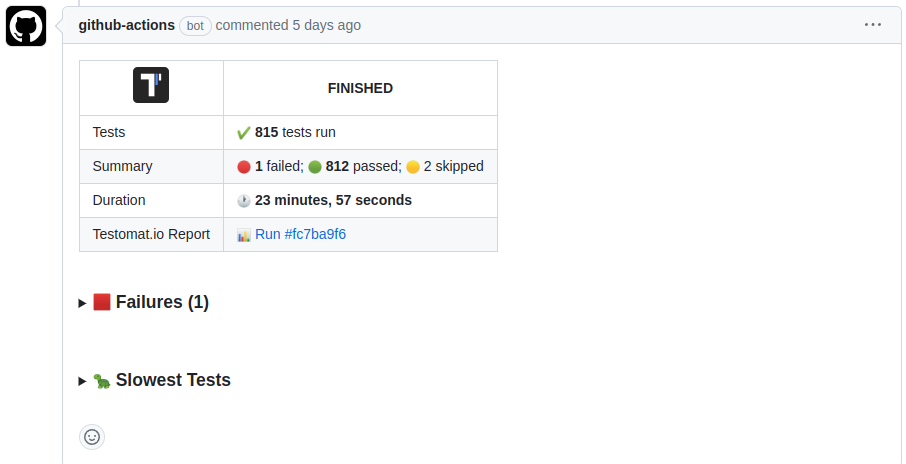
Posts a comment to the Pull Request: run status, pass/fail/skip counts, stack traces of the failures, screenshots, and the slowest tests. Re-running the workflow replaces the previous comment.
|
|
99
|
+
|
|
100
|
+
|
|
101
|
+
|
|
102
|
+
- `GH_PAT` — GitHub token; `${{ github.token }}` works in Actions
|
|
103
|
+
- the job must grant `permissions: pull-requests: write`
|
|
104
|
+
- `GH_KEEP_OUTDATED_REPORTS=1` — keep previous comments instead of deleting them
|
|
105
|
+
|
|
106
|
+
### GitLab Report
|
|
107
|
+
|
|
108
|
+
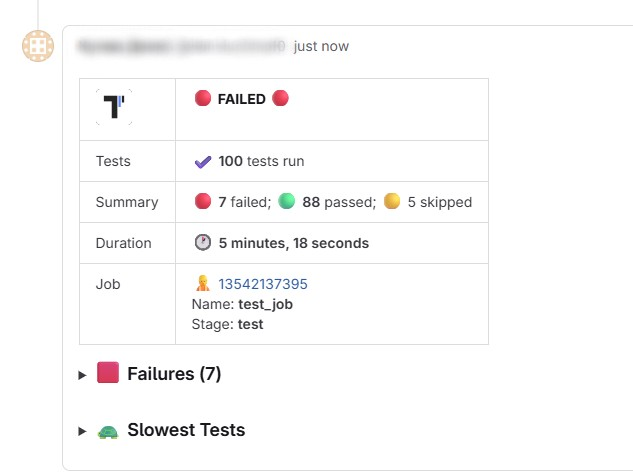
Posts a comment to the Merge Request with the same summary. It needs Merge Request context, so run it in merge-request pipelines.
|
|
109
|
+
|
|
110
|
+
|
|
111
|
+
|
|
112
|
+
- `GITLAB_PAT` — Personal or Project Access Token with `api` scope
|
|
113
|
+
- run in merge-request pipelines (`$CI_PIPELINE_SOURCE == "merge_request_event"`)
|
|
114
|
+
- `GITLAB_KEEP_OUTDATED_REPORTS=1` — keep previous comments
|
|
115
|
+
- `GITLAB_REMOVE_ALL_OUTDATED_REPORTS=1` — remove all previous comments, not just the latest
|
|
116
|
+
|
|
117
|
+
### Bitbucket Report
|
|
118
|
+
|
|
119
|
+
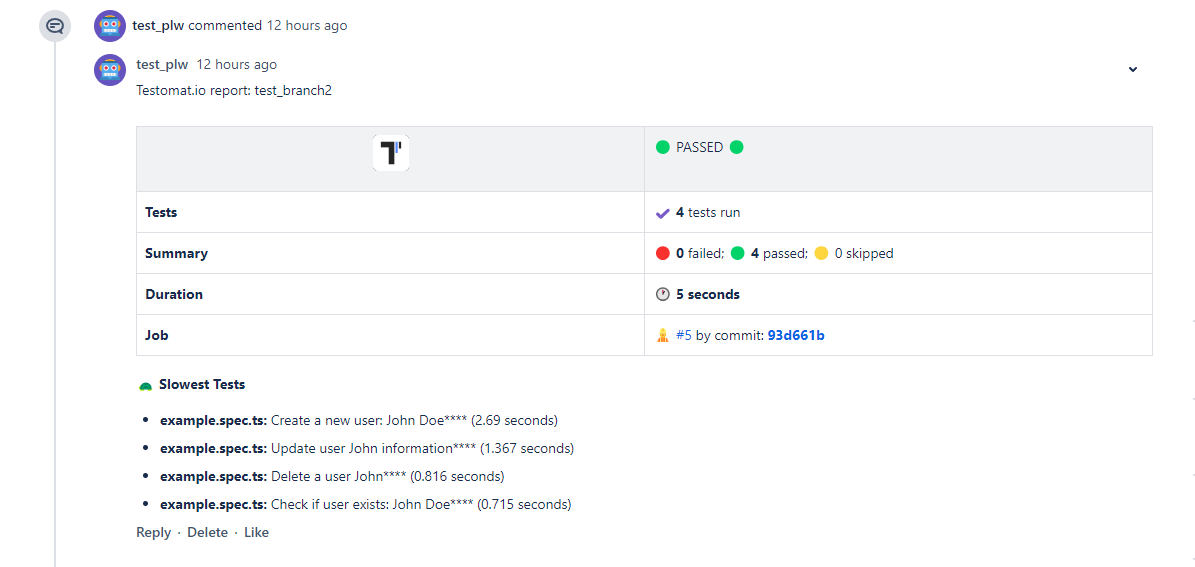
Posts a comment to the Pull Request with the same summary. Comments are created only in `pull-requests` pipelines.
|
|
120
|
+
|
|
121
|
+
|
|
122
|
+
|
|
123
|
+
- `BITBUCKET_ACCESS_TOKEN` — repository access token with `Pull requests: Write` and `Repository: Read`
|
|
124
|
+
- run in `pull-requests` pipelines
|
|
125
|
+
- `BITBUCKET_KEEP_OUTDATED_REPORTS=1` — keep previous comments
|
|
126
|
+
|
|
127
|
+
### Markdown Report
|
|
128
|
+
|
|
129
|
+
- Preferred in CodeceptJS 4: enable `markdown: true` in `plugins.testomatio` and run `npx codeceptjs run`
|
|
130
|
+
|
|
131
|
+

|
|
132
|
+
|
|
133
|
+
A single self-contained Markdown file — renders in PR comments, CI job summaries, and Slack, and is convenient for AI agents reading test results. Needs no API key.
|
|
134
|
+
|
|
135
|
+
- `TESTOMATIO_MARKDOWN_REPORT_SAVE=1` — enable the report
|
|
136
|
+
- `TESTOMATIO_MARKDOWN_REPORT_FOLDER=output/reports` — keep it inside CodeceptJS's `output/` dir (default folder is `md-report`)
|
|
137
|
+
- `TESTOMATIO_MARKDOWN_FILENAME` — file name, must end in `.md` (default `testomatio-report.md`)
|
|
138
|
+
- `TESTOMATIO_TITLE` — document title (default `Test Results`)
|
|
139
|
+
|
|
140
|
+
On GitHub Actions, append it to the job summary: `cat output/reports/testomatio-report.md >> "$GITHUB_STEP_SUMMARY"`.
|
|
141
|
+
|
|
142
|
+
## JUnit XML
|
|
143
|
+
|
|
144
|
+
For CI servers that read JUnit XML (Jenkins, GitLab CI, CircleCI, the GitHub Actions test tab), enable the [`junitReporter`](/plugins#junitreporter) plugin. It writes `output/report.xml` with CodeceptJS steps included — unlike `mocha-junit-reporter`.
|
|
145
|
+
|
|
146
|
+
```js
|
|
147
|
+
plugins: {
|
|
148
|
+
junitReporter: { enabled: true },
|
|
149
|
+
}
|
|
150
|
+
```
|
|
151
|
+
|
|
152
|
+
Options (`outputName`, `output`, `testGroupName`, `attachMeta`, `attachSteps`, `stepsInFailure`): [plugin docs](/plugins#junitreporter).
|
|
153
|
+
|
|
154
|
+
## ReportPortal
|
|
155
|
+
|
|
156
|
+
[ReportPortal](https://reportportal.io) is an open-source self-hosted dashboard for test reports. Publish with the [CodeceptJS Agent for ReportPortal](https://github.com/reportportal/agent-js-codecept/).
|
|
157
|
+
|
|
158
|
+
## Custom reporter
|
|
159
|
+
|
|
160
|
+
The [`customReporter`](/plugins#customreporter) plugin hooks into test events:
|
|
161
|
+
|
|
162
|
+
```js
|
|
163
|
+
plugins: {
|
|
164
|
+
customReporter: {
|
|
165
|
+
enabled: true,
|
|
166
|
+
onTestFailed: (test, err) => console.log('FAIL', test.title, err.message),
|
|
167
|
+
onResult: result => {
|
|
168
|
+
// result.stats, result.tests
|
|
169
|
+
},
|
|
170
|
+
},
|
|
171
|
+
}
|
|
172
|
+
```
|
|
173
|
+
|
|
174
|
+
Hooks: `onHookFinished`, `onTestBefore`, `onTestPassed`, `onTestFailed`, `onTestSkipped`, `onTestFinished`, `onResult`.
|
|
175
|
+
|
|
176
|
+
For built-in Mocha reporters, use `--reporter`:
|
|
177
|
+
|
|
178
|
+
```sh
|
|
179
|
+
npx codeceptjs run --reporter dot
|
|
180
|
+
```
|
|
181
|
+
|
|
182
|
+
> The bundled `Mochawesome` helper was removed in 4.x. For an HTML report use the [Testomat.io Reporter](https://github.com/testomatio/reporter) HTML pipe (see above); for JUnit XML use the [`junitReporter`](#junit-xml) plugin. Wiring multiple Mocha reporters through `mocha-multi`/`cmr` is not recommended — prefer these instead.
|
|
183
|
+
|
|
184
|
+
Plugins exist for [TestRail](https://www.npmjs.com/package/codeceptjs-testrail) and [Tesults](https://www.npmjs.com/package/codeceptjs-tesults).
|
|
185
|
+
|
|
186
|
+
## CLI output
|
|
187
|
+
|
|
188
|
+
By default CodeceptJS prints test names and failures. Add `--steps` to see each step, `--debug` for runner notices, or `--verbose` for full stack traces and events (use this when reporting bugs).
|
|
189
|
+
|
|
190
|
+
```sh
|
|
191
|
+
npx codeceptjs run --steps
|
|
192
|
+
```
|
|
193
|
+
|
|
194
|
+
`dry-run` lists tests and steps without running them:
|
|
195
|
+
|
|
196
|
+
```sh
|
|
197
|
+
npx codeceptjs dry-run --steps
|
|
198
|
+
```
|