codeceptjs 4.0.0-rc.21 → 4.0.0-rc.22
This diff represents the content of publicly available package versions that have been released to one of the supported registries. The information contained in this diff is provided for informational purposes only and reflects changes between package versions as they appear in their respective public registries.
- package/docs/advanced.md +1 -1
- package/docs/architecture.md +219 -0
- package/docs/configuration.md +82 -127
- package/docs/continuous-integration.md +113 -151
- package/docs/custom-helpers.md +1 -1
- package/docs/hooks.md +76 -277
- package/docs/installation.md +95 -40
- package/docs/parallel.md +98 -496
- package/docs/plugins.md +43 -0
- package/docs/reports.md +102 -401
- package/docs/retry.md +44 -37
- package/docs/typescript.md +54 -269
- package/lib/command/workers/runTests.js +1 -5
- package/lib/helper/Playwright.js +10 -4
- package/lib/plugin/junitReporter.js +303 -0
- package/package.json +1 -1
- package/docs/internal-api.md +0 -265
package/docs/plugins.md
CHANGED
|
@@ -569,6 +569,49 @@ More config options are available:
|
|
|
569
569
|
|
|
570
570
|
* `config` (optional, default `{}`)
|
|
571
571
|
|
|
572
|
+
## junitReporter
|
|
573
|
+
|
|
574
|
+
Generates a JUnit-compatible XML report after a test run.
|
|
575
|
+
|
|
576
|
+
Unlike Mocha's `mocha-junit-reporter`, this plugin understands CodeceptJS steps and substeps.
|
|
577
|
+
For every `<testcase>` it includes:
|
|
578
|
+
|
|
579
|
+
* `<properties>` — the test's meta information: every `meta` key from `Scenario('...', { meta })`, plus its `tags` and `retries`
|
|
580
|
+
* `<system-out>` — an indented step/substep log (substeps are nested under their meta step); only failed steps are marked
|
|
581
|
+
* `<failure>` — for failed tests: the error message, type, stack trace and (optionally) the step trace
|
|
582
|
+
|
|
583
|
+
The produced file is consumable by Jenkins, GitLab CI, CircleCI, GitHub Actions test reporters, etc.
|
|
584
|
+
|
|
585
|
+
#### Configuration
|
|
586
|
+
|
|
587
|
+
```js
|
|
588
|
+
"plugins": {
|
|
589
|
+
"junitReporter": {
|
|
590
|
+
"enabled": true
|
|
591
|
+
}
|
|
592
|
+
}
|
|
593
|
+
```
|
|
594
|
+
|
|
595
|
+
Possible config options:
|
|
596
|
+
|
|
597
|
+
* `outputName`: file name for the report. Default: `report.xml`.
|
|
598
|
+
* `output`: directory where the report is stored, relative to the project root. Default: the `output` directory.
|
|
599
|
+
* `testGroupName`: value of the `name` attribute on the root `<testsuites>` element. Default: `CodeceptJS`.
|
|
600
|
+
* `attachMeta`: add the test's meta information (`meta` keys, `tags`, `retries`) as `<properties>`. Default: true.
|
|
601
|
+
* `attachSteps`: add the step/substep log as `<system-out>`. Default: true.
|
|
602
|
+
* `stepsInFailure`: append the step trace to the `<failure>` body. Default: true.
|
|
603
|
+
|
|
604
|
+
CLI examples:
|
|
605
|
+
|
|
606
|
+
npx codeceptjs run -p junitReporter
|
|
607
|
+
npx codeceptjs run -p junitReporter:outputName=junit.xml
|
|
608
|
+
|
|
609
|
+
> ℹ When running with `run-workers`, steps are serialized between processes and substep nesting is flattened.
|
|
610
|
+
|
|
611
|
+
### Parameters
|
|
612
|
+
|
|
613
|
+
* `config` **any** (optional, default `{}`)
|
|
614
|
+
|
|
572
615
|
## pageInfo
|
|
573
616
|
|
|
574
617
|
Collects information from web page after each failed test and adds it to the test as an artifact.
|
package/docs/reports.md
CHANGED
|
@@ -5,479 +5,180 @@ title: Reporters
|
|
|
5
5
|
|
|
6
6
|
# Reporters
|
|
7
7
|
|
|
8
|
-
|
|
8
|
+
CodeceptJS prints test results to the console by default (see [CLI output](#cli-output)). For an HTML report, a pull-request comment, JUnit XML, or a hosted dashboard, it is recommeded to use **[Testomat.io Reporter](https://github.com/testomatio/reporter)**. It sends results to whichever destinations you turn on with steps, screenshots, videos, traces, and logs.
|
|
9
9
|
|
|
10
|
-
|
|
11
|
-
Test names and failures will be printed out on screen.
|
|
10
|
+
### Install
|
|
12
11
|
|
|
13
12
|
```sh
|
|
14
|
-
|
|
15
|
-
✓ search in 2577ms
|
|
16
|
-
✓ signin in 2170ms
|
|
17
|
-
✖ register in 1306ms
|
|
18
|
-
|
|
19
|
-
-- FAILURES:
|
|
20
|
-
|
|
21
|
-
1) GitHub: register:
|
|
22
|
-
Field q not found by name|text|CSS|XPath
|
|
23
|
-
|
|
24
|
-
Scenario Steps:
|
|
25
|
-
|
|
26
|
-
- I.fillField("q", "aaa") at examples/github_test.js:29:7
|
|
27
|
-
- I.fillField("user[password]", "user@user.com") at examples/github_test.js:28:7
|
|
28
|
-
- I.fillField("user[email]", "user@user.com") at examples/github_test.js:27:7
|
|
29
|
-
- I.fillField("user[login]", "User") at examples/github_test.js:26:7
|
|
30
|
-
|
|
31
|
-
|
|
32
|
-
|
|
33
|
-
Run with --verbose flag to see NodeJS stacktrace
|
|
34
|
-
|
|
35
|
-
```
|
|
36
|
-
|
|
37
|
-
output steps use `--steps` option:
|
|
38
|
-
|
|
39
|
-
```
|
|
40
|
-
npx codeceptjs run --steps
|
|
41
|
-
```
|
|
42
|
-
|
|
43
|
-
Output:
|
|
44
|
-
|
|
45
|
-
```sh
|
|
46
|
-
GitHub --
|
|
47
|
-
search
|
|
48
|
-
• I am on page "https://github.com"
|
|
49
|
-
• I am on page "https://github.com/search"
|
|
50
|
-
• I fill field "Search GitHub", "CodeceptJS"
|
|
51
|
-
• I press key "Enter"
|
|
52
|
-
• I see "Codeception/CodeceptJS", "a"
|
|
53
|
-
✓ OK in 2681ms
|
|
54
|
-
|
|
55
|
-
signin
|
|
56
|
-
• I am on page "https://github.com"
|
|
57
|
-
• I click "Sign in"
|
|
58
|
-
• I see "Sign in to GitHub"
|
|
59
|
-
• I fill field "Username or email address", "something@totest.com"
|
|
60
|
-
• I fill field "Password", "123456"
|
|
61
|
-
• I click "Sign in"
|
|
62
|
-
• I see "Incorrect username or password.", ".flash-error"
|
|
63
|
-
✓ OK in 2252ms
|
|
64
|
-
|
|
65
|
-
register
|
|
66
|
-
• I am on page "https://github.com"
|
|
67
|
-
Within .js-signup-form:
|
|
68
|
-
• I fill field "user[login]", "User"
|
|
69
|
-
• I fill field "user[email]", "user@user.com"
|
|
70
|
-
• I fill field "user[password]", "user@user.com"
|
|
71
|
-
• I fill field "q", "aaa"
|
|
72
|
-
✖ FAILED in 1260ms
|
|
73
|
-
```
|
|
74
|
-
|
|
75
|
-
To get additional information about test execution use `--debug` option.
|
|
76
|
-
|
|
77
|
-
```
|
|
78
|
-
npx codeceptjs run --debug
|
|
79
|
-
```
|
|
80
|
-
|
|
81
|
-
This will show execution steps
|
|
82
|
-
as well as notices from test runner. To get even more information with more technical details like error stack traces,
|
|
83
|
-
and global promises, or events use `--verbose` mode.
|
|
84
|
-
|
|
85
|
-
```
|
|
86
|
-
npx codeceptjs run --verbose
|
|
87
|
-
```
|
|
88
|
-
|
|
89
|
-
```sh
|
|
90
|
-
GitHub --
|
|
91
|
-
register
|
|
92
|
-
[1] Starting recording promises
|
|
93
|
-
Emitted | test.before
|
|
94
|
-
> WebDriver._before
|
|
95
|
-
[1] Queued | hook WebDriver._before()
|
|
96
|
-
[1] Queued | amOnPage: https://github.com
|
|
97
|
-
Emitted | step.before (I am on page "https://github.com")
|
|
98
|
-
• I am on page "https://github.com"
|
|
99
|
-
Emitted | step.after (I am on page "https://github.com")
|
|
100
|
-
Emitted | test.start ([object Object])
|
|
101
|
-
...
|
|
102
|
-
```
|
|
103
|
-
|
|
104
|
-
Please use verbose output when reporting issues to GitHub.
|
|
105
|
-
|
|
106
|
-
### Dry Run
|
|
107
|
-
|
|
108
|
-
There is a way to list all tests and their steps without actually executing them. Execute tests in `dry-run` mode to see all available tests:
|
|
109
|
-
|
|
110
|
-
```
|
|
111
|
-
npx codeceptjs dry-run
|
|
112
|
-
```
|
|
113
|
-
|
|
114
|
-
Output:
|
|
115
|
-
|
|
116
|
-
```
|
|
117
|
-
Tests from /home/davert/projects/codeceptjs/examples:
|
|
118
|
-
|
|
119
|
-
Business rules --
|
|
120
|
-
☐ do something
|
|
121
|
-
Google --
|
|
122
|
-
☐ test @123
|
|
123
|
-
GitHub -- /home/davert/projects/codeceptjs/examples/github_test.js
|
|
124
|
-
☐ Visit Home Page @retry
|
|
125
|
-
☐ search @grop
|
|
126
|
-
☐ signin @normal @important @slow
|
|
127
|
-
☐ signin2
|
|
128
|
-
☐ register
|
|
129
|
-
|
|
130
|
-
Total: 3 suites | 7 tests
|
|
131
|
-
|
|
132
|
-
--- DRY MODE: No tests were executed ---
|
|
133
|
-
```
|
|
134
|
-
|
|
135
|
-
Pass `--steps` or `--debug` option as in `run` command to also get steps and substeps to be printed. In this mode **tests will be executed** but all helpers and plugins disabled, so no real actions will be performed.
|
|
136
|
-
|
|
137
|
-
```
|
|
138
|
-
npx codecepjs dry-run --debug
|
|
13
|
+
npm install @testomatio/reporter --save-dev
|
|
139
14
|
```
|
|
140
15
|
|
|
141
|
-
|
|
142
|
-
|
|
143
|
-
## Testomat.io
|
|
144
|
-
|
|
145
|
-
[Testomat.io](https://testomat.io) is a modern test management tool focused on CodeceptJS and **created by CodeceptJS team**.
|
|
146
|
-
Testomat.io is commercial SaaS service that can receive run reports from local runs or CI. Out of box Testomat.io supports parallel runs, uploading of screenshots and videos.
|
|
147
|
-
|
|
148
|
-

|
|
149
|
-
|
|
150
|
-
> 😻 **Testomat.io is free** for small teams, so you can use its reporting features with CodeceptJS.
|
|
151
|
-
|
|
152
|
-
To receive run reports you should:
|
|
153
|
-
|
|
154
|
-
- [Sign up](https://app.testomat.io/users/sign_up) at Testomat.io
|
|
155
|
-
- Create a new "Classical" project (select "BDD" project if you use CodeceptJS in BDD mode)
|
|
156
|
-
- Select "Import from Source Code"
|
|
157
|
-
- Select "CodeceptJS" as testing framework and JavaScript or TypeScript as a language. If you use BDD select "Gherkin" as language.
|
|
158
|
-
- Execute provided command in a terminal with your project. This will be "check-tests" or "check-cucmber" command. It scans all your test files and imports them into Testomat.io. This way all your e2e tests will be visible in one UI.
|
|
159
|
-
- After tests are imported, go to Runs tab and select "Setup automated tests".
|
|
160
|
-
- Follow the instructions:
|
|
161
|
-
|
|
162
|
-

|
|
163
|
-
|
|
164
|
-
- You will need to install `@testomatio/reporter` package and enable it as a plugin in codeceptjs config:
|
|
16
|
+
Enable reporter plugin:
|
|
165
17
|
|
|
166
18
|
```js
|
|
19
|
+
// codecept.conf.js
|
|
167
20
|
plugins: {
|
|
168
21
|
testomatio: {
|
|
169
22
|
enabled: true,
|
|
170
|
-
require: '@testomatio/reporter/
|
|
171
|
-
apiKey: process.env.TESTOMATIO,
|
|
172
|
-
}
|
|
173
|
-
}
|
|
174
|
-
```
|
|
175
|
-
|
|
176
|
-
- Run tests with `TESTOMATIO=` env variable and API key provided by Testomat.io
|
|
177
|
-
- See the run report is created and updated in realtime.
|
|
178
|
-
|
|
179
|
-
[Testomat.io](https://testomat.io) reporter works in the cloud, so it doesn't require you to install additional software. It can be integrated with your CI service to rerun only failed tests, launch new runs from UI, and send report notifications by email or in Slack, MS Teams, or create issue in Jira.
|
|
180
|
-
|
|
181
|
-
## ReportPortal
|
|
182
|
-
|
|
183
|
-
For enterprise grade we reporting we recommend using [ReportPortal](https://reportportal.io).
|
|
184
|
-
|
|
185
|
-

|
|
186
|
-
|
|
187
|
-
[ReportPortal](https://reportportal.io) is open-source self-hosted service for aggregating test execution reports.
|
|
188
|
-
Think of it as Kibana but for test reports.
|
|
189
|
-
|
|
190
|
-
Use official [CodeceptJS Agent for ReportPortal](https://github.com/reportportal/agent-js-codecept/) to start publishing your test results.
|
|
191
|
-
|
|
192
|
-
## XML
|
|
193
|
-
|
|
194
|
-
Use default xunit reporter of Mocha to print xml reports. Provide `--reporter xunit` to get the report to screen.
|
|
195
|
-
It is recommended to use more powerful [`mocha-junit-reporter`](https://www.npmjs.com/package/mocha-junit-reporter) package
|
|
196
|
-
to get better support for Jenkins CI.
|
|
197
|
-
|
|
198
|
-
Install it via NPM (locally or globally, depending on CodeceptJS installation type):
|
|
199
|
-
|
|
200
|
-
```sh
|
|
201
|
-
npm i mocha-junit-reporter
|
|
202
|
-
```
|
|
203
|
-
|
|
204
|
-
Additional configuration should be added to `codecept.conf.js` to print xml report to `output` directory:
|
|
205
|
-
|
|
206
|
-
```json
|
|
207
|
-
"mocha": {
|
|
208
|
-
"reporterOptions": {
|
|
209
|
-
"mochaFile": "output/result.xml"
|
|
210
|
-
}
|
|
211
|
-
},
|
|
212
|
-
```
|
|
213
|
-
|
|
214
|
-
Execute CodeceptJS with JUnit reporter:
|
|
215
|
-
|
|
216
|
-
```sh
|
|
217
|
-
codeceptjs run --reporter mocha-junit-reporter
|
|
218
|
-
```
|
|
219
|
-
|
|
220
|
-
Result will be located at `output/result.xml` file.
|
|
221
|
-
|
|
222
|
-
Alternatively, the reporter name can be added to the configuration file as well. In this case, CodeceptJS can be executed without additional CLI options.
|
|
223
|
-
|
|
224
|
-
```json
|
|
225
|
-
"mocha": {
|
|
226
|
-
"reporter": "mocha-junit-reporter",
|
|
227
|
-
"reporterOptions": {
|
|
228
|
-
"mochaFile": "output/result.xml"
|
|
229
|
-
}
|
|
23
|
+
require: '@testomatio/reporter/codecept',
|
|
230
24
|
},
|
|
25
|
+
}
|
|
231
26
|
```
|
|
232
27
|
|
|
233
|
-
|
|
234
|
-
codeceptjs run
|
|
235
|
-
```
|
|
28
|
+
### Enable an output
|
|
236
29
|
|
|
237
|
-
|
|
30
|
+
Each output turns on when you set its environment variable. Run your tests as usual — one run feeds every output you enabled.
|
|
238
31
|
|
|
239
|
-
|
|
32
|
+
| To get… | Set | Details |
|
|
33
|
+
| --- | --- | --- |
|
|
34
|
+
| HTML report | `TESTOMATIO_HTML_REPORT_SAVE=1` | [HTML Report](#html-report) |
|
|
35
|
+
| Markdown report | `TESTOMATIO_MARKDOWN_REPORT_SAVE=1` | [Markdown Report](#markdown-report) |
|
|
36
|
+
| Run Result on [app.testomat.io](https://testomat.io) | `TESTOMATIO` (project API key) | [Cloud Report](#cloud-report) |
|
|
37
|
+
| A comment on a GitHub Pull Request | `GH_PAT` (`${{ github.token }}` in Actions) | [GitHub Report](#github-report) |
|
|
38
|
+
| A comment on a GitLab Merge Request | `GITLAB_PAT` (token with `api` scope) | [GitLab Report](#gitlab-report) |
|
|
39
|
+
| A comment on a Bitbucket Pull Request | `BITBUCKET_ACCESS_TOKEN` (repo access token) | [Bitbucket Report](#bitbucket-report) |
|
|
240
40
|
|
|
241
|
-
|
|
41
|
+
Screenshots and videos in these reports are uploaded to your own storage — see [Artifacts](#artifacts).
|
|
242
42
|
|
|
243
|
-
|
|
43
|
+
Put the variables on CI when running tests:
|
|
244
44
|
|
|
245
|
-
```
|
|
246
|
-
|
|
45
|
+
```yaml
|
|
46
|
+
- run: npx codeceptjs run
|
|
47
|
+
env:
|
|
48
|
+
TESTOMATIO_HTML_REPORT_SAVE: 1 # → output/reports/testomatio-report.html
|
|
49
|
+
TESTOMATIO_HTML_REPORT_FOLDER: output/reports # keep it with the rest of output/
|
|
50
|
+
GH_PAT: ${{ github.token }} # → PR comment
|
|
51
|
+
# TESTOMATIO: ${{ secrets.TESTOMATIO }} # → testomat.io run
|
|
52
|
+
- uses: actions/upload-artifact@v4
|
|
53
|
+
if: always()
|
|
54
|
+
with:
|
|
55
|
+
name: codeceptjs-output
|
|
56
|
+
path: output/
|
|
247
57
|
```
|
|
248
58
|
|
|
249
|
-
|
|
59
|
+
The GitHub pipe also needs the job to grant `permissions: pull-requests: write`.
|
|
250
60
|
|
|
251
|
-
Add the `testomatio` plugin to your `codecept.conf.js`:
|
|
252
61
|
|
|
253
|
-
|
|
254
|
-
export const config = {
|
|
255
|
-
plugins: {
|
|
256
|
-
testomatio: {
|
|
257
|
-
enabled: true,
|
|
258
|
-
require: '@testomatio/reporter/lib/adapter/codecept',
|
|
259
|
-
},
|
|
260
|
-
},
|
|
261
|
-
}
|
|
262
|
-
```
|
|
62
|
+
### HTML Report
|
|
263
63
|
|
|
264
|
-
|
|
64
|
+
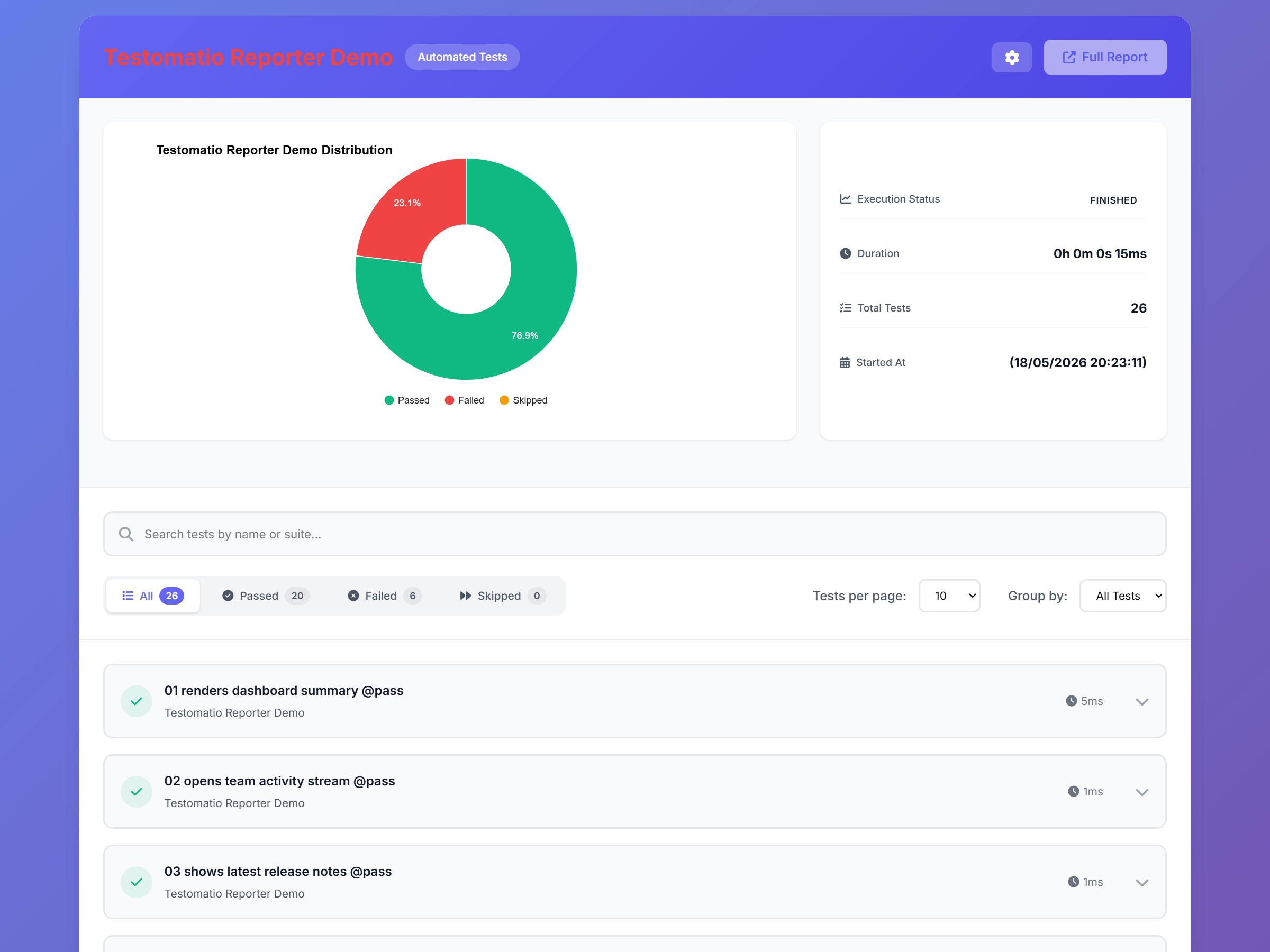
A single self-contained HTML file with the run summary and, per test, its steps, screenshots, logs, and error. It needs no API key and no service, so it works anywhere — open it locally or attach it to a CI build.
|
|
265
65
|
|
|
266
|
-
|
|
66
|
+
|
|
267
67
|
|
|
268
|
-
|
|
269
|
-
|
|
270
|
-
|
|
68
|
+
- `TESTOMATIO_HTML_REPORT_SAVE=1` — enable the report
|
|
69
|
+
- `TESTOMATIO_HTML_REPORT_FOLDER=output/reports` — keep it inside CodeceptJS's `output/` dir (default folder is `html-report`)
|
|
70
|
+
- `TESTOMATIO_HTML_FILENAME` — file name, must end in `.html` (default `testomatio-report.html`)
|
|
271
71
|
|
|
272
|
-
|
|
72
|
+
### Cloud Report
|
|
273
73
|
|
|
274
|
-
|
|
74
|
+
Sends the run to [app.testomat.io](https://testomat.io) — a hosted dashboard with run history, flaky-test detection, parallel-run merging, re-running failed tests, and notifications. Free for small teams.
|
|
275
75
|
|
|
276
|
-
|
|
76
|
+

|
|
277
77
|
|
|
278
|
-
|
|
279
|
-
|
|
280
|
-
|
|
78
|
+
- `TESTOMATIO` — project API key; enables the pipe
|
|
79
|
+
- `TESTOMATIO_CREATE=1` — create tests in Testomat.io that were not imported beforehand
|
|
80
|
+
- `TESTOMATIO_TITLE` — report title
|
|
81
|
+
- `TESTOMATIO_RUNGROUP_TITLE` — add the run to a group (e.g. `"Build ${BUILD_ID}"`)
|
|
82
|
+
- `TESTOMATIO_PUBLISH=1` — make the report publicly accessible
|
|
281
83
|
|
|
282
|
-
|
|
283
|
-
TESTOMATIO_HTML_REPORT_SAVE=1 TESTOMATIO_HTML_FILENAME=my-report.html npx codeceptjs run
|
|
84
|
+
More options (shared runs, rungroups, run management): [Testomat.io pipe](https://github.com/testomatio/reporter/blob/master/docs/pipes/testomatio.md).
|
|
284
85
|
|
|
285
|
-
#
|
|
286
|
-
TESTOMATIO_HTML_REPORT_SAVE=1 TESTOMATIO=your_api_key npx codeceptjs run
|
|
287
|
-
```
|
|
86
|
+
To view artifacts on cloud they must be uploaded to S3 storages. Images from [`screenshot`](/plugins#screenshot) plugin, videos from the [`screencast`](/plugins#screencast) plugin (or the Playwright helper's `video` and `trace`). Can be used with any S3 provider: AWS S3, Cloudflare R2, Google Cloud Storage (interoperability mode), DigitalOcean Spaces, MinIO.
|
|
288
87
|
|
|
289
|
-
|
|
290
|
-
### Mochawesome
|
|
88
|
+
### GitHub Report
|
|
291
89
|
|
|
292
|
-
|
|
90
|
+
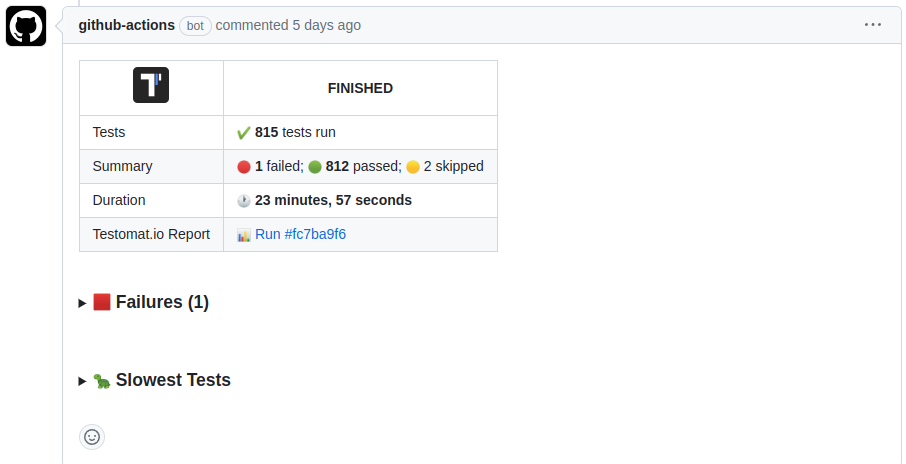
Posts a comment to the Pull Request: run status, pass/fail/skip counts, stack traces of the failures, screenshots, and the slowest tests. Re-running the workflow replaces the previous comment.
|
|
293
91
|
|
|
294
|
-
|
|
295
93
|
|
|
296
|
-
|
|
94
|
+
- `GH_PAT` — GitHub token; `${{ github.token }}` works in Actions
|
|
95
|
+
- the job must grant `permissions: pull-requests: write`
|
|
96
|
+
- `GH_KEEP_OUTDATED_REPORTS=1` — keep previous comments instead of deleting them
|
|
297
97
|
|
|
298
|
-
|
|
299
|
-
npm i mochawesome
|
|
300
|
-
```
|
|
98
|
+
### GitLab Report
|
|
301
99
|
|
|
302
|
-
|
|
100
|
+
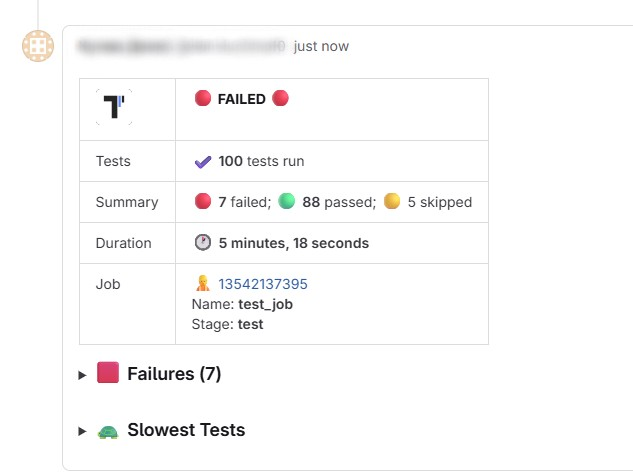
Posts a comment to the Merge Request with the same summary. It needs Merge Request context, so run it in merge-request pipelines.
|
|
303
101
|
|
|
304
|
-
|
|
305
|
-
"mochawesome" reporter not found
|
|
102
|
+
|
|
306
103
|
|
|
307
|
-
|
|
308
|
-
|
|
104
|
+
- `GITLAB_PAT` — Personal or Project Access Token with `api` scope
|
|
105
|
+
- run in merge-request pipelines (`$CI_PIPELINE_SOURCE == "merge_request_event"`)
|
|
106
|
+
- `GITLAB_KEEP_OUTDATED_REPORTS=1` — keep previous comments
|
|
107
|
+
- `GITLAB_REMOVE_ALL_OUTDATED_REPORTS=1` — remove all previous comments, not just the latest
|
|
309
108
|
|
|
310
|
-
|
|
109
|
+
### Bitbucket Report
|
|
311
110
|
|
|
312
|
-
|
|
313
|
-
npm i mocha -D
|
|
314
|
-
```
|
|
111
|
+
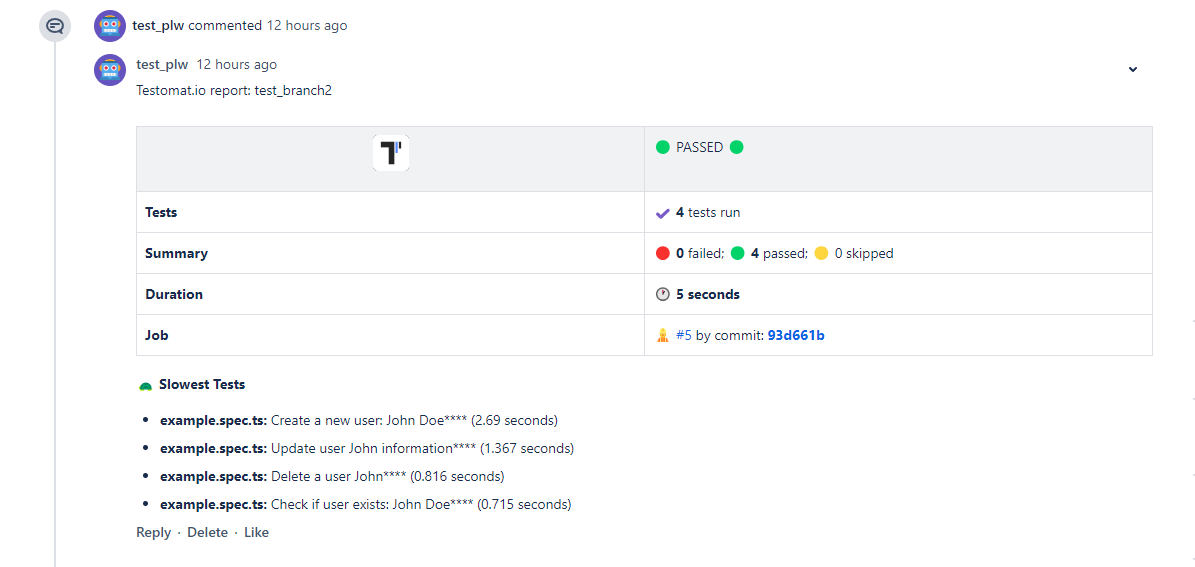
Posts a comment to the Pull Request with the same summary. Comments are created only in `pull-requests` pipelines.
|
|
315
112
|
|
|
316
|
-
|
|
113
|
+
|
|
317
114
|
|
|
318
|
-
|
|
319
|
-
|
|
320
|
-
|
|
321
|
-
"reportDir": "output"
|
|
322
|
-
}
|
|
323
|
-
},
|
|
324
|
-
```
|
|
325
|
-
|
|
326
|
-
Execute CodeceptJS with mochawesome reporter:
|
|
327
|
-
|
|
328
|
-
```sh
|
|
329
|
-
codeceptjs run --reporter mochawesome
|
|
330
|
-
```
|
|
115
|
+
- `BITBUCKET_ACCESS_TOKEN` — repository access token with `Pull requests: Write` and `Repository: Read`
|
|
116
|
+
- run in `pull-requests` pipelines
|
|
117
|
+
- `BITBUCKET_KEEP_OUTDATED_REPORTS=1` — keep previous comments
|
|
331
118
|
|
|
332
|
-
|
|
119
|
+
### Markdown Report
|
|
333
120
|
|
|
334
|
-
|
|
121
|
+
A single self-contained Markdown file — renders in PR comments, CI job summaries, and Slack, and is convenient for AI agents reading test results. Needs no API key.
|
|
335
122
|
|
|
336
|
-
|
|
337
|
-
|
|
338
|
-
|
|
339
|
-
|
|
340
|
-
"reportDir": "output"
|
|
341
|
-
}
|
|
342
|
-
},
|
|
343
|
-
```
|
|
123
|
+
- `TESTOMATIO_MARKDOWN_REPORT_SAVE=1` — enable the report
|
|
124
|
+
- `TESTOMATIO_MARKDOWN_REPORT_FOLDER=output/reports` — keep it inside CodeceptJS's `output/` dir (default folder is `md-report`)
|
|
125
|
+
- `TESTOMATIO_MARKDOWN_FILENAME` — file name, must end in `.md` (default `testomatio-report.md`)
|
|
126
|
+
- `TESTOMATIO_TITLE` — document title (default `Test Results`)
|
|
344
127
|
|
|
345
|
-
|
|
346
|
-
codeceptjs run
|
|
347
|
-
```
|
|
128
|
+
On GitHub Actions, append it to the job summary: `cat output/reports/testomatio-report.md >> "$GITHUB_STEP_SUMMARY"`.
|
|
348
129
|
|
|
349
|
-
|
|
130
|
+
## JUnit XML
|
|
350
131
|
|
|
351
|
-
|
|
352
|
-
Then add Mochawesome helper to your config:
|
|
132
|
+
For CI servers that read JUnit XML (Jenkins, GitLab CI, CircleCI, the GitHub Actions test tab), enable the [`junitReporter`](/plugins#junitreporter) plugin. It writes `output/report.xml` with CodeceptJS steps included — unlike `mocha-junit-reporter`.
|
|
353
133
|
|
|
354
|
-
```
|
|
355
|
-
|
|
356
|
-
|
|
357
|
-
|
|
358
|
-
}
|
|
359
|
-
},
|
|
134
|
+
```js
|
|
135
|
+
plugins: {
|
|
136
|
+
junitReporter: { enabled: true },
|
|
137
|
+
}
|
|
360
138
|
```
|
|
361
139
|
|
|
362
|
-
|
|
363
|
-
|
|
364
|
-
### Configuration
|
|
140
|
+
Options (`outputName`, `output`, `testGroupName`, `attachMeta`, `attachSteps`, `stepsInFailure`): [plugin docs](/plugins#junitreporter).
|
|
365
141
|
|
|
366
|
-
|
|
367
|
-
|
|
368
|
-
- `uniqueScreenshotNames` (optional, default: false) - option to prevent screenshot override if you have scenarios with the same name in different suites. This option should be the same as in common helper.
|
|
369
|
-
- `disableScreenshots` (optional, default: false) - don't save screenshot on failure. This option should be the same as in common helper.
|
|
142
|
+
## ReportPortal
|
|
370
143
|
|
|
371
|
-
|
|
144
|
+
[ReportPortal](https://reportportal.io) is an open-source self-hosted dashboard for test reports. Publish with the [CodeceptJS Agent for ReportPortal](https://github.com/reportportal/agent-js-codecept/).
|
|
372
145
|
|
|
373
|
-
|
|
146
|
+
## Custom reporter
|
|
374
147
|
|
|
375
|
-
|
|
148
|
+
The [`customReporter`](/plugins#customreporter) plugin hooks into test events:
|
|
376
149
|
|
|
377
150
|
```js
|
|
378
|
-
|
|
379
|
-
|
|
380
|
-
|
|
381
|
-
|
|
382
|
-
|
|
383
|
-
|
|
384
|
-
|
|
385
|
-
b: '2',
|
|
386
|
-
c: 'd',
|
|
151
|
+
plugins: {
|
|
152
|
+
customReporter: {
|
|
153
|
+
enabled: true,
|
|
154
|
+
onTestFailed: (test, err) => console.log('FAIL', test.title, err.message),
|
|
155
|
+
onResult: result => {
|
|
156
|
+
// result.stats, result.tests
|
|
157
|
+
},
|
|
387
158
|
},
|
|
388
|
-
}
|
|
389
|
-
```
|
|
390
|
-
|
|
391
|
-
##### Parameters
|
|
392
|
-
|
|
393
|
-
- `context` string, url, path to screenshot, object. See [this](https://www.npmjs.com/package/mochawesome#adding-test-context)
|
|
394
|
-
|
|
395
|
-
## Multi Reports
|
|
396
|
-
|
|
397
|
-
Want to use several reporters in the same time? Try to use [mocha-multi](https://www.npmjs.com/package/mocha-multi) reporter
|
|
398
|
-
|
|
399
|
-
Install it via NPM:
|
|
400
|
-
|
|
401
|
-
```sh
|
|
402
|
-
npm i mocha-multi
|
|
159
|
+
}
|
|
403
160
|
```
|
|
404
161
|
|
|
405
|
-
|
|
406
|
-
|
|
407
|
-
```json
|
|
408
|
-
"mocha": {
|
|
409
|
-
"reporterOptions": {
|
|
410
|
-
"codeceptjs-cli-reporter": {
|
|
411
|
-
"stdout": "-",
|
|
412
|
-
"options": {
|
|
413
|
-
"verbose": true,
|
|
414
|
-
"steps": true,
|
|
415
|
-
}
|
|
416
|
-
},
|
|
417
|
-
"mochawesome": {
|
|
418
|
-
"stdout": "./output/console.log",
|
|
419
|
-
"options": {
|
|
420
|
-
"reportDir": "./output",
|
|
421
|
-
"reportFilename": "report"
|
|
422
|
-
}
|
|
423
|
-
},
|
|
424
|
-
"mocha-junit-reporter": {
|
|
425
|
-
"stdout": "./output/console.log",
|
|
426
|
-
"options": {
|
|
427
|
-
"mochaFile": "./output/result.xml",
|
|
428
|
-
"attachments": true //add screenshot for a failed test
|
|
429
|
-
}
|
|
430
|
-
}
|
|
431
|
-
}
|
|
432
|
-
}
|
|
433
|
-
```
|
|
162
|
+
Hooks: `onHookFinished`, `onTestBefore`, `onTestPassed`, `onTestFailed`, `onTestSkipped`, `onTestFinished`, `onResult`.
|
|
434
163
|
|
|
435
|
-
|
|
164
|
+
For Mocha reporters, use `--reporter`:
|
|
436
165
|
|
|
437
166
|
```sh
|
|
438
|
-
npx codeceptjs run --reporter
|
|
167
|
+
npx codeceptjs run --reporter mochawesome --reporter-options reportDir=output
|
|
439
168
|
```
|
|
440
169
|
|
|
441
|
-
|
|
170
|
+
Plugins exist for [TestRail](https://www.npmjs.com/package/codeceptjs-testrail) and [Tesults](https://www.npmjs.com/package/codeceptjs-tesults).
|
|
442
171
|
|
|
443
|
-
|
|
172
|
+
## CLI output
|
|
444
173
|
|
|
445
|
-
|
|
446
|
-
"mocha": {
|
|
447
|
-
"reporter": "mocha-multi",
|
|
448
|
-
"reporterOptions": {
|
|
449
|
-
...
|
|
450
|
-
}
|
|
451
|
-
}
|
|
452
|
-
```
|
|
174
|
+
By default CodeceptJS prints test names and failures. Add `--steps` to see each step, `--debug` for runner notices, or `--verbose` for full stack traces and events (use this when reporting bugs).
|
|
453
175
|
|
|
454
176
|
```sh
|
|
455
|
-
codeceptjs run
|
|
456
|
-
```
|
|
457
|
-
|
|
458
|
-
## Testrail
|
|
459
|
-
|
|
460
|
-
Testrail integration with CodeceptJS is now so seamless. The test run is created automatically afterwards. The screenshots of failed tests are also attached to test results.
|
|
461
|
-
|
|
462
|
-
Try to use [codeceptjs-testrail](https://www.npmjs.com/package/codeceptjs-testrail) plugin
|
|
463
|
-
|
|
464
|
-
Install it via NPM:
|
|
465
|
-
|
|
466
|
-
```sh
|
|
467
|
-
npm i codeceptjs-testrail --save
|
|
177
|
+
npx codeceptjs run --steps
|
|
468
178
|
```
|
|
469
179
|
|
|
470
|
-
|
|
471
|
-
|
|
472
|
-
Now there is new feature, add the configuration to test run of test plan
|
|
473
|
-

|
|
474
|
-
|
|
475
|
-
## Tesults
|
|
476
|
-
|
|
477
|
-
Submit test results data from CodeceptJS to [Tesults](https://www.tesults.com) easily with the [codeceptjs-tesults](https://www.npmjs.com/package/codeceptjs-tesults) plugin. Test results data is submitted automatically after a test run completes.
|
|
180
|
+
`dry-run` lists tests and steps without running them:
|
|
478
181
|
|
|
479
182
|
```sh
|
|
480
|
-
|
|
183
|
+
npx codeceptjs dry-run --steps
|
|
481
184
|
```
|
|
482
|
-
|
|
483
|
-
Once installed, follow the [quick and easy integration instructions](https://www.tesults.com/docs/codeceptjs) to get setup in no time.
|