codeceptjs 4.0.0-rc.2 → 4.0.0-rc.20
This diff represents the content of publicly available package versions that have been released to one of the supported registries. The information contained in this diff is provided for informational purposes only and reflects changes between package versions as they appear in their respective public registries.
- package/README.md +39 -27
- package/bin/codecept.js +15 -2
- package/bin/codeceptq.js +49 -0
- package/bin/mcp-server.js +1187 -0
- package/docs/advanced.md +201 -0
- package/docs/agents.md +159 -0
- package/docs/ai.md +537 -0
- package/docs/aitrace.md +266 -0
- package/docs/api.md +332 -0
- package/docs/assertions.md +415 -0
- package/docs/auth.md +318 -0
- package/docs/basics.md +424 -0
- package/docs/bdd.md +539 -0
- package/docs/best.md +240 -0
- package/docs/bootstrap.md +132 -0
- package/docs/commands.md +352 -0
- package/docs/community-helpers.md +63 -0
- package/docs/configuration.md +230 -0
- package/docs/continuous-integration.md +497 -0
- package/docs/custom-helpers.md +297 -0
- package/docs/data.md +448 -0
- package/docs/debugging.md +332 -0
- package/docs/detox.md +235 -0
- package/docs/docker.md +136 -0
- package/docs/effects.md +179 -0
- package/docs/element-based-testing.md +295 -0
- package/docs/element-selection.md +125 -0
- package/docs/els.md +328 -0
- package/docs/examples.md +161 -0
- package/docs/heal.md +213 -0
- package/docs/helpers/ApiDataFactory.md +267 -0
- package/docs/helpers/Appium.md +1405 -0
- package/docs/helpers/Detox.md +665 -0
- package/docs/helpers/ExpectHelper.md +275 -0
- package/docs/helpers/FileSystem.md +152 -0
- package/docs/helpers/GraphQL.md +152 -0
- package/docs/helpers/GraphQLDataFactory.md +226 -0
- package/docs/helpers/JSONResponse.md +255 -0
- package/docs/helpers/Mochawesome.md +8 -0
- package/docs/helpers/MockRequest.md +377 -0
- package/docs/helpers/MockServer.md +212 -0
- package/docs/helpers/Playwright.md +2969 -0
- package/docs/helpers/Polly.md +44 -0
- package/docs/helpers/Protractor.md +1769 -0
- package/docs/helpers/Puppeteer-firefox.md +86 -0
- package/docs/helpers/Puppeteer.md +2690 -0
- package/docs/helpers/REST.md +289 -0
- package/docs/helpers/SoftExpectHelper.md +352 -0
- package/docs/helpers/WebDriver.md +2682 -0
- package/docs/hooks.md +339 -0
- package/docs/index.md +111 -0
- package/docs/installation.md +83 -0
- package/docs/internal-api.md +265 -0
- package/docs/internal-test-server.md +89 -0
- package/docs/locators.md +355 -0
- package/docs/mcp.md +485 -0
- package/docs/migration-4.md +556 -0
- package/docs/mobile.md +338 -0
- package/docs/pageobjects.md +399 -0
- package/docs/parallel.md +585 -0
- package/docs/playwright.md +714 -0
- package/docs/plugins.md +866 -0
- package/docs/puppeteer.md +314 -0
- package/docs/quickstart.md +120 -0
- package/docs/react.md +70 -0
- package/docs/reports.md +483 -0
- package/docs/retry.md +274 -0
- package/docs/secrets.md +150 -0
- package/docs/sessions.md +80 -0
- package/docs/shadow.md +68 -0
- package/docs/test-structure.md +275 -0
- package/docs/timeouts.md +183 -0
- package/docs/translation.md +247 -0
- package/docs/tutorial.md +271 -0
- package/docs/typescript.md +374 -0
- package/docs/web-element.md +251 -0
- package/docs/webdriver.md +708 -0
- package/docs/within.md +55 -0
- package/lib/ai.js +3 -2
- package/lib/aria.js +260 -0
- package/lib/assertions.js +18 -0
- package/lib/codecept.js +26 -23
- package/lib/command/check.js +2 -1
- package/lib/command/dryRun.js +24 -5
- package/lib/command/generate.js +2 -0
- package/lib/command/gherkin/snippets.js +5 -4
- package/lib/command/init.js +248 -269
- package/lib/command/list.js +150 -10
- package/lib/command/query.js +218 -0
- package/lib/command/run-multiple.js +2 -0
- package/lib/command/run-workers.js +2 -0
- package/lib/command/run.js +1 -1
- package/lib/command/workers/runTests.js +10 -10
- package/lib/config.js +77 -4
- package/lib/container.js +114 -17
- package/lib/effects.js +17 -0
- package/lib/element/WebElement.js +246 -2
- package/lib/els.js +12 -6
- package/lib/globals.js +32 -19
- package/lib/heal.js +4 -3
- package/lib/helper/ApiDataFactory.js +2 -1
- package/lib/helper/Appium.js +8 -8
- package/lib/helper/FileSystem.js +3 -2
- package/lib/helper/GraphQLDataFactory.js +2 -1
- package/lib/helper/Playwright.js +228 -162
- package/lib/helper/Puppeteer.js +208 -76
- package/lib/helper/WebDriver.js +173 -68
- package/lib/helper/errors/MultipleElementsFound.js +27 -110
- package/lib/helper/errors/NonFocusedType.js +8 -0
- package/lib/helper/extras/Download.js +45 -0
- package/lib/helper/extras/PlaywrightReactVueLocator.js +45 -36
- package/lib/helper/extras/elementSelection.js +58 -0
- package/lib/helper/extras/focusCheck.js +43 -0
- package/lib/helper/extras/richTextEditor.js +178 -0
- package/lib/helper/scripts/dropFile.js +11 -0
- package/lib/history.js +3 -2
- package/lib/html.js +103 -16
- package/lib/index.js +9 -1
- package/lib/listener/config.js +6 -4
- package/lib/listener/emptyRun.js +2 -1
- package/lib/listener/globalRetry.js +32 -6
- package/lib/listener/helpers.js +4 -1
- package/lib/listener/mocha.js +2 -1
- package/lib/listener/pageobjects.js +43 -0
- package/lib/listener/result.js +3 -2
- package/lib/locator.js +126 -3
- package/lib/mocha/cli.js +14 -2
- package/lib/mocha/factory.js +7 -2
- package/lib/mocha/inject.js +1 -1
- package/lib/mocha/scenarioConfig.js +2 -1
- package/lib/mocha/ui.js +5 -6
- package/lib/parser.js +2 -2
- package/lib/pause.js +38 -4
- package/lib/plugin/aiTrace.js +453 -0
- package/lib/plugin/analyze.js +1 -1
- package/lib/plugin/auth.js +3 -3
- package/lib/plugin/browser.js +77 -0
- package/lib/plugin/expose.js +159 -0
- package/lib/plugin/heal.js +44 -1
- package/lib/plugin/pageInfo.js +53 -49
- package/lib/plugin/pause.js +131 -0
- package/lib/plugin/pauseOnFail.js +10 -34
- package/lib/plugin/retryFailedStep.js +28 -19
- package/lib/plugin/screencast.js +287 -0
- package/lib/plugin/screenshot.js +563 -0
- package/lib/plugin/screenshotOnFail.js +8 -171
- package/lib/rerun.js +2 -1
- package/lib/result.js +2 -1
- package/lib/step/base.js +3 -2
- package/lib/step/config.js +15 -2
- package/lib/step/record.js +2 -2
- package/lib/store.js +72 -3
- package/lib/translation.js +2 -1
- package/lib/utils/mask_data.js +2 -1
- package/lib/utils/pluginParser.js +151 -0
- package/lib/utils/trace.js +297 -0
- package/lib/utils.js +77 -3
- package/lib/workers.js +52 -22
- package/package.json +19 -13
- package/typings/index.d.ts +19 -5
- package/docs/webapi/amOnPage.mustache +0 -11
- package/docs/webapi/appendField.mustache +0 -11
- package/docs/webapi/attachFile.mustache +0 -12
- package/docs/webapi/blur.mustache +0 -18
- package/docs/webapi/checkOption.mustache +0 -13
- package/docs/webapi/clearCookie.mustache +0 -9
- package/docs/webapi/clearField.mustache +0 -9
- package/docs/webapi/click.mustache +0 -29
- package/docs/webapi/clickLink.mustache +0 -8
- package/docs/webapi/closeCurrentTab.mustache +0 -7
- package/docs/webapi/closeOtherTabs.mustache +0 -8
- package/docs/webapi/dontSee.mustache +0 -11
- package/docs/webapi/dontSeeCheckboxIsChecked.mustache +0 -10
- package/docs/webapi/dontSeeCookie.mustache +0 -8
- package/docs/webapi/dontSeeCurrentPathEquals.mustache +0 -10
- package/docs/webapi/dontSeeCurrentUrlEquals.mustache +0 -10
- package/docs/webapi/dontSeeElement.mustache +0 -8
- package/docs/webapi/dontSeeElementInDOM.mustache +0 -8
- package/docs/webapi/dontSeeInCurrentUrl.mustache +0 -4
- package/docs/webapi/dontSeeInField.mustache +0 -11
- package/docs/webapi/dontSeeInSource.mustache +0 -8
- package/docs/webapi/dontSeeInTitle.mustache +0 -8
- package/docs/webapi/dontSeeTraffic.mustache +0 -13
- package/docs/webapi/doubleClick.mustache +0 -13
- package/docs/webapi/downloadFile.mustache +0 -12
- package/docs/webapi/dragAndDrop.mustache +0 -9
- package/docs/webapi/dragSlider.mustache +0 -11
- package/docs/webapi/executeAsyncScript.mustache +0 -24
- package/docs/webapi/executeScript.mustache +0 -26
- package/docs/webapi/fillField.mustache +0 -16
- package/docs/webapi/flushNetworkTraffics.mustache +0 -5
- package/docs/webapi/focus.mustache +0 -13
- package/docs/webapi/forceClick.mustache +0 -28
- package/docs/webapi/forceRightClick.mustache +0 -18
- package/docs/webapi/grabAllWindowHandles.mustache +0 -7
- package/docs/webapi/grabAttributeFrom.mustache +0 -10
- package/docs/webapi/grabAttributeFromAll.mustache +0 -9
- package/docs/webapi/grabBrowserLogs.mustache +0 -9
- package/docs/webapi/grabCookie.mustache +0 -11
- package/docs/webapi/grabCssPropertyFrom.mustache +0 -11
- package/docs/webapi/grabCssPropertyFromAll.mustache +0 -10
- package/docs/webapi/grabCurrentUrl.mustache +0 -9
- package/docs/webapi/grabCurrentWindowHandle.mustache +0 -6
- package/docs/webapi/grabDataFromPerformanceTiming.mustache +0 -20
- package/docs/webapi/grabElementBoundingRect.mustache +0 -20
- package/docs/webapi/grabGeoLocation.mustache +0 -8
- package/docs/webapi/grabHTMLFrom.mustache +0 -10
- package/docs/webapi/grabHTMLFromAll.mustache +0 -9
- package/docs/webapi/grabNumberOfOpenTabs.mustache +0 -8
- package/docs/webapi/grabNumberOfVisibleElements.mustache +0 -9
- package/docs/webapi/grabPageScrollPosition.mustache +0 -8
- package/docs/webapi/grabPopupText.mustache +0 -5
- package/docs/webapi/grabRecordedNetworkTraffics.mustache +0 -10
- package/docs/webapi/grabSource.mustache +0 -8
- package/docs/webapi/grabTextFrom.mustache +0 -10
- package/docs/webapi/grabTextFromAll.mustache +0 -9
- package/docs/webapi/grabTitle.mustache +0 -8
- package/docs/webapi/grabValueFrom.mustache +0 -9
- package/docs/webapi/grabValueFromAll.mustache +0 -8
- package/docs/webapi/grabWebElement.mustache +0 -9
- package/docs/webapi/grabWebElements.mustache +0 -9
- package/docs/webapi/moveCursorTo.mustache +0 -12
- package/docs/webapi/openNewTab.mustache +0 -7
- package/docs/webapi/pressKey.mustache +0 -12
- package/docs/webapi/pressKeyDown.mustache +0 -12
- package/docs/webapi/pressKeyUp.mustache +0 -12
- package/docs/webapi/pressKeyWithKeyNormalization.mustache +0 -60
- package/docs/webapi/refreshPage.mustache +0 -6
- package/docs/webapi/resizeWindow.mustache +0 -6
- package/docs/webapi/rightClick.mustache +0 -14
- package/docs/webapi/saveElementScreenshot.mustache +0 -10
- package/docs/webapi/saveScreenshot.mustache +0 -12
- package/docs/webapi/say.mustache +0 -10
- package/docs/webapi/scrollIntoView.mustache +0 -11
- package/docs/webapi/scrollPageToBottom.mustache +0 -6
- package/docs/webapi/scrollPageToTop.mustache +0 -6
- package/docs/webapi/scrollTo.mustache +0 -12
- package/docs/webapi/see.mustache +0 -11
- package/docs/webapi/seeAttributesOnElements.mustache +0 -9
- package/docs/webapi/seeCheckboxIsChecked.mustache +0 -10
- package/docs/webapi/seeCookie.mustache +0 -8
- package/docs/webapi/seeCssPropertiesOnElements.mustache +0 -9
- package/docs/webapi/seeCurrentPathEquals.mustache +0 -10
- package/docs/webapi/seeCurrentUrlEquals.mustache +0 -11
- package/docs/webapi/seeElement.mustache +0 -8
- package/docs/webapi/seeElementInDOM.mustache +0 -8
- package/docs/webapi/seeInCurrentUrl.mustache +0 -8
- package/docs/webapi/seeInField.mustache +0 -12
- package/docs/webapi/seeInPopup.mustache +0 -8
- package/docs/webapi/seeInSource.mustache +0 -7
- package/docs/webapi/seeInTitle.mustache +0 -8
- package/docs/webapi/seeNumberOfElements.mustache +0 -11
- package/docs/webapi/seeNumberOfVisibleElements.mustache +0 -10
- package/docs/webapi/seeTextEquals.mustache +0 -9
- package/docs/webapi/seeTitleEquals.mustache +0 -8
- package/docs/webapi/seeTraffic.mustache +0 -36
- package/docs/webapi/selectOption.mustache +0 -21
- package/docs/webapi/setCookie.mustache +0 -16
- package/docs/webapi/setGeoLocation.mustache +0 -12
- package/docs/webapi/startRecordingTraffic.mustache +0 -8
- package/docs/webapi/startRecordingWebSocketMessages.mustache +0 -8
- package/docs/webapi/stopRecordingTraffic.mustache +0 -5
- package/docs/webapi/stopRecordingWebSocketMessages.mustache +0 -7
- package/docs/webapi/switchTo.mustache +0 -9
- package/docs/webapi/switchToNextTab.mustache +0 -10
- package/docs/webapi/switchToPreviousTab.mustache +0 -10
- package/docs/webapi/type.mustache +0 -21
- package/docs/webapi/uncheckOption.mustache +0 -13
- package/docs/webapi/wait.mustache +0 -8
- package/docs/webapi/waitForClickable.mustache +0 -11
- package/docs/webapi/waitForCookie.mustache +0 -9
- package/docs/webapi/waitForDetached.mustache +0 -10
- package/docs/webapi/waitForDisabled.mustache +0 -6
- package/docs/webapi/waitForElement.mustache +0 -11
- package/docs/webapi/waitForEnabled.mustache +0 -6
- package/docs/webapi/waitForFunction.mustache +0 -17
- package/docs/webapi/waitForInvisible.mustache +0 -10
- package/docs/webapi/waitForNumberOfTabs.mustache +0 -9
- package/docs/webapi/waitForText.mustache +0 -13
- package/docs/webapi/waitForValue.mustache +0 -10
- package/docs/webapi/waitForVisible.mustache +0 -10
- package/docs/webapi/waitInUrl.mustache +0 -9
- package/docs/webapi/waitNumberOfVisibleElements.mustache +0 -10
- package/docs/webapi/waitToHide.mustache +0 -10
- package/docs/webapi/waitUrlEquals.mustache +0 -10
- package/lib/helper/AI.js +0 -214
- package/lib/listener/enhancedGlobalRetry.js +0 -110
- package/lib/plugin/enhancedRetryFailedStep.js +0 -99
- package/lib/plugin/htmlReporter.js +0 -3648
- package/lib/plugin/stepByStepReport.js +0 -427
- package/lib/plugin/subtitles.js +0 -89
- package/lib/retryCoordinator.js +0 -207
- package/typings/promiseBasedTypes.d.ts +0 -9469
- package/typings/types.d.ts +0 -11402
|
@@ -0,0 +1,714 @@
|
|
|
1
|
+
---
|
|
2
|
+
permalink: /playwright
|
|
3
|
+
title: Testing with Playwright
|
|
4
|
+
---
|
|
5
|
+
|
|
6
|
+
# Testing with Playwright
|
|
7
|
+
|
|
8
|
+
Playwright is a Node library to automate the [Chromium](https://www.chromium.org/Home), [WebKit](https://webkit.org/) and [Firefox](https://www.mozilla.org/en-US/firefox/new/) browsers as well as [Electron](https://www.electronjs.org/) apps with a single API. It enables **cross-browser** web automation that is **ever-green**, **capable**, **reliable** and **fast**.
|
|
9
|
+
|
|
10
|
+
Playwright was built similarly to [Puppeteer](https://github.com/puppeteer/puppeteer), using its API and so is very different in usage. However, Playwright has cross browser support with better design for test automation.
|
|
11
|
+
|
|
12
|
+
Take a look at a sample test:
|
|
13
|
+
|
|
14
|
+
```js
|
|
15
|
+
I.amOnPage('https://github.com')
|
|
16
|
+
I.click('Sign in', '//html/body/div[1]/header')
|
|
17
|
+
I.see('Sign in to GitHub', 'h1')
|
|
18
|
+
I.fillField('Username or email address', 'something@totest.com')
|
|
19
|
+
I.fillField('Password', '123456')
|
|
20
|
+
I.click('Sign in')
|
|
21
|
+
I.see('Incorrect username or password.', '.flash-error')
|
|
22
|
+
```
|
|
23
|
+
|
|
24
|
+
It's readable and simple and working using Playwright API!
|
|
25
|
+
|
|
26
|
+
## Setup
|
|
27
|
+
|
|
28
|
+
To start you need CodeceptJS with Playwright packages installed
|
|
29
|
+
|
|
30
|
+
```bash
|
|
31
|
+
npm install codeceptjs playwright --save
|
|
32
|
+
```
|
|
33
|
+
|
|
34
|
+
Or see [alternative installation options](https://codecept.io/installation/)
|
|
35
|
+
|
|
36
|
+
> If you already have CodeceptJS project, just install `playwright` package and enable a helper it in config.
|
|
37
|
+
|
|
38
|
+
And a basic project initialized
|
|
39
|
+
|
|
40
|
+
```sh
|
|
41
|
+
npx codeceptjs init
|
|
42
|
+
```
|
|
43
|
+
|
|
44
|
+
You will be asked for a Helper to use, you should select Playwright and provide url of a website you are testing.
|
|
45
|
+
|
|
46
|
+
## Configuring
|
|
47
|
+
|
|
48
|
+
Make sure `Playwright` helper is enabled in `codecept.conf.js` config:
|
|
49
|
+
|
|
50
|
+
```js
|
|
51
|
+
{ // ..
|
|
52
|
+
helpers: {
|
|
53
|
+
Playwright: {
|
|
54
|
+
url: "http://localhost",
|
|
55
|
+
show: true,
|
|
56
|
+
browser: 'chromium'
|
|
57
|
+
}
|
|
58
|
+
}
|
|
59
|
+
// ..
|
|
60
|
+
}
|
|
61
|
+
```
|
|
62
|
+
|
|
63
|
+
> Turn off the `show` option if you want to run test in headless mode.
|
|
64
|
+
> If you don't specify the browser here, `chromium` will be used. Possible browsers are: `chromium`, `firefox` and `webkit`
|
|
65
|
+
|
|
66
|
+
Playwright uses different strategies to detect if a page is loaded. In configuration use `waitForNavigation` option for that:
|
|
67
|
+
|
|
68
|
+
When to consider navigation succeeded, defaults to `load`. Given an array of event strings, navigation is considered to be successful after all events have been fired. Events can be either:
|
|
69
|
+
|
|
70
|
+
- `load` - consider navigation to be finished when the load event is fired.
|
|
71
|
+
- `domcontentloaded` - consider navigation to be finished when the DOMContentLoaded event is fired.
|
|
72
|
+
- `networkidle` - consider navigation to be finished when there are no network connections for at least 500 ms.
|
|
73
|
+
|
|
74
|
+
```js
|
|
75
|
+
helpers: {
|
|
76
|
+
Playwright: {
|
|
77
|
+
url: "http://localhost",
|
|
78
|
+
show: true,
|
|
79
|
+
browser: 'chromium',
|
|
80
|
+
waitForNavigation: "networkidle0"
|
|
81
|
+
}
|
|
82
|
+
}
|
|
83
|
+
```
|
|
84
|
+
|
|
85
|
+
When a test runs faster than application it is recommended to increase `waitForAction` config value.
|
|
86
|
+
It will wait for a small amount of time (100ms) by default after each user action is taken.
|
|
87
|
+
|
|
88
|
+
> ▶ More options are listed in [helper reference](https://codecept.io/helpers/Playwright/).
|
|
89
|
+
|
|
90
|
+
## Writing Tests
|
|
91
|
+
|
|
92
|
+
Additional CodeceptJS tests should be created with `gt` command:
|
|
93
|
+
|
|
94
|
+
```sh
|
|
95
|
+
npx codeceptjs gt
|
|
96
|
+
```
|
|
97
|
+
|
|
98
|
+
As an example we will use `ToDoMvc` app for testing.
|
|
99
|
+
|
|
100
|
+
### Actions
|
|
101
|
+
|
|
102
|
+
Tests consist with a scenario of user's action taken on a page. The most widely used ones are:
|
|
103
|
+
|
|
104
|
+
- `amOnPage` - to open a webpage (accepts relative or absolute url)
|
|
105
|
+
- `click` - to locate a button or link and click on it
|
|
106
|
+
- `fillField` - to enter a text inside a field
|
|
107
|
+
- `selectOption`, `checkOption` - to interact with a form
|
|
108
|
+
- `wait*` to wait for some parts of page to be fully rendered (important for testing SPA)
|
|
109
|
+
- `grab*` to get values from page sources
|
|
110
|
+
- `see`, `dontSee` - to check for a text on a page
|
|
111
|
+
- `seeElement`, `dontSeeElement` - to check for elements on a page
|
|
112
|
+
|
|
113
|
+
> ℹ All actions are listed in [Playwright helper reference](https://codecept.io/helpers/Playwright/).\*
|
|
114
|
+
|
|
115
|
+
All actions which interact with elements can use **[CSS or XPath locators](https://codecept.io/locators/#css-and-xpath)**. Actions like `click` or `fillField` can locate elements by their name or value on a page:
|
|
116
|
+
|
|
117
|
+
```js
|
|
118
|
+
// search for link or button
|
|
119
|
+
I.click('Login')
|
|
120
|
+
// locate field by its label
|
|
121
|
+
I.fillField('Name', 'Miles')
|
|
122
|
+
// we can use input name
|
|
123
|
+
I.fillField('user[email]', 'miles@davis.com')
|
|
124
|
+
```
|
|
125
|
+
|
|
126
|
+
You can also specify the exact locator type with strict locators:
|
|
127
|
+
|
|
128
|
+
```js
|
|
129
|
+
I.click({ css: 'button.red' })
|
|
130
|
+
I.fillField({ name: 'user[email]' }, 'miles@davis.com')
|
|
131
|
+
I.seeElement({ xpath: '//body/header' })
|
|
132
|
+
```
|
|
133
|
+
|
|
134
|
+
### Interactive Pause
|
|
135
|
+
|
|
136
|
+
It's easy to start writing a test if you use [interactive pause](/basics#debug). Just open a web page and pause execution.
|
|
137
|
+
|
|
138
|
+
```js
|
|
139
|
+
Feature('Sample Test')
|
|
140
|
+
|
|
141
|
+
Scenario('open my website', ({ I }) => {
|
|
142
|
+
I.amOnPage('http://todomvc.com/examples/react/')
|
|
143
|
+
pause()
|
|
144
|
+
})
|
|
145
|
+
```
|
|
146
|
+
|
|
147
|
+
This is just enough to run a test, open a browser, and think what to do next to write a test case.
|
|
148
|
+
|
|
149
|
+
When you execute such test with `codeceptjs run` command you may see the browser is started
|
|
150
|
+
|
|
151
|
+
```
|
|
152
|
+
npx codeceptjs run --steps
|
|
153
|
+
```
|
|
154
|
+
|
|
155
|
+
After a page is opened a full control of a browser is given to a terminal. Type in different commands such as `click`, `see`, `fillField` to write the test. A successful commands will be saved to `./output/cli-history` file and can be copied into a test.
|
|
156
|
+
|
|
157
|
+
A complete ToDo-MVC test may look like:
|
|
158
|
+
|
|
159
|
+
```js
|
|
160
|
+
Feature('ToDo')
|
|
161
|
+
|
|
162
|
+
Scenario('create todo item', ({ I }) => {
|
|
163
|
+
I.amOnPage('http://todomvc.com/examples/react/')
|
|
164
|
+
I.dontSeeElement('.todo-count')
|
|
165
|
+
I.fillField('What needs to be done?', 'Write a guide')
|
|
166
|
+
I.pressKey('Enter')
|
|
167
|
+
I.see('Write a guide', '.todo-list')
|
|
168
|
+
I.see('1 item left', '.todo-count')
|
|
169
|
+
})
|
|
170
|
+
```
|
|
171
|
+
|
|
172
|
+
### Grabbers
|
|
173
|
+
|
|
174
|
+
If you need to get element's value inside a test you can use `grab*` methods. They should be used with `await` operator inside `async` function:
|
|
175
|
+
|
|
176
|
+
```js
|
|
177
|
+
import assert from 'assert'
|
|
178
|
+
Scenario('get value of current tasks', async ({ I }) => {
|
|
179
|
+
I.fillField('.todo', 'my first item')
|
|
180
|
+
I.pressKey('Enter')
|
|
181
|
+
I.fillField('.todo', 'my second item')
|
|
182
|
+
I.pressKey('Enter')
|
|
183
|
+
let numTodos = await I.grabTextFrom('.todo-count strong')
|
|
184
|
+
assert.equal(2, numTodos)
|
|
185
|
+
})
|
|
186
|
+
```
|
|
187
|
+
|
|
188
|
+
### Within
|
|
189
|
+
|
|
190
|
+
In case some actions should be taken inside one element (a container or modal window or iframe) you can use `within` block to narrow the scope.
|
|
191
|
+
Please take a note that you can't use within inside another within in Playwright helper:
|
|
192
|
+
|
|
193
|
+
```js
|
|
194
|
+
await within('.todoapp', () => {
|
|
195
|
+
I.fillField('.todo', 'my new item')
|
|
196
|
+
I.pressKey('Enter')
|
|
197
|
+
I.see('1 item left', '.todo-count')
|
|
198
|
+
I.click('.todo-list input.toggle')
|
|
199
|
+
})
|
|
200
|
+
I.see('0 items left', '.todo-count')
|
|
201
|
+
```
|
|
202
|
+
|
|
203
|
+
### Each Element <Badge text="Since 3.3" type="warning"/>
|
|
204
|
+
|
|
205
|
+
Usually, CodeceptJS performs an action on the first matched element.
|
|
206
|
+
In case you want to do an action on each element found, use the special function `eachElement` which comes from [eachElement](https://codecept.io/plugins/#eachelement) plugin.
|
|
207
|
+
|
|
208
|
+
`eachElement` function matches all elements by locator and performs a callback on each of those element. A callback function receives [ElementHandle instance](https://playwright.dev/docs/api/class-elementhandle) from Playwright API. `eachElement` may perform arbitrary actions on a page, so the first argument should by a description of the actions performed. This description will be used for logging purposes.
|
|
209
|
+
|
|
210
|
+
Usage example
|
|
211
|
+
|
|
212
|
+
```js
|
|
213
|
+
await eachElement(
|
|
214
|
+
'tick all checkboxes',
|
|
215
|
+
'input.custom-checkbox',
|
|
216
|
+
async (el, index) => {
|
|
217
|
+
await el.check();
|
|
218
|
+
});
|
|
219
|
+
);
|
|
220
|
+
```
|
|
221
|
+
|
|
222
|
+
> ℹ Learn more about [eachElement plugin](/plugins/#eachelement)
|
|
223
|
+
|
|
224
|
+
## Multi Session Testing
|
|
225
|
+
|
|
226
|
+
To launch additional browser context (or incognito window) use `session` command.
|
|
227
|
+
|
|
228
|
+
```js
|
|
229
|
+
Scenario('I try to open this site as anonymous user', ({ I }) => {
|
|
230
|
+
I.amOnPage('/')
|
|
231
|
+
I.dontSee('Agree to cookies')
|
|
232
|
+
session('anonymous user', () => {
|
|
233
|
+
I.amOnPage('/')
|
|
234
|
+
I.see('Agree to cookies')
|
|
235
|
+
})
|
|
236
|
+
})
|
|
237
|
+
```
|
|
238
|
+
|
|
239
|
+
> ℹ Learn more about [multi-session testing](/basics/#multiple-sessions)
|
|
240
|
+
|
|
241
|
+
## Electron Testing
|
|
242
|
+
|
|
243
|
+
CodeceptJS allows you to make use of [Playwright's Electron flavor](https://github.com/microsoft/playwright/blob/master/packages/playwright-electron/README.md).
|
|
244
|
+
To use this functionality, all you need to do is set the browser to `electron` in the CodeceptJS configuration file and, according to the [Playwright BrowserType API](https://playwright.dev/docs/api/class-browsertype/#browsertypelaunchoptions), set the launch options to point to your Electron application.
|
|
245
|
+
|
|
246
|
+
`main.js` - main Electron application file
|
|
247
|
+
|
|
248
|
+
```js
|
|
249
|
+
import { app, BrowserWindow } from 'electron'
|
|
250
|
+
|
|
251
|
+
function createWindow() {
|
|
252
|
+
const window = new BrowserWindow({ width: 800, height: 600 })
|
|
253
|
+
window.loadURL('https://example.com')
|
|
254
|
+
}
|
|
255
|
+
|
|
256
|
+
app.whenReady().then(createWindow)
|
|
257
|
+
```
|
|
258
|
+
|
|
259
|
+
`codecept.conf.js` - CodeceptJS configuration file
|
|
260
|
+
|
|
261
|
+
```js
|
|
262
|
+
import path from 'path'
|
|
263
|
+
import electron from 'electron'
|
|
264
|
+
|
|
265
|
+
export const config = {
|
|
266
|
+
helpers: {
|
|
267
|
+
Playwright: {
|
|
268
|
+
browser: 'electron',
|
|
269
|
+
electron: {
|
|
270
|
+
executablePath: electron,
|
|
271
|
+
args: [path.join(__dirname, 'main.js')],
|
|
272
|
+
},
|
|
273
|
+
},
|
|
274
|
+
},
|
|
275
|
+
// rest of config
|
|
276
|
+
}
|
|
277
|
+
```
|
|
278
|
+
|
|
279
|
+
Sometimes, the Electron app is built with [electron-forge](https://www.electronforge.io/), then configuring may a bit different.
|
|
280
|
+
|
|
281
|
+
- First, you should run your electron-forge command to build and pack your app.
|
|
282
|
+
- Then, you would find `index.js` file inside `.webpack/main/index.js`
|
|
283
|
+
|
|
284
|
+
`codecept.conf.js` - CodeceptJS configuration file
|
|
285
|
+
|
|
286
|
+
```js
|
|
287
|
+
import path from 'path'
|
|
288
|
+
import electron from 'electron'
|
|
289
|
+
|
|
290
|
+
export const config = {
|
|
291
|
+
helpers: {
|
|
292
|
+
Playwright: {
|
|
293
|
+
browser: 'electron',
|
|
294
|
+
electron: {
|
|
295
|
+
executablePath: electron,
|
|
296
|
+
args: [path.join(__dirname, '.webpack/main/index.js')],
|
|
297
|
+
},
|
|
298
|
+
},
|
|
299
|
+
},
|
|
300
|
+
// rest of config
|
|
301
|
+
}
|
|
302
|
+
```
|
|
303
|
+
|
|
304
|
+
### Headless Mode
|
|
305
|
+
|
|
306
|
+
With Electron, headless mode must be set when creating the window. Therefore, CodeceptJS's `show` configuration parameter will not work. However, you can set it in the `main.js` file as shown below:
|
|
307
|
+
|
|
308
|
+
```js
|
|
309
|
+
function createWindow() {
|
|
310
|
+
const window = new BrowserWindow({ width: 800, height: 600, show: false })
|
|
311
|
+
window.loadURL('https://example.com')
|
|
312
|
+
}
|
|
313
|
+
```
|
|
314
|
+
|
|
315
|
+
## Device Emulation
|
|
316
|
+
|
|
317
|
+
Playwright can emulate browsers of mobile devices. Instead of paying for expensive devices for mobile tests you can adjust Playwright settings so it could emulate mobile browsers on iPhone, Samsung Galaxy, etc.
|
|
318
|
+
|
|
319
|
+
Device emulation can be enabled in CodeceptJS globally in a config or per session.
|
|
320
|
+
|
|
321
|
+
Playwright contains a [list of predefined devices](https://github.com/microsoft/playwright/blob/master/src/server/deviceDescriptors.js) to emulate, for instance this is how you can enable iPhone 6 emulation for all tests:
|
|
322
|
+
|
|
323
|
+
```js
|
|
324
|
+
import { devices } from 'playwright';
|
|
325
|
+
|
|
326
|
+
helpers: {
|
|
327
|
+
Playwright: {
|
|
328
|
+
// regular config goes here
|
|
329
|
+
emulate: devices['iPhone 6'],
|
|
330
|
+
}
|
|
331
|
+
}
|
|
332
|
+
```
|
|
333
|
+
|
|
334
|
+
To adjust browser settings you can pass [custom options](https://github.com/microsoft/playwright/blob/master/docs/src/api/class-browsercontext.md)
|
|
335
|
+
|
|
336
|
+
```js
|
|
337
|
+
helpers: {
|
|
338
|
+
Playwright: {
|
|
339
|
+
// regular config goes here
|
|
340
|
+
// put on mobile device
|
|
341
|
+
emulate: { isMobile: true, deviceScaleFactor: 2 }
|
|
342
|
+
}
|
|
343
|
+
}
|
|
344
|
+
```
|
|
345
|
+
|
|
346
|
+
To enable device emulation for a specific test, create an additional browser session and pass in config as a second parameter:
|
|
347
|
+
|
|
348
|
+
```js
|
|
349
|
+
import { devices } from 'playwright'
|
|
350
|
+
|
|
351
|
+
Scenario('website looks nice on iPhone', () => {
|
|
352
|
+
session('mobile user', devices['iPhone 6'], () => {
|
|
353
|
+
I.amOnPage('/')
|
|
354
|
+
I.see('Hello, iPhone user!')
|
|
355
|
+
})
|
|
356
|
+
})
|
|
357
|
+
```
|
|
358
|
+
|
|
359
|
+
## API Requests
|
|
360
|
+
|
|
361
|
+
CodeceptJS has [REST](/helpers/REST) and [GraphQL](<(/helpers/GraphQL)>) helpers to perform requests to external APIs. This may be helpful to implement [data management](https://codecept.io/data/) strategy.
|
|
362
|
+
|
|
363
|
+
However, Playwright since 1.18 has its own [API for making request](https://playwright.dev/docs/api/class-apirequestcontext#api-request-context-get). It uses cookies from browser session to authenticate requests. So you can use it via [`makeApiRequest`](/helpers/Playwright#makeApiRequest) method:
|
|
364
|
+
|
|
365
|
+
```js
|
|
366
|
+
I.makeApiRequest('GET', '/users')
|
|
367
|
+
```
|
|
368
|
+
|
|
369
|
+
It is also possible to test JSON responses by adding [`JSONResponse`](/helpers/JSONResponse) and connecting it to Playwright:
|
|
370
|
+
|
|
371
|
+
```js
|
|
372
|
+
// inside codecept.conf.js
|
|
373
|
+
{
|
|
374
|
+
helpers: {
|
|
375
|
+
Playwright: {
|
|
376
|
+
// current config
|
|
377
|
+
},
|
|
378
|
+
JSONResponse: {
|
|
379
|
+
requestHelper: 'Playwright',
|
|
380
|
+
}
|
|
381
|
+
}
|
|
382
|
+
}
|
|
383
|
+
```
|
|
384
|
+
|
|
385
|
+
This helper provides you methods for [API testing](/api). For instance, you can check for status code, data inclusion and structure:
|
|
386
|
+
|
|
387
|
+
```js
|
|
388
|
+
I.makeApiRequest('GET', '/users/1')
|
|
389
|
+
I.seeResponseCodeIs(200)
|
|
390
|
+
I.seeResponseContainsKeys(['user'])
|
|
391
|
+
```
|
|
392
|
+
|
|
393
|
+
This way you can do full fledged API testing via Playwright.
|
|
394
|
+
|
|
395
|
+
## Accessing Playwright API
|
|
396
|
+
|
|
397
|
+
To get [Playwright API](https://playwright.dev/docs/api/class-playwright) inside a test use `I.usePlaywrightTo` method with a callback.
|
|
398
|
+
|
|
399
|
+
`usePlaywrightTo` passes in an instance of Playwright helper from which you can obtain access to main Playwright classes:
|
|
400
|
+
|
|
401
|
+
- [`browser`](https://playwright.dev/docs/api/class-browser)
|
|
402
|
+
- [`browserContext`](https://playwright.dev/docs/api/class-browsercontext)
|
|
403
|
+
- [`page`](https://playwright.dev/docs/api/class-page)
|
|
404
|
+
|
|
405
|
+
To keep test readable provide a description of a callback inside the first parameter.
|
|
406
|
+
|
|
407
|
+
```js
|
|
408
|
+
I.usePlaywrightTo('emulate offline mode', async ({ browser, browserContext, page }) => {
|
|
409
|
+
// use browser, page, context objects inside this function
|
|
410
|
+
await browserContext.setOffline(true)
|
|
411
|
+
})
|
|
412
|
+
```
|
|
413
|
+
|
|
414
|
+
Playwright commands are asynchronous so a callback function must be async.
|
|
415
|
+
|
|
416
|
+
A Playwright helper is passed as argument for callback, so you can combine Playwright API with CodeceptJS API:
|
|
417
|
+
|
|
418
|
+
```js
|
|
419
|
+
I.usePlaywrightTo('emulate offline mode', async Playwright => {
|
|
420
|
+
// access internal objects browser, page, context of helper
|
|
421
|
+
await Playwright.browserContext.setOffline(true)
|
|
422
|
+
// call a method of helper, await is required here
|
|
423
|
+
await Playwright.click('Reload')
|
|
424
|
+
})
|
|
425
|
+
```
|
|
426
|
+
|
|
427
|
+
## Mocking Network Requests <Badge text="Since 3.1" type="warning"/>
|
|
428
|
+
|
|
429
|
+
Network requests & responses can be mocked and modified. Use `mockRequest` which strictly follows [Playwright's `route` API](https://playwright.dev/docs/api/class-browsercontext#browser-context-route).
|
|
430
|
+
|
|
431
|
+
```js
|
|
432
|
+
I.mockRoute('/api/**', route => {
|
|
433
|
+
if (route.request().postData().includes('my-string'))
|
|
434
|
+
route.fulfill({ body: 'mocked-data' });
|
|
435
|
+
else
|
|
436
|
+
route.continue();
|
|
437
|
+
});
|
|
438
|
+
|
|
439
|
+
I.mockRoute('**/*.{png,jpg,jpeg}', route => route.abort());
|
|
440
|
+
|
|
441
|
+
// To disable mocking for a route call `stopMockingRoute`
|
|
442
|
+
// for previously mocked URL
|
|
443
|
+
I.stopMockingRoute('**/*.{png,jpg,jpeg}'
|
|
444
|
+
```
|
|
445
|
+
|
|
446
|
+
To master request intercepting [use `route` object](https://playwright.dev/docs/api/class-route) object passed into mock request handler.
|
|
447
|
+
|
|
448
|
+
## Video <Badge text="Since 3.1" type="warning"/>
|
|
449
|
+
|
|
450
|
+
Playwright may record videos for failed tests. This can be enabled in a config with `video: true` option:
|
|
451
|
+
|
|
452
|
+
```js
|
|
453
|
+
export const config = {
|
|
454
|
+
helpers: {
|
|
455
|
+
Playwright: {
|
|
456
|
+
// ...
|
|
457
|
+
video: true,
|
|
458
|
+
},
|
|
459
|
+
},
|
|
460
|
+
}
|
|
461
|
+
```
|
|
462
|
+
|
|
463
|
+
When a test fails and video was enabled a video file is shown under the `artifacts` section in the error message:
|
|
464
|
+
|
|
465
|
+
```
|
|
466
|
+
-- FAILURES:
|
|
467
|
+
|
|
468
|
+
1) GitHub
|
|
469
|
+
open:
|
|
470
|
+
|
|
471
|
+
Scenario Steps:
|
|
472
|
+
- I.amOnPage("https://gothub11.com/search") at Test.<anonymous> (./github_test.js:16:5)
|
|
473
|
+
|
|
474
|
+
Artifacts:
|
|
475
|
+
- screenshot: /home/davert/projects/codeceptjs/examples/output/open.failed.png
|
|
476
|
+
- video: /home/davert/projects/codeceptjs/examples/output/videos/5ecf6aaa78865bce14d271b55de964fd.webm
|
|
477
|
+
```
|
|
478
|
+
|
|
479
|
+
Open video and use it to debug a failed test case. Video helps when running tests on CI. Configure your CI system to enable artifacts storage for `output/video` and review videos of failed test case to understand failures.
|
|
480
|
+
|
|
481
|
+
## Screencast
|
|
482
|
+
|
|
483
|
+
For richer evidence than helper-level `video`, enable the [`screencast`](https://codecept.io/plugins/#screencast) plugin. It uses Playwright's `page.screencast` API (Playwright >= 1.59) to record WebM video with optional burned-in action captions and a standalone `.srt` subtitle track.
|
|
484
|
+
|
|
485
|
+
```js
|
|
486
|
+
plugins: {
|
|
487
|
+
screencast: {
|
|
488
|
+
enabled: true,
|
|
489
|
+
on: 'fail',
|
|
490
|
+
}
|
|
491
|
+
}
|
|
492
|
+
```
|
|
493
|
+
|
|
494
|
+
`on: 'fail'` (default) deletes the recording when the test passes; `on: 'test'` keeps every test's video.
|
|
495
|
+
|
|
496
|
+
`captions: true` (default) burns `I.click()` / `I.fillField()` annotations into the video via `page.screencast.showActions()`. `subtitles: true` writes a standalone `.srt` file alongside the video — VLC and most players auto-load it.
|
|
497
|
+
|
|
498
|
+
```js
|
|
499
|
+
plugins: {
|
|
500
|
+
screencast: {
|
|
501
|
+
enabled: true,
|
|
502
|
+
on: 'test',
|
|
503
|
+
captions: true,
|
|
504
|
+
subtitles: true,
|
|
505
|
+
}
|
|
506
|
+
}
|
|
507
|
+
```
|
|
508
|
+
|
|
509
|
+

|
|
510
|
+
|
|
511
|
+
CLI usage:
|
|
512
|
+
|
|
513
|
+
npx codeceptjs run -p screencast
|
|
514
|
+
npx codeceptjs run -p screencast:on=test
|
|
515
|
+
npx codeceptjs run -p screencast:on=test;captions=false;subtitles=true
|
|
516
|
+
|
|
517
|
+
The recording is attached to the test as `test.artifacts.screencast`; the `.srt` (when enabled) is attached as `test.artifacts.subtitle`.
|
|
518
|
+
|
|
519
|
+
> Enabling helper-level `video: true` **and** the `screencast` plugin produces two independent recordings (one in `output/videos/`, one in `output/screencast/`). Pick one.
|
|
520
|
+
|
|
521
|
+
## Trace
|
|
522
|
+
|
|
523
|
+
If video is not enough to descover why a test failed a [trace](https://playwright.dev/docs/trace-viewer/) can be recorded.
|
|
524
|
+
|
|
525
|
+

|
|
526
|
+
|
|
527
|
+
Inside a trace you get screenshots, DOM snapshots, console logs, network requests and playwright commands logged and showed on a timeline. This may help for a deep debug of a failed test cases. Trace file is saved into ZIP archive and can be viewed with Trace Viewer built into Playwright.
|
|
528
|
+
|
|
529
|
+
Enable trace with `trace: true` option in a config:
|
|
530
|
+
|
|
531
|
+
```js
|
|
532
|
+
export const config = {
|
|
533
|
+
helpers: {
|
|
534
|
+
Playwright: {
|
|
535
|
+
// ...
|
|
536
|
+
trace: true,
|
|
537
|
+
},
|
|
538
|
+
},
|
|
539
|
+
}
|
|
540
|
+
```
|
|
541
|
+
|
|
542
|
+
When a test fails and trace was enabled, a trace file is shown under the `artifacts` section in the error message:
|
|
543
|
+
|
|
544
|
+
```
|
|
545
|
+
-- FAILURES:
|
|
546
|
+
|
|
547
|
+
1) GitHub
|
|
548
|
+
open:
|
|
549
|
+
|
|
550
|
+
Scenario Steps:
|
|
551
|
+
- I.amOnPage("https://gothub11.com/search") at Test.<anonymous> (./github_test.js:16:5)
|
|
552
|
+
|
|
553
|
+
Artifacts:
|
|
554
|
+
- screenshot: /home/davert/projects/codeceptjs/examples/output/open.failed.png
|
|
555
|
+
- trace: /home/davert/projects/codeceptjs/examples/output/trace/open.zip
|
|
556
|
+
```
|
|
557
|
+
|
|
558
|
+
Use Playwright's trace viewer to analyze the trace:
|
|
559
|
+
|
|
560
|
+
```
|
|
561
|
+
npx playwright show-trace {path-to-trace-file}
|
|
562
|
+
```
|
|
563
|
+
|
|
564
|
+
For instance, this is how you can read a trace for a failed test from an example:
|
|
565
|
+
|
|
566
|
+
```
|
|
567
|
+
npx playwright show-trace /home/davert/projects/codeceptjs/examples/output/trace/open.zip
|
|
568
|
+
```
|
|
569
|
+
|
|
570
|
+
## Capturing Code Coverage
|
|
571
|
+
|
|
572
|
+
Code coverage can be captured, by enabling the `coverage` plugin in `codecept.config.js`.
|
|
573
|
+
|
|
574
|
+
```js
|
|
575
|
+
{
|
|
576
|
+
plugins: {
|
|
577
|
+
coverage: {
|
|
578
|
+
enabled: true
|
|
579
|
+
}
|
|
580
|
+
}
|
|
581
|
+
}
|
|
582
|
+
```
|
|
583
|
+
|
|
584
|
+
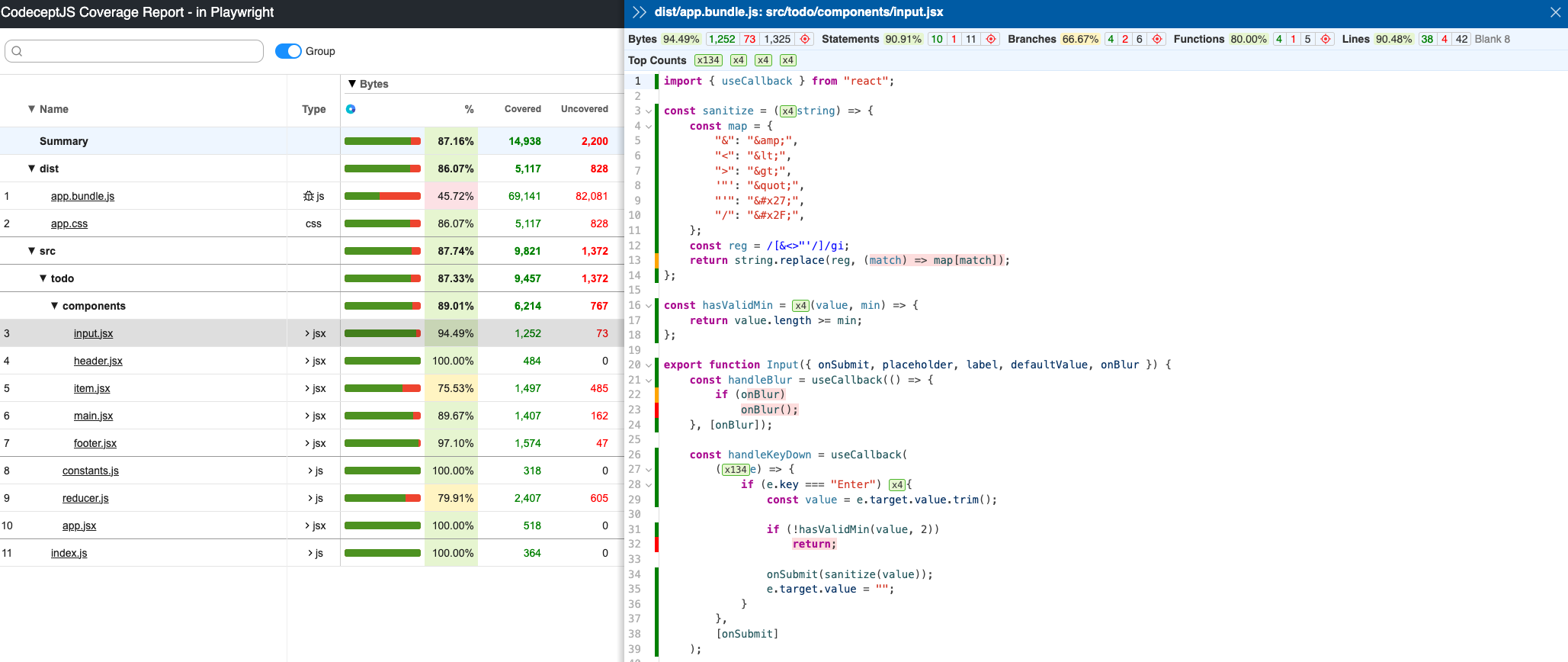
Once all the tests are completed, `codecept` will create and store coverage in `output/coverage` folder, as shown below.
|
|
585
|
+
|
|
586
|
+
>)
|
|
587
|
+
|
|
588
|
+
Open `index.html` in your browser to view the full interactive coverage report.
|
|
589
|
+
|
|
590
|
+

|
|
591
|
+
|
|
592
|
+
|
|
593
|
+
|
|
594
|
+
## Extending Helper
|
|
595
|
+
|
|
596
|
+
To create custom `I.*` commands using Playwright API you need to create a custom helper.
|
|
597
|
+
|
|
598
|
+
Start with creating an `MyPlaywright` helper using `generate:helper` or `gh` command:
|
|
599
|
+
|
|
600
|
+
```sh
|
|
601
|
+
npx codeceptjs gh
|
|
602
|
+
```
|
|
603
|
+
|
|
604
|
+
Then inside a Helper you can access `Playwright` helper of CodeceptJS.
|
|
605
|
+
Let's say you want to create `I.grabDimensionsOfCurrentPage` action. In this case you need to call `evaluate` method of `page` object
|
|
606
|
+
|
|
607
|
+
```js
|
|
608
|
+
// inside a MyPlaywright helper
|
|
609
|
+
async grabDimensionsOfCurrentPage() {
|
|
610
|
+
const { page } = this.helpers.Playwright;
|
|
611
|
+
await page.goto('https://www.example.com/');
|
|
612
|
+
return page.evaluate(() => {
|
|
613
|
+
return {
|
|
614
|
+
width: document.documentElement.clientWidth,
|
|
615
|
+
height: document.documentElement.clientHeight,
|
|
616
|
+
deviceScaleFactor: window.devicePixelRatio
|
|
617
|
+
}
|
|
618
|
+
})
|
|
619
|
+
}
|
|
620
|
+
```
|
|
621
|
+
|
|
622
|
+
The same way you can also access `browser` object to implement more actions or handle events. For instance, you want to set the permissions, you can approach it with:
|
|
623
|
+
|
|
624
|
+
```js
|
|
625
|
+
// inside a MyPlaywright helper
|
|
626
|
+
async setPermissions() {
|
|
627
|
+
const { browser } = this.helpers.Playwright;
|
|
628
|
+
const context = browser.defaultContext()
|
|
629
|
+
return context.setPermissions('https://html5demos.com', ['geolocation']);
|
|
630
|
+
}
|
|
631
|
+
```
|
|
632
|
+
|
|
633
|
+
> [▶ Learn more about BrowserContext](https://github.com/microsoft/playwright/blob/master/docs/src/api/class-browsercontext.md)
|
|
634
|
+
|
|
635
|
+
> [▶ Learn more about Helpers](https://codecept.io/helpers/)
|
|
636
|
+
|
|
637
|
+
## Timezone change
|
|
638
|
+
|
|
639
|
+
Sometimes it's useful to test browser in different timezones. You can configure timezone in Playwright helper configuration:
|
|
640
|
+
|
|
641
|
+
```js
|
|
642
|
+
// In codecept.conf.js
|
|
643
|
+
helpers: {
|
|
644
|
+
Playwright: {
|
|
645
|
+
browser: 'chromium',
|
|
646
|
+
// Set timezone for all tests
|
|
647
|
+
contextOptions: {
|
|
648
|
+
timezoneId: 'America/Phoenix'
|
|
649
|
+
}
|
|
650
|
+
}
|
|
651
|
+
}
|
|
652
|
+
```
|
|
653
|
+
|
|
654
|
+
Other context options: https://playwright.dev/docs/api/class-browser#browser-new-context
|
|
655
|
+
|
|
656
|
+
## Configuring CI
|
|
657
|
+
|
|
658
|
+
### GitHub Actions
|
|
659
|
+
|
|
660
|
+
Playwright can be added to GitHub Actions using [official action](https://github.com/microsoft/playwright-github-action). Use it before starting CodeceptJS tests to install all dependencies. It is important to run tests in headless mode ([otherwise you will need to enable xvfb to emulate desktop](https://github.com/microsoft/playwright-github-action#run-in-headful-mode)).
|
|
661
|
+
|
|
662
|
+
```yml
|
|
663
|
+
# from workflows/tests.yml
|
|
664
|
+
- uses: microsoft/playwright-github-action@v1
|
|
665
|
+
- name: run CodeceptJS tests
|
|
666
|
+
run: npx codeceptjs run
|
|
667
|
+
```
|
|
668
|
+
|
|
669
|
+
## Reusing Auth State (storageState) <Badge text="Since 3.7.5" type="warning"/>
|
|
670
|
+
|
|
671
|
+
Use Playwright's native `storageState` to start tests already authenticated.
|
|
672
|
+
Pass either a JSON file path or a state object to the Playwright helper; CodeceptJS forwards it directly to Playwright (no pre-checks).
|
|
673
|
+
|
|
674
|
+
**Sensitive**: A storage state contains session cookies, auth tokens and may contain localStorage / IndexedDB application data. Treat it like a secret: do not commit it to git, encrypt or store it in a secure CI artifact store.
|
|
675
|
+
|
|
676
|
+
Reference: https://playwright.dev/docs/auth#reuse-authentication-state
|
|
677
|
+
|
|
678
|
+
**Limitation**: If a Scenario is declared with a `cookies` option (e.g. `Scenario('My test', { cookies: [...] }, ({ I }) => { ... })`), those cookies are used to initialize the context and any helper-level `storageState` is ignored (no merge). Choose one mechanism per Scenario.
|
|
679
|
+
|
|
680
|
+
Minimal examples:
|
|
681
|
+
|
|
682
|
+
```js
|
|
683
|
+
// File path
|
|
684
|
+
helpers: { Playwright: { url: 'http://localhost', browser: 'chromium', storageState: 'authState.json' } }
|
|
685
|
+
|
|
686
|
+
// Inline object
|
|
687
|
+
import state from './authState.json' with { type: 'json' };
|
|
688
|
+
helpers: { Playwright: { url: 'http://localhost', browser: 'chromium', storageState: state } }
|
|
689
|
+
```
|
|
690
|
+
|
|
691
|
+
Scenario with explicit cookies (bypasses configured storageState):
|
|
692
|
+
|
|
693
|
+
```js
|
|
694
|
+
const authCookies = [{ name: 'session', value: 'abc123', domain: 'localhost', path: '/', httpOnly: true, secure: false, sameSite: 'Lax' }]
|
|
695
|
+
Scenario('Dashboard (authenticated)', { cookies: authCookies }, ({ I }) => {
|
|
696
|
+
I.amOnPage('/dashboard')
|
|
697
|
+
I.see('Welcome')
|
|
698
|
+
})
|
|
699
|
+
```
|
|
700
|
+
|
|
701
|
+
Helper snippet:
|
|
702
|
+
|
|
703
|
+
```js
|
|
704
|
+
import fs from 'fs'
|
|
705
|
+
|
|
706
|
+
// Grab current state as object
|
|
707
|
+
const state = await I.grabStorageState()
|
|
708
|
+
// Persist manually (sensitive file!)
|
|
709
|
+
fs.writeFileSync('authState.json', JSON.stringify(state))
|
|
710
|
+
|
|
711
|
+
// Include IndexedDB (Playwright >= 1.51) if your app relies on it (e.g. Firebase Auth persistence)
|
|
712
|
+
const stateWithIDB = await I.grabStorageState({ indexedDB: true })
|
|
713
|
+
fs.writeFileSync('authState-with-idb.json', JSON.stringify(stateWithIDB))
|
|
714
|
+
```
|