code-inspector-plugin 0.1.2 → 0.1.4
This diff represents the content of publicly available package versions that have been released to one of the supported registries. The information contained in this diff is provided for informational purposes only and reflects changes between package versions as they appear in their respective public registries.
- package/LICENSE +21 -21
- package/README.md +60 -196
- package/package.json +5 -5
- package/types/index.d.ts +6 -6
package/LICENSE
CHANGED
|
@@ -1,21 +1,21 @@
|
|
|
1
|
-
MIT License
|
|
2
|
-
|
|
3
|
-
Copyright (c) 2022 zhoulixiang
|
|
4
|
-
|
|
5
|
-
Permission is hereby granted, free of charge, to any person obtaining a copy
|
|
6
|
-
of this software and associated documentation files (the "Software"), to deal
|
|
7
|
-
in the Software without restriction, including without limitation the rights
|
|
8
|
-
to use, copy, modify, merge, publish, distribute, sublicense, and/or sell
|
|
9
|
-
copies of the Software, and to permit persons to whom the Software is
|
|
10
|
-
furnished to do so, subject to the following conditions:
|
|
11
|
-
|
|
12
|
-
The above copyright notice and this permission notice shall be included in all
|
|
13
|
-
copies or substantial portions of the Software.
|
|
14
|
-
|
|
15
|
-
THE SOFTWARE IS PROVIDED "AS IS", WITHOUT WARRANTY OF ANY KIND, EXPRESS OR
|
|
16
|
-
IMPLIED, INCLUDING BUT NOT LIMITED TO THE WARRANTIES OF MERCHANTABILITY,
|
|
17
|
-
FITNESS FOR A PARTICULAR PURPOSE AND NONINFRINGEMENT. IN NO EVENT SHALL THE
|
|
18
|
-
AUTHORS OR COPYRIGHT HOLDERS BE LIABLE FOR ANY CLAIM, DAMAGES OR OTHER
|
|
19
|
-
LIABILITY, WHETHER IN AN ACTION OF CONTRACT, TORT OR OTHERWISE, ARISING FROM,
|
|
20
|
-
OUT OF OR IN CONNECTION WITH THE SOFTWARE OR THE USE OR OTHER DEALINGS IN THE
|
|
21
|
-
SOFTWARE.
|
|
1
|
+
MIT License
|
|
2
|
+
|
|
3
|
+
Copyright (c) 2022 zhoulixiang
|
|
4
|
+
|
|
5
|
+
Permission is hereby granted, free of charge, to any person obtaining a copy
|
|
6
|
+
of this software and associated documentation files (the "Software"), to deal
|
|
7
|
+
in the Software without restriction, including without limitation the rights
|
|
8
|
+
to use, copy, modify, merge, publish, distribute, sublicense, and/or sell
|
|
9
|
+
copies of the Software, and to permit persons to whom the Software is
|
|
10
|
+
furnished to do so, subject to the following conditions:
|
|
11
|
+
|
|
12
|
+
The above copyright notice and this permission notice shall be included in all
|
|
13
|
+
copies or substantial portions of the Software.
|
|
14
|
+
|
|
15
|
+
THE SOFTWARE IS PROVIDED "AS IS", WITHOUT WARRANTY OF ANY KIND, EXPRESS OR
|
|
16
|
+
IMPLIED, INCLUDING BUT NOT LIMITED TO THE WARRANTIES OF MERCHANTABILITY,
|
|
17
|
+
FITNESS FOR A PARTICULAR PURPOSE AND NONINFRINGEMENT. IN NO EVENT SHALL THE
|
|
18
|
+
AUTHORS OR COPYRIGHT HOLDERS BE LIABLE FOR ANY CLAIM, DAMAGES OR OTHER
|
|
19
|
+
LIABILITY, WHETHER IN AN ACTION OF CONTRACT, TORT OR OTHERWISE, ARISING FROM,
|
|
20
|
+
OUT OF OR IN CONNECTION WITH THE SOFTWARE OR THE USE OR OTHER DEALINGS IN THE
|
|
21
|
+
SOFTWARE.
|
package/README.md
CHANGED
|
@@ -1,196 +1,60 @@
|
|
|
1
|
-
<div align="center">
|
|
2
|
-
<img src="https://github.com/zh-lx/code-inspector/assets/73059627/842c3e88-dca7-4743-854c-d61093d3d34f" width=160px" style="margin-bottom: 12px;" />
|
|
3
|
-
|
|
4
|
-
<p align="center">
|
|
5
|
-
<h2>code-inspector-plugin</h2>
|
|
6
|
-
<span>中文文档</span> |
|
|
7
|
-
<a href="https://github.com/zh-lx/code-inspector/blob/main/docs/README-EN.md">English Doc</a>
|
|
8
|
-
|
|
9
|
-
|
|
10
|
-
|
|
11
|
-
[![
|
|
12
|
-
[![
|
|
13
|
-
|
|
14
|
-
|
|
15
|
-
|
|
16
|
-
|
|
17
|
-
|
|
18
|
-
|
|
19
|
-
|
|
20
|
-
|
|
21
|
-
|
|
22
|
-
|
|
23
|
-
|
|
24
|
-
|
|
25
|
-
|
|
26
|
-
|
|
27
|
-
|
|
28
|
-
|
|
29
|
-
|
|
30
|
-
|
|
31
|
-
|
|
32
|
-
|
|
33
|
-
|
|
34
|
-
|
|
35
|
-
|
|
36
|
-
|
|
37
|
-
|
|
38
|
-
|
|
39
|
-
|
|
40
|
-
|
|
41
|
-
|
|
42
|
-
|
|
43
|
-
|
|
44
|
-
|
|
45
|
-
|
|
46
|
-
|
|
47
|
-
|
|
48
|
-
|
|
49
|
-
|
|
50
|
-
|
|
51
|
-
|
|
52
|
-
|
|
53
|
-
|
|
54
|
-
|
|
55
|
-
|
|
56
|
-
|
|
57
|
-
|
|
58
|
-
|
|
59
|
-
|
|
60
|
-
|
|
61
|
-
|
|
62
|
-
```js
|
|
63
|
-
// webpack.config.js
|
|
64
|
-
const { CodeInspectorPlugin } = require('code-inspector-plugin');
|
|
65
|
-
|
|
66
|
-
module.exports = (env = {}) => ({
|
|
67
|
-
plugins: [
|
|
68
|
-
CodeInspectorPlugin({
|
|
69
|
-
bundler: 'webpack',
|
|
70
|
-
}),
|
|
71
|
-
],
|
|
72
|
-
});
|
|
73
|
-
```
|
|
74
|
-
|
|
75
|
-
- <b>vite 中使用</b>,在 `vite.config.js` 中添加如下配置:
|
|
76
|
-
|
|
77
|
-
```js
|
|
78
|
-
// vite.config.js
|
|
79
|
-
import { defineConfig } from 'vite';
|
|
80
|
-
import { CodeInspectorPlugin } from 'code-inspector-plugin';
|
|
81
|
-
|
|
82
|
-
// https://vitejs.dev/config/
|
|
83
|
-
export default defineConfig({
|
|
84
|
-
plugins: [
|
|
85
|
-
CodeInspectorPlugin({
|
|
86
|
-
bundler: 'vite',
|
|
87
|
-
}),
|
|
88
|
-
],
|
|
89
|
-
});
|
|
90
|
-
```
|
|
91
|
-
|
|
92
|
-
### 2. 配置命令行工具(仅当 Mac + Vscode 需要配置此步)
|
|
93
|
-
|
|
94
|
-
如果你的编辑器是 VSCode 且系统为 MacOS,需要进行如下配置:
|
|
95
|
-
|
|
96
|
-
- 在 VSCode 中执行 `command + shift + p`(mac) 或 `ctrl + shift + p`(windows) 命令, 搜索 指令并点击 `shell Command: Install 'code' command in Path`:
|
|
97
|
-
|
|
98
|
-
<img src="https://s3.bmp.ovh/imgs/2021/08/a99ec7b8e93f55fd.png" width="60%" />
|
|
99
|
-
|
|
100
|
-
- 如果出现如下弹窗,说明配置成功了:
|
|
101
|
-
|
|
102
|
-
<img src="https://s3.bmp.ovh/imgs/2021/08/c3d00a8efbb20feb.png" width="40%" />
|
|
103
|
-
|
|
104
|
-
### 3. 使用代码审查
|
|
105
|
-
|
|
106
|
-
目前使用代码审查功能的方式有两种:
|
|
107
|
-
|
|
108
|
-
1. 【推荐】按住组合键时,即可进行代码审查。 (Mac 系统默认组合键是 `Option + Shift`;Window 的默认组合键是 `Alt + Shift`,浏览器控制台会输出相关提示)
|
|
109
|
-

|
|
110
|
-
2. 点击页面上的 Code Inspector 开关按钮。当开关的颜色变成彩色时,表示代码审查模式打开 <img src="https://github.com/zh-lx/code-inspector/assets/73059627/842c3e88-dca7-4743-854c-d61093d3d34f" width="20" />;当开关颜色变成黑白时,表示代码审查模式关闭 <img src="https://user-images.githubusercontent.com/73059627/230129864-e2813188-8d49-4a8e-a6bc-dda19c79b491.png" width="20" />。(Code Inspector 开关按钮 <img src="https://github.com/zh-lx/code-inspector/assets/73059627/842c3e88-dca7-4743-854c-d61093d3d34f" width="20" /> 默认隐藏,需要配置 `showSwitch: true` 才会在页面显示。)
|
|
111
|
-
|
|
112
|
-
当代码审查模式打开时,点击页面上的元素,将自动打开你的代码编辑器并将光标定位到元素对应的代码位置。
|
|
113
|
-
|
|
114
|
-
## 🎨 可选配置
|
|
115
|
-
|
|
116
|
-
| 参数 | 描述 | 是否必传 | 类型 | 可选值 | 默认值 |
|
|
117
|
-
| ---------- | ---------------------------------------------------------- | -------- | ------------------- | -------------------------------------------------------------------- | ------------------------ |
|
|
118
|
-
| bundler | 指定的打包工具 | 是 | `string` | `vite/webpack` | - |
|
|
119
|
-
| showSwitch | 是否展示功能开关 | 否 | `boolean` | `true/false` | `false` |
|
|
120
|
-
| hotKeys | 组合键触发功能,为 `false` 或者空数组则关闭组合键触发 | 否 | `string[] \| false` | Array<`'ctrlKey'`\|`'altKey'`\|`'metaKey'`\|`'shiftKey'`> \| `false` | `['altKey', 'shiftKey']` |
|
|
121
|
-
| autoToggle | 打开功能开关的情况下,点击触发跳转编辑器时是否自动关闭开关 | 否 | `boolean` | `true/false` | `true` |
|
|
122
|
-
|
|
123
|
-
## 🎯 指定 IDE
|
|
124
|
-
|
|
125
|
-
默认情况下,`code-inspector-plugin` 会自动识别当前系统运行中的 IDE 程序并按照优先级打开识别到的第一个。如果你有多种不同的 IDE,你可以指定要打开的 IDE,在项目根目录添加一个名为 `.env.local` 的文件并添加: `CODE_EDITOR=[IDE编码名称]`。
|
|
126
|
-
|
|
127
|
-
以 vscode 为例,它的`IDE编码名称`是 `code`,则对应在 `.env.local` 中添加如下内容:
|
|
128
|
-
|
|
129
|
-
```perl
|
|
130
|
-
# 指定 IDE 为 vscode
|
|
131
|
-
CODE_EDITOR=code
|
|
132
|
-
```
|
|
133
|
-
|
|
134
|
-
IDE 及对应的`IDE编码名称`对照表如下:
|
|
135
|
-
|
|
136
|
-
<table>
|
|
137
|
-
<tr>
|
|
138
|
-
<th>IDE</th>
|
|
139
|
-
<th>IDE编码名称</th>
|
|
140
|
-
</tr>
|
|
141
|
-
<tr>
|
|
142
|
-
<td>Visual Studio Code(vscode)</td>
|
|
143
|
-
<td>code</td>
|
|
144
|
-
</tr>
|
|
145
|
-
<tr>
|
|
146
|
-
<td>Visual Studio Code - Insiders(vscode 内部版)</td>
|
|
147
|
-
<td>code_insiders</td>
|
|
148
|
-
</tr>
|
|
149
|
-
<tr>
|
|
150
|
-
<td>WebStorm</td>
|
|
151
|
-
<td>webstorm</td>
|
|
152
|
-
</tr>
|
|
153
|
-
<tr>
|
|
154
|
-
<td>Atom</td>
|
|
155
|
-
<td>atom</td>
|
|
156
|
-
</tr>
|
|
157
|
-
<tr>
|
|
158
|
-
<td>HBuilderX</td>
|
|
159
|
-
<td>hbuilder</td>
|
|
160
|
-
</tr>
|
|
161
|
-
<tr>
|
|
162
|
-
<td>PhpStorm</td>
|
|
163
|
-
<td>phpstorm</td>
|
|
164
|
-
</tr>
|
|
165
|
-
<tr>
|
|
166
|
-
<td>Pycharm</td>
|
|
167
|
-
<td>pycharm</td>
|
|
168
|
-
</tr>
|
|
169
|
-
<tr>
|
|
170
|
-
<td>IntelliJ IDEA</td>
|
|
171
|
-
<td>idea</td>
|
|
172
|
-
</tr>
|
|
173
|
-
</table>
|
|
174
|
-
|
|
175
|
-
## 🎨 支持列表
|
|
176
|
-
|
|
177
|
-
下面是编译器、web 框架以及代码编辑器支持列表:
|
|
178
|
-
|
|
179
|
-
- 当前支持以下打包工具<br />
|
|
180
|
-
✅ webpack(4.x/5.x)<br />
|
|
181
|
-
✅ vite
|
|
182
|
-
- 当前支持以下 Web 框架<br />
|
|
183
|
-
✅ vue2<br />
|
|
184
|
-
✅ vue3<br />
|
|
185
|
-
✅ react
|
|
186
|
-
- 当前支持以下代码编辑器<br />
|
|
187
|
-
[VSCode](https://code.visualstudio.com/) | [Visual Studio Code - Insiders](https://code.visualstudio.com/insiders/) | [WebStorm](https://www.jetbrains.com/webstorm/) | [Atom](https://atom.io/) | [HBuilderX](https://www.dcloud.io/hbuilderx.html) | [PhpStorm](https://www.jetbrains.com/phpstorm/) | [PyCharm](https://www.jetbrains.com/pycharm/) | [IntelliJ IDEA](https://www.jetbrains.com/idea/)
|
|
188
|
-
|
|
189
|
-
## 📧 交流与反馈
|
|
190
|
-
|
|
191
|
-
任何使用问题可以加入 QQ 群 `769748484` 或者添加作者微信 `zhoulx1688888` 进行咨询与反馈:
|
|
192
|
-
|
|
193
|
-
<div style="display: flex;">
|
|
194
|
-
<img src="https://github.com/zh-lx/code-inspector/assets/73059627/b107aac0-0582-4392-b2c5-c375ccc4fedc" width="200" />
|
|
195
|
-
<img src="https://user-images.githubusercontent.com/73059627/226233691-848b2a40-f1a9-414e-a80f-3fc6c6209eb1.png" width="200" />
|
|
196
|
-
</div>
|
|
1
|
+
<div align="center">
|
|
2
|
+
<img src="https://github.com/zh-lx/code-inspector/assets/73059627/842c3e88-dca7-4743-854c-d61093d3d34f" width=160px" style="margin-bottom: 12px;" />
|
|
3
|
+
|
|
4
|
+
<p align="center">
|
|
5
|
+
<h2>code-inspector-plugin</h2>
|
|
6
|
+
<span>中文文档</span> |
|
|
7
|
+
<a href="https://github.com/zh-lx/code-inspector/blob/main/docs/README-EN.md">English Doc</a> |
|
|
8
|
+
<a href="https://inspector.fe-dev.cn">在线文档</a>
|
|
9
|
+
</p>
|
|
10
|
+
|
|
11
|
+
[](https://www.npmjs.com/package/code-inspector-plugin)
|
|
12
|
+
[](https://github.com/zh-lx/code-inspector)
|
|
13
|
+
[](https://opensource.org/licenses/MIT)
|
|
14
|
+
|
|
15
|
+
</div>
|
|
16
|
+
|
|
17
|
+
<hr />
|
|
18
|
+
|
|
19
|
+
## 📖 介绍
|
|
20
|
+
|
|
21
|
+
点击页面上的元素,能够自动打开你的代码编辑器并将光标定位到元素对应的代码位置。
|
|
22
|
+
|
|
23
|
+
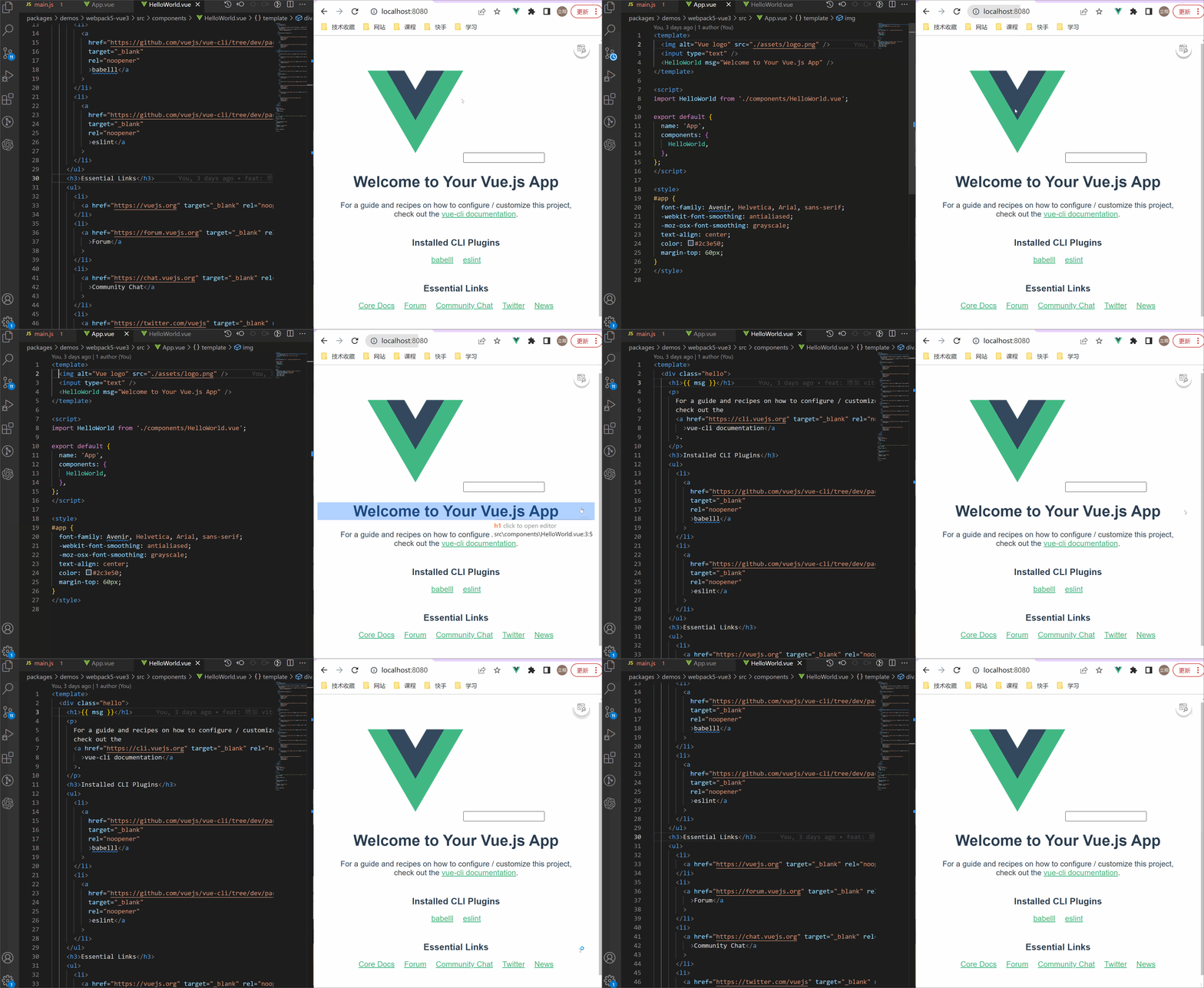
|
|
24
|
+
|
|
25
|
+
## 🚀 安装
|
|
26
|
+
|
|
27
|
+
```perl
|
|
28
|
+
npm i code-inspector-plugin -D
|
|
29
|
+
# or
|
|
30
|
+
yarn add code-inspector-plugin -D
|
|
31
|
+
# or
|
|
32
|
+
pnpm add code-inspector-plugin -D
|
|
33
|
+
```
|
|
34
|
+
|
|
35
|
+
## 🌈 使用
|
|
36
|
+
|
|
37
|
+
完整的接入及使用方式请查看:[code-inspector-plugin 配置](https://inspector.fe-dev.cn/guide/start.html#%E9%85%8D%E7%BD%AE)
|
|
38
|
+
|
|
39
|
+
## 🎨 支持列表
|
|
40
|
+
|
|
41
|
+
下面是编译器、web 框架以及代码编辑器支持列表:
|
|
42
|
+
|
|
43
|
+
- 当前支持以下打包工具<br />
|
|
44
|
+
✅ webpack(4.x/5.x)<br />
|
|
45
|
+
✅ vite
|
|
46
|
+
- 当前支持以下 Web 框架<br />
|
|
47
|
+
✅ vue2<br />
|
|
48
|
+
✅ vue3<br />
|
|
49
|
+
✅ react
|
|
50
|
+
- 当前支持以下代码编辑器<br />
|
|
51
|
+
[VSCode](https://code.visualstudio.com/) | [Visual Studio Code - Insiders](https://code.visualstudio.com/insiders/) | [WebStorm](https://www.jetbrains.com/webstorm/) | [Atom](https://atom.io/) | [HBuilderX](https://www.dcloud.io/hbuilderx.html) | [PhpStorm](https://www.jetbrains.com/phpstorm/) | [PyCharm](https://www.jetbrains.com/pycharm/) | [IntelliJ IDEA](https://www.jetbrains.com/idea/)
|
|
52
|
+
|
|
53
|
+
## 📧 交流与反馈
|
|
54
|
+
|
|
55
|
+
任何使用问题可以加入 QQ 群 `769748484` 或者添加作者微信 `zhoulx1688888` 进行咨询与反馈:
|
|
56
|
+
|
|
57
|
+
<div style="display: flex;">
|
|
58
|
+
<img src="https://github.com/zh-lx/code-inspector/assets/73059627/1ffb57e0-d511-4981-bc06-cf16f8793fd8" width="200" />
|
|
59
|
+
<img src="https://user-images.githubusercontent.com/73059627/226233691-848b2a40-f1a9-414e-a80f-3fc6c6209eb1.png" width="200" />
|
|
60
|
+
</div>
|
package/package.json
CHANGED
|
@@ -1,6 +1,6 @@
|
|
|
1
1
|
{
|
|
2
2
|
"name": "code-inspector-plugin",
|
|
3
|
-
"version": "0.1.
|
|
3
|
+
"version": "0.1.4",
|
|
4
4
|
"main": "./dist/index.js",
|
|
5
5
|
"module": "./dist/index.mjs",
|
|
6
6
|
"typings": "./types/index.d.ts",
|
|
@@ -23,7 +23,7 @@
|
|
|
23
23
|
}
|
|
24
24
|
}
|
|
25
25
|
},
|
|
26
|
-
"homepage": "https://
|
|
26
|
+
"homepage": "https://inspector.fe-dev.cn/",
|
|
27
27
|
"description": "点击页面上的元素,将自动打开你的代码编辑器并将光标定位到元素对应的代码位置。",
|
|
28
28
|
"keywords": [
|
|
29
29
|
"webpack",
|
|
@@ -39,9 +39,9 @@
|
|
|
39
39
|
},
|
|
40
40
|
"dependencies": {
|
|
41
41
|
"chalk": "4.1.1",
|
|
42
|
-
"code-inspector-core": "0.1.
|
|
43
|
-
"
|
|
44
|
-
"
|
|
42
|
+
"code-inspector-core": "0.1.4",
|
|
43
|
+
"webpack-code-inspector-plugin": "0.1.4",
|
|
44
|
+
"vite-code-inspector-plugin": "0.1.4"
|
|
45
45
|
},
|
|
46
46
|
"devDependencies": {
|
|
47
47
|
"@types/node": "^16.0.1",
|
package/types/index.d.ts
CHANGED
|
@@ -1,6 +1,6 @@
|
|
|
1
|
-
import { CodeOptions } from 'code-inspector-core';
|
|
2
|
-
export interface CodeInspectorPluginOptions extends CodeOptions {
|
|
3
|
-
bundler: 'vite' | 'webpack';
|
|
4
|
-
catch?: boolean;
|
|
5
|
-
}
|
|
6
|
-
export declare function CodeInspectorPlugin(options: CodeInspectorPluginOptions): any;
|
|
1
|
+
import { CodeOptions } from 'code-inspector-core';
|
|
2
|
+
export interface CodeInspectorPluginOptions extends CodeOptions {
|
|
3
|
+
bundler: 'vite' | 'webpack';
|
|
4
|
+
catch?: boolean;
|
|
5
|
+
}
|
|
6
|
+
export declare function CodeInspectorPlugin(options: CodeInspectorPluginOptions): any;
|