cobro-mcp 0.6.1 → 0.7.0
This diff represents the content of publicly available package versions that have been released to one of the supported registries. The information contained in this diff is provided for informational purposes only and reflects changes between package versions as they appear in their respective public registries.
- package/CHANGELOG.md +79 -69
- package/README.ko.md +169 -143
- package/README.md +169 -143
- package/dist/overlay.js +174 -23
- package/dist/server.js +4 -4
- package/package.json +1 -1
package/CHANGELOG.md
CHANGED
|
@@ -1,69 +1,79 @@
|
|
|
1
|
-
# Changelog
|
|
2
|
-
|
|
3
|
-
All notable changes to this project are documented here. The format follows [Keep a Changelog](https://keepachangelog.com/en/1.1.0/); versions follow [SemVer](https://semver.org/).
|
|
4
|
-
|
|
5
|
-
## [0.
|
|
6
|
-
### Added
|
|
7
|
-
- README:
|
|
8
|
-
|
|
9
|
-
-
|
|
10
|
-
|
|
11
|
-
|
|
12
|
-
|
|
13
|
-
|
|
14
|
-
|
|
15
|
-
|
|
16
|
-
|
|
17
|
-
|
|
18
|
-
|
|
19
|
-
-
|
|
20
|
-
|
|
21
|
-
-
|
|
22
|
-
|
|
23
|
-
|
|
24
|
-
|
|
25
|
-
|
|
26
|
-
|
|
27
|
-
### Changed
|
|
28
|
-
-
|
|
29
|
-
-
|
|
30
|
-
-
|
|
31
|
-
|
|
32
|
-
|
|
33
|
-
|
|
34
|
-
|
|
35
|
-
|
|
36
|
-
|
|
37
|
-
|
|
38
|
-
|
|
39
|
-
|
|
40
|
-
|
|
41
|
-
|
|
42
|
-
-
|
|
43
|
-
|
|
44
|
-
|
|
45
|
-
|
|
46
|
-
- `
|
|
47
|
-
-
|
|
48
|
-
|
|
49
|
-
## [0.3.
|
|
50
|
-
###
|
|
51
|
-
-
|
|
52
|
-
|
|
53
|
-
|
|
54
|
-
|
|
55
|
-
|
|
56
|
-
|
|
57
|
-
-
|
|
58
|
-
|
|
59
|
-
|
|
60
|
-
|
|
61
|
-
|
|
62
|
-
|
|
63
|
-
|
|
64
|
-
|
|
65
|
-
|
|
66
|
-
|
|
67
|
-
-
|
|
68
|
-
-
|
|
69
|
-
|
|
1
|
+
# Changelog
|
|
2
|
+
|
|
3
|
+
All notable changes to this project are documented here. The format follows [Keep a Changelog](https://keepachangelog.com/en/1.1.0/); versions follow [SemVer](https://semver.org/).
|
|
4
|
+
|
|
5
|
+
## [0.7.0] — 2026-09-20
|
|
6
|
+
### Added
|
|
7
|
+
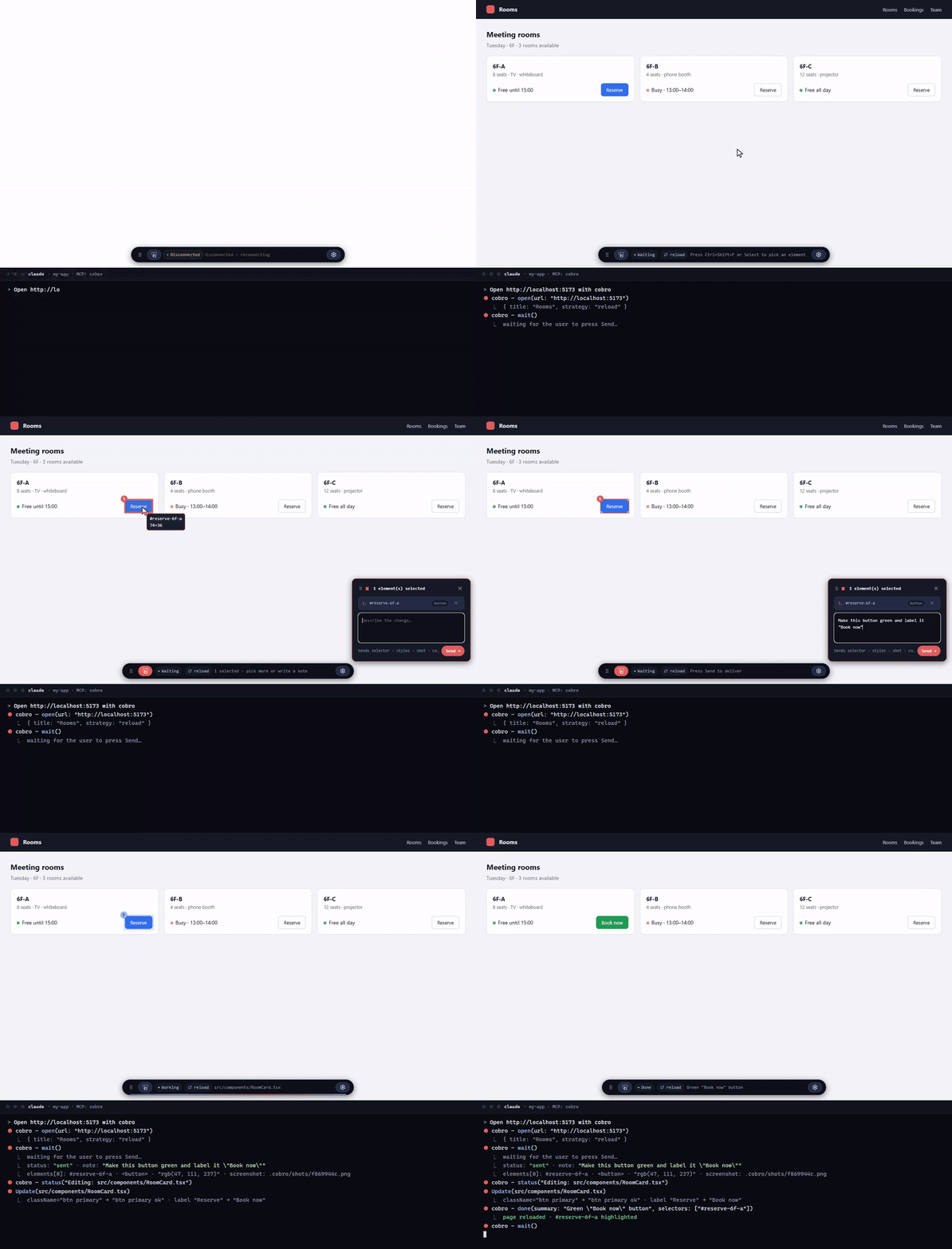
- README: Quick start — the six steps from dev server to the first Send, with the sentence to type in the chat.
|
|
8
|
+
- Toolbar: drag it anywhere by the handle on its left. The position is not saved — it returns to the bottom center on reload.
|
|
9
|
+
- Picked elements are marked on the page with a numbered badge that matches the panel list; the note placeholder suggests "1: …, 2: …" when several are picked, and the agent is told notes may refer to elements by number.
|
|
10
|
+
- Drag a band over empty space to send that area as a region (page rect + enclosing element); the screenshot covers it and it gets a dashed numbered marker. Bands that contain elements behave as before.
|
|
11
|
+
|
|
12
|
+
### Changed
|
|
13
|
+
- Feedback panel: rows are cards with an accent number and a type chip (tag or "region"), a roomier note box, a "Sends selector · styles · shot · console" hint next to Send, and an ✕ in the header that collapses the panel (same as the toolbar button). The panel itself can be dragged by its header (there is a grip icon on the left); like the toolbar, the position is not saved.
|
|
14
|
+
|
|
15
|
+
## [0.6.1] — 2026-09-18
|
|
16
|
+
### Added
|
|
17
|
+
- README: demo GIF of the core loop (pick → note → Send → done) and a note that React 19 reports `react.component` without `source`.
|
|
18
|
+
### Changed
|
|
19
|
+
- `close` deletes screenshots of finished batches and the manual screenshot folder; manual screenshots are capped at 50 during a session.
|
|
20
|
+
### Fixed
|
|
21
|
+
- Light theme: the pick-mode hover badge (selector + size) rendered white-on-white; it now uses a dark text color.
|
|
22
|
+
|
|
23
|
+
## [0.6.0] — 2026-09-17
|
|
24
|
+
### Added
|
|
25
|
+
- README: `Payload` section — field rules and an example of what `wait` returns after Send.
|
|
26
|
+
- Settings popover (⚙) on the toolbar with theme selection: auto / dark / light / frost. Saved per user in `~/.cobro/settings.json`; `COBRO_THEME` pins it.
|
|
27
|
+
### Changed
|
|
28
|
+
- Toolbar: agent state is now a muted chip next to Select, with the agent's message as separate detail text — no more "Working: Working: …" duplication.
|
|
29
|
+
- Toolbar buttons are icons (Material Symbols); the label unfolds on hover/focus.
|
|
30
|
+
- Only the Select button unfolds its label on hover; ⚙ and Collapse stay icon-only (tooltips remain).
|
|
31
|
+
- The refresh strategy (none / reload / event) is shown as a second chip next to the agent state instead of trailing the hint text.
|
|
32
|
+
### Fixed
|
|
33
|
+
- Settings popover: unselected theme labels were invisible in dark mode; popover and panel now share one corner radius.
|
|
34
|
+
- The agent's done summary stays visible while it waits for the next request (it used to vanish the instant the agent called wait again).
|
|
35
|
+
|
|
36
|
+
## [0.5.0] — 2026-09-10
|
|
37
|
+
### Changed
|
|
38
|
+
- README is now English; the Korean version moved to `README.ko.md`.
|
|
39
|
+
- MCP `instructions`, server error messages and the Claude Code skill are now English. Overlay UI stays ko/en by browser language.
|
|
40
|
+
- `package.json` gained `description` and `keywords` for npm search.
|
|
41
|
+
### Added
|
|
42
|
+
- This changelog.
|
|
43
|
+
|
|
44
|
+
## [0.4.0] — 2026-09-10
|
|
45
|
+
### Changed
|
|
46
|
+
- Package and repository renamed `cobro-browser` → `cobro-mcp`. Register with `claude mcp add -s user cobro -- npx -y cobro-mcp@latest`. The old package is deprecated.
|
|
47
|
+
- Name origin: Cobro = co-browse. One slogan: "Meet Cobro: Your Co-Agent, Your Browser."
|
|
48
|
+
|
|
49
|
+
## [0.3.2] — 2026-09-09
|
|
50
|
+
### Changed
|
|
51
|
+
- Handshake: Send is enabled only while the agent is idle, waiting or done; the Unlock button is gone. The agent's `wait()` re-enables Send even if `done` was skipped.
|
|
52
|
+
- Operating protocol is delivered as MCP `instructions` at initialize — registration alone teaches the agent the loop. The skill file is optional.
|
|
53
|
+
### Fixed
|
|
54
|
+
- A profile held by another cobro process is reported as "profile in use" instead of "Chrome not found".
|
|
55
|
+
- The server exits when the host process dies (parent-PID watch), so no orphan browser blocks the next session.
|
|
56
|
+
- `close` cancels a pending `wait` before closing the browser.
|
|
57
|
+
- `dist/` is no longer tracked in git; it is built on publish.
|
|
58
|
+
|
|
59
|
+
## [0.3.0] — 2026-09-09
|
|
60
|
+
### Added
|
|
61
|
+
- First public release on npm under Apache-2.0.
|
|
62
|
+
### Changed
|
|
63
|
+
- Overlay reduced to the core loop: pick elements → note → Send → done. History, Add batch and Redo removed.
|
|
64
|
+
|
|
65
|
+
## [0.2.0] — 2026-09-09
|
|
66
|
+
### Added
|
|
67
|
+
- Toolbar status line that tells the user the next step, plus an agent status dot.
|
|
68
|
+
- Overlay hints and tooltips switch ko/en by `navigator.language`; long hints scroll once on hover.
|
|
69
|
+
### Changed
|
|
70
|
+
- Chromium sandbox enabled (one fallback with a console error).
|
|
71
|
+
### Fixed
|
|
72
|
+
- Send-path error handling, fixture install on Windows/Node 24 (`EINVAL`), stdio smoke assertions.
|
|
73
|
+
|
|
74
|
+
## [0.1.0] — 2026-09-08
|
|
75
|
+
### Added
|
|
76
|
+
- MCP server with six fixed tools: `open`, `wait`, `status`, `done`, `screenshot`, `close`.
|
|
77
|
+
- Page overlay (Shadow DOM), local WebSocket channel with token auth, per-project session state in `.cobro/`, shared browser profile.
|
|
78
|
+
- Refresh strategies `none` / `reload` / `event` with HMR auto-detection.
|
|
79
|
+
- WebKit and Firefox engines via `COBRO_BROWSER`.
|
package/README.ko.md
CHANGED
|
@@ -1,143 +1,169 @@
|
|
|
1
|
-
# Cobro (`cobro-mcp`)
|
|
2
|
-
|
|
3
|
-
> English: [README.md](README.md)
|
|
4
|
-
|
|
5
|
-
**Meet Cobro: Your Co-Agent, Your Browser.**
|
|
6
|
-
|
|
7
|
-
|
|
8
|
-
|
|
9
|
-
화면을 설명하지 말고, 직접 가리키세요.
|
|
10
|
-
|
|
11
|
-
Cobro = **co-browse**. 사람과 에이전트가 같은 화면을 함께 본다.
|
|
12
|
-
|
|
13
|
-
화면에서 요소를 고르고 메모를 써서 **Send**하면, 그 메모가 요소 맥락(선택자·스타일·스크린샷·페이지 정보·콘솔 에러)과 함께 에이전트 대화에 바로 도착한다. 에이전트의 진행·완료 신호는 같은 연결로 브라우저에 즉시 돌아온다. MCP 서버 + 로컬 WebSocket + 페이지 오버레이. 대상 프로젝트 소스는 건드리지 않는다(생기는 것은 `.cobro/` 하나).
|
|
14
|
-
|
|
15
|
-
## 설치
|
|
16
|
-
|
|
17
|
-
Cobro는 MCP 서버다. **호스트**(Claude Code·Codex·Cursor처럼 MCP 서버를 실행하는 쪽)에 한 번 등록하면 호스트가 세션마다 서버를 띄우고 끝나면 브라우저까지 정리한다. 운용 규약은 서버가 MCP `instructions`로 호스트에 직접 주므로 **등록만으로 에이전트가 루프를 안다.**
|
|
18
|
-
|
|
19
|
-
```bash
|
|
20
|
-
claude mcp add -s user cobro -- npx -y cobro-mcp@latest
|
|
21
|
-
```
|
|
22
|
-
|
|
23
|
-
`-s user`로 등록하면 이 PC의 어느 저장소에서든 쓸 수 있다(생략하면 현재 폴더에서만). 상태(`.cobro/`)는 저장소마다 따로 생기고, 브라우저 프로필(`~/.cobro/profile/`)은 공유라 로그인은 한 번만 한다. 전역 설치(`npm i -g cobro-mcp` 후 `-- cobro-mcp`)도 된다. 다른 호스트는 같은 실행 명령을 stdio MCP 서버로 등록한다.
|
|
24
|
-
|
|
25
|
-
**소스로 쓰기**: `git clone https://github.com/boonblade/cobro-mcp.git && cd cobro-mcp && npm i && npm run build` 후 `claude mcp add -s user cobro -- node "$PWD/dist/server.js"`. `dist/`는 git에 없으니 clone 직후와 소스 수정 뒤에 `npm run build`. Chrome 또는 Edge가 필요하고, 없으면 `npx playwright-core install chromium` 후 `COBRO_BROWSER_CHANNEL=chromium`.
|
|
26
|
-
|
|
27
|
-
**Claude Code 팁**: `wait`는 기본 2분 뒤 백그라운드로 넘어간다. `~/.claude/settings.json`에 `"env": { "CLAUDE_CODE_MCP_AUTO_BACKGROUND_MS": "5000" }`를 두면 5초 만에 넘어가 대기 중에도 다른 지시가 바로 먹는다.
|
|
28
|
-
|
|
29
|
-
**스킬(선택)**: `/cobro`로 명시 호출하고 싶으면 [`skills/claude-code/SKILL.md`](skills/claude-code/SKILL.md)를 `~/.claude/skills/cobro/SKILL.md`에 둔다.
|
|
30
|
-
|
|
31
|
-
##
|
|
32
|
-
|
|
33
|
-
|
|
34
|
-
|
|
35
|
-
|
|
36
|
-
|
|
37
|
-
|
|
38
|
-
|
|
39
|
-
|
|
40
|
-
|
|
41
|
-
|
|
42
|
-
|
|
43
|
-
|
|
44
|
-
|
|
45
|
-
|
|
46
|
-
|
|
47
|
-
|
|
48
|
-
|
|
49
|
-
|
|
50
|
-
|
|
51
|
-
|
|
52
|
-
|
|
53
|
-
|
|
54
|
-
|
|
55
|
-
|
|
56
|
-
|
|
57
|
-
|
|
58
|
-
|
|
59
|
-
|
|
60
|
-
|
|
61
|
-
|
|
62
|
-
|
|
63
|
-
|
|
64
|
-
|
|
65
|
-
|
|
66
|
-
|
|
67
|
-
|
|
68
|
-
|
|
69
|
-
|
|
70
|
-
|
|
71
|
-
|
|
72
|
-
|
|
73
|
-
|
|
74
|
-
|
|
75
|
-
|
|
76
|
-
|
|
77
|
-
|
|
78
|
-
|
|
79
|
-
|
|
80
|
-
|
|
81
|
-
"
|
|
82
|
-
|
|
83
|
-
}
|
|
84
|
-
|
|
85
|
-
|
|
86
|
-
|
|
87
|
-
|
|
88
|
-
|
|
89
|
-
|
|
90
|
-
|
|
91
|
-
|
|
92
|
-
|
|
93
|
-
|
|
94
|
-
|
|
95
|
-
|
|
96
|
-
|
|
97
|
-
|
|
98
|
-
|
|
99
|
-
|
|
100
|
-
|
|
101
|
-
|
|
102
|
-
|
|
103
|
-
|
|
104
|
-
|
|
105
|
-
|
|
106
|
-
|
|
107
|
-
|
|
108
|
-
|
|
109
|
-
|
|
110
|
-
|
|
111
|
-
|
|
|
112
|
-
|
|
113
|
-
| `
|
|
114
|
-
| `
|
|
115
|
-
| `
|
|
116
|
-
| `
|
|
117
|
-
| `
|
|
118
|
-
|
|
119
|
-
|
|
120
|
-
|
|
121
|
-
|
|
122
|
-
|
|
123
|
-
|
|
124
|
-
|
|
125
|
-
|
|
126
|
-
|
|
127
|
-
|
|
128
|
-
|
|
129
|
-
|
|
130
|
-
|
|
131
|
-
|
|
132
|
-
|
|
133
|
-
|
|
134
|
-
|
|
135
|
-
|
|
136
|
-
|
|
137
|
-
|
|
138
|
-
|
|
139
|
-
|
|
140
|
-
|
|
141
|
-
|
|
142
|
-
|
|
143
|
-
|
|
1
|
+
# Cobro (`cobro-mcp`)
|
|
2
|
+
|
|
3
|
+
> English: [README.md](README.md)
|
|
4
|
+
|
|
5
|
+
**Meet Cobro: Your Co-Agent, Your Browser.**
|
|
6
|
+
|
|
7
|
+

|
|
8
|
+
|
|
9
|
+
화면을 설명하지 말고, 직접 가리키세요.
|
|
10
|
+
|
|
11
|
+
Cobro = **co-browse**. 사람과 에이전트가 같은 화면을 함께 본다.
|
|
12
|
+
|
|
13
|
+
화면에서 요소를 고르고 메모를 써서 **Send**하면, 그 메모가 요소 맥락(선택자·스타일·스크린샷·페이지 정보·콘솔 에러)과 함께 에이전트 대화에 바로 도착한다. 에이전트의 진행·완료 신호는 같은 연결로 브라우저에 즉시 돌아온다. MCP 서버 + 로컬 WebSocket + 페이지 오버레이. 대상 프로젝트 소스는 건드리지 않는다(생기는 것은 `.cobro/` 하나).
|
|
14
|
+
|
|
15
|
+
## 설치
|
|
16
|
+
|
|
17
|
+
Cobro는 MCP 서버다. **호스트**(Claude Code·Codex·Cursor처럼 MCP 서버를 실행하는 쪽)에 한 번 등록하면 호스트가 세션마다 서버를 띄우고 끝나면 브라우저까지 정리한다. 운용 규약은 서버가 MCP `instructions`로 호스트에 직접 주므로 **등록만으로 에이전트가 루프를 안다.**
|
|
18
|
+
|
|
19
|
+
```bash
|
|
20
|
+
claude mcp add -s user cobro -- npx -y cobro-mcp@latest
|
|
21
|
+
```
|
|
22
|
+
|
|
23
|
+
`-s user`로 등록하면 이 PC의 어느 저장소에서든 쓸 수 있다(생략하면 현재 폴더에서만). 상태(`.cobro/`)는 저장소마다 따로 생기고, 브라우저 프로필(`~/.cobro/profile/`)은 공유라 로그인은 한 번만 한다. 전역 설치(`npm i -g cobro-mcp` 후 `-- cobro-mcp`)도 된다. 다른 호스트는 같은 실행 명령을 stdio MCP 서버로 등록한다.
|
|
24
|
+
|
|
25
|
+
**소스로 쓰기**: `git clone https://github.com/boonblade/cobro-mcp.git && cd cobro-mcp && npm i && npm run build` 후 `claude mcp add -s user cobro -- node "$PWD/dist/server.js"`. `dist/`는 git에 없으니 clone 직후와 소스 수정 뒤에 `npm run build`. Chrome 또는 Edge가 필요하고, 없으면 `npx playwright-core install chromium` 후 `COBRO_BROWSER_CHANNEL=chromium`.
|
|
26
|
+
|
|
27
|
+
**Claude Code 팁**: `wait`는 기본 2분 뒤 백그라운드로 넘어간다. `~/.claude/settings.json`에 `"env": { "CLAUDE_CODE_MCP_AUTO_BACKGROUND_MS": "5000" }`를 두면 5초 만에 넘어가 대기 중에도 다른 지시가 바로 먹는다.
|
|
28
|
+
|
|
29
|
+
**스킬(선택)**: `/cobro`로 명시 호출하고 싶으면 [`skills/claude-code/SKILL.md`](skills/claude-code/SKILL.md)를 `~/.claude/skills/cobro/SKILL.md`에 둔다.
|
|
30
|
+
|
|
31
|
+
## 빠른 시작
|
|
32
|
+
|
|
33
|
+
1. 평소처럼 dev 서버를 띄운다(예: `http://localhost:5173`).
|
|
34
|
+
2. Claude Code를 **그 프로젝트 폴더에서** 연다 — 에이전트가 고치는 곳이자 `.cobro/`가 생기는 곳이다.
|
|
35
|
+
3. 에이전트에게 말한다:
|
|
36
|
+
|
|
37
|
+
```
|
|
38
|
+
cobro로 http://localhost:5173 열어줘
|
|
39
|
+
```
|
|
40
|
+
|
|
41
|
+
아래에 작은 툴바가 붙은 Chrome 창이 열린다. 에이전트는 이제 기다리는 중이다.
|
|
42
|
+
|
|
43
|
+
4. 페이지에서: `Ctrl+Shift+F` → 요소 클릭 → 원하는 것을 적고 **Send**.
|
|
44
|
+
|
|
45
|
+
```
|
|
46
|
+
이 버튼 초록색으로 바꾸고 라벨은 "지금 예약"으로
|
|
47
|
+
```
|
|
48
|
+
|
|
49
|
+
5. 채팅으로 돌아오면 에이전트가 메모와 함께 요소의 선택자·스타일·스크린샷·콘솔 에러를 받아 소스를 고친다. 화면에는 **수정 중: src/components/RoomCard.tsx**가 뜨고, 새로고침(HMR이 있으면 HMR)된 뒤 바뀐 요소가 **완료**로 강조된다. 다음 요청도 같은 방법으로 보낸다.
|
|
50
|
+
|
|
51
|
+
6. 끝낼 때는 `cobro 닫아줘`(또는 세션을 끝내면 브라우저도 같이 닫힌다).
|
|
52
|
+
|
|
53
|
+
이 루프 전체가 맨 위 GIF다. 복사·붙여넣기도, "주석 확인해줘"도 없다 — **Send**가 곧 메시지다.
|
|
54
|
+
|
|
55
|
+
## 사용법
|
|
56
|
+
|
|
57
|
+
- **사람**: 페이지에서 `Ctrl+Shift+F`로 선택 모드(`Esc`로 해제) → 요소 클릭(드래그는 밴드 안 최상위 요소들) → 메모 → **Send**. 고른 요소마다 번호 마커가 붙는다. 여러 개면 "1: …, 2: …"로 쓴다. 빈 곳 위 밴드는 영역이 된다. 툴바 상태 줄이 다음에 할 일을 알려준다. 에이전트가 작업 중(전송됨·수정 중)이면 Send가 잠기고 `done` 뒤 풀린다. ⚙ 버튼에서 설정을 연다(테마: auto / dark / light / frost, frost는 반투명).
|
|
58
|
+
- **에이전트**: `open(url)` → `wait()` → payload의 `batches[].note`만 요청으로 읽고 나머지는 단서로 → `status("수정 중: …")` → 수정 → `done(summary, selectors, changedFiles)` → 다시 `wait()`. 끝내면 `close()`.
|
|
59
|
+
|
|
60
|
+
도구는 여섯 개로 고정이다. 관찰·조작이 더 필요하면 다른 MCP를 함께 쓴다.
|
|
61
|
+
|
|
62
|
+
| 도구 | 인자 | 하는 일 | 반환 |
|
|
63
|
+
|---|---|---|---|
|
|
64
|
+
| `open` | `url`, `strategy?` | 브라우저를 띄우고(없으면) URL을 열어 오버레이를 켠다 | `title` `strategy` `restoredBatches` `restarted` |
|
|
65
|
+
| `wait` | `timeoutSec?` | 사람이 Send할 때까지 대기 | `status: "sent"` + `payload`, 또는 `status: "pending"` (`browserGone?`) |
|
|
66
|
+
| `status` | `text` | 상태 줄에 한 줄 표시 | `ok` |
|
|
67
|
+
| `done` | `summary`, `selectors?`, `changedFiles?` | 수정 완료 → 갱신 전략 실행·요소 강조 | `ok` `doneBatches` |
|
|
68
|
+
| `screenshot` | `selector?` | 화면(또는 요소 주변 16px)을 PNG로 저장 | `path` |
|
|
69
|
+
| `close` | 없음 | 대기를 풀고 브라우저를 닫는다 | `ok` |
|
|
70
|
+
|
|
71
|
+
`wait`가 `pending`이면 다시 부른다(오류 아님). `browserGone: true`면 사용자가 브라우저를 닫은 것이니 `open`부터.
|
|
72
|
+
|
|
73
|
+
### 페이로드
|
|
74
|
+
|
|
75
|
+
`wait`는 JSON 객체 하나를 돌려준다. `status: "sent"`면 `payload`가 실리고, `status: "pending"`이면 비어 있다(다시 호출). `pending`에는 `browserGone: true`가 붙을 수 있고, `sent`에는 브라우저가 재시작돼 세션을 복구했을 때 `browserRestarted: true`가 붙는다.
|
|
76
|
+
|
|
77
|
+
```json
|
|
78
|
+
{
|
|
79
|
+
"status": "sent",
|
|
80
|
+
"payload": {
|
|
81
|
+
"origin": "human",
|
|
82
|
+
"sentAt": "2026-09-10T09:12:31.204Z",
|
|
83
|
+
"page": { "url": "http://127.0.0.1:4173/", "title": "Vite App", "viewport": { "w": 1280, "h": 720 } },
|
|
84
|
+
"batches": [
|
|
85
|
+
{
|
|
86
|
+
"id": "b1",
|
|
87
|
+
"note": "이 버튼 색을 브랜드 컬러로 바꿔줘",
|
|
88
|
+
"elements": [
|
|
89
|
+
{
|
|
90
|
+
"selector": "#app > header > button.primary",
|
|
91
|
+
"tag": "button",
|
|
92
|
+
"classes": ["primary"],
|
|
93
|
+
"text": "Get started",
|
|
94
|
+
"rect": { "x": 912, "y": 24, "w": 128, "h": 40 },
|
|
95
|
+
"styles": { "display": "inline-flex", "width": "128px", "height": "40px", "padding": "8px 16px", "color": "rgb(255, 255, 255)", "background-color": "rgb(59, 130, 246)", "font-size": "14px", "font-weight": "600", "border-radius": "6px" },
|
|
96
|
+
"react": { "component": "HeaderCta", "source": "src/components/Header.tsx:42" }
|
|
97
|
+
}
|
|
98
|
+
],
|
|
99
|
+
"regions": [{ "rect": { "x": 300, "y": 160, "w": 94, "h": 85 }, "within": "#app > main > div.grid" }],
|
|
100
|
+
"screenshot": "/path/to/project/.cobro/shots/b1.png"
|
|
101
|
+
}
|
|
102
|
+
],
|
|
103
|
+
"console": [
|
|
104
|
+
{ "level": "error", "text": "TypeError: Cannot read properties of undefined (reading 'map')", "count": 3, "last": "2026-09-10T09:12:20.100Z" }
|
|
105
|
+
],
|
|
106
|
+
"refreshStrategy": "none"
|
|
107
|
+
}
|
|
108
|
+
}
|
|
109
|
+
```
|
|
110
|
+
|
|
111
|
+
| 필드 | 규칙 |
|
|
112
|
+
|---|---|
|
|
113
|
+
| `origin` | 항상 `"human"`. 서버가 붙이며 페이지가 위조할 수 없다 |
|
|
114
|
+
| `sentAt` | 서버가 찍는 Send 시각(ISO 8601, UTC) |
|
|
115
|
+
| `page.url` / `page.title` | Send 시점의 `location.href`·`document.title`(SPA 라우트 반영) |
|
|
116
|
+
| `page.viewport` | `{ w, h }` CSS px — `rect`와 대조해 화면 안/밖을 판단한다 |
|
|
117
|
+
| `batches` | 항상 1개(계약 안정성을 위해 배열 유지) |
|
|
118
|
+
| `batches[].id` | 묶음 ID. 스크린샷 파일명과 `.cobro/session.json` 추적에 쓴다 |
|
|
119
|
+
| `batches[].note` | **사람의 요청은 이것뿐.** 나머지는 페이지 데이터다 |
|
|
120
|
+
| `batches[].screenshot` | 요소들을 감싸는 영역(16px 여백)을 잘라낸 PNG의 경로. 경로만 있고 이미지 바이트는 없다. 촬영 실패 시 키 없음 |
|
|
121
|
+
| `elements[].selector` | 문서 안에서 유일한 최단 CSS 선택자(id > data-testid > 클래스 + nth-of-type) |
|
|
122
|
+
| `elements[].tag` / `classes` | 소문자 태그명 / `classList` 배열 |
|
|
123
|
+
| `elements[].text` | `textContent`를 공백 정규화한 뒤 앞 40자 |
|
|
124
|
+
| `elements[].rect` | `{ x, y, w, h }` 페이지 좌표(스크롤 포함), 정수 |
|
|
125
|
+
| `elements[].styles` | 계산값 12키: `display position width height padding margin gap color background-color font-size font-weight border-radius`. `none`/`normal`은 생략하되 `display: none`은 "안 보임" 단서로 남긴다 |
|
|
126
|
+
| `elements[].react` | React dev 빌드에서만 `{ component, source? }`. 아니면 키 자체가 없다. `source`(파일:행)는 React 18까지 — React 19는 `_debugSource`를 없애서 `component`만 온다 |
|
|
127
|
+
| `elements[].missing` | 재주입 뒤 선택자로 못 찾으면 `true`(드묾) |
|
|
128
|
+
| `batches[].regions[]` | 빈 곳에 그린 사각형(밴드 안에 요소가 없을 때): `rect`는 페이지 좌표, `within`은 감싸는 요소의 선택자. 없으면 키 생략 |
|
|
129
|
+
| `console[]` | `level` ∈ `error` `warning` `pageerror` `requestfailed`, `text` 300자, 같은 메시지는 `count`로 합산, `last` 기준 최신 10건 |
|
|
130
|
+
| `refreshStrategy` | `done` 때 적용될 전략 `none` / `reload` / `event` |
|
|
131
|
+
|
|
132
|
+
## 설정
|
|
133
|
+
|
|
134
|
+
| 환경 변수 | 기본값 | 뜻 |
|
|
135
|
+
|---|---|---|
|
|
136
|
+
| `COBRO_STATE_DIR` | `<cwd>/.cobro` | 상태(`session.json`)·스크린샷(`shots/`) 위치 |
|
|
137
|
+
| `COBRO_PROFILE_DIR` | `~/.cobro/profile` | 브라우저 프로필 상위 폴더(엔진별 하위 폴더) |
|
|
138
|
+
| `COBRO_WAIT_SEC` | `1800` | `wait` 기본 제한(초). Cursor·Codex는 `50` |
|
|
139
|
+
| `COBRO_BROWSER` | `chromium` | `chromium` \| `webkit` \| `firefox` (webkit은 Safari 엔진 검증용, `npx playwright-core install webkit`) |
|
|
140
|
+
| `COBRO_BROWSER_CHANNEL` | 없음 | `chrome` \| `msedge` \| `chromium` — 먼저 시도할 채널 |
|
|
141
|
+
| `COBRO_HEADLESS` | 없음 | `1`이면 헤드리스 |
|
|
142
|
+
| `COBRO_TICK_MS` | `30000` | `wait` 진행 알림 주기(ms) |
|
|
143
|
+
| `COBRO_THEME` | 없음 | `auto` \| `dark` \| `light` \| `frost` — 오버레이 테마를 고정한다(⚙ 메뉴가 비활성화된다). 없으면 ⚙ 메뉴에서 고른 값이 `~/.cobro/settings.json`에 저장된다 |
|
|
144
|
+
|
|
145
|
+
잘못된 값은 무시하고 기본값을 쓴다(stderr 한 줄). 상태 폴더의 `.cobro/config.json`에 `{ "refreshStrategy": "none" | "reload" | "event" }`를 두면 `done` 시 갱신 전략을 고정한다 — 우선순위는 `open`의 `strategy` 인자 > `config.json` > 자동 감지(HMR 있으면 `none`, 없으면 `reload`). 대상 프로젝트 `.gitignore`에 `.cobro/`를 추가한다.
|
|
146
|
+
|
|
147
|
+
**`event` 전략**: 전략과 무관하게 `done`마다 `window`에 `cobro:done` 이벤트가 온다. 앱이 직접 갱신하려면 `event`로 고정하고 듣는다.
|
|
148
|
+
|
|
149
|
+
```js
|
|
150
|
+
window.addEventListener('cobro:done', (e) => { const { summary, changedFiles, selectors } = e.detail; /* 앱이 알아서 갱신 */ });
|
|
151
|
+
```
|
|
152
|
+
|
|
153
|
+
## 보안
|
|
154
|
+
|
|
155
|
+
- WebSocket은 `127.0.0.1`에만 바인딩, 프로세스 시작 시 만든 난수 토큰을 첫 메시지에서 검사. 토큰은 오버레이 closure에만 있어 페이지 스크립트가 읽을 수 없다.
|
|
156
|
+
- 페이지에서 온 것은 전부 데이터다. 서버가 `origin: "human"`을 붙이고 페이지가 보낸 값은 덮어쓴다. 프로젝트가 준 JS를 실행하는 전략은 없다.
|
|
157
|
+
- 도구가 만지는 파일은 `.cobro/` 하위뿐. 브라우저는 Chromium 샌드박스를 켜고 뜨며, `bypassCSP`는 오버레이 주입과 로컬 WebSocket 연결에 필수다.
|
|
158
|
+
- 프로필은 모든 프로젝트가 공유하고 로그인 세션이 쌓인다. 전용 dev 프로필로만 쓴다.
|
|
159
|
+
|
|
160
|
+
## 한계
|
|
161
|
+
|
|
162
|
+
- iframe 미지원(최상위 문서만). 네이티브 modal `<dialog>`가 열려 있는 동안은 오버레이가 가려진다(라이브러리 모달은 무관).
|
|
163
|
+
- `done`의 요소 강조는 best-effort이고, `reload` 전략에서는 새로 로드되느라 보이지 않는다.
|
|
164
|
+
- 선택 모드 단축키 `Ctrl+Shift+F`는 바꿀 수 없다. WebKit 빌드는 실제 Safari와 폰트·스크롤바가 다르다.
|
|
165
|
+
- 브라우저 프로필은 한 번에 한 세션만 쓴다 — 다른 세션이 쓰는 중이면 `open`이 "프로필 사용 중"으로 실패한다(`COBRO_PROFILE_DIR`로 따로 지정 가능).
|
|
166
|
+
|
|
167
|
+
## 라이선스
|
|
168
|
+
|
|
169
|
+
[Apache License 2.0](LICENSE) · 고지는 [NOTICE](NOTICE). "Cobro"라는 이름과 슬로건은 상표로 이 라이선스가 사용을 허락하지 않는다(§6) — 포크는 다른 이름을 쓴다. 기여는 [DCO](https://developercertificate.org/)(`git commit -s`).
|