cmux-ssh-here 0.5.0 → 0.7.0
This diff represents the content of publicly available package versions that have been released to one of the supported registries. The information contained in this diff is provided for informational purposes only and reflects changes between package versions as they appear in their respective public registries.
- package/README.md +51 -19
- package/bin.js +49 -8
- package/package.json +5 -1
package/README.md
CHANGED
|
@@ -1,46 +1,78 @@
|
|
|
1
1
|
# cmux-ssh-here
|
|
2
2
|
|
|
3
|
-
|
|
3
|
+
**Share a shell on this machine in one command — no SSH setup, no keys, no passwords.**
|
|
4
|
+
|
|
5
|
+
[](https://www.npmjs.com/package/cmux-ssh-here)
|
|
6
|
+
[](https://github.com/viktor-silakov/cmux-ssh-here/actions/workflows/ci.yml)
|
|
7
|
+
[](./LICENSE)
|
|
8
|
+
|
|
9
|
+
`cmux-ssh-here` spins up a throwaway, token-authenticated SSH server and prints a [cmux](https://cmux.com) deep link. Send the link to any device on your LAN, open it in cmux, and you're instantly in a terminal on this machine. When you're done, hit `Ctrl-C` — the server, token, and host key vanish.
|
|
4
10
|
|
|
5
11
|
```bash
|
|
6
12
|
npx cmux-ssh-here
|
|
7
13
|
```
|
|
8
14
|
|
|
9
|
-
|
|
15
|
+
That's it. No `sshd` to configure, no `~/.ssh/authorized_keys` to edit, no firewall dance.
|
|
10
16
|
|
|
11
|
-
|
|
12
|
-
Connect to this machine via cmux over the LAN
|
|
13
|
-
(shell as you; Ctrl-C here to stop):
|
|
17
|
+
---
|
|
14
18
|
|
|
15
|
-
|
|
16
|
-
|
|
19
|
+
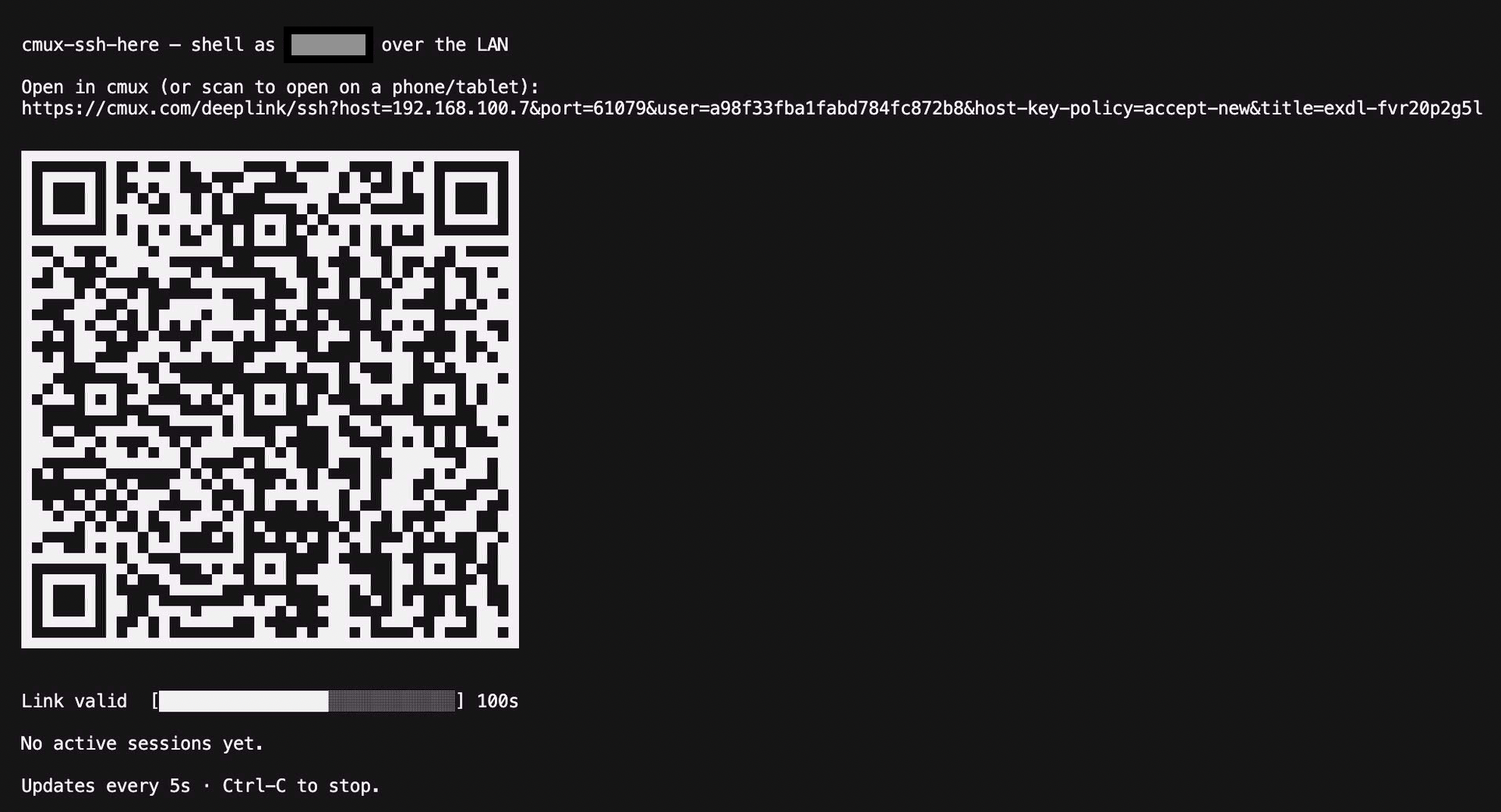
The terminal turns into a live dashboard — the link, a scannable QR code, a countdown bar for its lifetime, and who's connected:
|
|
20
|
+
|
|
21
|
+
|
|
22
|
+
|
|
23
|
+
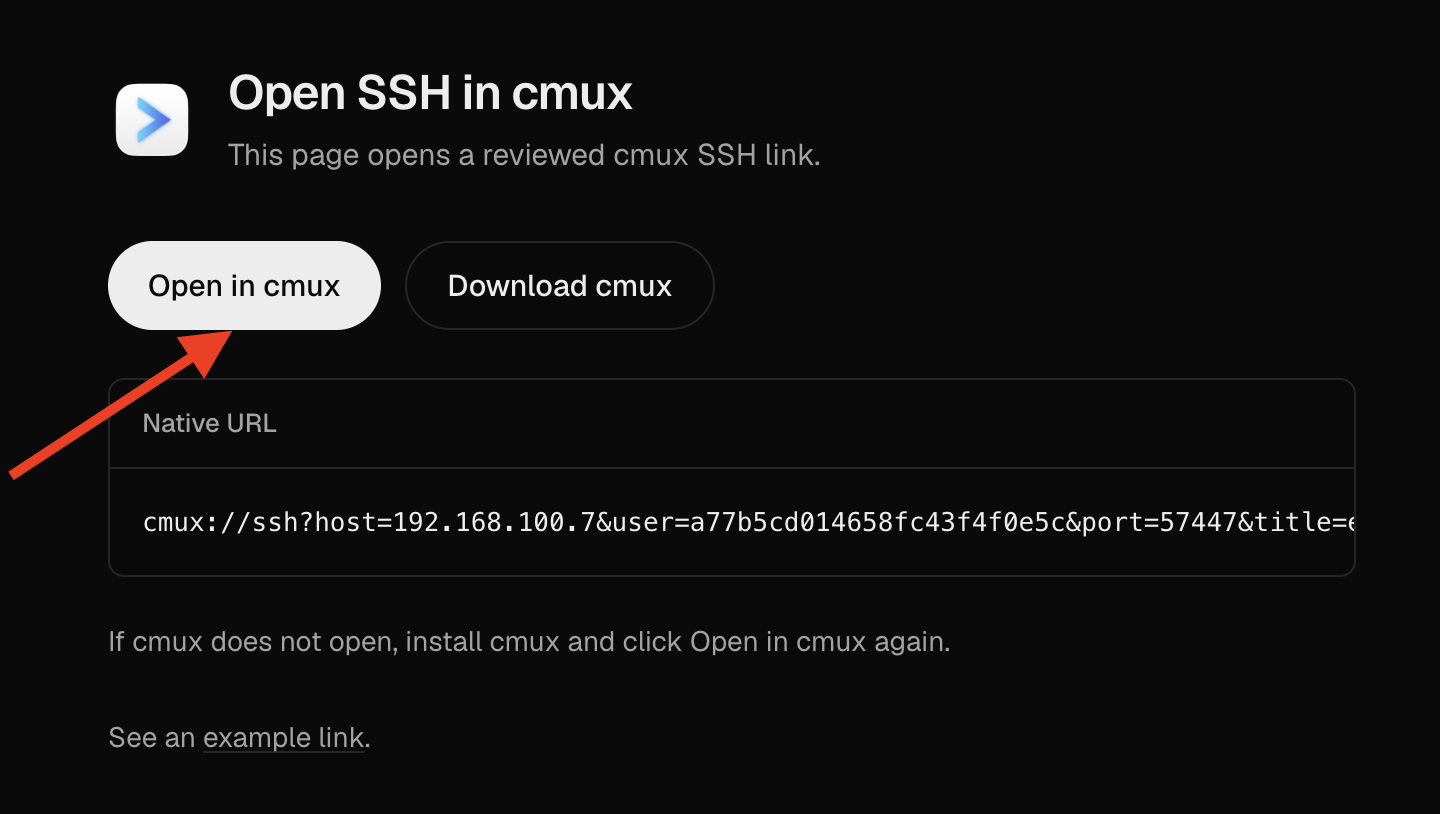
Open the link and cmux connects on its own — one click, straight into the shell:
|
|
24
|
+
|
|
25
|
+
|
|
26
|
+
|
|
27
|
+
## Why you'll like it
|
|
17
28
|
|
|
18
|
-
|
|
29
|
+
- ⚡ **Zero setup** — one `npx` command, no SSH server administration.
|
|
30
|
+
- 📱 **Scan to connect** — a QR code in the terminal opens the link on a phone or tablet.
|
|
31
|
+
- 🔑 **No credentials to share** — auth is a one-time token baked into the link.
|
|
32
|
+
- ⏳ **Self-expiring** — the link rotates every 3 minutes; leaked links go stale on their own. Live sessions stay connected.
|
|
33
|
+
- 🎯 **One-time mode** — `--once` locks the link to the first device that connects and rejects everyone else.
|
|
34
|
+
- 👀 **Live dashboard** — see the current link, a countdown bar, and every connected client at a glance.
|
|
35
|
+
- 🧩 **Real SSH** — full PTY shell, `scp`/`sftp`, and the exec channel cmux needs to bootstrap remote workspaces.
|
|
36
|
+
- 🪟 **Persistent sessions** — when `tmux` is present, sessions survive disconnects and are shared across connections.
|
|
19
37
|
|
|
20
|
-
|
|
38
|
+
## Quick start
|
|
39
|
+
|
|
40
|
+
```bash
|
|
41
|
+
# on the machine you want to reach
|
|
42
|
+
npx cmux-ssh-here
|
|
43
|
+
```
|
|
44
|
+
|
|
45
|
+
Then open the printed `https://cmux.com/deeplink/ssh?…` link in cmux on any device on the same network.
|
|
21
46
|
|
|
22
47
|
## How it works
|
|
23
48
|
|
|
24
49
|
- Its own SSH server (`ssh2`) with an ephemeral host key and token — both live only while the process runs.
|
|
25
|
-
- The token
|
|
50
|
+
- The token rides in the deep link's `user=`; the server accepts only that token, and rotates it every 3 minutes.
|
|
26
51
|
- cmux deep links deliberately carry no passwords or keys, so the secret is the token itself.
|
|
27
|
-
- Full PTY shell via `node-pty`,
|
|
28
|
-
-
|
|
29
|
-
|
|
52
|
+
- Full PTY shell via `node-pty`, a raw-pipe exec channel, and a filesystem-backed SFTP server — together they let `cmux ssh` upload and run its remote helper (a shell-only server isn't enough).
|
|
53
|
+
- With `tmux` available, the interactive shell runs inside it: sessions persist, are shared across connections, and the session list (`choose-tree`) is shown on connect.
|
|
54
|
+
|
|
55
|
+
## Compatibility
|
|
30
56
|
|
|
31
|
-
|
|
57
|
+
| Host running `npx cmux-ssh-here` | Supported |
|
|
58
|
+
| --- | --- |
|
|
59
|
+
| macOS | ✅ |
|
|
60
|
+
| Linux | ✅ |
|
|
61
|
+
| Windows | ❌ — needs a POSIX shell, and cmux's remote daemon has no Windows build |
|
|
32
62
|
|
|
33
|
-
|
|
34
|
-
- [cmux](https://cmux.com) on the device you open the link from.
|
|
35
|
-
- macOS or Linux on the host sharing the shell. Windows host is not supported.
|
|
36
|
-
- `tmux` (optional) for persistent, shared server-side sessions.
|
|
63
|
+
The device you open the link from just needs [cmux](https://cmux.com) installed. Node 18+ is required on the host. `tmux` is optional (for persistent, shared sessions).
|
|
37
64
|
|
|
38
65
|
## Security
|
|
39
66
|
|
|
40
|
-
⚠️ **The token in the link is a bearer secret that grants a shell as your user.**
|
|
67
|
+
⚠️ **The token in the link is a bearer secret that grants a shell as your user.** Use it on a trusted local network only. Don't publish the link or send it over untrusted channels. Close the terminal and the token and host key are gone.
|
|
41
68
|
|
|
42
69
|
## Options
|
|
43
70
|
|
|
71
|
+
- `npx cmux-ssh-here --once` — single-use link: locks to the first device that connects, rejects any other.
|
|
44
72
|
- `PORT=2222 npx cmux-ssh-here` — fixed port (random free port by default).
|
|
45
73
|
- `CMUX_SSH_TTL=600 npx cmux-ssh-here` — link/token lifetime in seconds before regeneration (default 180).
|
|
46
74
|
- `CMUX_SSH_DEBUG=1 npx cmux-ssh-here` — log incoming auth/env/exec/shell requests to stderr (disables the live dashboard).
|
|
75
|
+
|
|
76
|
+
## License
|
|
77
|
+
|
|
78
|
+
MIT
|
package/bin.js
CHANGED
|
@@ -18,6 +18,15 @@ import { spawn } from "node:child_process";
|
|
|
18
18
|
import { chmodSync } from "node:fs";
|
|
19
19
|
import { createRequire } from "node:module";
|
|
20
20
|
import { dirname, join, resolve } from "node:path";
|
|
21
|
+
import qrcodeTerminal from "qrcode-terminal";
|
|
22
|
+
|
|
23
|
+
// ponytail: the host side needs a POSIX shell + scp/exec semantics, and cmux's
|
|
24
|
+
// own remote daemon only ships linux/darwin/freebsd builds — so a Windows host
|
|
25
|
+
// can't serve `cmux ssh`. Fail fast with a clear message instead of crashing later.
|
|
26
|
+
if (process.platform === "win32") {
|
|
27
|
+
console.error("cmux-ssh-here must run on a macOS or Linux host (POSIX shell required). Windows is not supported.");
|
|
28
|
+
process.exit(1);
|
|
29
|
+
}
|
|
21
30
|
|
|
22
31
|
// ponytail: node-pty's prebuilt spawn-helper sometimes unpacks without +x
|
|
23
32
|
// (packaging bug) -> "posix_spawnp failed". Fix it before importing.
|
|
@@ -40,6 +49,13 @@ const regenerateToken = () => {
|
|
|
40
49
|
};
|
|
41
50
|
regenerateToken();
|
|
42
51
|
|
|
52
|
+
// --once: single-use link. After the first client connects, lock to its IP and
|
|
53
|
+
// stop rotating — new machines are rejected, but that client's several
|
|
54
|
+
// connections (cmux opens ControlMaster + daemon + probes) keep working.
|
|
55
|
+
const ONCE = process.argv.includes("--once");
|
|
56
|
+
let consumed = false;
|
|
57
|
+
let lockedIp = null;
|
|
58
|
+
|
|
43
59
|
// Active authenticated connections, shown live in the server terminal.
|
|
44
60
|
const sessions = new Map();
|
|
45
61
|
let nextSid = 0;
|
|
@@ -50,7 +66,9 @@ const { privateKey } = generateKeyPairSync("rsa", {
|
|
|
50
66
|
publicKeyEncoding: { type: "spki", format: "pem" },
|
|
51
67
|
});
|
|
52
68
|
|
|
53
|
-
|
|
69
|
+
// ponytail: $SHELL is set on real logins; the fallback only matters in bare
|
|
70
|
+
// envs — bash on Linux, zsh on macOS.
|
|
71
|
+
const shellPath = process.env.SHELL || (process.platform === "darwin" ? "/bin/zsh" : "/bin/bash");
|
|
54
72
|
const debug = process.env.CMUX_SSH_DEBUG ? (...a) => console.error("[debug]", ...a) : () => {};
|
|
55
73
|
|
|
56
74
|
const lanIP = () =>
|
|
@@ -248,13 +266,19 @@ let render = () => {}; // assigned once the server is listening (knows ip/port)
|
|
|
248
266
|
const server = new Server(serverCfg, (client, info) => {
|
|
249
267
|
client.on("authentication", (ctx) => {
|
|
250
268
|
debug("auth", ctx.method, ctx.username);
|
|
251
|
-
|
|
269
|
+
// Correct token, plus (in --once after consumption) only the locked-in IP.
|
|
270
|
+
const ok = ctx.username === token && (!consumed || info?.ip === lockedIp);
|
|
271
|
+
return ok ? ctx.accept() : ctx.reject();
|
|
252
272
|
});
|
|
253
273
|
client.on("ready", () => {
|
|
254
274
|
// ponytail: just track the connection; the 5s timer redraws — no per-event
|
|
255
275
|
// repaint (that was the screen-churn that broke copying).
|
|
256
276
|
const id = nextSid++;
|
|
257
277
|
sessions.set(id, { ip: info?.ip || "?", since: Date.now() });
|
|
278
|
+
if (ONCE && !consumed) {
|
|
279
|
+
consumed = true;
|
|
280
|
+
lockedIp = info?.ip || "?";
|
|
281
|
+
}
|
|
258
282
|
client.on("close", () => sessions.delete(id));
|
|
259
283
|
});
|
|
260
284
|
client.on("session", (accept) => {
|
|
@@ -333,6 +357,16 @@ server.listen(PORT, "0.0.0.0", function () {
|
|
|
333
357
|
return `[${"█".repeat(filled)}${"░".repeat(W - filled)}]`;
|
|
334
358
|
};
|
|
335
359
|
|
|
360
|
+
// ASCII QR of the current link — scan with a phone/tablet to open in cmux.
|
|
361
|
+
const qrFor = (text) => {
|
|
362
|
+
let out = "";
|
|
363
|
+
qrcodeTerminal.generate(text, { small: true }, (q) => (out = q));
|
|
364
|
+
return out
|
|
365
|
+
.split("\n")
|
|
366
|
+
.map((l) => " " + l)
|
|
367
|
+
.join("\n");
|
|
368
|
+
};
|
|
369
|
+
|
|
336
370
|
// Collapse cmux's several SSH connections from one machine into one row per IP.
|
|
337
371
|
const sessionRows = () => {
|
|
338
372
|
const byIp = new Map();
|
|
@@ -346,19 +380,25 @@ server.listen(PORT, "0.0.0.0", function () {
|
|
|
346
380
|
);
|
|
347
381
|
};
|
|
348
382
|
|
|
383
|
+
const mode = ONCE ? " (one-time link)" : "";
|
|
384
|
+
|
|
349
385
|
render = () => {
|
|
350
386
|
if (!liveUI) return;
|
|
351
387
|
const rem = remainingSec();
|
|
388
|
+
const link = buildLink();
|
|
352
389
|
const lines = [
|
|
353
390
|
"",
|
|
354
|
-
` cmux-ssh-here — shell as ${user} over the LAN`,
|
|
391
|
+
` cmux-ssh-here — shell as ${user} over the LAN${mode}`,
|
|
355
392
|
"",
|
|
356
|
-
" Open in cmux:",
|
|
357
|
-
` ${
|
|
393
|
+
" Open in cmux (or scan to open on a phone/tablet):",
|
|
394
|
+
` ${link}`,
|
|
358
395
|
"",
|
|
359
|
-
|
|
396
|
+
qrFor(link),
|
|
360
397
|
"",
|
|
361
398
|
];
|
|
399
|
+
if (consumed) lines.push(` 🔒 One-time link used — locked to ${lockedIp}.`);
|
|
400
|
+
else lines.push(` Link valid ${bar(rem)} ${rem}s`);
|
|
401
|
+
lines.push("");
|
|
362
402
|
const rows = sessionRows();
|
|
363
403
|
if (rows.length) lines.push(` Connected (${rows.length}):`, ...rows);
|
|
364
404
|
else lines.push(" No active sessions yet.");
|
|
@@ -370,9 +410,10 @@ server.listen(PORT, "0.0.0.0", function () {
|
|
|
370
410
|
if (liveUI) render();
|
|
371
411
|
else console.log(`\n Open in cmux (regenerates in ${remainingSec()}s):\n ${buildLink()}\n`);
|
|
372
412
|
|
|
373
|
-
// Refresh every 5s: regenerate the link when it expires
|
|
413
|
+
// Refresh every 5s: regenerate the link when it expires (unless a one-time
|
|
414
|
+
// link has already been consumed — then it's frozen), then redraw.
|
|
374
415
|
setInterval(() => {
|
|
375
|
-
if (remainingSec() <= 0) {
|
|
416
|
+
if (!consumed && remainingSec() <= 0) {
|
|
376
417
|
regenerateToken();
|
|
377
418
|
if (!liveUI) console.log(`\n [link regenerated]\n ${buildLink()}\n`);
|
|
378
419
|
}
|
package/package.json
CHANGED
|
@@ -1,11 +1,14 @@
|
|
|
1
1
|
{
|
|
2
2
|
"name": "cmux-ssh-here",
|
|
3
|
-
"version": "0.
|
|
3
|
+
"version": "0.7.0",
|
|
4
4
|
"description": "Spin up a token-auth SSH server and print a cmux deep link to connect over LAN",
|
|
5
5
|
"type": "module",
|
|
6
6
|
"bin": {
|
|
7
7
|
"cmux-ssh-here": "bin.js"
|
|
8
8
|
},
|
|
9
|
+
"scripts": {
|
|
10
|
+
"test": "node --test"
|
|
11
|
+
},
|
|
9
12
|
"files": [
|
|
10
13
|
"bin.js",
|
|
11
14
|
"README.md"
|
|
@@ -31,6 +34,7 @@
|
|
|
31
34
|
},
|
|
32
35
|
"dependencies": {
|
|
33
36
|
"node-pty": "^1.0.0",
|
|
37
|
+
"qrcode-terminal": "^0.12.0",
|
|
34
38
|
"ssh2": "^1.16.0"
|
|
35
39
|
}
|
|
36
40
|
}
|