clwy-react-native-tableview-simple 4.5.0
This diff represents the content of publicly available package versions that have been released to one of the supported registries. The information contained in this diff is provided for informational purposes only and reflects changes between package versions as they appear in their respective public registries.
- package/LICENSE +22 -0
- package/README.md +727 -0
- package/package.json +89 -0
- package/src/components/Cell.tsx +552 -0
- package/src/components/Section.tsx +284 -0
- package/src/components/Separator.tsx +73 -0
- package/src/components/TableView.tsx +56 -0
- package/src/components/Theme.ts +44 -0
- package/src/components/__tests__/Cell-Basic.test.tsx +28 -0
- package/src/components/__tests__/Cell-LeftDetail.test.tsx +41 -0
- package/src/components/__tests__/Cell-RightDetail.test.tsx +28 -0
- package/src/components/__tests__/Cell-Subtitle.test.tsx +32 -0
- package/src/components/__tests__/TableView.test.tsx +97 -0
- package/src/components/__tests__/__snapshots__/Cell-Basic.test.tsx.snap +229 -0
- package/src/components/__tests__/__snapshots__/Cell-LeftDetail.test.tsx.snap +315 -0
- package/src/components/__tests__/__snapshots__/Cell-RightDetail.test.tsx.snap +202 -0
- package/src/components/__tests__/__snapshots__/Cell-Subtitle.test.tsx.snap +226 -0
- package/src/components/__tests__/__snapshots__/TableView.test.tsx.snap +1209 -0
- package/src/index.ts +8 -0
package/README.md
ADDED
|
@@ -0,0 +1,727 @@
|
|
|
1
|
+
# react-native-tableview-simple
|
|
2
|
+
|
|
3
|
+
[](https://www.patreon.com/purii)
|
|
4
|
+
[](https://travis-ci.org/Purii/react-native-tableview-simple)
|
|
5
|
+
[](https://www.npmjs.com/package/react-native-tableview-simple)
|
|
6
|
+
[](https://www.npmjs.com/package/react-native-tableview-simple)
|
|
7
|
+
[](http://packagequality.com/#?package=react-native-tableview-simple)
|
|
8
|
+
[](https://snyk.io/test/npm/react-native-tableview-simple)
|
|
9
|
+
[](https://raw.githubusercontent.com/Purii/react-native-tableview-simple/master/LICENSE)
|
|
10
|
+
|
|
11
|
+
<!-- prettier-ignore -->
|
|
12
|
+
:point_right: _This component is used in my production app [**Game ideas**](https://apps.apple.com/us/app/game-ideas-get-inspired/id1450078546). Make sure to check it out!_ :point_left:
|
|
13
|
+
|
|
14
|
+
This cross-platform component is inspired by the iOS-TableView. Made with pure CSS, the intention is to provide **a flexible and lightweight alternative to a bridged component**. Don't be scared of React-Native upgrades anymore!
|
|
15
|
+
|
|
16
|
+
A possible use case might be an about- or a settings-screen with a few rows.
|
|
17
|
+
For displaying long datalists it is recommended to use the `FlatList` Component together with `Cell` and `Separator` Components. ([see example](#render-with-flatlist) or [live demo with expo](https://snack.expo.io/@purii/react-native-tableview-simple))
|
|
18
|
+
|
|
19
|
+
:rocket: If you like my component and want to buy me a coffee press the `Sponsor` Button and find out about GitHub Sponsors – Thanks! :point_left:
|
|
20
|
+
|
|
21
|
+
| | |
|
|
22
|
+
| :-------------------------------------------------------------------------------------------: | :---------------------------------------------------------------------------------------: |
|
|
23
|
+
| 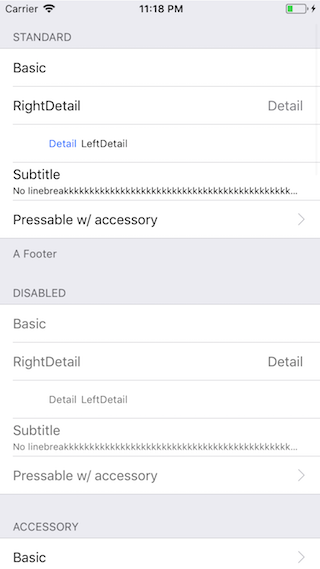 | 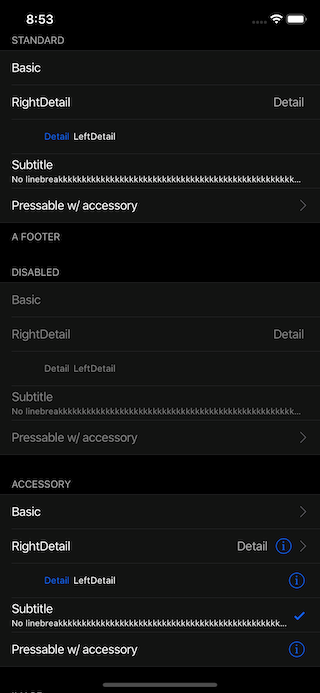 |
|
|
24
|
+
|
|
25
|
+
Have a look at the [examples below](https://github.com/Purii/react-native-tableview-simple#examples)! :-)
|
|
26
|
+
|
|
27
|
+
- [Installation](#installation)
|
|
28
|
+
- [Extensible](#extensible)
|
|
29
|
+
- [Props](#props): [`TableView`](#tableview) [`Cell`](#cell) [`Section`](#section) [`Separator`](#separator)
|
|
30
|
+
- [Examples](#examples)
|
|
31
|
+
- [Try it out](#try-it-out)
|
|
32
|
+
|
|
33
|
+
## Installation
|
|
34
|
+
|
|
35
|
+
1. _Install as dependency:_
|
|
36
|
+
|
|
37
|
+
```sh
|
|
38
|
+
// yarn
|
|
39
|
+
yarn add react-native-tableview-simple
|
|
40
|
+
// or npm
|
|
41
|
+
npm i react-native-tableview-simple --S
|
|
42
|
+
```
|
|
43
|
+
|
|
44
|
+
2. _Add needed components:_
|
|
45
|
+
|
|
46
|
+
```javascript
|
|
47
|
+
import { Cell, Section, TableView } from 'react-native-tableview-simple';
|
|
48
|
+
```
|
|
49
|
+
|
|
50
|
+
## Extensible
|
|
51
|
+
|
|
52
|
+
`react-native-tableview-simple` provides you with some predefined CSS-styles, inspired by the native TableView.
|
|
53
|
+
You can always mix the `Cell`-instances inside a `Section`, with other (React-Native)-Views.
|
|
54
|
+
|
|
55
|
+
### Override defaults of `Cell`-Component
|
|
56
|
+
|
|
57
|
+
Don't repeat yourself.
|
|
58
|
+
If you override the default props over and over again, just pass them as an object.
|
|
59
|
+
|
|
60
|
+
```jsx
|
|
61
|
+
const cellPropsCustom = {
|
|
62
|
+
cellStyle: 'Basic',
|
|
63
|
+
title: 'Basic Custom',
|
|
64
|
+
backgroundColor: 'black',
|
|
65
|
+
};
|
|
66
|
+
|
|
67
|
+
|
|
68
|
+
<Cell onPress={console.log} {...cellPropsCustom} />
|
|
69
|
+
<Cell onPress={console.log} {...cellPropsCustom} />
|
|
70
|
+
```
|
|
71
|
+
|
|
72
|
+
### Separator BackgroundColor is derived from Cell BackgroundColor
|
|
73
|
+
|
|
74
|
+
The `Separator`-Component is a line from the left end to the right end.
|
|
75
|
+
According to the original iOS TableView there should be an insent on the left end.
|
|
76
|
+
This is done by separating the `Separator`-Component in two parts: `SeparatorContainer` (full width) and `SeparatorInner` (width - inset). (See: [`Separator.tsx`](/src/components/Separator.tsx))
|
|
77
|
+
The `SeparatorContainer` has the same color that the `Cell`-Component above.
|
|
78
|
+
The `SeparatorInner` has the default Separator Color.
|
|
79
|
+
Pressing a Cell Component will change the color of `SeparatorInner` to `transparent`.
|
|
80
|
+
|
|
81
|
+
#### Why is that so complicated?
|
|
82
|
+
|
|
83
|
+
Because just hiding the separator would make the height of the component jump.
|
|
84
|
+
|
|
85
|
+
## Props
|
|
86
|
+
|
|
87
|
+
- [`TableView`](#tableview)
|
|
88
|
+
- [`Cell`](#cell)
|
|
89
|
+
- [`Section`](#section)
|
|
90
|
+
- [`Separator`](#separator)
|
|
91
|
+
|
|
92
|
+
### `TableView`
|
|
93
|
+
|
|
94
|
+
The `TableView` component controls the theme.
|
|
95
|
+
|
|
96
|
+
| Prop | Default | Type | Description |
|
|
97
|
+
| :---------------- | :-----: | :----------------: | ----------------------------------------------------------------------------------------------------------------------------------------- |
|
|
98
|
+
| children | - | `React.ReactNode` | Children. Should be of type `Section` |
|
|
99
|
+
| appearance | `auto` | `string` | `auto`: System Appearance; `light`: Light Appearance; `dark`: Dark Appearance; `[string]`: Appearance defined through `customAppearances` |
|
|
100
|
+
| customAppearances | - | `THEME_APPEARANCE` | |
|
|
101
|
+
| style | - | `ViewStyle` | Applied to the table wrapper |
|
|
102
|
+
|
|
103
|
+
### `Section`
|
|
104
|
+
|
|
105
|
+
The `Section` component is needed to render the `Cells` together with `Separators`.
|
|
106
|
+
It's possible to use the `Flatlist` component instead ([Example](#render-with-flatlist)).
|
|
107
|
+
|
|
108
|
+
| Prop | Default | Type | Description |
|
|
109
|
+
| :------------------------ | :---------------------------: | :--------------------: | ------------------------------------------------------------------- |
|
|
110
|
+
| allowFontScaling | `true` | `bool` | Respect Text Size accessibility setting on iOS |
|
|
111
|
+
| footerComponent | - | `React.Component` | Inject any component to replace original footer (optional) |
|
|
112
|
+
| headerComponent | - | `React.Component` | Inject any component to replace original header (optional) |
|
|
113
|
+
| footer | - | `string` | Footer value |
|
|
114
|
+
| footerTextColor | `#6d6d72` | `string` | Text color of footer |
|
|
115
|
+
| footerTextStyle | `{}` | `Text.propTypes.style` | These styles will be applied to the footer `Text`-Component. |
|
|
116
|
+
| header | - | `string` | Header value |
|
|
117
|
+
| headerTextColor | `#6d6d72` | `string` | Text color of header |
|
|
118
|
+
| headerTextStyle | `{}` | `Text.propTypes.style` | These styles will be applied to the header `Text`-Component. |
|
|
119
|
+
| hideSeparator | `false` | `bool` | Hide separators |
|
|
120
|
+
| hideSurroundingSeparators | `false` | `bool` | Hide surrounding separators, best combined with roundedCorners |
|
|
121
|
+
| roundedCorners | `false` | `bool` | Enable rounded corners, best combined with hideSurroundingSeparator |
|
|
122
|
+
| sectionPaddingBottom | `15` | `number` | Padding bottom of section |
|
|
123
|
+
| sectionPaddingTop | `15` | `number` | Padding top of section |
|
|
124
|
+
| sectionTintColor | `#EFEFF4` | `string` | Background color of section |
|
|
125
|
+
| separatorInsetLeft | `15` | `number` | Left inset of separator |
|
|
126
|
+
| separatorInsetRight | `0` | `number` | Right inset of separator |
|
|
127
|
+
| separatorTintColor | `#C8C7CC` | `string` | Color of separator |
|
|
128
|
+
| withSafeAreaView | `true / false (on iOS <= 10)` | `bool` | Render section header and footer with SafeAreaView |
|
|
129
|
+
|
|
130
|
+
### `Cell`
|
|
131
|
+
|
|
132
|
+
The style of the `Cell` component is inspired by the native `UITableView`.
|
|
133
|
+
Because the `Cell` component is created with CSS only, its highly flexible.
|
|
134
|
+
The content of the cell is separated in three views, which can all be modified via `props`: `cellImageView` | `cellContentView` | `cellAccessoryView`.
|
|
135
|
+
|
|
136
|
+
To get an idea what you can modify via `props`, have a look at the [examples below](https://github.com/Purii/react-native-tableview-simple#examples).
|
|
137
|
+
|
|
138
|
+
| Prop | Default | Type | Description |
|
|
139
|
+
| :-------------------------------- | :---------------------------: | :---------------------------------------: | ----------------------------------------------------------------------------------------------------------------------------------------------------------------------------------- |
|
|
140
|
+
| accessory | - | `string` | Predefined accessory: `DisclosureIndicator`, `Detail`, `DetailDisclosure`, `Checkmark` |
|
|
141
|
+
| accessoryColor | `#007AFF` | `string` | Color of accessory |
|
|
142
|
+
| accessoryColorDisclosureIndicator | `#C7C7CC` | `string` | Color of accessory `DisclosureIndicator` |
|
|
143
|
+
| allowFontScaling | `true` | `bool` | Respect Text Size accessibility setting on iOS |
|
|
144
|
+
| backgroundColor | `#FFF` | `string` | Background color of cell |
|
|
145
|
+
| cellStyle | `Basic` | `string` | Predefined styles: `Basic`, `RightDetail`, `LeftDetail`, `Subtitle` |
|
|
146
|
+
| cellAccessoryView | - | `React.Component` | Replace accessory view component (_e.g.: add Switch or ActivityIndicator_) |
|
|
147
|
+
| cellContentView | - | `React.Component` | Replace content view component |
|
|
148
|
+
| cellImageView | - | `React.Component` | Replace image view component |
|
|
149
|
+
children | - | `React.Component` | Additional content to be displayed below the cell. (_e.g: Add Picker or DateTimePicker_)
|
|
150
|
+
| contentContainerStyle | `{}` | `View.propTypes.style` | These styles will be applied to the content container which wraps all of the child views. Overrides `cellStyle` (_e.g.: Override paddingLeft and paddingRight or set fixed height_) |
|
|
151
|
+
| detail | - | `string` or `number` | Detail value |
|
|
152
|
+
| detailTextProps | `{}` | `Text.propTypes` | These props will be applied to the (left- / right-) detail `Text`-Component. |
|
|
153
|
+
| detailTextStyle | `{}` | `Text.propTypes.style` | These styles will be applied to the (left- / right-) detail `Text`-Component. |
|
|
154
|
+
| disableImageResize | `false` | `bool` | Disable resizing of image |
|
|
155
|
+
| hideSeparator | `false` | `bool` | Hide the following `Separator`-Component |
|
|
156
|
+
| highlightActiveOpacity | `0.8` | `number` | Opacity of cell when touch is active |
|
|
157
|
+
| highlightUnderlayColor | `black` | `string` | Color of underlay that will show through when touch is active |
|
|
158
|
+
| isDisabled | `false` | `bool` | Cell is disabled. `onPress` will not get triggered |
|
|
159
|
+
| image | - | `React.Component (Image)` | Image component displayed on the left. Will resized automatically |
|
|
160
|
+
| leftDetailColor | `#007AFF` | `string` | Text color of left detail |
|
|
161
|
+
| rightDetailColor | `#8E8E93` | `string` | Text color of right detail |
|
|
162
|
+
| subtitleColor | `#000` | `string` | Text color of subtitle |
|
|
163
|
+
| subtitleTextStyle | `{}` | `Text.propTypes.style` | These styles will be applied to the subtitle `Text`-Component. |
|
|
164
|
+
| testID | `undefined` | `string` | Add testID to root component |
|
|
165
|
+
| title | - | `string` or `number` or `React.Component` | Title value |
|
|
166
|
+
| titleTextColor | `#000` | `string` | Text color of title |
|
|
167
|
+
| titleTextProps | `{}` | `Text.propTypes` | These props will be applied to the title `Text`-Component. |
|
|
168
|
+
| titleTextStyle | `{}` | `Text.propTypes.style` | These styles will be applied to the title `Text`-Component (_e.g.: update `fontSize` or `fontFamily`_) |
|
|
169
|
+
| titleTextStyleDisabled | `{}` | `Text.propTypes.style` | These styles will be applied to the title `Text`-Component, when the cell is disabled |
|
|
170
|
+
| onPress | - | `func` or `false` | If set, cell will be automaticaly initialized with TouchableHighlight |
|
|
171
|
+
| onPressDetailAccessory | - | `func` or `false` | Listen to onPress event of detail accessory |
|
|
172
|
+
| withSafeAreaView | `true / false (on iOS <= 10)` | `bool` | Render cell with SafeAreaView |
|
|
173
|
+
|
|
174
|
+
#### Wrap `Cell`
|
|
175
|
+
|
|
176
|
+
Sometimes custom `Cell` components are needed.
|
|
177
|
+
By creating a new component, which is based on `Cell`, its only necessary to set the props once.
|
|
178
|
+
However, this comes with certain downsides. In order to keep the API as easy to use as possible, I implemented some automations for the `Sections` component.
|
|
179
|
+
For example, the `Cell.backgroundColor` prop will also decide on the `backgroundColor` of the `Separator` component.
|
|
180
|
+
|
|
181
|
+
Given the following pattern:
|
|
182
|
+
|
|
183
|
+
```javascript
|
|
184
|
+
import {
|
|
185
|
+
Cell,
|
|
186
|
+
Section,
|
|
187
|
+
TableView,
|
|
188
|
+
} from 'react-native-tableview-simple';
|
|
189
|
+
|
|
190
|
+
const CellVariant = (props) => (
|
|
191
|
+
<Cell
|
|
192
|
+
{...props}
|
|
193
|
+
cellContentView={
|
|
194
|
+
<View
|
|
195
|
+
style={{ alignItems: 'center', flexDirection: 'row', flex: 1, paddingVertical: 10 }}
|
|
196
|
+
>
|
|
197
|
+
<Text
|
|
198
|
+
allowFontScaling
|
|
199
|
+
numberOfLines={1}
|
|
200
|
+
style={{ flex: 1, fontSize: 20 }}
|
|
201
|
+
>
|
|
202
|
+
{props.title}
|
|
203
|
+
</Text>
|
|
204
|
+
</View>
|
|
205
|
+
}
|
|
206
|
+
/>
|
|
207
|
+
);
|
|
208
|
+
|
|
209
|
+
// ...
|
|
210
|
+
|
|
211
|
+
<TableView>
|
|
212
|
+
<Section>
|
|
213
|
+
<CellVariant title="Element 1" />
|
|
214
|
+
<CellVariant title="Element 2" />
|
|
215
|
+
<CellVariant title="Element 3" />
|
|
216
|
+
<CellVariant title="Element 4" />
|
|
217
|
+
</Section>
|
|
218
|
+
</TableView>
|
|
219
|
+
````
|
|
220
|
+
|
|
221
|
+
This pattern introduces an additional layer between `Section` and `Cell`: `Section` -> `CellVariant` -> `Cell`.
|
|
222
|
+
The `Section` component is expecting a `Cell` component as a child and therefor tries to [access the props as defined for the `Cell` component](https://github.com/Purii/react-native-tableview-simple/blob/5e81f61993eea32784cd9b20fa6e73d1240d77e5/src/components/Section.tsx#L131).
|
|
223
|
+
If following the mentioned pattern, this would fail, because `CellVariant.props` only contains the prop `title`.
|
|
224
|
+
Instead, I recommend to insert your new default props as description in this section: [Override defaults of `Cell`-Component](##override-defaults-of-cell-component).
|
|
225
|
+
|
|
226
|
+
If this is not enough for you, and you still need to have a custom cell component, consider merging both approaches:
|
|
227
|
+
|
|
228
|
+
```javascript
|
|
229
|
+
import {
|
|
230
|
+
Cell,
|
|
231
|
+
Section,
|
|
232
|
+
TableView,
|
|
233
|
+
} from 'react-native-tableview-simple';
|
|
234
|
+
|
|
235
|
+
|
|
236
|
+
const cellPropsVariant = {
|
|
237
|
+
hideSeparator: true,
|
|
238
|
+
backgroundColor: 'black',
|
|
239
|
+
};
|
|
240
|
+
|
|
241
|
+
const CellVariant = (props) => (
|
|
242
|
+
<Cell
|
|
243
|
+
{...props}
|
|
244
|
+
cellContentView={
|
|
245
|
+
<View
|
|
246
|
+
style={{ alignItems: 'center', flexDirection: 'row', flex: 1, paddingVertical: 10 }}
|
|
247
|
+
>
|
|
248
|
+
<Text
|
|
249
|
+
allowFontScaling
|
|
250
|
+
numberOfLines={1}
|
|
251
|
+
style={{ flex: 1, fontSize: 20 }}
|
|
252
|
+
>
|
|
253
|
+
{props.title}
|
|
254
|
+
</Text>
|
|
255
|
+
</View>
|
|
256
|
+
}
|
|
257
|
+
/>
|
|
258
|
+
);
|
|
259
|
+
|
|
260
|
+
// ...
|
|
261
|
+
|
|
262
|
+
<TableView>
|
|
263
|
+
<Section>
|
|
264
|
+
<CellVariant title="Element 1" {...cellPropsVariant} />
|
|
265
|
+
<CellVariant title="Element 2" {...cellPropsVariant} />
|
|
266
|
+
<CellVariant title="Element 3" {...cellPropsVariant} />
|
|
267
|
+
<CellVariant title="Element 4" {...cellPropsVariant} />
|
|
268
|
+
</Section>
|
|
269
|
+
</TableView>
|
|
270
|
+
````
|
|
271
|
+
|
|
272
|
+
### `Separator`
|
|
273
|
+
|
|
274
|
+
In general the `Separator` component is used internally by the `Section` component.
|
|
275
|
+
But additionally this component can be used together with `FlatList`.
|
|
276
|
+
See the [example below](#render-with-flatlist).
|
|
277
|
+
|
|
278
|
+
| Prop | Default | Type | Description |
|
|
279
|
+
| :--------------- | :---------------------------: | :------: | ------------------------------------- |
|
|
280
|
+
| backgroundColor | `#EFEFF4` | `string` | Background color |
|
|
281
|
+
| insetLeft | `15` | `number` | Left inset of separator |
|
|
282
|
+
| insetRight | `0` | `number` | Right inset of separator |
|
|
283
|
+
| isHidden | `false` | `bool` | Hide separator but keeping its height |
|
|
284
|
+
| tintColor | `#C8C7CC` | `string` | Color of separator |
|
|
285
|
+
| withSafeAreaView | `true / false (on iOS <= 10)` | `bool` | Render separator with SafeAreaView |
|
|
286
|
+
|
|
287
|
+
## Examples
|
|
288
|
+
|
|
289
|
+
The following examples can be found in the folder `example`.
|
|
290
|
+
To run the example project, follow these steps:
|
|
291
|
+
|
|
292
|
+
1. `git clone https://github.com/Purii/react-native-tableview-simple`
|
|
293
|
+
1. `cd example`
|
|
294
|
+
1. `yarn` or `npm i`
|
|
295
|
+
1. run `/example/ios/example.xcodeproj` via Xcode
|
|
296
|
+
|
|
297
|
+
- [Quick look](#quick-look)
|
|
298
|
+
- [Use case: About-screen](#use-case-about-screen)
|
|
299
|
+
- [Complete example / vs. native iOS](#react-native-tableview-simple-vs-native-ios)
|
|
300
|
+
- [Render with `FlatList`](#render-with-flatlist)
|
|
301
|
+
|
|
302
|
+
### Quick look
|
|
303
|
+
|
|
304
|
+
```javascript
|
|
305
|
+
// ActivityIndicator as accessory
|
|
306
|
+
<Cell
|
|
307
|
+
title="Switch"
|
|
308
|
+
cellAccessoryView={<Switch />}
|
|
309
|
+
contentContainerStyle={{ paddingVertical: 4 }} // Adjust height
|
|
310
|
+
/>
|
|
311
|
+
|
|
312
|
+
// Switch as accessory
|
|
313
|
+
<Cell
|
|
314
|
+
title="ActivityIndicator"
|
|
315
|
+
cellAccessoryView={<ActivityIndicator />}
|
|
316
|
+
/>
|
|
317
|
+
|
|
318
|
+
// TextInput
|
|
319
|
+
<Cell
|
|
320
|
+
cellContentView={<TextInput style={{fontSize: 16, flex: 1}} placeholder="TextInput"/>}
|
|
321
|
+
/>
|
|
322
|
+
|
|
323
|
+
// Image
|
|
324
|
+
<Cell
|
|
325
|
+
title="Image"
|
|
326
|
+
image={
|
|
327
|
+
<Image
|
|
328
|
+
style={{ borderRadius: 5 }}
|
|
329
|
+
source={{
|
|
330
|
+
uri: 'https://facebook.github.io/react/img/logo_og.png',
|
|
331
|
+
}}
|
|
332
|
+
/>
|
|
333
|
+
}
|
|
334
|
+
/>
|
|
335
|
+
```
|
|
336
|
+
|
|
337
|
+
### Use case: About-screen
|
|
338
|
+
|
|
339
|
+
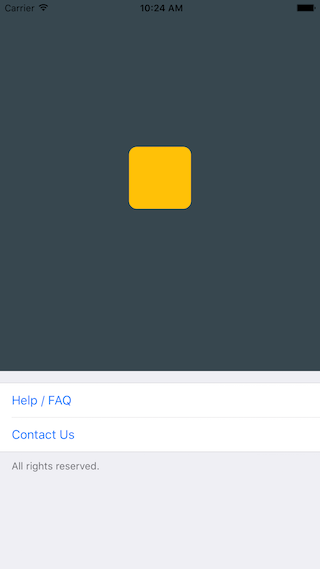
|
|
340
|
+
|
|
341
|
+
```javascript
|
|
342
|
+
/**
|
|
343
|
+
* Sample React Native App
|
|
344
|
+
* https://github.com/facebook/react-native
|
|
345
|
+
* @flow
|
|
346
|
+
*/
|
|
347
|
+
|
|
348
|
+
import React, { Component } from 'react';
|
|
349
|
+
import { AppRegistry, ScrollView, StyleSheet, Text, View } from 'react-native';
|
|
350
|
+
import { Cell, Section, TableView } from 'react-native-tableview-simple';
|
|
351
|
+
|
|
352
|
+
export default class App extends Component<{}> {
|
|
353
|
+
render() {
|
|
354
|
+
return (
|
|
355
|
+
<ScrollView contentContainerStyle={styles.stage}>
|
|
356
|
+
<View
|
|
357
|
+
style={{
|
|
358
|
+
backgroundColor: '#37474F',
|
|
359
|
+
height: 500,
|
|
360
|
+
alignItems: 'center',
|
|
361
|
+
justifyContent: 'center',
|
|
362
|
+
}}>
|
|
363
|
+
<View
|
|
364
|
+
style={{
|
|
365
|
+
backgroundColor: '#ffc107',
|
|
366
|
+
width: 80,
|
|
367
|
+
height: 80,
|
|
368
|
+
borderRadius: 10,
|
|
369
|
+
}}
|
|
370
|
+
/>
|
|
371
|
+
</View>
|
|
372
|
+
<TableView>
|
|
373
|
+
<Section footer="All rights reserved.">
|
|
374
|
+
<Cell
|
|
375
|
+
title="Help / FAQ"
|
|
376
|
+
titleTextColor="#007AFF"
|
|
377
|
+
onPress={() => console.log('open Help/FAQ')}
|
|
378
|
+
/>
|
|
379
|
+
<Cell
|
|
380
|
+
title="Contact Us"
|
|
381
|
+
titleTextColor="#007AFF"
|
|
382
|
+
onPress={() => console.log('open Contact Us')}
|
|
383
|
+
/>
|
|
384
|
+
</Section>
|
|
385
|
+
</TableView>
|
|
386
|
+
</ScrollView>
|
|
387
|
+
);
|
|
388
|
+
}
|
|
389
|
+
}
|
|
390
|
+
|
|
391
|
+
const styles = StyleSheet.create({
|
|
392
|
+
stage: {
|
|
393
|
+
backgroundColor: '#EFEFF4',
|
|
394
|
+
paddingBottom: 20,
|
|
395
|
+
flex: 1,
|
|
396
|
+
},
|
|
397
|
+
});
|
|
398
|
+
```
|
|
399
|
+
|
|
400
|
+
### `react-native-tableview-simple` vs. Native iOS
|
|
401
|
+
|
|
402
|
+
The left and middle screens are build using `react-native-tableview-simple`. The right one is native.
|
|
403
|
+
|
|
404
|
+
| `react-native-tableview-simple` (Dark Appearance) | `react-native-tableview-simple` | Native iOS |
|
|
405
|
+
| :---------------------------------------------------------------------------------------: | :-----------------------------------------------------------------------------------: | ------------------------------------------------------------------------------------------- |
|
|
406
|
+
|  | 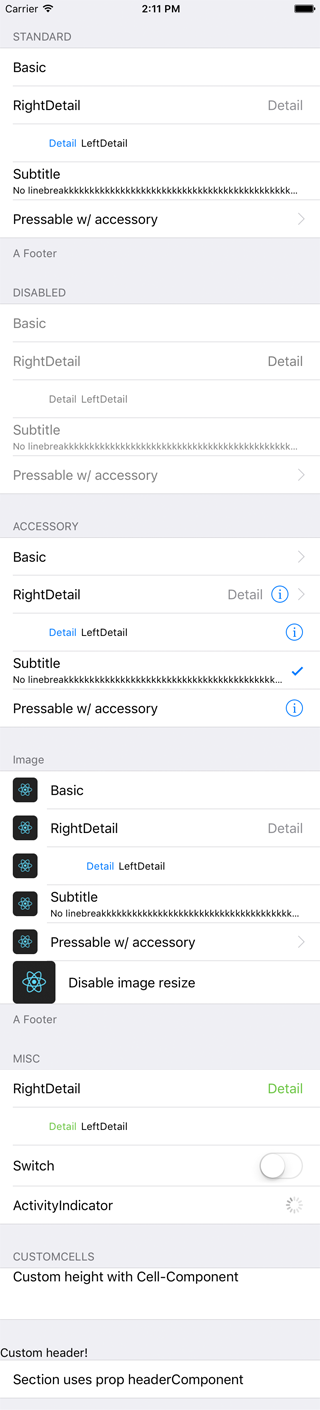 | 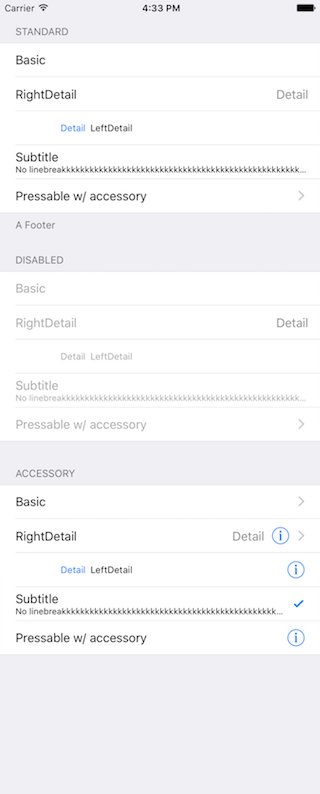 |
|
|
407
|
+
|
|
408
|
+
```javascript
|
|
409
|
+
/**
|
|
410
|
+
* Sample React Native App
|
|
411
|
+
* https://github.com/facebook/react-native
|
|
412
|
+
* @flow
|
|
413
|
+
*/
|
|
414
|
+
|
|
415
|
+
import React, { Component } from 'react';
|
|
416
|
+
import {
|
|
417
|
+
ActivityIndicator,
|
|
418
|
+
AppRegistry,
|
|
419
|
+
Dimensions,
|
|
420
|
+
Image,
|
|
421
|
+
ScrollView,
|
|
422
|
+
StyleSheet,
|
|
423
|
+
Switch,
|
|
424
|
+
Text,
|
|
425
|
+
TextInput,
|
|
426
|
+
View,
|
|
427
|
+
} from 'react-native';
|
|
428
|
+
import { Cell, Section, TableView } from 'react-native-tableview-simple';
|
|
429
|
+
|
|
430
|
+
export default class App extends Component<{}> {
|
|
431
|
+
render() {
|
|
432
|
+
return (
|
|
433
|
+
<ScrollView contentContainerStyle={styles.stage}>
|
|
434
|
+
<TableView>
|
|
435
|
+
<Section header="STANDARD" footer="A Footer">
|
|
436
|
+
<Cell cellStyle="Basic" title="Basic" />
|
|
437
|
+
<Cell cellStyle="RightDetail" title="RightDetail" detail="Detail" />
|
|
438
|
+
<Cell cellStyle="LeftDetail" title="LeftDetail" detail="Detail" />
|
|
439
|
+
<Cell
|
|
440
|
+
cellStyle="Subtitle"
|
|
441
|
+
title="Subtitle"
|
|
442
|
+
detail="No linebreakkkkkkkkkkkkkkkkkkkkkkkkkkkkkkkkkkkkkkkkkkkkkkkkkkkkkkkkkkkkkkkkkkkk"
|
|
443
|
+
/>
|
|
444
|
+
<Cell
|
|
445
|
+
cellStyle="Basic"
|
|
446
|
+
title="Pressable w/ accessory"
|
|
447
|
+
accessory="DisclosureIndicator"
|
|
448
|
+
onPress={() => console.log('Heyho!')}
|
|
449
|
+
/>
|
|
450
|
+
</Section>
|
|
451
|
+
<Section header="DISABLED">
|
|
452
|
+
<Cell cellStyle="Basic" isDisabled title="Basic" />
|
|
453
|
+
<Cell
|
|
454
|
+
cellStyle="RightDetail"
|
|
455
|
+
isDisabled
|
|
456
|
+
title="RightDetail"
|
|
457
|
+
detail="Detail"
|
|
458
|
+
/>
|
|
459
|
+
<Cell
|
|
460
|
+
cellStyle="LeftDetail"
|
|
461
|
+
isDisabled
|
|
462
|
+
title="LeftDetail"
|
|
463
|
+
detail="Detail"
|
|
464
|
+
/>
|
|
465
|
+
<Cell
|
|
466
|
+
cellStyle="Subtitle"
|
|
467
|
+
isDisabled
|
|
468
|
+
title="Subtitle"
|
|
469
|
+
detail="No linebreakkkkkkkkkkkkkkkkkkkkkkkkkkkkkkkkkkkkkkkkkkkkkkkkkkkkkkkkkkkkkkkkkkkk"
|
|
470
|
+
/>
|
|
471
|
+
<Cell
|
|
472
|
+
cellStyle="Basic"
|
|
473
|
+
isDisabled
|
|
474
|
+
title="Pressable w/ accessory"
|
|
475
|
+
accessory="DisclosureIndicator"
|
|
476
|
+
onPress={() => console.log('Heyho!')}
|
|
477
|
+
/>
|
|
478
|
+
</Section>
|
|
479
|
+
<Section header="ACCESSORY">
|
|
480
|
+
<Cell
|
|
481
|
+
cellStyle="Basic"
|
|
482
|
+
accessory="DisclosureIndicator"
|
|
483
|
+
title="Basic"
|
|
484
|
+
/>
|
|
485
|
+
<Cell
|
|
486
|
+
cellStyle="RightDetail"
|
|
487
|
+
accessory="DetailDisclosure"
|
|
488
|
+
title="RightDetail"
|
|
489
|
+
detail="Detail"
|
|
490
|
+
/>
|
|
491
|
+
<Cell
|
|
492
|
+
cellStyle="LeftDetail"
|
|
493
|
+
accessory="Detail"
|
|
494
|
+
title="LeftDetail"
|
|
495
|
+
detail="Detail"
|
|
496
|
+
/>
|
|
497
|
+
<Cell
|
|
498
|
+
cellStyle="Subtitle"
|
|
499
|
+
accessory="Checkmark"
|
|
500
|
+
title="Subtitle"
|
|
501
|
+
detail="No linebreakkkkkkkkkkkkkkkkkkkkkkkkkkkkkkkkkkkkkkkkkkkkkkkkkkkkkkkkkkkkkkkkkkkk"
|
|
502
|
+
/>
|
|
503
|
+
<Cell
|
|
504
|
+
cellStyle="Basic"
|
|
505
|
+
accessory="Detail"
|
|
506
|
+
title="Pressable w/ accessory"
|
|
507
|
+
onPress={() => console.log('Heyho!')}
|
|
508
|
+
/>
|
|
509
|
+
</Section>
|
|
510
|
+
<Section header="Image" footer="A Footer">
|
|
511
|
+
<Cell
|
|
512
|
+
cellStyle="Basic"
|
|
513
|
+
title="Basic"
|
|
514
|
+
image={
|
|
515
|
+
<Image
|
|
516
|
+
style={{ borderRadius: 5 }}
|
|
517
|
+
source={{
|
|
518
|
+
uri: 'https://facebook.github.io/react/img/logo_og.png',
|
|
519
|
+
}}
|
|
520
|
+
/>
|
|
521
|
+
}
|
|
522
|
+
/>
|
|
523
|
+
<Cell
|
|
524
|
+
cellStyle="RightDetail"
|
|
525
|
+
title="RightDetail"
|
|
526
|
+
detail="Detail"
|
|
527
|
+
image={
|
|
528
|
+
<Image
|
|
529
|
+
style={{ borderRadius: 5 }}
|
|
530
|
+
source={{
|
|
531
|
+
uri: 'https://facebook.github.io/react/img/logo_og.png',
|
|
532
|
+
}}
|
|
533
|
+
/>
|
|
534
|
+
}
|
|
535
|
+
/>
|
|
536
|
+
<Cell
|
|
537
|
+
cellStyle="LeftDetail"
|
|
538
|
+
title="LeftDetail"
|
|
539
|
+
detail="Detail"
|
|
540
|
+
image={
|
|
541
|
+
<Image
|
|
542
|
+
style={{ borderRadius: 5 }}
|
|
543
|
+
source={{
|
|
544
|
+
uri: 'https://facebook.github.io/react/img/logo_og.png',
|
|
545
|
+
}}
|
|
546
|
+
/>
|
|
547
|
+
}
|
|
548
|
+
/>
|
|
549
|
+
<Cell
|
|
550
|
+
cellStyle="Subtitle"
|
|
551
|
+
title="Subtitle"
|
|
552
|
+
detail="No linebreakkkkkkkkkkkkkkkkkkkkkkkkkkkkkkkkkkkkkkkkkkkkkkkkkkkkkkkkkkkkkkkkkkkk"
|
|
553
|
+
image={
|
|
554
|
+
<Image
|
|
555
|
+
style={{ borderRadius: 5 }}
|
|
556
|
+
source={{
|
|
557
|
+
uri: 'https://facebook.github.io/react/img/logo_og.png',
|
|
558
|
+
}}
|
|
559
|
+
/>
|
|
560
|
+
}
|
|
561
|
+
/>
|
|
562
|
+
<Cell
|
|
563
|
+
cellStyle="Basic"
|
|
564
|
+
title="Pressable w/ accessory"
|
|
565
|
+
accessory="DisclosureIndicator"
|
|
566
|
+
onPress={() => console.log('Heyho!')}
|
|
567
|
+
image={
|
|
568
|
+
<Image
|
|
569
|
+
style={{ borderRadius: 5 }}
|
|
570
|
+
source={{
|
|
571
|
+
uri: 'https://facebook.github.io/react/img/logo_og.png',
|
|
572
|
+
}}
|
|
573
|
+
/>
|
|
574
|
+
}
|
|
575
|
+
/>
|
|
576
|
+
<Cell
|
|
577
|
+
cellStyle="Basic"
|
|
578
|
+
title="Disable image resize"
|
|
579
|
+
disableImageResize
|
|
580
|
+
image={
|
|
581
|
+
<Image
|
|
582
|
+
style={{ height: 50, width: 50, borderRadius: 5 }}
|
|
583
|
+
source={{
|
|
584
|
+
uri: 'https://facebook.github.io/react/img/logo_og.png',
|
|
585
|
+
}}
|
|
586
|
+
/>
|
|
587
|
+
}
|
|
588
|
+
/>
|
|
589
|
+
</Section>
|
|
590
|
+
<Section header="MISC">
|
|
591
|
+
<Cell
|
|
592
|
+
cellStyle="RightDetail"
|
|
593
|
+
title="RightDetail"
|
|
594
|
+
detail="Detail"
|
|
595
|
+
rightDetailColor="#6cc644"
|
|
596
|
+
/>
|
|
597
|
+
<Cell
|
|
598
|
+
cellStyle="LeftDetail"
|
|
599
|
+
title="LeftDetail"
|
|
600
|
+
detail="Detail"
|
|
601
|
+
leftDetailColor="#6cc644"
|
|
602
|
+
/>
|
|
603
|
+
<Cell
|
|
604
|
+
cellStyle="Basic"
|
|
605
|
+
title="Switch"
|
|
606
|
+
cellAccessoryView={<Switch />}
|
|
607
|
+
contentContainerStyle={{ paddingVertical: 4 }}
|
|
608
|
+
/>
|
|
609
|
+
<Cell
|
|
610
|
+
cellStyle="Basic"
|
|
611
|
+
title="ActivityIndicator"
|
|
612
|
+
cellAccessoryView={<ActivityIndicator />}
|
|
613
|
+
/>
|
|
614
|
+
<Cell
|
|
615
|
+
cellContentView={
|
|
616
|
+
<TextInput
|
|
617
|
+
style={{ fontSize: 16, flex: 1 }}
|
|
618
|
+
placeholder="TextInput"
|
|
619
|
+
/>
|
|
620
|
+
}
|
|
621
|
+
/>
|
|
622
|
+
</Section>
|
|
623
|
+
<Section header="CUSTOMCELLS">
|
|
624
|
+
<Cell
|
|
625
|
+
onPress={() => console.log('Heyho!')}
|
|
626
|
+
contentContainerStyle={{ alignItems: 'flex-start', height: 60 }}
|
|
627
|
+
cellContentView={
|
|
628
|
+
<Text style={{ flex: 1, fontSize: 16 }}>
|
|
629
|
+
Custom height with Cell-Component
|
|
630
|
+
</Text>
|
|
631
|
+
}
|
|
632
|
+
/>
|
|
633
|
+
</Section>
|
|
634
|
+
<Section headerComponent={<CustomSectionHeader />}>
|
|
635
|
+
<Cell cellStyle="Basic" title="Section uses prop headerComponent" />
|
|
636
|
+
</Section>
|
|
637
|
+
</TableView>
|
|
638
|
+
<View
|
|
639
|
+
style={{
|
|
640
|
+
minHeight: Dimensions.get('window').height,
|
|
641
|
+
}}>
|
|
642
|
+
<View
|
|
643
|
+
style={{
|
|
644
|
+
backgroundColor: '#37474F',
|
|
645
|
+
height: 500,
|
|
646
|
+
alignItems: 'center',
|
|
647
|
+
justifyContent: 'center',
|
|
648
|
+
}}>
|
|
649
|
+
<View
|
|
650
|
+
style={{
|
|
651
|
+
backgroundColor: '#ffc107',
|
|
652
|
+
width: 80,
|
|
653
|
+
height: 80,
|
|
654
|
+
borderRadius: 10,
|
|
655
|
+
}}
|
|
656
|
+
/>
|
|
657
|
+
</View>
|
|
658
|
+
<TableView>
|
|
659
|
+
<Section footer="All rights reserved.">
|
|
660
|
+
<Cell
|
|
661
|
+
title="Help / FAQ"
|
|
662
|
+
titleTextColor="#007AFF"
|
|
663
|
+
onPress={() => console.log('open Help/FAQ')}
|
|
664
|
+
/>
|
|
665
|
+
<Cell
|
|
666
|
+
title="Contact Us"
|
|
667
|
+
titleTextColor="#007AFF"
|
|
668
|
+
onPress={() => console.log('open Contact Us')}
|
|
669
|
+
/>
|
|
670
|
+
</Section>
|
|
671
|
+
</TableView>
|
|
672
|
+
</View>
|
|
673
|
+
</ScrollView>
|
|
674
|
+
);
|
|
675
|
+
}
|
|
676
|
+
}
|
|
677
|
+
|
|
678
|
+
const styles = StyleSheet.create({
|
|
679
|
+
stage: {
|
|
680
|
+
backgroundColor: '#EFEFF4',
|
|
681
|
+
paddingTop: 20,
|
|
682
|
+
paddingBottom: 20,
|
|
683
|
+
},
|
|
684
|
+
});
|
|
685
|
+
```
|
|
686
|
+
|
|
687
|
+
### Render with `FlatList`
|
|
688
|
+
|
|
689
|
+
Be aware of the prop [`keyboardShouldPersistTaps`](https://facebook.github.io/react-native/docs/scrollview#keyboardshouldpersisttaps) if using `ScrollView` or similar components. (See #85)
|
|
690
|
+
|
|
691
|
+
```javascript
|
|
692
|
+
import React from 'react';
|
|
693
|
+
import { FlatList } from 'react-native';
|
|
694
|
+
|
|
695
|
+
import { Cell, Separator, TableView } from 'react-native-tableview-simple';
|
|
696
|
+
|
|
697
|
+
const data = [
|
|
698
|
+
{ id: 1, title: '1' },
|
|
699
|
+
{ id: 2, title: '2' },
|
|
700
|
+
{ id: 3, title: '3' },
|
|
701
|
+
{ id: 4, title: '4' },
|
|
702
|
+
];
|
|
703
|
+
|
|
704
|
+
export default ExampleWithFlatList = () => (
|
|
705
|
+
<TableView style={{ flex: 1 }}>
|
|
706
|
+
<FlatList
|
|
707
|
+
data={data}
|
|
708
|
+
keyExtractor={(item, index) => item.id}
|
|
709
|
+
renderItem={({ item, separators }) => (
|
|
710
|
+
<Cell
|
|
711
|
+
title={item.title}
|
|
712
|
+
onPress={console.log}
|
|
713
|
+
onHighlightRow={separators.highlight}
|
|
714
|
+
onUnHighlightRow={separators.unhighlight}
|
|
715
|
+
/>
|
|
716
|
+
)}
|
|
717
|
+
ItemSeparatorComponent={({ highlighted }) => (
|
|
718
|
+
<Separator isHidden={highlighted} />
|
|
719
|
+
)}
|
|
720
|
+
/>
|
|
721
|
+
</TableView>
|
|
722
|
+
);
|
|
723
|
+
```
|
|
724
|
+
|
|
725
|
+
# Try it out
|
|
726
|
+
|
|
727
|
+
Try it in Expo: [https://snack.expo.io/@purii/react-native-tableview-simple](https://snack.expo.io/@purii/react-native-tableview-simple)
|