cloud-pc-templates 1.3.0 → 1.4.0
This diff represents the content of publicly available package versions that have been released to one of the supported registries. The information contained in this diff is provided for informational purposes only and reflects changes between package versions as they appear in their respective public registries.
- package/README.md +58 -175
- package/handlers/agents.js +87 -0
- package/index.js +41 -3
- package/package.json +1 -1
package/README.md
CHANGED
|
@@ -7,6 +7,14 @@ Cloud PC Templates is a command-line tool for managing cloud PC configurations a
|
|
|
7
7
|
```bash
|
|
8
8
|
npm install -g cloud-pc-templates
|
|
9
9
|
```
|
|
10
|
+
## Video Tutorial
|
|
11
|
+
|
|
12
|
+
For a step-by-step guide on using Cloud PC Templates, watch this video tutorial:
|
|
13
|
+
|
|
14
|
+
[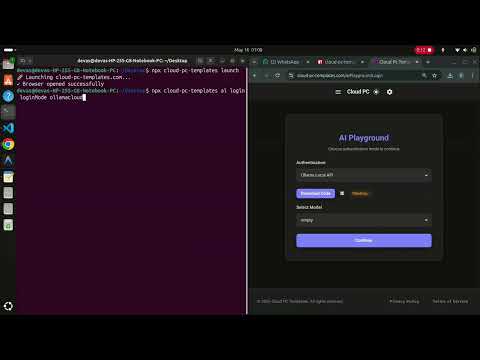](https://www.youtube.com/watch?v=XMF0K9R2rD0)
|
|
15
|
+
|
|
16
|
+
[Click here to watch on YouTube](https://www.youtube.com/watch?v=XMF0K9R2rD0)
|
|
17
|
+
|
|
10
18
|
|
|
11
19
|
## Usage
|
|
12
20
|
|
|
@@ -42,14 +50,7 @@ npx cloud-pc-templates ai login loginMode ollamacloud
|
|
|
42
50
|
```
|
|
43
51
|
|
|
44
52
|
**What it does:**
|
|
45
|
-
1.
|
|
46
|
-
2. If already logged in, displays "Already logged in" message
|
|
47
|
-
3. If not logged in:
|
|
48
|
-
- Prompts you to enter your API Key (masked input with asterisks)
|
|
49
|
-
- Downloads the Ollama proxy script from GitHub
|
|
50
|
-
- Runs the proxy with your API key as an argument
|
|
51
|
-
- Validates the health endpoint
|
|
52
|
-
- Displays "Logged in" confirmation
|
|
53
|
+
1. Runs a wrapper service at `http://localhost:3004/health` which is an interface to ollama cloud models, it requires ollama api key.
|
|
53
54
|
|
|
54
55
|
**Example:**
|
|
55
56
|
```bash
|
|
@@ -59,27 +60,15 @@ Enter API Key: **************************
|
|
|
59
60
|
- Endpoint checked: http://localhost:3004/health
|
|
60
61
|
```
|
|
61
62
|
|
|
62
|
-
**Features:**
|
|
63
|
-
- Masked input for API key (shows `*` instead of actual characters)
|
|
64
|
-
- Supports pasting long API keys
|
|
65
|
-
- Backspace support for corrections
|
|
66
|
-
- Cross-platform terminal support (TTY and non-TTY)
|
|
67
|
-
- Real-time proxy output logging for debugging
|
|
68
|
-
|
|
69
63
|
##### Ollama Local Login
|
|
70
64
|
|
|
71
|
-
Connect to Ollama Local
|
|
65
|
+
Connect to Ollama Local models:
|
|
72
66
|
```bash
|
|
73
67
|
npx cloud-pc-templates ai login loginMode ollamalocal
|
|
74
68
|
```
|
|
75
69
|
|
|
76
70
|
**What it does:**
|
|
77
|
-
1.
|
|
78
|
-
2. If Ollama is not running, displays a warning with installation instructions
|
|
79
|
-
3. Downloads the Ollama Offline Proxy script from GitHub
|
|
80
|
-
4. Runs the proxy on port 3005 (no API key required)
|
|
81
|
-
5. Validates the proxy health endpoint
|
|
82
|
-
6. Displays "Logged in" confirmation
|
|
71
|
+
1. Runs a wrapper service to connect to ollama local models
|
|
83
72
|
|
|
84
73
|
**Example (with Ollama running):**
|
|
85
74
|
```bash
|
|
@@ -93,26 +82,11 @@ $ npx cloud-pc-templates ai login loginMode ollamalocal
|
|
|
93
82
|
- Ollama running on: localhost:11434
|
|
94
83
|
```
|
|
95
84
|
|
|
96
|
-
**Example (without Ollama running):**
|
|
97
|
-
```bash
|
|
98
|
-
$ npx cloud-pc-templates ai login loginMode ollamalocal
|
|
99
|
-
🔍 Checking if Ollama is running...
|
|
100
|
-
⚠️ WARNING: Ollama is not running on localhost:11434
|
|
101
|
-
Please install Ollama and run it before using this login mode.
|
|
102
|
-
Download Ollama from: https://ollama.ai
|
|
103
|
-
|
|
104
|
-
After installation, start Ollama with:
|
|
105
|
-
ollama serve
|
|
106
|
-
|
|
107
|
-
Continuing anyway...
|
|
108
|
-
```
|
|
109
|
-
|
|
110
85
|
**Features:**
|
|
111
86
|
- No API key required
|
|
112
87
|
- Checks for local Ollama installation
|
|
113
88
|
- Helpful warnings with installation instructions
|
|
114
89
|
- Runs proxy on port 3005
|
|
115
|
-
- Provides detailed status output
|
|
116
90
|
|
|
117
91
|
##### Hugging Face Login
|
|
118
92
|
|
|
@@ -122,11 +96,7 @@ npx cloud-pc-templates ai login loginMode huggingface
|
|
|
122
96
|
```
|
|
123
97
|
|
|
124
98
|
**What it does:**
|
|
125
|
-
1.
|
|
126
|
-
2. Downloads the Hugging Face proxy script from GitHub
|
|
127
|
-
3. Runs the proxy on port 3006 with your API key
|
|
128
|
-
4. Validates the proxy health endpoint
|
|
129
|
-
5. Displays "Logged in" confirmation
|
|
99
|
+
1. Runs a wrapper service over huggingface cloud models and it requires huggingface api key
|
|
130
100
|
|
|
131
101
|
**Example:**
|
|
132
102
|
```bash
|
|
@@ -136,13 +106,49 @@ Enter Hugging Face API Key: ****************************
|
|
|
136
106
|
- Endpoint checked: http://localhost:3006/health
|
|
137
107
|
```
|
|
138
108
|
|
|
139
|
-
|
|
140
|
-
|
|
141
|
-
|
|
142
|
-
|
|
143
|
-
|
|
144
|
-
|
|
145
|
-
|
|
109
|
+
#### AI Agents
|
|
110
|
+
|
|
111
|
+
Manage and explore available AI agents from the registry.
|
|
112
|
+
|
|
113
|
+
**Agent Registry URL:**
|
|
114
|
+
```
|
|
115
|
+
https://raw.githubusercontent.com/devashish234073/cloud-pc-templates-marketplace/refs/heads/main/JS-AGENTS/agent-registry.json
|
|
116
|
+
```
|
|
117
|
+
|
|
118
|
+
##### List All Agents
|
|
119
|
+
|
|
120
|
+
Display all available agents with their IDs, names, and ports:
|
|
121
|
+
```bash
|
|
122
|
+
npx cloud-pc-templates ai agents list
|
|
123
|
+
```
|
|
124
|
+
|
|
125
|
+
**Example output:**
|
|
126
|
+
```bash
|
|
127
|
+
$ npx cloud-pc-templates ai agents list
|
|
128
|
+
|
|
129
|
+
Available Agents
|
|
130
|
+
|
|
131
|
+
────────────────────────────────────────────────────────────────────────────────
|
|
132
|
+
ID: playwright connector
|
|
133
|
+
Name: Playwright Connector
|
|
134
|
+
Port: 3036
|
|
135
|
+
────────────────────────────────────────────────────────────────────────────────
|
|
136
|
+
ID: mysql connector
|
|
137
|
+
Name: MySQL Connector
|
|
138
|
+
Port: 3037
|
|
139
|
+
────────────────────────────────────────────────────────────────────────────────
|
|
140
|
+
ID: angular connector
|
|
141
|
+
Name: Angular Connector
|
|
142
|
+
Port: 3034
|
|
143
|
+
────────────────────────────────────────────────────────────────────────────────
|
|
144
|
+
```
|
|
145
|
+
|
|
146
|
+
##### Get Agent Details
|
|
147
|
+
|
|
148
|
+
Display complete information for a specific agent:
|
|
149
|
+
```bash
|
|
150
|
+
npx cloud-pc-templates ai agents "agent-id"
|
|
151
|
+
```
|
|
146
152
|
|
|
147
153
|
### Command Discovery
|
|
148
154
|
|
|
@@ -177,49 +183,12 @@ cloud-pc-templates/
|
|
|
177
183
|
│ ├── ollamacloud.js # Ollama Cloud login functionality
|
|
178
184
|
│ ├── ollamalocal.js # Ollama Local login functionality
|
|
179
185
|
│ ├── huggingface.js # Hugging Face login functionality
|
|
186
|
+
│ ├── agents.js # AI agents registry management
|
|
180
187
|
│ └── launch.js # Website launcher
|
|
181
188
|
├── package.json # Project metadata and bin configuration
|
|
182
189
|
└── README.md # This file
|
|
183
190
|
```
|
|
184
|
-
|
|
185
|
-
### Modules
|
|
186
|
-
|
|
187
|
-
#### index.js
|
|
188
|
-
- **Command Tree**: Hierarchical command structure supporting nested subcommands
|
|
189
|
-
- **Argument Parsing**: Handles command-line arguments with `--` prefix stripping
|
|
190
|
-
- **Request Routing**: Routes commands to appropriate handlers
|
|
191
|
-
|
|
192
|
-
#### handlers/ollamacloud.js
|
|
193
|
-
- `promptForApiKey()`: Interactive masked API key input
|
|
194
|
-
- `checkHealthEndpoint()`: Health check for proxy server
|
|
195
|
-
- `downloadAndRunProxy()`: Downloads and executes proxy script with API key
|
|
196
|
-
- `checkAndLoginOllamaCloud()`: Main login orchestrator
|
|
197
|
-
|
|
198
|
-
#### handlers/ollamalocal.js
|
|
199
|
-
- `checkOllamaHealth()`: Verifies Ollama is running on port 11434
|
|
200
|
-
- `downloadAndRunProxy()`: Downloads and executes offline proxy script
|
|
201
|
-
- `checkProxyHealth()`: Health check for the offline proxy
|
|
202
|
-
- `checkAndLoginOllamaLocal()`: Main login orchestrator with warning system
|
|
203
|
-
|
|
204
|
-
#### handlers/huggingface.js
|
|
205
|
-
- `promptForApiKey()`: Interactive masked API key input
|
|
206
|
-
- `checkHealthEndpoint()`: Health check for proxy server
|
|
207
|
-
- `downloadAndRunProxy()`: Downloads and executes proxy script with API key
|
|
208
|
-
- `checkAndLoginHuggingFace()`: Main login orchestrator
|
|
209
|
-
|
|
210
|
-
#### handlers/launch.js
|
|
211
|
-
- `openBrowser()`: Cross-platform browser launcher
|
|
212
|
-
- `launchWebsite()`: Opens cloud-pc-templates.com
|
|
213
|
-
|
|
214
|
-
## Features
|
|
215
|
-
|
|
216
|
-
### Masked API Key Input
|
|
217
|
-
When logging in to Ollama Cloud, your API key is protected:
|
|
218
|
-
- Each character you type displays as an asterisk `*`
|
|
219
|
-
- Works with keyboard input and pasted text
|
|
220
|
-
- Supports backspace for corrections
|
|
221
|
-
|
|
222
|
-
### Cross-Platform Support
|
|
191
|
+
### Cross-Platform Support for the launch command
|
|
223
192
|
The launch command works on:
|
|
224
193
|
- macOS (uses `open` command)
|
|
225
194
|
- Linux (uses `xdg-open` command)
|
|
@@ -253,36 +222,6 @@ Each handler is a separate module that can be:
|
|
|
253
222
|
- Extended with new features
|
|
254
223
|
- Reused in other projects
|
|
255
224
|
|
|
256
|
-
### Adding New Commands
|
|
257
|
-
|
|
258
|
-
To add a new command:
|
|
259
|
-
|
|
260
|
-
1. Create a new handler file in `handlers/`:
|
|
261
|
-
```javascript
|
|
262
|
-
// handlers/mycommand.js
|
|
263
|
-
async function myCommandHandler() {
|
|
264
|
-
// Implementation
|
|
265
|
-
}
|
|
266
|
-
|
|
267
|
-
module.exports = { myCommandHandler };
|
|
268
|
-
```
|
|
269
|
-
|
|
270
|
-
2. Import it in `index.js`:
|
|
271
|
-
```javascript
|
|
272
|
-
const { myCommandHandler } = require('./handlers/mycommand');
|
|
273
|
-
```
|
|
274
|
-
|
|
275
|
-
3. Add it to the command tree:
|
|
276
|
-
```javascript
|
|
277
|
-
const commandTree = {
|
|
278
|
-
// ... existing commands
|
|
279
|
-
mycommand: {
|
|
280
|
-
description: 'My command description',
|
|
281
|
-
handler: () => myCommandHandler()
|
|
282
|
-
}
|
|
283
|
-
};
|
|
284
|
-
```
|
|
285
|
-
|
|
286
225
|
## NPM Script
|
|
287
226
|
|
|
288
227
|
The project is configured with a binary entrypoint in `package.json`:
|
|
@@ -297,66 +236,10 @@ The project is configured with a binary entrypoint in `package.json`:
|
|
|
297
236
|
|
|
298
237
|
This enables the `npx cloud-pc-templates` command globally.
|
|
299
238
|
|
|
300
|
-
## API Key Security
|
|
301
|
-
|
|
302
|
-
When entering your API key:
|
|
303
|
-
- Input is masked with asterisks
|
|
304
|
-
- Key is passed directly to the proxy process
|
|
305
|
-
- Never logged or stored in plain text
|
|
306
|
-
- Passed via command-line argument or environment variable
|
|
307
|
-
|
|
308
|
-
## Troubleshooting
|
|
309
|
-
|
|
310
|
-
### "Unknown command" error
|
|
311
|
-
- Make sure you've spelled the command correctly
|
|
312
|
-
- Use `npx cloud-pc-templates help` to see available commands
|
|
313
|
-
- Commands are case-sensitive
|
|
314
|
-
|
|
315
|
-
### Ollama Cloud login fails
|
|
316
|
-
- Check that you have a valid API key
|
|
317
|
-
- Ensure your network connection is stable
|
|
318
|
-
- Try checking if the health endpoint is accessible manually:
|
|
319
|
-
```bash
|
|
320
|
-
curl http://localhost:3004/health
|
|
321
|
-
```
|
|
322
|
-
|
|
323
|
-
### Ollama Local login fails
|
|
324
|
-
- Make sure Ollama is installed: https://ollama.ai
|
|
325
|
-
- Start Ollama with: `ollama serve`
|
|
326
|
-
- Check if Ollama is running on port 11434:
|
|
327
|
-
```bash
|
|
328
|
-
curl http://localhost:11434/api/tags
|
|
329
|
-
```
|
|
330
|
-
- Ensure port 3005 is not in use by another application
|
|
331
|
-
|
|
332
|
-
### Hugging Face login fails
|
|
333
|
-
- Check that you have a valid Hugging Face API key
|
|
334
|
-
- Get your API key from: https://huggingface.co/settings/tokens
|
|
335
|
-
- Make sure your API key has the necessary permissions
|
|
336
|
-
- Ensure port 3006 is not in use by another application
|
|
337
|
-
- Check your internet connection for accessing Hugging Face services
|
|
338
|
-
|
|
339
|
-
### Browser won't open with `launch`
|
|
340
|
-
- Ensure you have a default browser configured
|
|
341
|
-
- On Linux, make sure `xdg-open` is installed: `sudo apt-get install xdg-utils`
|
|
342
|
-
- On Windows, ensure a browser is set as default
|
|
343
|
-
- On Android/Termux:
|
|
344
|
-
- For best results, install Termux API: `pkg install termux-api`
|
|
345
|
-
- Otherwise, `xdg-open` will be used as fallback
|
|
346
|
-
- Ensure you have a browser app installed on your device
|
|
347
|
-
|
|
348
|
-
## Video Tutorial
|
|
349
|
-
|
|
350
|
-
For a step-by-step guide on using Cloud PC Templates, watch this video tutorial:
|
|
351
|
-
|
|
352
|
-
[](https://www.youtube.com/watch?v=XMF0K9R2rD0)
|
|
353
|
-
|
|
354
|
-
[Click here to watch on YouTube](https://www.youtube.com/watch?v=XMF0K9R2rD0)
|
|
355
|
-
|
|
356
239
|
## License
|
|
357
240
|
|
|
358
241
|
ISC
|
|
359
242
|
|
|
360
243
|
## Author
|
|
361
244
|
|
|
362
|
-
|
|
245
|
+
Devashish Priyadarshi
|
|
@@ -0,0 +1,87 @@
|
|
|
1
|
+
const AGENTS_REGISTRY_URL = 'https://raw.githubusercontent.com/devashish234073/cloud-pc-templates-marketplace/refs/heads/main/JS-AGENTS/agent-registry.json';
|
|
2
|
+
|
|
3
|
+
async function fetchAgentsRegistry() {
|
|
4
|
+
try {
|
|
5
|
+
const response = await fetch(AGENTS_REGISTRY_URL);
|
|
6
|
+
if (!response.ok) {
|
|
7
|
+
throw new Error(`Failed to fetch agents registry: ${response.status} ${response.statusText}`);
|
|
8
|
+
}
|
|
9
|
+
return await response.json();
|
|
10
|
+
} catch (error) {
|
|
11
|
+
throw new Error(`Failed to fetch agents registry: ${error.message}`);
|
|
12
|
+
}
|
|
13
|
+
}
|
|
14
|
+
|
|
15
|
+
async function listAgents() {
|
|
16
|
+
try {
|
|
17
|
+
const agents = await fetchAgentsRegistry();
|
|
18
|
+
|
|
19
|
+
if (!Array.isArray(agents) || agents.length === 0) {
|
|
20
|
+
console.log('No agents found in registry');
|
|
21
|
+
return;
|
|
22
|
+
}
|
|
23
|
+
|
|
24
|
+
console.log('\nAvailable Agents\n');
|
|
25
|
+
console.log('─'.repeat(80));
|
|
26
|
+
|
|
27
|
+
agents.forEach((agent) => {
|
|
28
|
+
const idStr = `ID: ${agent.id}`.padEnd(40);
|
|
29
|
+
const nameStr = `Name: ${agent.name}`.padEnd(40);
|
|
30
|
+
const portStr = `Port: ${agent.port || 'N/A'}`;
|
|
31
|
+
|
|
32
|
+
console.log(idStr);
|
|
33
|
+
console.log(nameStr);
|
|
34
|
+
console.log(portStr);
|
|
35
|
+
console.log('─'.repeat(80));
|
|
36
|
+
});
|
|
37
|
+
|
|
38
|
+
} catch (error) {
|
|
39
|
+
console.error(`Error: ${error.message}`);
|
|
40
|
+
process.exit(1);
|
|
41
|
+
}
|
|
42
|
+
}
|
|
43
|
+
|
|
44
|
+
async function getAgentDetails(agentId) {
|
|
45
|
+
try {
|
|
46
|
+
const agents = await fetchAgentsRegistry();
|
|
47
|
+
|
|
48
|
+
if (!Array.isArray(agents)) {
|
|
49
|
+
console.error('Invalid registry format');
|
|
50
|
+
process.exit(1);
|
|
51
|
+
}
|
|
52
|
+
|
|
53
|
+
const agent = agents.find(a => a.id.toLowerCase() === agentId.toLowerCase());
|
|
54
|
+
|
|
55
|
+
if (!agent) {
|
|
56
|
+
console.error(`❌ Agent not found: "${agentId}"`);
|
|
57
|
+
console.log('\nAvailable agents:');
|
|
58
|
+
agents.forEach(a => console.log(` - ${a.id}`));
|
|
59
|
+
process.exit(1);
|
|
60
|
+
}
|
|
61
|
+
|
|
62
|
+
console.log(`\nAgent Details: ${agent.name}\n`);
|
|
63
|
+
console.log('─'.repeat(80));
|
|
64
|
+
|
|
65
|
+
Object.entries(agent).forEach(([key, value]) => {
|
|
66
|
+
const displayKey = key.charAt(0).toUpperCase() + key.slice(1);
|
|
67
|
+
|
|
68
|
+
if (typeof value === 'string' && value.length > 70) {
|
|
69
|
+
console.log(`${displayKey}:`);
|
|
70
|
+
console.log(` ${value}`);
|
|
71
|
+
} else {
|
|
72
|
+
console.log(`${displayKey}: ${value}`);
|
|
73
|
+
}
|
|
74
|
+
});
|
|
75
|
+
|
|
76
|
+
console.log('─'.repeat(80) + '\n');
|
|
77
|
+
|
|
78
|
+
} catch (error) {
|
|
79
|
+
console.error(`Error: ${error.message}`);
|
|
80
|
+
process.exit(1);
|
|
81
|
+
}
|
|
82
|
+
}
|
|
83
|
+
|
|
84
|
+
module.exports = {
|
|
85
|
+
listAgents,
|
|
86
|
+
getAgentDetails
|
|
87
|
+
};
|
package/index.js
CHANGED
|
@@ -4,6 +4,7 @@ const { checkAndLoginOllamaCloud } = require('./handlers/ollamacloud');
|
|
|
4
4
|
const { checkAndLoginOllamaLocal } = require('./handlers/ollamalocal');
|
|
5
5
|
const { checkAndLoginHuggingFace } = require('./handlers/huggingface');
|
|
6
6
|
const { launchWebsite } = require('./handlers/launch');
|
|
7
|
+
const { listAgents, getAgentDetails } = require('./handlers/agents');
|
|
7
8
|
|
|
8
9
|
// Command tree structure
|
|
9
10
|
const commandTree = {
|
|
@@ -36,6 +37,11 @@ const commandTree = {
|
|
|
36
37
|
}
|
|
37
38
|
}
|
|
38
39
|
}
|
|
40
|
+
},
|
|
41
|
+
agents: {
|
|
42
|
+
description: 'Manage AI agents',
|
|
43
|
+
handler: aiAgents,
|
|
44
|
+
dynamic: true
|
|
39
45
|
}
|
|
40
46
|
}
|
|
41
47
|
},
|
|
@@ -60,6 +66,8 @@ function help() {
|
|
|
60
66
|
console.log(' npx cloud-pc-templates ai login loginMode ollamacloud');
|
|
61
67
|
console.log(' npx cloud-pc-templates ai login loginMode ollamalocal');
|
|
62
68
|
console.log(' npx cloud-pc-templates ai login loginMode huggingface');
|
|
69
|
+
console.log(' npx cloud-pc-templates ai agents list List all available agents');
|
|
70
|
+
console.log(' npx cloud-pc-templates ai agents "agent-name" Show agent details');
|
|
63
71
|
}
|
|
64
72
|
|
|
65
73
|
// Default AI function
|
|
@@ -78,6 +86,24 @@ async function aiLogin(mode) {
|
|
|
78
86
|
}
|
|
79
87
|
}
|
|
80
88
|
|
|
89
|
+
// AI Agents function
|
|
90
|
+
async function aiAgents(remainingArgs) {
|
|
91
|
+
if (!remainingArgs || remainingArgs.length === 0) {
|
|
92
|
+
console.log('Usage: npx cloud-pc-templates ai agents <list|agent-name>');
|
|
93
|
+
console.log(' list List all available agents');
|
|
94
|
+
console.log(' "agent-name" Show details for a specific agent');
|
|
95
|
+
return;
|
|
96
|
+
}
|
|
97
|
+
|
|
98
|
+
const subcommand = remainingArgs[0].toLowerCase();
|
|
99
|
+
|
|
100
|
+
if (subcommand === 'list') {
|
|
101
|
+
await listAgents();
|
|
102
|
+
} else {
|
|
103
|
+
await getAgentDetails(remainingArgs[0]);
|
|
104
|
+
}
|
|
105
|
+
}
|
|
106
|
+
|
|
81
107
|
// Function to show available options at a certain level
|
|
82
108
|
function showAvailableOptions(node, path) {
|
|
83
109
|
if (!node || !node.subcommands) {
|
|
@@ -97,15 +123,27 @@ function showAvailableOptions(node, path) {
|
|
|
97
123
|
function traverseCommandTree(args, startNode, startPath = []) {
|
|
98
124
|
let currentNode = startNode;
|
|
99
125
|
let path = startPath;
|
|
126
|
+
let argIndex = 1; // Start from the second argument (first is already matched in processArgs)
|
|
127
|
+
|
|
128
|
+
// Special handling for dynamic commands like agents
|
|
129
|
+
if (currentNode.dynamic && currentNode.handler) {
|
|
130
|
+
const remainingArgs = args.slice(1);
|
|
131
|
+
const result = currentNode.handler(remainingArgs);
|
|
132
|
+
if (result instanceof Promise) {
|
|
133
|
+
result.catch(err => console.error('Error:', err.message));
|
|
134
|
+
}
|
|
135
|
+
return;
|
|
136
|
+
}
|
|
100
137
|
|
|
101
|
-
//
|
|
102
|
-
|
|
103
|
-
let arg = args[
|
|
138
|
+
// Normal command tree traversal
|
|
139
|
+
while (argIndex < args.length) {
|
|
140
|
+
let arg = args[argIndex].replace(/^--/, ''); // Remove -- prefix
|
|
104
141
|
|
|
105
142
|
// Check if current node has subcommands
|
|
106
143
|
if (currentNode.subcommands && currentNode.subcommands[arg]) {
|
|
107
144
|
currentNode = currentNode.subcommands[arg];
|
|
108
145
|
path.push(arg);
|
|
146
|
+
argIndex++;
|
|
109
147
|
} else if (arg === 'help' || arg === '--help') {
|
|
110
148
|
showAvailableOptions(currentNode, path);
|
|
111
149
|
return;
|