clisbot 0.1.11 → 0.1.15
This diff represents the content of publicly available package versions that have been released to one of the supported registries. The information contained in this diff is provided for informational purposes only and reflects changes between package versions as they appear in their respective public registries.
- package/README.md +137 -155
- package/config/clisbot.json.template +88 -21
- package/dist/main.js +1832 -820
- package/package.json +1 -1
- package/templates/customized/personal-assistant/GEMINI.md +136 -0
- package/templates/customized/team-assistant/GEMINI.md +137 -0
- package/templates/slack/default/app-manifest-guide.md +111 -0
- package/templates/slack/default/app-manifest.json +57 -0
package/README.md
CHANGED
|
@@ -1,97 +1,44 @@
|
|
|
1
|
-
# clisbot -
|
|
2
|
-
|
|
1
|
+
# clisbot - Turn your favorite coding CLI into an agentic assistant and code on the go
|
|
2
|
+
Want to use OpenClaw but are struggling because:
|
|
3
3
|
|
|
4
|
-
|
|
4
|
+
- API cost is too high, so you end up looking for LLM proxy workarounds
|
|
5
|
+
- you have to switch between OpenClaw for daily work and Claude / Codex / Gemini for real coding
|
|
6
|
+
- you want to code on the go and work on the go
|
|
5
7
|
|
|
6
|
-
`clisbot` is
|
|
8
|
+
`clisbot` is the right solution for you.
|
|
7
9
|
|
|
8
|
-
|
|
10
|
+
`clisbot` turns native frontier agent CLIs like Claude Code, Codex, and Gemini CLI into durable Slack and Telegram bots. Each agent runs inside its own tmux session, keeps a real workspace, and can behave like a coding bot, a daily-work assistant, or a team assistant with SOUL, IDENTITY, and MEMORY. It is not just a tmux bridge with chat glued on top. `clisbot` adds channel-aware routing, durable conversation state, pairing and access control, follow-up behavior, and support for sending and receiving files through Slack and Telegram.
|
|
9
11
|
|
|
10
|
-
|
|
12
|
+
It is a cheaper, simpler path to frontier agent workflows for teams and individuals because it reuses the CLI subscriptions you already have instead of forcing a separate API-heavy stack. If you already trust Claude Code, Codex, or Gemini CLI for real work, `clisbot` lets you keep those tools as the core runtime and add chat surfaces, follow-up control, team workflows, and on-the-go access around them.
|
|
11
13
|
|
|
12
|
-
|
|
13
|
-
|
|
14
|
-
## Important caution
|
|
15
|
-
|
|
16
|
-
Strong vendor investment in security and safety does not make frontier agentic CLI tools inherently safe. `clisbot` exposes those tools more broadly through chat and workflow surfaces, so you should treat the whole system as high-trust software and use it at your own risk.
|
|
17
|
-
|
|
18
|
-
## Acknowledgements
|
|
19
|
-
|
|
20
|
-
`clisbot` would not exist without the ideas, momentum, and practical inspiration created by OpenClaw. Many configuration, routing, and workspace concepts here were learned from studying OpenClaw, then adapted to `clisbot`'s own direction. Respect and thanks to the OpenClaw project and community.
|
|
14
|
+
`clisbot` is also meant to grow into a reusable agent runtime layer that can support many CLI tools, many channels, and many workflow shapes on top of the same durable agent session.
|
|
21
15
|
|
|
22
16
|
## Why clisbot
|
|
23
17
|
|
|
24
|
-
-
|
|
25
|
-
-
|
|
26
|
-
-
|
|
27
|
-
-
|
|
28
|
-
-
|
|
29
|
-
-
|
|
30
|
-
-
|
|
31
|
-
-
|
|
32
|
-
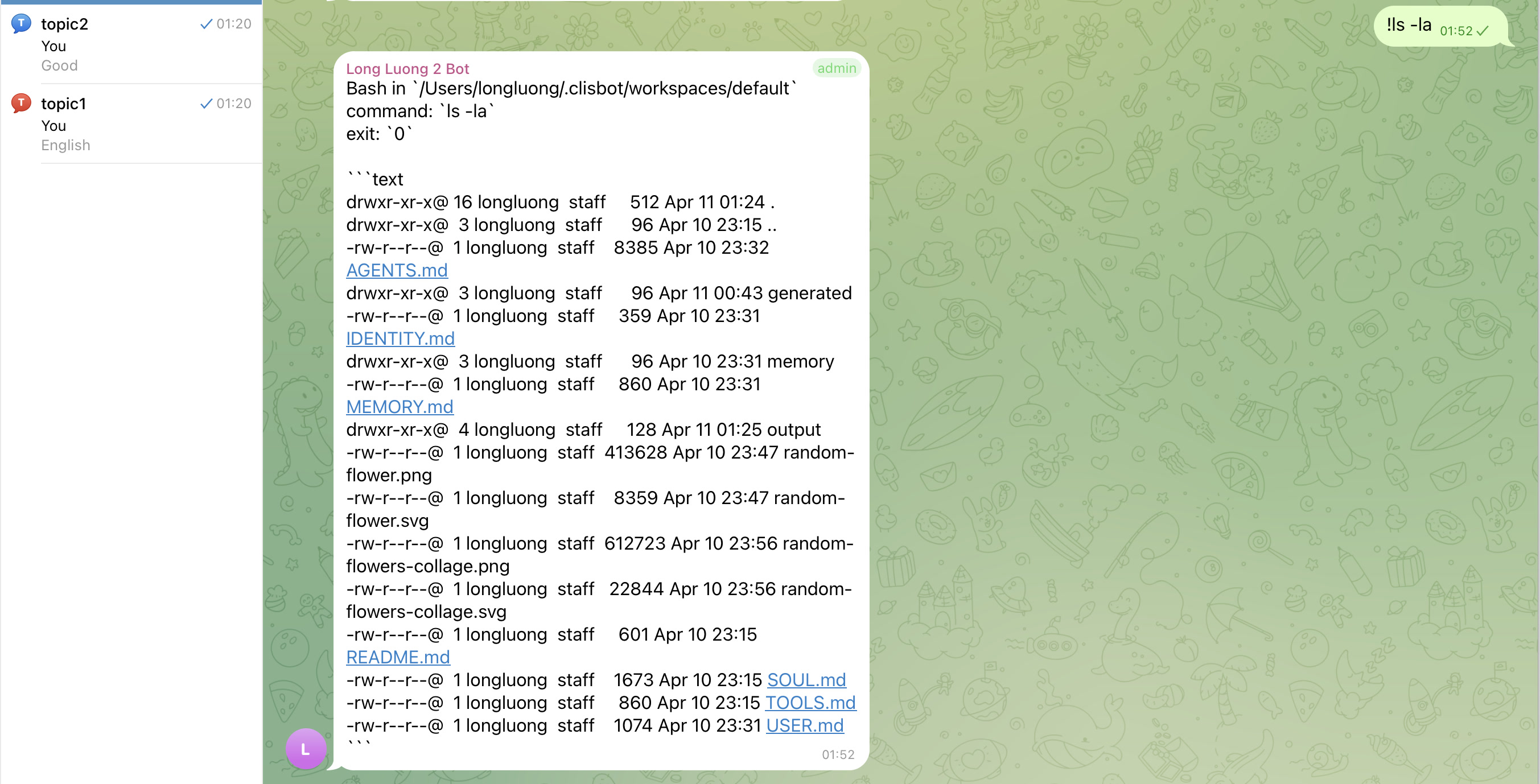
- Fast operator shortcuts for shell execution: `!<command>` or `/bash <command>`, plus slash-prefix mappings such as `\bash` or `::bash` when Slack slash-command handling is incompatible. Turns Slack / Telegram into a terminal interface on the go.
|
|
33
|
-
- The proof of concept already shows high potential beyond internal coding workflows, including customer chatbot use cases once messaging MCP or CLI-based skills let the agent send messages proactively in a cleaner way.
|
|
34
|
-
|
|
35
|
-
## Current Focus
|
|
36
|
-
|
|
37
|
-
`clisbot` is growing toward a broader agent runtime layer:
|
|
38
|
-
|
|
39
|
-
- more CLI tool support beyond Claude Code and Codex, including Gemini CLI, OpenCode, Qwen, Kilo, and other agentic CLIs
|
|
40
|
-
- more communication channels beyond Slack and Telegram, including Zalo, WhatsApp, Facebook, Discord, and future API-compatible surfaces
|
|
41
|
-
- simple workflow building blocks such as cronjobs, heartbeat jobs, lightweight Ralph-style loops, and prompt combinations that just work
|
|
42
|
-
- durable agent sessions, workspaces, follow-up policy, commands, attachments, and operator controls that stay reusable across all those surfaces
|
|
43
|
-
|
|
44
|
-
tmux is still the current stability boundary. One agent maps to one durable runner session in one workspace, and every CLI, channel, or workflow layer should route onto that durable runtime instead of recreating the agent from scratch.
|
|
45
|
-
|
|
46
|
-
## Launch MVP Path
|
|
47
|
-
|
|
48
|
-
See [docs/overview/launch-mvp-path.md](docs/overview/launch-mvp-path.md) for the full current launch order.
|
|
49
|
-
|
|
50
|
-
Short snapshot:
|
|
51
|
-
|
|
52
|
-
1. Foundations first:
|
|
53
|
-
- frictionless start and credential persistence
|
|
54
|
-
- runtime stability and truthful status or debug UX
|
|
55
|
-
- `/loop` as the current differentiating workflow feature
|
|
56
|
-
2. International launch gate:
|
|
57
|
-
- Claude, Codex, and Gemini as the well-tested core CLI trio
|
|
58
|
-
- current shared channel package remains Slack plus Telegram
|
|
59
|
-
3. Vietnam launch package:
|
|
60
|
-
- add Zalo Official Account and Zalo Personal on top of the same core trio
|
|
61
|
-
4. Next expansion wave:
|
|
62
|
-
- more CLIs such as Cursor, Amp, OpenCode, Qwen, Kilo, and Minimax, prioritized by real userbase demand
|
|
63
|
-
- more channels such as Discord, WhatsApp, Google Workspace, and Microsoft Teams
|
|
64
|
-
5. Open launch decision:
|
|
65
|
-
- whether native CLI slash-command compatibility, override, and customization should ship before broader push
|
|
66
|
-
|
|
67
|
-
## Showcase
|
|
68
|
-
|
|
69
|
-
Slack
|
|
70
|
-
|
|
71
|
-
|
|
18
|
+
- One frontier-agent stack for both daily work and real coding. You do not need one product for assistant work and another for actual engineering work.
|
|
19
|
+
- Learns from and integrates the two biggest strengths that made OpenClaw popular: memory and native channel integration with deep, channel-specific conversation and presentation capabilities.
|
|
20
|
+
- Reuses native CLI subscriptions you already pay for, such as Claude Code, Codex, and Gemini CLI, instead of pushing you toward a separate API-cost-heavy stack.
|
|
21
|
+
- Strong chat-first support in Slack and Telegram, with durable tmux-backed sessions behind the bot, so you can work from your laptop or on the go without giving up a real coding workspace.
|
|
22
|
+
- Not just a tmux bridge. Slack and Telegram are treated as real channel surfaces with routing, thread or topic continuity, pairing, follow-up control, and attachment-aware interaction instead of plain text passthrough.
|
|
23
|
+
- Files and images can move through the chat surfaces too, not just text prompts: inbound Slack or Telegram attachments can land in the workspace, and outbound channel delivery is designed around real message and media actions rather than terminal-only output.
|
|
24
|
+
- Team-first by design, with `AGENTS`, `USER`, and `MEMORY` context bootstrapping shaped for shared team reality instead of only personal solo-assistant flows.
|
|
25
|
+
- Useful for coding, operations, teamwork, and general assistant work, with fast shell shortcuts such as `!<command>` and `/bash <command>` when you need terminal-like control from chat.
|
|
72
26
|
|
|
73
|
-
|
|
27
|
+
## What to expect
|
|
74
28
|
|
|
75
|
-
|
|
76
|
-
|
|
77
|
-
|
|
78
|
-
|
|
79
|
-
|
|
29
|
+
- You can get the first Telegram bot running in one command.
|
|
30
|
+
- The first-run path creates one default agent and only enables the channels you explicitly name.
|
|
31
|
+
- DMs start with pairing so access stays explicit.
|
|
32
|
+
- `--persist` lets later restarts use plain `clisbot start`.
|
|
33
|
+
- Slack and Telegram are not treated as plain-text sinks: routed conversations can carry thread or topic identity, pairing, and file-aware workflows.
|
|
34
|
+
- Advanced multi-agent setup is available later, but it is not required for day one.
|
|
80
35
|
|
|
81
36
|
## Quick Start
|
|
82
37
|
|
|
83
|
-
|
|
84
|
-
|
|
85
|
-
```bash
|
|
86
|
-
clisbot start \
|
|
87
|
-
--cli codex \
|
|
88
|
-
--bot-type personal \
|
|
89
|
-
--telegram-bot-token <your-telegram-bot-token>
|
|
90
|
-
```
|
|
91
|
-
|
|
92
|
-
If you want later runs to work with plain `clisbot start`, persist that token immediately:
|
|
38
|
+
Most people should start here:
|
|
93
39
|
|
|
94
40
|
```bash
|
|
41
|
+
npm install -g clisbot
|
|
95
42
|
clisbot start \
|
|
96
43
|
--cli codex \
|
|
97
44
|
--bot-type personal \
|
|
@@ -99,7 +46,16 @@ clisbot start \
|
|
|
99
46
|
--persist
|
|
100
47
|
```
|
|
101
48
|
|
|
102
|
-
|
|
49
|
+
If you want to try first without persisting the token yet, just remove `--persist`.
|
|
50
|
+
|
|
51
|
+
Need the step-by-step setup docs instead of the shortest path?
|
|
52
|
+
|
|
53
|
+
- Telegram: [Telegram Bot Setup](docs/user-guide/telegram-setup.md)
|
|
54
|
+
- Slack: [Slack App Setup](docs/user-guide/slack-setup.md)
|
|
55
|
+
- Slack app manifest template: [app-manifest.json](templates/slack/default/app-manifest.json)
|
|
56
|
+
- Slack app manifest guide: [app-manifest-guide.md](templates/slack/default/app-manifest-guide.md)
|
|
57
|
+
|
|
58
|
+
What happens next:
|
|
103
59
|
|
|
104
60
|
- `--bot-type personal` creates one assistant for one human
|
|
105
61
|
- `--bot-type team` creates one shared assistant for a team, channel, or group workflow
|
|
@@ -108,11 +64,14 @@ What this does:
|
|
|
108
64
|
- fresh bootstrap only enables the channels you name explicitly
|
|
109
65
|
- after the persisted first run, later restarts can use plain `clisbot start`
|
|
110
66
|
|
|
111
|
-
|
|
67
|
+
If you prefer Slack first:
|
|
112
68
|
|
|
113
69
|
```bash
|
|
114
|
-
|
|
115
|
-
|
|
70
|
+
clisbot start \
|
|
71
|
+
--cli codex \
|
|
72
|
+
--bot-type team \
|
|
73
|
+
--slack-app-token SLACK_APP_TOKEN \
|
|
74
|
+
--slack-bot-token SLACK_BOT_TOKEN
|
|
116
75
|
```
|
|
117
76
|
|
|
118
77
|
Short alias:
|
|
@@ -128,16 +87,6 @@ bun install
|
|
|
128
87
|
bun run start --cli codex --bot-type personal --telegram-bot-token <your-telegram-bot-token> --persist
|
|
129
88
|
```
|
|
130
89
|
|
|
131
|
-
If you prefer Slack first:
|
|
132
|
-
|
|
133
|
-
```bash
|
|
134
|
-
clisbot start \
|
|
135
|
-
--cli codex \
|
|
136
|
-
--bot-type team \
|
|
137
|
-
--slack-app-token SLACK_APP_TOKEN \
|
|
138
|
-
--slack-bot-token SLACK_BOT_TOKEN
|
|
139
|
-
```
|
|
140
|
-
|
|
141
90
|
First conversation path:
|
|
142
91
|
|
|
143
92
|
- send a DM to the bot in Slack or Telegram
|
|
@@ -153,36 +102,57 @@ clisbot pairing approve telegram <CODE>
|
|
|
153
102
|
|
|
154
103
|
Fresh config starts with no configured agents, so first-run `clisbot start` requires both `--cli` and `--bot-type` before it creates the first `default` agent.
|
|
155
104
|
Fresh config also starts with no preconfigured Slack channels or Telegram groups or topics. Add those routes manually in `~/.clisbot/clisbot.json`.
|
|
156
|
-
`clisbot start` requires explicit channel token input before it bootstraps anything. You can pass raw values, env names such as `
|
|
157
|
-
|
|
105
|
+
`clisbot start` requires explicit channel token input before it bootstraps anything. You can pass raw values, env names such as `MY_TELEGRAM_BOT_TOKEN`, or placeholders such as `'${MY_TELEGRAM_BOT_TOKEN}'`.
|
|
106
|
+
If you want a separate dev instance beside your main bot, see the [Development Guide](docs/development/README.md).
|
|
107
|
+
|
|
108
|
+
## Showcase
|
|
109
|
+
|
|
110
|
+
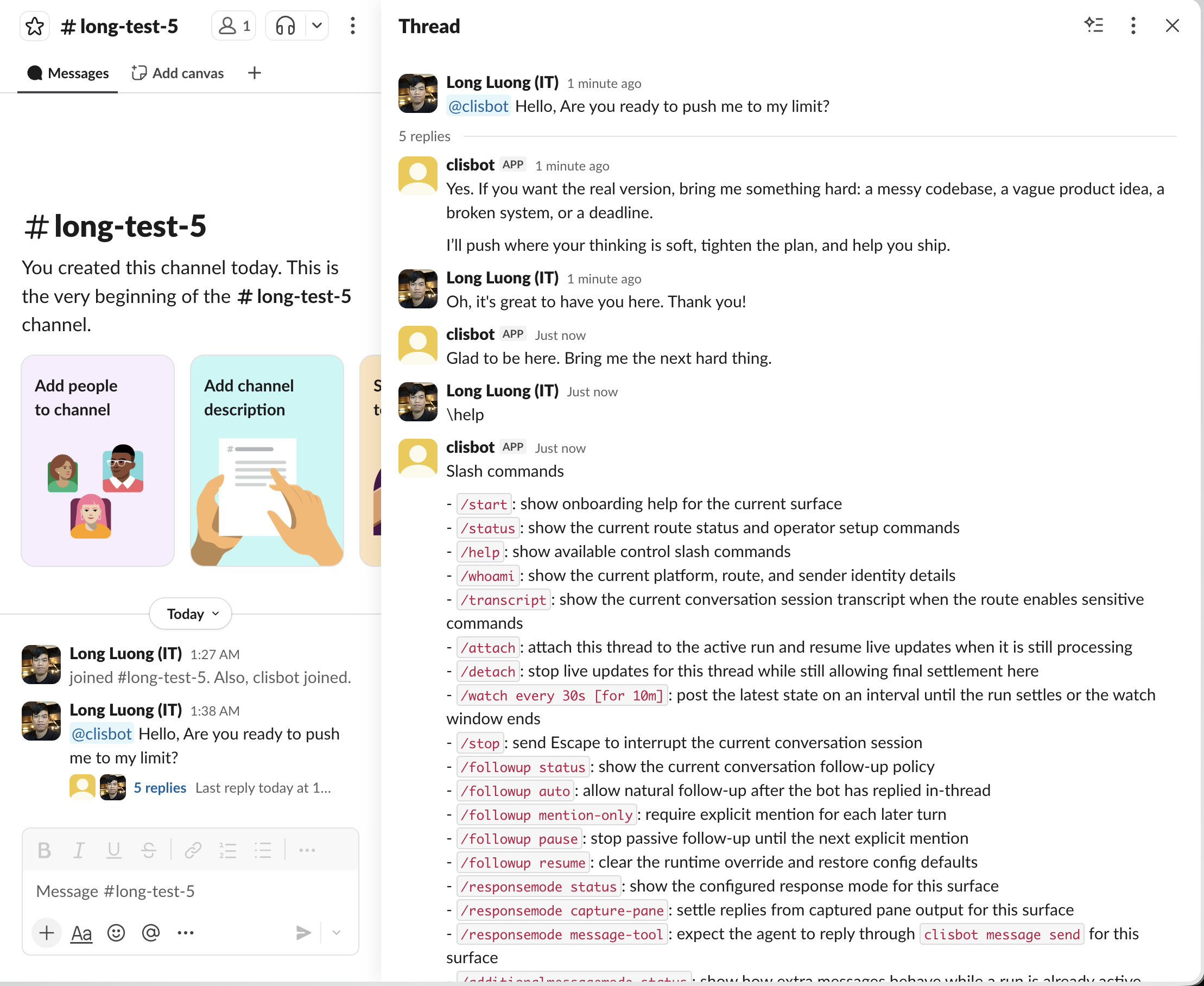
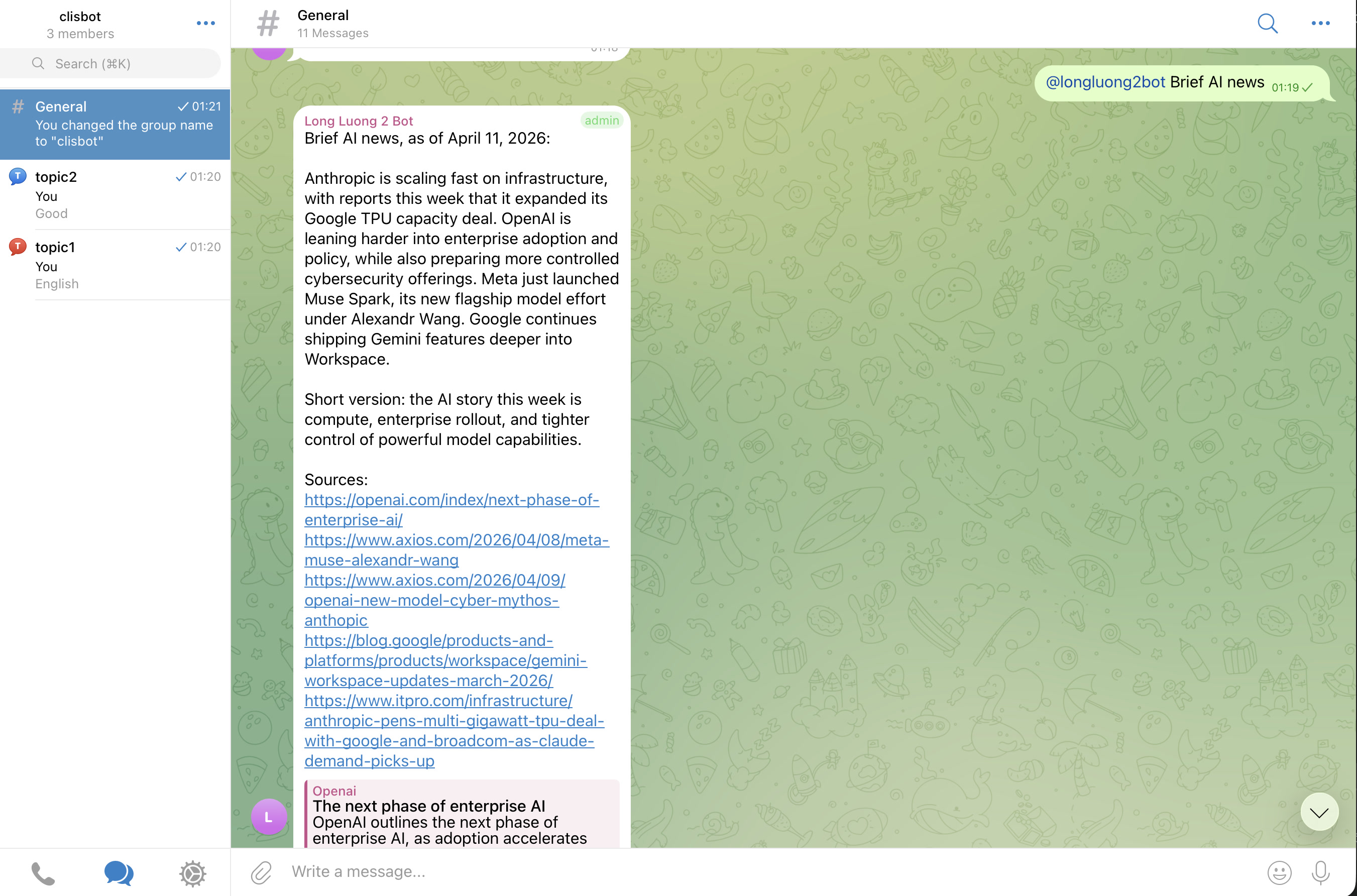
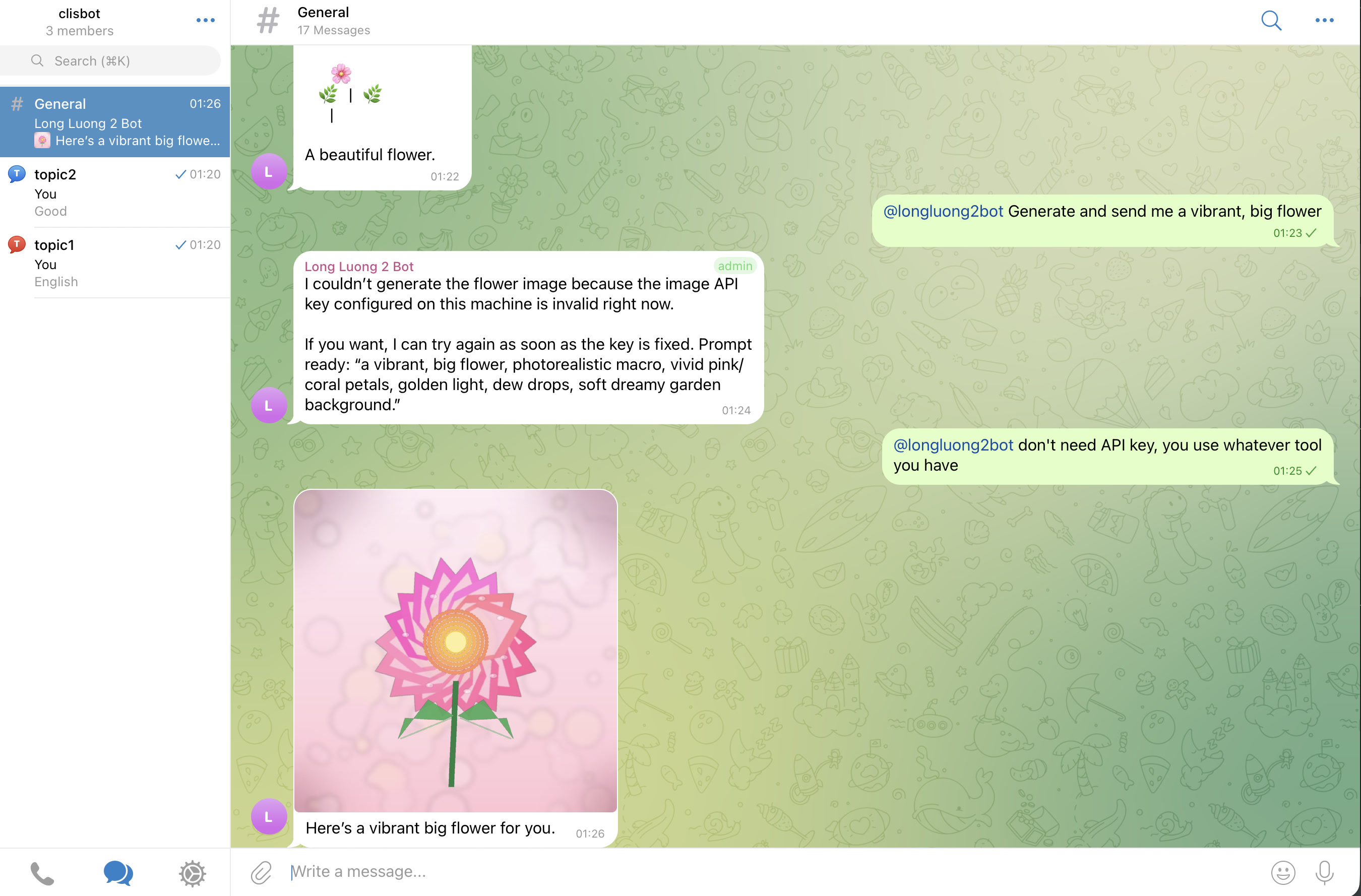
The goal is a real chat-native agent surface, not a terminal transcript mirror: threads, topics, follow-up behavior, and file-aware workflows should feel native to Slack and Telegram.
|
|
111
|
+
|
|
112
|
+
Slack
|
|
113
|
+
|
|
114
|
+

|
|
115
|
+
|
|
116
|
+
Telegram
|
|
117
|
+
|
|
118
|
+
|
|
119
|
+
|
|
120
|
+
|
|
121
|
+
|
|
122
|
+
|
|
123
|
+
|
|
124
|
+
## Important caution
|
|
125
|
+
|
|
126
|
+
Strong vendor investment in security and safety does not make frontier agentic CLI tools inherently safe. `clisbot` exposes those tools more broadly through chat and workflow surfaces, so you should treat the whole system as high-trust software and use it at your own risk.
|
|
127
|
+
|
|
128
|
+
## Acknowledgements
|
|
129
|
+
|
|
130
|
+
`clisbot` would not exist without the ideas, momentum, and practical inspiration created by OpenClaw. Many configuration, routing, and workspace concepts here were learned from studying OpenClaw, then adapted to `clisbot`'s own direction. Respect and thanks to the OpenClaw project and community.
|
|
158
131
|
|
|
159
132
|
## Setup Guide
|
|
160
133
|
|
|
161
|
-
The easiest setup flow is:
|
|
134
|
+
The easiest setup flow is still:
|
|
135
|
+
|
|
136
|
+
1. Install `clisbot`.
|
|
137
|
+
2. Run the quick start command above.
|
|
138
|
+
3. DM the bot and approve pairing.
|
|
139
|
+
4. Only move into advanced config after the first successful run.
|
|
140
|
+
|
|
141
|
+
If you want the repo-guided setup path:
|
|
162
142
|
|
|
163
143
|
1. Clone this repo.
|
|
164
|
-
2. Open Claude Code or
|
|
144
|
+
2. Open Claude Code, Codex, or Gemini CLI in this repo.
|
|
165
145
|
3. Ask it to help you set up `clisbot`.
|
|
166
146
|
|
|
167
147
|
The docs in this repo are kept current, including the [User Guide](docs/user-guide/README.md), so the agent should have enough context to walk you through setup, configuration, and troubleshooting directly inside the repo.
|
|
168
148
|
|
|
169
|
-
If you prefer to configure
|
|
149
|
+
If you prefer to configure everything yourself:
|
|
170
150
|
|
|
171
151
|
1. Read the full config template in [config/clisbot.json.template](config/clisbot.json.template).
|
|
172
152
|
2. Copy it to `~/.clisbot/clisbot.json` and adjust channels, bindings, workspaces, and policies for your environment.
|
|
173
153
|
3. Add agents through the CLI so tool defaults, startup options, and bootstrap templates stay consistent.
|
|
174
154
|
4. Optionally move stable channel secrets into env vars or canonical credential files after your first successful run.
|
|
175
155
|
|
|
176
|
-
Separate dev home example:
|
|
177
|
-
|
|
178
|
-
```bash
|
|
179
|
-
export CLISBOT_HOME=~/.clisbot-dev
|
|
180
|
-
clisbot start --cli codex --bot-type team --telegram-bot-token TELEGRAM_BOT_TOKEN
|
|
181
|
-
```
|
|
182
|
-
|
|
183
|
-
- `CLISBOT_HOME` changes the default config path, runtime state dir, tmux socket, local wrapper path, and default workspaces together
|
|
184
|
-
- `CLISBOT_CONFIG_PATH` still works when you want to point at one exact config file manually
|
|
185
|
-
|
|
186
156
|
Channel route setup is manual by design:
|
|
187
157
|
|
|
188
158
|
- fresh config does not auto-add Slack channels
|
|
@@ -190,27 +160,12 @@ Channel route setup is manual by design:
|
|
|
190
160
|
- add only the exact channel, group, topic, or DM routing you want to expose
|
|
191
161
|
- default channel account setup lives in [docs/user-guide/channel-accounts.md](docs/user-guide/channel-accounts.md)
|
|
192
162
|
|
|
193
|
-
|
|
163
|
+
Advanced agent management:
|
|
194
164
|
|
|
195
|
-
|
|
196
|
-
clisbot
|
|
197
|
-
|
|
198
|
-
|
|
199
|
-
```bash
|
|
200
|
-
clisbot agents add claude --cli claude --bootstrap team-assistant --bind telegram
|
|
201
|
-
clisbot agents bootstrap claude --mode team-assistant --force
|
|
202
|
-
clisbot agents list --bindings
|
|
203
|
-
```
|
|
204
|
-
|
|
205
|
-
Agent setup rules:
|
|
206
|
-
|
|
207
|
-
- `agents add` requires `--cli` and currently supports `codex` and `claude`.
|
|
208
|
-
- `--bootstrap` accepts `personal-assistant` or `team-assistant` and seeds the workspace from `templates/openclaw`, `templates/customized/default`, and the selected customized template.
|
|
209
|
-
- `personal-assistant` fits one assistant for one human.
|
|
210
|
-
- `team-assistant` fits one shared assistant for a team, channel, or group workflow.
|
|
211
|
-
- `agents bootstrap <agentId> --mode <personal-assistant|team-assistant>` bootstraps an existing agent workspace using the agent's configured CLI tool.
|
|
212
|
-
- bootstrap runs a dry check first; if any template markdown file already exists in the workspace, it stops and asks you to rerun with `--force`.
|
|
213
|
-
- Fresh channel config still points at the `default` agent. If your first agent is not named `default`, update `defaultAgentId` and any route `agentId` values in config.
|
|
165
|
+
- most users should stay on `clisbot start --cli ... --bot-type ...` and let first-run create the default agent
|
|
166
|
+
- if you need more than one agent, custom bindings, or manual workspace bootstrap flows, use the `clisbot agents ...` commands described in [docs/user-guide/README.md](docs/user-guide/README.md)
|
|
167
|
+
- README intentionally keeps that low-level surface out of the main onboarding path because the public first-run model is `--bot-type personal|team`, not internal template-mode naming
|
|
168
|
+
- fresh channel config still points at the `default` agent; if your first agent uses another id, update `defaultAgentId` and any route `agentId` values in config
|
|
214
169
|
|
|
215
170
|
Env-backed setup is still supported when you want config to reference an env name instead of persisting a credential file:
|
|
216
171
|
|
|
@@ -224,20 +179,20 @@ clisbot start \
|
|
|
224
179
|
|
|
225
180
|
- these flags are written into `~/.clisbot/clisbot.json` as `${ENV_NAME}` placeholders
|
|
226
181
|
- you can pass either `CUSTOM_SLACK_APP_TOKEN` or `'${CUSTOM_SLACK_APP_TOKEN}'`
|
|
227
|
-
- use this path when
|
|
182
|
+
- use this path when you want config to point at env variable names you chose yourself
|
|
228
183
|
- keep env export details in [docs/user-guide/channel-accounts.md](docs/user-guide/channel-accounts.md) instead of front-loading them into quick start
|
|
229
184
|
|
|
230
185
|
## Troubleshooting
|
|
231
186
|
|
|
232
|
-
|
|
233
|
-
|
|
187
|
+
If the quick start does not work, check these in order:
|
|
188
|
+
|
|
189
|
+
- If setup feels unclear, open Claude Code, Codex, or Gemini CLI in this repo and ask it to help using the local docs.
|
|
234
190
|
- If config behavior is confusing, inspect [config/clisbot.json.template](config/clisbot.json.template) first, then compare it with [docs/user-guide/README.md](docs/user-guide/README.md).
|
|
235
191
|
- If `clisbot start` says no agents are configured, prefer `clisbot start --cli codex --bot-type personal --telegram-bot-token <your-telegram-bot-token>`.
|
|
236
192
|
- If you want later runs to work with plain `clisbot start`, rerun your successful first-run command with `--persist`.
|
|
237
193
|
- If `clisbot start` prints token refs as `missing`, either pass the token explicitly on the command line or switch to env-backed setup described in [docs/user-guide/channel-accounts.md](docs/user-guide/channel-accounts.md).
|
|
238
194
|
- If you use custom env names, pass them explicitly with `--slack-app-token`, `--slack-bot-token`, or `--telegram-bot-token`.
|
|
239
|
-
- If `clisbot status` shows `bootstrap=...:missing
|
|
240
|
-
- If `clisbot status` shows `bootstrap=...:not-bootstrapped`, finish the workspace bootstrap by reviewing `BOOTSTRAP.md`, `SOUL.md`, `IDENTITY.md`, and the mode-specific files in that workspace.
|
|
195
|
+
- If `clisbot status` shows `bootstrap=...:missing` or `bootstrap=...:not-bootstrapped`, follow the advanced agent bootstrap steps in [docs/user-guide/README.md](docs/user-guide/README.md).
|
|
241
196
|
- If Codex shows `Do you trust the contents of this directory?`, keep `trustWorkspace: true` in clisbot config and also mark the workspace as trusted in `~/.codex/config.toml`, for example:
|
|
242
197
|
|
|
243
198
|
```toml
|
|
@@ -246,6 +201,7 @@ trust_level = "trusted"
|
|
|
246
201
|
```
|
|
247
202
|
|
|
248
203
|
- If that trust screen is still blocking, attach directly and continue from tmux with `tmux -S ~/.clisbot/state/clisbot.sock attach -t agent-default-main`.
|
|
204
|
+
- If Gemini startup says it is waiting for manual authorization, authenticate Gemini directly first or provide a headless auth path such as `GEMINI_API_KEY` or Vertex AI credentials; `clisbot` now treats that screen as a startup blocker instead of a healthy ready session.
|
|
249
205
|
- If Codex warns that `bubblewrap` is missing on Linux, install `bubblewrap` in the runtime environment.
|
|
250
206
|
- If the bot does not answer, check that your shell environment really contains the expected tokens and restart `clisbot` after changing them.
|
|
251
207
|
- If runtime startup still fails, run `clisbot logs` and inspect the recent log tail that `clisbot` now prints automatically on startup failure.
|
|
@@ -254,34 +210,29 @@ trust_level = "trusted"
|
|
|
254
210
|
- If Slack thread behavior feels too eager, use `/followup pause` or `/followup mention-only`.
|
|
255
211
|
- If Slack slash commands conflict with Slack-native command handling, add a leading space, for example ` /bash ls -la`.
|
|
256
212
|
|
|
257
|
-
##
|
|
213
|
+
## Common CLI commands
|
|
214
|
+
|
|
215
|
+
Most users only need a small set of commands at first:
|
|
258
216
|
|
|
259
217
|
- `clisbot start`
|
|
260
218
|
- `clisbot restart`
|
|
261
219
|
- `clisbot stop`
|
|
262
|
-
- `clisbot stop --hard`
|
|
263
220
|
- `clisbot status`
|
|
264
221
|
- `clisbot logs`
|
|
222
|
+
- `clisbot pairing approve slack <CODE>`
|
|
223
|
+
- `clisbot pairing approve telegram <CODE>`
|
|
265
224
|
- `clisbot channels enable slack`
|
|
266
225
|
- `clisbot channels enable telegram`
|
|
267
226
|
- `clisbot channels add telegram-group <chatId> [--topic <topicId>] [--agent <id>] [--require-mention true|false]`
|
|
268
|
-
- `clisbot channels remove telegram-group <chatId> [--topic <topicId>]`
|
|
269
227
|
- `clisbot channels add slack-channel <channelId> [--agent <id>] [--require-mention true|false]`
|
|
270
|
-
- `clisbot channels remove slack-channel <channelId>`
|
|
271
|
-
- `clisbot channels add slack-group <groupId> [--agent <id>] [--require-mention true|false]`
|
|
272
|
-
- `clisbot channels remove slack-group <groupId>`
|
|
273
|
-
- `clisbot channels set-token <slack-app|slack-bot|telegram-bot> <value>`
|
|
274
|
-
- `clisbot channels clear-token <slack-app|slack-bot|telegram-bot>`
|
|
275
228
|
- `clisbot channels privilege enable <target>`
|
|
276
|
-
- `clisbot channels privilege disable <target>`
|
|
277
229
|
- `clisbot channels privilege allow-user <target> <userId>`
|
|
278
|
-
- `clisbot channels privilege remove-user <target> <userId>`
|
|
279
230
|
- `clisbot agents list --bindings`
|
|
280
|
-
- `clisbot start --cli codex --bot-type personal --telegram-bot-token <your-telegram-bot-token> --persist`
|
|
281
|
-
- `clisbot agents bootstrap default --mode personal-assistant`
|
|
282
|
-
- `clisbot agents bind --agent default --bind telegram`
|
|
283
231
|
- `clisbot agents bindings`
|
|
284
232
|
- `clisbot --help`
|
|
233
|
+
|
|
234
|
+
If you are running from the repo instead of the global package:
|
|
235
|
+
|
|
285
236
|
- `bun run dev`
|
|
286
237
|
- `bun run start`
|
|
287
238
|
- `bun run restart`
|
|
@@ -340,23 +291,54 @@ Follow-up behavior matters in team threads:
|
|
|
340
291
|
|
|
341
292
|
- [Overview](docs/overview/README.md)
|
|
342
293
|
- [Architecture](docs/architecture/README.md)
|
|
294
|
+
- [Development Guide](docs/development/README.md)
|
|
343
295
|
- [Feature Tables](docs/features/feature-tables.md)
|
|
344
296
|
- [Backlog](docs/tasks/backlog.md)
|
|
345
297
|
- [User Guide](docs/user-guide/README.md)
|
|
346
298
|
|
|
347
299
|
## Roadmap
|
|
348
300
|
|
|
349
|
-
-
|
|
350
|
-
-
|
|
351
|
-
-
|
|
352
|
-
-
|
|
353
|
-
-
|
|
354
|
-
|
|
355
|
-
|
|
301
|
+
- Add more native CLIs, starting with a stronger Claude, Codex, and Gemini launch trio.
|
|
302
|
+
- Add more channels, starting from Slack and Telegram, then moving toward Zalo and other expansion surfaces.
|
|
303
|
+
- Add better workflow building blocks such as heartbeat, cron-style jobs, and stronger loop automation.
|
|
304
|
+
- Explore structured output, ACP, and native SDK integrations where they improve truthfulness or operator control.
|
|
305
|
+
- Explore more stable native messaging paths beyond tmux-pane capture over time.
|
|
306
|
+
|
|
307
|
+
## Current Focus
|
|
308
|
+
|
|
309
|
+
`clisbot` is growing toward a broader agent runtime layer:
|
|
310
|
+
|
|
311
|
+
- more CLI tool support beyond Claude Code, Codex, and Gemini CLI
|
|
312
|
+
- more communication channels beyond Slack and Telegram
|
|
313
|
+
- simple workflow building blocks such as cron jobs, heartbeat jobs, and loops
|
|
314
|
+
- durable agent sessions, workspaces, follow-up policy, commands, attachments, and operator controls that stay reusable across all those surfaces
|
|
315
|
+
|
|
316
|
+
tmux is still the current stability boundary. One agent maps to one durable runner session in one workspace, and every CLI, channel, or workflow layer should route onto that durable runtime instead of recreating the agent from scratch.
|
|
317
|
+
|
|
318
|
+
## Launch MVP Path
|
|
319
|
+
|
|
320
|
+
See [docs/overview/launch-mvp-path.md](docs/overview/launch-mvp-path.md) for the full current launch order.
|
|
321
|
+
|
|
322
|
+
Short snapshot:
|
|
323
|
+
|
|
324
|
+
1. Foundations first:
|
|
325
|
+
- frictionless start and credential persistence
|
|
326
|
+
- runtime stability and truthful status or debug UX
|
|
327
|
+
- `/loop` as the current differentiating workflow feature
|
|
328
|
+
2. International launch gate:
|
|
329
|
+
- Claude, Codex, and Gemini as the well-tested core CLI trio
|
|
330
|
+
- current shared channel package remains Slack plus Telegram
|
|
331
|
+
3. Vietnam launch package:
|
|
332
|
+
- add Zalo Official Account and Zalo Personal on top of the same core trio
|
|
333
|
+
4. Next expansion wave:
|
|
334
|
+
- more CLIs such as Cursor, Amp, OpenCode, Qwen, Kilo, and Minimax, prioritized by real userbase demand
|
|
335
|
+
- more channels such as Discord, WhatsApp, Google Workspace, and Microsoft Teams
|
|
336
|
+
5. Open launch decision:
|
|
337
|
+
- whether native CLI slash-command compatibility, override, and customization should ship before broader push
|
|
356
338
|
|
|
357
339
|
## Completed
|
|
358
340
|
|
|
359
|
-
- [x] Multiple Codex and
|
|
341
|
+
- [x] Multiple Codex, Claude, and Gemini sessions with streaming on/off support.
|
|
360
342
|
- [x] Stale tmux session cleanup and session resume.
|
|
361
343
|
- [x] OpenClaw-compatible configuration system.
|
|
362
344
|
- [x] Slack channel support with streaming and attachments, smart follow mode
|
|
@@ -366,7 +348,7 @@ Follow-up behavior matters in team threads:
|
|
|
366
348
|
|
|
367
349
|
This repo also serves as a small example of an AI-native engineering workflow:
|
|
368
350
|
|
|
369
|
-
- simple `AGENTS.md` and `CLAUDE.md`-style operating rules
|
|
351
|
+
- simple `AGENTS.md` and `CLAUDE.md`-style operating rules
|
|
370
352
|
- lessons-learned docs to capture repeated feedback and pitfalls
|
|
371
353
|
- architecture docs used as a stable implementation contract
|
|
372
354
|
- end-to-end validation expectations to close the feedback loop for AI agents
|
|
@@ -1,7 +1,7 @@
|
|
|
1
1
|
{
|
|
2
2
|
"meta": {
|
|
3
3
|
"schemaVersion": 1,
|
|
4
|
-
"lastTouchedAt": "2026-04-
|
|
4
|
+
"lastTouchedAt": "2026-04-15T00:00:00.000Z"
|
|
5
5
|
},
|
|
6
6
|
"tmux": {
|
|
7
7
|
"socketPath": "~/.clisbot/state/clisbot.sock"
|
|
@@ -12,9 +12,81 @@
|
|
|
12
12
|
"identityLinks": {},
|
|
13
13
|
"storePath": "~/.clisbot/state/sessions.json"
|
|
14
14
|
},
|
|
15
|
+
"app": {
|
|
16
|
+
"auth": {
|
|
17
|
+
"ownerClaimWindowMinutes": 30,
|
|
18
|
+
"defaultRole": "member",
|
|
19
|
+
"roles": {
|
|
20
|
+
"owner": {
|
|
21
|
+
"allow": [
|
|
22
|
+
"configManage",
|
|
23
|
+
"appAuthManage",
|
|
24
|
+
"agentAuthManage",
|
|
25
|
+
"promptGovernanceManage"
|
|
26
|
+
],
|
|
27
|
+
"users": []
|
|
28
|
+
},
|
|
29
|
+
"admin": {
|
|
30
|
+
"allow": [
|
|
31
|
+
"configManage",
|
|
32
|
+
"appAuthManage",
|
|
33
|
+
"agentAuthManage",
|
|
34
|
+
"promptGovernanceManage"
|
|
35
|
+
],
|
|
36
|
+
"users": []
|
|
37
|
+
},
|
|
38
|
+
"member": {
|
|
39
|
+
"allow": [],
|
|
40
|
+
"users": []
|
|
41
|
+
}
|
|
42
|
+
}
|
|
43
|
+
}
|
|
44
|
+
},
|
|
15
45
|
"agents": {
|
|
16
46
|
"defaults": {
|
|
17
47
|
"workspace": "~/.clisbot/workspaces/{agentId}",
|
|
48
|
+
"auth": {
|
|
49
|
+
"defaultRole": "member",
|
|
50
|
+
"roles": {
|
|
51
|
+
"admin": {
|
|
52
|
+
"allow": [
|
|
53
|
+
"sendMessage",
|
|
54
|
+
"helpView",
|
|
55
|
+
"statusView",
|
|
56
|
+
"identityView",
|
|
57
|
+
"transcriptView",
|
|
58
|
+
"runObserve",
|
|
59
|
+
"runInterrupt",
|
|
60
|
+
"streamingManage",
|
|
61
|
+
"queueManage",
|
|
62
|
+
"steerManage",
|
|
63
|
+
"loopManage",
|
|
64
|
+
"shellExecute",
|
|
65
|
+
"runNudge",
|
|
66
|
+
"followupManage",
|
|
67
|
+
"responseModeManage",
|
|
68
|
+
"additionalMessageModeManage"
|
|
69
|
+
],
|
|
70
|
+
"users": []
|
|
71
|
+
},
|
|
72
|
+
"member": {
|
|
73
|
+
"allow": [
|
|
74
|
+
"sendMessage",
|
|
75
|
+
"helpView",
|
|
76
|
+
"statusView",
|
|
77
|
+
"identityView",
|
|
78
|
+
"transcriptView",
|
|
79
|
+
"runObserve",
|
|
80
|
+
"runInterrupt",
|
|
81
|
+
"streamingManage",
|
|
82
|
+
"queueManage",
|
|
83
|
+
"steerManage",
|
|
84
|
+
"loopManage"
|
|
85
|
+
],
|
|
86
|
+
"users": []
|
|
87
|
+
}
|
|
88
|
+
}
|
|
89
|
+
},
|
|
18
90
|
"runner": {
|
|
19
91
|
"command": "codex",
|
|
20
92
|
"args": [
|
|
@@ -72,11 +144,20 @@
|
|
|
72
144
|
"configReload": {
|
|
73
145
|
"watch": true,
|
|
74
146
|
"watchDebounceMs": 250
|
|
147
|
+
},
|
|
148
|
+
"sessionCleanup": {
|
|
149
|
+
"enabled": true,
|
|
150
|
+
"intervalMinutes": 5
|
|
151
|
+
},
|
|
152
|
+
"loop": {
|
|
153
|
+
"maxRunsPerLoop": 20,
|
|
154
|
+
"maxActiveLoops": 10,
|
|
155
|
+
"defaultTimezone": "UTC"
|
|
75
156
|
}
|
|
76
157
|
},
|
|
77
158
|
"channels": {
|
|
78
159
|
"slack": {
|
|
79
|
-
"enabled":
|
|
160
|
+
"enabled": false,
|
|
80
161
|
"mode": "socket",
|
|
81
162
|
"appToken": "${SLACK_APP_TOKEN}",
|
|
82
163
|
"botToken": "${SLACK_BOT_TOKEN}",
|
|
@@ -104,10 +185,6 @@
|
|
|
104
185
|
"channelPolicy": "allowlist",
|
|
105
186
|
"groupPolicy": "allowlist",
|
|
106
187
|
"defaultAgentId": "default",
|
|
107
|
-
"privilegeCommands": {
|
|
108
|
-
"enabled": false,
|
|
109
|
-
"allowUsers": []
|
|
110
|
-
},
|
|
111
188
|
"commandPrefixes": {
|
|
112
189
|
"slash": [
|
|
113
190
|
"::",
|
|
@@ -121,6 +198,7 @@
|
|
|
121
198
|
"response": "final",
|
|
122
199
|
"responseMode": "message-tool",
|
|
123
200
|
"additionalMessageMode": "steer",
|
|
201
|
+
"verbose": "minimal",
|
|
124
202
|
"followUp": {
|
|
125
203
|
"mode": "auto",
|
|
126
204
|
"participationTtlMin": 5
|
|
@@ -132,15 +210,11 @@
|
|
|
132
210
|
"policy": "pairing",
|
|
133
211
|
"allowFrom": [],
|
|
134
212
|
"requireMention": false,
|
|
135
|
-
"agentId": "default"
|
|
136
|
-
"privilegeCommands": {
|
|
137
|
-
"enabled": false,
|
|
138
|
-
"allowUsers": []
|
|
139
|
-
}
|
|
213
|
+
"agentId": "default"
|
|
140
214
|
}
|
|
141
215
|
},
|
|
142
216
|
"telegram": {
|
|
143
|
-
"enabled":
|
|
217
|
+
"enabled": false,
|
|
144
218
|
"mode": "polling",
|
|
145
219
|
"botToken": "${TELEGRAM_BOT_TOKEN}",
|
|
146
220
|
"defaultAccount": "default",
|
|
@@ -157,10 +231,6 @@
|
|
|
157
231
|
"allowBots": false,
|
|
158
232
|
"groupPolicy": "allowlist",
|
|
159
233
|
"defaultAgentId": "default",
|
|
160
|
-
"privilegeCommands": {
|
|
161
|
-
"enabled": false,
|
|
162
|
-
"allowUsers": []
|
|
163
|
-
},
|
|
164
234
|
"commandPrefixes": {
|
|
165
235
|
"slash": [
|
|
166
236
|
"::",
|
|
@@ -174,6 +244,7 @@
|
|
|
174
244
|
"response": "final",
|
|
175
245
|
"responseMode": "message-tool",
|
|
176
246
|
"additionalMessageMode": "steer",
|
|
247
|
+
"verbose": "minimal",
|
|
177
248
|
"followUp": {
|
|
178
249
|
"mode": "auto",
|
|
179
250
|
"participationTtlMin": 5
|
|
@@ -189,11 +260,7 @@
|
|
|
189
260
|
"allowFrom": [],
|
|
190
261
|
"requireMention": false,
|
|
191
262
|
"allowBots": false,
|
|
192
|
-
"agentId": "default"
|
|
193
|
-
"privilegeCommands": {
|
|
194
|
-
"enabled": false,
|
|
195
|
-
"allowUsers": []
|
|
196
|
-
}
|
|
263
|
+
"agentId": "default"
|
|
197
264
|
}
|
|
198
265
|
}
|
|
199
266
|
}
|