cliff-ai 1.0.0 → 1.0.1
This diff represents the content of publicly available package versions that have been released to one of the supported registries. The information contained in this diff is provided for informational purposes only and reflects changes between package versions as they appear in their respective public registries.
- package/LICENSE +21 -0
- package/README.md +28 -49
- package/package.json +2 -2
package/LICENSE
ADDED
|
@@ -0,0 +1,21 @@
|
|
|
1
|
+
MIT License
|
|
2
|
+
|
|
3
|
+
Copyright (c) 2026 Raj Shah
|
|
4
|
+
|
|
5
|
+
Permission is hereby granted, free of charge, to any person obtaining a copy
|
|
6
|
+
of this software and associated documentation files (the "Software"), to deal
|
|
7
|
+
in the Software without restriction, including without limitation the rights
|
|
8
|
+
to use, copy, modify, merge, publish, distribute, sublicense, and/or sell
|
|
9
|
+
copies of the Software, and to permit persons to whom the Software is
|
|
10
|
+
furnished to do so, subject to the following conditions:
|
|
11
|
+
|
|
12
|
+
The above copyright notice and this permission notice shall be included in all
|
|
13
|
+
copies or substantial portions of the Software.
|
|
14
|
+
|
|
15
|
+
THE SOFTWARE IS PROVIDED "AS IS", WITHOUT WARRANTY OF ANY KIND, EXPRESS OR
|
|
16
|
+
IMPLIED, INCLUDING BUT NOT LIMITED TO THE WARRANTIES OF MERCHANTABILITY,
|
|
17
|
+
FITNESS FOR A PARTICULAR PURPOSE AND NONINFRINGEMENT. IN NO EVENT SHALL THE
|
|
18
|
+
AUTHORS OR COPYRIGHT HOLDERS BE LIABLE FOR ANY CLAIM, DAMAGES OR OTHER
|
|
19
|
+
LIABILITY, WHETHER IN AN ACTION OF CONTRACT, TORT OR OTHERWISE, ARISING FROM,
|
|
20
|
+
OUT OF OR IN CONNECTION WITH THE SOFTWARE OR THE USE OR OTHER DEALINGS IN THE
|
|
21
|
+
SOFTWARE.
|
package/README.md
CHANGED
|
@@ -39,87 +39,66 @@ A terminal-first AI coding assistant built with **Node.js, Groq, LangChain, and
|
|
|
39
39
|
|
|
40
40
|
### A quick look at the workflow
|
|
41
41
|
|
|
42
|
-
|
|
43
|
-
$ cliff
|
|
44
|
-
|
|
45
|
-
CLIFF.
|
|
46
|
-
THE EDGE IS YOURS.
|
|
47
|
-
|
|
48
|
-
> Read calculator.js and add input validation to multiply().
|
|
49
|
-
|
|
50
|
-
◇ Reading calculator.js
|
|
51
|
-
◇ Preparing an edit
|
|
52
|
-
|
|
53
|
-
Proposed changes: calculator.js
|
|
54
|
-
─────────────────────────────────────────
|
|
55
|
-
- return a * b;
|
|
56
|
-
+ if (typeof a !== "number" || typeof b !== "number") {
|
|
57
|
-
+ throw new TypeError("Expected numbers");
|
|
58
|
-
+ }
|
|
59
|
-
+ return a * b;
|
|
60
|
-
|
|
61
|
-
Apply this change? [y/N] y
|
|
62
|
-
✓ File updated
|
|
63
|
-
```
|
|
42
|
+
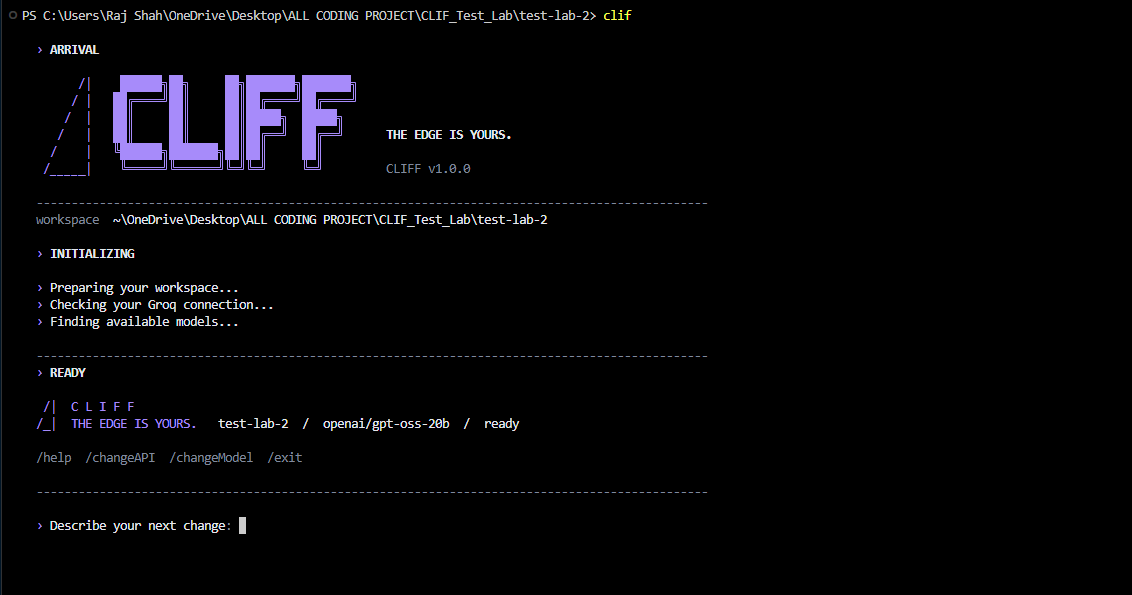
|
|
64
43
|
|
|
65
44
|
<sub>Illustrative terminal session; exact visual output depends on the current CLI UI.</sub>
|
|
66
45
|
|
|
67
|
-
|
|
46
|
+
|
|
47
|
+
## 🚀 Getting Started
|
|
68
48
|
|
|
69
49
|
### Prerequisites
|
|
70
50
|
|
|
71
|
-
-
|
|
72
|
-
- A [Groq API
|
|
73
|
-
- A terminal and a project
|
|
51
|
+
- **Node.js** (v20 or later recommended)
|
|
52
|
+
- A free [Groq API Key](https://console.groq.com/keys)
|
|
53
|
+
- A terminal and a project to work on
|
|
54
|
+
|
|
55
|
+
### 1. Install CLIFF
|
|
74
56
|
|
|
75
|
-
|
|
57
|
+
Install globally using npm:
|
|
76
58
|
|
|
77
59
|
```bash
|
|
78
|
-
|
|
79
|
-
cd <YOUR_REPOSITORY_FOLDER>
|
|
80
|
-
npm install
|
|
60
|
+
npm install -g cliff-ai
|
|
81
61
|
```
|
|
82
62
|
|
|
83
|
-
|
|
63
|
+
Or run directly without installing:
|
|
84
64
|
|
|
85
65
|
```bash
|
|
86
|
-
|
|
66
|
+
npx cliff-ai
|
|
87
67
|
```
|
|
88
68
|
|
|
89
|
-
|
|
69
|
+
### 2. Launch CLIFF
|
|
90
70
|
|
|
91
|
-
|
|
71
|
+
Navigate to your project directory and start CLIFF:
|
|
92
72
|
|
|
93
73
|
```bash
|
|
94
74
|
cd path/to/your/project
|
|
95
75
|
cliff
|
|
96
76
|
```
|
|
97
77
|
|
|
98
|
-
On first launch,
|
|
78
|
+
On your first launch, CLIFF will guide you through configuring your **Groq API key** and selecting an AI model.
|
|
99
79
|
|
|
100
80
|
> [!IMPORTANT]
|
|
101
|
-
>
|
|
81
|
+
> Always launch CLIFF **inside your project directory**. CLIFF treats the current working directory as its workspace. Review file modifications before approving them.
|
|
102
82
|
|
|
103
|
-
###
|
|
83
|
+
### 3. Start Building ✨
|
|
104
84
|
|
|
105
|
-
|
|
106
|
-
Read README.md and summarize the project's structure.
|
|
107
|
-
```
|
|
85
|
+
Try asking CLIFF:
|
|
108
86
|
|
|
109
87
|
```text
|
|
110
|
-
|
|
111
|
-
```
|
|
88
|
+
> Read README.md and explain this project.
|
|
112
89
|
|
|
113
|
-
|
|
114
|
-
Read calculator.js and update only the multiply function to reject non-number inputs.
|
|
115
|
-
```
|
|
90
|
+
> Create a utils.js file with an email validation function.
|
|
116
91
|
|
|
117
|
-
|
|
118
|
-
|
|
92
|
+
> Update the multiply function in calculator.js to handle invalid inputs.
|
|
93
|
+
|
|
94
|
+
> List all files and identify the project's entry point.
|
|
119
95
|
```
|
|
120
96
|
|
|
121
|
-
|
|
122
|
-
|
|
97
|
+
### 🔗 Useful Links
|
|
98
|
+
|
|
99
|
+
[](https://www.npmjs.com/package/cliff-ai)
|
|
100
|
+
|
|
101
|
+
> **CLIFF v1** focuses on reading, creating, and updating project files with AI-powered assistance and user-controlled approvals.
|
|
123
102
|
|
|
124
103
|
## 🧰 Tech stack
|
|
125
104
|
|
package/package.json
CHANGED
|
@@ -1,6 +1,6 @@
|
|
|
1
1
|
{
|
|
2
2
|
"name": "cliff-ai",
|
|
3
|
-
"version": "1.0.
|
|
3
|
+
"version": "1.0.1",
|
|
4
4
|
"description": "CLIFF — An AI-powered terminal coding assistant. The edge is yours.",
|
|
5
5
|
"main": "index.js",
|
|
6
6
|
"bin": {
|
|
@@ -18,7 +18,7 @@
|
|
|
18
18
|
"README.md",
|
|
19
19
|
"LICENSE"
|
|
20
20
|
],
|
|
21
|
-
"keywords": [
|
|
21
|
+
"keywords": [
|
|
22
22
|
"cliff",
|
|
23
23
|
"ai",
|
|
24
24
|
"coding-assistant",
|