clawt 3.8.3 → 3.8.4
This diff represents the content of publicly available package versions that have been released to one of the supported registries. The information contained in this diff is provided for informational purposes only and reflects changes between package versions as they appear in their respective public registries.
- package/README.md +177 -175
- package/README.zh-CN.md +379 -0
- package/dist/index.js +2 -44
- package/docs/remove.md +2 -2
- package/package.json +1 -1
- package/src/utils/worktree-matcher.ts +3 -3
package/README.md
CHANGED
|
@@ -1,377 +1,379 @@
|
|
|
1
1
|
# Clawt
|
|
2
2
|
|
|
3
|
-
|
|
3
|
+
**[English](./README.md)** | [中文](./README.zh-CN.md)
|
|
4
4
|
|
|
5
|
-
|
|
5
|
+
Run multiple Claude Code Agent tasks in parallel based on Git Worktree — all agents' code changes are fully isolated from each other.
|
|
6
|
+
|
|
7
|
+
## Installation
|
|
6
8
|
|
|
7
9
|
```bash
|
|
8
10
|
npm i -g clawt
|
|
9
11
|
```
|
|
10
12
|
|
|
11
|
-
|
|
13
|
+
**Requirements:** Node.js >= 18 · Git >= 2.15 · Claude Code CLI
|
|
12
14
|
|
|
13
|
-
##
|
|
15
|
+
## Quick Start
|
|
14
16
|
|
|
15
17
|
```bash
|
|
16
|
-
# 1.
|
|
18
|
+
# 1. Initialize in your project root (directory containing .git), confirm the main work branch
|
|
17
19
|
clawt init
|
|
18
20
|
|
|
19
|
-
# 2.
|
|
21
|
+
# 2. Run tasks in parallel, each in its own isolated worktree
|
|
20
22
|
clawt run -b feat-login
|
|
21
23
|
clawt run -b feat-search
|
|
22
24
|
clawt run -b fix-bug
|
|
23
25
|
|
|
24
|
-
# 3.
|
|
26
|
+
# 3. Open the interactive panel to monitor all task statuses and perform actions
|
|
25
27
|
clawt status -i
|
|
26
28
|
```
|
|
27
29
|
|
|
28
|
-
`clawt status -i`
|
|
30
|
+
`clawt status -i` provides a real-time TUI panel. Use arrow keys to select a worktree, then press shortcuts to operate:
|
|
29
31
|
|
|
30
|
-
|
|
|
32
|
+
| Shortcut | Action | Equivalent Command |
|
|
31
33
|
| ------ | ---- | -------- |
|
|
32
|
-
| `v` |
|
|
33
|
-
| `m` |
|
|
34
|
-
| `r` |
|
|
35
|
-
| `s` |
|
|
36
|
-
| `d` |
|
|
37
|
-
| `c` |
|
|
38
|
-
| `q` |
|
|
39
|
-
|
|
40
|
-
|
|
34
|
+
| `v` | Validate branch changes | `clawt validate -b <branch>` |
|
|
35
|
+
| `m` | Merge into main branch | `clawt merge -b <branch>` |
|
|
36
|
+
| `r` | Resume Claude Code session | `clawt resume -b <branch>` |
|
|
37
|
+
| `s` | Sync main branch code | `clawt sync -b <branch>` |
|
|
38
|
+
| `d` | Delete worktree | `clawt remove -b <branch>` |
|
|
39
|
+
| `c` | Cover changes back to target worktree | `clawt cover` |
|
|
40
|
+
| `q` | Quit panel | — |
|
|
41
|
+
|
|
42
|
+
Example:
|
|
41
43
|
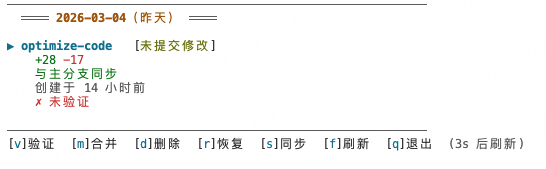
|
|
42
|
-
>
|
|
44
|
+
> All operations can also be executed via standalone commands — see "Command Reference" below.
|
|
43
45
|
|
|
44
|
-
##
|
|
46
|
+
## Command Reference
|
|
45
47
|
|
|
46
|
-
>
|
|
48
|
+
> Except for `config`, `alias`, `projects`, and `completion`, all other commands must be run in the **root directory of the main worktree**. The `-b` parameter supports fuzzy matching. Most action commands (`run`, `create`, `validate`, `merge`, etc.) require running `clawt init` first.
|
|
47
49
|
|
|
48
|
-
### `clawt init` —
|
|
50
|
+
### `clawt init` — Initialize project-level configuration
|
|
49
51
|
|
|
50
52
|
```bash
|
|
51
|
-
clawt init #
|
|
52
|
-
clawt init -b <branch> #
|
|
53
|
-
clawt init show #
|
|
54
|
-
clawt init show --json #
|
|
53
|
+
clawt init # Initialize with the current branch as the main work branch
|
|
54
|
+
clawt init -b <branch> # Specify the main work branch name
|
|
55
|
+
clawt init show # Interactively view and modify project configuration
|
|
56
|
+
clawt init show --json # Output project configuration in JSON format
|
|
55
57
|
```
|
|
56
58
|
|
|
57
|
-
|
|
59
|
+
Sets the project's main work branch. Re-running updates the main work branch configuration. `init show` provides an interactive panel for viewing and modifying project settings (e.g., commands to auto-run after validate succeeds, postCreate hook commands after worktree creation, etc.). `init show --json` outputs the current project configuration in JSON format.
|
|
58
60
|
|
|
59
|
-
### `clawt run` —
|
|
61
|
+
### `clawt run` — Create worktree and execute tasks
|
|
60
62
|
|
|
61
63
|
```bash
|
|
62
|
-
#
|
|
64
|
+
# Single worktree, opens Claude Code interactive interface (most common)
|
|
63
65
|
clawt run -b <branch>
|
|
64
66
|
|
|
65
|
-
#
|
|
66
|
-
clawt run -b <branch> --tasks "
|
|
67
|
+
# Parallel tasks (each --tasks corresponds to an independent worktree)
|
|
68
|
+
clawt run -b <branch> --tasks "task1" --tasks "task2"
|
|
67
69
|
|
|
68
|
-
#
|
|
70
|
+
# Read task list from a task file (uses branch names defined in the file)
|
|
69
71
|
clawt run -f tasks.md
|
|
70
72
|
|
|
71
|
-
#
|
|
73
|
+
# Read tasks from file, but auto-number branches with -b (branch names in file are optional)
|
|
72
74
|
clawt run -f tasks.md -b feat
|
|
73
75
|
|
|
74
|
-
#
|
|
75
|
-
clawt run -b <branch> --tasks "
|
|
76
|
+
# Dry run: preview worktrees and tasks to be created without actually executing
|
|
77
|
+
clawt run -b <branch> --tasks "task1" --tasks "task2" --dry-run
|
|
76
78
|
|
|
77
|
-
#
|
|
79
|
+
# Skip postCreate hook
|
|
78
80
|
clawt run -b <branch> --no-post-create
|
|
79
81
|
```
|
|
80
82
|
|
|
81
|
-
**`--dry-run`
|
|
83
|
+
**`--dry-run` preview example:**
|
|
82
84
|
|
|
83
85
|
```
|
|
84
86
|
════════════════════════════════════════
|
|
85
|
-
Dry Run
|
|
87
|
+
Dry Run Preview
|
|
86
88
|
════════════════════════════════════════
|
|
87
|
-
|
|
89
|
+
Tasks: 2 │ Concurrency: unlimited │ Worktree: ~/.clawt/worktrees/project
|
|
88
90
|
────────────────────────────────────────
|
|
89
91
|
✓ [1/2] feat-1
|
|
90
|
-
|
|
91
|
-
|
|
92
|
+
Path: ~/.clawt/worktrees/project/feat-1
|
|
93
|
+
Task: task1
|
|
92
94
|
|
|
93
95
|
✓ [2/2] feat-2
|
|
94
|
-
|
|
95
|
-
|
|
96
|
+
Path: ~/.clawt/worktrees/project/feat-2
|
|
97
|
+
Task: task2
|
|
96
98
|
|
|
97
99
|
════════════════════════════════════════
|
|
98
|
-
✓
|
|
100
|
+
✓ Preview complete, no conflicts. Remove --dry-run to execute.
|
|
99
101
|
```
|
|
100
102
|
|
|
101
|
-
|
|
103
|
+
**Task file format:**
|
|
102
104
|
|
|
103
105
|
```markdown
|
|
104
106
|
<!-- CLAWT-TASKS:START -->
|
|
105
107
|
# branch: feat-login
|
|
106
|
-
|
|
108
|
+
Implement user login feature
|
|
107
109
|
<!-- CLAWT-TASKS:END -->
|
|
108
110
|
|
|
109
111
|
<!-- CLAWT-TASKS:START -->
|
|
110
112
|
# branch: fix-bug
|
|
111
|
-
|
|
112
|
-
|
|
113
|
+
Fix memory leak issue
|
|
114
|
+
Supports multi-line task descriptions
|
|
113
115
|
<!-- CLAWT-TASKS:END -->
|
|
114
116
|
```
|
|
115
117
|
|
|
116
|
-
>
|
|
118
|
+
> When using `-b`, the `# branch: ...` line in the file can be omitted. Branch names are auto-numbered from the `-b` value (e.g., `feat-1`, `feat-2`).
|
|
117
119
|
|
|
118
|
-
|
|
120
|
+
Press `Ctrl+C` to interrupt all tasks.
|
|
119
121
|
|
|
120
|
-
### `clawt resume` —
|
|
122
|
+
### `clawt resume` — Resume a previous Claude Code session
|
|
121
123
|
|
|
122
124
|
```bash
|
|
123
|
-
clawt resume -b <branch> #
|
|
124
|
-
clawt resume #
|
|
125
|
+
clawt resume -b <branch> # Specify branch
|
|
126
|
+
clawt resume # Interactive multi-select (grouped by creation date)
|
|
125
127
|
|
|
126
|
-
#
|
|
127
|
-
clawt resume -b <branch> --prompt "
|
|
128
|
-
clawt resume -f tasks.md #
|
|
129
|
-
clawt resume -f tasks.md -c 2 #
|
|
128
|
+
# Non-interactive follow-up
|
|
129
|
+
clawt resume -b <branch> --prompt "follow-up content"
|
|
130
|
+
clawt resume -f tasks.md # Batch follow-up from task file
|
|
131
|
+
clawt resume -f tasks.md -c 2 # Limit concurrency
|
|
130
132
|
```
|
|
131
133
|
|
|
132
|
-
|
|
134
|
+
Without `-b`, the branch list is displayed grouped by creation date, supporting global select-all and per-group select-all. Selecting 1 branch resumes in a new terminal tab by default (set `resumeInPlace: true` to resume in the current terminal). Selecting multiple branches automatically resumes in separate terminal tabs in batch (macOS only).
|
|
133
135
|
|
|
134
|
-
`--prompt`
|
|
136
|
+
`--prompt` is for non-interactive follow-up on a specified branch. `-f` performs batch follow-up on multiple branches from a task file (matching existing worktrees by branch name). The two are mutually exclusive.
|
|
135
137
|
|
|
136
|
-
|
|
138
|
+
If the target worktree has a previous session, it automatically continues the last conversation (`--continue`).
|
|
137
139
|
|
|
138
|
-
>
|
|
140
|
+
> **Note:** When batch resuming with Terminal.app, you need to grant accessibility permissions in "System Settings → Privacy & Security → Accessibility". iTerm2 requires no additional permissions. The terminal type can be configured via the `terminalApp` setting.
|
|
139
141
|
|
|
140
|
-
### `clawt create` —
|
|
142
|
+
### `clawt create` — Create worktree only (without executing tasks)
|
|
141
143
|
|
|
142
144
|
```bash
|
|
143
|
-
clawt create -b <branch> #
|
|
144
|
-
clawt create -b <branch> -n 3 #
|
|
145
|
-
clawt create -b <branch> --no-post-create #
|
|
145
|
+
clawt create -b <branch> # Create 1 worktree
|
|
146
|
+
clawt create -b <branch> -n 3 # Batch create 3 worktrees
|
|
147
|
+
clawt create -b <branch> --no-post-create # Skip postCreate hook
|
|
146
148
|
```
|
|
147
149
|
|
|
148
|
-
### `clawt validate` —
|
|
150
|
+
### `clawt validate` — Validate branch changes in the main worktree
|
|
149
151
|
|
|
150
152
|
```bash
|
|
151
|
-
clawt validate -b <branch> #
|
|
152
|
-
clawt validate -b <branch> --clean #
|
|
153
|
-
clawt validate -b <branch> -r "npm test" #
|
|
154
|
-
clawt validate -b <branch> -r "npm run build" #
|
|
155
|
-
clawt validate -b <branch> -r "pnpm test & pnpm build" #
|
|
153
|
+
clawt validate -b <branch> # Migrate changes to main worktree for testing
|
|
154
|
+
clawt validate -b <branch> --clean # Clean up validate state
|
|
155
|
+
clawt validate -b <branch> -r "npm test" # Auto-run tests after successful validation
|
|
156
|
+
clawt validate -b <branch> -r "npm run build" # Auto-build after successful validation
|
|
157
|
+
clawt validate -b <branch> -r "pnpm test & pnpm build" # Run multiple commands in parallel
|
|
156
158
|
```
|
|
157
159
|
|
|
158
|
-
|
|
160
|
+
Supports incremental mode: when re-validating the same branch, you can view incremental diffs between validations via `git diff`.
|
|
159
161
|
|
|
160
|
-
|
|
162
|
+
When patch apply fails (target branch diverges too much from main), it automatically prompts whether to run `sync` to synchronize the main branch to the target worktree — no manual action needed.
|
|
161
163
|
|
|
162
|
-
`-r, --run`
|
|
164
|
+
The `-r, --run` option auto-executes a specified command in the main worktree after successful validation (e.g., tests, builds). Command failure does not affect the validation result. Without `-r`, it automatically reads from the project's `validateRunCommand` config (configurable via `clawt init show`). Use `&` to separate multiple commands for parallel execution:
|
|
163
165
|
|
|
164
|
-
|
|
|
166
|
+
| Usage | Behavior |
|
|
165
167
|
| ---- | ---- |
|
|
166
|
-
| `-r "npm test"` |
|
|
167
|
-
| `-r "npm lint && npm test"` | `&&`
|
|
168
|
-
| `-r "pnpm test & pnpm build"` |
|
|
168
|
+
| `-r "npm test"` | Single command, synchronous |
|
|
169
|
+
| `-r "npm lint && npm test"` | `&&` is not split, synchronous |
|
|
170
|
+
| `-r "pnpm test & pnpm build"` | Parallel execution, waits for all to complete |
|
|
169
171
|
|
|
170
|
-
### `clawt cover` —
|
|
172
|
+
### `clawt cover` — Cover validated branch changes back to target worktree
|
|
171
173
|
|
|
172
174
|
```bash
|
|
173
|
-
clawt cover #
|
|
175
|
+
clawt cover # Execute on the validate branch, auto-deduces target branch
|
|
174
176
|
```
|
|
175
177
|
|
|
176
|
-
|
|
178
|
+
During validation, if you modified code on the main worktree (on the validate branch), use `cover` to push those changes back to the target worktree. When there are no working directory changes, it prompts for confirmation to avoid accidental operations.
|
|
177
179
|
|
|
178
|
-
### `clawt sync` —
|
|
180
|
+
### `clawt sync` — Sync main branch code to target worktree
|
|
179
181
|
|
|
180
182
|
```bash
|
|
181
183
|
clawt sync -b <branch>
|
|
182
184
|
```
|
|
183
185
|
|
|
184
|
-
|
|
186
|
+
Also automatically prompted when `validate` patch apply fails — usually no manual invocation needed.
|
|
185
187
|
|
|
186
|
-
### `clawt merge` —
|
|
188
|
+
### `clawt merge` — Merge branch into main worktree
|
|
187
189
|
|
|
188
190
|
```bash
|
|
189
|
-
clawt merge -b <branch> -m "feat:
|
|
190
|
-
clawt merge -b <branch>
|
|
191
|
-
clawt merge -b <branch> --auto
|
|
191
|
+
clawt merge -b <branch> -m "feat: commit message" # Specify commit message via -m
|
|
192
|
+
clawt merge -b <branch> # In interactive mode, prompts for commit message if there are uncommitted changes
|
|
193
|
+
clawt merge -b <branch> --auto # Resolve conflicts with AI automatically
|
|
192
194
|
```
|
|
193
195
|
|
|
194
|
-
|
|
196
|
+
In interactive mode, if the target worktree has uncommitted changes or a commit message is needed after squash, it automatically prompts for input — no need to specify `-m` in advance. In non-interactive mode (`-y` / CI), it exits with an error if `-m` is not provided.
|
|
195
197
|
|
|
196
|
-
### `clawt remove` —
|
|
198
|
+
### `clawt remove` — Remove worktree
|
|
197
199
|
|
|
198
200
|
```bash
|
|
199
|
-
clawt remove -b <branch> #
|
|
200
|
-
clawt remove #
|
|
201
|
-
clawt remove --all #
|
|
201
|
+
clawt remove -b <branch> # Remove worktree for specified branch (supports fuzzy matching)
|
|
202
|
+
clawt remove # Interactive multi-select worktrees to remove (grouped by creation date)
|
|
203
|
+
clawt remove --all # Remove all worktrees for the current project
|
|
202
204
|
```
|
|
203
205
|
|
|
204
|
-
### `clawt list` —
|
|
206
|
+
### `clawt list` — List all worktrees
|
|
205
207
|
|
|
206
208
|
```bash
|
|
207
|
-
clawt list #
|
|
208
|
-
clawt list --json # JSON
|
|
209
|
+
clawt list # Text format
|
|
210
|
+
clawt list --json # JSON format
|
|
209
211
|
```
|
|
210
212
|
|
|
211
|
-
### `clawt status` —
|
|
213
|
+
### `clawt status` — Project status overview
|
|
212
214
|
|
|
213
215
|
```bash
|
|
214
|
-
clawt status #
|
|
215
|
-
clawt status --json # JSON
|
|
216
|
-
clawt status -i #
|
|
216
|
+
clawt status # Text format
|
|
217
|
+
clawt status --json # JSON format
|
|
218
|
+
clawt status -i # Interactive panel mode (real-time refresh, keyboard navigation and shortcuts)
|
|
217
219
|
```
|
|
218
220
|
|
|
219
|
-
|
|
221
|
+
Displays the main worktree status, change details for each worktree (including branch creation time and validation status), and validate snapshot summaries.
|
|
220
222
|
|
|
221
|
-
|
|
223
|
+
Interactive panel mode (`-i`) provides a real-time TUI interface with arrow key navigation and shortcut-driven operations:
|
|
222
224
|
|
|
223
|
-
|
|
|
225
|
+
| Shortcut | Action |
|
|
224
226
|
| ------ | ---- |
|
|
225
|
-
| `↑` `↓` |
|
|
226
|
-
| `v` `m` `d` `r` `s` `c` |
|
|
227
|
-
| `f` |
|
|
228
|
-
| `q` / `Ctrl+C` |
|
|
227
|
+
| `↑` `↓` | Navigate and select worktree |
|
|
228
|
+
| `v` `m` `d` `r` `s` `c` | Validate / Merge / Delete / Resume / Sync / Cover |
|
|
229
|
+
| `f` | Manual refresh |
|
|
230
|
+
| `q` / `Ctrl+C` | Quit |
|
|
229
231
|
|
|
230
|
-
### `clawt reset` —
|
|
232
|
+
### `clawt reset` — Reset main worktree to clean state
|
|
231
233
|
|
|
232
234
|
```bash
|
|
233
235
|
clawt reset
|
|
234
236
|
```
|
|
235
237
|
|
|
236
|
-
### `clawt home` —
|
|
238
|
+
### `clawt home` — Switch back to main work branch
|
|
237
239
|
|
|
238
240
|
```bash
|
|
239
241
|
clawt home
|
|
240
242
|
```
|
|
241
243
|
|
|
242
|
-
|
|
244
|
+
If already on the main work branch, a message indicates no switch is needed.
|
|
243
245
|
|
|
244
|
-
### `clawt tasks` —
|
|
246
|
+
### `clawt tasks` — Task file management
|
|
245
247
|
|
|
246
248
|
```bash
|
|
247
|
-
clawt tasks init #
|
|
248
|
-
clawt tasks init [path] #
|
|
249
|
+
clawt tasks init # Generate task template file (defaults to .clawt/tasks/ directory)
|
|
250
|
+
clawt tasks init [path] # Specify output path
|
|
249
251
|
```
|
|
250
252
|
|
|
251
|
-
|
|
253
|
+
Quickly generates the task file template needed by `clawt run -f`, including format instructions and example task blocks.
|
|
252
254
|
|
|
253
|
-
### `clawt projects` —
|
|
255
|
+
### `clawt projects` — Cross-project worktree overview
|
|
254
256
|
|
|
255
257
|
```bash
|
|
256
|
-
clawt projects #
|
|
257
|
-
clawt projects my-project #
|
|
258
|
-
clawt projects --json # JSON
|
|
258
|
+
clawt projects # View all projects overview
|
|
259
|
+
clawt projects my-project # View worktree details for a specific project
|
|
260
|
+
clawt projects --json # JSON format output
|
|
259
261
|
```
|
|
260
262
|
|
|
261
|
-
|
|
263
|
+
Displays worktree counts, disk usage, and last active time for all projects, or detailed information for each worktree under a specific project.
|
|
262
264
|
|
|
263
|
-
### `clawt config` —
|
|
265
|
+
### `clawt config` — Interactively view and modify configuration
|
|
264
266
|
|
|
265
267
|
```bash
|
|
266
|
-
clawt config #
|
|
267
|
-
clawt config set <key> <value> #
|
|
268
|
-
clawt config get <key> #
|
|
269
|
-
clawt config reset #
|
|
268
|
+
clawt config # Interactive modification (select config items and modify values)
|
|
269
|
+
clawt config set <key> <value> # Directly set a config item
|
|
270
|
+
clawt config get <key> # Get a config item's value
|
|
271
|
+
clawt config reset # Restore default configuration
|
|
270
272
|
```
|
|
271
273
|
|
|
272
|
-
|
|
274
|
+
**Usage examples:**
|
|
273
275
|
|
|
274
276
|
```bash
|
|
275
|
-
#
|
|
277
|
+
# Interactive modification (lists all config items, arrow key selection, auto-prompts by type)
|
|
276
278
|
clawt config
|
|
277
279
|
|
|
278
|
-
#
|
|
280
|
+
# Direct setting
|
|
279
281
|
clawt config set autoDeleteBranch true
|
|
280
282
|
clawt config set maxConcurrency 4
|
|
281
283
|
clawt config set terminalApp iterm2
|
|
282
284
|
|
|
283
|
-
#
|
|
285
|
+
# View a config item
|
|
284
286
|
clawt config get maxConcurrency
|
|
285
287
|
```
|
|
286
288
|
|
|
287
|
-
### `clawt completion` — Shell
|
|
289
|
+
### `clawt completion` — Shell auto-completion
|
|
288
290
|
|
|
289
|
-
|
|
291
|
+
Provides auto-completion for commands, subcommands, options, and even branch names and config keys in the terminal.
|
|
290
292
|
|
|
291
293
|
```bash
|
|
292
|
-
#
|
|
294
|
+
# Auto-install completion script (recommended)
|
|
293
295
|
clawt completion install
|
|
294
296
|
|
|
295
|
-
#
|
|
297
|
+
# Or manually add the script to your shell config file
|
|
296
298
|
clawt completion bash >> ~/.bashrc
|
|
297
299
|
clawt completion zsh >> ~/.zshrc
|
|
298
300
|
```
|
|
299
|
-
>
|
|
301
|
+
> **Supported features:** All subcommands, options, `-b` parameter auto-completes local worktree branch names, `-f` parameter auto-completes file paths, and `config set/get` key name auto-completion.
|
|
300
302
|
|
|
301
|
-
### `clawt alias` —
|
|
303
|
+
### `clawt alias` — Manage command aliases
|
|
302
304
|
|
|
303
305
|
```bash
|
|
304
|
-
clawt alias #
|
|
305
|
-
clawt alias list #
|
|
306
|
-
clawt alias set <alias> <command> #
|
|
307
|
-
clawt alias remove <alias> #
|
|
306
|
+
clawt alias # List all command aliases
|
|
307
|
+
clawt alias list # List all command aliases
|
|
308
|
+
clawt alias set <alias> <command> # Set a command alias
|
|
309
|
+
clawt alias remove <alias> # Remove a command alias
|
|
308
310
|
```
|
|
309
311
|
|
|
310
|
-
|
|
312
|
+
**Usage examples:**
|
|
311
313
|
|
|
312
314
|
```bash
|
|
313
|
-
#
|
|
315
|
+
# Set aliases
|
|
314
316
|
clawt alias set l list
|
|
315
317
|
clawt alias set r run
|
|
316
318
|
clawt alias set v validate
|
|
317
319
|
|
|
318
|
-
#
|
|
319
|
-
clawt l #
|
|
320
|
-
clawt r task.md #
|
|
320
|
+
# Use aliases (equivalent to the corresponding full commands)
|
|
321
|
+
clawt l # Equivalent to clawt list
|
|
322
|
+
clawt r task.md # Equivalent to clawt run task.md
|
|
321
323
|
|
|
322
|
-
#
|
|
324
|
+
# Remove alias
|
|
323
325
|
clawt alias remove l
|
|
324
326
|
```
|
|
325
327
|
|
|
326
|
-
>
|
|
328
|
+
> **Constraints:** Aliases cannot override built-in command names, and targets must be registered built-in commands. Options and arguments of aliases are fully passed through to the target command.
|
|
327
329
|
|
|
328
|
-
##
|
|
330
|
+
## Configuration
|
|
329
331
|
|
|
330
|
-
|
|
332
|
+
Configuration file is located at `~/.clawt/config.json`, auto-generated after installation:
|
|
331
333
|
|
|
332
|
-
|
|
|
334
|
+
| Config Item | Default | Description |
|
|
333
335
|
| ------ | ------ | ---- |
|
|
334
|
-
| `autoDeleteBranch` | `false` |
|
|
335
|
-
| `claudeCodeCommand` | `"claude"` | Claude Code CLI
|
|
336
|
-
| `autoPullPush` | `false` |
|
|
337
|
-
| `confirmDestructiveOps` | `true` |
|
|
338
|
-
| `maxConcurrency` | `0` | run
|
|
339
|
-
| `terminalApp` | `"auto"` |
|
|
340
|
-
| `resumeInPlace` | `false` |
|
|
341
|
-
| `aliases` | `{}` |
|
|
342
|
-
| `autoUpdate` | `true` |
|
|
343
|
-
| `conflictResolveMode` | `"ask"` |
|
|
344
|
-
| `conflictResolveTimeoutMs` | `600000` | Claude Code
|
|
336
|
+
| `autoDeleteBranch` | `false` | Auto-delete merged/removed branches |
|
|
337
|
+
| `claudeCodeCommand` | `"claude"` | Claude Code CLI launch command |
|
|
338
|
+
| `autoPullPush` | `false` | Auto pull/push after merge |
|
|
339
|
+
| `confirmDestructiveOps` | `true` | Confirm before destructive operations |
|
|
340
|
+
| `maxConcurrency` | `0` | Max concurrency for run command, `0` means unlimited |
|
|
341
|
+
| `terminalApp` | `"auto"` | Terminal for batch resume: `auto` / `iterm2` / `terminal` |
|
|
342
|
+
| `resumeInPlace` | `false` | Resume single selection in current terminal; `false` opens in new tab |
|
|
343
|
+
| `aliases` | `{}` | Command alias mapping (e.g., `{"l": "list", "r": "run"}`) |
|
|
344
|
+
| `autoUpdate` | `true` | Auto-check for new versions (checks npm registry every 24 hours) |
|
|
345
|
+
| `conflictResolveMode` | `"ask"` | Merge conflict resolution mode: `ask` (prompt for AI), `auto` (auto AI resolve), `manual` (manual resolve) |
|
|
346
|
+
| `conflictResolveTimeoutMs` | `600000` | Claude Code conflict resolution timeout (ms), default 10 minutes |
|
|
345
347
|
|
|
346
348
|
## postCreate Hook
|
|
347
349
|
|
|
348
|
-
worktree
|
|
350
|
+
Automatically execute any initialization commands after worktree creation (e.g., install dependencies, generate config files, compile resources, etc.). Supported by both `create` and `run` commands.
|
|
349
351
|
|
|
350
|
-
|
|
352
|
+
**Configuration (choose one):**
|
|
351
353
|
|
|
352
|
-
1.
|
|
353
|
-
2.
|
|
354
|
+
1. **Project config**: Set the `postCreate` field via `clawt init show` (e.g., `npm install`)
|
|
355
|
+
2. **Script file**: Create `.clawt/postCreate.sh` in the project root and grant execute permission
|
|
354
356
|
|
|
355
|
-
|
|
357
|
+
Project config takes priority over the script file. Use `--no-post-create` to skip hook execution.
|
|
356
358
|
|
|
357
|
-
|
|
359
|
+
Hooks run asynchronously in the background (fire-and-forget), not blocking the main flow. Results are only logged.
|
|
358
360
|
|
|
359
|
-
##
|
|
361
|
+
## Global Options
|
|
360
362
|
|
|
361
|
-
|
|
|
363
|
+
| Option | Description |
|
|
362
364
|
| ---- | ---- |
|
|
363
|
-
| `--debug` |
|
|
364
|
-
| `-y, --yes` |
|
|
365
|
+
| `--debug` | Output debug information |
|
|
366
|
+
| `-y, --yes` | Skip all interactive confirmations, suitable for scripts/CI environments |
|
|
365
367
|
|
|
366
|
-
##
|
|
368
|
+
## Environment Variables
|
|
367
369
|
|
|
368
|
-
|
|
|
370
|
+
| Variable | Description |
|
|
369
371
|
| -------- | ---- |
|
|
370
|
-
| `CI` |
|
|
371
|
-
| `CLAWT_NON_INTERACTIVE` |
|
|
372
|
+
| `CI` | When set to `true` or `1`, enables non-interactive mode (equivalent to `--yes`) |
|
|
373
|
+
| `CLAWT_NON_INTERACTIVE` | When set to `true` or `1`, enables non-interactive mode (equivalent to `--yes`) |
|
|
372
374
|
|
|
373
|
-
>
|
|
375
|
+
> **Priority:** `--yes` > `CI` > `CLAWT_NON_INTERACTIVE` > default interactive mode
|
|
374
376
|
|
|
375
|
-
##
|
|
377
|
+
## Logs
|
|
376
378
|
|
|
377
|
-
|
|
379
|
+
Logs are saved in `~/.clawt/logs/`, rotated by date, retained for 30 days.
|
package/README.zh-CN.md
ADDED
|
@@ -0,0 +1,379 @@
|
|
|
1
|
+
# Clawt
|
|
2
|
+
|
|
3
|
+
[English](./README.md) | **[中文](./README.zh-CN.md)**
|
|
4
|
+
|
|
5
|
+
基于 Git Worktree 并行执行多个 Claude Code Agent 任务,所有 Agent 的代码修改互不干扰。
|
|
6
|
+
|
|
7
|
+
## 安装
|
|
8
|
+
|
|
9
|
+
```bash
|
|
10
|
+
npm i -g clawt
|
|
11
|
+
```
|
|
12
|
+
|
|
13
|
+
**环境要求:** Node.js >= 18 · Git >= 2.15 · Claude Code CLI
|
|
14
|
+
|
|
15
|
+
## 快速开始
|
|
16
|
+
|
|
17
|
+
```bash
|
|
18
|
+
# 1. 在项目根目录(包含 .git 的目录)下初始化,确认主工作分支
|
|
19
|
+
clawt init
|
|
20
|
+
|
|
21
|
+
# 2. 并行执行任务,每个任务在独立的 worktree 中运行
|
|
22
|
+
clawt run -b feat-login
|
|
23
|
+
clawt run -b feat-search
|
|
24
|
+
clawt run -b fix-bug
|
|
25
|
+
|
|
26
|
+
# 3. 打开交互式面板,实时查看所有任务状态,一站式完成后续操作
|
|
27
|
+
clawt status -i
|
|
28
|
+
```
|
|
29
|
+
|
|
30
|
+
`clawt status -i` 提供实时刷新的 TUI 面板,用方向键选中 worktree 后可直接按快捷键操作:
|
|
31
|
+
|
|
32
|
+
| 快捷键 | 操作 | 等同命令 |
|
|
33
|
+
| ------ | ---- | -------- |
|
|
34
|
+
| `v` | 验证分支变更 | `clawt validate -b <branch>` |
|
|
35
|
+
| `m` | 合并到主分支 | `clawt merge -b <branch>` |
|
|
36
|
+
| `r` | 恢复 Claude Code 会话 | `clawt resume -b <branch>` |
|
|
37
|
+
| `s` | 同步主分支代码 | `clawt sync -b <branch>` |
|
|
38
|
+
| `d` | 删除 worktree | `clawt remove -b <branch>` |
|
|
39
|
+
| `c` | 覆盖修改回目标 worktree | `clawt cover` |
|
|
40
|
+
| `q` | 退出面板 | — |
|
|
41
|
+
|
|
42
|
+
示例:
|
|
43
|
+

|
|
44
|
+
> 所有操作也可通过独立命令执行,详见下方「命令一览」。
|
|
45
|
+
|
|
46
|
+
## 命令一览
|
|
47
|
+
|
|
48
|
+
> 除 `config`、`alias`、`projects`、`completion` 外,其余命令需在**主 worktree 的仓库根目录**下执行。`-b` 参数支持模糊匹配。大部分操作命令(`run`、`create`、`validate`、`merge` 等)需要先执行 `clawt init`。
|
|
49
|
+
|
|
50
|
+
### `clawt init` — 初始化项目级配置
|
|
51
|
+
|
|
52
|
+
```bash
|
|
53
|
+
clawt init # 以当前分支作为主工作分支进行初始化
|
|
54
|
+
clawt init -b <branch> # 指定主工作分支名
|
|
55
|
+
clawt init show # 交互式查看和修改项目配置
|
|
56
|
+
clawt init show --json # 以 JSON 格式输出项目配置
|
|
57
|
+
```
|
|
58
|
+
|
|
59
|
+
设置项目的主工作分支。重复执行会更新主工作分支配置。`init show` 提供交互式面板,可查看和修改项目配置项(如 validate 成功后自动执行的命令、worktree 创建后自动执行的 postCreate hook 命令等)。`init show --json` 可以直接输出当前项目配置的 JSON 格式。
|
|
60
|
+
|
|
61
|
+
### `clawt run` — 创建 worktree 并执行任务
|
|
62
|
+
|
|
63
|
+
```bash
|
|
64
|
+
# 单 worktree,打开 Claude Code 交互式界面(最常用)
|
|
65
|
+
clawt run -b <branch>
|
|
66
|
+
|
|
67
|
+
# 多任务并行(每个 --tasks 对应一个独立 worktree)
|
|
68
|
+
clawt run -b <branch> --tasks "任务1" --tasks "任务2"
|
|
69
|
+
|
|
70
|
+
# 从任务文件读取任务列表(使用文件中定义的分支名)
|
|
71
|
+
clawt run -f tasks.md
|
|
72
|
+
|
|
73
|
+
# 从任务文件读取任务,但用 -b 自动编号分支(文件中分支名可省略)
|
|
74
|
+
clawt run -f tasks.md -b feat
|
|
75
|
+
|
|
76
|
+
# 试运行:仅预览将要创建的 worktree 和任务,不实际执行
|
|
77
|
+
clawt run -b <branch> --tasks "任务1" --tasks "任务2" --dry-run
|
|
78
|
+
|
|
79
|
+
# 跳过 postCreate hook
|
|
80
|
+
clawt run -b <branch> --no-post-create
|
|
81
|
+
```
|
|
82
|
+
|
|
83
|
+
**`--dry-run` 预览示例:**
|
|
84
|
+
|
|
85
|
+
```
|
|
86
|
+
════════════════════════════════════════
|
|
87
|
+
Dry Run 预览
|
|
88
|
+
════════════════════════════════════════
|
|
89
|
+
任务数: 2 │ 并发数: 不限制 │ Worktree: ~/.clawt/worktrees/project
|
|
90
|
+
────────────────────────────────────────
|
|
91
|
+
✓ [1/2] feat-1
|
|
92
|
+
路径: ~/.clawt/worktrees/project/feat-1
|
|
93
|
+
任务: 任务1
|
|
94
|
+
|
|
95
|
+
✓ [2/2] feat-2
|
|
96
|
+
路径: ~/.clawt/worktrees/project/feat-2
|
|
97
|
+
任务: 任务2
|
|
98
|
+
|
|
99
|
+
════════════════════════════════════════
|
|
100
|
+
✓ 预览完成,无冲突。移除 --dry-run 即可正式执行。
|
|
101
|
+
```
|
|
102
|
+
|
|
103
|
+
**任务文件格式:**
|
|
104
|
+
|
|
105
|
+
```markdown
|
|
106
|
+
<!-- CLAWT-TASKS:START -->
|
|
107
|
+
# branch: feat-login
|
|
108
|
+
实现用户登录功能
|
|
109
|
+
<!-- CLAWT-TASKS:END -->
|
|
110
|
+
|
|
111
|
+
<!-- CLAWT-TASKS:START -->
|
|
112
|
+
# branch: fix-bug
|
|
113
|
+
修复内存泄漏问题
|
|
114
|
+
支持多行任务描述
|
|
115
|
+
<!-- CLAWT-TASKS:END -->
|
|
116
|
+
```
|
|
117
|
+
|
|
118
|
+
> 使用 `-b` 时,文件中的 `# branch: ...` 行可省略,分支名由 `-b` 值自动编号(如 `feat-1`、`feat-2`)。
|
|
119
|
+
|
|
120
|
+
按 `Ctrl+C` 可中断所有任务。
|
|
121
|
+
|
|
122
|
+
### `clawt resume` — 恢复之前的 Claude Code 会话
|
|
123
|
+
|
|
124
|
+
```bash
|
|
125
|
+
clawt resume -b <branch> # 指定分支
|
|
126
|
+
clawt resume # 交互式多选(按创建日期分组)
|
|
127
|
+
|
|
128
|
+
# 非交互式追问
|
|
129
|
+
clawt resume -b <branch> --prompt "追问内容"
|
|
130
|
+
clawt resume -f tasks.md # 从任务文件批量追问
|
|
131
|
+
clawt resume -f tasks.md -c 2 # 限制并发数
|
|
132
|
+
```
|
|
133
|
+
|
|
134
|
+
不传 `-b` 时,分支列表按创建日期分组显示,支持全局全选和按组全选。选 1 个默认在新终端 Tab 中恢复(设置 `resumeInPlace: true` 可改为在当前终端就地恢复),选多个自动在独立终端 Tab 中批量恢复(仅 macOS)。
|
|
135
|
+
|
|
136
|
+
`--prompt` 用于对指定分支进行非交互式追问,`-f` 从任务文件批量追问多个分支(通过 branch 名匹配已有 worktree)。两者互斥。
|
|
137
|
+
|
|
138
|
+
如果目标 worktree 存在历史会话,会自动继续上次对话(`--continue`)。
|
|
139
|
+
|
|
140
|
+
> **注意:** 使用 Terminal.app 批量恢复时,需要在「系统设置 → 隐私与安全性 → 辅助功能」中授权终端应用。iTerm2 无需额外授权。终端类型可通过配置项 `terminalApp` 指定。
|
|
141
|
+
|
|
142
|
+
### `clawt create` — 仅创建 worktree(不执行任务)
|
|
143
|
+
|
|
144
|
+
```bash
|
|
145
|
+
clawt create -b <branch> # 创建 1 个
|
|
146
|
+
clawt create -b <branch> -n 3 # 批量创建 3 个
|
|
147
|
+
clawt create -b <branch> --no-post-create # 跳过 postCreate hook
|
|
148
|
+
```
|
|
149
|
+
|
|
150
|
+
### `clawt validate` — 在主 worktree 中验证分支变更
|
|
151
|
+
|
|
152
|
+
```bash
|
|
153
|
+
clawt validate -b <branch> # 将变更迁移到主 worktree 测试
|
|
154
|
+
clawt validate -b <branch> --clean # 清理 validate 状态
|
|
155
|
+
clawt validate -b <branch> -r "npm test" # validate 成功后自动运行测试
|
|
156
|
+
clawt validate -b <branch> -r "npm run build" # validate 成功后自动构建
|
|
157
|
+
clawt validate -b <branch> -r "pnpm test & pnpm build" # 并行执行多个命令
|
|
158
|
+
```
|
|
159
|
+
|
|
160
|
+
支持增量模式:再次 validate 同一分支时,可通过 `git diff` 查看两次之间的增量差异。
|
|
161
|
+
|
|
162
|
+
当 patch apply 失败(目标分支与主分支差异过大)时,会自动询问是否执行 `sync` 同步主分支到目标 worktree,无需手动操作。
|
|
163
|
+
|
|
164
|
+
`-r, --run` 选项可在 validate 成功后自动在主 worktree 中执行指定命令(如测试、构建等),命令执行失败不影响 validate 结果。不传 `-r` 时会自动从项目配置的 `validateRunCommand` 读取(可通过 `clawt init show` 设置)。支持用 `&` 分隔多个命令并行执行:
|
|
165
|
+
|
|
166
|
+
| 用法 | 行为 |
|
|
167
|
+
| ---- | ---- |
|
|
168
|
+
| `-r "npm test"` | 单命令,同步执行 |
|
|
169
|
+
| `-r "npm lint && npm test"` | `&&` 不拆分,同步执行 |
|
|
170
|
+
| `-r "pnpm test & pnpm build"` | 并行执行,等全部完成后汇总结果 |
|
|
171
|
+
|
|
172
|
+
### `clawt cover` — 将验证分支修改覆盖回目标 worktree
|
|
173
|
+
|
|
174
|
+
```bash
|
|
175
|
+
clawt cover # 在验证分支上执行,自动推导目标分支
|
|
176
|
+
```
|
|
177
|
+
|
|
178
|
+
在 validate 验证过程中,如果在主 worktree(验证分支上)修改了代码,可通过 `cover` 将修改覆盖回目标 worktree。当工作区无修改时会提示确认,避免误操作。
|
|
179
|
+
|
|
180
|
+
### `clawt sync` — 同步主分支代码到目标 worktree
|
|
181
|
+
|
|
182
|
+
```bash
|
|
183
|
+
clawt sync -b <branch>
|
|
184
|
+
```
|
|
185
|
+
|
|
186
|
+
当 `validate` 的 patch apply 失败时也会自动提示执行 sync,通常无需手动调用。
|
|
187
|
+
|
|
188
|
+
### `clawt merge` — 合并分支到主 worktree
|
|
189
|
+
|
|
190
|
+
```bash
|
|
191
|
+
clawt merge -b <branch> -m "feat: 提交信息" # 通过 -m 直接指定提交信息
|
|
192
|
+
clawt merge -b <branch> # 交互模式下有未提交修改时会询问输入提交信息
|
|
193
|
+
clawt merge -b <branch> --auto # 遇到冲突直接调用 AI 解决
|
|
194
|
+
```
|
|
195
|
+
|
|
196
|
+
交互模式下,如果目标 worktree 有未提交修改或 squash 后需要提交,会自动询问输入提交信息,无需提前指定 `-m`。非交互模式(`-y` / CI)下未提供 `-m` 时会提示退出。
|
|
197
|
+
|
|
198
|
+
### `clawt remove` — 移除 worktree
|
|
199
|
+
|
|
200
|
+
```bash
|
|
201
|
+
clawt remove -b <branch> # 移除指定分支的 worktree(支持模糊匹配)
|
|
202
|
+
clawt remove # 交互式多选要移除的 worktree(按创建日期分组)
|
|
203
|
+
clawt remove --all # 移除当前项目下所有 worktree
|
|
204
|
+
```
|
|
205
|
+
|
|
206
|
+
### `clawt list` — 列出所有 worktree
|
|
207
|
+
|
|
208
|
+
```bash
|
|
209
|
+
clawt list # 文本格式
|
|
210
|
+
clawt list --json # JSON 格式
|
|
211
|
+
```
|
|
212
|
+
|
|
213
|
+
### `clawt status` — 项目状态总览
|
|
214
|
+
|
|
215
|
+
```bash
|
|
216
|
+
clawt status # 文本格式
|
|
217
|
+
clawt status --json # JSON 格式
|
|
218
|
+
clawt status -i # 交互式面板模式(实时刷新,支持键盘导航和快捷操作)
|
|
219
|
+
```
|
|
220
|
+
|
|
221
|
+
展示主 worktree 状态、各 worktree 的变更详情(含分支创建时间和验证状态)以及 validate 快照摘要。
|
|
222
|
+
|
|
223
|
+
交互式面板模式(`-i`)提供实时刷新的 TUI 界面,支持方向键导航选中 worktree,并通过快捷键直接执行 validate / merge / remove / resume / sync 等操作:
|
|
224
|
+
|
|
225
|
+
| 快捷键 | 操作 |
|
|
226
|
+
| ------ | ---- |
|
|
227
|
+
| `↑` `↓` | 导航选中 worktree |
|
|
228
|
+
| `v` `m` `d` `r` `s` `c` | 验证 / 合并 / 删除 / 恢复 / 同步 / 覆盖 |
|
|
229
|
+
| `f` | 手动刷新 |
|
|
230
|
+
| `q` / `Ctrl+C` | 退出 |
|
|
231
|
+
|
|
232
|
+
### `clawt reset` — 重置主 worktree 到干净状态
|
|
233
|
+
|
|
234
|
+
```bash
|
|
235
|
+
clawt reset
|
|
236
|
+
```
|
|
237
|
+
|
|
238
|
+
### `clawt home` — 切换回主工作分支
|
|
239
|
+
|
|
240
|
+
```bash
|
|
241
|
+
clawt home
|
|
242
|
+
```
|
|
243
|
+
|
|
244
|
+
如果当前已在主工作分支上,会提示无需切换。
|
|
245
|
+
|
|
246
|
+
### `clawt tasks` — 任务文件管理
|
|
247
|
+
|
|
248
|
+
```bash
|
|
249
|
+
clawt tasks init # 生成任务模板文件(默认输出到 .clawt/tasks/ 目录)
|
|
250
|
+
clawt tasks init [path] # 指定输出路径
|
|
251
|
+
```
|
|
252
|
+
|
|
253
|
+
快速生成 `clawt run -f` 所需的任务文件模板,包含格式说明注释和示例任务块。
|
|
254
|
+
|
|
255
|
+
### `clawt projects` — 跨项目 worktree 概览
|
|
256
|
+
|
|
257
|
+
```bash
|
|
258
|
+
clawt projects # 查看所有项目概览
|
|
259
|
+
clawt projects my-project # 查看指定项目的 worktree 详情
|
|
260
|
+
clawt projects --json # JSON 格式输出
|
|
261
|
+
```
|
|
262
|
+
|
|
263
|
+
展示所有项目的 worktree 数量、磁盘占用和最近活跃时间,或查看指定项目下每个 worktree 的详细信息。
|
|
264
|
+
|
|
265
|
+
### `clawt config` — 交互式查看和修改配置
|
|
266
|
+
|
|
267
|
+
```bash
|
|
268
|
+
clawt config # 交互式修改配置(选择配置项并修改值)
|
|
269
|
+
clawt config set <key> <value> # 直接设置某个配置项
|
|
270
|
+
clawt config get <key> # 获取某个配置项的值
|
|
271
|
+
clawt config reset # 恢复默认配置
|
|
272
|
+
```
|
|
273
|
+
|
|
274
|
+
**使用示例:**
|
|
275
|
+
|
|
276
|
+
```bash
|
|
277
|
+
# 交互式修改(列出所有配置项,方向键选择,根据类型自动提示)
|
|
278
|
+
clawt config
|
|
279
|
+
|
|
280
|
+
# 直接设置
|
|
281
|
+
clawt config set autoDeleteBranch true
|
|
282
|
+
clawt config set maxConcurrency 4
|
|
283
|
+
clawt config set terminalApp iterm2
|
|
284
|
+
|
|
285
|
+
# 查看某项配置
|
|
286
|
+
clawt config get maxConcurrency
|
|
287
|
+
```
|
|
288
|
+
|
|
289
|
+
### `clawt completion` — Shell 自动补全
|
|
290
|
+
|
|
291
|
+
为终端提供命令、子命令、选项,甚至分支名和配置项的自动补全功能。
|
|
292
|
+
|
|
293
|
+
```bash
|
|
294
|
+
# 自动安装补全脚本(推荐)
|
|
295
|
+
clawt completion install
|
|
296
|
+
|
|
297
|
+
# 或手动将脚本添加到你的 shell 配置文件
|
|
298
|
+
clawt completion bash >> ~/.bashrc
|
|
299
|
+
clawt completion zsh >> ~/.zshrc
|
|
300
|
+
```
|
|
301
|
+
> **支持特性:** 所有子命令、选项、`-b` 参数自动补全本地 `worktree` 分支名、`-f` 参数自动补全文件路径,以及 `config set/get` 键名自动补全。
|
|
302
|
+
|
|
303
|
+
### `clawt alias` — 管理命令别名
|
|
304
|
+
|
|
305
|
+
```bash
|
|
306
|
+
clawt alias # 列出所有命令别名
|
|
307
|
+
clawt alias list # 列出所有命令别名
|
|
308
|
+
clawt alias set <alias> <command> # 设置命令别名
|
|
309
|
+
clawt alias remove <alias> # 移除命令别名
|
|
310
|
+
```
|
|
311
|
+
|
|
312
|
+
**使用示例:**
|
|
313
|
+
|
|
314
|
+
```bash
|
|
315
|
+
# 设置别名
|
|
316
|
+
clawt alias set l list
|
|
317
|
+
clawt alias set r run
|
|
318
|
+
clawt alias set v validate
|
|
319
|
+
|
|
320
|
+
# 使用别名(等同于对应的完整命令)
|
|
321
|
+
clawt l # 等同于 clawt list
|
|
322
|
+
clawt r task.md # 等同于 clawt run task.md
|
|
323
|
+
|
|
324
|
+
# 移除别名
|
|
325
|
+
clawt alias remove l
|
|
326
|
+
```
|
|
327
|
+
|
|
328
|
+
> **约束:** 别名不能覆盖内置命令名,目标必须是已注册的内置命令。别名的选项和参数会完全透传给目标命令。
|
|
329
|
+
|
|
330
|
+
## 配置
|
|
331
|
+
|
|
332
|
+
配置文件位于 `~/.clawt/config.json`,安装后自动生成:
|
|
333
|
+
|
|
334
|
+
| 配置项 | 默认值 | 说明 |
|
|
335
|
+
| ------ | ------ | ---- |
|
|
336
|
+
| `autoDeleteBranch` | `false` | 自动删除已合并/已移除的分支 |
|
|
337
|
+
| `claudeCodeCommand` | `"claude"` | Claude Code CLI 启动命令 |
|
|
338
|
+
| `autoPullPush` | `false` | merge 后自动 pull/push |
|
|
339
|
+
| `confirmDestructiveOps` | `true` | 破坏性操作前确认 |
|
|
340
|
+
| `maxConcurrency` | `0` | run 命令最大并发数,`0` 为不限制 |
|
|
341
|
+
| `terminalApp` | `"auto"` | 批量 resume 使用的终端:`auto` / `iterm2` / `terminal` |
|
|
342
|
+
| `resumeInPlace` | `false` | resume 单选时在当前终端就地恢复,`false` 则在新 Tab 中打开 |
|
|
343
|
+
| `aliases` | `{}` | 命令别名映射(如 `{"l": "list", "r": "run"}`) |
|
|
344
|
+
| `autoUpdate` | `true` | 自动检查新版本(每 24 小时检查一次 npm registry) |
|
|
345
|
+
| `conflictResolveMode` | `"ask"` | merge 冲突时的解决模式:`ask`(询问是否使用 AI)、`auto`(自动 AI 解决)、`manual`(手动解决) |
|
|
346
|
+
| `conflictResolveTimeoutMs` | `600000` | Claude Code 冲突解决超时时间(毫秒),默认 10 分钟 |
|
|
347
|
+
|
|
348
|
+
## postCreate Hook
|
|
349
|
+
|
|
350
|
+
worktree 创建后可自动执行任意初始化命令(如安装依赖、生成配置文件、编译资源等),`create` 和 `run` 命令均支持。
|
|
351
|
+
|
|
352
|
+
**配置方式(二选一):**
|
|
353
|
+
|
|
354
|
+
1. **项目配置**:通过 `clawt init show` 设置 `postCreate` 字段(如 `npm install`)
|
|
355
|
+
2. **脚本文件**:在项目根目录创建 `.clawt/postCreate.sh` 并赋予执行权限
|
|
356
|
+
|
|
357
|
+
项目配置优先于脚本文件。使用 `--no-post-create` 可跳过 hook 执行。
|
|
358
|
+
|
|
359
|
+
hook 以 fire-and-forget 模式后台异步并行执行,不阻塞主流程。执行结果仅写入日志。
|
|
360
|
+
|
|
361
|
+
## 全局选项
|
|
362
|
+
|
|
363
|
+
| 选项 | 说明 |
|
|
364
|
+
| ---- | ---- |
|
|
365
|
+
| `--debug` | 输出调试信息 |
|
|
366
|
+
| `-y, --yes` | 跳过所有交互式确认,适用于脚本/CI 环境 |
|
|
367
|
+
|
|
368
|
+
## 环境变量
|
|
369
|
+
|
|
370
|
+
| 环境变量 | 说明 |
|
|
371
|
+
| -------- | ---- |
|
|
372
|
+
| `CI` | 设置为 `true` 或 `1` 时,自动启用非交互模式(等同于 `--yes`) |
|
|
373
|
+
| `CLAWT_NON_INTERACTIVE` | 设置为 `true` 或 `1` 时,自动启用非交互模式(等同于 `--yes`) |
|
|
374
|
+
|
|
375
|
+
> **优先级:** `--yes` > `CI` > `CLAWT_NON_INTERACTIVE` > 默认交互模式
|
|
376
|
+
|
|
377
|
+
## 日志
|
|
378
|
+
|
|
379
|
+
日志保存在 `~/.clawt/logs/`,按日期滚动,保留 30 天。
|
package/dist/index.js
CHANGED
|
@@ -2183,48 +2183,6 @@ async function promptSelectBranch(worktrees, message) {
|
|
|
2183
2183
|
}).run();
|
|
2184
2184
|
return worktrees.find((wt) => wt.branch === selectedBranch);
|
|
2185
2185
|
}
|
|
2186
|
-
async function promptMultiSelectBranches(worktrees, message) {
|
|
2187
|
-
if (isNonInteractive()) {
|
|
2188
|
-
throw new ClawtError("\u975E\u4EA4\u4E92\u6A21\u5F0F\u4E0B\u65E0\u6CD5\u8FDB\u884C\u5206\u652F\u591A\u9009\uFF0C\u8BF7\u901A\u8FC7 -b \u53C2\u6570\u7CBE\u786E\u6307\u5B9A\u5206\u652F\u540D");
|
|
2189
|
-
}
|
|
2190
|
-
const branchChoices = worktrees.map((wt) => ({
|
|
2191
|
-
name: wt.branch,
|
|
2192
|
-
message: wt.branch
|
|
2193
|
-
}));
|
|
2194
|
-
const choices = [
|
|
2195
|
-
{ name: SELECT_ALL_NAME, message: SELECT_ALL_LABEL },
|
|
2196
|
-
...branchChoices
|
|
2197
|
-
];
|
|
2198
|
-
const MultiSelect = Enquirer3.MultiSelect;
|
|
2199
|
-
class MultiSelectWithSelectAll extends MultiSelect {
|
|
2200
|
-
space() {
|
|
2201
|
-
if (!this.focused) return;
|
|
2202
|
-
if (this.focused.name === SELECT_ALL_NAME) {
|
|
2203
|
-
const willEnable = !this.focused.enabled;
|
|
2204
|
-
for (const ch of this.choices) {
|
|
2205
|
-
ch.enabled = willEnable;
|
|
2206
|
-
}
|
|
2207
|
-
return this.render();
|
|
2208
|
-
}
|
|
2209
|
-
this.toggle(this.focused);
|
|
2210
|
-
const selectAllChoice = this.choices.find((ch) => ch.name === SELECT_ALL_NAME);
|
|
2211
|
-
const branchItems = this.choices.filter((ch) => ch.name !== SELECT_ALL_NAME);
|
|
2212
|
-
if (selectAllChoice) {
|
|
2213
|
-
selectAllChoice.enabled = branchItems.every((ch) => ch.enabled);
|
|
2214
|
-
}
|
|
2215
|
-
return this.render();
|
|
2216
|
-
}
|
|
2217
|
-
}
|
|
2218
|
-
const selectedBranches = await new MultiSelectWithSelectAll({
|
|
2219
|
-
message,
|
|
2220
|
-
choices,
|
|
2221
|
-
// 使用空心圆/实心圆作为选中指示符
|
|
2222
|
-
symbols: {
|
|
2223
|
-
indicator: { on: "\u25CF", off: "\u25CB" }
|
|
2224
|
-
}
|
|
2225
|
-
}).run();
|
|
2226
|
-
return worktrees.filter((wt) => selectedBranches.includes(wt.branch));
|
|
2227
|
-
}
|
|
2228
2186
|
async function promptGroupedMultiSelectBranches(worktrees, message) {
|
|
2229
2187
|
if (isNonInteractive()) {
|
|
2230
2188
|
throw new ClawtError("\u975E\u4EA4\u4E92\u6A21\u5F0F\u4E0B\u65E0\u6CD5\u8FDB\u884C\u5206\u652F\u591A\u9009\uFF0C\u8BF7\u901A\u8FC7 -b \u53C2\u6570\u7CBE\u786E\u6307\u5B9A\u5206\u652F\u540D");
|
|
@@ -2307,7 +2265,7 @@ async function resolveTargetWorktrees(worktrees, messages, branchName) {
|
|
|
2307
2265
|
if (worktrees.length === 1) {
|
|
2308
2266
|
return [worktrees[0]];
|
|
2309
2267
|
}
|
|
2310
|
-
return
|
|
2268
|
+
return promptGroupedMultiSelectBranches(worktrees, messages.selectBranch);
|
|
2311
2269
|
}
|
|
2312
2270
|
const exactMatch = findExactMatch(worktrees, branchName);
|
|
2313
2271
|
if (exactMatch) {
|
|
@@ -2318,7 +2276,7 @@ async function resolveTargetWorktrees(worktrees, messages, branchName) {
|
|
|
2318
2276
|
return [fuzzyMatches[0]];
|
|
2319
2277
|
}
|
|
2320
2278
|
if (fuzzyMatches.length > 1) {
|
|
2321
|
-
return
|
|
2279
|
+
return promptGroupedMultiSelectBranches(fuzzyMatches, messages.multipleMatches(branchName));
|
|
2322
2280
|
}
|
|
2323
2281
|
const allBranches = worktrees.map((wt) => wt.branch);
|
|
2324
2282
|
throw new ClawtError(messages.noMatch(branchName, allBranches));
|
package/docs/remove.md
CHANGED
|
@@ -35,12 +35,12 @@ clawt remove
|
|
|
35
35
|
- **未传 `-b` 参数**:
|
|
36
36
|
- 无可用 worktree → 报错退出
|
|
37
37
|
- 仅 1 个 worktree → 直接使用,无需选择
|
|
38
|
-
- 多个 worktree →
|
|
38
|
+
- 多个 worktree → 通过 `promptGroupedMultiSelectBranches` 展示**按日期分组的交互式多选列表**(详见 [resume.md](./resume.md) 中的「按日期分组多选」章节),支持三级联动选择(全局全选 → 组全选 → 单分支)
|
|
39
39
|
- **传了 `-b` 参数**:
|
|
40
40
|
1. **精确匹配优先**:在 worktree 列表中查找分支名完全相同的 worktree,找到则直接使用
|
|
41
41
|
2. **模糊匹配**(子串匹配,大小写不敏感):
|
|
42
42
|
- 唯一匹配 → 直接使用
|
|
43
|
-
- 多个匹配 →
|
|
43
|
+
- 多个匹配 → 通过按日期分组的交互式多选列表让用户从匹配结果中选择
|
|
44
44
|
3. **无匹配** → 报错退出,并列出所有可用分支名
|
|
45
45
|
4. **当前分支安全检查**:逐个检查待移除的分支,如果该分支或其对应的验证分支(`clawt-validate-<branchName>`)是主 worktree 当前所在分支,则抛出错误并阻止移除。
|
|
46
46
|
5. 列出即将移除的 worktree 及对应分支:
|
package/package.json
CHANGED
|
@@ -10,7 +10,7 @@ import {
|
|
|
10
10
|
SELECT_ALL_LABEL
|
|
11
11
|
} from '../constants/index.js';
|
|
12
12
|
import type { WorktreeInfo } from '../types/index.js';
|
|
13
|
-
import { promptSelectBranch,
|
|
13
|
+
import { promptSelectBranch, promptGroupedMultiSelectBranches } from './ui-prompts.js';
|
|
14
14
|
import type { GroupedChoice } from './ui-prompts.js';
|
|
15
15
|
|
|
16
16
|
/**
|
|
@@ -90,7 +90,7 @@ export async function resolveTargetWorktrees(
|
|
|
90
90
|
if (worktrees.length === 1) {
|
|
91
91
|
return [worktrees[0]];
|
|
92
92
|
}
|
|
93
|
-
return
|
|
93
|
+
return promptGroupedMultiSelectBranches(worktrees, messages.selectBranch);
|
|
94
94
|
}
|
|
95
95
|
|
|
96
96
|
// 1. 精确匹配优先
|
|
@@ -109,7 +109,7 @@ export async function resolveTargetWorktrees(
|
|
|
109
109
|
|
|
110
110
|
// 2b. 多个匹配,交互多选
|
|
111
111
|
if (fuzzyMatches.length > 1) {
|
|
112
|
-
return
|
|
112
|
+
return promptGroupedMultiSelectBranches(fuzzyMatches, messages.multipleMatches(branchName));
|
|
113
113
|
}
|
|
114
114
|
|
|
115
115
|
// 3. 无匹配,抛出错误并列出所有可用分支
|