claude-skills-manager 1.0.1
This diff represents the content of publicly available package versions that have been released to one of the supported registries. The information contained in this diff is provided for informational purposes only and reflects changes between package versions as they appear in their respective public registries.
- package/CLAUDE.md +117 -0
- package/CONTRIBUTING.md +46 -0
- package/LICENSE +21 -0
- package/README.md +259 -0
- package/Skills.cmd +14 -0
- package/assets/icon.icns +0 -0
- package/assets/icon.ico +0 -0
- package/assets/icon.png +0 -0
- package/bin/claude-skills-manager.js +104 -0
- package/install-shortcut.ps1 +62 -0
- package/launch.vbs +19 -0
- package/lib/app-info.js +71 -0
- package/lib/fork.js +301 -0
- package/lib/frontmatter.js +82 -0
- package/lib/paths.js +72 -0
- package/lib/platform.js +163 -0
- package/lib/projects.js +111 -0
- package/lib/settings.js +114 -0
- package/lib/shortcut.js +224 -0
- package/lib/skills.js +317 -0
- package/package.json +50 -0
- package/public/app.js +1554 -0
- package/public/index.html +98 -0
- package/public/styles.css +1061 -0
- package/server.js +526 -0
- package/tools/make-icon.js +281 -0
package/CLAUDE.md
ADDED
|
@@ -0,0 +1,117 @@
|
|
|
1
|
+
# Claude Skills Manager — notes for Claude Code
|
|
2
|
+
|
|
3
|
+
A local web app for managing the skills in `~/.claude/skills`. A Node HTTP server
|
|
4
|
+
on `127.0.0.1` serves a single page; the page is the whole interface.
|
|
5
|
+
|
|
6
|
+
If you are reading this inside somebody's own copy, they made it through
|
|
7
|
+
**Modify this app → Set it up**, and they want to change something. Read the
|
|
8
|
+
invariants below before you do — several of them protect a file the user cannot
|
|
9
|
+
afford to lose.
|
|
10
|
+
|
|
11
|
+
## Run it
|
|
12
|
+
|
|
13
|
+
```bash
|
|
14
|
+
node server.js # opens your browser
|
|
15
|
+
SKILLS_NO_OPEN=1 node server.js # headless; prints the URL instead
|
|
16
|
+
```
|
|
17
|
+
|
|
18
|
+
There is no build step, no test suite, and **no dependencies** — the whole thing
|
|
19
|
+
is Node's standard library. `npm install` does nothing here.
|
|
20
|
+
|
|
21
|
+
## The files
|
|
22
|
+
|
|
23
|
+
```
|
|
24
|
+
server.js HTTP server, routing, the JSON API
|
|
25
|
+
lib/skills.js scans both scopes, resolves each skill's effective state
|
|
26
|
+
lib/projects.js finds project folders, remembers ones added by hand
|
|
27
|
+
lib/settings.js reads/writes skillOverrides — backups, atomic writes
|
|
28
|
+
lib/frontmatter.js SKILL.md frontmatter parser
|
|
29
|
+
lib/paths.js every path the app touches, plus legacy-data migration
|
|
30
|
+
lib/platform.js every difference between Windows, macOS and Linux
|
|
31
|
+
lib/shortcut.js desktop shortcuts on the three platforms
|
|
32
|
+
lib/fork.js making and managing someone's own copy of the app
|
|
33
|
+
lib/app-info.js what this copy is called, and how it was installed
|
|
34
|
+
public/ the interface: index.html, app.js, styles.css
|
|
35
|
+
tools/make-icon.js draws assets/icon.{ico,png,icns} from scratch
|
|
36
|
+
bin/ the CLI entry point
|
|
37
|
+
```
|
|
38
|
+
|
|
39
|
+
## Invariants
|
|
40
|
+
|
|
41
|
+
These are the things a reasonable-looking change quietly breaks. Treat them as
|
|
42
|
+
constraints, not preferences.
|
|
43
|
+
|
|
44
|
+
**Zero runtime dependencies.** Deliberate, not an accident. It means the
|
|
45
|
+
published package is also the source, which is what lets someone fork it with a
|
|
46
|
+
file copy and no toolchain. Do not add one to solve a problem the standard
|
|
47
|
+
library can solve.
|
|
48
|
+
|
|
49
|
+
**Never write `settings.json` directly.** Go through `lib/settings.js`, which
|
|
50
|
+
copies the old file into `~/.claude/backups/` and then writes atomically via a
|
|
51
|
+
temp file and a rename. If the existing file is invalid JSON it refuses to write
|
|
52
|
+
rather than replacing something it could not read. This is the user's real
|
|
53
|
+
Claude Code configuration; a truncated write costs them their setup.
|
|
54
|
+
|
|
55
|
+
**Removing a skill moves it, never unlinks it.** Destination is
|
|
56
|
+
`~/.claude/skills-trash/` (or `.claude/skills-trash/` inside a project). The only
|
|
57
|
+
true delete is *Delete forever* in the Removed view, and it says so.
|
|
58
|
+
|
|
59
|
+
**The API is token-guarded and loopback-only.** The server binds `127.0.0.1` and
|
|
60
|
+
every `/api/` request must carry the per-run token from `server.js`. Do not add a
|
|
61
|
+
route that skips the check, and do not bind to `0.0.0.0` — any page in any
|
|
62
|
+
browser on the machine could then drive it.
|
|
63
|
+
|
|
64
|
+
**Reveal paths come from an allowlist.** `POST /api/reveal-path` only accepts
|
|
65
|
+
folders the app itself offered. Do not let it open an arbitrary path a request
|
|
66
|
+
names.
|
|
67
|
+
|
|
68
|
+
**All OS branching lives in `lib/platform.js`.** `lib/shortcut.js` is the one
|
|
69
|
+
exception, because a `.lnk`, an `.app` bundle and a `.desktop` file have nothing
|
|
70
|
+
in common to abstract. Anywhere else, use the helpers.
|
|
71
|
+
|
|
72
|
+
**Compare paths with `platform.samePath` / `pathKey`, never `.toLowerCase()`.**
|
|
73
|
+
Windows and macOS are case-insensitive; Linux is not, and lowercasing there
|
|
74
|
+
silently merges two genuinely different folders into one.
|
|
75
|
+
|
|
76
|
+
**The live-instance record is per install.** `lib/paths.js` keys the session file
|
|
77
|
+
by a hash of the install directory. Share it between copies and launching a
|
|
78
|
+
modified copy hands you the original's window instead, discarding every change
|
|
79
|
+
the user made without a word.
|
|
80
|
+
|
|
81
|
+
**Project settings go in `.claude/settings.local.json`.** The gitignored one, so
|
|
82
|
+
the app never dirties a file the user's repo shares with other people.
|
|
83
|
+
|
|
84
|
+
## Node version
|
|
85
|
+
|
|
86
|
+
Node 18+. `server.js` uses global `fetch` and `AbortSignal.timeout`.
|
|
87
|
+
|
|
88
|
+
## Things worth knowing
|
|
89
|
+
|
|
90
|
+
- **State lives in `~/.claude/skills-manager/`**, not in the install directory.
|
|
91
|
+
Under `npx` the install directory is a cache npm replaces on every update.
|
|
92
|
+
- **Effective state is computed, not stored.** A skill's setting comes from
|
|
93
|
+
`skillOverrides` plus its own frontmatter — `disable-model-invocation: true`
|
|
94
|
+
rules out *Auto* and *Name only* no matter what the settings file says. See
|
|
95
|
+
`lib/skills.js`.
|
|
96
|
+
- **The page renders from one `/api/state` payload.** Most actions post a change
|
|
97
|
+
and get fresh state back, then re-render. Follow that pattern rather than
|
|
98
|
+
mutating the DOM from a handler.
|
|
99
|
+
- **Undo/redo is client-side history over the same API.** See `pushHistory` and
|
|
100
|
+
`applyEntry` in `public/app.js`.
|
|
101
|
+
- **The server stops on its own** once no page has checked in for ~2.5 minutes,
|
|
102
|
+
because a shortcut launch leaves no window to close.
|
|
103
|
+
|
|
104
|
+
## Testing changes
|
|
105
|
+
|
|
106
|
+
There is no test suite. What is worth doing by hand after a change:
|
|
107
|
+
|
|
108
|
+
1. `SKILLS_NO_OPEN=1 node server.js`, then load the printed URL.
|
|
109
|
+
2. Change one skill's setting; confirm a new file appeared in
|
|
110
|
+
`~/.claude/backups/` and `settings.json` is still valid JSON.
|
|
111
|
+
3. Undo it, and confirm the setting comes back.
|
|
112
|
+
4. Turn Default Claude mode on and off; confirm every skill returns to the
|
|
113
|
+
setting it had.
|
|
114
|
+
|
|
115
|
+
**This app edits your real Claude Code configuration.** Testing carelessly has
|
|
116
|
+
consequences — though every write is backed up first, so mistakes are
|
|
117
|
+
recoverable from `~/.claude/backups/`.
|
package/CONTRIBUTING.md
ADDED
|
@@ -0,0 +1,46 @@
|
|
|
1
|
+
# Contributing
|
|
2
|
+
|
|
3
|
+
Bug reports and pull requests are welcome.
|
|
4
|
+
|
|
5
|
+
## Running it
|
|
6
|
+
|
|
7
|
+
```bash
|
|
8
|
+
git clone https://github.com/npd1987/claude-skills-manager.git
|
|
9
|
+
cd claude-skills-manager
|
|
10
|
+
node server.js
|
|
11
|
+
```
|
|
12
|
+
|
|
13
|
+
Node 18 or newer. There is nothing to install — see below.
|
|
14
|
+
|
|
15
|
+
## The one rule
|
|
16
|
+
|
|
17
|
+
**No dependencies.** The app uses only Node's standard library, and that is a
|
|
18
|
+
feature rather than an oversight: it means the published package *is* the
|
|
19
|
+
source, so anyone can fork it with a plain file copy and no toolchain. A pull
|
|
20
|
+
request that adds a runtime dependency will be asked to solve the problem
|
|
21
|
+
another way, however small the package.
|
|
22
|
+
|
|
23
|
+
Development-only tooling is a different conversation, but the bar is still high.
|
|
24
|
+
|
|
25
|
+
## Before opening a pull request
|
|
26
|
+
|
|
27
|
+
[CLAUDE.md](CLAUDE.md) lists the invariants worth knowing — how settings are
|
|
28
|
+
written, why paths are compared the way they are, where OS-specific code
|
|
29
|
+
belongs. It is written for Claude Code but it is the best short description of
|
|
30
|
+
the codebase for anyone.
|
|
31
|
+
|
|
32
|
+
There is no test suite. The manual pass at the end of CLAUDE.md is what to run.
|
|
33
|
+
Please say in the pull request which platforms you actually tried it on;
|
|
34
|
+
Windows, macOS and Linux each have their own code paths for opening a browser,
|
|
35
|
+
revealing a folder, and installing a shortcut.
|
|
36
|
+
|
|
37
|
+
## Reporting a bug
|
|
38
|
+
|
|
39
|
+
Include your OS, your Node version (`node --version`), and how you installed it
|
|
40
|
+
(`npx`, `npm i -g`, or a clone). Those three decide which code path you were on.
|
|
41
|
+
|
|
42
|
+
## Changing it just for yourself
|
|
43
|
+
|
|
44
|
+
You do not need to contribute anything back. **Modify this app → Set it up**
|
|
45
|
+
inside the app gives you your own copy to change however you like, and you can
|
|
46
|
+
point your shortcut at it instead of this one.
|
package/LICENSE
ADDED
|
@@ -0,0 +1,21 @@
|
|
|
1
|
+
MIT License
|
|
2
|
+
|
|
3
|
+
Copyright (c) 2026 npd1987
|
|
4
|
+
|
|
5
|
+
Permission is hereby granted, free of charge, to any person obtaining a copy
|
|
6
|
+
of this software and associated documentation files (the "Software"), to deal
|
|
7
|
+
in the Software without restriction, including without limitation the rights
|
|
8
|
+
to use, copy, modify, merge, publish, distribute, sublicense, and/or sell
|
|
9
|
+
copies of the Software, and to permit persons to whom the Software is
|
|
10
|
+
furnished to do so, subject to the following conditions:
|
|
11
|
+
|
|
12
|
+
The above copyright notice and this permission notice shall be included in all
|
|
13
|
+
copies or substantial portions of the Software.
|
|
14
|
+
|
|
15
|
+
THE SOFTWARE IS PROVIDED "AS IS", WITHOUT WARRANTY OF ANY KIND, EXPRESS OR
|
|
16
|
+
IMPLIED, INCLUDING BUT NOT LIMITED TO THE WARRANTIES OF MERCHANTABILITY,
|
|
17
|
+
FITNESS FOR A PARTICULAR PURPOSE AND NONINFRINGEMENT. IN NO EVENT SHALL THE
|
|
18
|
+
AUTHORS OR COPYRIGHT HOLDERS BE LIABLE FOR ANY CLAIM, DAMAGES OR OTHER
|
|
19
|
+
LIABILITY, WHETHER IN AN ACTION OF CONTRACT, TORT OR OTHERWISE, ARISING FROM,
|
|
20
|
+
OUT OF OR IN CONNECTION WITH THE SOFTWARE OR THE USE OR OTHER DEALINGS IN THE
|
|
21
|
+
SOFTWARE.
|
package/README.md
ADDED
|
@@ -0,0 +1,259 @@
|
|
|
1
|
+
# Claude Skills Manager
|
|
2
|
+
|
|
3
|
+
A local interface for the skills in `~/.claude/skills` — see every skill you have
|
|
4
|
+
installed, what state each one is in, and change that state without hand-editing
|
|
5
|
+
`settings.json`.
|
|
6
|
+
|
|
7
|
+
Windows, macOS and Linux. Free, MIT licensed, and no dependencies: the whole app
|
|
8
|
+
is Node's standard library, down to the icon.
|
|
9
|
+
|
|
10
|
+

|
|
11
|
+
|
|
12
|
+
## Install
|
|
13
|
+
|
|
14
|
+
One command, the same on every platform:
|
|
15
|
+
|
|
16
|
+
```bash
|
|
17
|
+
npx claude-skills-manager
|
|
18
|
+
```
|
|
19
|
+
|
|
20
|
+
That's the whole thing — it downloads, starts, and opens in your browser. Needs
|
|
21
|
+
[Node.js](https://nodejs.org) 18 or newer, and nothing else.
|
|
22
|
+
|
|
23
|
+
Launching it again while it's already running reopens the existing tab rather
|
|
24
|
+
than starting a second copy.
|
|
25
|
+
|
|
26
|
+
**Stopping it.** Use **Quit** in the top right, or just close the tab — the page
|
|
27
|
+
checks in while it's open, and the server shuts itself down about 15 seconds
|
|
28
|
+
after the last one goes away. It never lingers in the background. Reloading is
|
|
29
|
+
safe.
|
|
30
|
+
|
|
31
|
+
### A shortcut instead of a command
|
|
32
|
+
|
|
33
|
+
If you would rather launch it from your Start menu, Dock or app launcher,
|
|
34
|
+
install it properly first so it has a permanent home:
|
|
35
|
+
|
|
36
|
+
```bash
|
|
37
|
+
npm i -g claude-skills-manager
|
|
38
|
+
claude-skills-manager install-shortcut
|
|
39
|
+
```
|
|
40
|
+
|
|
41
|
+
That writes a Start-menu entry on Windows, an app bundle in `~/Applications` on
|
|
42
|
+
macOS, and a `.desktop` entry on Linux. Add `--desktop` for a desktop copy too,
|
|
43
|
+
and `uninstall-shortcut` removes them again.
|
|
44
|
+
|
|
45
|
+
### Make it your own
|
|
46
|
+
|
|
47
|
+
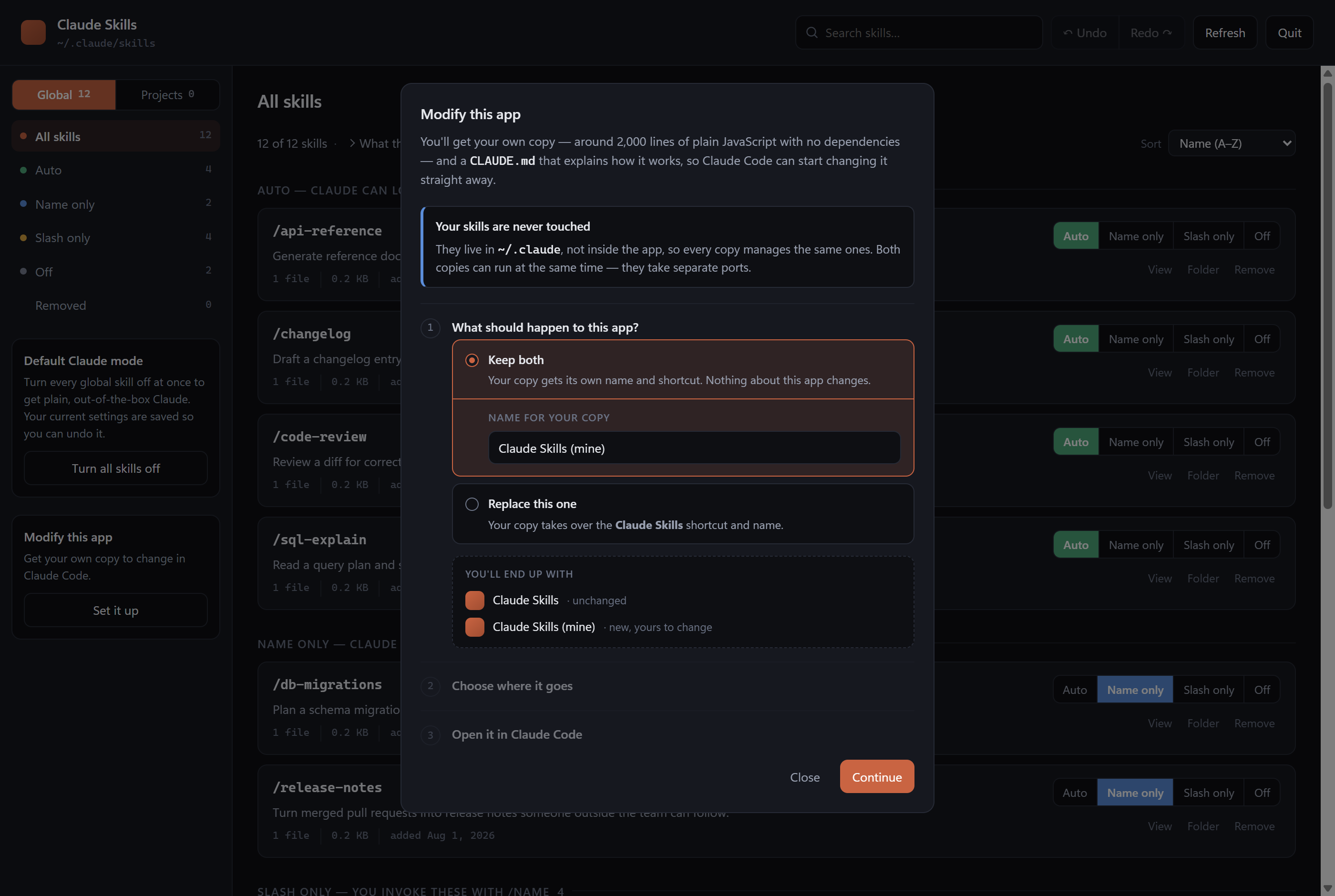
The app can hand you your own copy to change in Claude Code — the sidebar's
|
|
48
|
+
**Modify this app** card walks you through it, including whether your version
|
|
49
|
+
sits alongside this one or replaces it.
|
|
50
|
+
|
|
51
|
+
|
|
52
|
+
|
|
53
|
+
From a terminal, the same thing is:
|
|
54
|
+
|
|
55
|
+
```bash
|
|
56
|
+
npx claude-skills-manager dev
|
|
57
|
+
```
|
|
58
|
+
|
|
59
|
+
You get a full working copy plus a `CLAUDE.md` explaining the architecture, so
|
|
60
|
+
Claude Code can start changing it straight away rather than reading its way in.
|
|
61
|
+
See [CONTRIBUTING.md](CONTRIBUTING.md) if you want to send something back.
|
|
62
|
+
|
|
63
|
+
## Global and project skills
|
|
64
|
+
|
|
65
|
+
The **Global / Projects** switch at the top of the sidebar chooses between the
|
|
66
|
+
two places skills live. It sits above the filter list because it governs it —
|
|
67
|
+
switching scope re-computes every count below. Skills that ship with Claude Code
|
|
68
|
+
are never listed, because they aren't yours to manage here.
|
|
69
|
+
|
|
70
|
+
**Global** — `~/.claude/skills`, available in every project. Settings go in
|
|
71
|
+
`~/.claude/settings.json`.
|
|
72
|
+
|
|
73
|
+
**Projects** — skills inside a single folder's `.claude/skills`, which only
|
|
74
|
+
exist for Claude Code sessions run there. Cards are grouped by folder, and the
|
|
75
|
+
sidebar filters narrow across all folders at once. Settings go in that project's
|
|
76
|
+
`.claude/settings.local.json` — the gitignored file — so this app never dirties a
|
|
77
|
+
file your repo shares with other people.
|
|
78
|
+
|
|
79
|
+
Two badges only appear on project skills:
|
|
80
|
+
|
|
81
|
+
- **project only** — the name exists nowhere else
|
|
82
|
+
- **overrides global** — a global skill has the same name, and inside this folder
|
|
83
|
+
the project one wins
|
|
84
|
+
|
|
85
|
+
Because project settings sit above global ones, setting a project skill to *Auto*
|
|
86
|
+
sometimes writes an explicit `"on"` rather than removing the entry — otherwise
|
|
87
|
+
the global value would show through. The app handles that for you.
|
|
88
|
+
|
|
89
|
+
### Which folders it looks in
|
|
90
|
+
|
|
91
|
+
Every folder you've run a Claude Code session in — it recovers the real paths
|
|
92
|
+
from the session records. A folder needs one session, ever; after that any skill
|
|
93
|
+
you add there shows up on the next Refresh.
|
|
94
|
+
|
|
95
|
+
For a folder Claude Code has never opened, use **Add folder** on the count line.
|
|
96
|
+
It opens the standard Windows folder picker (a browser can't be given a real
|
|
97
|
+
path by dragging, so a picker is the only reliable way). Added folders are
|
|
98
|
+
remembered in `data/folders.json`.
|
|
99
|
+
|
|
100
|
+
**Default Claude mode applies to global skills only.** Project skills are left
|
|
101
|
+
alone.
|
|
102
|
+
|
|
103
|
+
Skills are grouped by how they actually behave:
|
|
104
|
+
|
|
105
|
+
| Group | Meaning |
|
|
106
|
+
| :--- | :--- |
|
|
107
|
+
| **Auto** | Claude can decide to load the skill on its own, and `/name` works |
|
|
108
|
+
| **Name only** | Claude sees the skill's name but not its full description |
|
|
109
|
+
| **Slash only** | Runs only when you type `/name` — Claude never reaches for it |
|
|
110
|
+
| **Off** | Disabled entirely; the files stay on disk |
|
|
111
|
+
|
|
112
|
+
## The four settings
|
|
113
|
+
|
|
114
|
+
The buttons on each card write to `skillOverrides` in `~/.claude/settings.json`.
|
|
115
|
+
They carry the same four names as the sidebar, so a skill's button and its
|
|
116
|
+
section always agree:
|
|
117
|
+
|
|
118
|
+
| Button | Written as | Notes |
|
|
119
|
+
| :--- | :--- | :--- |
|
|
120
|
+
| **Auto** | *(no entry)* | Claude's default, so this removes the override |
|
|
121
|
+
| **Name only** | `"name-only"` | |
|
|
122
|
+
| **Slash only** | `"user-invocable-only"` | |
|
|
123
|
+
| **Off** | `"off"` | |
|
|
124
|
+
|
|
125
|
+
Buttons that a skill's own frontmatter rules out are **struck through and
|
|
126
|
+
disabled**, with a tooltip saying why. For a skill with
|
|
127
|
+
`disable-model-invocation: true` that's *Auto* and *Name only* — they'd behave
|
|
128
|
+
identically to *Slash only*, so offering them as real choices would be a lie.
|
|
129
|
+
Such a skill shows **Slash only** as its selected button even when it has no
|
|
130
|
+
override at all, because that is what it actually does.
|
|
131
|
+
|
|
132
|
+
### Sorting
|
|
133
|
+
|
|
134
|
+
The **Sort** control sits at the right of the count line: **Name (A–Z)**,
|
|
135
|
+
**Newest installed**, **Oldest installed**, or **Recently changed**. On the All
|
|
136
|
+
skills page it sorts *within* each section, so the grouping still reads first.
|
|
137
|
+
Your choice is remembered between sessions.
|
|
138
|
+
|
|
139
|
+
Install dates come from when a skill's folder appeared in `~/.claude/skills`, so
|
|
140
|
+
a skill copied in from elsewhere dates from the copy rather than from when it was
|
|
141
|
+
first written. Each card shows its date under the description.
|
|
142
|
+
|
|
143
|
+
### Descriptions and paths
|
|
144
|
+
|
|
145
|
+
Every view has a description folded away on the count line — *45 of 45 skills ·
|
|
146
|
+
**What this app does***. Click to expand it; it slides open and holds the
|
|
147
|
+
explanation, when to reach for that setting, and the folders involved
|
|
148
|
+
(**Skills folder** and **Settings file**, each with an *Open* button that reveals
|
|
149
|
+
it in Explorer). The Removed view shows the trash folder instead.
|
|
150
|
+
|
|
151
|
+
### Cards stay where you clicked them
|
|
152
|
+
|
|
153
|
+
Changing a setting saves immediately, but the card does **not** jump to its new
|
|
154
|
+
section. It stays put, shows the new setting, and picks up a blue
|
|
155
|
+
**moves to Off** tag telling you where it will land. The sidebar counts update
|
|
156
|
+
straight away, so the new grouping is visible there at once.
|
|
157
|
+
|
|
158
|
+
Press **Refresh** whenever you want the list itself regrouped. Switching views
|
|
159
|
+
regroups too.
|
|
160
|
+
|
|
161
|
+
### Undo and redo
|
|
162
|
+
|
|
163
|
+
**↶ Undo** and **Redo ↷** sit in the top bar — `Ctrl+Z` and `Ctrl+Y` also work.
|
|
164
|
+
Hovering either one tells you exactly what it will do, e.g.
|
|
165
|
+
*Undo: tdd: Slash only → Off*.
|
|
166
|
+
|
|
167
|
+
They cover setting changes, Default Claude mode, orphan cleanup, and removals —
|
|
168
|
+
undoing a removal puts the folder back *and* restores the setting it had. The
|
|
169
|
+
history survives a page reload and is cleared when you close the tab.
|
|
170
|
+
|
|
171
|
+
The single exception is **Delete forever** in the Removed view. That one really
|
|
172
|
+
is permanent, and the dialog says so; using it clears any history entries that
|
|
173
|
+
referred to the deleted folder.
|
|
174
|
+
|
|
175
|
+
### Two reasons a skill is slash-only
|
|
176
|
+
|
|
177
|
+
The difference matters:
|
|
178
|
+
|
|
179
|
+
1. **Your setting here** — changeable any time from this app.
|
|
180
|
+
2. **The skill's own frontmatter** — `disable-model-invocation: true` inside its
|
|
181
|
+
`SKILL.md`. Cards showing a **locked to /** tag are in this category, and
|
|
182
|
+
their *Auto* and *Name only* buttons are struck through: the skill's author
|
|
183
|
+
ruled those out, and changing it means editing the `SKILL.md`.
|
|
184
|
+
|
|
185
|
+
The sidebar counts tell you how many of yours fall into each category.
|
|
186
|
+
|
|
187
|
+
## Default Claude mode
|
|
188
|
+
|
|
189
|
+
The sidebar switch turns every skill off in one move, for when you want plain
|
|
190
|
+
out-of-the-box Claude. Your per-skill settings are snapshotted to
|
|
191
|
+
`data/snapshot.json` first, and the panel then reads **Default Claude mode is
|
|
192
|
+
on**.
|
|
193
|
+
|
|
194
|
+
There are two equally good ways back, and both restore every skill to the exact
|
|
195
|
+
setting it had:
|
|
196
|
+
|
|
197
|
+
- **Bring my skills back** — the sidebar button.
|
|
198
|
+
- **Undo** — `Ctrl+Z`, or the button in the top bar.
|
|
199
|
+
|
|
200
|
+
They are the same operation, so they stay in step: undoing the restore puts you
|
|
201
|
+
back in Default Claude mode, snapshot and all, and redo works from either
|
|
202
|
+
direction. Both the settings and the snapshot are written by one request, which
|
|
203
|
+
is what keeps the sidebar switch from ever disagreeing with the skills
|
|
204
|
+
themselves.
|
|
205
|
+
|
|
206
|
+
## Removing skills
|
|
207
|
+
|
|
208
|
+
**Remove** moves a skill's folder to `~/.claude/skills-trash/` — it is never
|
|
209
|
+
unlinked. Restore it from **Removed** in the sidebar, or delete it for good from
|
|
210
|
+
there once you're sure.
|
|
211
|
+
|
|
212
|
+
If you only want Claude to stop using a skill, use **Off** instead. It keeps the
|
|
213
|
+
skill exactly where it is.
|
|
214
|
+
|
|
215
|
+
## Safety
|
|
216
|
+
|
|
217
|
+
- Every write to `settings.json` copies the old file to `~/.claude/backups/`
|
|
218
|
+
first (the last 40 are kept), then writes atomically via a temp file + rename.
|
|
219
|
+
- If `settings.json` ever contains invalid JSON, the app refuses to write and
|
|
220
|
+
tells you, rather than replacing a file it could not read.
|
|
221
|
+
- The server binds to `127.0.0.1` only and requires a random per-run token, so no
|
|
222
|
+
other page or process on the machine can drive it.
|
|
223
|
+
|
|
224
|
+
## Restart Claude Code after changing settings
|
|
225
|
+
|
|
226
|
+
Claude Code reads `skillOverrides` when a session starts. Changes here apply to
|
|
227
|
+
your **next** session.
|
|
228
|
+
|
|
229
|
+
## Layout
|
|
230
|
+
|
|
231
|
+
```
|
|
232
|
+
server.js HTTP server + JSON API
|
|
233
|
+
bin/ the command-line entry point
|
|
234
|
+
lib/skills.js scans both scopes, resolves effective state
|
|
235
|
+
lib/projects.js finds project folders, remembers added ones
|
|
236
|
+
lib/settings.js reads/writes skillOverrides, backups, atomic writes
|
|
237
|
+
lib/frontmatter.js SKILL.md frontmatter parser
|
|
238
|
+
lib/paths.js every path the app touches
|
|
239
|
+
lib/platform.js every Windows/macOS/Linux difference
|
|
240
|
+
lib/shortcut.js desktop shortcuts on the three platforms
|
|
241
|
+
lib/fork.js making and managing your own copy
|
|
242
|
+
lib/app-info.js what this copy is called, and how it was installed
|
|
243
|
+
public/ the interface
|
|
244
|
+
tools/make-icon.js draws assets/icon.{ico,png,icns}
|
|
245
|
+
launch.vbs windowless launcher used by the Windows shortcut
|
|
246
|
+
install-shortcut.ps1 creates/removes the Start menu shortcut
|
|
247
|
+
```
|
|
248
|
+
|
|
249
|
+
Your settings and folder list live outside the app, in
|
|
250
|
+
`~/.claude/skills-manager/`, so they survive an update:
|
|
251
|
+
|
|
252
|
+
```
|
|
253
|
+
snapshot.json created only while Default Claude mode is on
|
|
254
|
+
folders.json folders you added by hand
|
|
255
|
+
sessions/ one file per installed copy, recording the live instance
|
|
256
|
+
```
|
|
257
|
+
|
|
258
|
+
[CLAUDE.md](CLAUDE.md) goes further — the invariants a change must not break,
|
|
259
|
+
and how to test one.
|
package/Skills.cmd
ADDED
|
@@ -0,0 +1,14 @@
|
|
|
1
|
+
@echo off
|
|
2
|
+
title Claude Skills Manager
|
|
3
|
+
cd /d "%~dp0"
|
|
4
|
+
|
|
5
|
+
where node >nul 2>nul
|
|
6
|
+
if errorlevel 1 (
|
|
7
|
+
echo Node.js was not found on your PATH.
|
|
8
|
+
echo Install it from https://nodejs.org and run this again.
|
|
9
|
+
pause
|
|
10
|
+
exit /b 1
|
|
11
|
+
)
|
|
12
|
+
|
|
13
|
+
node server.js
|
|
14
|
+
pause
|
package/assets/icon.icns
ADDED
|
Binary file
|
package/assets/icon.ico
ADDED
|
Binary file
|
package/assets/icon.png
ADDED
|
Binary file
|
|
@@ -0,0 +1,104 @@
|
|
|
1
|
+
#!/usr/bin/env node
|
|
2
|
+
'use strict';
|
|
3
|
+
|
|
4
|
+
// Subcommands are required lazily: starting the server should not pay to load
|
|
5
|
+
// the shortcut writer, and `--help` should work even on a platform where some
|
|
6
|
+
// other part of the app cannot.
|
|
7
|
+
|
|
8
|
+
const { NAME, VERSION, PACKAGE_NAME } = require('../lib/app-info');
|
|
9
|
+
|
|
10
|
+
const HELP = `
|
|
11
|
+
${NAME} ${VERSION}
|
|
12
|
+
|
|
13
|
+
Usage
|
|
14
|
+
${PACKAGE_NAME} start it and open the app
|
|
15
|
+
${PACKAGE_NAME} dev [folder] make your own copy to change in Claude Code
|
|
16
|
+
${PACKAGE_NAME} install-shortcut add a desktop/Start-menu shortcut
|
|
17
|
+
${PACKAGE_NAME} uninstall-shortcut remove it again
|
|
18
|
+
|
|
19
|
+
Options
|
|
20
|
+
--desktop install-shortcut: also put one on the desktop
|
|
21
|
+
--name <name> install-shortcut: name it something else, so a copy of the
|
|
22
|
+
app can sit alongside the original
|
|
23
|
+
--help, --version
|
|
24
|
+
|
|
25
|
+
Environment
|
|
26
|
+
SKILLS_NO_OPEN=1 don't open a browser, just print the URL
|
|
27
|
+
`;
|
|
28
|
+
|
|
29
|
+
function fail(message) {
|
|
30
|
+
console.error(`\n ${message}\n`);
|
|
31
|
+
process.exit(1);
|
|
32
|
+
}
|
|
33
|
+
|
|
34
|
+
/** Pulls `--flag value` and bare `--flag` out of the remaining arguments. */
|
|
35
|
+
function parseFlags(argv) {
|
|
36
|
+
const flags = { _: [] };
|
|
37
|
+
for (let i = 0; i < argv.length; i++) {
|
|
38
|
+
const arg = argv[i];
|
|
39
|
+
if (!arg.startsWith('--')) {
|
|
40
|
+
flags._.push(arg);
|
|
41
|
+
continue;
|
|
42
|
+
}
|
|
43
|
+
const key = arg.slice(2);
|
|
44
|
+
const next = argv[i + 1];
|
|
45
|
+
if (next && !next.startsWith('--')) {
|
|
46
|
+
flags[key] = next;
|
|
47
|
+
i++;
|
|
48
|
+
} else {
|
|
49
|
+
flags[key] = true;
|
|
50
|
+
}
|
|
51
|
+
}
|
|
52
|
+
return flags;
|
|
53
|
+
}
|
|
54
|
+
|
|
55
|
+
async function main() {
|
|
56
|
+
const [command, ...rest] = process.argv.slice(2);
|
|
57
|
+
const flags = parseFlags(rest);
|
|
58
|
+
|
|
59
|
+
switch (command) {
|
|
60
|
+
case undefined:
|
|
61
|
+
return require('../server').start();
|
|
62
|
+
|
|
63
|
+
case 'dev':
|
|
64
|
+
case 'fork': {
|
|
65
|
+
const fork = require('../lib/fork');
|
|
66
|
+
const result = await fork.run({ dir: flags._[0], name: flags.name });
|
|
67
|
+
console.log(fork.describe(result));
|
|
68
|
+
return;
|
|
69
|
+
}
|
|
70
|
+
|
|
71
|
+
case 'install-shortcut': {
|
|
72
|
+
const shortcut = require('../lib/shortcut');
|
|
73
|
+
const created = shortcut.install({ desktop: Boolean(flags.desktop), name: flags.name });
|
|
74
|
+
for (const line of created) console.log(` Created ${line}`);
|
|
75
|
+
console.log(`\n Launch it by searching for "${flags.name || NAME}".\n`);
|
|
76
|
+
return;
|
|
77
|
+
}
|
|
78
|
+
|
|
79
|
+
case 'uninstall-shortcut': {
|
|
80
|
+
const shortcut = require('../lib/shortcut');
|
|
81
|
+
const removed = shortcut.uninstall({ name: flags.name });
|
|
82
|
+
if (!removed.length) return console.log('\n Nothing to remove.\n');
|
|
83
|
+
for (const line of removed) console.log(` Removed ${line}`);
|
|
84
|
+
console.log('');
|
|
85
|
+
return;
|
|
86
|
+
}
|
|
87
|
+
|
|
88
|
+
case 'help':
|
|
89
|
+
case '--help':
|
|
90
|
+
case '-h':
|
|
91
|
+
return console.log(HELP);
|
|
92
|
+
|
|
93
|
+
case 'version':
|
|
94
|
+
case '--version':
|
|
95
|
+
case '-v':
|
|
96
|
+
return console.log(VERSION);
|
|
97
|
+
|
|
98
|
+
default:
|
|
99
|
+
console.log(HELP);
|
|
100
|
+
fail(`Unknown command: ${command}`);
|
|
101
|
+
}
|
|
102
|
+
}
|
|
103
|
+
|
|
104
|
+
main().catch((err) => fail(err && err.message ? err.message : String(err)));
|
|
@@ -0,0 +1,62 @@
|
|
|
1
|
+
<#
|
|
2
|
+
Creates a "Claude Skills" shortcut in your Start menu.
|
|
3
|
+
|
|
4
|
+
.\install-shortcut.ps1 # Start menu
|
|
5
|
+
.\install-shortcut.ps1 -Desktop # Start menu + Desktop
|
|
6
|
+
.\install-shortcut.ps1 -Remove # delete the shortcuts again
|
|
7
|
+
.\install-shortcut.ps1 -Name "My Skills" # name it something else, so your
|
|
8
|
+
# own copy can sit beside the
|
|
9
|
+
# original instead of replacing it
|
|
10
|
+
|
|
11
|
+
Normally driven by `claude-skills-manager install-shortcut`, which passes
|
|
12
|
+
-Name for you. It still works on its own.
|
|
13
|
+
|
|
14
|
+
The shortcut targets wscript.exe (a real executable), which is what lets
|
|
15
|
+
Windows pin it to the Start menu and the taskbar.
|
|
16
|
+
#>
|
|
17
|
+
[CmdletBinding()]
|
|
18
|
+
param(
|
|
19
|
+
[switch]$Desktop,
|
|
20
|
+
[switch]$Remove,
|
|
21
|
+
[string]$Name = 'Claude Skills'
|
|
22
|
+
)
|
|
23
|
+
|
|
24
|
+
$ErrorActionPreference = 'Stop'
|
|
25
|
+
|
|
26
|
+
$appDir = $PSScriptRoot
|
|
27
|
+
$startDir = [Environment]::GetFolderPath('Programs')
|
|
28
|
+
$targets = @(Join-Path $startDir "$Name.lnk")
|
|
29
|
+
|
|
30
|
+
if ($Desktop -or $Remove) {
|
|
31
|
+
$targets += Join-Path ([Environment]::GetFolderPath('Desktop')) "$Name.lnk"
|
|
32
|
+
}
|
|
33
|
+
|
|
34
|
+
if ($Remove) {
|
|
35
|
+
foreach ($path in $targets) {
|
|
36
|
+
if (Test-Path $path) { Remove-Item $path -Force; "Removed $path" }
|
|
37
|
+
}
|
|
38
|
+
return
|
|
39
|
+
}
|
|
40
|
+
|
|
41
|
+
$icon = Join-Path $appDir 'assets\icon.ico'
|
|
42
|
+
if (-not (Test-Path $icon)) {
|
|
43
|
+
& node (Join-Path $appDir 'tools\make-icon.js') | Out-Null
|
|
44
|
+
}
|
|
45
|
+
|
|
46
|
+
$launcher = Join-Path $appDir 'launch.vbs'
|
|
47
|
+
if (-not (Test-Path $launcher)) { throw "Cannot find $launcher" }
|
|
48
|
+
|
|
49
|
+
$wscript = Join-Path $env:SystemRoot 'System32\wscript.exe'
|
|
50
|
+
$shell = New-Object -ComObject WScript.Shell
|
|
51
|
+
|
|
52
|
+
foreach ($path in ($targets | Select-Object -Unique)) {
|
|
53
|
+
$lnk = $shell.CreateShortcut($path)
|
|
54
|
+
$lnk.TargetPath = $wscript
|
|
55
|
+
$lnk.Arguments = '"{0}"' -f $launcher
|
|
56
|
+
$lnk.WorkingDirectory = $appDir
|
|
57
|
+
$lnk.IconLocation = "$icon,0"
|
|
58
|
+
$lnk.Description = 'See and manage your Claude Code skills'
|
|
59
|
+
$lnk.WindowStyle = 7 # minimised; the launcher is windowless anyway
|
|
60
|
+
$lnk.Save()
|
|
61
|
+
"Created $path"
|
|
62
|
+
}
|
package/launch.vbs
ADDED
|
@@ -0,0 +1,19 @@
|
|
|
1
|
+
' Starts Claude Skills with no console window, for the Start menu shortcut.
|
|
2
|
+
' The server opens your browser itself, and quits from the app's Quit button.
|
|
3
|
+
Option Explicit
|
|
4
|
+
|
|
5
|
+
Dim fso, shell, here
|
|
6
|
+
Set fso = CreateObject("Scripting.FileSystemObject")
|
|
7
|
+
Set shell = CreateObject("WScript.Shell")
|
|
8
|
+
|
|
9
|
+
here = fso.GetParentFolderName(WScript.ScriptFullName)
|
|
10
|
+
shell.CurrentDirectory = here
|
|
11
|
+
|
|
12
|
+
' Fail loudly rather than silently doing nothing if Node has gone missing.
|
|
13
|
+
If shell.Run("cmd /c where node", 0, True) <> 0 Then
|
|
14
|
+
MsgBox "Claude Skills needs Node.js, which isn't on your PATH." & vbCrLf & vbCrLf & _
|
|
15
|
+
"Install it from https://nodejs.org and try again.", 16, "Claude Skills"
|
|
16
|
+
WScript.Quit 1
|
|
17
|
+
End If
|
|
18
|
+
|
|
19
|
+
shell.Run "cmd /c node """ & fso.BuildPath(here, "server.js") & """", 0, False
|