claude-b 0.3.2 → 0.3.3
This diff represents the content of publicly available package versions that have been released to one of the supported registries. The information contained in this diff is provided for informational purposes only and reflects changes between package versions as they appear in their respective public registries.
- package/LICENSE +201 -228
- package/README.md +62 -2
- package/RELEASING.md +167 -0
- package/assets/voice-pipeline.mmd +46 -0
- package/assets/voice-pipeline.png +0 -0
- package/assets/voice-pipeline.svg +1 -0
- package/dist/daemon/index.js +132 -37
- package/package.json +2 -2
- package/scripts/install.sh +2 -2
- package/website/DOCKERHUB.md +138 -0
- package/website/Favicon-Claude-B.png +0 -0
- package/website/deploy.sh +6 -6
- package/website/index.html +261 -22
- package/website/install.sh +2 -2
- package/website/sync-dockerhub-readme.sh +52 -0
- package/website/voice-pipeline.png +0 -0
|
@@ -0,0 +1,138 @@
|
|
|
1
|
+
# Claude-B
|
|
2
|
+
|
|
3
|
+
> Background-capable [Claude Code](https://claude.ai/code) — async AI workflows, a Telegram bot,
|
|
4
|
+
> a REST API, and multi-host orchestration in a single container.
|
|
5
|
+
|
|
6
|
+
## Why
|
|
7
|
+
|
|
8
|
+
- **Fire-and-forget tasks.** Kick off long Claude Code jobs and keep working. Results wait in an
|
|
9
|
+
inbox until you're ready.
|
|
10
|
+
- **Telegram remote control.** Get notified when a session finishes. Reply by text or voice note
|
|
11
|
+
from your phone — Whisper transcribes, Claude optimises, TTS plays the result back.
|
|
12
|
+
- **REST API + WebSocket.** Programmatic access to every session. Build bots, dashboards, CI
|
|
13
|
+
integrations.
|
|
14
|
+
- **Multi-host orchestration.** Distribute work across machines with health-aware routing and
|
|
15
|
+
automatic failover.
|
|
16
|
+
- **Tmux bridge.** Live Claude Code panes post completion notifications to Telegram via a `Stop`
|
|
17
|
+
hook. No code changes to your existing workflow.
|
|
18
|
+
- **Stateless on config, stateful on data.** One `.env` file configures everything. All session
|
|
19
|
+
state lives in a mounted volume.
|
|
20
|
+
|
|
21
|
+
## The voice pipeline — the actual differentiator
|
|
22
|
+
|
|
23
|
+
Other Telegram/WhatsApp AI integrations forward your voice note to one model and play the reply
|
|
24
|
+
back. Claude-B chains **four specialised models** per voice-to-voice round-trip, and the middle
|
|
25
|
+
step — prompt optimisation with fresh session context — turns *"um, can you uh, fix the thing
|
|
26
|
+
we were just working on"* into an actionable prompt Claude Code can execute.
|
|
27
|
+
|
|
28
|
+
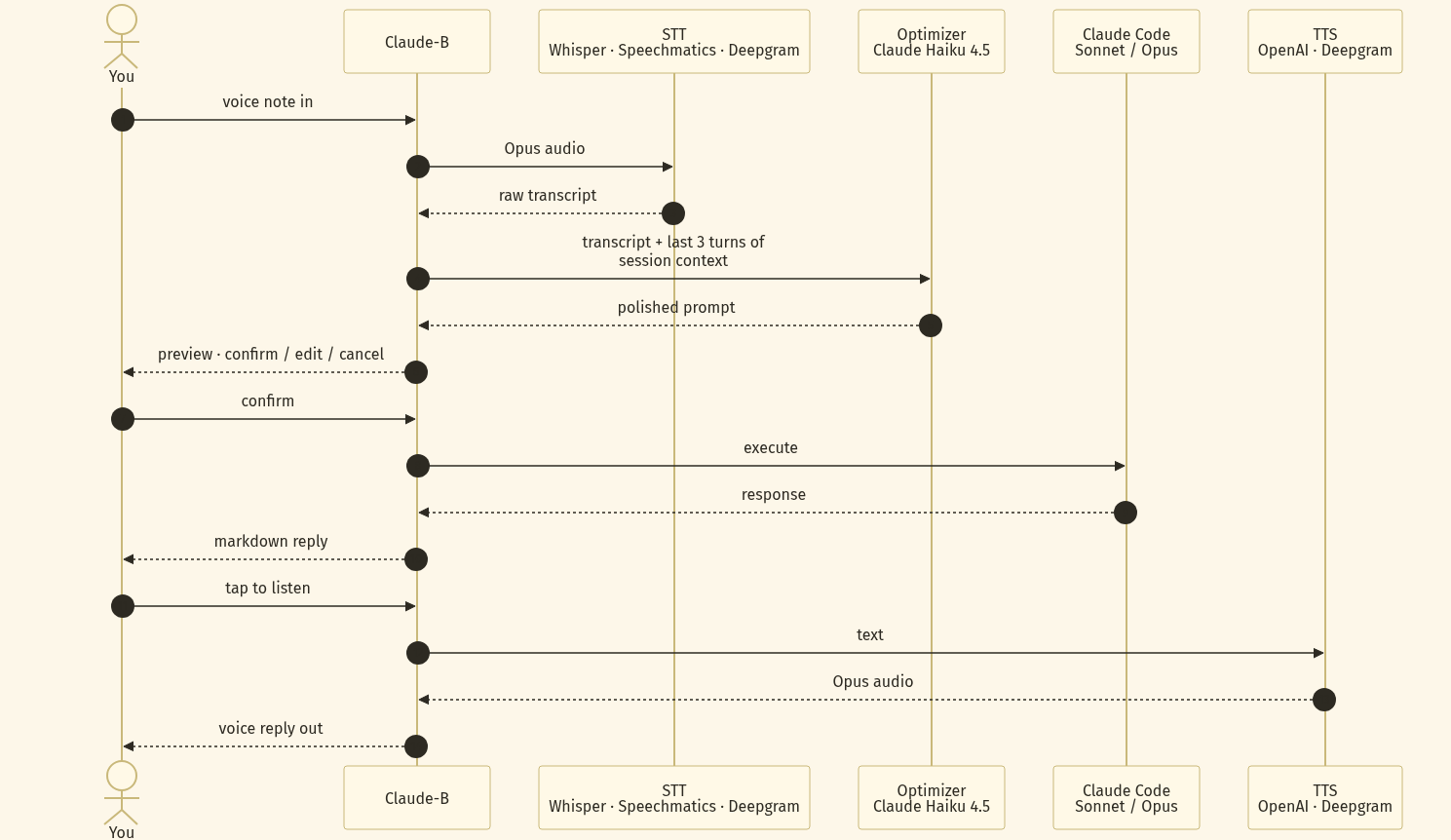
|
|
29
|
+
|
|
30
|
+
Every stage is provider-swappable. Default stack: Whisper → Claude Haiku 4.5 → your session's
|
|
31
|
+
main model (Sonnet / Opus) → OpenAI `gpt-4o-mini-tts`. Confirm-before-execute is baked in, so
|
|
32
|
+
a botched transcription never becomes a rogue `rm -rf`.
|
|
33
|
+
|
|
34
|
+
## Quick start
|
|
35
|
+
|
|
36
|
+
Pull the image and run — everything reads from `~/.claude-b/.env`, created by `cb init` on
|
|
37
|
+
first run.
|
|
38
|
+
|
|
39
|
+
```bash
|
|
40
|
+
# 1. One-time interactive setup
|
|
41
|
+
docker run --rm -it \
|
|
42
|
+
-v "$HOME/.claude-b:/root/.claude-b" \
|
|
43
|
+
danimoya/claude-b:latest cb init
|
|
44
|
+
|
|
45
|
+
# 2. Run the daemon
|
|
46
|
+
docker run -d \
|
|
47
|
+
--name claude-b \
|
|
48
|
+
--restart unless-stopped \
|
|
49
|
+
-v "$HOME/.claude-b:/root/.claude-b" \
|
|
50
|
+
-p 3847:3847 \
|
|
51
|
+
danimoya/claude-b:latest
|
|
52
|
+
|
|
53
|
+
# 3. Use it from the container
|
|
54
|
+
docker exec -it claude-b cb "summarise README.md"
|
|
55
|
+
```
|
|
56
|
+
|
|
57
|
+
`cb init` walks you through BotFather, auto-captures your Telegram chat id, and writes the `.env`
|
|
58
|
+
file for you. You never copy tokens by hand.
|
|
59
|
+
|
|
60
|
+
## docker-compose
|
|
61
|
+
|
|
62
|
+
```yaml
|
|
63
|
+
services:
|
|
64
|
+
claude-b:
|
|
65
|
+
image: danimoya/claude-b:latest
|
|
66
|
+
restart: unless-stopped
|
|
67
|
+
ports:
|
|
68
|
+
- "3847:3847"
|
|
69
|
+
volumes:
|
|
70
|
+
- claude-b-data:/root/.claude-b
|
|
71
|
+
environment:
|
|
72
|
+
ANTHROPIC_API_KEY: ${ANTHROPIC_API_KEY}
|
|
73
|
+
TELEGRAM_BOT_TOKEN: ${TELEGRAM_BOT_TOKEN} # optional
|
|
74
|
+
OPENAI_API_KEY: ${OPENAI_API_KEY} # optional — enables voice notes
|
|
75
|
+
|
|
76
|
+
volumes:
|
|
77
|
+
claude-b-data:
|
|
78
|
+
```
|
|
79
|
+
|
|
80
|
+
```bash
|
|
81
|
+
docker compose up -d
|
|
82
|
+
docker compose exec claude-b cb init # if you didn't set env vars above
|
|
83
|
+
```
|
|
84
|
+
|
|
85
|
+
## Configuration
|
|
86
|
+
|
|
87
|
+
Precedence: `process env` > `/root/.claude-b/.env` > `./.env`.
|
|
88
|
+
|
|
89
|
+
| Variable | Required | Purpose |
|
|
90
|
+
|---|---|---|
|
|
91
|
+
| `ANTHROPIC_API_KEY` | yes | Claude Code authentication |
|
|
92
|
+
| `TELEGRAM_BOT_TOKEN` | no | Enable Telegram remote control |
|
|
93
|
+
| `TELEGRAM_ALLOWED_CHAT_IDS` | no | Comma-separated list of allowed chat ids |
|
|
94
|
+
| `OPENAI_API_KEY` | no | Whisper STT + TTS for voice notes |
|
|
95
|
+
| `SPEECHMATICS_API_KEY` / `DEEPGRAM_API_KEY` | no | Alternative STT providers |
|
|
96
|
+
| `CB_DATA_DIR` | no | Override `/root/.claude-b` (rarely needed in containers) |
|
|
97
|
+
| `CB_REST_HOST` / `CB_REST_PORT` | no | REST API bind address (defaults `0.0.0.0:3847`) |
|
|
98
|
+
| `CB_REST_API_KEY` | no | Pre-set REST API key (auto-generated otherwise) |
|
|
99
|
+
|
|
100
|
+
## Tags
|
|
101
|
+
|
|
102
|
+
| Tag | Points at | Use for |
|
|
103
|
+
|---|---|---|
|
|
104
|
+
| `latest` | newest release | quick start, demos |
|
|
105
|
+
| `0.3`, `0` | newest 0.3.x / 0.x | pin to a minor/major series |
|
|
106
|
+
| `0.3.2`, `v0.3.2` | exact release | reproducible deploys |
|
|
107
|
+
|
|
108
|
+
Images are multi-arch: `linux/amd64` and `linux/arm64` (runs on Raspberry Pi, Apple Silicon,
|
|
109
|
+
Graviton).
|
|
110
|
+
|
|
111
|
+
## Alternatives to Docker
|
|
112
|
+
|
|
113
|
+
```bash
|
|
114
|
+
# One-line install — auto-detects npm or docker
|
|
115
|
+
curl -fsSL https://cb.danimoya.com | bash
|
|
116
|
+
|
|
117
|
+
# npm (requires Node.js 20+)
|
|
118
|
+
npm i -g claude-b && cb init
|
|
119
|
+
|
|
120
|
+
# Build from source
|
|
121
|
+
git clone https://github.com/danimoya/Claude-B.git
|
|
122
|
+
cd Claude-B && pnpm install && pnpm build && pnpm link --global
|
|
123
|
+
```
|
|
124
|
+
|
|
125
|
+
## Links
|
|
126
|
+
|
|
127
|
+
- **Source & docs:** https://github.com/danimoya/Claude-B
|
|
128
|
+
- **Issues:** https://github.com/danimoya/Claude-B/issues
|
|
129
|
+
- **GHCR mirror:** `ghcr.io/danimoya/claude-b`
|
|
130
|
+
- **License:** Apache-2.0
|
|
131
|
+
|
|
132
|
+
## Topics
|
|
133
|
+
|
|
134
|
+
AI agents · Anthropic Claude · Claude Code · coding assistant · AI automation ·
|
|
135
|
+
background jobs · async workflows · Telegram bot · voice assistant · Whisper STT ·
|
|
136
|
+
OpenAI TTS · REST API · WebSocket · CLI tool · developer tools · DevOps · tmux ·
|
|
137
|
+
multi-host orchestration · self-hosted · Node.js · TypeScript
|
|
138
|
+
|
|
Binary file
|
package/website/deploy.sh
CHANGED
|
@@ -1,5 +1,5 @@
|
|
|
1
1
|
#!/usr/bin/env bash
|
|
2
|
-
# Deploy the claude-b.
|
|
2
|
+
# Deploy the claude-b.danimoya.com / cb.danimoya.com landing container.
|
|
3
3
|
#
|
|
4
4
|
# Prerequisites:
|
|
5
5
|
# - Docker daemon reachable
|
|
@@ -7,7 +7,7 @@
|
|
|
7
7
|
# - NPM credentials exported:
|
|
8
8
|
# NPM_USER=daniel.moya@...
|
|
9
9
|
# NPM_PASSWORD=...
|
|
10
|
-
# - A record for claude-b.
|
|
10
|
+
# - A record for claude-b.danimoya.com + cb.danimoya.com pointing at the server IP
|
|
11
11
|
#
|
|
12
12
|
# Usage:
|
|
13
13
|
# cd website && ./deploy.sh
|
|
@@ -21,7 +21,7 @@ cp ../scripts/install.sh install.sh
|
|
|
21
21
|
IMAGE="claude-b-landing:latest"
|
|
22
22
|
CONTAINER="claude-b-landing"
|
|
23
23
|
NETWORK="management-network"
|
|
24
|
-
DOMAINS='["claude-b.
|
|
24
|
+
DOMAINS='["claude-b.danimoya.com","cb.danimoya.com"]'
|
|
25
25
|
|
|
26
26
|
echo "==> Building $IMAGE"
|
|
27
27
|
docker build -t "$IMAGE" .
|
|
@@ -51,7 +51,7 @@ HOST_ID=$(curl -fsS "http://localhost:81/api/nginx/proxy-hosts" \
|
|
|
51
51
|
import json, sys
|
|
52
52
|
hosts = json.load(sys.stdin)
|
|
53
53
|
for h in hosts:
|
|
54
|
-
if 'cb.
|
|
54
|
+
if 'cb.danimoya.com' in h['domain_names'] or 'claude-b.danimoya.com' in h['domain_names']:
|
|
55
55
|
print(h['id']); break
|
|
56
56
|
")
|
|
57
57
|
|
|
@@ -91,7 +91,7 @@ echo "==> Requesting Let's Encrypt cert"
|
|
|
91
91
|
CERT_ID=$(curl -fsS -X POST "http://localhost:81/api/nginx/certificates" \
|
|
92
92
|
-H "Authorization: Bearer $TOKEN" \
|
|
93
93
|
-H "Content-Type: application/json" \
|
|
94
|
-
-d "{\"provider\":\"letsencrypt\",\"nice_name\":\"cb.
|
|
94
|
+
-d "{\"provider\":\"letsencrypt\",\"nice_name\":\"cb.danimoya.com\",\"domain_names\":$DOMAINS,\"meta\":{\"dns_challenge\":false}}" \
|
|
95
95
|
| python3 -c 'import json,sys; print(json.load(sys.stdin)["id"])' 2>/dev/null || echo "")
|
|
96
96
|
|
|
97
97
|
if [ -n "$CERT_ID" ]; then
|
|
@@ -109,4 +109,4 @@ fi
|
|
|
109
109
|
|
|
110
110
|
echo
|
|
111
111
|
echo "✓ Deployed. Test with:"
|
|
112
|
-
echo " curl -fsSL https://cb.
|
|
112
|
+
echo " curl -fsSL https://cb.danimoya.com | head"
|
package/website/index.html
CHANGED
|
@@ -3,54 +3,283 @@
|
|
|
3
3
|
<head>
|
|
4
4
|
<meta charset="utf-8" />
|
|
5
5
|
<meta name="viewport" content="width=device-width, initial-scale=1" />
|
|
6
|
-
<
|
|
7
|
-
<
|
|
6
|
+
<link rel="icon" type="image/png" href="/favicon.png" />
|
|
7
|
+
<link rel="apple-touch-icon" href="/favicon.png" />
|
|
8
|
+
<title>Claude-B — background Claude Code with a multi-LLM voice pipeline</title>
|
|
9
|
+
<meta name="description" content="Claude-B runs Claude Code in the background. Telegram bot, REST API, multi-host orchestration, and a four-stage STT → optimizer → Claude → TTS voice pipeline that turns rambling voice notes into structured prompts grounded in your session." />
|
|
10
|
+
<meta property="og:title" content="Claude-B — background Claude Code" />
|
|
11
|
+
<meta property="og:description" content="Async Claude Code sessions, Telegram bot, and a multi-LLM voice-to-voice pipeline that grounds prompt optimization in live session context." />
|
|
12
|
+
<meta property="og:image" content="/voice-pipeline.png" />
|
|
8
13
|
<style>
|
|
9
14
|
:root {
|
|
10
|
-
--bg: #0b0d10; --fg: #e6edf3; --mute: #8b949e; --accent: #79c0ff;
|
|
11
|
-
--code-bg: #161b22;
|
|
15
|
+
--bg: #0b0d10; --fg: #e6edf3; --mute: #8b949e; --accent: #79c0ff;
|
|
16
|
+
--accent-dim: #1f6feb33; --border: #30363d; --code-bg: #161b22;
|
|
17
|
+
--hl: #d29922;
|
|
12
18
|
}
|
|
13
19
|
* { box-sizing: border-box; }
|
|
14
|
-
html, body {
|
|
15
|
-
|
|
16
|
-
|
|
17
|
-
|
|
18
|
-
|
|
20
|
+
html, body {
|
|
21
|
+
margin: 0; padding: 0;
|
|
22
|
+
background: var(--bg); color: var(--fg);
|
|
23
|
+
font-family: ui-monospace, 'SF Mono', Menlo, Consolas, monospace;
|
|
24
|
+
line-height: 1.55;
|
|
25
|
+
}
|
|
26
|
+
main { max-width: 880px; margin: 0 auto; padding: 4rem 1.5rem 6rem; }
|
|
27
|
+
header { margin-bottom: 3rem; }
|
|
28
|
+
h1 { font-size: 2.4rem; margin: 0 0 0.4rem; letter-spacing: -0.02em; }
|
|
29
|
+
h2 {
|
|
30
|
+
font-size: 1.2rem; margin: 3rem 0 1rem;
|
|
31
|
+
color: var(--accent); letter-spacing: -0.01em;
|
|
32
|
+
}
|
|
33
|
+
h3 { font-size: 1rem; margin: 1.5rem 0 0.5rem; color: var(--fg); }
|
|
34
|
+
.tag { color: var(--mute); font-size: 1rem; margin: 0; }
|
|
35
|
+
.lede { color: var(--fg); font-size: 1.05rem; margin: 1rem 0 0.5rem; max-width: 640px; }
|
|
19
36
|
pre {
|
|
20
37
|
background: var(--code-bg);
|
|
21
38
|
border: 1px solid var(--border);
|
|
22
|
-
border-radius:
|
|
39
|
+
border-radius: 8px;
|
|
23
40
|
padding: 1rem 1.1rem;
|
|
24
41
|
overflow-x: auto;
|
|
25
42
|
font-size: 0.92rem;
|
|
26
43
|
}
|
|
27
44
|
code { color: var(--accent); }
|
|
28
45
|
pre code { color: var(--fg); }
|
|
29
|
-
a { color: var(--accent); }
|
|
46
|
+
a { color: var(--accent); text-decoration: none; }
|
|
47
|
+
a:hover { text-decoration: underline; }
|
|
30
48
|
ul { padding-left: 1.25rem; }
|
|
31
|
-
li { margin: 0.
|
|
32
|
-
.cta { display:
|
|
33
|
-
.footer { margin-top: 4rem; color: var(--mute); font-size: 0.85rem; }
|
|
49
|
+
li { margin: 0.35rem 0; }
|
|
50
|
+
.cta { display: block; margin-top: 0.4rem; font-size: 0.9rem; color: var(--mute); }
|
|
51
|
+
.footer { margin-top: 4rem; color: var(--mute); font-size: 0.85rem; border-top: 1px solid var(--border); padding-top: 1.5rem; }
|
|
52
|
+
|
|
53
|
+
/* Pipeline diagram */
|
|
54
|
+
.pipeline-figure {
|
|
55
|
+
margin: 1.5rem 0 0.5rem;
|
|
56
|
+
padding: 1rem;
|
|
57
|
+
background: var(--code-bg);
|
|
58
|
+
border: 1px solid var(--border);
|
|
59
|
+
border-radius: 8px;
|
|
60
|
+
}
|
|
61
|
+
.pipeline-figure img { max-width: 100%; height: auto; display: block; }
|
|
62
|
+
.pipeline-caption {
|
|
63
|
+
font-size: 0.85rem;
|
|
64
|
+
color: var(--mute);
|
|
65
|
+
margin: 0.5rem 0 0;
|
|
66
|
+
text-align: center;
|
|
67
|
+
}
|
|
68
|
+
|
|
69
|
+
/* Step list */
|
|
70
|
+
.steps {
|
|
71
|
+
counter-reset: step;
|
|
72
|
+
list-style: none;
|
|
73
|
+
padding: 0;
|
|
74
|
+
margin: 1rem 0;
|
|
75
|
+
}
|
|
76
|
+
.steps li {
|
|
77
|
+
counter-increment: step;
|
|
78
|
+
position: relative;
|
|
79
|
+
padding: 0.6rem 0 0.6rem 2.4rem;
|
|
80
|
+
border-left: 1px solid var(--border);
|
|
81
|
+
margin-left: 1rem;
|
|
82
|
+
}
|
|
83
|
+
.steps li::before {
|
|
84
|
+
content: counter(step);
|
|
85
|
+
position: absolute;
|
|
86
|
+
left: -0.9rem; top: 0.55rem;
|
|
87
|
+
width: 1.8rem; height: 1.8rem;
|
|
88
|
+
background: var(--accent-dim);
|
|
89
|
+
color: var(--accent);
|
|
90
|
+
border: 1px solid var(--accent);
|
|
91
|
+
border-radius: 50%;
|
|
92
|
+
display: flex;
|
|
93
|
+
align-items: center;
|
|
94
|
+
justify-content: center;
|
|
95
|
+
font-weight: 600;
|
|
96
|
+
font-size: 0.85rem;
|
|
97
|
+
}
|
|
98
|
+
.steps li strong { color: var(--accent); display: block; margin-bottom: 0.15rem; }
|
|
99
|
+
|
|
100
|
+
/* API requirements table */
|
|
101
|
+
.api-table {
|
|
102
|
+
width: 100%;
|
|
103
|
+
border-collapse: collapse;
|
|
104
|
+
margin: 1rem 0;
|
|
105
|
+
font-size: 0.92rem;
|
|
106
|
+
}
|
|
107
|
+
.api-table th, .api-table td {
|
|
108
|
+
padding: 0.65rem 0.8rem;
|
|
109
|
+
text-align: left;
|
|
110
|
+
border-bottom: 1px solid var(--border);
|
|
111
|
+
vertical-align: top;
|
|
112
|
+
}
|
|
113
|
+
.api-table th { color: var(--mute); font-weight: 600; font-size: 0.85rem; text-transform: uppercase; letter-spacing: 0.04em; }
|
|
114
|
+
.api-table td:first-child { white-space: nowrap; color: var(--fg); }
|
|
115
|
+
.api-table td.muted { color: var(--mute); }
|
|
116
|
+
.pill {
|
|
117
|
+
display: inline-block;
|
|
118
|
+
padding: 0.1rem 0.5rem;
|
|
119
|
+
font-size: 0.75rem;
|
|
120
|
+
border-radius: 3px;
|
|
121
|
+
background: var(--accent-dim);
|
|
122
|
+
color: var(--accent);
|
|
123
|
+
margin-right: 0.3rem;
|
|
124
|
+
}
|
|
125
|
+
.pill.req { background: rgba(248, 81, 73, 0.15); color: #f85149; }
|
|
126
|
+
.pill.opt { background: rgba(63, 185, 80, 0.12); color: #3fb950; }
|
|
127
|
+
|
|
128
|
+
.grid-2 {
|
|
129
|
+
display: grid;
|
|
130
|
+
grid-template-columns: 1fr 1fr;
|
|
131
|
+
gap: 1.2rem;
|
|
132
|
+
margin: 1rem 0;
|
|
133
|
+
}
|
|
134
|
+
@media (max-width: 600px) {
|
|
135
|
+
.grid-2 { grid-template-columns: 1fr; }
|
|
136
|
+
h1 { font-size: 2rem; }
|
|
137
|
+
}
|
|
34
138
|
</style>
|
|
35
139
|
</head>
|
|
36
140
|
<body>
|
|
37
141
|
<main>
|
|
38
|
-
<
|
|
39
|
-
|
|
142
|
+
<header>
|
|
143
|
+
<h1>Claude-B</h1>
|
|
144
|
+
<p class="tag">Background Claude Code · Telegram bot · REST API · multi-host orchestration.</p>
|
|
145
|
+
<p class="lede">
|
|
146
|
+
Run Claude Code as a daemon, talk to it from your phone, and let a
|
|
147
|
+
four-stage <strong style="color:var(--hl)">multi-LLM voice pipeline</strong>
|
|
148
|
+
turn rambling voice notes into structured prompts grounded in your live
|
|
149
|
+
session context.
|
|
150
|
+
</p>
|
|
151
|
+
</header>
|
|
40
152
|
|
|
41
153
|
<h2>Install</h2>
|
|
42
|
-
<pre><code>curl -fsSL https://cb.
|
|
43
|
-
<
|
|
154
|
+
<pre><code>curl -fsSL https://cb.danimoya.com | bash</code></pre>
|
|
155
|
+
<span class="cta">Auto-detects <code>npm</code> or <code>docker</code>. Force with <code>--method docker</code>.</span>
|
|
44
156
|
|
|
45
157
|
<h2>Configure</h2>
|
|
46
158
|
<pre><code>cb init</code></pre>
|
|
47
|
-
<
|
|
159
|
+
<span class="cta">Interactive wizard — connects the Telegram bot, configures the voice pipeline, writes <code>~/.claude-b/.env</code>.</span>
|
|
160
|
+
|
|
161
|
+
<h2>The voice pipeline</h2>
|
|
162
|
+
<p>
|
|
163
|
+
Most Telegram-AI bots forward your voice note to one model and play the
|
|
164
|
+
reply back. Claude-B chains <strong>four specialised models</strong> per
|
|
165
|
+
round-trip. The differentiator is the middle stage — a prompt optimiser
|
|
166
|
+
that reads your raw transcript <em>and the last few turns of the target
|
|
167
|
+
session</em>, then rewrites the request as something Claude Code can
|
|
168
|
+
actually execute.
|
|
169
|
+
</p>
|
|
170
|
+
|
|
171
|
+
<figure class="pipeline-figure">
|
|
172
|
+
<img src="/voice-pipeline.png" alt="Sequence diagram of the Claude-B voice pipeline: Telegram → STT → Optimizer → Claude Code → TTS → Telegram" />
|
|
173
|
+
<figcaption class="pipeline-caption">Voice in, structured prompt out, voice summary back — four LLMs, one trip.</figcaption>
|
|
174
|
+
</figure>
|
|
175
|
+
|
|
176
|
+
<ol class="steps">
|
|
177
|
+
<li>
|
|
178
|
+
<strong>STT — speech to text</strong>
|
|
179
|
+
Voice note arrives from Telegram (.ogg). Transcribed by your chosen
|
|
180
|
+
STT provider into raw text. Picks up filler words, mishears domain
|
|
181
|
+
terms, doesn't know what you're working on.
|
|
182
|
+
</li>
|
|
183
|
+
<li>
|
|
184
|
+
<strong>Context gathering</strong>
|
|
185
|
+
Reads the target session's transcript path (cached from the most recent
|
|
186
|
+
<code>Stop</code> hook) and pulls the last 3 user + 3 assistant turns,
|
|
187
|
+
plus the working directory and current status. No turn history? The
|
|
188
|
+
next stage runs ungrounded.
|
|
189
|
+
</li>
|
|
190
|
+
<li>
|
|
191
|
+
<strong>Optimiser — transcript to structured prompt</strong>
|
|
192
|
+
A fast model (default: <code>claude-haiku-4-5</code>) gets the raw
|
|
193
|
+
transcript and the session context, with a system prompt instructing it
|
|
194
|
+
to fix STT errors, drop filler, add specificity from context, and
|
|
195
|
+
preserve intent without inventing requirements. Output: an actionable
|
|
196
|
+
prompt for Claude Code. You see it on Telegram with confirm / edit /
|
|
197
|
+
cancel buttons before it runs.
|
|
198
|
+
</li>
|
|
199
|
+
<li>
|
|
200
|
+
<strong>Claude Code — execution</strong>
|
|
201
|
+
The optimised prompt is routed to the right session: a long-running
|
|
202
|
+
Claude-B session via the daemon, or a live tmux pane via
|
|
203
|
+
<code>tmux send-keys</code>. Claude Code runs as it would in your
|
|
204
|
+
terminal — tool calls, edits, the lot.
|
|
205
|
+
</li>
|
|
206
|
+
<li>
|
|
207
|
+
<strong>TTS — text to speech</strong>
|
|
208
|
+
When Claude responds, the result is summarised and synthesised into a
|
|
209
|
+
voice note that plays back in Telegram. You can listen on your commute
|
|
210
|
+
instead of staring at a transcript.
|
|
211
|
+
</li>
|
|
212
|
+
</ol>
|
|
213
|
+
|
|
214
|
+
<p>
|
|
215
|
+
Each stage's provider is independent — pick what you have keys for, mix
|
|
216
|
+
and match, and swap any one without touching the others.
|
|
217
|
+
</p>
|
|
218
|
+
|
|
219
|
+
<h2>API requirements</h2>
|
|
220
|
+
<p>
|
|
221
|
+
The voice pipeline needs three things wired up: an STT provider, a
|
|
222
|
+
prompt-optimiser provider, and a Telegram bot token. TTS reuses the STT
|
|
223
|
+
provider's account where supported.
|
|
224
|
+
</p>
|
|
225
|
+
|
|
226
|
+
<table class="api-table">
|
|
227
|
+
<thead>
|
|
228
|
+
<tr><th>Stage</th><th>Provider options</th><th>API key env / command</th><th>Notes</th></tr>
|
|
229
|
+
</thead>
|
|
230
|
+
<tbody>
|
|
231
|
+
<tr>
|
|
232
|
+
<td><span class="pill req">required</span> Telegram bot</td>
|
|
233
|
+
<td>BotFather token</td>
|
|
234
|
+
<td><code>cb --telegram <TOKEN></code></td>
|
|
235
|
+
<td class="muted">No bot, no voice in/out. Free; create via <a href="https://t.me/BotFather">@BotFather</a>.</td>
|
|
236
|
+
</tr>
|
|
237
|
+
<tr>
|
|
238
|
+
<td><span class="pill req">required</span> STT (speech-in)</td>
|
|
239
|
+
<td>OpenAI Whisper · Speechmatics · Deepgram</td>
|
|
240
|
+
<td><code>cb --voice-setup <provider> <KEY></code></td>
|
|
241
|
+
<td class="muted">Same key handles TTS where the provider supports it (OpenAI, Speechmatics, Deepgram all do).</td>
|
|
242
|
+
</tr>
|
|
243
|
+
<tr>
|
|
244
|
+
<td><span class="pill req">required</span> Optimiser (LLM)</td>
|
|
245
|
+
<td>Anthropic direct · OpenRouter</td>
|
|
246
|
+
<td><code>cb --ai-provider anthropic <KEY></code><br/><code>cb --ai-provider openrouter <KEY></code></td>
|
|
247
|
+
<td class="muted">Default model: <code>claude-haiku-4-5</code> (fast, cheap, accurate enough for prompt rewriting). OpenRouter routes to any model.</td>
|
|
248
|
+
</tr>
|
|
249
|
+
<tr>
|
|
250
|
+
<td><span class="pill opt">optional</span> Claude Code execution</td>
|
|
251
|
+
<td>Anthropic <code>claude</code> CLI</td>
|
|
252
|
+
<td><code>ANTHROPIC_API_KEY</code></td>
|
|
253
|
+
<td class="muted">Already configured if <code>claude</code> works in your terminal. Sonnet / Opus per your subscription.</td>
|
|
254
|
+
</tr>
|
|
255
|
+
<tr>
|
|
256
|
+
<td><span class="pill opt">optional</span> ffmpeg</td>
|
|
257
|
+
<td>system package</td>
|
|
258
|
+
<td><code>apt install ffmpeg</code></td>
|
|
259
|
+
<td class="muted">Required only for TTS (Telegram voice replies). STT-only flows work without it.</td>
|
|
260
|
+
</tr>
|
|
261
|
+
</tbody>
|
|
262
|
+
</table>
|
|
263
|
+
|
|
264
|
+
<h3>Minimum to be voice-active</h3>
|
|
265
|
+
<pre><code># 1. Bot
|
|
266
|
+
cb --telegram <BOT_TOKEN_FROM_BOTFATHER>
|
|
267
|
+
|
|
268
|
+
# 2. Speech-to-text + text-to-speech (one provider, one key)
|
|
269
|
+
cb --voice-setup openai sk-proj-...
|
|
270
|
+
|
|
271
|
+
# 3. Prompt optimiser (Anthropic direct — recommended)
|
|
272
|
+
cb --ai-provider anthropic sk-ant-...
|
|
273
|
+
|
|
274
|
+
# Verify
|
|
275
|
+
cb --voice-status</code></pre>
|
|
48
276
|
|
|
49
277
|
<h2>What you get</h2>
|
|
50
278
|
<ul>
|
|
51
|
-
<li>Background Claude Code sessions with async prompts</li>
|
|
52
|
-
<li>Telegram bot
|
|
279
|
+
<li>Background Claude Code sessions with async, fire-and-forget prompts</li>
|
|
280
|
+
<li>Telegram bot — text and voice in, voice out, inline confirm / edit / cancel</li>
|
|
53
281
|
<li>REST API + WebSocket for programmatic access</li>
|
|
282
|
+
<li>Live tmux pane integration via <code>send-keys</code></li>
|
|
54
283
|
<li>Multi-host orchestration across machines</li>
|
|
55
284
|
</ul>
|
|
56
285
|
|
|
@@ -64,9 +293,19 @@ docker run -d \
|
|
|
64
293
|
--env-file ~/.claude-b/.env \
|
|
65
294
|
ghcr.io/danimoya/claude-b:latest</code></pre>
|
|
66
295
|
|
|
296
|
+
<h2>Pair with a dashboard</h2>
|
|
297
|
+
<p>
|
|
298
|
+
<a href="https://github.com/danimoya/Claude-Dashboard">Claude-Dashboard</a>
|
|
299
|
+
is a self-hosted web GUI that surfaces Claude-B's inbox, session
|
|
300
|
+
transcripts, and live tmux panes — same daemon, browser instead of phone.
|
|
301
|
+
Both use the recommended single-database tier on
|
|
302
|
+
<a href="https://github.com/Dimensigon/HDB-HeliosDB-Nano">HeliosDB-Nano</a>.
|
|
303
|
+
</p>
|
|
304
|
+
|
|
67
305
|
<p class="footer">
|
|
68
306
|
Source: <a href="https://github.com/danimoya/Claude-B">github.com/danimoya/Claude-B</a> ·
|
|
69
|
-
License:
|
|
307
|
+
License: Apache-2.0 ·
|
|
308
|
+
Diagram: <a href="/voice-pipeline.png">voice-pipeline.png</a>
|
|
70
309
|
</p>
|
|
71
310
|
</main>
|
|
72
311
|
</body>
|
package/website/install.sh
CHANGED
|
@@ -1,8 +1,8 @@
|
|
|
1
1
|
#!/usr/bin/env bash
|
|
2
2
|
# Claude-B installer
|
|
3
3
|
# Usage:
|
|
4
|
-
# curl -fsSL https://cb.
|
|
5
|
-
# curl -fsSL https://cb.
|
|
4
|
+
# curl -fsSL https://cb.danimoya.com | bash
|
|
5
|
+
# curl -fsSL https://cb.danimoya.com | bash -s -- --method npm
|
|
6
6
|
#
|
|
7
7
|
# Methods (auto-detected, override with --method):
|
|
8
8
|
# npm — requires node >= 20
|
|
@@ -0,0 +1,52 @@
|
|
|
1
|
+
#!/usr/bin/env bash
|
|
2
|
+
# Push website/DOCKERHUB.md to Docker Hub as the repository description.
|
|
3
|
+
# Safe to re-run — idempotent PATCH.
|
|
4
|
+
#
|
|
5
|
+
# Reads credentials from $DOCKERHUB_USERNAME / $DOCKERHUB_TOKEN, or the file
|
|
6
|
+
# passed as $1 (defaults to ~/.dockerhub-credentials).
|
|
7
|
+
#
|
|
8
|
+
# Usage: website/sync-dockerhub-readme.sh [creds-file]
|
|
9
|
+
set -euo pipefail
|
|
10
|
+
|
|
11
|
+
cd "$(dirname "$0")"
|
|
12
|
+
|
|
13
|
+
CREDS_FILE="${1:-$HOME/.dockerhub-credentials}"
|
|
14
|
+
if [ -z "${DOCKERHUB_USERNAME:-}" ] || [ -z "${DOCKERHUB_TOKEN:-}" ]; then
|
|
15
|
+
[ -f "$CREDS_FILE" ] || { echo "no creds in env, and $CREDS_FILE missing" >&2; exit 1; }
|
|
16
|
+
# shellcheck disable=SC1090
|
|
17
|
+
set -a; . "$CREDS_FILE"; set +a
|
|
18
|
+
fi
|
|
19
|
+
export DOCKERHUB_USERNAME DOCKERHUB_TOKEN
|
|
20
|
+
|
|
21
|
+
REPO="${REPO:-danimoya/claude-b}"
|
|
22
|
+
SHORT="${SHORT:-AI agent CLI: background Claude Code, Telegram bot, voice, REST API, multi-host orchestration.}"
|
|
23
|
+
|
|
24
|
+
python3 - <<PY
|
|
25
|
+
import json, os, urllib.request, sys
|
|
26
|
+
user = os.environ['DOCKERHUB_USERNAME']
|
|
27
|
+
token = os.environ['DOCKERHUB_TOKEN']
|
|
28
|
+
repo = "$REPO"
|
|
29
|
+
short = "$SHORT"
|
|
30
|
+
|
|
31
|
+
if len(short.encode('utf-8')) > 100:
|
|
32
|
+
sys.exit(f"short description is {len(short.encode('utf-8'))} bytes, max 100")
|
|
33
|
+
|
|
34
|
+
with open('DOCKERHUB.md') as f:
|
|
35
|
+
full_desc = f.read()
|
|
36
|
+
|
|
37
|
+
req = urllib.request.Request(
|
|
38
|
+
'https://hub.docker.com/v2/users/login/',
|
|
39
|
+
data=json.dumps({'username': user, 'password': token}).encode(),
|
|
40
|
+
headers={'Content-Type': 'application/json'}, method='POST')
|
|
41
|
+
with urllib.request.urlopen(req) as r:
|
|
42
|
+
jwt = json.load(r)['token']
|
|
43
|
+
|
|
44
|
+
req = urllib.request.Request(
|
|
45
|
+
f'https://hub.docker.com/v2/repositories/{repo}/',
|
|
46
|
+
data=json.dumps({'description': short, 'full_description': full_desc}).encode(),
|
|
47
|
+
headers={'Authorization': f'JWT {jwt}', 'Content-Type': 'application/json'},
|
|
48
|
+
method='PATCH')
|
|
49
|
+
with urllib.request.urlopen(req) as r:
|
|
50
|
+
d = json.load(r)
|
|
51
|
+
print(f"OK — {repo}: description {len(d.get('description') or '')} chars, full_description {len(d.get('full_description') or '')} chars")
|
|
52
|
+
PY
|
|
Binary file
|