cdpm-mcp 0.1.7 → 0.1.9
This diff represents the content of publicly available package versions that have been released to one of the supported registries. The information contained in this diff is provided for informational purposes only and reflects changes between package versions as they appear in their respective public registries.
- package/CHANGELOG.md +12 -0
- package/README.ko.md +55 -7
- package/README.md +55 -7
- package/dist/chrome/version.js +76 -0
- package/dist/service.js +118 -4
- package/dist/tools/register.js +13 -0
- package/package.json +2 -1
package/CHANGELOG.md
CHANGED
|
@@ -3,6 +3,18 @@
|
|
|
3
3
|
버전 번호는 `package.json`에서 관리해요. 확인: `cdpm --version` (직접 받았으면 `node dist/cli.js --version`).
|
|
4
4
|
업데이트 방법은 README의 "업데이트" 항목을 보세요.
|
|
5
5
|
|
|
6
|
+
## 0.1.9 (2026-10-17)
|
|
7
|
+
|
|
8
|
+
- README 첫 화면을 새로 썼어요 (영어·한국어): 소개, 실제 실행 시연 GIF, 무엇이 다른가, 빠른 시작, 다른 브라우저 MCP와 비교표, 보안 안내. 대표 이미지와 시연 GIF는 `docs/media/`에 있고, npm 페이지에서도 보이도록 전체 주소로 걸었어요.
|
|
9
|
+
- 공식 MCP Registry 등록을 위해 `package.json`에 `mcpName`(`io.github.IGELHARINE/cdpm`)을, 저장소에 `server.json`을 넣었어요. 코드는 바뀌지 않았어요.
|
|
10
|
+
|
|
11
|
+
## 0.1.8 (2026-10-17)
|
|
12
|
+
|
|
13
|
+
- 슬롯 Chrome이 실행 중에 업데이트되면 새 탭이 빈 채로 멈추던 문제를 해결했어요. Windows는 Chrome 업데이트가 `chrome.exe`를 새 버전으로 바꿔치기하는데, 옛 버전으로 도는 Chrome이 새 탭용 화면 프로세스(렌더러)를 띄울 때 바뀐 실행 파일을 써서 버전이 맞지 않아 바로 죽어요(실측: 154로 돌던 슬롯은 새 탭이 응답 없음, 155로 뜬 슬롯은 정상). 이미 열려 있던 탭은 멀쩡하지만, 다른 사이트로 넘어가거나 새로 고치면 죽을 수 있어요.
|
|
14
|
+
- CDPM이 슬롯 Chrome의 버전과 디스크에 설치된 Chrome의 버전을 비교해요. 슬롯에 붙을 때 한 번 비교하고, 그 뒤로는 10초마다 `chrome.exe` 파일이 바뀌었는지만 봐요(파일 정보만 읽어서 가벼움). 파일이 바뀌었을 때만 슬롯들에 버전을 물어 비교해요. 바꿔치기는 이름만 바뀌어 수정 시각이 그대로일 수 있어서, 파일 자체가 바뀌었는지(파일 번호·크기)도 봐요.
|
|
15
|
+
- 다르면 그 슬롯을 새 버전으로 자동으로 다시 켜요. 열려 있던 탭 주소를 순서대로 다시 열고, 창 모드·헤드리스는 그대로예요. 로그인은 프로필에 남아요. 다음 도구 결과 머리말에 다시 켰다는 알림이 에이전트마다 한 번 붙어요 (탭 ID가 바뀌었고 저장 안 한 입력은 사라졌다는 안내 포함).
|
|
16
|
+
- 프록시 슬롯은 접속 정보가 기록에 없어서 자동으로 다시 켜지 않고 알리기만 해요. 다시 켜도 버전이 계속 다르면 같은 상황으로는 다시 켜지 않아요 (무한 반복 방지).
|
|
17
|
+
|
|
6
18
|
## 0.1.7 (2026-10-17)
|
|
7
19
|
|
|
8
20
|
- PC가 재부팅된 뒤 Windows가 슬롯 Chrome을 다시 띄우면, 작업표시줄의 슬롯 아이콘이 일반 Chrome 아이콘으로 풀리던 문제를 고쳤어요. 기록부에는 재부팅 전 Chrome 번호가 남아 있는데, CDPM은 그 번호가 죽었을 때만 다시 확인했어요. 옛 번호를 다른 프로그램이 받으면 영영 안 고쳐지고, 그 프로그램이 VS Code처럼 같은 창 종류를 쓰면 슬롯 아이콘이 엉뚱한 창에 붙을 수도 있었어요.
|
package/README.ko.md
CHANGED
|
@@ -1,14 +1,55 @@
|
|
|
1
|
-
# CDPM
|
|
1
|
+
# CDPM
|
|
2
2
|
|
|
3
3
|
[English README](README.md)
|
|
4
4
|
|
|
5
|
-
|
|
6
|
-
|
|
7
|
-
|
|
8
|
-
|
|
9
|
-
|
|
5
|
+
|
|
6
|
+
|
|
7
|
+
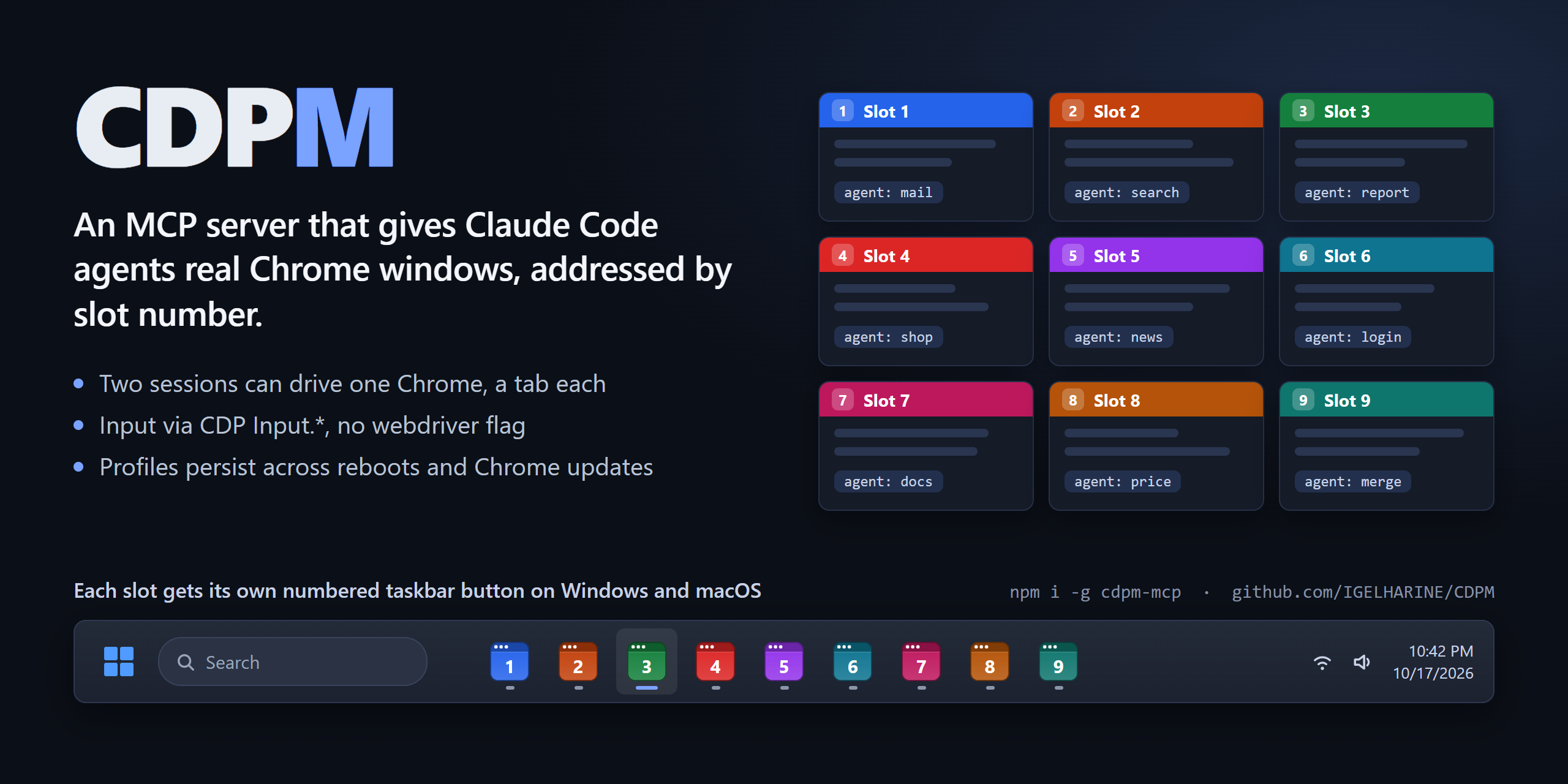
CDPM은 Chrome을 최대 30개("슬롯") 정해진 디버깅 포트에 띄워 두고, 여러 Claude Code 세션과 서브에이전트가 번호만으로 조종하게 해 주는 MCP 서버예요. *"3번 켜줘"*, *"1번에서 로그인하고 2번에서 양식 채워줘"* 식으로 써요. 슬롯마다 프로필이 따로 있는 평범한 Chrome이라, 로그인이 다음에도 유지되고 사람이 쓰는 브라우저와 똑같아요.
|
|
8
|
+
|
|
9
|
+
여러 Claude 에이전트를 로그인된 업무용 웹사이트에 동시에 붙여 쓰다가 만들게 됐어요. 정작 어려운 건 버튼 누르기가 아니라, 여러 세션이 브라우저를 나눠 쓰고, 브라우저가 꺼지지 않게 하고, Chrome 자체가 일을 막을 때 알아채는 쪽이었어요.
|
|
10
|
+
|
|
11
|
+
## 시연
|
|
12
|
+
|
|
13
|
+
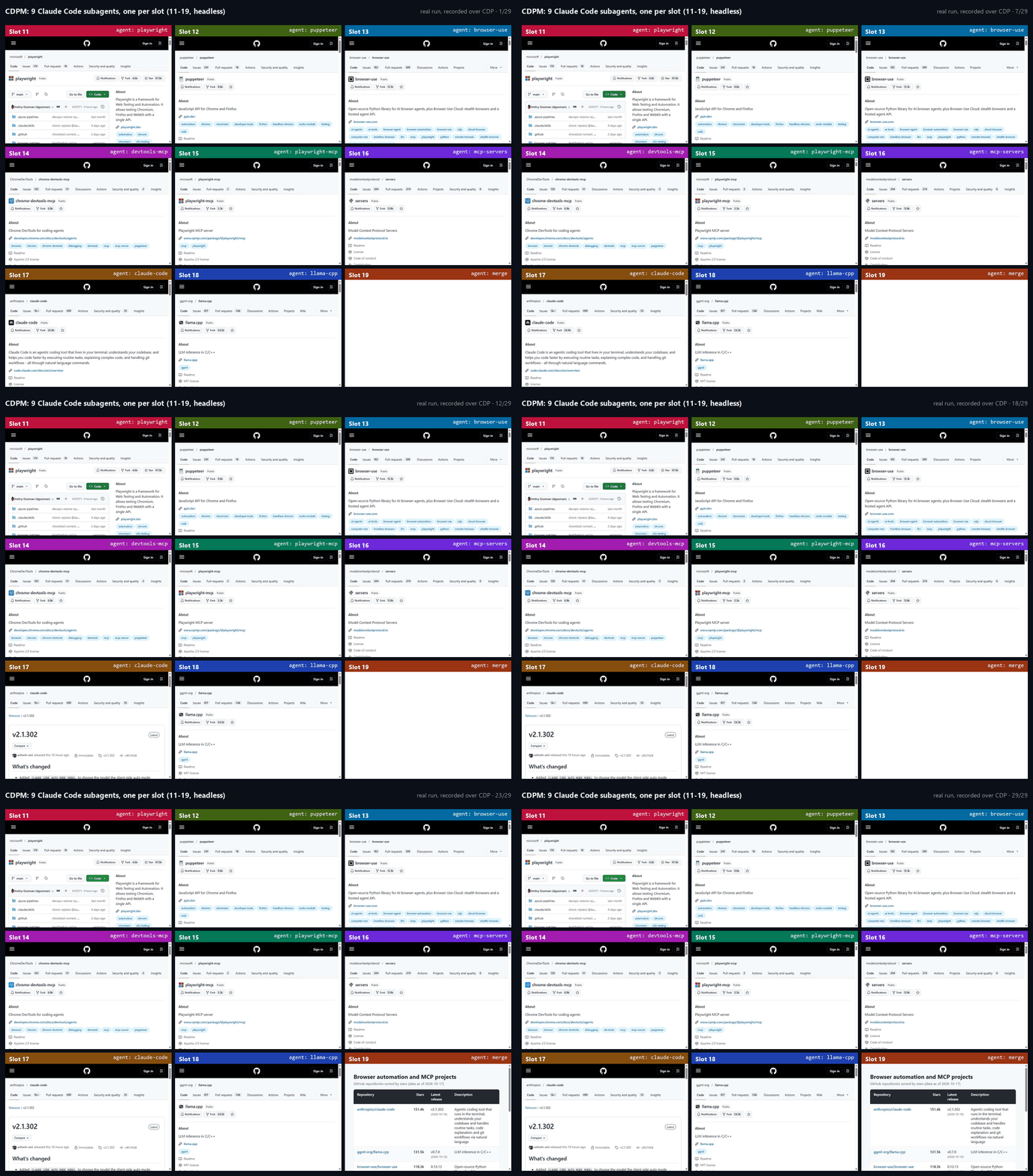
헤드리스 슬롯 11~19번에 서브에이전트 9개. 11~18번은 각자 GitHub 저장소 페이지를 읽어 `slot_send`로 19번에 숫자를 보내고, 19번은 `slot_inbox`로 기다렸다가 비교표를 만들어 열어요. 실제 실행을 CDP로 녹화했고, 걸린 시간은 약 45초예요.
|
|
14
|
+
|
|
15
|
+
|
|
16
|
+
|
|
17
|
+
## 무엇이 다른가
|
|
18
|
+
|
|
19
|
+
- **번호로 부르는 공유 브라우저.** 슬롯 *N*은 포트 `14049 + N`을 쓰고 프로필 폴더가 따로 있어요. 세션이 브라우저를 소유하지 않고 슬롯 번호로 불러 써요. 두 세션이 한 슬롯의 다른 탭에서 동시에 일할 수 있고, 명령은 탭마다 줄을 세워서 두 에이전트가 같은 탭에 입력해도 섞이지 않아요. 통합 테스트로 확인하고, 세션 3개가 한 슬롯을 600바퀴 함께 써도 메모리·탭·잠금 파일이 늘지 않는 오래 쓰기 시험도 있어요.
|
|
20
|
+
- **CDP로 직접 다루는 평범한 Chrome.** Playwright·Puppeteer를 쓰지 않아요. 클릭과 키 입력은 `Input.dispatch*Event`로 보내서 페이지에는 진짜 이벤트로 보여요. Chrome을 `--enable-automation` 없이 띄워서 `navigator.webdriver`가 `false`이고, `Runtime.enable`을 쓰지 않으며, 페이지를 읽는 스크립트는 모두 페이지가 볼 수 없는 분리된 공간(isolated world)에서 돌아요. 스냅샷은 Shadow DOM 안쪽까지 읽어요. 흔한 자동화 흔적이 없다는 뜻이지, 접속 빈도나 IP로 막는 것까지 피한다는 뜻은 아니에요. 슬롯 9개가 동시에 구글 검색을 하면 로봇 확인이 떠요.
|
|
21
|
+
- **흔한 고장에 버텨요.** 슬롯은 따로 떨어진 프로세스로 띄워서 VS Code나 Claude Code를 닫아도(줄기째 강제 종료돼도) 살아 있어요. 재부팅 뒤에는 슬롯 포트에 응답하는 Chrome에 다시 붙고, 작업표시줄 아이콘을 붙이기 전에 프로세스 번호를 다시 확인해요. 슬롯이 켜진 동안 Chrome이 업데이트되면(Windows는 `chrome.exe`를 바꿔치기해서 옛 Chrome이 화면 프로세스를 못 띄우고 새 탭이 빈 채로 멈춰요) 그 슬롯을 새 버전으로 다시 켜고 탭을 다시 열어요.
|
|
22
|
+
- **에이전트끼리 협업.** `slot_send` / `slot_inbox`로 슬롯 번호와 에이전트 이름을 주소 삼아 메시지를 주고받아요. 디스크에 저장돼서 Chrome을 다시 켜도 남고, 기다리던 에이전트는 메시지가 오는 즉시 깨어나요.
|
|
23
|
+
- **페이지 밖 브라우저 화면도 처리.** JavaScript 알림창은 알려 주고 `browser_dialog`로 처리해요. Windows에서는 권한 말풍선("이 기기의 다른 앱 및 서비스에 액세스", 알림, 위치 등)을 UI Automation으로 찾아 `browser_permission`으로 답해요. 에이전트 조작으로 뜨는 파일 선택·인쇄 창은 OS 창을 띄우지 않고 가로채요.
|
|
24
|
+
|
|
25
|
+
## 빠른 시작
|
|
26
|
+
|
|
27
|
+
```sh
|
|
28
|
+
npm install -g cdpm-mcp
|
|
29
|
+
cdpm install
|
|
30
|
+
```
|
|
31
|
+
|
|
32
|
+
Claude Code를 다시 시작하고, 예를 들어 *"1번 슬롯 창으로 켜서 github.com 열어줘"*라고 해 보세요.
|
|
33
|
+
|
|
34
|
+
## 다른 브라우저 MCP와 비교
|
|
35
|
+
|
|
36
|
+
| | CDPM | Playwright MCP | Chrome DevTools MCP |
|
|
37
|
+
| --- | --- | --- | --- |
|
|
38
|
+
| 브라우저 | 번호 슬롯 최대 30개, 모든 세션이 공유 | 서버 프로세스마다 하나 | 서버 프로세스마다 하나 |
|
|
39
|
+
| 여러 세션이 한 브라우저를 함께 | 됨: 탭별 줄 세우기, 남의 탭 경고 | 목표가 아님 | 목표가 아님 |
|
|
40
|
+
| 로그인 유지 | 됨, 슬롯마다 프로필 | 됨, 프로필 하나 (`--isolated`면 매번 새로) | 됨, 프로필 하나 (`--isolated`면 매번 새로) |
|
|
41
|
+
| 조작 방식 | CDP 직접 | Playwright | Puppeteer |
|
|
42
|
+
| 에이전트끼리 메시지 | 기본 제공 | 없음 | 없음 |
|
|
43
|
+
| 슬롯별 작업표시줄 아이콘 | Windows 작업표시줄, macOS Dock | 없음 | 없음 |
|
|
44
|
+
| 다른 브라우저 | Chrome만 | Chromium, Firefox, WebKit | Chrome만 |
|
|
45
|
+
|
|
46
|
+
두 도구 모두 좋은 도구예요. Firefox·WebKit이 필요하면 Playwright MCP, 성능 기록이나 DevTools 패널이 필요하면 Chrome DevTools MCP가 더 맞아요. 두 도구 칸은 2026년 10월 기준 각 문서를 바탕으로 정리했어요.
|
|
47
|
+
|
|
48
|
+
## 보안
|
|
10
49
|
|
|
11
|
-
|
|
50
|
+
슬롯 포트는 `127.0.0.1`에서만 열리지만, 이 PC의 다른 프로그램은 누구나 접속해서 그 슬롯의 로그인된 세션으로 조작할 수 있어요. 켜진 슬롯은 잠기지 않은 브라우저처럼 다뤄 주세요. 믿을 수 없는 프로그램을 돌리는 동안에는 중요한 계정을 슬롯에 로그인해 두지 마세요. 꺼진 슬롯도 프로필은 디스크에 남아요(`cdpm purge N`으로 지워요).
|
|
51
|
+
|
|
52
|
+
## 자세히
|
|
12
53
|
|
|
13
54
|
- **순수 CDP**: Playwright, Puppeteer, 우회 패치를 쓰지 않아요. 디버깅 포트만 연 일반 Chrome에 진짜 입력 이벤트를 보내요.
|
|
14
55
|
- **번호 슬롯**: 슬롯 N은 CDP 포트 `14049 + N`을 써요 (1번 = 14050 … 30번 = 14079). 흔히 쓰이는 9222와 부딪히지 않도록 고른 구간이고, 이 구간을 다른 프로그램이 쓰면 환경변수 `CDPM_PORT_BASE`로 시작 번호를 옮길 수 있어요. 슬롯마다 프로필 폴더가 따로 있어서 로그인이 슬롯별로 유지돼요. 범위 밖 포트는 다루지 않아요.
|
|
@@ -31,6 +72,12 @@
|
|
|
31
72
|
|
|
32
73
|
## 설치
|
|
33
74
|
|
|
75
|
+
> **설치를 부탁받았다면 (Claude·AI 에이전트용)** 아래 순서대로 하세요.
|
|
76
|
+
> 1. Node.js 22 이상과 Google Chrome이 있는지 확인해요. 없으면 사용자에게 알리고 멈춰요.
|
|
77
|
+
> 2. `npm install -g cdpm-mcp@latest` 를 실행해요 (이미 설치돼 있어도 그대로 실행 → 최신으로 업데이트).
|
|
78
|
+
> 3. `cdpm install` 을 실행해요 (`cdpm`을 못 찾으면 `node "$(npm root -g)/cdpm-mcp/dist/cli.js" install`). Claude Code 등록과 상태줄·규칙·서브에이전트·권한 설정을 한 번에 해요. 예전에 git으로 받아 등록해 둔 것도 새 위치로 바꿔요.
|
|
79
|
+
> 4. Chrome 슬롯을 켜지 말고, 질문하거나 내부 설명을 덧붙이지 마세요. 성공하면 "CDPM <버전> 설치 완료. Claude Code를 다시 시작하면 쓸 수 있어요." 한 줄만 답해요 (버전은 `cdpm --version`). 실패하면 어느 단계에서 왜 실패했는지만 말해요.
|
|
80
|
+
|
|
34
81
|
```sh
|
|
35
82
|
npm install -g cdpm-mcp
|
|
36
83
|
cdpm install
|
|
@@ -254,6 +301,7 @@ Windows `%LOCALAPPDATA%\cdpm\`, macOS `~/Library/Application Support/cdpm/`, Lin
|
|
|
254
301
|
- 실행 인자는 `--remote-debugging-port`, `--user-data-dir`, `--no-first-run`, `--no-default-browser-check`, `--window-name=N번`뿐이에요 (헤드리스 요청 시 `--headless`, 사용자가 프록시를 부탁했을 때만 `--proxy-server`와 `--force-webrtc-ip-handling-policy=disable_non_proxied_udp` 추가). 헤드리스 Chrome은 User-Agent에 `HeadlessChrome`이 그대로 찍혀요.
|
|
255
302
|
- 창 크기·위치·상태, 뷰포트, 확대 비율을 바꾸지 않아요. 페이지가 클릭 때문에 전체 화면이 되면 바로 해제해요.
|
|
256
303
|
- `Runtime.enable`을 쓰지 않고, 판단용 스크립트는 전부 isolated world에서 실행해요.
|
|
304
|
+
- 슬롯이 켜져 있는 동안 Chrome이 업데이트되면(Windows는 `chrome.exe`를 바꿔치기) 옛 버전 Chrome이 화면 프로세스를 띄우지 못해 새 탭이 빈 채로 멈춰요. CDPM이 실행 중인 버전과 설치된 버전을 비교해서(슬롯에 붙을 때, 그리고 10초마다 파일 정보만 봐서 `chrome.exe`가 바뀌었을 때) 다르면 그 슬롯을 새 버전으로 다시 켜고 탭을 순서대로 다시 열어요(로그인 유지, 프록시 슬롯은 알리기만).
|
|
257
305
|
- Chrome 권한 요청 말풍선은 페이지가 아니라 브라우저 화면이라 스냅샷·스크린샷에 안 보이고 페이지 도구로 누를 수 없는데, 페이지는 그 답을 기다리며 멈춰요. Windows에서는 CDPM이 이걸 찾아서(슬롯 Chrome 창에 딸린 작은 창 중 제목에 탭의 사이트 주소가 들어간 것. 번역·비밀번호 저장 말풍선은 걸러지고 Chrome 언어와 상관없음) 결과 머리말로 알리고, `browser_wait` 중이면 뜨는 즉시 멈추고, Claude가 `browser_permission`으로 버튼을 눌러요(UI Automation. 창이 최소화되거나 가려져 있어도 됨). 사용자가 시키지 않은 카메라·마이크·위치 허용은 먼저 물어봐요.
|
|
258
306
|
- 알림창(alert/confirm/prompt/beforeunload)을 정해진 규칙으로 자동 처리하지 않아요. 떠 있으면 알리고, Claude가 내용을 보고 `browser_dialog`로 직접 확인·취소해요. 사용자가 시키지 않은 되돌릴 수 없는 일(결제·삭제 등)을 확정하는 창일 때만 먼저 물어봐요.
|
|
259
307
|
- 거부하는 동작: `mailto:`·`tel:`·앱 전용 주소로 클릭·이동·켜면서 열기·새 탭 열기(다른 프로그램 실행), `<select>` 클릭(목록 창), `Ctrl+C/X/V`·`Shift+Insert`(사용자 클립보드)
|
package/README.md
CHANGED
|
@@ -1,14 +1,55 @@
|
|
|
1
|
-
# CDPM
|
|
1
|
+
# CDPM
|
|
2
2
|
|
|
3
3
|
[한국어 README](README.ko.md)
|
|
4
4
|
|
|
5
|
-
|
|
6
|
-
|
|
7
|
-
|
|
8
|
-
|
|
9
|
-
|
|
5
|
+

|
|
6
|
+
|
|
7
|
+
CDPM is an MCP server that keeps up to 30 Chrome instances ("slots") on fixed debugging ports and lets any number of Claude Code sessions and subagents drive them by number: *"open slot 3"*, *"log in on slot 1, then fill the form in slot 2"*. Each slot is an ordinary Chrome with its own profile, so logins stick between runs and the browser is the same one you would use by hand.
|
|
8
|
+
|
|
9
|
+
It grew out of running several Claude agents against logged-in web apps at once, where the hard parts were not clicking buttons but sharing browsers between sessions, keeping them alive, and noticing when Chrome itself got in the way.
|
|
10
|
+
|
|
11
|
+
## Demo
|
|
12
|
+
|
|
13
|
+
Nine subagents on slots 11-19 (headless). Slots 11-18 each read a GitHub repository page and send the numbers to slot 19 with `slot_send`; slot 19 waits on `slot_inbox`, writes a comparison table and opens it. Recorded over CDP from a real run: about 45 seconds of wall time, one frame per pass over the nine slots.
|
|
14
|
+
|
|
15
|
+

|
|
16
|
+
|
|
17
|
+
## What is different
|
|
18
|
+
|
|
19
|
+
- **Shared, numbered browsers.** Slot *N* listens on port `14049 + N` and keeps its profile in its own folder. Sessions don't own a browser; they address a slot. Two sessions can work in the same slot on different tabs: commands are queued per tab, so two agents typing into one tab don't interleave. This is covered by an integration test and by a long test where three sessions share one slot for 600 rounds without memory, tab or lock-file growth.
|
|
20
|
+
- **Plain Chrome over CDP.** No Playwright or Puppeteer. Clicks and keys are sent with `Input.dispatch*Event`, so pages receive trusted events. Chrome is started without `--enable-automation`, so `navigator.webdriver` stays `false`. CDPM never calls `Runtime.enable`, and every script it runs to read the page lives in an isolated world the page cannot see; snapshots pierce shadow roots. That removes the usual automation fingerprints. It does not get you past rate limits or IP reputation: nine slots searching Google at the same moment will still get a CAPTCHA.
|
|
21
|
+
- **Survives the boring failures.** Slots are started detached, so closing VS Code or Claude Code (even with a process-tree kill) leaves them running. After a reboot, CDPM re-attaches to whatever Chrome answers on the slot ports and re-checks its process ID before touching taskbar icons. If Chrome updates itself while a slot is running (on Windows the update swaps `chrome.exe`, the old browser can no longer start renderers, and new tabs hang blank), CDPM restarts that slot on the new version and reopens its tabs.
|
|
22
|
+
- **Agents can coordinate.** `slot_send` / `slot_inbox` deliver messages addressed by slot and agent name. They are stored on disk, so they survive a Chrome restart, and a waiting agent wakes as soon as one arrives.
|
|
23
|
+
- **Browser UI the page can't see.** JavaScript dialogs are reported and answered with `browser_dialog`. On Windows, permission bubbles ("access other apps and services on this device", notifications, location) are detected through UI Automation and answered with `browser_permission`. File pickers and print dialogs triggered by an agent's action are intercepted instead of opening OS windows.
|
|
24
|
+
|
|
25
|
+
## Quick start
|
|
26
|
+
|
|
27
|
+
```sh
|
|
28
|
+
npm install -g cdpm-mcp
|
|
29
|
+
cdpm install
|
|
30
|
+
```
|
|
31
|
+
|
|
32
|
+
Restart Claude Code and ask for a slot, for example: *"Open slot 1 with a window and go to github.com."*
|
|
33
|
+
|
|
34
|
+
## Compared with other browser MCP servers
|
|
35
|
+
|
|
36
|
+
| | CDPM | Playwright MCP | Chrome DevTools MCP |
|
|
37
|
+
| --- | --- | --- | --- |
|
|
38
|
+
| Browsers | up to 30 numbered slots shared by every session | one per server process | one per server process |
|
|
39
|
+
| Several sessions on one browser | yes: per-tab queues, ownership warnings | not a design goal | not a design goal |
|
|
40
|
+
| Logins kept between runs | yes, one profile per slot | yes, one persistent profile (`--isolated` for a fresh one) | yes, one persistent profile (`--isolated` for a fresh one) |
|
|
41
|
+
| Driven by | raw CDP | Playwright | Puppeteer |
|
|
42
|
+
| Messages between agents | built in | no | no |
|
|
43
|
+
| Per-slot taskbar icons | Windows taskbar, macOS Dock | no | no |
|
|
44
|
+
| Other browsers | Chrome only | Chromium, Firefox, WebKit | Chrome only |
|
|
45
|
+
|
|
46
|
+
The other two are good tools and the better choice if you need Firefox or WebKit (Playwright) or performance traces and DevTools panels (Chrome DevTools MCP). Their columns reflect their documentation as of October 2026.
|
|
47
|
+
|
|
48
|
+
## Security
|
|
10
49
|
|
|
11
|
-
|
|
50
|
+
Slot ports listen on `127.0.0.1` only, but any process on this machine can connect to them and act with that slot's logged-in sessions. Treat a running slot like an unlocked browser: don't leave sensitive accounts logged in on slots while running software you don't trust. Closed slots keep their profiles on disk (`cdpm purge N` deletes one).
|
|
51
|
+
|
|
52
|
+
## Details
|
|
12
53
|
|
|
13
54
|
- **Pure CDP.** No Playwright, no Puppeteer, no stealth patches. A normal Chrome with a debugging port, driven with real input events.
|
|
14
55
|
- **Numbered slots.** Slot *N* uses CDP port `14049 + N` (slot 1 = 14050 … slot 30 = 14079) and its own profile folder. The range avoids the common default 9222; set `CDPM_PORT_BASE` to move it if something else uses those ports. Ports outside that range are not managed.
|
|
@@ -31,6 +72,12 @@ An MCP server that runs **Chrome slots 1–30** over the Chrome DevTools Protoco
|
|
|
31
72
|
|
|
32
73
|
## Install
|
|
33
74
|
|
|
75
|
+
> **Asked to install this? (for Claude / AI agents)** Do these steps in order.
|
|
76
|
+
> 1. Check that Node.js 22+ and Google Chrome are installed. If not, tell the user and stop.
|
|
77
|
+
> 2. Run `npm install -g cdpm-mcp@latest` (also when already installed: this updates it).
|
|
78
|
+
> 3. Run `cdpm install` (if `cdpm` isn't found: `node "$(npm root -g)/cdpm-mcp/dist/cli.js" install`). It registers CDPM with Claude Code and sets up the status line, rules, subagent and permissions; an older git-clone registration is switched to the new location.
|
|
79
|
+
> 4. Do not launch any Chrome slot, ask questions, or explain internals. On success reply with exactly one line in the user's language, e.g. "CDPM <version> installed. Restart Claude Code to use it." (version: `cdpm --version`). If a step failed, say only which step and why.
|
|
80
|
+
|
|
34
81
|
```sh
|
|
35
82
|
npm install -g cdpm-mcp
|
|
36
83
|
cdpm install
|
|
@@ -186,6 +233,7 @@ Data lives in `%LOCALAPPDATA%\cdpm\` on Windows `~/Library/Application Support/c
|
|
|
186
233
|
- Launch flags are only `--remote-debugging-port`, `--user-data-dir`, `--no-first-run`, `--no-default-browser-check`, `--window-name` (plus `--headless` on request, and `--proxy-server` + `--force-webrtc-ip-handling-policy=disable_non_proxied_udp` only when the user asks for a proxy; headless Chrome still reports `HeadlessChrome`).
|
|
187
234
|
- Never changes window size/position/state, viewport, or zoom; if a click makes the page fullscreen, it is exited immediately.
|
|
188
235
|
- No `Runtime.enable`; helper scripts run in an isolated world.
|
|
236
|
+
- If Chrome updates itself while a slot is running (Windows swaps `chrome.exe`), the old browser can no longer start renderers, so new tabs hang blank. CDPM compares the running version with the installed one (on attach, and whenever the `chrome.exe` file changes, checked every 10s from file info only) and restarts that slot on the new version, reopening its tabs in order (logins are kept; proxy slots are only reported).
|
|
189
237
|
- Chrome permission bubbles are browser UI, so they never show up in snapshots or screenshots and page tools can't click them, while the page waits on them. On Windows, CDPM spots them (a small window owned by the slot's Chrome whose title contains a tab's host, so translate or password bubbles are ignored and the Chrome language doesn't matter), warns in the result header, stops `browser_wait` as soon as one appears, and lets Claude press a button with `browser_permission` (UI Automation; works while the window is minimized or covered). Claude asks before allowing camera, microphone or location the user didn't ask for.
|
|
190
238
|
- Dialogs (alert/confirm/prompt/beforeunload) are reported, never handled automatically. Claude reads the message and handles it itself with `browser_dialog` (accept or dismiss); it asks the user only when the dialog would confirm something irreversible the user did not ask for (a payment, a deletion).
|
|
191
239
|
- Refuses: `mailto:`/`tel:`/app-scheme links and addresses in click, navigate, launch start pages and new tabs (would launch other programs), clicking `<select>` (popup), `Ctrl+C/X/V`/`Shift+Insert` (user clipboard). Downloads triggered by navigation are reported with the file name.
|
|
@@ -0,0 +1,76 @@
|
|
|
1
|
+
// 디스크에 설치된 Chrome 실행 파일의 버전. 실행 중인 슬롯 Chrome의 버전과 다르면 "실행 중에 업데이트된" 것이다:
|
|
2
|
+
// Windows는 업데이트가 chrome.exe를 새 버전으로 바꿔치기하는데, 옛 버전으로 도는 본체가 새 탭용 렌더러를 띄울 때
|
|
3
|
+
// 바뀐 chrome.exe를 실행해 버전이 맞지 않아 렌더러가 바로 죽는다 → 새 탭·다른 사이트로 이동한 탭이 빈 채로 멈춘다 (실측).
|
|
4
|
+
import { execFileSync } from 'node:child_process';
|
|
5
|
+
import fs from 'node:fs';
|
|
6
|
+
import path from 'node:path';
|
|
7
|
+
import { findChrome } from './finder.js';
|
|
8
|
+
/** Windows 실행 파일(PE)의 버전 정보에서 ProductVersion 값을 읽는다 (예: "155.0.8059.82"). */
|
|
9
|
+
export function peProductVersion(buf) {
|
|
10
|
+
const key = Buffer.from('ProductVersion\0', 'utf16le');
|
|
11
|
+
for (let at = buf.indexOf(key); at >= 0; at = buf.indexOf(key, at + 2)) {
|
|
12
|
+
let p = at + key.length;
|
|
13
|
+
while (p % 4)
|
|
14
|
+
p++; // 값은 4바이트 경계에서 시작한다
|
|
15
|
+
let end = p;
|
|
16
|
+
while (end + 1 < buf.length && end - p < 128 && (buf[end] | buf[end + 1]) !== 0)
|
|
17
|
+
end += 2;
|
|
18
|
+
const v = buf.toString('utf16le', p, end).trim();
|
|
19
|
+
if (/^\d+(\.\d+){1,3}$/.test(v))
|
|
20
|
+
return v;
|
|
21
|
+
}
|
|
22
|
+
return undefined;
|
|
23
|
+
}
|
|
24
|
+
let cache;
|
|
25
|
+
/**
|
|
26
|
+
* 설치된 Chrome 실행 파일의 "정체" (경로·파일 번호·크기·수정 시각). 파일 정보만 보므로 아주 가볍다.
|
|
27
|
+
* 바뀌었을 때만 버전을 다시 읽고 슬롯들과 비교하면 된다.
|
|
28
|
+
*/
|
|
29
|
+
export function installedChromeKey() {
|
|
30
|
+
if (process.env.CDPM_TEST_INSTALLED_VERSION)
|
|
31
|
+
return `test|${process.env.CDPM_TEST_INSTALLED_VERSION}`;
|
|
32
|
+
try {
|
|
33
|
+
const exe = findChrome();
|
|
34
|
+
const st = fs.statSync(exe, { bigint: true });
|
|
35
|
+
return `${exe}|${st.ino}|${st.size}|${st.mtimeMs}`;
|
|
36
|
+
}
|
|
37
|
+
catch {
|
|
38
|
+
return undefined;
|
|
39
|
+
}
|
|
40
|
+
}
|
|
41
|
+
/**
|
|
42
|
+
* 설치된 Chrome 버전. 실행 파일이 바뀔 때만 다시 읽는다. 바꿔치기는 이름만 바꾸는 것이라 수정 시각이 그대로일 수 있어서
|
|
43
|
+
* 파일 번호(ino)·크기까지 함께 본다. 알 수 없으면 undefined (그때는 비교하지 않는다).
|
|
44
|
+
*/
|
|
45
|
+
export function installedChromeVersion() {
|
|
46
|
+
if (process.env.CDPM_TEST_INSTALLED_VERSION)
|
|
47
|
+
return process.env.CDPM_TEST_INSTALLED_VERSION; // 시험용
|
|
48
|
+
try {
|
|
49
|
+
const exe = findChrome();
|
|
50
|
+
const key = installedChromeKey();
|
|
51
|
+
if (!key)
|
|
52
|
+
return undefined;
|
|
53
|
+
if (cache?.key === key)
|
|
54
|
+
return cache.version;
|
|
55
|
+
let version;
|
|
56
|
+
if (process.platform === 'win32')
|
|
57
|
+
version = peProductVersion(fs.readFileSync(exe));
|
|
58
|
+
else if (process.platform === 'darwin') {
|
|
59
|
+
const plist = fs.readFileSync(path.join(path.dirname(exe), '..', 'Info.plist'), 'utf8');
|
|
60
|
+
version = /<key>CFBundleShortVersionString<\/key>\s*<string>([\d.]+)<\/string>/.exec(plist)?.[1];
|
|
61
|
+
}
|
|
62
|
+
else {
|
|
63
|
+
const out = execFileSync(exe, ['--version'], { encoding: 'utf8', timeout: 5000, stdio: ['ignore', 'pipe', 'ignore'] });
|
|
64
|
+
version = /(\d+(?:\.\d+){1,3})/.exec(out)?.[1];
|
|
65
|
+
}
|
|
66
|
+
cache = { key, version };
|
|
67
|
+
return version;
|
|
68
|
+
}
|
|
69
|
+
catch {
|
|
70
|
+
return undefined;
|
|
71
|
+
}
|
|
72
|
+
}
|
|
73
|
+
/** /json/version의 Browser 값("Chrome/154.0.8037.98", "HeadlessChrome/...")에서 버전만 */
|
|
74
|
+
export function runningVersion(browser) {
|
|
75
|
+
return /\/(\d+(?:\.\d+){1,3})/.exec(browser ?? '')?.[1];
|
|
76
|
+
}
|
package/dist/service.js
CHANGED
|
@@ -1,6 +1,7 @@
|
|
|
1
1
|
// 슬롯 실행 보장, 탭 목록과 기록부 맞추기, 행동 기록.
|
|
2
2
|
import { launchChrome } from './chrome/launcher.js';
|
|
3
3
|
import { describeProxy } from './chrome/proxy.js';
|
|
4
|
+
import { installedChromeKey, installedChromeVersion, runningVersion } from './chrome/version.js';
|
|
4
5
|
import { browserConnection, dropSlotConnections, hasLiveBrowserConnection, pageSession } from './cdp/sessions.js';
|
|
5
6
|
import { listPages, probe } from './cdp/targets.js';
|
|
6
7
|
import { CdpmError } from './errors.js';
|
|
@@ -42,7 +43,7 @@ async function probeSure(slot) {
|
|
|
42
43
|
}
|
|
43
44
|
return p;
|
|
44
45
|
}
|
|
45
|
-
export async function attachSlot(slot) {
|
|
46
|
+
export async function attachSlot(slot, opts = {}) {
|
|
46
47
|
// 빠른 길: 이 프로세스의 연결이 살아 있고 기록된 Chrome도 살아 있으면 포트에 다시 묻지 않는다.
|
|
47
48
|
const known = readRegistry().slots[String(slot)];
|
|
48
49
|
// 기록된 번호는 이 프로세스가 확인한 것일 때만 믿는다 (다른 세션이 다시 켰거나 재부팅 뒤 옛 번호일 수 있음)
|
|
@@ -81,7 +82,10 @@ export async function attachSlot(slot) {
|
|
|
81
82
|
confirmedPid.set(slot, actual);
|
|
82
83
|
applyTaskbar(slot, pid);
|
|
83
84
|
if (DOCK_SUPPORTED && !rec?.headless)
|
|
84
|
-
void applyDock(slot, pid);
|
|
85
|
+
void applyDock(slot, pid);
|
|
86
|
+
// 실행 중에 Chrome이 업데이트됐으면(새 탭이 안 열림) 새 버전으로 다시 켠다
|
|
87
|
+
if (!opts.inLock && p.state === 'chrome')
|
|
88
|
+
await restartIfUpdated(slot, p.version.Browser); // macOS만
|
|
85
89
|
}
|
|
86
90
|
function portBusy(slot, detail) {
|
|
87
91
|
return new CdpmError(`Slot ${slot} port ${portOf(slot)} is used by a non-Chrome program (${detail}). Close it or use another slot.`);
|
|
@@ -96,7 +100,7 @@ async function launchSlotLocked(slot, agent, opts) {
|
|
|
96
100
|
if (p.state === 'other')
|
|
97
101
|
throw portBusy(slot, p.detail);
|
|
98
102
|
if (p.state === 'chrome') {
|
|
99
|
-
await attachSlot(slot);
|
|
103
|
+
await attachSlot(slot, { inLock: true });
|
|
100
104
|
return { launched: false };
|
|
101
105
|
}
|
|
102
106
|
// 방금 끈 Chrome은 포트를 닫은 뒤에도 잠깐 살아서 프로필을 붙잡고 있다. 그때 새로 켜면 새 Chrome이
|
|
@@ -138,6 +142,114 @@ export async function freeSlots(n) {
|
|
|
138
142
|
export async function firstFreeSlot() {
|
|
139
143
|
return (await freeSlots(1))[0];
|
|
140
144
|
}
|
|
145
|
+
/** 실행 중 업데이트로 다시 켠 버전 쌍 (슬롯 → "옛>새"). 다시 켜도 버전이 안 맞으면 같은 쌍으로 또 켜지 않는다 (무한 반복 방지) */
|
|
146
|
+
const updateRestarted = new Map();
|
|
147
|
+
/** 슬롯 Chrome(/json/version의 Browser)이 디스크에 설치된 Chrome과 버전이 다르면 두 버전. 알 수 없으면 undefined */
|
|
148
|
+
export function staleVersion(browser) {
|
|
149
|
+
const running = runningVersion(browser);
|
|
150
|
+
const installed = installedChromeVersion();
|
|
151
|
+
return running && installed && running !== installed ? { running, installed } : undefined;
|
|
152
|
+
}
|
|
153
|
+
const isBlankUrl = (u) => !u || u === 'about:blank' || /^chrome:\/\/(newtab|new-tab-page)\/?$/.test(u) || u.startsWith('chrome-search://');
|
|
154
|
+
async function setNotice(slot, text) {
|
|
155
|
+
await updateRegistry((r) => {
|
|
156
|
+
const s = r.slots[String(slot)];
|
|
157
|
+
if (s)
|
|
158
|
+
s.notice = { text, at: nowIso() };
|
|
159
|
+
}).catch(() => undefined);
|
|
160
|
+
}
|
|
161
|
+
/**
|
|
162
|
+
* 슬롯 Chrome이 실행 중에 업데이트됐으면(디스크의 Chrome과 버전이 다름) 새 버전으로 다시 켠다. 옛 버전 본체는 바뀐
|
|
163
|
+
* 실행 파일로 렌더러를 띄우지 못해 새 탭·다른 사이트로 넘어간 탭이 빈 채로 멈추기 때문이다. 열려 있던 탭 주소를 순서대로
|
|
164
|
+
* 다시 열고, 창 모드·헤드리스는 그대로 둔다 (로그인은 프로필에 남음). 프록시 슬롯은 접속 정보가 기록에 없어 다시 켜지
|
|
165
|
+
* 않고 알리기만 한다. 다시 켰으면 true.
|
|
166
|
+
*/
|
|
167
|
+
export async function restartIfUpdated(slot, browser) {
|
|
168
|
+
const first = staleVersion(browser);
|
|
169
|
+
if (!first)
|
|
170
|
+
return false;
|
|
171
|
+
const pair = `${first.running}>${first.installed}`;
|
|
172
|
+
if (updateRestarted.get(slot) === pair)
|
|
173
|
+
return false;
|
|
174
|
+
updateRestarted.set(slot, pair);
|
|
175
|
+
return withSlotLock(slot, async () => {
|
|
176
|
+
// 잠금을 기다리는 동안 다른 세션이 이미 다시 켰을 수 있다
|
|
177
|
+
const p = await probe(slot, 1500);
|
|
178
|
+
const stale = p.state === 'chrome' ? staleVersion(p.version.Browser) : undefined;
|
|
179
|
+
if (!stale)
|
|
180
|
+
return false;
|
|
181
|
+
const rec = readRegistry().slots[String(slot)];
|
|
182
|
+
const from = `${stale.running} → ${stale.installed}`;
|
|
183
|
+
if (rec?.proxy) {
|
|
184
|
+
await setNotice(slot, `Slot ${slot} Chrome was updated while running (${from}), so new tabs and cross-site navigations may hang. It uses a proxy, so CDPM did not restart it: ask the user to restart it (browser_close, then browser_launch with the same proxy).`);
|
|
185
|
+
return false;
|
|
186
|
+
}
|
|
187
|
+
const tabs = await syncTabs(slot).catch(() => []);
|
|
188
|
+
const urls = tabs.map((t) => t.url).filter((u) => !isBlankUrl(u));
|
|
189
|
+
const browserConn = await browserConnection(slot);
|
|
190
|
+
await browserConn.send('Browser.close', {}, 5000).catch(() => undefined);
|
|
191
|
+
for (let i = 0; i < 25 && (await probe(slot, 500)).state === 'chrome'; i++)
|
|
192
|
+
await sleep(200);
|
|
193
|
+
// 포트가 닫혀도 프로세스는 잠깐 더 살아 프로필을 붙잡는다. 끝날 때까지 기다려야 다시 켤 수 있다.
|
|
194
|
+
for (let i = 0; rec?.pid && i < 50 && pidAlive(rec.pid); i++)
|
|
195
|
+
await sleep(100);
|
|
196
|
+
await forgetSlot(slot);
|
|
197
|
+
const launched = await launchChrome(slot, { headless: rec?.headless, url: urls[0] });
|
|
198
|
+
const pid = launched.pid ?? (await browserPid(slot));
|
|
199
|
+
if (pid)
|
|
200
|
+
confirmedPid.set(slot, pid);
|
|
201
|
+
const text = `Slot ${slot} Chrome had been updated while running (${from}), so new tabs could not load. CDPM restarted it on the new version` +
|
|
202
|
+
`${urls.length ? ` and reopened ${urls.length} tab(s)` : ''}. Logins are kept, but tab IDs changed and unsaved page input was lost.`;
|
|
203
|
+
await updateRegistry((r) => {
|
|
204
|
+
r.slots[String(slot)] = {
|
|
205
|
+
...newSlotRecord(rec?.launchedBy ?? EXTERNAL, nowIso(), pid),
|
|
206
|
+
...(rec?.headless ? { headless: true } : {}),
|
|
207
|
+
notice: { text, at: nowIso() },
|
|
208
|
+
};
|
|
209
|
+
});
|
|
210
|
+
const conn = await browserConnection(slot).catch(() => undefined);
|
|
211
|
+
for (const u of urls.slice(1))
|
|
212
|
+
await conn?.send('Target.createTarget', { url: u, background: true }).catch(() => undefined);
|
|
213
|
+
await syncTabs(slot).catch(() => undefined);
|
|
214
|
+
for (let i = 0; !rec?.headless && i < 50; i++) {
|
|
215
|
+
if (applyTaskbar(slot, pid) > 0)
|
|
216
|
+
break;
|
|
217
|
+
await sleep(100);
|
|
218
|
+
}
|
|
219
|
+
return true;
|
|
220
|
+
});
|
|
221
|
+
}
|
|
222
|
+
/**
|
|
223
|
+
* 슬롯 감시: 10초마다 설치된 chrome.exe가 바뀌었는지만 본다 (파일 정보만, 슬롯에는 묻지 않음).
|
|
224
|
+
* 바뀌었을 때(그리고 이 CDPM이 처음 확인할 때 한 번)만 슬롯마다 버전을 물어 비교하고, 다르면 다시 켠다.
|
|
225
|
+
* 업데이트는 슬롯이 켜져 있는 동안에도 일어난다 (평소 쓰는 Chrome을 껐다 켜는 순간 같은 chrome.exe가 바뀜).
|
|
226
|
+
*/
|
|
227
|
+
let lastInstalledKey;
|
|
228
|
+
let lastUpdateCheck = 0;
|
|
229
|
+
export async function checkUpdatedChrome() {
|
|
230
|
+
if (Date.now() - lastUpdateCheck < 10_000)
|
|
231
|
+
return [];
|
|
232
|
+
lastUpdateCheck = Date.now();
|
|
233
|
+
const key = installedChromeKey();
|
|
234
|
+
if (!key || key === lastInstalledKey)
|
|
235
|
+
return [];
|
|
236
|
+
const restarted = [];
|
|
237
|
+
let unsure = false;
|
|
238
|
+
for (const s of Object.keys(readRegistry().slots)) {
|
|
239
|
+
const slot = Number(s);
|
|
240
|
+
const p = await probe(slot, 1500);
|
|
241
|
+
if (p.state === 'slow')
|
|
242
|
+
unsure = true; // 바쁜 슬롯은 다음 확인 때 다시
|
|
243
|
+
if (p.state !== 'chrome' || !staleVersion(p.version.Browser))
|
|
244
|
+
continue;
|
|
245
|
+
if (await restartIfUpdated(slot, p.version.Browser).catch(() => false))
|
|
246
|
+
restarted.push(slot);
|
|
247
|
+
}
|
|
248
|
+
// 모든 슬롯을 확인했으면 이 실행 파일은 끝. 응답이 늦은 슬롯이 있었으면 다음 주기에 다시 비교한다
|
|
249
|
+
if (!unsure)
|
|
250
|
+
lastInstalledKey = key;
|
|
251
|
+
return restarted;
|
|
252
|
+
}
|
|
141
253
|
/**
|
|
142
254
|
* 기록부의 Chrome 번호가 지금 포트의 Chrome 본체와 같은지 확인하고, 다르면 고친다. 확인한 번호를 돌려준다.
|
|
143
255
|
* 포트가 비어 있거나(Chrome 꺼짐) 확인할 수 없으면 undefined (기록은 그대로).
|
|
@@ -350,7 +462,9 @@ export function startSlotWatcher(intervalMs = 2000) {
|
|
|
350
462
|
if (busy)
|
|
351
463
|
return;
|
|
352
464
|
busy = true;
|
|
353
|
-
checkClosedWindows().catch(() => undefined)
|
|
465
|
+
checkClosedWindows().catch(() => undefined)
|
|
466
|
+
.then(() => checkUpdatedChrome().catch(() => undefined))
|
|
467
|
+
.finally(() => (busy = false));
|
|
354
468
|
}, intervalMs);
|
|
355
469
|
slotWatcher.unref();
|
|
356
470
|
}
|
package/dist/tools/register.js
CHANGED
|
@@ -93,10 +93,23 @@ onAgentForgotten((agent) => {
|
|
|
93
93
|
if (k.endsWith(`:${agent}`))
|
|
94
94
|
m.delete(k);
|
|
95
95
|
});
|
|
96
|
+
/** 이미 보여준 슬롯 알림 (슬롯:에이전트:시각) */
|
|
97
|
+
const shownNotices = new Set();
|
|
96
98
|
async function header(slot, agent, tabs, opts = {}) {
|
|
97
99
|
touchAgent(agent);
|
|
98
100
|
const messages = opts.skipMessages ? [] : await takeUnread(slot, agent).catch(() => []);
|
|
99
101
|
const warnings = [...(opts.warnings ?? [])];
|
|
102
|
+
// 슬롯 알림(업데이트 때문에 다시 켬 등)은 에이전트마다 한 번 (10분 안)
|
|
103
|
+
const notice = readRegistry().slots[String(slot)]?.notice;
|
|
104
|
+
if (notice && secondsSince(notice.at) < 600) {
|
|
105
|
+
const k = `${slot}:${agent}:${notice.at}`;
|
|
106
|
+
if (!shownNotices.has(k)) {
|
|
107
|
+
if (shownNotices.size > 500)
|
|
108
|
+
shownNotices.clear();
|
|
109
|
+
shownNotices.add(k);
|
|
110
|
+
warnings.push(notice.text);
|
|
111
|
+
}
|
|
112
|
+
}
|
|
100
113
|
for (const t of tabs) {
|
|
101
114
|
const blocks = liveBlocks(t);
|
|
102
115
|
if (blocks.length)
|
package/package.json
CHANGED
|
@@ -1,6 +1,7 @@
|
|
|
1
1
|
{
|
|
2
2
|
"name": "cdpm-mcp",
|
|
3
|
-
"version": "0.1.
|
|
3
|
+
"version": "0.1.9",
|
|
4
|
+
"mcpName": "io.github.IGELHARINE/cdpm",
|
|
4
5
|
"description": "CDP Manager - an MCP server that runs Chrome slots 1-30 over CDP so multiple Claude agents can share and drive them by number",
|
|
5
6
|
"type": "module",
|
|
6
7
|
"bin": {
|