ccstatusline 2.0.6 → 2.0.8
This diff represents the content of publicly available package versions that have been released to one of the supported registries. The information contained in this diff is provided for informational purposes only and reflects changes between package versions as they appear in their respective public registries.
- package/README.md +41 -15
- package/dist/ccstatusline.js +802 -533
- package/package.json +1 -1
package/README.md
CHANGED
|
@@ -42,6 +42,30 @@
|
|
|
42
42
|
|
|
43
43
|
## 🆕 Recent Updates
|
|
44
44
|
|
|
45
|
+
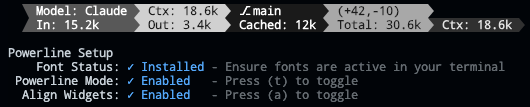
### v2.0.8 - Powerline Auto-Alignment
|
|
46
|
+
|
|
47
|
+
|
|
48
|
+
|
|
49
|
+
- **🎯 Widget Alignment** - Auto-align widgets across multiple status lines in Powerline mode for a clean, columnar layout (toggle with 'a' in Powerline Setup)
|
|
50
|
+
|
|
51
|
+
### v2.0.7 - Current Working Directory & Session Cost
|
|
52
|
+
|
|
53
|
+

|
|
54
|
+
|
|
55
|
+
- **📁 Current Working Directory** - Display the current working directory with configurable segment display
|
|
56
|
+
- Set the number of path segments to show (e.g., show only last 2 segments: `.../Personal/ccstatusline`)
|
|
57
|
+
- Supports raw value mode for compact display
|
|
58
|
+
- Automatically truncates long paths with ellipsis
|
|
59
|
+
- **💰 Session Cost Widget** - Track your Claude Code session costs (requires Claude Code 1.0.85+)
|
|
60
|
+
- Displays total session cost in USD
|
|
61
|
+
- Supports raw value mode (shows just `$X.YZ` vs `Cost: $X.YZ`)
|
|
62
|
+
- Real-time cost tracking from Claude Code session data
|
|
63
|
+
- Note: Cost may not update properly when using `/resume` (Claude Code limitation)
|
|
64
|
+
- **🐛 Bug Fixes**
|
|
65
|
+
- Fixed Block Timer calculations for accurate time tracking across block boundaries
|
|
66
|
+
- Improved widget editor stability with proper Ctrl+S handling
|
|
67
|
+
- Enhanced cursor display in numeric input fields
|
|
68
|
+
|
|
45
69
|
### v2.0.2 - Block Timer Widget
|
|
46
70
|
|
|
47
71
|

|
|
@@ -70,7 +94,7 @@
|
|
|
70
94
|
- **⚡ Powerline Support** - Beautiful Powerline-style rendering with arrow separators, caps, and custom fonts
|
|
71
95
|
- **📐 Multi-line Support** - Configure up to 3 independent status lines
|
|
72
96
|
- **🖥️ Interactive TUI** - Built-in configuration interface using React/Ink
|
|
73
|
-
- **⚙️ Global Options** - Apply consistent formatting across all
|
|
97
|
+
- **⚙️ Global Options** - Apply consistent formatting across all widgets (padding, separators, bold, background)
|
|
74
98
|
- **🚀 Cross-platform** - Works seamlessly with both Bun and Node.js
|
|
75
99
|
- **📏 Smart Width Detection** - Automatically adapts to terminal width with flex separators
|
|
76
100
|
- **⚡ Zero Config** - Sensible defaults that work out of the box
|
|
@@ -93,10 +117,10 @@ bunx ccstatusline@latest
|
|
|
93
117
|
|
|
94
118
|
The interactive configuration tool provides a terminal UI where you can:
|
|
95
119
|
- Configure up to 3 separate status lines
|
|
96
|
-
- Add/remove/reorder status line
|
|
97
|
-
- Customize colors for each
|
|
120
|
+
- Add/remove/reorder status line widgets
|
|
121
|
+
- Customize colors for each widget
|
|
98
122
|
- Configure flex separator behavior
|
|
99
|
-
- Edit custom text
|
|
123
|
+
- Edit custom text widgets
|
|
100
124
|
- Install/uninstall to Claude Code settings
|
|
101
125
|
- Preview your status line in real-time
|
|
102
126
|
|
|
@@ -108,13 +132,15 @@ The interactive configuration tool provides a terminal UI where you can:
|
|
|
108
132
|
|
|
109
133
|
Once configured, ccstatusline automatically formats your Claude Code status line. The status line appears at the bottom of your terminal during Claude Code sessions.
|
|
110
134
|
|
|
111
|
-
### 📊 Available
|
|
135
|
+
### 📊 Available Widgets
|
|
112
136
|
|
|
113
137
|
- **Model Name** - Shows the current Claude model (e.g., "Claude 3.5 Sonnet")
|
|
114
138
|
- **Git Branch** - Displays current git branch name
|
|
115
139
|
- **Git Changes** - Shows uncommitted insertions/deletions (e.g., "+42,-10")
|
|
116
140
|
- **Session Clock** - Shows elapsed time since session start (e.g., "2hr 15m")
|
|
141
|
+
- **Session Cost** - Shows total session cost in USD (e.g., "$1.23")
|
|
117
142
|
- **Block Timer** - Shows time elapsed in current 5-hour block or progress bar
|
|
143
|
+
- **Current Working Directory** - Shows current working directory with configurable path segments
|
|
118
144
|
- **Version** - Shows Claude Code version
|
|
119
145
|
- **Output Style** - Shows the currently set output style in Claude Code
|
|
120
146
|
- **Tokens Input** - Shows input tokens used
|
|
@@ -127,7 +153,7 @@ Once configured, ccstatusline automatically formats your Claude Code status line
|
|
|
127
153
|
- **Terminal Width** - Shows detected terminal width (for debugging)
|
|
128
154
|
- **Custom Text** - Add your own custom text to the status line
|
|
129
155
|
- **Custom Command** - Execute shell commands and display their output (refreshes whenever the statusline is updated by Claude Code)
|
|
130
|
-
- **Separator** - Visual divider between
|
|
156
|
+
- **Separator** - Visual divider between widgets (customizable: |, -, comma, space)
|
|
131
157
|
- **Flex Separator** - Expands to fill available space
|
|
132
158
|
|
|
133
159
|
---
|
|
@@ -142,13 +168,13 @@ These settings affect where long lines are truncated, and where right-alignment
|
|
|
142
168
|
|
|
143
169
|
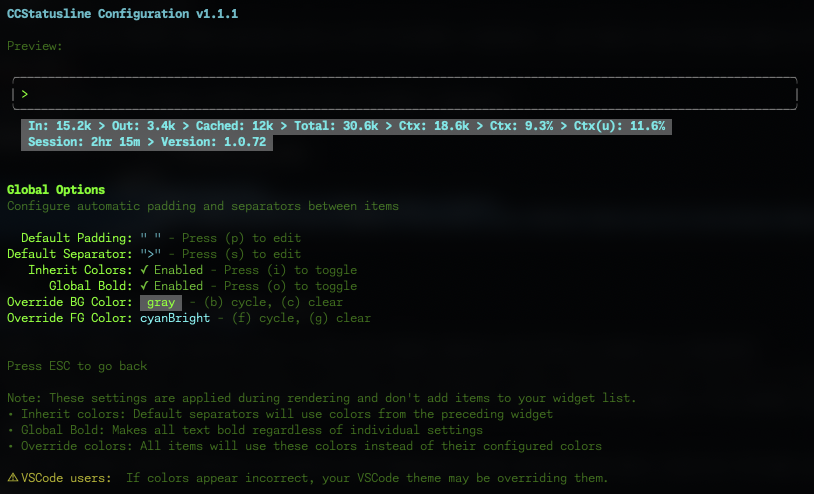
### ⚙️ Global Options
|
|
144
170
|
|
|
145
|
-
Configure global formatting preferences that apply to all
|
|
171
|
+
Configure global formatting preferences that apply to all widgets:
|
|
146
172
|
|
|
147
173
|
|
|
148
174
|
|
|
149
175
|
#### Default Padding & Separators
|
|
150
|
-
- **Default Padding** - Add consistent padding to the left and right of each
|
|
151
|
-
- **Default Separator** - Automatically insert a separator between all
|
|
176
|
+
- **Default Padding** - Add consistent padding to the left and right of each widget
|
|
177
|
+
- **Default Separator** - Automatically insert a separator between all widgets
|
|
152
178
|
- Press **(p)** to edit padding
|
|
153
179
|
- Press **(s)** to edit separator
|
|
154
180
|
|
|
@@ -157,18 +183,18 @@ Configure global formatting preferences that apply to all status items:
|
|
|
157
183
|
|
|
158
184
|
- **Inherit Colors** - Default separators inherit foreground and background colors from the preceding widget
|
|
159
185
|
- Press **(i)** to toggle
|
|
160
|
-
- **Global Bold** - Apply bold formatting to all text regardless of individual
|
|
186
|
+
- **Global Bold** - Apply bold formatting to all text regardless of individual widget settings
|
|
161
187
|
- Press **(o)** to toggle
|
|
162
|
-
- **Override Foreground Color** - Force all
|
|
188
|
+
- **Override Foreground Color** - Force all widgets to use the same text color
|
|
163
189
|
- Press **(f)** to cycle through colors
|
|
164
190
|
- Press **(g)** to clear override
|
|
165
|
-
- **Override Background Color** - Force all
|
|
191
|
+
- **Override Background Color** - Force all widgets to use the same background color
|
|
166
192
|
- Press **(b)** to cycle through colors
|
|
167
193
|
- Press **(c)** to clear override
|
|
168
194
|
|
|
169
195
|
</details>
|
|
170
196
|
|
|
171
|
-
> 💡 **Note:** These settings are applied during rendering and don't add
|
|
197
|
+
> 💡 **Note:** These settings are applied during rendering and don't add widgets to your widget list. They provide a consistent look across your entire status line without modifying individual widget configurations.
|
|
172
198
|
|
|
173
199
|
> ⚠️ **VSCode Users:** If colors appear incorrect in the VSCode integrated terminal, the "Terminal › Integrated: Minimum Contrast Ratio" (`terminal.integrated.minimumContrastRatio`) setting is forcing a minimum contrast between foreground and background colors. You can adjust this setting to 1 to disable the contrast enforcement, or use a standalone terminal for accurate colors.
|
|
174
200
|
|
|
@@ -188,11 +214,11 @@ The Block Timer widget helps you track your progress through Claude Code's 5-hou
|
|
|
188
214
|
- Floors block start time to the hour for consistent tracking
|
|
189
215
|
- Shows "Block: 3hr 45m" in normal mode or just "3hr 45m" in raw value mode
|
|
190
216
|
- Progress bars show completion percentage (e.g., "[████████████████████████░░░░░░░░] 73.9%")
|
|
191
|
-
- Toggle between modes with the **(p)** key in the
|
|
217
|
+
- Toggle between modes with the **(p)** key in the widgets editor
|
|
192
218
|
|
|
193
219
|
### 🔤 Raw Value Mode
|
|
194
220
|
|
|
195
|
-
Some
|
|
221
|
+
Some widgets support "raw value" mode which displays just the value without a label:
|
|
196
222
|
- Normal: `Model: Claude 3.5 Sonnet` → Raw: `Claude 3.5 Sonnet`
|
|
197
223
|
- Normal: `Session: 2hr 15m` → Raw: `2hr 15m`
|
|
198
224
|
- Normal: `Block: 3hr 45m` → Raw: `3hr 45m`
|