ccstatusline 2.0.0 → 2.0.2
This diff represents the content of publicly available package versions that have been released to one of the supported registries. The information contained in this diff is provided for informational purposes only and reflects changes between package versions as they appear in their respective public registries.
- package/README.md +44 -4
- package/dist/ccstatusline.js +3454 -868
- package/package.json +6 -2
package/README.md
CHANGED
|
@@ -42,6 +42,16 @@
|
|
|
42
42
|
|
|
43
43
|
## 🆕 Recent Updates
|
|
44
44
|
|
|
45
|
+
### v2.0.2 - Block Timer Widget
|
|
46
|
+
|
|
47
|
+

|
|
48
|
+
|
|
49
|
+
- **⏱️ Block Timer** - Track your progress through 5-hour Claude Code blocks
|
|
50
|
+
- Displays time elapsed in current block as hours/minutes (e.g., "3hr 45m")
|
|
51
|
+
- Progress bar mode shows visual completion percentage
|
|
52
|
+
- Two progress bar styles: full width (32 chars) or compact (16 chars)
|
|
53
|
+
- Automatically detects block boundaries from transcript timestamps
|
|
54
|
+
|
|
45
55
|
### v2.0.0 - Powerline Support & Enhanced Themes
|
|
46
56
|
- **⚡ Powerline Mode** - Beautiful Powerline-style status lines with arrow separators and customizable caps
|
|
47
57
|
- **🎨 Built-in Themes** - Multiple pre-configured themes that you can copy and customize
|
|
@@ -55,7 +65,7 @@
|
|
|
55
65
|
|
|
56
66
|
## ✨ Features
|
|
57
67
|
|
|
58
|
-
- **📊 Real-time Metrics** - Display model name, git branch, token usage, session duration, and more
|
|
68
|
+
- **📊 Real-time Metrics** - Display model name, git branch, token usage, session duration, block timer, and more
|
|
59
69
|
- **🎨 Fully Customizable** - Choose what to display and customize colors for each element
|
|
60
70
|
- **⚡ Powerline Support** - Beautiful Powerline-style rendering with arrow separators, caps, and custom fonts
|
|
61
71
|
- **📐 Multi-line Support** - Configure up to 3 independent status lines
|
|
@@ -104,6 +114,7 @@ Once configured, ccstatusline automatically formats your Claude Code status line
|
|
|
104
114
|
- **Git Branch** - Displays current git branch name
|
|
105
115
|
- **Git Changes** - Shows uncommitted insertions/deletions (e.g., "+42,-10")
|
|
106
116
|
- **Session Clock** - Shows elapsed time since session start (e.g., "2hr 15m")
|
|
117
|
+
- **Block Timer** - Shows time elapsed in current 5-hour block or progress bar
|
|
107
118
|
- **Version** - Shows Claude Code version
|
|
108
119
|
- **Output Style** - Shows the currently set output style in Claude Code
|
|
109
120
|
- **Tokens Input** - Shows input tokens used
|
|
@@ -161,11 +172,30 @@ Configure global formatting preferences that apply to all status items:
|
|
|
161
172
|
|
|
162
173
|
> ⚠️ **VSCode Users:** If colors appear incorrect in the VSCode integrated terminal, the "Terminal › Integrated: Minimum Contrast Ratio" (`terminal.integrated.minimumContrastRatio`) setting is forcing a minimum contrast between foreground and background colors. You can adjust this setting to 1 to disable the contrast enforcement, or use a standalone terminal for accurate colors.
|
|
163
174
|
|
|
175
|
+
### ⏱️ Block Timer Widget
|
|
176
|
+
|
|
177
|
+
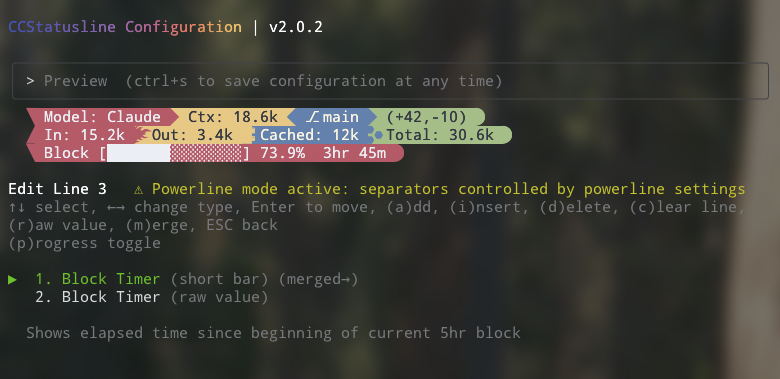
The Block Timer widget helps you track your progress through Claude Code's 5-hour conversation blocks:
|
|
178
|
+
|
|
179
|
+
|
|
180
|
+
|
|
181
|
+
**Display Modes:**
|
|
182
|
+
- **Time Display** - Shows elapsed time as "3hr 45m" (default)
|
|
183
|
+
- **Progress Bar** - Full width 32-character progress bar with percentage
|
|
184
|
+
- **Progress Bar (Short)** - Compact 16-character progress bar with percentage
|
|
185
|
+
|
|
186
|
+
**Features:**
|
|
187
|
+
- Automatically detects block boundaries from transcript timestamps
|
|
188
|
+
- Floors block start time to the hour for consistent tracking
|
|
189
|
+
- Shows "Block: 3hr 45m" in normal mode or just "3hr 45m" in raw value mode
|
|
190
|
+
- Progress bars show completion percentage (e.g., "[████████████████████████░░░░░░░░] 73.9%")
|
|
191
|
+
- Toggle between modes with the **(p)** key in the items editor
|
|
192
|
+
|
|
164
193
|
### 🔤 Raw Value Mode
|
|
165
194
|
|
|
166
195
|
Some items support "raw value" mode which displays just the value without a label:
|
|
167
196
|
- Normal: `Model: Claude 3.5 Sonnet` → Raw: `Claude 3.5 Sonnet`
|
|
168
197
|
- Normal: `Session: 2hr 15m` → Raw: `2hr 15m`
|
|
198
|
+
- Normal: `Block: 3hr 45m` → Raw: `3hr 45m`
|
|
169
199
|
- Normal: `Ctx: 18.6k` → Raw: `18.6k`
|
|
170
200
|
|
|
171
201
|
---
|
|
@@ -190,7 +220,7 @@ Execute shell commands and display their output dynamically:
|
|
|
190
220
|
- `git rev-parse --short HEAD` - Show current commit hash
|
|
191
221
|
- `date +%H:%M` - Display current time
|
|
192
222
|
- `curl -s wttr.in?format="%t"` - Show current temperature
|
|
193
|
-
- `npx -y ccusage statusline` - Display Claude usage metrics (set timeout: 5000ms)
|
|
223
|
+
- `npx -y ccusage@latest statusline` - Display Claude usage metrics (set timeout: 5000ms)
|
|
194
224
|
|
|
195
225
|
> ⚠️ **Important:** Commands should complete quickly to avoid delays. Long-running commands will be killed after the configured timeout. If you're not seeing output from your custom command, try increasing the timeout value (press 't' in the editor).
|
|
196
226
|
|
|
@@ -200,10 +230,10 @@ Execute shell commands and display their output dynamically:
|
|
|
200
230
|
|
|
201
231
|
### 🔗 Integration Example: ccusage
|
|
202
232
|
|
|
203
|
-
[ccusage](https://github.com/
|
|
233
|
+
[ccusage](https://github.com/ryoppippi/ccusage) is a tool that tracks and displays Claude Code usage metrics. You can integrate it directly into your status line:
|
|
204
234
|
|
|
205
235
|
1. Add a Custom Command widget
|
|
206
|
-
2. Set command: `npx -y ccusage statusline`
|
|
236
|
+
2. Set command: `npx -y ccusage@latest statusline`
|
|
207
237
|
3. Set timeout: `5000` (5 seconds for initial download)
|
|
208
238
|
4. Enable "preserve colors" to keep ccusage's color formatting
|
|
209
239
|
|
|
@@ -325,6 +355,16 @@ Contributions are welcome! Please feel free to submit a Pull Request.
|
|
|
325
355
|
|
|
326
356
|
---
|
|
327
357
|
|
|
358
|
+
## Star History
|
|
359
|
+
|
|
360
|
+
<a href="https://www.star-history.com/#sirmalloc/ccstatusline&Timeline">
|
|
361
|
+
<picture>
|
|
362
|
+
<source media="(prefers-color-scheme: dark)" srcset="https://api.star-history.com/svg?repos=sirmalloc/ccstatusline&type=Timeline&theme=dark" />
|
|
363
|
+
<source media="(prefers-color-scheme: light)" srcset="https://api.star-history.com/svg?repos=sirmalloc/ccstatusline&type=Timeline" />
|
|
364
|
+
<img alt="Star History Chart" src="https://api.star-history.com/svg?repos=sirmalloc/ccstatusline&type=Timeline" />
|
|
365
|
+
</picture>
|
|
366
|
+
</a>
|
|
367
|
+
|
|
328
368
|
<div align="center">
|
|
329
369
|
|
|
330
370
|
### 🌟 Show Your Support
|