ccstatusline 1.2.0 → 2.0.0
This diff represents the content of publicly available package versions that have been released to one of the supported registries. The information contained in this diff is provided for informational purposes only and reflects changes between package versions as they appear in their respective public registries.
- package/README.md +61 -46
- package/dist/ccstatusline.js +18255 -3199
- package/package.json +25 -9
package/README.md
CHANGED
|
@@ -1,8 +1,17 @@
|
|
|
1
1
|
<div align="center">
|
|
2
2
|
|
|
3
|
+
<pre>
|
|
4
|
+
_ _ _ _
|
|
5
|
+
___ ___ ___| |_ __ _| |_ _ _ ___| (_)_ __ ___
|
|
6
|
+
/ __/ __/ __| __/ _` | __| | | / __| | | '_ \ / _ \
|
|
7
|
+
| (_| (__\__ \ || (_| | |_| |_| \__ \ | | | | | __/
|
|
8
|
+
\___\___|___/\__\__,_|\__|\__,_|___/_|_|_| |_|\___|
|
|
9
|
+
|
|
10
|
+
</pre>
|
|
11
|
+
|
|
3
12
|
# ccstatusline
|
|
4
13
|
|
|
5
|
-
**🎨 A highly customizable status line formatter for Claude Code CLI**
|
|
14
|
+
**🎨 A highly customizable status line formatter for Claude Code CLI**
|
|
6
15
|
*Display model info, git branch, token usage, and other metrics in your terminal*
|
|
7
16
|
|
|
8
17
|
[](https://www.npmjs.com/package/ccstatusline)
|
|
@@ -12,6 +21,8 @@
|
|
|
12
21
|
[](https://packagephobia.com/result?p=ccstatusline)
|
|
13
22
|
[](https://github.com/sirmalloc/ccstatusline/graphs/commit-activity)
|
|
14
23
|
|
|
24
|
+
[](https://github.com/hesreallyhim/awesome-claude-code)
|
|
25
|
+
|
|
15
26
|
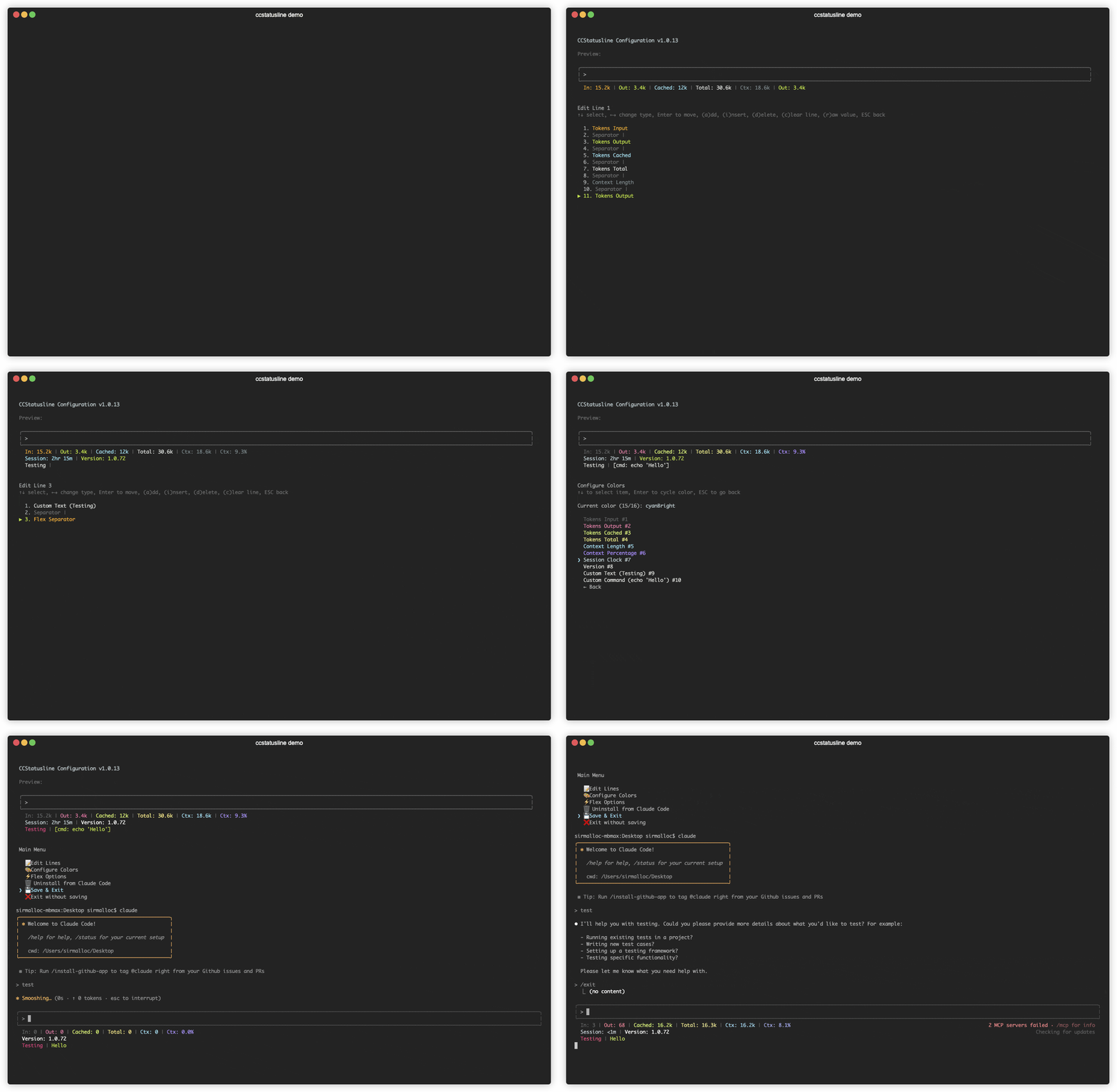
|
|
16
27
|
|
|
17
28
|
</div>
|
|
@@ -31,10 +42,14 @@
|
|
|
31
42
|
|
|
32
43
|
## 🆕 Recent Updates
|
|
33
44
|
|
|
34
|
-
###
|
|
35
|
-
-
|
|
36
|
-
-
|
|
37
|
-
-
|
|
45
|
+
### v2.0.0 - Powerline Support & Enhanced Themes
|
|
46
|
+
- **⚡ Powerline Mode** - Beautiful Powerline-style status lines with arrow separators and customizable caps
|
|
47
|
+
- **🎨 Built-in Themes** - Multiple pre-configured themes that you can copy and customize
|
|
48
|
+
- **🌈 Advanced Color Support** - Basic (16), 256-color (with custom ANSI codes), and truecolor (with hex codes) modes
|
|
49
|
+
- **🔗 Widget Merging** - Merge multiple widgets together with or without padding for seamless designs
|
|
50
|
+
- **📦 Easy Installation** - Install directly with `npx` or `bunx` - no global package needed
|
|
51
|
+
- **🔤 Custom Separators** - Add multiple Powerline separators with custom hex codes for font support
|
|
52
|
+
- **🚀 Auto Font Install** - Automatic Powerline font installation with user consent
|
|
38
53
|
|
|
39
54
|
---
|
|
40
55
|
|
|
@@ -42,6 +57,7 @@
|
|
|
42
57
|
|
|
43
58
|
- **📊 Real-time Metrics** - Display model name, git branch, token usage, session duration, and more
|
|
44
59
|
- **🎨 Fully Customizable** - Choose what to display and customize colors for each element
|
|
60
|
+
- **⚡ Powerline Support** - Beautiful Powerline-style rendering with arrow separators, caps, and custom fonts
|
|
45
61
|
- **📐 Multi-line Support** - Configure up to 3 independent status lines
|
|
46
62
|
- **🖥️ Interactive TUI** - Built-in configuration interface using React/Ink
|
|
47
63
|
- **⚙️ Global Options** - Apply consistent formatting across all items (padding, separators, bold, background)
|
|
@@ -53,11 +69,14 @@
|
|
|
53
69
|
|
|
54
70
|
## 🚀 Quick Start
|
|
55
71
|
|
|
56
|
-
### No installation needed! Use directly with npx:
|
|
72
|
+
### No installation needed! Use directly with npx or bunx:
|
|
57
73
|
|
|
58
74
|
```bash
|
|
59
|
-
# Run the configuration TUI
|
|
75
|
+
# Run the configuration TUI with npm
|
|
60
76
|
npx ccstatusline@latest
|
|
77
|
+
|
|
78
|
+
# Or with Bun (faster)
|
|
79
|
+
bunx ccstatusline@latest
|
|
61
80
|
```
|
|
62
81
|
|
|
63
82
|
### Configure ccstatusline
|
|
@@ -86,6 +105,7 @@ Once configured, ccstatusline automatically formats your Claude Code status line
|
|
|
86
105
|
- **Git Changes** - Shows uncommitted insertions/deletions (e.g., "+42,-10")
|
|
87
106
|
- **Session Clock** - Shows elapsed time since session start (e.g., "2hr 15m")
|
|
88
107
|
- **Version** - Shows Claude Code version
|
|
108
|
+
- **Output Style** - Shows the currently set output style in Claude Code
|
|
89
109
|
- **Tokens Input** - Shows input tokens used
|
|
90
110
|
- **Tokens Output** - Shows output tokens used
|
|
91
111
|
- **Tokens Cached** - Shows cached tokens used
|
|
@@ -101,40 +121,11 @@ Once configured, ccstatusline automatically formats your Claude Code status line
|
|
|
101
121
|
|
|
102
122
|
---
|
|
103
123
|
|
|
104
|
-
###
|
|
105
|
-
|
|
106
|
-
|
|
107
|
-
-
|
|
108
|
-
- **
|
|
109
|
-
- **Ctrl+C** - Exit
|
|
110
|
-
|
|
111
|
-
#### Line Editor
|
|
112
|
-
- **↑↓** - Select item
|
|
113
|
-
- **←→** - Change item type
|
|
114
|
-
- **Enter** - Enter move mode (reorder items)
|
|
115
|
-
- **a** - Add item at end
|
|
116
|
-
- **i** - Insert item before selected
|
|
117
|
-
- **d** - Delete selected item
|
|
118
|
-
- **c** - Clear entire line
|
|
119
|
-
- **r** - Toggle raw value mode (no labels)
|
|
120
|
-
- **b** - Toggle bold text for this item
|
|
121
|
-
- **e** - Edit value (for custom-text and custom-command items)
|
|
122
|
-
- **w** - Set max width (for custom-command items)
|
|
123
|
-
- **t** - Set timeout in milliseconds (for custom-command items)
|
|
124
|
-
- **p** - Toggle preserve colors (for custom-command items)
|
|
125
|
-
- **Space** - Change separator character (for separator items)
|
|
126
|
-
- **ESC** - Go back
|
|
127
|
-
|
|
128
|
-
#### Color Configuration
|
|
129
|
-
- **↑↓** - Select item
|
|
130
|
-
- **Enter** - Cycle through colors
|
|
131
|
-
- **ESC** - Go back
|
|
132
|
-
|
|
133
|
-
#### Flex Options
|
|
134
|
-
Configure how flex separators calculate available width:
|
|
135
|
-
- **Full width always** - Uses full terminal width (may wrap with auto-compact message)
|
|
136
|
-
- **Full width minus 40** - Leaves space for auto-compact message (default)
|
|
137
|
-
- **Full width until compact** - Switches based on context percentage threshold
|
|
124
|
+
### Terminal Width Options
|
|
125
|
+
These settings affect where long lines are truncated, and where right-alignment occurs when using flex separators:
|
|
126
|
+
- **Full width always** - Uses full terminal width (may wrap if auto-compact message appears or IDE integration adds text)
|
|
127
|
+
- **Full width minus 40** - Reserves 40 characters for auto-compact message to prevent wrapping (default)
|
|
128
|
+
- **Full width until compact** - Dynamically switches between full width and minus 40 based on context percentage threshold (configurable, default 60%)
|
|
138
129
|
|
|
139
130
|
---
|
|
140
131
|
|
|
@@ -260,11 +251,35 @@ bun run build
|
|
|
260
251
|
```
|
|
261
252
|
ccstatusline/
|
|
262
253
|
├── src/
|
|
263
|
-
│ ├── ccstatusline.ts
|
|
264
|
-
│ ├── tui
|
|
265
|
-
│ ├──
|
|
266
|
-
│
|
|
267
|
-
|
|
254
|
+
│ ├── ccstatusline.ts # Main entry point
|
|
255
|
+
│ ├── tui/ # React/Ink configuration UI
|
|
256
|
+
│ │ ├── App.tsx # Root TUI component
|
|
257
|
+
│ │ ├── index.tsx # TUI entry point
|
|
258
|
+
│ │ └── components/ # UI components
|
|
259
|
+
│ │ ├── MainMenu.tsx
|
|
260
|
+
│ │ ├── LineSelector.tsx
|
|
261
|
+
│ │ ├── ItemsEditor.tsx
|
|
262
|
+
│ │ ├── ColorMenu.tsx
|
|
263
|
+
│ │ ├── PowerlineSetup.tsx
|
|
264
|
+
│ │ └── ...
|
|
265
|
+
│ ├── widgets/ # Status line widget implementations
|
|
266
|
+
│ │ ├── Model.ts
|
|
267
|
+
│ │ ├── GitBranch.ts
|
|
268
|
+
│ │ ├── TokensTotal.ts
|
|
269
|
+
│ │ ├── OutputStyle.ts
|
|
270
|
+
│ │ └── ...
|
|
271
|
+
│ ├── utils/ # Utility functions
|
|
272
|
+
│ │ ├── config.ts # Settings management
|
|
273
|
+
│ │ ├── renderer.ts # Core rendering logic
|
|
274
|
+
│ │ ├── powerline.ts # Powerline font utilities
|
|
275
|
+
│ │ ├── colors.ts # Color definitions
|
|
276
|
+
│ │ └── claude-settings.ts # Claude Code integration
|
|
277
|
+
│ └── types/ # TypeScript type definitions
|
|
278
|
+
│ ├── Settings.ts
|
|
279
|
+
│ ├── Widget.ts
|
|
280
|
+
│ ├── PowerlineConfig.ts
|
|
281
|
+
│ └── ...
|
|
282
|
+
├── dist/ # Built files (generated)
|
|
268
283
|
├── package.json
|
|
269
284
|
├── tsconfig.json
|
|
270
285
|
└── README.md
|