ccstatusline 1.1.7 → 2.0.0
This diff represents the content of publicly available package versions that have been released to one of the supported registries. The information contained in this diff is provided for informational purposes only and reflects changes between package versions as they appear in their respective public registries.
- package/LICENSE +21 -0
- package/README.md +142 -57
- package/dist/ccstatusline.js +18255 -3199
- package/package.json +26 -14
package/LICENSE
ADDED
|
@@ -0,0 +1,21 @@
|
|
|
1
|
+
MIT License
|
|
2
|
+
|
|
3
|
+
Copyright (c) 2025 ccstatusline contributors
|
|
4
|
+
|
|
5
|
+
Permission is hereby granted, free of charge, to any person obtaining a copy
|
|
6
|
+
of this software and associated documentation files (the "Software"), to deal
|
|
7
|
+
in the Software without restriction, including without limitation the rights
|
|
8
|
+
to use, copy, modify, merge, publish, distribute, sublicense, and/or sell
|
|
9
|
+
copies of the Software, and to permit persons to whom the Software is
|
|
10
|
+
furnished to do so, subject to the following conditions:
|
|
11
|
+
|
|
12
|
+
The above copyright notice and this permission notice shall be included in all
|
|
13
|
+
copies or substantial portions of the Software.
|
|
14
|
+
|
|
15
|
+
THE SOFTWARE IS PROVIDED "AS IS", WITHOUT WARRANTY OF ANY KIND, EXPRESS OR
|
|
16
|
+
IMPLIED, INCLUDING BUT NOT LIMITED TO THE WARRANTIES OF MERCHANTABILITY,
|
|
17
|
+
FITNESS FOR A PARTICULAR PURPOSE AND NONINFRINGEMENT. IN NO EVENT SHALL THE
|
|
18
|
+
AUTHORS OR COPYRIGHT HOLDERS BE LIABLE FOR ANY CLAIM, DAMAGES OR OTHER
|
|
19
|
+
LIABILITY, WHETHER IN AN ACTION OF CONTRACT, TORT OR OTHERWISE, ARISING FROM,
|
|
20
|
+
OUT OF OR IN CONNECTION WITH THE SOFTWARE OR THE USE OR OTHER DEALINGS IN THE
|
|
21
|
+
SOFTWARE.
|
package/README.md
CHANGED
|
@@ -1,20 +1,63 @@
|
|
|
1
|
+
<div align="center">
|
|
2
|
+
|
|
3
|
+
<pre>
|
|
4
|
+
_ _ _ _
|
|
5
|
+
___ ___ ___| |_ __ _| |_ _ _ ___| (_)_ __ ___
|
|
6
|
+
/ __/ __/ __| __/ _` | __| | | / __| | | '_ \ / _ \
|
|
7
|
+
| (_| (__\__ \ || (_| | |_| |_| \__ \ | | | | | __/
|
|
8
|
+
\___\___|___/\__\__,_|\__|\__,_|___/_|_|_| |_|\___|
|
|
9
|
+
|
|
10
|
+
</pre>
|
|
11
|
+
|
|
1
12
|
# ccstatusline
|
|
2
13
|
|
|
3
|
-
|
|
14
|
+
**🎨 A highly customizable status line formatter for Claude Code CLI**
|
|
15
|
+
*Display model info, git branch, token usage, and other metrics in your terminal*
|
|
16
|
+
|
|
17
|
+
[](https://www.npmjs.com/package/ccstatusline)
|
|
18
|
+
[](https://www.npmjs.com/package/ccstatusline)
|
|
19
|
+
[](https://github.com/sirmalloc/ccstatusline/blob/main/LICENSE)
|
|
20
|
+
[](https://nodejs.org)
|
|
21
|
+
[](https://packagephobia.com/result?p=ccstatusline)
|
|
22
|
+
[](https://github.com/sirmalloc/ccstatusline/graphs/commit-activity)
|
|
23
|
+
|
|
24
|
+
[](https://github.com/hesreallyhim/awesome-claude-code)
|
|
4
25
|
|
|
5
26
|
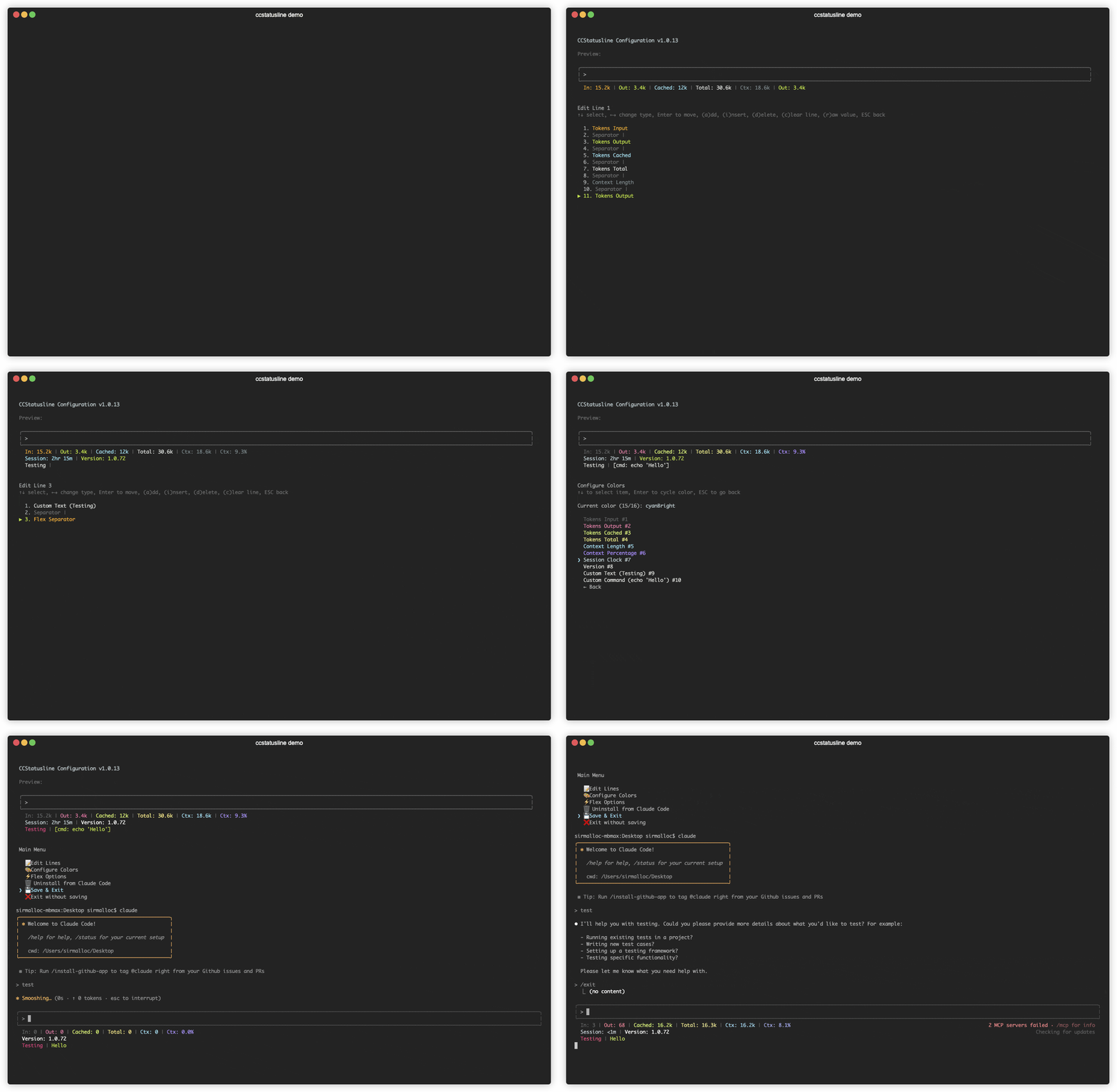
|
|
6
27
|
|
|
28
|
+
</div>
|
|
29
|
+
|
|
30
|
+
## 📚 Table of Contents
|
|
31
|
+
|
|
32
|
+
- [Recent Updates](#-recent-updates)
|
|
33
|
+
- [Features](#-features)
|
|
34
|
+
- [Quick Start](#-quick-start)
|
|
35
|
+
- [Usage](#-usage)
|
|
36
|
+
- [Development](#️-development)
|
|
37
|
+
- [Contributing](#-contributing)
|
|
38
|
+
- [License](#-license)
|
|
39
|
+
- [Related Projects](#-related-projects)
|
|
40
|
+
|
|
41
|
+
---
|
|
42
|
+
|
|
7
43
|
## 🆕 Recent Updates
|
|
8
44
|
|
|
9
|
-
###
|
|
10
|
-
-
|
|
11
|
-
-
|
|
12
|
-
-
|
|
45
|
+
### v2.0.0 - Powerline Support & Enhanced Themes
|
|
46
|
+
- **⚡ Powerline Mode** - Beautiful Powerline-style status lines with arrow separators and customizable caps
|
|
47
|
+
- **🎨 Built-in Themes** - Multiple pre-configured themes that you can copy and customize
|
|
48
|
+
- **🌈 Advanced Color Support** - Basic (16), 256-color (with custom ANSI codes), and truecolor (with hex codes) modes
|
|
49
|
+
- **🔗 Widget Merging** - Merge multiple widgets together with or without padding for seamless designs
|
|
50
|
+
- **📦 Easy Installation** - Install directly with `npx` or `bunx` - no global package needed
|
|
51
|
+
- **🔤 Custom Separators** - Add multiple Powerline separators with custom hex codes for font support
|
|
52
|
+
- **🚀 Auto Font Install** - Automatic Powerline font installation with user consent
|
|
53
|
+
|
|
54
|
+
---
|
|
13
55
|
|
|
14
56
|
## ✨ Features
|
|
15
57
|
|
|
16
58
|
- **📊 Real-time Metrics** - Display model name, git branch, token usage, session duration, and more
|
|
17
59
|
- **🎨 Fully Customizable** - Choose what to display and customize colors for each element
|
|
60
|
+
- **⚡ Powerline Support** - Beautiful Powerline-style rendering with arrow separators, caps, and custom fonts
|
|
18
61
|
- **📐 Multi-line Support** - Configure up to 3 independent status lines
|
|
19
62
|
- **🖥️ Interactive TUI** - Built-in configuration interface using React/Ink
|
|
20
63
|
- **⚙️ Global Options** - Apply consistent formatting across all items (padding, separators, bold, background)
|
|
@@ -22,13 +65,18 @@
|
|
|
22
65
|
- **📏 Smart Width Detection** - Automatically adapts to terminal width with flex separators
|
|
23
66
|
- **⚡ Zero Config** - Sensible defaults that work out of the box
|
|
24
67
|
|
|
68
|
+
---
|
|
69
|
+
|
|
25
70
|
## 🚀 Quick Start
|
|
26
71
|
|
|
27
|
-
### No installation needed! Use directly with npx:
|
|
72
|
+
### No installation needed! Use directly with npx or bunx:
|
|
28
73
|
|
|
29
74
|
```bash
|
|
30
|
-
# Run the configuration TUI
|
|
75
|
+
# Run the configuration TUI with npm
|
|
31
76
|
npx ccstatusline@latest
|
|
77
|
+
|
|
78
|
+
# Or with Bun (faster)
|
|
79
|
+
bunx ccstatusline@latest
|
|
32
80
|
```
|
|
33
81
|
|
|
34
82
|
### Configure ccstatusline
|
|
@@ -44,6 +92,8 @@ The interactive configuration tool provides a terminal UI where you can:
|
|
|
44
92
|
|
|
45
93
|
> 💡 **Tip:** Your settings are automatically saved to `~/.config/ccstatusline/settings.json`
|
|
46
94
|
|
|
95
|
+
---
|
|
96
|
+
|
|
47
97
|
## 📖 Usage
|
|
48
98
|
|
|
49
99
|
Once configured, ccstatusline automatically formats your Claude Code status line. The status line appears at the bottom of your terminal during Claude Code sessions.
|
|
@@ -55,6 +105,7 @@ Once configured, ccstatusline automatically formats your Claude Code status line
|
|
|
55
105
|
- **Git Changes** - Shows uncommitted insertions/deletions (e.g., "+42,-10")
|
|
56
106
|
- **Session Clock** - Shows elapsed time since session start (e.g., "2hr 15m")
|
|
57
107
|
- **Version** - Shows Claude Code version
|
|
108
|
+
- **Output Style** - Shows the currently set output style in Claude Code
|
|
58
109
|
- **Tokens Input** - Shows input tokens used
|
|
59
110
|
- **Tokens Output** - Shows output tokens used
|
|
60
111
|
- **Tokens Cached** - Shows cached tokens used
|
|
@@ -68,40 +119,15 @@ Once configured, ccstatusline automatically formats your Claude Code status line
|
|
|
68
119
|
- **Separator** - Visual divider between items (customizable: |, -, comma, space)
|
|
69
120
|
- **Flex Separator** - Expands to fill available space
|
|
70
121
|
|
|
71
|
-
|
|
72
|
-
|
|
73
|
-
|
|
74
|
-
|
|
75
|
-
- **
|
|
76
|
-
- **
|
|
77
|
-
|
|
78
|
-
|
|
79
|
-
|
|
80
|
-
- **←→** - Change item type
|
|
81
|
-
- **Enter** - Enter move mode (reorder items)
|
|
82
|
-
- **a** - Add item at end
|
|
83
|
-
- **i** - Insert item before selected
|
|
84
|
-
- **d** - Delete selected item
|
|
85
|
-
- **c** - Clear entire line
|
|
86
|
-
- **r** - Toggle raw value mode (no labels)
|
|
87
|
-
- **b** - Toggle bold text for this item
|
|
88
|
-
- **e** - Edit value (for custom-text and custom-command items)
|
|
89
|
-
- **w** - Set max width (for custom-command items)
|
|
90
|
-
- **t** - Set timeout in milliseconds (for custom-command items)
|
|
91
|
-
- **p** - Toggle preserve colors (for custom-command items)
|
|
92
|
-
- **Space** - Change separator character (for separator items)
|
|
93
|
-
- **ESC** - Go back
|
|
94
|
-
|
|
95
|
-
#### Color Configuration
|
|
96
|
-
- **↑↓** - Select item
|
|
97
|
-
- **Enter** - Cycle through colors
|
|
98
|
-
- **ESC** - Go back
|
|
99
|
-
|
|
100
|
-
#### Flex Options
|
|
101
|
-
Configure how flex separators calculate available width:
|
|
102
|
-
- **Full width always** - Uses full terminal width (may wrap with auto-compact message)
|
|
103
|
-
- **Full width minus 40** - Leaves space for auto-compact message (default)
|
|
104
|
-
- **Full width until compact** - Switches based on context percentage threshold
|
|
122
|
+
---
|
|
123
|
+
|
|
124
|
+
### Terminal Width Options
|
|
125
|
+
These settings affect where long lines are truncated, and where right-alignment occurs when using flex separators:
|
|
126
|
+
- **Full width always** - Uses full terminal width (may wrap if auto-compact message appears or IDE integration adds text)
|
|
127
|
+
- **Full width minus 40** - Reserves 40 characters for auto-compact message to prevent wrapping (default)
|
|
128
|
+
- **Full width until compact** - Dynamically switches between full width and minus 40 based on context percentage threshold (configurable, default 60%)
|
|
129
|
+
|
|
130
|
+
---
|
|
105
131
|
|
|
106
132
|
### ⚙️ Global Options
|
|
107
133
|
|
|
@@ -115,7 +141,9 @@ Configure global formatting preferences that apply to all status items:
|
|
|
115
141
|
- Press **(p)** to edit padding
|
|
116
142
|
- Press **(s)** to edit separator
|
|
117
143
|
|
|
118
|
-
|
|
144
|
+
<details>
|
|
145
|
+
<summary><b>Global Formatting Options</b></summary>
|
|
146
|
+
|
|
119
147
|
- **Inherit Colors** - Default separators inherit foreground and background colors from the preceding widget
|
|
120
148
|
- Press **(i)** to toggle
|
|
121
149
|
- **Global Bold** - Apply bold formatting to all text regardless of individual item settings
|
|
@@ -127,6 +155,8 @@ Configure global formatting preferences that apply to all status items:
|
|
|
127
155
|
- Press **(b)** to cycle through colors
|
|
128
156
|
- Press **(c)** to clear override
|
|
129
157
|
|
|
158
|
+
</details>
|
|
159
|
+
|
|
130
160
|
> 💡 **Note:** These settings are applied during rendering and don't add items to your widget list. They provide a consistent look across your entire status line without modifying individual item configurations.
|
|
131
161
|
|
|
132
162
|
> ⚠️ **VSCode Users:** If colors appear incorrect in the VSCode integrated terminal, the "Terminal › Integrated: Minimum Contrast Ratio" (`terminal.integrated.minimumContrastRatio`) setting is forcing a minimum contrast between foreground and background colors. You can adjust this setting to 1 to disable the contrast enforcement, or use a standalone terminal for accurate colors.
|
|
@@ -138,6 +168,8 @@ Some items support "raw value" mode which displays just the value without a labe
|
|
|
138
168
|
- Normal: `Session: 2hr 15m` → Raw: `2hr 15m`
|
|
139
169
|
- Normal: `Ctx: 18.6k` → Raw: `18.6k`
|
|
140
170
|
|
|
171
|
+
---
|
|
172
|
+
|
|
141
173
|
### 🔧 Custom Widgets
|
|
142
174
|
|
|
143
175
|
#### Custom Text Widget
|
|
@@ -160,10 +192,12 @@ Execute shell commands and display their output dynamically:
|
|
|
160
192
|
- `curl -s wttr.in?format="%t"` - Show current temperature
|
|
161
193
|
- `npx -y ccusage statusline` - Display Claude usage metrics (set timeout: 5000ms)
|
|
162
194
|
|
|
163
|
-
> ⚠️ **
|
|
195
|
+
> ⚠️ **Important:** Commands should complete quickly to avoid delays. Long-running commands will be killed after the configured timeout. If you're not seeing output from your custom command, try increasing the timeout value (press 't' in the editor).
|
|
164
196
|
|
|
165
197
|
> 💡 **Tip:** Custom commands can be other Claude Code compatible status line formatters! They receive the same JSON via stdin that ccstatusline receives from Claude Code, allowing you to chain or combine multiple status line tools.
|
|
166
198
|
|
|
199
|
+
---
|
|
200
|
+
|
|
167
201
|
### 🔗 Integration Example: ccusage
|
|
168
202
|
|
|
169
203
|
[ccusage](https://github.com/samuelint/ccusage) is a tool that tracks and displays Claude Code usage metrics. You can integrate it directly into your status line:
|
|
@@ -175,12 +209,14 @@ Execute shell commands and display their output dynamically:
|
|
|
175
209
|
|
|
176
210
|

|
|
177
211
|
|
|
178
|
-
The command receives Claude Code's JSON data via stdin, allowing ccusage to access session information, model details, and transcript data for accurate usage tracking.
|
|
212
|
+
> 📄 **How it works:** The command receives Claude Code's JSON data via stdin, allowing ccusage to access session information, model details, and transcript data for accurate usage tracking.
|
|
179
213
|
|
|
180
214
|
### ✂️ Smart Truncation
|
|
181
215
|
|
|
182
216
|
When terminal width is detected, status lines automatically truncate with ellipsis (...) if they exceed the available width, preventing line wrapping.
|
|
183
217
|
|
|
218
|
+
---
|
|
219
|
+
|
|
184
220
|
## 🛠️ Development
|
|
185
221
|
|
|
186
222
|
### Prerequisites
|
|
@@ -215,11 +251,35 @@ bun run build
|
|
|
215
251
|
```
|
|
216
252
|
ccstatusline/
|
|
217
253
|
├── src/
|
|
218
|
-
│ ├── ccstatusline.ts
|
|
219
|
-
│ ├── tui
|
|
220
|
-
│ ├──
|
|
221
|
-
│
|
|
222
|
-
|
|
254
|
+
│ ├── ccstatusline.ts # Main entry point
|
|
255
|
+
│ ├── tui/ # React/Ink configuration UI
|
|
256
|
+
│ │ ├── App.tsx # Root TUI component
|
|
257
|
+
│ │ ├── index.tsx # TUI entry point
|
|
258
|
+
│ │ └── components/ # UI components
|
|
259
|
+
│ │ ├── MainMenu.tsx
|
|
260
|
+
│ │ ├── LineSelector.tsx
|
|
261
|
+
│ │ ├── ItemsEditor.tsx
|
|
262
|
+
│ │ ├── ColorMenu.tsx
|
|
263
|
+
│ │ ├── PowerlineSetup.tsx
|
|
264
|
+
│ │ └── ...
|
|
265
|
+
│ ├── widgets/ # Status line widget implementations
|
|
266
|
+
│ │ ├── Model.ts
|
|
267
|
+
│ │ ├── GitBranch.ts
|
|
268
|
+
│ │ ├── TokensTotal.ts
|
|
269
|
+
│ │ ├── OutputStyle.ts
|
|
270
|
+
│ │ └── ...
|
|
271
|
+
│ ├── utils/ # Utility functions
|
|
272
|
+
│ │ ├── config.ts # Settings management
|
|
273
|
+
│ │ ├── renderer.ts # Core rendering logic
|
|
274
|
+
│ │ ├── powerline.ts # Powerline font utilities
|
|
275
|
+
│ │ ├── colors.ts # Color definitions
|
|
276
|
+
│ │ └── claude-settings.ts # Claude Code integration
|
|
277
|
+
│ └── types/ # TypeScript type definitions
|
|
278
|
+
│ ├── Settings.ts
|
|
279
|
+
│ ├── Widget.ts
|
|
280
|
+
│ ├── PowerlineConfig.ts
|
|
281
|
+
│ └── ...
|
|
282
|
+
├── dist/ # Built files (generated)
|
|
223
283
|
├── package.json
|
|
224
284
|
├── tsconfig.json
|
|
225
285
|
└── README.md
|
|
@@ -234,19 +294,28 @@ Contributions are welcome! Please feel free to submit a Pull Request.
|
|
|
234
294
|
4. Push to the branch (`git push origin feature/amazing-feature`)
|
|
235
295
|
5. Open a Pull Request
|
|
236
296
|
|
|
297
|
+
---
|
|
298
|
+
|
|
237
299
|
## 📄 License
|
|
238
300
|
|
|
239
301
|
[MIT](LICENSE) © Matthew Breedlove
|
|
240
302
|
|
|
303
|
+
---
|
|
304
|
+
|
|
241
305
|
## 👤 Author
|
|
242
306
|
|
|
243
307
|
**Matthew Breedlove**
|
|
244
308
|
|
|
245
309
|
- GitHub: [@sirmalloc](https://github.com/sirmalloc)
|
|
246
310
|
|
|
311
|
+
---
|
|
312
|
+
|
|
247
313
|
## 🔗 Related Projects
|
|
248
314
|
|
|
249
315
|
- [tweakcc](https://github.com/Piebald-AI/tweakcc) - Customize Claude Code themes, thinking verbs, and more.
|
|
316
|
+
- [ccusage](https://github.com/samuelint/ccusage) - Track and display Claude Code usage metrics.
|
|
317
|
+
|
|
318
|
+
---
|
|
250
319
|
|
|
251
320
|
## 🙏 Acknowledgments
|
|
252
321
|
|
|
@@ -256,11 +325,27 @@ Contributions are welcome! Please feel free to submit a Pull Request.
|
|
|
256
325
|
|
|
257
326
|
---
|
|
258
327
|
|
|
259
|
-
<
|
|
260
|
-
|
|
261
|
-
|
|
262
|
-
|
|
263
|
-
|
|
264
|
-
|
|
265
|
-
|
|
266
|
-
|
|
328
|
+
<div align="center">
|
|
329
|
+
|
|
330
|
+
### 🌟 Show Your Support
|
|
331
|
+
|
|
332
|
+
Give a ⭐ if this project helped you!
|
|
333
|
+
|
|
334
|
+
[](https://github.com/sirmalloc/ccstatusline/stargazers)
|
|
335
|
+
[](https://github.com/sirmalloc/ccstatusline/network/members)
|
|
336
|
+
[](https://github.com/sirmalloc/ccstatusline/watchers)
|
|
337
|
+
|
|
338
|
+
[](https://www.npmjs.com/package/ccstatusline)
|
|
339
|
+
[](https://www.npmjs.com/package/ccstatusline)
|
|
340
|
+
[](https://github.com/sirmalloc/ccstatusline/blob/main/LICENSE)
|
|
341
|
+
[](https://bun.sh)
|
|
342
|
+
|
|
343
|
+
[](https://github.com/sirmalloc/ccstatusline/issues)
|
|
344
|
+
[](https://github.com/sirmalloc/ccstatusline/pulls)
|
|
345
|
+
[](https://github.com/sirmalloc/ccstatusline/graphs/contributors)
|
|
346
|
+
|
|
347
|
+
### 💬 Connect
|
|
348
|
+
|
|
349
|
+
[Report Bug](https://github.com/sirmalloc/ccstatusline/issues) · [Request Feature](https://github.com/sirmalloc/ccstatusline/issues) · [Discussions](https://github.com/sirmalloc/ccstatusline/discussions)
|
|
350
|
+
|
|
351
|
+
</div>
|