ccstatusline 1.0.16 → 1.1.1
This diff represents the content of publicly available package versions that have been released to one of the supported registries. The information contained in this diff is provided for informational purposes only and reflects changes between package versions as they appear in their respective public registries.
- package/README.md +42 -1
- package/dist/ccstatusline.js +778 -153
- package/package.json +1 -1
package/README.md
CHANGED
|
@@ -4,12 +4,20 @@
|
|
|
4
4
|
|
|
5
5
|
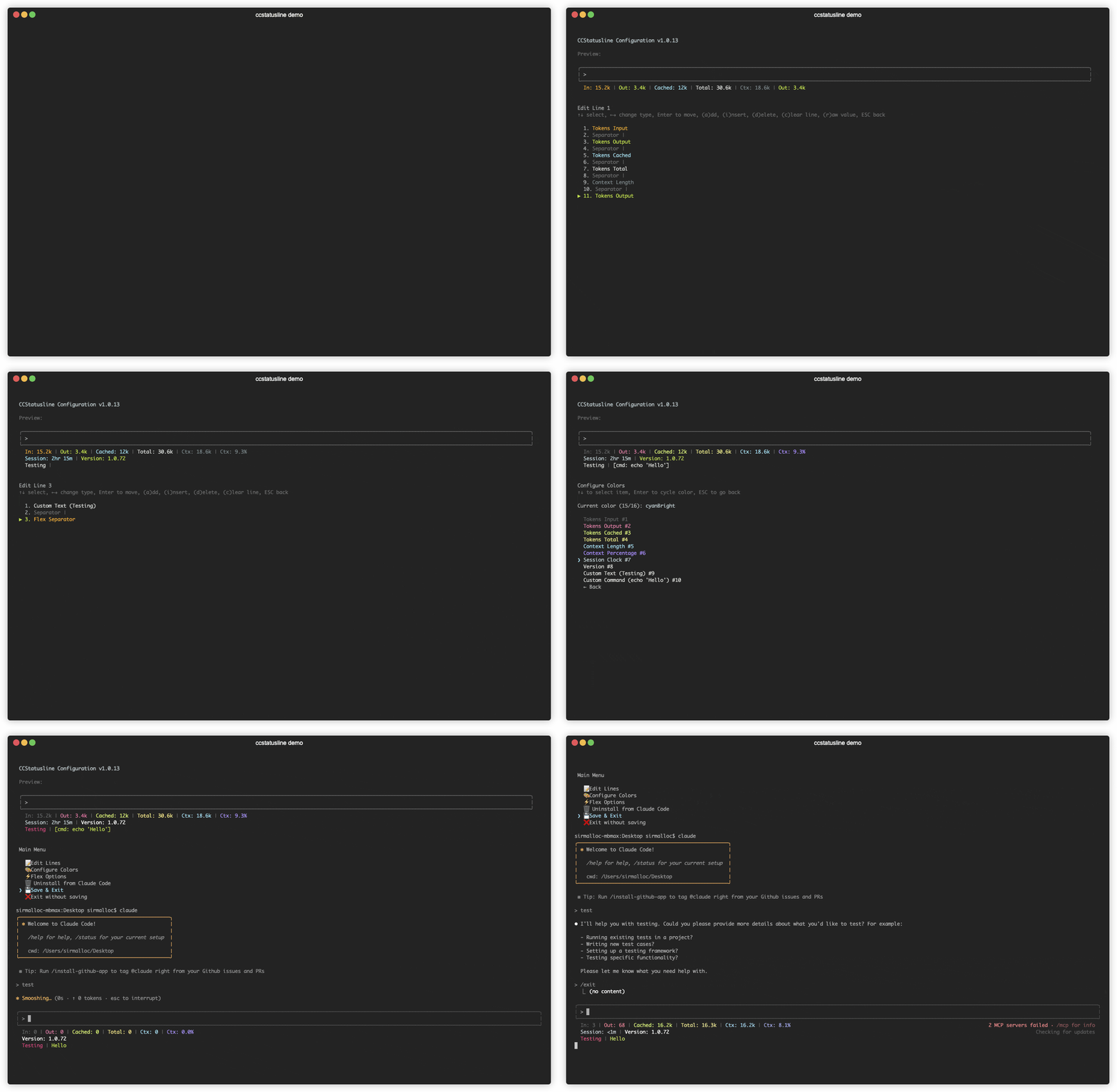
|
|
6
6
|
|
|
7
|
+
## 🆕 Recent Updates
|
|
8
|
+
|
|
9
|
+
### v1.1.0 - Enhanced Customization
|
|
10
|
+
- **🎨 Background Colors** - Set background colors for individual status items in Color Configuration menu
|
|
11
|
+
- **🔤 Bold Text Styling** - Toggle bold formatting for individual items in Color Configuration menu
|
|
12
|
+
- **⚙️ Global Options Menu** - New menu for global formatting preferences including padding, separators, color inheritance, and overrides
|
|
13
|
+
|
|
7
14
|
## ✨ Features
|
|
8
15
|
|
|
9
16
|
- **📊 Real-time Metrics** - Display model name, git branch, token usage, session duration, and more
|
|
10
17
|
- **🎨 Fully Customizable** - Choose what to display and customize colors for each element
|
|
11
18
|
- **📐 Multi-line Support** - Configure up to 3 independent status lines
|
|
12
19
|
- **🖥️ Interactive TUI** - Built-in configuration interface using React/Ink
|
|
20
|
+
- **⚙️ Global Options** - Apply consistent formatting across all items (padding, separators, bold, background)
|
|
13
21
|
- **🚀 Cross-platform** - Works seamlessly with both Bun and Node.js
|
|
14
22
|
- **📏 Smart Width Detection** - Automatically adapts to terminal width with flex separators
|
|
15
23
|
- **⚡ Zero Config** - Sensible defaults that work out of the box
|
|
@@ -76,6 +84,7 @@ Once configured, ccstatusline automatically formats your Claude Code status line
|
|
|
76
84
|
- **d** - Delete selected item
|
|
77
85
|
- **c** - Clear entire line
|
|
78
86
|
- **r** - Toggle raw value mode (no labels)
|
|
87
|
+
- **b** - Toggle bold text for this item
|
|
79
88
|
- **e** - Edit value (for custom-text and custom-command items)
|
|
80
89
|
- **w** - Set max width (for custom-command items)
|
|
81
90
|
- **t** - Set timeout in milliseconds (for custom-command items)
|
|
@@ -94,6 +103,34 @@ Configure how flex separators calculate available width:
|
|
|
94
103
|
- **Full width minus 40** - Leaves space for auto-compact message (default)
|
|
95
104
|
- **Full width until compact** - Switches based on context percentage threshold
|
|
96
105
|
|
|
106
|
+
### ⚙️ Global Options
|
|
107
|
+
|
|
108
|
+
Configure global formatting preferences that apply to all status items:
|
|
109
|
+
|
|
110
|
+
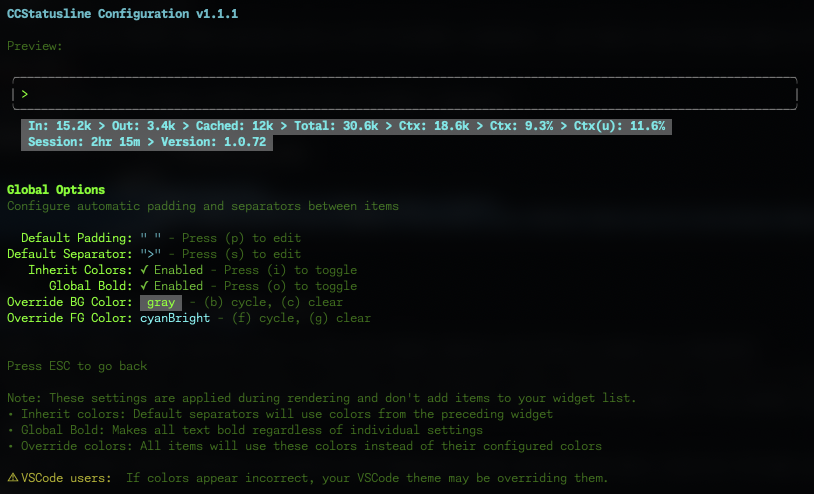
|
|
111
|
+
|
|
112
|
+
#### Default Padding & Separators
|
|
113
|
+
- **Default Padding** - Add consistent padding to the left and right of each item
|
|
114
|
+
- **Default Separator** - Automatically insert a separator between all items
|
|
115
|
+
- Press **(p)** to edit padding
|
|
116
|
+
- Press **(s)** to edit separator
|
|
117
|
+
|
|
118
|
+
#### Global Formatting
|
|
119
|
+
- **Inherit Colors** - Default separators inherit foreground and background colors from the preceding widget
|
|
120
|
+
- Press **(i)** to toggle
|
|
121
|
+
- **Global Bold** - Apply bold formatting to all text regardless of individual item settings
|
|
122
|
+
- Press **(o)** to toggle
|
|
123
|
+
- **Override Foreground Color** - Force all items to use the same text color
|
|
124
|
+
- Press **(f)** to cycle through colors
|
|
125
|
+
- Press **(v)** to clear override
|
|
126
|
+
- **Override Background Color** - Force all items to use the same background color
|
|
127
|
+
- Press **(b)** to cycle through colors
|
|
128
|
+
- Press **(c)** to clear override
|
|
129
|
+
|
|
130
|
+
> 💡 **Note:** These settings are applied during rendering and don't add items to your widget list. They provide a consistent look across your entire status line without modifying individual item configurations.
|
|
131
|
+
|
|
132
|
+
> ⚠️ **VSCode Users:** If colors appear incorrect in the VSCode integrated terminal, your VSCode theme may be overriding the ANSI color codes. This is a known limitation of VSCode's terminal rendering. The status line will display correctly in standalone terminals.
|
|
133
|
+
|
|
97
134
|
### 🔤 Raw Value Mode
|
|
98
135
|
|
|
99
136
|
Some items support "raw value" mode which displays just the value without a label:
|
|
@@ -207,6 +244,10 @@ Contributions are welcome! Please feel free to submit a Pull Request.
|
|
|
207
244
|
|
|
208
245
|
- GitHub: [@sirmalloc](https://github.com/sirmalloc)
|
|
209
246
|
|
|
247
|
+
## 🔗 Related Projects
|
|
248
|
+
|
|
249
|
+
- [tweakcc](https://github.com/Piebald-AI/tweakcc) - Customize Claude Code themes, thinking verbs, and more.
|
|
250
|
+
|
|
210
251
|
## 🙏 Acknowledgments
|
|
211
252
|
|
|
212
253
|
- Built for use with [Claude Code CLI](https://claude.ai/code) by Anthropic
|
|
@@ -222,4 +263,4 @@ Contributions are welcome! Please feel free to submit a Pull Request.
|
|
|
222
263
|
<a href="https://github.com/sirmalloc/ccstatusline/blob/main/LICENSE">
|
|
223
264
|
<img src="https://img.shields.io/badge/license-MIT-blue.svg" alt="License">
|
|
224
265
|
</a>
|
|
225
|
-
</p>
|
|
266
|
+
</p>
|