ccstatusline 1.0.13 → 1.0.14
This diff represents the content of publicly available package versions that have been released to one of the supported registries. The information contained in this diff is provided for informational purposes only and reflects changes between package versions as they appear in their respective public registries.
- package/README.md +69 -36
- package/dist/ccstatusline.js +98 -24
- package/package.json +1 -1
package/README.md
CHANGED
|
@@ -1,36 +1,31 @@
|
|
|
1
1
|
# ccstatusline
|
|
2
2
|
|
|
3
|
-
A customizable status line formatter for Claude Code CLI that displays model info, git branch, token usage, and other metrics in your terminal.
|
|
3
|
+
> 🎨 A highly customizable status line formatter for Claude Code CLI that displays model info, git branch, token usage, and other metrics in your terminal.
|
|
4
4
|
|
|
5
|
-
|
|
5
|
+
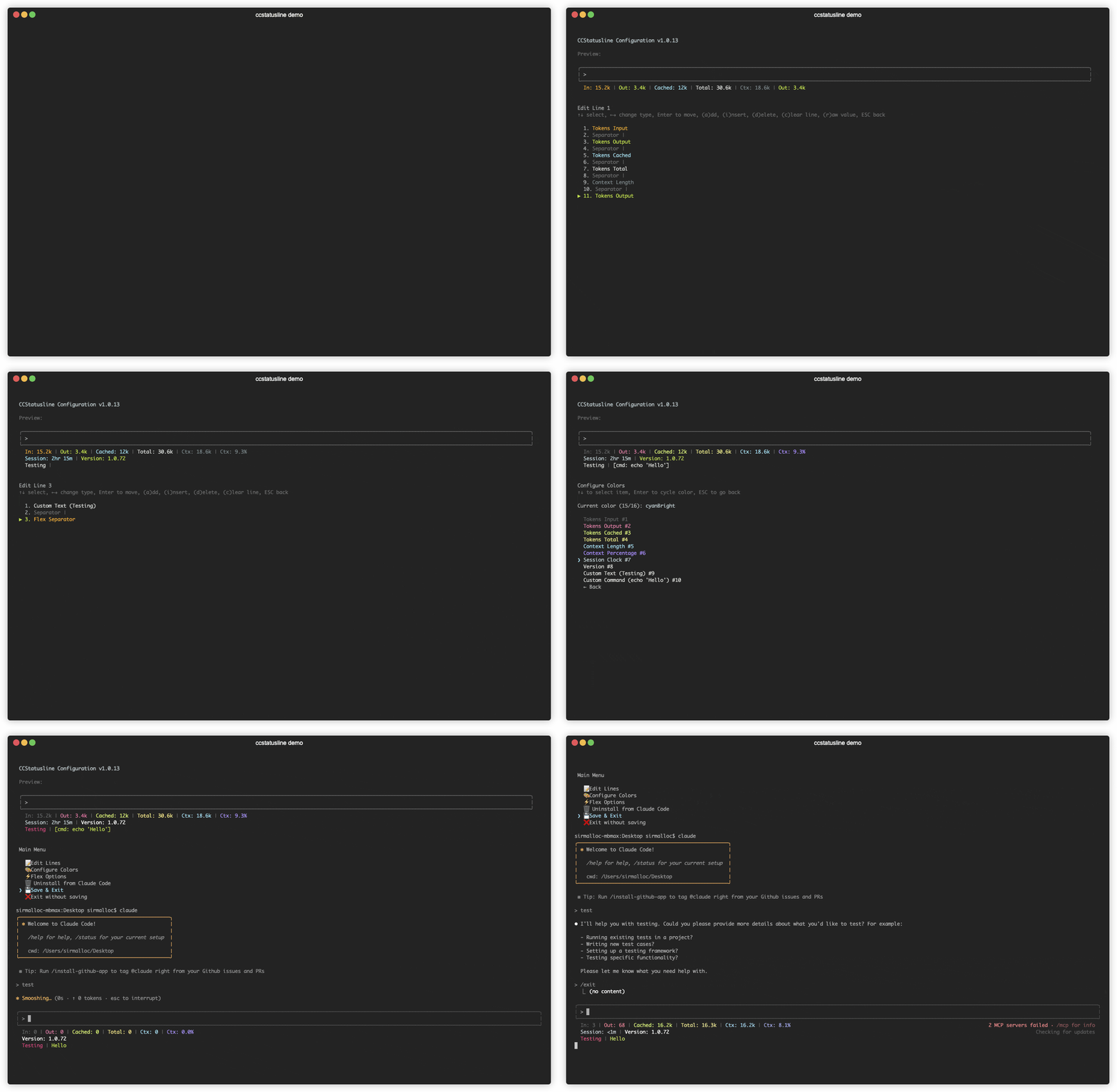
|
|
6
6
|
|
|
7
|
-
|
|
8
|
-
- 🎨 **Fully customizable** - Choose what to display and customize colors
|
|
9
|
-
- 📐 **Multi-line support** - Configure up to 3 status lines
|
|
10
|
-
- 🖥️ **Interactive TUI** - Built-in configuration interface using React/Ink
|
|
11
|
-
- 🚀 **Cross-platform** - Works with both Bun and Node.js
|
|
12
|
-
- 📏 **Auto-width detection** - Automatically adapts to terminal width with flex separators
|
|
7
|
+
## ✨ Features
|
|
13
8
|
|
|
14
|
-
|
|
9
|
+
- **📊 Real-time Metrics** - Display model name, git branch, token usage, session duration, and more
|
|
10
|
+
- **🎨 Fully Customizable** - Choose what to display and customize colors for each element
|
|
11
|
+
- **📐 Multi-line Support** - Configure up to 3 independent status lines
|
|
12
|
+
- **🖥️ Interactive TUI** - Built-in configuration interface using React/Ink
|
|
13
|
+
- **🚀 Cross-platform** - Works seamlessly with both Bun and Node.js
|
|
14
|
+
- **📏 Smart Width Detection** - Automatically adapts to terminal width with flex separators
|
|
15
|
+
- **⚡ Zero Config** - Sensible defaults that work out of the box
|
|
15
16
|
|
|
16
|
-
|
|
17
|
+
## 🚀 Quick Start
|
|
18
|
+
|
|
19
|
+
### No installation needed! Use directly with npx:
|
|
17
20
|
|
|
18
21
|
```bash
|
|
19
22
|
# Run the configuration TUI
|
|
20
23
|
npx ccstatusline@latest
|
|
21
24
|
```
|
|
22
25
|
|
|
23
|
-
## Setup
|
|
24
|
-
|
|
25
26
|
### Configure ccstatusline
|
|
26
27
|
|
|
27
|
-
|
|
28
|
-
|
|
29
|
-
```bash
|
|
30
|
-
npx ccstatusline@latest
|
|
31
|
-
```
|
|
32
|
-
|
|
33
|
-
This launches a TUI where you can:
|
|
28
|
+
The interactive configuration tool provides a terminal UI where you can:
|
|
34
29
|
- Configure up to 3 separate status lines
|
|
35
30
|
- Add/remove/reorder status line items
|
|
36
31
|
- Customize colors for each element
|
|
@@ -39,13 +34,13 @@ This launches a TUI where you can:
|
|
|
39
34
|
- Install/uninstall to Claude Code settings
|
|
40
35
|
- Preview your status line in real-time
|
|
41
36
|
|
|
42
|
-
Your settings are saved to `~/.config/ccstatusline/settings.json
|
|
37
|
+
> 💡 **Tip:** Your settings are automatically saved to `~/.config/ccstatusline/settings.json`
|
|
43
38
|
|
|
44
|
-
## Usage
|
|
39
|
+
## 📖 Usage
|
|
45
40
|
|
|
46
41
|
Once configured, ccstatusline automatically formats your Claude Code status line. The status line appears at the bottom of your terminal during Claude Code sessions.
|
|
47
42
|
|
|
48
|
-
### Available Status Items
|
|
43
|
+
### 📊 Available Status Items
|
|
49
44
|
|
|
50
45
|
- **Model Name** - Shows the current Claude model (e.g., "Claude 3.5 Sonnet")
|
|
51
46
|
- **Git Branch** - Displays current git branch name
|
|
@@ -60,10 +55,11 @@ Once configured, ccstatusline automatically formats your Claude Code status line
|
|
|
60
55
|
- **Context Percentage** - Shows percentage of context limit used
|
|
61
56
|
- **Terminal Width** - Shows detected terminal width (for debugging)
|
|
62
57
|
- **Custom Text** - Add your own custom text to the status line
|
|
58
|
+
- **Custom Command** - Execute shell commands and display their output (refreshes every 5 seconds)
|
|
63
59
|
- **Separator** - Visual divider between items (customizable: |, -, comma, space)
|
|
64
60
|
- **Flex Separator** - Expands to fill available space
|
|
65
61
|
|
|
66
|
-
### TUI Controls
|
|
62
|
+
### ⌨️ TUI Controls
|
|
67
63
|
|
|
68
64
|
#### Main Menu
|
|
69
65
|
- **↑↓** - Navigate menu items
|
|
@@ -79,7 +75,7 @@ Once configured, ccstatusline automatically formats your Claude Code status line
|
|
|
79
75
|
- **d** - Delete selected item
|
|
80
76
|
- **c** - Clear entire line
|
|
81
77
|
- **r** - Toggle raw value mode (no labels)
|
|
82
|
-
- **e** - Edit
|
|
78
|
+
- **e** - Edit value (for custom-text and custom-command items)
|
|
83
79
|
- **Space** - Change separator character (for separator items)
|
|
84
80
|
- **ESC** - Go back
|
|
85
81
|
|
|
@@ -94,23 +90,45 @@ Configure how flex separators calculate available width:
|
|
|
94
90
|
- **Full width minus 40** - Leaves space for auto-compact message (default)
|
|
95
91
|
- **Full width until compact** - Switches based on context percentage threshold
|
|
96
92
|
|
|
97
|
-
### Raw Value Mode
|
|
93
|
+
### 🔤 Raw Value Mode
|
|
98
94
|
|
|
99
95
|
Some items support "raw value" mode which displays just the value without a label:
|
|
100
96
|
- Normal: `Model: Claude 3.5 Sonnet` → Raw: `Claude 3.5 Sonnet`
|
|
101
97
|
- Normal: `Session: 2hr 15m` → Raw: `2hr 15m`
|
|
102
98
|
- Normal: `Ctx: 18.6k` → Raw: `18.6k`
|
|
103
99
|
|
|
104
|
-
###
|
|
100
|
+
### 🔧 Custom Widgets
|
|
101
|
+
|
|
102
|
+
#### Custom Text Widget
|
|
103
|
+
Add static text to your status line. Perfect for:
|
|
104
|
+
- Project identifiers
|
|
105
|
+
- Environment indicators (dev/prod)
|
|
106
|
+
- Personal labels or reminders
|
|
107
|
+
|
|
108
|
+
#### Custom Command Widget
|
|
109
|
+
Execute shell commands and display their output dynamically:
|
|
110
|
+
- Refreshes automatically every 5 seconds
|
|
111
|
+
- Displays command output inline in your status line
|
|
112
|
+
- Examples:
|
|
113
|
+
- `pwd | xargs basename` - Show current directory name
|
|
114
|
+
- `node -v` - Display Node.js version
|
|
115
|
+
- `git rev-parse --short HEAD` - Show current commit hash
|
|
116
|
+
- `date +%H:%M` - Display current time
|
|
117
|
+
- `curl -s wttr.in?format="%t"` - Show current temperature
|
|
118
|
+
|
|
119
|
+
> ⚠️ **Note:** Commands should complete quickly (<1s) to avoid delays. Long-running commands will be killed after timeout.
|
|
120
|
+
|
|
121
|
+
### ✂️ Smart Truncation
|
|
105
122
|
|
|
106
123
|
When terminal width is detected, status lines automatically truncate with ellipsis (...) if they exceed the available width, preventing line wrapping.
|
|
107
124
|
|
|
108
|
-
## Development
|
|
125
|
+
## 🛠️ Development
|
|
109
126
|
|
|
110
127
|
### Prerequisites
|
|
111
128
|
|
|
112
|
-
- [Bun](https://bun.sh)
|
|
129
|
+
- [Bun](https://bun.sh) (v1.0+)
|
|
113
130
|
- Git
|
|
131
|
+
- Node.js 18+ (optional, for npm publishing)
|
|
114
132
|
|
|
115
133
|
### Setup
|
|
116
134
|
|
|
@@ -133,7 +151,7 @@ bun run src/ccstatusline.ts
|
|
|
133
151
|
bun run build
|
|
134
152
|
```
|
|
135
153
|
|
|
136
|
-
### Project Structure
|
|
154
|
+
### 📁 Project Structure
|
|
137
155
|
|
|
138
156
|
```
|
|
139
157
|
ccstatusline/
|
|
@@ -147,7 +165,7 @@ ccstatusline/
|
|
|
147
165
|
├── tsconfig.json
|
|
148
166
|
└── README.md
|
|
149
167
|
```
|
|
150
|
-
## Contributing
|
|
168
|
+
## 🤝 Contributing
|
|
151
169
|
|
|
152
170
|
Contributions are welcome! Please feel free to submit a Pull Request.
|
|
153
171
|
|
|
@@ -157,14 +175,29 @@ Contributions are welcome! Please feel free to submit a Pull Request.
|
|
|
157
175
|
4. Push to the branch (`git push origin feature/amazing-feature`)
|
|
158
176
|
5. Open a Pull Request
|
|
159
177
|
|
|
160
|
-
## License
|
|
178
|
+
## 📄 License
|
|
179
|
+
|
|
180
|
+
[MIT](LICENSE) © Matthew Breedlove
|
|
181
|
+
|
|
182
|
+
## 👤 Author
|
|
183
|
+
|
|
184
|
+
**Matthew Breedlove**
|
|
161
185
|
|
|
162
|
-
|
|
186
|
+
- GitHub: [@sirmalloc](https://github.com/sirmalloc)
|
|
163
187
|
|
|
164
|
-
##
|
|
188
|
+
## 🙏 Acknowledgments
|
|
165
189
|
|
|
166
|
-
|
|
190
|
+
- Built for use with [Claude Code CLI](https://claude.ai/code) by Anthropic
|
|
191
|
+
- Powered by [Ink](https://github.com/vadimdemedes/ink) for the terminal UI
|
|
192
|
+
- Made with ❤️ for the Claude Code community
|
|
167
193
|
|
|
168
|
-
|
|
194
|
+
---
|
|
169
195
|
|
|
170
|
-
|
|
196
|
+
<p align="center">
|
|
197
|
+
<a href="https://www.npmjs.com/package/ccstatusline">
|
|
198
|
+
<img src="https://img.shields.io/npm/v/ccstatusline.svg" alt="npm version">
|
|
199
|
+
</a>
|
|
200
|
+
<a href="https://github.com/sirmalloc/ccstatusline/blob/main/LICENSE">
|
|
201
|
+
<img src="https://img.shields.io/badge/license-MIT-blue.svg" alt="License">
|
|
202
|
+
</a>
|
|
203
|
+
</p>
|
package/dist/ccstatusline.js
CHANGED
|
@@ -254,31 +254,31 @@ var renderSingleLine = (items, terminalWidth, widthDetectionAvailable, settings)
|
|
|
254
254
|
elements.push(changesColor("(+42,-10)"));
|
|
255
255
|
break;
|
|
256
256
|
case "tokens-input":
|
|
257
|
-
const inputColor = chalk[item.color || "
|
|
257
|
+
const inputColor = chalk[item.color || "blue"] || chalk.blue;
|
|
258
258
|
elements.push(inputColor(item.rawValue ? "15.2k" : "In: 15.2k"));
|
|
259
259
|
break;
|
|
260
260
|
case "tokens-output":
|
|
261
|
-
const outputColor = chalk[item.color || "
|
|
261
|
+
const outputColor = chalk[item.color || "white"] || chalk.white;
|
|
262
262
|
elements.push(outputColor(item.rawValue ? "3.4k" : "Out: 3.4k"));
|
|
263
263
|
break;
|
|
264
264
|
case "tokens-cached":
|
|
265
|
-
const cachedColor = chalk[item.color || "
|
|
265
|
+
const cachedColor = chalk[item.color || "cyan"] || chalk.cyan;
|
|
266
266
|
elements.push(cachedColor(item.rawValue ? "12k" : "Cached: 12k"));
|
|
267
267
|
break;
|
|
268
268
|
case "tokens-total":
|
|
269
|
-
const totalColor = chalk[item.color || "
|
|
269
|
+
const totalColor = chalk[item.color || "cyan"] || chalk.cyan;
|
|
270
270
|
elements.push(totalColor(item.rawValue ? "30.6k" : "Total: 30.6k"));
|
|
271
271
|
break;
|
|
272
272
|
case "context-length":
|
|
273
|
-
const ctxColor = chalk[item.color || "
|
|
273
|
+
const ctxColor = chalk[item.color || "dim"] || chalk.dim;
|
|
274
274
|
elements.push(ctxColor(item.rawValue ? "18.6k" : "Ctx: 18.6k"));
|
|
275
275
|
break;
|
|
276
276
|
case "context-percentage":
|
|
277
|
-
const ctxPctColor = chalk[item.color || "
|
|
277
|
+
const ctxPctColor = chalk[item.color || "blue"] || chalk.blue;
|
|
278
278
|
elements.push(ctxPctColor(item.rawValue ? "9.3%" : "Ctx: 9.3%"));
|
|
279
279
|
break;
|
|
280
280
|
case "session-clock":
|
|
281
|
-
const sessionColor = chalk[item.color || "
|
|
281
|
+
const sessionColor = chalk[item.color || "yellow"] || chalk.yellow;
|
|
282
282
|
elements.push(sessionColor(item.rawValue ? "2hr 15m" : "Session: 2hr 15m"));
|
|
283
283
|
break;
|
|
284
284
|
case "version":
|
|
@@ -286,7 +286,7 @@ var renderSingleLine = (items, terminalWidth, widthDetectionAvailable, settings)
|
|
|
286
286
|
elements.push(versionColor(item.rawValue ? "1.0.72" : "Version: 1.0.72"));
|
|
287
287
|
break;
|
|
288
288
|
case "terminal-width":
|
|
289
|
-
const termColor = chalk[item.color || "
|
|
289
|
+
const termColor = chalk[item.color || "gray"] || chalk.gray;
|
|
290
290
|
const detectedWidth = canDetectTerminalWidth() ? terminalWidth : "??";
|
|
291
291
|
elements.push(termColor(item.rawValue ? `${detectedWidth}` : `Term: ${detectedWidth}`));
|
|
292
292
|
break;
|
|
@@ -783,14 +783,50 @@ var ItemsEditor = ({ items, onUpdate, onBack, lineNumber }) => {
|
|
|
783
783
|
}
|
|
784
784
|
}
|
|
785
785
|
});
|
|
786
|
+
const getDefaultColor = (type) => {
|
|
787
|
+
switch (type) {
|
|
788
|
+
case "model":
|
|
789
|
+
return "cyan";
|
|
790
|
+
case "git-branch":
|
|
791
|
+
return "magenta";
|
|
792
|
+
case "git-changes":
|
|
793
|
+
return "yellow";
|
|
794
|
+
case "session-clock":
|
|
795
|
+
return "yellow";
|
|
796
|
+
case "version":
|
|
797
|
+
return "green";
|
|
798
|
+
case "tokens-input":
|
|
799
|
+
return "blue";
|
|
800
|
+
case "tokens-output":
|
|
801
|
+
return "white";
|
|
802
|
+
case "tokens-cached":
|
|
803
|
+
return "cyan";
|
|
804
|
+
case "tokens-total":
|
|
805
|
+
return "cyan";
|
|
806
|
+
case "context-length":
|
|
807
|
+
return "dim";
|
|
808
|
+
case "context-percentage":
|
|
809
|
+
return "blue";
|
|
810
|
+
case "terminal-width":
|
|
811
|
+
return "gray";
|
|
812
|
+
case "custom-text":
|
|
813
|
+
return "white";
|
|
814
|
+
case "custom-command":
|
|
815
|
+
return "white";
|
|
816
|
+
default:
|
|
817
|
+
return "white";
|
|
818
|
+
}
|
|
819
|
+
};
|
|
786
820
|
const getItemDisplay = (item) => {
|
|
821
|
+
const colorName = item.color || getDefaultColor(item.type);
|
|
822
|
+
const colorFunc = chalk[colorName] || chalk.white;
|
|
787
823
|
switch (item.type) {
|
|
788
824
|
case "model":
|
|
789
|
-
return
|
|
825
|
+
return colorFunc("Model");
|
|
790
826
|
case "git-branch":
|
|
791
|
-
return
|
|
827
|
+
return colorFunc("Git Branch");
|
|
792
828
|
case "git-changes":
|
|
793
|
-
return
|
|
829
|
+
return colorFunc("Git Changes");
|
|
794
830
|
case "separator": {
|
|
795
831
|
const char = item.character || "|";
|
|
796
832
|
const charDisplay = char === " " ? "(space)" : char;
|
|
@@ -799,30 +835,34 @@ var ItemsEditor = ({ items, onUpdate, onBack, lineNumber }) => {
|
|
|
799
835
|
case "flex-separator":
|
|
800
836
|
return chalk.yellow("Flex Separator");
|
|
801
837
|
case "tokens-input":
|
|
802
|
-
return
|
|
838
|
+
return colorFunc("Tokens Input");
|
|
803
839
|
case "tokens-output":
|
|
804
|
-
return
|
|
840
|
+
return colorFunc("Tokens Output");
|
|
805
841
|
case "tokens-cached":
|
|
806
|
-
return
|
|
842
|
+
return colorFunc("Tokens Cached");
|
|
807
843
|
case "tokens-total":
|
|
808
|
-
return
|
|
844
|
+
return colorFunc("Tokens Total");
|
|
809
845
|
case "context-length":
|
|
810
|
-
return
|
|
846
|
+
return colorFunc("Context Length");
|
|
811
847
|
case "context-percentage":
|
|
812
|
-
return
|
|
848
|
+
return colorFunc("Context %");
|
|
813
849
|
case "session-clock":
|
|
814
|
-
return
|
|
850
|
+
return colorFunc("Session Clock");
|
|
815
851
|
case "terminal-width":
|
|
816
|
-
return
|
|
852
|
+
return colorFunc("Terminal Width");
|
|
817
853
|
case "version":
|
|
818
|
-
return
|
|
854
|
+
return colorFunc("Version");
|
|
819
855
|
case "custom-text":
|
|
820
856
|
const text = item.customText || "Empty";
|
|
821
|
-
return
|
|
857
|
+
return colorFunc(`Custom Text (${text})`);
|
|
822
858
|
case "custom-command":
|
|
823
859
|
const cmd = item.commandPath || "No command";
|
|
824
860
|
const truncatedCmd = cmd.length > 30 ? `${cmd.substring(0, 27)}...` : cmd;
|
|
825
|
-
|
|
861
|
+
if (!item.preserveColors) {
|
|
862
|
+
return colorFunc(`Custom Command (${truncatedCmd})`);
|
|
863
|
+
} else {
|
|
864
|
+
return chalk.white(`Custom Command (${truncatedCmd}) [preserving colors]`);
|
|
865
|
+
}
|
|
826
866
|
}
|
|
827
867
|
};
|
|
828
868
|
const hasFlexSeparator = items.some((item) => item.type === "flex-separator");
|
|
@@ -977,6 +1017,40 @@ var ItemsEditor = ({ items, onUpdate, onBack, lineNumber }) => {
|
|
|
977
1017
|
var ColorMenu = ({ items, onUpdate, onBack }) => {
|
|
978
1018
|
const colorableItems = items.filter((item) => ["model", "git-branch", "git-changes", "tokens-input", "tokens-output", "tokens-cached", "tokens-total", "context-length", "context-percentage", "session-clock", "terminal-width", "version", "custom-text", "custom-command"].includes(item.type) && !(item.type === "custom-command" && item.preserveColors));
|
|
979
1019
|
const [selectedIndex, setSelectedIndex] = useState(0);
|
|
1020
|
+
const getDefaultColor = (type) => {
|
|
1021
|
+
switch (type) {
|
|
1022
|
+
case "model":
|
|
1023
|
+
return "cyan";
|
|
1024
|
+
case "git-branch":
|
|
1025
|
+
return "magenta";
|
|
1026
|
+
case "git-changes":
|
|
1027
|
+
return "yellow";
|
|
1028
|
+
case "session-clock":
|
|
1029
|
+
return "yellow";
|
|
1030
|
+
case "version":
|
|
1031
|
+
return "green";
|
|
1032
|
+
case "tokens-input":
|
|
1033
|
+
return "blue";
|
|
1034
|
+
case "tokens-output":
|
|
1035
|
+
return "white";
|
|
1036
|
+
case "tokens-cached":
|
|
1037
|
+
return "cyan";
|
|
1038
|
+
case "tokens-total":
|
|
1039
|
+
return "cyan";
|
|
1040
|
+
case "context-length":
|
|
1041
|
+
return "dim";
|
|
1042
|
+
case "context-percentage":
|
|
1043
|
+
return "blue";
|
|
1044
|
+
case "terminal-width":
|
|
1045
|
+
return "gray";
|
|
1046
|
+
case "custom-text":
|
|
1047
|
+
return "white";
|
|
1048
|
+
case "custom-command":
|
|
1049
|
+
return "white";
|
|
1050
|
+
default:
|
|
1051
|
+
return "white";
|
|
1052
|
+
}
|
|
1053
|
+
};
|
|
980
1054
|
useInput((input, key) => {
|
|
981
1055
|
if (key.escape) {
|
|
982
1056
|
onBack();
|
|
@@ -1051,7 +1125,7 @@ var ColorMenu = ({ items, onUpdate, onBack }) => {
|
|
|
1051
1125
|
}
|
|
1052
1126
|
};
|
|
1053
1127
|
const menuItems = colorableItems.map((item, index) => {
|
|
1054
|
-
const color = item.color ||
|
|
1128
|
+
const color = item.color || getDefaultColor(item.type);
|
|
1055
1129
|
const colorFunc = chalk[color] || chalk.white;
|
|
1056
1130
|
return {
|
|
1057
1131
|
label: colorFunc(`${getItemLabel(item)} #${index + 1}`),
|
|
@@ -1101,7 +1175,7 @@ var ColorMenu = ({ items, onUpdate, onBack }) => {
|
|
|
1101
1175
|
"whiteBright"
|
|
1102
1176
|
];
|
|
1103
1177
|
const selectedItem = selectedIndex < colorableItems.length ? colorableItems[selectedIndex] : null;
|
|
1104
|
-
const currentColor = selectedItem ? selectedItem.color ||
|
|
1178
|
+
const currentColor = selectedItem ? selectedItem.color || getDefaultColor(selectedItem.type) : "white";
|
|
1105
1179
|
const colorIndex = colors.indexOf(currentColor);
|
|
1106
1180
|
const colorNumber = colorIndex === -1 ? 8 : colorIndex + 1;
|
|
1107
1181
|
const colorDisplay = chalk[currentColor] ? chalk[currentColor](currentColor) : chalk.white(currentColor);
|