ccstatusline-usage 2.3.9 → 2.3.11
This diff represents the content of publicly available package versions that have been released to one of the supported registries. The information contained in this diff is provided for informational purposes only and reflects changes between package versions as they appear in their respective public registries.
- package/README.md +49 -22
- package/dist/ccstatusline.js +3181 -1249
- package/package.json +3 -3
package/README.md
CHANGED
|
@@ -47,25 +47,35 @@ Session: [████░░░░░░░░░░░] 27.0% | Weekly: [██
|
|
|
47
47
|
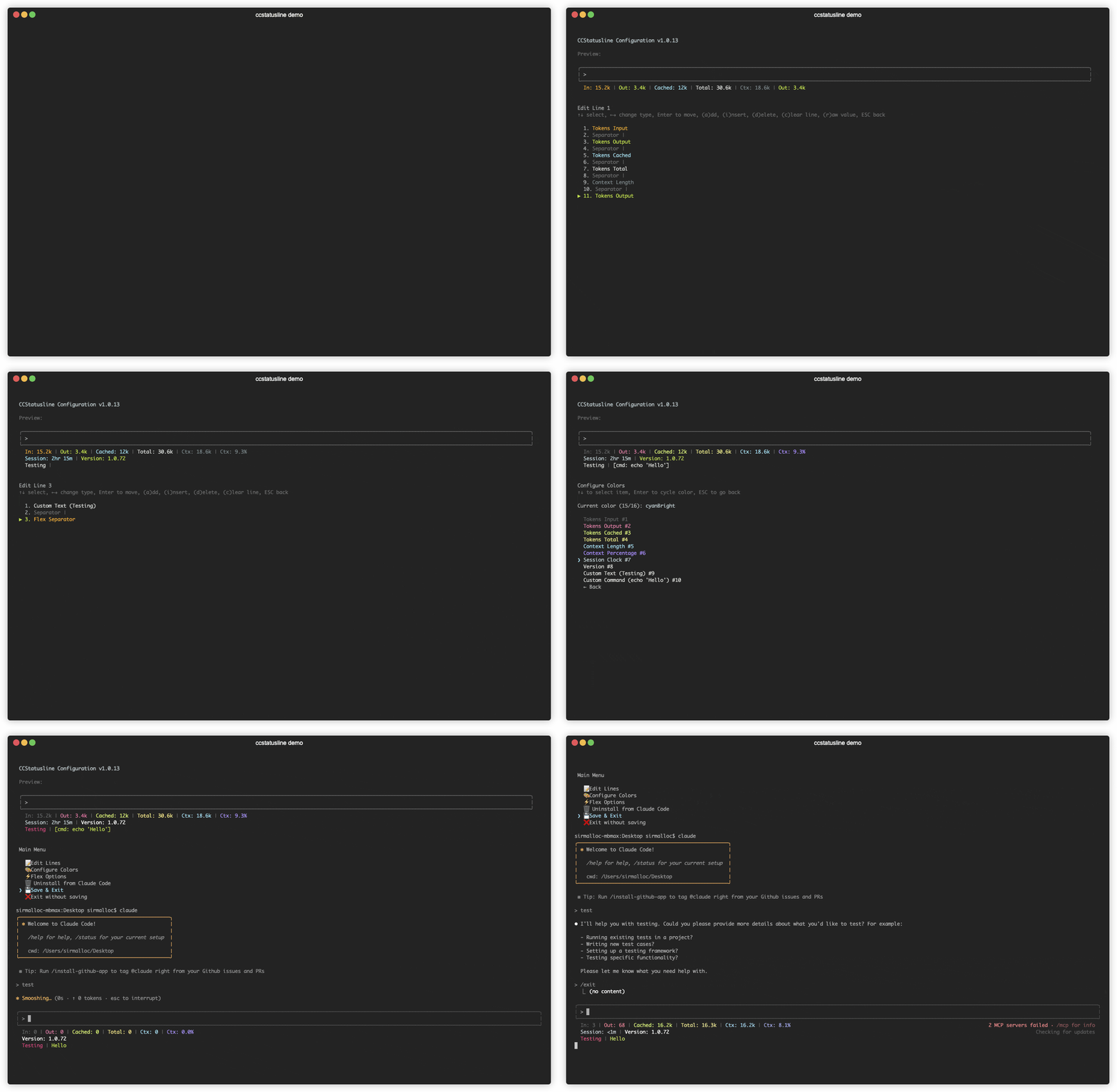
|
|
48
48
|
|
|
49
49
|
</div>
|
|
50
|
+
<br />
|
|
50
51
|
|
|
51
52
|
## 📚 Table of Contents
|
|
52
53
|
|
|
53
54
|
- [Recent Updates](#-recent-updates)
|
|
54
55
|
- [Features](#-features)
|
|
56
|
+
- [Localizations](#-localizations)
|
|
55
57
|
- [Quick Start](#-quick-start)
|
|
56
|
-
- [Windows Support](
|
|
57
|
-
- [Usage](
|
|
58
|
-
- [
|
|
59
|
-
- [Development](#️-development)
|
|
58
|
+
- [Windows Support](docs/WINDOWS.md)
|
|
59
|
+
- [Usage](docs/USAGE.md)
|
|
60
|
+
- [Development](docs/DEVELOPMENT.md)
|
|
60
61
|
- [Contributing](#-contributing)
|
|
61
62
|
- [Uninstall](#️-uninstall)
|
|
62
63
|
- [License](#-license)
|
|
63
64
|
- [Related Projects](#-related-projects)
|
|
64
65
|
|
|
65
|
-
|
|
66
|
+
<br />
|
|
66
67
|
|
|
67
68
|
## 🆕 Recent Updates
|
|
68
69
|
|
|
70
|
+
### [v2.3.11](https://github.com/pcvelz/ccstatusline-usage/releases/tag/v2.3.11) - Fix dual-cache drift between Weekly Usage and Weekly Pace
|
|
71
|
+
|
|
72
|
+
- [pcvelz/ccstatusline-usage](https://github.com/pcvelz/ccstatusline-usage): **Unified usage data source** — Session Usage, Weekly Usage, and Reset Timer widgets now read from the shared `context.usageData` pipeline instead of maintaining a separate API cache. Previously, around the weekly reset boundary the two caches could drift and show contradictory data (e.g. `Weekly: 99%` alongside `Pace: D1/7 +2%`). Deleted ~330 lines of duplicate fetching/caching infrastructure from `ApiUsage.tsx` (556 → 227 lines). Upstream merge: #278 (JSONL token overcounting fix), #283 (model display name parenthetical strip — integrated into fork's existing `[1m]`-aware display logic).
|
|
73
|
+
|
|
74
|
+
### [v2.3.10](https://github.com/pcvelz/ccstatusline-usage/releases/tag/v2.3.10) - Extra usage on session limit, fix empty separator for null widgets
|
|
75
|
+
|
|
76
|
+
- [pcvelz/ccstatusline-usage](https://github.com/pcvelz/ccstatusline-usage): **Extra usage on session limit** — Reset Timer now shows extra usage spending when session limit reaches 100% (not just weekly limit or charged 1M model).
|
|
77
|
+
- [pcvelz/ccstatusline-usage](https://github.com/pcvelz/ccstatusline-usage): **Fix empty separator for null widgets** — Separators adjacent to widgets that return null (e.g. Battery when charging) are now suppressed correctly. Previously showed a visible `| |` gap.
|
|
78
|
+
|
|
69
79
|
### [v2.3.9](https://github.com/pcvelz/ccstatusline-usage/releases/tag/v2.3.9) - Medium display size for mid-width terminals
|
|
70
80
|
|
|
71
81
|
- [pcvelz/ccstatusline-usage](https://github.com/pcvelz/ccstatusline-usage): **Three-tier display sizing** — New medium display size for terminals between 134–177 chars wide. Progress bars render at 8 chars (between mobile's 4 and full's 15). Model and Session ID use compact format in medium mode. Weekly Pace pendulum bar scales to halfWidth=4 in medium.
|
|
@@ -176,6 +186,10 @@ Session: [████░░░░░░░░░░░] 27.0% | Weekly: [██
|
|
|
176
186
|
- **🔗 Git widget link modes (v2.2.6)** - `Git Branch` can render clickable GitHub branch links, and `Git Root Dir` can render clickable IDE links for VS Code and Cursor.
|
|
177
187
|
- **🤝 Better subagent-aware speed reporting** - Token speed calculations continue to include referenced subagent activity so displayed speeds better reflect actual concurrent work.
|
|
178
188
|
|
|
189
|
+
<br />
|
|
190
|
+
<details>
|
|
191
|
+
<summary><b>Older updates (v2.1.10 and earlier)</b></summary>
|
|
192
|
+
|
|
179
193
|
### v2.1.0 - v2.1.10 - Usage widgets, links, new git insertions / deletions widgets, and reliability fixes
|
|
180
194
|
|
|
181
195
|
- **🧩 New Usage widgets (v2.1.0)** - Added **Session Usage**, **Weekly Usage**, **Block Reset Timer**, and **Context Bar** widgets.
|
|
@@ -272,7 +286,9 @@ Session: [████░░░░░░░░░░░] 27.0% | Weekly: [██
|
|
|
272
286
|
- **🔤 Custom Separators** - Add multiple Powerline separators with custom hex codes for font support
|
|
273
287
|
- **🚀 Auto Font Install** - Automatic Powerline font installation with user consent
|
|
274
288
|
|
|
275
|
-
|
|
289
|
+
</details>
|
|
290
|
+
|
|
291
|
+
<br />
|
|
276
292
|
|
|
277
293
|
## ✨ Features
|
|
278
294
|
|
|
@@ -284,13 +300,21 @@ Session: [████░░░░░░░░░░░] 27.0% | Weekly: [██
|
|
|
284
300
|
- **📐 Multi-line Support** - Configure multiple independent status lines
|
|
285
301
|
- **🖥️ Interactive TUI** - Built-in configuration interface using React/Ink
|
|
286
302
|
- **🔎 Fast Widget Picker** - Add/change widgets by category with search and ranked matching
|
|
287
|
-
- **⚙️ Global Options** - Apply consistent formatting across all widgets (padding, separators, bold,
|
|
303
|
+
- **⚙️ Global Options** - Apply consistent formatting across all widgets (padding, separators, bold, minimalist mode, and color overrides)
|
|
288
304
|
- **🚀 Cross-platform** - Works seamlessly with both Bun and Node.js
|
|
289
305
|
- **🔧 Flexible Configuration** - Supports custom Claude Code config directory via `CLAUDE_CONFIG_DIR` environment variable
|
|
290
306
|
- **📏 Smart Width Detection** - Automatically adapts to terminal width with flex separators
|
|
291
307
|
- **⚡ Zero Config** - Sensible defaults that work out of the box
|
|
292
308
|
|
|
293
|
-
|
|
309
|
+
<br />
|
|
310
|
+
|
|
311
|
+
## 🌐 Localizations
|
|
312
|
+
|
|
313
|
+
The localizations in this section are third-party forks maintained outside this repository. They are not maintained, reviewed, or endorsed by this repository, so review their code and releases before using them.
|
|
314
|
+
|
|
315
|
+
- 🌏 **中文版 (Chinese):** [ccstatusline-zh](https://github.com/huangguang1999/ccstatusline-zh)
|
|
316
|
+
|
|
317
|
+
<br />
|
|
294
318
|
|
|
295
319
|
## 🚀 Quick Start
|
|
296
320
|
|
|
@@ -304,7 +328,9 @@ npx -y ccstatusline-usage@latest
|
|
|
304
328
|
bunx -y ccstatusline-usage@latest
|
|
305
329
|
```
|
|
306
330
|
|
|
307
|
-
|
|
331
|
+
<br />
|
|
332
|
+
<details>
|
|
333
|
+
<summary><b>Configure ccstatusline</b></summary>
|
|
308
334
|
|
|
309
335
|
The interactive configuration tool provides a terminal UI where you can:
|
|
310
336
|
- Configure multiple separate status lines
|
|
@@ -321,14 +347,16 @@ The interactive configuration tool provides a terminal UI where you can:
|
|
|
321
347
|
> ```bash
|
|
322
348
|
> # Linux/macOS
|
|
323
349
|
> export CLAUDE_CONFIG_DIR=/custom/path/to/.claude
|
|
324
|
-
>
|
|
325
|
-
> # Windows PowerShell
|
|
326
|
-
> $env:CLAUDE_CONFIG_DIR="C:\custom\path\.claude"
|
|
327
350
|
> ```
|
|
328
351
|
|
|
329
352
|
> 🌐 **Usage API proxy:** Usage widgets honor the uppercase `HTTPS_PROXY` environment variable for their direct API call to Anthropic.
|
|
330
353
|
|
|
331
|
-
|
|
354
|
+
> 🪟 **Windows Support:** PowerShell examples, installation notes, fonts, troubleshooting, WSL, and Windows Terminal configuration are in [docs/WINDOWS.md](docs/WINDOWS.md).
|
|
355
|
+
|
|
356
|
+
</details>
|
|
357
|
+
|
|
358
|
+
<details>
|
|
359
|
+
<summary><b>Claude Code settings.json format</b></summary>
|
|
332
360
|
|
|
333
361
|
When you install from the TUI, ccstatusline writes a `statusLine` command object to your Claude Code settings:
|
|
334
362
|
|
|
@@ -390,10 +418,12 @@ For optimal Powerline rendering on Windows:
|
|
|
390
418
|
# Install JetBrains Mono Nerd Font via winget
|
|
391
419
|
winget install DEVCOM.JetBrainsMonoNerdFont
|
|
392
420
|
|
|
393
|
-
# Alternative: Install base JetBrains Mono font
|
|
394
|
-
winget install "JetBrains.JetBrainsMono"
|
|
395
|
-
|
|
396
421
|
# Or download manually from: https://www.nerdfonts.com/font-downloads
|
|
422
|
+
|
|
423
|
+
# Alternative: Download and install base JetBrains Mono font
|
|
424
|
+
# from [JetBrains](https://www.jetbrains.com/lp/mono/)
|
|
425
|
+
# or [GitHub](https://github.com/JetBrains/JetBrainsMono)
|
|
426
|
+
# or [Google Fonts](https://fonts.google.com/specimen/JetBrains+Mono)
|
|
397
427
|
```
|
|
398
428
|
|
|
399
429
|
#### Path Handling
|
|
@@ -410,7 +440,7 @@ ccstatusline automatically handles Windows-specific paths:
|
|
|
410
440
|
**Issue**: Powerline symbols showing as question marks or boxes
|
|
411
441
|
```powershell
|
|
412
442
|
# Solution: Install a compatible Nerd Font
|
|
413
|
-
winget install
|
|
443
|
+
winget install DEVCOM.JetBrainsMonoNerdFont
|
|
414
444
|
# Then set the font in your terminal settings
|
|
415
445
|
```
|
|
416
446
|
|
|
@@ -878,7 +908,6 @@ Contributions are welcome! Please feel free to submit a Pull Request.
|
|
|
878
908
|
4. Push to the branch (`git push origin feature/amazing-feature`)
|
|
879
909
|
5. Open a Pull Request
|
|
880
910
|
|
|
881
|
-
---
|
|
882
911
|
|
|
883
912
|
## 🗑️ Uninstall
|
|
884
913
|
|
|
@@ -888,13 +917,11 @@ rm -rf ~/.npm/_npx ~/.config/ccstatusline ~/.cache/ccstatusline*
|
|
|
888
917
|
jq 'del(.statusLine)' ~/.claude/settings.json > /tmp/cs.json && cat /tmp/cs.json > ~/.claude/settings.json
|
|
889
918
|
```
|
|
890
919
|
|
|
891
|
-
---
|
|
892
920
|
|
|
893
921
|
## 📄 License
|
|
894
922
|
|
|
895
923
|
[MIT](LICENSE) © Matthew Breedlove
|
|
896
924
|
|
|
897
|
-
---
|
|
898
925
|
|
|
899
926
|
## 👤 Author
|
|
900
927
|
|
|
@@ -912,8 +939,8 @@ jq 'del(.statusLine)' ~/.claude/settings.json > /tmp/cs.json && cat /tmp/cs.json
|
|
|
912
939
|
|
|
913
940
|
- [tweakcc](https://github.com/Piebald-AI/tweakcc) - Customize Claude Code themes, thinking verbs, and more.
|
|
914
941
|
- [ccusage](https://github.com/ryoppippi/ccusage) - Track and display Claude Code usage metrics.
|
|
942
|
+
- [codachi](https://github.com/vincent-k2026/codachi) - A tamagotchi-style statusline pet that grows with your context window.
|
|
915
943
|
|
|
916
|
-
---
|
|
917
944
|
|
|
918
945
|
## 🙏 Acknowledgments
|
|
919
946
|
|
|
@@ -921,7 +948,7 @@ jq 'del(.statusLine)' ~/.claude/settings.json > /tmp/cs.json && cat /tmp/cs.json
|
|
|
921
948
|
- Powered by [Ink](https://github.com/vadimdemedes/ink) for the terminal UI
|
|
922
949
|
- Made with ❤️ for the Claude Code community
|
|
923
950
|
|
|
924
|
-
|
|
951
|
+
<br />
|
|
925
952
|
|
|
926
953
|
## Star History
|
|
927
954
|
|