ccgauge 1.1.0 → 1.1.2
This diff represents the content of publicly available package versions that have been released to one of the supported registries. The information contained in this diff is provided for informational purposes only and reflects changes between package versions as they appear in their respective public registries.
- package/.next/standalone/.next/BUILD_ID +1 -1
- package/.next/standalone/.next/app-build-manifest.json +42 -42
- package/.next/standalone/.next/app-path-routes-manifest.json +6 -6
- package/.next/standalone/.next/build-manifest.json +2 -2
- package/.next/standalone/.next/prerender-manifest.json +3 -3
- package/.next/standalone/.next/server/app/_not-found/page_client-reference-manifest.js +1 -1
- package/.next/standalone/.next/server/app/api/blocks/route_client-reference-manifest.js +1 -1
- package/.next/standalone/.next/server/app/api/export/usage/route.js +1 -1
- package/.next/standalone/.next/server/app/api/export/usage/route_client-reference-manifest.js +1 -1
- package/.next/standalone/.next/server/app/api/pricing/route_client-reference-manifest.js +1 -1
- package/.next/standalone/.next/server/app/api/projects/route_client-reference-manifest.js +1 -1
- package/.next/standalone/.next/server/app/api/scan/route_client-reference-manifest.js +1 -1
- package/.next/standalone/.next/server/app/api/sessions/route_client-reference-manifest.js +1 -1
- package/.next/standalone/.next/server/app/api/usage/route_client-reference-manifest.js +1 -1
- package/.next/standalone/.next/server/app/models/page.js +1 -1
- package/.next/standalone/.next/server/app/models/page_client-reference-manifest.js +1 -1
- package/.next/standalone/.next/server/app/page.js +2 -2
- package/.next/standalone/.next/server/app/page_client-reference-manifest.js +1 -1
- package/.next/standalone/.next/server/app/projects/[id]/page_client-reference-manifest.js +1 -1
- package/.next/standalone/.next/server/app/projects/page.js +1 -1
- package/.next/standalone/.next/server/app/projects/page_client-reference-manifest.js +1 -1
- package/.next/standalone/.next/server/app/sessions/[id]/page_client-reference-manifest.js +1 -1
- package/.next/standalone/.next/server/app/sessions/page.js +1 -1
- package/.next/standalone/.next/server/app/sessions/page_client-reference-manifest.js +1 -1
- package/.next/standalone/.next/server/app/settings/page.js +2 -2
- package/.next/standalone/.next/server/app/settings/page_client-reference-manifest.js +1 -1
- package/.next/standalone/.next/server/app/usage/page.js +1 -1
- package/.next/standalone/.next/server/app/usage/page_client-reference-manifest.js +1 -1
- package/.next/standalone/.next/server/app-paths-manifest.json +6 -6
- package/.next/standalone/.next/server/chunks/125.js +1 -1
- package/.next/standalone/.next/server/chunks/567.js +3 -3
- package/.next/standalone/.next/server/chunks/716.js +1 -1
- package/.next/standalone/.next/server/chunks/98.js +1 -1
- package/.next/standalone/.next/server/functions-config-manifest.json +1 -1
- package/.next/standalone/.next/server/middleware-manifest.json +5 -5
- package/.next/standalone/.next/server/pages/500.html +1 -1
- package/.next/standalone/.next/server/server-reference-manifest.json +1 -1
- package/.next/standalone/.next/static/chunks/148-edf90b0918345dc2.js +1 -0
- package/.next/standalone/.next/static/chunks/app/layout-af71188a257674b5.js +1 -0
- package/.next/standalone/.next/static/chunks/app/page-1a147d12fca0b184.js +1 -0
- package/.next/standalone/.next/static/chunks/app/usage/{page-7fcc2a2d931307d5.js → page-051223f62647aadc.js} +1 -1
- package/.next/standalone/.next/static/css/fabb40b2545c70dd.css +5 -0
- package/.next/standalone/package.json +8 -2
- package/.next/standalone/public/codex-logo.webp +0 -0
- package/CHANGELOG.md +160 -0
- package/README.md +136 -384
- package/README.zh-CN.md +146 -398
- package/bin/cli.mjs +30 -190
- package/dist/mcp/server.mjs +11 -11
- package/dist/report/index.mjs +36 -3127
- package/package.json +8 -2
- package/.next/standalone/.next/static/chunks/148-f2cba0b76260b8d3.js +0 -1
- package/.next/standalone/.next/static/chunks/app/layout-0adb4fc0305adf29.js +0 -1
- package/.next/standalone/.next/static/chunks/app/page-3cda7f70ecf5017a.js +0 -1
- package/.next/standalone/.next/static/css/bde47638beb0c717.css +0 -3
- package/.next/standalone/node_modules/next/dist/compiled/@next/font/dist/constants.js +0 -10
- package/.next/standalone/node_modules/next/dist/compiled/@next/font/dist/fontkit/index.js +0 -1
- package/.next/standalone/node_modules/next/dist/compiled/@next/font/dist/format-available-values.js +0 -9
- package/.next/standalone/node_modules/next/dist/compiled/@next/font/dist/google/fetch-css-from-google-fonts.js +0 -28
- package/.next/standalone/node_modules/next/dist/compiled/@next/font/dist/google/fetch-font-file.js +0 -24
- package/.next/standalone/node_modules/next/dist/compiled/@next/font/dist/google/fetch-resource.js +0 -46
- package/.next/standalone/node_modules/next/dist/compiled/@next/font/dist/google/find-font-files-in-css.js +0 -34
- package/.next/standalone/node_modules/next/dist/compiled/@next/font/dist/google/font-data.json +0 -17669
- package/.next/standalone/node_modules/next/dist/compiled/@next/font/dist/google/get-fallback-font-override-metrics.js +0 -62
- package/.next/standalone/node_modules/next/dist/compiled/@next/font/dist/google/get-font-axes.js +0 -66
- package/.next/standalone/node_modules/next/dist/compiled/@next/font/dist/google/get-google-fonts-url.js +0 -55
- package/.next/standalone/node_modules/next/dist/compiled/@next/font/dist/google/get-proxy-agent.js +0 -23
- package/.next/standalone/node_modules/next/dist/compiled/@next/font/dist/google/google-fonts-metadata.js +0 -8
- package/.next/standalone/node_modules/next/dist/compiled/@next/font/dist/google/loader.js +0 -175
- package/.next/standalone/node_modules/next/dist/compiled/@next/font/dist/google/retry.js +0 -18
- package/.next/standalone/node_modules/next/dist/compiled/@next/font/dist/google/sort-fonts-variant-values.js +0 -26
- package/.next/standalone/node_modules/next/dist/compiled/@next/font/dist/google/validate-google-font-function-call.js +0 -101
- package/.next/standalone/node_modules/next/dist/compiled/@next/font/dist/local/get-fallback-metrics-from-font-file.js +0 -85
- package/.next/standalone/node_modules/next/dist/compiled/@next/font/dist/local/loader.js +0 -78
- package/.next/standalone/node_modules/next/dist/compiled/@next/font/dist/local/pick-font-file-for-fallback-generation.js +0 -85
- package/.next/standalone/node_modules/next/dist/compiled/@next/font/dist/local/validate-local-font-function-call.js +0 -66
- package/.next/standalone/node_modules/next/dist/compiled/@next/font/dist/next-font-error.js +0 -11
- package/.next/standalone/node_modules/next/dist/compiled/@next/font/google/loader.js +0 -1
- package/.next/standalone/node_modules/next/dist/compiled/@next/font/local/loader.js +0 -1
- package/.next/standalone/node_modules/next/dist/compiled/@next/font/package.json +0 -1
- package/.next/standalone/node_modules/next/dist/compiled/amphtml-validator/index.js +0 -1
- package/.next/standalone/node_modules/next/dist/compiled/amphtml-validator/package.json +0 -1
- package/.next/standalone/node_modules/next/dist/compiled/amphtml-validator/validator_wasm.js +0 -2672
- package/.next/standalone/node_modules/next/dist/compiled/babel/bundle.js +0 -227
- package/.next/standalone/node_modules/next/dist/compiled/babel/code-frame.js +0 -1
- package/.next/standalone/node_modules/next/dist/compiled/babel/core-lib-block-hoist-plugin.js +0 -1
- package/.next/standalone/node_modules/next/dist/compiled/babel/core-lib-config.js +0 -1
- package/.next/standalone/node_modules/next/dist/compiled/babel/core-lib-normalize-file.js +0 -1
- package/.next/standalone/node_modules/next/dist/compiled/babel/core-lib-normalize-opts.js +0 -1
- package/.next/standalone/node_modules/next/dist/compiled/babel/core-lib-plugin-pass.js +0 -1
- package/.next/standalone/node_modules/next/dist/compiled/babel/core.js +0 -1
- package/.next/standalone/node_modules/next/dist/compiled/babel/generator.js +0 -1
- package/.next/standalone/node_modules/next/dist/compiled/babel/package.json +0 -1
- package/.next/standalone/node_modules/next/dist/compiled/babel/parser.js +0 -1
- package/.next/standalone/node_modules/next/dist/compiled/babel/plugin-syntax-jsx.js +0 -1
- package/.next/standalone/node_modules/next/dist/compiled/babel/plugin-transform-define.js +0 -1
- package/.next/standalone/node_modules/next/dist/compiled/babel/plugin-transform-modules-commonjs.js +0 -1
- package/.next/standalone/node_modules/next/dist/compiled/babel/preset-typescript.js +0 -1
- package/.next/standalone/node_modules/next/dist/compiled/babel/traverse.js +0 -1
- package/.next/standalone/node_modules/next/dist/compiled/babel/types.js +0 -1
- package/.next/standalone/node_modules/next/dist/compiled/babel-packages/package.json +0 -1
- package/.next/standalone/node_modules/next/dist/compiled/babel-packages/packages-bundle.js +0 -335
- package/.next/standalone/node_modules/next/dist/server/capsize-font-metrics.json +0 -181516
- package/.next/standalone/node_modules/next/node_modules/@img/sharp-darwin-arm64/LICENSE +0 -191
- package/.next/standalone/node_modules/next/node_modules/@img/sharp-darwin-arm64/lib/sharp-darwin-arm64.node +0 -0
- package/.next/standalone/node_modules/next/node_modules/@img/sharp-darwin-arm64/package.json +0 -40
- package/.next/standalone/node_modules/next/node_modules/@img/sharp-libvips-darwin-arm64/lib/index.js +0 -1
- package/.next/standalone/node_modules/next/node_modules/@img/sharp-libvips-darwin-arm64/lib/libvips-cpp.8.17.3.dylib +0 -0
- package/.next/standalone/node_modules/next/node_modules/@img/sharp-libvips-darwin-arm64/package.json +0 -36
- package/.next/standalone/node_modules/next/node_modules/@img/sharp-libvips-darwin-arm64/versions.json +0 -30
- package/.next/standalone/node_modules/next/node_modules/sharp/lib/channel.js +0 -177
- package/.next/standalone/node_modules/next/node_modules/sharp/lib/colour.js +0 -195
- package/.next/standalone/node_modules/next/node_modules/sharp/lib/composite.js +0 -212
- package/.next/standalone/node_modules/next/node_modules/sharp/lib/constructor.js +0 -499
- package/.next/standalone/node_modules/next/node_modules/sharp/lib/index.js +0 -16
- package/.next/standalone/node_modules/next/node_modules/sharp/lib/input.js +0 -809
- package/.next/standalone/node_modules/next/node_modules/sharp/lib/is.js +0 -143
- package/.next/standalone/node_modules/next/node_modules/sharp/lib/libvips.js +0 -207
- package/.next/standalone/node_modules/next/node_modules/sharp/lib/operation.js +0 -1016
- package/.next/standalone/node_modules/next/node_modules/sharp/lib/output.js +0 -1666
- package/.next/standalone/node_modules/next/node_modules/sharp/lib/resize.js +0 -595
- package/.next/standalone/node_modules/next/node_modules/sharp/lib/sharp.js +0 -121
- package/.next/standalone/node_modules/next/node_modules/sharp/lib/utility.js +0 -291
- package/.next/standalone/node_modules/next/node_modules/sharp/package.json +0 -202
- package/.next/standalone/public/codex-logo.png +0 -0
- /package/.next/standalone/.next/static/{jncTEohJB76Iq9TUm3G21 → EQqRlXV5HyaCYSZWOVllH}/_buildManifest.js +0 -0
- /package/.next/standalone/.next/static/{jncTEohJB76Iq9TUm3G21 → EQqRlXV5HyaCYSZWOVllH}/_ssgManifest.js +0 -0
package/README.zh-CN.md
CHANGED
|
@@ -2,12 +2,15 @@
|
|
|
2
2
|
|
|
3
3
|
# ccgauge
|
|
4
4
|
|
|
5
|
-
|
|
5
|
+
**Claude Code + Codex CLI 的 Token、花费、缓存节省看板。**
|
|
6
|
+
一行命令、零安装、全程不出本机。
|
|
6
7
|
|
|
7
|
-
[](https://www.npmjs.com/package/ccgauge)
|
|
8
9
|
[](https://github.com/chengzuopeng/ccgauge/blob/main/LICENSE)
|
|
9
10
|
[](#)
|
|
10
11
|
|
|
12
|
+
**🌐 官网:[chengzuopeng.github.io/ccgauge](https://chengzuopeng.github.io/ccgauge)**
|
|
13
|
+
|
|
11
14
|
[English](https://github.com/chengzuopeng/ccgauge/blob/main/README.md) · [简体中文](https://github.com/chengzuopeng/ccgauge/blob/main/README.zh-CN.md)
|
|
12
15
|
|
|
13
16
|
</div>
|
|
@@ -16,236 +19,144 @@
|
|
|
16
19
|
npx ccgauge
|
|
17
20
|
```
|
|
18
21
|
|
|
19
|
-
|
|
22
|
+
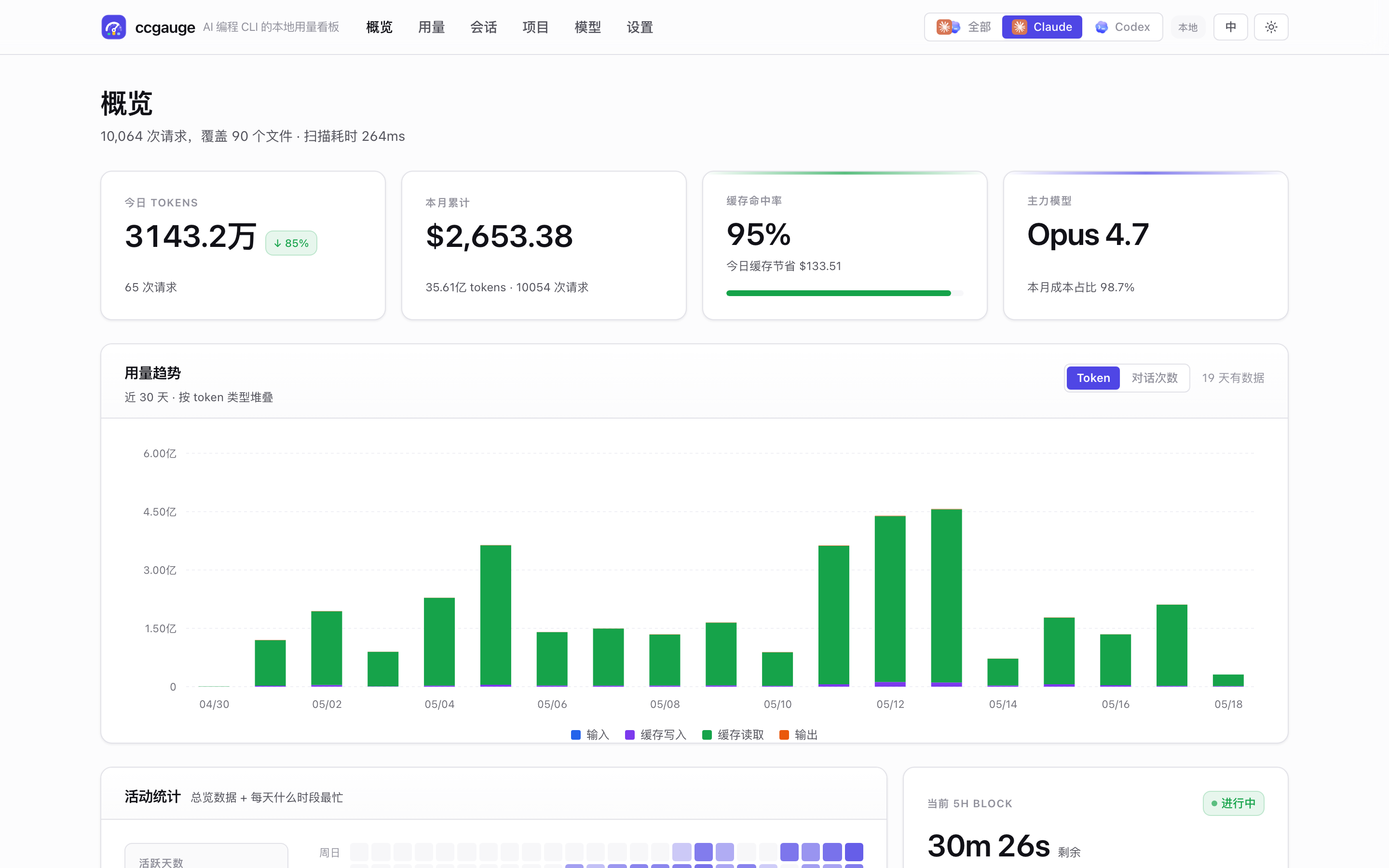
ccgauge 读取 Claude Code 和 Codex CLI 本地已经写下的 JSONL 会话文件,按天 / 项目 / 模型 / 会话统计 token 用量与**美元等值花费**,在浏览器里打开统一看板,顶部一键切换数据源。也能让大模型通过内置的 MCP 服务直接查你的用量。不想开浏览器?`ccgauge report -d` 在终端里就有同款看板。
|
|
23
|
+
|
|
24
|
+
**无登录、无遥测、无任何外网调用。**
|
|
20
25
|
|
|
21
26
|
|
|
22
27
|
|
|
23
28
|
---
|
|
24
29
|
|
|
25
|
-
##
|
|
30
|
+
## 为什么选 ccgauge
|
|
26
31
|
|
|
27
|
-
|
|
32
|
+
- 🪟 **两个 CLI,一个看板。** Claude Code 与 OpenAI Codex CLI 并排展示 —— 顶部一键切换,或用 All 视图合并查看。同时覆盖两者的看板,目前就这一个。
|
|
33
|
+
- 💰 **缓存节省单独成卡。** 直接看本周 Anthropic prompt caching 帮你省了多少美元 —— 不是脚注,是 KPI 大卡。
|
|
34
|
+
- ⏱️ **5 小时窗口实时进度。** 倒计时、进度条、预计总花费 —— 在被限速前就知道窗口什么时候重置。
|
|
35
|
+
- 🤖 **MCP 原生支持。** 连上 Claude Desktop / Cursor / Cline,直接问*「我昨天都做了啥,按项目分一下?」* —— 真实数字、不截图、不复制粘贴。
|
|
36
|
+
- 🔒 **100% 本地、隐私优先。** 只读你已有的 JSONL 文件,零外网调用,MIT 开源,对话内容全程不出本机。
|
|
37
|
+
- 🪜 **Worktree 感知。** 同一个 repo 的所有 worktree 自动合并到同一个项目行 —— 跟你的思维模型一致。
|
|
28
38
|
|
|
29
|
-
|
|
30
|
-
- *"Prompt caching 到底帮我省了多少钱?"*
|
|
31
|
-
- *"哪个项目 / 会话 / 模型最吃 token?"*
|
|
32
|
-
- *"5 小时窗口还剩多久才重置?"*
|
|
39
|
+
## v1.1.0 新特性
|
|
33
40
|
|
|
34
|
-
|
|
41
|
+
- **`ccgauge report --dashboard` / `-d`** —— 一屏富 TUI 终端看板:KPI tile、堆叠柱状趋势图、breakdown 表格、7×24 活跃热力图。SSH / tmux / 快速看一眼时不用切浏览器。窗口宽度 < 80 自动 fallback 到纯文本。
|
|
42
|
+
- **`/usage` 自定义日期范围** —— 真正的日历选择器(react-day-picker),跟随主题与语言切换,URL 契约 `?range=custom&from=...&to=...`。
|
|
43
|
+
- **官网根路径** —— 英文页迁到 `/cli/` / `/features/` / `/mcp/`,中文页 `/zh/...`。旧的 `/en/*` 路径还能通过静态 redirect 跳转,不会 404。
|
|
35
44
|
|
|
36
|
-
|
|
45
|
+
完整 release notes 见 [CHANGELOG.md](https://github.com/chengzuopeng/ccgauge/blob/main/CHANGELOG.md)。
|
|
37
46
|
|
|
38
|
-
##
|
|
47
|
+
## 功能一览
|
|
39
48
|
|
|
40
|
-
###
|
|
41
|
-
-
|
|
42
|
-
-
|
|
43
|
-
-
|
|
44
|
-
-
|
|
49
|
+
### 浏览器看板
|
|
50
|
+
- **概览** —— 6 张 KPI 卡(今日 token / 今日花费 / 缓存命中 / 主力模型 / 今日活跃会话 / 实时 5h block),每张都带日环比。
|
|
51
|
+
- **用量** —— 按对话轮次分组的明细表,可展开看每次工具调用,支持 CSV 导出;趋势图支持 **Token / 对话数** 切换。完整筛选:时间范围(含**自定义日期**)、粒度、模型 / 项目 multi-select。
|
|
52
|
+
- **会话** —— 每场对话的列表(模型 / token / 花费 / 时长),点进去看消息级时间线。
|
|
53
|
+
- **项目** —— 按 `cwd` 聚合的卡片,含趋势条与花费占比;worktree 自动合并到主仓库。
|
|
54
|
+
- **模型** —— 各模型并排:成本占比、token 占比、缓存命中、官方 per-1M 单价。
|
|
55
|
+
- **亮色 / 暗色 / 跟随系统** 三档主题,首屏无闪烁;**英 / 中** 双语,cookie + localStorage 双向同步。
|
|
45
56
|
|
|
46
|
-
###
|
|
47
|
-
-
|
|
48
|
-
-
|
|
49
|
-
-
|
|
57
|
+
### 命令行报告
|
|
58
|
+
- `ccgauge report` —— ~0.2 秒打出彩色对齐的终端报告,适合 CI。
|
|
59
|
+
- `ccgauge report -d` —— 富 TUI 看板:KPI tile、堆叠柱状趋势图、双列 breakdown 表、7×24 活跃热力图。
|
|
60
|
+
- 滤波:`--range / --source / --by / --since / --until / --model / --project`。
|
|
61
|
+
- `--json` 给脚本;`--no-color` 走管道时自动开启。
|
|
50
62
|
|
|
51
|
-
###
|
|
52
|
-
-
|
|
53
|
-
-
|
|
54
|
-
-
|
|
55
|
-
-
|
|
63
|
+
### MCP 服务
|
|
64
|
+
- `ccgauge mcp` —— stdio JSON-RPC 服务,接进 Claude Desktop / Cursor / Cline / 自建 agent。
|
|
65
|
+
- **9 个 tool**:usage summary、time-series、按模型 / 项目 / 会话拆分、daily / weekly summary、recent activity、假设请求成本估算。
|
|
66
|
+
- 模型有 reasoning token 时单独折算。
|
|
67
|
+
- 独立缓存(`index-mcp-v2.json`),MCP 进程和看板永远不抢同一份磁盘索引。
|
|
56
68
|
|
|
57
69
|
### 成本透明
|
|
58
|
-
- **缓存节省**
|
|
59
|
-
- Codex
|
|
60
|
-
- 内置价格表:12 个 Claude 模型 + gpt-5 系列 + o 系列;未知模型自动回退到同 family
|
|
61
|
-
|
|
62
|
-
### 精致的本地 UI
|
|
63
|
-
- **亮色 / 暗色 / 跟随系统** 三档主题,首屏无闪烁
|
|
64
|
-
- **English / 中文** 双语,cookie + localStorage 双向同步
|
|
65
|
-
- 完整筛选:时间区间(今天 / 7 天 / 30 天 / 90 天 / 全部)、粒度(小时 / 天 / 周 / 月)、模型 / 项目 multi-select
|
|
66
|
-
|
|
67
|
-
### 命令行报告(无 server)
|
|
68
|
-
- `ccgauge report` 读取同一份 JSONL,在 ~0.2 秒内打出彩色对齐的终端报告
|
|
69
|
-
- `--range / --source / --by / --since / --until / --model / --project` 滤波参数
|
|
70
|
-
- `--json` 输出给脚本;`--no-color` 走管道时自动开启 —— 可以直接塞进 shell 和 CI
|
|
71
|
-
|
|
72
|
-
### MCP 服务(给 LLM 用)
|
|
73
|
-
- `ccgauge mcp` 起一个 stdio JSON-RPC 服务,让 **Claude Desktop / Cursor / Cline** 等 MCP 客户端直接查你本地的 ccgauge 历史
|
|
74
|
-
- 9 个 MCP tool:`usage_summary`、`usage_by_time`、`usage_by_model`、`usage_by_project`、`usage_by_session`、`daily_summary`、`weekly_summary`、`recent_activity`、`cost_estimator`
|
|
75
|
-
- 支持模型有 reasoning token 时单独折算
|
|
76
|
-
- 独立命名缓存(`index-mcp-v2.json`),MCP 进程不会和仪表盘抢同一份磁盘索引
|
|
70
|
+
- **缓存节省** 单独成卡,量化 Anthropic prompt caching 节省的美元。
|
|
71
|
+
- Codex 成本标注为 **OpenAI API 单价折算估值**,方便订阅用户对比 PAYG。
|
|
72
|
+
- 内置价格表:12 个 Claude 模型 + gpt-5 系列 + o 系列;未知模型自动回退到同 family 最新单价。
|
|
77
73
|
|
|
78
74
|
### 隐私优先
|
|
79
|
-
- 100
|
|
80
|
-
- 开源,MIT
|
|
81
|
-
- 后台常驻模式,配套 `start / stop / restart / status / open / logs`
|
|
75
|
+
- 100% 本地:只读 JSONL 文件,零外网调用。
|
|
76
|
+
- 开源,MIT。
|
|
77
|
+
- 后台常驻模式,配套 `start / stop / restart / status / open / logs` 完整生命周期。
|
|
82
78
|
|
|
83
79
|
## 快速开始
|
|
84
80
|
|
|
85
|
-
零安装一行运行:
|
|
86
|
-
|
|
87
|
-
```bash
|
|
88
|
-
npx ccgauge
|
|
89
|
-
```
|
|
90
|
-
|
|
91
|
-
或者全局安装:
|
|
92
|
-
|
|
93
81
|
```bash
|
|
94
|
-
|
|
95
|
-
|
|
96
|
-
yarn global add ccgauge && ccgauge # yarn
|
|
82
|
+
npx ccgauge # 零安装一行运行
|
|
83
|
+
npm i -g ccgauge && ccgauge # 或全局安装
|
|
97
84
|
```
|
|
98
85
|
|
|
99
|
-
|
|
86
|
+
看板默认开在 [http://localhost:3737](http://localhost:3737)。端口被占用会自动顺延到下一个可用端口,`Ctrl+C` 停止。
|
|
100
87
|
|
|
101
|
-
**环境要求:** Node.js 20
|
|
88
|
+
**环境要求:** Node.js 20+。macOS / Linux / Windows 均可。
|
|
102
89
|
|
|
103
90
|
## 命令行用法
|
|
104
91
|
|
|
105
|
-
`ccgauge` 是 `ccgauge start` 的简写,参数可以放在任一边。
|
|
106
|
-
|
|
107
|
-
### 前台模式(默认)
|
|
108
|
-
|
|
109
|
-
```bash
|
|
110
|
-
ccgauge
|
|
111
|
-
ccgauge --port 4000 --no-open
|
|
112
|
-
ccgauge start --host 0.0.0.0 --port 4000
|
|
113
|
-
```
|
|
114
|
-
|
|
115
|
-
### 后台服务模式
|
|
116
|
-
|
|
117
|
-
```bash
|
|
118
|
-
ccgauge start --background
|
|
119
|
-
|
|
120
|
-
ccgauge status
|
|
121
|
-
ccgauge open
|
|
122
|
-
ccgauge logs # 最近 80 行
|
|
123
|
-
ccgauge logs --follow # 实时跟随
|
|
124
|
-
ccgauge restart --port 4000
|
|
125
|
-
ccgauge stop
|
|
126
|
-
```
|
|
127
|
-
|
|
128
|
-
后台状态默认写在 `~/.ccgauge/`:
|
|
129
|
-
- `state.json` —— 进程 PID、URL、启动时间、日志路径
|
|
130
|
-
- `ccgauge.log` —— 服务输出(`ccgauge logs` 会读它)
|
|
131
|
-
- 设置 `CCGAUGE_STATE_DIR=/path/to/dir` 可隔离不同 profile(适合测试)
|
|
132
|
-
|
|
133
92
|
### 命令一览
|
|
134
93
|
|
|
135
94
|
| 命令 | 用途 |
|
|
136
95
|
| --- | --- |
|
|
137
|
-
| `ccgauge`, `ccgauge start` |
|
|
96
|
+
| `ccgauge`, `ccgauge start` | 前台启动看板服务。`Ctrl+C` 停止。 |
|
|
138
97
|
| `ccgauge start --background` | 启动后台服务。 |
|
|
139
98
|
| `ccgauge stop [--force]` | 停止后台服务。 |
|
|
140
|
-
| `ccgauge restart [options]` |
|
|
141
|
-
| `ccgauge status [--json]` | 查看后台状态。纯文本模式后台未运行时退出码 **3**(systemd
|
|
99
|
+
| `ccgauge restart [options]` | 停止后用新参数重启。 |
|
|
100
|
+
| `ccgauge status [--json]` | 查看后台状态。纯文本模式后台未运行时退出码 **3**(systemd 约定)。 |
|
|
142
101
|
| `ccgauge open` | 在浏览器打开正在运行的看板。 |
|
|
143
|
-
| `ccgauge logs [-f] [-n
|
|
144
|
-
| `ccgauge report [options]` |
|
|
145
|
-
| `ccgauge mcp` | 起 MCP
|
|
146
|
-
| `ccgauge doctor` |
|
|
102
|
+
| `ccgauge logs [-f] [-n N]` | 查看后台服务日志。 |
|
|
103
|
+
| `ccgauge report [options]` | 一次性命令行报告(文本 or TUI,不起服务)。 |
|
|
104
|
+
| `ccgauge mcp` | 起 MCP 服务让 LLM 查你的用量。 |
|
|
105
|
+
| `ccgauge doctor` | 一屏诊断 —— 报 issue 直接粘。 |
|
|
106
|
+
|
|
107
|
+
### 启动参数
|
|
147
108
|
|
|
148
|
-
|
|
109
|
+
| 参数 | 默认 | 用途 |
|
|
110
|
+
| --- | --- | --- |
|
|
111
|
+
| `-p, --port <port>` | `3737` | 首选端口。被占用自动顺延,除非加 `--strict-port`。 |
|
|
112
|
+
| `-H, --host <host>` | `127.0.0.1` | 绑定地址。 |
|
|
113
|
+
| `--no-open` | — | 前台模式不自动打开浏览器。 |
|
|
114
|
+
| `-b, --background` | — | 以后台服务方式启动。 |
|
|
115
|
+
| `-q, --quiet` | — | 静默 Next.js 输出。 |
|
|
116
|
+
| `--dir <path>` | — | 把 `<path>/projects` 加入 Claude 数据源。 |
|
|
117
|
+
| `--strict-port` | — | 端口不可用时直接失败。 |
|
|
149
118
|
|
|
150
|
-
|
|
119
|
+
### 后台模式
|
|
151
120
|
|
|
152
121
|
```bash
|
|
153
|
-
ccgauge
|
|
154
|
-
ccgauge
|
|
155
|
-
ccgauge
|
|
156
|
-
ccgauge
|
|
157
|
-
ccgauge report --since 2026-05-01 --until 2026-05-08
|
|
122
|
+
ccgauge start -b # 后台服务,状态写在 ~/.ccgauge/
|
|
123
|
+
ccgauge status # PID / URL / 启动时间
|
|
124
|
+
ccgauge logs --follow # 实时跟随日志
|
|
125
|
+
ccgauge stop # 优雅停止(或 --force)
|
|
158
126
|
```
|
|
159
127
|
|
|
160
|
-
|
|
128
|
+
`~/.ccgauge/` 下放 `state.json`(PID、URL、启动时间、日志路径)和 `ccgauge.log`。设置 `CCGAUGE_STATE_DIR=/tmp/profile` 可隔离 profile(适合测试)。
|
|
129
|
+
|
|
130
|
+
### `ccgauge report`
|
|
131
|
+
|
|
132
|
+
```bash
|
|
133
|
+
ccgauge report # 默认:近 7 天 / 所有数据源 / 文本
|
|
134
|
+
ccgauge report -d # 富 TUI 看板
|
|
135
|
+
ccgauge report -r 30d -b project # 30 天,按项目分组
|
|
136
|
+
ccgauge report -s codex -m gpt-5 # 只看 Codex 的 gpt-5* 模型
|
|
137
|
+
ccgauge report --json # 输出 JSON 给脚本
|
|
138
|
+
```
|
|
161
139
|
|
|
162
140
|
| 参数 | 默认 | 作用 |
|
|
163
141
|
| --- | --- | --- |
|
|
164
142
|
| `-r, --range <range>` | `7d` | `today` / `1d` / `7d` / `30d` / `90d` / `all` |
|
|
165
143
|
| `-s, --source <provider>` | `all` | `claude` / `codex` / `all` |
|
|
166
144
|
| `-b, --by <dim>` | `model` | 分组维度:`model` / `project` / `session` |
|
|
167
|
-
| `-g, --gran <
|
|
168
|
-
| `-n, --limit <n>` | `10` |
|
|
169
|
-
| `--since
|
|
170
|
-
|
|
|
171
|
-
|
|
|
172
|
-
|
|
|
173
|
-
|
|
|
174
|
-
| `--no-
|
|
175
|
-
|
|
|
176
|
-
| `--no-
|
|
177
|
-
|
|
178
|
-
|
|
179
|
-
|
|
180
|
-
|
|
181
|
-
|
|
182
|
-
|
|
183
|
-
### 启动参数
|
|
184
|
-
|
|
185
|
-
| 参数 | 适用命令 | 用途 |
|
|
186
|
-
| --- | --- | --- |
|
|
187
|
-
| `-p, --port <port>` | start, restart, 根命令 | 首选端口。默认 `3737`。 |
|
|
188
|
-
| `-H, --host <host>` | start, restart, 根命令 | 绑定地址。默认 `127.0.0.1`。 |
|
|
189
|
-
| `--no-open` | start, 根命令 | 前台不自动打开浏览器。后台模式本来就不自动打开,需要时用 `ccgauge open`。 |
|
|
190
|
-
| `--dir <path>` | start, restart, 根命令 | 把 `<path>/projects` 加入 Claude 数据源。 |
|
|
191
|
-
| `-q, --quiet` | start, restart, 根命令 | 静默 Next.js 输出。 |
|
|
192
|
-
| `-b, --background` | start, 根命令 | 以后台服务方式启动。 |
|
|
193
|
-
| `--strict-port` | start, restart, 根命令 | 端口不可用时直接失败。 |
|
|
194
|
-
| `--log <path>` | start --background, restart | 后台日志文件。 |
|
|
195
|
-
|
|
196
|
-
## MCP 服务(让大模型直接查你的用量)
|
|
197
|
-
|
|
198
|
-
ccgauge 内置了一个 [Model Context Protocol](https://modelcontextprotocol.io/) 服务,
|
|
199
|
-
任何 MCP 客户端(Claude Desktop / Cursor / Cline / Codex CLI / 自建 agent)都能
|
|
200
|
-
通过结构化 tool 调用,直接问大模型关于你本机 Claude Code + Codex CLI 历史的问题——
|
|
201
|
-
不用复制粘贴、不用截图看板。
|
|
202
|
-
|
|
203
|
-
### 你能问什么
|
|
204
|
-
|
|
205
|
-
配好之后,可以这样问:
|
|
206
|
-
|
|
207
|
-
- *"我这周在 AI 编程上花了多少?分别看下 Claude 和 Codex。"*
|
|
208
|
-
- *"我昨天都在做什么?"*
|
|
209
|
-
- *"列一下本月最贵的 10 个会话。"*
|
|
210
|
-
- *"过去 30 天哪个项目最吃 token?"*
|
|
211
|
-
- *"prompt caching 帮我省了多少钱?"*
|
|
212
|
-
- *"如果我在 Opus 4.7 上再跑 100K input + 20K output,要多少钱?"*
|
|
213
|
-
- *"上周 Codex 的 reasoning 开销有多大?"*
|
|
214
|
-
- *"给我一份本周完成事项的 standup bullet list。"*
|
|
215
|
-
|
|
216
|
-
LLM 会自动选合适的 tool、本地调用、用大白话给你带真实数字的答案。
|
|
217
|
-
|
|
218
|
-
### 工具一览
|
|
219
|
-
|
|
220
|
-
| Tool | 回答什么 |
|
|
221
|
-
| --- | --- |
|
|
222
|
-
| `usage_summary` | 一段时间内总 tokens / 花费 / 缓存节省。永远同时返回合并总数 + 按 source 拆分。 |
|
|
223
|
-
| `usage_by_time` | 时间序列(小时/天/周/月),用于趋势 / "什么时候开销爆了"。 |
|
|
224
|
-
| `usage_by_model` | 按模型的成本占比,每条带 source。 |
|
|
225
|
-
| `usage_by_project` | 按项目(cwd)的成本占比 + 会话数 + 最近活跃时间。 |
|
|
226
|
-
| `usage_by_session` | 会话列表,含标题(首条用户消息)/ 模型 / 时长 / 花费。可按 recent / cost / tokens / duration 排序。 |
|
|
227
|
-
| `daily_summary` | "今天 / 昨天 / 周一 / YYYY-MM-DD 我都干了啥?" 按项目分组的会话 + 模型 + top 工具调用。 |
|
|
228
|
-
| `weekly_summary` | 7 天 roll-up:每日花费趋势 + top 会话 + top 项目 + 模型分布。`week_offset=-1` 看上周。 |
|
|
229
|
-
| `recent_activity` | 最近 N 条活跃会话(默认最近 30 天,可显式给 `from`/`to`)。 |
|
|
230
|
-
| `cost_estimator` | 计算"假设我用 X 模型发 N 个 token 要花多少钱"。直接读内置 per-1M-token 单价表,不查历史。常用于额度规划 / what-if。 |
|
|
231
|
-
|
|
232
|
-
| Resource URI | 内容 |
|
|
233
|
-
| --- | --- |
|
|
234
|
-
| `ccgauge://providers` | 检测到的 provider、数据目录、文件 / 记录数、indexer 状态。 |
|
|
235
|
-
|
|
236
|
-
**公共参数**(每个分析类工具都接):
|
|
237
|
-
|
|
238
|
-
- `source`:`"claude"` | `"codex"` | `"all"`(默认 `"all"`)。当 `"all"` 时,响应同时带合并总数 **和** `bySource: { claude, codex }` 拆分,让 LLM 一次调用就能回答 "总共多少" 和 "分别多少" 两类问题。
|
|
239
|
-
- 时间范围:传 `range`(`today` / `yesterday` / `this_week` / `last_week` / `this_month` / `last_month` / `7d` / `30d` / `90d` / `all`),**或**显式 `from` / `to`(ISO 日期或完整时间戳)。
|
|
240
|
-
|
|
241
|
-
### 在 MCP 客户端里配置
|
|
242
|
-
|
|
243
|
-
不同客户端的配置文件位置不同,但 snippet 形状一样。
|
|
244
|
-
|
|
245
|
-
#### Claude Desktop
|
|
246
|
-
|
|
247
|
-
`~/Library/Application Support/Claude/claude_desktop_config.json`(macOS)/
|
|
248
|
-
`%APPDATA%\Claude\claude_desktop_config.json`(Windows):
|
|
145
|
+
| `-g, --gran <gran>` | `day` | 趋势粒度:`hour` / `day` / `week` / `month` |
|
|
146
|
+
| `-n, --limit <n>` | `10` | breakdown 表显示行数 |
|
|
147
|
+
| `--since` / `--until` | — | 自定义日期范围(`YYYY-MM-DD`,按本地自然日) |
|
|
148
|
+
| `-m, --model <pat>` | — | 模型名子串过滤 |
|
|
149
|
+
| `--project <pat>` | — | 项目名 / cwd 子串过滤 |
|
|
150
|
+
| `-d, --dashboard` | — | 一屏富 TUI 布局(KPI tile + 堆叠趋势 + breakdown + 热力图) |
|
|
151
|
+
| `--width <n>` | 终端宽 | 强制输出宽度 —— 截图 / CI 时用 |
|
|
152
|
+
| `--no-banner / --compact` | — | dashboard 精简(不画 banner / 不画趋势图) |
|
|
153
|
+
| `-j, --json` | — | JSON 输出 |
|
|
154
|
+
| `--no-color` | 自动 | 关闭 ANSI 颜色(管道里自动关) |
|
|
155
|
+
| `--no-trend / --no-breakdown` | — | 跳过分块(仅文本模式) |
|
|
156
|
+
|
|
157
|
+
## MCP 服务 —— 让大模型直接查你的用量
|
|
158
|
+
|
|
159
|
+
配一次,之后就能用大白话问问题。各客户端(Claude Desktop / Cursor / Cline / Continue)的 snippet 形状一致:
|
|
249
160
|
|
|
250
161
|
```json
|
|
251
162
|
{
|
|
@@ -258,135 +169,50 @@ LLM 会自动选合适的 tool、本地调用、用大白话给你带真实数
|
|
|
258
169
|
}
|
|
259
170
|
```
|
|
260
171
|
|
|
261
|
-
|
|
172
|
+
重启客户端。可以试试:*「你有哪些 ccgauge 工具?跑一下 usage_summary 看最近 7 天。」*
|
|
262
173
|
|
|
263
|
-
|
|
264
|
-
{
|
|
265
|
-
"mcpServers": {
|
|
266
|
-
"ccgauge": {
|
|
267
|
-
"command": "ccgauge",
|
|
268
|
-
"args": ["mcp"]
|
|
269
|
-
}
|
|
270
|
-
}
|
|
271
|
-
}
|
|
272
|
-
```
|
|
273
|
-
|
|
274
|
-
重启 Claude Desktop,工具选择器里就能看到 ccgauge 的 8 个工具。
|
|
275
|
-
|
|
276
|
-
#### Cursor
|
|
174
|
+
已全局安装 ccgauge 的话可以省掉 `npx`,`"command": "ccgauge"` 即可。要覆盖扫描路径,通过 `env` 字段传 `CLAUDE_CONFIG_DIR` / `CCGAUGE_CODEX_DIR`。
|
|
277
175
|
|
|
278
|
-
|
|
279
|
-
|
|
280
|
-
```json
|
|
281
|
-
{
|
|
282
|
-
"mcpServers": {
|
|
283
|
-
"ccgauge": {
|
|
284
|
-
"command": "ccgauge",
|
|
285
|
-
"args": ["mcp"]
|
|
286
|
-
}
|
|
287
|
-
}
|
|
288
|
-
}
|
|
289
|
-
```
|
|
290
|
-
|
|
291
|
-
#### Cline / Continue / 通用 MCP 客户端
|
|
292
|
-
|
|
293
|
-
任何遵循标准 `{ command, args, env? }` 格式的客户端都能用。`npx -y ccgauge mcp`
|
|
294
|
-
(无需全局装)或 `ccgauge mcp`(已全局装)任选其一。要覆盖扫描路径,通过 `env` 传:
|
|
295
|
-
|
|
296
|
-
```json
|
|
297
|
-
{
|
|
298
|
-
"mcpServers": {
|
|
299
|
-
"ccgauge": {
|
|
300
|
-
"command": "ccgauge",
|
|
301
|
-
"args": ["mcp"],
|
|
302
|
-
"env": {
|
|
303
|
-
"CCGAUGE_CODEX_DIR": "/custom/codex/path",
|
|
304
|
-
"CLAUDE_CONFIG_DIR": "/custom/claude/path",
|
|
305
|
-
"CCGAUGE_STATE_DIR": "/custom/cache/path"
|
|
306
|
-
}
|
|
307
|
-
}
|
|
308
|
-
}
|
|
309
|
-
}
|
|
310
|
-
```
|
|
311
|
-
|
|
312
|
-
#### 验证是否生效
|
|
313
|
-
|
|
314
|
-
在 Claude Desktop 新开一个对话,问:
|
|
315
|
-
|
|
316
|
-
> *"你有哪些 ccgauge 工具?跑一下 usage_summary 看最近 7 天数据。"*
|
|
317
|
-
|
|
318
|
-
如果配置成功,Claude 会调 `usage_summary`,返回带 `totals` + `bySource` 的 JSON,
|
|
319
|
-
然后用大白话总结成带真实数字的回答。
|
|
320
|
-
|
|
321
|
-
### Prompt 示例集
|
|
322
|
-
|
|
323
|
-
直接复制丢进 Claude Desktop / Cursor / Cline 即可。每个 prompt 后面斜体注的是
|
|
324
|
-
LLM 大概率会调的工具——方便你"为什么会这样回答"反查。
|
|
325
|
-
|
|
326
|
-
#### 用量与花费
|
|
327
|
-
|
|
328
|
-
- *"我这周用 AI 编程花了多少钱?分开看 Claude 和 Codex。"*
|
|
329
|
-
→ `usage_summary({ range: "7d" })`
|
|
330
|
-
- *"本月 AI 编程花了多少?跟上个月比怎么样?"*
|
|
331
|
-
→ `usage_summary({ range: "this_month" })` + `usage_summary({ range: "last_month" })`
|
|
332
|
-
- *"画一下最近 30 天的每日花费趋势。"*
|
|
333
|
-
→ `usage_by_time({ range: "30d", granularity: "day" })`
|
|
334
|
-
- *"本月用的最多的 Claude 模型是哪个?花了多少?"*
|
|
335
|
-
→ `usage_by_model({ range: "this_month", source: "claude" })`
|
|
336
|
-
- *"本月最贵的 5 个会话是哪些?"*
|
|
337
|
-
→ `usage_by_session({ range: "this_month", sort: "cost", limit: 5 })`
|
|
338
|
-
|
|
339
|
-
#### 工作内容回顾 / standup
|
|
340
|
-
|
|
341
|
-
- *"我昨天都做了什么?按项目分一下。"*
|
|
342
|
-
→ `daily_summary({ date: "yesterday" })`
|
|
343
|
-
- *"给我一份周一 standup 用的 bullet list,列我上周完成的事。"*
|
|
344
|
-
→ `weekly_summary({ week_offset: -1 })`
|
|
345
|
-
- *"过去两周我接触最多的 3 个项目是什么?"*
|
|
346
|
-
→ `usage_by_project({ from: "2026-05-01", to: "2026-05-15", limit: 3 })`——非 `7d` / `30d` / `90d` / `this_week` / `last_week` 等命名窗口时,传显式 `from` / `to`。
|
|
347
|
-
- *"我最近一次的编码会话是关于什么的?"*
|
|
348
|
-
→ `recent_activity({ limit: 1 })`
|
|
349
|
-
|
|
350
|
-
#### 缓存 / 效率
|
|
351
|
-
|
|
352
|
-
- *"本月 Anthropic prompt caching 帮我省了多少 tokens?"*
|
|
353
|
-
→ `usage_summary({ range: "this_month", source: "claude" })`——返回里有 `saved_usd`。
|
|
354
|
-
- *"本周 Codex 的 output 里有多少比例是 reasoning tokens?"*
|
|
355
|
-
→ `usage_summary({ range: "7d", source: "codex" })`——返回里 `reasoning_tokens` 紧挨着 `output_tokens`。
|
|
356
|
-
|
|
357
|
-
#### 预算 / 规划
|
|
176
|
+
### 工具一览
|
|
358
177
|
|
|
359
|
-
|
|
360
|
-
|
|
361
|
-
|
|
362
|
-
|
|
178
|
+
| Tool | 回答什么 |
|
|
179
|
+
| --- | --- |
|
|
180
|
+
| `usage_summary` | 一段时间内的总 tokens / 花费 / 缓存节省。永远同时返回合并总数 + 按 source 拆分。 |
|
|
181
|
+
| `usage_by_time` | 时间序列(小时 / 天 / 周 / 月)用于趋势问题。 |
|
|
182
|
+
| `usage_by_model` | 按模型的成本占比,每条带 source。 |
|
|
183
|
+
| `usage_by_project` | 按项目(`cwd`)的成本占比 + 会话数 + 最近活跃。 |
|
|
184
|
+
| `usage_by_session` | 会话列表,按 recent / cost / tokens / duration 排序。 |
|
|
185
|
+
| `daily_summary` | *「今天 / 昨天 / YYYY-MM-DD 我都干了啥?」* —— 按项目分组的会话 + top 工具调用。 |
|
|
186
|
+
| `weekly_summary` | 7 天 roll-up:每日花费趋势、top 会话 / 项目、模型分布。`week_offset=-1` 看上周。 |
|
|
187
|
+
| `recent_activity` | 最近 N 条活跃会话(跨 provider)。 |
|
|
188
|
+
| `cost_estimator` | 假设请求的美元成本。读内置价格表,不查历史。 |
|
|
363
189
|
|
|
364
|
-
|
|
190
|
+
每个分析类工具都接 `source`(`claude` / `codex` / `all`)和时间范围参数(`range`:`today` / `7d` / `30d` / `this_week` / `last_week` / `this_month` / `last_month` / `all`,或显式 `from` / `to`)。`all` 模式响应同时返回合并总数和 `bySource: { claude, codex }` 拆分 —— 一次调用回答两个层次的问题。
|
|
365
191
|
|
|
366
|
-
|
|
367
|
-
→ `usage_summary({ range: "this_month" })`——两边数字都在 `bySource` 里。
|
|
368
|
-
- *"上周每个 provider 的最吃 token 项目分别是哪个?"*
|
|
369
|
-
→ `usage_by_project({ range: "last_week" })`(每条 entry 自带 `source`)。
|
|
192
|
+
### Prompt 示例
|
|
370
193
|
|
|
371
|
-
|
|
194
|
+
- *「我这周用 AI 编程花了多少钱?分开看 Claude 和 Codex。」*
|
|
195
|
+
- *「画一下最近 30 天的每日花费趋势。」*
|
|
196
|
+
- *「本月最贵的 5 个会话是哪些?」*
|
|
197
|
+
- *「我昨天做了什么?按项目分一下。」*
|
|
198
|
+
- *「给我一份本周完成事项的 standup bullet list。」*
|
|
199
|
+
- *「按当前消耗速度本月预计花多少?如果今天再在 Opus 4.7 上跑 200K input + 50K output 要加多少?」*
|
|
372
200
|
|
|
373
|
-
|
|
374
|
-
- 只读本机已有的 JSONL 文件,零上游 API 调用
|
|
375
|
-
- 错误信息里的绝对路径会脱敏(`$HOME` → `~`)
|
|
376
|
-
- MCP 用独立的持久化缓存文件(`~/.ccgauge/cache/index-mcp-v2.json`),永远不会和看板抢同一份磁盘状态
|
|
201
|
+
### 隐私与排障
|
|
377
202
|
|
|
378
|
-
|
|
203
|
+
- v1 **仅 stdio** —— 不开网络端口。
|
|
204
|
+
- 只读本地 JSONL;错误信息里的绝对路径已脱敏(`$HOME` → `~`)。
|
|
379
205
|
|
|
380
206
|
| 现象 | 建议 |
|
|
381
207
|
| --- | --- |
|
|
382
|
-
|
|
|
383
|
-
|
|
|
384
|
-
| Resource 显示 "no providers detected" |
|
|
385
|
-
| 想看 server
|
|
208
|
+
| 客户端看不到工具 | 改完配置重启客户端;不连客户端验证可跑 `ccgauge mcp --check` 或 `ccgauge doctor` |
|
|
209
|
+
| 第一次调用慢 | 冷启动会全量索引(100 文件约 1–3s),之后 O(1) |
|
|
210
|
+
| Resource 显示 "no providers detected" | 通过 MCP `env` 传 `CLAUDE_CONFIG_DIR` / `CCGAUGE_CODEX_DIR` |
|
|
211
|
+
| 想看 server 日志 | 看客户端的 MCP 日志 —— ccgauge 写到 **stderr**(stdout 被 JSON-RPC 占用) |
|
|
386
212
|
|
|
387
213
|
## 配置
|
|
388
214
|
|
|
389
|
-
ccgauge
|
|
215
|
+
ccgauge 自动识别标准路径:
|
|
390
216
|
|
|
391
217
|
| Provider | 默认数据源 |
|
|
392
218
|
| --- | --- |
|
|
@@ -397,132 +223,54 @@ ccgauge 会自动识别标准路径:
|
|
|
397
223
|
|
|
398
224
|
| 变量 | 作用 |
|
|
399
225
|
| --- | --- |
|
|
400
|
-
| `
|
|
401
|
-
| `
|
|
226
|
+
| `CLAUDE_CONFIG_DIR` | 把 `<dir>/projects` 加入 Claude 数据源 |
|
|
227
|
+
| `CCGAUGE_CONFIG_DIR` | 同上(ccgauge 旧名字,兼容) |
|
|
402
228
|
| `CCGAUGE_CODEX_DIR` | 额外的 Codex 会话目录 |
|
|
403
229
|
| `CODEX_HOME` | 把 `<dir>/sessions` 与 `<dir>/archived_sessions` 一并加入 |
|
|
404
230
|
| `CCGAUGE_STATE_DIR` | 覆盖后台服务的状态 / 日志目录 |
|
|
405
231
|
|
|
406
|
-
## 架构
|
|
407
|
-
|
|
408
|
-
```
|
|
409
|
-
~/.claude/projects/**/*.jsonl ──┐
|
|
410
|
-
├─► ProviderAdapter 注册表
|
|
411
|
-
~/.codex/sessions/**/*.jsonl ───┘ │
|
|
412
|
-
▼
|
|
413
|
-
scanAll() ─► 去重 ─► 按 时间/模型/项目/会话/5h block 聚合
|
|
414
|
-
▼
|
|
415
|
-
Next.js RSC 页面 + 客户端图表
|
|
416
|
-
```
|
|
417
|
-
|
|
418
|
-
1. **CLI**(`bin/cli.mjs`)归一化命令,校验 standalone 产物,用 [`get-port`](https://github.com/sindresorhus/get-port) 选端口。
|
|
419
|
-
2. **前台模式** 用 `fork()`,进程绑在终端上;**后台模式** 用 detached `spawn()`,状态写到 `~/.ccgauge/`。
|
|
420
|
-
3. **Provider 适配层**(`lib/providers/<name>/index.ts`)负责数据目录、JSONL 解析器、价格表、模型名格式化。注册表驱动 —— 加新 provider 就是一个新文件 + 注册表一行。
|
|
421
|
-
4. **Claude 解析器** 按行抽取 assistant 消息的 `usage`。
|
|
422
|
-
5. **Codex 解析器** 用一个轮状态机走事件流,对每个 `event_msg.token_count` 发射一条记录,**只用 `last_token_usage`**(避免累计字段重复计费);`cached_input_tokens` 进 cache_read,`reasoning_output_tokens` 并入 output。
|
|
423
|
-
6. **价格** 走内置快照:Claude 用 Anthropic 官价(12 个模型),Codex 用 OpenAI 公开 API 单价(gpt-5 系列 + o 系列)。Codex 的成本标注为"API 单价折算估值"——订阅计划(Plus / Pro)实际计费方式不同。
|
|
424
|
-
7. **i18n + 主题**:cookie 驱动 SSR + `localStorage` 镜像 + `<head>` 注入同步执行的 no-flash 脚本。
|
|
425
|
-
|
|
426
|
-
## 增加新 Provider
|
|
427
|
-
|
|
428
|
-
```
|
|
429
|
-
lib/providers/<name>/
|
|
430
|
-
index.ts ProviderAdapter 实现
|
|
431
|
-
parse-<name>.ts JSONL → AssistantRecord[]
|
|
432
|
-
pricing.ts model → Pricing
|
|
433
|
-
shorten-model.ts 模型名美化
|
|
434
|
-
```
|
|
435
|
-
|
|
436
|
-
然后在 `lib/providers/index.ts` 注册一行、在 `ProviderId` 联合里加一项。`scan.ts`、aggregator、价格、所有页面都不用动。
|
|
437
|
-
|
|
438
232
|
## 本地开发
|
|
439
233
|
|
|
440
|
-
仓库本身就是一个能跑的 Next.js 工程,可以一边改代码一边看实时数据。
|
|
441
|
-
|
|
442
234
|
```bash
|
|
443
235
|
git clone https://github.com/chengzuopeng/ccgauge.git
|
|
444
236
|
cd ccgauge
|
|
445
237
|
pnpm install
|
|
446
238
|
pnpm dev # http://localhost:3738
|
|
447
|
-
```
|
|
448
|
-
|
|
449
|
-
常用脚本:
|
|
450
|
-
|
|
451
|
-
```bash
|
|
452
239
|
pnpm typecheck # tsc --noEmit
|
|
453
|
-
pnpm
|
|
454
|
-
pnpm
|
|
455
|
-
pnpm build # next build + 把 static 拷进 .next/standalone
|
|
456
|
-
pnpm start # 用 bin/cli.mjs 跑 standalone 产物
|
|
457
|
-
pnpm screenshots # 重新生成 docs/screenshots/*.png
|
|
458
|
-
pnpm site:dev # 产品官网开发服务,http://localhost:4321
|
|
459
|
-
pnpm site:build # 只构建 site/ 产品官网
|
|
460
|
-
pnpm clean # rm -rf .next node_modules
|
|
240
|
+
pnpm test # 解析器烟测(Node 22+)
|
|
241
|
+
pnpm build # next build + 打包 MCP + 打包 CLI report
|
|
461
242
|
```
|
|
462
243
|
|
|
463
|
-
|
|
244
|
+
仓库本身就是一个能跑的 Next.js 工程,可以一边改代码一边对实时数据热重载。增加第三个 provider(Gemini CLI、Cursor、Aider…)只需在 [`lib/providers/<name>/`](https://github.com/chengzuopeng/ccgauge/tree/main/lib/providers) 下加一个新目录 + 在注册表加一行 —— `scan.ts` / aggregator / 价格模块 / 所有页面都不用动。
|
|
464
245
|
|
|
465
|
-
|
|
466
|
-
pnpm pack # 预览要发布的 tarball
|
|
467
|
-
pnpm publish --access public # 会自动先跑 pnpm build(prepublishOnly)
|
|
468
|
-
```
|
|
246
|
+
产品官网在 [`site/`](https://github.com/chengzuopeng/ccgauge/tree/main/site)(Astro + Tailwind),跟 npm 包独立发布 —— `pnpm site:dev` 启本地预览。
|
|
469
247
|
|
|
470
248
|
## 排障
|
|
471
249
|
|
|
472
|
-
> **任何"为啥不工作"的问题先跑一下:**
|
|
250
|
+
> **任何"为啥不工作"的问题先跑一下:** **`ccgauge doctor`**。一屏列出版本、env、构建产物、后台状态、indexer 扫描计数,报 issue 直接粘。
|
|
473
251
|
|
|
474
|
-
| 现象 |
|
|
252
|
+
| 现象 | 建议 |
|
|
475
253
|
| --- | --- |
|
|
476
|
-
|
|
|
477
|
-
|
|
|
478
|
-
|
|
|
479
|
-
|
|
|
480
|
-
| 想要干净的 profile | `CCGAUGE_STATE_DIR=/tmp/ccgauge-test ccgauge start -b` |
|
|
481
|
-
| Codex 没有数据 | 确认 `~/.codex/sessions` 存在;可在「设置」页查看检测到的路径 |
|
|
254
|
+
| 端口被自动换 | `ccgauge --strict-port --port 3737` |
|
|
255
|
+
| 后台服务状态不对 | `ccgauge status`,必要时 `ccgauge stop --force` |
|
|
256
|
+
| 后台启动失败 | `ccgauge logs` 查 `~/.ccgauge/ccgauge.log` |
|
|
257
|
+
| Codex 没数据 | 确认 `~/.codex/sessions` 存在;在「设置」页查检测到的路径 |
|
|
482
258
|
| 不想自动打开浏览器 | `ccgauge --no-open` |
|
|
483
259
|
|
|
484
260
|
## 常见问答
|
|
485
261
|
|
|
486
|
-
**ccgauge
|
|
487
|
-
|
|
262
|
+
**ccgauge 会上传对话或日志吗?**
|
|
263
|
+
不会。全程跑在本地,只读 Claude Code 和 Codex CLI 已经写下的本地 JSONL 文件,零外网调用,不需要任何 API 凭证。
|
|
488
264
|
|
|
489
|
-
|
|
490
|
-
|
|
265
|
+
**跟 [ccusage](https://github.com/ryoppippi/ccusage) 有什么不同?**
|
|
266
|
+
ccusage 是把用量打成表格的终端工具。ccgauge 是一个完整的 Web 看板:图表、按会话下钻、5h 实时进度、按项目 / 模型分维度统计,并且**开箱覆盖 OpenAI Codex CLI**。还多了一个 MCP 服务让 LLM 用自然语言查你的用量,以及一个终端版 TUI 看板(`ccgauge report -d`)—— 不想开浏览器时用。
|
|
491
267
|
|
|
492
268
|
**对 Claude Pro / Max / Team / Codex Plus 订阅用户有用吗?**
|
|
493
|
-
有用。看板始终展示**美元等值**的 API
|
|
269
|
+
有用。看板始终展示**美元等值**的 API 折算成本,看到"如果按 API 计费这些用量值多少"。订阅计费方式不同,ccgauge 不替代你的账单。
|
|
494
270
|
|
|
495
271
|
**支持哪些模型?**
|
|
496
|
-
|
|
497
|
-
- **OpenAI Codex CLI**:gpt-5 系列(gpt-5、gpt-5-mini、gpt-5-nano、gpt-5.4、gpt-5.5、gpt-5.5-mini、gpt-5.5-nano)、gpt-4.1 / gpt-4.1-mini,以及 o 系列(o3、o4-mini)
|
|
498
|
-
- 未知模型自动回退到同 family 最新一档单价
|
|
499
|
-
|
|
500
|
-
**能加我自己的 provider 吗?**
|
|
501
|
-
能 —— 见 [增加新 Provider](#增加新-provider) 一节。Provider 适配层就是为了显式留扩展点。
|
|
502
|
-
|
|
503
|
-
**需要 Anthropic / OpenAI 凭证吗?**
|
|
504
|
-
不需要。ccgauge 不调用任何上游 API,只读 CLI 已经写在本地的 JSONL 文件。
|
|
505
|
-
|
|
506
|
-
## 关键词
|
|
507
|
-
|
|
508
|
-
`claude code 看板` · `claude code 用量` · `claude code 花费` · `claude code 监控` ·
|
|
509
|
-
`codex cli 用量` · `codex cli 看板` · `openai codex 用量` · `openai codex 监控` ·
|
|
510
|
-
`AI 编程 CLI token 监控` · `claude pro 计划用量` · `claude max 计划用量` · `codex plus 用量` ·
|
|
511
|
-
`prompt caching 节省` · `5 小时窗口监控` · `rate limit 倒计时` · `ccusage 替代品` ·
|
|
512
|
-
`ccusage web 版` · `token 用量分析` · `本地 AI 用量监控` · `自部署 AI 看板`
|
|
513
|
-
|
|
514
|
-
## 产品官网
|
|
515
|
-
|
|
516
|
-
产品官网(Astro + Tailwind 自建、中英双语、暗 / 亮主题、独立部署)放在
|
|
517
|
-
[`site/`](./site/) 目录。它跟着主仓库一起在 git 里,但**不会**进 npm 包;
|
|
518
|
-
命令和依赖统一由根目录 `package.json` 管理。
|
|
519
|
-
|
|
520
|
-
```bash
|
|
521
|
-
pnpm site:dev # http://localhost:4321
|
|
522
|
-
```
|
|
523
|
-
|
|
524
|
-
构建 / 部署细节见 [`site/README.md`](./site/README.md)。
|
|
272
|
+
所有 `claude-*` 模型(Opus / Sonnet / Haiku,3.x / 4.x)、gpt-5 系列、gpt-4.1 系列、o 系列(o3 / o4-mini)。未知模型自动回退到同 family 最新一档单价。
|
|
525
273
|
|
|
526
274
|
## 许可证
|
|
527
275
|
|
|
528
|
-
MIT ——
|
|
276
|
+
MIT —— 见 [LICENSE](https://github.com/chengzuopeng/ccgauge/blob/main/LICENSE)。
|