cc-ding 0.1.0 → 0.3.0-beta
This diff represents the content of publicly available package versions that have been released to one of the supported registries. The information contained in this diff is provided for informational purposes only and reflects changes between package versions as they appear in their respective public registries.
- package/README.md +249 -85
- package/dist/src/biz/cc-ding-cli.js +54 -61
- package/dist/src/biz/claude-process.js +29 -29
- package/dist/src/biz/commands.js +6 -6
- package/dist/src/biz/cron.js +3 -3
- package/dist/src/biz/image.js +11 -10
- package/dist/src/biz/menu.js +3 -0
- package/dist/src/biz/messaging.js +5 -5
- package/dist/src/biz/quote.js +7 -3
- package/dist/src/biz/recorder.js +9 -9
- package/dist/src/biz/session.js +10 -9
- package/dist/src/biz/todo.js +8 -0
- package/package.json +1 -1
package/README.md
CHANGED
|
@@ -4,29 +4,37 @@
|
|
|
4
4
|
[](https://www.npmjs.com/package/cc-ding)
|
|
5
5
|
[](LICENSE)
|
|
6
6
|
[](https://nodejs.org)
|
|
7
|
+
[](https://github.com/yihuineng/cc-ding/stargazers)
|
|
7
8
|
|
|
8
|
-
|
|
9
|
+
> 将 Claude Code 接入钉钉,构建企业级 AI 协作工作流。
|
|
10
|
+
>
|
|
11
|
+
> Connect Claude Code to DingTalk for enterprise-grade AI collaboration.
|
|
9
12
|
|
|
10
|
-
|
|
13
|
+
**[中文](#中文--简体中文)** | **[English](#english)**
|
|
11
14
|
|
|
12
|
-
|
|
13
|
-
- **群内多用户** — 白名单内所有成员均可参与同一会话
|
|
14
|
-
- **任务队列** — `/task` 提交任务,按队列顺序执行,完成后自动回复
|
|
15
|
-
- **定时任务** — 自然语言创建 cron,支持暂停 / 恢复 / 删除
|
|
16
|
-
- **图片消息** — 自动接收钉钉图片 / 富文本内嵌图片,可选本地 OCR 识别
|
|
17
|
-
- **API Key 池化** — 429 自动切换、跨天重置,提升服务稳定性
|
|
18
|
-
- **关联群** — 多个群共享同一个 Claude 会话上下文
|
|
15
|
+
---
|
|
19
16
|
|
|
20
|
-
##
|
|
17
|
+
## 中文 | 简体中文
|
|
21
18
|
|
|
22
|
-
|
|
19
|
+
将 Claude Code 接入钉钉,实现双向通信。支持多轮对话、任务队列、定时任务、图片识别,帮助团队以最低成本构建可私有化部署的 AI 助手。
|
|
20
|
+
|
|
21
|
+
### 目录
|
|
22
|
+
|
|
23
|
+
- [快速开始](#快速开始)
|
|
24
|
+
- [命令参考](#命令参考)
|
|
25
|
+
- [配置说明](#配置说明)
|
|
26
|
+
- [数据存储](#数据存储)
|
|
27
|
+
- [开发](#开发)
|
|
28
|
+
|
|
29
|
+
### 快速开始
|
|
30
|
+
|
|
31
|
+
#### 安装
|
|
23
32
|
|
|
24
33
|
```bash
|
|
25
34
|
pnpm i cc-ding -g
|
|
26
|
-
cc-ding --help
|
|
27
35
|
```
|
|
28
36
|
|
|
29
|
-
|
|
37
|
+
#### 初始化
|
|
30
38
|
|
|
31
39
|
```bash
|
|
32
40
|
cc-ding init -ci {clientId} -cs {clientSecret} -m {手机号}
|
|
@@ -34,107 +42,78 @@ cc-ding init -ci {clientId} -cs {clientSecret} -m {手机号}
|
|
|
34
42
|
|
|
35
43
|
| 参数 | 说明 |
|
|
36
44
|
|------|------|
|
|
37
|
-
| `-ci, --clientId` |
|
|
45
|
+
| `-ci, --clientId` | 钉钉应用 ClientId |
|
|
38
46
|
| `-cs, --clientSecret` | 钉钉 Stream 连接密钥 |
|
|
39
47
|
| `-m, --mobile` | 管理员手机号(自动加入白名单) |
|
|
40
48
|
| `-cn, --clientName` | 机器人名称(可选,默认 "cc助手") |
|
|
41
49
|
|
|
42
|
-
|
|
50
|
+
#### 编辑配置
|
|
43
51
|
|
|
44
|
-
配置文件位于 `~/.cc-ding/{clientId}/config.json
|
|
52
|
+
配置文件位于 `~/.cc-ding/{clientId}/config.json`,参考下方 [配置文件示例](#配置文件示例)。
|
|
45
53
|
|
|
46
|
-
|
|
54
|
+
#### 启动
|
|
47
55
|
|
|
48
56
|
```bash
|
|
49
57
|
# 直接启动
|
|
50
58
|
cc-ding run -ci {clientId}
|
|
51
59
|
|
|
52
|
-
# 推荐:PM2
|
|
60
|
+
# 推荐:PM2 守护进程
|
|
53
61
|
pm2 start --name "cc-ding-{clientId}" npx -- -p cc-ding cc-ding run -ci {clientId}
|
|
54
62
|
```
|
|
55
63
|
|
|
56
|
-
|
|
64
|
+
### 命令参考
|
|
57
65
|
|
|
58
|
-
|
|
66
|
+
#### 会话
|
|
59
67
|
|
|
60
68
|
| 命令 | 说明 |
|
|
61
69
|
|------|------|
|
|
62
|
-
| `/help` |
|
|
63
|
-
| `/log [行数]` |
|
|
64
|
-
| `/new [
|
|
65
|
-
| `/resume [
|
|
70
|
+
| `/help` | 查看所有命令 |
|
|
71
|
+
| `/log [行数]` | 查看会话日志 |
|
|
72
|
+
| `/new [消息]` | 开始新对话 |
|
|
73
|
+
| `/resume [ID]` | 恢复历史会话(不指定则恢复最近一个) |
|
|
66
74
|
| `/end` | 结束当前会话 |
|
|
67
75
|
|
|
68
|
-
|
|
69
|
-
- 群内所有白名单用户均可参与对话
|
|
76
|
+
> 会话自动持久化到 `active.json`,重启后无缝恢复。群内所有白名单用户均可参与。
|
|
70
77
|
|
|
71
|
-
|
|
78
|
+
#### 任务
|
|
72
79
|
|
|
73
80
|
```
|
|
74
|
-
/task
|
|
75
|
-
/task cancel
|
|
81
|
+
/task <描述> # 提交任务(自动排队顺序执行)
|
|
82
|
+
/task cancel # 取消任务
|
|
76
83
|
```
|
|
77
84
|
|
|
78
|
-
|
|
85
|
+
#### 定时任务
|
|
79
86
|
|
|
80
87
|
```
|
|
81
|
-
/cron
|
|
82
|
-
/cron 0 9 * * *
|
|
83
|
-
/cron list
|
|
84
|
-
/cron pause <id>
|
|
85
|
-
/cron delete <id>
|
|
88
|
+
/cron <自然语言> # Claude 自动生成 cron 表达式
|
|
89
|
+
/cron 0 9 * * * <描述> # 直接指定 cron
|
|
90
|
+
/cron list # 查看列表
|
|
91
|
+
/cron pause <id> | resume <id> # 暂停 / 恢复
|
|
92
|
+
/cron delete <id> # 删除
|
|
86
93
|
```
|
|
87
94
|
|
|
88
|
-
|
|
95
|
+
#### 文件操作
|
|
89
96
|
|
|
90
97
|
| 命令 | 说明 |
|
|
91
98
|
|------|------|
|
|
92
|
-
| `/pwd` | 显示工作目录绝对路径 |
|
|
93
99
|
| `/ls [目录] [层数]` | 查看目录结构 |
|
|
94
|
-
| `/
|
|
95
|
-
| `/touch <路径>` | 创建空文件 |
|
|
96
|
-
| `/rm <路径>` | 删除文件或目录 |
|
|
100
|
+
| `/bash <命令>` | 执行任意命令(覆盖 pwd/mkdir/touch/rm 等) |
|
|
97
101
|
|
|
98
|
-
|
|
102
|
+
#### 管理命令(仅 owner)
|
|
99
103
|
|
|
100
104
|
| 命令 | 说明 |
|
|
101
105
|
|------|------|
|
|
102
|
-
| `/info [robot\|session\|task]` |
|
|
103
|
-
| `/version` |
|
|
104
|
-
| `/open [shell]` |
|
|
105
|
-
| `/clean [all]` |
|
|
106
|
+
| `/info [robot\|session\|task]` | 查看配置/会话/任务信息 |
|
|
107
|
+
| `/version` | 版本信息 |
|
|
108
|
+
| `/open [shell]` | 打开工作目录 |
|
|
109
|
+
| `/clean [all]` | 清除历史和缓存 |
|
|
106
110
|
| `/reset-apikeycfg` | 重置 API Key 配置 |
|
|
107
|
-
| `/cfg` |
|
|
111
|
+
| `/cfg` | 注册当前群到配置(支持 `--permissionMode` 设置权限模式) |
|
|
108
112
|
| `/auth [add\|del <用户>]` | 管理群级白名单 |
|
|
109
113
|
|
|
110
|
-
|
|
111
|
-
|
|
112
|
-
### 白名单
|
|
113
|
-
|
|
114
|
-
- **全局白名单**:`config.json` 中的 `whiteUserList`
|
|
115
|
-
- **群级白名单**:`conversations[].whiteUserList`(优先级高于全局)
|
|
116
|
-
- 支持手机号和 userId 两种格式,手机号自动解析为 userId
|
|
117
|
-
|
|
118
|
-
### API Key 池化
|
|
119
|
-
|
|
120
|
-
配置 `apiKeyCfg` 后启用:
|
|
121
|
-
|
|
122
|
-
- 429 错误自动切换到可用 Key
|
|
123
|
-
- 连续 TPM 不稳定时自动换 Key
|
|
124
|
-
- 每日 0 点自动重置 API Key 状态
|
|
125
|
-
|
|
126
|
-
### 图片消息
|
|
127
|
-
|
|
128
|
-
- 支持 `picture` 和 `richText`(含内嵌图片)消息类型
|
|
129
|
-
- 图片自动下载到 `.images/` 目录
|
|
130
|
-
- `useLocalOcr: true`(默认)使用本地 OCR 识别,同时传入原图路径供 Claude 自主查看
|
|
131
|
-
- 设置 `useLocalOcr: false` 关闭 OCR(适用于支持图片识别的模型)
|
|
132
|
-
|
|
133
|
-
### 关联群
|
|
114
|
+
### 配置说明
|
|
134
115
|
|
|
135
|
-
|
|
136
|
-
|
|
137
|
-
## 配置文件示例
|
|
116
|
+
#### 配置文件示例
|
|
138
117
|
|
|
139
118
|
```json
|
|
140
119
|
{
|
|
@@ -151,9 +130,8 @@ pm2 start --name "cc-ding-{clientId}" npx -- -p cc-ding cc-ding run -ci {clientI
|
|
|
151
130
|
"whiteUserList": ["工号1", "工号2"],
|
|
152
131
|
"agent": "指定agent(可选)",
|
|
153
132
|
"useLocalOcr": true,
|
|
154
|
-
"
|
|
155
|
-
|
|
156
|
-
}
|
|
133
|
+
"permissionMode": "bypassPermissions",
|
|
134
|
+
"taskCfg": { "skill": "指定技能(可选)" }
|
|
157
135
|
}
|
|
158
136
|
],
|
|
159
137
|
"taskQueueSize": 50,
|
|
@@ -165,30 +143,216 @@ pm2 start --name "cc-ding-{clientId}" npx -- -p cc-ding cc-ding run -ci {clientI
|
|
|
165
143
|
}
|
|
166
144
|
```
|
|
167
145
|
|
|
168
|
-
|
|
146
|
+
#### 配置项速查
|
|
147
|
+
|
|
148
|
+
| 配置 | 说明 |
|
|
149
|
+
|------|------|
|
|
150
|
+
| `whiteUserList` | 全局白名单(手机号或 userId) |
|
|
151
|
+
| `conversations[].whiteUserList` | 群级白名单,优先级高于全局 |
|
|
152
|
+
| `apiKeyCfg` | API Key 池化:429 自动切换、每日 0 点重置 |
|
|
153
|
+
| `useLocalOcr` | 图片本地 OCR(默认 `true`),模型支持图片时可设 `false` |
|
|
154
|
+
| `linkConversationId` | 关联群 ID,多群共享同一 Claude 会话上下文 |
|
|
155
|
+
| `permissionMode` | Claude 进程权限模式(默认 `bypassPermissions`),可选: `default`、`acceptEdits`、`plan`、`auto`、`bypassPermissions`、`dontAsk` |
|
|
156
|
+
| `preBash` | 全局 `/bash` 前置命令 |
|
|
157
|
+
|
|
158
|
+
### 数据存储
|
|
169
159
|
|
|
170
160
|
所有数据存储在 `~/.cc-ding/{clientId}/` 目录下:
|
|
171
161
|
|
|
172
162
|
| 类型 | 路径 |
|
|
173
163
|
|------|------|
|
|
174
|
-
|
|
|
175
|
-
|
|
|
164
|
+
| 会话 | `{MD5}/.sessions/{claudeSessionId}/session.{json,log}` |
|
|
165
|
+
| 任务 | `{MD5}/.tasks/{时间戳}/task.{json,log}` |
|
|
176
166
|
| 定时任务 | `cron.json` |
|
|
177
167
|
| 图片缓存 | `{MD5}/.images/` |
|
|
178
168
|
| 手机号映射 | `phone-map.json` |
|
|
179
169
|
|
|
180
|
-
|
|
170
|
+
### 开发
|
|
171
|
+
|
|
172
|
+
```bash
|
|
173
|
+
pnpm install
|
|
174
|
+
pnpm run lint
|
|
175
|
+
pnpm run test
|
|
176
|
+
pnpm run build
|
|
177
|
+
```
|
|
178
|
+
|
|
179
|
+
**系统要求:** Node.js >= 24
|
|
180
|
+
|
|
181
|
+
---
|
|
182
|
+
|
|
183
|
+
## English
|
|
184
|
+
|
|
185
|
+
Connect Claude Code to DingTalk for bidirectional communication. Supports multi-turn conversations, task queues, scheduled jobs, and image recognition — helping teams build privately deployable AI assistants at minimal cost.
|
|
186
|
+
|
|
187
|
+
### Table of Contents
|
|
188
|
+
|
|
189
|
+
- [Quick Start](#quick-start)
|
|
190
|
+
- [Commands](#commands)
|
|
191
|
+
- [Configuration](#configuration)
|
|
192
|
+
- [Data Storage](#data-storage)
|
|
193
|
+
- [Development](#development)
|
|
194
|
+
|
|
195
|
+
### Quick Start
|
|
196
|
+
|
|
197
|
+
#### Install
|
|
198
|
+
|
|
199
|
+
```bash
|
|
200
|
+
pnpm i cc-ding -g
|
|
201
|
+
```
|
|
202
|
+
|
|
203
|
+
#### Initialize
|
|
204
|
+
|
|
205
|
+
```bash
|
|
206
|
+
cc-ding init -ci {clientId} -cs {clientSecret} -m {phone_number}
|
|
207
|
+
```
|
|
208
|
+
|
|
209
|
+
| Parameter | Description |
|
|
210
|
+
|-----------|-------------|
|
|
211
|
+
| `-ci, --clientId` | DingTalk app ClientId |
|
|
212
|
+
| `-cs, --clientSecret` | DingTalk Stream connection secret |
|
|
213
|
+
| `-m, --mobile` | Admin phone number (auto-added to whitelist) |
|
|
214
|
+
| `-cn, --clientName` | Bot name (optional, default "cc助手") |
|
|
215
|
+
|
|
216
|
+
#### Edit Config
|
|
217
|
+
|
|
218
|
+
Config file is at `~/.cc-ding/{clientId}/config.json`. See [config example](#configuration-example) below.
|
|
219
|
+
|
|
220
|
+
#### Start
|
|
221
|
+
|
|
222
|
+
```bash
|
|
223
|
+
# Direct start
|
|
224
|
+
cc-ding run -ci {clientId}
|
|
225
|
+
|
|
226
|
+
# Recommended: PM2 daemon
|
|
227
|
+
pm2 start --name "cc-ding-{clientId}" npx -- -p cc-ding cc-ding run -ci {clientId}
|
|
228
|
+
```
|
|
229
|
+
|
|
230
|
+
### Commands
|
|
231
|
+
|
|
232
|
+
#### Session
|
|
233
|
+
|
|
234
|
+
| Command | Description |
|
|
235
|
+
|---------|-------------|
|
|
236
|
+
| `/help` | View all commands |
|
|
237
|
+
| `/log [lines]` | View session logs |
|
|
238
|
+
| `/new [msg]` | Start a new conversation |
|
|
239
|
+
| `/resume [ID]` | Resume a previous session (latest if omitted) |
|
|
240
|
+
| `/end` | End the current session |
|
|
241
|
+
|
|
242
|
+
> Sessions are auto-persisted to `active.json` and restored on restart. All whitelisted users in the group can participate.
|
|
243
|
+
|
|
244
|
+
#### Task
|
|
245
|
+
|
|
246
|
+
```
|
|
247
|
+
/task <description> # Submit task (auto-queued, sequential execution)
|
|
248
|
+
/task cancel # Cancel a task
|
|
249
|
+
```
|
|
250
|
+
|
|
251
|
+
#### Scheduled
|
|
252
|
+
|
|
253
|
+
```
|
|
254
|
+
/cron <natural language> # Claude auto-generates cron expression
|
|
255
|
+
/cron 0 9 * * * <description> # Specify cron directly
|
|
256
|
+
/cron list # View all
|
|
257
|
+
/cron pause <id> | resume <id> # Pause / resume
|
|
258
|
+
/cron delete <id> # Delete
|
|
259
|
+
```
|
|
260
|
+
|
|
261
|
+
#### File Operations
|
|
262
|
+
|
|
263
|
+
| Command | Description |
|
|
264
|
+
|---------|-------------|
|
|
265
|
+
| `/ls [dir] [depth]` | View directory structure |
|
|
266
|
+
| `/bash <cmd>` | Execute arbitrary commands (covers pwd/mkdir/touch/rm etc.) |
|
|
267
|
+
|
|
268
|
+
#### Admin (owner only)
|
|
269
|
+
|
|
270
|
+
| Command | Description |
|
|
271
|
+
|---------|-------------|
|
|
272
|
+
| `/info [robot\|session\|task]` | View config/session/task info |
|
|
273
|
+
| `/version` | Version info |
|
|
274
|
+
| `/open [shell]` | Open working directory |
|
|
275
|
+
| `/clean [all]` | Clear history and cache |
|
|
276
|
+
| `/reset-apikeycfg` | Reset API Key configuration |
|
|
277
|
+
| `/cfg` | Register current group to config (supports `--permissionMode` to set permission mode) |
|
|
278
|
+
| `/auth [add\|del <user>]` | Manage group whitelist |
|
|
279
|
+
|
|
280
|
+
### Configuration
|
|
281
|
+
|
|
282
|
+
#### Configuration Example
|
|
283
|
+
|
|
284
|
+
```json
|
|
285
|
+
{
|
|
286
|
+
"clientName": "cc助手",
|
|
287
|
+
"owner": "your_phone_number",
|
|
288
|
+
"whiteUserList": ["your_phone_number"],
|
|
289
|
+
"clientSecret": "dingtalk_stream_secret",
|
|
290
|
+
"defaultDingToken": "fallback_dingtalk_bot_token",
|
|
291
|
+
"conversations": [
|
|
292
|
+
{
|
|
293
|
+
"conversationId": "group_id",
|
|
294
|
+
"conversationTitle": "group_name",
|
|
295
|
+
"dingToken": "group_bot_token",
|
|
296
|
+
"whiteUserList": ["emp_id_1", "emp_id_2"],
|
|
297
|
+
"agent": "specified_agent (optional)",
|
|
298
|
+
"useLocalOcr": true,
|
|
299
|
+
"permissionMode": "bypassPermissions",
|
|
300
|
+
"taskCfg": { "skill": "specified_skill (optional)" }
|
|
301
|
+
}
|
|
302
|
+
],
|
|
303
|
+
"taskQueueSize": 50,
|
|
304
|
+
"taskHandlerCount": 1,
|
|
305
|
+
"sessionMaxConcurrency": 20,
|
|
306
|
+
"includeThinking": false,
|
|
307
|
+
"resultOnly": true,
|
|
308
|
+
"debug": false
|
|
309
|
+
}
|
|
310
|
+
```
|
|
311
|
+
|
|
312
|
+
#### Config Quick Reference
|
|
313
|
+
|
|
314
|
+
| Config | Description |
|
|
315
|
+
|--------|-------------|
|
|
316
|
+
| `whiteUserList` | Global whitelist (phone or userId) |
|
|
317
|
+
| `conversations[].whiteUserList` | Group-level whitelist, higher priority than global |
|
|
318
|
+
| `apiKeyCfg` | API Key pooling: auto-switch on 429, daily reset at midnight |
|
|
319
|
+
| `useLocalOcr` | Local image OCR (default `true`); set `false` if model supports images natively |
|
|
320
|
+
| `linkConversationId` | Link groups to share one Claude session context |
|
|
321
|
+
| `permissionMode` | Claude process permission mode (default `bypassPermissions`), options: `default`, `acceptEdits`, `plan`, `auto`, `bypassPermissions`, `dontAsk` |
|
|
322
|
+
| `preBash` | Global pre-bash command for `/bash` |
|
|
323
|
+
|
|
324
|
+
### Data Storage
|
|
325
|
+
|
|
326
|
+
All data is stored under `~/.cc-ding/{clientId}/`:
|
|
327
|
+
|
|
328
|
+
| Type | Path |
|
|
329
|
+
|------|------|
|
|
330
|
+
| Sessions | `{MD5}/.sessions/{claudeSessionId}/session.{json,log}` |
|
|
331
|
+
| Tasks | `{MD5}/.tasks/{timestamp}/task.{json,log}` |
|
|
332
|
+
| Cron jobs | `cron.json` |
|
|
333
|
+
| Image cache | `{MD5}/.images/` |
|
|
334
|
+
| Phone mapping | `phone-map.json` |
|
|
335
|
+
|
|
336
|
+
### Development
|
|
181
337
|
|
|
182
338
|
```bash
|
|
183
339
|
pnpm install
|
|
184
|
-
pnpm run lint
|
|
185
|
-
pnpm run test
|
|
186
|
-
pnpm run build
|
|
340
|
+
pnpm run lint
|
|
341
|
+
pnpm run test
|
|
342
|
+
pnpm run build
|
|
187
343
|
```
|
|
188
344
|
|
|
189
|
-
|
|
345
|
+
**Requirements:** Node.js >= 24
|
|
346
|
+
|
|
347
|
+
---
|
|
348
|
+
|
|
349
|
+
## Star History
|
|
350
|
+
|
|
351
|
+
[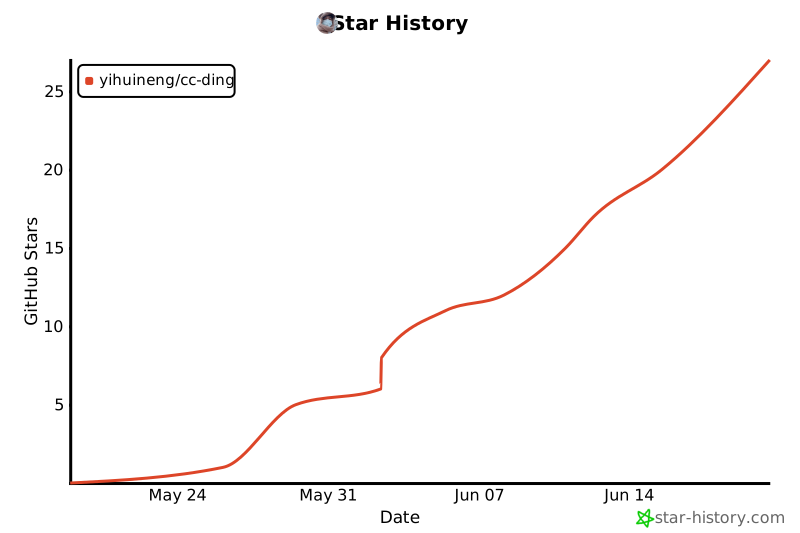](https://github.com/yihuineng/cc-ding/stargazers)
|
|
352
|
+
|
|
353
|
+
## Contributors
|
|
190
354
|
|
|
191
|
-
-
|
|
355
|
+
[](https://github.com/yihuineng/cc-ding/graphs/contributors)
|
|
192
356
|
|
|
193
357
|
## License
|
|
194
358
|
|