cavalion-js 1.0.74 → 1.0.76
This diff represents the content of publicly available package versions that have been released to one of the supported registries. The information contained in this diff is provided for informational purposes only and reflects changes between package versions as they appear in their respective public registries.
- package/.js +0 -0
- package/.md +25 -3
- package/CHANGELOG.md +11 -1
- package/PROMPT.md +19 -0
- package/Resource-o4rk6z5bml.md +69 -0
- package/package.json +1 -1
- package/src/console/Printer.js +2 -1
- package/src/js/ArrayFactory.js +0 -0
- package/src/js/JsObject.js +1 -4
- package/src/js.js +1 -1
- package/src/locale.js +5 -0
package/.js
ADDED
|
File without changes
|
package/.md
CHANGED
|
@@ -1,15 +1,17 @@
|
|
|
1
|
-
* [CHANGELOG.md]() - [README.md]() - [package.json]()
|
|
2
|
-
* [.workspace](`(devtools/Workspace<${ws.getSpecializer()}>)`) - [.js]()
|
|
3
|
-
|
|
1
|
+
* [CHANGELOG.md]() - [README.md]() - [package.json]() - [PROMPT.md]()
|
|
4
2
|
|
|
5
3
|
# cavalion-js
|
|
6
4
|
|
|
5
|
+
* [openai.com](https://chat.:)
|
|
6
|
+
* [String Word & Line Counter](https://chat.openai.com/c/01217e42-e74a-4d6a-b327-883ebfb3fa58)
|
|
7
|
+
* [Setting Up SPA Environment](https://chat.openai.com/c/2ff4e435-dd2d-46e3-a08d-58ccae92ee93)
|
|
7
8
|
* [src](:/)
|
|
8
9
|
* **[console](src/:/)**
|
|
9
10
|
* **[data](src/:/)** - [design](src/:/)
|
|
10
11
|
* **[entities](src/:/)** - [entities.js](src/) - [features](src/:/)
|
|
11
12
|
* [js](src/:/) / [\_js.js](src/js/:) - [extensions.js](src/js/:) - _[global.js](src/js/:)_? - _[define.js](src/js/:)?_
|
|
12
13
|
- [defineClass.js](src/js/:) - [referenceClass.js](src/js/:)
|
|
14
|
+
- **[JsObject.js](src/js/:) - [Class.js](src/js/:) **
|
|
13
15
|
- [json.js](src/:) - [locale.js](src/:) - [text.js](src/:)
|
|
14
16
|
- [script.js](src/:) - [relscript.js](src/:)
|
|
15
17
|
- [stylesheet.js](src/:)
|
|
@@ -47,6 +49,26 @@
|
|
|
47
49
|
- [Scaffold.js](src/js/:)
|
|
48
50
|
- [Type.js](src/js/:)
|
|
49
51
|
|
|
52
|
+
# `2023/05/23` countWords
|
|
53
|
+
|
|
54
|
+
String.prototype.countLinesAndWords = function() {
|
|
55
|
+
const lines = this.split('\n').length;
|
|
56
|
+
const words = this.split(/\s+/).length;
|
|
57
|
+
return { lines, words };
|
|
58
|
+
};
|
|
59
|
+
|
|
60
|
+
// Usage example:
|
|
61
|
+
const text = 'Hello\nWorld!\nThis is a sample text.';
|
|
62
|
+
const { lines, words } = text.countLinesAndWords();
|
|
63
|
+
console.log('Number of lines:', lines);
|
|
64
|
+
console.log('Number of words:', words);
|
|
65
|
+
|
|
66
|
+
# `2023/05/11` Constructing...
|
|
67
|
+
|
|
68
|
+
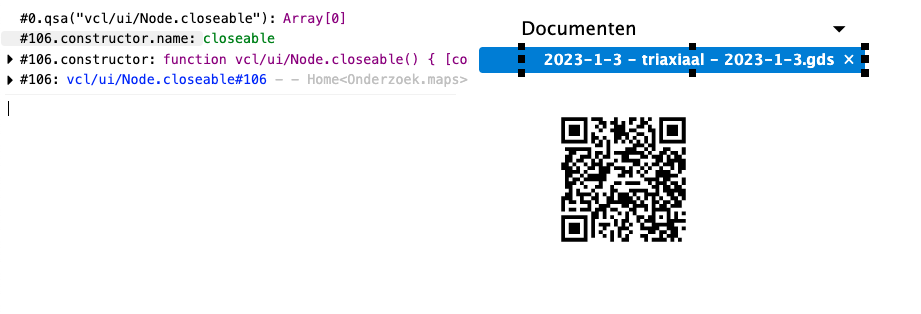
The name of the constructor for vcl/ui/Node.closeable is not correct.
|
|
69
|
+
|
|
70
|
+
|
|
71
|
+
|
|
50
72
|
# `2022/11/02`
|
|
51
73
|
|
|
52
74
|
What about a shared _polyfill_-like file, loaded at startup in order to fill in the gaps of packages that are not updated/compiled just yet.
|
package/CHANGELOG.md
CHANGED
|
@@ -1,4 +1,14 @@
|
|
|
1
|
-
### 2023/
|
|
1
|
+
### 2023/09/30 - 1.0.76
|
|
2
|
+
|
|
3
|
+
* Fixes a solid bug, in _JsObject.prototype.setProperties()_, sure why not?
|
|
4
|
+
|
|
5
|
+
### 2023/06/30 - 1.0.75
|
|
6
|
+
|
|
7
|
+
* Introduces locales.mixIn, prefixed.has()
|
|
8
|
+
* Ensures that Printer.prottype.print returns the printed value
|
|
9
|
+
* Refactores String.escape to use JSON.stringify
|
|
10
|
+
|
|
11
|
+
### 2023/06/30 - 1.0.74
|
|
2
12
|
|
|
3
13
|
* Introduces `locale.has()`
|
|
4
14
|
|
package/PROMPT.md
ADDED
|
@@ -0,0 +1,19 @@
|
|
|
1
|
+
> _I want to document my homemade/written cavalion-js library. It deals with a JavaScript class system and some utility classes for manipulating the DOM, printing to a "in-page console". It must be using code examples a lot._
|
|
2
|
+
|
|
3
|
+
"From now on, I want you to act as a technical writer and JavaScript expert focusing on library documentation.
|
|
4
|
+
|
|
5
|
+
We are documenting the 'cavalion-js' library, which is a homemade JavaScript library that provides a class system and utility classes for DOM manipulation and printing to an in-page console.
|
|
6
|
+
|
|
7
|
+
Start with an overview of the library, explaining its purpose, benefits, and main features. Provide a high-level view of the class system and utility classes it includes. Explain what problems this library solves and why someone might choose to use it over other solutions.
|
|
8
|
+
|
|
9
|
+
Next, delve into the specifics of the JavaScript class system that 'cavalion-js' implements. Explain how to define classes, inherit from other classes, override methods, and use other features of the class system. Use code examples to illustrate these concepts.
|
|
10
|
+
|
|
11
|
+
Then, document the utility classes for manipulating the DOM. Provide a comprehensive guide to each class, describing what it does and how to use it. Include code examples for each utility, showing how to perform common tasks like selecting elements, manipulating element attributes, and modifying the DOM structure.
|
|
12
|
+
|
|
13
|
+
After that, cover the in-page console feature. Explain how it works, how to print messages to it, and any customization options it provides. Again, use code examples to clearly demonstrate its usage.
|
|
14
|
+
|
|
15
|
+
Also, provide a section on installation and setup instructions for the library, and any other important details like browser compatibility or known issues.
|
|
16
|
+
|
|
17
|
+
Ensure that the documentation is clear, thorough, and easy to follow. Use a lot of code examples to illustrate how to use the various features of 'cavalion-js.' Provide enough detail so that both novice and experienced JavaScript developers can effectively use the library in their projects.
|
|
18
|
+
|
|
19
|
+
Throughout this process, use the best practices for writing technical documentation, such as clear language, logical organization, and regular updates as the library evolves."
|
|
@@ -0,0 +1,69 @@
|
|
|
1
|
+
# JavaScript Classes: The Complete Guide To Creating Your Own Custom Class System
|
|
2
|
+
|
|
3
|
+
JavaScript is a powerful programming language that allows you to create custom code that works in the browser. If you want to create your own custom class system, then this article is for you. It will teach you how to define classes in JavaScript and turn them into something that can be used anywhere on your website.
|
|
4
|
+
|
|
5
|
+
## The Basics of JavaScript Classes
|
|
6
|
+
|
|
7
|
+
In JavaScript, a class is just a special type of function. Classes are in fact "special functions", and just like you can define function expressions and function declarations, the same goes for classes.
|
|
8
|
+
There are two ways to create a class in JavaScript:
|
|
9
|
+
|
|
10
|
+
The first way is to use a class declaration. To do this, you use the class keyword followed by the name of the class. For example:
|
|
11
|
+
|
|
12
|
+
class Rectangle {
|
|
13
|
+
// ...
|
|
14
|
+
}
|
|
15
|
+
|
|
16
|
+
This creates a new class called Rectangle. You can then add properties and methods to this class by using the prototype property of the Rectangle class:
|
|
17
|
+
|
|
18
|
+
Rectangle.prototype.width = 10;
|
|
19
|
+
Rectangle.prototype.height = 5;
|
|
20
|
+
|
|
21
|
+
You can also add methods to the prototype:
|
|
22
|
+
|
|
23
|
+
Rectangle.prototype.getArea = function() {
|
|
24
|
+
return this.width * this.height;
|
|
25
|
+
}
|
|
26
|
+
|
|
27
|
+
## Defining a Class System in JavaScript
|
|
28
|
+
|
|
29
|
+
In JavaScript, a class is a blueprint for an object. It is a template that you can use to create new objects with the same characteristics. A class system is a way of organizing and defining classes so that they can be easily reused and extended.
|
|
30
|
+
|
|
31
|
+
There are several ways to define a class system in JavaScript. The most common way is to use the prototype-based approach. This approach uses the prototype property of objects to create new classes. The prototype property is an object that contains the properties and methods that will be inherited by all instances of the class.
|
|
32
|
+
|
|
33
|
+
Another way to define a class system in JavaScript is to use the constructor function. This function allows you to create objects with the same characteristics as the constructor function's prototype object. The constructor function is used to initialize the new object's properties and methods.
|
|
34
|
+
|
|
35
|
+
Once you have defined your class system, you can use it to create new objects. To do this, you first need to create a constructor function for your class. This function will take any arguments that you want to pass into your new object. Once you have created your constructor function, you can then use the new keyword to create an instance of your class.
|
|
36
|
+
|
|
37
|
+
## Step by Step Creation of a Class Definition
|
|
38
|
+
|
|
39
|
+
Assuming you have a basic understanding of Object-Oriented Programming concepts, creating a class in JavaScript is very simple. In fact, there are only a few steps involved:
|
|
40
|
+
|
|
41
|
+
* 1) First, create a function that will serve as the class constructor. This function should accept any parameters that you wish to pass into the class instance when it is created.
|
|
42
|
+
|
|
43
|
+
* 2) Next, create any properties or methods that you wish to add to the class. These can be defined directly within the constructor function, or they can be added after the fact using the prototype object.
|
|
44
|
+
|
|
45
|
+
* 3) Finally, return the newly created class from the constructor function.
|
|
46
|
+
|
|
47
|
+
That's all there is to it! With these three steps, you can create your own custom classes in JavaScript.
|
|
48
|
+
|
|
49
|
+
## Using the New Class in JS
|
|
50
|
+
|
|
51
|
+
Assuming you have a basic understanding of JavaScript classes, let's explore how to use the new class in JS.
|
|
52
|
+
|
|
53
|
+
As we discussed earlier, the new keyword is used to create an instance of a class. When creating an instance of a class, you must provide the arguments that will be passed to the class constructor function. For example:
|
|
54
|
+
|
|
55
|
+
class MyClass {
|
|
56
|
+
constructor(arg1, arg2) {
|
|
57
|
+
this.arg1 = arg1;
|
|
58
|
+
this.arg2 = arg2;
|
|
59
|
+
}
|
|
60
|
+
myMethod() {
|
|
61
|
+
// do something with this.arg1 and this.arg2 here
|
|
62
|
+
}
|
|
63
|
+
}
|
|
64
|
+
|
|
65
|
+
const myInstance = new MyClass('foo', 'bar');
|
|
66
|
+
|
|
67
|
+
## Conclusion
|
|
68
|
+
|
|
69
|
+
In conclusion, JavaScript classes provide a great way to create your own custom class system. With the help of this guide, you should now be able to create your own custom classes and use them in your web development projects. If you have any questions or if there is anything we missed, please feel free to reach out and let us know. We would be more than happy to help you out.
|
package/package.json
CHANGED
package/src/console/Printer.js
CHANGED
|
@@ -70,7 +70,6 @@ define(function(require) {
|
|
|
70
70
|
});
|
|
71
71
|
|
|
72
72
|
var Printer = {
|
|
73
|
-
|
|
74
73
|
prototype: {
|
|
75
74
|
_node: null,
|
|
76
75
|
|
|
@@ -105,6 +104,8 @@ define(function(require) {
|
|
|
105
104
|
}
|
|
106
105
|
this._node.appendChild(line.getNode());
|
|
107
106
|
this._node.scrollTop = this._node.scrollHeight;
|
|
107
|
+
|
|
108
|
+
return arguments.length > 1 ? arguments[1] : arguments[0];
|
|
108
109
|
}
|
|
109
110
|
}
|
|
110
111
|
};
|
package/src/js/ArrayFactory.js
CHANGED
|
File without changes
|
package/src/js/JsObject.js
CHANGED
|
@@ -16,9 +16,7 @@ define(function(require) {
|
|
|
16
16
|
var JsObject = Class.define;
|
|
17
17
|
|
|
18
18
|
return (JsObject = JsObject(require, {
|
|
19
|
-
|
|
20
19
|
inherits: Object,
|
|
21
|
-
|
|
22
20
|
prototype: {
|
|
23
21
|
|
|
24
22
|
'@hashCode': null,
|
|
@@ -77,14 +75,13 @@ define(function(require) {
|
|
|
77
75
|
var props = this.defineProperties();
|
|
78
76
|
for(var k in values) {
|
|
79
77
|
var prop = props[k];
|
|
80
|
-
if(
|
|
78
|
+
if(prop) {
|
|
81
79
|
prop.set(this, values[k]);
|
|
82
80
|
}
|
|
83
81
|
}
|
|
84
82
|
return this;
|
|
85
83
|
}
|
|
86
84
|
},
|
|
87
|
-
|
|
88
85
|
statics: {
|
|
89
86
|
|
|
90
87
|
$: references,
|
package/src/js.js
CHANGED
package/src/locale.js
CHANGED
|
@@ -245,6 +245,11 @@ define(function(require) {
|
|
|
245
245
|
onLoad(dict);
|
|
246
246
|
});
|
|
247
247
|
},
|
|
248
|
+
mixIn: function(dict) {
|
|
249
|
+
const dest = locale[locale.loc], proto = {};
|
|
250
|
+
dict = unwrap(js.mi(js.obj2kvp(proto), js.obj2kvp(dict)));
|
|
251
|
+
js.mi(dest, dict);
|
|
252
|
+
},
|
|
248
253
|
define: locale.define
|
|
249
254
|
};
|
|
250
255
|
});
|