capybara-db-mcp 1.0.0
This diff represents the content of publicly available package versions that have been released to one of the supported registries. The information contained in this diff is provided for informational purposes only and reflects changes between package versions as they appear in their respective public registries.
- package/LICENSE +21 -0
- package/README.md +230 -0
- package/dist/chunk-H73NN6K4.js +2175 -0
- package/dist/demo/employee-sqlite/employee.sql +117 -0
- package/dist/demo/employee-sqlite/load_department.sql +10 -0
- package/dist/demo/employee-sqlite/load_dept_emp.sql +1103 -0
- package/dist/demo/employee-sqlite/load_dept_manager.sql +17 -0
- package/dist/demo/employee-sqlite/load_employee.sql +1000 -0
- package/dist/demo/employee-sqlite/load_salary1.sql +9488 -0
- package/dist/demo/employee-sqlite/load_title.sql +1470 -0
- package/dist/demo-loader-PSMTLZ2T.js +46 -0
- package/dist/index.d.ts +1 -0
- package/dist/index.js +3615 -0
- package/dist/public/favicon.svg +57 -0
- package/dist/public/logo-full-light.svg +58 -0
- package/dist/registry-54CGLMGK.js +10 -0
- package/package.json +89 -0
package/LICENSE
ADDED
|
@@ -0,0 +1,21 @@
|
|
|
1
|
+
MIT License
|
|
2
|
+
|
|
3
|
+
Copyright (c) 2025 Bytebase
|
|
4
|
+
|
|
5
|
+
Permission is hereby granted, free of charge, to any person obtaining a copy
|
|
6
|
+
of this software and associated documentation files (the "Software"), to deal
|
|
7
|
+
in the Software without restriction, including without limitation the rights
|
|
8
|
+
to use, copy, modify, merge, publish, distribute, sublicense, and/or sell
|
|
9
|
+
copies of the Software, and to permit persons to whom the Software is
|
|
10
|
+
furnished to do so, subject to the following conditions:
|
|
11
|
+
|
|
12
|
+
The above copyright notice and this permission notice shall be included in all
|
|
13
|
+
copies or substantial portions of the Software.
|
|
14
|
+
|
|
15
|
+
THE SOFTWARE IS PROVIDED "AS IS", WITHOUT WARRANTY OF ANY KIND, EXPRESS OR
|
|
16
|
+
IMPLIED, INCLUDING BUT NOT LIMITED TO THE WARRANTIES OF MERCHANTABILITY,
|
|
17
|
+
FITNESS FOR A PARTICULAR PURPOSE AND NONINFRINGEMENT. IN NO EVENT SHALL THE
|
|
18
|
+
AUTHORS OR COPYRIGHT HOLDERS BE LIABLE FOR ANY CLAIM, DAMAGES OR OTHER
|
|
19
|
+
LIABILITY, WHETHER IN AN ACTION OF CONTRACT, TORT OR OTHERWISE, ARISING FROM,
|
|
20
|
+
OUT OF OR IN CONNECTION WITH THE SOFTWARE OR THE USE OR OTHER DEALINGS IN THE
|
|
21
|
+
SOFTWARE.
|
package/README.md
ADDED
|
@@ -0,0 +1,230 @@
|
|
|
1
|
+
# capybara-db-mcp
|
|
2
|
+
|
|
3
|
+
> **Your data is safe with Capybara.** Just like capybaras are famously safe and peaceful to be around, **capybara-db-mcp keeps your database data safe—your query results are never shared with an LLM.** Data stays on your machine; the model receives only success/failure.
|
|
4
|
+
|
|
5
|
+
**capybara-db-mcp** is a community fork of [DBHub](https://github.com/bytebase/dbhub) by [Bytebase](https://www.bytebase.com/). The key difference: **DBHub sends query results (rows, columns, counts) directly to the LLM**, which can expose sensitive data. **capybara-db-mcp is PII-safe**: it writes results to local files, opens them in the editor, and returns only success/failure to the LLM—no data or file path ever reaches the model. It also enforces read-only SQL, keeps the same internal names (e.g. `dbhub.toml`) for easy merging from upstream, and adds **default-schema support** for PostgreSQL and multi-database setups.
|
|
6
|
+
|
|
7
|
+
- **Original project:** [github.com/bytebase/dbhub](https://github.com/bytebase/dbhub)
|
|
8
|
+
- **This fork:** [github.com/ajgreyling/capybara-db-mcp](https://github.com/ajgreyling/capybara-db-mcp)
|
|
9
|
+
|
|
10
|
+
To point your clone at this fork:
|
|
11
|
+
|
|
12
|
+
```bash
|
|
13
|
+
git remote set-url origin https://github.com/ajgreyling/capybara-db-mcp.git
|
|
14
|
+
```
|
|
15
|
+
|
|
16
|
+
<p align="center">
|
|
17
|
+
<a href="https://dbhub.ai/" target="_blank">
|
|
18
|
+
<picture>
|
|
19
|
+
<source media="(prefers-color-scheme: dark)" srcset="https://raw.githubusercontent.com/ajgreyling/capybara-db-mcp/main/docs/images/logo/full-dark.svg" width="75%">
|
|
20
|
+
<source media="(prefers-color-scheme: light)" srcset="https://raw.githubusercontent.com/ajgreyling/capybara-db-mcp/main/docs/images/logo/full-light.svg" width="75%">
|
|
21
|
+
<img src="https://raw.githubusercontent.com/ajgreyling/capybara-db-mcp/main/docs/images/logo/full-light.svg" width="75%" alt="DBHub Logo">
|
|
22
|
+
</picture>
|
|
23
|
+
</a>
|
|
24
|
+
</p>
|
|
25
|
+
|
|
26
|
+
```mermaid
|
|
27
|
+
flowchart LR
|
|
28
|
+
subgraph clients["MCP Clients"]
|
|
29
|
+
A[Claude Desktop]
|
|
30
|
+
B[Claude Code]
|
|
31
|
+
C[Cursor]
|
|
32
|
+
D[VS Code]
|
|
33
|
+
E[Copilot CLI]
|
|
34
|
+
end
|
|
35
|
+
|
|
36
|
+
subgraph server["MCP Server"]
|
|
37
|
+
M[capybara-db-mcp]
|
|
38
|
+
end
|
|
39
|
+
|
|
40
|
+
subgraph dbs["Databases"]
|
|
41
|
+
P[PostgreSQL]
|
|
42
|
+
S[SQL Server]
|
|
43
|
+
L[SQLite]
|
|
44
|
+
My[MySQL]
|
|
45
|
+
Ma[MariaDB]
|
|
46
|
+
end
|
|
47
|
+
|
|
48
|
+
A --> M
|
|
49
|
+
B --> M
|
|
50
|
+
C --> M
|
|
51
|
+
D --> M
|
|
52
|
+
E --> M
|
|
53
|
+
|
|
54
|
+
M --> P
|
|
55
|
+
M --> S
|
|
56
|
+
M --> L
|
|
57
|
+
M --> My
|
|
58
|
+
M --> Ma
|
|
59
|
+
```
|
|
60
|
+
|
|
61
|
+
### PII-safe data flow
|
|
62
|
+
|
|
63
|
+
SQL results never reach the LLM. They are written to local files and opened in the editor; only a success/failure status is returned:
|
|
64
|
+
|
|
65
|
+
```mermaid
|
|
66
|
+
flowchart TB
|
|
67
|
+
subgraph llm["LLM / MCP Client"]
|
|
68
|
+
Q["SQL query"]
|
|
69
|
+
R["Tool response:\n✓ success/failure only"]
|
|
70
|
+
end
|
|
71
|
+
|
|
72
|
+
subgraph server["capybara-db-mcp"]
|
|
73
|
+
Exec[Execute SQL]
|
|
74
|
+
Write[Write to .safe-sql-results/]
|
|
75
|
+
Format[createPiiSafeToolResponse]
|
|
76
|
+
end
|
|
77
|
+
|
|
78
|
+
subgraph db["Database"]
|
|
79
|
+
DB[(PostgreSQL, SQLite, etc.)]
|
|
80
|
+
end
|
|
81
|
+
|
|
82
|
+
subgraph files["Local filesystem"]
|
|
83
|
+
CSV[".safe-sql-results/YYYYMMDD_HHMMSS_execute_sql.csv"]
|
|
84
|
+
end
|
|
85
|
+
|
|
86
|
+
Q -->|1. Call execute_sql| Exec
|
|
87
|
+
Exec -->|2. Run query| DB
|
|
88
|
+
DB -->|3. Result rows| Write
|
|
89
|
+
Write -->|4. Data to file, open in editor| CSV
|
|
90
|
+
Write -->|5. Then format success response| Format
|
|
91
|
+
Format -->|6. Success only - no path, count, or columns| R
|
|
92
|
+
```
|
|
93
|
+
|
|
94
|
+
capybara-db-mcp is a zero-dependency, token-efficient MCP server implementing the Model Context Protocol (MCP). It supports the same features as DBHub, plus a default schema.
|
|
95
|
+
|
|
96
|
+
**This fork is unconditionally read-only.** Only read-only SQL (SELECT, WITH, EXPLAIN, SHOW, etc.) is allowed. Write operations (UPDATE, DELETE, INSERT, MERGE, etc.) are never permitted.
|
|
97
|
+
|
|
98
|
+
**Your data is safe with Capybara.** Capybaras are famously safe and peaceful—and so is your data. Query results are **never shared with an LLM**. Raw data is written to local files (`.safe-sql-results/`) and opened in the editor; the LLM receives only success/failure. No file path, row count, or column names are returned (to prevent exfiltration via dynamic SQL). This prevents personally identifiable information (PII) from ever reaching the model.
|
|
99
|
+
|
|
100
|
+
- **Local Development First**: Zero dependency, token efficient with just two MCP tools to maximize context window
|
|
101
|
+
- **Multi-Database**: PostgreSQL, MySQL, MariaDB, SQL Server, and SQLite through a single interface
|
|
102
|
+
- **Multi-Connection**: Connect to multiple databases simultaneously with TOML configuration
|
|
103
|
+
- **Default schema**: Use `--schema` (or TOML `schema = "..."`) so PostgreSQL uses that schema for `execute_sql` and `search_objects` is restricted to it (see below)
|
|
104
|
+
- **Guardrails**: Unconditionally read-only, row limiting, and a safe 60-second query timeout default (overridable per source via `query_timeout` in `dbhub.toml`) to prevent runaway operations
|
|
105
|
+
- **PII-safe**: Query results are written to `.safe-sql-results/` and opened in the editor; only success/failure is sent to the LLM—no file path, row data, count, or column names (prevents exfiltration via dynamic column aliasing)
|
|
106
|
+
- **Secure Access**: SSH tunneling and SSL/TLS encryption
|
|
107
|
+
|
|
108
|
+
## Why Capybara?
|
|
109
|
+
|
|
110
|
+
The capybara is the spirit animal of capybara-db-mcp: calm, social, and famously safe to be around. **Just as capybaras are safe**, your database data stays safe—never shared with an LLM. It reflects the project's philosophy of peaceful coexistence, predictable behavior, and built-in guardrails.
|
|
111
|
+
|
|
112
|
+
### The Capybara: A Paragon of Peaceful Coexistence
|
|
113
|
+
|
|
114
|
+
- **Docile temperament**: Capybaras are known for gentle, non-aggressive behavior and are often seen peacefully sharing space with many species.
|
|
115
|
+
- **Herbivorous nature**: As herbivores, they pose no predatory threat to humans or other animals.
|
|
116
|
+
- **Social harmony**: They live in cooperative groups, reinforcing a "safe by default" ecosystem.
|
|
117
|
+
- **Adaptability**: They thrive in different environments, reducing conflict and stress.
|
|
118
|
+
- **Confident calm**: Other animals prefer their company, and capybaras are rarely rattled by neighbors around them.
|
|
119
|
+
|
|
120
|
+
## Supported Databases
|
|
121
|
+
|
|
122
|
+
PostgreSQL, MySQL, SQL Server, MariaDB, and SQLite.
|
|
123
|
+
|
|
124
|
+
## MCP Tools
|
|
125
|
+
|
|
126
|
+
- **[execute_sql](https://dbhub.ai/tools/execute-sql)**: Execute SQL queries with transaction support and safety controls
|
|
127
|
+
- **[search_objects](https://dbhub.ai/tools/search-objects)**: Search and explore database schemas, tables, columns, indexes, and procedures with progressive disclosure
|
|
128
|
+
- **[Custom Tools](https://dbhub.ai/tools/custom-tools)**: Define reusable, parameterized SQL operations in your `dbhub.toml` configuration file
|
|
129
|
+
|
|
130
|
+
## Default schema (`--schema`)
|
|
131
|
+
|
|
132
|
+
When you set a default schema (via `--schema`, the `SCHEMA` environment variable, or `schema = "..."` in `dbhub.toml` for a source):
|
|
133
|
+
|
|
134
|
+
- **PostgreSQL**: The connection `search_path` is set so `execute_sql` runs in that schema by default (unqualified table names resolve to that schema).
|
|
135
|
+
- **All connectors**: `search_objects` is restricted to that schema unless the tool is called with an explicit `schema` argument.
|
|
136
|
+
|
|
137
|
+
**Example (Cursor / MCP `mcp.json`):**
|
|
138
|
+
|
|
139
|
+
```json
|
|
140
|
+
{
|
|
141
|
+
"command": "npx",
|
|
142
|
+
"args": [
|
|
143
|
+
"capybara-db-mcp",
|
|
144
|
+
"--transport",
|
|
145
|
+
"stdio",
|
|
146
|
+
"--dsn",
|
|
147
|
+
"postgres://user:password@host:5432/mydb",
|
|
148
|
+
"--schema",
|
|
149
|
+
"my_app_schema",
|
|
150
|
+
"--ssh-host",
|
|
151
|
+
"bastion.example.com",
|
|
152
|
+
"--ssh-port",
|
|
153
|
+
"22",
|
|
154
|
+
"--ssh-user",
|
|
155
|
+
"deploy",
|
|
156
|
+
"--ssh-key",
|
|
157
|
+
"~/.ssh/mykey"
|
|
158
|
+
]
|
|
159
|
+
}
|
|
160
|
+
```
|
|
161
|
+
|
|
162
|
+
**Example (TOML in `dbhub.toml`):**
|
|
163
|
+
|
|
164
|
+
```toml
|
|
165
|
+
[[sources]]
|
|
166
|
+
id = "default"
|
|
167
|
+
dsn = "postgres://user:password@host:5432/mydb"
|
|
168
|
+
schema = "my_app_schema"
|
|
169
|
+
```
|
|
170
|
+
|
|
171
|
+
Full DBHub docs (including TOML and command-line options) apply; see [dbhub.ai](https://dbhub.ai) and [Command-Line Options](https://dbhub.ai/config/command-line).
|
|
172
|
+
|
|
173
|
+
### PII-safe output
|
|
174
|
+
|
|
175
|
+
By default, `execute_sql` and custom tools write query results to `.safe-sql-results/` in your project directory and open them in the editor. The MCP tool response sent to the LLM contains only success/failure. **No file path, row data, row count, or column names** are returned—preventing both direct PII leakage and exfiltration via dynamic SQL (e.g. `SELECT secret AS "password_is_hunter2"`). The user inspects results in the editor. Output format is configurable via `--output-format=csv|json|markdown` (default: `csv`).
|
|
176
|
+
|
|
177
|
+
### Read-only (unconditional)
|
|
178
|
+
|
|
179
|
+
This fork is unconditionally read-only. Write operations (UPDATE, DELETE, INSERT, MERGE, DROP, CREATE, ALTER, TRUNCATE, etc.) are never allowed. Only read-only SQL (SELECT, WITH, EXPLAIN, SHOW, DESCRIBE, etc.) is permitted.
|
|
180
|
+
|
|
181
|
+
## Workbench
|
|
182
|
+
|
|
183
|
+
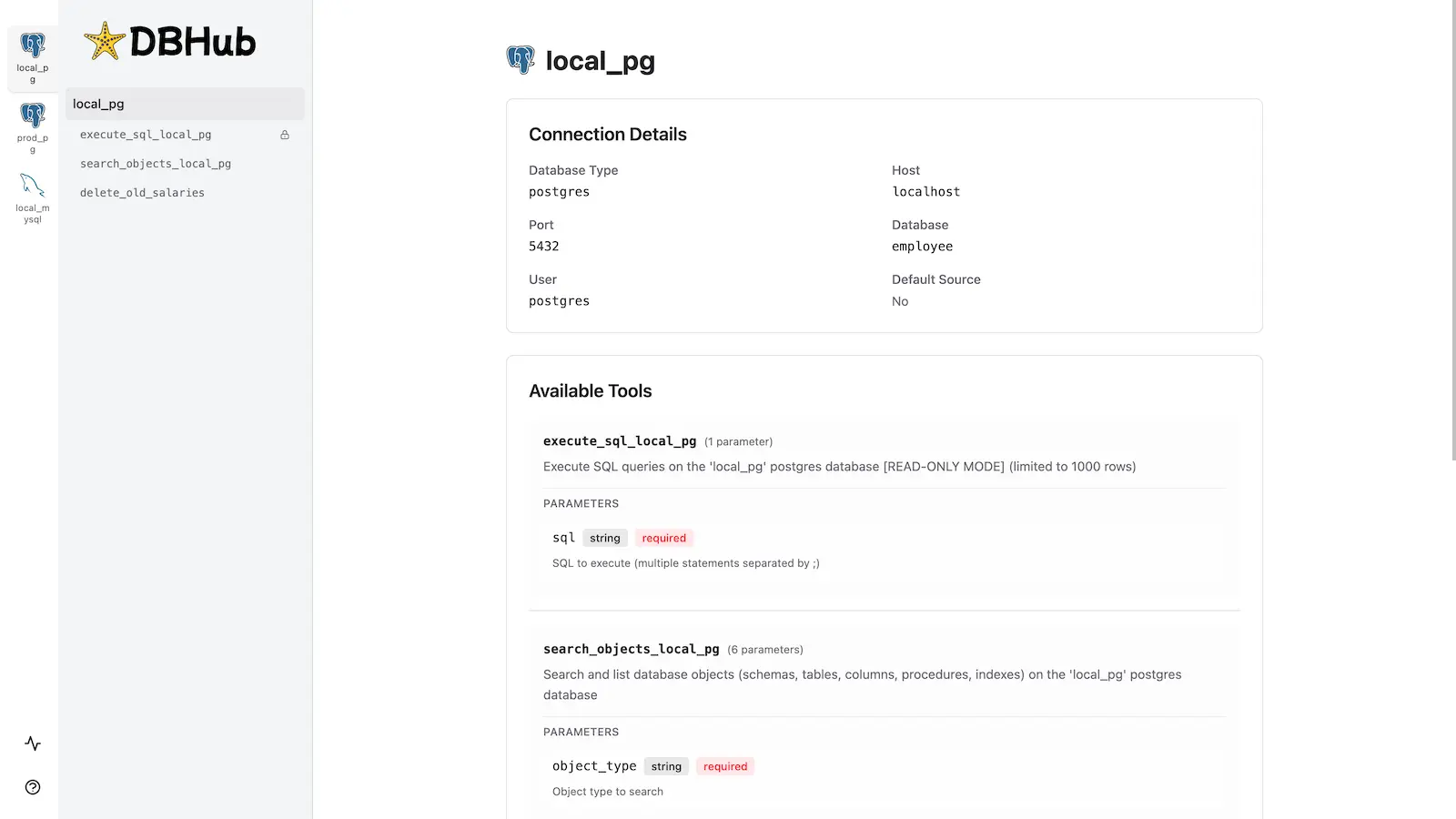
capybara-db-mcp includes the same [built-in web interface](https://dbhub.ai/workbench/overview) as DBHub for interacting with your database tools.
|
|
184
|
+
|
|
185
|
+
|
|
186
|
+
|
|
187
|
+
## Installation
|
|
188
|
+
|
|
189
|
+
### Quick Start
|
|
190
|
+
|
|
191
|
+
**NPM (from this repo, after build):**
|
|
192
|
+
|
|
193
|
+
```bash
|
|
194
|
+
pnpm install && pnpm build
|
|
195
|
+
npx capybara-db-mcp --transport http --port 8080 --dsn "postgres://user:password@localhost:5432/dbname?sslmode=disable"
|
|
196
|
+
```
|
|
197
|
+
|
|
198
|
+
With a default schema:
|
|
199
|
+
|
|
200
|
+
```bash
|
|
201
|
+
npx capybara-db-mcp --transport stdio --dsn "postgres://user:password@localhost:5432/dbname" --schema "public"
|
|
202
|
+
```
|
|
203
|
+
|
|
204
|
+
**Demo mode:**
|
|
205
|
+
|
|
206
|
+
```bash
|
|
207
|
+
npx capybara-db-mcp --transport http --port 8080 --demo
|
|
208
|
+
```
|
|
209
|
+
|
|
210
|
+
See [Command-Line Options](https://dbhub.ai/config/command-line) for all parameters.
|
|
211
|
+
|
|
212
|
+
### Multi-Database Setup
|
|
213
|
+
|
|
214
|
+
Use a `dbhub.toml` file as in DBHub. See [Multi-Database Configuration](https://dbhub.ai/config/toml). You can set `schema = "..."` per source to apply the default schema for that connection.
|
|
215
|
+
|
|
216
|
+
## Development
|
|
217
|
+
|
|
218
|
+
```bash
|
|
219
|
+
pnpm install
|
|
220
|
+
pnpm dev
|
|
221
|
+
pnpm build && pnpm start --transport stdio --dsn "postgres://user:password@localhost:5432/dbname"
|
|
222
|
+
```
|
|
223
|
+
|
|
224
|
+
To build and publish to npm: `npm run release`.
|
|
225
|
+
|
|
226
|
+
See [Testing](.claude/skills/testing/SKILL.md) and [Debug](https://dbhub.ai/config/debug).
|
|
227
|
+
|
|
228
|
+
## Contributors
|
|
229
|
+
|
|
230
|
+
Based on [bytebase/dbhub](https://github.com/bytebase/dbhub). See that repository for upstream contributors and star history.
|