canvas-color-disc 1.2.0 → 1.3.0
This diff represents the content of publicly available package versions that have been released to one of the supported registries. The information contained in this diff is provided for informational purposes only and reflects changes between package versions as they appear in their respective public registries.
- package/README.cn.md +242 -0
- package/README.md +189 -28
- package/dist/canvas-color-disc.es.js +458 -104
- package/dist/canvas-color-disc.umd.js +1 -1
- package/dist/style.css +1 -1
- package/dist/vue3/canvas-color-disc.es.js +613 -0
- package/dist/vue3/canvas-color-disc.umd.js +1 -0
- package/dist/vue3/style.css +1 -0
- package/package.json +34 -10
- package/src/color.js +271 -0
- package/src/components/CanvasColorDisc.vue +530 -159
- package/src/index.d.ts +74 -0
- package/src/index.js +7 -4
- package/src/style.css +47 -0
- package/src/util.js +89 -129
package/README.cn.md
ADDED
|
@@ -0,0 +1,242 @@
|
|
|
1
|
+
[English](./README.md) | [简体中文](./README.cn.md)
|
|
2
|
+
|
|
3
|
+
# canvas-color-disc
|
|
4
|
+
|
|
5
|
+
> 基于 Vue + Canvas 的圆形色盘取色组件,支持 PC 与移动端(Pointer Events),同时支持 Vue 2 与 Vue 3
|
|
6
|
+
|
|
7
|
+
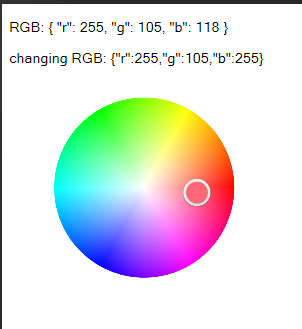
|
|
8
|
+
|
|
9
|
+
## Vue 版本支持
|
|
10
|
+
|
|
11
|
+
| Vue 版本 | 引入路径 | v-model 的 prop / 事件 | 样式 |
|
|
12
|
+
| --- | --- | --- | --- |
|
|
13
|
+
| Vue 2(`^2.5.0`) | `canvas-color-disc`(或 `canvas-color-disc/vue2`) | `value` / `input` | `canvas-color-disc/dist/style.css` |
|
|
14
|
+
| Vue 3(`^3.0.0`) | `canvas-color-disc/vue3` | `modelValue` / `update:modelValue` | `canvas-color-disc/vue3/style.css` |
|
|
15
|
+
|
|
16
|
+
两份产物来自同一份源码(`src/components/CanvasColorDisc.vue`),只是 SFC 编译目标不同;默认入口 `.` 保持为 Vue 2 构建以兼容旧版本。
|
|
17
|
+
|
|
18
|
+
## 安装
|
|
19
|
+
|
|
20
|
+
```bash
|
|
21
|
+
npm install canvas-color-disc
|
|
22
|
+
```
|
|
23
|
+
|
|
24
|
+
```bash
|
|
25
|
+
yarn add canvas-color-disc
|
|
26
|
+
```
|
|
27
|
+
|
|
28
|
+
> Vue 为 peer 依赖(`^2.5.0 || ^3.0.0`),需自行安装;不依赖任何第三方运行时库。
|
|
29
|
+
|
|
30
|
+
## 引入
|
|
31
|
+
|
|
32
|
+
包内导出的是组件本身,同时挂载了 `install` 方法,因此全局注册与局部注册都支持。
|
|
33
|
+
|
|
34
|
+
### Vue 2
|
|
35
|
+
|
|
36
|
+
```js
|
|
37
|
+
import Vue from 'vue'
|
|
38
|
+
import CanvasColorDisc from 'canvas-color-disc'
|
|
39
|
+
import 'canvas-color-disc/dist/style.css'
|
|
40
|
+
|
|
41
|
+
Vue.use(CanvasColorDisc)
|
|
42
|
+
```
|
|
43
|
+
|
|
44
|
+
### Vue 3
|
|
45
|
+
|
|
46
|
+
```js
|
|
47
|
+
import { createApp } from 'vue'
|
|
48
|
+
import CanvasColorDisc from 'canvas-color-disc/vue3'
|
|
49
|
+
import 'canvas-color-disc/vue3/style.css'
|
|
50
|
+
import App from './App.vue'
|
|
51
|
+
|
|
52
|
+
createApp(App).use(CanvasColorDisc).mount('#app')
|
|
53
|
+
```
|
|
54
|
+
|
|
55
|
+
### 局部注册
|
|
56
|
+
|
|
57
|
+
```js
|
|
58
|
+
// Vue 2
|
|
59
|
+
import CanvasColorDisc from 'canvas-color-disc'
|
|
60
|
+
import 'canvas-color-disc/dist/style.css'
|
|
61
|
+
|
|
62
|
+
// Vue 3
|
|
63
|
+
import CanvasColorDisc from 'canvas-color-disc/vue3'
|
|
64
|
+
import 'canvas-color-disc/vue3/style.css'
|
|
65
|
+
|
|
66
|
+
export default {
|
|
67
|
+
components: { CanvasColorDisc }
|
|
68
|
+
}
|
|
69
|
+
```
|
|
70
|
+
|
|
71
|
+
注册后组件名为 `CanvasColorDisc`,模板中可使用 `<canvas-color-disc />`。
|
|
72
|
+
|
|
73
|
+
### 浏览器直接引入(UMD)
|
|
74
|
+
|
|
75
|
+
```html
|
|
76
|
+
<link rel="stylesheet" href="https://unpkg.com/canvas-color-disc/dist/style.css">
|
|
77
|
+
<script src="https://unpkg.com/vue@2.7.16/dist/vue.js"></script>
|
|
78
|
+
<script src="https://unpkg.com/canvas-color-disc"></script>
|
|
79
|
+
|
|
80
|
+
<script>
|
|
81
|
+
// 未调用 Vue.use 时,也可直接作为组件选项使用
|
|
82
|
+
new Vue({
|
|
83
|
+
el: '#app',
|
|
84
|
+
components: { CanvasColorDisc: window.CanvasColorDisc }
|
|
85
|
+
})
|
|
86
|
+
</script>
|
|
87
|
+
```
|
|
88
|
+
|
|
89
|
+
Vue 3 请使用 `dist/vue3/canvas-color-disc.umd.js` 搭配 `dist/vue3/style.css`,全局变量同样是 `window.CanvasColorDisc`,且支持 `app.use(...)`。
|
|
90
|
+
|
|
91
|
+
## 使用
|
|
92
|
+
|
|
93
|
+
Vue 2 与 Vue 3 的模板写法完全一致:
|
|
94
|
+
|
|
95
|
+
```vue
|
|
96
|
+
<template>
|
|
97
|
+
<div id="app">
|
|
98
|
+
<p>RGB: {{ rgb }}</p>
|
|
99
|
+
<canvas-color-disc
|
|
100
|
+
v-model="rgb"
|
|
101
|
+
:width="300"
|
|
102
|
+
:height="300"
|
|
103
|
+
@change="onChange"
|
|
104
|
+
/>
|
|
105
|
+
</div>
|
|
106
|
+
</template>
|
|
107
|
+
|
|
108
|
+
<script>
|
|
109
|
+
export default {
|
|
110
|
+
data () {
|
|
111
|
+
return {
|
|
112
|
+
rgb: { r: 255, g: 255, b: 255 }
|
|
113
|
+
}
|
|
114
|
+
},
|
|
115
|
+
methods: {
|
|
116
|
+
onChange (rgb) {
|
|
117
|
+
console.log('change:', rgb)
|
|
118
|
+
}
|
|
119
|
+
}
|
|
120
|
+
}
|
|
121
|
+
</script>
|
|
122
|
+
```
|
|
123
|
+
|
|
124
|
+
`v-model` 绑定的形状由 `format` 决定,父组件修改绑定值时色盘选择器会同步移动。
|
|
125
|
+
|
|
126
|
+
### 颜色格式
|
|
127
|
+
|
|
128
|
+
`format` 决定绑定值的形状(默认 `rgb`):
|
|
129
|
+
|
|
130
|
+
| format | 绑定值 | 示例 |
|
|
131
|
+
| --- | --- | --- |
|
|
132
|
+
| `rgb` | `{ r, g, b }`,通道 0~255 | `{ r: 255, g: 0, b: 0 }` |
|
|
133
|
+
| `hex` | 字符串,支持 3/4/6/8 位 | `'#ff0000'` |
|
|
134
|
+
| `hsv` | `{ h, s, v }`,h 0~360、s/v 0~100 | `{ h: 0, s: 100, v: 100 }` |
|
|
135
|
+
| `hsl` | `{ h, s, l }`,h 0~360、s/l 0~100 | `{ h: 0, s: 100, l: 50 }` |
|
|
136
|
+
|
|
137
|
+
字符串一律按 hex 解析;对象会先按 `format` 解析,未指定 `format` 时按字段推断。
|
|
138
|
+
|
|
139
|
+
`alpha` 为 `true` 时额外读写 `a` 分量(0~1),hex 格式下输出 8 位(如 `#ff000080`)。色盘是二维的,本身不调节透明度与明度,这两项需要由外部控件或绑定值给出。
|
|
140
|
+
|
|
141
|
+
## API
|
|
142
|
+
|
|
143
|
+
### Props
|
|
144
|
+
|
|
145
|
+
| 参数 | 说明 | 类型 | 默认值 | 适用版本 |
|
|
146
|
+
| --- | --- | --- | --- | --- |
|
|
147
|
+
| value | 当前颜色,配合 `v-model` 使用 | Object / String | `{ r: 255, g: 255, b: 255 }` | Vue 2 |
|
|
148
|
+
| modelValue | 当前颜色,配合 `v-model` 使用 | Object / String | `undefined`(回退到 `value`) | Vue 3 |
|
|
149
|
+
| width | 画布宽度(CSS 像素),`'auto'` 表示跟随容器 | Number / String | 300 | 通用 |
|
|
150
|
+
| height | 画布高度(CSS 像素),`'auto'` 表示跟随容器 | Number / String | 300 | 通用 |
|
|
151
|
+
| format | 绑定值格式:`rgb` / `hex` / `hsv` / `hsl` | String | `rgb` | 通用 |
|
|
152
|
+
| alpha | 是否保留并输出 alpha 分量 | Boolean | `false` | 通用 |
|
|
153
|
+
| disabled | 禁用指针与键盘交互 | Boolean | `false` | 通用 |
|
|
154
|
+
| keyboardStep | 方向键步进(饱和度百分点 / 色相度数),按住 Shift 时 ×10 | Number | 1 | 通用 |
|
|
155
|
+
|
|
156
|
+
### Events
|
|
157
|
+
|
|
158
|
+
| 事件名 | 说明 | 回调参数 | 适用版本 |
|
|
159
|
+
| --- | --- | --- | --- |
|
|
160
|
+
| input | 颜色变化时实时触发(按帧节流,配合 `v-model`) | 与 `format` 一致 | Vue 2 |
|
|
161
|
+
| update:modelValue | 同 `input`,配合 `v-model` 使用 | 与 `format` 一致 | Vue 3 |
|
|
162
|
+
| change | 一次选择(按下后抬起,或一次键盘调整)结束时触发 | 与 `format` 一致 | 通用 |
|
|
163
|
+
|
|
164
|
+
`input` 与 `update:modelValue` 会同时派发,未被监听的一方会被忽略。
|
|
165
|
+
|
|
166
|
+
### 插槽
|
|
167
|
+
|
|
168
|
+
| 名称 | 作用域参数 | 说明 |
|
|
169
|
+
| --- | --- | --- |
|
|
170
|
+
| palette | `color`(当前颜色)、`setColor(value)` | 渲染在色盘下方的附加区域,常用于预设色板 |
|
|
171
|
+
|
|
172
|
+
```vue
|
|
173
|
+
<canvas-color-disc v-model="rgb">
|
|
174
|
+
<template #palette="{ setColor }">
|
|
175
|
+
<button @click="setColor({ r: 255, g: 0, b: 0 })">红</button>
|
|
176
|
+
</template>
|
|
177
|
+
</canvas-color-disc>
|
|
178
|
+
```
|
|
179
|
+
|
|
180
|
+
### 实例方法
|
|
181
|
+
|
|
182
|
+
通过 `ref` 调用(Vue 3 下经由 `expose` 暴露,Vue 2 下直接从 `$refs` 取到):
|
|
183
|
+
|
|
184
|
+
| 方法 | 说明 |
|
|
185
|
+
| --- | --- |
|
|
186
|
+
| `getColor()` | 取当前颜色,对象格式为副本 |
|
|
187
|
+
| `setColor(value)` | 设置颜色,值需符合当前 `format`,非法值被忽略;会同时派发 `change` |
|
|
188
|
+
| `reset()` | 重置为白色 |
|
|
189
|
+
|
|
190
|
+
### 键盘操作
|
|
191
|
+
|
|
192
|
+
色盘的交互元素可被聚焦(`tabindex="0"`,带 `role="slider"` 与 `aria-valuetext`),聚焦后:
|
|
193
|
+
|
|
194
|
+
| 按键 | 行为 |
|
|
195
|
+
| --- | --- |
|
|
196
|
+
| ← / → | 色相 ∓/± `keyboardStep` 度 |
|
|
197
|
+
| ↑ / ↓ | 饱和度 ±/∓ `keyboardStep` |
|
|
198
|
+
| Home / End | 饱和度归零 / 拉满 |
|
|
199
|
+
| Shift + 方向键 | 步进 ×10 |
|
|
200
|
+
|
|
201
|
+
### 说明
|
|
202
|
+
|
|
203
|
+
- 色盘为 HSV 模型:色相取角度、饱和度取离圆心的半径比例;明度(V)取自绑定值并原样保留,因此传入灰色不会被拉成纯色
|
|
204
|
+
- `width`/`height` 为画布逻辑尺寸(CSS 像素),色盘半径自动按「短边半径减去比例留白(收敛在 8~18px)」适配,圆心居中;两者可以不相等。选择器圆环与圆心白色死区同样随半径缩放,因此极小与极大的色盘都能保持一致的观感
|
|
205
|
+
- 画布按 `devicePixelRatio` 放大绘制,高清屏下不会模糊
|
|
206
|
+
- 取色坐标会自动换算回画布逻辑坐标:即使画布被外部 CSS 缩放(如全局 `canvas { max-width: 100% }`、父容器压缩、transform 缩放),取色位置仍与视觉位置一致
|
|
207
|
+
- 点击或拖动超出色盘范围时,选择器会钉在圆周上(取圆周对应位置的颜色)
|
|
208
|
+
- 基于 Pointer Events,鼠标与触摸的操作方式一致;拖动通过 `setPointerCapture` 捕获,指针移出画布也不中断;若捕获失败(部分浏览器/合成事件),window 上的兜底监听仍会正常结束一次选择
|
|
209
|
+
- 只响应主键与主指针:右键/中键不会取色,多指触摸时后续手指不会打断正在进行的拖动
|
|
210
|
+
- 拖动过程中页面滚动会立即使缓存的画布位置失效,避免出现取色偏移
|
|
211
|
+
- `width`/`height` 传 `'auto'` 时画布尺寸跟随容器,容器尺寸变化会自动重绘;该方向需要父容器有确定尺寸
|
|
212
|
+
- `devicePixelRatio` 变化(跨屏拖动窗口、修改系统缩放)时会自动按新比例重建画布
|
|
213
|
+
- 色盘像素按几何参数缓存,尺寸与 dpr 未变时不会重算;圆周做 1 物理像素的透明度渐变,避免锯齿
|
|
214
|
+
- 样式为普通 CSS,通过 `.canvas-color-disc` 后代选择器限定作用域,每个应用引入一次对应版本的 `style.css` 即可
|
|
215
|
+
- 包内附带 `src/index.d.ts`,TS 项目可直接获得 props 与实例方法的类型
|
|
216
|
+
|
|
217
|
+
## 本地开发
|
|
218
|
+
|
|
219
|
+
```bash
|
|
220
|
+
# 安装依赖
|
|
221
|
+
npm install
|
|
222
|
+
|
|
223
|
+
# 启动 Vue 2 demo(localhost:5173)
|
|
224
|
+
npm run dev
|
|
225
|
+
|
|
226
|
+
# 启动 Vue 3 demo(localhost:5174)
|
|
227
|
+
npm run dev:vue3
|
|
228
|
+
|
|
229
|
+
# 同时构建 Vue 2(dist/)与 Vue 3(dist/vue3/)产物
|
|
230
|
+
npm run build
|
|
231
|
+
|
|
232
|
+
# 单独构建某一版本
|
|
233
|
+
npm run build:vue2
|
|
234
|
+
npm run build:vue3
|
|
235
|
+
|
|
236
|
+
# 运行单元测试
|
|
237
|
+
npm test
|
|
238
|
+
```
|
|
239
|
+
|
|
240
|
+
## 许可证
|
|
241
|
+
|
|
242
|
+
[MIT](./LICENSE)
|
package/README.md
CHANGED
|
@@ -1,30 +1,96 @@
|
|
|
1
|
-
|
|
1
|
+
[English](./README.md) | [简体中文](./README.cn.md)
|
|
2
2
|
|
|
3
|
-
|
|
3
|
+
# canvas-color-disc
|
|
4
4
|
|
|
5
|
+
> A circular color picker built with Vue + Canvas, works on both desktop and mobile (Pointer Events). Supports Vue 2 and Vue 3.
|
|
5
6
|
|
|
6
7
|

|
|
7
8
|
|
|
8
|
-
|
|
9
|
+
## Vue version support
|
|
9
10
|
|
|
10
|
-
|
|
11
|
+
| Vue version | Import path | v-model prop / event | Style |
|
|
12
|
+
| --- | --- | --- | --- |
|
|
13
|
+
| Vue 2 (`^2.5.0`) | `canvas-color-disc` (or `canvas-color-disc/vue2`) | `value` / `input` | `canvas-color-disc/dist/style.css` |
|
|
14
|
+
| Vue 3 (`^3.0.0`) | `canvas-color-disc/vue3` | `modelValue` / `update:modelValue` | `canvas-color-disc/vue3/style.css` |
|
|
11
15
|
|
|
12
|
-
|
|
13
|
-
|
|
14
|
-
|
|
16
|
+
Both builds come from the same source (`src/components/CanvasColorDisc.vue`); only the SFC compile target differs. The default entry `.` stays on the Vue 2 build for backward compatibility.
|
|
17
|
+
|
|
18
|
+
## Install
|
|
19
|
+
|
|
20
|
+
```bash
|
|
21
|
+
npm install canvas-color-disc
|
|
15
22
|
```
|
|
16
23
|
|
|
17
|
-
```
|
|
18
|
-
|
|
19
|
-
npm run dev
|
|
24
|
+
```bash
|
|
25
|
+
yarn add canvas-color-disc
|
|
20
26
|
```
|
|
21
27
|
|
|
22
|
-
|
|
23
|
-
|
|
24
|
-
|
|
28
|
+
> Vue is a peer dependency (`^2.5.0 || ^3.0.0`) and must be installed by yourself. There is no other runtime dependency.
|
|
29
|
+
|
|
30
|
+
## Import
|
|
31
|
+
|
|
32
|
+
The package exports the component itself with an `install` method attached, so both global and local registration work.
|
|
33
|
+
|
|
34
|
+
### Vue 2
|
|
35
|
+
|
|
36
|
+
```js
|
|
37
|
+
import Vue from 'vue'
|
|
38
|
+
import CanvasColorDisc from 'canvas-color-disc'
|
|
39
|
+
import 'canvas-color-disc/dist/style.css'
|
|
40
|
+
|
|
41
|
+
Vue.use(CanvasColorDisc)
|
|
42
|
+
```
|
|
43
|
+
|
|
44
|
+
### Vue 3
|
|
45
|
+
|
|
46
|
+
```js
|
|
47
|
+
import { createApp } from 'vue'
|
|
48
|
+
import CanvasColorDisc from 'canvas-color-disc/vue3'
|
|
49
|
+
import 'canvas-color-disc/vue3/style.css'
|
|
50
|
+
import App from './App.vue'
|
|
51
|
+
|
|
52
|
+
createApp(App).use(CanvasColorDisc).mount('#app')
|
|
25
53
|
```
|
|
26
54
|
|
|
27
|
-
|
|
55
|
+
### Local registration
|
|
56
|
+
|
|
57
|
+
```js
|
|
58
|
+
// Vue 2
|
|
59
|
+
import CanvasColorDisc from 'canvas-color-disc'
|
|
60
|
+
import 'canvas-color-disc/dist/style.css'
|
|
61
|
+
|
|
62
|
+
// Vue 3
|
|
63
|
+
import CanvasColorDisc from 'canvas-color-disc/vue3'
|
|
64
|
+
import 'canvas-color-disc/vue3/style.css'
|
|
65
|
+
|
|
66
|
+
export default {
|
|
67
|
+
components: { CanvasColorDisc }
|
|
68
|
+
}
|
|
69
|
+
```
|
|
70
|
+
|
|
71
|
+
The component is registered as `CanvasColorDisc`, use it as `<canvas-color-disc />` in templates.
|
|
72
|
+
|
|
73
|
+
### Use via CDN (UMD)
|
|
74
|
+
|
|
75
|
+
```html
|
|
76
|
+
<link rel="stylesheet" href="https://unpkg.com/canvas-color-disc/dist/style.css">
|
|
77
|
+
<script src="https://unpkg.com/vue@2.7.16/dist/vue.js"></script>
|
|
78
|
+
<script src="https://unpkg.com/canvas-color-disc"></script>
|
|
79
|
+
|
|
80
|
+
<script>
|
|
81
|
+
// Without Vue.use, it can also be used directly as a component option
|
|
82
|
+
new Vue({
|
|
83
|
+
el: '#app',
|
|
84
|
+
components: { CanvasColorDisc: window.CanvasColorDisc }
|
|
85
|
+
})
|
|
86
|
+
</script>
|
|
87
|
+
```
|
|
88
|
+
|
|
89
|
+
For Vue 3 use `dist/vue3/canvas-color-disc.umd.js` together with `dist/vue3/style.css`; the global is still `window.CanvasColorDisc` and it accepts an app instance via `app.use(...)`.
|
|
90
|
+
|
|
91
|
+
## Usage
|
|
92
|
+
|
|
93
|
+
The same template works for Vue 2 and Vue 3:
|
|
28
94
|
|
|
29
95
|
```vue
|
|
30
96
|
<template>
|
|
@@ -55,27 +121,122 @@ export default {
|
|
|
55
121
|
</script>
|
|
56
122
|
```
|
|
57
123
|
|
|
124
|
+
The shape of the bound value is decided by `format`. Updating it from the parent moves the selector accordingly.
|
|
125
|
+
|
|
126
|
+
### Color formats
|
|
127
|
+
|
|
128
|
+
`format` (default `rgb`) decides the shape of the bound value:
|
|
129
|
+
|
|
130
|
+
| format | Value | Example |
|
|
131
|
+
| --- | --- | --- |
|
|
132
|
+
| `rgb` | `{ r, g, b }`, channels 0~255 | `{ r: 255, g: 0, b: 0 }` |
|
|
133
|
+
| `hex` | string, 3/4/6/8 digits | `'#ff0000'` |
|
|
134
|
+
| `hsv` | `{ h, s, v }`, h 0~360, s/v 0~100 | `{ h: 0, s: 100, v: 100 }` |
|
|
135
|
+
| `hsl` | `{ h, s, l }`, h 0~360, s/l 0~100 | `{ h: 0, s: 100, l: 50 }` |
|
|
136
|
+
|
|
137
|
+
Strings are always parsed as hex. Objects are parsed with `format` first, and by field names when `format` is not given.
|
|
138
|
+
|
|
139
|
+
With `alpha` enabled an extra `a` channel (0~1) is read and written, and hex output becomes 8 digits (e.g. `#ff000080`). The disc is two-dimensional, so it does not adjust alpha or value itself — provide them through the bound value or your own controls.
|
|
140
|
+
|
|
58
141
|
## API
|
|
59
142
|
|
|
60
143
|
### Props
|
|
61
144
|
|
|
62
|
-
|
|
|
63
|
-
| --- | --- | --- | --- |
|
|
64
|
-
| value |
|
|
65
|
-
|
|
|
66
|
-
|
|
|
145
|
+
| Prop | Description | Type | Default | Vue version |
|
|
146
|
+
| --- | --- | --- | --- | --- |
|
|
147
|
+
| value | Current color, used by `v-model` | Object / String | `{ r: 255, g: 255, b: 255 }` | Vue 2 |
|
|
148
|
+
| modelValue | Current color, used by `v-model` | Object / String | `undefined` (falls back to `value`) | Vue 3 |
|
|
149
|
+
| width | Canvas width in CSS pixels, `'auto'` follows the container | Number / String | 300 | both |
|
|
150
|
+
| height | Canvas height in CSS pixels, `'auto'` follows the container | Number / String | 300 | both |
|
|
151
|
+
| format | Bound value format: `rgb` / `hex` / `hsv` / `hsl` | String | `rgb` | both |
|
|
152
|
+
| alpha | Keep and emit the alpha channel | Boolean | `false` | both |
|
|
153
|
+
| disabled | Disable pointer and keyboard interaction | Boolean | `false` | both |
|
|
154
|
+
| keyboardStep | Arrow key step (saturation percentage / hue degrees), ×10 with Shift | Number | 1 | both |
|
|
67
155
|
|
|
68
156
|
### Events
|
|
69
157
|
|
|
70
|
-
|
|
|
158
|
+
| Event | Description | Payload | Vue version |
|
|
159
|
+
| --- | --- | --- | --- |
|
|
160
|
+
| input | Fired in real time while the color changes (throttled per frame, used by `v-model`) | matches `format` | Vue 2 |
|
|
161
|
+
| update:modelValue | Same as `input`, used by `v-model` | matches `format` | Vue 3 |
|
|
162
|
+
| change | Fired when a pick gesture (press then release) or a key adjustment ends | matches `format` | both |
|
|
163
|
+
|
|
164
|
+
Both `input` and `update:modelValue` are always emitted, so the unused one is simply ignored.
|
|
165
|
+
|
|
166
|
+
### Slot
|
|
167
|
+
|
|
168
|
+
| Name | Scope | Description |
|
|
71
169
|
| --- | --- | --- |
|
|
72
|
-
|
|
|
73
|
-
|
|
170
|
+
| palette | `color` (current color), `setColor(value)` | Extra area rendered below the disc, typically used for preset swatches |
|
|
171
|
+
|
|
172
|
+
```vue
|
|
173
|
+
<canvas-color-disc v-model="rgb">
|
|
174
|
+
<template #palette="{ setColor }">
|
|
175
|
+
<button @click="setColor({ r: 255, g: 0, b: 0 })">Red</button>
|
|
176
|
+
</template>
|
|
177
|
+
</canvas-color-disc>
|
|
178
|
+
```
|
|
179
|
+
|
|
180
|
+
### Instance methods
|
|
181
|
+
|
|
182
|
+
Available through a `ref` (exposed via `expose` on Vue 3, directly on `$refs` on Vue 2):
|
|
183
|
+
|
|
184
|
+
| Method | Description |
|
|
185
|
+
| --- | --- |
|
|
186
|
+
| `getColor()` | Returns the current color; objects are returned as copies |
|
|
187
|
+
| `setColor(value)` | Sets the color; the value must match `format`, invalid values are ignored. Also emits `change` |
|
|
188
|
+
| `reset()` | Resets to white |
|
|
189
|
+
|
|
190
|
+
### Keyboard
|
|
191
|
+
|
|
192
|
+
The interactive element is focusable (`tabindex="0"`, `role="slider"` with `aria-valuetext`). Once focused:
|
|
193
|
+
|
|
194
|
+
| Key | Action |
|
|
195
|
+
| --- | --- |
|
|
196
|
+
| ← / → | Hue ∓/± `keyboardStep` degrees |
|
|
197
|
+
| ↑ / ↓ | Saturation ±/∓ `keyboardStep` |
|
|
198
|
+
| Home / End | Saturation to 0 / 100 |
|
|
199
|
+
| Shift + arrows | Step ×10 |
|
|
200
|
+
|
|
201
|
+
### Notes
|
|
202
|
+
|
|
203
|
+
- The disc uses the HSV model: hue comes from the angle, saturation from the distance to the center ratio. Value is taken from the bound value and preserved, so passing a gray does not turn it into a fully saturated color
|
|
204
|
+
- `width` / `height` are logical canvas sizes in CSS pixels. The disc radius is the shorter half side minus a proportional padding (clamped to 8~18px) and the origin is centered; they do not have to be equal. The selector ring and the white dead zone at the center scale with the radius too, so tiny and large discs keep the same proportions
|
|
205
|
+
- The canvas is rendered with `devicePixelRatio` scaling, so it stays sharp on high-DPI screens
|
|
206
|
+
- Pointer coordinates are converted back to logical canvas coordinates: even if the canvas is scaled by external CSS (e.g. a global `canvas { max-width: 100% }`, a squeezed parent, or a `transform` scale), the picked position still matches the visual position
|
|
207
|
+
- Clicking or dragging outside the disc pins the selector to the circumference and takes the color at that point
|
|
208
|
+
- Built on Pointer Events, so mouse and touch behave the same; dragging uses `setPointerCapture`, so it continues even when the pointer leaves the canvas, and a window-level fallback ends the gesture if the capture could not be taken
|
|
209
|
+
- Only the primary button / primary pointer starts a pick: right and middle clicks are ignored, and extra fingers in a multi-touch gesture do not take over an ongoing drag
|
|
210
|
+
- The cached canvas rect is invalidated on scroll, so picking stays accurate while the page is scrolled during a drag
|
|
211
|
+
- Passing `'auto'` for `width` / `height` makes the canvas follow its container and redraw on container resizes; the parent needs a definite size on that axis
|
|
212
|
+
- When `devicePixelRatio` changes (dragging the window to another screen, changing the OS scaling), the canvas is rebuilt at the new ratio
|
|
213
|
+
- Disc pixels are cached by geometry, so nothing is recomputed while size and dpr stay the same; the circumference fades over one physical pixel to avoid aliasing
|
|
214
|
+
- Styles are shipped as plain CSS scoped by the `.canvas-color-disc` ancestor selector; import the matching `style.css` once per app
|
|
215
|
+
- `src/index.d.ts` ships with the package, so TS projects get prop and instance method types out of the box
|
|
216
|
+
|
|
217
|
+
## Local development
|
|
218
|
+
|
|
219
|
+
```bash
|
|
220
|
+
# install dependencies
|
|
221
|
+
npm install
|
|
222
|
+
|
|
223
|
+
# serve the Vue 2 demo at localhost:5173
|
|
224
|
+
npm run dev
|
|
225
|
+
|
|
226
|
+
# serve the Vue 3 demo at localhost:5174
|
|
227
|
+
npm run dev:vue3
|
|
228
|
+
|
|
229
|
+
# build both Vue 2 (dist/) and Vue 3 (dist/vue3/) bundles
|
|
230
|
+
npm run build
|
|
231
|
+
|
|
232
|
+
# build a single target
|
|
233
|
+
npm run build:vue2
|
|
234
|
+
npm run build:vue3
|
|
235
|
+
|
|
236
|
+
# run the unit tests
|
|
237
|
+
npm test
|
|
238
|
+
```
|
|
74
239
|
|
|
75
|
-
|
|
240
|
+
## License
|
|
76
241
|
|
|
77
|
-
|
|
78
|
-
- `width`/`height` 为画布逻辑尺寸(CSS 像素),色盘半径自动按 `min(width, height) / 2 - 18` 适配,圆心居中
|
|
79
|
-
- 取色坐标会自动换算回画布逻辑坐标:即使画布被外部 CSS 缩放(如全局 `canvas { max-width: 100% }`、父容器压缩、transform 缩放),取色位置仍与视觉位置一致
|
|
80
|
-
- 点击或拖动超出色盘范围时,选择器会钉在圆周上(取圆周对应位置的颜色)
|
|
81
|
-
- 基于 Pointer Events,鼠标与触摸的操作方式一致
|
|
242
|
+
[MIT](./LICENSE)
|