busybits 0.0.0-stage → 2.0.1
This diff represents the content of publicly available package versions that have been released to one of the supported registries. The information contained in this diff is provided for informational purposes only and reflects changes between package versions as they appear in their respective public registries.
- package/.claude-plugin/marketplace.json +26 -0
- package/CHANGELOG.md +692 -0
- package/LICENSE +21 -0
- package/README.es.md +1457 -0
- package/README.fr.md +1435 -0
- package/README.md +1623 -2
- package/README.pt-BR.md +1373 -0
- package/dist/build.json +5 -0
- package/dist/cli/busybits.js +14724 -0
- package/dist/client/assets/art/framed/painting-abstract.png +0 -0
- package/dist/client/assets/art/framed/painting-beach.png +0 -0
- package/dist/client/assets/art/framed/painting-cat.png +0 -0
- package/dist/client/assets/art/framed/painting-city-night.png +0 -0
- package/dist/client/assets/art/framed/painting-mountains.png +0 -0
- package/dist/client/assets/art/framed/painting-rio.png +0 -0
- package/dist/client/assets/art/framed/painting-sunflowers.png +0 -0
- package/dist/client/assets/art/framed/painting-wave.png +0 -0
- package/dist/client/assets/art/framed/painting-wide-aurora.png +0 -0
- package/dist/client/assets/art/framed/painting-wide-color-fields.png +0 -0
- package/dist/client/assets/art/framed/painting-wide-forest-lake.png +0 -0
- package/dist/client/assets/art/painting-abstract.png +0 -0
- package/dist/client/assets/art/painting-beach.png +0 -0
- package/dist/client/assets/art/painting-cat.png +0 -0
- package/dist/client/assets/art/painting-city-night.png +0 -0
- package/dist/client/assets/art/painting-mountains.png +0 -0
- package/dist/client/assets/art/painting-rio.png +0 -0
- package/dist/client/assets/art/painting-sunflowers.png +0 -0
- package/dist/client/assets/art/painting-wave.png +0 -0
- package/dist/client/assets/art/painting-wide-aurora.png +0 -0
- package/dist/client/assets/art/painting-wide-color-fields.png +0 -0
- package/dist/client/assets/art/painting-wide-forest-lake.png +0 -0
- package/dist/client/assets/art/poster-bug.png +0 -0
- package/dist/client/assets/art/poster-cat.png +0 -0
- package/dist/client/assets/art/poster-code.png +0 -0
- package/dist/client/assets/art/poster-coffee.png +0 -0
- package/dist/client/assets/art/poster-rocket.png +0 -0
- package/dist/client/assets/art/poster-ship-it.png +0 -0
- package/dist/client/assets/brand/apple-touch-icon.png +0 -0
- package/dist/client/assets/brand/favicon-16.png +0 -0
- package/dist/client/assets/brand/favicon-32.png +0 -0
- package/dist/client/assets/brand/icon-192.png +0 -0
- package/dist/client/assets/brand/icon-512.png +0 -0
- package/dist/client/assets/brand/logo-detailed.png +0 -0
- package/dist/client/assets/brand/logo-mark.png +0 -0
- package/dist/client/assets/brand/logo-mark@4x.png +0 -0
- package/dist/client/assets/brand/signage.png +0 -0
- package/dist/client/assets/brand/signage@4x.png +0 -0
- package/dist/client/assets/emoji/LICENSE-SerenityOS.txt +28 -0
- package/dist/client/assets/emoji/sheet.png +0 -0
- package/dist/client/assets/illustrations/empty-office.png +0 -0
- package/dist/client/assets/manifest.json +260 -0
- package/dist/client/assets/og-image.png +0 -0
- package/dist/client/bundle/app-CoDOLwxe.css +1 -0
- package/dist/client/bundle/app-QYGBa260.js +24 -0
- package/dist/client/bundle/city-DPTwQLdi.css +1 -0
- package/dist/client/bundle/city-UYDbxWIy.js +1 -0
- package/dist/client/bundle/daystats-CJyNq6hu.js +1 -0
- package/dist/client/bundle/dom-slmnBOjx.js +1 -0
- package/dist/client/bundle/en-BQQEHqmG.js +169 -0
- package/dist/client/bundle/es-BgBoKwEe.js +169 -0
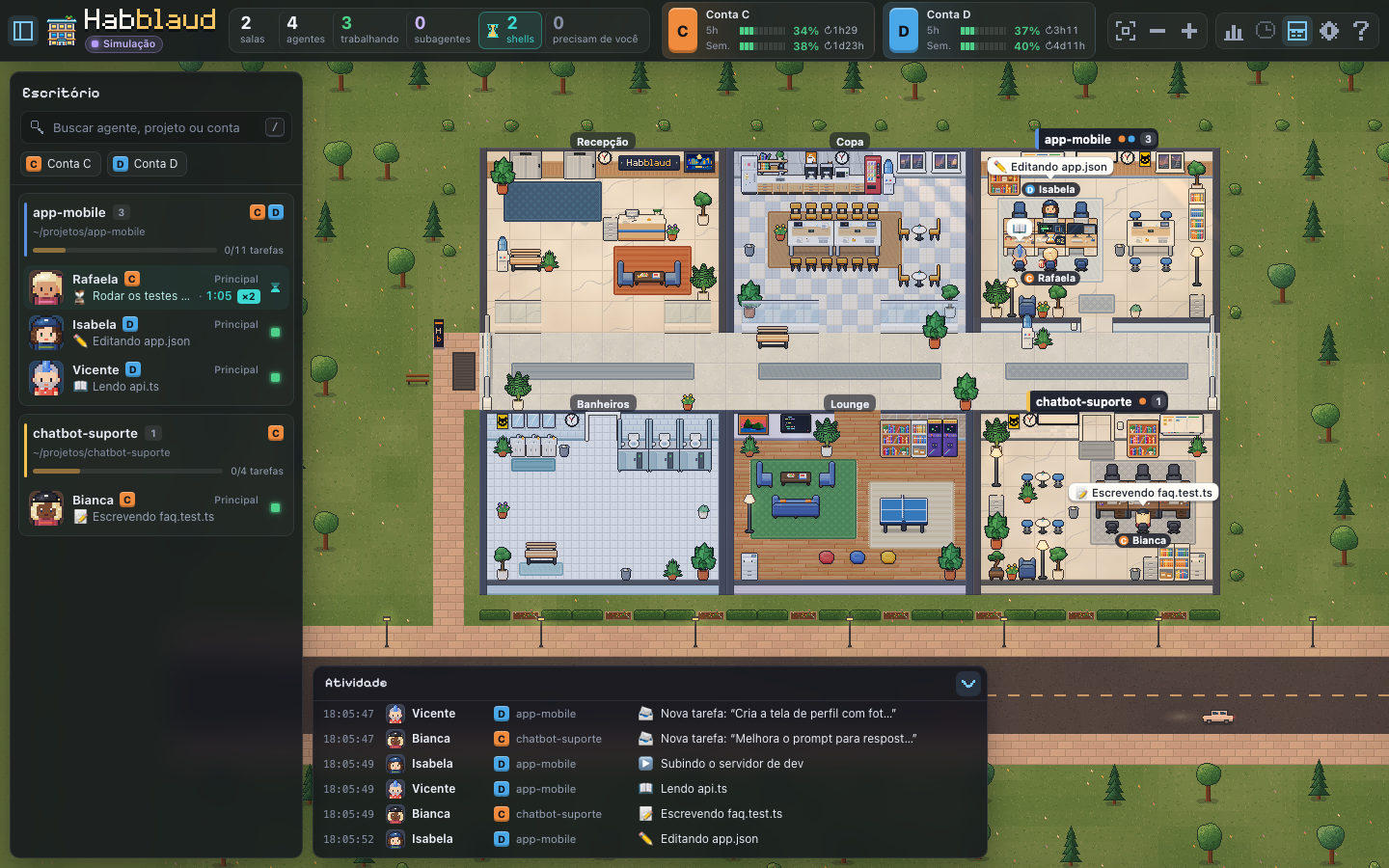
- package/dist/client/bundle/format-CvlPqloO.js +1 -0
- package/dist/client/bundle/fr-PI_gjIFq.js +169 -0
- package/dist/client/bundle/main-DTHUta25.js +2 -0
- package/dist/client/bundle/pixelify-sans-cyrillic-400-normal-Ckz2YJkH.woff2 +0 -0
- package/dist/client/bundle/pixelify-sans-cyrillic-400-normal-DfOZNMlW.woff +0 -0
- package/dist/client/bundle/pixelify-sans-cyrillic-500-normal--wrb4dVK.woff2 +0 -0
- package/dist/client/bundle/pixelify-sans-cyrillic-500-normal-CR9SIKMr.woff +0 -0
- package/dist/client/bundle/pixelify-sans-cyrillic-600-normal-B3EuUOZG.woff +0 -0
- package/dist/client/bundle/pixelify-sans-cyrillic-600-normal-BhqNJYOZ.woff2 +0 -0
- package/dist/client/bundle/pixelify-sans-cyrillic-700-normal-BrZTw8tu.woff +0 -0
- package/dist/client/bundle/pixelify-sans-cyrillic-700-normal-CYtG5Rfp.woff2 +0 -0
- package/dist/client/bundle/pixelify-sans-latin-400-normal-DLrIX9QE.woff2 +0 -0
- package/dist/client/bundle/pixelify-sans-latin-400-normal-JapMNN6Z.woff +0 -0
- package/dist/client/bundle/pixelify-sans-latin-500-normal-Bq6pAlou.woff +0 -0
- package/dist/client/bundle/pixelify-sans-latin-500-normal-DC052d-m.woff2 +0 -0
- package/dist/client/bundle/pixelify-sans-latin-600-normal-BNlgYbDL.woff +0 -0
- package/dist/client/bundle/pixelify-sans-latin-600-normal-Dd_Dy7u5.woff2 +0 -0
- package/dist/client/bundle/pixelify-sans-latin-700-normal-BctWAS0u.woff +0 -0
- package/dist/client/bundle/pixelify-sans-latin-700-normal-D3Xxx3QE.woff2 +0 -0
- package/dist/client/bundle/pixelify-sans-latin-ext-400-normal-BkfTUL4s.woff +0 -0
- package/dist/client/bundle/pixelify-sans-latin-ext-400-normal-DdH6zlBQ.woff2 +0 -0
- package/dist/client/bundle/pixelify-sans-latin-ext-500-normal-BHT4w5qI.woff2 +0 -0
- package/dist/client/bundle/pixelify-sans-latin-ext-500-normal-Bkr-oq6R.woff +0 -0
- package/dist/client/bundle/pixelify-sans-latin-ext-600-normal-CDaIumwU.woff +0 -0
- package/dist/client/bundle/pixelify-sans-latin-ext-600-normal-Dha6RiOG.woff2 +0 -0
- package/dist/client/bundle/pixelify-sans-latin-ext-700-normal-BadXkHzZ.woff +0 -0
- package/dist/client/bundle/pixelify-sans-latin-ext-700-normal-ClyJstAh.woff2 +0 -0
- package/dist/client/bundle/ptypane-9pL54zR0.js +16 -0
- package/dist/client/bundle/ptypane-BrP-ENHg.css +1 -0
- package/dist/client/bundle/room-name-Bv6N672f.js +1 -0
- package/dist/client/bundle/simulator-B45JPgSp.js +7 -0
- package/dist/client/bundle/world-model-BgjMjmrp.js +1 -0
- package/dist/client/bundle/world-stream-CUfry7aL.js +1 -0
- package/dist/client/index.html +41 -0
- package/dist/client/manifest.webmanifest +17 -0
- package/dist/server/index.js +40342 -0
- package/mod/README.md +193 -0
- package/mod/habblaud/.claude-plugin/plugin.json +11 -0
- package/mod/habblaud/hooks/hooks.json +4 -0
- package/mod/habblaud/hooks/register.ts +517 -0
- package/mod/habblaud-codex/hook.mjs +274 -0
- package/mod/habblaud-mensagens/.claude-plugin/plugin.json +11 -0
- package/mod/habblaud-mensagens/hooks/hooks.json +4 -0
- package/mod/habblaud-mensagens/hooks/register.ts +384 -0
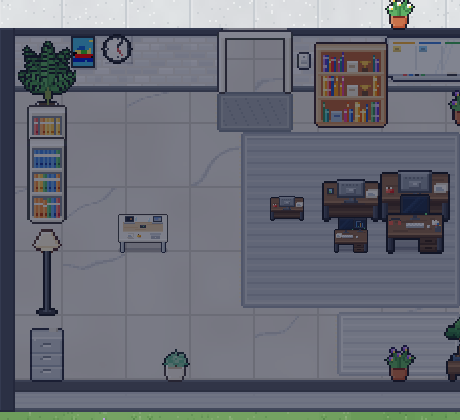
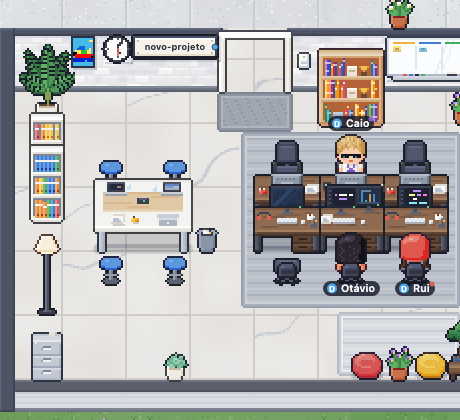
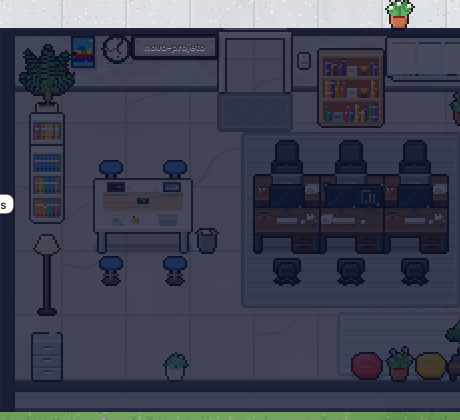
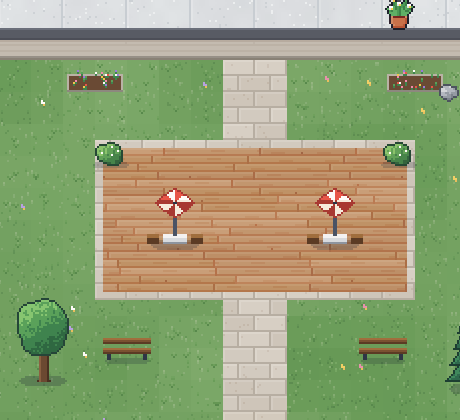
- package/mod/habblaud-permissoes/.claude-plugin/plugin.json +11 -0
- package/mod/habblaud-permissoes/hooks/hooks.json +18 -0
- package/mod/habblaud-permissoes/hooks/permission-hook.mjs +265 -0
- package/mod/habblaud-pi/core.ts +325 -0
- package/mod/habblaud-pi/extension.ts +119 -0
- package/mod/habblaud-pi/package.json +12 -0
- package/package.json +100 -4
package/README.md
CHANGED
|
@@ -1,3 +1,1624 @@
|
|
|
1
|
-
|
|
1
|
+
<p align="center">
|
|
2
|
+
<img src="https://raw.githubusercontent.com/Midnightgb/busybits-assets/main/client/public/assets/brand/logo-mark@4x.png" width="96" alt="Busybits logo: a tile of small pixel-art blocks" />
|
|
3
|
+
</p>
|
|
2
4
|
|
|
3
|
-
|
|
5
|
+
<h1 align="center">Busybits</h1>
|
|
6
|
+
|
|
7
|
+
<p align="center">
|
|
8
|
+
<b>The virtual office for your Claude Code (and Codex) agents.</b><br />
|
|
9
|
+
Each project becomes a room, and each agent becomes a pixel-art character that shows, in real time, what it's doing.
|
|
10
|
+
</p>
|
|
11
|
+
|
|
12
|
+
<p align="center"><b>English</b> · <a href="README.pt-BR.md">Português</a> · <a href="README.es.md">Español</a> · <a href="README.fr.md">Français</a></p>
|
|
13
|
+
|
|
14
|
+
<p align="center"><sub>Based on <a href="https://github.com/marmottajr/habblaud">Habblaud</a> by Márcio Junior (MIT).</sub></p>
|
|
15
|
+
|
|
16
|
+
<p align="center">
|
|
17
|
+
<img alt="Node.js 22.12+" src="https://img.shields.io/badge/node-%E2%89%A522.12-5fa04e?logo=node.js&logoColor=white" />
|
|
18
|
+
<img alt="TypeScript" src="https://img.shields.io/badge/TypeScript-7-3178c6?logo=typescript&logoColor=white" />
|
|
19
|
+
<img alt="Docker" src="https://img.shields.io/badge/Docker-ready-2496ed?logo=docker&logoColor=white" />
|
|
20
|
+
<img alt="Zero runtime dependencies" src="https://img.shields.io/badge/runtime%20dependencies-0-f08a3c" />
|
|
21
|
+
<img alt="Interface in Portuguese, English, Spanish and French" src="https://img.shields.io/badge/interface-PT%20%C2%B7%20EN%20%C2%B7%20ES%20%C2%B7%20FR-4aa8e8" />
|
|
22
|
+
</p>
|
|
23
|
+
|
|
24
|
+
<p align="center">
|
|
25
|
+
<img src="https://raw.githubusercontent.com/Midnightgb/busybits-assets/main/docs/screenshots/office.gif" width="820" alt="Animation of a Busybits room: characters typing at their desks, subagents with badges and activity bubbles" />
|
|
26
|
+
</p>
|
|
27
|
+
|
|
28
|
+
---
|
|
29
|
+
|
|
30
|
+
You open Claude Code in several projects, launch subagents, leave tasks running… and lose track of who's doing
|
|
31
|
+
what. **Busybits** turns all of that into an office you can take in at a glance: who's typing, who raised a hand
|
|
32
|
+
because they **need you**, who delivered their work and left, who went for a coffee while waiting for the next
|
|
33
|
+
instruction — and how much of each account you've already used in the 5-hour session and in the week.
|
|
34
|
+
|
|
35
|
+
And when two or more agents have nothing to do, the office gets a **social life**: each one has its own personality,
|
|
36
|
+
and they watch soccer together in the lounge, play video games and ping-pong, gossip in the kitchen, freshen up at the
|
|
37
|
+
mirror and bet coins on rock-paper-scissors. See [Social life](#social-life).
|
|
38
|
+
|
|
39
|
+
Everything runs on your machine, reading the files Claude Code itself already writes (plus only the `alias` lines in
|
|
40
|
+
your shell, to give each account its letter). Nothing leaves the computer: Busybits doesn't read credentials or make
|
|
41
|
+
external calls.
|
|
42
|
+
|
|
43
|
+
## Contents
|
|
44
|
+
|
|
45
|
+
- [What it looks like](#what-it-looks-like)
|
|
46
|
+
- [Installation](#installation)
|
|
47
|
+
- [One office for all your machines](#one-office-for-all-your-machines-optional)
|
|
48
|
+
- [How to use](#how-to-use)
|
|
49
|
+
- [Accounts and usage (5-hour and weekly)](#accounts-and-usage-5-hour-and-weekly)
|
|
50
|
+
- [Configuration](#configuration)
|
|
51
|
+
- [Habblaud World](#habblaud-world)
|
|
52
|
+
- [How it works](#how-it-works)
|
|
53
|
+
- [Privacy and security](#privacy-and-security)
|
|
54
|
+
- [Development](#development)
|
|
55
|
+
- [Troubleshooting](#troubleshooting)
|
|
56
|
+
- [Disclaimer](#disclaimer)
|
|
57
|
+
- [License](#license)
|
|
58
|
+
- [Social life](#social-life)
|
|
59
|
+
|
|
60
|
+
## What it looks like
|
|
61
|
+
|
|
62
|
+
**Overview.** The building has a lobby with elevators, a kitchen, restrooms and a lounge; each project with an open
|
|
63
|
+
session gets its own room along the hallway. At the top, the counters and each account's usage; on the left, the rooms
|
|
64
|
+
and agents; at the bottom, the activity feed.
|
|
65
|
+
|
|
66
|
+
|
|
67
|
+
|
|
68
|
+
<table>
|
|
69
|
+
<tr>
|
|
70
|
+
<td width="50%"><img src="https://raw.githubusercontent.com/Midnightgb/busybits-assets/main/docs/screenshots/agent-details.png" alt="Details drawer of an agent with tasks, subagents, timeline and stats" /></td>
|
|
71
|
+
<td width="50%"><img src="https://raw.githubusercontent.com/Midnightgb/busybits-assets/main/docs/screenshots/night.png" alt="The office at night, with streetlights on and lit rooms" /></td>
|
|
72
|
+
</tr>
|
|
73
|
+
<tr>
|
|
74
|
+
<td><b>Agent details:</b> current activity, tasks with progress, subagents, timeline and stats.</td>
|
|
75
|
+
<td><b>Day and night:</b> the sky in the windows and the lighting follow local time.</td>
|
|
76
|
+
</tr>
|
|
77
|
+
</table>
|
|
78
|
+
|
|
79
|
+
<table>
|
|
80
|
+
<tr>
|
|
81
|
+
<td width="42%"><img src="https://raw.githubusercontent.com/Midnightgb/busybits-assets/main/docs/screenshots/collab.png" alt="Subagent delivering the result to the main agent while another agent asks for permission" /></td>
|
|
82
|
+
<td width="58%">
|
|
83
|
+
<b>Collaboration in plain sight.</b> Subagents are coworkers with their own names and badges: they arrive by elevator, work in
|
|
84
|
+
the project's room and, when they finish, walk over to the agent that called them to deliver the result (📦) before leaving.<br /><br />
|
|
85
|
+
<b>Needs you.</b> When an agent is waiting for a permission or an answer in the terminal, it rushes to its desk and
|
|
86
|
+
raises a hand, with a blinking alert — and a notice pops up on screen (optionally with sound and a browser notification).
|
|
87
|
+
You can approve, answer the question or send the next instruction right there.
|
|
88
|
+
</td>
|
|
89
|
+
</tr>
|
|
90
|
+
</table>
|
|
91
|
+
|
|
92
|
+
<table>
|
|
93
|
+
<tr>
|
|
94
|
+
<td width="58%">
|
|
95
|
+
<b>Waiting on shell.</b> When the agent finishes its turn but leaves a command running (tests, build,
|
|
96
|
+
deploy…), it doesn't wander off: it stays at its desk with an hourglass flipping over its head, the terminal showing
|
|
97
|
+
progress and a bubble with the command and the elapsed time. And the wait turns into comedy: first it eats popcorn watching the
|
|
98
|
+
terminal; after 3 min it crosses its arms and spins in its chair; after 10 min it gathers cobwebs; after
|
|
99
|
+
25 min it dozes off. When the command finishes, it stands up and celebrates with confetti — or gets a rain cloud, if
|
|
100
|
+
it failed. In the sidebar list and in the details, a timer shows how long each command has been running.
|
|
101
|
+
</td>
|
|
102
|
+
<td width="42%"><img src="https://raw.githubusercontent.com/Midnightgb/busybits-assets/main/docs/screenshots/shell-wait.png" alt="Agent eating popcorn at its desk, with an hourglass over its head and the bubble 'Run the test suite · 1 min'; in the front row, a coworker has been waiting longer, with cobwebs on the chair and the terminal showing progress" /></td>
|
|
103
|
+
</tr>
|
|
104
|
+
</table>
|
|
105
|
+
|
|
106
|
+
**The lights go out.** When you close a project's last session, the last character walks to the light switch,
|
|
107
|
+
turns off the lights and leaves by elevator — and the room is taken apart, becoming a garden until a new project
|
|
108
|
+
arrives. If the garden ended up between two rooms, the farthest room moves there: it's set up in the empty spot,
|
|
109
|
+
everyone walks over to it, and the old address goes dark and is taken apart. That way the building has no gaps and
|
|
110
|
+
shrinks on its own.
|
|
111
|
+
|
|
112
|
+
| 1. The room is set up, still dark | 2. Someone turns on the lights and everyone works | 3. The last one leaves and turns off the lights | 4. The room becomes a garden |
|
|
113
|
+
| --- | --- | --- | --- |
|
|
114
|
+
|  |  |  |  |
|
|
115
|
+
|
|
116
|
+
<table>
|
|
117
|
+
<tr>
|
|
118
|
+
<td width="34%"><img src="https://raw.githubusercontent.com/Midnightgb/busybits-assets/main/docs/screenshots/mobile.png" alt="Busybits on a phone, with account usage at the top" /></td>
|
|
119
|
+
<td>
|
|
120
|
+
<b>On your phone too.</b> The interface adapts to small screens: account usage stays at the top, the room list
|
|
121
|
+
becomes a drawer and the details open from the bottom up. See how to allow access over the local network in
|
|
122
|
+
<a href="#open-on-your-phone-optional">Open on your phone</a>.
|
|
123
|
+
</td>
|
|
124
|
+
</tr>
|
|
125
|
+
</table>
|
|
126
|
+
|
|
127
|
+
> The images above use **demo mode** (made-up projects, people and accounts).
|
|
128
|
+
|
|
129
|
+
## Installation
|
|
130
|
+
|
|
131
|
+
### Install (npm)
|
|
132
|
+
|
|
133
|
+
Needs **Node.js 22.12+** and npm. No clone, no build:
|
|
134
|
+
|
|
135
|
+
```bash
|
|
136
|
+
npx busybits setup --service
|
|
137
|
+
# or, to keep the command around:
|
|
138
|
+
npm i -g busybits && busybits setup --service
|
|
139
|
+
```
|
|
140
|
+
|
|
141
|
+
`busybits setup` installs the packaged version under `~/.busybits`, installs the Claude Code mod, the Pi extension and
|
|
142
|
+
the Codex hooks (each only when that tool is present), and with `--service` an always-on user service (`busybits.service`
|
|
143
|
+
on Linux, `com.busybits.server` on macOS). Then open **http://localhost:4747**. Setup options: `--service`, `--port <n>`,
|
|
144
|
+
`--no-claude`, `--no-pi`, `--no-codex`, `--dry-run`, `--ignore-node`.
|
|
145
|
+
|
|
146
|
+
| Command | What it does |
|
|
147
|
+
| --- | --- |
|
|
148
|
+
| `busybits status` | shows the install and the service state |
|
|
149
|
+
| `busybits start` | runs the server in the foreground |
|
|
150
|
+
| `busybits update` | updates to the latest version (see [Updating](#updating)) |
|
|
151
|
+
| `busybits update --rollback` | goes back to the previous version |
|
|
152
|
+
| `busybits uninstall` | removes extensions and services (`--purge` also deletes the data) |
|
|
153
|
+
| `busybits pair` | pairs this machine as a satellite of a central Busybits |
|
|
154
|
+
|
|
155
|
+
**Where things live**
|
|
156
|
+
|
|
157
|
+
- `~/.busybits` (`BUSYBITS_HOME` changes it): the installed versions, the command shims and the marketplace.
|
|
158
|
+
- Data stays in `~/.habblaud` and the env file in `~/.config/habblaud/env`, as before; an existing clone install is taken
|
|
159
|
+
over in place and keeps its pairing and TLS state.
|
|
160
|
+
- The old `habblaud.service` / `com.habblaud.server` are replaced by `busybits.service` / `com.busybits.server` (setup
|
|
161
|
+
removes the legacy ones).
|
|
162
|
+
|
|
163
|
+
**Good to know**
|
|
164
|
+
|
|
165
|
+
- **Codex:** after the first takeover, re-approve the Busybits hooks in Codex `/hooks`.
|
|
166
|
+
- **Linux:** `node-pty` (terminal takeover) compiles only when build tools (a C/C++ toolchain and Python, for node-gyp) are installed;
|
|
167
|
+
without them the install still works and terminal takeover stays off.
|
|
168
|
+
- **Node and the service:** the packaged service starts through a shim that looks up Node at each start, so switching
|
|
169
|
+
Node versions is safe. A service installed **from a clone** pins the Node that ran `npm run setup`; rerun setup after
|
|
170
|
+
changing Node.
|
|
171
|
+
- **Windows:** `busybits setup`, `update` and `uninstall` refuse there and point to `scripts/windows/install-satellite.ps1`
|
|
172
|
+
(run from a clone).
|
|
173
|
+
|
|
174
|
+
### From a clone (development)
|
|
175
|
+
|
|
176
|
+
On a new machine, from a clone of the repository:
|
|
177
|
+
|
|
178
|
+
```bash
|
|
179
|
+
git clone https://github.com/marmottajr/habblaud.git
|
|
180
|
+
cd habblaud
|
|
181
|
+
npm run setup
|
|
182
|
+
```
|
|
183
|
+
|
|
184
|
+
`npm run setup` does everything below that is missing and skips what is already done, so it is safe to run again:
|
|
185
|
+
|
|
186
|
+
1. checks Node (22.12+ or 24; otherwise it tells you how to get it with [nvm](https://github.com/nvm-sh/nvm):
|
|
187
|
+
`nvm install 24 && nvm use 24`);
|
|
188
|
+
2. `npm ci` (only when `node_modules` is missing or older than `package-lock.json`) and `npm run build` (only when
|
|
189
|
+
`dist/` is missing or older than the code);
|
|
190
|
+
3. writes `~/.config/habblaud/env` (`HABBLAUD_ENV_FILE` or `XDG_CONFIG_HOME` change the place) with the port and the
|
|
191
|
+
Claude Code accounts, **leaving out** leftover folders such as `.claude.retired` or `.claude.backup-…` that would
|
|
192
|
+
otherwise show up as phantom accounts. The server reads this file by itself on start-up (what is already in the
|
|
193
|
+
environment wins); only the block between the `habblaud setup` marks is rewritten;
|
|
194
|
+
4. installs the Claude Code mod in those accounts (`npm run mod:install`), if `claude` is in the `PATH`;
|
|
195
|
+
5. installs the **habblaud-pi** extension in Gentle Shell (`~/.gentle-shell/agent`) and Pi (`~/.pi/agent`), whichever
|
|
196
|
+
exist (`npm run pi:install`; see [Gentle Shell](#gentle-shell));
|
|
197
|
+
6. with `npm run setup -- --service`, installs an always-on **user** service (no sudo): a systemd user unit on Linux
|
|
198
|
+
(`~/.config/systemd/user/busybits.service`) or a LaunchAgent on macOS (`com.busybits.server`) that runs the built
|
|
199
|
+
server with that environment. Windows has no service: use `npm start`.
|
|
200
|
+
|
|
201
|
+
```bash
|
|
202
|
+
npm run setup -- --dry-run # shows what it would do, changes nothing
|
|
203
|
+
npm run setup:status # what is ready and what is missing
|
|
204
|
+
npm run setup:uninstall # removes the service, the Pi extension and the mod (--purge also deletes the env file)
|
|
205
|
+
```
|
|
206
|
+
|
|
207
|
+
Other options: `--port <n>`, `--no-claude`, `--no-pi`, `--rebuild`, `--ignore-node`. Then run `npm start` (or let the
|
|
208
|
+
service start it) and open **http://localhost:4747**. The steps below are the manual version of the same thing.
|
|
209
|
+
|
|
210
|
+
### Requirements
|
|
211
|
+
|
|
212
|
+
- **macOS** (tested) or Linux.
|
|
213
|
+
- **[Claude Code](https://code.claude.com)** installed, with one or more accounts (2.1.287 or newer for the mod).
|
|
214
|
+
- **Node.js 22.12+** and **npm** (developed with Node 24; Docker already uses Node 24).
|
|
215
|
+
- **Docker Desktop** (or Docker Engine with Compose v2), if you're going to run it in a container.
|
|
216
|
+
|
|
217
|
+
### 1. Get the project
|
|
218
|
+
|
|
219
|
+
```bash
|
|
220
|
+
git clone https://github.com/marmottajr/habblaud.git
|
|
221
|
+
cd habblaud
|
|
222
|
+
npm install
|
|
223
|
+
```
|
|
224
|
+
|
|
225
|
+
> `npm install` only downloads build tools (Vite, TypeScript, tsx…). The Busybits server has no
|
|
226
|
+
> runtime dependencies: it only uses Node's built-in modules.
|
|
227
|
+
|
|
228
|
+
### 2. Start Busybits
|
|
229
|
+
|
|
230
|
+
**Option A — Docker (recommended for keeping it always on)**
|
|
231
|
+
|
|
232
|
+
```bash
|
|
233
|
+
npm run docker:up
|
|
234
|
+
```
|
|
235
|
+
|
|
236
|
+
The script detects your Claude Code accounts, mounts only the folders it needs (read-only), builds
|
|
237
|
+
the image and starts the container — which restarts on its own along with Docker. Open **http://localhost:4747**.
|
|
238
|
+
|
|
239
|
+
**Option B — Node, without Docker**
|
|
240
|
+
|
|
241
|
+
```bash
|
|
242
|
+
npm run build
|
|
243
|
+
npm start
|
|
244
|
+
```
|
|
245
|
+
|
|
246
|
+
Open **http://localhost:4747**. For development, use `npm run dev` (server + Vite with hot reload).
|
|
247
|
+
|
|
248
|
+
Now open Claude Code in any project and watch your agent arrive by elevator. 🎉
|
|
249
|
+
|
|
250
|
+
### 3. Install the Busybits mod in Claude Code (recommended)
|
|
251
|
+
|
|
252
|
+
```bash
|
|
253
|
+
npm run mod:install # o mod e os plugins de permissões e de mensagens, em cada conta
|
|
254
|
+
npm run mod:install -- --sem-permissoes # sem responder permissões e perguntas pelo escritório
|
|
255
|
+
npm run mod:install -- --sem-mensagens # sem mandar mensagens aos agentes pelo escritório
|
|
256
|
+
```
|
|
257
|
+
|
|
258
|
+
Busybits ships a [mod](https://code.claude.com/docs/en/plugins/mods/overview) (a plugin that runs inside
|
|
259
|
+
Claude Code) and installs it in each account, through `claude plugin` itself, from this folder. With it:
|
|
260
|
+
|
|
261
|
+
- each account's **5-hour and weekly usage** shows up live in Busybits;
|
|
262
|
+
- the terminal shows a line when **another session needs you** (permission or answer);
|
|
263
|
+
- the **`/busybits`** command becomes available in Claude Code, and the mod's texts follow your language (English, Spanish, Portuguese or French, from `HABBLAUD_LANG`, `LC_ALL`, `LC_MESSAGES`, `LANG` or `LANGUAGE`; English by default). If you installed it before it was renamed (`habblaud`), run `npm run mod:install` once: it swaps the old plugin for `busybits`;
|
|
264
|
+
- you can **approve or deny permission requests from the office** ("Do you want to…") and **answer the agent's
|
|
265
|
+
questions**, with the `busybits-permissions` plugin (see [Answering from the office](#answering-from-the-office));
|
|
266
|
+
- you can **send messages** to the agent from the office, as if you were typing in its terminal, with the
|
|
267
|
+
`busybits-messages` plugin (see [Sending messages](#sending-messages)).
|
|
268
|
+
|
|
269
|
+
It requires **Claude Code 2.1.287 or newer** (`claude --version`). The mod runs inside each session, with your
|
|
270
|
+
permissions, and only accesses what is listed in [`mod/README.md`](mod/README.md); to check without running anything,
|
|
271
|
+
`claude plugin validate mod/habblaud` shows the events it handles and the calls it makes. Sessions that are already open
|
|
272
|
+
load the mod with `/reload-plugins` (or when reopened). If the account had the old setup (below), `mod:install` removes the
|
|
273
|
+
tap and the hook from `settings.json` (with a backup), because the mod does the same thing. Check with `npm run mod:status`; to
|
|
274
|
+
undo: `npm run mod:uninstall`.
|
|
275
|
+
|
|
276
|
+
> The mod is loaded from this folder. If you move the folder, run `npm run mod:install` again.
|
|
277
|
+
|
|
278
|
+
<details>
|
|
279
|
+
<summary><b>Claude Code older than 2.1.287: the old way</b></summary>
|
|
280
|
+
|
|
281
|
+
Without mods, live usage and answering from the office come from two installers that edit each account's
|
|
282
|
+
`settings.json` (with a backup first):
|
|
283
|
+
|
|
284
|
+
```bash
|
|
285
|
+
npm run usage:install # põe um "tap" na frente do statusline de cada conta, que captura o uso de 5h/semanal
|
|
286
|
+
npm run hooks:install # acrescenta o hook PermissionRequest, para responder permissões pelo escritório
|
|
287
|
+
```
|
|
288
|
+
|
|
289
|
+
Your statusline keeps looking the same. To undo: `npm run usage:uninstall` and `npm run hooks:uninstall`.
|
|
290
|
+
Both point to this folder: if you move the folder, run them again (until then, the accounts' statusline shows an error).
|
|
291
|
+
When you update Claude Code, switch to the mod: `npm run mod:install` removes the old tap and hook (with a backup) so
|
|
292
|
+
you don't end up with two of them capturing usage or answering the same request.
|
|
293
|
+
|
|
294
|
+
</details>
|
|
295
|
+
|
|
296
|
+
### 4. Codex in the office (optional)
|
|
297
|
+
|
|
298
|
+
If you also use OpenAI's **Codex** (the `codex` CLI or the app), its sessions join the same office: each
|
|
299
|
+
project is a room — the same room as Claude Code, when both are open in the same project — and each session is a
|
|
300
|
+
character with the **CODEX** tag. Busybits finds the Codex folder on its own (`~/.codex`, `CODEX_HOME` or `~/.codex*`) and
|
|
301
|
+
reads the conversations, without installing anything. To see Codex **live** (what it's doing right now, who needs you) and
|
|
302
|
+
approve commands from the office, install the hooks:
|
|
303
|
+
|
|
304
|
+
```bash
|
|
305
|
+
npm run codex:install # acrescenta os hooks do Busybits em ~/.codex/hooks.json (backup antes; os outros ficam)
|
|
306
|
+
npm run codex:status # confere
|
|
307
|
+
```
|
|
308
|
+
|
|
309
|
+
Then **open Codex and approve the Busybits hooks in `/hooks`**: Codex only runs a new hook after you
|
|
310
|
+
approve it (Busybits never writes that approval). With Busybits in Docker, to send messages to Codex sessions,
|
|
311
|
+
also keep `npm run codex:bridge` running on the Mac (see [Codex](#codex)).
|
|
312
|
+
|
|
313
|
+
### Open on your phone (optional)
|
|
314
|
+
|
|
315
|
+
By default Busybits only accepts connections from the computer it runs on. To open it on your phone (on the same Wi-Fi), with Docker:
|
|
316
|
+
|
|
317
|
+
```bash
|
|
318
|
+
printf 'HABBLAUD_BIND=0.0.0.0\n' > .env
|
|
319
|
+
npm run docker:up -- --no-build
|
|
320
|
+
```
|
|
321
|
+
|
|
322
|
+
Then open `http://<ip-do-computador>:4747` on your phone (on macOS: `ipconfig getifaddr en0`; if it comes back empty,
|
|
323
|
+
`ipconfig getifaddr en1`). In Node mode, use `HABBLAUD_HOST=0.0.0.0 npm start`.
|
|
324
|
+
|
|
325
|
+
> ⚠️ With this, any device on the network can see the agents' activity (commands, files, session titles). Use it
|
|
326
|
+
> only on trusted networks. The [terminal](#terminal) (and with it, answering and sending messages from the office) stays
|
|
327
|
+
> off while the port is exposed. To go back: delete `.env` and run `npm run docker:up -- --no-build`.
|
|
328
|
+
|
|
329
|
+
#### Phone with login and HTTPS (approving requests)
|
|
330
|
+
|
|
331
|
+
Instead of exposing the main port, open a **second port with a username, a password and HTTPS**. Port 4747 stays on the
|
|
332
|
+
computer only (hooks, plugins and your browser keep working without a login); the remote port goes to the network and
|
|
333
|
+
every request on it requires a login. What separates the two is the port the connection arrived on, never the Host
|
|
334
|
+
header. Nothing of this exists until you run the setup: without it, no extra port is published.
|
|
335
|
+
|
|
336
|
+
```bash
|
|
337
|
+
npm run remote:setup # usuário, senha, nome do endereço e (opcional) um endereço próprio
|
|
338
|
+
systemctl --user restart busybits # Node install (macOS: launchctl kickstart -k gui/$UID/com.busybits.server)
|
|
339
|
+
npm run docker:up # Docker install
|
|
340
|
+
```
|
|
341
|
+
|
|
342
|
+
`remote:setup` writes the username (`HABBLAUD_REMOTE_USER`) and only the password **hash** (scrypt,
|
|
343
|
+
`HABBLAUD_REMOTE_PASSWORD_HASH`) to the file your install reads: the user env file (`~/.config/habblaud/env`) on a Node
|
|
344
|
+
install, which must then **restart its service** (the command above; the script prints it), or the repo `.env` on a
|
|
345
|
+
Docker install — plain-text passwords (`HABBLAUD_REMOTE_PASSWORD`) are intentionally rejected
|
|
346
|
+
by the server (see [Remote environment variables](server/README.md#remote-access-from-the-phone-habblaud_remote_)).
|
|
347
|
+
It also creates a local CA and the server certificate in `~/.habblaud/remote-tls`, and leaves a service announcing
|
|
348
|
+
`<nome>.local` (`HABBLAUD_REMOTE_NAME`, default `busybits`) on the network (mDNS; LaunchAgent on macOS, systemd on Linux).
|
|
349
|
+
Open `https://<nome>.local` on your phone (with `:4748` if port 443 was taken). The first time,
|
|
350
|
+
accept the warning, tap **Install the Busybits certificate** and trust it (iPhone: Settings › Profile Downloaded ›
|
|
351
|
+
Install, then Settings › General › About › Certificate Trust Settings; Android: Security › Encryption & credentials ›
|
|
352
|
+
Install a certificate › CA certificate), checking the fingerprint the setup showed.
|
|
353
|
+
|
|
354
|
+
- **Restricted CA:** it only signs `localhost`, `.local` names, your own address and private-network IPs. Even if its
|
|
355
|
+
key leaked, a certificate for any other site would be rejected by the phone that trusts it. Changing your own
|
|
356
|
+
address creates a new CA (install the certificate on the phone again). The CA key never goes into the container.
|
|
357
|
+
- **Own address** (e.g. `meuclaude.home`): goes into the certificate, but the phone only finds it with an entry in the
|
|
358
|
+
router's DNS pointing to the computer's IP. `<nome>.local` works without configuring anything.
|
|
359
|
+
- **What the phone can do:** by default, approve and deny permission requests. `HABBLAUD_REMOTE_ALLOW` in `.env`
|
|
360
|
+
accepts `permissions`, `messages`, `terminal` and `spawn`, separated by commas, or `none` (view only). The
|
|
361
|
+
interactive terminal never works from the phone.
|
|
362
|
+
- **Deliveries** (phone, with `terminal` allowed): the box button in the top bar lists what each agent finished, with
|
|
363
|
+
a summary and attachments (screenshots, PDFs, files it sent) that open with a tap.
|
|
364
|
+
- **New agent** (the **+** button): starts a Claude Code session in the background on the computer (`claude --bg`, in
|
|
365
|
+
the chosen folder), which shows up in the office and receives messages and permission requests through Busybits. In
|
|
366
|
+
a folder Claude Code doesn't trust yet, it opens the Claude app's new-session screen filled in, and you press Enter
|
|
367
|
+
there. **It comes turned off:** it needs `HABBLAUD_PTY=1` (the same opt-in as the
|
|
368
|
+
[interactive terminal](#interactive-terminal-take-over-new-session-and-end); in Docker, put it in `.env` and keep
|
|
369
|
+
`npm run codex:bridge` running on the computer) and, from the phone, `spawn` in `HABBLAUD_REMOTE_ALLOW` too.
|
|
370
|
+
- **New agent in herdr:** the dialog offers the providers installed on the computer (Claude Code, Gentle Shell and
|
|
371
|
+
Codex) and where to open the session: in the background (Claude Code only, as above), in a new herdr tab in a
|
|
372
|
+
workspace you pick, or in a split to the right or below an existing herdr pane. A split always creates a new pane and
|
|
373
|
+
never touches the one you picked; the folder chosen in the dialog wins over that pane's. It needs herdr running on
|
|
374
|
+
the computer, Habblaud outside Docker, and herdr's `default` session; otherwise those options show up disabled with a
|
|
375
|
+
hint. **Take over here** on a session opened there focuses its herdr pane. Whether herdr brings these sessions back
|
|
376
|
+
after a restart is **not verified yet** for any of the three providers (see
|
|
377
|
+
[`docs/herdr-resume-verification.md`](docs/herdr-resume-verification.md)). For Gentle Shell, herdr only records the
|
|
378
|
+
session through its pi integration: `herdr integration install pi` is how to enable resume, still unverified.
|
|
379
|
+
With herdr open and nothing chosen before, the dialog preselects a new herdr tab, also for Claude Code, so new
|
|
380
|
+
sessions live where herdr can bring them back; the last provider and destination you used are remembered.
|
|
381
|
+
- **Dictation** (in New agent and in the message box): needs `whisper-cli` and `ffmpeg` (`brew install whisper-cpp
|
|
382
|
+
ffmpeg`) and a multilingual model in `~/.local/share/whisper/` (`ggml-small.bin` gets more right than
|
|
383
|
+
`ggml-base.bin`; the `.en` ones only understand English). Without them, the Dictate button doesn't show up. The
|
|
384
|
+
voice never leaves the computer. `HABBLAUD_WHISPER_BIN`, `HABBLAUD_FFMPEG_BIN`, `HABBLAUD_WHISPER_MODEL` and
|
|
385
|
+
`HABBLAUD_DICTATION_LANGS` (default `pt,en`) adjust it.
|
|
386
|
+
- **Away from home (Tailscale):** with Tailscale on the computer and on the phone, `tailscale serve --bg --https=443
|
|
387
|
+
https+insecure://127.0.0.1:443` publishes the remote port (with login) only to your devices, with a valid
|
|
388
|
+
certificate at `https://<computador>.<tailnet>.ts.net`; add that name to `HABBLAUD_ALLOWED_HOSTS`. Always point it at
|
|
389
|
+
the remote port, never at 4747 (which has no login).
|
|
390
|
+
- **Session:** 30 days; changing the password (running the setup again) ends all of them, and **Settings › Phone
|
|
391
|
+
access › Sign out** ends the one on that device. After 5 wrong passwords in a row, each new attempt waits from 1 s up to 5 min.
|
|
392
|
+
- **IP changed?** `docker:up` re-issues the server certificate when the new IP is missing or when it's 30 days from
|
|
393
|
+
expiring, with the same CA (the phone keeps trusting it); the server swaps the certificate without restarting.
|
|
394
|
+
- **Turn off:** `npm run remote:setup -- --off` and `npm run docker:up`.
|
|
395
|
+
|
|
396
|
+
Without HTTPS the remote port doesn't start; `HABBLAUD_REMOTE_INSECURE_HTTP=1` forces plain HTTP (password and cookie
|
|
397
|
+
in the clear on the network). In Node mode: `HABBLAUD_REMOTE_PORT` and `HABBLAUD_REMOTE_HOST` (default
|
|
398
|
+
`0.0.0.0:4748`) and `HABBLAUD_REMOTE_TLS_DIR` (default `~/.habblaud/remote-tls/server`). In Docker: `HABBLAUD_REMOTE_BIND`
|
|
399
|
+
(default `0.0.0.0` from setup, or `127.0.0.1`) and `HABBLAUD_REMOTE_HTTP_PORT` (optional port 80 redirect).
|
|
400
|
+
|
|
401
|
+
### One office for all your machines (optional)
|
|
402
|
+
|
|
403
|
+
Run Busybits on several computers (say a Mac, a Windows PC and WSL) and see every agent in **one** office. One machine
|
|
404
|
+
is the **central** (the office you open); the others are **satellites** that send their agents to it. Both modes are off
|
|
405
|
+
by default and are not available in Docker. If you use a single machine, nothing changes: with both modes off Busybits
|
|
406
|
+
behaves, writes and listens exactly as before.
|
|
407
|
+
|
|
408
|
+
**Requirements:** [Tailscale](https://tailscale.com) on every machine, and Node 24 on the satellites.
|
|
409
|
+
|
|
410
|
+
**1. Turn the central on.** Add `HABBLAUD_SATELLITES=1` to `~/.config/habblaud/env` and restart Busybits. It starts a
|
|
411
|
+
second listener on the machine's **Tailscale address only**, port `4749` (`HABBLAUD_CENTRAL_PORT`), with its own CA in
|
|
412
|
+
`~/.habblaud/central-tls`. Without a Tailscale address it does not listen (and says so in the log).
|
|
413
|
+
|
|
414
|
+
**2. Pair each satellite.** On the central, open **Settings › Machines › Generate pairing code**. The pairing text
|
|
415
|
+
(`busybits-pair:1:...`) is shown **once**, is valid for 10 minutes, and works for one machine. Then, on the satellite,
|
|
416
|
+
paste it through stdin (it stays out of `ps` and of your shell history):
|
|
417
|
+
|
|
418
|
+
```bash
|
|
419
|
+
echo "busybits-pair:1:https://…" | npm run satellite:pair -- --label Mac --codex-wait
|
|
420
|
+
```
|
|
421
|
+
|
|
422
|
+
Run `npm run satellite:pair` with nothing piped to get a masked prompt instead. `--pairing <text>` also works, but the
|
|
423
|
+
text is then visible in the process list: use it only in CI. The command checks the central's CA fingerprint **before**
|
|
424
|
+
sending the code, saves the token and the CA to `~/.habblaud/satellite/link.json` (owner only) and prints the two
|
|
425
|
+
variables to set: `HABBLAUD_CENTRAL_URL` (satellite mode) and `HABBLAUD_MACHINE_LABEL` (the name shown in the office).
|
|
426
|
+
Put them in the env file and **restart the satellite's Busybits**. With `--codex-wait`, the Codex hooks wait 120 s for
|
|
427
|
+
your answer (instead of 25 s), because the answer now travels through the central; changing this wait asks you to
|
|
428
|
+
approve the hooks again in `/hooks`.
|
|
429
|
+
|
|
430
|
+
**Windows.** In PowerShell, in the checkout, with Node 24:
|
|
431
|
+
|
|
432
|
+
```powershell
|
|
433
|
+
"busybits-pair:1:https://…" | .\scripts\windows\install-satellite.ps1 -Label Windows
|
|
434
|
+
```
|
|
435
|
+
|
|
436
|
+
The script installs and builds, pairs (piping, or the masked prompt when nothing is piped; `-Pairing` is for CI only),
|
|
437
|
+
writes the env file and registers a Task Scheduler task at logon (no admin rights). The task runs a wrapper that
|
|
438
|
+
restarts the satellite after a crash (5 s, backing off to 60 s) and logs each restart to
|
|
439
|
+
`%USERPROFILE%\.habblaud\satellite-restarts.log`. Start it with `Start-ScheduledTask -TaskName 'Busybits satellite'`.
|
|
440
|
+
`-DryRun` prints every step and changes nothing; `scripts\windows\uninstall-satellite.ps1` removes the task.
|
|
441
|
+
|
|
442
|
+
**WSL.** Pair as above, then add `HABBLAUD_CENTRAL_URL=<printed url>` and `HABBLAUD_MACHINE_LABEL=WSL` to
|
|
443
|
+
`~/.config/habblaud/env` (the file `busybits.service` already reads) and run `systemctl --user restart busybits.service`.
|
|
444
|
+
|
|
445
|
+
**What works on a remote machine:** live agents in their rooms, messages (with images), permission requests,
|
|
446
|
+
agent detail, terminal and transcript view, session history, deliveries, day stats, the timelapse and usage meters.
|
|
447
|
+
**Taking over a terminal and ending a session** also work (phase 2): the satellite needs `HABBLAUD_PTY=1`; without it
|
|
448
|
+
the central shows the reason. The terminal window displays the machine's label; a temporary link drop appears inline
|
|
449
|
+
in yellow and recovery in green. **Not yet:** starting a **New agent** on a remote machine (phase 3).
|
|
450
|
+
|
|
451
|
+
**Limits and behaviour**
|
|
452
|
+
|
|
453
|
+
- A machine shows as **offline** after 30 s without news, and is **hidden** after 10 min. Its agents leave the list while
|
|
454
|
+
it is offline.
|
|
455
|
+
- A message to an offline machine fails (at once when the central already shows it offline, otherwise after up to
|
|
456
|
+
60 s) and **keeps the text you typed**. Images are capped at 32 MB per message; a message with large images travels
|
|
457
|
+
to the machine on its own, so it never delays or drops other actions.
|
|
458
|
+
- At most 4 buffered reads (detail, history, stats, deliveries) run per machine at a time. The merged lists
|
|
459
|
+
(deliveries, history, stats) can be **partial** for a moment when a machine is slow; the page says so.
|
|
460
|
+
- The timelapse records remote agents only while the central is up. Remote agents count in the day stats as each
|
|
461
|
+
satellite reports them.
|
|
462
|
+
- At most 4 remote terminals run per machine at a time.
|
|
463
|
+
- Error messages that come from a satellite arrive in that satellite's language.
|
|
464
|
+
|
|
465
|
+
**Security**
|
|
466
|
+
|
|
467
|
+
- The central listens only on its Tailscale address, over TLS with its own CA (never the phone's CA). The satellite
|
|
468
|
+
**pins** that CA at pairing and talks only to it.
|
|
469
|
+
- Tokens are stored **hashed** on the central and can be revoked: **Settings › Machines › Revoke** takes effect
|
|
470
|
+
immediately and the machine disappears from the office. Re-pair to bring it back.
|
|
471
|
+
- Generating codes and revoking are local-only: they never work through the phone's remote port.
|
|
472
|
+
- Pairing attempts share **one** lockout across the whole tailnet (5 wrong codes, then a wait of up to 300 s), so
|
|
473
|
+
anyone on your tailnet can delay a pairing. They cannot pair without a valid code.
|
|
474
|
+
- The central never trusts what a satellite says about content types: it relays only JSON, and serves files sandboxed.
|
|
475
|
+
|
|
476
|
+
### Updating
|
|
477
|
+
|
|
478
|
+
The version in use shows up in the top bar, next to "Connected", and in **Settings › About**. On a packaged install,
|
|
479
|
+
Busybits checks npm every 6 hours by default (clone and Docker installs: off; `HABBLAUD_UPDATE_CHECK=1` or `0` overrides
|
|
480
|
+
it). When there is a new version, the green **New version** badge appears in place of the number. **About** has the link
|
|
481
|
+
to what changed (also in [`CHANGELOG.md`](CHANGELOG.md)), the **Check now** button and, on a packaged install, **Update
|
|
482
|
+
now**, which runs `busybits update` outside the service. From a terminal:
|
|
483
|
+
|
|
484
|
+
```bash
|
|
485
|
+
busybits update # to the latest version
|
|
486
|
+
busybits update --check # only shows the current and the latest version
|
|
487
|
+
busybits update --to 1.2.0 # to a specific version
|
|
488
|
+
busybits update --global # also refreshes the global busybits command
|
|
489
|
+
busybits update --rollback # back to the previous version
|
|
490
|
+
```
|
|
491
|
+
|
|
492
|
+
- It refuses to start while another update runs (lock file `~/.busybits/update.lock`; if none is really running, delete it).
|
|
493
|
+
- If the new version fails its setup or does not answer `/api/health` within 30 s, it rolls back to the previous one (the `/api/health` check and its rollback only happen when a background service is installed; a setup failure always rolls back).
|
|
494
|
+
- Interrupting it with Ctrl-C during the health wait usually leaves the **new** version active: run
|
|
495
|
+
`busybits update --rollback` to go back.
|
|
496
|
+
- Windows: `busybits update` is not available; see the Install section.
|
|
497
|
+
|
|
498
|
+
**From a clone** (or Docker):
|
|
499
|
+
|
|
500
|
+
```bash
|
|
501
|
+
git pull
|
|
502
|
+
npm install
|
|
503
|
+
npm run docker:up # ou: npm run build && npm start (e depois npm run mod:install)
|
|
504
|
+
```
|
|
505
|
+
|
|
506
|
+
> If `git pull` stops with "Your local changes to the following files would be overwritten by merge:
|
|
507
|
+
> package-lock.json", run `git checkout -- package-lock.json` and try again: up to 0.4.0, `npm install` changed that
|
|
508
|
+
> file.
|
|
509
|
+
|
|
510
|
+
`docker:up` also updates the mod in the accounts where it's already installed (it never installs it on its own) and tells you:
|
|
511
|
+
"Mod updated to 0.3.0 on Account D; open sessions: /reload-plugins". In Node mode, run `npm run mod:install`
|
|
512
|
+
after updating. To have Busybits check npm for new versions, use `HABBLAUD_UPDATE_CHECK=1` (in `.env`, for Docker).
|
|
513
|
+
|
|
514
|
+
#### Coming from CodeTown
|
|
515
|
+
|
|
516
|
+
Busybits was called **CodeTown** up to 0.3.2. After `git pull`, run once:
|
|
517
|
+
|
|
518
|
+
```bash
|
|
519
|
+
npm install
|
|
520
|
+
npm run mod:install # troca o marketplace e os plugins codetown pelos habblaud, em cada conta
|
|
521
|
+
npm run docker:up # tira o container codetown e copia os dados do volume antigo para o novo
|
|
522
|
+
```
|
|
523
|
+
|
|
524
|
+
- **Mod:** until you run `mod:install`, the accounts' Claude Code complains about the `codetown` marketplace (the
|
|
525
|
+
`mod/codetown*` folders were renamed). `docker:up` warns you, but doesn't switch it on its own.
|
|
526
|
+
- **Docker:** the old volume (`codetown_codetown-data`) is left untouched. After checking that the characters' names
|
|
527
|
+
came over, delete it with `docker volume rm codetown_codetown-data`, and the old image with `docker image rm codetown:local`.
|
|
528
|
+
- **Local folder:** `~/.codetown` becomes `~/.habblaud` on its own (in the server, in `docker:up` and in `mod:install`).
|
|
529
|
+
- **Browser:** preferences and coins move to the new keys the first time the page opens.
|
|
530
|
+
- **Variables:** the `CODETOWN_*` ones no longer work; rename them to `HABBLAUD_*` in `.env` (e.g. `HABBLAUD_BIND`). The
|
|
531
|
+
server and `docker:up` warn you when they find an old one.
|
|
532
|
+
- **Repository:** it's now `github.com/marmottajr/habblaud` (GitHub redirects the old address). To fix your
|
|
533
|
+
clone: `git remote set-url origin https://github.com/marmottajr/habblaud.git`. The local folder can keep its
|
|
534
|
+
old name.
|
|
535
|
+
- `settings.json` backups made before the switch keep the name `settings.json.codetown-backup-<data>`.
|
|
536
|
+
|
|
537
|
+
### Uninstalling
|
|
538
|
+
|
|
539
|
+
```bash
|
|
540
|
+
busybits uninstall --dry-run # shows what would be removed
|
|
541
|
+
busybits uninstall # removes the service, the Pi extension, the Codex hooks and the mod
|
|
542
|
+
busybits uninstall --purge # also deletes the Busybits data
|
|
543
|
+
npm rm -g busybits # only if you installed it globally
|
|
544
|
+
```
|
|
545
|
+
|
|
546
|
+
**From a clone** (or Docker):
|
|
547
|
+
|
|
548
|
+
```bash
|
|
549
|
+
npm run mod:uninstall # tira o mod, os plugins de permissões e de mensagens e o marketplace
|
|
550
|
+
npm run codex:uninstall # tira os hooks do Busybits do Codex (os outros ficam)
|
|
551
|
+
npm run docker:down # para o container
|
|
552
|
+
docker volume rm habblaud_habblaud-data # apaga os dados do container (nomes, salas, linha do tempo e estatísticas)
|
|
553
|
+
docker image rm habblaud:local # apaga a imagem
|
|
554
|
+
rm -rf ~/.habblaud # apaga os dados locais (uso capturado, nomes, salas, linha do tempo e estatísticas)
|
|
555
|
+
```
|
|
556
|
+
|
|
557
|
+
Then just delete the project folder — run `mod:uninstall` **first**, or the accounts' Claude Code will start
|
|
558
|
+
complaining about the missing marketplace. If you used the old way, also run `npm run usage:uninstall` (restores the
|
|
559
|
+
original statusline) and `npm run hooks:uninstall` (removes the permission hook); without them, the accounts' statusline starts
|
|
560
|
+
showing an error (and the hook, failing silently). `mod:install`, which removes the old tap and hook, and the old installers and
|
|
561
|
+
uninstallers leave `settings.json.habblaud-backup-<data>` copies in each account's folder (e.g.
|
|
562
|
+
`~/.claude/`); delete them if you no longer need them.
|
|
563
|
+
|
|
564
|
+
## How to use
|
|
565
|
+
|
|
566
|
+
### What each character is doing
|
|
567
|
+
|
|
568
|
+
| State | What you see |
|
|
569
|
+
| --- | --- |
|
|
570
|
+
| **Working** | At the desk, typing. The monitor and a bubble show the activity: 📖 reading, ✏️ editing, 💻 terminal, 🧪 tests, 🌐 searching… |
|
|
571
|
+
| **Needs you** | Rushes to the desk and raises a hand, with a blinking alert: it's waiting for a permission or an answer in the terminal. |
|
|
572
|
+
| **Waiting on shell** | Finished its turn but left a command running (tests, build, deploy…), so it stays at the desk with an hourglass flipping over its head and the terminal in progress: it eats popcorn while watching, after 3 min it crosses its arms and spins in its chair, after 10 min it gathers cobwebs and after 25 min it dozes off; when the command finishes, it stands up and celebrates with confetti (or gets a rain cloud, if it failed). After 40 s, if there are coworkers with nothing to do, it may head out to a hangout — with the hourglass over its head. |
|
|
573
|
+
| **Waiting for background agents** | Finished its turn while background agents are still running. It waits in an idle-like pose; the terminal shows each agent's type, task, elapsed time and known token count. A resumed agent becomes active again until its next completion notification. |
|
|
574
|
+
| **Idle** | Finished its turn and wanders around: coffee in the kitchen, the water cooler, the restroom, the lounge couch, the phone on the beanbag, the mirror. With idle coworkers around, it joins a hangout: TV, video games, ping-pong, a kitchen chat, rock-paper-scissors (see [Social life](#social-life)). After 10 min without moving, it dozes off — but a coworker may wake it up for a hangout. |
|
|
575
|
+
| **Subagent done** | Walks over to the agent that called it, delivers the result and leaves by elevator. |
|
|
576
|
+
| **Session ended** | Leaves; if it was the last one in the room, it turns off the lights on the way out. |
|
|
577
|
+
|
|
578
|
+
Each character has a **unique Brazilian name** (Marina, Henrique, Luan…) that stays as long as the session exists, and
|
|
579
|
+
a **colored chip with the account letter** (C, D…).
|
|
580
|
+
|
|
581
|
+
### Interface
|
|
582
|
+
|
|
583
|
+
- **Top:** counters (rooms, agents, working, subagents, shells running, need you) and a **per-account usage**
|
|
584
|
+
card. The shells counter only shows up while some command is running; click it to go to whoever is waiting.
|
|
585
|
+
Below the logo are the connection and the version in use, which turns into the **New version** badge when a new version comes out (see
|
|
586
|
+
[Updating](#updating)).
|
|
587
|
+
- **Side panel:** search, account filter and the list of rooms with their agents and subagents.
|
|
588
|
+
- **Details drawer:** click a character (in the building or in the list) to see activity, tasks, subagents,
|
|
589
|
+
timeline and stats (tools, tokens, cost, lines changed, model, branch).
|
|
590
|
+
- **Feed:** the latest activity across the whole office.
|
|
591
|
+
- **Settings (⚙):** names, bubbles, how much idle agents wander around, day/night cycle, sounds, browser notifications,
|
|
592
|
+
FPS limits (60/30/15 FPS) and pause when tab is hidden, demo mode and **About** (version in use and new version). **Help (?):** full legend and shortcuts.
|
|
593
|
+
- **Performance panel:** the gauge icon in the top bar opens real-time resource usage per machine (central and satellites: CPU, RSS/heap memory, event loop delay p99, uptime, workload counters and 10-minute sparklines) and in the browser (FPS, frame time p50/p95 as GPU proxy, long tasks, JS heap, DOM nodes and FPS cap options). Polling runs only while the panel is open and visible.
|
|
594
|
+
- **My day (📊):** where the day's time went (see [My day](#my-day)). **Timelapse** and **Session history** (the clocks
|
|
595
|
+
in the top bar): see [Day timelapse](#day-timelapse) and [Terminal](#terminal).
|
|
596
|
+
|
|
597
|
+
**Camera:** drag to move, scroll to zoom, double-click a character to follow it.
|
|
598
|
+
|
|
599
|
+
**Shortcuts:** `/` search · `F` follow the selected one · `T` terminal · `L` timelapse · `M` my day · `P` next request
|
|
600
|
+
(permission or question) · `O` or `0` overview · `Esc` clear selection · `[` side panel · `]` feed · arrows/`WASD` move ·
|
|
601
|
+
`+` `-` zoom · `?` help.
|
|
602
|
+
|
|
603
|
+
### Office themes
|
|
604
|
+
|
|
605
|
+
In **Settings → Appearance → Office theme**, choose:
|
|
606
|
+
|
|
607
|
+
- **Automatic** (default): follows the calendar, in local time. Halloween from October 1 to 31, Christmas from
|
|
608
|
+
November 1 to December 26 and, the rest of the year, the original look.
|
|
609
|
+
- **None**: always the original look.
|
|
610
|
+
- **Christmas**: wreaths, warm lights, trees with presents, Christmas rugs, snow on the windows and Santa hats on the characters.
|
|
611
|
+
- **Halloween**: pumpkins, decorative ghosts, cobwebs, bats, purple lights, themed rugs and costume accessories.
|
|
612
|
+
|
|
613
|
+
The switch is immediate and the choice is saved in this browser. The themes keep the agents' paths,
|
|
614
|
+
activities and animations. The day/night cycle is still a separate option.
|
|
615
|
+
|
|
616
|
+
<table>
|
|
617
|
+
<tr>
|
|
618
|
+
<td width="50%"><img src="https://raw.githubusercontent.com/Midnightgb/busybits-assets/main/docs/screenshots/seasonal-christmas.png" alt="Office with the Christmas theme: trees with presents in the corners of the rooms, wreaths and lights on the walls, red rugs and characters in Santa hats" /></td>
|
|
619
|
+
<td width="50%"><img src="https://raw.githubusercontent.com/Midnightgb/busybits-assets/main/docs/screenshots/seasonal-halloween.png" alt="Office with the Halloween theme: pumpkins and ghosts in place of the plants, cobwebs and bats on the walls, purple rugs and characters in costume" /></td>
|
|
620
|
+
</tr>
|
|
621
|
+
</table>
|
|
622
|
+
|
|
623
|
+
### Languages
|
|
624
|
+
|
|
625
|
+
The interface is in **Portuguese, English, Spanish and French**. It follows the browser's language; in
|
|
626
|
+
**Settings › Language** you can pin one (the choice is saved in this browser). The texts the server builds
|
|
627
|
+
(activities, notices, terminal, logs and the install scripts) follow `HABBLAUD_LANG` and, without it, the
|
|
628
|
+
system language, and in English when neither names a supported language. For another language set `HABBLAUD_LANG`
|
|
629
|
+
(`pt-BR`, `en`, `es` or `fr`; in Docker, in `.env`), for example `HABBLAUD_LANG=es`. Any text without a translation shows
|
|
630
|
+
up in Portuguese.
|
|
631
|
+
|
|
632
|
+
### Day, night and sounds
|
|
633
|
+
|
|
634
|
+
The office follows **local time**: late at night and in the evening the lawn and the street turn bluish and dark, the streetlights,
|
|
635
|
+
the lamps, the machines and the monitors that are on cast halos of light, the rooms with people in them are lit (the lights that
|
|
636
|
+
go out when a room empties still apply), the cars drive by with their headlights on and fireflies show up in the garden. At
|
|
637
|
+
dawn (~5–7 a.m.) and at dusk (~5–7 p.m.) everything takes on a warm tone, and during the day the sun comes in through the windows and
|
|
638
|
+
draws strips of light on the floor — short at noon, long and orange in the late afternoon. In **Settings › Day/night
|
|
639
|
+
cycle** you can choose automatic, always day or always night; to test a time, use `?hora=21:30` in the URL.
|
|
640
|
+
|
|
641
|
+
**Sounds** come turned off. Turned on in **Settings › Sounds**, they're synthesized in the browser itself (no audio
|
|
642
|
+
files) and quiet: the typing of whoever is working in the rooms in view, the elevator "ding" when someone arrives or
|
|
643
|
+
leaves, the bell when someone needs you, the click of a finished task and the ping-pong and arcade sounds of the hangouts.
|
|
644
|
+
There's a master volume and each category can be turned on and off separately. With the tab hidden, only the bell rings.
|
|
645
|
+
|
|
646
|
+
### Terminal
|
|
647
|
+
|
|
648
|
+
Click an agent and use **Open terminal** to see the session's conversation the way Claude Code shows it: the prompts, the
|
|
649
|
+
replies, each tool call (with the command or the diff) and the result, updated live. It works for main
|
|
650
|
+
agents and subagents; in demo mode, the conversation is made up.
|
|
651
|
+
|
|
652
|
+
At the bottom, for main agents, you can **type**: `Enter` sends and `Shift+Enter` adds a new line. The text goes
|
|
653
|
+
into the session as if you had typed it in its terminal (see [Sending messages](#sending-messages)); if the agent
|
|
654
|
+
is busy, it goes in when the agent finishes what it's doing. Subagents and sessions from the history stay read-only.
|
|
655
|
+
|
|
656
|
+
- **Search:** with the terminal focused, `Ctrl+F` (`⌘F` on Mac) or the magnifier in the header opens search in the conversation,
|
|
657
|
+
ignoring case and accents. The counter shows the position ("3/17"); `Enter` and `Shift+Enter` go to the next
|
|
658
|
+
and the previous one, expanding the collapsed blocks ("… +N lines") where the term is. Search keeps working while
|
|
659
|
+
new messages arrive. `Esc` closes the search; the next one closes the terminal.
|
|
660
|
+
- **Filter:** **All**, **Prompts only** (your prompts and the agent's final replies, without the intermediate steps)
|
|
661
|
+
or **No tools**.
|
|
662
|
+
- **Copy:** hover over (or focus) a prompt, a reply, a command or a result to copy it.
|
|
663
|
+
- **Session history:** the clock in the top bar lists the sessions from the last 7 days across all accounts (up to 150), grouped
|
|
664
|
+
by day, with search by title, project or account. An ended session opens in the terminal with the project, title and date in the
|
|
665
|
+
header and "Session ended at …" at the bottom; a session that's still open opens the agent's live terminal.
|
|
666
|
+
|
|
667
|
+
Since the terminal (and the history) shows the whole conversation, it only exists when Busybits is reachable **only from the
|
|
668
|
+
computer it runs on** (the default), and it only opens through `http://localhost` or `http://127.0.0.1`. With the port open to the network
|
|
669
|
+
(`HABBLAUD_BIND=0.0.0.0` or `HABBLAUD_HOST=0.0.0.0`), it stays off. Details in
|
|
670
|
+
[Privacy and security](#privacy-and-security).
|
|
671
|
+
|
|
672
|
+
### Interactive terminal (take over, new session and end)
|
|
673
|
+
|
|
674
|
+
With `HABBLAUD_PTY=1` and running with `npm start` (outside Docker), each main agent's terminal window is
|
|
675
|
+
interactive: the drawer's **Open terminal** button, the shortcut next to each agent in the side list or the `T` key
|
|
676
|
+
open the same window, with tabs for the other agents in the same project.
|
|
677
|
+
|
|
678
|
+
- Session opened here: it's the real Claude Code (type, answer; Esc interrupts the agent, as in the terminal).
|
|
679
|
+
- Session opened in another terminal: **Take over here** (at the top of the window) ends the session there and continues the **same
|
|
680
|
+
conversation** here (`claude --resume <sessão>`, in the same folder and account). The character keeps its name. On Windows, the
|
|
681
|
+
terminal the session came from goes back to normal (Busybits turns off the mouse/keyboard modes that Claude turned on).
|
|
682
|
+
- **End** closes the session, whether it's here or in another terminal (the conversation is saved).
|
|
683
|
+
- **New session** (in the room's drawer) opens a new Claude Code in the project folder.
|
|
684
|
+
|
|
685
|
+
Taking over and ending ask for a second click; closing the window doesn't end the session. The window (and the agent's
|
|
686
|
+
drawer) can be dragged by its bar and resized from the corner; double-clicking the bar puts it back in place.
|
|
687
|
+
**It comes turned off:** turn it on with `HABBLAUD_PTY=1` (first read the warning in [Privacy and security](#privacy-and-security)).
|
|
688
|
+
It uses `node-pty`, `@xterm/headless` (optional dependencies) and the `claude` on your PATH (`HABBLAUD_CLAUDE_BIN` for
|
|
689
|
+
another one); it only accepts requests from the computer it runs on. On startup, Busybits opens a test terminal: if `node-pty` or
|
|
690
|
+
`claude` don't work, the feature stays off and the log says why. **Restarting Busybits ends the sessions
|
|
691
|
+
it opened.**
|
|
692
|
+
The live terminal is still available in the session history, for subagents and when the interactive one is off.
|
|
693
|
+
|
|
694
|
+
### Day timelapse
|
|
695
|
+
|
|
696
|
+
The **Timelapse** button (a clock with a back arrow, or the `L` key) replays the day at high speed: rooms
|
|
697
|
+
lighting up and going dark, agents arriving, working, waiting on you, heading to the hangouts, subagents coming and going.
|
|
698
|
+
The playback bar has the day, play/pause, the speed (60×, 180× or 600×: a 10-hour day in 10, 3⅓ or 1 min),
|
|
699
|
+
the draggable timeline with the chart of who was present and working, the peak markers (click to
|
|
700
|
+
jump there) and **Back to live**. Meanwhile, the office takes on a light sepia tone, with the **REPLAY 14:32** badge, and the
|
|
701
|
+
feed keeps showing what's happening now.
|
|
702
|
+
|
|
703
|
+
The server records the timeline **from the moment it's turned on** (the past can't be rebuilt):
|
|
704
|
+
summaries of what the office shows, without conversations, in `~/.habblaud/timeline/` (in Docker, in the data volume), with
|
|
705
|
+
a size limit per day and the last **7 days** kept. To not record: `HABBLAUD_TIMELINE=0`. Details in
|
|
706
|
+
[`server/README.md`](server/README.md#timeline-timelapse).
|
|
707
|
+
|
|
708
|
+
The characters walk faster in the replay, but at high speeds anyone who stays only briefly in the office barely
|
|
709
|
+
reaches their desk; jumping to another point shows everyone already in place.
|
|
710
|
+
### Answering from the office
|
|
711
|
+
|
|
712
|
+
With the permissions plugin installed (`npm run mod:install`, which installs it along with the mod; on Claude Code older
|
|
713
|
+
than 2.1.287, `npm run hooks:install`), when an agent asks for permission — to run a command, edit a file, open
|
|
714
|
+
a page — the request shows up in the office: the character raises a hand, a notice with **Reply**
|
|
715
|
+
pops up on screen and, in the agent's details, the **Asks for permission** card shows the command (or the edit's diff) with the
|
|
716
|
+
buttons:
|
|
717
|
+
|
|
718
|
+
- **Approve** — and, when Claude Code suggests it, **Approve and don't ask again** (the same rule the terminal
|
|
719
|
+
would offer, for example `Bash(npm test:*)` in this project);
|
|
720
|
+
- **Deny** — with an optional reason, which goes to the agent, and the option to interrupt it;
|
|
721
|
+
- **Answer in terminal** — Busybits sets the request aside.
|
|
722
|
+
|
|
723
|
+
The dialog keeps showing in the terminal at the same time, and whichever answer comes first wins: if you answered in the
|
|
724
|
+
terminal, the request disappears from the office on its own. The **need you** counter (and the `P` key) takes you to each request.
|
|
725
|
+
|
|
726
|
+
**The agent's questions** (`AskUserQuestion`) work too: the questions card shows each question with its
|
|
727
|
+
options and descriptions, as the terminal would. Pick an option (or several, when the question allows it) or write
|
|
728
|
+
your own in **Other**, and use **Reply**; **Deny…** tells the agent you don't want to answer, and **Answer in
|
|
729
|
+
terminal** leaves the question there. The answer reaches the agent as if you had chosen it in the terminal.
|
|
730
|
+
|
|
731
|
+
- The request goes through a Claude Code `PermissionRequest` hook (the plugin's, or the old way's), which only diverts it
|
|
732
|
+
when there's **some Busybits page open** on this computer; with Busybits stopped or no page open, it
|
|
733
|
+
exits right away and the terminal carries on as usual.
|
|
734
|
+
- With no answer from the office within 5 minutes (up to 24 h with `HABBLAUD_PERMISSION_TIMEOUT=86400` in the `env`
|
|
735
|
+
of `settings.json`), the request goes back to being answerable only in the terminal (the plugin's options are in
|
|
736
|
+
[`mod/README.md`](mod/README.md); in the old way, `npm run hooks:install -- --timeout 120` changes the time and
|
|
737
|
+
`--port`, the port). For **background subagents**, Claude Code only shows the dialog in the terminal after the
|
|
738
|
+
hook finishes: answer from the office or use **Answer in terminal**. With a wait longer than 5 minutes, if no
|
|
739
|
+
page that can answer stays open for 5 minutes (and no [phone with login](#phone-with-login-and-https-approving-requests)
|
|
740
|
+
is set up to answer), the request goes back to the terminal.
|
|
741
|
+
- It works under the same safeguard as the terminal: only with Busybits reachable only from the computer it runs on
|
|
742
|
+
and opened through `http://localhost`. Check with `npm run mod:status` (or `npm run hooks:status`, in the old
|
|
743
|
+
way). It also works from the [phone with login](#phone-with-login-and-https-approving-requests) (its default).
|
|
744
|
+
- In demo mode, the made-up agents also ask for permission and ask questions (pretend ones), so you can
|
|
745
|
+
try it out.
|
|
746
|
+
|
|
747
|
+
### Sending messages
|
|
748
|
+
|
|
749
|
+
With the messages plugin installed (`npm run mod:install`, which installs it along with the mod; it requires Claude Code
|
|
750
|
+
2.1.287 or newer), each main agent's details get the **Send message** section, and the bottom of the
|
|
751
|
+
[terminal](#terminal) becomes a text box. Write and press `Enter` (`Shift+Enter` adds a new line): the text
|
|
752
|
+
goes into the session **as if you had typed it in its terminal**. You can reply when the agent finishes its turn
|
|
753
|
+
and waits for the next request, give a new instruction or correct its course, without hunting for the right window.
|
|
754
|
+
|
|
755
|
+
- The box shows the status: **queued** (the session fetches messages every 2 seconds), **delivered** or **not
|
|
756
|
+
delivered**, with the reason. With the agent busy, the message waits and goes in when it finishes its turn, like a
|
|
757
|
+
prompt typed while the agent is working.
|
|
758
|
+
- The plugin runs inside each session and only talks to Busybits at `127.0.0.1`. Without it (or in a session opened before
|
|
759
|
+
the install: use `/reload-plugins`), an install hint shows up in place of the box. Subagents don't receive
|
|
760
|
+
messages.
|
|
761
|
+
- It works under the same safeguard as the terminal (local access only) and can be turned off with `HABBLAUD_MENSAGENS=0`.
|
|
762
|
+
Read the warning in [Privacy and security](#privacy-and-security).
|
|
763
|
+
From the [phone with login](#phone-with-login-and-https-approving-requests), only with `messages` in `HABBLAUD_REMOTE_ALLOW`.
|
|
764
|
+
- **Slash commands:** a message that starts with `/command arguments` runs that command in the session, as if you had
|
|
765
|
+
typed it (`/compact focus on the tests`, `/review`). Typing `/` at the start of the box opens an explorer with every
|
|
766
|
+
command and skill from the session, grouped by source (yours, plugins, MCP and Claude Code) with real-time filtering,
|
|
767
|
+
keyboard navigation (arrows, PageUp/PageDown, Home/End) and completion with `Enter` or `Tab` (`Esc` closes). A
|
|
768
|
+
message that starts with `/` but isn't a command of that session (`/etc/hosts`, a typo) is not delivered and says
|
|
769
|
+
why. Commands that open an interactive menu in the terminal (`/model` without an argument, `/config`) have nothing
|
|
770
|
+
to show here: give them arguments or use the terminal. Codex agents have no command list.
|
|
771
|
+
- **Images:** `Ctrl+V` pastes a screenshot into the box, and the attach button opens the file picker (gallery or camera
|
|
772
|
+
on a phone). Each image shows as a thumbnail with a `×` to remove it. Up to 8 images of up to 15 MB each (PNG, JPEG,
|
|
773
|
+
GIF and WebP, checked by their content, not by the name), and images alone are enough: the text can be empty. If an
|
|
774
|
+
upload fails, the thumbnail shows a retry and sending stays blocked until you fix or remove it. An uploaded image
|
|
775
|
+
expires after 30 minutes: the send then fails with a message, the text stays in the box, and only the expired images
|
|
776
|
+
ask to be attached again (the others stay ready). Removing a thumbnail also frees the image on the server. When the
|
|
777
|
+
clipboard has text too (Excel, Word, Keynote), `Ctrl+V` pastes only the text. Slash commands cannot
|
|
778
|
+
carry images. The agent receives your text plus the list of the saved paths; the files live in
|
|
779
|
+
`~/.habblaud/attachments/` (folders 700, files 600). From the
|
|
780
|
+
[phone with login](#phone-with-login-and-https-approving-requests), only with `messages` in `HABBLAUD_REMOTE_ALLOW`.
|
|
781
|
+
**Not available in Docker** (the container cannot write to the host, so the paths would not exist for the agents) nor
|
|
782
|
+
in the mock mode: the controls are hidden. Whether the agent can read the image depends on the provider: Claude Code
|
|
783
|
+
and Gentle Shell read the image from the path (the reading was checked with each CLI reading a test image from a path;
|
|
784
|
+
the run through the office box is still pending); Codex receives the paths, but whether it reads them has not been
|
|
785
|
+
verified. Any provider that cannot open the image still receives the path.
|
|
786
|
+
- In demo mode, the made-up agents also receive messages (pretend ones).
|
|
787
|
+
|
|
788
|
+
### Editing the character
|
|
789
|
+
|
|
790
|
+
Each session arrives with a random name and look. To pin a project's character, open the main
|
|
791
|
+
agent's details and click the pencil next to the name (**Edit character**). In the editor:
|
|
792
|
+
|
|
793
|
+
- **Name:** up to 24 characters. It can't repeat the name of someone who's in the office or the one chosen for another
|
|
794
|
+
project.
|
|
795
|
+
- **Randomize:** brings up another look.
|
|
796
|
+
- **Pieces:** skin, hair, beard, eyes, top, bottom, shoes and accessory, with a preview next to them.
|
|
797
|
+
- **Save:** applies to the project (the room). The next session opened in it arrives as this character. With two sessions
|
|
798
|
+
at the same time in the same room, the second one gets a random character.
|
|
799
|
+
- **Back to random:** undoes the choice.
|
|
800
|
+
- **Default character style:** in **Settings › Characters › Default style**, configure fixed appearance parts (skin, hair, clothes...) for new agents, or apply them to all agents without hand-customized styles.
|
|
801
|
+
|
|
802
|
+
The choice is stored in `~/.habblaud/names.json` and goes away after 60 days without the project being used. The editor has the same safeguard as the
|
|
803
|
+
terminal: the pencil only shows up with the terminal on (without `HABBLAUD_TERMINAL=0`) and local access, that
|
|
804
|
+
is, with Busybits reachable only from the computer it runs on and opened through `http://localhost`.
|
|
805
|
+
|
|
806
|
+
### Custom rooms and favorites
|
|
807
|
+
|
|
808
|
+
Every live main agent has a star when message access is enabled. With no custom rooms, clicking it creates **Favorites** and moves the agent there; with one room it moves directly, and with several it opens a room menu (including **New room…**). Clicking a filled star moves the agent back. Right-click a custom room on the map or in the sidebar to rename or delete it; deleting returns its agents to their project rooms.
|
|
809
|
+
|
|
810
|
+
Custom rooms are visual map seats only: agents keep their project room (`roomId`), grouping, deliverables, history, stats and room counts. Subagents remain in their original project room even when their parent is in a favorite room. The setup is stored in `~/.habblaud/favorites.json` with atomic writes. Creating, renaming, deleting and favoriting use the same permission as sending messages: local message access, or `HABBLAUD_REMOTE_ALLOW=messages` on the remote port.
|
|
811
|
+
|
|
812
|
+
### Codex
|
|
813
|
+
|
|
814
|
+
Codex sessions (CLI or app) show up like Claude Code's: character, project room, activity, tasks,
|
|
815
|
+
subagents, terminal and history, 5-hour and weekly usage and **My day** (tokens only: Codex doesn't report cost). The
|
|
816
|
+
Codex account chip is hollow and carries the **CODEX** tag.
|
|
817
|
+
|
|
818
|
+
- **Without installing anything**, Busybits reads the files Codex itself writes (the conversations in `~/.codex/sessions` and the
|
|
819
|
+
locks of the open sessions in `~/.codex/thread-writer-locks`). The catch is that Codex writes each step **after** it
|
|
820
|
+
finishes and never writes "waiting on you": without the hooks, the office shows Codex with a delay and doesn't tell you when it
|
|
821
|
+
needs you.
|
|
822
|
+
- **With the hooks** (`npm run codex:install` and approving them in `/hooks`), Codex notifies Busybits at every step: the session
|
|
823
|
+
shows up right away, the activity is the current one and an approval request makes the character raise a hand.
|
|
824
|
+
- **Approving from the office:** with some Busybits page open, Codex's approval request waits for your
|
|
825
|
+
answer in the **Asks for permission** card for up to **25 seconds** (`npm run codex:install -- --espera <s>`, from 5 to 120):
|
|
826
|
+
**Approve** or **Deny** (with the reason). Unlike Claude Code, Codex only shows the approval in the terminal
|
|
827
|
+
**after** the office answers or the time runs out — in the meantime the terminal shows "Waiting for an answer in
|
|
828
|
+
Busybits…". There's no "always allow" or "interrupt", and Codex doesn't let you answer its questions from outside.
|
|
829
|
+
- **Sending messages:** the **Send message** box works for Codex too, through `codex queue`: the message joins
|
|
830
|
+
the session's queue and Codex picks it up when it finishes what it's doing (up to about 10 seconds later). In Node mode
|
|
831
|
+
Busybits runs the command itself; **in Docker**, keep `npm run codex:bridge` running on the Mac (the container can't
|
|
832
|
+
see your Codex).
|
|
833
|
+
- **Images:** the message box sends images to Codex too, but Codex only receives the saved paths (see [Sending messages](#sending-messages)); whether it reads them is not verified.
|
|
834
|
+
- **5-hour and weekly usage:** comes from Codex's own files and only refreshes while some session is running; the card
|
|
835
|
+
shows how old the numbers are and "no quota" when the workspace has run out of credits.
|
|
836
|
+
- **When the session comes in:** with the first message (that's when Codex records the project folder); a CLI that's open
|
|
837
|
+
and still has no conversation doesn't show up.
|
|
838
|
+
- **When the session leaves the office:** the Codex CLI runs sessions on a background server, which keeps them
|
|
839
|
+
loaded for up to a minute after they go idle with no one watching; that's why the character may take a
|
|
840
|
+
little while to leave after you close the terminal.
|
|
841
|
+
- ChatGPT cloud conversations (with no file on the computer) don't show up. `HABBLAUD_CODEX=0` turns Codex off.
|
|
842
|
+
|
|
843
|
+
### Gentle Shell
|
|
844
|
+
|
|
845
|
+
Sessions of Gentle Shell (the `gentle-shell` CLI, built on Pi) show up like
|
|
846
|
+
the others: character, project room, activity (tool calls), tasks (`todo`), model, tokens and cost, and the
|
|
847
|
+
read-only terminal. Busybits reads `~/.gentle-shell/agent` (or `HABBLAUD_GENTLE_SHELL_DIRS`) without installing anything and
|
|
848
|
+
never writes there (`auth.json` and the settings are never opened). Messages and the "needs you" notice need the
|
|
849
|
+
`habblaud-pi` extension (below), which is the only thing that touches that folder (one entry in `settings.json`).
|
|
850
|
+
|
|
851
|
+
- **Open sessions:** a session is open while it keeps renewing its heartbeat in `gentle-agents/presence/` (about every
|
|
852
|
+
5 s); when it stops, the character leaves. Versions without that folder fall back to "transcript modified in the last
|
|
853
|
+
30 min". A Gentle Shell process from a version that doesn't write presence files doesn't show up.
|
|
854
|
+
- **Subagents:** each `subagent_run` appears as a subagent of its session while its task (`gentle-agents/tasks/`) is
|
|
855
|
+
running, with the activity of its own transcript, and delivers when it finishes.
|
|
856
|
+
- **Not supported yet:** answering permissions from the office, the session history and the plan usage. In
|
|
857
|
+
Docker (`docker:up`) the folder is not mounted automatically: Gentle Shell works in Node mode.
|
|
858
|
+
- `HABBLAUD_GENTLE_SHELL=0` turns Gentle Shell off.
|
|
859
|
+
|
|
860
|
+
### Agent Hub
|
|
861
|
+
|
|
862
|
+
Jobs launched through Agent Hub appear as read-only agents for `agy`, `opencode`, `copilot` and `codex`. Running jobs
|
|
863
|
+
show as working, queued jobs as waiting, succeeded jobs as done, and failed or cancelled jobs as failed; unknown
|
|
864
|
+
statuses appear as idle. Finished jobs leave after the normal office grace period. All Agent Hub jobs sit in a single
|
|
865
|
+
shared "Agent Hub" room that exists while jobs are active. Each job derives its project from `repo.root` (mapping git
|
|
866
|
+
worktrees to their main repository) or scratch copies, shown as a secondary label in the sidebar and drawer ("projeto: ...").
|
|
867
|
+
Accounts are grouped by CLI ("Agent Hub · agy", "Agent Hub · copilot", "Agent Hub · opencode", "Agent Hub · codex"),
|
|
868
|
+
with the model shown on the agent. Agent Hub does not record the caller's Claude session. The drawer shows the tail of
|
|
869
|
+
`stdout.log` while a job runs and `response.txt` after it finishes. Busybits never starts, cancels or edits Agent Hub jobs.
|
|
870
|
+
|
|
871
|
+
The read-only mirror is `${XDG_DATA_HOME:-~/.local/share}/agent-hub/runs/<jobId>/`: `result.json` contains the job
|
|
872
|
+
metadata, `prompt.txt` the task, `stdout.log` live output, and `response.txt` the final answer. Busybits reads at most
|
|
873
|
+
the latest 64 KB of the output log and checks only recently updated job directories (up to 200), keeping completed
|
|
874
|
+
jobs from the last 30 minutes. See [server data sources](server/README.md#data-sources-read-only) for the fields and
|
|
875
|
+
status mapping. `HABBLAUD_AGENT_HUB=off` disables the source; the default `auto` enables it only when the data
|
|
876
|
+
directory exists, and `on` forces it on.
|
|
877
|
+
|
|
878
|
+
#### Messages and "needs you": the `habblaud-pi` extension
|
|
879
|
+
|
|
880
|
+
```bash
|
|
881
|
+
npm run pi:install # or npm run setup; npm run pi:status / npm run pi:uninstall
|
|
882
|
+
```
|
|
883
|
+
|
|
884
|
+
It adds the `mod/habblaud-pi` folder to `packages` in the `settings.json` of `~/.gentle-shell/agent` (and of
|
|
885
|
+
`~/.pi/agent` if it exists), which is what `pi install <local folder>` does; nothing else in the file changes, a backup
|
|
886
|
+
(`settings.json.habblaud-backup-<date>`) is written first, and running it again changes nothing. `auth.json` and
|
|
887
|
+
`mcp*.json` are never touched. Open the Gentle Shell session again (or `/reload` in Pi) to load it.
|
|
888
|
+
|
|
889
|
+
- **Messages from the office:** the message box of a Gentle Shell agent works as it does for Claude Code: what you type is
|
|
890
|
+
delivered to the session as if you had typed it (`pi.sendUserMessage`; in the middle of a turn it waits for the turn to
|
|
891
|
+
end), and the "To send messages from here: npm run mod:install" hint goes away once the extension is connected.
|
|
892
|
+
`/command args` runs commands of extensions, prompt templates and skills of the session (and feeds the `/`
|
|
893
|
+
autocomplete); other texts starting with `/` fail with the reason, because Pi's built-in commands only run in the
|
|
894
|
+
terminal.
|
|
895
|
+
- **Images:** Gentle Shell reads the images attached in the message box from the saved paths (see [Sending messages](#sending-messages)). Text such as `/etc/hosts …` is treated as a command by the extension, so its delivery fails.
|
|
896
|
+
- **"Needs you":** when Pi opens a question box while the agent is working, such as gentle-pi's *"Allow guarded git
|
|
897
|
+
push? Yes/No"*, the agent shows as waiting in the office with the command (and the notice in the feed). It disappears
|
|
898
|
+
as soon as the box closes. **The answer is still given in the terminal**: gentle-pi asks with `ctx.ui.confirm` and
|
|
899
|
+
Pi gives extensions no way to answer another extension's dialog (only the `ui_prompt_start`/`ui_prompt_end`
|
|
900
|
+
notifications), so there are no Approve/Deny buttons for Gentle Shell and the guard keeps working exactly as before.
|
|
901
|
+
- Local only, like the other plugins: it talks to `127.0.0.1:<HABBLAUD_PORT or 4747>` and respects the same locks
|
|
902
|
+
(`HABBLAUD_MENSAGENS=0` turns messages off). `HABBLAUD_PI=0` turns the extension off for a session.
|
|
903
|
+
|
|
904
|
+
### GitHub in the office
|
|
905
|
+
|
|
906
|
+
What the agents do on GitHub livens up the project's room, with no token and no internet access: Busybits reads the
|
|
907
|
+
calls in the transcripts (`gh pr create`, `gh pr merge`, `git push`, `gh run watch`, `gh pr checks`, `gh run view`,
|
|
908
|
+
`gh release create` and the GitHub MCP tools) and their results.
|
|
909
|
+
|
|
910
|
+
| Event | What happens |
|
|
911
|
+
| --- | --- |
|
|
912
|
+
| 🎉 **PR opened or merged, release published** | Confetti falls in the room, everyone celebrates by hopping and a banner says why ("PR #12 merged!") for ~12 s. |
|
|
913
|
+
| 🚨 **Red CI** | A rotating beacon flashing in the corners of the room, a reddish floor and a "!" bubble over whoever saw the failure, until a green CI in the room (which turns into a party) or for 10 min. |
|
|
914
|
+
| 🚀 **Push** | Just the notice and the feed. |
|
|
915
|
+
|
|
916
|
+
<table>
|
|
917
|
+
<tr>
|
|
918
|
+
<td width="50%"><img src="https://raw.githubusercontent.com/Midnightgb/busybits-assets/main/docs/screenshots/github-party.png" alt="The app-mobile room partying: confetti falling, the golden banner 'PR #12 merged!' and Jéssica standing with her arms up and a star over her head" /></td>
|
|
919
|
+
<td width="50%"><img src="https://raw.githubusercontent.com/Midnightgb/busybits-assets/main/docs/screenshots/github-alarm.png" alt="The data-pipeline room on alert: reddish floor, red banner 'CI failed (feat/checkout)', rotating beacons in the top corners and a red '!' bubble next to Ícaro" /></td>
|
|
920
|
+
</tr>
|
|
921
|
+
</table>
|
|
922
|
+
|
|
923
|
+
Each event also creates a notice ("🎉 Danilo opened PR #12 in habblaud", "🚨 CI failed in habblaud (feat/x)") and goes
|
|
924
|
+
into the feed. Only what happens live livens up the room: whatever was already in the transcripts when Busybits opened only goes to the
|
|
925
|
+
history. With "reduce motion" turned on in the system, nothing flashes or spins. In demo mode, made-up PRs, merges and CI runs
|
|
926
|
+
show up from time to time.
|
|
927
|
+
### My day
|
|
928
|
+
|
|
929
|
+
The **My day** button (or the `M` key) shows where the day went: how much time the agents spent working and,
|
|
930
|
+
highlighted, how much time they spent **waiting on you** (permission, question or choice) — with the longest wait, who
|
|
931
|
+
waited, where and when. Next to it, sessions, subagents, requests, tokens and cost (when Claude Code records the cost in the
|
|
932
|
+
transcript), and charts by hour, by project (from the one that waited on you the most to the one that waited the least) and by account, plus
|
|
933
|
+
the ranking of the longest waits. Pick the day in the selector (Busybits keeps the last 30); when it's showing today,
|
|
934
|
+
the panel refreshes every 30 s. Each chart has a table version, and the legend turns each status on and off.
|
|
935
|
+
|
|
936
|
+
The time is **agent time**: two agents working for an hour count as two hours. Busybits only counts what
|
|
937
|
+
happens while it's running, and the day follows your browser's time zone. With demo mode on, the panel
|
|
938
|
+
shows made-up numbers (with the "demo" badge) and lets you switch to the real data; the demo agents never
|
|
939
|
+
go into the real stats.
|
|
940
|
+
|
|
941
|
+
### Demo mode
|
|
942
|
+
|
|
943
|
+
Want to see the office full without having any sessions open?
|
|
944
|
+
|
|
945
|
+
- Add **`?mock=1`** to the URL (e.g. http://localhost:4747/?mock=1) to simulate everything in the browser, without your
|
|
946
|
+
real sessions. Parameters: `&speed=3` speeds up time and `&sessions=6` changes the number of simulated sessions.
|
|
947
|
+
- Or turn it on from the interface — **View demo** (when the office is empty) or **Settings › Demo
|
|
948
|
+
mode** — which puts made-up agents alongside the real ones. With `npm run demo` (or `HABBLAUD_DEMO=1` in the
|
|
949
|
+
Docker `.env`), this mode starts already on.
|
|
950
|
+
|
|
951
|
+
## Accounts and usage (5-hour and weekly)
|
|
952
|
+
|
|
953
|
+
> **Codex** accounts come in on their own (each `~/.codex*` folder or `CODEX_HOME` is an account; the letter comes from an
|
|
954
|
+
> `alias x='CODEX_HOME=… codex'`, if there is one) and their usage comes from Codex's files; see [Codex](#codex). The rest
|
|
955
|
+
> of this section is about Claude Code.
|
|
956
|
+
|
|
957
|
+
If you use more than one Claude Code account (for example, a `c` shortcut with `~/.claude` and a `d` with
|
|
958
|
+
`CLAUDE_CONFIG_DIR=~/.claude-conta2`), Busybits shows them all together: each agent carries its account's chip and the top bar
|
|
959
|
+
shows, for each account, the **percentage used** of the 5-hour session and of the week and **when each limit resets**.
|
|
960
|
+
|
|
961
|
+
**How accounts are recognized.** Each Claude Code config folder is an account: `~/.claude` and any
|
|
962
|
+
`~/.claude*` with `projects/` or `sessions/` (plus `CLAUDE_CONFIG_DIR`). Copies are not accounts: a folder whose name has
|
|
963
|
+
`.backup`, `.bak`, `.retired`, `.old` or `.orig` as a whole word, or ends in a date/time stamp (`.claude.backup-20260521-113111`),
|
|
964
|
+
is skipped; one named in `CLAUDE_CONFIG_DIR`, `HABBLAUD_CLAUDE_DIRS` or `--conta <folder>` never is. To give each one its letter, Busybits
|
|
965
|
+
reads, in your shell files (`~/.zshrc`, `~/.bashrc`…), **only** the `alias x='... claude ...'` lines:
|
|
966
|
+
|
|
967
|
+
```bash
|
|
968
|
+
alias c='claude'
|
|
969
|
+
alias d='CLAUDE_CONFIG_DIR=~/.claude-conta2 claude'
|
|
970
|
+
```
|
|
971
|
+
|
|
972
|
+
becomes **Account C** and **Account D**. Only shortcuts of up to 3 letters count; accounts without a shortcut get A, B…
|
|
973
|
+
|
|
974
|
+
**Where the numbers come from.** The recommended way is the Busybits mod (`npm run mod:install`, Claude Code 2.1.287+):
|
|
975
|
+
inside each session, it receives the plan limits from Claude Code itself and stores only the 5-hour and weekly
|
|
976
|
+
percentages (and when they reset) in `~/.habblaud/usage/<conta>.json`. The numbers arrive after each account's next
|
|
977
|
+
reply. Check with `npm run mod:status`. On earlier versions of Claude Code, the statusline tap
|
|
978
|
+
(`npm run usage:install`) does the same through the statusline command, in the same file.
|
|
979
|
+
|
|
980
|
+
<details>
|
|
981
|
+
<summary><b>Details of the tap and the /usage cache</b></summary>
|
|
982
|
+
|
|
983
|
+
- `usage:install` (the old way) changes, in `<conta>/settings.json`, **only** the `statusLine.command` field: the
|
|
984
|
+
original command (e.g. `npx -y ccstatusline`) now runs through `node "<pasta do Busybits>/scripts/statusline-tap.mjs" --
|
|
985
|
+
<comando original>` (on Windows, the original command runs in Git Bash, as Claude Code would run it). A copy of the
|
|
986
|
+
file first goes to `settings.json.habblaud-backup-<data>`. If the account had no statusline, one is created that only
|
|
987
|
+
captures usage. `npm run usage:install -- --dry-run` shows what would change without writing anything.
|
|
988
|
+
- The tap passes the same JSON on to your statusline (output and exit code are still its own) and writes **only**
|
|
989
|
+
`{accountId, configDir, fetchedAt, five_hour, seven_day}` — no prompts, costs or project paths. Any
|
|
990
|
+
failure while capturing is ignored: the statusline never breaks because of Busybits.
|
|
991
|
+
|
|
992
|
+
| Source | How it works |
|
|
993
|
+
| --- | --- |
|
|
994
|
+
| **Busybits mod** (recommended) | Live, as described above. Replaces the tap: `mod:install` removes the tap from the account. |
|
|
995
|
+
| Statusline tap (Claude Code older than 2.1.287) | Live, through the statusline command, in the same file. |
|
|
996
|
+
| `/usage` cache (always on) | Claude Code saves the last result of the `/usage` command. In Node mode, Busybits rereads it every 60 s; in Docker, the value read at the last `npm run docker:up` applies. It only changes when someone runs `/usage`. |
|
|
997
|
+
|
|
998
|
+
The sources are local files: none of them reads passwords or tokens, or makes network calls. The source with the
|
|
999
|
+
most recent numbers always wins. Numbers older than 30 minutes show up as **outdated**; a window that has already reset
|
|
1000
|
+
since the numbers were collected shows up as **—** until new numbers arrive.
|
|
1001
|
+
|
|
1002
|
+
</details>
|
|
1003
|
+
|
|
1004
|
+
## Configuration
|
|
1005
|
+
|
|
1006
|
+
Everything works without configuring anything. If you need to adjust something, use environment variables (each
|
|
1007
|
+
`HABBLAUD_X` also accepts the alias `BUSYBITS_X` in Node mode; when both are set, `HABBLAUD_X` wins):
|
|
1008
|
+
|
|
1009
|
+
| Variable | Default | What for |
|
|
1010
|
+
| --- | --- | --- |
|
|
1011
|
+
| `HABBLAUD_PORT` | `4747` | HTTP port (in Docker, the port published on the host). |
|
|
1012
|
+
| `HABBLAUD_HOST` | `127.0.0.1` | Server interface in Node mode. Anything other than `127.0.0.1`/`localhost` turns off the terminal (and answering and sending messages from the office). |
|
|
1013
|
+
| `HABBLAUD_BIND` | `127.0.0.1` | Docker only (in `.env`): where the port is published. `0.0.0.0` opens it to the local network (and turns off the terminal and anything that acts on the sessions). |
|
|
1014
|
+
| `HABBLAUD_CLAUDE_DIRS` | automatic detection | Account folders, comma-separated (e.g. `/caminho/conta1,/caminho/conta2`). |
|
|
1015
|
+
| `HABBLAUD_DATA_DIR` | `~/.habblaud` | Where Busybits keeps its own data (character and room names, the timelapse timeline and the My day stats). |
|
|
1016
|
+
| `HABBLAUD_TIMELINE` | on | `0` turns off timeline recording (the days already recorded stay in the timelapse). In Docker it's always on. |
|
|
1017
|
+
| `HABBLAUD_USAGE_DIR` | `~/.habblaud/usage` | Where the mod (or the statusline tap) writes usage. |
|
|
1018
|
+
| `HABBLAUD_DEMO` | off | `1` turns on demo mode at startup. |
|
|
1019
|
+
| `HABBLAUD_ALLOWED_HOSTS` | — | Extra names accepted in the address (e.g. `meu-mac.local`), besides `localhost` and IPs. |
|
|
1020
|
+
| `HABBLAUD_TERMINAL` | on (local access only) | `0` turns off the terminal, answering and sending messages from the office, and the character editor. With the port exposed they're already off, with no way to turn them on. |
|
|
1021
|
+
| `HABBLAUD_PTY` | off | `1` turns on the interactive terminal (open, take over and end Claude Code sessions from the office; local access only and outside Docker) and **New agent** (also in Docker, through `npm run codex:bridge`). Read the warning in [Privacy and security](#privacy-and-security). |
|
|
1022
|
+
| `HABBLAUD_CLAUDE_BIN` | `claude` from PATH | The Claude Code executable that the interactive terminal and New agent run. |
|
|
1023
|
+
| `HABBLAUD_REMOTE_ALLOW` | `permissions` | What the [phone with login](#phone-with-login-and-https-approving-requests) can do: `permissions`, `messages`, `terminal`, `spawn` (comma-separated) or `none`. The other `HABBLAUD_REMOTE_*` are written by `npm run remote:setup`. |
|
|
1024
|
+
| `HABBLAUD_MENSAGENS` | on (with the terminal) | `0` turns off only messages from the office (the box in the terminal and in the agent's details). |
|
|
1025
|
+
| `HABBLAUD_CODEX` | on | `0` turns off Codex in the office. |
|
|
1026
|
+
| `HABBLAUD_CODEX_DIRS` | automatic detection | Codex folders, comma-separated (instead of `~/.codex*` and `CODEX_HOME`). |
|
|
1027
|
+
| `HABBLAUD_CODEX_BIN` | `codex` from PATH (on Windows, `codex.exe`) | The Codex binary that delivers the messages (`codex queue`), in Node mode or in `npm run codex:bridge`. |
|
|
1028
|
+
| `HABBLAUD_GENTLE_SHELL` | on | `0` turns off Gentle Shell in the office. |
|
|
1029
|
+
| `HABBLAUD_GENTLE_SHELL_DIRS` | `~/.gentle-shell/agent` | Gentle Shell `agent/` folders, comma-separated (instead of the default). |
|
|
1030
|
+
| `HABBLAUD_AGENT_HUB` | auto | `auto` reads Agent Hub when `~/.local/share/agent-hub` (or `$XDG_DATA_HOME/agent-hub`) exists; `on` forces it on and `off` disables it. |
|
|
1031
|
+
| `HABBLAUD_UPDATE_CHECK` | packaged: on; clone/Docker: off | `1` turns on the new-version check (a request to the npm registry every 6 h), `0` turns it off. |
|
|
1032
|
+
| `HABBLAUD_LANG` | system language, otherwise `en` | Language of the texts the server builds (activities, notices, logs): `pt-BR`, `en`, `es` or `fr`. The interface follows the browser or the choice in Settings › Language. See [Languages](#languages). |
|
|
1033
|
+
| `HABBLAUD_ACCOUNTS` | — | JSON to customize name, letter or color, matched by the account folder name. E.g. `[{"id":".claude-conta2","name":"Trabalho","short":"T","color":"#5cc97b"}]`. |
|
|
1034
|
+
|
|
1035
|
+
**In Docker**, `HABBLAUD_PORT`, `HABBLAUD_BIND`, `HABBLAUD_ALLOWED_HOSTS`, `HABBLAUD_DEMO`, `HABBLAUD_TERMINAL`,
|
|
1036
|
+
`HABBLAUD_MENSAGENS`, `HABBLAUD_CODEX`, `HABBLAUD_UPDATE_CHECK`, `HABBLAUD_LANG`, `HABBLAUD_PTY`, the `HABBLAUD_WORLD*` and the
|
|
1037
|
+
`HABBLAUD_REMOTE_*` apply (in `.env` or in the environment), as do `HABBLAUD_CLAUDE_DIRS`, `HABBLAUD_CODEX_DIRS`, `HABBLAUD_USAGE_DIR` and
|
|
1038
|
+
`HABBLAUD_ACCOUNTS` (read by `docker:up` on the host); the rest are fixed inside the container. Options: `npm run docker:up -- --no-build` (starts without rebuilding),
|
|
1039
|
+
`npm run docker:down` (stops) and `npm run docker:logs` (follows the logs).
|
|
1040
|
+
|
|
1041
|
+
## Habblaud World
|
|
1042
|
+
|
|
1043
|
+
Habblaud World is an online pixel-art city where every Busybits office becomes a building, lit up live while the agents
|
|
1044
|
+
work, and everyone walks around with a character. **It's off by default in Busybits**: `HABBLAUD_WORLD=1` turns it on,
|
|
1045
|
+
pointing at `server.habblaud.com`; even then, **nothing leaves your computer until you create an account** and sign in.
|
|
1046
|
+
Access is granted through a waiting list.
|
|
1047
|
+
|
|
1048
|
+
**How to configure it.** Turn it on with `HABBLAUD_WORLD=1` (in `.env` or in the environment); the other variables
|
|
1049
|
+
below are optional: without them, Busybits points at the official server. The section shows up in the **Habblaud World** window (the city button in the top bar) and only works from this computer (never through the phone port); the
|
|
1050
|
+
account stays only here, in `~/.habblaud/world.json` (permission 600; in Docker, in the `/data` volume).
|
|
1051
|
+
|
|
1052
|
+
| Variable | Default | What for |
|
|
1053
|
+
| --- | --- | --- |
|
|
1054
|
+
| `HABBLAUD_WORLD_URL` | `https://server.habblaud.com` | World server address, `https://` or `wss://` only (no path). |
|
|
1055
|
+
| `HABBLAUD_WORLD` | off | `1` turns on the World (routes and interface). Unset or `0`, there's nothing about it and nothing leaves your computer. |
|
|
1056
|
+
| `HABBLAUD_WORLD_DEV` | off | `1` accepts a local world server without TLS: `http://127.0.0.1:<port>` (`npm run dev` already does) or, from inside Docker, `http://host.docker.internal:<port>`. |
|
|
1057
|
+
|
|
1058
|
+
**Privacy.** Nothing about your work leaves your computer. From the building, only this goes out: the theme, one floor
|
|
1059
|
+
per open room (with a random code that changes every day) and, for each agent, main or subagent, the tool, the status,
|
|
1060
|
+
the appearance, a drawn name and the band of tasks completed that day. Paths, project names, titles, commands,
|
|
1061
|
+
messages, code, cost, model, branch and your Claude account never leave. The full list, field by field (in Portuguese):
|
|
1062
|
+
[docs/world/privacidade.md](docs/world/privacidade.md). **See what was sent**, on the Your building card, shows the
|
|
1063
|
+
exact JSON of the last upload, with its size in bytes and the world's reply.
|
|
1064
|
+
|
|
1065
|
+
**Account and waitlist.** Sign up with e-mail, **player name** (3 to 20 characters, unique in the world: it stays
|
|
1066
|
+
reserved for you while you wait on the list and becomes your character's name) and password (12 characters or more;
|
|
1067
|
+
leaked passwords are refused), a 6-digit code by e-mail and accepting the Terms of Use and the Privacy Policy. Every
|
|
1068
|
+
account joins a waitlist, and access is granted in batches: an open Busybits checks on its own every 30 minutes. Up to 3
|
|
1069
|
+
computers per account (**Devices**, with revoke).
|
|
1070
|
+
|
|
1071
|
+
**Character.** The player name chosen at sign-up (it can be changed later, once every 30 days), the same appearance
|
|
1072
|
+
editor as the agents, 2 or 3 personality traits and an intro line from the list (there's no free text in the world
|
|
1073
|
+
besides the name). You can create it while still on the waitlist.
|
|
1074
|
+
|
|
1075
|
+
**Building.** With the account approved and the character created, the building goes up on its own (over a WebSocket)
|
|
1076
|
+
and follows the office live. The **Your building** card shows the connection, floors, agents, the last upload and, when
|
|
1077
|
+
the world refuses an upload or stops the building (old version, another computer, suspended or banned account), the
|
|
1078
|
+
reason; a suspended or banned account gets **Appeal by e-mail**. A building marked as "unverified" (implausible numbers,
|
|
1079
|
+
under review) stays out of leaderboards and highlights and shows **Dispute by e-mail**. When the world is under
|
|
1080
|
+
maintenance, the card says so, and Busybits tries again on its own.
|
|
1081
|
+
|
|
1082
|
+
**Visibility.** Live (floors, counters and each character's status) or **discreet mode** (only lit or dark and the
|
|
1083
|
+
number of floors); closed to visits; hide the country; the building's **tokens** only in bands (up to 100 thousand, 1
|
|
1084
|
+
million…), never the number or the cost, and they can be turned off; leaderboard and compactions only if you turn them
|
|
1085
|
+
on; knocks on the door (**Let me know when someone knocks**) only if you turn it on.
|
|
1086
|
+
|
|
1087
|
+
**City.** The **World** button in the top bar swaps the office for the city: walk with the arrows/WASD or by clicking,
|
|
1088
|
+
each building's card shows floors, agents and status, and the minimap sits in the corner; paused or out of the world,
|
|
1089
|
+
your building stays dark, but you can still walk around the city. In demo mode (`?mock=1&world=approved&scene=city`,
|
|
1090
|
+
only fictional buildings and people): [the city](https://raw.githubusercontent.com/Midnightgb/busybits-assets/main/docs/screenshots/world-cidade.png) and
|
|
1091
|
+
[a building's card](https://raw.githubusercontent.com/Midnightgb/busybits-assets/main/docs/screenshots/world-cartao.png).
|
|
1092
|
+
|
|
1093
|
+
**Visits.** Near a building's door, **Enter (E)** takes you inside: the owner's live office, with rooms under made-up
|
|
1094
|
+
names and the agents in their current status, view only (no terminal, messages or permissions, and nothing about the
|
|
1095
|
+
work); a building closed to visits can only be seen from outside. On yours, you see "N visitors now" (only the count,
|
|
1096
|
+
never who). In demo mode: [the visit](https://raw.githubusercontent.com/Midnightgb/busybits-assets/main/docs/screenshots/world-visita.png) and
|
|
1097
|
+
[the visit panel](https://raw.githubusercontent.com/Midnightgb/busybits-assets/main/docs/screenshots/world-visita-painel.png).
|
|
1098
|
+
|
|
1099
|
+
**Social.** In the city, with no free text anywhere: **L** likes the building by the door, **G** opens the greeting
|
|
1100
|
+
wheel (ready-made phrases, translated for whoever reads them) and **K** knocks on the door of owners who accept it; each
|
|
1101
|
+
person's card has Greet, Block and Report, and the minimap takes you to a building by its code ("Go to HB-XXXX") or to
|
|
1102
|
+
any lit building. Inside a building, **Like** and **Leave a stamp** at the front desk (one per building per day). In the
|
|
1103
|
+
square, the thermometer of the city's weekly goal and, when it's reached, fireworks. In the office, the "❤️ N today"
|
|
1104
|
+
chip and the "While you were away" card with the visits, likes and stamps left at the front desk (never who); people you
|
|
1105
|
+
blocked are listed in **Blocked**, with **Unblock**. In demo mode:
|
|
1106
|
+
[the greeting wheel](https://raw.githubusercontent.com/Midnightgb/busybits-assets/main/docs/screenshots/world-social.png) and
|
|
1107
|
+
[the square with the fireworks](https://raw.githubusercontent.com/Midnightgb/busybits-assets/main/docs/screenshots/world-praca.png).
|
|
1108
|
+
|
|
1109
|
+
**Pause, leave, delete.** **Pause** turns the building off right away and keeps the lot (after 30 days paused, it
|
|
1110
|
+
disappears from the map; 30 days later, it's removed). **Leave the world** removes the building and frees the lot; the
|
|
1111
|
+
account and the character stay, and coming back creates a new building. **Delete account** (in **Account and data**,
|
|
1112
|
+
with the code that arrives by e-mail) takes the building and the profile out of the world right away, deletes the
|
|
1113
|
+
account, likes, blocks, reports you made and devices from the database within 7 days (and from backups within 30) and
|
|
1114
|
+
deletes `world.json` from this computer. With no word from Busybits for 7 days, the building disappears from the map
|
|
1115
|
+
and, 30 days later, is removed; an e-mail warns 3 days before (can be turned off in **Account and data**).
|
|
1116
|
+
|
|
1117
|
+
**Export.** **Download my data** (in **Account and data**) saves `habblaud-world-dados.json` with what the world keeps
|
|
1118
|
+
about your account: e-mail, dates, character, visibility, devices, building, likes given, blocks and reports you made.
|
|
1119
|
+
Once a day.
|
|
1120
|
+
|
|
1121
|
+
**Truthful data.** The World only works if the buildings are real: changing Busybits to send invented or inflated
|
|
1122
|
+
floors, agents, statuses, tokens or characters breaks the Terms of Use and gets the account banned (the server checks
|
|
1123
|
+
the plausibility of every packet). Changing Busybits for anything else stays free (MIT). How Busybits talks to the World
|
|
1124
|
+
(in Portuguese): [shared/world/README.md](shared/world/README.md).
|
|
1125
|
+
|
|
1126
|
+
**Testing with a local world server.** For World development, with the world server running on the same computer (for
|
|
1127
|
+
example, in Docker, published on port 4848):
|
|
1128
|
+
|
|
1129
|
+
- Outside Docker: `HABBLAUD_WORLD_URL=http://127.0.0.1:4848 npm run dev`.
|
|
1130
|
+
- With Busybits in Docker: in this folder's `.env`, `HABBLAUD_WORLD_URL=http://host.docker.internal:4848` and
|
|
1131
|
+
`HABBLAUD_WORLD_DEV=1`; then `npm run docker:up`, which ends with the World line
|
|
1132
|
+
(`Habblaud World: on: http://host.docker.internal:4848`, or why it stayed off). `docker-compose.yml` already maps
|
|
1133
|
+
`host.docker.internal` to the host (`extra_hosts` with `host-gateway`; Docker Desktop already has the name). On
|
|
1134
|
+
Linux, the world server must listen on an interface the container can reach (`0.0.0.0` or the Docker bridge IP): a
|
|
1135
|
+
port published only on the host's `127.0.0.1` doesn't answer through `host-gateway`.
|
|
1136
|
+
- Without TLS, only with `HABBLAUD_WORLD_DEV=1` (or `--dev`) and only for `127.0.0.1` and `host.docker.internal`;
|
|
1137
|
+
otherwise, only `https://` or `wss://`. The world server must accept the name used in the URL as its game host
|
|
1138
|
+
(otherwise it answers `421`).
|
|
1139
|
+
|
|
1140
|
+
How the section looks, in demo mode (`?mock=1&world=logged_out`, `waiting` or `approved`; in Portuguese):
|
|
1141
|
+
[no account](https://raw.githubusercontent.com/Midnightgb/busybits-assets/main/docs/screenshots/world-sem-conta.png), [waitlist](https://raw.githubusercontent.com/Midnightgb/busybits-assets/main/docs/screenshots/world-lista-de-espera.png),
|
|
1142
|
+
[character](https://raw.githubusercontent.com/Midnightgb/busybits-assets/main/docs/screenshots/world-personagem.png), [Your building](https://raw.githubusercontent.com/Midnightgb/busybits-assets/main/docs/screenshots/world-predio.png) and
|
|
1143
|
+
[what was sent](https://raw.githubusercontent.com/Midnightgb/busybits-assets/main/docs/screenshots/world-enviado.png).
|
|
1144
|
+
|
|
1145
|
+
## How it works
|
|
1146
|
+
|
|
1147
|
+
```
|
|
1148
|
+
~/.claude*/sessions/<pid>.json ─────────────────┐
|
|
1149
|
+
~/.claude*/projects/<projeto>/<sessão>.jsonl ───┼──▶ servidor Node ──▶ modelo do escritório ──▶ SSE ──▶ navegador
|
|
1150
|
+
.../<sessão>/subagents/**/agent-*.jsonl ────────┘ (polling de 1 s) (canvas + interface)
|
|
1151
|
+
```
|
|
1152
|
+
|
|
1153
|
+
- **Who's in the office:** while a session is open, Claude Code keeps `sessions/<pid>.json` with the
|
|
1154
|
+
project and the status (busy, idle, waiting on you or waiting on a background shell). That's what decides
|
|
1155
|
+
who shows up and what each one does.
|
|
1156
|
+
- **Running shells:** in the transcripts, each background `Bash` (or long foreground command) becomes a
|
|
1157
|
+
"shell" with a label and a timer, until the notification arrives that it finished, failed or was interrupted.
|
|
1158
|
+
- **Social life:** the hangouts, the personalities and the coins are a simulation in the browser (`client/src/world/social/`),
|
|
1159
|
+
with no effect at all on the real agents. The personality comes from each agent's seed (it's the same in any
|
|
1160
|
+
browser); the wallets are kept in the browser's `localStorage`.
|
|
1161
|
+
- **What each one is doing:** the server follows the end of the transcripts (`.jsonl`) of the open sessions and turns
|
|
1162
|
+
each tool call into an activity, with an icon, in the server's language (see [Languages](#languages)). Tasks, title, model and
|
|
1163
|
+
stats come from there too.
|
|
1164
|
+
- **Subagents:** the transcripts in `<sessão>/subagents/` (including those from workflows) become characters linked to the
|
|
1165
|
+
agent that called them.
|
|
1166
|
+
- **GitHub:** PRs, pushes, CI and releases come from the same transcript lines (the command and its output, or the
|
|
1167
|
+
`gitOperation` that Claude Code itself records); nothing is queried on GitHub.
|
|
1168
|
+
- **The drawing:** the browser receives the state over SSE and draws everything on a canvas — characters, furniture, floors and walls
|
|
1169
|
+
are pixel art **generated by code**; the logo, the illustrations and the pictures on the walls, on the other hand, were generated with AI.
|
|
1170
|
+
|
|
1171
|
+
<details>
|
|
1172
|
+
<summary><b>Code structure and API</b></summary>
|
|
1173
|
+
|
|
1174
|
+
```
|
|
1175
|
+
shared/ protocolo (types.ts), atividades em PT-BR, nomes, simulador de demonstração
|
|
1176
|
+
server/ servidor HTTP + SSE: contas e uso, leitura das sessões e transcripts, modelo do escritório
|
|
1177
|
+
client/ Vite: src/art (pixel art procedural), src/world (o escritório no canvas), src/ui (interface)
|
|
1178
|
+
scripts/ build do servidor, docker-up, instaladores (mod, tap de statusline e hook de permissão) e screenshots
|
|
1179
|
+
mod/ o mod do Busybits e os plugins de permissões e de mensagens (plugins do Claude Code; marketplace em .claude-plugin/)
|
|
1180
|
+
```
|
|
1181
|
+
|
|
1182
|
+
| Route | Description |
|
|
1183
|
+
| --- | --- |
|
|
1184
|
+
| `GET /api/stream` | SSE with the `snapshot`, `feed` and `notice` events (format in `shared/types.ts`). |
|
|
1185
|
+
| `GET /api/snapshot` | Current state of the office. |
|
|
1186
|
+
| `GET /api/agents/:id` | An agent's details, with up to 200 activities. |
|
|
1187
|
+
| `GET /api/agents/:id/terminal` | Terminal SSE (`init` and `append` events); local access only. |
|
|
1188
|
+
| `PUT /api/agents/:id/character` | Edit the character: `{name, seed, parts}` saves the main agent's name and look as the project's (the room's) character; local access only. |
|
|
1189
|
+
| `DELETE /api/agents/:id/character` | "Back to random": deletes the project's character and the agent goes back to its random name; local access only. |
|
|
1190
|
+
| `GET /api/sessions/recent` | Session history: sessions from the last 7 days across all accounts (up to 150); local access only. |
|
|
1191
|
+
| `GET /api/sessions/:conta/:sessionId/terminal` | SSE of the conversation of a session from the history (same protocol as the terminal); local access only. |
|
|
1192
|
+
| `GET /api/stats?day=AAAA-MM-DD` | My day stats (time per status, projects, accounts, hours, waits, tokens and cost). |
|
|
1193
|
+
| `GET /api/stats/days` | Days with stats (the last 30). |
|
|
1194
|
+
| `GET /api/timeline/days` | Days recorded for the timelapse, with size and the time of the first and last entries. |
|
|
1195
|
+
| `GET /api/timeline/:dia` | A day's timeline (`AAAA-MM-DD`), in JSONL (gzipped). |
|
|
1196
|
+
| `GET /api/health` | Health: version, demo, Docker, terminal, answering and sending messages from the office, sources and usage status of each account. |
|
|
1197
|
+
| `POST /api/demo` | `{"enabled": true \| false}` turns the simulated agents on or off. |
|
|
1198
|
+
| `POST /api/rooms/rename` | `{"id": sala, "name": nome}` renames the room (empty goes back to the folder name); the name is stored in `rooms.json`, in the data folder. Local access only. |
|
|
1199
|
+
| `GET /api/mod/summary` | For the Claude Code mod: version, how many agents, how many are working and who needs you (without the demo and, with `?account=&session=`, without its own session). |
|
|
1200
|
+
| `/api/permissions…` | Answering from the office: the permission hook registers the request (permission or question) and waits; the page fetches the details and decides or answers. Local access only. |
|
|
1201
|
+
| `/api/messages…` and `/api/mod/inbox…` | Sending messages: the page puts the message in the queue and follows its delivery; the `busybits-messages` plugin fetches it, delivers it to the session and confirms. Local access only. |
|
|
1202
|
+
| `POST /api/mod/commands` and `GET /api/messages/commands/:agentId` | Slash commands: the plugin publishes the session's command list; the page reads it for the message box autocomplete. Local access only. |
|
|
1203
|
+
| `POST /api/codex/events` | Events from the Codex hooks (session opened, tool, approval, end of turn). Local access only. |
|
|
1204
|
+
| `/api/codex/bridge/poll` and `/ack` | `npm run codex:bridge` fetches the messages for Codex and confirms delivery. Local access only. |
|
|
1205
|
+
|
|
1206
|
+
More server details in [`server/README.md`](server/README.md).
|
|
1207
|
+
|
|
1208
|
+
</details>
|
|
1209
|
+
|
|
1210
|
+
<details>
|
|
1211
|
+
<summary><b>What Docker mounts and why</b></summary>
|
|
1212
|
+
|
|
1213
|
+
| Host | Container | What for |
|
|
1214
|
+
| --- | --- | --- |
|
|
1215
|
+
| `<conta>/sessions/` | `/claude/<conta>/sessions` (read-only) | Open sessions and their status. |
|
|
1216
|
+
| `<conta>/projects/` | `/claude/<conta>/projects` (read-only) | Transcripts of the sessions and subagents. |
|
|
1217
|
+
| `~/.habblaud/usage/` | `/usage` (read-only) | Usage captured by the mod (or by the statusline tap). |
|
|
1218
|
+
| `habblaud-data` volume | `/data` | Busybits's own data (character names, the timelapse timeline and the My day stats). |
|
|
1219
|
+
| `~/.habblaud/remote-tls/server/` | `/remote-tls` (read-only) | Only after `npm run remote:setup`: the server certificate and key of the [phone with login](#phone-with-login-and-https-approving-requests) (never the CA key). |
|
|
1220
|
+
|
|
1221
|
+
The account folder is **never** mounted whole (credentials and settings live there). The container runs as an unprivileged
|
|
1222
|
+
user, with a read-only file system, no extra capabilities and with `no-new-privileges`. The accounts'
|
|
1223
|
+
metadata (letter, email, organization) is read on the host by `docker:up` and passed to the container.
|
|
1224
|
+
|
|
1225
|
+
</details>
|
|
1226
|
+
|
|
1227
|
+
## Privacy and security
|
|
1228
|
+
|
|
1229
|
+
- **Read-only:** Busybits never writes to the Claude Code folders. The exceptions are the installers, which you run:
|
|
1230
|
+
`npm run mod:install` / `mod:uninstall` uses `claude plugin` itself (which registers the marketplace and the plugins
|
|
1231
|
+
in `settings.json` and in `<conta>/plugins/`) and, on install, removes the old tap and hook with a backup; in the old
|
|
1232
|
+
way, `npm run usage:install` / `usage:uninstall` changes only the `statusLine.command` in `settings.json` and
|
|
1233
|
+
`npm run hooks:install` / `hooks:uninstall`, only the `hooks.PermissionRequest` list — always with a backup first.
|
|
1234
|
+
- **The mod:** runs inside each Claude Code session, with your permissions (like every mod), and only does what is
|
|
1235
|
+
listed in [`mod/README.md`](mod/README.md) — `claude plugin validate mod/habblaud` shows the events and the calls,
|
|
1236
|
+
without running anything. It only writes the 5-hour and weekly usage percentages (and when they reset) to
|
|
1237
|
+
`~/.habblaud/usage/<conta>.json`; for the "needs you" line and `/busybits`, it only talks to Busybits at
|
|
1238
|
+
`127.0.0.1`. It doesn't read the conversation, doesn't call the model and doesn't send anything off the computer. It's loaded from this
|
|
1239
|
+
folder: whatever is in it (including after a `git pull`) is what runs. The messages plugin
|
|
1240
|
+
(`busybits-messages`) is separate precisely because it acts: it types into the session what you sent from the office.
|
|
1241
|
+
- **Local only, by default:** the server only accepts connections from the computer it runs on; opening it to the local network is optional.
|
|
1242
|
+
There's no telemetry. The only external call is the new-version check: on by default for packaged installs (off for clone and Docker;
|
|
1243
|
+
`HABBLAUD_UPDATE_CHECK=1` or `0` overrides), every 6 hours, an anonymous request, with no token, to the npm registry
|
|
1244
|
+
(`registry.npmjs.org/busybits`). It doesn't send anything about your sessions; npm only sees your IP. With
|
|
1245
|
+
`HABBLAUD_UPDATE_CHECK=0` (or on a clone without `=1`), there's no request.
|
|
1246
|
+
[Habblaud World](#habblaud-world) (off by default in Busybits; `HABBLAUD_WORLD=1` turns it on) only sends something
|
|
1247
|
+
to the world server after you create an account and sign in, and only what is listed in
|
|
1248
|
+
[what leaves your computer](docs/world/privacidade.md) (in Portuguese).
|
|
1249
|
+
So is the [phone with login](#phone-with-login-and-https-approving-requests), which only exists after `npm run remote:setup`.
|
|
1250
|
+
- **No credentials:** Busybits doesn't read passwords or access tokens. From each account's `.claude.json` it only uses the
|
|
1251
|
+
email, the organization and the `/usage` cache; live usage comes from the mod (or the statusline tap).
|
|
1252
|
+
- **Masked secrets:** tokens and passwords in known formats (`Bearer`, `-u usuário:senha`, `TOKEN=`, `sk-…`,
|
|
1253
|
+
`ghp_…`, `AKIA…` keys, JWTs, passwords in URLs) become `***` before they reach the browser.
|
|
1254
|
+
- **Protected against malicious sites:** the server refuses addresses that aren't `localhost`/IP (DNS rebinding) and
|
|
1255
|
+
`POST` requests coming from other origins (CSRF), and doesn't let the page be embedded in other sites.
|
|
1256
|
+
- **Local-only terminal:** the full conversation of the sessions (and the history of the ended sessions, with their
|
|
1257
|
+
titles) only leaves the server with Busybits reachable only from the computer it runs on (`HABBLAUD_HOST` local in Node;
|
|
1258
|
+
`HABBLAUD_BIND` local in Docker) — there's no way to
|
|
1259
|
+
turn it on with the port exposed — and each request has to come through `localhost`/`127.0.0.1`: network IPs and names from
|
|
1260
|
+
`HABBLAUD_ALLOWED_HOSTS` (proxies, tunnels) are refused. Secrets are masked and long texts truncated before
|
|
1261
|
+
they reach the browser; in demo mode, the conversation is made up. `HABBLAUD_TERMINAL=0` turns it off for good.
|
|
1262
|
+
The one exception is the [phone with login](#phone-with-login-and-https-approving-requests), and only with `terminal` in `HABBLAUD_REMOTE_ALLOW`.
|
|
1263
|
+
- **Timelapse timeline:** only the summaries that already show up on screen (one-line activity, status, titles,
|
|
1264
|
+
account usage, with no emails, full commands or conversations), written to `~/.habblaud/timeline/` and deleted after
|
|
1265
|
+
7 days. `HABBLAUD_TIMELINE=0` turns off recording.
|
|
1266
|
+
- **Answering from the office, local only:** approving or denying acts on the sessions, so it follows the same safeguard as the
|
|
1267
|
+
terminal (local bind, local `Host`, no proxies or tunnels) and only exists with the permission hook (the one from the
|
|
1268
|
+
`busybits-permissions` plugin or the old way's) installed by you. Answers require JSON and a local origin (a site
|
|
1269
|
+
open in the browser can't send them), the hook only talks to `127.0.0.1` and, when in doubt — Busybits down,
|
|
1270
|
+
an error, a timeout — it exits without deciding: the terminal decides. The full command or the diff only leaves the server for
|
|
1271
|
+
whoever opened the page from the computer it runs on. "Always allow" only applies a rule that Claude Code itself suggested
|
|
1272
|
+
for that request. Note: any program or person that can open `http://localhost:4747` on this machine
|
|
1273
|
+
can also answer; on computers shared with other users, don't install the hook
|
|
1274
|
+
(`npm run mod:install -- --sem-permissoes`).
|
|
1275
|
+
Exception: the [phone with login](#phone-with-login-and-https-approving-requests) answers too (that is its default) and sees the same command or diff.
|
|
1276
|
+
- **Sending messages, local only — and with a warning:** the message goes into the session as if you had typed it, so
|
|
1277
|
+
whatever the agent can do with a request of yours applies. It follows the same safeguard (local bind, local `Host`, JSON and local origin,
|
|
1278
|
+
so a site open in the browser can't send one), but **any program on this machine** that talks to
|
|
1279
|
+
`http://localhost:4747` — including an agent running a command — can leave a message for another session
|
|
1280
|
+
that has the plugin. If that doesn't work for you (shared computer, agents running unsupervised), don't
|
|
1281
|
+
install the plugin (`npm run mod:install -- --sem-mensagens`) or turn it off with `HABBLAUD_MENSAGENS=0`. The text of the
|
|
1282
|
+
messages isn't saved: it disappears from the server as soon as it's delivered.
|
|
1283
|
+
Images and files sent from the message box or from **New agent** are saved in `~/.habblaud/attachments/` (or
|
|
1284
|
+
`HABBLAUD_ATTACHMENTS_DIR`). They are deleted automatically once older than the period chosen in Settings › Saved
|
|
1285
|
+
attachments (1, 3, 7 — the default —, 30 days, or never): the server cleans up at startup and about once an hour,
|
|
1286
|
+
and only removes request folders (named like `20261107-181926-fcdfdad9`) directly inside that folder, never
|
|
1287
|
+
following symbolic links. Changing the setting takes effect without a restart; only this computer can change it.
|
|
1288
|
+
From the [phone with login](#phone-with-login-and-https-approving-requests), only with `messages` in `HABBLAUD_REMOTE_ALLOW`.
|
|
1289
|
+
- **Interactive terminal, opt-in — and with a warning:** with `HABBLAUD_PTY=1`, the office opens Claude Code in
|
|
1290
|
+
any folder, types into it (including `!comando`, which runs in the shell) and ends or takes over sessions open in other
|
|
1291
|
+
terminals. It follows the same safeguard as the terminal (local bind, local `Host`, no proxies or tunnels) and each request
|
|
1292
|
+
has to come from the computer it runs on, with a local origin (a site open in the browser can't send one). Even so,
|
|
1293
|
+
**any program on this machine** that talks to `http://localhost:4747` — including an agent running a command —
|
|
1294
|
+
gets that power. Before ending a process from outside, Busybits checks in the session registry and in the system that
|
|
1295
|
+
that PID is still that Claude Code (same start time and executable). On shared computers or with agents
|
|
1296
|
+
running unsupervised, leave it off.
|
|
1297
|
+
- **Phone with login, opt-in:** only exists after `npm run remote:setup`. A second port with HTTPS (a local CA that only
|
|
1298
|
+
signs `.local` names, `localhost`, your own address and private IPs), a username and a password (only the scrypt
|
|
1299
|
+
hash is stored); the session is an `HttpOnly`, `SameSite=Strict`, `Secure` cookie signed with HMAC. On that port,
|
|
1300
|
+
what is allowed comes from `HABBLAUD_REMOTE_ALLOW` (by default, only answering permission requests), never from the
|
|
1301
|
+
Host header; the routes of the hooks, the plugins and the host helper, the interactive terminal, the character editor
|
|
1302
|
+
and renaming rooms never work through it. Whoever has the password gets what you allowed: choose a strong one and
|
|
1303
|
+
allow only what you need. The CA key stays in `~/.habblaud/remote-tls/ca` and never goes into the container.
|
|
1304
|
+
- **New agent, opt-in:** with `HABBLAUD_PTY=1`, the office starts Claude Code sessions with the request you wrote, in
|
|
1305
|
+
the folder you choose — the same warning as the interactive terminal applies. Attachments are written to
|
|
1306
|
+
`~/.habblaud/attachments/` (folder 700, files 600). In Docker, whoever starts the sessions is the host helper
|
|
1307
|
+
(`npm run codex:bridge`), which also reads the delivery files only from known project folders (the ones Claude Code
|
|
1308
|
+
has in `<conta>/projects`), the temporary folder and the attachments.
|
|
1309
|
+
- **Character editor, local only:** saving or going back to random changes the office and writes to `names.json`, so it
|
|
1310
|
+
follows the same safeguard as the terminal (local bind, local `Host`, no proxies or tunnels): without it, the pencil doesn't show up
|
|
1311
|
+
and the server answers `403`. Changes require JSON and a local origin. `HABBLAUD_TERMINAL=0` turns it off too.
|
|
1312
|
+
- **My day stats:** only aggregate numbers (time per status, counts, tokens, cost) with project,
|
|
1313
|
+
account and agent names, kept in `HABBLAUD_DATA_DIR/stats/` for 30 days — nothing from the conversation.
|
|
1314
|
+
- **Codex:** Busybits only reads the conversations (`sessions/`, `archived_sessions/`) and the locks of the open sessions
|
|
1315
|
+
(`thread-writer-locks/`); in Docker, only those three folders are mounted, read-only. It never reads `auth.json`,
|
|
1316
|
+
`config.toml`, the shell environment (`shell_snapshots/`), the prompt history, the logs or the Codex databases, and doesn't
|
|
1317
|
+
show the ChatGPT account ids. `npm run codex:install` only adds groups to `hooks.json` (with a backup; those from
|
|
1318
|
+
other apps stay where they are) and writes `~/.habblaud/codex-hook.json`; approving the hooks is always up to you, in
|
|
1319
|
+
`/hooks`. The hooks only talk to `127.0.0.1`. Messages to Codex carry the same warning as those to Claude Code: any
|
|
1320
|
+
program on this machine that talks to Busybits can leave a message in a session's queue.
|
|
1321
|
+
- **What shows up on screen:** activity summaries (tool, file, command or query), session titles,
|
|
1322
|
+
tasks and stats (and, in the terminal, the conversation). Don't expose the port on networks you don't
|
|
1323
|
+
trust.
|
|
1324
|
+
|
|
1325
|
+
## Development
|
|
1326
|
+
|
|
1327
|
+
| Command | What it does |
|
|
1328
|
+
| --- | --- |
|
|
1329
|
+
| `npm run dev` | Server + Vite at http://localhost:4747, with hot reload. |
|
|
1330
|
+
| `npm run dev:client` | Vite only, at http://localhost:5173 (open it with `?mock=1`; `/api` is proxied to port 4747). |
|
|
1331
|
+
| `npm run demo` | `npm run dev` with demo mode on. |
|
|
1332
|
+
| `npm run build` / `npm start` | Builds and runs the production version. |
|
|
1333
|
+
| `npm test` | Tests (Vitest). |
|
|
1334
|
+
| `npm run typecheck` | Type checking for the client, the server and the scripts. |
|
|
1335
|
+
| `claude plugin test mod/habblaud` | Mod tests (no session, account or network); same for `mod/habblaud-mensagens`. |
|
|
1336
|
+
| `claude plugin validate .` | Validates the marketplace (`.claude-plugin/marketplace.json`); with `mod/habblaud`, `mod/habblaud-permissoes` or `mod/habblaud-mensagens`, validates the plugin and lists the mod's events and calls. |
|
|
1337
|
+
| `claude --plugin-dir mod/habblaud` | Opens a session with the mod from this folder, without installing it (edit and run `/reload-plugins`). |
|
|
1338
|
+
| `npm run mod:status` | Shows, per account, the marketplace, the plugins and the installed versions. |
|
|
1339
|
+
| `npm run demo:timeline` | Generates a made-up timeline (demo mode simulator) for the timelapse. |
|
|
1340
|
+
| `npm run release` | Publishes the `package.json` version on GitHub (tag and release with the notes from `CHANGELOG.md`). |
|
|
1341
|
+
|
|
1342
|
+
To take screenshots without opening your browser, `scripts/shot.mjs` uses an isolated headless Chromium (Playwright).
|
|
1343
|
+
The first time, download the browser (just once): `npx playwright-core install chromium-headless-shell`.
|
|
1344
|
+
|
|
1345
|
+
```bash
|
|
1346
|
+
node scripts/shot.mjs 'http://localhost:4747/?mock=1&speed=3' /tmp/habblaud.png --size 1400x900 --wait 4000
|
|
1347
|
+
```
|
|
1348
|
+
|
|
1349
|
+
In the browser console, `habblaud.world.debug` has tools for testing scenes (e.g.
|
|
1350
|
+
`habblaud.world.debug.setHour(21)` to see the night). To set the time right when it opens, use `?hora=21:30` in the URL.
|
|
1351
|
+
|
|
1352
|
+
**Timelapse with made-up data only** (e.g. to record a GIF): `npm run demo:timeline` runs the demo mode
|
|
1353
|
+
simulator offline and records a whole day (by default, yesterday from 9 a.m. to 7 p.m., with a busy morning, a quieter lunch and a
|
|
1354
|
+
peak in the afternoon) in `<tmp>/habblaud-demo/timeline/`. Then start a Busybits that only reads that folder and doesn't show your
|
|
1355
|
+
sessions, and open the Timelapse:
|
|
1356
|
+
|
|
1357
|
+
```bash
|
|
1358
|
+
npm run demo:timeline -- --data-dir /tmp/habblaud-demo # opções: --date, --start 8:30, --hours, --sessions, --seed
|
|
1359
|
+
mkdir -p /tmp/habblaud-demo/vazio
|
|
1360
|
+
HABBLAUD_DATA_DIR=/tmp/habblaud-demo HABBLAUD_TIMELINE=0 HABBLAUD_CLAUDE_DIRS=/tmp/habblaud-demo/vazio \
|
|
1361
|
+
HABBLAUD_PORT=4848 npm start # depois de npm run build; abra http://localhost:4848
|
|
1362
|
+
```
|
|
1363
|
+
|
|
1364
|
+
`HABBLAUD_TIMELINE=0` avoids writing to that folder; with recording on, days older than 7 days are deleted.
|
|
1365
|
+
|
|
1366
|
+
**Git hooks (contributors):** `npm install` sets up [Husky](https://typicode.github.io/husky/) hooks through the `prepare`
|
|
1367
|
+
script. They are dev-only and never ship in the npm package.
|
|
1368
|
+
|
|
1369
|
+
| Hook | What it runs |
|
|
1370
|
+
| --- | --- |
|
|
1371
|
+
| `commit-msg` | [commitlint](https://commitlint.js.org/): the message must follow Conventional Commits (`feat(scope): ...`). |
|
|
1372
|
+
| `pre-commit` | `npm run typecheck`, `npm run i18n:check` and `npm run version:check`. |
|
|
1373
|
+
| `pre-push` | `npm test`, `npm run build` and `npm run pack:check`. |
|
|
1374
|
+
|
|
1375
|
+
In an emergency, skip them with `git commit --no-verify` / `git push --no-verify`, or disable them for a command with
|
|
1376
|
+
`HUSKY=0` (for example `HUSKY=0 git push`). CI still runs the same checks.
|
|
1377
|
+
|
|
1378
|
+
**Publishing a version:** every version has its own section in [`CHANGELOG.md`](CHANGELOG.md), with what went in. While
|
|
1379
|
+
working, note the changes under "Não lançado" (Unreleased). To release:
|
|
1380
|
+
|
|
1381
|
+
1. Bump the number with `npm version minor --no-git-tag-version` (or `patch`, for a bug-fix-only version).
|
|
1382
|
+
2. Replace "Não lançado" with the version and the date (`## [0.3.0] - AAAA-MM-DD`), leave an empty "Não lançado" above it and
|
|
1383
|
+
update the links at the end. `npm test` fails if the `package.json` version doesn't have a section.
|
|
1384
|
+
3. Merge into `main`, wait for CI to pass on that commit and run `npm run release` (it refuses to run until CI is green; it needs an authenticated [`gh`](https://cli.github.com/); `-- --dry-run`
|
|
1385
|
+
only shows the notes). The script creates the `v0.3.0` tag and the release with the section's text. From then on, Busybits
|
|
1386
|
+
users see the **New version** badge.
|
|
1387
|
+
|
|
1388
|
+
## Troubleshooting
|
|
1389
|
+
|
|
1390
|
+
<details>
|
|
1391
|
+
<summary><b>The office is empty</b></summary>
|
|
1392
|
+
|
|
1393
|
+
Only **open** Claude Code sessions show up. Check whether there's one running and whether the account was detected at
|
|
1394
|
+
`http://localhost:4747/api/health`. If the account folders are somewhere else, use
|
|
1395
|
+
`HABBLAUD_CLAUDE_DIRS=/caminho/conta1,/caminho/conta2`.
|
|
1396
|
+
|
|
1397
|
+
</details>
|
|
1398
|
+
|
|
1399
|
+
<details>
|
|
1400
|
+
<summary><b>Usage shows "no data" or "outdated"</b></summary>
|
|
1401
|
+
|
|
1402
|
+
Run `npm run mod:install` (or, on Claude Code older than 2.1.287, `npm run usage:install`) and check with
|
|
1403
|
+
`npm run mod:status` (or `npm run usage:status`). The numbers arrive after the next reply in an open session
|
|
1404
|
+
of that account; in a session opened before the install, run `/reload-plugins` or reopen the session. A **—** in place
|
|
1405
|
+
of the percentage means the window has reset since the last collection.
|
|
1406
|
+
|
|
1407
|
+
</details>
|
|
1408
|
+
|
|
1409
|
+
<details>
|
|
1410
|
+
<summary><b>The mod doesn't load in a session</b></summary>
|
|
1411
|
+
|
|
1412
|
+
Run `npm run mod:status`: it shows the Claude Code version (the mod needs 2.1.287 or newer) and, per account,
|
|
1413
|
+
whether the marketplace points to this folder and whether the plugins are installed and enabled. In a session opened before the
|
|
1414
|
+
install, run `/reload-plugins`; `/plugin` shows, below the tabs, the loaded mods (e.g.
|
|
1415
|
+
`1 mod active · habblaud`). Mods don't run with `"disableAllHooks": true` in the account's `settings.json` or with
|
|
1416
|
+
`claude --safe-mode`.
|
|
1417
|
+
|
|
1418
|
+
</details>
|
|
1419
|
+
|
|
1420
|
+
<details>
|
|
1421
|
+
<summary><b>"Port 4747 is already in use"</b></summary>
|
|
1422
|
+
|
|
1423
|
+
Another Busybits (Node or Docker) is already running. Stop it (`npm run docker:down`, or Ctrl+C in the
|
|
1424
|
+
`npm start` terminal) or use another port: `HABBLAUD_PORT=4848 npm run docker:up` (Docker) or `HABBLAUD_PORT=4848 npm start`
|
|
1425
|
+
(Node).
|
|
1426
|
+
|
|
1427
|
+
</details>
|
|
1428
|
+
|
|
1429
|
+
<details>
|
|
1430
|
+
<summary><b>It doesn't open on my phone</b></summary>
|
|
1431
|
+
|
|
1432
|
+
Check that you created `.env` with `HABBLAUD_BIND=0.0.0.0` and recreated the container (`npm run docker:up -- --no-build`), that
|
|
1433
|
+
the phone is on the same Wi-Fi and that the computer's firewall allows connections on port 4747. By IP it works right away;
|
|
1434
|
+
to open it by a name (e.g. `meu-mac.local`), add `HABBLAUD_ALLOWED_HOSTS=meu-mac.local` (in Docker, in the same
|
|
1435
|
+
`.env`).
|
|
1436
|
+
|
|
1437
|
+
</details>
|
|
1438
|
+
|
|
1439
|
+
<details>
|
|
1440
|
+
<summary><b>The terminal doesn't open</b></summary>
|
|
1441
|
+
|
|
1442
|
+
The terminal only exists with Busybits reachable only from the computer it runs on. Check that `.env` doesn't have
|
|
1443
|
+
`HABBLAUD_BIND=0.0.0.0` (or, in Node mode, that you didn't use `HABBLAUD_HOST=0.0.0.0`) or `HABBLAUD_TERMINAL=0`, and open it through
|
|
1444
|
+
`http://localhost:4747` (through the network IP or a name from `HABBLAUD_ALLOWED_HOSTS` it's refused). In Docker, a container
|
|
1445
|
+
created before this feature needs to be recreated: `npm run docker:up`. The startup log (`npm run docker:logs`)
|
|
1446
|
+
says whether the terminal is on and, if it isn't, why.
|
|
1447
|
+
|
|
1448
|
+
</details>
|
|
1449
|
+
|
|
1450
|
+
<details>
|
|
1451
|
+
<summary><b>The permission request (or the question) doesn't show up in the office</b></summary>
|
|
1452
|
+
|
|
1453
|
+
Run `npm run mod:status`: it says, per account, whether the `busybits-permissions` plugin is installed and enabled (and whether
|
|
1454
|
+
the old hook was left alongside it, which would make two of them answer) and whether Busybits is handling requests. In the old way,
|
|
1455
|
+
`npm run hooks:status` says whether the hook is installed and pointing to this folder. The request is only diverted with some
|
|
1456
|
+
Busybits page opened through `http://localhost` (or `127.0.0.1`) and with the terminal on (same safeguard). Sessions
|
|
1457
|
+
opened before the install load the plugin with `/reload-plugins` (or when reopened). In the old way, if Busybits
|
|
1458
|
+
uses another port, reinstall with `npm run hooks:install -- --port <porta>`. For the agent's questions, the plugin
|
|
1459
|
+
must be from 0.6.0 or newer: run `npm run mod:install` after updating.
|
|
1460
|
+
|
|
1461
|
+
</details>
|
|
1462
|
+
|
|
1463
|
+
<details>
|
|
1464
|
+
<summary><b>Codex doesn't show up in the office (or shows up with a delay)</b></summary>
|
|
1465
|
+
|
|
1466
|
+
The startup log (`npm run docker:logs`) says how many Codex accounts Busybits found; if it's none, point to the
|
|
1467
|
+
folder with `HABBLAUD_CODEX_DIRS` (and run `npm run docker:up` again: in Docker, only the folders that existed at
|
|
1468
|
+
`docker:up` are mounted). Without the hooks, Codex shows up through its files, which are only written after each step:
|
|
1469
|
+
run `npm run codex:install`, **approve the hooks in `/hooks` in Codex** and check with `npm run codex:status`. Codex runs
|
|
1470
|
+
the hooks through the login shell, which may have an old Node; `codex:install` picks a Node 22+ and tells you which one (or use
|
|
1471
|
+
`--node <caminho>`). A freshly opened CLI session only shows up with the **first message**: before that, Codex doesn't
|
|
1472
|
+
say which folder it's in (it only creates the session lock), and without the folder there's no room.
|
|
1473
|
+
|
|
1474
|
+
</details>
|
|
1475
|
+
|
|
1476
|
+
<details>
|
|
1477
|
+
<summary><b>The message box doesn't show up (or stays queued)</b></summary>
|
|
1478
|
+
|
|
1479
|
+
The box only shows up for main agents whose session has the `busybits-messages` plugin connected: run
|
|
1480
|
+
`npm run mod:status` (it says, per account, whether the plugin is installed and whether Busybits has messages turned on) and, in
|
|
1481
|
+
sessions opened before the install, `/reload-plugins`. Without the plugin, the agent's details show the install
|
|
1482
|
+
hint. Messages follow the terminal's safeguard and `HABBLAUD_MENSAGENS=0` turns them off; the startup log
|
|
1483
|
+
(`npm run docker:logs`) says whether they're on and, if they aren't, why. A message that stays **queued** and fails
|
|
1484
|
+
with "the session didn't fetch the message" means the session stopped asking Busybits (it closed, or the plugin was
|
|
1485
|
+
turned off).
|
|
1486
|
+
|
|
1487
|
+
</details>
|
|
1488
|
+
|
|
1489
|
+
<details>
|
|
1490
|
+
<summary><b>In Docker, a closed session stays in the office</b></summary>
|
|
1491
|
+
|
|
1492
|
+
This happens if Claude Code was force-quit without deleting its own entry in `sessions/` (in Docker there's no way to
|
|
1493
|
+
check whether the process still exists). Running with Node (`npm start`), Busybits checks the processes and this doesn't
|
|
1494
|
+
happen.
|
|
1495
|
+
|
|
1496
|
+
</details>
|
|
1497
|
+
|
|
1498
|
+
<details>
|
|
1499
|
+
<summary><b>In Docker, an account outside /Users doesn't show up</b></summary>
|
|
1500
|
+
|
|
1501
|
+
Docker Desktop only shares some Mac folders with containers (by default `/Users`, `/Volumes`, `/private` and
|
|
1502
|
+
`/tmp`). Add the folder in *Settings › Resources › File sharing*.
|
|
1503
|
+
|
|
1504
|
+
</details>
|
|
1505
|
+
|
|
1506
|
+
<details>
|
|
1507
|
+
<summary><b>I want to start from scratch</b></summary>
|
|
1508
|
+
|
|
1509
|
+
`npm run docker:down`, then `docker volume rm habblaud_habblaud-data` (deletes the saved names) and
|
|
1510
|
+
`npm run docker:up`.
|
|
1511
|
+
|
|
1512
|
+
</details>
|
|
1513
|
+
|
|
1514
|
+
### Releasing
|
|
1515
|
+
|
|
1516
|
+
Maintainers cut a release with:
|
|
1517
|
+
|
|
1518
|
+
```bash
|
|
1519
|
+
npm version minor --no-git-tag-version # bumps and syncs the version files
|
|
1520
|
+
npm run release # tags vX.Y.Z from the CHANGELOG section and pushes the tag
|
|
1521
|
+
```
|
|
1522
|
+
|
|
1523
|
+
`npm run release` refuses to continue unless the `ci.yml` GitHub workflow concluded `success` for the exact `HEAD` commit
|
|
1524
|
+
(it asks `gh run list`, also with `--dry-run`): wait for CI to finish on `main`, or fix it, then retry. There is no bypass flag.
|
|
1525
|
+
|
|
1526
|
+
Pushing a `vX.Y.Z` tag runs `.github/workflows/release.yml`, which publishes the package to npm and needs the
|
|
1527
|
+
`NPM_TOKEN` repository secret. The publish step has no `--provenance` while the repository is private.
|
|
1528
|
+
|
|
1529
|
+
## Disclaimer
|
|
1530
|
+
|
|
1531
|
+
Busybits is an independent project, **not affiliated with, sponsored or endorsed by Anthropic**. "Claude" and
|
|
1532
|
+
"Claude Code" are trademarks of Anthropic, used here only to describe what the project works with.
|
|
1533
|
+
|
|
1534
|
+
To show the agents, Busybits only reads local files that Claude Code itself writes on your machine
|
|
1535
|
+
(records of the open sessions, transcripts and account settings). This format isn't documented and may change between Claude Code versions:
|
|
1536
|
+
after an update, Busybits may stop working, fully or partially, until it's adjusted.
|
|
1537
|
+
|
|
1538
|
+
## License
|
|
1539
|
+
|
|
1540
|
+
[MIT](LICENSE). The images in `client/public/assets` (logo, illustrations, pictures and posters) were generated with
|
|
1541
|
+
AI for this project and converted into pixel art by the scripts in `scripts/assets/`.
|
|
1542
|
+
|
|
1543
|
+
The pixel-art emoji (`client/public/assets/emoji/`) are from [SerenityOS](https://github.com/SerenityOS/serenity) (BSD 2-Clause, copyright the
|
|
1544
|
+
SerenityOS developers); the license text is in `LICENSE-SerenityOS.txt` next to the sprite sheet, which
|
|
1545
|
+
`scripts/build-emoji-sheet.mjs` regenerates.
|
|
1546
|
+
|
|
1547
|
+
## Social life
|
|
1548
|
+
|
|
1549
|
+
When two or more agents have nothing to do — idle, or waiting on a shell for more than 40 seconds — they stop
|
|
1550
|
+
wandering around alone and get together. Nobody plans anything: each character has a **personality**, **friends** and
|
|
1551
|
+
**rivals**, and that decides what it prefers to do, with whom and what it says. Someone waiting on a shell only leaves the desk
|
|
1552
|
+
for a hangout (alone, it sticks with the popcorn) and takes the hourglass along; when the command finishes — or when you send
|
|
1553
|
+
a new request to someone — it lets the group know ("Oops, they're calling me! 🏃") and runs back to its desk.
|
|
1554
|
+
|
|
1555
|
+
<p align="center">
|
|
1556
|
+
<img src="https://raw.githubusercontent.com/Midnightgb/busybits-assets/main/docs/screenshots/social-lounge.gif" width="816" alt="Busybits lounge with three hangouts at once: three coworkers on the couch watching soccer on TV (the screen flashes GOL), a ping-pong match with fans and an arcade duel with trash talk in the bubbles" />
|
|
1557
|
+
</p>
|
|
1558
|
+
|
|
1559
|
+
### The hangouts
|
|
1560
|
+
|
|
1561
|
+
| | Hangout | What happens |
|
|
1562
|
+
| --- | --- | --- |
|
|
1563
|
+
| 📺 | **TV in the lounge** | Soccer, a soap opera or cartoons, with popcorn on the couch. During soccer the fans cheer along with the "GOL" flashing on the screen (or groan at the other team's goal); during the soap opera, little hearts and "No way! 😱". Nap lovers end up falling asleep on the couch. |
|
|
1564
|
+
| 🎮 | **Video games** | Two on the couch with controllers, the TV in split screen (racing or fighting), best of 3, trash talk ("What's with this lag?!") and fans. |
|
|
1565
|
+
| 👾 | **Arcade** | A duel at the lounge's two machines, a single match. |
|
|
1566
|
+
| 🏓 | **Ping-pong** | Up to 5 points, with the ball going back and forth, the score in the bubbles ("3 × 2 🏓") and fans behind the table. |
|
|
1567
|
+
| ☕ | **Kitchen chat** | Each one grabs a coffee (or water) and sits at the table: gossip with coworkers' names ("Did you see Rafaela's commit? 👀"), jokes (the group cracks up), work talk ("Deploy on a Friday? 😈") and topics about the day and the time ("TGIF! 🎉"). |
|
|
1568
|
+
| 💬 | **Chat** | Two coworkers standing in a corner of the lobby, the kitchen or the lounge. |
|
|
1569
|
+
| ✊ | **Rock-paper-scissors for coins** | "Jo… Ken… Po!", the hand signs appear over their heads, the winner celebrates and the coins fly from one to the other; the loser gets upset and, if competitive, asks for a rematch. A tie goes again. Anyone walking by may stop to watch. |
|
|
1570
|
+
| 💄 | **Bathroom mirror** | Lipstick or a comb, with the face reflected in the mirror and a sparkle at the end. Works alone or in pairs ("Can I borrow your comb?"). |
|
|
1571
|
+
|
|
1572
|
+
<table>
|
|
1573
|
+
<tr>
|
|
1574
|
+
<td width="50%"><img src="https://raw.githubusercontent.com/Midnightgb/busybits-assets/main/docs/screenshots/social-rps.png" alt="Rock-paper-scissors in the lobby: Lia celebrates with a coin over her head and the bubble 'I won!', coins fly from Bruna (upset, with the rock icon) to her, '+20' and '−20' floating, and Iara watches from behind" /></td>
|
|
1575
|
+
<td width="50%"><img src="https://raw.githubusercontent.com/Midnightgb/busybits-assets/main/docs/screenshots/social-kitchen.png" alt="Kitchen chat: four coworkers sitting at the long table with coffee, with the bubbles 'It'll work out!' and 'Hahaha'" /></td>
|
|
1576
|
+
</tr>
|
|
1577
|
+
<tr>
|
|
1578
|
+
<td><b>Rock-paper-scissors for coins.</b> The bet comes from the personality (betting lovers bet big, penny-pinchers bet little) and never goes over the balance of whoever has less.</td>
|
|
1579
|
+
<td><b>Kitchen chat.</b> Whoever is more sociable talks more; the reactions depend on the topic (a big laugh at a joke, 👀 at gossip).</td>
|
|
1580
|
+
</tr>
|
|
1581
|
+
<tr>
|
|
1582
|
+
<td><img src="https://raw.githubusercontent.com/Midnightgb/busybits-assets/main/docs/screenshots/social-mirror.png" alt="Two coworkers at the bathroom sinks freshening up, with their faces reflected in the mirrors and the bubble 'You're killing it!'" /></td>
|
|
1583
|
+
<td><img src="https://raw.githubusercontent.com/Midnightgb/busybits-assets/main/docs/screenshots/social-drawer.png" alt="Social life section in the agent's details: 'Watching a soap opera on TV with Bruna and Iara', 115 coins, 1 win and 0 losses, the Vanity and Thrift traits, the catchphrase, friendships, rivalries with the score and the statement" /></td>
|
|
1584
|
+
</tr>
|
|
1585
|
+
<tr>
|
|
1586
|
+
<td><b>At the mirror.</b> Vanity lovers stop by the restroom whenever they can — and show up reflected.</td>
|
|
1587
|
+
<td><b>In the agent's details.</b> What it's doing, the wallet, the score, the personality, friendships and rivalries (with the head-to-head record) and the statement.</td>
|
|
1588
|
+
</tr>
|
|
1589
|
+
</table>
|
|
1590
|
+
|
|
1591
|
+
### Personalities
|
|
1592
|
+
|
|
1593
|
+
Each agent has 2 or 3 traits, drawn from its seed (it's always the same person, in any browser):
|
|
1594
|
+
|
|
1595
|
+
🏆 Competition · 🎲 Betting · 🎮 Games · 📺 TV & shows · 🗣️ Gossip · 💄 Vanity · ☕ Caffeine · 😂 Jokes · 🏓 Sports ·
|
|
1596
|
+
🙈 Shyness · 💰 Thrift · 😴 Naps · 🧘 Calm · 📚 Reading
|
|
1597
|
+
|
|
1598
|
+
The traits change what each one chooses (TV lovers turn on the TV, sports lovers call people over for ping-pong), whom
|
|
1599
|
+
they call (friends look for each other; rivals challenge each other in games), what they say and even who plays better. Each one also has a
|
|
1600
|
+
catchphrase ("Done and done!", "Let's code!"). Hover over a trait in the agent's details to see what it does.
|
|
1601
|
+
|
|
1602
|
+
### Coins
|
|
1603
|
+
|
|
1604
|
+
Made-up coins (🪙), just to make the bets more fun:
|
|
1605
|
+
|
|
1606
|
+
| | |
|
|
1607
|
+
| --- | --- |
|
|
1608
|
+
| **Arrived at the office** | 🪙100 (subagents, 🪙30) |
|
|
1609
|
+
| **Task done** (item on the task list) | +🪙10 |
|
|
1610
|
+
| **Request handled** (end of turn) | +🪙5 |
|
|
1611
|
+
| **Subagent delivered the result** | +🪙15 |
|
|
1612
|
+
| **Bets** (rock-paper-scissors; matches between rivals or with betting lovers) | whatever the loser loses goes to the winner |
|
|
1613
|
+
|
|
1614
|
+
Each gain shows up as "+🪙10" over the head; matches and bets go into the activity feed. The balance, the score
|
|
1615
|
+
and the statement are saved in the browser (each browser has its own economy: the bets are drawn there) and are
|
|
1616
|
+
forgotten three days after the agent leaves.
|
|
1617
|
+
|
|
1618
|
+
> All of this is just Busybits putting on a show: nothing changes in the Claude Code agents, which keep working normally.
|
|
1619
|
+
|
|
1620
|
+
---
|
|
1621
|
+
|
|
1622
|
+
<p align="center">
|
|
1623
|
+
Made with ☕ and lots of <a href="https://code.claude.com">Claude Code</a> agents.
|
|
1624
|
+
</p>
|