bun-types 1.3.3 → 1.3.4-canary.20251123T140630
This diff represents the content of publicly available package versions that have been released to one of the supported registries. The information contained in this diff is provided for informational purposes only and reflects changes between package versions as they appear in their respective public registries.
- package/CLAUDE.md +3 -3
- package/docs/bundler/css.mdx +1 -1
- package/docs/bundler/executables.mdx +33 -4
- package/docs/bundler/fullstack.mdx +3 -3
- package/docs/bundler/hot-reloading.mdx +2 -2
- package/docs/bundler/html-static.mdx +10 -9
- package/docs/bundler/index.mdx +27 -18
- package/docs/bundler/loaders.mdx +2 -2
- package/docs/bundler/macros.mdx +1 -1
- package/docs/feedback.mdx +2 -12
- package/docs/guides/binary/arraybuffer-to-array.mdx +1 -1
- package/docs/guides/binary/arraybuffer-to-blob.mdx +1 -1
- package/docs/guides/binary/arraybuffer-to-buffer.mdx +1 -1
- package/docs/guides/binary/arraybuffer-to-string.mdx +1 -1
- package/docs/guides/binary/arraybuffer-to-typedarray.mdx +1 -1
- package/docs/guides/binary/blob-to-arraybuffer.mdx +1 -1
- package/docs/guides/binary/blob-to-dataview.mdx +1 -1
- package/docs/guides/binary/blob-to-stream.mdx +1 -1
- package/docs/guides/binary/blob-to-string.mdx +1 -1
- package/docs/guides/binary/blob-to-typedarray.mdx +1 -1
- package/docs/guides/binary/buffer-to-arraybuffer.mdx +1 -1
- package/docs/guides/binary/buffer-to-blob.mdx +1 -1
- package/docs/guides/binary/buffer-to-readablestream.mdx +1 -1
- package/docs/guides/binary/buffer-to-string.mdx +1 -1
- package/docs/guides/binary/buffer-to-typedarray.mdx +1 -1
- package/docs/guides/binary/dataview-to-string.mdx +1 -1
- package/docs/guides/binary/typedarray-to-arraybuffer.mdx +1 -1
- package/docs/guides/binary/typedarray-to-blob.mdx +1 -1
- package/docs/guides/binary/typedarray-to-buffer.mdx +1 -1
- package/docs/guides/binary/typedarray-to-dataview.mdx +1 -1
- package/docs/guides/binary/typedarray-to-readablestream.mdx +1 -1
- package/docs/guides/binary/typedarray-to-string.mdx +1 -1
- package/docs/guides/deployment/aws-lambda.mdx +6 -6
- package/docs/guides/deployment/digital-ocean.mdx +7 -7
- package/docs/guides/deployment/vercel.mdx +1 -3
- package/docs/guides/ecosystem/discordjs.mdx +2 -2
- package/docs/guides/ecosystem/express.mdx +2 -2
- package/docs/guides/ecosystem/mongoose.mdx +1 -1
- package/docs/guides/ecosystem/neon-drizzle.mdx +2 -2
- package/docs/guides/ecosystem/neon-serverless-postgres.mdx +2 -2
- package/docs/guides/ecosystem/nuxt.mdx +1 -1
- package/docs/guides/ecosystem/prisma-postgres.mdx +1 -1
- package/docs/guides/ecosystem/prisma.mdx +1 -1
- package/docs/guides/ecosystem/qwik.mdx +4 -4
- package/docs/guides/ecosystem/sentry.mdx +2 -2
- package/docs/guides/ecosystem/sveltekit.mdx +1 -1
- package/docs/guides/ecosystem/tanstack-start.mdx +0 -1
- package/docs/guides/ecosystem/upstash.mdx +2 -2
- package/docs/guides/ecosystem/vite.mdx +2 -2
- package/docs/guides/html-rewriter/extract-links.mdx +2 -2
- package/docs/guides/html-rewriter/extract-social-meta.mdx +1 -1
- package/docs/guides/http/file-uploads.mdx +1 -1
- package/docs/guides/http/hot.mdx +1 -1
- package/docs/guides/http/server.mdx +1 -1
- package/docs/guides/http/simple.mdx +1 -1
- package/docs/guides/http/stream-file.mdx +3 -3
- package/docs/guides/http/tls.mdx +1 -1
- package/docs/guides/install/add-dev.mdx +1 -1
- package/docs/guides/install/add-git.mdx +1 -1
- package/docs/guides/install/add-optional.mdx +1 -1
- package/docs/guides/install/add-peer.mdx +3 -3
- package/docs/guides/install/add-tarball.mdx +1 -1
- package/docs/guides/install/add.mdx +1 -1
- package/docs/guides/install/azure-artifacts.mdx +3 -3
- package/docs/guides/install/custom-registry.mdx +2 -2
- package/docs/guides/install/from-npm-install-to-bun-install.mdx +1 -1
- package/docs/guides/install/git-diff-bun-lockfile.mdx +2 -1
- package/docs/guides/install/npm-alias.mdx +1 -1
- package/docs/guides/install/registry-scope.mdx +3 -3
- package/docs/guides/install/trusted.mdx +1 -1
- package/docs/guides/install/workspaces.mdx +1 -1
- package/docs/guides/install/yarnlock.mdx +4 -3
- package/docs/guides/process/ctrl-c.mdx +1 -1
- package/docs/guides/process/ipc.mdx +2 -2
- package/docs/guides/process/nanoseconds.mdx +1 -1
- package/docs/guides/process/os-signals.mdx +1 -1
- package/docs/guides/process/spawn-stderr.mdx +2 -2
- package/docs/guides/process/spawn-stdout.mdx +2 -2
- package/docs/guides/process/spawn.mdx +2 -2
- package/docs/guides/process/stdin.mdx +1 -1
- package/docs/guides/read-file/arraybuffer.mdx +2 -2
- package/docs/guides/read-file/buffer.mdx +1 -1
- package/docs/guides/read-file/exists.mdx +1 -1
- package/docs/guides/read-file/mime.mdx +1 -1
- package/docs/guides/read-file/stream.mdx +1 -1
- package/docs/guides/read-file/uint8array.mdx +1 -1
- package/docs/guides/read-file/watch.mdx +1 -1
- package/docs/guides/runtime/build-time-constants.mdx +3 -3
- package/docs/guides/runtime/cicd.mdx +1 -1
- package/docs/guides/runtime/codesign-macos-executable.mdx +1 -1
- package/docs/guides/runtime/delete-directory.mdx +1 -1
- package/docs/guides/runtime/delete-file.mdx +1 -1
- package/docs/guides/runtime/heap-snapshot.mdx +1 -1
- package/docs/guides/runtime/import-json.mdx +1 -1
- package/docs/guides/runtime/import-toml.mdx +1 -1
- package/docs/guides/runtime/import-yaml.mdx +1 -1
- package/docs/guides/runtime/read-env.mdx +1 -1
- package/docs/guides/runtime/set-env.mdx +2 -2
- package/docs/guides/runtime/shell.mdx +1 -1
- package/docs/guides/runtime/tsconfig-paths.mdx +1 -1
- package/docs/guides/runtime/typescript.mdx +1 -1
- package/docs/guides/runtime/vscode-debugger.mdx +1 -2
- package/docs/guides/runtime/web-debugger.mdx +1 -1
- package/docs/guides/streams/to-array.mdx +1 -1
- package/docs/guides/streams/to-arraybuffer.mdx +1 -1
- package/docs/guides/streams/to-blob.mdx +1 -1
- package/docs/guides/streams/to-buffer.mdx +1 -1
- package/docs/guides/streams/to-json.mdx +1 -1
- package/docs/guides/streams/to-string.mdx +1 -1
- package/docs/guides/streams/to-typedarray.mdx +1 -1
- package/docs/guides/test/bail.mdx +1 -1
- package/docs/guides/test/concurrent-test-glob.mdx +5 -2
- package/docs/guides/test/coverage-threshold.mdx +1 -1
- package/docs/guides/test/coverage.mdx +1 -1
- package/docs/guides/test/happy-dom.mdx +1 -1
- package/docs/guides/test/migrate-from-jest.mdx +7 -7
- package/docs/guides/test/mock-clock.mdx +2 -2
- package/docs/guides/test/mock-functions.mdx +1 -1
- package/docs/guides/test/rerun-each.mdx +1 -1
- package/docs/guides/test/run-tests.mdx +2 -2
- package/docs/guides/test/skip-tests.mdx +2 -2
- package/docs/guides/test/snapshot.mdx +4 -4
- package/docs/guides/test/spy-on.mdx +1 -1
- package/docs/guides/test/svelte-test.mdx +4 -4
- package/docs/guides/test/testing-library.mdx +3 -3
- package/docs/guides/test/timeout.mdx +1 -1
- package/docs/guides/test/todo-tests.mdx +2 -2
- package/docs/guides/test/update-snapshots.mdx +1 -1
- package/docs/guides/test/watch-mode.mdx +1 -1
- package/docs/guides/util/base64.mdx +1 -1
- package/docs/guides/util/deep-equals.mdx +3 -3
- package/docs/guides/util/deflate.mdx +1 -1
- package/docs/guides/util/entrypoint.mdx +2 -2
- package/docs/guides/util/escape-html.mdx +1 -1
- package/docs/guides/util/file-url-to-path.mdx +1 -1
- package/docs/guides/util/gzip.mdx +1 -1
- package/docs/guides/util/hash-a-password.mdx +1 -1
- package/docs/guides/util/import-meta-dir.mdx +2 -2
- package/docs/guides/util/import-meta-file.mdx +2 -2
- package/docs/guides/util/import-meta-path.mdx +2 -2
- package/docs/guides/util/javascript-uuid.mdx +2 -2
- package/docs/guides/util/main.mdx +1 -1
- package/docs/guides/util/path-to-file-url.mdx +1 -1
- package/docs/guides/util/sleep.mdx +1 -1
- package/docs/guides/util/version.mdx +2 -2
- package/docs/guides/util/which-path-to-executable-bin.mdx +1 -1
- package/docs/guides/websocket/context.mdx +1 -1
- package/docs/guides/websocket/simple.mdx +1 -1
- package/docs/guides/write-file/basic.mdx +2 -2
- package/docs/guides/write-file/blob.mdx +2 -2
- package/docs/guides/write-file/cat.mdx +2 -2
- package/docs/guides/write-file/file-cp.mdx +2 -2
- package/docs/guides/write-file/filesink.mdx +1 -1
- package/docs/guides/write-file/response.mdx +2 -2
- package/docs/guides/write-file/stdout.mdx +2 -2
- package/docs/guides/write-file/stream.mdx +2 -2
- package/docs/guides/write-file/unlink.mdx +1 -1
- package/docs/index.mdx +2 -2
- package/docs/installation.mdx +3 -3
- package/docs/pm/bunx.mdx +2 -2
- package/docs/pm/cli/install.mdx +8 -8
- package/docs/pm/cli/link.mdx +2 -2
- package/docs/pm/cli/outdated.mdx +3 -3
- package/docs/pm/cli/patch.mdx +2 -2
- package/docs/pm/cli/pm.mdx +1 -1
- package/docs/pm/cli/publish.mdx +1 -1
- package/docs/pm/filter.mdx +2 -2
- package/docs/pm/isolated-installs.mdx +3 -3
- package/docs/pm/npmrc.mdx +6 -6
- package/docs/pm/scopes-registries.mdx +1 -1
- package/docs/pm/security-scanner-api.mdx +2 -2
- package/docs/pm/workspaces.mdx +3 -4
- package/docs/project/benchmarking.mdx +1 -1
- package/docs/project/building-windows.mdx +1 -1
- package/docs/project/contributing.mdx +1 -1
- package/docs/project/license.mdx +1 -1
- package/docs/quickstart.mdx +3 -3
- package/docs/runtime/auto-install.mdx +1 -1
- package/docs/runtime/binary-data.mdx +1 -1
- package/docs/runtime/bun-apis.mdx +35 -35
- package/docs/runtime/bunfig.mdx +29 -3
- package/docs/runtime/c-compiler.mdx +3 -3
- package/docs/runtime/child-process.mdx +2 -2
- package/docs/runtime/cookies.mdx +19 -19
- package/docs/runtime/debugger.mdx +4 -4
- package/docs/runtime/environment-variables.mdx +24 -7
- package/docs/runtime/ffi.mdx +2 -2
- package/docs/runtime/file-io.mdx +2 -2
- package/docs/runtime/file-types.mdx +5 -5
- package/docs/runtime/globals.mdx +4 -4
- package/docs/runtime/http/error-handling.mdx +2 -2
- package/docs/runtime/http/routing.mdx +1 -1
- package/docs/runtime/http/server.mdx +5 -9
- package/docs/runtime/http/websockets.mdx +1 -1
- package/docs/runtime/index.mdx +2 -2
- package/docs/runtime/jsx.mdx +1 -1
- package/docs/runtime/module-resolution.mdx +2 -2
- package/docs/runtime/networking/fetch.mdx +4 -4
- package/docs/runtime/nodejs-compat.mdx +3 -3
- package/docs/runtime/plugins.mdx +1 -1
- package/docs/runtime/s3.mdx +4 -4
- package/docs/runtime/secrets.mdx +10 -7
- package/docs/runtime/sql.mdx +10 -10
- package/docs/runtime/sqlite.mdx +15 -4
- package/docs/runtime/templating/create.mdx +4 -4
- package/docs/runtime/transpiler.mdx +1 -1
- package/docs/runtime/utils.mdx +3 -3
- package/docs/runtime/watch-mode.mdx +1 -1
- package/docs/runtime/workers.mdx +5 -17
- package/docs/snippets/cli/publish.mdx +2 -2
- package/docs/test/configuration.mdx +1 -1
- package/docs/test/dom.mdx +1 -1
- package/docs/test/index.mdx +8 -8
- package/docs/test/reporters.mdx +1 -1
- package/docs/test/snapshots.mdx +3 -3
- package/docs/test/writing-tests.mdx +37 -0
- package/docs/typescript.mdx +2 -2
- package/package.json +3 -4
- package/docs/snippets/product-card.mdx +0 -32
- package/docs/snippets/product-tiles.mdx +0 -94
|
@@ -13,7 +13,7 @@ Bun reads the following files automatically (listed in order of increasing prece
|
|
|
13
13
|
- `.env.production`, `.env.development`, `.env.test` (depending on value of `NODE_ENV`)
|
|
14
14
|
- `.env.local`
|
|
15
15
|
|
|
16
|
-
```
|
|
16
|
+
```ini .env icon="settings"
|
|
17
17
|
FOO=hello
|
|
18
18
|
BAR=world
|
|
19
19
|
```
|
|
@@ -38,7 +38,7 @@ $env:FOO="helloworld"; bun run dev
|
|
|
38
38
|
|
|
39
39
|
<Accordion title="Cross-platform solution with Windows">
|
|
40
40
|
|
|
41
|
-
For a cross-platform solution, you can use [bun shell](/runtime/shell). For example, the `bun exec` command.
|
|
41
|
+
For a cross-platform solution, you can use [bun shell](/docs/runtime/shell). For example, the `bun exec` command.
|
|
42
42
|
|
|
43
43
|
```sh
|
|
44
44
|
bun exec 'FOO=helloworld bun run dev'
|
|
@@ -46,7 +46,7 @@ bun exec 'FOO=helloworld bun run dev'
|
|
|
46
46
|
|
|
47
47
|
On Windows, `package.json` scripts called with `bun run` will automatically use the **bun shell**, making the following also cross-platform.
|
|
48
48
|
|
|
49
|
-
```json package.json
|
|
49
|
+
```json package.json icon="file-json"
|
|
50
50
|
"scripts": {
|
|
51
51
|
"dev": "NODE_ENV=development bun --watch app.ts",
|
|
52
52
|
},
|
|
@@ -72,13 +72,30 @@ bun --env-file=.env.1 src/index.ts
|
|
|
72
72
|
bun --env-file=.env.abc --env-file=.env.def run build
|
|
73
73
|
```
|
|
74
74
|
|
|
75
|
+
## Disabling automatic `.env` loading
|
|
76
|
+
|
|
77
|
+
Use `--no-env-file` to disable Bun's automatic `.env` file loading. This is useful in production environments or CI/CD pipelines where you want to rely solely on system environment variables.
|
|
78
|
+
|
|
79
|
+
```sh
|
|
80
|
+
bun run --no-env-file index.ts
|
|
81
|
+
```
|
|
82
|
+
|
|
83
|
+
This can also be configured in `bunfig.toml`:
|
|
84
|
+
|
|
85
|
+
```toml bunfig.toml icon="settings"
|
|
86
|
+
# Disable loading .env files
|
|
87
|
+
env = false
|
|
88
|
+
```
|
|
89
|
+
|
|
90
|
+
Explicitly provided environment files via `--env-file` will still be loaded even when default loading is disabled.
|
|
91
|
+
|
|
75
92
|
---
|
|
76
93
|
|
|
77
94
|
## Quotation marks
|
|
78
95
|
|
|
79
96
|
Bun supports double quotes, single quotes, and template literal backticks:
|
|
80
97
|
|
|
81
|
-
```
|
|
98
|
+
```ini .env icon="settings"
|
|
82
99
|
FOO='hello'
|
|
83
100
|
FOO="hello"
|
|
84
101
|
FOO=`hello`
|
|
@@ -88,7 +105,7 @@ FOO=`hello`
|
|
|
88
105
|
|
|
89
106
|
Environment variables are automatically _expanded_. This means you can reference previously-defined variables in your environment variables.
|
|
90
107
|
|
|
91
|
-
```
|
|
108
|
+
```ini .env icon="settings"
|
|
92
109
|
FOO=world
|
|
93
110
|
BAR=hello$FOO
|
|
94
111
|
```
|
|
@@ -99,7 +116,7 @@ process.env.BAR; // => "helloworld"
|
|
|
99
116
|
|
|
100
117
|
This is useful for constructing connection strings or other compound values.
|
|
101
118
|
|
|
102
|
-
```
|
|
119
|
+
```ini .env icon="settings"
|
|
103
120
|
DB_USER=postgres
|
|
104
121
|
DB_PASSWORD=secret
|
|
105
122
|
DB_HOST=localhost
|
|
@@ -109,7 +126,7 @@ DB_URL=postgres://$DB_USER:$DB_PASSWORD@$DB_HOST:$DB_PORT/$DB_NAME
|
|
|
109
126
|
|
|
110
127
|
This can be disabled by escaping the `$` with a backslash.
|
|
111
128
|
|
|
112
|
-
```
|
|
129
|
+
```ini .env icon="settings"
|
|
113
130
|
FOO=world
|
|
114
131
|
BAR=hello\$FOO
|
|
115
132
|
```
|
package/docs/runtime/ffi.mdx
CHANGED
|
@@ -5,7 +5,7 @@ description: Use Bun's FFI module to efficiently call native libraries from Java
|
|
|
5
5
|
|
|
6
6
|
<Warning>
|
|
7
7
|
`bun:ffi` is **experimental**, with known bugs and limitations, and should not be relied on in production. The most
|
|
8
|
-
stable way to interact with native code from Bun is to write a [Node-API module](/runtime/node-api).
|
|
8
|
+
stable way to interact with native code from Bun is to write a [Node-API module](/docs/runtime/node-api).
|
|
9
9
|
</Warning>
|
|
10
10
|
|
|
11
11
|
Use the built-in `bun:ffi` module to efficiently call native libraries from JavaScript. It works with languages that support the C ABI (Zig, Rust, C/C++, C#, Nim, Kotlin, etc).
|
|
@@ -313,7 +313,7 @@ When you're done with a JSCallback, you should call `close()` to free the memory
|
|
|
313
313
|
|
|
314
314
|
`JSCallback` has experimental support for thread-safe callbacks. This will be needed if you pass a callback function into a different thread from its instantiation context. You can enable it with the optional `threadsafe` parameter.
|
|
315
315
|
|
|
316
|
-
Currently, thread-safe callbacks work best when run from another thread that is running JavaScript code, i.e. a [`Worker`](/runtime/workers). A future version of Bun will enable them to be called from any thread (such as new threads spawned by your native library that Bun is not aware of).
|
|
316
|
+
Currently, thread-safe callbacks work best when run from another thread that is running JavaScript code, i.e. a [`Worker`](/docs/runtime/workers). A future version of Bun will enable them to be called from any thread (such as new threads spawned by your native library that Bun is not aware of).
|
|
317
317
|
|
|
318
318
|
```ts
|
|
319
319
|
const searchIterator = new JSCallback((ptr, length) => /hello/.test(new CString(ptr, length)), {
|
package/docs/runtime/file-io.mdx
CHANGED
|
@@ -5,7 +5,7 @@ description: Bun provides a set of optimized APIs for reading and writing files.
|
|
|
5
5
|
|
|
6
6
|
<Note>
|
|
7
7
|
|
|
8
|
-
The `Bun.file` and `Bun.write` APIs documented on this page are heavily optimized and represent the recommended way to perform file-system tasks using Bun. For operations that are not yet available with `Bun.file`, such as `mkdir` or `readdir`, you can use Bun's [nearly complete](/runtime/nodejs-compat#node-fs) implementation of the [`node:fs`](https://nodejs.org/api/fs.html) module.
|
|
8
|
+
The `Bun.file` and `Bun.write` APIs documented on this page are heavily optimized and represent the recommended way to perform file-system tasks using Bun. For operations that are not yet available with `Bun.file`, such as `mkdir` or `readdir`, you can use Bun's [nearly complete](/docs/runtime/nodejs-compat#node-fs) implementation of the [`node:fs`](https://nodejs.org/api/fs.html) module.
|
|
9
9
|
|
|
10
10
|
</Note>
|
|
11
11
|
|
|
@@ -263,7 +263,7 @@ bun ./cat.ts ./path-to-file
|
|
|
263
263
|
|
|
264
264
|
It runs 2x faster than GNU `cat` for large files on Linux.
|
|
265
265
|
|
|
266
|
-
<Frame></Frame>
|
|
266
|
+
<Frame>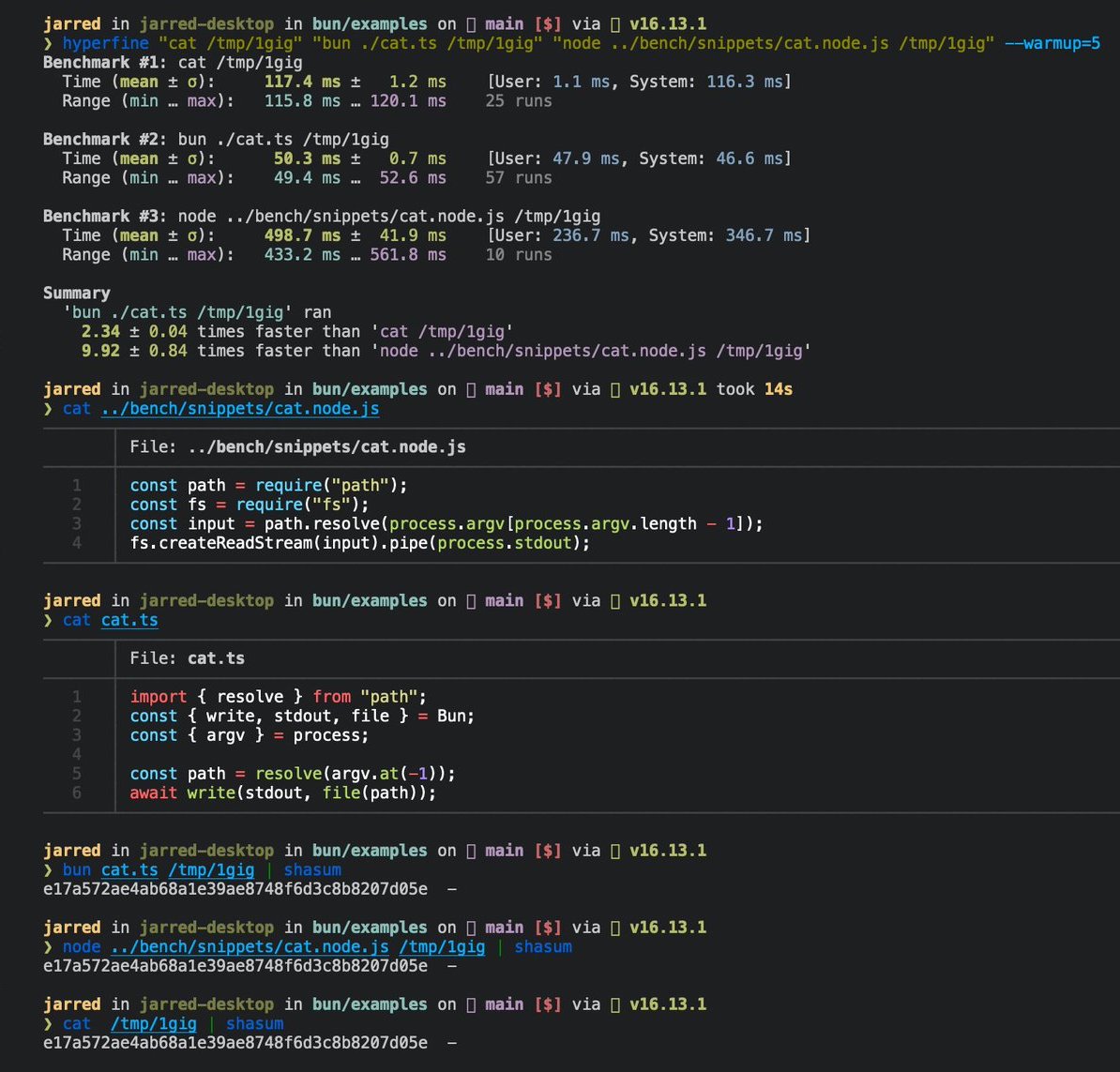</Frame>
|
|
267
267
|
|
|
268
268
|
---
|
|
269
269
|
|
|
@@ -7,7 +7,7 @@ The Bun bundler implements a set of default loaders out of the box. As a rule of
|
|
|
7
7
|
|
|
8
8
|
`.js` `.cjs` `.mjs` `.mts` `.cts` `.ts` `.tsx` `.jsx` `.css` `.json` `.jsonc` `.toml` `.yaml` `.yml` `.txt` `.wasm` `.node` `.html` `.sh`
|
|
9
9
|
|
|
10
|
-
Bun uses the file extension to determine which built-in _loader_ should be used to parse the file. Every loader has a name, such as `js`, `tsx`, or `json`. These names are used when building [plugins](/bundler/plugins) that extend Bun with custom loaders.
|
|
10
|
+
Bun uses the file extension to determine which built-in _loader_ should be used to parse the file. Every loader has a name, such as `js`, `tsx`, or `json`. These names are used when building [plugins](/docs/bundler/plugins) that extend Bun with custom loaders.
|
|
11
11
|
|
|
12
12
|
You can explicitly specify which loader to use using the `'type'` import attribute.
|
|
13
13
|
|
|
@@ -251,7 +251,7 @@ In the bundler, `.node` files are handled using the [`file`](#file) loader.
|
|
|
251
251
|
|
|
252
252
|
**SQLite loader**. `with { "type": "sqlite" }` import attribute
|
|
253
253
|
|
|
254
|
-
In the runtime and bundler, SQLite databases can be directly imported. This will load the database using [`bun:sqlite`](/runtime/sqlite).
|
|
254
|
+
In the runtime and bundler, SQLite databases can be directly imported. This will load the database using [`bun:sqlite`](/docs/runtime/sqlite).
|
|
255
255
|
|
|
256
256
|
```ts
|
|
257
257
|
import db from "./my.db" with { type: "sqlite" };
|
|
@@ -268,7 +268,7 @@ You can change this behavior with the `"embed"` attribute:
|
|
|
268
268
|
import db from "./my.db" with { type: "sqlite", embed: "true" };
|
|
269
269
|
```
|
|
270
270
|
|
|
271
|
-
When using a [standalone executable](/bundler/executables), the database is embedded into the single-file executable.
|
|
271
|
+
When using a [standalone executable](/docs/bundler/executables), the database is embedded into the single-file executable.
|
|
272
272
|
|
|
273
273
|
Otherwise, the database to embed is copied into the `outdir` with a hashed filename.
|
|
274
274
|
|
|
@@ -356,7 +356,7 @@ The `html` loader behaves differently depending on how it's used:
|
|
|
356
356
|
|
|
357
357
|
**CSS loader**. Default for `.css`.
|
|
358
358
|
|
|
359
|
-
CSS files can be directly imported. This is primarily useful for [full-stack applications](/bundler/html-static) where CSS is bundled alongside HTML.
|
|
359
|
+
CSS files can be directly imported. This is primarily useful for [full-stack applications](/docs/bundler/html-static) where CSS is bundled alongside HTML.
|
|
360
360
|
|
|
361
361
|
```ts
|
|
362
362
|
import "./styles.css";
|
|
@@ -368,7 +368,7 @@ There isn't any value returned from the import, it's only used for side effects.
|
|
|
368
368
|
|
|
369
369
|
**Bun Shell loader**. Default for `.sh` files
|
|
370
370
|
|
|
371
|
-
This loader is used to parse [Bun Shell](/runtime/shell) scripts. It's only supported when starting Bun itself, so it's not available in the bundler or in the runtime.
|
|
371
|
+
This loader is used to parse [Bun Shell](/docs/runtime/shell) scripts. It's only supported when starting Bun itself, so it's not available in the bundler or in the runtime.
|
|
372
372
|
|
|
373
373
|
```sh
|
|
374
374
|
bun run ./script.sh
|
package/docs/runtime/globals.mdx
CHANGED
|
@@ -11,7 +11,7 @@ Bun implements the following globals.
|
|
|
11
11
|
| [`AbortSignal`](https://developer.mozilla.org/en-US/docs/Web/API/AbortSignal) | Web | |
|
|
12
12
|
| [`alert`](https://developer.mozilla.org/en-US/docs/Web/API/Window/alert) | Web | Intended for command-line tools |
|
|
13
13
|
| [`Blob`](https://developer.mozilla.org/en-US/docs/Web/API/Blob) | Web | |
|
|
14
|
-
| [`Buffer`](https://nodejs.org/api/buffer.html#class-buffer) | Node.js | See [Node.js > `Buffer`](/runtime/nodejs-compat#node-buffer) |
|
|
14
|
+
| [`Buffer`](https://nodejs.org/api/buffer.html#class-buffer) | Node.js | See [Node.js > `Buffer`](/docs/runtime/nodejs-compat#node-buffer) |
|
|
15
15
|
| `Bun` | Bun | Subject to change as additional APIs are added |
|
|
16
16
|
| [`ByteLengthQueuingStrategy`](https://developer.mozilla.org/en-US/docs/Web/API/ByteLengthQueuingStrategy) | Web | |
|
|
17
17
|
| [`confirm`](https://developer.mozilla.org/en-US/docs/Web/API/Window/confirm) | Web | Intended for command-line tools |
|
|
@@ -34,15 +34,15 @@ Bun implements the following globals.
|
|
|
34
34
|
| [`exports`](https://nodejs.org/api/globals.html#exports) | Node.js | |
|
|
35
35
|
| [`fetch`](https://developer.mozilla.org/en-US/docs/Web/API/fetch) | Web | |
|
|
36
36
|
| [`FormData`](https://developer.mozilla.org/en-US/docs/Web/API/FormData) | Web | |
|
|
37
|
-
| [`global`](https://nodejs.org/api/globals.html#global) | Node.js | See [Node.js > `global`](/runtime/nodejs-compat#global). |
|
|
37
|
+
| [`global`](https://nodejs.org/api/globals.html#global) | Node.js | See [Node.js > `global`](/docs/runtime/nodejs-compat#global). |
|
|
38
38
|
| [`globalThis`](https://developer.mozilla.org/en-US/docs/Web/JavaScript/Reference/Global_Objects/globalThis) | Cross-platform | Aliases to `global` |
|
|
39
39
|
| [`Headers`](https://developer.mozilla.org/en-US/docs/Web/API/Headers) | Web | |
|
|
40
|
-
| [`HTMLRewriter`](/runtime/html-rewriter) | Cloudflare | |
|
|
40
|
+
| [`HTMLRewriter`](/docs/runtime/html-rewriter) | Cloudflare | |
|
|
41
41
|
| [`JSON`](https://developer.mozilla.org/en-US/docs/Web/JavaScript/Reference/Global_Objects/JSON) | Web | |
|
|
42
42
|
| [`MessageEvent`](https://developer.mozilla.org/en-US/docs/Web/API/MessageEvent) | Web | |
|
|
43
43
|
| [`module`](https://nodejs.org/api/globals.html#module) | Node.js | |
|
|
44
44
|
| [`performance`](https://developer.mozilla.org/en-US/docs/Web/API/performance) | Web | |
|
|
45
|
-
| [`process`](https://nodejs.org/api/process.html) | Node.js | See [Node.js > `process`](/runtime/nodejs-compat#node-process) |
|
|
45
|
+
| [`process`](https://nodejs.org/api/process.html) | Node.js | See [Node.js > `process`](/docs/runtime/nodejs-compat#node-process) |
|
|
46
46
|
| [`prompt`](https://developer.mozilla.org/en-US/docs/Web/API/Window/prompt) | Web | Intended for command-line tools |
|
|
47
47
|
| [`queueMicrotask()`](https://developer.mozilla.org/en-US/docs/Web/API/queueMicrotask) | Web | |
|
|
48
48
|
| [`ReadableByteStreamController`](https://developer.mozilla.org/en-US/docs/Web/API/ReadableByteStreamController) | Web | |
|
|
@@ -16,7 +16,7 @@ Bun.serve({
|
|
|
16
16
|
|
|
17
17
|
In development mode, Bun will surface errors in-browser with a built-in error page.
|
|
18
18
|
|
|
19
|
-
<Frame></Frame>
|
|
19
|
+
<Frame>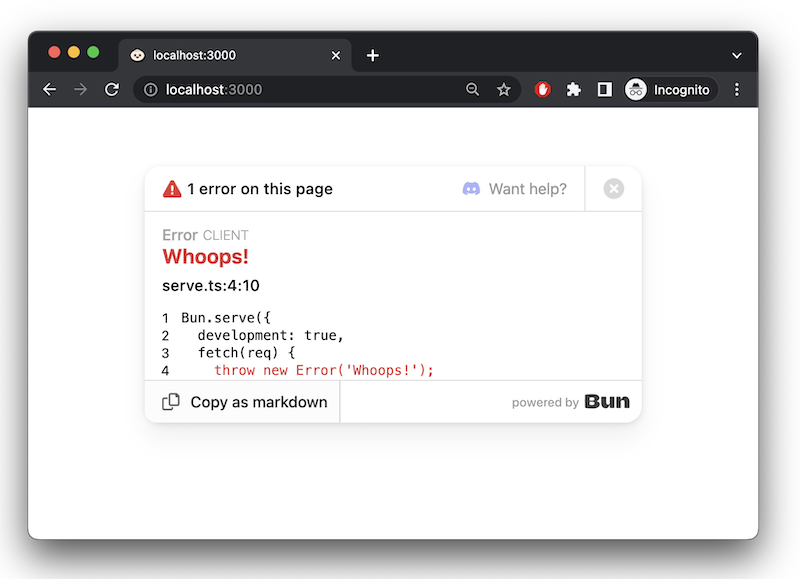</Frame>
|
|
20
20
|
|
|
21
21
|
### `error` callback
|
|
22
22
|
|
|
@@ -37,4 +37,4 @@ Bun.serve({
|
|
|
37
37
|
});
|
|
38
38
|
```
|
|
39
39
|
|
|
40
|
-
<Info>[Learn more about debugging in Bun](/runtime/debugger)</Info>
|
|
40
|
+
<Info>[Learn more about debugging in Bun](/docs/runtime/debugger)</Info>
|
|
@@ -102,7 +102,7 @@ Bun.serve({
|
|
|
102
102
|
|
|
103
103
|
TypeScript parses route parameters when passed as a string literal, so that your editor will show autocomplete when accessing `request.params`.
|
|
104
104
|
|
|
105
|
-
```ts title="index.ts"
|
|
105
|
+
```ts title="index.ts" icon="/icons/typescript.svg"
|
|
106
106
|
import type { BunRequest } from "bun";
|
|
107
107
|
|
|
108
108
|
Bun.serve({
|
|
@@ -32,12 +32,8 @@ const server = Bun.serve({
|
|
|
32
32
|
// Redirect from /blog/hello to /blog/hello/world
|
|
33
33
|
"/blog/hello": Response.redirect("/blog/hello/world"),
|
|
34
34
|
|
|
35
|
-
// Serve a file by
|
|
36
|
-
"/favicon.ico":
|
|
37
|
-
headers: {
|
|
38
|
-
"Content-Type": "image/x-icon",
|
|
39
|
-
},
|
|
40
|
-
}),
|
|
35
|
+
// Serve a file by lazily loading it into memory
|
|
36
|
+
"/favicon.ico": Bun.file("./favicon.ico"),
|
|
41
37
|
},
|
|
42
38
|
|
|
43
39
|
// (optional) fallback for unmatched routes:
|
|
@@ -70,9 +66,9 @@ Bun.serve({
|
|
|
70
66
|
});
|
|
71
67
|
```
|
|
72
68
|
|
|
73
|
-
HTML imports don't just serve HTML — it's a full-featured frontend bundler, transpiler, and toolkit built using Bun's [bundler](/bundler), JavaScript transpiler and CSS parser. You can use this to build full-featured frontends with React, TypeScript, Tailwind CSS, and more.
|
|
69
|
+
HTML imports don't just serve HTML — it's a full-featured frontend bundler, transpiler, and toolkit built using Bun's [bundler](/docs/bundler), JavaScript transpiler and CSS parser. You can use this to build full-featured frontends with React, TypeScript, Tailwind CSS, and more.
|
|
74
70
|
|
|
75
|
-
For a complete guide on building full-stack applications with HTML imports, including detailed examples and best practices, see [/docs/bundler/fullstack](/bundler/fullstack).
|
|
71
|
+
For a complete guide on building full-stack applications with HTML imports, including detailed examples and best practices, see [/docs/bundler/fullstack](/docs/bundler/fullstack).
|
|
76
72
|
|
|
77
73
|
---
|
|
78
74
|
|
|
@@ -126,7 +122,7 @@ bun --port=4002 server.ts
|
|
|
126
122
|
- `BUN_PORT` environment variable
|
|
127
123
|
|
|
128
124
|
```sh
|
|
129
|
-
|
|
125
|
+
BUN_PORT=4002 bun server.ts
|
|
130
126
|
```
|
|
131
127
|
|
|
132
128
|
- `PORT` environment variable
|
|
@@ -174,7 +174,7 @@ Bun.serve({
|
|
|
174
174
|
|
|
175
175
|
To connect to this server from the browser, create a new `WebSocket`.
|
|
176
176
|
|
|
177
|
-
```
|
|
177
|
+
```js browser.js icon="file-code"
|
|
178
178
|
const socket = new WebSocket("ws://localhost:3000/chat");
|
|
179
179
|
|
|
180
180
|
socket.addEventListener("message", event => {
|
package/docs/runtime/index.mdx
CHANGED
|
@@ -94,7 +94,7 @@ Cleaning...
|
|
|
94
94
|
Done.
|
|
95
95
|
```
|
|
96
96
|
|
|
97
|
-
Bun executes the script command in a subshell. On Linux & macOS, it checks for the following shells in order, using the first one it finds: `bash`, `sh`, `zsh`. On
|
|
97
|
+
Bun executes the script command in a subshell. On Linux & macOS, it checks for the following shells in order, using the first one it finds: `bash`, `sh`, `zsh`. On Windows, it uses [bun shell](/docs/runtime/shell) to support bash-like syntax and many common commands.
|
|
98
98
|
|
|
99
99
|
<Note>⚡️ The startup time for `npm run` on Linux is roughly 170ms; with Bun it is `6ms`.</Note>
|
|
100
100
|
|
|
@@ -153,7 +153,7 @@ bun run --filter 'ba*' <script>
|
|
|
153
153
|
|
|
154
154
|
will execute `<script>` in both `bar` and `baz`, but not in `foo`.
|
|
155
155
|
|
|
156
|
-
Find more details in the docs page for [filter](
|
|
156
|
+
Find more details in the docs page for [filter](/docs/pm/filter#running-scripts-with-filter).
|
|
157
157
|
|
|
158
158
|
## `bun run -` to pipe code from stdin
|
|
159
159
|
|
package/docs/runtime/jsx.mdx
CHANGED
|
@@ -19,7 +19,7 @@ console.log(<Component message="Hello world!" />);
|
|
|
19
19
|
|
|
20
20
|
## Configuration
|
|
21
21
|
|
|
22
|
-
Bun reads your `tsconfig.json` or `jsconfig.json` configuration files to determines how to perform the JSX transform internally. To avoid using either of these, the following options can also be defined in [`bunfig.toml`](/runtime/bunfig).
|
|
22
|
+
Bun reads your `tsconfig.json` or `jsconfig.json` configuration files to determines how to perform the JSX transform internally. To avoid using either of these, the following options can also be defined in [`bunfig.toml`](/docs/runtime/bunfig).
|
|
23
23
|
|
|
24
24
|
The following compiler options are respected.
|
|
25
25
|
|
|
@@ -72,13 +72,13 @@ Bun supports both ES modules (`import`/`export` syntax) and CommonJS modules (`r
|
|
|
72
72
|
|
|
73
73
|
<CodeGroup>
|
|
74
74
|
|
|
75
|
-
```
|
|
75
|
+
```js index.js icon="/icons/javascript.svg"
|
|
76
76
|
const { hello } = require("./hello");
|
|
77
77
|
|
|
78
78
|
hello();
|
|
79
79
|
```
|
|
80
80
|
|
|
81
|
-
```
|
|
81
|
+
```js hello.js icon="/icons/javascript.svg"
|
|
82
82
|
function hello() {
|
|
83
83
|
console.log("Hello world!");
|
|
84
84
|
}
|
|
@@ -273,7 +273,7 @@ const response = await fetch("s3://my-bucket/path/to/object", {
|
|
|
273
273
|
|
|
274
274
|
Note: Only PUT and POST methods support request bodies when using S3. For uploads, Bun automatically uses multipart upload for streaming bodies.
|
|
275
275
|
|
|
276
|
-
You can read more about Bun's S3 support in the [S3](/runtime/s3) documentation.
|
|
276
|
+
You can read more about Bun's S3 support in the [S3](/docs/runtime/s3) documentation.
|
|
277
277
|
|
|
278
278
|
#### File URLs - `file://`
|
|
279
279
|
|
|
@@ -342,7 +342,7 @@ This will print the request and response headers to your terminal:
|
|
|
342
342
|
```sh
|
|
343
343
|
[fetch] > HTTP/1.1 GET http://example.com/
|
|
344
344
|
[fetch] > Connection: keep-alive
|
|
345
|
-
[fetch] > User-Agent: Bun/1.3.
|
|
345
|
+
[fetch] > User-Agent: Bun/1.3.3
|
|
346
346
|
[fetch] > Accept: */*
|
|
347
347
|
[fetch] > Host: example.com
|
|
348
348
|
[fetch] > Accept-Encoding: gzip, deflate, br, zstd
|
|
@@ -388,7 +388,7 @@ dns.prefetch("bun.com");
|
|
|
388
388
|
|
|
389
389
|
By default, Bun caches and deduplicates DNS queries in-memory for up to 30 seconds. You can see the cache stats by calling `dns.getCacheStats()`:
|
|
390
390
|
|
|
391
|
-
To learn more about DNS caching in Bun, see the [DNS caching](/runtime/networking/dns) documentation.
|
|
391
|
+
To learn more about DNS caching in Bun, see the [DNS caching](/docs/runtime/networking/dns) documentation.
|
|
392
392
|
|
|
393
393
|
### Preconnect to a host
|
|
394
394
|
|
|
@@ -430,7 +430,7 @@ When the limit is exceeded, the requests are queued and sent as soon as the next
|
|
|
430
430
|
You can increase the maximum number of simultaneous connections via the `BUN_CONFIG_MAX_HTTP_REQUESTS` environment variable:
|
|
431
431
|
|
|
432
432
|
```sh
|
|
433
|
-
|
|
433
|
+
BUN_CONFIG_MAX_HTTP_REQUESTS=512 bun ./my-script.ts
|
|
434
434
|
```
|
|
435
435
|
|
|
436
436
|
The max value for this limit is currently set to 65,336. The maximum port number is 65,535, so it's quite difficult for any one computer to exceed this limit.
|
|
@@ -121,7 +121,7 @@ This page is updated regularly to reflect compatibility status of the latest ver
|
|
|
121
121
|
|
|
122
122
|
### [`node:module`](https://nodejs.org/api/module.html)
|
|
123
123
|
|
|
124
|
-
🟡 Missing `syncBuiltinESMExports`, `Module#load()`. Overriding `require.cache` is supported for ESM & CJS modules. `module._extensions`, `module._pathCache`, `module._cache` are no-ops. `module.register` is not implemented and we recommend using a [`Bun.plugin`](/runtime/plugins) in the meantime.
|
|
124
|
+
🟡 Missing `syncBuiltinESMExports`, `Module#load()`. Overriding `require.cache` is supported for ESM & CJS modules. `module._extensions`, `module._pathCache`, `module._cache` are no-ops. `module.register` is not implemented and we recommend using a [`Bun.plugin`](/docs/runtime/plugins) in the meantime.
|
|
125
125
|
|
|
126
126
|
### [`node:net`](https://nodejs.org/api/net.html)
|
|
127
127
|
|
|
@@ -149,7 +149,7 @@ This page is updated regularly to reflect compatibility status of the latest ver
|
|
|
149
149
|
|
|
150
150
|
### [`node:v8`](https://nodejs.org/api/v8.html)
|
|
151
151
|
|
|
152
|
-
🟡 `writeHeapSnapshot` and `getHeapSnapshot` are implemented. `serialize` and `deserialize` use JavaScriptCore's wire format instead of V8's. Other methods are not implemented. For profiling, use [`bun:jsc`](/project/benchmarking#
|
|
152
|
+
🟡 `writeHeapSnapshot` and `getHeapSnapshot` are implemented. `serialize` and `deserialize` use JavaScriptCore's wire format instead of V8's. Other methods are not implemented. For profiling, use [`bun:jsc`](/docs/project/benchmarking#javascript-heap-stats) instead.
|
|
153
153
|
|
|
154
154
|
### [`node:vm`](https://nodejs.org/api/vm.html)
|
|
155
155
|
|
|
@@ -177,7 +177,7 @@ This page is updated regularly to reflect compatibility status of the latest ver
|
|
|
177
177
|
|
|
178
178
|
### [`node:test`](https://nodejs.org/api/test.html)
|
|
179
179
|
|
|
180
|
-
🟡 Partly implemented. Missing mocks, snapshots, timers. Use [`bun:test`](/test) instead.
|
|
180
|
+
🟡 Partly implemented. Missing mocks, snapshots, timers. Use [`bun:test`](/docs/test) instead.
|
|
181
181
|
|
|
182
182
|
### [`node:trace_events`](https://nodejs.org/api/tracing.html)
|
|
183
183
|
|
package/docs/runtime/plugins.mdx
CHANGED
|
@@ -310,7 +310,7 @@ One of the reasons why Bun's bundler is so fast is that it is written in native
|
|
|
310
310
|
|
|
311
311
|
However, one limitation of plugins written in JavaScript is that JavaScript itself is single-threaded.
|
|
312
312
|
|
|
313
|
-
Native plugins are written as [NAPI](/runtime/node-api) modules and can be run on multiple threads. This allows native plugins to run much faster than JavaScript plugins.
|
|
313
|
+
Native plugins are written as [NAPI](/docs/runtime/node-api) modules and can be run on multiple threads. This allows native plugins to run much faster than JavaScript plugins.
|
|
314
314
|
|
|
315
315
|
In addition, native plugins can skip unnecessary work such as the UTF-8 -> UTF-16 conversion needed to pass strings to JavaScript.
|
|
316
316
|
|
package/docs/runtime/s3.mdx
CHANGED
|
@@ -451,7 +451,7 @@ If the `S3_*` environment variable is not set, Bun will also check for the `AWS_
|
|
|
451
451
|
| `bucket` | `AWS_BUCKET` |
|
|
452
452
|
| `sessionToken` | `AWS_SESSION_TOKEN` |
|
|
453
453
|
|
|
454
|
-
These environment variables are read from [`.env` files](/runtime/environment-variables) or from the process environment at initialization time (`process.env` is not used for this).
|
|
454
|
+
These environment variables are read from [`.env` files](/docs/runtime/environment-variables) or from the process environment at initialization time (`process.env` is not used for this).
|
|
455
455
|
|
|
456
456
|
These defaults are overridden by the options you pass to `s3.file(credentials)`, `new Bun.S3Client(credentials)`, or any of the methods that accept credentials. So if, for example, you use the same credentials for different buckets, you can set the credentials once in your `.env` file and then pass `bucket: "my-bucket"` to the `s3.file()` function without having to specify all the credentials again.
|
|
457
457
|
|
|
@@ -540,7 +540,7 @@ const exists = await client.exists("my-file.txt");
|
|
|
540
540
|
|
|
541
541
|
`S3File` instances are created by calling the `S3Client` instance method or the `s3.file()` function. Like `Bun.file()`, `S3File` instances are lazy. They don't refer to something that necessarily exists at the time of creation. That's why all the methods that don't involve network requests are fully synchronous.
|
|
542
542
|
|
|
543
|
-
```ts Type Reference icon="/icons/typescript.svg"
|
|
543
|
+
```ts Type Reference icon="/icons/typescript.svg" expandable
|
|
544
544
|
interface S3File extends Blob {
|
|
545
545
|
slice(start: number, end?: number): S3File;
|
|
546
546
|
exists(): Promise<boolean>;
|
|
@@ -589,7 +589,7 @@ That means using `S3File` instances with `fetch()`, `Response`, and other web AP
|
|
|
589
589
|
|
|
590
590
|
To read a partial range of a file, you can use the `slice` method.
|
|
591
591
|
|
|
592
|
-
```ts s3.ts icon="/icons/typescript.svg"
|
|
592
|
+
```ts s3.ts icon="/icons/typescript.svg" highlight={1}
|
|
593
593
|
const partial = s3file.slice(0, 1024);
|
|
594
594
|
|
|
595
595
|
// Read the partial range as a Uint8Array
|
|
@@ -733,7 +733,7 @@ This is equivalent to calling `new S3Client(credentials).list()`.
|
|
|
733
733
|
|
|
734
734
|
To check if an S3 file exists, you can use the `S3Client.exists` static method.
|
|
735
735
|
|
|
736
|
-
```ts s3.ts icon="/icons/typescript.svg"
|
|
736
|
+
```ts s3.ts icon="/icons/typescript.svg" highlight={11}
|
|
737
737
|
import { S3Client } from "bun";
|
|
738
738
|
|
|
739
739
|
const credentials = {
|
package/docs/runtime/secrets.mdx
CHANGED
|
@@ -10,24 +10,27 @@ Store and retrieve sensitive credentials securely using the operating system's n
|
|
|
10
10
|
```typescript index.ts icon="/icons/typescript.svg"
|
|
11
11
|
import { secrets } from "bun";
|
|
12
12
|
|
|
13
|
-
|
|
13
|
+
let githubToken: string | null = await secrets.get({
|
|
14
14
|
service: "my-cli-tool",
|
|
15
15
|
name: "github-token",
|
|
16
16
|
});
|
|
17
17
|
|
|
18
18
|
if (!githubToken) {
|
|
19
|
-
|
|
20
|
-
|
|
21
|
-
});
|
|
22
|
-
console.log("Please enter your GitHub token");
|
|
23
|
-
} else {
|
|
19
|
+
githubToken = prompt("Please enter your GitHub token");
|
|
20
|
+
|
|
24
21
|
await secrets.set({
|
|
25
22
|
service: "my-cli-tool",
|
|
26
23
|
name: "github-token",
|
|
27
|
-
value:
|
|
24
|
+
value: githubToken,
|
|
28
25
|
});
|
|
29
26
|
console.log("GitHub token stored");
|
|
30
27
|
}
|
|
28
|
+
|
|
29
|
+
const response = await fetch("https://api.github.com/name", {
|
|
30
|
+
headers: { Authorization: `token ${githubToken}` },
|
|
31
|
+
});
|
|
32
|
+
|
|
33
|
+
console.log(`Logged in as ${(await response.json()).login}`);
|
|
31
34
|
```
|
|
32
35
|
|
|
33
36
|
---
|
package/docs/runtime/sql.mdx
CHANGED
|
@@ -153,16 +153,16 @@ const memory = new SQL(":memory:");
|
|
|
153
153
|
const memory2 = new SQL("sqlite://:memory:");
|
|
154
154
|
|
|
155
155
|
// File-based database
|
|
156
|
-
const
|
|
156
|
+
const sql1 = new SQL("sqlite://myapp.db");
|
|
157
157
|
|
|
158
158
|
// Using options object
|
|
159
|
-
const
|
|
159
|
+
const sql2 = new SQL({
|
|
160
160
|
adapter: "sqlite",
|
|
161
161
|
filename: "./data/app.db",
|
|
162
162
|
});
|
|
163
163
|
|
|
164
164
|
// For simple filenames, specify adapter explicitly
|
|
165
|
-
const
|
|
165
|
+
const sql3 = new SQL("myapp.db", { adapter: "sqlite" });
|
|
166
166
|
```
|
|
167
167
|
|
|
168
168
|
<Accordion title="SQLite Connection String Formats">
|
|
@@ -205,7 +205,7 @@ new SQL("sqlite://data.db?mode=rwc"); // Read-write-create mode (default)
|
|
|
205
205
|
SQLite databases support additional configuration options:
|
|
206
206
|
|
|
207
207
|
```ts
|
|
208
|
-
const
|
|
208
|
+
const sql = new SQL({
|
|
209
209
|
adapter: "sqlite",
|
|
210
210
|
filename: "app.db",
|
|
211
211
|
|
|
@@ -443,7 +443,7 @@ Bun's SQL is lazy, which means it will only start executing when awaited or exec
|
|
|
443
443
|
You can cancel a query that is currently executing by calling the `cancel()` method on the query object.
|
|
444
444
|
|
|
445
445
|
```ts
|
|
446
|
-
const query =
|
|
446
|
+
const query = sql`SELECT * FROM users`.execute();
|
|
447
447
|
setTimeout(() => query.cancel(), 100);
|
|
448
448
|
await query;
|
|
449
449
|
```
|
|
@@ -601,7 +601,7 @@ You can configure your database connection manually by passing options to the SQ
|
|
|
601
601
|
```ts
|
|
602
602
|
import { SQL } from "bun";
|
|
603
603
|
|
|
604
|
-
const
|
|
604
|
+
const sql = new SQL({
|
|
605
605
|
// Required for MySQL when using options object
|
|
606
606
|
adapter: "mysql",
|
|
607
607
|
|
|
@@ -649,7 +649,7 @@ const db = new SQL({
|
|
|
649
649
|
```ts
|
|
650
650
|
import { SQL } from "bun";
|
|
651
651
|
|
|
652
|
-
const
|
|
652
|
+
const sql = new SQL({
|
|
653
653
|
// Connection details (adapter is auto-detected as PostgreSQL)
|
|
654
654
|
url: "postgres://user:pass@localhost:5432/dbname",
|
|
655
655
|
|
|
@@ -694,7 +694,7 @@ const db = new SQL({
|
|
|
694
694
|
```ts
|
|
695
695
|
import { SQL } from "bun";
|
|
696
696
|
|
|
697
|
-
const
|
|
697
|
+
const sql = new SQL({
|
|
698
698
|
// Required for SQLite
|
|
699
699
|
adapter: "sqlite",
|
|
700
700
|
filename: "./data/app.db", // or ":memory:" for in-memory database
|
|
@@ -924,7 +924,7 @@ const sql = new SQL("postgres://user:password@localhost/mydb?sslmode=verify-full
|
|
|
924
924
|
Bun's SQL client automatically manages a connection pool, which is a pool of database connections that are reused for multiple queries. This helps to reduce the overhead of establishing and closing connections for each query, and it also helps to manage the number of concurrent connections to the database.
|
|
925
925
|
|
|
926
926
|
```ts
|
|
927
|
-
const
|
|
927
|
+
const sql = new SQL({
|
|
928
928
|
// Pool configuration
|
|
929
929
|
max: 20, // Maximum 20 concurrent connections
|
|
930
930
|
idleTimeout: 30, // Close idle connections after 30s
|
|
@@ -936,7 +936,7 @@ const db = new SQL({
|
|
|
936
936
|
No connection will be made until a query is made.
|
|
937
937
|
|
|
938
938
|
```ts
|
|
939
|
-
const sql = Bun.
|
|
939
|
+
const sql = Bun.SQL(); // no connection are created
|
|
940
940
|
|
|
941
941
|
await sql`...`; // pool is started until max is reached (if possible), first available connection is used
|
|
942
942
|
await sql`...`; // previous connection is reused
|
package/docs/runtime/sqlite.mdx
CHANGED
|
@@ -86,11 +86,11 @@ import { Database } from "bun:sqlite";
|
|
|
86
86
|
const strict = new Database(":memory:", { strict: true });
|
|
87
87
|
|
|
88
88
|
// throws error because of the typo:
|
|
89
|
-
const query = strict.query("SELECT $message;").all({
|
|
89
|
+
const query = strict.query("SELECT $message;").all({ messag: "Hello world" });
|
|
90
90
|
|
|
91
91
|
const notStrict = new Database(":memory:");
|
|
92
92
|
// does not throw error:
|
|
93
|
-
notStrict.query("SELECT $message;").all({
|
|
93
|
+
notStrict.query("SELECT $message;").all({ messag: "Hello world" });
|
|
94
94
|
```
|
|
95
95
|
|
|
96
96
|
### Load via ES module import
|
|
@@ -645,15 +645,26 @@ class Database {
|
|
|
645
645
|
readonly?: boolean;
|
|
646
646
|
create?: boolean;
|
|
647
647
|
readwrite?: boolean;
|
|
648
|
+
safeIntegers?: boolean;
|
|
649
|
+
strict?: boolean;
|
|
648
650
|
},
|
|
649
651
|
);
|
|
650
652
|
|
|
651
|
-
|
|
653
|
+
prepare<ReturnType, Params>(sql: string): Statement<ReturnType, Params>;
|
|
654
|
+
query<ReturnType, Params>(sql: string): Statement<ReturnType, Params>;
|
|
652
655
|
run(sql: string, params?: SQLQueryBindings): { lastInsertRowid: number; changes: number };
|
|
653
656
|
exec = this.run;
|
|
657
|
+
|
|
658
|
+
transaction(insideTransaction: (...args: any) => void): CallableFunction & {
|
|
659
|
+
deferred: (...args: any) => void;
|
|
660
|
+
immediate: (...args: any) => void;
|
|
661
|
+
exclusive: (...args: any) => void;
|
|
662
|
+
};
|
|
663
|
+
|
|
664
|
+
close(throwOnError?: boolean): void;
|
|
654
665
|
}
|
|
655
666
|
|
|
656
|
-
class Statement<
|
|
667
|
+
class Statement<ReturnType, Params> {
|
|
657
668
|
all(params: Params): ReturnType[];
|
|
658
669
|
get(params: Params): ReturnType | undefined;
|
|
659
670
|
run(params: Params): {
|
|
@@ -12,7 +12,7 @@ description: Create a new Bun project from a React component, a `create-<templat
|
|
|
12
12
|
|
|
13
13
|
Template a new Bun project with `bun create`. This is a flexible command that can be used to create a new project from a React component, a `create-<template>` npm package, a GitHub repo, or a local template.
|
|
14
14
|
|
|
15
|
-
If you're looking to create a brand new empty project, use [`bun init`](
|
|
15
|
+
If you're looking to create a brand new empty project, use [`bun init`](/docs/runtime/templating/init).
|
|
16
16
|
|
|
17
17
|
## From a React component
|
|
18
18
|
|
|
@@ -46,11 +46,11 @@ $ bun create ./MyComponent.jsx # .tsx also supported
|
|
|
46
46
|
|
|
47
47
|
When you run `bun create <component>`, Bun:
|
|
48
48
|
|
|
49
|
-
1. Uses [Bun's JavaScript bundler](
|
|
49
|
+
1. Uses [Bun's JavaScript bundler](/docs/bundler) to analyze your module graph.
|
|
50
50
|
2. Collects all the dependencies needed to run the component.
|
|
51
51
|
3. Scans the exports of the entry point for a React component.
|
|
52
52
|
4. Generates a `package.json` file with the dependencies and scripts needed to run the component.
|
|
53
|
-
5. Installs any missing dependencies using [`bun install --only-missing`](
|
|
53
|
+
5. Installs any missing dependencies using [`bun install --only-missing`](/docs/pm/cli/install).
|
|
54
54
|
6. Generates the following files:
|
|
55
55
|
- `${component}.html`
|
|
56
56
|
- `${component}.client.tsx` (entry point for the frontend)
|
|
@@ -63,7 +63,7 @@ When you run `bun create <component>`, Bun:
|
|
|
63
63
|
|
|
64
64
|
When you run `bun create <component>`, Bun scans your JSX/TSX file for TailwindCSS class names (and any files it imports). If it detects TailwindCSS class names, it will add the following dependencies to your `package.json`:
|
|
65
65
|
|
|
66
|
-
```json package.json icon="file-
|
|
66
|
+
```json package.json icon="file-json"
|
|
67
67
|
{
|
|
68
68
|
"dependencies": {
|
|
69
69
|
"tailwindcss": "^4",
|