bun-types 1.1.43-canary.20250107T145807 → 1.1.43-canary.20250108T140520
This diff represents the content of publicly available package versions that have been released to one of the supported registries. The information contained in this diff is provided for informational purposes only and reflects changes between package versions as they appear in their respective public registries.
- package/docs/api/s3.md +6 -5
- package/docs/api/sqlite.md +2 -2
- package/docs/api/utils.md +1 -1
- package/docs/cli/filter.md +50 -17
- package/docs/cli/install.md +14 -0
- package/docs/cli/outdated.md +2 -0
- package/docs/cli/run.md +2 -2
- package/docs/install/lockfile.md +1 -1
- package/docs/runtime/shell.md +1 -1
- package/package.json +1 -1
- package/test.d.ts +14 -12
package/docs/api/s3.md
CHANGED
|
@@ -150,7 +150,7 @@ const writer = s3file.writer({
|
|
|
150
150
|
queueSize: 10,
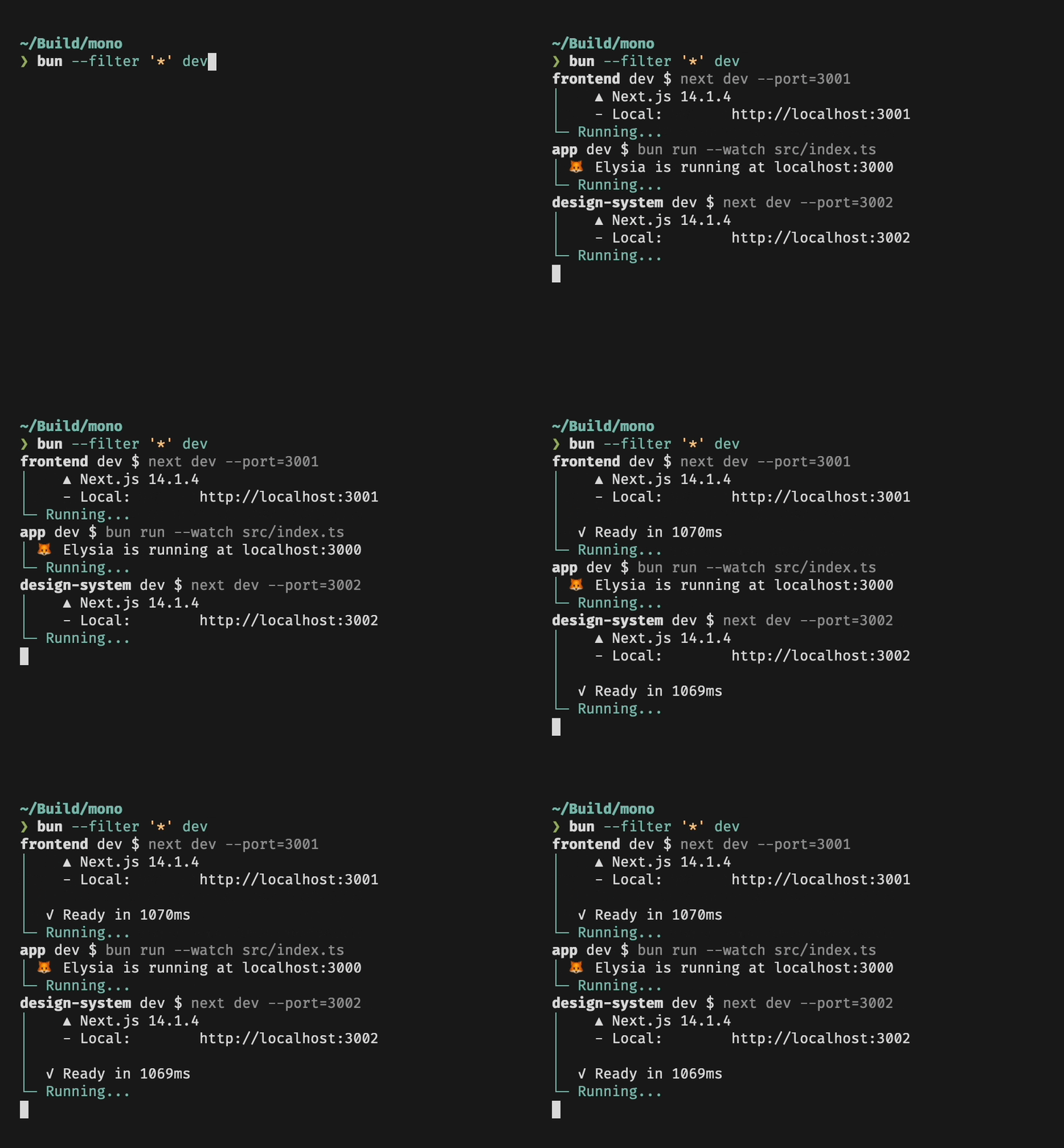
|
|
151
151
|
|
|
152
152
|
// Upload in 5 MB chunks
|
|
153
|
-
partSize: 5,
|
|
153
|
+
partSize: 5 * 1024 * 1024,
|
|
154
154
|
});
|
|
155
155
|
for (let i = 0; i < 10; i++) {
|
|
156
156
|
await writer.write(bigFile);
|
|
@@ -367,7 +367,7 @@ If the `S3_*` environment variable is not set, Bun will also check for the `AWS_
|
|
|
367
367
|
|
|
368
368
|
These environment variables are read from [`.env` files](/docs/runtime/env) or from the process environment at initialization time (`process.env` is not used for this).
|
|
369
369
|
|
|
370
|
-
These defaults are
|
|
370
|
+
These defaults are overridden by the options you pass to `s3(credentials)`, `new Bun.S3Client(credentials)`, or any of the methods that accept credentials. So if, for example, you use the same credentials for different buckets, you can set the credentials once in your `.env` file and then pass `bucket: "my-bucket"` to the `s3()` helper function without having to specify all the credentials again.
|
|
371
371
|
|
|
372
372
|
### `S3Client` objects
|
|
373
373
|
|
|
@@ -614,9 +614,10 @@ const credentials = {
|
|
|
614
614
|
|
|
615
615
|
const stat = await S3Client.stat("my-file.txt", credentials);
|
|
616
616
|
// {
|
|
617
|
+
// etag: "\"7a30b741503c0b461cc14157e2df4ad8\"",
|
|
618
|
+
// lastModified: 2025-01-07T00:19:10.000Z,
|
|
617
619
|
// size: 1024,
|
|
618
|
-
//
|
|
619
|
-
// lastModified: new Date(),
|
|
620
|
+
// type: "text/plain;charset=utf-8",
|
|
620
621
|
// }
|
|
621
622
|
```
|
|
622
623
|
|
|
@@ -661,7 +662,7 @@ const response = await fetch("s3://my-bucket/my-file.txt", {
|
|
|
661
662
|
endpoint: "https://s3.us-east-1.amazonaws.com",
|
|
662
663
|
},
|
|
663
664
|
headers: {
|
|
664
|
-
"
|
|
665
|
+
"range": "bytes=0-1023",
|
|
665
666
|
},
|
|
666
667
|
});
|
|
667
668
|
```
|
package/docs/api/sqlite.md
CHANGED
|
@@ -82,7 +82,7 @@ const strict = new Database(
|
|
|
82
82
|
// throws error because of the typo:
|
|
83
83
|
const query = strict
|
|
84
84
|
.query("SELECT $message;")
|
|
85
|
-
.all({
|
|
85
|
+
.all({ message: "Hello world" });
|
|
86
86
|
|
|
87
87
|
const notStrict = new Database(
|
|
88
88
|
":memory:"
|
|
@@ -90,7 +90,7 @@ const notStrict = new Database(
|
|
|
90
90
|
// does not throw error:
|
|
91
91
|
notStrict
|
|
92
92
|
.query("SELECT $message;")
|
|
93
|
-
.all({
|
|
93
|
+
.all({ message: "Hello world" });
|
|
94
94
|
```
|
|
95
95
|
|
|
96
96
|
### Load via ES module import
|
package/docs/api/utils.md
CHANGED
|
@@ -121,7 +121,7 @@ const id = randomUUIDv7();
|
|
|
121
121
|
|
|
122
122
|
A UUID v7 is a 128-bit value that encodes the current timestamp, a random value, and a counter. The timestamp is encoded using the lowest 48 bits, and the random value and counter are encoded using the remaining bits.
|
|
123
123
|
|
|
124
|
-
The `timestamp` parameter defaults to the current time in milliseconds. When the timestamp changes, the counter is reset to a
|
|
124
|
+
The `timestamp` parameter defaults to the current time in milliseconds. When the timestamp changes, the counter is reset to a pseudo-random integer wrapped to 4096. This counter is atomic and threadsafe, meaning that using `Bun.randomUUIDv7()` in many Workers within the same process running at the same timestamp will not have colliding counter values.
|
|
125
125
|
|
|
126
126
|
The final 8 bytes of the UUID are a cryptographically secure random value. It uses the same random number generator used by `crypto.randomUUID()` (which comes from BoringSSL, which in turn comes from the platform-specific system random number generator usually provided by the underlying hardware).
|
|
127
127
|
|
package/docs/cli/filter.md
CHANGED
|
@@ -1,4 +1,51 @@
|
|
|
1
|
-
|
|
1
|
+
The `--filter` (or `-F`) flag is used for selecting packages by pattern in a monorepo. Patterns can be used to match package names or package paths, with full glob syntax support.
|
|
2
|
+
|
|
3
|
+
Currently `--filter` is supported by `bun install` and `bun outdated`, and can also be used to run scripts for multiple packages at once.
|
|
4
|
+
|
|
5
|
+
## Matching
|
|
6
|
+
|
|
7
|
+
### Package Name `--filter <pattern>`
|
|
8
|
+
|
|
9
|
+
Name patterns select packages based on the package name, as specified in `package.json`. For example, if you have packages `pkg-a`, `pkg-b` and `other`, you can match all packages with `*`, only `pkg-a` and `pkg-b` with `pkg*`, and a specific package by providing the full name of the package.
|
|
10
|
+
|
|
11
|
+
### Package Path `--filter ./<glob>`
|
|
12
|
+
|
|
13
|
+
Path patterns are specified by starting the pattern with `./`, and will select all packages in directories that match the pattern. For example, to match all packages in subdirectories of `packages`, you can use `--filter './packages/**'`. To match a package located in `packages/foo`, use `--filter ./packages/foo`.
|
|
14
|
+
|
|
15
|
+
## `bun install` and `bun outdated`
|
|
16
|
+
|
|
17
|
+
Both `bun install` and `bun outdated` support the `--filter` flag.
|
|
18
|
+
|
|
19
|
+
`bun install` by default will install dependencies for all packages in the monorepo. To install dependencies for specific packages, use `--filter`.
|
|
20
|
+
|
|
21
|
+
Given a monorepo with workspaces `pkg-a`, `pkg-b`, and `pkg-c` under `./packages`:
|
|
22
|
+
|
|
23
|
+
```bash
|
|
24
|
+
# Install dependencies for all workspaces except `pkg-c`
|
|
25
|
+
$ bun install --filter '!pkg-c'
|
|
26
|
+
|
|
27
|
+
# Install dependencies for packages in `./packages` (`pkg-a`, `pkg-b`, `pkg-c`)
|
|
28
|
+
$ bun install --filter './packages/*'
|
|
29
|
+
|
|
30
|
+
# Save as above, but exclude the root package.json
|
|
31
|
+
$ bun install --filter --filter '!./' --filter './packages/*'
|
|
32
|
+
```
|
|
33
|
+
|
|
34
|
+
Similarly, `bun outdated` will display outdated dependencies for all packages in the monorepo, and `--filter` can be used to restrict the command to a subset of the packages:
|
|
35
|
+
|
|
36
|
+
```bash
|
|
37
|
+
# Display outdated dependencies for workspaces starting with `pkg-`
|
|
38
|
+
$ bun outdated --filter 'pkg-*'
|
|
39
|
+
|
|
40
|
+
# Display outdated dependencies for only the root package.json
|
|
41
|
+
$ bun outdated --filter './'
|
|
42
|
+
```
|
|
43
|
+
|
|
44
|
+
For more information on both these commands, see [`bun install`](https://bun.sh/docs/cli/install) and [`bun outdated`](https://bun.sh/docs/cli/outdated).
|
|
45
|
+
|
|
46
|
+
## Running scripts with `--filter`
|
|
47
|
+
|
|
48
|
+
Use the `--filter` flag to execute scripts in multiple packages at once:
|
|
2
49
|
|
|
3
50
|
```bash
|
|
4
51
|
bun --filter <pattern> <script>
|
|
@@ -24,19 +71,7 @@ bun --filter '*' dev
|
|
|
24
71
|
Both commands will be run in parallel, and you will see a nice terminal UI showing their respective outputs:
|
|
25
72
|
|
|
26
73
|
|
|
27
|
-
|
|
28
|
-
|
|
29
|
-
`--filter` accepts a pattern to match specific packages, either by name or by path. Patterns have full support for glob syntax.
|
|
30
|
-
|
|
31
|
-
### Package Name `--filter <pattern>`
|
|
32
|
-
|
|
33
|
-
Name patterns select packages based on the package name, as specified in `package.json`. For example, if you have packages `pkga`, `pkgb` and `other`, you can match all packages with `*`, only `pkga` and `pkgb` with `pkg*`, and a specific package by providing the full name of the package.
|
|
34
|
-
|
|
35
|
-
### Package Path `--filter ./<glob>`
|
|
36
|
-
|
|
37
|
-
Path patterns are specified by starting the pattern with `./`, and will select all packages in directories that match the pattern. For example, to match all packages in subdirectories of `packages`, you can use `--filter './packages/**'`. To match a package located in `pkgs/foo`, use `--filter ./pkgs/foo`.
|
|
38
|
-
|
|
39
|
-
## Workspaces
|
|
74
|
+
### Running scripts in workspaces
|
|
40
75
|
|
|
41
76
|
Filters respect your [workspace configuration](https://bun.sh/docs/install/workspaces): If you have a `package.json` file that specifies which packages are part of the workspace,
|
|
42
77
|
`--filter` will be restricted to only these packages. Also, in a workspace you can use `--filter` to run scripts in packages that are located anywhere in the workspace:
|
|
@@ -50,8 +85,6 @@ Filters respect your [workspace configuration](https://bun.sh/docs/install/works
|
|
|
50
85
|
bun run --filter foo myscript
|
|
51
86
|
```
|
|
52
87
|
|
|
53
|
-
|
|
88
|
+
### Dependency Order
|
|
54
89
|
|
|
55
90
|
Bun will respect package dependency order when running scripts. Say you have a package `foo` that depends on another package `bar` in your workspace, and both packages have a `build` script. When you run `bun --filter '*' build`, you will notice that `foo` will only start running once `bar` is done.
|
|
56
|
-
|
|
57
|
-
### Cyclic Dependencies
|
package/docs/cli/install.md
CHANGED
|
@@ -81,6 +81,20 @@ Bun supports `"workspaces"` in package.json. For complete documentation refer to
|
|
|
81
81
|
}
|
|
82
82
|
```
|
|
83
83
|
|
|
84
|
+
## Installing dependencies for specific packages
|
|
85
|
+
|
|
86
|
+
In a monorepo, you can install the dependencies for a subset of packages using the `--filter` flag.
|
|
87
|
+
|
|
88
|
+
```bash
|
|
89
|
+
# Install dependencies for all workspaces except `pkg-c`
|
|
90
|
+
$ bun install --filter '!pkg-c'
|
|
91
|
+
|
|
92
|
+
# Install dependencies for only `pkg-a` in `./packages/pkg-a`
|
|
93
|
+
$ bun install --filter './packages/pkg-a'
|
|
94
|
+
```
|
|
95
|
+
|
|
96
|
+
For more information on filtering with `bun install`, refer to [Package Manager > Filtering](https://bun.sh/docs/cli/install#bun-install-and-bun-outdated)
|
|
97
|
+
|
|
84
98
|
## Overrides and resolutions
|
|
85
99
|
|
|
86
100
|
Bun supports npm's `"overrides"` and Yarn's `"resolutions"` in `package.json`. These are mechanisms for specifying a version range for _metadependencies_—the dependencies of your dependencies. Refer to [Package manager > Overrides and resolutions](https://bun.sh/docs/install/overrides) for complete documentation.
|
package/docs/cli/outdated.md
CHANGED
|
@@ -59,3 +59,5 @@ If you want to do the same, but exclude the `./apps/api` workspace:
|
|
|
59
59
|
```sh
|
|
60
60
|
$ bun outdated --filter './apps/*' --filter '!./apps/api'
|
|
61
61
|
```
|
|
62
|
+
|
|
63
|
+
Refer to [Package Manager > Filtering](https://bun.sh/docs/cli/filter#bun-install-and-bun-outdated) for more information on `--filter`.
|
package/docs/cli/run.md
CHANGED
|
@@ -153,7 +153,7 @@ $ bun run --bun vite
|
|
|
153
153
|
|
|
154
154
|
### Filtering
|
|
155
155
|
|
|
156
|
-
|
|
156
|
+
In monorepos containing multiple packages, you can use the `--filter` argument to execute scripts in many packages at once.
|
|
157
157
|
|
|
158
158
|
Use `bun run --filter <name_pattern> <script>` to execute `<script>` in all packages whose name matches `<name_pattern>`.
|
|
159
159
|
For example, if you have subdirectories containing packages named `foo`, `bar` and `baz`, running
|
|
@@ -164,7 +164,7 @@ bun run --filter 'ba*' <script>
|
|
|
164
164
|
|
|
165
165
|
will execute `<script>` in both `bar` and `baz`, but not in `foo`.
|
|
166
166
|
|
|
167
|
-
Find more details in the docs page for [filter](https://bun.sh/docs/cli/filter).
|
|
167
|
+
Find more details in the docs page for [filter](https://bun.sh/docs/cli/filter#running-scripts-with-filter).
|
|
168
168
|
|
|
169
169
|
## `bun run -` to pipe code from stdin
|
|
170
170
|
|
package/docs/install/lockfile.md
CHANGED
|
@@ -100,7 +100,7 @@ $ head -n3 bun.lock
|
|
|
100
100
|
"workspaces": {
|
|
101
101
|
```
|
|
102
102
|
|
|
103
|
-
Once `bun.lock` is generated, Bun will use it for all subsequent installs and updates through commands that read and modify the lockfile. If both lockfiles exist, `bun.lock` will be
|
|
103
|
+
Once `bun.lock` is generated, Bun will use it for all subsequent installs and updates through commands that read and modify the lockfile. If both lockfiles exist, `bun.lock` will be chosen over `bun.lockb`.
|
|
104
104
|
|
|
105
105
|
Bun v1.2.0 will switch the default lockfile format to `bun.lock`.
|
|
106
106
|
|
package/docs/runtime/shell.md
CHANGED
|
@@ -102,7 +102,7 @@ The default handling of non-zero exit codes can be configured by calling `.nothr
|
|
|
102
102
|
import { $ } from "bun";
|
|
103
103
|
// shell promises will not throw, meaning you will have to
|
|
104
104
|
// check for `exitCode` manually on every shell command.
|
|
105
|
-
$.nothrow(); //
|
|
105
|
+
$.nothrow(); // equivalent to $.throws(false)
|
|
106
106
|
|
|
107
107
|
// default behavior, non-zero exit codes will throw an error
|
|
108
108
|
$.throws(true);
|
package/package.json
CHANGED
package/test.d.ts
CHANGED
|
@@ -1104,22 +1104,24 @@ declare module "bun:test" {
|
|
|
1104
1104
|
toContainAllValues(expected: unknown): void;
|
|
1105
1105
|
|
|
1106
1106
|
/**
|
|
1107
|
-
|
|
1108
|
-
|
|
1109
|
-
|
|
1110
|
-
|
|
1111
|
-
|
|
1112
|
-
|
|
1113
|
-
|
|
1114
|
-
|
|
1115
|
-
|
|
1116
|
-
|
|
1117
|
-
|
|
1118
|
-
|
|
1107
|
+
* Asserts that an `object` contain any provided value.
|
|
1108
|
+
*
|
|
1109
|
+
* The value must be an object
|
|
1110
|
+
*
|
|
1111
|
+
* @example
|
|
1112
|
+
* const o = { a: 'foo', b: 'bar', c: 'baz' };
|
|
1113
|
+
* expect(o).toContainAnyValues(['qux', 'foo']);
|
|
1114
|
+
* expect(o).toContainAnyValues(['qux', 'bar']);
|
|
1115
|
+
* expect(o).toContainAnyValues(['qux', 'baz']);
|
|
1116
|
+
* expect(o).not.toContainAnyValues(['qux']);
|
|
1117
|
+
* @param expected the expected value
|
|
1118
|
+
*/
|
|
1119
1119
|
toContainAnyValues(expected: unknown): void;
|
|
1120
1120
|
|
|
1121
1121
|
/**
|
|
1122
1122
|
* Asserts that an `object` contains all the provided keys.
|
|
1123
|
+
*
|
|
1124
|
+
* @example
|
|
1123
1125
|
* expect({ a: 'foo', b: 'bar', c: 'baz' }).toContainKeys(['a', 'b']);
|
|
1124
1126
|
* expect({ a: 'foo', b: 'bar', c: 'baz' }).toContainKeys(['a', 'b', 'c']);
|
|
1125
1127
|
* expect({ a: 'foo', b: 'bar', c: 'baz' }).not.toContainKeys(['a', 'b', 'e']);
|