bun-types 1.1.43-canary.20250106T140553 → 1.1.43-canary.20250108T140520
This diff represents the content of publicly available package versions that have been released to one of the supported registries. The information contained in this diff is provided for informational purposes only and reflects changes between package versions as they appear in their respective public registries.
- package/bun.d.ts +67 -114
- package/docs/api/s3.md +245 -116
- package/docs/api/sqlite.md +2 -2
- package/docs/api/utils.md +1 -1
- package/docs/cli/add.md +8 -0
- package/docs/cli/filter.md +50 -17
- package/docs/cli/install.md +14 -0
- package/docs/cli/outdated.md +2 -0
- package/docs/cli/run.md +2 -2
- package/docs/guides/install/add-optional.md +1 -1
- package/docs/install/index.md +6 -0
- package/docs/install/lockfile.md +1 -1
- package/docs/install/workspaces.md +10 -0
- package/docs/runtime/nodejs-apis.md +1 -1
- package/docs/runtime/shell.md +1 -1
- package/package.json +1 -1
- package/test.d.ts +14 -12
package/bun.d.ts
CHANGED
|
@@ -21,6 +21,7 @@ declare module "bun" {
|
|
|
21
21
|
EphemeralKeyInfo,
|
|
22
22
|
PeerCertificate,
|
|
23
23
|
} from "tls";
|
|
24
|
+
import type { Stats } from "node:fs";
|
|
24
25
|
interface Env {
|
|
25
26
|
NODE_ENV?: string;
|
|
26
27
|
/**
|
|
@@ -1274,118 +1275,14 @@ declare module "bun" {
|
|
|
1274
1275
|
* Finish the upload. This also flushes the internal buffer.
|
|
1275
1276
|
*/
|
|
1276
1277
|
end(error?: Error): number | Promise<number>;
|
|
1277
|
-
}
|
|
1278
|
-
|
|
1279
|
-
type S3 = {
|
|
1280
|
-
/**
|
|
1281
|
-
* Create a new instance of an S3 bucket so that credentials can be managed
|
|
1282
|
-
* from a single instance instead of being passed to every method.
|
|
1283
|
-
*
|
|
1284
|
-
* @param options The default options to use for the S3 client. Can be
|
|
1285
|
-
* overriden by passing options to the methods.
|
|
1286
|
-
*
|
|
1287
|
-
* ## Keep S3 credentials in a single instance
|
|
1288
|
-
*
|
|
1289
|
-
* @example
|
|
1290
|
-
* const bucket = new Bun.S3({
|
|
1291
|
-
* accessKeyId: "your-access-key",
|
|
1292
|
-
* secretAccessKey: "your-secret-key",
|
|
1293
|
-
* bucket: "my-bucket",
|
|
1294
|
-
* endpoint: "https://s3.us-east-1.amazonaws.com",
|
|
1295
|
-
* sessionToken: "your-session-token",
|
|
1296
|
-
* });
|
|
1297
|
-
*
|
|
1298
|
-
* // S3Bucket is callable, so you can do this:
|
|
1299
|
-
* const file = bucket("my-file.txt");
|
|
1300
|
-
*
|
|
1301
|
-
* // or this:
|
|
1302
|
-
* await file.write("Hello Bun!");
|
|
1303
|
-
* await file.text();
|
|
1304
|
-
*
|
|
1305
|
-
* // To delete the file:
|
|
1306
|
-
* await bucket.delete("my-file.txt");
|
|
1307
|
-
*
|
|
1308
|
-
* // To write a file without returning the instance:
|
|
1309
|
-
* await bucket.write("my-file.txt", "Hello Bun!");
|
|
1310
|
-
*
|
|
1311
|
-
*/
|
|
1312
|
-
new (options?: S3Options): S3Bucket;
|
|
1313
1278
|
|
|
1314
1279
|
/**
|
|
1315
|
-
*
|
|
1316
|
-
*
|
|
1317
|
-
* @param path The path to the file.
|
|
1318
|
-
* @param options The options to use for the S3 client.
|
|
1319
|
-
*
|
|
1320
|
-
* For an instance method version, {@link S3File.unlink}. You can also use {@link S3Bucket.unlink}.
|
|
1321
|
-
*
|
|
1322
|
-
* @example
|
|
1323
|
-
* import { S3 } from "bun";
|
|
1324
|
-
* await S3.unlink("s3://my-bucket/my-file.txt", {
|
|
1325
|
-
* accessKeyId: "your-access-key",
|
|
1326
|
-
* secretAccessKey: "your-secret-key",
|
|
1327
|
-
* });
|
|
1328
|
-
*
|
|
1329
|
-
* @example
|
|
1330
|
-
* await S3.unlink("key", {
|
|
1331
|
-
* bucket: "my-bucket",
|
|
1332
|
-
* accessKeyId: "your-access-key",
|
|
1333
|
-
* secretAccessKey: "your-secret-key",
|
|
1334
|
-
* });
|
|
1335
|
-
*/
|
|
1336
|
-
delete(path: string, options?: S3Options): Promise<void>;
|
|
1337
|
-
/**
|
|
1338
|
-
* unlink is an alias for {@link S3.delete}
|
|
1280
|
+
* Get the stat of the file.
|
|
1339
1281
|
*/
|
|
1340
|
-
|
|
1282
|
+
stat(): Promise<Stats>;
|
|
1283
|
+
}
|
|
1341
1284
|
|
|
1342
|
-
|
|
1343
|
-
* Writes data to an S3-compatible storage service.
|
|
1344
|
-
* Supports various input types and handles large files with multipart uploads.
|
|
1345
|
-
*
|
|
1346
|
-
* @param path The path or key where the file will be written
|
|
1347
|
-
* @param data The data to write
|
|
1348
|
-
* @param options S3 configuration and upload options
|
|
1349
|
-
* @returns promise that resolves with the number of bytes written
|
|
1350
|
-
*
|
|
1351
|
-
* @example
|
|
1352
|
-
* // Writing a string
|
|
1353
|
-
* await S3.write("hello.txt", "Hello World!", {
|
|
1354
|
-
* bucket: "my-bucket",
|
|
1355
|
-
* type: "text/plain"
|
|
1356
|
-
* });
|
|
1357
|
-
*
|
|
1358
|
-
* @example
|
|
1359
|
-
* // Writing JSON
|
|
1360
|
-
* await S3.write(
|
|
1361
|
-
* "data.json",
|
|
1362
|
-
* JSON.stringify({ hello: "world" }),
|
|
1363
|
-
* { type: "application/json" }
|
|
1364
|
-
* );
|
|
1365
|
-
*
|
|
1366
|
-
* @example
|
|
1367
|
-
* // Writing a large file with multipart upload
|
|
1368
|
-
* await S3.write("large-file.dat", largeBuffer, {
|
|
1369
|
-
* partSize: 10 * 1024 * 1024, // 10MB parts
|
|
1370
|
-
* queueSize: 4, // Upload 4 parts in parallel
|
|
1371
|
-
* retry: 3 // Retry failed parts up to 3 times
|
|
1372
|
-
* });
|
|
1373
|
-
*/
|
|
1374
|
-
write(
|
|
1375
|
-
path: string,
|
|
1376
|
-
data:
|
|
1377
|
-
| string
|
|
1378
|
-
| ArrayBufferView
|
|
1379
|
-
| ArrayBufferLike
|
|
1380
|
-
| Response
|
|
1381
|
-
| Request
|
|
1382
|
-
| ReadableStream
|
|
1383
|
-
| Blob
|
|
1384
|
-
| File,
|
|
1385
|
-
options?: S3Options,
|
|
1386
|
-
): Promise<number>;
|
|
1387
|
-
};
|
|
1388
|
-
var S3: S3;
|
|
1285
|
+
var S3Client: S3Client;
|
|
1389
1286
|
|
|
1390
1287
|
/**
|
|
1391
1288
|
* Creates a new S3File instance for working with a single file.
|
|
@@ -1528,7 +1425,7 @@ declare module "bun" {
|
|
|
1528
1425
|
endpoint?: string;
|
|
1529
1426
|
|
|
1530
1427
|
/**
|
|
1531
|
-
* The size of each part in multipart uploads (in
|
|
1428
|
+
* The size of each part in multipart uploads (in bytes).
|
|
1532
1429
|
* - Minimum: 5 MiB
|
|
1533
1430
|
* - Maximum: 5120 MiB
|
|
1534
1431
|
* - Default: 5 MiB
|
|
@@ -1536,7 +1433,7 @@ declare module "bun" {
|
|
|
1536
1433
|
* @example
|
|
1537
1434
|
* // Configuring multipart uploads
|
|
1538
1435
|
* const file = s3("large-file.dat", {
|
|
1539
|
-
* partSize: 10, // 10 MiB parts
|
|
1436
|
+
* partSize: 10 * 1024 * 1024, // 10 MiB parts
|
|
1540
1437
|
* queueSize: 4 // Upload 4 parts in parallel
|
|
1541
1438
|
* });
|
|
1542
1439
|
*
|
|
@@ -1630,6 +1527,13 @@ declare module "bun" {
|
|
|
1630
1527
|
method?: "GET" | "POST" | "PUT" | "DELETE" | "HEAD";
|
|
1631
1528
|
}
|
|
1632
1529
|
|
|
1530
|
+
interface S3Stats {
|
|
1531
|
+
size: number;
|
|
1532
|
+
lastModified: Date;
|
|
1533
|
+
etag: string;
|
|
1534
|
+
type: string;
|
|
1535
|
+
}
|
|
1536
|
+
|
|
1633
1537
|
/**
|
|
1634
1538
|
* Represents a file in an S3-compatible storage service.
|
|
1635
1539
|
* Extends the Blob interface for compatibility with web APIs.
|
|
@@ -1908,6 +1812,13 @@ declare module "bun" {
|
|
|
1908
1812
|
* await file.unlink();
|
|
1909
1813
|
*/
|
|
1910
1814
|
unlink: S3File["delete"];
|
|
1815
|
+
|
|
1816
|
+
/**
|
|
1817
|
+
* Get the stat of a file in an S3-compatible storage service.
|
|
1818
|
+
*
|
|
1819
|
+
* @returns Promise resolving to S3Stat
|
|
1820
|
+
*/
|
|
1821
|
+
stat(): Promise<S3Stats>;
|
|
1911
1822
|
}
|
|
1912
1823
|
|
|
1913
1824
|
/**
|
|
@@ -1917,7 +1828,7 @@ declare module "bun" {
|
|
|
1917
1828
|
*
|
|
1918
1829
|
* @example
|
|
1919
1830
|
* // Basic bucket setup
|
|
1920
|
-
* const bucket = new
|
|
1831
|
+
* const bucket = new S3Client({
|
|
1921
1832
|
* bucket: "my-bucket",
|
|
1922
1833
|
* accessKeyId: "key",
|
|
1923
1834
|
* secretAccessKey: "secret"
|
|
@@ -1931,19 +1842,53 @@ declare module "bun" {
|
|
|
1931
1842
|
* const url = bucket.presign("file.pdf");
|
|
1932
1843
|
* await bucket.unlink("old.txt");
|
|
1933
1844
|
*/
|
|
1934
|
-
type
|
|
1845
|
+
type S3Client = {
|
|
1846
|
+
/**
|
|
1847
|
+
* Create a new instance of an S3 bucket so that credentials can be managed
|
|
1848
|
+
* from a single instance instead of being passed to every method.
|
|
1849
|
+
*
|
|
1850
|
+
* @param options The default options to use for the S3 client. Can be
|
|
1851
|
+
* overriden by passing options to the methods.
|
|
1852
|
+
*
|
|
1853
|
+
* ## Keep S3 credentials in a single instance
|
|
1854
|
+
*
|
|
1855
|
+
* @example
|
|
1856
|
+
* const bucket = new Bun.S3Client({
|
|
1857
|
+
* accessKeyId: "your-access-key",
|
|
1858
|
+
* secretAccessKey: "your-secret-key",
|
|
1859
|
+
* bucket: "my-bucket",
|
|
1860
|
+
* endpoint: "https://s3.us-east-1.amazonaws.com",
|
|
1861
|
+
* sessionToken: "your-session-token",
|
|
1862
|
+
* });
|
|
1863
|
+
*
|
|
1864
|
+
* // S3Client is callable, so you can do this:
|
|
1865
|
+
* const file = bucket.file("my-file.txt");
|
|
1866
|
+
*
|
|
1867
|
+
* // or this:
|
|
1868
|
+
* await file.write("Hello Bun!");
|
|
1869
|
+
* await file.text();
|
|
1870
|
+
*
|
|
1871
|
+
* // To delete the file:
|
|
1872
|
+
* await bucket.delete("my-file.txt");
|
|
1873
|
+
*
|
|
1874
|
+
* // To write a file without returning the instance:
|
|
1875
|
+
* await bucket.write("my-file.txt", "Hello Bun!");
|
|
1876
|
+
*
|
|
1877
|
+
*/
|
|
1878
|
+
new (options?: S3Options): S3Client;
|
|
1879
|
+
|
|
1935
1880
|
/**
|
|
1936
1881
|
* Creates an S3File instance for the given path.
|
|
1937
1882
|
*
|
|
1938
1883
|
* @example
|
|
1939
|
-
* const file = bucket("image.jpg");
|
|
1884
|
+
* const file = bucket.file("image.jpg");
|
|
1940
1885
|
* await file.write(imageData);
|
|
1941
1886
|
* const configFile = bucket("config.json", {
|
|
1942
1887
|
* type: "application/json",
|
|
1943
1888
|
* acl: "private"
|
|
1944
1889
|
* });
|
|
1945
1890
|
*/
|
|
1946
|
-
(path: string, options?: S3Options): S3File;
|
|
1891
|
+
file(path: string, options?: S3Options): S3File;
|
|
1947
1892
|
|
|
1948
1893
|
/**
|
|
1949
1894
|
* Writes data directly to a path in the bucket.
|
|
@@ -2028,6 +1973,7 @@ declare module "bun" {
|
|
|
2028
1973
|
* }
|
|
2029
1974
|
*/
|
|
2030
1975
|
unlink(path: string, options?: S3Options): Promise<void>;
|
|
1976
|
+
delete: S3Client["unlink"];
|
|
2031
1977
|
|
|
2032
1978
|
/**
|
|
2033
1979
|
* Get the size of a file in bytes.
|
|
@@ -2066,6 +2012,13 @@ declare module "bun" {
|
|
|
2066
2012
|
* }
|
|
2067
2013
|
*/
|
|
2068
2014
|
exists(path: string, options?: S3Options): Promise<boolean>;
|
|
2015
|
+
/**
|
|
2016
|
+
* Get the stat of a file in an S3-compatible storage service.
|
|
2017
|
+
*
|
|
2018
|
+
* @param path The path to the file.
|
|
2019
|
+
* @param options The options to use for the S3 client.
|
|
2020
|
+
*/
|
|
2021
|
+
stat(path: string, options?: S3Options): Promise<S3Stats>;
|
|
2069
2022
|
};
|
|
2070
2023
|
|
|
2071
2024
|
/**
|
package/docs/api/s3.md
CHANGED
|
@@ -3,14 +3,11 @@ Production servers often read, upload, and write files to S3-compatible object s
|
|
|
3
3
|
Bun provides fast, native bindings for interacting with S3-compatible object storage services. Bun's S3 API is designed to be simple and feel similar to fetch's `Response` and `Blob` APIs (like Bun's local filesystem APIs).
|
|
4
4
|
|
|
5
5
|
```ts
|
|
6
|
-
import { s3, write,
|
|
6
|
+
import { s3, write, S3Client } from "bun";
|
|
7
7
|
|
|
8
|
-
|
|
9
|
-
|
|
10
|
-
|
|
11
|
-
bucket: "my-bucket",
|
|
12
|
-
// endpoint: "https://s3.us-east-1.amazonaws.com",
|
|
13
|
-
});
|
|
8
|
+
// Bun.s3 reads environment variables for credentials
|
|
9
|
+
// file() returns a lazy reference to a file on S3
|
|
10
|
+
const metadata = s3.file("123.json");
|
|
14
11
|
|
|
15
12
|
// Download from S3 as JSON
|
|
16
13
|
const data = await metadata.json();
|
|
@@ -23,9 +20,12 @@ const url = metadata.presign({
|
|
|
23
20
|
acl: "public-read",
|
|
24
21
|
expiresIn: 60 * 60 * 24, // 1 day
|
|
25
22
|
});
|
|
23
|
+
|
|
24
|
+
// Delete the file
|
|
25
|
+
await metadata.delete();
|
|
26
26
|
```
|
|
27
27
|
|
|
28
|
-
S3 is the [de facto standard](https://en.wikipedia.org/wiki/De_facto_standard) internet filesystem.
|
|
28
|
+
S3 is the [de facto standard](https://en.wikipedia.org/wiki/De_facto_standard) internet filesystem. Bun's S3 API works with S3-compatible storage services like:
|
|
29
29
|
|
|
30
30
|
- AWS S3
|
|
31
31
|
- Cloudflare R2
|
|
@@ -38,28 +38,45 @@ S3 is the [de facto standard](https://en.wikipedia.org/wiki/De_facto_standard) i
|
|
|
38
38
|
|
|
39
39
|
There are several ways to interact with Bun's S3 API.
|
|
40
40
|
|
|
41
|
-
###
|
|
41
|
+
### `Bun.S3Client` & `Bun.s3`
|
|
42
|
+
|
|
43
|
+
`Bun.s3` is equivalent to `new Bun.S3Client()`, relying on environment variables for credentials.
|
|
42
44
|
|
|
43
|
-
|
|
45
|
+
To explicitly set credentials, pass them to the `Bun.S3Client` constructor.
|
|
44
46
|
|
|
45
47
|
```ts
|
|
46
|
-
import {
|
|
48
|
+
import { S3Client } from "bun";
|
|
47
49
|
|
|
48
|
-
|
|
49
|
-
const s3file = s3("my-file.txt", {
|
|
50
|
+
const client = new S3Client({
|
|
50
51
|
accessKeyId: "your-access-key",
|
|
51
52
|
secretAccessKey: "your-secret-key",
|
|
52
53
|
bucket: "my-bucket",
|
|
53
|
-
//
|
|
54
|
+
// sessionToken: "..."
|
|
55
|
+
// acl: "public-read",
|
|
56
|
+
// endpoint: "https://s3.us-east-1.amazonaws.com",
|
|
54
57
|
// endpoint: "https://<account-id>.r2.cloudflarestorage.com", // Cloudflare R2
|
|
55
58
|
// endpoint: "https://<region>.digitaloceanspaces.com", // DigitalOcean Spaces
|
|
56
59
|
// endpoint: "http://localhost:9000", // MinIO
|
|
57
60
|
});
|
|
61
|
+
|
|
62
|
+
// Bun.s3 is a global singleton that is equivalent to `new Bun.S3Client()`
|
|
63
|
+
Bun.s3 = client;
|
|
64
|
+
```
|
|
65
|
+
|
|
66
|
+
### Working with S3 Files
|
|
67
|
+
|
|
68
|
+
The **`file`** method in `S3Client` returns a **lazy reference to a file on S3**.
|
|
69
|
+
|
|
70
|
+
```ts
|
|
71
|
+
// A lazy reference to a file on S3
|
|
72
|
+
const s3file: S3File = client.file("123.json");
|
|
58
73
|
```
|
|
59
74
|
|
|
60
|
-
|
|
75
|
+
Like `Bun.file(path)`, the `S3Client`'s `file` method is synchronous. It does zero network requests until you call a method that depends on a network request.
|
|
76
|
+
|
|
77
|
+
### Reading files from S3
|
|
61
78
|
|
|
62
|
-
|
|
79
|
+
If you've used the `fetch` API, you're familiar with the `Response` and `Blob` APIs. `S3File` extends `Blob`. The same methods that work on `Blob` also work on `S3File`.
|
|
63
80
|
|
|
64
81
|
```ts
|
|
65
82
|
// Read an S3File as text
|
|
@@ -81,14 +98,28 @@ for await (const chunk of stream) {
|
|
|
81
98
|
}
|
|
82
99
|
```
|
|
83
100
|
|
|
84
|
-
|
|
101
|
+
#### Memory optimization
|
|
102
|
+
|
|
103
|
+
Methods like `text()`, `json()`, `bytes()`, or `arrayBuffer()` avoid duplicating the string or bytes in memory when possible.
|
|
104
|
+
|
|
105
|
+
If the text happens to be ASCII, Bun directly transfers the string to JavaScriptCore (the engine) without transcoding and without duplicating the string in memory. When you use `.bytes()` or `.arrayBuffer()`, it will also avoid duplicating the bytes in memory.
|
|
85
106
|
|
|
86
|
-
|
|
107
|
+
These helper methods not only simplify the API, they also make it faster.
|
|
108
|
+
|
|
109
|
+
### Writing & uploading files to S3
|
|
110
|
+
|
|
111
|
+
Writing to S3 is just as simple.
|
|
87
112
|
|
|
88
113
|
```ts
|
|
89
114
|
// Write a string (replacing the file)
|
|
90
115
|
await s3file.write("Hello World!");
|
|
91
116
|
|
|
117
|
+
// Write a Buffer (replacing the file)
|
|
118
|
+
await s3file.write(Buffer.from("Hello World!"));
|
|
119
|
+
|
|
120
|
+
// Write a Response (replacing the file)
|
|
121
|
+
await s3file.write(new Response("Hello World!"));
|
|
122
|
+
|
|
92
123
|
// Write with content type
|
|
93
124
|
await s3file.write(JSON.stringify({ name: "John", age: 30 }), {
|
|
94
125
|
type: "application/json",
|
|
@@ -134,20 +165,11 @@ When your production service needs to let users upload files to your server, it'
|
|
|
134
165
|
To facilitate this, you can presign URLs for S3 files. This generates a URL with a signature that allows a user to securely upload that specific file to S3, without exposing your credentials or granting them unnecessary access to your bucket.
|
|
135
166
|
|
|
136
167
|
```ts
|
|
137
|
-
|
|
138
|
-
const url = s3file.presign();
|
|
139
|
-
|
|
140
|
-
// Custom expiration time (in seconds)
|
|
141
|
-
const url2 = s3file.presign({ expiresIn: 3600 }); // 1 hour
|
|
168
|
+
import { s3 } from "bun";
|
|
142
169
|
|
|
143
|
-
//
|
|
144
|
-
const
|
|
145
|
-
|
|
146
|
-
accessKeyId: "your-access-key",
|
|
147
|
-
secretAccessKey: "your-secret-key",
|
|
148
|
-
// endpoint: "https://s3.us-east-1.amazonaws.com",
|
|
149
|
-
// endpoint: "https://<account-id>.r2.cloudflarestorage.com", // Cloudflare R2
|
|
150
|
-
expiresIn: 3600,
|
|
170
|
+
// Generate a presigned URL that expires in 24 hours (default)
|
|
171
|
+
const url = s3.presign("my-file.txt", {
|
|
172
|
+
expiresIn: 3600, // 1 hour
|
|
151
173
|
});
|
|
152
174
|
```
|
|
153
175
|
|
|
@@ -183,6 +205,12 @@ To set an expiration time for a presigned URL, pass the `expiresIn` option.
|
|
|
183
205
|
const url = s3file.presign({
|
|
184
206
|
// Seconds
|
|
185
207
|
expiresIn: 3600, // 1 hour
|
|
208
|
+
|
|
209
|
+
// access control list
|
|
210
|
+
acl: "public-read",
|
|
211
|
+
|
|
212
|
+
// HTTP method
|
|
213
|
+
method: "PUT",
|
|
186
214
|
});
|
|
187
215
|
```
|
|
188
216
|
|
|
@@ -203,7 +231,7 @@ const url = s3file.presign({
|
|
|
203
231
|
|
|
204
232
|
### `new Response(S3File)`
|
|
205
233
|
|
|
206
|
-
To quickly redirect users to a presigned URL for an S3 file,
|
|
234
|
+
To quickly redirect users to a presigned URL for an S3 file, pass an `S3File` instance to a `Response` object as the body.
|
|
207
235
|
|
|
208
236
|
```ts
|
|
209
237
|
const response = new Response(s3file);
|
|
@@ -230,30 +258,85 @@ Response (0 KB) {
|
|
|
230
258
|
|
|
231
259
|
Bun's S3 implementation works with any S3-compatible storage service. Just specify the appropriate endpoint:
|
|
232
260
|
|
|
261
|
+
### Using Bun's S3Client with AWS S3
|
|
262
|
+
|
|
263
|
+
AWS S3 is the default. You can also pass a `region` option instead of an `endpoint` option for AWS S3.
|
|
264
|
+
|
|
233
265
|
```ts
|
|
234
|
-
import {
|
|
266
|
+
import { S3Client } from "bun";
|
|
267
|
+
|
|
268
|
+
// AWS S3
|
|
269
|
+
const s3 = new S3Client({
|
|
270
|
+
accessKeyId: "access-key",
|
|
271
|
+
secretAccessKey: "secret-key",
|
|
272
|
+
bucket: "my-bucket",
|
|
273
|
+
// endpoint: "https://s3.us-east-1.amazonaws.com",
|
|
274
|
+
// region: "us-east-1",
|
|
275
|
+
});
|
|
276
|
+
```
|
|
277
|
+
|
|
278
|
+
### Using Bun's S3Client with Google Cloud Storage
|
|
279
|
+
|
|
280
|
+
To use Bun's S3 client with [Google Cloud Storage](https://cloud.google.com/storage), set `endpoint` to `"https://storage.googleapis.com"` in the `S3Client` constructor.
|
|
281
|
+
|
|
282
|
+
```ts
|
|
283
|
+
import { S3Client } from "bun";
|
|
284
|
+
|
|
285
|
+
// Google Cloud Storage
|
|
286
|
+
const gcs = new S3Client({
|
|
287
|
+
accessKeyId: "access-key",
|
|
288
|
+
secretAccessKey: "secret-key",
|
|
289
|
+
bucket: "my-bucket",
|
|
290
|
+
endpoint: "https://storage.googleapis.com",
|
|
291
|
+
});
|
|
292
|
+
```
|
|
293
|
+
|
|
294
|
+
### Using Bun's S3Client with Cloudflare R2
|
|
295
|
+
|
|
296
|
+
To use Bun's S3 client with [Cloudflare R2](https://developers.cloudflare.com/r2/), set `endpoint` to the R2 endpoint in the `S3Client` constructor. The R2 endpoint includes your account ID.
|
|
297
|
+
|
|
298
|
+
```ts
|
|
299
|
+
import { S3Client } from "bun";
|
|
235
300
|
|
|
236
301
|
// CloudFlare R2
|
|
237
|
-
const
|
|
302
|
+
const r2 = new S3Client({
|
|
238
303
|
accessKeyId: "access-key",
|
|
239
304
|
secretAccessKey: "secret-key",
|
|
240
305
|
bucket: "my-bucket",
|
|
241
306
|
endpoint: "https://<account-id>.r2.cloudflarestorage.com",
|
|
242
307
|
});
|
|
308
|
+
```
|
|
309
|
+
|
|
310
|
+
### Using Bun's S3Client with DigitalOcean Spaces
|
|
311
|
+
|
|
312
|
+
To use Bun's S3 client with [DigitalOcean Spaces](https://www.digitalocean.com/products/spaces/), set `endpoint` to the DigitalOcean Spaces endpoint in the `S3Client` constructor.
|
|
243
313
|
|
|
244
|
-
|
|
245
|
-
|
|
314
|
+
```ts
|
|
315
|
+
import { S3Client } from "bun";
|
|
316
|
+
|
|
317
|
+
const spaces = new S3Client({
|
|
246
318
|
accessKeyId: "access-key",
|
|
247
319
|
secretAccessKey: "secret-key",
|
|
248
320
|
bucket: "my-bucket",
|
|
321
|
+
// region: "nyc3",
|
|
249
322
|
endpoint: "https://<region>.digitaloceanspaces.com",
|
|
250
323
|
});
|
|
324
|
+
```
|
|
325
|
+
|
|
326
|
+
### Using Bun's S3Client with MinIO
|
|
251
327
|
|
|
252
|
-
|
|
253
|
-
|
|
328
|
+
To use Bun's S3 client with [MinIO](https://min.io/), set `endpoint` to the URL that MinIO is running on in the `S3Client` constructor.
|
|
329
|
+
|
|
330
|
+
```ts
|
|
331
|
+
import { S3Client } from "bun";
|
|
332
|
+
|
|
333
|
+
const minio = new S3Client({
|
|
254
334
|
accessKeyId: "access-key",
|
|
255
335
|
secretAccessKey: "secret-key",
|
|
256
336
|
bucket: "my-bucket",
|
|
337
|
+
|
|
338
|
+
// Make sure to use the correct endpoint URL
|
|
339
|
+
// It might not be localhost in production!
|
|
257
340
|
endpoint: "http://localhost:9000",
|
|
258
341
|
});
|
|
259
342
|
```
|
|
@@ -284,16 +367,16 @@ If the `S3_*` environment variable is not set, Bun will also check for the `AWS_
|
|
|
284
367
|
|
|
285
368
|
These environment variables are read from [`.env` files](/docs/runtime/env) or from the process environment at initialization time (`process.env` is not used for this).
|
|
286
369
|
|
|
287
|
-
These defaults are
|
|
370
|
+
These defaults are overridden by the options you pass to `s3(credentials)`, `new Bun.S3Client(credentials)`, or any of the methods that accept credentials. So if, for example, you use the same credentials for different buckets, you can set the credentials once in your `.env` file and then pass `bucket: "my-bucket"` to the `s3()` helper function without having to specify all the credentials again.
|
|
288
371
|
|
|
289
|
-
### `
|
|
372
|
+
### `S3Client` objects
|
|
290
373
|
|
|
291
|
-
|
|
374
|
+
When you're not using environment variables or using multiple buckets, you can create a `S3Client` object to explicitly set credentials.
|
|
292
375
|
|
|
293
376
|
```ts
|
|
294
|
-
import {
|
|
377
|
+
import { S3Client } from "bun";
|
|
295
378
|
|
|
296
|
-
const
|
|
379
|
+
const client = new S3Client({
|
|
297
380
|
accessKeyId: "your-access-key",
|
|
298
381
|
secretAccessKey: "your-secret-key",
|
|
299
382
|
bucket: "my-bucket",
|
|
@@ -303,15 +386,6 @@ const bucket = new S3({
|
|
|
303
386
|
// endpoint: "http://localhost:9000", // MinIO
|
|
304
387
|
});
|
|
305
388
|
|
|
306
|
-
// bucket is a function that creates `S3File` instances (lazy)
|
|
307
|
-
const file = bucket("my-file.txt");
|
|
308
|
-
|
|
309
|
-
// Write to S3
|
|
310
|
-
await file.write("Hello World!");
|
|
311
|
-
|
|
312
|
-
// Read from S3
|
|
313
|
-
const text = await file.text();
|
|
314
|
-
|
|
315
389
|
// Write using a Response
|
|
316
390
|
await file.write(new Response("Hello World!"));
|
|
317
391
|
|
|
@@ -322,65 +396,57 @@ const url = file.presign({
|
|
|
322
396
|
});
|
|
323
397
|
|
|
324
398
|
// Delete the file
|
|
325
|
-
await file.
|
|
399
|
+
await file.delete();
|
|
326
400
|
```
|
|
327
401
|
|
|
328
|
-
|
|
402
|
+
### `S3Client.prototype.write`
|
|
329
403
|
|
|
330
|
-
|
|
404
|
+
To upload or write a file to S3, call `write` on the `S3Client` instance.
|
|
331
405
|
|
|
332
406
|
```ts
|
|
333
|
-
const
|
|
334
|
-
const text = await s3file.text();
|
|
335
|
-
const json = await s3file.json();
|
|
336
|
-
const bytes = await s3file.bytes();
|
|
337
|
-
const arrayBuffer = await s3file.arrayBuffer();
|
|
338
|
-
```
|
|
339
|
-
|
|
340
|
-
#### Write a file to S3
|
|
341
|
-
|
|
342
|
-
To write a file to the bucket, you can use the `write` method.
|
|
343
|
-
|
|
344
|
-
```ts
|
|
345
|
-
const bucket = new Bun.S3({
|
|
407
|
+
const client = new Bun.S3Client({
|
|
346
408
|
accessKeyId: "your-access-key",
|
|
347
409
|
secretAccessKey: "your-secret-key",
|
|
348
410
|
endpoint: "https://s3.us-east-1.amazonaws.com",
|
|
349
411
|
bucket: "my-bucket",
|
|
350
412
|
});
|
|
351
|
-
await
|
|
352
|
-
await
|
|
353
|
-
```
|
|
354
|
-
|
|
355
|
-
You can also call `.write` on the `S3File` instance created by the `S3` bucket instance.
|
|
413
|
+
await client.write("my-file.txt", "Hello World!");
|
|
414
|
+
await client.write("my-file.txt", new Response("Hello World!"));
|
|
356
415
|
|
|
357
|
-
|
|
358
|
-
|
|
359
|
-
await s3file.write("Hello World!", {
|
|
360
|
-
type: "text/plain",
|
|
361
|
-
});
|
|
362
|
-
await s3file.write(new Response("Hello World!"));
|
|
416
|
+
// equivalent to
|
|
417
|
+
// await client.file("my-file.txt").write("Hello World!");
|
|
363
418
|
```
|
|
364
419
|
|
|
365
|
-
|
|
420
|
+
### `S3Client.prototype.delete`
|
|
366
421
|
|
|
367
|
-
To delete a file from
|
|
422
|
+
To delete a file from S3, call `delete` on the `S3Client` instance.
|
|
368
423
|
|
|
369
424
|
```ts
|
|
370
|
-
const
|
|
425
|
+
const client = new Bun.S3Client({
|
|
371
426
|
accessKeyId: "your-access-key",
|
|
372
427
|
secretAccessKey: "your-secret-key",
|
|
373
428
|
bucket: "my-bucket",
|
|
374
429
|
});
|
|
375
430
|
|
|
376
|
-
await
|
|
431
|
+
await client.delete("my-file.txt");
|
|
432
|
+
// equivalent to
|
|
433
|
+
// await client.file("my-file.txt").delete();
|
|
377
434
|
```
|
|
378
435
|
|
|
379
|
-
|
|
436
|
+
### `S3Client.prototype.exists`
|
|
437
|
+
|
|
438
|
+
To check if a file exists in S3, call `exists` on the `S3Client` instance.
|
|
380
439
|
|
|
381
440
|
```ts
|
|
382
|
-
|
|
383
|
-
|
|
441
|
+
const client = new Bun.S3Client({
|
|
442
|
+
accessKeyId: "your-access-key",
|
|
443
|
+
secretAccessKey: "your-secret-key",
|
|
444
|
+
bucket: "my-bucket",
|
|
445
|
+
});
|
|
446
|
+
|
|
447
|
+
const exists = await client.exists("my-file.txt");
|
|
448
|
+
// equivalent to
|
|
449
|
+
// const exists = await client.file("my-file.txt").exists();
|
|
384
450
|
```
|
|
385
451
|
|
|
386
452
|
## `S3File`
|
|
@@ -410,7 +476,18 @@ interface S3File extends Blob {
|
|
|
410
476
|
options?: BlobPropertyBag,
|
|
411
477
|
): Promise<void>;
|
|
412
478
|
|
|
413
|
-
|
|
479
|
+
exists(options?: S3Options): Promise<boolean>;
|
|
480
|
+
unlink(options?: S3Options): Promise<void>;
|
|
481
|
+
delete(options?: S3Options): Promise<void>;
|
|
482
|
+
presign(options?: S3Options): string;
|
|
483
|
+
|
|
484
|
+
stat(options?: S3Options): Promise<S3Stat>;
|
|
485
|
+
/**
|
|
486
|
+
* Size is not synchronously available because it requires a network request.
|
|
487
|
+
*
|
|
488
|
+
* @deprecated Use `stat()` instead.
|
|
489
|
+
*/
|
|
490
|
+
size: NaN;
|
|
414
491
|
|
|
415
492
|
// ... more omitted for brevity
|
|
416
493
|
}
|
|
@@ -428,7 +505,7 @@ Like `Bun.file()`, `S3File` extends [`Blob`](https://developer.mozilla.org/en-US
|
|
|
428
505
|
|
|
429
506
|
That means using `S3File` instances with `fetch()`, `Response`, and other web APIs that accept `Blob` instances just works.
|
|
430
507
|
|
|
431
|
-
### Partial reads
|
|
508
|
+
### Partial reads with `slice`
|
|
432
509
|
|
|
433
510
|
To read a partial range of a file, you can use the `slice` method.
|
|
434
511
|
|
|
@@ -444,6 +521,17 @@ const text = await partial.text();
|
|
|
444
521
|
|
|
445
522
|
Internally, this works by using the HTTP `Range` header to request only the bytes you want. This `slice` method is the same as [`Blob.prototype.slice`](https://developer.mozilla.org/en-US/docs/Web/API/Blob/slice).
|
|
446
523
|
|
|
524
|
+
### Deleting files from S3
|
|
525
|
+
|
|
526
|
+
To delete a file from S3, you can use the `delete` method.
|
|
527
|
+
|
|
528
|
+
```ts
|
|
529
|
+
await s3file.delete();
|
|
530
|
+
// await s3File.unlink();
|
|
531
|
+
```
|
|
532
|
+
|
|
533
|
+
`delete` is the same as `unlink`.
|
|
534
|
+
|
|
447
535
|
## Error codes
|
|
448
536
|
|
|
449
537
|
When Bun's S3 API throws an error, it will have a `code` property that matches one of the following values:
|
|
@@ -457,82 +545,102 @@ When Bun's S3 API throws an error, it will have a `code` property that matches o
|
|
|
457
545
|
|
|
458
546
|
When the S3 Object Storage service returns an error (that is, not Bun), it will be an `S3Error` instance (an `Error` instance with the name `"S3Error"`).
|
|
459
547
|
|
|
460
|
-
## `
|
|
548
|
+
## `S3Client` static methods
|
|
461
549
|
|
|
462
|
-
The `
|
|
550
|
+
The `S3Client` class provides several static methods for interacting with S3.
|
|
463
551
|
|
|
464
|
-
### `
|
|
552
|
+
### `S3Client.presign` (static)
|
|
465
553
|
|
|
466
|
-
To generate a presigned URL for an S3 file, you can use the `
|
|
554
|
+
To generate a presigned URL for an S3 file, you can use the `S3Client.presign` static method.
|
|
467
555
|
|
|
468
556
|
```ts
|
|
469
|
-
import {
|
|
557
|
+
import { S3Client } from "bun";
|
|
470
558
|
|
|
471
|
-
const
|
|
559
|
+
const credentials = {
|
|
472
560
|
accessKeyId: "your-access-key",
|
|
473
561
|
secretAccessKey: "your-secret-key",
|
|
474
562
|
bucket: "my-bucket",
|
|
475
|
-
expiresIn: 3600,
|
|
476
563
|
// endpoint: "https://s3.us-east-1.amazonaws.com",
|
|
477
564
|
// endpoint: "https://<account-id>.r2.cloudflarestorage.com", // Cloudflare R2
|
|
565
|
+
};
|
|
566
|
+
|
|
567
|
+
const url = S3Client.presign("my-file.txt", {
|
|
568
|
+
...credentials,
|
|
569
|
+
expiresIn: 3600,
|
|
478
570
|
});
|
|
479
571
|
```
|
|
480
572
|
|
|
481
|
-
This is
|
|
573
|
+
This is equivalent to calling `new S3Client(credentials).presign("my-file.txt", { expiresIn: 3600 })`.
|
|
482
574
|
|
|
483
|
-
### `
|
|
575
|
+
### `S3Client.exists` (static)
|
|
484
576
|
|
|
485
|
-
To check if an S3 file exists, you can use the `
|
|
577
|
+
To check if an S3 file exists, you can use the `S3Client.exists` static method.
|
|
486
578
|
|
|
487
579
|
```ts
|
|
488
|
-
import {
|
|
580
|
+
import { S3Client } from "bun";
|
|
489
581
|
|
|
490
|
-
const
|
|
582
|
+
const credentials = {
|
|
491
583
|
accessKeyId: "your-access-key",
|
|
492
584
|
secretAccessKey: "your-secret-key",
|
|
493
585
|
bucket: "my-bucket",
|
|
494
586
|
// endpoint: "https://s3.us-east-1.amazonaws.com",
|
|
495
|
-
}
|
|
587
|
+
};
|
|
588
|
+
|
|
589
|
+
const exists = await S3Client.exists("my-file.txt", credentials);
|
|
496
590
|
```
|
|
497
591
|
|
|
498
592
|
The same method also works on `S3File` instances.
|
|
499
593
|
|
|
500
594
|
```ts
|
|
501
595
|
const s3file = Bun.s3("my-file.txt", {
|
|
502
|
-
|
|
503
|
-
secretAccessKey: "your-secret-key",
|
|
504
|
-
bucket: "my-bucket",
|
|
596
|
+
...credentials,
|
|
505
597
|
});
|
|
506
598
|
const exists = await s3file.exists();
|
|
507
599
|
```
|
|
508
600
|
|
|
509
|
-
### `
|
|
601
|
+
### `S3Client.stat` (static)
|
|
510
602
|
|
|
511
|
-
To get the size of an S3 file, you can use the `
|
|
603
|
+
To get the size, etag, and other metadata of an S3 file, you can use the `S3Client.stat` static method.
|
|
512
604
|
|
|
513
605
|
```ts
|
|
514
|
-
import {
|
|
515
|
-
|
|
606
|
+
import { S3Client } from "bun";
|
|
607
|
+
|
|
608
|
+
const credentials = {
|
|
516
609
|
accessKeyId: "your-access-key",
|
|
517
610
|
secretAccessKey: "your-secret-key",
|
|
518
611
|
bucket: "my-bucket",
|
|
519
612
|
// endpoint: "https://s3.us-east-1.amazonaws.com",
|
|
520
|
-
}
|
|
613
|
+
};
|
|
614
|
+
|
|
615
|
+
const stat = await S3Client.stat("my-file.txt", credentials);
|
|
616
|
+
// {
|
|
617
|
+
// etag: "\"7a30b741503c0b461cc14157e2df4ad8\"",
|
|
618
|
+
// lastModified: 2025-01-07T00:19:10.000Z,
|
|
619
|
+
// size: 1024,
|
|
620
|
+
// type: "text/plain;charset=utf-8",
|
|
621
|
+
// }
|
|
521
622
|
```
|
|
522
623
|
|
|
523
|
-
### `
|
|
624
|
+
### `S3Client.delete` (static)
|
|
524
625
|
|
|
525
|
-
To delete an S3 file, you can use the `
|
|
626
|
+
To delete an S3 file, you can use the `S3Client.delete` static method.
|
|
526
627
|
|
|
527
628
|
```ts
|
|
528
|
-
import {
|
|
629
|
+
import { S3Client } from "bun";
|
|
529
630
|
|
|
530
|
-
|
|
631
|
+
const credentials = {
|
|
531
632
|
accessKeyId: "your-access-key",
|
|
532
633
|
secretAccessKey: "your-secret-key",
|
|
533
634
|
bucket: "my-bucket",
|
|
534
635
|
// endpoint: "https://s3.us-east-1.amazonaws.com",
|
|
535
|
-
}
|
|
636
|
+
};
|
|
637
|
+
|
|
638
|
+
await S3Client.delete("my-file.txt", credentials);
|
|
639
|
+
// equivalent to
|
|
640
|
+
// await new S3Client(credentials).delete("my-file.txt");
|
|
641
|
+
|
|
642
|
+
// S3Client.unlink is alias of S3Client.delete
|
|
643
|
+
await S3Client.unlink("my-file.txt", credentials);
|
|
536
644
|
```
|
|
537
645
|
|
|
538
646
|
## s3:// protocol
|
|
@@ -544,6 +652,27 @@ const response = await fetch("s3://my-bucket/my-file.txt");
|
|
|
544
652
|
const file = Bun.file("s3://my-bucket/my-file.txt");
|
|
545
653
|
```
|
|
546
654
|
|
|
547
|
-
|
|
655
|
+
You can additionally pass `s3` options to the `fetch` and `Bun.file` functions.
|
|
656
|
+
|
|
657
|
+
```ts
|
|
658
|
+
const response = await fetch("s3://my-bucket/my-file.txt", {
|
|
659
|
+
s3: {
|
|
660
|
+
accessKeyId: "your-access-key",
|
|
661
|
+
secretAccessKey: "your-secret-key",
|
|
662
|
+
endpoint: "https://s3.us-east-1.amazonaws.com",
|
|
663
|
+
},
|
|
664
|
+
headers: {
|
|
665
|
+
"range": "bytes=0-1023",
|
|
666
|
+
},
|
|
667
|
+
});
|
|
668
|
+
```
|
|
669
|
+
|
|
670
|
+
### UTF-8, UTF-16, and BOM (byte order mark)
|
|
671
|
+
|
|
672
|
+
Like `Response` and `Blob`, `S3File` assumes UTF-8 encoding by default.
|
|
673
|
+
|
|
674
|
+
When calling one of the `text()` or `json()` methods on an `S3File`:
|
|
548
675
|
|
|
549
|
-
|
|
676
|
+
- When a UTF-16 byte order mark (BOM) is detected, it will be treated as UTF-16. JavaScriptCore natively supports UTF-16, so it skips the UTF-8 transcoding process (and strips the BOM). This is mostly good, but it does mean if you have invalid surrogate pairs characters in your UTF-16 string, they will be passed through to JavaScriptCore (same as source code).
|
|
677
|
+
- When a UTF-8 BOM is detected, it gets stripped before the string is passed to JavaScriptCore and invalid UTF-8 codepoints are replaced with the Unicode replacement character (`\uFFFD`).
|
|
678
|
+
- UTF-32 is not supported.
|
package/docs/api/sqlite.md
CHANGED
|
@@ -82,7 +82,7 @@ const strict = new Database(
|
|
|
82
82
|
// throws error because of the typo:
|
|
83
83
|
const query = strict
|
|
84
84
|
.query("SELECT $message;")
|
|
85
|
-
.all({
|
|
85
|
+
.all({ message: "Hello world" });
|
|
86
86
|
|
|
87
87
|
const notStrict = new Database(
|
|
88
88
|
":memory:"
|
|
@@ -90,7 +90,7 @@ const notStrict = new Database(
|
|
|
90
90
|
// does not throw error:
|
|
91
91
|
notStrict
|
|
92
92
|
.query("SELECT $message;")
|
|
93
|
-
.all({
|
|
93
|
+
.all({ message: "Hello world" });
|
|
94
94
|
```
|
|
95
95
|
|
|
96
96
|
### Load via ES module import
|
package/docs/api/utils.md
CHANGED
|
@@ -121,7 +121,7 @@ const id = randomUUIDv7();
|
|
|
121
121
|
|
|
122
122
|
A UUID v7 is a 128-bit value that encodes the current timestamp, a random value, and a counter. The timestamp is encoded using the lowest 48 bits, and the random value and counter are encoded using the remaining bits.
|
|
123
123
|
|
|
124
|
-
The `timestamp` parameter defaults to the current time in milliseconds. When the timestamp changes, the counter is reset to a
|
|
124
|
+
The `timestamp` parameter defaults to the current time in milliseconds. When the timestamp changes, the counter is reset to a pseudo-random integer wrapped to 4096. This counter is atomic and threadsafe, meaning that using `Bun.randomUUIDv7()` in many Workers within the same process running at the same timestamp will not have colliding counter values.
|
|
125
125
|
|
|
126
126
|
The final 8 bytes of the UUID are a cryptographically secure random value. It uses the same random number generator used by `crypto.randomUUID()` (which comes from BoringSSL, which in turn comes from the platform-specific system random number generator usually provided by the underlying hardware).
|
|
127
127
|
|
package/docs/cli/add.md
CHANGED
|
@@ -33,6 +33,14 @@ To add a package as an optional dependency (`"optionalDependencies"`):
|
|
|
33
33
|
$ bun add --optional lodash
|
|
34
34
|
```
|
|
35
35
|
|
|
36
|
+
## `--peer`
|
|
37
|
+
|
|
38
|
+
To add a package as a peer dependency (`"peerDependencies"`):
|
|
39
|
+
|
|
40
|
+
```bash
|
|
41
|
+
$ bun add --peer @types/bun
|
|
42
|
+
```
|
|
43
|
+
|
|
36
44
|
## `--exact`
|
|
37
45
|
|
|
38
46
|
{% callout %}
|
package/docs/cli/filter.md
CHANGED
|
@@ -1,4 +1,51 @@
|
|
|
1
|
-
|
|
1
|
+
The `--filter` (or `-F`) flag is used for selecting packages by pattern in a monorepo. Patterns can be used to match package names or package paths, with full glob syntax support.
|
|
2
|
+
|
|
3
|
+
Currently `--filter` is supported by `bun install` and `bun outdated`, and can also be used to run scripts for multiple packages at once.
|
|
4
|
+
|
|
5
|
+
## Matching
|
|
6
|
+
|
|
7
|
+
### Package Name `--filter <pattern>`
|
|
8
|
+
|
|
9
|
+
Name patterns select packages based on the package name, as specified in `package.json`. For example, if you have packages `pkg-a`, `pkg-b` and `other`, you can match all packages with `*`, only `pkg-a` and `pkg-b` with `pkg*`, and a specific package by providing the full name of the package.
|
|
10
|
+
|
|
11
|
+
### Package Path `--filter ./<glob>`
|
|
12
|
+
|
|
13
|
+
Path patterns are specified by starting the pattern with `./`, and will select all packages in directories that match the pattern. For example, to match all packages in subdirectories of `packages`, you can use `--filter './packages/**'`. To match a package located in `packages/foo`, use `--filter ./packages/foo`.
|
|
14
|
+
|
|
15
|
+
## `bun install` and `bun outdated`
|
|
16
|
+
|
|
17
|
+
Both `bun install` and `bun outdated` support the `--filter` flag.
|
|
18
|
+
|
|
19
|
+
`bun install` by default will install dependencies for all packages in the monorepo. To install dependencies for specific packages, use `--filter`.
|
|
20
|
+
|
|
21
|
+
Given a monorepo with workspaces `pkg-a`, `pkg-b`, and `pkg-c` under `./packages`:
|
|
22
|
+
|
|
23
|
+
```bash
|
|
24
|
+
# Install dependencies for all workspaces except `pkg-c`
|
|
25
|
+
$ bun install --filter '!pkg-c'
|
|
26
|
+
|
|
27
|
+
# Install dependencies for packages in `./packages` (`pkg-a`, `pkg-b`, `pkg-c`)
|
|
28
|
+
$ bun install --filter './packages/*'
|
|
29
|
+
|
|
30
|
+
# Save as above, but exclude the root package.json
|
|
31
|
+
$ bun install --filter --filter '!./' --filter './packages/*'
|
|
32
|
+
```
|
|
33
|
+
|
|
34
|
+
Similarly, `bun outdated` will display outdated dependencies for all packages in the monorepo, and `--filter` can be used to restrict the command to a subset of the packages:
|
|
35
|
+
|
|
36
|
+
```bash
|
|
37
|
+
# Display outdated dependencies for workspaces starting with `pkg-`
|
|
38
|
+
$ bun outdated --filter 'pkg-*'
|
|
39
|
+
|
|
40
|
+
# Display outdated dependencies for only the root package.json
|
|
41
|
+
$ bun outdated --filter './'
|
|
42
|
+
```
|
|
43
|
+
|
|
44
|
+
For more information on both these commands, see [`bun install`](https://bun.sh/docs/cli/install) and [`bun outdated`](https://bun.sh/docs/cli/outdated).
|
|
45
|
+
|
|
46
|
+
## Running scripts with `--filter`
|
|
47
|
+
|
|
48
|
+
Use the `--filter` flag to execute scripts in multiple packages at once:
|
|
2
49
|
|
|
3
50
|
```bash
|
|
4
51
|
bun --filter <pattern> <script>
|
|
@@ -24,19 +71,7 @@ bun --filter '*' dev
|
|
|
24
71
|
Both commands will be run in parallel, and you will see a nice terminal UI showing their respective outputs:
|
|
25
72
|
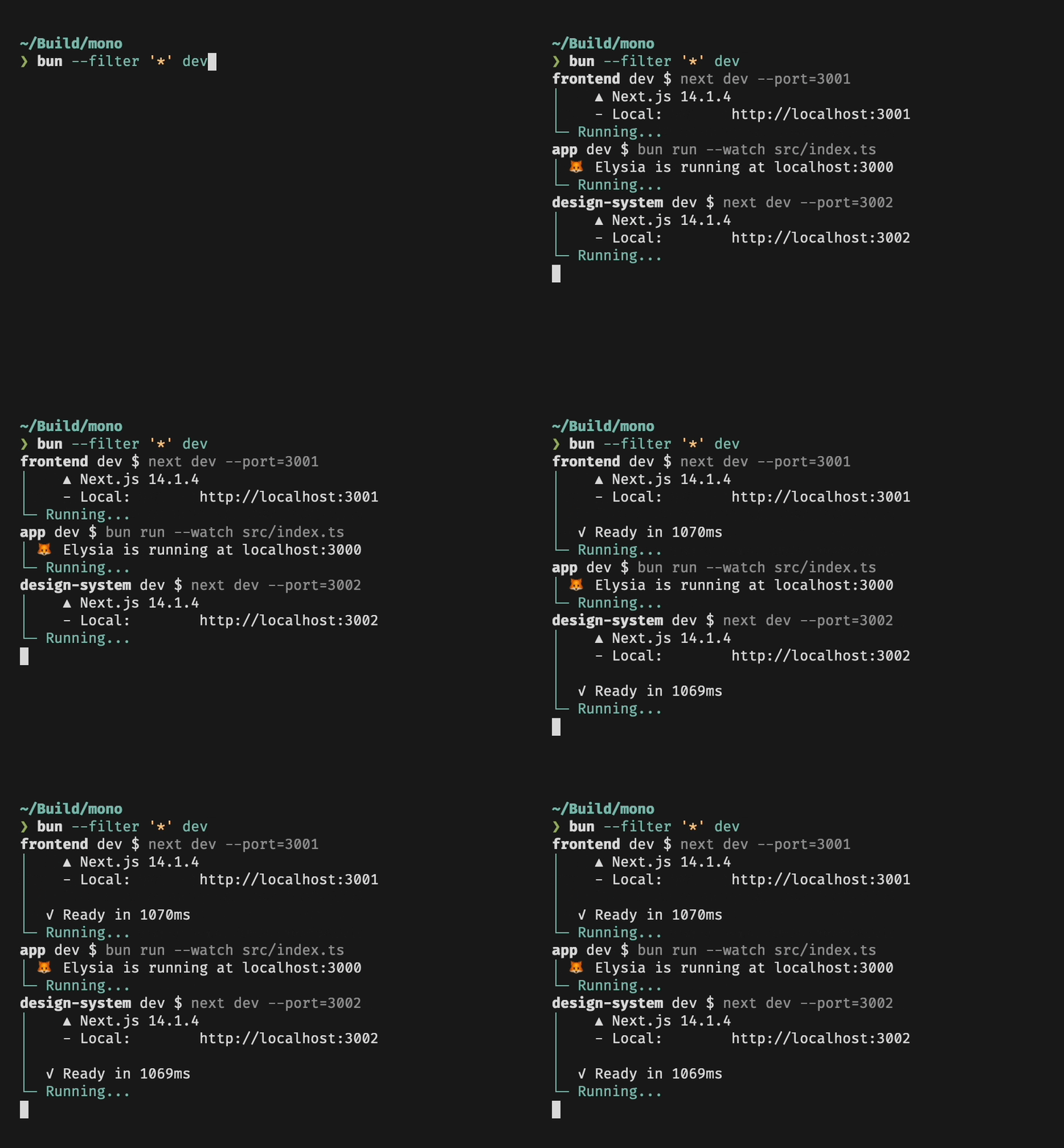
|
|
26
73
|
|
|
27
|
-
|
|
28
|
-
|
|
29
|
-
`--filter` accepts a pattern to match specific packages, either by name or by path. Patterns have full support for glob syntax.
|
|
30
|
-
|
|
31
|
-
### Package Name `--filter <pattern>`
|
|
32
|
-
|
|
33
|
-
Name patterns select packages based on the package name, as specified in `package.json`. For example, if you have packages `pkga`, `pkgb` and `other`, you can match all packages with `*`, only `pkga` and `pkgb` with `pkg*`, and a specific package by providing the full name of the package.
|
|
34
|
-
|
|
35
|
-
### Package Path `--filter ./<glob>`
|
|
36
|
-
|
|
37
|
-
Path patterns are specified by starting the pattern with `./`, and will select all packages in directories that match the pattern. For example, to match all packages in subdirectories of `packages`, you can use `--filter './packages/**'`. To match a package located in `pkgs/foo`, use `--filter ./pkgs/foo`.
|
|
38
|
-
|
|
39
|
-
## Workspaces
|
|
74
|
+
### Running scripts in workspaces
|
|
40
75
|
|
|
41
76
|
Filters respect your [workspace configuration](https://bun.sh/docs/install/workspaces): If you have a `package.json` file that specifies which packages are part of the workspace,
|
|
42
77
|
`--filter` will be restricted to only these packages. Also, in a workspace you can use `--filter` to run scripts in packages that are located anywhere in the workspace:
|
|
@@ -50,8 +85,6 @@ Filters respect your [workspace configuration](https://bun.sh/docs/install/works
|
|
|
50
85
|
bun run --filter foo myscript
|
|
51
86
|
```
|
|
52
87
|
|
|
53
|
-
|
|
88
|
+
### Dependency Order
|
|
54
89
|
|
|
55
90
|
Bun will respect package dependency order when running scripts. Say you have a package `foo` that depends on another package `bar` in your workspace, and both packages have a `build` script. When you run `bun --filter '*' build`, you will notice that `foo` will only start running once `bar` is done.
|
|
56
|
-
|
|
57
|
-
### Cyclic Dependencies
|
package/docs/cli/install.md
CHANGED
|
@@ -81,6 +81,20 @@ Bun supports `"workspaces"` in package.json. For complete documentation refer to
|
|
|
81
81
|
}
|
|
82
82
|
```
|
|
83
83
|
|
|
84
|
+
## Installing dependencies for specific packages
|
|
85
|
+
|
|
86
|
+
In a monorepo, you can install the dependencies for a subset of packages using the `--filter` flag.
|
|
87
|
+
|
|
88
|
+
```bash
|
|
89
|
+
# Install dependencies for all workspaces except `pkg-c`
|
|
90
|
+
$ bun install --filter '!pkg-c'
|
|
91
|
+
|
|
92
|
+
# Install dependencies for only `pkg-a` in `./packages/pkg-a`
|
|
93
|
+
$ bun install --filter './packages/pkg-a'
|
|
94
|
+
```
|
|
95
|
+
|
|
96
|
+
For more information on filtering with `bun install`, refer to [Package Manager > Filtering](https://bun.sh/docs/cli/install#bun-install-and-bun-outdated)
|
|
97
|
+
|
|
84
98
|
## Overrides and resolutions
|
|
85
99
|
|
|
86
100
|
Bun supports npm's `"overrides"` and Yarn's `"resolutions"` in `package.json`. These are mechanisms for specifying a version range for _metadependencies_—the dependencies of your dependencies. Refer to [Package manager > Overrides and resolutions](https://bun.sh/docs/install/overrides) for complete documentation.
|
package/docs/cli/outdated.md
CHANGED
|
@@ -59,3 +59,5 @@ If you want to do the same, but exclude the `./apps/api` workspace:
|
|
|
59
59
|
```sh
|
|
60
60
|
$ bun outdated --filter './apps/*' --filter '!./apps/api'
|
|
61
61
|
```
|
|
62
|
+
|
|
63
|
+
Refer to [Package Manager > Filtering](https://bun.sh/docs/cli/filter#bun-install-and-bun-outdated) for more information on `--filter`.
|
package/docs/cli/run.md
CHANGED
|
@@ -153,7 +153,7 @@ $ bun run --bun vite
|
|
|
153
153
|
|
|
154
154
|
### Filtering
|
|
155
155
|
|
|
156
|
-
|
|
156
|
+
In monorepos containing multiple packages, you can use the `--filter` argument to execute scripts in many packages at once.
|
|
157
157
|
|
|
158
158
|
Use `bun run --filter <name_pattern> <script>` to execute `<script>` in all packages whose name matches `<name_pattern>`.
|
|
159
159
|
For example, if you have subdirectories containing packages named `foo`, `bar` and `baz`, running
|
|
@@ -164,7 +164,7 @@ bun run --filter 'ba*' <script>
|
|
|
164
164
|
|
|
165
165
|
will execute `<script>` in both `bar` and `baz`, but not in `foo`.
|
|
166
166
|
|
|
167
|
-
Find more details in the docs page for [filter](https://bun.sh/docs/cli/filter).
|
|
167
|
+
Find more details in the docs page for [filter](https://bun.sh/docs/cli/filter#running-scripts-with-filter).
|
|
168
168
|
|
|
169
169
|
## `bun run -` to pipe code from stdin
|
|
170
170
|
|
package/docs/install/index.md
CHANGED
|
@@ -143,6 +143,12 @@ To add a package as an optional dependency (`"optionalDependencies"`):
|
|
|
143
143
|
$ bun add --optional lodash
|
|
144
144
|
```
|
|
145
145
|
|
|
146
|
+
To add a package as a peer dependency (`"peerDependencies"`):
|
|
147
|
+
|
|
148
|
+
```bash
|
|
149
|
+
$ bun add --peer @types/bun
|
|
150
|
+
```
|
|
151
|
+
|
|
146
152
|
To install a package globally:
|
|
147
153
|
|
|
148
154
|
```bash
|
package/docs/install/lockfile.md
CHANGED
|
@@ -100,7 +100,7 @@ $ head -n3 bun.lock
|
|
|
100
100
|
"workspaces": {
|
|
101
101
|
```
|
|
102
102
|
|
|
103
|
-
Once `bun.lock` is generated, Bun will use it for all subsequent installs and updates through commands that read and modify the lockfile. If both lockfiles exist, `bun.lock` will be
|
|
103
|
+
Once `bun.lock` is generated, Bun will use it for all subsequent installs and updates through commands that read and modify the lockfile. If both lockfiles exist, `bun.lock` will be chosen over `bun.lockb`.
|
|
104
104
|
|
|
105
105
|
Bun v1.2.0 will switch the default lockfile format to `bun.lock`.
|
|
106
106
|
|
|
@@ -53,6 +53,16 @@ Each workspace has it's own `package.json`. When referencing other packages in t
|
|
|
53
53
|
}
|
|
54
54
|
```
|
|
55
55
|
|
|
56
|
+
`bun install` will install dependencies for all workspaces in the monorepo, de-duplicating packages if possible. If you only want to install dependencies for specific workspaces, you can use the `--filter` flag.
|
|
57
|
+
|
|
58
|
+
```bash
|
|
59
|
+
# Install dependencies for all workspaces starting with `pkg-` except for `pkg-c`
|
|
60
|
+
$ bun install --filter "pkg-*" --filter "!pkg-c"
|
|
61
|
+
|
|
62
|
+
# Paths can also be used. This is equivalent to the command above.
|
|
63
|
+
$ bun install --filter "./packages/pkg-*" --filter "!pkg-c" # or --filter "!./packages/pkg-c"
|
|
64
|
+
```
|
|
65
|
+
|
|
56
66
|
Workspaces have a couple major benefits.
|
|
57
67
|
|
|
58
68
|
- **Code can be split into logical parts.** If one package relies on another, you can simply add it as a dependency in `package.json`. If package `b` depends on `a`, `bun install` will install your local `packages/a` directory into `node_modules` instead of downloading it from the npm registry.
|
|
@@ -341,7 +341,7 @@ The table below lists all globals implemented by Node.js and Bun's current compa
|
|
|
341
341
|
|
|
342
342
|
### [`process`](https://nodejs.org/api/process.html)
|
|
343
343
|
|
|
344
|
-
🟡 Missing `
|
|
344
|
+
🟡 Missing `initgroups` `allowedNodeEnvironmentFlags` `getActiveResourcesInfo` `setActiveResourcesInfo` `moduleLoadList` `setSourceMapsEnabled`. `process.binding` is partially implemented.
|
|
345
345
|
|
|
346
346
|
### [`queueMicrotask()`](https://developer.mozilla.org/en-US/docs/Web/API/queueMicrotask)
|
|
347
347
|
|
package/docs/runtime/shell.md
CHANGED
|
@@ -102,7 +102,7 @@ The default handling of non-zero exit codes can be configured by calling `.nothr
|
|
|
102
102
|
import { $ } from "bun";
|
|
103
103
|
// shell promises will not throw, meaning you will have to
|
|
104
104
|
// check for `exitCode` manually on every shell command.
|
|
105
|
-
$.nothrow(); //
|
|
105
|
+
$.nothrow(); // equivalent to $.throws(false)
|
|
106
106
|
|
|
107
107
|
// default behavior, non-zero exit codes will throw an error
|
|
108
108
|
$.throws(true);
|
package/package.json
CHANGED
package/test.d.ts
CHANGED
|
@@ -1104,22 +1104,24 @@ declare module "bun:test" {
|
|
|
1104
1104
|
toContainAllValues(expected: unknown): void;
|
|
1105
1105
|
|
|
1106
1106
|
/**
|
|
1107
|
-
|
|
1108
|
-
|
|
1109
|
-
|
|
1110
|
-
|
|
1111
|
-
|
|
1112
|
-
|
|
1113
|
-
|
|
1114
|
-
|
|
1115
|
-
|
|
1116
|
-
|
|
1117
|
-
|
|
1118
|
-
|
|
1107
|
+
* Asserts that an `object` contain any provided value.
|
|
1108
|
+
*
|
|
1109
|
+
* The value must be an object
|
|
1110
|
+
*
|
|
1111
|
+
* @example
|
|
1112
|
+
* const o = { a: 'foo', b: 'bar', c: 'baz' };
|
|
1113
|
+
* expect(o).toContainAnyValues(['qux', 'foo']);
|
|
1114
|
+
* expect(o).toContainAnyValues(['qux', 'bar']);
|
|
1115
|
+
* expect(o).toContainAnyValues(['qux', 'baz']);
|
|
1116
|
+
* expect(o).not.toContainAnyValues(['qux']);
|
|
1117
|
+
* @param expected the expected value
|
|
1118
|
+
*/
|
|
1119
1119
|
toContainAnyValues(expected: unknown): void;
|
|
1120
1120
|
|
|
1121
1121
|
/**
|
|
1122
1122
|
* Asserts that an `object` contains all the provided keys.
|
|
1123
|
+
*
|
|
1124
|
+
* @example
|
|
1123
1125
|
* expect({ a: 'foo', b: 'bar', c: 'baz' }).toContainKeys(['a', 'b']);
|
|
1124
1126
|
* expect({ a: 'foo', b: 'bar', c: 'baz' }).toContainKeys(['a', 'b', 'c']);
|
|
1125
1127
|
* expect({ a: 'foo', b: 'bar', c: 'baz' }).not.toContainKeys(['a', 'b', 'e']);
|