bun-types 1.1.37-canary.20241124T140524 → 1.1.37
This diff represents the content of publicly available package versions that have been released to one of the supported registries. The information contained in this diff is provided for informational purposes only and reflects changes between package versions as they appear in their respective public registries.
- package/docs/api/binary-data.md +1028 -0
- package/docs/api/cc.md +197 -0
- package/docs/api/color.md +262 -0
- package/docs/api/console.md +38 -0
- package/docs/api/dns.md +113 -0
- package/docs/api/fetch.md +308 -0
- package/docs/api/ffi.md +536 -0
- package/docs/api/file-io.md +358 -0
- package/docs/api/file-system-router.md +112 -0
- package/docs/api/file.md +19 -0
- package/docs/api/glob.md +157 -0
- package/docs/api/globals.md +387 -0
- package/docs/api/hashing.md +314 -0
- package/docs/api/html-rewriter.md +31 -0
- package/docs/api/http.md +661 -0
- package/docs/api/import-meta.md +69 -0
- package/docs/api/node-api.md +16 -0
- package/docs/api/semver.md +52 -0
- package/docs/api/spawn.md +441 -0
- package/docs/api/sqlite.md +692 -0
- package/docs/api/streams.md +214 -0
- package/docs/api/tcp.md +221 -0
- package/docs/api/test.md +1 -0
- package/docs/api/transpiler.md +274 -0
- package/docs/api/udp.md +125 -0
- package/docs/api/utils.md +773 -0
- package/docs/api/websockets.md +547 -0
- package/docs/api/workers.md +230 -0
- package/docs/benchmarks.md +120 -0
- package/docs/bun-flavored-toml.md +42 -0
- package/docs/bundler/executables.md +291 -0
- package/docs/bundler/index.md +1543 -0
- package/docs/bundler/intro.md +75 -0
- package/docs/bundler/loaders.md +288 -0
- package/docs/bundler/macros.md +327 -0
- package/docs/bundler/plugins.md +30 -0
- package/docs/bundler/vs-esbuild.md +1127 -0
- package/docs/cli/add.md +163 -0
- package/docs/cli/bun-completions.md +3 -0
- package/docs/cli/bun-create.md +254 -0
- package/docs/cli/bun-dev.md +21 -0
- package/docs/cli/bun-install.md +255 -0
- package/docs/cli/bun-upgrade.md +39 -0
- package/docs/cli/bunx.md +80 -0
- package/docs/cli/filter.md +57 -0
- package/docs/cli/init.md +40 -0
- package/docs/cli/install.md +205 -0
- package/docs/cli/link.md +38 -0
- package/docs/cli/outdated.md +61 -0
- package/docs/cli/patch-commit.md +9 -0
- package/docs/cli/pm.md +150 -0
- package/docs/cli/publish.md +107 -0
- package/docs/cli/remove.md +5 -0
- package/docs/cli/run.md +196 -0
- package/docs/cli/test.md +247 -0
- package/docs/cli/unlink.md +7 -0
- package/docs/cli/update.md +34 -0
- package/docs/contributing/upgrading-webkit.md +57 -0
- package/docs/ecosystem/elysia.md +24 -0
- package/docs/ecosystem/express.md +37 -0
- package/docs/ecosystem/hono.md +18 -0
- package/docs/ecosystem/react.md +65 -0
- package/docs/ecosystem/stric.md +37 -0
- package/docs/guides/binary/arraybuffer-to-array.md +27 -0
- package/docs/guides/binary/arraybuffer-to-blob.md +24 -0
- package/docs/guides/binary/arraybuffer-to-buffer.md +25 -0
- package/docs/guides/binary/arraybuffer-to-string.md +15 -0
- package/docs/guides/binary/arraybuffer-to-typedarray.md +39 -0
- package/docs/guides/binary/blob-to-arraybuffer.md +14 -0
- package/docs/guides/binary/blob-to-dataview.md +14 -0
- package/docs/guides/binary/blob-to-stream.md +14 -0
- package/docs/guides/binary/blob-to-string.md +15 -0
- package/docs/guides/binary/blob-to-typedarray.md +14 -0
- package/docs/guides/binary/buffer-to-arraybuffer.md +14 -0
- package/docs/guides/binary/buffer-to-blob.md +14 -0
- package/docs/guides/binary/buffer-to-readablestream.md +41 -0
- package/docs/guides/binary/buffer-to-string.md +25 -0
- package/docs/guides/binary/buffer-to-typedarray.md +14 -0
- package/docs/guides/binary/dataview-to-string.md +15 -0
- package/docs/guides/binary/typedarray-to-arraybuffer.md +25 -0
- package/docs/guides/binary/typedarray-to-blob.md +16 -0
- package/docs/guides/binary/typedarray-to-buffer.md +14 -0
- package/docs/guides/binary/typedarray-to-dataview.md +14 -0
- package/docs/guides/binary/typedarray-to-readablestream.md +41 -0
- package/docs/guides/binary/typedarray-to-string.md +16 -0
- package/docs/guides/ecosystem/astro.md +72 -0
- package/docs/guides/ecosystem/discordjs.md +77 -0
- package/docs/guides/ecosystem/docker.md +140 -0
- package/docs/guides/ecosystem/drizzle.md +185 -0
- package/docs/guides/ecosystem/edgedb.md +228 -0
- package/docs/guides/ecosystem/elysia.md +31 -0
- package/docs/guides/ecosystem/express.md +40 -0
- package/docs/guides/ecosystem/hono.md +39 -0
- package/docs/guides/ecosystem/mongoose.md +87 -0
- package/docs/guides/ecosystem/neon-drizzle.md +220 -0
- package/docs/guides/ecosystem/neon-serverless-postgres.md +55 -0
- package/docs/guides/ecosystem/nextjs.md +38 -0
- package/docs/guides/ecosystem/nuxt.md +56 -0
- package/docs/guides/ecosystem/pm2.md +57 -0
- package/docs/guides/ecosystem/prisma.md +140 -0
- package/docs/guides/ecosystem/qwik.md +107 -0
- package/docs/guides/ecosystem/react.md +49 -0
- package/docs/guides/ecosystem/remix.md +78 -0
- package/docs/guides/ecosystem/render.md +79 -0
- package/docs/guides/ecosystem/sentry.md +52 -0
- package/docs/guides/ecosystem/solidstart.md +58 -0
- package/docs/guides/ecosystem/ssr-react.md +51 -0
- package/docs/guides/ecosystem/stric.md +55 -0
- package/docs/guides/ecosystem/sveltekit.md +125 -0
- package/docs/guides/ecosystem/systemd.md +113 -0
- package/docs/guides/ecosystem/vite.md +70 -0
- package/docs/guides/http/cluster.md +66 -0
- package/docs/guides/http/fetch-unix.md +33 -0
- package/docs/guides/http/fetch.md +24 -0
- package/docs/guides/http/file-uploads.md +94 -0
- package/docs/guides/http/hot.md +22 -0
- package/docs/guides/http/proxy.md +24 -0
- package/docs/guides/http/server.md +46 -0
- package/docs/guides/http/simple.md +18 -0
- package/docs/guides/http/stream-file.md +48 -0
- package/docs/guides/http/stream-iterator.md +47 -0
- package/docs/guides/http/stream-node-streams-in-bun.md +20 -0
- package/docs/guides/http/tls.md +30 -0
- package/docs/guides/install/add-dev.md +26 -0
- package/docs/guides/install/add-git.md +36 -0
- package/docs/guides/install/add-optional.md +25 -0
- package/docs/guides/install/add-peer.md +17 -0
- package/docs/guides/install/add-tarball.md +33 -0
- package/docs/guides/install/add.md +42 -0
- package/docs/guides/install/azure-artifacts.md +73 -0
- package/docs/guides/install/cicd.md +41 -0
- package/docs/guides/install/custom-registry.md +30 -0
- package/docs/guides/install/from-npm-install-to-bun-install.md +214 -0
- package/docs/guides/install/git-diff-bun-lockfile.md +38 -0
- package/docs/guides/install/jfrog-artifactory.md +28 -0
- package/docs/guides/install/npm-alias.md +23 -0
- package/docs/guides/install/registry-scope.md +36 -0
- package/docs/guides/install/trusted.md +48 -0
- package/docs/guides/install/workspaces.md +70 -0
- package/docs/guides/install/yarnlock.md +42 -0
- package/docs/guides/process/argv.md +57 -0
- package/docs/guides/process/ctrl-c.md +16 -0
- package/docs/guides/process/ipc.md +66 -0
- package/docs/guides/process/nanoseconds.md +13 -0
- package/docs/guides/process/os-signals.md +39 -0
- package/docs/guides/process/spawn-stderr.md +31 -0
- package/docs/guides/process/spawn-stdout.md +26 -0
- package/docs/guides/process/spawn.md +41 -0
- package/docs/guides/process/stdin.md +54 -0
- package/docs/guides/read-file/arraybuffer.md +28 -0
- package/docs/guides/read-file/buffer.md +19 -0
- package/docs/guides/read-file/exists.md +16 -0
- package/docs/guides/read-file/json.md +17 -0
- package/docs/guides/read-file/mime.md +20 -0
- package/docs/guides/read-file/stream.md +26 -0
- package/docs/guides/read-file/string.md +22 -0
- package/docs/guides/read-file/uint8array.md +21 -0
- package/docs/guides/read-file/watch.md +68 -0
- package/docs/guides/runtime/cicd.md +43 -0
- package/docs/guides/runtime/define-constant.md +145 -0
- package/docs/guides/runtime/import-html.md +15 -0
- package/docs/guides/runtime/import-json.md +44 -0
- package/docs/guides/runtime/import-toml.md +30 -0
- package/docs/guides/runtime/read-env.md +32 -0
- package/docs/guides/runtime/set-env.md +37 -0
- package/docs/guides/runtime/shell.md +40 -0
- package/docs/guides/runtime/timezone.md +35 -0
- package/docs/guides/runtime/tsconfig-paths.md +29 -0
- package/docs/guides/runtime/typescript.md +47 -0
- package/docs/guides/runtime/vscode-debugger.md +47 -0
- package/docs/guides/runtime/web-debugger.md +82 -0
- package/docs/guides/streams/node-readable-to-arraybuffer.md +11 -0
- package/docs/guides/streams/node-readable-to-blob.md +11 -0
- package/docs/guides/streams/node-readable-to-json.md +12 -0
- package/docs/guides/streams/node-readable-to-string.md +12 -0
- package/docs/guides/streams/node-readable-to-uint8array.md +11 -0
- package/docs/guides/streams/to-array.md +14 -0
- package/docs/guides/streams/to-arraybuffer.md +14 -0
- package/docs/guides/streams/to-blob.md +14 -0
- package/docs/guides/streams/to-buffer.md +15 -0
- package/docs/guides/streams/to-json.md +14 -0
- package/docs/guides/streams/to-string.md +14 -0
- package/docs/guides/streams/to-typedarray.md +22 -0
- package/docs/guides/test/bail.md +22 -0
- package/docs/guides/test/coverage-threshold.md +60 -0
- package/docs/guides/test/coverage.md +44 -0
- package/docs/guides/test/happy-dom.md +68 -0
- package/docs/guides/test/migrate-from-jest.md +110 -0
- package/docs/guides/test/mock-clock.md +48 -0
- package/docs/guides/test/mock-functions.md +68 -0
- package/docs/guides/test/rerun-each.md +14 -0
- package/docs/guides/test/run-tests.md +111 -0
- package/docs/guides/test/skip-tests.md +39 -0
- package/docs/guides/test/snapshot.md +99 -0
- package/docs/guides/test/spy-on.md +46 -0
- package/docs/guides/test/testing-library.md +87 -0
- package/docs/guides/test/timeout.md +15 -0
- package/docs/guides/test/todo-tests.md +67 -0
- package/docs/guides/test/update-snapshots.md +50 -0
- package/docs/guides/test/watch-mode.md +19 -0
- package/docs/guides/util/base64.md +15 -0
- package/docs/guides/util/deep-equals.md +39 -0
- package/docs/guides/util/deflate.md +18 -0
- package/docs/guides/util/detect-bun.md +23 -0
- package/docs/guides/util/entrypoint.md +17 -0
- package/docs/guides/util/escape-html.md +22 -0
- package/docs/guides/util/file-url-to-path.md +14 -0
- package/docs/guides/util/gzip.md +18 -0
- package/docs/guides/util/hash-a-password.md +54 -0
- package/docs/guides/util/import-meta-dir.md +13 -0
- package/docs/guides/util/import-meta-file.md +13 -0
- package/docs/guides/util/import-meta-path.md +13 -0
- package/docs/guides/util/main.md +32 -0
- package/docs/guides/util/path-to-file-url.md +14 -0
- package/docs/guides/util/sleep.md +22 -0
- package/docs/guides/util/version.md +21 -0
- package/docs/guides/util/which-path-to-executable-bin.md +15 -0
- package/docs/guides/websocket/compression.md +31 -0
- package/docs/guides/websocket/context.md +72 -0
- package/docs/guides/websocket/pubsub.md +38 -0
- package/docs/guides/websocket/simple.md +33 -0
- package/docs/guides/write-file/append.md +52 -0
- package/docs/guides/write-file/basic.md +44 -0
- package/docs/guides/write-file/blob.md +28 -0
- package/docs/guides/write-file/cat.md +17 -0
- package/docs/guides/write-file/file-cp.md +16 -0
- package/docs/guides/write-file/filesink.md +52 -0
- package/docs/guides/write-file/response.md +17 -0
- package/docs/guides/write-file/stdout.md +21 -0
- package/docs/guides/write-file/stream.md +17 -0
- package/docs/guides/write-file/unlink.md +23 -0
- package/docs/index.md +77 -0
- package/docs/install/cache.md +57 -0
- package/docs/install/index.md +202 -0
- package/docs/install/lifecycle.md +46 -0
- package/docs/install/lockfile.md +90 -0
- package/docs/install/npmrc.md +75 -0
- package/docs/install/overrides.md +73 -0
- package/docs/install/patch.md +57 -0
- package/docs/install/registries.md +30 -0
- package/docs/install/workspaces.md +70 -0
- package/docs/installation.md +289 -0
- package/docs/project/benchmarking.md +203 -0
- package/docs/project/building-windows.md +162 -0
- package/docs/project/internals/build-process-for-ci.md +75 -0
- package/docs/project/roadmap.md +87 -0
- package/docs/quickstart.md +144 -0
- package/docs/runtime/autoimport.md +94 -0
- package/docs/runtime/bun-apis.md +129 -0
- package/docs/runtime/bunfig.md +532 -0
- package/docs/runtime/debugger.md +325 -0
- package/docs/runtime/env.md +214 -0
- package/docs/runtime/hot.md +139 -0
- package/docs/runtime/index.md +309 -0
- package/docs/runtime/jsx.md +326 -0
- package/docs/runtime/loaders.md +127 -0
- package/docs/runtime/modules.md +298 -0
- package/docs/runtime/nodejs-apis.md +456 -0
- package/docs/runtime/plugins.md +605 -0
- package/docs/runtime/shell.md +537 -0
- package/docs/runtime/typescript.md +60 -0
- package/docs/runtime/web-apis.md +128 -0
- package/docs/test/coverage.md +91 -0
- package/docs/test/dom.md +75 -0
- package/docs/test/hot.md +15 -0
- package/docs/test/lifecycle.md +81 -0
- package/docs/test/mocks.md +236 -0
- package/docs/test/snapshots.md +15 -0
- package/docs/test/time.md +106 -0
- package/docs/test/writing.md +547 -0
- package/docs/typescript.md +51 -0
- package/package.json +5 -4
|
@@ -0,0 +1,52 @@
|
|
|
1
|
+
---
|
|
2
|
+
name: Write a file incrementally
|
|
3
|
+
---
|
|
4
|
+
|
|
5
|
+
Bun provides an API for incrementally writing to a file. This is useful for writing large files, or for writing to a file over a long period of time.
|
|
6
|
+
|
|
7
|
+
Call `.writer()` on a `BunFile` to retrieve a `FileSink` instance. This instance can be used to efficiently buffer data and periodically "flush" it to disk. You can write & flush many times.
|
|
8
|
+
|
|
9
|
+
```ts
|
|
10
|
+
const file = Bun.file("/path/to/file.txt");
|
|
11
|
+
const writer = file.writer();
|
|
12
|
+
|
|
13
|
+
writer.write("lorem");
|
|
14
|
+
writer.write("ipsum");
|
|
15
|
+
writer.write("dolor");
|
|
16
|
+
|
|
17
|
+
writer.flush();
|
|
18
|
+
|
|
19
|
+
// continue writing & flushing
|
|
20
|
+
```
|
|
21
|
+
|
|
22
|
+
---
|
|
23
|
+
|
|
24
|
+
The `.write()` method can accept strings or binary data.
|
|
25
|
+
|
|
26
|
+
```ts
|
|
27
|
+
w.write("hello");
|
|
28
|
+
w.write(Buffer.from("there"));
|
|
29
|
+
w.write(new Uint8Array([0, 255, 128]));
|
|
30
|
+
writer.flush();
|
|
31
|
+
```
|
|
32
|
+
|
|
33
|
+
---
|
|
34
|
+
|
|
35
|
+
The `FileSink` will also auto-flush when its internal buffer is full. You can configure the buffer size with the `highWaterMark` option.
|
|
36
|
+
|
|
37
|
+
```ts
|
|
38
|
+
const file = Bun.file("/path/to/file.txt");
|
|
39
|
+
const writer = file.writer({ highWaterMark: 1024 * 1024 }); // 1MB
|
|
40
|
+
```
|
|
41
|
+
|
|
42
|
+
---
|
|
43
|
+
|
|
44
|
+
When you're done writing to the file, call `.end()` to auto-flush the buffer and close the file.
|
|
45
|
+
|
|
46
|
+
```ts
|
|
47
|
+
writer.end();
|
|
48
|
+
```
|
|
49
|
+
|
|
50
|
+
---
|
|
51
|
+
|
|
52
|
+
Full documentation: [FileSink](https://bun.sh/docs/api/file-io#incremental-writing-with-filesink).
|
|
@@ -0,0 +1,17 @@
|
|
|
1
|
+
---
|
|
2
|
+
name: Write a Response to a file
|
|
3
|
+
---
|
|
4
|
+
|
|
5
|
+
This code snippet writes a `Response` to disk at a particular path. Bun will consume the `Response` body according to its `Content-Type` header.
|
|
6
|
+
|
|
7
|
+
It uses the fast [`Bun.write()`](https://bun.sh/docs/api/file-io#writing-files-bun-write) API to efficiently write data to disk. The first argument is a _destination_, like an absolute path or `BunFile` instance. The second argument is the _data_ to write.
|
|
8
|
+
|
|
9
|
+
```ts
|
|
10
|
+
const result = await fetch("https://bun.sh");
|
|
11
|
+
const path = "./file.txt";
|
|
12
|
+
await Bun.write(path, result);
|
|
13
|
+
```
|
|
14
|
+
|
|
15
|
+
---
|
|
16
|
+
|
|
17
|
+
See [Docs > API > File I/O](https://bun.sh/docs/api/file-io#writing-files-bun-write) for complete documentation of `Bun.write()`.
|
|
@@ -0,0 +1,21 @@
|
|
|
1
|
+
---
|
|
2
|
+
name: Write to stdout
|
|
3
|
+
---
|
|
4
|
+
|
|
5
|
+
The `console.log` function writes to `stdout`. It will automatically append a line break at the end of the printed data.
|
|
6
|
+
|
|
7
|
+
```ts
|
|
8
|
+
console.log("Lorem ipsum");
|
|
9
|
+
```
|
|
10
|
+
|
|
11
|
+
---
|
|
12
|
+
|
|
13
|
+
For more advanced use cases, Bun exposes `stdout` as a `BunFile` via the `Bun.stdout` property. This can be used as a destination for [`Bun.write()`](https://bun.sh/docs/api/file-io#writing-files-bun-write).
|
|
14
|
+
|
|
15
|
+
```ts
|
|
16
|
+
await Bun.write(Bun.stdout, "Lorem ipsum");
|
|
17
|
+
```
|
|
18
|
+
|
|
19
|
+
---
|
|
20
|
+
|
|
21
|
+
See [Docs > API > File I/O](https://bun.sh/docs/api/file-io#writing-files-bun-write) for complete documentation of `Bun.write()`.
|
|
@@ -0,0 +1,17 @@
|
|
|
1
|
+
---
|
|
2
|
+
name: Write a ReadableStream to a file
|
|
3
|
+
---
|
|
4
|
+
|
|
5
|
+
To write a `ReadableStream` to disk, first create a `Response` instance from the stream. This `Response` can then be written to disk using [`Bun.write()`](https://bun.sh/docs/api/file-io#writing-files-bun-write).
|
|
6
|
+
|
|
7
|
+
```ts
|
|
8
|
+
const stream: ReadableStream = ...;
|
|
9
|
+
const path = "./file.txt";
|
|
10
|
+
const response = new Response(stream);
|
|
11
|
+
|
|
12
|
+
await Bun.write(path, response);
|
|
13
|
+
```
|
|
14
|
+
|
|
15
|
+
---
|
|
16
|
+
|
|
17
|
+
See [Docs > API > File I/O](https://bun.sh/docs/api/file-io#writing-files-bun-write) for complete documentation of `Bun.write()`.
|
|
@@ -0,0 +1,23 @@
|
|
|
1
|
+
---
|
|
2
|
+
name: Delete a file
|
|
3
|
+
---
|
|
4
|
+
|
|
5
|
+
To synchronously delete a file with Bun, use the `unlinkSync` function from the [`node:fs`](https://nodejs.org/api/fs.html#fs_fs_unlink_path_callback) module. (Currently, there is no `Bun` API for deleting files.)
|
|
6
|
+
|
|
7
|
+
```ts
|
|
8
|
+
import { unlinkSync } from "node:fs";
|
|
9
|
+
|
|
10
|
+
const path = "/path/to/file.txt";
|
|
11
|
+
unlinkSync(path);
|
|
12
|
+
```
|
|
13
|
+
|
|
14
|
+
---
|
|
15
|
+
|
|
16
|
+
To remove a file asynchronously, use the `unlink` function from the [`node:fs/promises`](https://nodejs.org/api/fs.html#fs_fspromises_unlink_path) module.
|
|
17
|
+
|
|
18
|
+
```ts
|
|
19
|
+
import { unlink } from "node:fs/promises";
|
|
20
|
+
|
|
21
|
+
const path = "/path/to/file.txt";
|
|
22
|
+
await unlink(path);
|
|
23
|
+
```
|
package/docs/index.md
ADDED
|
@@ -0,0 +1,77 @@
|
|
|
1
|
+
Bun is an all-in-one toolkit for JavaScript and TypeScript apps. It ships as a single executable called `bun`.
|
|
2
|
+
|
|
3
|
+
At its core is the _Bun runtime_, a fast JavaScript runtime designed as a drop-in replacement for Node.js. It's written in Zig and powered by JavaScriptCore under the hood, dramatically reducing startup times and memory usage.
|
|
4
|
+
|
|
5
|
+
```bash
|
|
6
|
+
$ bun run index.tsx # TS and JSX supported out of the box
|
|
7
|
+
```
|
|
8
|
+
|
|
9
|
+
The `bun` command-line tool also implements a test runner, script runner, and Node.js-compatible package manager, all significantly faster than existing tools and usable in existing Node.js projects with little to no changes necessary.
|
|
10
|
+
|
|
11
|
+
```bash
|
|
12
|
+
$ bun run start # run the `start` script
|
|
13
|
+
$ bun install <pkg> # install a package
|
|
14
|
+
$ bun build ./index.tsx # bundle a project for browsers
|
|
15
|
+
$ bun test # run tests
|
|
16
|
+
$ bunx cowsay 'Hello, world!' # execute a package
|
|
17
|
+
```
|
|
18
|
+
|
|
19
|
+
Get started with one of the quick links below, or read on to learn more about Bun.
|
|
20
|
+
|
|
21
|
+
{% block className="gap-2 grid grid-flow-row grid-cols-1 md:grid-cols-2" %}
|
|
22
|
+
{% arrowbutton href="/docs/installation" text="Install Bun" /%}
|
|
23
|
+
{% arrowbutton href="/docs/quickstart" text="Do the quickstart" /%}
|
|
24
|
+
{% arrowbutton href="/docs/cli/install" text="Install a package" /%}
|
|
25
|
+
{% arrowbutton href="/docs/cli/bun-create" text="Use a project template" /%}
|
|
26
|
+
{% arrowbutton href="/docs/bundler" text="Bundle code for production" /%}
|
|
27
|
+
{% arrowbutton href="/docs/api/http" text="Build an HTTP server" /%}
|
|
28
|
+
{% arrowbutton href="/docs/api/websockets" text="Build a Websocket server" /%}
|
|
29
|
+
{% arrowbutton href="/docs/api/file-io" text="Read and write files" /%}
|
|
30
|
+
{% arrowbutton href="/docs/api/sqlite" text="Run SQLite queries" /%}
|
|
31
|
+
{% arrowbutton href="/docs/cli/test" text="Write and run tests" /%}
|
|
32
|
+
{% /block %}
|
|
33
|
+
|
|
34
|
+
## What is a runtime?
|
|
35
|
+
|
|
36
|
+
JavaScript (or, more formally, ECMAScript) is just a _specification_ for a programming language. Anyone can write a JavaScript _engine_ that ingests a valid JavaScript program and executes it. The two most popular engines in use today are V8 (developed by Google)
|
|
37
|
+
and JavaScriptCore (developed by Apple). Both are open source.
|
|
38
|
+
|
|
39
|
+
But most JavaScript programs don't run in a vacuum. They need a way to access the outside world to perform useful tasks. This is where _runtimes_ come in. They implement additional APIs that are then made available to the JavaScript programs they execute.
|
|
40
|
+
|
|
41
|
+
### Browsers
|
|
42
|
+
|
|
43
|
+
Notably, browsers ship with JavaScript runtimes that implement a set of Web-specific APIs that are exposed via the global `window` object. Any JavaScript code executed by the browser can use these APIs to implement interactive or dynamic behavior in the context of the current webpage.
|
|
44
|
+
|
|
45
|
+
<!-- JavaScript runtime that exposes JavaScript engines are designed to run "vanilla" JavaScript programs, but it's often JavaScript _runtimes_ use an engine internally to execute the code and implement additional APIs that are then made available to executed programs.
|
|
46
|
+
JavaScript was [initially designed](https://en.wikipedia.org/wiki/JavaScript) as a language to run in web browsers to implement interactivity and dynamic behavior in web pages. Browsers are the first JavaScript runtimes. JavaScript programs that are executed in browsers have access to a set of Web-specific global APIs on the `window` object. -->
|
|
47
|
+
|
|
48
|
+
### Node.js
|
|
49
|
+
|
|
50
|
+
Similarly, Node.js is a JavaScript runtime that can be used in non-browser environments, like servers. JavaScript programs executed by Node.js have access to a set of Node.js-specific [globals](https://nodejs.org/api/globals.html) like `Buffer`, `process`, and `__dirname` in addition to built-in modules for performing OS-level tasks like reading/writing files (`node:fs`) and networking (`node:net`, `node:http`). Node.js also implements a CommonJS-based module system and resolution algorithm that pre-dates JavaScript's native module system.
|
|
51
|
+
|
|
52
|
+
<!-- Bun.js prefers Web API compatibility instead of designing new APIs when possible. Bun.js also implements some Node.js APIs. -->
|
|
53
|
+
|
|
54
|
+
Bun is designed as a faster, leaner, more modern replacement for Node.js.
|
|
55
|
+
|
|
56
|
+
<!-- ## Why a new runtime?
|
|
57
|
+
|
|
58
|
+
Bun is designed as a faster, leaner, more modern replacement for Node.js. Node.js is burdened by ingrained performance issues, backwards compatibility concerns, and slow development velocity—inevitable issues for a project of its age and magnitude. -->
|
|
59
|
+
|
|
60
|
+
## Design goals
|
|
61
|
+
|
|
62
|
+
Bun is designed from the ground-up with today's JavaScript ecosystem in mind.
|
|
63
|
+
|
|
64
|
+
- **Speed**. Bun processes start [4x faster than Node.js](https://twitter.com/jarredsumner/status/1499225725492076544) currently (try it yourself!)
|
|
65
|
+
- **TypeScript & JSX support**. You can directly execute `.jsx`, `.ts`, and `.tsx` files; Bun's transpiler converts these to vanilla JavaScript before execution.
|
|
66
|
+
- **ESM & CommonJS compatibility**. The world is moving towards ES modules (ESM), but millions of packages on npm still require CommonJS. Bun recommends ES modules, but supports CommonJS.
|
|
67
|
+
- **Web-standard APIs**. Bun implements standard Web APIs like `fetch`, `WebSocket`, and `ReadableStream`. Bun is powered by the JavaScriptCore engine, which is developed by Apple for Safari, so some APIs like [`Headers`](https://developer.mozilla.org/en-US/docs/Web/API/Headers) and [`URL`](https://developer.mozilla.org/en-US/docs/Web/API/URL) directly use [Safari's implementation](https://github.com/oven-sh/bun/blob/HEAD/src/bun.js/bindings/webcore/JSFetchHeaders.cpp).
|
|
68
|
+
- **Node.js compatibility**. In addition to supporting Node-style module resolution, Bun aims for full compatibility with built-in Node.js globals (`process`, `Buffer`) and modules (`path`, `fs`, `http`, etc.) _This is an ongoing effort that is not complete._ Refer to the [compatibility page](https://bun.sh/docs/runtime/nodejs-apis) for the current status.
|
|
69
|
+
|
|
70
|
+
Bun is more than a runtime. The long-term goal is to be a cohesive, infrastructural toolkit for building apps with JavaScript/TypeScript, including a package manager, transpiler, bundler, script runner, test runner, and more.
|
|
71
|
+
|
|
72
|
+
<!-- - tsconfig.json `"paths"` is natively supported, along with `"exports"` in package.json
|
|
73
|
+
- `fs`, `path`, and `process` from Node.js are partially implemented
|
|
74
|
+
- Web APIs like [`fetch`](https://developer.mozilla.org/en-US/docs/Web/API/fetch), [`Response`](https://developer.mozilla.org/en-US/docs/Web/API/Response), [`URL`](https://developer.mozilla.org/en-US/docs/Web/API/URL) and more are built-in
|
|
75
|
+
- [`HTMLRewriter`](https://developers.cloudflare.com/workers/runtime-apis/html-rewriter/) makes it easy to transform HTML in Bun.js
|
|
76
|
+
- `.env` files automatically load into `process.env` and `Bun.env`
|
|
77
|
+
- top level await -->
|
|
@@ -0,0 +1,57 @@
|
|
|
1
|
+
All packages downloaded from the registry are stored in a global cache at `~/.bun/install/cache`. They are stored in subdirectories named like `${name}@${version}`, so multiple versions of a package can be cached.
|
|
2
|
+
|
|
3
|
+
{% details summary="Configuring cache behavior (bunfig.toml)" %}
|
|
4
|
+
|
|
5
|
+
```toml
|
|
6
|
+
[install.cache]
|
|
7
|
+
# the directory to use for the cache
|
|
8
|
+
dir = "~/.bun/install/cache"
|
|
9
|
+
|
|
10
|
+
# when true, don't load from the global cache.
|
|
11
|
+
# Bun may still write to node_modules/.cache
|
|
12
|
+
disable = false
|
|
13
|
+
|
|
14
|
+
# when true, always resolve the latest versions from the registry
|
|
15
|
+
disableManifest = false
|
|
16
|
+
```
|
|
17
|
+
|
|
18
|
+
## Minimizing re-downloads
|
|
19
|
+
|
|
20
|
+
Bun strives to avoid re-downloading packages multiple times. When installing a package, if the cache already contains a version in the range specified by `package.json`, Bun will use the cached package instead of downloading it again.
|
|
21
|
+
|
|
22
|
+
{% details summary="Installation details" %}
|
|
23
|
+
If the semver version has pre-release suffix (`1.0.0-beta.0`) or a build suffix (`1.0.0+20220101`), it is replaced with a hash of that value instead, to reduce the chances of errors associated with long file paths.
|
|
24
|
+
|
|
25
|
+
When the `node_modules` folder exists, before installing, Bun checks that `node_modules` contains all expected packages with appropriate versions. If so `bun install` completes. Bun uses a custom JSON parser which stops parsing as soon as it finds `"name"` and `"version"`.
|
|
26
|
+
|
|
27
|
+
If a package is missing or has a version incompatible with the `package.json`, Bun checks for a compatible module in the cache. If found, it is installed into `node_modules`. Otherwise, the package will be downloaded from the registry then installed.
|
|
28
|
+
{% /details %}
|
|
29
|
+
|
|
30
|
+
## Fast copying
|
|
31
|
+
|
|
32
|
+
Once a package is downloaded into the cache, Bun still needs to copy those files into `node_modules`. Bun uses the fastest syscalls available to perform this task. On Linux, it uses hardlinks; on macOS, it uses `clonefile`.
|
|
33
|
+
|
|
34
|
+
## Saving disk space
|
|
35
|
+
|
|
36
|
+
Since Bun uses hardlinks to "copy" a module into a project's `node_modules` directory on Linux, the contents of the package only exist in a single location on disk, greatly reducing the amount of disk space dedicated to `node_modules`.
|
|
37
|
+
|
|
38
|
+
This benefit also applies to macOS, but there are exceptions. It uses `clonefile` which is copy-on-write, meaning it will not occupy disk space, but it will count towards drive's limit. This behavior is useful if something attempts to patch `node_modules/*`, so it's impossible to affect other installations.
|
|
39
|
+
|
|
40
|
+
{% details summary="Installation strategies" %}
|
|
41
|
+
This behavior is configurable with the `--backend` flag, which is respected by all of Bun's package management commands.
|
|
42
|
+
|
|
43
|
+
- **`hardlink`**: Default on Linux.
|
|
44
|
+
- **`clonefile`** Default on macOS.
|
|
45
|
+
- **`clonefile_each_dir`**: Similar to `clonefile`, except it clones each file individually per directory. It is only available on macOS and tends to perform slower than `clonefile`.
|
|
46
|
+
- **`copyfile`**: The fallback used when any of the above fail. It is the slowest option. On macOS, it uses `fcopyfile()`; on Linux it uses `copy_file_range()`.
|
|
47
|
+
- **`symlink`**: Currently used only `file:` (and eventually `link:`) dependencies. To prevent infinite loops, it skips symlinking the `node_modules` folder.
|
|
48
|
+
|
|
49
|
+
If you install with `--backend=symlink`, Node.js won't resolve node_modules of dependencies unless each dependency has its own `node_modules` folder or you pass `--preserve-symlinks` to `node`. See [Node.js documentation on `--preserve-symlinks`](https://nodejs.org/api/cli.html#--preserve-symlinks).
|
|
50
|
+
|
|
51
|
+
```bash
|
|
52
|
+
$ bun install --backend symlink
|
|
53
|
+
$ node --preserve-symlinks ./foo.js
|
|
54
|
+
```
|
|
55
|
+
|
|
56
|
+
Bun's runtime does not currently expose an equivalent of `--preserve-symlinks`.
|
|
57
|
+
{% /details %}
|
|
@@ -0,0 +1,202 @@
|
|
|
1
|
+
The `bun` CLI contains an `npm`-compatible package manager designed to be a faster replacement for existing package management tools like `npm`, `yarn`, and `pnpm`. It's designed for Node.js compatibility; use it in any Bun or Node.js project.
|
|
2
|
+
|
|
3
|
+
{% callout %}
|
|
4
|
+
|
|
5
|
+
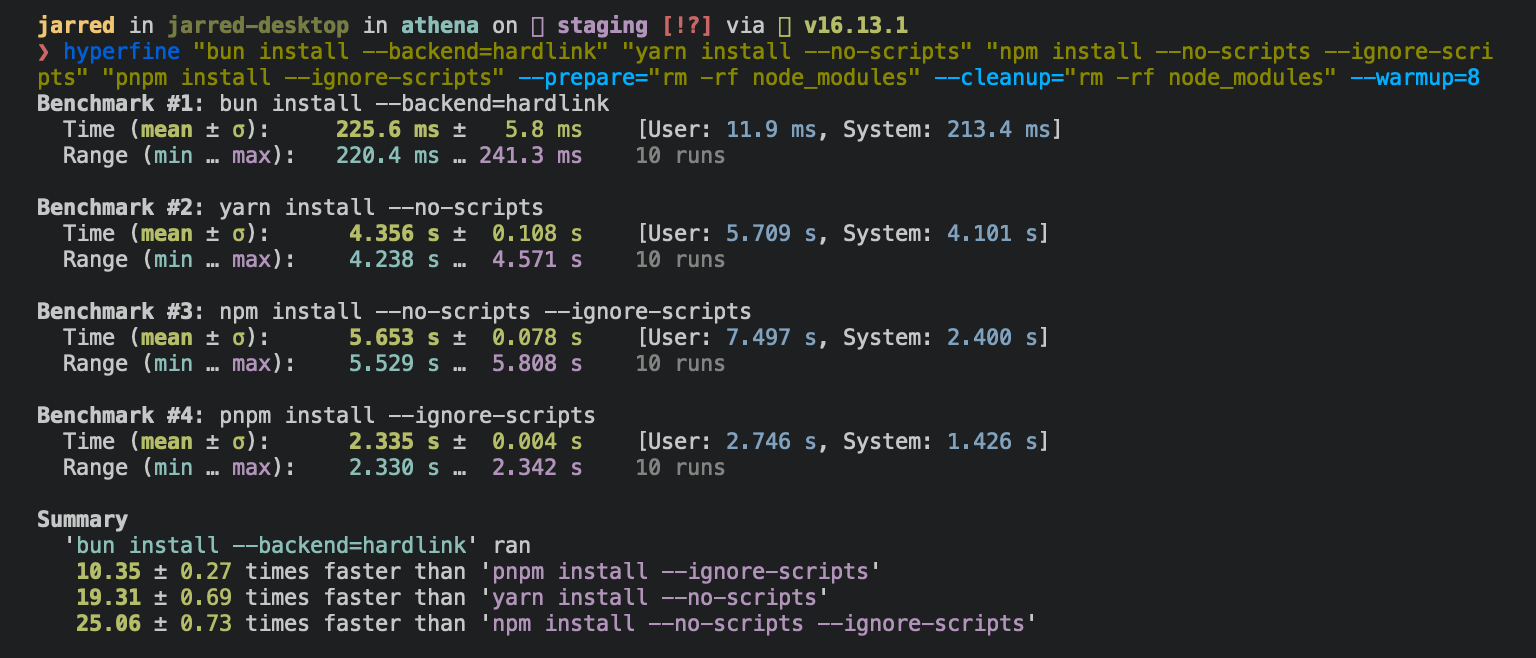
**⚡️ 80x faster** — Switch from `npm install` to `bun install` in any Node.js project to make your installations up to 80x faster.
|
|
6
|
+
|
|
7
|
+
{% image src="https://user-images.githubusercontent.com/709451/147004342-571b6123-17a9-49a2-8bfd-dcfc5204047e.png" height="200" /%}
|
|
8
|
+
|
|
9
|
+
{% /callout %}
|
|
10
|
+
|
|
11
|
+
{% details summary="For Linux users" %}
|
|
12
|
+
The minimum Linux Kernel version is 5.1. If you're on Linux kernel 5.1 - 5.5, `bun install` should still work, but HTTP requests will be slow due to a lack of support for io_uring's `connect()` operation.
|
|
13
|
+
|
|
14
|
+
If you're using Ubuntu 20.04, here's how to install a [newer kernel](https://wiki.ubuntu.com/Kernel/LTSEnablementStack):
|
|
15
|
+
|
|
16
|
+
```bash
|
|
17
|
+
# If this returns a version >= 5.6, you don't need to do anything
|
|
18
|
+
uname -r
|
|
19
|
+
|
|
20
|
+
# Install the official Ubuntu hardware enablement kernel
|
|
21
|
+
sudo apt install --install-recommends linux-generic-hwe-20.04
|
|
22
|
+
```
|
|
23
|
+
|
|
24
|
+
{% /details %}
|
|
25
|
+
|
|
26
|
+
## Manage dependencies
|
|
27
|
+
|
|
28
|
+
### `bun install`
|
|
29
|
+
|
|
30
|
+
To install all dependencies of a project:
|
|
31
|
+
|
|
32
|
+
```bash
|
|
33
|
+
$ bun install
|
|
34
|
+
```
|
|
35
|
+
|
|
36
|
+
On Linux, `bun install` tends to install packages 20-100x faster than `npm install`. On macOS, it's more like 4-80x.
|
|
37
|
+
|
|
38
|
+
|
|
39
|
+
|
|
40
|
+
Running `bun install` will:
|
|
41
|
+
|
|
42
|
+
- **Install** all `dependencies`, `devDependencies`, and `optionalDependencies`. Bun will install `peerDependencies` by default.
|
|
43
|
+
- **Run** your project's `{pre|post}install` scripts at the appropriate time. For security reasons Bun _does not execute_ lifecycle scripts of installed dependencies.
|
|
44
|
+
- **Write** a `bun.lockb` lockfile to the project root.
|
|
45
|
+
|
|
46
|
+
To install in production mode (i.e. without `devDependencies`):
|
|
47
|
+
|
|
48
|
+
```bash
|
|
49
|
+
$ bun install --production
|
|
50
|
+
```
|
|
51
|
+
|
|
52
|
+
To install dependencies without allowing changes to lockfile (useful on CI):
|
|
53
|
+
|
|
54
|
+
```bash
|
|
55
|
+
$ bun install --frozen-lockfile
|
|
56
|
+
```
|
|
57
|
+
|
|
58
|
+
To perform a dry run (i.e. don't actually install anything):
|
|
59
|
+
|
|
60
|
+
```bash
|
|
61
|
+
$ bun install --dry-run
|
|
62
|
+
```
|
|
63
|
+
|
|
64
|
+
To modify logging verbosity:
|
|
65
|
+
|
|
66
|
+
```bash
|
|
67
|
+
$ bun install --verbose # debug logging
|
|
68
|
+
$ bun install --silent # no logging
|
|
69
|
+
```
|
|
70
|
+
|
|
71
|
+
{% details summary="Configuring behavior" %}
|
|
72
|
+
The default behavior of `bun install` can be configured in `bunfig.toml`:
|
|
73
|
+
|
|
74
|
+
```toml
|
|
75
|
+
[install]
|
|
76
|
+
|
|
77
|
+
# whether to install optionalDependencies
|
|
78
|
+
optional = true
|
|
79
|
+
|
|
80
|
+
# whether to install devDependencies
|
|
81
|
+
dev = true
|
|
82
|
+
|
|
83
|
+
# whether to install peerDependencies
|
|
84
|
+
peer = true
|
|
85
|
+
|
|
86
|
+
# equivalent to `--production` flag
|
|
87
|
+
production = false
|
|
88
|
+
|
|
89
|
+
# equivalent to `--frozen-lockfile` flag
|
|
90
|
+
frozenLockfile = false
|
|
91
|
+
|
|
92
|
+
# equivalent to `--dry-run` flag
|
|
93
|
+
dryRun = false
|
|
94
|
+
|
|
95
|
+
# equivalent to `--concurrent-scripts` flag
|
|
96
|
+
concurrentScripts = 16 # (cpu count or GOMAXPROCS) x2
|
|
97
|
+
```
|
|
98
|
+
|
|
99
|
+
{% /details %}
|
|
100
|
+
|
|
101
|
+
### `bun add`
|
|
102
|
+
|
|
103
|
+
To add a particular package:
|
|
104
|
+
|
|
105
|
+
```bash
|
|
106
|
+
$ bun add preact
|
|
107
|
+
```
|
|
108
|
+
|
|
109
|
+
To specify a version, version range, or tag:
|
|
110
|
+
|
|
111
|
+
```bash
|
|
112
|
+
$ bun add zod@3.20.0
|
|
113
|
+
$ bun add zod@^3.0.0
|
|
114
|
+
$ bun add zod@latest
|
|
115
|
+
```
|
|
116
|
+
|
|
117
|
+
To add a package as a dev dependency (`"devDependencies"`):
|
|
118
|
+
|
|
119
|
+
```bash
|
|
120
|
+
$ bun add --dev @types/react
|
|
121
|
+
$ bun add -d @types/react
|
|
122
|
+
```
|
|
123
|
+
|
|
124
|
+
To add a package as an optional dependency (`"optionalDependencies"`):
|
|
125
|
+
|
|
126
|
+
```bash
|
|
127
|
+
$ bun add --optional lodash
|
|
128
|
+
```
|
|
129
|
+
|
|
130
|
+
To install a package globally:
|
|
131
|
+
|
|
132
|
+
```bash
|
|
133
|
+
$ bun add --global cowsay # or `bun add -g cowsay`
|
|
134
|
+
$ cowsay "Bun!"
|
|
135
|
+
______
|
|
136
|
+
< Bun! >
|
|
137
|
+
------
|
|
138
|
+
\ ^__^
|
|
139
|
+
\ (oo)\_______
|
|
140
|
+
(__)\ )\/\
|
|
141
|
+
||----w |
|
|
142
|
+
|| ||
|
|
143
|
+
```
|
|
144
|
+
|
|
145
|
+
{% details summary="Configuring global installation behavior" %}
|
|
146
|
+
|
|
147
|
+
```toml
|
|
148
|
+
[install]
|
|
149
|
+
# where `bun install --global` installs packages
|
|
150
|
+
globalDir = "~/.bun/install/global"
|
|
151
|
+
|
|
152
|
+
# where globally-installed package bins are linked
|
|
153
|
+
globalBinDir = "~/.bun/bin"
|
|
154
|
+
```
|
|
155
|
+
|
|
156
|
+
{% /details %}
|
|
157
|
+
To view a complete list of options for a given command:
|
|
158
|
+
|
|
159
|
+
```bash
|
|
160
|
+
$ bun add --help
|
|
161
|
+
```
|
|
162
|
+
|
|
163
|
+
### `bun remove`
|
|
164
|
+
|
|
165
|
+
To remove a dependency:
|
|
166
|
+
|
|
167
|
+
```bash
|
|
168
|
+
$ bun remove preact
|
|
169
|
+
```
|
|
170
|
+
|
|
171
|
+
## Git dependencies
|
|
172
|
+
|
|
173
|
+
To add a dependency from a git repository:
|
|
174
|
+
|
|
175
|
+
```bash
|
|
176
|
+
$ bun install git@github.com:moment/moment.git
|
|
177
|
+
```
|
|
178
|
+
|
|
179
|
+
Bun supports a variety of protocols, including [`github`](https://docs.npmjs.com/cli/v9/configuring-npm/package-json#github-urls), [`git`](https://docs.npmjs.com/cli/v9/configuring-npm/package-json#git-urls-as-dependencies), `git+ssh`, `git+https`, and many more.
|
|
180
|
+
|
|
181
|
+
```json
|
|
182
|
+
{
|
|
183
|
+
"dependencies": {
|
|
184
|
+
"dayjs": "git+https://github.com/iamkun/dayjs.git",
|
|
185
|
+
"lodash": "git+ssh://github.com/lodash/lodash.git#4.17.21",
|
|
186
|
+
"moment": "git@github.com:moment/moment.git",
|
|
187
|
+
"zod": "github:colinhacks/zod"
|
|
188
|
+
}
|
|
189
|
+
}
|
|
190
|
+
```
|
|
191
|
+
|
|
192
|
+
## Tarball dependencies
|
|
193
|
+
|
|
194
|
+
A package name can correspond to a publicly hosted `.tgz` file. During `bun install`, Bun will download and install the package from the specified tarball URL, rather than from the package registry.
|
|
195
|
+
|
|
196
|
+
```json#package.json
|
|
197
|
+
{
|
|
198
|
+
"dependencies": {
|
|
199
|
+
"zod": "https://registry.npmjs.org/zod/-/zod-3.21.4.tgz"
|
|
200
|
+
}
|
|
201
|
+
}
|
|
202
|
+
```
|
|
@@ -0,0 +1,46 @@
|
|
|
1
|
+
Packages on `npm` can define _lifecycle scripts_ in their `package.json`. Some of the most common are below, but there are [many others](https://docs.npmjs.com/cli/v10/using-npm/scripts).
|
|
2
|
+
|
|
3
|
+
- `preinstall`: Runs before the package is installed
|
|
4
|
+
- `postinstall`: Runs after the package is installed
|
|
5
|
+
- `preuninstall`: Runs before the package is uninstalled
|
|
6
|
+
- `prepublishOnly`: Runs before the package is published
|
|
7
|
+
|
|
8
|
+
These scripts are arbitrary shell commands that the package manager is expected to read and execute at the appropriate time. But executing arbitrary scripts represents a potential security risk, so—unlike other `npm` clients—Bun does not execute arbitrary lifecycle scripts by default.
|
|
9
|
+
|
|
10
|
+
## `postinstall`
|
|
11
|
+
|
|
12
|
+
The `postinstall` script is particularly important. It's widely used to build or install platform-specific binaries for packages that are implemented as [native Node.js add-ons](https://nodejs.org/api/addons.html). For example, `node-sass` is a popular package that uses `postinstall` to build a native binary for Sass.
|
|
13
|
+
|
|
14
|
+
```json
|
|
15
|
+
{
|
|
16
|
+
"name": "my-app",
|
|
17
|
+
"version": "1.0.0",
|
|
18
|
+
"dependencies": {
|
|
19
|
+
"node-sass": "^6.0.1"
|
|
20
|
+
}
|
|
21
|
+
}
|
|
22
|
+
```
|
|
23
|
+
|
|
24
|
+
## `trustedDependencies`
|
|
25
|
+
|
|
26
|
+
Instead of executing arbitrary scripts, Bun uses a "default-secure" approach. You can add certain packages to an allow list, and Bun will execute lifecycle scripts for those packages. To tell Bun to allow lifecycle scripts for a particular package, add the package name to `trustedDependencies` array in your `package.json`.
|
|
27
|
+
|
|
28
|
+
```json-diff
|
|
29
|
+
{
|
|
30
|
+
"name": "my-app",
|
|
31
|
+
"version": "1.0.0",
|
|
32
|
+
+ "trustedDependencies": ["node-sass"]
|
|
33
|
+
}
|
|
34
|
+
```
|
|
35
|
+
|
|
36
|
+
Once added to `trustedDependencies`, install/re-install the package. Bun will read this field and run lifecycle scripts for `my-trusted-package`.
|
|
37
|
+
|
|
38
|
+
As of Bun v1.0.16, the top 500 npm packages with lifecycle scripts are allowed by default. You can see the full list [here](https://github.com/oven-sh/bun/blob/main/src/install/default-trusted-dependencies.txt).
|
|
39
|
+
|
|
40
|
+
## `--ignore-scripts`
|
|
41
|
+
|
|
42
|
+
To disable lifecycle scripts for all packages, use the `--ignore-scripts` flag.
|
|
43
|
+
|
|
44
|
+
```bash
|
|
45
|
+
$ bun install --ignore-scripts
|
|
46
|
+
```
|
|
@@ -0,0 +1,90 @@
|
|
|
1
|
+
Running `bun install` will create a binary lockfile called `bun.lockb`.
|
|
2
|
+
|
|
3
|
+
#### Why is it binary?
|
|
4
|
+
|
|
5
|
+
In a word: Performance. Bun’s lockfile saves & loads incredibly quickly, and saves a lot more data than what is typically inside lockfiles.
|
|
6
|
+
|
|
7
|
+
#### How do I inspect Bun's lockfile?
|
|
8
|
+
|
|
9
|
+
Run `bun install -y` to generate a Yarn-compatible `yarn.lock` (v1) that can be inspected more easily.
|
|
10
|
+
|
|
11
|
+
#### How do I `git diff` Bun's lockfile?
|
|
12
|
+
|
|
13
|
+
Add the following to your local or global `.gitattributes` file:
|
|
14
|
+
|
|
15
|
+
```
|
|
16
|
+
*.lockb binary diff=lockb
|
|
17
|
+
```
|
|
18
|
+
|
|
19
|
+
Then add the following to your local git config with:
|
|
20
|
+
|
|
21
|
+
```sh
|
|
22
|
+
$ git config diff.lockb.textconv bun
|
|
23
|
+
$ git config diff.lockb.binary true
|
|
24
|
+
```
|
|
25
|
+
|
|
26
|
+
Or to your global git config (system-wide) with the `--global` option:
|
|
27
|
+
|
|
28
|
+
```sh
|
|
29
|
+
$ git config --global diff.lockb.textconv bun
|
|
30
|
+
$ git config --global diff.lockb.binary true
|
|
31
|
+
```
|
|
32
|
+
|
|
33
|
+
**Why this works:**
|
|
34
|
+
|
|
35
|
+
- `textconv` tells git to run `bun` on the file before diffing
|
|
36
|
+
- `binary` tells git to treat the file as binary (so it doesn't try to diff it line-by-line)
|
|
37
|
+
|
|
38
|
+
Running `bun` on a lockfile will print a human-readable diff. So we just need to tell `git` to run `bun` on the lockfile before diffing it.
|
|
39
|
+
|
|
40
|
+
#### Platform-specific dependencies?
|
|
41
|
+
|
|
42
|
+
Bun stores normalized `cpu` and `os` values from npm in the lockfile, along with the resolved packages. It skips downloading, extracting, and installing packages disabled for the current target at runtime. This means the lockfile won’t change between platforms/architectures even if the packages ultimately installed do change.
|
|
43
|
+
|
|
44
|
+
#### What does Bun's lockfile store?
|
|
45
|
+
|
|
46
|
+
Packages, metadata for those packages, the hoisted install order, dependencies for each package, what packages those dependencies resolved to, an integrity hash (if available), what each package was resolved to, and which version (or equivalent).
|
|
47
|
+
|
|
48
|
+
#### Why is Bun's lockfile fast?
|
|
49
|
+
|
|
50
|
+
It uses linear arrays for all data. [Packages](https://github.com/oven-sh/bun/blob/be03fc273a487ac402f19ad897778d74b6d72963/src/install/install.zig#L1825) are referenced by an auto-incrementing integer ID or a hash of the package name. Strings longer than 8 characters are de-duplicated. Prior to saving on disk, the lockfile is garbage-collected & made deterministic by walking the package tree and cloning the packages in dependency order.
|
|
51
|
+
|
|
52
|
+
#### Can I opt out?
|
|
53
|
+
|
|
54
|
+
To install without creating a lockfile:
|
|
55
|
+
|
|
56
|
+
```bash
|
|
57
|
+
$ bun install --no-save
|
|
58
|
+
```
|
|
59
|
+
|
|
60
|
+
To install a Yarn lockfile _in addition_ to `bun.lockb`.
|
|
61
|
+
|
|
62
|
+
{% codetabs %}
|
|
63
|
+
|
|
64
|
+
```bash#CLI flag
|
|
65
|
+
$ bun install --yarn
|
|
66
|
+
```
|
|
67
|
+
|
|
68
|
+
```toml#bunfig.toml
|
|
69
|
+
[install.lockfile]
|
|
70
|
+
# whether to save a non-Bun lockfile alongside bun.lockb
|
|
71
|
+
# only "yarn" is supported
|
|
72
|
+
print = "yarn"
|
|
73
|
+
```
|
|
74
|
+
|
|
75
|
+
{% /codetabs %}
|
|
76
|
+
|
|
77
|
+
{% details summary="Configuring lockfile" %}
|
|
78
|
+
|
|
79
|
+
```toml
|
|
80
|
+
[install.lockfile]
|
|
81
|
+
|
|
82
|
+
# whether to save the lockfile to disk
|
|
83
|
+
save = true
|
|
84
|
+
|
|
85
|
+
# whether to save a non-Bun lockfile alongside bun.lockb
|
|
86
|
+
# only "yarn" is supported
|
|
87
|
+
print = "yarn"
|
|
88
|
+
```
|
|
89
|
+
|
|
90
|
+
{% /details %}
|