browser-debugger-cli 0.10.0 → 0.12.0
This diff represents the content of publicly available package versions that have been released to one of the supported registries. The information contained in this diff is provided for informational purposes only and reflects changes between package versions as they appear in their respective public registries.
- package/.claude/skills/bdg/SKILL.md +268 -0
- package/README.md +148 -74
- package/dist/commands/css.d.ts +13 -0
- package/dist/commands/css.js +53 -0
- package/dist/commands/dom/audit.d.ts +14 -0
- package/dist/commands/dom/audit.js +87 -0
- package/dist/commands/dom/formInteraction.js +36 -6
- package/dist/commands/dom/helpers/keyAttributes.d.ts +3 -2
- package/dist/commands/dom/helpers/keyAttributes.js +6 -4
- package/dist/commands/dom/helpers/screenshot.d.ts +1 -0
- package/dist/commands/dom/helpers/screenshot.js +158 -38
- package/dist/commands/dom/index.js +4 -1
- package/dist/commands/dom/screenshot.js +10 -6
- package/dist/commands/dom/wait.js +5 -3
- package/dist/commands/helpJson.js +1 -1
- package/dist/commands/installSkill.d.ts +20 -0
- package/dist/commands/installSkill.js +87 -0
- package/dist/commands/optionBehaviors.js +21 -6
- package/dist/commands/page.js +7 -4
- package/dist/commands/peek.d.ts +7 -0
- package/dist/commands/peek.js +65 -23
- package/dist/commands/shared/optionTypes.d.ts +5 -1
- package/dist/commands/start.d.ts +13 -0
- package/dist/commands/start.js +19 -2
- package/dist/commands/tail.d.ts +7 -1
- package/dist/commands/tail.js +13 -62
- package/dist/commands.js +5 -0
- package/dist/daemon/session/commandRegistry.js +7 -1
- package/dist/daemon/session/plugins.js +4 -52
- package/dist/daemon.js +7986 -6848
- package/dist/errors/messages.d.ts +50 -4
- package/dist/errors/messages.js +94 -5
- package/dist/index.js +709 -190
- package/dist/ipc/client.d.ts +4 -0
- package/dist/ipc/client.js +8 -0
- package/dist/ipc/protocol/auditTypes.d.ts +129 -0
- package/dist/ipc/protocol/auditTypes.js +6 -0
- package/dist/ipc/protocol/commands.d.ts +23 -0
- package/dist/ipc/protocol/commands.js +2 -0
- package/dist/ipc/protocol/domTypes.d.ts +4 -0
- package/dist/ipc/protocol/inspectTypes.d.ts +71 -8
- package/dist/runtime/css/search.d.ts +39 -0
- package/dist/runtime/css/search.js +122 -0
- package/dist/runtime/dom/actionEffects.d.ts +4 -1
- package/dist/runtime/dom/actionEffects.js +8 -4
- package/dist/runtime/dom/audit.d.ts +19 -0
- package/dist/runtime/dom/audit.js +36 -0
- package/dist/runtime/dom/auditModel.d.ts +45 -0
- package/dist/runtime/dom/auditModel.js +215 -0
- package/dist/runtime/dom/auditScripts.d.ts +107 -0
- package/dist/runtime/dom/auditScripts.js +112 -0
- package/dist/runtime/dom/elementGeometry.d.ts +8 -2
- package/dist/runtime/dom/elementGeometry.js +24 -8
- package/dist/runtime/dom/elementInfo.d.ts +3 -2
- package/dist/runtime/dom/elementInfo.js +8 -2
- package/dist/runtime/dom/formFillHelpers/fill.js +2 -2
- package/dist/runtime/dom/inspect.d.ts +7 -0
- package/dist/runtime/dom/inspect.js +88 -23
- package/dist/runtime/dom/inspectAllStyles.d.ts +16 -4
- package/dist/runtime/dom/inspectAllStyles.js +89 -7
- package/dist/runtime/dom/inspectCascade.d.ts +19 -2
- package/dist/runtime/dom/inspectCascade.js +214 -44
- package/dist/runtime/dom/inspectCascadeModel.d.ts +8 -0
- package/dist/runtime/dom/inspectCascadeModel.js +108 -34
- package/dist/runtime/dom/inspectHints.d.ts +26 -3
- package/dist/runtime/dom/inspectHints.js +125 -9
- package/dist/runtime/dom/inspectModel.d.ts +3 -0
- package/dist/runtime/dom/inspectModel.js +30 -7
- package/dist/runtime/dom/inspectPaintModel.d.ts +48 -22
- package/dist/runtime/dom/inspectPaintModel.js +180 -68
- package/dist/runtime/dom/inspectRules.d.ts +19 -0
- package/dist/runtime/dom/inspectRules.js +21 -5
- package/dist/runtime/dom/inspectScripts.d.ts +85 -12
- package/dist/runtime/dom/inspectScripts.js +314 -28
- package/dist/runtime/dom/inspectTree.js +10 -2
- package/dist/runtime/dom/inspectWhyModel.d.ts +2 -1
- package/dist/runtime/dom/inspectWhyModel.js +52 -10
- package/dist/runtime/dom/layout.js +31 -9
- package/dist/runtime/dom/reactEventHelpers.d.ts +7 -0
- package/dist/runtime/dom/reactEventHelpers.js +27 -9
- package/dist/runtime/page/emulation.d.ts +13 -4
- package/dist/runtime/page/emulation.js +69 -4
- package/dist/runtime/page/userAgent.d.ts +17 -0
- package/dist/runtime/page/userAgent.js +57 -0
- package/dist/types.d.ts +12 -0
- package/dist/ui/formatters/audit.d.ts +19 -0
- package/dist/ui/formatters/audit.js +106 -0
- package/dist/ui/formatters/dom.d.ts +1 -1
- package/dist/ui/formatters/dom.js +6 -3
- package/dist/ui/formatters/inspect.js +42 -15
- package/dist/ui/formatters/installSkill.d.ts +11 -0
- package/dist/ui/formatters/installSkill.js +31 -0
- package/dist/ui/formatters/status.js +1 -1
- package/dist/ui/messages/commands.d.ts +44 -7
- package/dist/ui/messages/commands.js +83 -11
- package/dist/ui/messages/preview.d.ts +6 -0
- package/dist/ui/messages/preview.js +9 -1
- package/dist/utils/cssValues.js +36 -4
- package/dist/utils/decisionTrees.js +0 -5
- package/dist/utils/suggestions.d.ts +4 -2
- package/dist/utils/suggestions.js +7 -5
- package/dist/utils/taskMappings.js +1 -1
- package/package.json +4 -2
|
@@ -0,0 +1,268 @@
|
|
|
1
|
+
---
|
|
2
|
+
name: bdg
|
|
3
|
+
description: Use bdg CLI to drive and debug a real Chrome via Chrome DevTools Protocol - navigate, click, fill and submit forms, check what an action changed (navigation, new messages, pending requests), inspect elements without screenshots (box, layout, fonts, colors, a11y), read network requests and console errors, and call any CDP method. Use this skill when you need to verify a UI change in a running app, debug a page, automate a browser flow, or scrape dynamic content.
|
|
4
|
+
---
|
|
5
|
+
|
|
6
|
+
# bdg - Browser Automation CLI
|
|
7
|
+
|
|
8
|
+
## Quick Start
|
|
9
|
+
|
|
10
|
+
```bash
|
|
11
|
+
bdg https://example.com # Start session (launches Chrome)
|
|
12
|
+
bdg dom screenshot /tmp/page.png # Take screenshot
|
|
13
|
+
bdg stop # End session
|
|
14
|
+
```
|
|
15
|
+
|
|
16
|
+
## Session Management
|
|
17
|
+
|
|
18
|
+
```bash
|
|
19
|
+
bdg <url> # Start session (1920x1080, headless if no display)
|
|
20
|
+
bdg <url> --headless # Force headless mode
|
|
21
|
+
bdg <url> --no-headless # Force visible browser window
|
|
22
|
+
bdg status # Check session status
|
|
23
|
+
bdg peek # Preview collected telemetry
|
|
24
|
+
bdg stop # End session (use sparingly)
|
|
25
|
+
bdg cleanup # Clean up after a crashed session
|
|
26
|
+
bdg cleanup --force # Kill a stuck session (daemon + its Chrome)
|
|
27
|
+
```
|
|
28
|
+
|
|
29
|
+
**Sessions run indefinitely by default** (no timeout). With HMR/hot-reload dev servers, keep the session running:
|
|
30
|
+
|
|
31
|
+
```bash
|
|
32
|
+
bdg http://localhost:5173 # Start once
|
|
33
|
+
# ... make code changes, HMR updates the page ...
|
|
34
|
+
bdg dom screenshot /tmp/s.png # Check anytime
|
|
35
|
+
bdg peek # Preview collected data
|
|
36
|
+
# No need to stop/restart - Chrome stays on the page
|
|
37
|
+
```
|
|
38
|
+
|
|
39
|
+
**Don't stop sessions prematurely** - use `bdg peek` to inspect data. Only call `bdg stop` when completely done with browser automation.
|
|
40
|
+
|
|
41
|
+
## Screenshots
|
|
42
|
+
|
|
43
|
+
Always use `bdg dom screenshot` (raw CDP is blocked):
|
|
44
|
+
|
|
45
|
+
```bash
|
|
46
|
+
bdg dom screenshot /tmp/page.png # Full page
|
|
47
|
+
bdg dom screenshot /tmp/viewport.png --no-full-page # Viewport only
|
|
48
|
+
bdg dom screenshot /tmp/el.png --selector "#main" # Element only
|
|
49
|
+
bdg dom screenshot /tmp/scroll.png --scroll "#target" # Scroll to element first
|
|
50
|
+
```
|
|
51
|
+
|
|
52
|
+
## Actions Report What Changed
|
|
53
|
+
|
|
54
|
+
`dom click`, `fill`, `submit`, `pressKey`, `hover` and `scroll` wait for the requests the action starts, then say what happened. Read this before reaching for a screenshot:
|
|
55
|
+
|
|
56
|
+
```text
|
|
57
|
+
✓ Element Clicked
|
|
58
|
+
Page: navigated to https://app.test/secure (200) # navigation (or "URL changed ... (same document)")
|
|
59
|
+
New text: "Your password is invalid!" (div#flash) # alert/status/aria-live messages that appeared
|
|
60
|
+
⚠ Element Clicked (no visible effect observed ...) # nothing changed - wrong element or a broken handler
|
|
61
|
+
```
|
|
62
|
+
|
|
63
|
+
- In `--json`: `navigation`, `messages`, `effect: "none"` and pending work (timers, spinners) are fields on `data`.
|
|
64
|
+
- Results the page shows later are not waited for: follow up with `bdg dom wait` (below).
|
|
65
|
+
|
|
66
|
+
## Form Interaction
|
|
67
|
+
|
|
68
|
+
```bash
|
|
69
|
+
# Discover forms
|
|
70
|
+
bdg dom form --brief # Quick scan: field names, types, required
|
|
71
|
+
|
|
72
|
+
# Fill and interact
|
|
73
|
+
bdg dom fill "input[name='user']" "myuser" # Fill by selector
|
|
74
|
+
bdg dom fill 0 "value" # Fill by index (from query)
|
|
75
|
+
bdg dom click "button.submit" # Click element
|
|
76
|
+
bdg dom submit "form" --wait-navigation # Submit and wait for page load
|
|
77
|
+
bdg dom pressKey "input" Enter # Press Enter key
|
|
78
|
+
|
|
79
|
+
# Options
|
|
80
|
+
--no-wait # Skip network stability wait
|
|
81
|
+
--wait-navigation # Wait for page navigation (traditional forms)
|
|
82
|
+
--wait-network <ms> # Wait for network idle (SPA forms)
|
|
83
|
+
--index <n> # Select nth element when multiple match
|
|
84
|
+
```
|
|
85
|
+
|
|
86
|
+
## DOM Inspection
|
|
87
|
+
|
|
88
|
+
```bash
|
|
89
|
+
bdg dom query "selector" # Find elements, returns [0], [1], [2]... (0-based)
|
|
90
|
+
bdg dom get "selector" # Get semantic a11y info (token-efficient)
|
|
91
|
+
bdg dom get "selector" --raw # Get full HTML
|
|
92
|
+
bdg dom eval "js expression" # Run JavaScript
|
|
93
|
+
bdg dom a11y "role:button" # Query by accessibility role/name
|
|
94
|
+
```
|
|
95
|
+
|
|
96
|
+
Selectors search open shadow roots and same-origin iframes, and accept `:has-text("...")` and `:visible`.
|
|
97
|
+
|
|
98
|
+
### Look Without a Screenshot
|
|
99
|
+
|
|
100
|
+
```bash
|
|
101
|
+
bdg dom inspect "button.primary" # Box, layout, rendered font, colors + WCAG contrast, borders, state (~60-100 tokens)
|
|
102
|
+
bdg dom inspect ".card" --why color # Which CSS rule set a property, and what it overrode
|
|
103
|
+
bdg dom layout ".card" # Positions/sizes of every match: above/below the fold, hidden, covered
|
|
104
|
+
bdg dom listeners "#save" # Event listeners that run for an element (incl. delegated, React/Preact)
|
|
105
|
+
bdg page emulate --viewport 390x844 --color-scheme dark # Responsive/theme check mid-session
|
|
106
|
+
```
|
|
107
|
+
|
|
108
|
+
### Wait for Something
|
|
109
|
+
|
|
110
|
+
```bash
|
|
111
|
+
bdg dom wait '#result' --visible # Appears and is visible
|
|
112
|
+
bdg dom wait '.toast' --text 'Saved' # Contains text
|
|
113
|
+
bdg dom wait '#loading' --gone # Spinner went away
|
|
114
|
+
bdg dom wait --load # Page finished loading
|
|
115
|
+
```
|
|
116
|
+
|
|
117
|
+
## Network and Console
|
|
118
|
+
|
|
119
|
+
```bash
|
|
120
|
+
bdg network list # Requests (DevTools-style)
|
|
121
|
+
bdg network list --filter "status-code:>=400" # Failed requests
|
|
122
|
+
bdg details network <id> # Headers, timing, body of one request
|
|
123
|
+
bdg console --level error # Console errors on the current page
|
|
124
|
+
bdg console --follow # Stream messages live
|
|
125
|
+
bdg network har /tmp/session.har # Export HAR 1.2
|
|
126
|
+
```
|
|
127
|
+
|
|
128
|
+
## CDP Access
|
|
129
|
+
|
|
130
|
+
Direct access to Chrome DevTools Protocol:
|
|
131
|
+
|
|
132
|
+
```bash
|
|
133
|
+
# Execute any CDP method
|
|
134
|
+
bdg cdp Runtime.evaluate --params '{"expression": "document.title", "returnByValue": true}'
|
|
135
|
+
bdg cdp Page.navigate --params '{"url": "https://example.com"}'
|
|
136
|
+
bdg cdp Page.reload --params '{"ignoreCache": true}'
|
|
137
|
+
|
|
138
|
+
# Discovery
|
|
139
|
+
bdg cdp --list # List all domains
|
|
140
|
+
bdg cdp Network --list # List methods in domain
|
|
141
|
+
bdg cdp Network.getCookies --describe # Show method schema
|
|
142
|
+
bdg cdp --search cookie # Search methods
|
|
143
|
+
```
|
|
144
|
+
|
|
145
|
+
**Important**: Always use `returnByValue: true` for Runtime.evaluate to get serialized values.
|
|
146
|
+
|
|
147
|
+
## Common Patterns
|
|
148
|
+
|
|
149
|
+
### Login Flow
|
|
150
|
+
```bash
|
|
151
|
+
bdg https://example.com/login
|
|
152
|
+
bdg dom form --brief
|
|
153
|
+
bdg dom fill "input[name='username']" "$USER"
|
|
154
|
+
bdg dom fill "input[name='password']" "$PASS"
|
|
155
|
+
bdg dom submit "button[type='submit']" --wait-navigation
|
|
156
|
+
bdg dom screenshot /tmp/result.png
|
|
157
|
+
bdg stop
|
|
158
|
+
```
|
|
159
|
+
|
|
160
|
+
### Verify a UI Change (dev server with HMR)
|
|
161
|
+
```bash
|
|
162
|
+
bdg http://localhost:5173 # Once; keep the session running
|
|
163
|
+
bdg dom click "button.save" # Read the reported effect
|
|
164
|
+
bdg dom wait '.toast' --text 'Saved'
|
|
165
|
+
bdg console --level error # Anything thrown?
|
|
166
|
+
bdg dom inspect ".toast" # Looks right? (no screenshot needed)
|
|
167
|
+
```
|
|
168
|
+
|
|
169
|
+
### Extract Data
|
|
170
|
+
```bash
|
|
171
|
+
bdg cdp Runtime.evaluate --params '{
|
|
172
|
+
"expression": "Array.from(document.querySelectorAll(\"a\")).map(a => ({text: a.textContent, href: a.href}))",
|
|
173
|
+
"returnByValue": true
|
|
174
|
+
}' | jq '.data.result.result.value'
|
|
175
|
+
```
|
|
176
|
+
|
|
177
|
+
## JSON Output and Exit Codes
|
|
178
|
+
|
|
179
|
+
Add `--json` (`-j`) to any command for `{ version, success, data }` (or `{ success: false, error, exitCode, suggestion }`). `bdg --help --json` lists every command, flag and exit code.
|
|
180
|
+
|
|
181
|
+
| Code | Meaning | Action |
|
|
182
|
+
|------|---------|--------|
|
|
183
|
+
| 0 | Success | - |
|
|
184
|
+
| 81 | Invalid arguments (incl. blocked raw CDP methods) | Read the suggestion, use the alternative |
|
|
185
|
+
| 83 | Resource not found | Element/session doesn't exist |
|
|
186
|
+
| 85 | Session busy (still starting/stopping) | Retry shortly |
|
|
187
|
+
| 87 | Stale index (page changed since `dom query`) | Re-run the query |
|
|
188
|
+
| 91 | `dom eval` script threw | Fix the JavaScript |
|
|
189
|
+
| 101 | CDP connection failure | Run `bdg cleanup --force` and retry |
|
|
190
|
+
| 102 | Timeout (CDP, or `dom wait --timeout`) | Increase timeout or check page load |
|
|
191
|
+
|
|
192
|
+
## Troubleshooting
|
|
193
|
+
|
|
194
|
+
```bash
|
|
195
|
+
bdg status --verbose # Full diagnostics
|
|
196
|
+
bdg cleanup # Clean up after a crashed session
|
|
197
|
+
bdg cleanup --force # Kill a stuck session (daemon + its Chrome)
|
|
198
|
+
```
|
|
199
|
+
|
|
200
|
+
**Chrome won't launch?** Run `bdg cleanup --force` then retry.
|
|
201
|
+
|
|
202
|
+
**Session stuck?** Run `bdg cleanup --force` to reset.
|
|
203
|
+
|
|
204
|
+
### Custom Chrome Flags
|
|
205
|
+
|
|
206
|
+
Use `--chrome-flags` or `BDG_CHROME_FLAGS` for self-signed certificates, CORS, etc.:
|
|
207
|
+
|
|
208
|
+
```bash
|
|
209
|
+
# CLI option
|
|
210
|
+
bdg https://localhost:5173 --chrome-flags="--ignore-certificate-errors"
|
|
211
|
+
|
|
212
|
+
# Environment variable
|
|
213
|
+
BDG_CHROME_FLAGS="--ignore-certificate-errors" bdg https://localhost:5173
|
|
214
|
+
|
|
215
|
+
# Multiple flags
|
|
216
|
+
bdg https://example.com --chrome-flags="--ignore-certificate-errors --disable-web-security"
|
|
217
|
+
```
|
|
218
|
+
|
|
219
|
+
**Common flags for development:**
|
|
220
|
+
- `--ignore-certificate-errors` - Self-signed SSL certs
|
|
221
|
+
- `--disable-web-security` - CORS issues in development
|
|
222
|
+
- `--allow-insecure-localhost` - Insecure localhost
|
|
223
|
+
- `--disable-features=IsolateOrigins,site-per-process` - Cross-origin iframes
|
|
224
|
+
|
|
225
|
+
## Verification Best Practices
|
|
226
|
+
|
|
227
|
+
**Prefer DOM queries over screenshots** for verification:
|
|
228
|
+
|
|
229
|
+
```bash
|
|
230
|
+
# GOOD: Fast, precise, scriptable
|
|
231
|
+
bdg cdp Runtime.evaluate --params '{
|
|
232
|
+
"expression": "document.querySelector(\".error-message\")?.textContent",
|
|
233
|
+
"returnByValue": true
|
|
234
|
+
}'
|
|
235
|
+
|
|
236
|
+
# GOOD: Check element exists
|
|
237
|
+
bdg dom query ".submit-btn"
|
|
238
|
+
|
|
239
|
+
# GOOD: Check text content
|
|
240
|
+
bdg cdp Runtime.evaluate --params '{
|
|
241
|
+
"expression": "document.body.innerText.includes(\"Success\")",
|
|
242
|
+
"returnByValue": true
|
|
243
|
+
}'
|
|
244
|
+
|
|
245
|
+
# AVOID: Screenshots for simple verification (slow, requires visual inspection)
|
|
246
|
+
bdg dom screenshot /tmp/check.png # Only use when you need visual proof
|
|
247
|
+
```
|
|
248
|
+
|
|
249
|
+
**When to use screenshots:**
|
|
250
|
+
- Visual regression testing
|
|
251
|
+
- Capturing proof for user review
|
|
252
|
+
- Debugging layout issues
|
|
253
|
+
- When DOM structure is unknown
|
|
254
|
+
|
|
255
|
+
**When to use DOM queries:**
|
|
256
|
+
- Verifying text content appeared
|
|
257
|
+
- Checking element exists/visible
|
|
258
|
+
- Validating form state
|
|
259
|
+
- Counting elements
|
|
260
|
+
- Any programmatic assertion
|
|
261
|
+
|
|
262
|
+
## When NOT to Use bdg
|
|
263
|
+
|
|
264
|
+
- **Static HTML** - Use `curl` + `htmlq`/`pq`
|
|
265
|
+
- **API calls** - Use `curl` + `jq`
|
|
266
|
+
- **Simple HTTP** - Use `wget`/`curl`
|
|
267
|
+
|
|
268
|
+
Use bdg when you need: JavaScript execution, dynamic content, browser APIs, screenshots, or network manipulation.
|
package/README.md
CHANGED
|
@@ -1,116 +1,190 @@
|
|
|
1
|
-
# Browser Debugger CLI
|
|
1
|
+
# bdg - Browser Debugger CLI
|
|
2
2
|
|
|
3
|
-
[](https://www.npmjs.com/package/browser-debugger-cli)
|
|
4
4
|
[](https://github.com/szymdzum/browser-debugger-cli/actions/workflows/ci.yml)
|
|
5
5
|
[](https://github.com/szymdzum/browser-debugger-cli/actions/workflows/security.yml)
|
|
6
|
-
[](https://github.com/szymdzum/browser-debugger-cli/pulls)
|
|
7
|
+
|
|
8
|
+
**Give your AI agent a real browser. And the DevTools to go with it.**
|
|
9
|
+
|
|
10
|
+
📖 **[Wiki](https://github.com/szymdzum/browser-debugger-cli/wiki)**: [Getting Started](https://github.com/szymdzum/browser-debugger-cli/wiki/Getting-Started) · [Commands](https://github.com/szymdzum/browser-debugger-cli/wiki/Commands) · [For AI Agents](https://github.com/szymdzum/browser-debugger-cli/wiki/For-AI-Agents) · [Recipes](https://github.com/szymdzum/browser-debugger-cli/wiki/Recipes) · [Quick Reference](https://github.com/szymdzum/browser-debugger-cli/wiki/Quick-Reference) · [Troubleshooting](https://github.com/szymdzum/browser-debugger-cli/wiki/Troubleshooting) · [CLI reference](docs/CLI_REFERENCE.md)
|
|
7
11
|
|
|
8
|
-
|
|
12
|
+
bdg keeps a browser session open in the background and lets you drive it one shell command at a time. Click, fill, navigate, then read what actually happened: requests, console errors, layout and styles. It is built for coding agents like Claude Code, Codex and Gemini CLI, and it's just as handy in your own terminal. Every command is a plain process with compact output, so it pipes into `jq` and costs an agent few tokens.
|
|
9
13
|
|
|
10
|
-
|
|
14
|
+
```bash
|
|
15
|
+
npm install -g browser-debugger-cli
|
|
16
|
+
bdg localhost:3000
|
|
17
|
+
```
|
|
11
18
|
|
|
12
|
-
|
|
13
|
-
- **Token efficient** - No overhead from MCP tool definitions; progressive discovery loads only what's needed
|
|
14
|
-
- **Self-correcting** - Errors clearly exposed with semantic exit codes and suggestions
|
|
15
|
-
- **Composable** - Unix philosophy: pipes, jq, shell scripts work naturally
|
|
19
|
+
## Two ways to use it
|
|
16
20
|
|
|
17
|
-
|
|
18
|
-
- **Puppeteer/Playwright**: Complex multi-step scripts, mature testing ecosystem
|
|
19
|
-
- **Chrome DevTools MCP**: Already invested in MCP infrastructure
|
|
21
|
+
### Debug a page: browser telemetry on demand
|
|
20
22
|
|
|
21
|
-
|
|
23
|
+
|
|
22
24
|
|
|
23
|
-
|
|
25
|
+
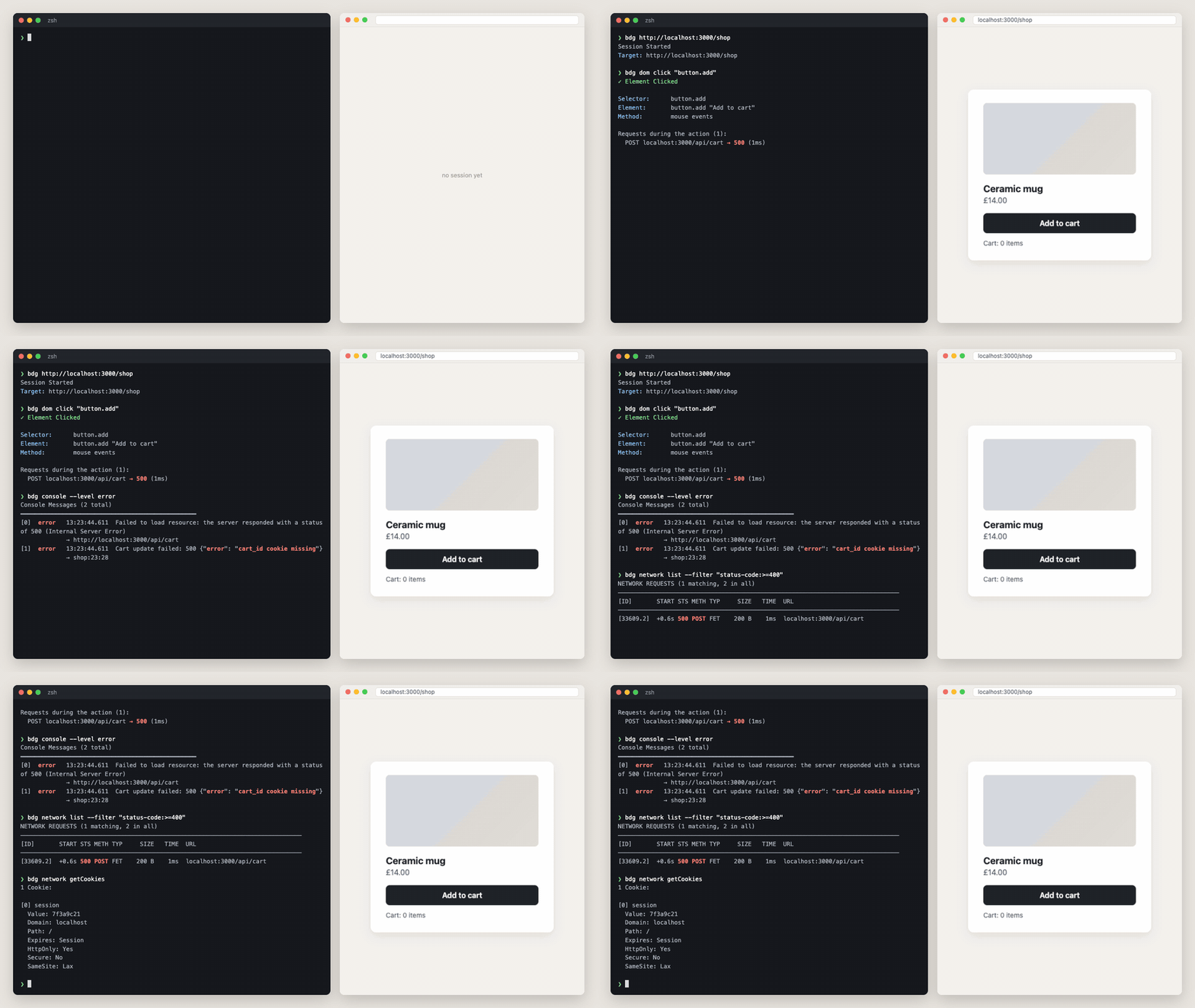
The cart button does nothing, and the page doesn't say why. Three commands later the agent knows: the click fired a POST that returned 500, the console says the `cart_id` cookie is missing, and the cookie jar confirms it. Network, console, cookies and the DOM are there whenever the agent asks, without a debugger UI.
|
|
24
26
|
|
|
25
|
-
|
|
27
|
+
### Automate without writing a script
|
|
26
28
|
|
|
29
|
+
|
|
27
30
|
|
|
28
|
-
|
|
31
|
+
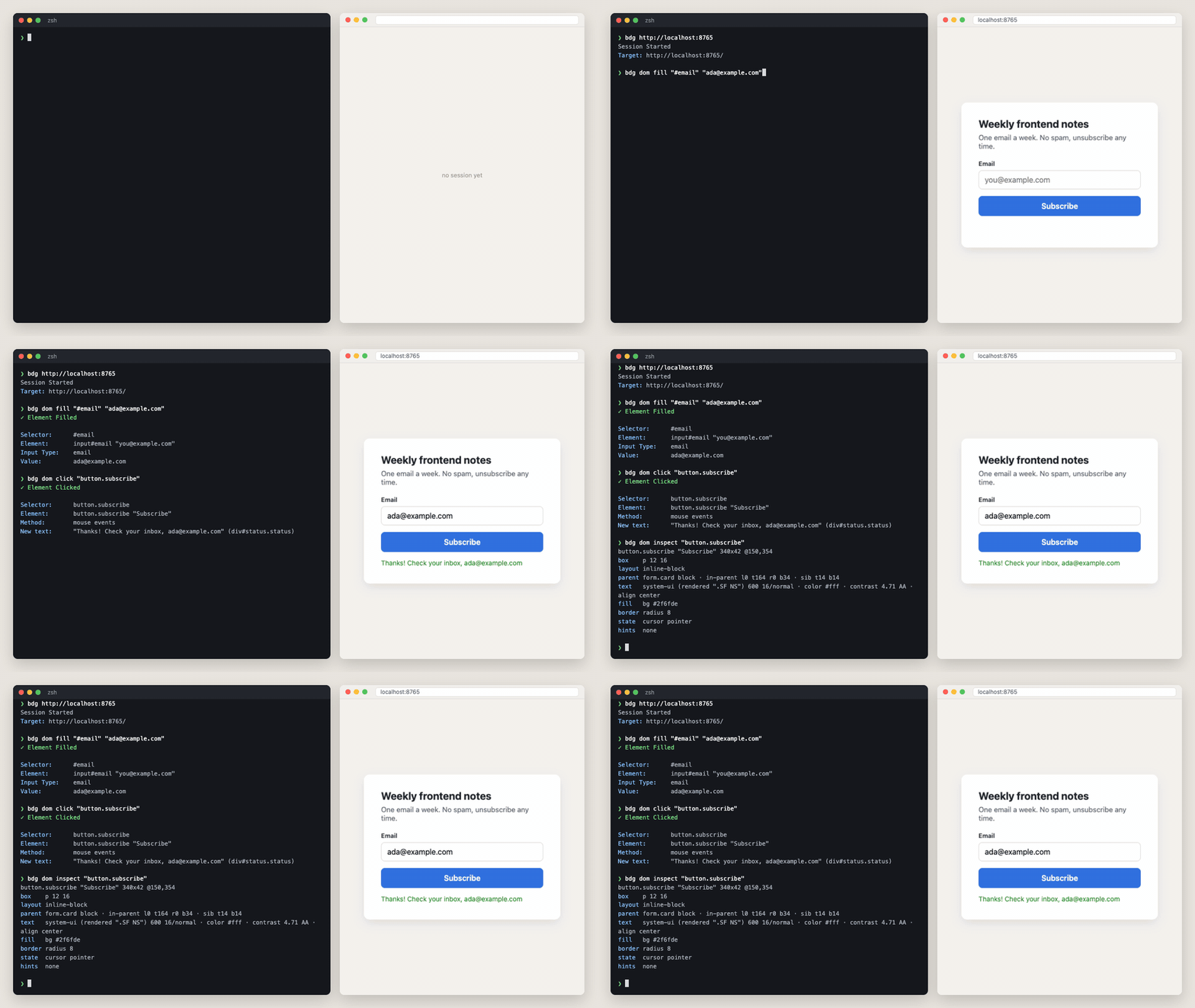
No Playwright script written up front. The agent runs one command, reads what the browser reports back, and picks the next step from that: the click says which text appeared, `dom inspect` says what the button looks like. When the page does something unexpected, the agent adapts on the spot instead of failing at line 40 of a test.
|
|
29
32
|
|
|
30
|
-
|
|
33
|
+
## More examples
|
|
31
34
|
|
|
35
|
+
### Reuse the browser's login from the shell
|
|
32
36
|
|
|
33
|
-
|
|
37
|
+
```console
|
|
38
|
+
$ bdg network getCookies
|
|
39
|
+
[1] session_id
|
|
40
|
+
Value: s%3A9f8e7d6c
|
|
41
|
+
HttpOnly: Yes
|
|
42
|
+
SameSite: Lax
|
|
43
|
+
|
|
44
|
+
$ bdg network headers 89565.2 --header authorization
|
|
45
|
+
Request Headers:
|
|
46
|
+
Authorization: Bearer eyJhbGciOiJIUzI1NiJ9.eyJzdWIiOiJhZGEifQ.demo
|
|
47
|
+
|
|
48
|
+
$ bdg eval "localStorage.getItem('access_token')"
|
|
49
|
+
eyJhbGciOiJIUzI1NiJ9.eyJzdWIiOiJhZGEifQ.demo
|
|
50
|
+
```
|
|
51
|
+
|
|
52
|
+
`HttpOnly` cookies are included, even though the page's own JavaScript can't read them. Log in once in the browser, then reuse the session from the shell:
|
|
34
53
|
|
|
35
54
|
```bash
|
|
36
|
-
|
|
55
|
+
COOKIES=$(bdg network getCookies --json | jq -r '[.data[] | "\(.name)=\(.value)"] | join("; ")')
|
|
56
|
+
curl -H "Cookie: $COOKIES" localhost:3000/api/me
|
|
37
57
|
```
|
|
38
58
|
|
|
39
|
-
|
|
59
|
+
### The rest of DevTools
|
|
40
60
|
|
|
41
|
-
|
|
42
|
-
|
|
43
|
-
|
|
44
|
-
|
|
61
|
+
```console
|
|
62
|
+
$ bdg dom a11y tree
|
|
63
|
+
[RootWebArea] "My App" (focused)
|
|
64
|
+
[Heading] "My App"
|
|
65
|
+
[Button] "Sign in" (focusable)
|
|
66
|
+
[Image] ← no accessible name
|
|
67
|
+
|
|
68
|
+
$ bdg cdp Performance.enable
|
|
69
|
+
$ bdg cdp Performance.getMetrics --json | jq '.data.result.metrics | from_entries'
|
|
70
|
+
{ "Nodes": 51, "LayoutDuration": 0.000115, "ScriptDuration": 0.000775, "JSHeapUsedSize": 772124, ... }
|
|
71
|
+
|
|
72
|
+
$ bdg cdp Emulation.setCPUThrottlingRate --params '{"rate":4}' # Slow CPU
|
|
73
|
+
$ bdg cdp Network.emulateNetworkConditions --params '{"offline":false,"latency":400,"downloadThroughput":50000,"uploadThroughput":20000}'
|
|
74
|
+
```
|
|
45
75
|
|
|
46
|
-
|
|
76
|
+
Accessibility, performance metrics, CPU profiling, heap snapshots, code coverage, throttling, storage, service workers: everything Chrome DevTools can do, bdg can do too, through raw CDP. Can't find the method you need? `bdg cdp --search heap`.
|
|
77
|
+
|
|
78
|
+
## Agents learn it on their own
|
|
79
|
+
|
|
80
|
+
No docs to paste into the prompt. The agent asks bdg:
|
|
47
81
|
|
|
48
82
|
```bash
|
|
49
|
-
bdg
|
|
50
|
-
bdg
|
|
51
|
-
bdg
|
|
52
|
-
|
|
53
|
-
|
|
54
|
-
bdg
|
|
55
|
-
|
|
56
|
-
|
|
57
|
-
bdg
|
|
58
|
-
|
|
59
|
-
|
|
60
|
-
|
|
61
|
-
bdg
|
|
62
|
-
|
|
63
|
-
|
|
64
|
-
bdg page emulate --viewport 900x700 # Responsive check mid-session (or --color-scheme)
|
|
65
|
-
bdg dom wait "#result" --visible # Wait for an element instead of sleeping
|
|
66
|
-
bdg example.com --session agent2 --viewport 1280x800 # A second, independent session
|
|
67
|
-
bdg stop # End session
|
|
83
|
+
bdg --help --json # Every command, flag and exit code, plus "task → command" mappings
|
|
84
|
+
bdg cdp --search cookie # 13 matching methods across all CDP domains, each with an example call
|
|
85
|
+
bdg cdp Network.getCookies --describe # Parameters, return types, an example
|
|
86
|
+
```
|
|
87
|
+
|
|
88
|
+
And when it gets something wrong, bdg tells it what it meant:
|
|
89
|
+
|
|
90
|
+
```console
|
|
91
|
+
$ bdg dom clik "a"
|
|
92
|
+
error: unknown command 'clik'
|
|
93
|
+
(Did you mean click?)
|
|
94
|
+
|
|
95
|
+
$ bdg cdp Network.getCookie
|
|
96
|
+
"error": "Method 'Network.getCookie' not found",
|
|
97
|
+
"suggestion": "... Did you mean: Network.getCookies, Network.setCookie, Network.setCookies"
|
|
68
98
|
```
|
|
69
99
|
|
|
70
|
-
|
|
100
|
+
Each mistake exits with code 81 (invalid arguments), so the agent knows to fix the call rather than retry it. CDP method names are case-insensitive, and raw CDP calls point to the friendlier command when one exists. More in the [Agent-Friendly Tools](docs/principles/AGENT_FRIENDLY_TOOLS.md) principles bdg follows.
|
|
101
|
+
|
|
102
|
+
## Benchmark: CLI vs MCP
|
|
103
|
+
|
|
104
|
+
We gave an AI agent five real debugging tasks, from a single JS error up to a memory leak, and ran each one with bdg and with the official Chrome DevTools MCP server (November 2025).
|
|
105
|
+
|
|
106
|
+
| | bdg | Chrome DevTools MCP |
|
|
107
|
+
|---|---|---|
|
|
108
|
+
| **Score** | **77 / 100** | 60 / 100 |
|
|
109
|
+
| **Token efficiency** | **202** | 152 |
|
|
110
|
+
| Tokens used | ~38.1K | ~39.4K |
|
|
111
|
+
|
|
112
|
+
bdg scored 17 points higher on about the same token budget, so its token efficiency was 33% better. Part of the gap is reach: memory profiling, HAR export and batch JS execution have no MCP equivalent. [Read the full analysis →](docs/benchmarks/ARTICLE_MCP_VS_CLI_FOR_AGENTS.md)
|
|
71
113
|
|
|
72
|
-
|
|
114
|
+
## Use it with your agent
|
|
73
115
|
|
|
74
|
-
|
|
116
|
+
bdg ships an agent skill that teaches the workflow: start once, act, read what changed, inspect without screenshots, check network and console.
|
|
75
117
|
|
|
76
118
|
```bash
|
|
77
|
-
#
|
|
78
|
-
bdg
|
|
79
|
-
bdg cdp Network --list # Methods in one domain
|
|
80
|
-
bdg cdp Network.getCookies --describe # Full schema + examples
|
|
81
|
-
bdg cdp Network.getCookies # Execute
|
|
82
|
-
|
|
83
|
-
# Search across all domains
|
|
84
|
-
bdg cdp --search screenshot # Find relevant methods
|
|
85
|
-
bdg cdp --search cookie # methods mentioning cookies
|
|
119
|
+
bdg install-skill # Claude Code (~/.claude/skills) + Codex, Gemini CLI, ... (~/.agents/skills)
|
|
120
|
+
bdg install-skill --claude # Claude Code only
|
|
86
121
|
```
|
|
87
122
|
|
|
88
|
-
|
|
123
|
+
Start a new agent session afterwards. In Claude Code the skill loads when a task needs a browser, or on demand with `/bdg`. Re-run `bdg install-skill` after upgrading bdg.
|
|
89
124
|
|
|
90
|
-
|
|
125
|
+
## Quick start
|
|
91
126
|
|
|
92
|
-
|
|
93
|
-
|
|
94
|
-
|
|
95
|
-
-
|
|
96
|
-
|
|
97
|
-
|
|
98
|
-
|
|
127
|
+
```bash
|
|
128
|
+
bdg example.com # Start a session (the browser stays open)
|
|
129
|
+
bdg dom fill 'input[name="q"]' "shoes" # Interact
|
|
130
|
+
bdg dom click 'button:has-text("Search")'
|
|
131
|
+
bdg dom wait "#result" --visible # Wait for an element instead of sleeping
|
|
132
|
+
bdg network list --preset errors # Failed requests
|
|
133
|
+
bdg console # Console messages
|
|
134
|
+
bdg dom layout "#save" # Where is it? Visible? Covered?
|
|
135
|
+
bdg dom inspect "#save" --why color # Which CSS rule sets the color
|
|
136
|
+
bdg dom audit contrast # Page-wide: text below WCAG AA, weakest first
|
|
137
|
+
bdg css search -- --brand # Where a token is set, in every stylesheet
|
|
138
|
+
bdg dom listeners "#save" # Which event listeners run
|
|
139
|
+
bdg page emulate --viewport 900x700 # Responsive check mid-session (--mobile for a phone)
|
|
140
|
+
bdg eval "document.title" # Run JavaScript (--frame for iframes)
|
|
141
|
+
bdg cdp Network.getCookies # Any CDP method
|
|
142
|
+
bdg stop # End the session
|
|
143
|
+
```
|
|
99
144
|
|
|
100
|
-
|
|
145
|
+
Local dev servers with self-signed certificates: `bdg https://localhost:5173 --chrome-flags="--ignore-certificate-errors"`. Need parallel sessions? `bdg example.com --session agent2`.
|
|
101
146
|
|
|
102
|
-
|
|
147
|
+
## What it covers
|
|
103
148
|
|
|
104
|
-
|
|
105
|
-
|
|
106
|
-
|
|
107
|
-
|
|
149
|
+
| Area | Commands |
|
|
150
|
+
|---|---|
|
|
151
|
+
| **Page** | navigate, reload, back/forward, viewport, phone (`--mobile`) and color-scheme emulation |
|
|
152
|
+
| **Interaction** | click (double, right), fill (React-compatible, file inputs), hover, keys, forms, scroll, wait; shadow DOM and iframes included |
|
|
153
|
+
| **Inspection** | element styles with the CSS cascade, layout and visibility, page-wide audits (contrast, overflow, layers, animations), stylesheet search, accessibility tree, event listeners, screenshots |
|
|
154
|
+
| **Telemetry** | network requests and headers (incl. `Authorization`), HAR export, cookies (incl. `HttpOnly`), console messages, live `peek --follow` |
|
|
155
|
+
| **Accessibility** | accessibility tree, semantic queries (`role:button name:Submit`), contrast checks |
|
|
156
|
+
| **Performance** | metrics, CPU and heap profiling, tracing, CPU and network throttling (raw CDP) |
|
|
157
|
+
| **Sessions** | several named sessions side by side, or attach to a browser you already have open (`--chrome-ws-url`) |
|
|
158
|
+
| **Everything else** | raw CDP: `bdg cdp --list`, `--search`, `--describe` |
|
|
108
159
|
|
|
109
|
-
|
|
160
|
+
The [CLI reference](docs/CLI_REFERENCE.md) documents every command. `bdg --help --json` gives agents the machine-readable version.
|
|
161
|
+
|
|
162
|
+
## Install
|
|
110
163
|
|
|
111
|
-
|
|
164
|
+
**Requirements:** Node.js 22.12+ and a Chromium-based browser: Chrome, Chromium or Microsoft Edge.
|
|
165
|
+
|
|
166
|
+
**Platforms:** macOS, Linux and Windows via WSL. Native PowerShell and Git Bash are not supported yet.
|
|
167
|
+
|
|
168
|
+
**Browsers:** bdg launches Chrome by default. To use Edge, point `CHROME_PATH` at its binary, or attach to an Edge you started with `--remote-debugging-port`:
|
|
169
|
+
|
|
170
|
+
```bash
|
|
171
|
+
CHROME_PATH="/Applications/Microsoft Edge.app/Contents/MacOS/Microsoft Edge" bdg example.com # macOS
|
|
172
|
+
CHROME_PATH=/usr/bin/microsoft-edge bdg example.com # Linux
|
|
173
|
+
bdg example.com --chrome-ws-url 9222 # Attach to a running browser
|
|
174
|
+
```
|
|
175
|
+
|
|
176
|
+
Firefox and Safari are not supported: bdg speaks the Chrome DevTools Protocol, which they do not implement.
|
|
177
|
+
|
|
178
|
+
## When to use something else
|
|
179
|
+
|
|
180
|
+
- **Playwright / Puppeteer**: long scripted test suites and a mature testing ecosystem.
|
|
181
|
+
- **Chrome DevTools MCP**: if your setup is already built around MCP servers.
|
|
182
|
+
|
|
183
|
+
bdg is for when an agent or a developer needs to poke at a live page, step by step, and understand what is going on.
|
|
184
|
+
|
|
185
|
+
## Contributing
|
|
112
186
|
|
|
113
|
-
See `docs/` for
|
|
187
|
+
[Issues](https://github.com/szymdzum/browser-debugger-cli/issues) for bugs, [Discussions](https://github.com/szymdzum/browser-debugger-cli/discussions) for ideas. PRs welcome. See the [Architecture](https://github.com/szymdzum/browser-debugger-cli/wiki/Architecture) page and `docs/` for contributor guides.
|
|
114
188
|
|
|
115
189
|
## License
|
|
116
190
|
|
|
@@ -0,0 +1,13 @@
|
|
|
1
|
+
/**
|
|
2
|
+
* `bdg css search <text>` - find text in the page's stylesheets, including
|
|
3
|
+
* cross-origin ones that page scripts cannot read: where a token is set, which
|
|
4
|
+
* rules use `oklch(`, a class or a custom property.
|
|
5
|
+
*/
|
|
6
|
+
import type { Command } from 'commander';
|
|
7
|
+
/**
|
|
8
|
+
* Register the `css` command group.
|
|
9
|
+
*
|
|
10
|
+
* @param program - Root command
|
|
11
|
+
*/
|
|
12
|
+
export declare function registerCssCommands(program: Command): void;
|
|
13
|
+
//# sourceMappingURL=css.d.ts.map
|
|
@@ -0,0 +1,53 @@
|
|
|
1
|
+
/**
|
|
2
|
+
* `bdg css search <text>` - find text in the page's stylesheets, including
|
|
3
|
+
* cross-origin ones that page scripts cannot read: where a token is set, which
|
|
4
|
+
* rules use `oklch(`, a class or a custom property.
|
|
5
|
+
*/
|
|
6
|
+
import { runCommand } from './shared/CommandRunner.js';
|
|
7
|
+
import { jsonOption } from './shared/commonOptions.js';
|
|
8
|
+
import { integerOption } from './shared/validation.js';
|
|
9
|
+
import { cssSearch } from '../ipc/client.js';
|
|
10
|
+
import { formatCssSearch } from '../ui/formatters/audit.js';
|
|
11
|
+
import { CSS_SEARCH_HELP_EXAMPLES } from '../ui/messages/commands.js';
|
|
12
|
+
import { EXIT_CODES } from '../utils/exitCodes.js';
|
|
13
|
+
/**
|
|
14
|
+
* Register the `css` command group.
|
|
15
|
+
*
|
|
16
|
+
* @param program - Root command
|
|
17
|
+
*/
|
|
18
|
+
export function registerCssCommands(program) {
|
|
19
|
+
const css = program.command('css').description("The page's stylesheets: search <text>");
|
|
20
|
+
css
|
|
21
|
+
.command('search')
|
|
22
|
+
.description('Find text in every stylesheet of the page (cross-origin ones too), with the rule and file:line')
|
|
23
|
+
.argument('<text>', 'Text to find (case-insensitive), e.g. oklch( or .btn-primary; put -- before one that starts with - (-- --brand)')
|
|
24
|
+
.option('--limit <n>', 'Matches listed (default: 20)', integerOption(1, 500))
|
|
25
|
+
.addOption(jsonOption())
|
|
26
|
+
.addHelpText('after', CSS_SEARCH_HELP_EXAMPLES)
|
|
27
|
+
.action(async (text, options) => {
|
|
28
|
+
await runCommand(() => search(text, options), options, formatCssSearch);
|
|
29
|
+
});
|
|
30
|
+
}
|
|
31
|
+
/**
|
|
32
|
+
* Ask the daemon to search the stylesheets.
|
|
33
|
+
*
|
|
34
|
+
* @param text - Text to find
|
|
35
|
+
* @param options - Limit
|
|
36
|
+
* @returns Command result
|
|
37
|
+
*/
|
|
38
|
+
async function search(text, options) {
|
|
39
|
+
const response = await cssSearch({
|
|
40
|
+
query: text,
|
|
41
|
+
...(options.limit !== undefined && { limit: options.limit }),
|
|
42
|
+
});
|
|
43
|
+
if (response.status === 'error' || !response.data) {
|
|
44
|
+
return {
|
|
45
|
+
success: false,
|
|
46
|
+
error: response.error ?? 'Failed to search the stylesheets',
|
|
47
|
+
exitCode: response.exitCode ?? EXIT_CODES.CDP_CONNECTION_FAILURE,
|
|
48
|
+
...(response.suggestion && { errorContext: { suggestion: response.suggestion } }),
|
|
49
|
+
};
|
|
50
|
+
}
|
|
51
|
+
return { success: true, data: response.data };
|
|
52
|
+
}
|
|
53
|
+
//# sourceMappingURL=css.js.map
|
|
@@ -0,0 +1,14 @@
|
|
|
1
|
+
/**
|
|
2
|
+
* `bdg dom audit [check...]` - page-wide checks without a screenshot or
|
|
3
|
+
* `dom eval`: text below a WCAG contrast level, what makes the page scroll
|
|
4
|
+
* sideways and cut-off text and scaled images, fixed and sticky layers, and
|
|
5
|
+
* running animations.
|
|
6
|
+
*/
|
|
7
|
+
import type { Command } from 'commander';
|
|
8
|
+
/**
|
|
9
|
+
* Register `bdg dom audit`.
|
|
10
|
+
*
|
|
11
|
+
* @param dom - The `dom` command group
|
|
12
|
+
*/
|
|
13
|
+
export declare function registerAuditCommand(dom: Command): void;
|
|
14
|
+
//# sourceMappingURL=audit.d.ts.map
|