brighterscript 1.0.0-alpha.26 → 1.0.0-alpha.27
This diff represents the content of publicly available package versions that have been released to one of the supported registries. The information contained in this diff is provided for informational purposes only and reflects changes between package versions as they appear in their respective public registries.
- package/CHANGELOG.md +21 -5
- package/dist/AstValidationSegmenter.d.ts +1 -1
- package/dist/AstValidationSegmenter.js +2 -3
- package/dist/AstValidationSegmenter.js.map +1 -1
- package/dist/DiagnosticMessages.d.ts +1 -3
- package/dist/DiagnosticMessages.js +5 -8
- package/dist/DiagnosticMessages.js.map +1 -1
- package/dist/Program.js +24 -25
- package/dist/Program.js.map +1 -1
- package/dist/Scope.d.ts +2 -8
- package/dist/Scope.js +20 -22
- package/dist/Scope.js.map +1 -1
- package/dist/SymbolTable.d.ts +1 -8
- package/dist/SymbolTable.js +1 -10
- package/dist/SymbolTable.js.map +1 -1
- package/dist/SymbolTableFlag.d.ts +8 -0
- package/dist/SymbolTableFlag.js +13 -0
- package/dist/SymbolTableFlag.js.map +1 -0
- package/dist/XmlScope.d.ts +1 -1
- package/dist/XmlScope.js +6 -7
- package/dist/XmlScope.js.map +1 -1
- package/dist/astUtils/CachedLookups.d.ts +1 -2
- package/dist/astUtils/CachedLookups.js +0 -11
- package/dist/astUtils/CachedLookups.js.map +1 -1
- package/dist/astUtils/creators.js +45 -6
- package/dist/astUtils/creators.js.map +1 -1
- package/dist/astUtils/reflection.d.ts +2 -0
- package/dist/astUtils/reflection.js +11 -3
- package/dist/astUtils/reflection.js.map +1 -1
- package/dist/astUtils/reflection.spec.js +1 -1
- package/dist/astUtils/reflection.spec.js.map +1 -1
- package/dist/bscPlugin/completions/CompletionsProcessor.js +20 -20
- package/dist/bscPlugin/completions/CompletionsProcessor.js.map +1 -1
- package/dist/bscPlugin/hover/HoverProcessor.d.ts +1 -0
- package/dist/bscPlugin/hover/HoverProcessor.js +26 -6
- package/dist/bscPlugin/hover/HoverProcessor.js.map +1 -1
- package/dist/bscPlugin/hover/HoverProcessor.spec.js +74 -2
- package/dist/bscPlugin/hover/HoverProcessor.spec.js.map +1 -1
- package/dist/bscPlugin/semanticTokens/BrsFileSemanticTokensProcessor.js +2 -3
- package/dist/bscPlugin/semanticTokens/BrsFileSemanticTokensProcessor.js.map +1 -1
- package/dist/bscPlugin/validation/BrsFileValidator.js +25 -26
- package/dist/bscPlugin/validation/BrsFileValidator.js.map +1 -1
- package/dist/bscPlugin/validation/ScopeValidator.d.ts +6 -0
- package/dist/bscPlugin/validation/ScopeValidator.js +70 -20
- package/dist/bscPlugin/validation/ScopeValidator.js.map +1 -1
- package/dist/bscPlugin/validation/ScopeValidator.spec.js +92 -10
- package/dist/bscPlugin/validation/ScopeValidator.spec.js.map +1 -1
- package/dist/diagnosticUtils.d.ts +1 -1
- package/dist/files/BrsFile.Class.spec.js +4 -3
- package/dist/files/BrsFile.Class.spec.js.map +1 -1
- package/dist/files/BrsFile.d.ts +3 -4
- package/dist/files/BrsFile.js +19 -112
- package/dist/files/BrsFile.js.map +1 -1
- package/dist/files/BrsFile.spec.js +56 -156
- package/dist/files/BrsFile.spec.js.map +1 -1
- package/dist/files/XmlFile.d.ts +2 -3
- package/dist/files/XmlFile.js +0 -2
- package/dist/files/XmlFile.js.map +1 -1
- package/dist/interfaces.d.ts +77 -83
- package/dist/interfaces.js +9 -9
- package/dist/interfaces.js.map +1 -1
- package/dist/parser/Expression.d.ts +85 -91
- package/dist/parser/Expression.js +50 -28
- package/dist/parser/Expression.js.map +1 -1
- package/dist/parser/Parser.Class.spec.js +15 -16
- package/dist/parser/Parser.Class.spec.js.map +1 -1
- package/dist/parser/Parser.d.ts +1 -2
- package/dist/parser/Parser.js +68 -62
- package/dist/parser/Parser.js.map +1 -1
- package/dist/parser/Parser.spec.js +27 -28
- package/dist/parser/Parser.spec.js.map +1 -1
- package/dist/parser/SGParser.js +49 -35
- package/dist/parser/SGParser.js.map +1 -1
- package/dist/parser/SGTypes.d.ts +36 -24
- package/dist/parser/SGTypes.js +26 -55
- package/dist/parser/SGTypes.js.map +1 -1
- package/dist/parser/Statement.d.ts +138 -139
- package/dist/parser/Statement.js +50 -37
- package/dist/parser/Statement.js.map +1 -1
- package/dist/parser/tests/expression/TypeExpression.spec.js +8 -9
- package/dist/parser/tests/expression/TypeExpression.spec.js.map +1 -1
- package/dist/parser/tests/statement/TryCatch.spec.js +9 -2
- package/dist/parser/tests/statement/TryCatch.spec.js.map +1 -1
- package/dist/roku-types/data.json +70 -52
- package/dist/roku-types/index.d.ts +43 -21
- package/dist/types/ArrayType.js +1 -2
- package/dist/types/ArrayType.js.map +1 -1
- package/dist/types/ArrayType.spec.js +7 -8
- package/dist/types/ArrayType.spec.js.map +1 -1
- package/dist/types/AssociativeArrayType.js +2 -3
- package/dist/types/AssociativeArrayType.js.map +1 -1
- package/dist/types/BscType.d.ts +1 -1
- package/dist/types/BscType.js +2 -3
- package/dist/types/BscType.js.map +1 -1
- package/dist/types/BuiltInInterfaceAdder.js +7 -8
- package/dist/types/BuiltInInterfaceAdder.js.map +1 -1
- package/dist/types/BuiltInInterfaceAdder.spec.js +31 -32
- package/dist/types/BuiltInInterfaceAdder.spec.js.map +1 -1
- package/dist/types/ClassType.spec.js +10 -11
- package/dist/types/ClassType.spec.js.map +1 -1
- package/dist/types/ComponentType.d.ts +2 -1
- package/dist/types/ComponentType.js.map +1 -1
- package/dist/types/EnumType.js +2 -3
- package/dist/types/EnumType.js.map +1 -1
- package/dist/types/InheritableType.js +3 -4
- package/dist/types/InheritableType.js.map +1 -1
- package/dist/types/InterfaceType.js +2 -3
- package/dist/types/InterfaceType.js.map +1 -1
- package/dist/types/InterfaceType.spec.js +3 -4
- package/dist/types/InterfaceType.spec.js.map +1 -1
- package/dist/types/ObjectType.js +1 -2
- package/dist/types/ObjectType.js.map +1 -1
- package/dist/types/ReferenceType.d.ts +1 -1
- package/dist/types/ReferenceType.spec.js +21 -22
- package/dist/types/ReferenceType.spec.js.map +1 -1
- package/dist/types/UnionType.js +3 -3
- package/dist/types/UnionType.js.map +1 -1
- package/dist/types/UnionType.spec.js +37 -38
- package/dist/types/UnionType.spec.js.map +1 -1
- package/dist/types/helper.spec.js +4 -5
- package/dist/types/helper.spec.js.map +1 -1
- package/dist/util.d.ts +3 -3
- package/dist/util.js +20 -19
- package/dist/util.js.map +1 -1
- package/dist/validators/ClassValidator.d.ts +0 -9
- package/dist/validators/ClassValidator.js +3 -46
- package/dist/validators/ClassValidator.js.map +1 -1
- package/package.json +1 -1
|
@@ -1,5 +1,5 @@
|
|
|
1
1
|
{
|
|
2
|
-
"generatedDate": "
|
|
2
|
+
"generatedDate": "2024-02-09T15:23:27.876Z",
|
|
3
3
|
"nodes": {
|
|
4
4
|
"animation": {
|
|
5
5
|
"description": "Extends [**AnimationBase**](https://developer.roku.com/docs/references/scenegraph/abstract-nodes/animationbase.md\n\nThe Animation node class provides animations of renderable nodes, by applying interpolator functions to the values in specified renderable node fields. For an animation to take effect, an Animation node definition must include a child field interpolator node ([FloatFieldInterpolator](https://developer.roku.com/docs/references/scenegraph/animation-nodes/floatfieldinterpolator.md\"FloatFieldInterpolator\"), [Vector2DFieldInterpolator](https://developer.roku.com/docs/references/scenegraph/animation-nodes/vector2dfieldinterpolator.md\"Vector2DFieldInterpolator\"), [ColorFieldInterpolator](https://developer.roku.com/docs/references/scenegraph/animation-nodes/colorfieldinterpolator.md\"ColorFieldInterpolator\")) definition for each renderable node field that is animated.\n\nThe Animation node class provides a simple linear interpolator function, where the animation takes place smoothly and simply from beginning to end. The Animation node class also provides several more complex interpolator functions to allow custom animation effects. For example, you can move a graphic image around the screen at differing speeds and curved trajectories at different times in the animation by specifying the appropriate function in the easeFunction field (quadratic and exponential are two examples of functions that can be specified). The interpolator functions are divided into two parts: the beginning of the animation (ease-in), and the end of the animation (ease-out). You can apply a specified interpolator function to either or both ease-in and ease-out, or specify no function for either or both (which is the linear function). You can also change the portion of the animation that is ease-in and ease-out to arbitrary fractional values for a quadratic interpolator function applied to both ease-in and ease-out.",
|
|
@@ -894,7 +894,7 @@
|
|
|
894
894
|
{
|
|
895
895
|
"accessPermission": "READ_WRITE",
|
|
896
896
|
"default": "",
|
|
897
|
-
"description": "Specifies the command to be executed: \\* \\[getUserData\\](#getuserdata) \\* \\[getUserRegionData\\](#getuserregiondata) (
|
|
897
|
+
"description": "Specifies the command to be executed: \\* \\[getUserData\\](#getuserdata) \\* \\[getUserRegionData\\](#getuserregiondata) () \\* \\[getCatalog\\](#getcatalog) and \\[getStoreCatalog\\](#getstorecatalog) \\* \\[doOrder\\](#doorder) \\* \\[getPurchases\\](#getpurchases) and \\[getAllPurchases\\](#getallpurchases) \\* \\[storeChannelCredData\\](#storechannelcreddata) \\* \\[getChannelCred\\](#getchannelcred) \\* \\[getDeviceAttestationToken\\](#getdeviceattestationtoken) (\\_Available since Roku OS 11.5\\_) \\* \\[requestPartnerOrder\\](#requestpartnerorder) \\* \\[confirmPartnerOrder\\](#confirmpartnerorder)",
|
|
898
898
|
"name": "command",
|
|
899
899
|
"type": "string"
|
|
900
900
|
}
|
|
@@ -1007,7 +1007,7 @@
|
|
|
1007
1007
|
"url": "https://developer.roku.com/docs/references/scenegraph/animation-nodes/colorfieldinterpolator.md"
|
|
1008
1008
|
},
|
|
1009
1009
|
"componentlibrary": {
|
|
1010
|
-
"description": "Extends [**Node**](https://developer.roku.com/docs/references/scenegraph/node.md\n\nThe ComponentLibrary node class downloads a library of custom SceneGraph components to be used in an application. The ComponentLibrary node should be used in a Scene node, such as Scene or OverhangPanelSetScene. One way to ensure that the library downloads before the SceneGraph application begins to compile the components for the application, is to begin the download in the main.brs file that creates the Scene node, by adding an
|
|
1010
|
+
"description": "Extends [**Node**](https://developer.roku.com/docs/references/scenegraph/node.md\n\nThe ComponentLibrary node class downloads a library of custom SceneGraph components to be used in an application. The ComponentLibrary node should be used in a Scene node, such as Scene or OverhangPanelSetScene. One way to ensure that the library downloads before the SceneGraph application begins to compile the components for the application, is to begin the download in the main.brs file that creates the Scene node, by adding an `<interface>` field to the Scene node that can be used to monitor the download, and starts the application when the download is complete.",
|
|
1011
1011
|
"events": [],
|
|
1012
1012
|
"extends": {
|
|
1013
1013
|
"name": "Node",
|
|
@@ -1140,7 +1140,7 @@
|
|
|
1140
1140
|
{
|
|
1141
1141
|
"accessPermission": "READ_WRITE",
|
|
1142
1142
|
"default": "0.0",
|
|
1143
|
-
"description": "Specifies the height of the bitmap graphic in local coordinates. If set to 0.0, the height of the bitmap from the image file is used. If set to a value greater than 0.0, the bitmap is scaled to that height",
|
|
1143
|
+
"description": "Specifies the height of the bitmap graphic in local coordinates. If set to 0.0, the height of the bitmap from the image file is used. If set to a value greater than 0.0, the bitmap is scaled to that height. The graphicWidth and graphicHeight fields both must be set in order to be applied, and both fields must be set before the graphicURI field.",
|
|
1144
1144
|
"name": "graphicHeight",
|
|
1145
1145
|
"type": "float"
|
|
1146
1146
|
},
|
|
@@ -1154,7 +1154,7 @@
|
|
|
1154
1154
|
{
|
|
1155
1155
|
"accessPermission": "READ_WRITE",
|
|
1156
1156
|
"default": "0.0",
|
|
1157
|
-
"description": "Specifies the width of the bitmap graphic in local coordinates. If set to 0.0, the width of the bitmap from the image file is used. If set to a value greater than 0.0, the bitmap is scaled to that width",
|
|
1157
|
+
"description": "Specifies the width of the bitmap graphic in local coordinates. If set to 0.0, the width of the bitmap from the image file is used. If set to a value greater than 0.0, the bitmap is scaled to that width. The graphicWidth and graphicHeight fields both must be set in order to be applied, and both fields must be set before the graphicURI field.",
|
|
1158
1158
|
"name": "graphicWidth",
|
|
1159
1159
|
"type": "float"
|
|
1160
1160
|
},
|
|
@@ -1248,8 +1248,7 @@
|
|
|
1248
1248
|
"url": "https://developer.roku.com/docs/references/scenegraph/dialog-nodes/dialog.md"
|
|
1249
1249
|
},
|
|
1250
1250
|
"dynamiccustomkeyboard": {
|
|
1251
|
-
"
|
|
1252
|
-
"description": "_Available since Roku OS 9.4_\n\nExtends [DynamicKeyboardBase](https://developer.roku.com/docs/references/scenegraph/dynamic-voice-keyboard-nodes/dynamic-keyboard-base.md\"DynamicKeyboardBase\")\n\nThe **DynamicCustomKeyboard** node enables developers to create a voice-enabled keyboard that has a custom layout. As specified in its parent [DynamicKeyboardBase](https://developer.roku.com/docs/references/scenegraph/dynamic-voice-keyboard-nodes/dynamic-keyboard-base.md\"DynamicKeyboardBase\") class, the **DynamicCustomKeyboard** node has a built-in [**VoiceTextEditBox**](https://developer.roku.com/docs/references/scenegraph/dynamic-voice-keyboard-nodes/voice-text-edit-box.md node for displaying the string of characters provided via text or voice entry, and it has a [**DynamicKeyGrid**](https://developer.roku.com/docs/references/scenegraph/dynamic-voice-keyboard-nodes/dynamic-key-grid.md node that provides keyboard functionality.\n\nThe layout of the keyboard is customized based on a JSON-formatted Key Definition File. In the Key Definition File, the developer labels the individual keys and groups them into sections and rows. The key labels support the characters in the Basic Latin, Latin 1 Supplement, Latin Extended-A, and Latin Extended-B blocks. This provides support for most Western European languages, including English, French, German, Italian, Portuguese, and Spanish.\n\n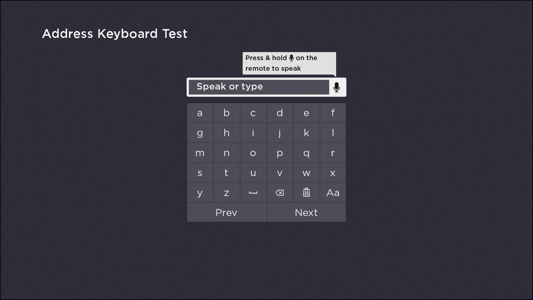",
|
|
1251
|
+
"description": "Extends [DynamicKeyboardBase](https://developer.roku.com/docs/references/scenegraph/dynamic-voice-keyboard-nodes/dynamic-keyboard-base.md\"DynamicKeyboardBase\")\n\nThe **DynamicCustomKeyboard** node enables developers to create a voice-enabled keyboard that has a custom layout. As specified in its parent [DynamicKeyboardBase](https://developer.roku.com/docs/references/scenegraph/dynamic-voice-keyboard-nodes/dynamic-keyboard-base.md\"DynamicKeyboardBase\") class, the **DynamicCustomKeyboard** node has a built-in [**VoiceTextEditBox**](https://developer.roku.com/docs/references/scenegraph/dynamic-voice-keyboard-nodes/voice-text-edit-box.md node for displaying the string of characters provided via text or voice entry, and it has a [**DynamicKeyGrid**](https://developer.roku.com/docs/references/scenegraph/dynamic-voice-keyboard-nodes/dynamic-key-grid.md node that provides keyboard functionality.\n\nThe layout of the keyboard is customized based on a JSON-formatted Key Definition File. In the Key Definition File, the developer labels the individual keys and groups them into sections and rows. The key labels support the characters in the Basic Latin, Latin 1 Supplement, Latin Extended-A, and Latin Extended-B blocks. This provides support for most Western European languages, including English, French, German, Italian, Portuguese, and Spanish.\n\n",
|
|
1253
1252
|
"events": [],
|
|
1254
1253
|
"extends": {
|
|
1255
1254
|
"name": "DynamicKeyboardBase",
|
|
@@ -1269,8 +1268,7 @@
|
|
|
1269
1268
|
"url": "https://developer.roku.com/docs/references/scenegraph/dynamic-voice-keyboard-nodes/dynamic-custom-keyboard.md"
|
|
1270
1269
|
},
|
|
1271
1270
|
"dynamickeyboard": {
|
|
1272
|
-
"
|
|
1273
|
-
"description": "_Available since Roku OS 9.4_\n\nExtends [DynamicKeyboardBase](https://developer.roku.com/docs/references/scenegraph/dynamic-voice-keyboard-nodes/dynamic-keyboard-base.md\"**DynamicKeyboardBase**\")\n\nThe **DynamicKeyboard** node is similar to the [legacy **Keyboard** node](https://developer.roku.com/docs/references/scenegraph/widget-nodes/keyboard.md, but with additional voice entry functionality. It enables text entry of alphanumeric and Latin characters, and voice entry of alphanumeric characters. It is typically used for entering email addresses or passwords.\n\nThe key layout is fixed based on the node's pre-built Key Definition File.\n\n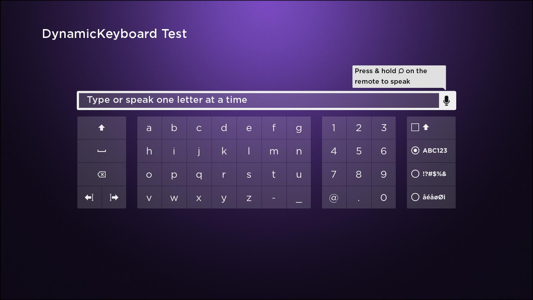",
|
|
1271
|
+
"description": "Extends [DynamicKeyboardBase](https://developer.roku.com/docs/references/scenegraph/dynamic-voice-keyboard-nodes/dynamic-keyboard-base.md\"**DynamicKeyboardBase**\")\n\nThe **DynamicKeyboard** node is similar to the [legacy **Keyboard** node](https://developer.roku.com/docs/references/scenegraph/widget-nodes/keyboard.md, but with additional voice entry functionality. It enables text entry of alphanumeric and Latin characters, and voice entry of alphanumeric characters. It is typically used for entering email addresses or passwords.\n\nThe key layout is fixed based on the node's pre-built Key Definition File.\n\n",
|
|
1274
1272
|
"events": [],
|
|
1275
1273
|
"extends": {
|
|
1276
1274
|
"name": "DynamicKeyboardBase",
|
|
@@ -1282,8 +1280,7 @@
|
|
|
1282
1280
|
"url": "https://developer.roku.com/docs/references/scenegraph/dynamic-voice-keyboard-nodes/dynamic-keyboard.md"
|
|
1283
1281
|
},
|
|
1284
1282
|
"dynamickeyboardbase": {
|
|
1285
|
-
"
|
|
1286
|
-
"description": "_Available since Roku OS 9.4_\n\nExtends [**Group**](https://developer.roku.com/docs/references/scenegraph/layout-group-nodes/group.md\"**Group**\")\n\n> Channels must use Roku voice keyboards for [email](https://developer.roku.com/docs/references/scenegraph/dynamic-voice-keyboard-nodes/dynamic-keyboard.md, [PIN](https://developer.roku.com/docs/references/scenegraph/dynamic-voice-keyboard-nodes/dynamic-pinpad.md, [password](https://developer.roku.com/docs/references/scenegraph/dynamic-voice-keyboard-nodes/dynamic-keyboard.md entry to pass [certification](/docs/developer-program/certification/certification.md#4-channel-operation).\n\nThe DynamicKeyboardBase is an abstract class that provides the functionality for dynamic voice-enabled keyboards. It combines [**DynamicKeyGrid**](https://developer.roku.com/docs/references/scenegraph/dynamic-voice-keyboard-nodes/dynamic-key-grid.md and [**VoiceTextEditBox**](https://developer.roku.com/docs/references/scenegraph/dynamic-voice-keyboard-nodes/voice-text-edit-box.md nodes to provide a single node that supports text entry in multiple languages and voice entry in English and Spanish.\n\n* The [**DynamicKeyGrid**](https://developer.roku.com/docs/references/scenegraph/dynamic-voice-keyboard-nodes/dynamic-key-grid.md provides keyboard functionality. The layout of the keyboard is based on a JSON-formatted Key Definition File.\n \n The classes derived from DynamicKeyboardBase (DynamicKeyboard, DynamicPinPad, and DynamicMiniKeyboard) have built-in Key Definition Files. For example, the DynamicKeyboard node uses a Key Definition File that matches the key layout of the [legacy Keyboard node](https://developer.roku.com/docs/references/scenegraph/widget-nodes/keyboard.md.\n \n The [**DynamicCustomKeyboard** node](https://developer.roku.com/docs/references/scenegraph/dynamic-voice-keyboard-nodes/dynamic-custom-keyboard.md enables developers to define a custom Key Definition File in order to configure the key layout. In the Key Definition File, the developer specifies the keys in each section and row of the keyboard. The keys support the characters in the Basic Latin, Latin 1 Supplement, Latin Extended-A, and Latin Extended-B blocks. This provides support for most Western European languages, including English, French, German, Italian, Portuguese, and Spanish.\n \n\n* The [**VoiceTextEditBox**](https://developer.roku.com/docs/references/scenegraph/dynamic-voice-keyboard-nodes/voice-text-edit-box.md displays the text that has been entered or spoken. This node supports multiple voice entry modes for entering email addresses, passwords, street addresses, and PINs. This node currently supports voice entry in English and Spanish.\n\n> Developers should upgrade the [legacy keyboards](https://developer.roku.com/docs/references/scenegraph/widget-nodes/keyboard.md in their channels to dynamic voice-enabled keyboards in order to leverage the following benefits:\n> \n> * **Faster on-device sign-ups and sign-ins.** Enable customers to use voice entry to provide their information when subscribing to channels and logging in.\n> \n> * **Localized in-channel search**: Enable customers to search for content in their native language.\n> \n> * **Localized customer information entry**: Enable customers to enter their personal information in their native language.\n>",
|
|
1283
|
+
"description": "Extends [**Group**](https://developer.roku.com/docs/references/scenegraph/layout-group-nodes/group.md\"**Group**\")\n\n> Channels must use Roku voice keyboards for [email](https://developer.roku.com/docs/references/scenegraph/dynamic-voice-keyboard-nodes/dynamic-keyboard.md, [PIN](https://developer.roku.com/docs/references/scenegraph/dynamic-voice-keyboard-nodes/dynamic-pinpad.md, [password](https://developer.roku.com/docs/references/scenegraph/dynamic-voice-keyboard-nodes/dynamic-keyboard.md entry to pass [certification](/docs/developer-program/certification/certification.md#4-channel-operation).\n\nThe DynamicKeyboardBase is an abstract class that provides the functionality for dynamic voice-enabled keyboards. It combines [**DynamicKeyGrid**](https://developer.roku.com/docs/references/scenegraph/dynamic-voice-keyboard-nodes/dynamic-key-grid.md and [**VoiceTextEditBox**](https://developer.roku.com/docs/references/scenegraph/dynamic-voice-keyboard-nodes/voice-text-edit-box.md nodes to provide a single node that supports text entry in multiple languages and voice entry in English and Spanish.\n\n* The [**DynamicKeyGrid**](https://developer.roku.com/docs/references/scenegraph/dynamic-voice-keyboard-nodes/dynamic-key-grid.md provides keyboard functionality. The layout of the keyboard is based on a JSON-formatted Key Definition File.\n \n The classes derived from DynamicKeyboardBase (DynamicKeyboard, DynamicPinPad, and DynamicMiniKeyboard) have built-in Key Definition Files. For example, the DynamicKeyboard node uses a Key Definition File that matches the key layout of the [legacy Keyboard node](https://developer.roku.com/docs/references/scenegraph/widget-nodes/keyboard.md.\n \n The [**DynamicCustomKeyboard** node](https://developer.roku.com/docs/references/scenegraph/dynamic-voice-keyboard-nodes/dynamic-custom-keyboard.md enables developers to define a custom Key Definition File in order to configure the key layout. In the Key Definition File, the developer specifies the keys in each section and row of the keyboard. The keys support the characters in the Basic Latin, Latin 1 Supplement, Latin Extended-A, and Latin Extended-B blocks. This provides support for most Western European languages, including English, French, German, Italian, Portuguese, and Spanish.\n \n\n* The [**VoiceTextEditBox**](https://developer.roku.com/docs/references/scenegraph/dynamic-voice-keyboard-nodes/voice-text-edit-box.md displays the text that has been entered or spoken. This node supports multiple voice entry modes for entering email addresses, passwords, street addresses, and PINs. This node currently supports voice entry in English and Spanish.\n\n> Developers should upgrade the [legacy keyboards](https://developer.roku.com/docs/references/scenegraph/widget-nodes/keyboard.md in their channels to dynamic voice-enabled keyboards in order to leverage the following benefits:\n> \n> * **Faster on-device sign-ups and sign-ins.** Enable customers to use voice entry to provide their information when subscribing to channels and logging in.\n> \n> * **Localized in-channel search**: Enable customers to search for content in their native language.\n> \n> * **Localized customer information entry**: Enable customers to enter their personal information in their native language.\n>",
|
|
1287
1284
|
"events": [],
|
|
1288
1285
|
"extends": {
|
|
1289
1286
|
"name": "Group",
|
|
@@ -1331,8 +1328,7 @@
|
|
|
1331
1328
|
"url": "https://developer.roku.com/docs/references/scenegraph/dynamic-voice-keyboard-nodes/dynamic-keyboard-base.md"
|
|
1332
1329
|
},
|
|
1333
1330
|
"dynamickeygrid": {
|
|
1334
|
-
"
|
|
1335
|
-
"description": "_Available since Roku OS 9.4_\n\nExtends [**Group**](https://developer.roku.com/docs/references/scenegraph/layout-group-nodes/group.md\"**Group**\")\n\nThe **DynamicKeyGrid** node implements a grid of keys that are defined and organized in a [Key Definition File](https://developer.roku.com/docs/references/scenegraph/dynamic-voice-keyboard-nodes/key-definition-file.md. It is typically used in a subclass of the [DynamicKeyboardBase](https://developer.roku.com/docs/references/scenegraph/dynamic-voice-keyboard-nodes/dynamic-keyboard-base.md node (DynamicKeyboard, DynamicPinPad, and DynamicMiniKeyboard) to display the string of characters entered via text or voice entry. It may also be used as an individual node.",
|
|
1331
|
+
"description": "Extends [**Group**](https://developer.roku.com/docs/references/scenegraph/layout-group-nodes/group.md\"**Group**\")\n\nThe **DynamicKeyGrid** node implements a grid of keys that are defined and organized in a [Key Definition File](https://developer.roku.com/docs/references/scenegraph/dynamic-voice-keyboard-nodes/key-definition-file.md. It is typically used in a subclass of the [DynamicKeyboardBase](https://developer.roku.com/docs/references/scenegraph/dynamic-voice-keyboard-nodes/dynamic-keyboard-base.md node (DynamicKeyboard, DynamicPinPad, and DynamicMiniKeyboard) to display the string of characters entered via text or voice entry. It may also be used as an individual node.",
|
|
1336
1332
|
"events": [],
|
|
1337
1333
|
"extends": {
|
|
1338
1334
|
"name": "Group",
|
|
@@ -1422,8 +1418,7 @@
|
|
|
1422
1418
|
"url": "https://developer.roku.com/docs/references/scenegraph/dynamic-voice-keyboard-nodes/dynamic-key-grid.md"
|
|
1423
1419
|
},
|
|
1424
1420
|
"dynamicminikeyboard": {
|
|
1425
|
-
"
|
|
1426
|
-
"description": "_Available since Roku OS 9.4_\n\nExtends [DynamicKeyboardBase](https://developer.roku.com/docs/references/scenegraph/dynamic-voice-keyboard-nodes/dynamic-keyboard-base.md\"**DynamicKeyboardBase**\")\n\nThe **DynamicMiniKeyboard** node is similar to the [legacy **MiniKeyboard** node](https://developer.roku.com/docs/references/scenegraph/widget-nodes/minikeyboard.md, but with additional voice entry functionality. It enables text and voice entry of letters A-Z and digits 0-9. It is typically used for entering a search query.\n\nThe key layout is fixed based on the node's pre-built Key Definition File.\n\n",
|
|
1421
|
+
"description": "Extends [DynamicKeyboardBase](https://developer.roku.com/docs/references/scenegraph/dynamic-voice-keyboard-nodes/dynamic-keyboard-base.md\"**DynamicKeyboardBase**\")\n\nThe **DynamicMiniKeyboard** node is similar to the [legacy **MiniKeyboard** node](https://developer.roku.com/docs/references/scenegraph/widget-nodes/minikeyboard.md, but with additional voice entry functionality. It enables text and voice entry of letters A-Z and digits 0-9. It is typically used for entering a search query.\n\nThe key layout is fixed based on the node's pre-built Key Definition File.\n\n",
|
|
1427
1422
|
"events": [],
|
|
1428
1423
|
"extends": {
|
|
1429
1424
|
"name": "DynamicKeyboardBase",
|
|
@@ -1435,8 +1430,7 @@
|
|
|
1435
1430
|
"url": "https://developer.roku.com/docs/references/scenegraph/dynamic-voice-keyboard-nodes/dynamic-mini-keyboard.md"
|
|
1436
1431
|
},
|
|
1437
1432
|
"dynamicpinpad": {
|
|
1438
|
-
"
|
|
1439
|
-
"description": "_Available since Roku OS 9.4_\n\nExtends [DynamicKeyboardBase](https://developer.roku.com/docs/references/scenegraph/dynamic-voice-keyboard-nodes/dynamic-keyboard-base.md\"**DynamicKeyboardBase**\")\n\nThe **DynamicPinPad** node is similar to the [legacy **PinPad** node](https://developer.roku.com/docs/references/scenegraph/widget-nodes/pinpad.md, but with additional voice entry functionality. It enables text and voice entry of numeric characters. It is typically used for entering short numeric PIN codes.\n\nThe key layout is fixed based on the node's pre-built Key Definition File.\n\n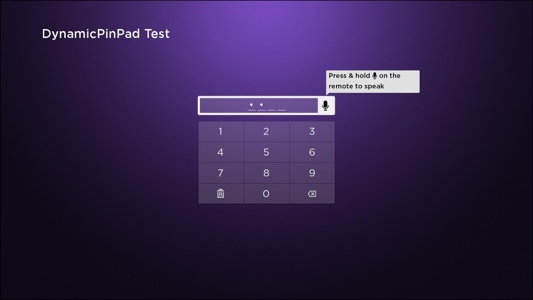",
|
|
1433
|
+
"description": "Extends [DynamicKeyboardBase](https://developer.roku.com/docs/references/scenegraph/dynamic-voice-keyboard-nodes/dynamic-keyboard-base.md\"**DynamicKeyboardBase**\")\n\nThe **DynamicPinPad** node is similar to the [legacy **PinPad** node](https://developer.roku.com/docs/references/scenegraph/widget-nodes/pinpad.md, but with additional voice entry functionality. It enables text and voice entry of numeric characters. It is typically used for entering short numeric PIN codes.\n\nThe key layout is fixed based on the node's pre-built Key Definition File.\n\n",
|
|
1440
1434
|
"events": [],
|
|
1441
1435
|
"extends": {
|
|
1442
1436
|
"name": "DynamicKeyboardBase",
|
|
@@ -2924,23 +2918,6 @@
|
|
|
2924
2918
|
"url": "https://developer.roku.com/docs/references/brightscript/interfaces/ifsgnodehttpagentaccess.md"
|
|
2925
2919
|
}
|
|
2926
2920
|
],
|
|
2927
|
-
"methods": [
|
|
2928
|
-
{
|
|
2929
|
-
"description": "callFunc() is a synchronized interface on roSGNode. It will always execute in the component's owning ScriptEngine and thread (by rendezvous if necessary), and it will always use the m and m.top of the owning component. Any context from the caller can be passed via one or more method parameters, which may be of any type (previously, callFunc() only supported a single associative array parameter).\n\nTo call the function, use the `callFunc` field with the required method signature. A return value, if any, can be an object that is similarly arbitrary. The method being called must determine how to interpret the parameters included in the `callFunc` field.",
|
|
2930
|
-
"isVariadic": true,
|
|
2931
|
-
"name": "callFunc",
|
|
2932
|
-
"params": [
|
|
2933
|
-
{
|
|
2934
|
-
"default": null,
|
|
2935
|
-
"description": "The function name to call.",
|
|
2936
|
-
"isRequired": true,
|
|
2937
|
-
"name": "functionName",
|
|
2938
|
-
"type": "String"
|
|
2939
|
-
}
|
|
2940
|
-
],
|
|
2941
|
-
"returnType": "Dynamic"
|
|
2942
|
-
}
|
|
2943
|
-
],
|
|
2944
2921
|
"name": "Node",
|
|
2945
2922
|
"url": "https://developer.roku.com/docs/references/scenegraph/node.md"
|
|
2946
2923
|
},
|
|
@@ -4111,6 +4088,27 @@
|
|
|
4111
4088
|
"name": "RowList",
|
|
4112
4089
|
"url": "https://developer.roku.com/docs/references/scenegraph/list-and-grid-nodes/rowlist.md"
|
|
4113
4090
|
},
|
|
4091
|
+
"rsgpalette": {
|
|
4092
|
+
"availableSince": "9.4",
|
|
4093
|
+
"description": "Extends [Node](https://developer.roku.com/docs/references/scenegraph/node.md\n\nThe **RSGPalette** node allows developers to specify a named set of color values that can be shared among nodes that support RSGPalette colors.\n\nNodes that support RSGPalette colors include a **palette** field, which can be set to an **RSGPalette** node to override the default colors used by the node. The specific palette values used by those nodes are defined in each node's documentation.\n\nIf a node that supports a palette does not set its **palette** filed, the RSGPalette is inherited from ancestor nodes in the scene graph. Specifically, the node looks up the scene graph until it finds a **PaletteGroup** node with its **palette** field set. This may be found in the **Scene** itself.\n\nIf no node in the scene graph has its **palette** field set, the keyboard uses the default palette (gray background/white text).\n\nCurrently, the **RSGPalette** node is typically used in channels that customize the colors of the dynamic keyboard nodes. In this case, the channel assigns the RSGPalette node to the **palette** field of the [DynamicKeyboardBase](https://developer.roku.com/docs/references/scenegraph/dynamic-voice-keyboard-nodes/dynamic-keyboard-base.md\"DynamicKeyboardBase\") node and lets the keyboard's **DynamicKeyGrid** and **VoiceTextEditBox** inherit that RSGPalette.\n\n> The colors in the RSGPalette do not cascade. If a child node overrides its parent's RSGPalette node, that RSGPalette should specify values for all the colors used by the node. Unspecified values will use the system default colors.",
|
|
4094
|
+
"events": [],
|
|
4095
|
+
"extends": {
|
|
4096
|
+
"name": "Node",
|
|
4097
|
+
"url": "https://developer.roku.com/docs/references/scenegraph/node.md"
|
|
4098
|
+
},
|
|
4099
|
+
"fields": [
|
|
4100
|
+
{
|
|
4101
|
+
"accessPermission": "READ_WRITE",
|
|
4102
|
+
"default": "not specified",
|
|
4103
|
+
"description": "Specifies an associative array of color name/color key-value pairs. For example: \\`\\`\\` { PrimaryTextColor: 0x111111FF, FocusColor: 0x0000FFFF } \\`\\`\\` .",
|
|
4104
|
+
"name": "colors",
|
|
4105
|
+
"type": "associative array"
|
|
4106
|
+
}
|
|
4107
|
+
],
|
|
4108
|
+
"interfaces": [],
|
|
4109
|
+
"name": "RSGPalette",
|
|
4110
|
+
"url": "https://developer.roku.com/en-ca/docs/references/scenegraph/scene.md"
|
|
4111
|
+
},
|
|
4114
4112
|
"scene": {
|
|
4115
4113
|
"description": "Extends [**Group**](https://developer.roku.com/docs/references/scenegraph/layout-group-nodes/group.md\"**Group**\")\n\nThe **Scene** node class serves as the root of a SceneGraph node tree. Every **roSGScreen** object must have a **Scene** node, or a node that derives from the **Scene** node class as its root, including an XML markup component that extends the Scene node class or subclass. That node must be created using the **roSGScreen** createScene() function, with an argument that is a string of the name of the **Scene** node object created. For example:\n\n```\nscreen = CreateObject(\"roSGScreen\")\nscene = screen.CreateScene(\"Scene\")\n```\n\nWhile it is technically possible to have more than one scene per channel, we recommend you only have one **roSGScreen** and one **Scene** node. Child nodes of the scene can be treated as different \"scenes\" where you can then implement transitions between them.",
|
|
4116
4114
|
"events": [],
|
|
@@ -5457,7 +5455,7 @@
|
|
|
5457
5455
|
"url": "https://developer.roku.com/docs/references/scenegraph/list-and-grid-nodes/targetset.md"
|
|
5458
5456
|
},
|
|
5459
5457
|
"task": {
|
|
5460
|
-
"description": "Extends [**Node**](https://developer.roku.com/docs/references/scenegraph/node.md\n\nThe Task node class allows you to specify a function to be spawned in a different thread, and run asynchronously with respect to both the scene rendering thread and the main application thread. A Task node also allows you to run functions that cannot be run in SceneGraph node or component, typically BrightScript code functions involving operations such as reading data from servers and file system manipulation. (You also cannot, and should not, run functions in a SceneGraph application for operations that are functionally the same as SceneGraph nodes and components, such as playing videos.) A list of all the BrightScript functions and components that cannot be used in SceneGraph applications or can only be used in a Task node can be found in [BrightScript Support](/docs/developer-program/core-concepts/scenegraph-brightscript/brightscript-support.md \"BrightScript Support\").\n\nA Task node is typically used to read data from a server to create a ContentNode to configure a SceneGraph node or component (see [ContentNode](https://developer.roku.com/docs/references/scenegraph/control-nodes/contentnode.md\"ContentNode\")). A Task node used for this purpose can be thought of as a content reader. Since ContentNodes are required to configure many components rendered in a scene, such as lists, panels, and grids, and you will generally want to read the data for those types of nodes from your server, you should create a Task node as a content reader for each of those components that you use in your scene.\n\nThe Task node class was designed with three general development use cases:\n\n* A new Task node object is created for each asynchronous operation. The input data needed for the operation is set in the Task node object [<interface>](https://developer.roku.com/docs/references/scenegraph/xml-elements/interface.md\"<interface>\") fields in the render thread, along with an observer of the output field data, and the Task node control field is set to RUN. After the output data is returned to the render thread, the Task node object is not used again.\n* A Task node object is used multiple times for several identical asynchronous operations. In this case, the input data for each operation is set in the existing Task node object, with another observer for the output field data, and the Task node control field is again set to RUN. This may be more efficient than creating a new Task node object for each of the identical operations.\n* A Task node observes its input fields using the port form of the ifSGNodeField [observeField()](https://developer.roku.com/docs/references/brightscript/interfaces/ifsgnodefield.mdobservefieldfieldname-as-string-functionname-as-string-as-boolean \"observeField()\") method, and returns output data with each field change. In this case, the Task node acts like a continuous server.\n\nSince Task nodes launch asynchronous threads, and have no provisions for locks and mutexes, you must be careful to avoid race, deadlock, and other asynchronous thread errors. Here are a few tips for using Task nodes:\n\n* Avoid accessing files which must be persistent before thread completion, to avoid a subsequent Task node or other thread access of the same file before the thread completes. It is easier and safer to use a dynamically-created string or other data object to hold temporary thread data to avoid having a subsequent or existing thread overwrite and corrupt the data.\n* Be very careful if you access any object in a Task node that may exist in another thread. It is better to completely separate all objects in any other possible thread from the Task node thread by setting the fields of the Task node with copies of the minimum amount of data needed to run the thread.\n* In the Task node init() function, perform the minimum required amount of initialization of the Task node and any included thread functions. If you intend to trigger an asynchronous task based on a Task node input field change, in many cases, you should only set up the observer for the field in init().\n* Use the port form of the ifSGNodeField [observeField()](https://developer.roku.com/docs/references/brightscript/interfaces/ifsgnodefield.mdobservefieldfieldname-as-string-functionname-as-string-as-boolean \"observeField()\") rather than the onChange attribute. This will avoid triggering the thread in response to a render thread event before the Task node observers are set up.\n* It is more efficient to use a persistent Task node that is triggered by an
|
|
5458
|
+
"description": "Extends [**Node**](https://developer.roku.com/docs/references/scenegraph/node.md\n\nThe Task node class allows you to specify a function to be spawned in a different thread, and run asynchronously with respect to both the scene rendering thread and the main application thread. A Task node also allows you to run functions that cannot be run in SceneGraph node or component, typically BrightScript code functions involving operations such as reading data from servers and file system manipulation. (You also cannot, and should not, run functions in a SceneGraph application for operations that are functionally the same as SceneGraph nodes and components, such as playing videos.) A list of all the BrightScript functions and components that cannot be used in SceneGraph applications or can only be used in a Task node can be found in [BrightScript Support](/docs/developer-program/core-concepts/scenegraph-brightscript/brightscript-support.md \"BrightScript Support\").\n\nA Task node is typically used to read data from a server to create a ContentNode to configure a SceneGraph node or component (see [ContentNode](https://developer.roku.com/docs/references/scenegraph/control-nodes/contentnode.md\"ContentNode\")). A Task node used for this purpose can be thought of as a content reader. Since ContentNodes are required to configure many components rendered in a scene, such as lists, panels, and grids, and you will generally want to read the data for those types of nodes from your server, you should create a Task node as a content reader for each of those components that you use in your scene.\n\nThe Task node class was designed with three general development use cases:\n\n* A new Task node object is created for each asynchronous operation. The input data needed for the operation is set in the Task node object [<interface>](https://developer.roku.com/docs/references/scenegraph/xml-elements/interface.md\"<interface>\") fields in the render thread, along with an observer of the output `<interface>` field data, and the Task node control field is set to RUN. After the output data is returned to the render thread, the Task node object is not used again.\n* A Task node object is used multiple times for several identical asynchronous operations. In this case, the input data for each operation is set in the existing Task node object, with another observer for the output `<interface>` field data, and the Task node control field is again set to RUN. This may be more efficient than creating a new Task node object for each of the identical operations.\n* A Task node observes its input `<interface>` fields using the port form of the ifSGNodeField [observeField()](https://developer.roku.com/docs/references/brightscript/interfaces/ifsgnodefield.mdobservefieldfieldname-as-string-functionname-as-string-as-boolean \"observeField()\") method, and returns output data with each field change. In this case, the Task node acts like a continuous server.\n\nSince Task nodes launch asynchronous threads, and have no provisions for locks and mutexes, you must be careful to avoid race, deadlock, and other asynchronous thread errors. Here are a few tips for using Task nodes:\n\n* Avoid accessing files which must be persistent before thread completion, to avoid a subsequent Task node or other thread access of the same file before the thread completes. It is easier and safer to use a dynamically-created string or other data object to hold temporary thread data to avoid having a subsequent or existing thread overwrite and corrupt the data.\n* Be very careful if you access any object in a Task node that may exist in another thread. It is better to completely separate all objects in any other possible thread from the Task node thread by setting the `<interface>` fields of the Task node with copies of the minimum amount of data needed to run the thread.\n* In the Task node init() function, perform the minimum required amount of initialization of the Task node and any included thread functions. If you intend to trigger an asynchronous task based on a Task node input`<interface>` field change, in many cases, you should only set up the observer for the field in init().\n* Use the port form of the ifSGNodeField [observeField()](https://developer.roku.com/docs/references/brightscript/interfaces/ifsgnodefield.mdobservefieldfieldname-as-string-functionname-as-string-as-boolean \"observeField()\") rather than the onChange attribute. This will avoid triggering the thread in response to a render thread event before the Task node observers are set up.\n* It is more efficient to use a persistent Task node that is triggered by an `<interface>` field change than to create a new Task node every time a particular asynchronous thread is required. If needed, you can communicate that the particular asynchronous thread is no longer required through an `<interface>` field as well, either through the triggering field, or a special field used for control of the Task node.\n* You can use a single Task node object to run any number of different asynchronous threads by setting the functionName field to the Task node function you want before setting the control field to RUN. If you do not use the input data `<interface>` fields to trigger running the thread, this is equivalent to calling an asynchronous function, and passing the input data fields as arguments to the function. The output data `<interface>` fields can likewise be considered as the return value of a asynchronous function call, but to avoid blocking you must observe the fields, or the state field, as a callback event to handle the results in the calling thread.\n\nAlso review \"[SceneGraph threads](/docs/developer-program/core-concepts/threads.md \"SceneGraph\")\" for in-depth information on using Task nodes most efficiently.",
|
|
5461
5459
|
"events": [],
|
|
5462
5460
|
"extends": {
|
|
5463
5461
|
"name": "Node",
|
|
@@ -5692,6 +5690,13 @@
|
|
|
5692
5690
|
"url": "https://developer.roku.com/docs/references/scenegraph/layout-group-nodes/group.md"
|
|
5693
5691
|
},
|
|
5694
5692
|
"fields": [
|
|
5693
|
+
{
|
|
5694
|
+
"accessPermission": "WRITE",
|
|
5695
|
+
"default": "false",
|
|
5696
|
+
"description": "Indicates whether the \"STOP\" command is executed asynchronously (true) or synchronously (false). By default, the STOP command is executed synchronously, which blocks the UI thread. Enabling this field makes the STOP command non-blocking, which enables the video to be switched faster. When this field is enabled, the \\`state\\` field is set to \"stopping\" when the asynnchronous stop begins. The \\`state\\` field then changes to \"stopped\" once the stop has been completed. Any other media player component calls on the UI thread that require the Video node to be re-instantiated should be blocked until the asynnchronous stop has been completed (for example, updating the \\`control\\` field to \"Play\" or \"Prebuffer\", updating the \\`seek\\` field, or updating the \\`seekClip\\` field). This is because a video node in the \"stopping\" state is still using the underlying media player, which is not available at that time. As a result, performing these types of operations on a different video while in the \"stopping\" state may result in a playback failure.",
|
|
5697
|
+
"name": "asyncStopSemantics _Available since Roku OS 12.5_",
|
|
5698
|
+
"type": "boolean"
|
|
5699
|
+
},
|
|
5695
5700
|
{
|
|
5696
5701
|
"accessPermission": "WRITE_ONLY",
|
|
5697
5702
|
"default": "{ }",
|
|
@@ -5843,13 +5848,13 @@
|
|
|
5843
5848
|
"accessPermission": "READ_ONLY",
|
|
5844
5849
|
"default": "",
|
|
5845
5850
|
"description": "Provides timing measurements related to the start of video playback. All measurements are in seconds. The roAssociativeArray contains the following fields:\n\n| Field | Type | Access Permission | Description |\n| --- | --- | --- | --- |\n| total\\_dur | float | READ\\_ONLY | Total video start duration. |\n| manifest\\_dur | float | READ\\_ONLY | Manifest download and parsing. |\n| drm\\_load\\_dur | float | READ\\_ONLY | DRM system initialization. |\n| drm\\_lic\\_acq\\_dur | float | READ\\_ONLY | License acquisition. This typically includes interactions with the license server. |\n| prebuf\\_dur | float | READ\\_ONLY | Prebuffer content. |\n| manifest\\_start (_Available since Roku OS 10.0_) | Float | READ\\_ONLY | Point at which manifest download and parsing begins. |\n| drm\\_load\\_start (_Available since Roku OS 10.0_) | Float | READ\\_ONLY | Point at which DRM system initialization begins. |\n| drm\\_lic\\_acq\\_start (_Available since Roku OS 10.0_) | Float | READ\\_ONLY | Point at which license acquisition begins. |\n| prebuf\\_start (_Available since Roku OS 10.0_) | Float | READ\\_ONLY | Point at which content pre-buffering begins. |\n\n\\> The \\\\\\_start fields correspond to the similarly named \\\\\\_dur (duration) fields in this structure. In each case, the \\\\\\_start point is the number of milliseconds elapsed from the initialization of the media player (t=0.000). If required, ending points for each interval can be derived from its associated starting-point and duration.",
|
|
5846
|
-
"name": "playStartInfo
|
|
5851
|
+
"name": "playStartInfo",
|
|
5847
5852
|
"type": "roAssociativeArray"
|
|
5848
5853
|
},
|
|
5849
5854
|
{
|
|
5850
5855
|
"accessPermission": "READ_ONLY",
|
|
5851
5856
|
"default": "none",
|
|
5852
|
-
"description": "Describes the current video play state, such as if the video play has been paused.\n\n| Value | Meaning |\n| --- | --- |\n| none | No current play state |\n| buffering | Video stream is currently buffering |\n| playing | Video is currently playing |\n| paused | Video is currently paused |\n| stopped | Video is currently stopped |\n| finished | Video has successfully completed playback |\n| error | An error has occurred in the video play. The error code, message, and diagnostics can be found in the `errorCode`, `errorMsg`, and `errorStr` fields respectively. |",
|
|
5857
|
+
"description": "Describes the current video play state, such as if the video play has been paused.\n\n| Value | Meaning |\n| --- | --- |\n| none | No current play state |\n| buffering | Video stream is currently buffering |\n| playing | Video is currently playing |\n| paused | Video is currently paused |\n| stopping _Available since Roku OS 12.5_ | Video is in the process of being stopped. This value is only returned if the `asyncStopSemantics` field is enabled. |\n| stopped | Video is currently stopped |\n| finished | Video has successfully completed playback |\n| error | An error has occurred in the video play. The error code, message, and diagnostics can be found in the `errorCode`, `errorMsg`, and `errorStr` fields respectively. |",
|
|
5853
5858
|
"name": "state",
|
|
5854
5859
|
"type": "value string"
|
|
5855
5860
|
},
|
|
@@ -5866,8 +5871,7 @@
|
|
|
5866
5871
|
"url": "https://developer.roku.com/docs/references/scenegraph/media-playback-nodes/video.md"
|
|
5867
5872
|
},
|
|
5868
5873
|
"voicetexteditbox": {
|
|
5869
|
-
"
|
|
5870
|
-
"description": "_Available since Roku OS 9.4_\n\nExtends [TextEditBox](https://developer.roku.com/docs/references/scenegraph/widget-nodes/texteditbox.md\n\nThe **VoiceTextEditBox** node is similar to the [legacy **TextEditBox** node](https://developer.roku.com/docs/references/scenegraph/widget-nodes/texteditbox.md, but with additional voice entry functionality. Only one voice-enabled **VoiceTextEditBox** node may be on the screen at a time. If another VoiceTextEditBox is rendered on the screen, its voice functionality is disabled implicitly.",
|
|
5874
|
+
"description": "Extends [TextEditBox](https://developer.roku.com/docs/references/scenegraph/widget-nodes/texteditbox.md\n\nThe **VoiceTextEditBox** node is similar to the [legacy **TextEditBox** node](https://developer.roku.com/docs/references/scenegraph/widget-nodes/texteditbox.md, but with additional voice entry functionality. Only one voice-enabled **VoiceTextEditBox** node may be on the screen at a time. If another VoiceTextEditBox is rendered on the screen, its voice functionality is disabled implicitly.",
|
|
5871
5875
|
"events": [],
|
|
5872
5876
|
"extends": {
|
|
5873
5877
|
"name": "TextEditBox",
|
|
@@ -7552,13 +7556,6 @@
|
|
|
7552
7556
|
"returnDescription": "Channel ID; e.g., \"12345\" or \"dev\"",
|
|
7553
7557
|
"returnType": "String"
|
|
7554
7558
|
},
|
|
7555
|
-
{
|
|
7556
|
-
"description": "Returns the subtitle value from the manifest.",
|
|
7557
|
-
"name": "GetSubtitle",
|
|
7558
|
-
"params": [],
|
|
7559
|
-
"returnDescription": "Possible subtitle configuration",
|
|
7560
|
-
"returnType": "String"
|
|
7561
|
-
},
|
|
7562
7559
|
{
|
|
7563
7560
|
"description": "Returns the title value from the manifest.",
|
|
7564
7561
|
"name": "GetTitle",
|
|
@@ -9093,7 +9090,7 @@
|
|
|
9093
9090
|
},
|
|
9094
9091
|
{
|
|
9095
9092
|
"default": null,
|
|
9096
|
-
"description": "
|
|
9093
|
+
"description": "This parameter is used for subscription upgrades and downgrades. If it is not specified, the action is a product purchase. It contains the following fields: \n| Name | Type | Description |\n| ------ | ------ | --------------------------------------------------------------------------------------------------------------------------------------------------------------------------------------------- |\n| action | String | The action to be performed, which may be one of the following:\"Upgrade\": The order is an upgrade from one subscription product to another.\"Downgrade\": The order is a subscription downgrade. |\n **Example** ``` m.store = CreateObject(\"roChannelStore\") ' Populate myOrderItems myOrderInfo.action = \"Upgrade\" m.store.setOrder(myOrderItems, myOrderInfo) ``` See [On-device upgrade and downgrade](/docs/developer-program/roku-pay/implementation/on-device-upgrade-downgrade.md#calling-the-roku-web-service-validate-transaction-api) for how to implement Roku Pay web services for upgrades/downgrades.",
|
|
9097
9094
|
"isRequired": true,
|
|
9098
9095
|
"name": "orderInfo",
|
|
9099
9096
|
"type": "roAssociativeArray"
|
|
@@ -9658,7 +9655,7 @@
|
|
|
9658
9655
|
"returnType": "Boolean"
|
|
9659
9656
|
},
|
|
9660
9657
|
{
|
|
9661
|
-
"description": "
|
|
9658
|
+
"description": "Parameters",
|
|
9662
9659
|
"name": "EnableLowGeneralMemoryEvent",
|
|
9663
9660
|
"params": [
|
|
9664
9661
|
{
|
|
@@ -9983,7 +9980,6 @@
|
|
|
9983
9980
|
"returnType": "Object"
|
|
9984
9981
|
},
|
|
9985
9982
|
{
|
|
9986
|
-
"description": "Returns the ISO 3166-1 (2-letter) country code associated with the user's Roku account.",
|
|
9987
9983
|
"name": "GetUserCountryCode",
|
|
9988
9984
|
"params": [],
|
|
9989
9985
|
"returnDescription": "An ISO 3166-1 (2-letter) country code.",
|
|
@@ -10020,7 +10016,7 @@
|
|
|
10020
10016
|
"params": [
|
|
10021
10017
|
{
|
|
10022
10018
|
"default": null,
|
|
10023
|
-
"description": "The feature to be checked, which may be one of the following values: * \"5.1\\_surround\\_sound\" * \"can\\_output\\_5.1\\_surround\\_sound\" * \"sd\\_only\\_hardware\" * \"usb\\_hardware\" * \"sdcard\\_hardware\" * \"ethernet\\_hardware\" * \"gaming\\_hardware\" * \"energy\\_star\\_compliant\" * \"soundbar\\_hardware\"
|
|
10019
|
+
"description": "The feature to be checked, which may be one of the following values: * \"5.1\\_surround\\_sound\" * \"can\\_output\\_5.1\\_surround\\_sound\" * \"sd\\_only\\_hardware\" * \"usb\\_hardware\" * \"sdcard\\_hardware\" * \"ethernet\\_hardware\" * \"gaming\\_hardware\" * \"energy\\_star\\_compliant\" * \"soundbar\\_hardware\". Check whether the device has soundbar hardware (for example, speakers). * \"voice\\_remote\" (_Available since Roku OS 10.5_). Checks whether a Roku device is paired with a Roku voice remote. This enables developers to tailor the in-channel user experience for viewers with Roku voice remote controls. * \"handsfree\\_voice\" (_Available since Roku OS 10.5_). Checks whether a Roku device is paired with a hands-free Roku remote control such as the Roku Voice Remote Pro. This enables developers to tailor the in-channel user experience for viewers with hands-free Roku remote controls (for example, displaying voice tips and tricks in the UI).",
|
|
10024
10020
|
"isRequired": true,
|
|
10025
10021
|
"name": "feature",
|
|
10026
10022
|
"type": "String"
|
|
@@ -13675,6 +13671,22 @@
|
|
|
13675
13671
|
}
|
|
13676
13672
|
],
|
|
13677
13673
|
"methods": [
|
|
13674
|
+
{
|
|
13675
|
+
"description": "callFunc() is a synchronized interface on roSGNode. It will always execute in the component's owning ScriptEngine and thread (by rendezvous if necessary), and it will always use the m and m.top of the owning component. Any context from the caller can be passed via one or more method parameters, which may be of any type (previously, callFunc() only supported a single associative array parameter).\n\nTo call the function, use the `callFunc` field with the required method signature. A return value, if any, can be an object that is similarly arbitrary. The method being called must determine how to interpret the parameters included in the `callFunc` field.",
|
|
13676
|
+
"isVariadic": true,
|
|
13677
|
+
"name": "callFunc",
|
|
13678
|
+
"params": [
|
|
13679
|
+
{
|
|
13680
|
+
"default": null,
|
|
13681
|
+
"description": "The function name to call.",
|
|
13682
|
+
"isRequired": true,
|
|
13683
|
+
"name": "functionName",
|
|
13684
|
+
"type": "String"
|
|
13685
|
+
}
|
|
13686
|
+
],
|
|
13687
|
+
"returnDescription": "An arbitrary object",
|
|
13688
|
+
"returnType": "Dynamic"
|
|
13689
|
+
},
|
|
13678
13690
|
{
|
|
13679
13691
|
"name": "clone",
|
|
13680
13692
|
"params": [
|
|
@@ -15466,6 +15478,13 @@
|
|
|
15466
15478
|
"returnDescription": "The string value stored in the calling String object.",
|
|
15467
15479
|
"returnType": "String"
|
|
15468
15480
|
},
|
|
15481
|
+
{
|
|
15482
|
+
"description": "Checks whether a string is empty.",
|
|
15483
|
+
"name": "IsEmpty",
|
|
15484
|
+
"params": [],
|
|
15485
|
+
"returnDescription": "A flag indicating whether the string is empty (true), or contains characters (false).",
|
|
15486
|
+
"returnType": "Boolean"
|
|
15487
|
+
},
|
|
15469
15488
|
{
|
|
15470
15489
|
"description": "Sets the calling String object to the specified string value.",
|
|
15471
15490
|
"name": "SetString",
|
|
@@ -17447,8 +17466,7 @@
|
|
|
17447
17466
|
"url": "https://developer.roku.com/docs/references/brightscript/events/rochannelstoreevent.md"
|
|
17448
17467
|
},
|
|
17449
17468
|
"rodeviceinfoevent": {
|
|
17450
|
-
"
|
|
17451
|
-
"description": "_Available since Roku OS 8_\n\nThe roDeviceInfo component sends the roDeviceInfoEvent with the following predicates that indicate its valid event types:",
|
|
17469
|
+
"description": "The roDeviceInfo component sends the roDeviceInfoEvent with the following predicates that indicate its valid event types:",
|
|
17452
17470
|
"implementers": [
|
|
17453
17471
|
{
|
|
17454
17472
|
"name": "roDeviceInfo",
|
|
@@ -228,7 +228,6 @@ export declare const nodes: {
|
|
|
228
228
|
url: string;
|
|
229
229
|
};
|
|
230
230
|
dynamiccustomkeyboard: {
|
|
231
|
-
availableSince: string;
|
|
232
231
|
description: string;
|
|
233
232
|
events: any[];
|
|
234
233
|
extends: {
|
|
@@ -247,7 +246,6 @@ export declare const nodes: {
|
|
|
247
246
|
url: string;
|
|
248
247
|
};
|
|
249
248
|
dynamickeyboard: {
|
|
250
|
-
availableSince: string;
|
|
251
249
|
description: string;
|
|
252
250
|
events: any[];
|
|
253
251
|
extends: {
|
|
@@ -260,7 +258,6 @@ export declare const nodes: {
|
|
|
260
258
|
url: string;
|
|
261
259
|
};
|
|
262
260
|
dynamickeyboardbase: {
|
|
263
|
-
availableSince: string;
|
|
264
261
|
description: string;
|
|
265
262
|
events: any[];
|
|
266
263
|
extends: {
|
|
@@ -279,7 +276,6 @@ export declare const nodes: {
|
|
|
279
276
|
url: string;
|
|
280
277
|
};
|
|
281
278
|
dynamickeygrid: {
|
|
282
|
-
availableSince: string;
|
|
283
279
|
description: string;
|
|
284
280
|
events: any[];
|
|
285
281
|
extends: {
|
|
@@ -298,7 +294,6 @@ export declare const nodes: {
|
|
|
298
294
|
url: string;
|
|
299
295
|
};
|
|
300
296
|
dynamicminikeyboard: {
|
|
301
|
-
availableSince: string;
|
|
302
297
|
description: string;
|
|
303
298
|
events: any[];
|
|
304
299
|
extends: {
|
|
@@ -311,7 +306,6 @@ export declare const nodes: {
|
|
|
311
306
|
url: string;
|
|
312
307
|
};
|
|
313
308
|
dynamicpinpad: {
|
|
314
|
-
availableSince: string;
|
|
315
309
|
description: string;
|
|
316
310
|
events: any[];
|
|
317
311
|
extends: {
|
|
@@ -641,19 +635,6 @@ export declare const nodes: {
|
|
|
641
635
|
name: string;
|
|
642
636
|
url: string;
|
|
643
637
|
}[];
|
|
644
|
-
methods: {
|
|
645
|
-
description: string;
|
|
646
|
-
isVariadic: boolean;
|
|
647
|
-
name: string;
|
|
648
|
-
params: {
|
|
649
|
-
default: any;
|
|
650
|
-
description: string;
|
|
651
|
-
isRequired: boolean;
|
|
652
|
-
name: string;
|
|
653
|
-
type: string;
|
|
654
|
-
}[];
|
|
655
|
-
returnType: string;
|
|
656
|
-
}[];
|
|
657
638
|
name: string;
|
|
658
639
|
url: string;
|
|
659
640
|
};
|
|
@@ -875,6 +856,25 @@ export declare const nodes: {
|
|
|
875
856
|
name: string;
|
|
876
857
|
url: string;
|
|
877
858
|
};
|
|
859
|
+
rsgpalette: {
|
|
860
|
+
availableSince: string;
|
|
861
|
+
description: string;
|
|
862
|
+
events: any[];
|
|
863
|
+
extends: {
|
|
864
|
+
name: string;
|
|
865
|
+
url: string;
|
|
866
|
+
};
|
|
867
|
+
fields: {
|
|
868
|
+
accessPermission: string;
|
|
869
|
+
default: string;
|
|
870
|
+
description: string;
|
|
871
|
+
name: string;
|
|
872
|
+
type: string;
|
|
873
|
+
}[];
|
|
874
|
+
interfaces: any[];
|
|
875
|
+
name: string;
|
|
876
|
+
url: string;
|
|
877
|
+
};
|
|
878
878
|
scene: {
|
|
879
879
|
description: string;
|
|
880
880
|
events: any[];
|
|
@@ -1530,7 +1530,6 @@ export declare const nodes: {
|
|
|
1530
1530
|
url: string;
|
|
1531
1531
|
};
|
|
1532
1532
|
voicetexteditbox: {
|
|
1533
|
-
availableSince: string;
|
|
1534
1533
|
description: string;
|
|
1535
1534
|
events: any[];
|
|
1536
1535
|
extends: {
|
|
@@ -3183,6 +3182,14 @@ export declare const interfaces: {
|
|
|
3183
3182
|
returnDescription?: undefined;
|
|
3184
3183
|
deprecatedDescription?: undefined;
|
|
3185
3184
|
isDeprecated?: undefined;
|
|
3185
|
+
} | {
|
|
3186
|
+
name: string;
|
|
3187
|
+
params: any[];
|
|
3188
|
+
returnDescription: string;
|
|
3189
|
+
returnType: string;
|
|
3190
|
+
description?: undefined;
|
|
3191
|
+
deprecatedDescription?: undefined;
|
|
3192
|
+
isDeprecated?: undefined;
|
|
3186
3193
|
})[];
|
|
3187
3194
|
name: string;
|
|
3188
3195
|
properties: any[];
|
|
@@ -4310,6 +4317,19 @@ export declare const interfaces: {
|
|
|
4310
4317
|
url: string;
|
|
4311
4318
|
}[];
|
|
4312
4319
|
methods: ({
|
|
4320
|
+
description: string;
|
|
4321
|
+
isVariadic: boolean;
|
|
4322
|
+
name: string;
|
|
4323
|
+
params: {
|
|
4324
|
+
default: any;
|
|
4325
|
+
description: string;
|
|
4326
|
+
isRequired: boolean;
|
|
4327
|
+
name: string;
|
|
4328
|
+
type: string;
|
|
4329
|
+
}[];
|
|
4330
|
+
returnDescription: string;
|
|
4331
|
+
returnType: string;
|
|
4332
|
+
} | {
|
|
4313
4333
|
name: string;
|
|
4314
4334
|
params: {
|
|
4315
4335
|
default: any;
|
|
@@ -4320,6 +4340,7 @@ export declare const interfaces: {
|
|
|
4320
4340
|
returnDescription: string;
|
|
4321
4341
|
returnType: string;
|
|
4322
4342
|
description?: undefined;
|
|
4343
|
+
isVariadic?: undefined;
|
|
4323
4344
|
} | {
|
|
4324
4345
|
description: string;
|
|
4325
4346
|
name: string;
|
|
@@ -4332,6 +4353,7 @@ export declare const interfaces: {
|
|
|
4332
4353
|
}[];
|
|
4333
4354
|
returnDescription: string;
|
|
4334
4355
|
returnType: string;
|
|
4356
|
+
isVariadic?: undefined;
|
|
4335
4357
|
} | {
|
|
4336
4358
|
description: string;
|
|
4337
4359
|
name: string;
|
|
@@ -4343,6 +4365,7 @@ export declare const interfaces: {
|
|
|
4343
4365
|
}[];
|
|
4344
4366
|
returnDescription: string;
|
|
4345
4367
|
returnType: string;
|
|
4368
|
+
isVariadic?: undefined;
|
|
4346
4369
|
})[];
|
|
4347
4370
|
name: string;
|
|
4348
4371
|
properties: any[];
|
|
@@ -5234,7 +5257,6 @@ export declare const events: {
|
|
|
5234
5257
|
url: string;
|
|
5235
5258
|
};
|
|
5236
5259
|
rodeviceinfoevent: {
|
|
5237
|
-
availableSince: string;
|
|
5238
5260
|
description: string;
|
|
5239
5261
|
implementers: {
|
|
5240
5262
|
name: string;
|
package/dist/types/ArrayType.js
CHANGED
|
@@ -1,7 +1,6 @@
|
|
|
1
1
|
"use strict";
|
|
2
2
|
Object.defineProperty(exports, "__esModule", { value: true });
|
|
3
3
|
exports.ArrayType = void 0;
|
|
4
|
-
const SymbolTable_1 = require("../SymbolTable");
|
|
5
4
|
const reflection_1 = require("../astUtils/reflection");
|
|
6
5
|
const BscType_1 = require("./BscType");
|
|
7
6
|
const BscTypeKind_1 = require("./BscTypeKind");
|
|
@@ -40,7 +39,7 @@ class ArrayType extends BscType_1.BscType {
|
|
|
40
39
|
else if ((0, reflection_1.isArrayType)(targetType)) {
|
|
41
40
|
return this.defaultType.isTypeCompatible(targetType.defaultType, data);
|
|
42
41
|
}
|
|
43
|
-
else if (this.checkCompatibilityBasedOnMembers(targetType,
|
|
42
|
+
else if (this.checkCompatibilityBasedOnMembers(targetType, 1 /* SymbolTypeFlag.runtime */, data)) {
|
|
44
43
|
return true;
|
|
45
44
|
}
|
|
46
45
|
return false;
|
|
@@ -1 +1 @@
|
|
|
1
|
-
{"version":3,"file":"ArrayType.js","sourceRoot":"","sources":["../../src/types/ArrayType.ts"],"names":[],"mappings":";;;
|
|
1
|
+
{"version":3,"file":"ArrayType.js","sourceRoot":"","sources":["../../src/types/ArrayType.ts"],"names":[],"mappings":";;;AAEA,uDAAkF;AAElF,uCAAoC;AACpC,+CAA4C;AAE5C,mEAAgE;AAChE,+CAA4C;AAC5C,+CAA4C;AAC5C,2CAA+C;AAC/C,uCAAiE;AAEjE,MAAa,SAAU,SAAQ,iBAAO;IAClC,YAAY,GAAG,UAAqB;QAChC,KAAK,EAAE,CAAC;QAII,SAAI,GAAG,yBAAW,CAAC,SAAS,CAAC;QAEtC,eAAU,GAAc,EAAE,CAAC;QAL9B,IAAI,CAAC,UAAU,GAAG,UAAU,CAAC;IACjC,CAAC;IAMD,IAAW,WAAW;;QAClB,IAAI,CAAA,MAAA,IAAI,CAAC,UAAU,0CAAE,MAAM,MAAK,CAAC,EAAE;YAC/B,OAAO,yBAAW,CAAC,QAAQ,CAAC;SAC/B;aAAM,IAAI,CAAA,MAAA,IAAI,CAAC,UAAU,0CAAE,MAAM,MAAK,CAAC,EAAE;YACtC,OAAO,IAAI,CAAC,UAAU,CAAC,CAAC,CAAC,CAAC;SAC7B;QACD,OAAO,IAAA,uBAAa,EAAC,IAAI,CAAC,UAAU,EAAE,4BAAgB,CAAC,CAAC;IAC5D,CAAC;IAEM,gBAAgB,CAAC,UAAmB,EAAE,IAA4B;QAErE,IAAI,IAAA,0BAAa,EAAC,UAAU,CAAC,EAAE;YAC3B,OAAO,IAAI,CAAC;SACf;aAAM,IAAI,IAAA,yBAAY,EAAC,UAAU,CAAC,EAAE;YACjC,OAAO,IAAI,CAAC;SACf;aAAM,IAAI,IAAA,+BAAqB,EAAC,IAAI,EAAE,UAAU,CAAC,EAAE;YAChD,OAAO,IAAI,CAAC;SACf;aAAM,IAAI,IAAA,wBAAW,EAAC,UAAU,CAAC,EAAE;YAChC,OAAO,IAAI,CAAC,WAAW,CAAC,gBAAgB,CAAC,UAAU,CAAC,WAAW,EAAE,IAAI,CAAC,CAAC;SAC1E;aAAM,IAAI,IAAI,CAAC,gCAAgC,CAAC,UAAU,kCAA0B,IAAI,CAAC,EAAE;YACxF,OAAO,IAAI,CAAC;SACf;QACD,OAAO,KAAK,CAAC;IACjB,CAAC;IAEM,QAAQ;QACX,OAAO,SAAS,IAAI,CAAC,WAAW,CAAC,QAAQ,EAAE,GAAG,CAAC;IACnD,CAAC;IAEM,YAAY;QACf,OAAO,QAAQ,CAAC;IACpB,CAAC;IAEM,OAAO,CAAC,UAAmB;QAC9B,IAAI,IAAA,wBAAW,EAAC,UAAU,CAAC,EAAE;YACzB,IAAI,UAAU,CAAC,UAAU,CAAC,MAAM,KAAK,IAAI,CAAC,UAAU,CAAC,MAAM,EAAE;gBACzD,OAAO,KAAK,CAAC;aAChB;YACD,KAAK,IAAI,CAAC,GAAG,CAAC,EAAE,CAAC,GAAG,IAAI,CAAC,UAAU,CAAC,MAAM,EAAE,CAAC,EAAE,EAAE;gBAC7C,IAAI,CAAC,IAAI,CAAC,UAAU,CAAC,CAAC,CAAC,CAAC,OAAO,CAAC,UAAU,CAAC,UAAU,CAAC,CAAC,CAAC,CAAC,EAAE;oBACvD,OAAO,KAAK,CAAC;iBAChB;aACJ;YACD,OAAO,IAAI,CAAC;SACf;QACD,OAAO,KAAK,CAAC;IACjB,CAAC;IAED,oBAAoB;QAChB,IAAI,CAAC,IAAI,CAAC,yBAAyB,EAAE;YACjC,MAAM,WAAW,GAAG,IAAI,GAAG,EAAoC,CAAC;YAChE,MAAM,WAAW,GAAG,IAAI,CAAC,WAAW,CAAC;YACrC,WAAW;gBACP,UAAU;iBACT,GAAG,CAAC,MAAM,EAAE,EAAE,UAAU,EAAE,WAAW,EAAE,CAAC;iBACxC,GAAG,CAAC,KAAK,EAAE,EAAE,UAAU,EAAE,WAAW,EAAE,CAAC;iBACvC,GAAG,CAAC,MAAM,EAAE,EAAE,cAAc,EAAE,CAAC,WAAW,CAAC,EAAE,CAAC;iBAC9C,GAAG,CAAC,OAAO,EAAE,EAAE,UAAU,EAAE,WAAW,EAAE,CAAC;iBACzC,GAAG,CAAC,SAAS,EAAE,EAAE,cAAc,EAAE,CAAC,WAAW,CAAC,EAAE,CAAC;iBACjD,GAAG,CAAC,QAAQ,EAAE,EAAE,cAAc,EAAE,CAAC,IAAI,CAAC,EAAE,CAAC;gBAC1C,aAAa;iBACZ,GAAG,CAAC,KAAK,EAAE,EAAE,UAAU,EAAE,WAAW,EAAE,CAAC;gBACxC,aAAa;iBACZ,GAAG,CAAC,KAAK,EAAE,EAAE,cAAc,EAAE,CAAC,yBAAW,CAAC,QAAQ,EAAE,WAAW,CAAC,EAAE,CAAC;gBACpE,QAAQ;iBACP,GAAG,CAAC,MAAM,EAAE,EAAE,UAAU,EAAE,WAAW,EAAE,CAAC,CAAC;YAC9C,6CAAqB,CAAC,0BAA0B,CAAC,IAAI,EAAE,WAAW,CAAC,CAAC;SACvE;QACD,IAAI,CAAC,yBAAyB,GAAG,IAAI,CAAC;IAC1C,CAAC;CACJ;AAhFD,8BAgFC"}
|
|
@@ -5,7 +5,6 @@ const ArrayType_1 = require("./ArrayType");
|
|
|
5
5
|
const DynamicType_1 = require("./DynamicType");
|
|
6
6
|
const BooleanType_1 = require("./BooleanType");
|
|
7
7
|
const StringType_1 = require("./StringType");
|
|
8
|
-
const SymbolTable_1 = require("../SymbolTable");
|
|
9
8
|
const TypedFunctionType_1 = require("./TypedFunctionType");
|
|
10
9
|
const testHelpers_spec_1 = require("../testHelpers.spec");
|
|
11
10
|
const IntegerType_1 = require("./IntegerType");
|
|
@@ -33,23 +32,23 @@ describe('ArrayType', () => {
|
|
|
33
32
|
describe('built in interfaces', () => {
|
|
34
33
|
it('adds built in interfaces', () => {
|
|
35
34
|
const myArray = new ArrayType_1.ArrayType();
|
|
36
|
-
(0, testHelpers_spec_1.expectTypeToBe)(myArray.getMemberType('push', { flags:
|
|
37
|
-
(0, testHelpers_spec_1.expectTypeToBe)(myArray.getMemberType('sort', { flags:
|
|
38
|
-
(0, testHelpers_spec_1.expectTypeToBe)(myArray.getMemberType('next', { flags:
|
|
35
|
+
(0, testHelpers_spec_1.expectTypeToBe)(myArray.getMemberType('push', { flags: 1 /* SymbolTypeFlag.runtime */ }), TypedFunctionType_1.TypedFunctionType);
|
|
36
|
+
(0, testHelpers_spec_1.expectTypeToBe)(myArray.getMemberType('sort', { flags: 1 /* SymbolTypeFlag.runtime */ }), TypedFunctionType_1.TypedFunctionType);
|
|
37
|
+
(0, testHelpers_spec_1.expectTypeToBe)(myArray.getMemberType('next', { flags: 1 /* SymbolTypeFlag.runtime */ }), TypedFunctionType_1.TypedFunctionType);
|
|
39
38
|
});
|
|
40
39
|
it('correctly sets types for typed array', () => {
|
|
41
40
|
const myArray = new ArrayType_1.ArrayType(IntegerType_1.IntegerType.instance);
|
|
42
|
-
const popType = myArray.getMemberType('pop', { flags:
|
|
41
|
+
const popType = myArray.getMemberType('pop', { flags: 1 /* SymbolTypeFlag.runtime */ });
|
|
43
42
|
(0, testHelpers_spec_1.expectTypeToBe)(popType.returnType, IntegerType_1.IntegerType);
|
|
44
|
-
const pushType = myArray.getMemberType('push', { flags:
|
|
43
|
+
const pushType = myArray.getMemberType('push', { flags: 1 /* SymbolTypeFlag.runtime */ });
|
|
45
44
|
(0, testHelpers_spec_1.expectTypeToBe)(pushType.params[0].type, IntegerType_1.IntegerType);
|
|
46
45
|
});
|
|
47
46
|
it('correctly gets optional params for sorts', () => {
|
|
48
47
|
const myArray = new ArrayType_1.ArrayType();
|
|
49
|
-
const sortType = myArray.getMemberType('sort', { flags:
|
|
48
|
+
const sortType = myArray.getMemberType('sort', { flags: 1 /* SymbolTypeFlag.runtime */ });
|
|
50
49
|
(0, testHelpers_spec_1.expectTypeToBe)(sortType.params[0].type, StringType_1.StringType);
|
|
51
50
|
(0, chai_config_spec_1.expect)(sortType.params[0].isOptional).to.be.true;
|
|
52
|
-
const sortByType = myArray.getMemberType('sortBy', { flags:
|
|
51
|
+
const sortByType = myArray.getMemberType('sortBy', { flags: 1 /* SymbolTypeFlag.runtime */ });
|
|
53
52
|
(0, testHelpers_spec_1.expectTypeToBe)(sortByType.params[0].type, StringType_1.StringType);
|
|
54
53
|
(0, testHelpers_spec_1.expectTypeToBe)(sortByType.params[1].type, StringType_1.StringType);
|
|
55
54
|
(0, chai_config_spec_1.expect)(sortByType.params[1].isOptional).to.be.true;
|