bootstrap-input-spinner 4.1.1 → 4.1.2
This diff represents the content of publicly available package versions that have been released to one of the supported registries. The information contained in this diff is provided for informational purposes only and reflects changes between package versions as they appear in their respective public registries.
- package/README.md +44 -25
- package/package.json +1 -1
package/README.md
CHANGED
|
@@ -1,8 +1,8 @@
|
|
|
1
1
|
# bootstrap-input-spinner
|
|
2
2
|
|
|
3
|
-
A Bootstrap extension to create input spinner elements for number input.
|
|
3
|
+
A Bootstrap 5 extension to create input spinner elements for number input.
|
|
4
4
|
|
|
5
|
-
> Note: bootstrap-input-spinner is now
|
|
5
|
+
> Note: bootstrap-input-spinner is now an ES6 module. The legacy ES5 version has been removed; if you still need it, pin to npm `3.x`.
|
|
6
6
|
|
|
7
7
|
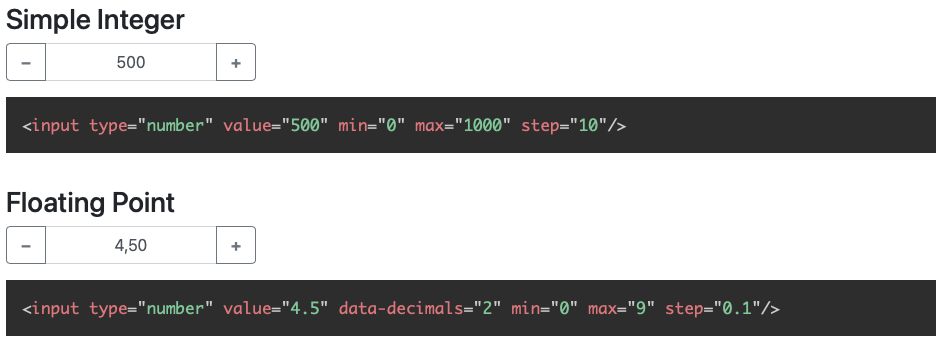
|
|
8
8
|
*Examples with floating-point and german localization*
|
|
@@ -72,7 +72,7 @@ Create the element in HTML. The attributes are compatible to the native `input[t
|
|
|
72
72
|
</script>
|
|
73
73
|
```
|
|
74
74
|
|
|
75
|
-
That's it. **No extra css needed**, just Bootstrap 5 and jQuery.
|
|
75
|
+
That's it. **No extra css needed**, just Bootstrap 5 and jQuery. jQuery is still a runtime dependency and is planned to be removed in a future release.
|
|
76
76
|
|
|
77
77
|
## API Reference
|
|
78
78
|
|
|
@@ -98,11 +98,13 @@ The InputSpinner also handles the standard input attributes `required`, `disable
|
|
|
98
98
|
|
|
99
99
|
### Create an instance in JavaScript
|
|
100
100
|
|
|
101
|
-
|
|
102
|
-
|
|
101
|
+
Instantiate the `InputSpinner` class on any `<input type="number">` element. You may provide additional configuration
|
|
102
|
+
in an object as a second parameter.
|
|
103
103
|
|
|
104
104
|
```js
|
|
105
|
-
|
|
105
|
+
import {InputSpinner} from "bootstrap-input-spinner/src/InputSpinner.js"
|
|
106
|
+
|
|
107
|
+
new InputSpinner(element, config)
|
|
106
108
|
```
|
|
107
109
|
|
|
108
110
|
#### Configuration (props)
|
|
@@ -177,12 +179,20 @@ step.
|
|
|
177
179
|
Used to format the number in the UI. Detected automatically from the user's browser, can be set to "de", "en",… or "
|
|
178
180
|
de_DE", "en_GB",….
|
|
179
181
|
|
|
180
|
-
##### editor
|
|
182
|
+
##### editor
|
|
183
|
+
|
|
184
|
+
An Editor defines how the input is parsed and rendered. The default editor is the internal `I18nEditor`, which
|
|
185
|
+
parses and renders an internationalized number. Additional editors live in `src/custom-editors.js` and are available
|
|
186
|
+
as named ES exports:
|
|
187
|
+
|
|
188
|
+
```js
|
|
189
|
+
import {RawEditor, TimeEditor} from "bootstrap-input-spinner/src/custom-editors.js"
|
|
190
|
+
|
|
191
|
+
new InputSpinner(element, {editor: TimeEditor})
|
|
192
|
+
```
|
|
181
193
|
|
|
182
|
-
An Editor
|
|
183
|
-
|
|
184
|
-
must implement the two functions `parse(customValue)`, to parse the input to a number and `render(number)` to render the
|
|
185
|
-
number to the spinner input.
|
|
194
|
+
An Editor must implement two functions: `parse(customFormat)` to turn the input string into a number, and
|
|
195
|
+
`render(number)` to format the number back for display.
|
|
186
196
|
|
|
187
197
|
The simplest custom Editor is the `RawEditor`, it renders just the value und parses just the value, without any changes,
|
|
188
198
|
like a native number input. It looks like this:
|
|
@@ -215,14 +225,19 @@ To modify the look completely, you can use the template parameter. There is an e
|
|
|
215
225
|
|
|
216
226
|
### Programmatic change and read of value
|
|
217
227
|
|
|
218
|
-
|
|
228
|
+
In vanilla JavaScript, read via `element.value` and write via `element.setValue(newValue)`:
|
|
219
229
|
|
|
220
230
|
```javascript
|
|
221
|
-
|
|
222
|
-
|
|
231
|
+
const currentValue = element.value // read
|
|
232
|
+
element.setValue(newValue) // write
|
|
223
233
|
```
|
|
224
234
|
|
|
225
|
-
|
|
235
|
+
The jQuery `val()` function also works in both directions:
|
|
236
|
+
|
|
237
|
+
```javascript
|
|
238
|
+
const currentValue = $(element).val() // read
|
|
239
|
+
$(element).val(newValue) // write
|
|
240
|
+
```
|
|
226
241
|
|
|
227
242
|
### Handling attributes
|
|
228
243
|
|
|
@@ -257,14 +272,12 @@ $(element).on("change", function (event) {
|
|
|
257
272
|
|
|
258
273
|
### Methods
|
|
259
274
|
|
|
260
|
-
Methods are passed as string values instead of the options object.
|
|
261
|
-
|
|
262
275
|
#### destroy
|
|
263
276
|
|
|
264
277
|
Removes the InputSpinner and shows the original input element.
|
|
265
278
|
|
|
266
279
|
```javascript
|
|
267
|
-
|
|
280
|
+
element.destroyInputSpinner()
|
|
268
281
|
```
|
|
269
282
|
|
|
270
283
|
## Minified version
|
|
@@ -280,21 +293,27 @@ Just install uglify
|
|
|
280
293
|
npm install uglify-js -g
|
|
281
294
|
```
|
|
282
295
|
|
|
283
|
-
and then in the src
|
|
296
|
+
and then in the `src` folder
|
|
284
297
|
|
|
285
298
|
```bash
|
|
286
|
-
uglifyjs
|
|
299
|
+
uglifyjs InputSpinner.js --compress --mangle > InputSpinner.min.js
|
|
287
300
|
```
|
|
288
301
|
|
|
289
302
|
Violà! :)
|
|
290
303
|
|
|
291
|
-
##
|
|
304
|
+
## Testing
|
|
305
|
+
|
|
306
|
+
There is a [Teevi](https://github.com/shaack/teevi) based browser test suite under `test/`. Serve the repo with any
|
|
307
|
+
static server and open `test/index.html` in a browser to run it:
|
|
292
308
|
|
|
293
|
-
|
|
309
|
+
```bash
|
|
310
|
+
npx http-server -p 8080
|
|
311
|
+
# then open http://localhost:8080/test/
|
|
312
|
+
```
|
|
313
|
+
|
|
314
|
+
## Browser support
|
|
294
315
|
|
|
295
|
-
|
|
296
|
-
**"Intl is not defined"** (See [issue #34](https://github.com/shaack/bootstrap-input-spinner/issues/34)), just use a
|
|
297
|
-
shim or polyfill like [Intl.js](https://github.com/andyearnshaw/Intl.js), and it works.
|
|
316
|
+
The spinner works in all modern browsers that support ES modules.
|
|
298
317
|
|
|
299
318
|
---
|
|
300
319
|
|
package/package.json
CHANGED