bootstrap-input-spinner 3.2.0 → 3.3.0
This diff represents the content of publicly available package versions that have been released to one of the supported registries. The information contained in this diff is provided for informational purposes only and reflects changes between package versions as they appear in their respective public registries.
- package/.gitattributes +2 -2
- package/README.md +3 -1
- package/index-es6-beta.html +525 -0
- package/package.json +1 -1
- package/src/es6-beta/InputSpinner.js +374 -0
package/.gitattributes
CHANGED
|
@@ -1,2 +1,2 @@
|
|
|
1
|
-
src/
|
|
2
|
-
index.html linguist-documentation
|
|
1
|
+
src/InputSpinner.js linguist-vendored=false
|
|
2
|
+
index.html linguist-documentation
|
package/README.md
CHANGED
|
@@ -2,6 +2,8 @@
|
|
|
2
2
|
|
|
3
3
|
A Bootstrap / jQuery plugin to create input spinner elements for number input.
|
|
4
4
|
|
|
5
|
+
> Note: With version 3.3 I added an ES6 module beta version under `src/es6-beta`. It is not yet documented, but there is a test page as `index-es6-beta.html`. With future versions I will move to ES6 modules and remove the jQuery dependency.
|
|
6
|
+
|
|
5
7
|
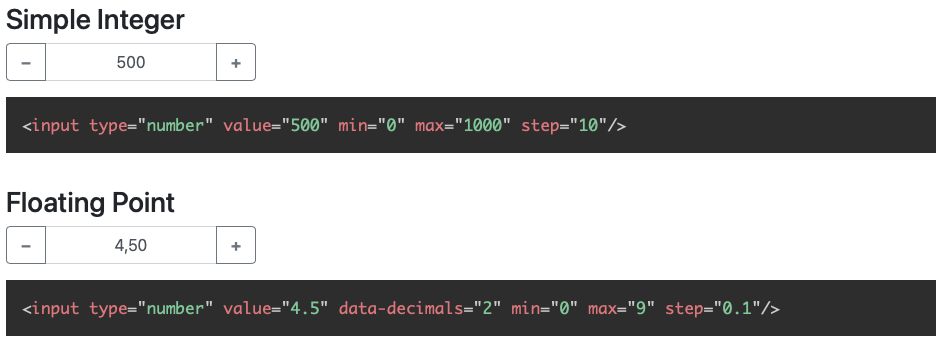
**[Demo page with examples](http://shaack.com/projekte/bootstrap-input-spinner/)**
|
|
6
8
|
|
|
7
9
|
|
|
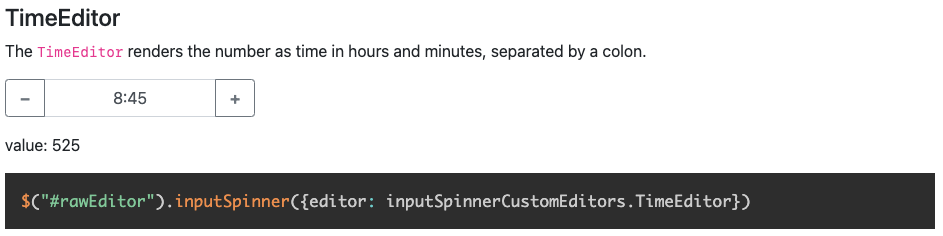
@@ -200,7 +202,7 @@ The `TimeEditor` renders and parses the number to time in hours and minutes, sep
|
|
|
200
202
|
|
|
201
203
|
*Supports custom editors to parse and render everything*
|
|
202
204
|
|
|
203
|
-
##### template
|
|
205
|
+
##### template
|
|
204
206
|
|
|
205
207
|
To modify the look completely, you can use the template parameter. There is an example about this on the
|
|
206
208
|
[Demo Page](http://shaack.com/projekte/bootstrap-input-spinner/).
|
|
@@ -0,0 +1,525 @@
|
|
|
1
|
+
<!DOCTYPE html>
|
|
2
|
+
<!--suppress HtmlFormInputWithoutLabel -->
|
|
3
|
+
<html lang="en">
|
|
4
|
+
<head>
|
|
5
|
+
<meta charset="UTF-8">
|
|
6
|
+
<title>bootstrap-input-spinner</title>
|
|
7
|
+
<link rel="stylesheet" href="https://cdn.jsdelivr.net/npm/bootstrap@5.1.1/dist/css/bootstrap.min.css"
|
|
8
|
+
integrity="sha384-F3w7mX95PdgyTmZZMECAngseQB83DfGTowi0iMjiWaeVhAn4FJkqJByhZMI3AhiU" crossorigin="anonymous">
|
|
9
|
+
<link rel="stylesheet" href="./node_modules/prismjs/themes/prism-tomorrow.css"/>
|
|
10
|
+
<meta name="viewport" content="width=device-width, initial-scale=1"/>
|
|
11
|
+
<style type="text/css">
|
|
12
|
+
h2 {
|
|
13
|
+
margin-top: 3rem;
|
|
14
|
+
margin-bottom: 1rem;
|
|
15
|
+
border-bottom: 1px solid rgba(0, 0, 0, 0.5);
|
|
16
|
+
}
|
|
17
|
+
|
|
18
|
+
h3, h4 {
|
|
19
|
+
margin-top: 2rem;
|
|
20
|
+
}
|
|
21
|
+
|
|
22
|
+
.input-group, input.test-value-input {
|
|
23
|
+
max-width: 250px;
|
|
24
|
+
}
|
|
25
|
+
</style>
|
|
26
|
+
<script src="https://code.jquery.com/jquery-3.6.0.min.js"
|
|
27
|
+
integrity="sha256-/xUj+3OJU5yExlq6GSYGSHk7tPXikynS7ogEvDej/m4=" crossorigin="anonymous"></script>
|
|
28
|
+
<script src="https://cdn.jsdelivr.net/npm/bootstrap@5.1.1/dist/js/bootstrap.bundle.min.js"
|
|
29
|
+
integrity="sha384-/bQdsTh/da6pkI1MST/rWKFNjaCP5gBSY4sEBT38Q/9RBh9AH40zEOg7Hlq2THRZ"
|
|
30
|
+
crossorigin="anonymous"></script>
|
|
31
|
+
<script src="src/custom-editors.js"></script>
|
|
32
|
+
<script src="./node_modules/prismjs/prism.js"></script>
|
|
33
|
+
</head>
|
|
34
|
+
<body>
|
|
35
|
+
<section class="container py-5">
|
|
36
|
+
<h1>bootstrap-input-spinner</h1>
|
|
37
|
+
<p>
|
|
38
|
+
A Bootstrap / jQuery plugin to create input spinner elements for number input, by
|
|
39
|
+
<a href="https://shaack.com/en">shaack.com</a> engineering. For now it needs jQuery, but I am working on it.
|
|
40
|
+
</p>
|
|
41
|
+
<p>This version is compatible with Bootstrap 5, but we remain a Bootstrap 4 compatible version with the branch
|
|
42
|
+
<a href="https://github.com/shaack/bootstrap-input-spinner/tree/bootstrap4-compatible">bootstrap4-compatible</a>.
|
|
43
|
+
npm versions 3.x are Bootstrap 5 compatible, versions 2.x Bootstrap 4 compatible.</p>
|
|
44
|
+
<p>
|
|
45
|
+
License: <a href="https://github.com/shaack/bootstrap-input-spinner/blob/master/LICENSE">MIT</a>
|
|
46
|
+
</p>
|
|
47
|
+
<h2>Features</h2>
|
|
48
|
+
<p>The Bootstrap InputSpinner</p>
|
|
49
|
+
<ul>
|
|
50
|
+
<li>
|
|
51
|
+
is <b>mobile friendly</b> and <b>responsive</b>,
|
|
52
|
+
</li>
|
|
53
|
+
<li>
|
|
54
|
+
has <b>internationalized</b> number formatting,
|
|
55
|
+
</li>
|
|
56
|
+
<li>
|
|
57
|
+
automatically changes the value when <b>holding a button</b>,
|
|
58
|
+
</li>
|
|
59
|
+
<li>
|
|
60
|
+
allows setting a <b>prefix</b> or <b>suffix</b> text in the input,
|
|
61
|
+
</li>
|
|
62
|
+
<li>
|
|
63
|
+
handles <code>val()</code> like the native element,
|
|
64
|
+
</li>
|
|
65
|
+
<li>
|
|
66
|
+
<b>dynamically handles</b> changing <b>attribute values</b> like <code>disabled</code> oder
|
|
67
|
+
<code>class</code>,
|
|
68
|
+
</li>
|
|
69
|
+
<li>
|
|
70
|
+
dispatches <code>change</code> and <code>input</code> <b>events on value
|
|
71
|
+
change</b> like the native element,
|
|
72
|
+
</li>
|
|
73
|
+
<li>
|
|
74
|
+
<b>needs no extra css</b>, just Bootstrap 5.
|
|
75
|
+
</li>
|
|
76
|
+
</ul>
|
|
77
|
+
<h2>Usage</h2>
|
|
78
|
+
<p>
|
|
79
|
+
This script enables the InputSpinner for all inputs with <code>type='number'</code>.
|
|
80
|
+
<b>No extra css needed</b>, just Bootstrap 5.
|
|
81
|
+
</p>
|
|
82
|
+
<pre><code class="language-html"><script src="./src/InputSpinner.js"></script>
|
|
83
|
+
<script>
|
|
84
|
+
$("input[type='number']").inputSpinner()
|
|
85
|
+
</script></code></pre>
|
|
86
|
+
<h2>Repository, documentation and npm package</h2>
|
|
87
|
+
<p>Find the source code, more documentation and the npm package at</p>
|
|
88
|
+
<ul>
|
|
89
|
+
<li><a href="https://github.com/shaack/bootstrap-input-spinner">GitHub repository and documentation</a></li>
|
|
90
|
+
<li><a href="https://www.npmjs.com/package/bootstrap-input-spinner">npm package</a></li>
|
|
91
|
+
</ul>
|
|
92
|
+
<h2>Examples</h2>
|
|
93
|
+
<p>The following contains examples of the InputSpinner's main features</p>
|
|
94
|
+
|
|
95
|
+
<h3>No attributes</h3>
|
|
96
|
+
<p>
|
|
97
|
+
<input type="number"/>
|
|
98
|
+
</p>
|
|
99
|
+
<pre><code class="language-html"><input type="number"/></code></pre>
|
|
100
|
+
<h3>Simple Integer</h3>
|
|
101
|
+
<p>
|
|
102
|
+
<input type="number" value="500" min="0" max="1000" step="10"/>
|
|
103
|
+
</p>
|
|
104
|
+
<pre><code
|
|
105
|
+
class="language-html"><input type="number" value="500" min="0" max="1000" step="10"/></code></pre>
|
|
106
|
+
<h3>Floating Point</h3>
|
|
107
|
+
<p>
|
|
108
|
+
<input type="number" value="4.5" data-decimals="2" min="0" max="9" step="0.1"/>
|
|
109
|
+
</p>
|
|
110
|
+
<pre><code
|
|
111
|
+
class="language-html"><input type="number" value="4.5" data-decimals="2" min="0" max="9" step="0.1"/></code></pre>
|
|
112
|
+
|
|
113
|
+
<h3>Handle <code>change</code> and <code>input</code> events and
|
|
114
|
+
read the value from JavaScript
|
|
115
|
+
with <code>val()</code></h3>
|
|
116
|
+
<p>
|
|
117
|
+
Type in a number to see the difference between <code>change</code> and <code>input</code> events.
|
|
118
|
+
</p>
|
|
119
|
+
<p>
|
|
120
|
+
<input type="number" id="changedInput" value="2500" min="0" max="5000000" data-decimals="2"/>
|
|
121
|
+
</p>
|
|
122
|
+
<p>
|
|
123
|
+
Value on input: <span id="valueOnInput"></span><br/>
|
|
124
|
+
Value on change: <span id="valueOnChange"></span>
|
|
125
|
+
</p>
|
|
126
|
+
<script>
|
|
127
|
+
var $changedInput = $("#changedInput")
|
|
128
|
+
var $valueOnInput = $("#valueOnInput")
|
|
129
|
+
var $valueOnChange = $("#valueOnChange")
|
|
130
|
+
$changedInput.on("input", function (event) {
|
|
131
|
+
console.log("on input", event)
|
|
132
|
+
$valueOnInput.html($(event.target).val())
|
|
133
|
+
// or $valueOnInput.html(event.target.value) // in vanilla js
|
|
134
|
+
// or $valueOnInput.html($changedInput.val())
|
|
135
|
+
})
|
|
136
|
+
$changedInput.on("change", function (event) {
|
|
137
|
+
console.log("on change", event)
|
|
138
|
+
$valueOnChange.html($(event.target).val())
|
|
139
|
+
})
|
|
140
|
+
</script>
|
|
141
|
+
<pre><code class="language-javascript">var $changedInput = $("#changedInput")
|
|
142
|
+
var $valueOnInput = $("#valueOnInput")
|
|
143
|
+
var $valueOnChange = $("#valueOnChange")
|
|
144
|
+
$changedInput.on("input", function (event) {
|
|
145
|
+
$valueOnInput.html($(event.target).val())
|
|
146
|
+
// or $valueOnInput.html(event.target.value) // in vanilla js
|
|
147
|
+
// or $valueOnInput.html($changedInput.val())
|
|
148
|
+
})
|
|
149
|
+
$changedInput.on("change", function (event) {
|
|
150
|
+
$valueOnChange.html($(event.target).val())
|
|
151
|
+
})</code></pre>
|
|
152
|
+
<h3>Programmatic changing the value with <code>val()</code></h3>
|
|
153
|
+
<p>
|
|
154
|
+
<label for="inputNet">Net</label>
|
|
155
|
+
<input type="number" id="inputNet" value="100" min="0" max="10000" step="0.01" data-decimals="2"/>
|
|
156
|
+
</p>
|
|
157
|
+
<p>
|
|
158
|
+
<label for="inputGross">Gross (+19%)</label>
|
|
159
|
+
<input type="number" id="inputGross" value="100" min="0" max="11900" step="0.01" data-decimals="2"/>
|
|
160
|
+
</p>
|
|
161
|
+
<script>
|
|
162
|
+
var $inputNet = $("#inputNet")
|
|
163
|
+
var $inputGross = $("#inputGross")
|
|
164
|
+
$inputNet.on("input", function (event) {
|
|
165
|
+
$inputGross.val($(event.target).val() * 1.19)
|
|
166
|
+
})
|
|
167
|
+
$inputGross.on("input", function (event) {
|
|
168
|
+
$inputNet.val($(event.target).val() / 1.19)
|
|
169
|
+
})
|
|
170
|
+
$inputGross.val($inputNet.val() * 1.19)
|
|
171
|
+
</script>
|
|
172
|
+
<pre><code class="language-javascript">$inputNet.on("input", function (event) {
|
|
173
|
+
$inputGross.val($(event.target).val() * 1.19)
|
|
174
|
+
// or $inputGross[0].setValue(event.target.value * 1.19) // in vanilla js
|
|
175
|
+
// or $inputGross.val($inputNet.val() * 1.19)
|
|
176
|
+
// do all the same
|
|
177
|
+
})
|
|
178
|
+
$inputGross.on("input", function (event) {
|
|
179
|
+
$inputNet.val($(event.target).val() / 1.19)
|
|
180
|
+
})</code></pre>
|
|
181
|
+
<h3>Attributes <code>placeholder</code> and <code>required</code></h3>
|
|
182
|
+
<form>
|
|
183
|
+
<p>
|
|
184
|
+
<input placeholder="Enter a number" required type="number" value="" min="-100" max="100"/>
|
|
185
|
+
</p>
|
|
186
|
+
<pre><code
|
|
187
|
+
class="language-html"><input <strong>placeholder</strong>="Enter a number" <strong>required</strong> type="number" value="" min="-100" max="100"/></code></pre>
|
|
188
|
+
<input type="submit" id="submitButton" class="btn btn-primary mb-4" value="Submit to test empty input"/>
|
|
189
|
+
</form>
|
|
190
|
+
|
|
191
|
+
<h3>Attribute <code>disabled</code>, dynamically changing</h3>
|
|
192
|
+
<p>Attributes are handled dynamically.</p>
|
|
193
|
+
<form>
|
|
194
|
+
<p>
|
|
195
|
+
<input id="inputDisabled" disabled type="number" value="50"/>
|
|
196
|
+
</p>
|
|
197
|
+
<div class="form-check">
|
|
198
|
+
<input type="checkbox" checked class="form-check-input" id="disabledSwitch">
|
|
199
|
+
<label class="form-check-label" for="disabledSwitch">Disabled</label>
|
|
200
|
+
</div>
|
|
201
|
+
<script>
|
|
202
|
+
var $inputDisabled = $("#inputDisabled")
|
|
203
|
+
var $disabledSwitch = $("#disabledSwitch")
|
|
204
|
+
$disabledSwitch.on("change", function () {
|
|
205
|
+
$inputDisabled.prop("disabled", $(this).prop("checked"))
|
|
206
|
+
})
|
|
207
|
+
</script>
|
|
208
|
+
<pre><code class="language-html"><input id="inputDisabled" disabled type="number" value="50"/>
|
|
209
|
+
<div class="form-check">
|
|
210
|
+
<input type="checkbox" checked class="form-check-input" id="disabledSwitch"/>
|
|
211
|
+
<label class="form-check-label" for="disabledSwitch">Disabled</label>
|
|
212
|
+
</div>
|
|
213
|
+
<script>
|
|
214
|
+
var $inputDisabled = $("#inputDisabled")
|
|
215
|
+
var $disabledSwitch = $("#disabledSwitch")
|
|
216
|
+
$disabledSwitch.on("change", function () {
|
|
217
|
+
$inputDisabled.prop("disabled", $(this).prop("checked"))
|
|
218
|
+
})
|
|
219
|
+
</script></code></pre>
|
|
220
|
+
</form>
|
|
221
|
+
|
|
222
|
+
<h3><code>buttonsOnly</code> mode and disabled <code>autoInterval</code></h3>
|
|
223
|
+
<p>
|
|
224
|
+
In <code>buttonsOnly</code> mode no direct text input is allowed, the text-input
|
|
225
|
+
gets the attribute <code>readonly</code>. But the plus and minus buttons still allow to change the value.
|
|
226
|
+
<br/><code>autoInterval: undefined</code> additionally disables the auto increase/decrease, when you hold the
|
|
227
|
+
button.
|
|
228
|
+
</p>
|
|
229
|
+
<p>
|
|
230
|
+
<input id="buttons-only" value="5" min="1" max="10"/>
|
|
231
|
+
</p>
|
|
232
|
+
<script type="module">
|
|
233
|
+
import {InputSpinner} from "./src/es6-beta/InputSpinner.js"
|
|
234
|
+
const element = document.getElementById("buttons-only")
|
|
235
|
+
new InputSpinner(element,
|
|
236
|
+
{buttonsOnly: true, autoInterval: undefined})
|
|
237
|
+
</script>
|
|
238
|
+
<pre><code class="language-js">$(".buttons-only").inputSpinner({buttonsOnly: true, autoInterval: undefined})</code></pre>
|
|
239
|
+
|
|
240
|
+
<h3>Dynamically handling of the <code>class</code> attribute</h3>
|
|
241
|
+
<p>
|
|
242
|
+
<input id="inputChangeClass" class="is-valid" type="number" value="50"/>
|
|
243
|
+
</p>
|
|
244
|
+
<p>
|
|
245
|
+
<label for="classInput">CSS Class</label>
|
|
246
|
+
<input id="classInput" type="text" class="form-control test-value-input" value="is-valid"/>
|
|
247
|
+
Try to change the class to "is-invalid" or "text-info".
|
|
248
|
+
</p>
|
|
249
|
+
<script>
|
|
250
|
+
var $inputChangeClass = $("#inputChangeClass")
|
|
251
|
+
var $classInput = $("#classInput")
|
|
252
|
+
$classInput.on("input", function () {
|
|
253
|
+
$inputChangeClass.prop("class", this.value)
|
|
254
|
+
})
|
|
255
|
+
</script>
|
|
256
|
+
<pre><code class="language-html"><input id="inputChangeClass" class="is-valid" type="number" value="50"/>
|
|
257
|
+
<label for="classInput">CSS Class</label>
|
|
258
|
+
<input id="classInput" type="text" class="form-control" value="is-valid"/>
|
|
259
|
+
<script>
|
|
260
|
+
var $inputChangeClass = $("#inputChangeClass")
|
|
261
|
+
var $classInput = $("#classInput")
|
|
262
|
+
$classInput.on("input", function() {
|
|
263
|
+
$inputChangeClass.prop("class", this.value);
|
|
264
|
+
})
|
|
265
|
+
</script></code></pre>
|
|
266
|
+
|
|
267
|
+
<h3>Sizing</h3>
|
|
268
|
+
<p>Sizing works out of the box. Just set the original inputs class to <code>form-control-sm</code> or
|
|
269
|
+
<code>form-control-lg</code>, and
|
|
270
|
+
the resulting group gets the class <code>input-group-sm</code> or <code>input-group-lg</code>.</p>
|
|
271
|
+
<p>
|
|
272
|
+
<label for="inputSmall">Small</label>
|
|
273
|
+
<input id="inputSmall" class="form-control-sm" type="number" value="0.0" data-decimals="4" min="-1" max="1"
|
|
274
|
+
step="0.0001"/>
|
|
275
|
+
</p>
|
|
276
|
+
<pre><code class="language-html"><input class="form-control-sm" type="number" value="0.0" data-decimals="4" min="-1" max="1" step="0.0001"/></code></pre>
|
|
277
|
+
<p>
|
|
278
|
+
<label for="inputLarge">Large</label>
|
|
279
|
+
<input id="inputLarge" class="form-control-lg" type="number" value="1000000" data-decimals="0" min="0"
|
|
280
|
+
max="2000000" step="1"/>
|
|
281
|
+
</p>
|
|
282
|
+
<pre><code class="language-html"><input class="form-control-lg" type="number" value="1000000" data-decimals="0" min="0" max="2000000" step="1"/></code></pre>
|
|
283
|
+
|
|
284
|
+
|
|
285
|
+
<h3>Dynamically handling of <code>min</code>, <code>max</code>,
|
|
286
|
+
<code>step</code> and <code>data-decimals</code></h3>
|
|
287
|
+
<div class="row">
|
|
288
|
+
<div class="col-lg-3">
|
|
289
|
+
<p>
|
|
290
|
+
<label for="minInput">min</label>
|
|
291
|
+
<input id="minInput" type="text" class="form-control test-value-input" value="0"/>
|
|
292
|
+
</p>
|
|
293
|
+
</div>
|
|
294
|
+
<div class="col-lg-3">
|
|
295
|
+
<p>
|
|
296
|
+
<label for="maxInput">max</label>
|
|
297
|
+
<input id="maxInput" type="text" class="form-control test-value-input" value="100"/>
|
|
298
|
+
</p>
|
|
299
|
+
</div>
|
|
300
|
+
<div class="col-lg-3">
|
|
301
|
+
<p>
|
|
302
|
+
<label for="stepInput">step</label>
|
|
303
|
+
<input id="stepInput" type="text" class="form-control test-value-input" value="0.05"/>
|
|
304
|
+
</p>
|
|
305
|
+
</div>
|
|
306
|
+
<div class="col-lg-3">
|
|
307
|
+
<p>
|
|
308
|
+
<label for="dataDecimalsInput">data-decimals</label>
|
|
309
|
+
<input id="dataDecimalsInput" type="text" class="form-control test-value-input" value="2"/>
|
|
310
|
+
</p>
|
|
311
|
+
</div>
|
|
312
|
+
</div>
|
|
313
|
+
<p>
|
|
314
|
+
<label for="minMaxTester">Try here</label>
|
|
315
|
+
<input id="minMaxTester" type="number" value="50" min="0" max="100" step="0.05" data-decimals="2"/>
|
|
316
|
+
</p>
|
|
317
|
+
<script>
|
|
318
|
+
var $minInput = $("#minInput")
|
|
319
|
+
var $maxInput = $("#maxInput")
|
|
320
|
+
var $stepInput = $("#stepInput")
|
|
321
|
+
var $dataDecimalsInput = $("#dataDecimalsInput")
|
|
322
|
+
var $minMaxTester = $("#minMaxTester")
|
|
323
|
+
$minInput.on("change", function (event) {
|
|
324
|
+
console.log("on change", event)
|
|
325
|
+
$minMaxTester.attr("min", $minInput.val())
|
|
326
|
+
})
|
|
327
|
+
$maxInput.on("change", function (event) {
|
|
328
|
+
console.log("on change", event)
|
|
329
|
+
$minMaxTester.attr("max", $maxInput.val())
|
|
330
|
+
})
|
|
331
|
+
$stepInput.on("change", function (event) {
|
|
332
|
+
console.log("on change", event)
|
|
333
|
+
$minMaxTester.attr("step", $stepInput.val())
|
|
334
|
+
})
|
|
335
|
+
$dataDecimalsInput.on("change", function (event) {
|
|
336
|
+
console.log("on change", event)
|
|
337
|
+
$minMaxTester.attr("data-decimals", $dataDecimalsInput.val())
|
|
338
|
+
})
|
|
339
|
+
</script>
|
|
340
|
+
<pre><code class="language-javascript">var $minInput = $("#minInput")
|
|
341
|
+
var $maxInput = $("#maxInput")
|
|
342
|
+
var $stepInput = $("#stepInput")
|
|
343
|
+
var $dataDecimalsInput = $("#dataDecimalsInput")
|
|
344
|
+
var $minMaxTester = $("#minMaxTester")
|
|
345
|
+
$minInput.on("change", function (event) {
|
|
346
|
+
$minMaxTester.attr("min", $minInput.val())
|
|
347
|
+
})
|
|
348
|
+
$maxInput.on("change", function (event) {
|
|
349
|
+
$minMaxTester.attr("max", $maxInput.val())
|
|
350
|
+
})
|
|
351
|
+
$stepInput.on("change", function (event) {
|
|
352
|
+
$minMaxTester.attr("step", $stepInput.val())
|
|
353
|
+
})
|
|
354
|
+
$dataDecimalsInput.on("change", function (event) {
|
|
355
|
+
$minMaxTester.attr("data-decimals", $dataDecimalsInput.val())
|
|
356
|
+
})
|
|
357
|
+
</code></pre>
|
|
358
|
+
|
|
359
|
+
<h3>Prefix and Suffix</h3>
|
|
360
|
+
<p>
|
|
361
|
+
<label for="inputPrefix">Prefix</label>
|
|
362
|
+
<input id="inputPrefix" data-prefix="$" value="100.0" data-decimals="2" min="0" max="1000" step="0.1"
|
|
363
|
+
type="number"/>
|
|
364
|
+
</p>
|
|
365
|
+
<pre><code class="language-html"><input data-prefix="$" value="100.0" data-decimals="2" min="0" max="1000" step="0.1" type="number" /></code></pre>
|
|
366
|
+
<p>
|
|
367
|
+
<label for="inputSuffix">Suffix</label>
|
|
368
|
+
<input id="inputSuffix" data-suffix="°C" value="50" min="0" max="100" type="number"/>
|
|
369
|
+
</p>
|
|
370
|
+
<pre><code
|
|
371
|
+
class="language-html"><input data-suffix="°C" value="50" min="0" max="100" type="number" /></code></pre>
|
|
372
|
+
|
|
373
|
+
|
|
374
|
+
<h3>Looping the value</h3>
|
|
375
|
+
<p>This input starts from 0 when reaching 360.</p>
|
|
376
|
+
<p>
|
|
377
|
+
<input type="number" id="inputLoop" value="0" data-decimals="0" min="-10" max="360" step="10"/>
|
|
378
|
+
</p>
|
|
379
|
+
<script>
|
|
380
|
+
var $inputLoop = $("#inputLoop")
|
|
381
|
+
$inputLoop.on("input", function (ignored) {
|
|
382
|
+
var value = $inputLoop.val()
|
|
383
|
+
value = (value < 0) ? 360 + parseInt(value, 10) : value % 360
|
|
384
|
+
$inputLoop.val(value)
|
|
385
|
+
})
|
|
386
|
+
</script>
|
|
387
|
+
<pre><code class="language-html"><input step="10" type="number" id="inputLoop" value="0" data-decimals="0" min="-10" max="360"/></code></pre>
|
|
388
|
+
<p>"Loop" the value between 0 and 360 with the <code>change</code> event in JavaScript.</p>
|
|
389
|
+
<pre><code class="language-javascript">var $inputLoop = $("#inputLoop")
|
|
390
|
+
$inputLoop.on("input", function(event) {
|
|
391
|
+
var value = $inputLoop.val()
|
|
392
|
+
value = (value < 0) ? 360 + parseInt(value, 10) : value % 360
|
|
393
|
+
$inputLoop.val(value)
|
|
394
|
+
})</code></pre>
|
|
395
|
+
|
|
396
|
+
<h3>Custom Editors</h3>
|
|
397
|
+
|
|
398
|
+
<p>An Editor defines, how the input is parsed and rendered. The inputSpinner is shipped with some custom Editors in
|
|
399
|
+
<code>/src/custom-editors.js</code>.</p>
|
|
400
|
+
|
|
401
|
+
<h4>RawEditor</h4>
|
|
402
|
+
|
|
403
|
+
<p>The simplest custom Editor is the <code>RawEditor</code>, it renders just the value und parses just the value,
|
|
404
|
+
without any
|
|
405
|
+
changes, like a native number input. No internationalization, no digit grouping.</p>
|
|
406
|
+
<p>
|
|
407
|
+
<input id="rawEditor" value="1000"/>
|
|
408
|
+
</p>
|
|
409
|
+
<script type="module">
|
|
410
|
+
import {InputSpinner} from "./src/es6-beta/InputSpinner.js"
|
|
411
|
+
|
|
412
|
+
new InputSpinner(document.getElementById("rawEditor"),
|
|
413
|
+
{editor: customEditors.RawEditor})
|
|
414
|
+
</script>
|
|
415
|
+
<pre><code
|
|
416
|
+
class="language-js">$("#rawEditor").inputSpinner({editor: customEditors.RawEditor})</code></pre>
|
|
417
|
+
|
|
418
|
+
<h4>TimeEditor</h4>
|
|
419
|
+
|
|
420
|
+
<p>The <code>TimeEditor</code> renders the number as time in hours and minutes, separated by a colon.</p>
|
|
421
|
+
<input id="timeEditor" value="60" step="5"/>
|
|
422
|
+
<div class="mt-1">value: <span id="timeValue"></span></div>
|
|
423
|
+
<script type="module">
|
|
424
|
+
import {InputSpinner} from "./src/es6-beta/InputSpinner.js"
|
|
425
|
+
|
|
426
|
+
const element = document.getElementById("timeEditor")
|
|
427
|
+
new InputSpinner(element, {editor: customEditors.TimeEditor})
|
|
428
|
+
element.addEventListener("input", () => {
|
|
429
|
+
document.getElementById("timeValue").textContent = element.value
|
|
430
|
+
})
|
|
431
|
+
document.getElementById("timeValue").textContent = element.value
|
|
432
|
+
</script>
|
|
433
|
+
<pre><code
|
|
434
|
+
class="language-js">$("#rawEditor").inputSpinner({editor: customEditors.TimeEditor})</code></pre>
|
|
435
|
+
|
|
436
|
+
<h3>Styling with templates (<i>new!</i>)</h3>
|
|
437
|
+
<p>With the new templating feature, you can almost do <b>anything, when it comes to layout</b>.</p>
|
|
438
|
+
<h5>How about... buttons right</h5>
|
|
439
|
+
<p>
|
|
440
|
+
<input data-prefix="¥" id="templateButtonsRight" value="1000"/>
|
|
441
|
+
</p>
|
|
442
|
+
<p>
|
|
443
|
+
This is the template for "buttons right":
|
|
444
|
+
</p>
|
|
445
|
+
<script type="module">
|
|
446
|
+
import {InputSpinner} from "./src/es6-beta/InputSpinner.js"
|
|
447
|
+
|
|
448
|
+
const element = document.getElementById("templateButtonsRight")
|
|
449
|
+
new InputSpinner(element, {
|
|
450
|
+
template:
|
|
451
|
+
'<div class="input-group ${groupClass}">' +
|
|
452
|
+
'<input type="text" inputmode="decimal" style="text-align: ${textAlign}" class="form-control"/>' +
|
|
453
|
+
'<button style="min-width: ${buttonsWidth}" class="btn btn-decrement ${buttonsClass}" type="button">${decrementButton}</button>' +
|
|
454
|
+
'<button style="min-width: ${buttonsWidth}" class="btn btn-increment ${buttonsClass}" type="button">${incrementButton}</button>' +
|
|
455
|
+
'</div>'
|
|
456
|
+
})
|
|
457
|
+
</script>
|
|
458
|
+
<pre><code class="language-html"><div class="input-group ${groupClass}">
|
|
459
|
+
<input type="text" inputmode="decimal" style="text-align: ${textAlign}" class="form-control"/>
|
|
460
|
+
<button style="min-width: ${buttonsWidth}" class="btn btn-decrement ${buttonsClass}" type="button">${decrementButton}</button>
|
|
461
|
+
<button style="min-width: ${buttonsWidth}" class="btn btn-increment ${buttonsClass}" type="button">${incrementButton}</button>
|
|
462
|
+
</div></code></pre>
|
|
463
|
+
<p>You can... or must use the following variables in your template:</p>
|
|
464
|
+
<ul>
|
|
465
|
+
<li>${groupClass}</li>
|
|
466
|
+
<li>${textAlign}</li>
|
|
467
|
+
<li>${buttonsWidth}</li>
|
|
468
|
+
<li>${buttonsClass}</li>
|
|
469
|
+
<li>${decrementButton}</li>
|
|
470
|
+
<li>${incrementButton}</li>
|
|
471
|
+
</ul>
|
|
472
|
+
<p>Provide the template as configuration parameter:</p>
|
|
473
|
+
<pre><code class="language-js">$(element).inputSpinner({template: '<div class...'})</code></pre>
|
|
474
|
+
|
|
475
|
+
<h3>Destroying the spinner</h3>
|
|
476
|
+
<p>To Remove the InputSpinner and show the original input element, use</p>
|
|
477
|
+
<pre><code class="language-javascript">$(element).inputSpinner("destroy")</code></pre>
|
|
478
|
+
<div class="mb-3">
|
|
479
|
+
<label for="inputDestroyCreate">Label `for` switches dynamically:</label>
|
|
480
|
+
<input type="number" id="inputDestroyCreate" value="50"/>
|
|
481
|
+
</div>
|
|
482
|
+
<button id="buttonDestroy" class="btn btn-primary">destroy</button>
|
|
483
|
+
<button id="buttonCreate" disabled="disabled" class="btn btn-primary">re-create</button>
|
|
484
|
+
<script type="module">
|
|
485
|
+
import {InputSpinner} from "./src/es6-beta/InputSpinner.js"
|
|
486
|
+
var $buttonDestroy = $("#buttonDestroy")
|
|
487
|
+
var $buttonCreate = $("#buttonCreate")
|
|
488
|
+
var $inputDestroyCreate = $("#inputDestroyCreate")
|
|
489
|
+
$buttonDestroy.click(function () {
|
|
490
|
+
$inputDestroyCreate[0].destroyInputSpinner()
|
|
491
|
+
$buttonDestroy.attr("disabled", true)
|
|
492
|
+
$buttonCreate.attr("disabled", false)
|
|
493
|
+
})
|
|
494
|
+
$buttonCreate.click(function () {
|
|
495
|
+
new InputSpinner($inputDestroyCreate[0])
|
|
496
|
+
$buttonDestroy.attr("disabled", false)
|
|
497
|
+
$buttonCreate.attr("disabled", true)
|
|
498
|
+
})
|
|
499
|
+
</script>
|
|
500
|
+
|
|
501
|
+
<div class="card my-5 border-info">
|
|
502
|
+
<a href="https://shaack.com/works">
|
|
503
|
+
<div class="card-body">
|
|
504
|
+
<h4 class="mb-2 mt-0">More Bootstrap components (from shaack.com)</h4>
|
|
505
|
+
You may want to check out our further Bootstrap extensions,
|
|
506
|
+
<b>bootstrap-show-modal</b> and
|
|
507
|
+
<b>bootstrap-detect-breakpoint</b>.
|
|
508
|
+
</div>
|
|
509
|
+
</a>
|
|
510
|
+
</div>
|
|
511
|
+
<p>If you find bugs or have suggestions, you may write an
|
|
512
|
+
<a href="https://github.com/shaack/bootstrap-input-spinner/issues">issue</a>.</p>
|
|
513
|
+
<br/><br/>
|
|
514
|
+
</section>
|
|
515
|
+
<!-- bootstrap needs jQuery -->
|
|
516
|
+
<script type="module">
|
|
517
|
+
import {InputSpinner} from "./src/es6-beta/InputSpinner.js"
|
|
518
|
+
|
|
519
|
+
const inputSpinnerElements = document.querySelectorAll("input[type='number']")
|
|
520
|
+
for (const inputSpinnerElement of inputSpinnerElements) {
|
|
521
|
+
new InputSpinner(inputSpinnerElement)
|
|
522
|
+
}
|
|
523
|
+
</script>
|
|
524
|
+
</body>
|
|
525
|
+
</html>
|
package/package.json
CHANGED
|
@@ -0,0 +1,374 @@
|
|
|
1
|
+
/**
|
|
2
|
+
* Author and copyright: Stefan Haack (https://shaack.com)
|
|
3
|
+
* Repository: https://github.com/shaack/bootstrap-input-spinner
|
|
4
|
+
* License: MIT, see file 'LICENSE'
|
|
5
|
+
*/
|
|
6
|
+
|
|
7
|
+
|
|
8
|
+
// the default editor for parsing and rendering
|
|
9
|
+
const I18nEditor = function (props, element) {
|
|
10
|
+
const locale = props.locale || "en-US"
|
|
11
|
+
|
|
12
|
+
this.parse = function (customFormat) {
|
|
13
|
+
const numberFormat = new Intl.NumberFormat(locale)
|
|
14
|
+
const thousandSeparator = numberFormat.format(11111).replace(/1/g, '') || '.'
|
|
15
|
+
const decimalSeparator = numberFormat.format(1.1).replace(/1/g, '')
|
|
16
|
+
return parseFloat(customFormat
|
|
17
|
+
.replace(new RegExp(' ', 'g'), '')
|
|
18
|
+
.replace(new RegExp('\\' + thousandSeparator, 'g'), '')
|
|
19
|
+
.replace(new RegExp('\\' + decimalSeparator), '.')
|
|
20
|
+
)
|
|
21
|
+
}
|
|
22
|
+
|
|
23
|
+
this.render = function (number) {
|
|
24
|
+
const decimals = parseInt(element.getAttribute("data-decimals")) || 0
|
|
25
|
+
const digitGrouping = !(element.getAttribute("data-digit-grouping") === "false")
|
|
26
|
+
const numberFormat = new Intl.NumberFormat(locale, {
|
|
27
|
+
minimumFractionDigits: decimals,
|
|
28
|
+
maximumFractionDigits: decimals,
|
|
29
|
+
useGrouping: digitGrouping
|
|
30
|
+
})
|
|
31
|
+
return numberFormat.format(number)
|
|
32
|
+
}
|
|
33
|
+
}
|
|
34
|
+
|
|
35
|
+
let triggerKeyPressed = false
|
|
36
|
+
const originalVal = $.fn.val
|
|
37
|
+
$.fn.val = function (value) {
|
|
38
|
+
if (arguments.length >= 1) {
|
|
39
|
+
for (let i = 0; i < this.length; i++) {
|
|
40
|
+
if (this[i]["bootstrap-input-spinner"] && this[i].setValue) {
|
|
41
|
+
const element = this[i]
|
|
42
|
+
setTimeout(function () {
|
|
43
|
+
element.setValue(value)
|
|
44
|
+
})
|
|
45
|
+
}
|
|
46
|
+
}
|
|
47
|
+
}
|
|
48
|
+
return originalVal.apply(this, arguments)
|
|
49
|
+
}
|
|
50
|
+
|
|
51
|
+
export class InputSpinner {
|
|
52
|
+
|
|
53
|
+
constructor(element, props) {
|
|
54
|
+
|
|
55
|
+
const self = this
|
|
56
|
+
this.element = element
|
|
57
|
+
/*
|
|
58
|
+
if (props === "destroy") { // todo replace with method
|
|
59
|
+
this.each(function () {
|
|
60
|
+
if (this["bootstrap-input-spinner"]) {
|
|
61
|
+
this.destroyInputSpinner()
|
|
62
|
+
} else {
|
|
63
|
+
console.warn("element", this, "is no bootstrap-input-spinner")
|
|
64
|
+
}
|
|
65
|
+
})
|
|
66
|
+
return this
|
|
67
|
+
}
|
|
68
|
+
*/
|
|
69
|
+
|
|
70
|
+
this.props = {
|
|
71
|
+
decrementButton: "<strong>−</strong>", // button text
|
|
72
|
+
incrementButton: "<strong>+</strong>", // ..
|
|
73
|
+
groupClass: "", // css class of the resulting input-group
|
|
74
|
+
buttonsClass: "btn-outline-secondary",
|
|
75
|
+
buttonsWidth: "2.5rem",
|
|
76
|
+
textAlign: "center", // alignment of the entered number
|
|
77
|
+
autoDelay: 500, // ms threshold before auto value change
|
|
78
|
+
autoInterval: 50, // speed of auto value change, set to `undefined` to disable auto-change
|
|
79
|
+
buttonsOnly: false, // set this `true` to disable the possibility to enter or paste the number via keyboard
|
|
80
|
+
keyboardStepping: true, // set this to `false` to disallow the use of the up and down arrow keys to step
|
|
81
|
+
locale: navigator.language, // the locale, per default detected automatically from the browser
|
|
82
|
+
editor: I18nEditor, // the editor (parsing and rendering of the input)
|
|
83
|
+
template: // the template of the input
|
|
84
|
+
'<div class="input-group ${groupClass}">' +
|
|
85
|
+
'<button style="min-width: ${buttonsWidth}" class="btn btn-decrement ${buttonsClass} btn-minus" type="button">${decrementButton}</button>' +
|
|
86
|
+
'<input type="text" inputmode="decimal" style="text-align: ${textAlign}" class="form-control form-control-text-input"/>' +
|
|
87
|
+
'<button style="min-width: ${buttonsWidth}" class="btn btn-increment ${buttonsClass} btn-plus" type="button">${incrementButton}</button>' +
|
|
88
|
+
'</div>'
|
|
89
|
+
}
|
|
90
|
+
|
|
91
|
+
Object.assign(this.props, props)
|
|
92
|
+
|
|
93
|
+
const html = this.props.template
|
|
94
|
+
.replace(/\${groupClass}/g, this.props.groupClass)
|
|
95
|
+
.replace(/\${buttonsWidth}/g, this.props.buttonsWidth)
|
|
96
|
+
.replace(/\${buttonsClass}/g, this.props.buttonsClass)
|
|
97
|
+
.replace(/\${decrementButton}/g, this.props.decrementButton)
|
|
98
|
+
.replace(/\${incrementButton}/g, this.props.incrementButton)
|
|
99
|
+
.replace(/\${textAlign}/g, this.props.textAlign)
|
|
100
|
+
|
|
101
|
+
if (this.element["bootstrap-input-spinner"]) {
|
|
102
|
+
console.warn("element", this.element, "is already a bootstrap-input-spinner")
|
|
103
|
+
} else {
|
|
104
|
+
|
|
105
|
+
this.$original = $(this.element)
|
|
106
|
+
this.$original[0]["bootstrap-input-spinner"] = true
|
|
107
|
+
this.$original.hide()
|
|
108
|
+
this.$original[0].inputSpinnerEditor = new this.props.editor(this.props, this.element)
|
|
109
|
+
|
|
110
|
+
this.autoDelayHandler = null
|
|
111
|
+
this.autoIntervalHandler = null
|
|
112
|
+
|
|
113
|
+
this.$inputGroup = $(html)
|
|
114
|
+
this.$buttonDecrement = this.$inputGroup.find(".btn-decrement")
|
|
115
|
+
this.$buttonIncrement = this.$inputGroup.find(".btn-increment")
|
|
116
|
+
this.$input = this.$inputGroup.find("input")
|
|
117
|
+
this.$label = $("label[for='" + this.$original.attr("id") + "']")
|
|
118
|
+
if (!this.$label[0]) {
|
|
119
|
+
this.$label = this.$original.closest("label")
|
|
120
|
+
}
|
|
121
|
+
|
|
122
|
+
this.min = null
|
|
123
|
+
this.max = null
|
|
124
|
+
this.step = null
|
|
125
|
+
|
|
126
|
+
updateAttributes()
|
|
127
|
+
|
|
128
|
+
this.value = parseFloat(this.$original[0].value)
|
|
129
|
+
let pointerState = false
|
|
130
|
+
|
|
131
|
+
const prefix = this.$original.attr("data-prefix") || ""
|
|
132
|
+
const suffix = this.$original.attr("data-suffix") || ""
|
|
133
|
+
|
|
134
|
+
if (prefix) {
|
|
135
|
+
const prefixElement = $('<span class="input-group-text">' + prefix + '</span>')
|
|
136
|
+
this.$inputGroup.find("input").before(prefixElement)
|
|
137
|
+
}
|
|
138
|
+
if (suffix) {
|
|
139
|
+
const suffixElement = $('<span class="input-group-text">' + suffix + '</span>')
|
|
140
|
+
this.$inputGroup.find("input").after(suffixElement)
|
|
141
|
+
}
|
|
142
|
+
|
|
143
|
+
this.$original[0].setValue = function (newValue) {
|
|
144
|
+
setValue(newValue)
|
|
145
|
+
}
|
|
146
|
+
this.$original[0].destroyInputSpinner = function () {
|
|
147
|
+
destroy()
|
|
148
|
+
}
|
|
149
|
+
|
|
150
|
+
this.observer = new MutationObserver(function () {
|
|
151
|
+
updateAttributes()
|
|
152
|
+
setValue(self.value, true)
|
|
153
|
+
})
|
|
154
|
+
this.observer.observe(this.$original[0], {attributes: true})
|
|
155
|
+
|
|
156
|
+
this.$original.after(this.$inputGroup)
|
|
157
|
+
|
|
158
|
+
setValue(this.value)
|
|
159
|
+
|
|
160
|
+
this.$input.on("paste input change focusout", function (event) {
|
|
161
|
+
let newValue = self.$input[0].value
|
|
162
|
+
const focusOut = event.type === "focusout"
|
|
163
|
+
newValue = self.$original[0].inputSpinnerEditor.parse(newValue)
|
|
164
|
+
setValue(newValue, focusOut)
|
|
165
|
+
dispatchEvent(self.$original, event.type)
|
|
166
|
+
if (self.props.keyboardStepping && focusOut) { // stop stepping
|
|
167
|
+
resetTimer()
|
|
168
|
+
}
|
|
169
|
+
}).on("keydown", function (event) {
|
|
170
|
+
if (self.props.keyboardStepping) {
|
|
171
|
+
if (event.which === 38) { // up arrow pressed
|
|
172
|
+
event.preventDefault()
|
|
173
|
+
if (!self.$buttonDecrement.prop("disabled")) {
|
|
174
|
+
stepHandling(self.step)
|
|
175
|
+
}
|
|
176
|
+
} else if (event.which === 40) { // down arrow pressed
|
|
177
|
+
event.preventDefault()
|
|
178
|
+
if (!self.$buttonIncrement.prop("disabled")) {
|
|
179
|
+
stepHandling(-self.step)
|
|
180
|
+
}
|
|
181
|
+
}
|
|
182
|
+
}
|
|
183
|
+
}).on("keyup", function (event) {
|
|
184
|
+
// up/down arrow released
|
|
185
|
+
if (self.props.keyboardStepping && (event.which === 38 || event.which === 40)) {
|
|
186
|
+
event.preventDefault()
|
|
187
|
+
resetTimer()
|
|
188
|
+
}
|
|
189
|
+
})
|
|
190
|
+
|
|
191
|
+
// decrement button
|
|
192
|
+
onPointerDown(self.$buttonDecrement[0], function () {
|
|
193
|
+
if (!self.$buttonDecrement.prop("disabled")) {
|
|
194
|
+
pointerState = true
|
|
195
|
+
stepHandling(-self.step)
|
|
196
|
+
}
|
|
197
|
+
})
|
|
198
|
+
// increment button
|
|
199
|
+
onPointerDown(self.$buttonIncrement[0], function () {
|
|
200
|
+
if (!self.$buttonIncrement.prop("disabled")) {
|
|
201
|
+
pointerState = true
|
|
202
|
+
stepHandling(self.step)
|
|
203
|
+
}
|
|
204
|
+
})
|
|
205
|
+
onPointerUp(document.body, function () {
|
|
206
|
+
if (pointerState === true) {
|
|
207
|
+
resetTimer()
|
|
208
|
+
dispatchEvent(self.$original, "change")
|
|
209
|
+
pointerState = false
|
|
210
|
+
}
|
|
211
|
+
})
|
|
212
|
+
}
|
|
213
|
+
|
|
214
|
+
function setValue(newValue, updateInput) {
|
|
215
|
+
if (updateInput === undefined) {
|
|
216
|
+
updateInput = true
|
|
217
|
+
}
|
|
218
|
+
if (isNaN(newValue) || newValue === "") {
|
|
219
|
+
self.$original[0].value = ""
|
|
220
|
+
if (updateInput) {
|
|
221
|
+
self.$input[0].value = ""
|
|
222
|
+
}
|
|
223
|
+
self.value = NaN
|
|
224
|
+
} else {
|
|
225
|
+
newValue = parseFloat(newValue)
|
|
226
|
+
newValue = Math.min(Math.max(newValue, self.min), self.max)
|
|
227
|
+
self.$original[0].value = newValue
|
|
228
|
+
if (updateInput) {
|
|
229
|
+
self.$input[0].value = self.$original[0].inputSpinnerEditor.render(newValue)
|
|
230
|
+
}
|
|
231
|
+
self.value = newValue
|
|
232
|
+
}
|
|
233
|
+
}
|
|
234
|
+
|
|
235
|
+
function destroy() {
|
|
236
|
+
self.$original.prop("required", self.$input.prop("required"))
|
|
237
|
+
self.observer.disconnect()
|
|
238
|
+
resetTimer()
|
|
239
|
+
self.$input.off("paste input change focusout")
|
|
240
|
+
self.$inputGroup.remove()
|
|
241
|
+
self.$original.show()
|
|
242
|
+
self.$original[0]["bootstrap-input-spinner"] = undefined
|
|
243
|
+
if (self.$label[0]) {
|
|
244
|
+
self.$label.attr("for", self.$original.attr("id"))
|
|
245
|
+
}
|
|
246
|
+
}
|
|
247
|
+
|
|
248
|
+
function dispatchEvent($element, type) {
|
|
249
|
+
if (type) {
|
|
250
|
+
setTimeout(function () {
|
|
251
|
+
let event
|
|
252
|
+
if (typeof (Event) === 'function') {
|
|
253
|
+
event = new Event(type, {bubbles: true})
|
|
254
|
+
} else { // IE todo remove
|
|
255
|
+
event = document.createEvent('Event')
|
|
256
|
+
event.initEvent(type, true, true)
|
|
257
|
+
}
|
|
258
|
+
$element[0].dispatchEvent(event)
|
|
259
|
+
})
|
|
260
|
+
}
|
|
261
|
+
}
|
|
262
|
+
|
|
263
|
+
function stepHandling(step) {
|
|
264
|
+
calcStep(step)
|
|
265
|
+
resetTimer()
|
|
266
|
+
if (self.props.autoInterval !== undefined) {
|
|
267
|
+
self.autoDelayHandler = setTimeout(function () {
|
|
268
|
+
self.autoIntervalHandler = setInterval(function () {
|
|
269
|
+
calcStep(step)
|
|
270
|
+
}, self.props.autoInterval)
|
|
271
|
+
}, self.props.autoDelay)
|
|
272
|
+
}
|
|
273
|
+
}
|
|
274
|
+
|
|
275
|
+
function calcStep(step) {
|
|
276
|
+
if (isNaN(self.value)) {
|
|
277
|
+
self.value = 0
|
|
278
|
+
}
|
|
279
|
+
setValue(Math.round(self.value / step) * step + step)
|
|
280
|
+
dispatchEvent(self.$original, "input")
|
|
281
|
+
}
|
|
282
|
+
|
|
283
|
+
function resetTimer() {
|
|
284
|
+
clearTimeout(self.autoDelayHandler)
|
|
285
|
+
clearTimeout(self.autoIntervalHandler)
|
|
286
|
+
}
|
|
287
|
+
|
|
288
|
+
function updateAttributes() {
|
|
289
|
+
// copy properties from original to the new input
|
|
290
|
+
if (self.$original.prop("required")) {
|
|
291
|
+
self.$input.prop("required", self.$original.prop("required"))
|
|
292
|
+
self.$original.removeAttr('required')
|
|
293
|
+
}
|
|
294
|
+
self.$input.prop("placeholder", self.$original.prop("placeholder"))
|
|
295
|
+
self.$input.attr("inputmode", self.$original.attr("inputmode") || "decimal")
|
|
296
|
+
const disabled = self.$original.prop("disabled")
|
|
297
|
+
const readonly = self.$original.prop("readonly")
|
|
298
|
+
self.$input.prop("disabled", disabled)
|
|
299
|
+
self.$input.prop("readonly", readonly || self.props.buttonsOnly)
|
|
300
|
+
self.$buttonIncrement.prop("disabled", disabled || readonly)
|
|
301
|
+
self.$buttonDecrement.prop("disabled", disabled || readonly)
|
|
302
|
+
if (disabled || readonly) {
|
|
303
|
+
resetTimer()
|
|
304
|
+
}
|
|
305
|
+
const originalClass = self.$original.prop("class")
|
|
306
|
+
let groupClass = ""
|
|
307
|
+
// sizing
|
|
308
|
+
if (/form-control-sm/g.test(originalClass)) {
|
|
309
|
+
groupClass = "input-group-sm"
|
|
310
|
+
} else if (/form-control-lg/g.test(originalClass)) {
|
|
311
|
+
groupClass = "input-group-lg"
|
|
312
|
+
}
|
|
313
|
+
const inputClass = originalClass.replace(/form-control(-(sm|lg))?/g, "")
|
|
314
|
+
self.$inputGroup.prop("class", "input-group " + groupClass + " " + self.props.groupClass)
|
|
315
|
+
self.$input.prop("class", "form-control " + inputClass)
|
|
316
|
+
|
|
317
|
+
// update the main attributes
|
|
318
|
+
self.min = isNaN(self.$original.prop("min")) || self.$original.prop("min") === "" ? -Infinity : parseFloat(self.$original.prop("min"))
|
|
319
|
+
self.max = isNaN(self.$original.prop("max")) || self.$original.prop("max") === "" ? Infinity : parseFloat(self.$original.prop("max"))
|
|
320
|
+
self.step = parseFloat(self.$original.prop("step")) || 1
|
|
321
|
+
if (self.$original.attr("hidden")) {
|
|
322
|
+
self.$inputGroup.attr("hidden", self.$original.attr("hidden"))
|
|
323
|
+
} else {
|
|
324
|
+
self.$inputGroup.removeAttr("hidden")
|
|
325
|
+
}
|
|
326
|
+
if (self.$original.attr("id")) {
|
|
327
|
+
self.$input.attr("id", self.$original.attr("id") + ":input_spinner") // give the spinner a unique id...
|
|
328
|
+
if (self.$label[0]) {
|
|
329
|
+
self.$label.attr("for", self.$input.attr("id")) // ...to rewire the label
|
|
330
|
+
}
|
|
331
|
+
}
|
|
332
|
+
}
|
|
333
|
+
|
|
334
|
+
function onPointerUp(element, callback) {
|
|
335
|
+
element.addEventListener("mouseup", function (e) {
|
|
336
|
+
callback(e)
|
|
337
|
+
})
|
|
338
|
+
element.addEventListener("touchend", function (e) {
|
|
339
|
+
callback(e)
|
|
340
|
+
})
|
|
341
|
+
element.addEventListener("keyup", function (e) {
|
|
342
|
+
if ((e.keyCode === 32 || e.keyCode === 13)) {
|
|
343
|
+
triggerKeyPressed = false
|
|
344
|
+
callback(e)
|
|
345
|
+
}
|
|
346
|
+
})
|
|
347
|
+
}
|
|
348
|
+
|
|
349
|
+
function onPointerDown(element, callback) {
|
|
350
|
+
element.addEventListener("mousedown", function (e) {
|
|
351
|
+
if (e.button === 0) {
|
|
352
|
+
e.preventDefault()
|
|
353
|
+
callback(e)
|
|
354
|
+
}
|
|
355
|
+
})
|
|
356
|
+
element.addEventListener("touchstart", function (e) {
|
|
357
|
+
if (e.cancelable) {
|
|
358
|
+
e.preventDefault()
|
|
359
|
+
}
|
|
360
|
+
callback(e)
|
|
361
|
+
}, {passive: true})
|
|
362
|
+
element.addEventListener("keydown", function (e) {
|
|
363
|
+
if ((e.keyCode === 32 || e.keyCode === 13) && !triggerKeyPressed) {
|
|
364
|
+
triggerKeyPressed = true
|
|
365
|
+
callback(e)
|
|
366
|
+
}
|
|
367
|
+
})
|
|
368
|
+
}
|
|
369
|
+
}
|
|
370
|
+
|
|
371
|
+
|
|
372
|
+
|
|
373
|
+
}
|
|
374
|
+
|