bootstrap-input-spinner 3.1.3 → 3.1.8
This diff represents the content of publicly available package versions that have been released to one of the supported registries. The information contained in this diff is provided for informational purposes only and reflects changes between package versions as they appear in their respective public registries.
- package/README.md +11 -7
- package/index.html +36 -29
- package/package.json +1 -1
- package/src/bootstrap-input-spinner.js +10 -2
- package/test/index.html +2 -2
package/README.md
CHANGED
|
@@ -7,7 +7,7 @@ A Bootstrap / jQuery plugin to create input spinner elements for number input.
|
|
|
7
7
|
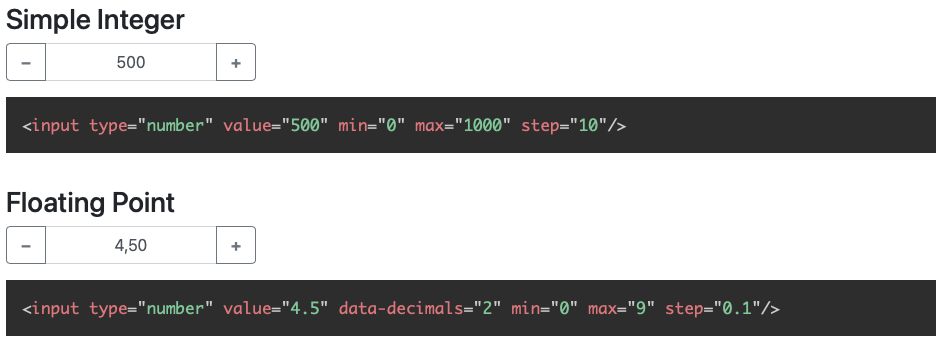
|
|
8
8
|
*Examples with floating-point and german localization*
|
|
9
9
|
|
|
10
|
-
> This version is compatible with Bootstrap 5
|
|
10
|
+
> This version is compatible with **Bootstrap 5**, but we remain a Bootstrap 4 compatible version with the branch
|
|
11
11
|
> <a href="https://github.com/shaack/bootstrap-input-spinner/tree/bootstrap4-compatible">bootstrap4-compatible</a>.
|
|
12
12
|
> npm package versions 3.x are Bootstrap 5 compatible, versions 2.x Bootstrap 4 compatible.
|
|
13
13
|
|
|
@@ -288,10 +288,14 @@ For older browsers (IE 9 or so), that doesn't support `Intl`, when you get an er
|
|
|
288
288
|
**"Intl is not defined"** (See [issue #34](https://github.com/shaack/bootstrap-input-spinner/issues/34)), just use a
|
|
289
289
|
shim or polyfill like [Intl.js](https://github.com/andyearnshaw/Intl.js), and it works.
|
|
290
290
|
|
|
291
|
-
#
|
|
291
|
+
# You may want to check out my further Bootstrap and HTML extensions
|
|
292
|
+
|
|
293
|
+
- [bootstrap-input-spinner](https://shaack.com/projekte/bootstrap-input-spinner/) – Input numbers
|
|
294
|
+
- [bootstrap-show-modal](https://shaack.com/projekte/bootstrap-show-modal/) – Show dialogs, dynamically
|
|
295
|
+
- [bootstrap-show-notification](https://shaack.com/projekte/bootstrap-show-notification/) – Show notifications, dynamically
|
|
296
|
+
- [bootstrap-detect-breakpoint](https://www.npmjs.com/package/bootstrap-detect-breakpoint) – Read the curr. BS BP from JS
|
|
297
|
+
- [auto-resize-textarea](https://shaack.com/projekte/auto-resize-textarea/) – Auto resize textareas by its content
|
|
298
|
+
- [external-links-blank](https://www.npmjs.com/package/external-links-blank) – Open all external links `_blank`
|
|
299
|
+
|
|
300
|
+
|
|
292
301
|
|
|
293
|
-
If you like this component, you may want to check out our other Bootstrap and HTML extensions
|
|
294
|
-
[**bootstrap-show-modal**](https://shaack.com/en/open-source-components),
|
|
295
|
-
[**bootstrap-detect-breakpoint**](https://shaack.com/en/open-source-components),
|
|
296
|
-
[**auto-resize-textarea**](https://shaack.com/en/open-source-components) and
|
|
297
|
-
[**external-links-blank**](https://shaack.com/en/open-source-components).
|
package/index.html
CHANGED
|
@@ -1,4 +1,5 @@
|
|
|
1
1
|
<!DOCTYPE html>
|
|
2
|
+
<!--suppress HtmlFormInputWithoutLabel -->
|
|
2
3
|
<html lang="en">
|
|
3
4
|
<head>
|
|
4
5
|
<meta charset="UTF-8">
|
|
@@ -13,7 +14,7 @@
|
|
|
13
14
|
border-bottom: 1px solid rgba(0, 0, 0, 0.5);
|
|
14
15
|
}
|
|
15
16
|
|
|
16
|
-
h3 {
|
|
17
|
+
h3, h4 {
|
|
17
18
|
margin-top: 2rem;
|
|
18
19
|
}
|
|
19
20
|
|
|
@@ -109,8 +110,9 @@
|
|
|
109
110
|
read the value from JavaScript
|
|
110
111
|
with <code>val()</code></h3>
|
|
111
112
|
<p>
|
|
112
|
-
Type in a number to see the difference between <code>change</code> and
|
|
113
|
-
|
|
113
|
+
Type in a number to see the difference between <code>change</code> and <code>input</code> events.
|
|
114
|
+
</p>
|
|
115
|
+
<p>
|
|
114
116
|
<input type="number" id="changedInput" value="2500" min="0" max="5000000" data-decimals="2"/>
|
|
115
117
|
</p>
|
|
116
118
|
<p>
|
|
@@ -122,11 +124,13 @@
|
|
|
122
124
|
var $valueOnInput = $("#valueOnInput")
|
|
123
125
|
var $valueOnChange = $("#valueOnChange")
|
|
124
126
|
$changedInput.on("input", function (event) {
|
|
127
|
+
console.log("on input", event)
|
|
125
128
|
$valueOnInput.html($(event.target).val())
|
|
126
129
|
// or $valueOnInput.html(event.target.value) // in vanilla js
|
|
127
130
|
// or $valueOnInput.html($changedInput.val())
|
|
128
131
|
})
|
|
129
132
|
$changedInput.on("change", function (event) {
|
|
133
|
+
console.log("on change", event)
|
|
130
134
|
$valueOnChange.html($(event.target).val())
|
|
131
135
|
})
|
|
132
136
|
</script>
|
|
@@ -143,31 +147,31 @@ $changedInput.on("change", function (event) {
|
|
|
143
147
|
})</code></pre>
|
|
144
148
|
<h3>Programmatic changing the value with <code>val()</code></h3>
|
|
145
149
|
<p>
|
|
146
|
-
Net
|
|
150
|
+
<label for="inputNet">Net</label>
|
|
147
151
|
<input type="number" id="inputNet" value="100" min="0" max="10000" step="0.01" data-decimals="2"/>
|
|
148
152
|
</p>
|
|
149
153
|
<p>
|
|
150
|
-
Gross (+19%)
|
|
154
|
+
<label for="inputGross">Gross (+19%)</label>
|
|
151
155
|
<input type="number" id="inputGross" value="100" min="0" max="11900" step="0.01" data-decimals="2"/>
|
|
152
156
|
</p>
|
|
153
157
|
<script>
|
|
154
158
|
var $inputNet = $("#inputNet")
|
|
155
159
|
var $inputGross = $("#inputGross")
|
|
156
|
-
$inputNet.on("
|
|
160
|
+
$inputNet.on("input", function (event) {
|
|
157
161
|
$inputGross.val($(event.target).val() * 1.19)
|
|
158
162
|
})
|
|
159
|
-
$inputGross.on("
|
|
163
|
+
$inputGross.on("input", function (event) {
|
|
160
164
|
$inputNet.val($(event.target).val() / 1.19)
|
|
161
165
|
})
|
|
162
166
|
$inputGross.val($inputNet.val() * 1.19)
|
|
163
167
|
</script>
|
|
164
|
-
<pre><code class="language-javascript">$inputNet.on("
|
|
168
|
+
<pre><code class="language-javascript">$inputNet.on("input", function (event) {
|
|
165
169
|
$inputGross.val($(event.target).val() * 1.19)
|
|
166
170
|
// or $inputGross[0].setValue(event.target.value * 1.19) // in vanilla js
|
|
167
171
|
// or $inputGross.val($inputNet.val() * 1.19)
|
|
168
172
|
// do all the same
|
|
169
173
|
})
|
|
170
|
-
$inputGross.on("
|
|
174
|
+
$inputGross.on("input", function (event) {
|
|
171
175
|
$inputNet.val($(event.target).val() / 1.19)
|
|
172
176
|
})</code></pre>
|
|
173
177
|
<h3>Attributes <code>placeholder</code> and <code>required</code></h3>
|
|
@@ -211,7 +215,7 @@ $inputGross.on("change", function (event) {
|
|
|
211
215
|
</script></code></pre>
|
|
212
216
|
</form>
|
|
213
217
|
|
|
214
|
-
<h3><code>buttonsOnly</code> mode
|
|
218
|
+
<h3><code>buttonsOnly</code> mode and disabled <code>autoInterval</code></h3>
|
|
215
219
|
<p>
|
|
216
220
|
In <code>buttonsOnly</code> mode no direct text input is allowed, the text-input
|
|
217
221
|
gets the attribute <code>readonly</code>. But the plus and minus buttons still allow to change the value.
|
|
@@ -254,13 +258,13 @@ $inputGross.on("change", function (event) {
|
|
|
254
258
|
<code>form-control-lg</code>, and
|
|
255
259
|
the resulting group gets the class <code>input-group-sm</code> or <code>input-group-lg</code>.</p>
|
|
256
260
|
<p>
|
|
257
|
-
Small
|
|
258
|
-
<input class="form-control-sm" type="number" value="0.0" data-decimals="4" min="-1" max="1" step="0.0001"/>
|
|
261
|
+
<label for="inputSmall">Small</label>
|
|
262
|
+
<input id="inputSmall" class="form-control-sm" type="number" value="0.0" data-decimals="4" min="-1" max="1" step="0.0001"/>
|
|
259
263
|
</p>
|
|
260
264
|
<pre><code class="language-html"><input class="form-control-sm" type="number" value="0.0" data-decimals="4" min="-1" max="1" step="0.0001"/></code></pre>
|
|
261
265
|
<p>
|
|
262
|
-
Large
|
|
263
|
-
<input class="form-control-lg" type="number" value="1000000" data-decimals="0" min="0" max="2000000" step="1"/>
|
|
266
|
+
<label for="inputLarge">Large</label>
|
|
267
|
+
<input id="inputLarge" class="form-control-lg" type="number" value="1000000" data-decimals="0" min="0" max="2000000" step="1"/>
|
|
264
268
|
</p>
|
|
265
269
|
<pre><code class="language-html"><input class="form-control-lg" type="number" value="1000000" data-decimals="0" min="0" max="2000000" step="1"/></code></pre>
|
|
266
270
|
|
|
@@ -304,15 +308,19 @@ $inputGross.on("change", function (event) {
|
|
|
304
308
|
var $dataDecimalsInput = $("#dataDecimalsInput")
|
|
305
309
|
var $minMaxTester = $("#minMaxTester")
|
|
306
310
|
$minInput.on("change", function (event) {
|
|
311
|
+
console.log("on change", event)
|
|
307
312
|
$minMaxTester.attr("min", $minInput.val())
|
|
308
313
|
})
|
|
309
314
|
$maxInput.on("change", function (event) {
|
|
315
|
+
console.log("on change", event)
|
|
310
316
|
$minMaxTester.attr("max", $maxInput.val())
|
|
311
317
|
})
|
|
312
318
|
$stepInput.on("change", function (event) {
|
|
319
|
+
console.log("on change", event)
|
|
313
320
|
$minMaxTester.attr("step", $stepInput.val())
|
|
314
321
|
})
|
|
315
322
|
$dataDecimalsInput.on("change", function (event) {
|
|
323
|
+
console.log("on change", event)
|
|
316
324
|
$minMaxTester.attr("data-decimals", $dataDecimalsInput.val())
|
|
317
325
|
})
|
|
318
326
|
</script>
|
|
@@ -337,13 +345,13 @@ $dataDecimalsInput.on("change", function (event) {
|
|
|
337
345
|
|
|
338
346
|
<h3>Prefix and Suffix</h3>
|
|
339
347
|
<p>
|
|
340
|
-
Prefix
|
|
341
|
-
<input data-prefix="$" value="100.0" data-decimals="2" min="0" max="1000" step="0.1" type="number"/>
|
|
348
|
+
<label for="inputPrefix">Prefix</label>
|
|
349
|
+
<input id="inputPrefix" data-prefix="$" value="100.0" data-decimals="2" min="0" max="1000" step="0.1" type="number"/>
|
|
342
350
|
</p>
|
|
343
351
|
<pre><code class="language-html"><input data-prefix="$" value="100.0" data-decimals="2" min="0" max="1000" step="0.1" type="number" /></code></pre>
|
|
344
352
|
<p>
|
|
345
|
-
Suffix
|
|
346
|
-
<input data-suffix="°C" value="50" min="0" max="100" type="number"/>
|
|
353
|
+
<label for="inputSuffix">Suffix</label>
|
|
354
|
+
<input id="inputSuffix" data-suffix="°C" value="50" min="0" max="100" type="number"/>
|
|
347
355
|
</p>
|
|
348
356
|
<pre><code
|
|
349
357
|
class="language-html"><input data-suffix="°C" value="50" min="0" max="100" type="number" /></code></pre>
|
|
@@ -356,7 +364,7 @@ $dataDecimalsInput.on("change", function (event) {
|
|
|
356
364
|
</p>
|
|
357
365
|
<script>
|
|
358
366
|
var $inputLoop = $("#inputLoop")
|
|
359
|
-
$inputLoop.on("
|
|
367
|
+
$inputLoop.on("input", function(ignored) {
|
|
360
368
|
var value = $inputLoop.val()
|
|
361
369
|
value = (value < 0) ? 360 + parseInt(value, 10) : value % 360
|
|
362
370
|
$inputLoop.val(value)
|
|
@@ -365,13 +373,13 @@ $dataDecimalsInput.on("change", function (event) {
|
|
|
365
373
|
<pre><code class="language-html"><input step="10" type="number" id="inputLoop" value="0" data-decimals="0" min="-10" max="360"/></code></pre>
|
|
366
374
|
<p>"Loop" the value between 0 and 360 with the <code>change</code> event in JavaScript.</p>
|
|
367
375
|
<pre><code class="language-javascript">var $inputLoop = $("#inputLoop")
|
|
368
|
-
$inputLoop.on("
|
|
376
|
+
$inputLoop.on("input", function(event) {
|
|
369
377
|
var value = $inputLoop.val()
|
|
370
378
|
value = (value < 0) ? 360 + parseInt(value, 10) : value % 360
|
|
371
379
|
$inputLoop.val(value)
|
|
372
380
|
})</code></pre>
|
|
373
381
|
|
|
374
|
-
<h3>Custom Editors
|
|
382
|
+
<h3>Custom Editors</h3>
|
|
375
383
|
|
|
376
384
|
<p>An Editor defines, how the input is parsed and rendered. The inputSpinner is shipped with some custom Editors in
|
|
377
385
|
<code>/src/custom-editors.js</code>.</p>
|
|
@@ -393,15 +401,14 @@ $inputLoop.on("change", function (event) {
|
|
|
393
401
|
<h4>TimeEditor</h4>
|
|
394
402
|
|
|
395
403
|
<p>The <code>TimeEditor</code> renders the number as time in hours and minutes, separated by a colon.</p>
|
|
396
|
-
<
|
|
397
|
-
|
|
398
|
-
|
|
399
|
-
</p>
|
|
404
|
+
<input id="timeEditor" value="60" step="5"/>
|
|
405
|
+
<div class="mt-1">value: <span id="timeValue"></span></div>
|
|
406
|
+
|
|
400
407
|
<script>
|
|
401
408
|
var $timeEditorInput = $("#timeEditor")
|
|
402
409
|
$timeEditorInput.inputSpinner({editor: customEditors.TimeEditor})
|
|
403
410
|
$("#timeValue").text($timeEditorInput.val())
|
|
404
|
-
$timeEditorInput.on("
|
|
411
|
+
$timeEditorInput.on("input", function() {
|
|
405
412
|
$("#timeValue").text($timeEditorInput.val())
|
|
406
413
|
})
|
|
407
414
|
</script>
|
|
@@ -470,9 +477,9 @@ $inputLoop.on("change", function (event) {
|
|
|
470
477
|
</script>
|
|
471
478
|
|
|
472
479
|
<div class="card my-5 border-info">
|
|
473
|
-
<a href="https://shaack.com/
|
|
480
|
+
<a href="https://shaack.com/works">
|
|
474
481
|
<div class="card-body">
|
|
475
|
-
<h4 class="mb-2">More Bootstrap components (from shaack.com)</h4>
|
|
482
|
+
<h4 class="mb-2 mt-0">More Bootstrap components (from shaack.com)</h4>
|
|
476
483
|
You may want to check out our further Bootstrap extensions,
|
|
477
484
|
<b>bootstrap-show-modal</b> and
|
|
478
485
|
<b>bootstrap-detect-breakpoint</b>.
|
|
@@ -489,4 +496,4 @@ $inputLoop.on("change", function (event) {
|
|
|
489
496
|
$(".buttons-only").inputSpinner({buttonsOnly: true, autoInterval: undefined })
|
|
490
497
|
</script>
|
|
491
498
|
</body>
|
|
492
|
-
</html>
|
|
499
|
+
</html>
|
package/package.json
CHANGED
|
@@ -124,6 +124,7 @@
|
|
|
124
124
|
updateAttributes()
|
|
125
125
|
|
|
126
126
|
var value = parseFloat($original[0].value)
|
|
127
|
+
var pointerState = false
|
|
127
128
|
|
|
128
129
|
var prefix = $original.attr("data-prefix") || ""
|
|
129
130
|
var suffix = $original.attr("data-suffix") || ""
|
|
@@ -182,19 +183,26 @@
|
|
|
182
183
|
}
|
|
183
184
|
})
|
|
184
185
|
|
|
186
|
+
// decrement button
|
|
185
187
|
onPointerDown($buttonDecrement[0], function () {
|
|
186
188
|
if (!$buttonDecrement.prop("disabled")) {
|
|
189
|
+
pointerState = true
|
|
187
190
|
stepHandling(-step)
|
|
188
191
|
}
|
|
189
192
|
})
|
|
193
|
+
// increment button
|
|
190
194
|
onPointerDown($buttonIncrement[0], function () {
|
|
191
195
|
if (!$buttonIncrement.prop("disabled")) {
|
|
196
|
+
pointerState = true
|
|
192
197
|
stepHandling(step)
|
|
193
198
|
}
|
|
194
199
|
})
|
|
195
200
|
onPointerUp(document.body, function () {
|
|
196
|
-
|
|
197
|
-
|
|
201
|
+
if(pointerState === true) {
|
|
202
|
+
resetTimer()
|
|
203
|
+
dispatchEvent($original, "change")
|
|
204
|
+
pointerState = false
|
|
205
|
+
}
|
|
198
206
|
})
|
|
199
207
|
}
|
|
200
208
|
|
package/test/index.html
CHANGED
|
@@ -7,8 +7,8 @@
|
|
|
7
7
|
</head>
|
|
8
8
|
<body>
|
|
9
9
|
<div id="testContainer"></div>
|
|
10
|
-
<script src="
|
|
11
|
-
<script src="
|
|
10
|
+
<script src="https://code.jquery.com/jquery-3.6.0.min.js" integrity="sha256-/xUj+3OJU5yExlq6GSYGSHk7tPXikynS7ogEvDej/m4=" crossorigin="anonymous"></script>
|
|
11
|
+
<script src="https://cdn.jsdelivr.net/npm/bootstrap@5.1.1/dist/js/bootstrap.bundle.min.js" integrity="sha384-/bQdsTh/da6pkI1MST/rWKFNjaCP5gBSY4sEBT38Q/9RBh9AH40zEOg7Hlq2THRZ" crossorigin="anonymous"></script>
|
|
12
12
|
<script src="../src/bootstrap-input-spinner.js"></script>
|
|
13
13
|
<script type="module">
|
|
14
14
|
import {teevi} from "../node_modules/teevi/src/teevi.js"
|