blueprompt 1.0.1
This diff represents the content of publicly available package versions that have been released to one of the supported registries. The information contained in this diff is provided for informational purposes only and reflects changes between package versions as they appear in their respective public registries.
- package/.env.example +24 -0
- package/.gitattributes +2 -0
- package/README-EN.md +105 -0
- package/README.md +104 -0
- package/assets/result.png +0 -0
- package/assets/start.png +0 -0
- package/assets/step.png +0 -0
- package/assets/title.png +0 -0
- package/cli/index.js +700 -0
- package/index.js +86 -0
- package/package.json +42 -0
- package/public/index.html +197 -0
- package/public/script.js +375 -0
- package/public/styles.css +378 -0
- package/server/index.js +717 -0
package/.env.example
ADDED
|
@@ -0,0 +1,24 @@
|
|
|
1
|
+
OPENAI_API_KEY=your_openai_api_key
|
|
2
|
+
OPENAI_MODEL=gpt-5.2
|
|
3
|
+
ANTHROPIC_API_KEY=
|
|
4
|
+
ANTHROPIC_MODEL=claude-sonnet-4-20250514
|
|
5
|
+
GEMINI_API_KEY=
|
|
6
|
+
GEMINI_MODEL=gemini-2.5-flash
|
|
7
|
+
OPENROUTER_API_KEY=
|
|
8
|
+
OPENROUTER_MODEL=openai/gpt-4.1-mini
|
|
9
|
+
OPENROUTER_SITE_URL=http://localhost:3000
|
|
10
|
+
OPENROUTER_APP_NAME=Reverse Engineer
|
|
11
|
+
GROQ_API_KEY=
|
|
12
|
+
GROQ_MODEL=llama-3.3-70b-versatile
|
|
13
|
+
XAI_API_KEY=
|
|
14
|
+
XAI_MODEL=grok-4-fast-reasoning
|
|
15
|
+
MISTRAL_API_KEY=
|
|
16
|
+
MISTRAL_MODEL=mistral-medium-latest
|
|
17
|
+
OLLAMA_BASE_URL=http://127.0.0.1:11434
|
|
18
|
+
OLLAMA_MODEL=llama3.2
|
|
19
|
+
KILOCODE_API_KEY=
|
|
20
|
+
KILOCODE_BASE_URL=https://api.kilo.ai/api/gateway
|
|
21
|
+
KILOCODE_MODEL=kilocode/kilo/auto
|
|
22
|
+
DEFAULT_PROVIDER=openai
|
|
23
|
+
GITHUB_TOKEN=optional_github_token_for_private_repos_or_higher_rate_limits
|
|
24
|
+
PORT=3000
|
package/.gitattributes
ADDED
package/README-EN.md
ADDED
|
@@ -0,0 +1,105 @@
|
|
|
1
|
+
# REVERSE ENGINEER
|
|
2
|
+
|
|
3
|
+
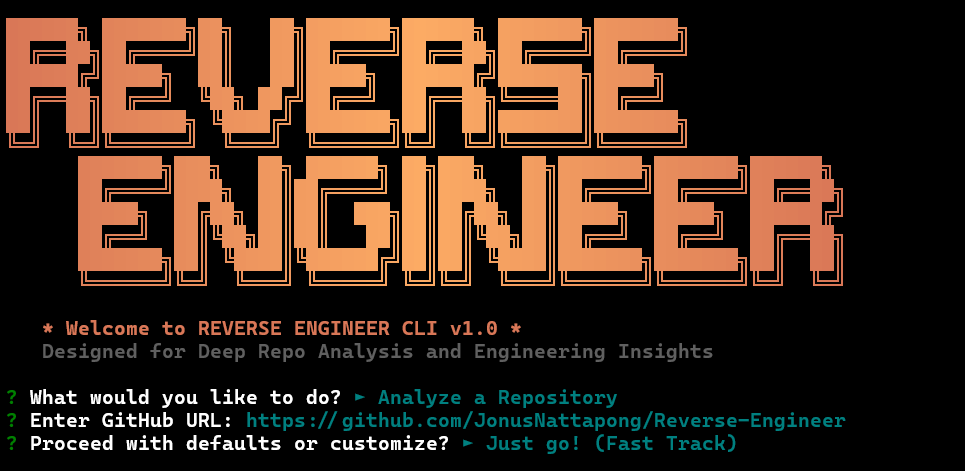
|
|
4
|
+
|
|
5
|
+
> [!NOTE]
|
|
6
|
+
> [Thai Version here / ดูฉบับภาษาไทยที่นี่](README.md)
|
|
7
|
+
|
|
8
|
+
## Advanced Repository Analysis & Technical Blueprinting Hub
|
|
9
|
+
|
|
10
|
+
REVERSE ENGINEER is a sophisticated engineering tool designed for analyzing and decomposing complex GitHub repositories. It extracts high-fidelity context from the source and leverages advanced AI models to map architectural patterns, resolve complex logic, and generate comprehensive implementation specifications.
|
|
11
|
+
|
|
12
|
+
---
|
|
13
|
+
|
|
14
|
+
## Core Capabilities
|
|
15
|
+
|
|
16
|
+
### 1. High-Fidelity Dashboard
|
|
17
|
+
|
|
18
|
+
- **Bento UI Architecture**: A cohesive dashboard that integrates visual analysis and operation logs in one view.
|
|
19
|
+
- **Cinematic Workspace**: A premium environment designed for long-form technical research and code audit.
|
|
20
|
+
- **Structural Integrity**: Native Markdown rendering for AI outputs with precise syntax highlighting.
|
|
21
|
+
- **Blueprint Mode**: Sophisticated prompt generation specifically optimized for downstream AI development tasks.
|
|
22
|
+
|
|
23
|
+
### 2. Professional 4-Phase TUI
|
|
24
|
+
|
|
25
|
+
- **Systematic Workflow**: A dedicated 4-phase process covering Handshake, Extraction, Synthesis, and Delivery.
|
|
26
|
+
- **Engineering Aesthetics**: Sophisticated, terminal-native aesthetics influenced by Anthropic's Claude interface.
|
|
27
|
+
|
|
28
|
+
### 3. Blueprint Generation (The Architect System)
|
|
29
|
+
|
|
30
|
+
- Beyond standard code summaries, it generates a full **Technical Implementation Specification**.
|
|
31
|
+
- It provides a granular map of data structures, execution flows, and architectural boundaries, enabling other AI agents to recreate modules with high precision.
|
|
32
|
+
|
|
33
|
+
### 4. Unified Launcher System
|
|
34
|
+
|
|
35
|
+
- A single entry point for all operations. Run `npm start` to access either the Web Dashboard or the Terminal User Interface (TUI). Background server processes are handled automatically for seamless switching.
|
|
36
|
+
|
|
37
|
+
---
|
|
38
|
+
|
|
39
|
+
## Interface Showcase
|
|
40
|
+
|
|
41
|
+
### Web Dashboard
|
|
42
|
+
|
|
43
|
+
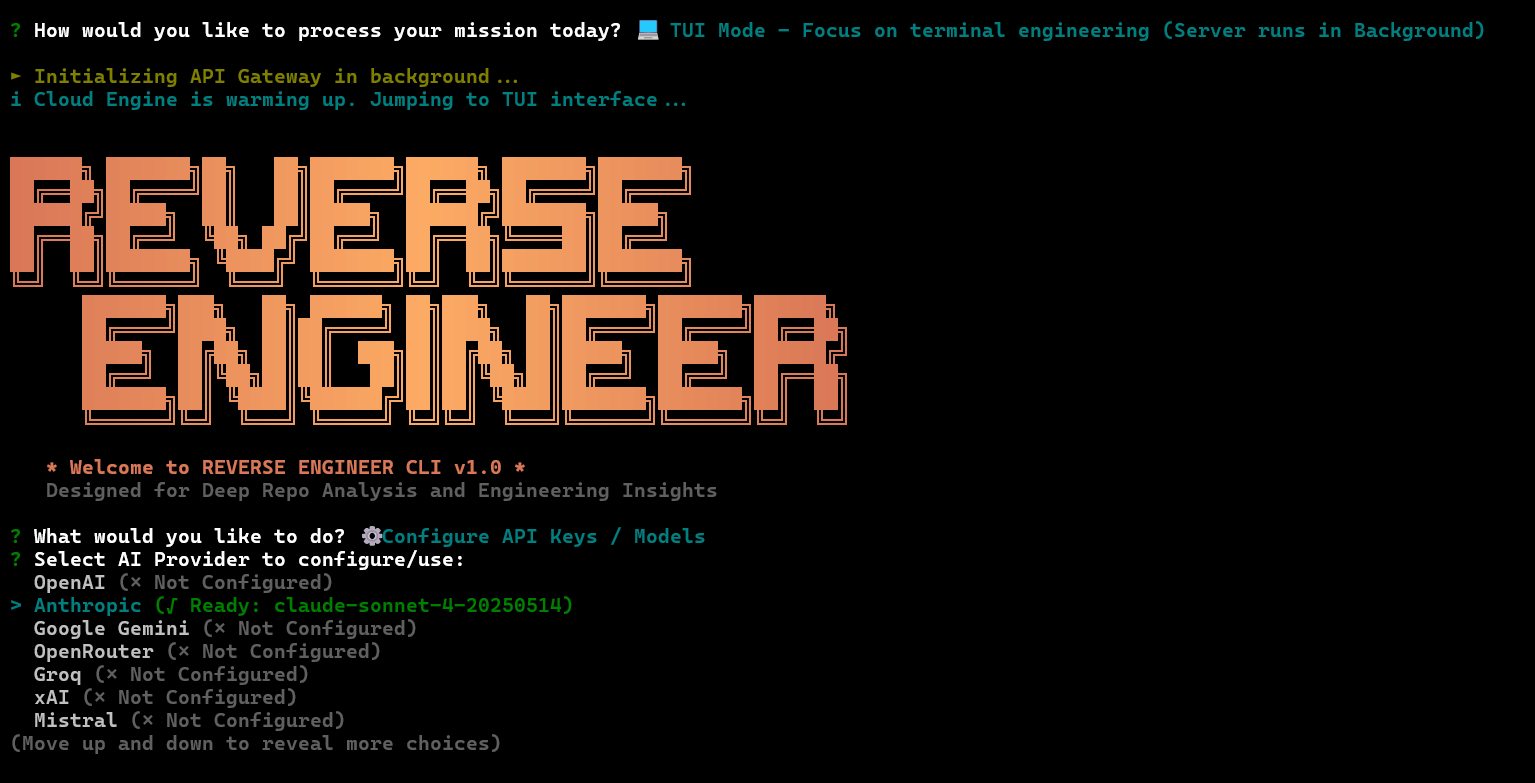
|
|
44
|
+
|
|
45
|
+
### TUI Operation
|
|
46
|
+
|
|
47
|
+
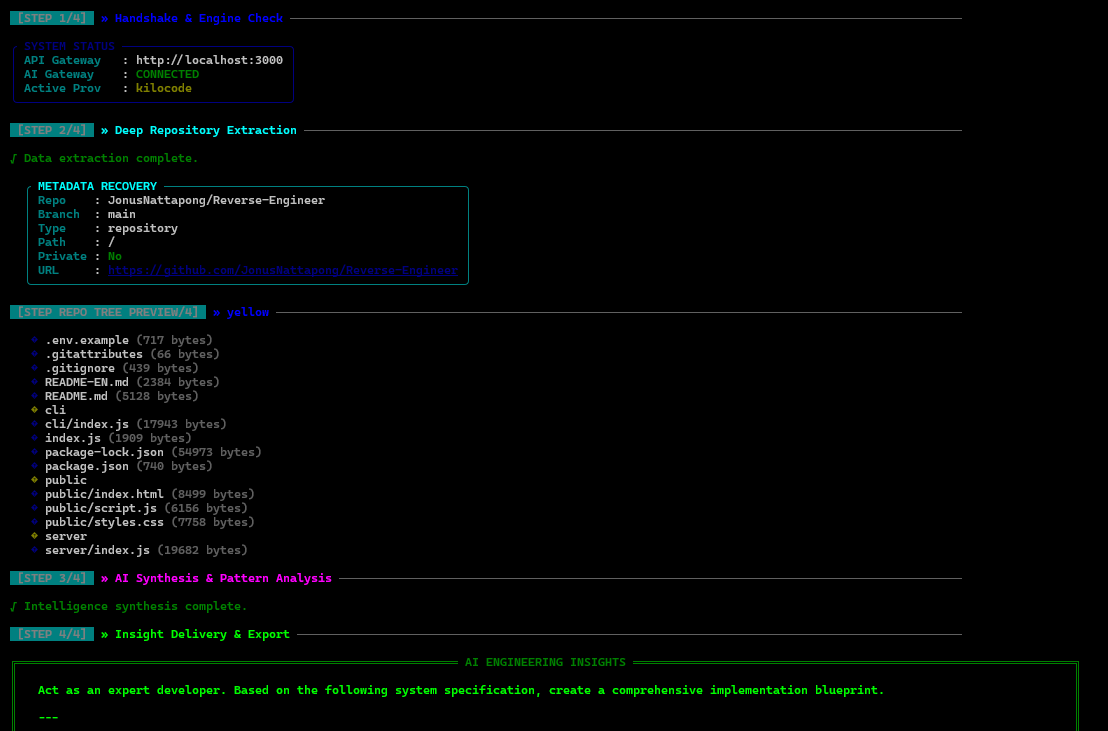
|
|
48
|
+
|
|
49
|
+
### Analysis Result
|
|
50
|
+
|
|
51
|
+
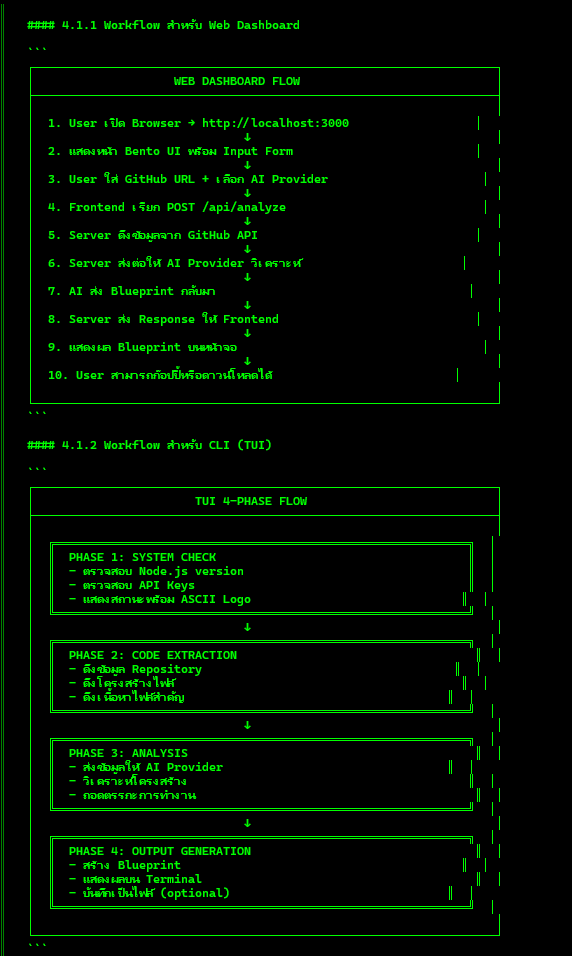
|
|
52
|
+
|
|
53
|
+
---
|
|
54
|
+
|
|
55
|
+
## Technical Setup
|
|
56
|
+
|
|
57
|
+
### 1. Installation
|
|
58
|
+
|
|
59
|
+
```bash
|
|
60
|
+
npm install
|
|
61
|
+
```
|
|
62
|
+
|
|
63
|
+
### 2. Environment Configuration
|
|
64
|
+
|
|
65
|
+
Create a `.env` file and populate the necessary authentication keys:
|
|
66
|
+
|
|
67
|
+
```env
|
|
68
|
+
OPENAI_API_KEY=your_key_here
|
|
69
|
+
ANTHROPIC_API_KEY=your_key_here
|
|
70
|
+
KILOCODE_API_KEY=your_key_here
|
|
71
|
+
GITHUB_TOKEN=recommended_for_higher_limits
|
|
72
|
+
```
|
|
73
|
+
|
|
74
|
+
### 3. Execution
|
|
75
|
+
|
|
76
|
+
```bash
|
|
77
|
+
npm start
|
|
78
|
+
```
|
|
79
|
+
|
|
80
|
+
---
|
|
81
|
+
|
|
82
|
+
## Headless CLI Operations
|
|
83
|
+
|
|
84
|
+
Access direct terminal commands with the following syntax:
|
|
85
|
+
|
|
86
|
+
```bash
|
|
87
|
+
# Full repository analysis with blueprint output
|
|
88
|
+
npm run tui --url "[github-url]" --style blueprint --language Thai
|
|
89
|
+
|
|
90
|
+
# Focused file analysis using a specific AI provider
|
|
91
|
+
npm run tui --url "[github-file-url]" --provider anthropic --model claude-3-5-sonnet-latest
|
|
92
|
+
```
|
|
93
|
+
|
|
94
|
+
---
|
|
95
|
+
|
|
96
|
+
## Project Architecture
|
|
97
|
+
|
|
98
|
+
- `/cli`: Professional Terminal User Interface implementation.
|
|
99
|
+
- `/server`: High-performance API Gateway and GitHub mining engine.
|
|
100
|
+
- `/public`: Static source for the web dashboard.
|
|
101
|
+
- `index.js`: Unified launcher and system entry point.
|
|
102
|
+
|
|
103
|
+
---
|
|
104
|
+
|
|
105
|
+
© 2026 REVERSE ENGINEER | Engineered for Architects and Security Researchers.
|
package/README.md
ADDED
|
@@ -0,0 +1,104 @@
|
|
|
1
|
+
# REVERSE ENGINEER
|
|
2
|
+
|
|
3
|
+

|
|
4
|
+
|
|
5
|
+
> [!TIP]
|
|
6
|
+
> [English Version here](README-EN.md)
|
|
7
|
+
|
|
8
|
+
## ระบบวิเคราะห์และถอดรหัสโครงสร้าง GitHub Repository ด้วย AI
|
|
9
|
+
|
|
10
|
+
**REVERSE ENGINEER** เป็นเครื่องมือระดับวิศวกรรมสำหรับวิเคราะห์และทำความเข้าใจโครงสร้างซอฟต์แวร์ที่ซับซ้อน โดยการดึงบริบทจริงจาก GitHub และใช้โมเดล AI ขั้นสูงในการประมวลผลตรรกะ ระบุรูปแบบ (Patterns) และสร้างพิมพ์เขียวทางเทคนิค (Technical Blueprints) เพื่อเป็นรากฐานในการพัฒนาหรือติดตั้งระบบใหม่
|
|
11
|
+
|
|
12
|
+
---
|
|
13
|
+
|
|
14
|
+
## คุณสมบัติหลัก
|
|
15
|
+
|
|
16
|
+
### 1. Web Dashboard (Bento UI)
|
|
17
|
+
|
|
18
|
+
- **Bento Interface**: การจัดวางข้อมูลแบบโมเดิร์นที่รวบรวมฟังก์ชันการทำงานไว้ในหน้าเดียว
|
|
19
|
+
- **Cinematic Dark Mode**: ดีไซน์ระดับพรีเมียมที่ออกแบบมาเพื่อลดมลภาวะทางสายตาสำหรับการวิเคราะห์เชิงลึก
|
|
20
|
+
- **Blueprint Mode**: ระบบสร้าง Technical Prompts สำหรับส่งต่อข้อมูลสถาปัตยกรรมไปยัง AI ตัวอื่นเพื่อการสร้างโค้ดที่มีความแม่นยำสูง
|
|
21
|
+
|
|
22
|
+
### 2. Professional 4-Phase TUI
|
|
23
|
+
|
|
24
|
+
- **Structured Workflow**: ระบบการทำงานแบบ 4 ขั้นตอน ตั้งแต่การตรวจสอบระบบ (Handshake), การสกัดข้อมูล (Extraction), การวิเคราะห์เชิงลึก (Synthesis) ไปจนถึงการส่งมอบข้อมูล (Delivery)
|
|
25
|
+
- **Engineering Aesthetics**: ธีมระดับพรีเมียมที่ได้รับแรงบันดาลใจจาก Claude พร้อมโลโก้ ASCII สำหรับผู้ใช้งานผ่าน Terminal
|
|
26
|
+
|
|
27
|
+
### 3. Blueprint Generation (The System Architect)
|
|
28
|
+
|
|
29
|
+
- แตกต่างจากการสรุปโค้ดทั่วไป โหมดนี้ออกแบบมาเพื่อสร้าง "ข้อกำหนดทางเทคนิค (Technical Specification)" ที่ครอบคลุมทั้งโครงสร้างข้อมูล, ตรรกะสำคัญ และความสัมพันธ์ระหว่างโมดูล
|
|
30
|
+
- เหมาะสำหรับการนำพิมพ์เขียวไปใช้ใน AI Coding Assistants เพื่อจำลองระบบหรือพัฒนาต่อยอด (Re-implementation)
|
|
31
|
+
|
|
32
|
+
### 4. Unified Launcher
|
|
33
|
+
|
|
34
|
+
- ระบบ Launcher ที่ช่วยใหเข้าถึงทั้ง Web Interface และ TUI Mode ได้ผ่านการควบคุมเดียว โดยระบบจะจัดการการทำงานของ Server ในพื้นหลังให้อัตโนมัติ
|
|
35
|
+
|
|
36
|
+
---
|
|
37
|
+
|
|
38
|
+
## หน้าตาของระบบ (Interface Showcase)
|
|
39
|
+
|
|
40
|
+
### Web Dashboard
|
|
41
|
+
|
|
42
|
+

|
|
43
|
+
|
|
44
|
+
### TUI Operation
|
|
45
|
+
|
|
46
|
+

|
|
47
|
+
|
|
48
|
+
### Analysis Result
|
|
49
|
+
|
|
50
|
+

|
|
51
|
+
|
|
52
|
+
---
|
|
53
|
+
|
|
54
|
+
## การเริ่มต้นใช้งาน
|
|
55
|
+
|
|
56
|
+
### 1. การติดตั้ง (Installation)
|
|
57
|
+
|
|
58
|
+
```bash
|
|
59
|
+
npm install
|
|
60
|
+
```
|
|
61
|
+
|
|
62
|
+
### 2. การตั้งค่า Environment
|
|
63
|
+
|
|
64
|
+
สร้างไฟล์ `.env` ที่ Root ของโครงการและระบุ API Keys:
|
|
65
|
+
|
|
66
|
+
```env
|
|
67
|
+
OPENAI_API_KEY=your_key_here
|
|
68
|
+
ANTHROPIC_API_KEY=your_key_here
|
|
69
|
+
KILOCODE_API_KEY=your_key_here
|
|
70
|
+
GITHUB_TOKEN=recommended_for_higher_limits
|
|
71
|
+
```
|
|
72
|
+
|
|
73
|
+
### 3. การรันระบบ
|
|
74
|
+
|
|
75
|
+
```bash
|
|
76
|
+
npm start
|
|
77
|
+
```
|
|
78
|
+
|
|
79
|
+
---
|
|
80
|
+
|
|
81
|
+
## การใช้งานขั้นสูงผ่าน CLI
|
|
82
|
+
|
|
83
|
+
สำหรับการรันคำสั่งโดยตรงผ่าน Terminal พร้อมพารามิเตอร์:
|
|
84
|
+
|
|
85
|
+
```bash
|
|
86
|
+
# วิเคราะห์ทั้ง Repository ในรูปแบบ Blueprint (ภาษาไทย)
|
|
87
|
+
npm run tui --url "[github-url]" --style blueprint --language Thai
|
|
88
|
+
|
|
89
|
+
# เจาะจงวิเคราะห์ไฟล์ด้วย Anthropic Claude
|
|
90
|
+
npm run tui --url "[github-file-url]" --provider anthropic --model claude-3-5-sonnet-latest
|
|
91
|
+
```
|
|
92
|
+
|
|
93
|
+
---
|
|
94
|
+
|
|
95
|
+
## โครงสร้างโครงการ
|
|
96
|
+
|
|
97
|
+
- `/cli`: ตรรกะและอินเทอร์เฟซผู้ใช้งานผ่าน Terminal
|
|
98
|
+
- `/server`: API Gateway และระบบการจัดการข้อมูลจาก GitHub
|
|
99
|
+
- `/public`: ระบบแสดงผลหน้าเว็บ (Dashboard)
|
|
100
|
+
- `index.js`: ระบบ Launcher หลัก
|
|
101
|
+
|
|
102
|
+
---
|
|
103
|
+
|
|
104
|
+
© 2026 REVERSE ENGINEER | Engineered for Architects and Security Researchers.
|
|
Binary file
|
package/assets/start.png
ADDED
|
Binary file
|
package/assets/step.png
ADDED
|
Binary file
|
package/assets/title.png
ADDED
|
Binary file
|