bkper 4.25.0 → 4.26.0
This diff represents the content of publicly available package versions that have been released to one of the supported registries. The information contained in this diff is provided for informational purposes only and reflects changes between package versions as they appear in their respective public registries.
- package/README.md +1 -1
- package/lib/agent/extensions/handoff.d.ts.map +1 -1
- package/lib/agent/extensions/handoff.js +2 -0
- package/lib/agent/extensions/handoff.js.map +1 -1
- package/lib/agent/startup-maintenance.d.ts +1 -0
- package/lib/agent/startup-maintenance.d.ts.map +1 -1
- package/lib/agent/startup-maintenance.js +7 -1
- package/lib/agent/startup-maintenance.js.map +1 -1
- package/lib/agent/system-prompt.js +1 -1
- package/lib/commands/apps/git/clone.js +1 -1
- package/lib/commands/apps/git/clone.js.map +1 -1
- package/lib/commands/apps/init.d.ts +3 -1
- package/lib/commands/apps/init.d.ts.map +1 -1
- package/lib/commands/apps/init.js +105 -58
- package/lib/commands/apps/init.js.map +1 -1
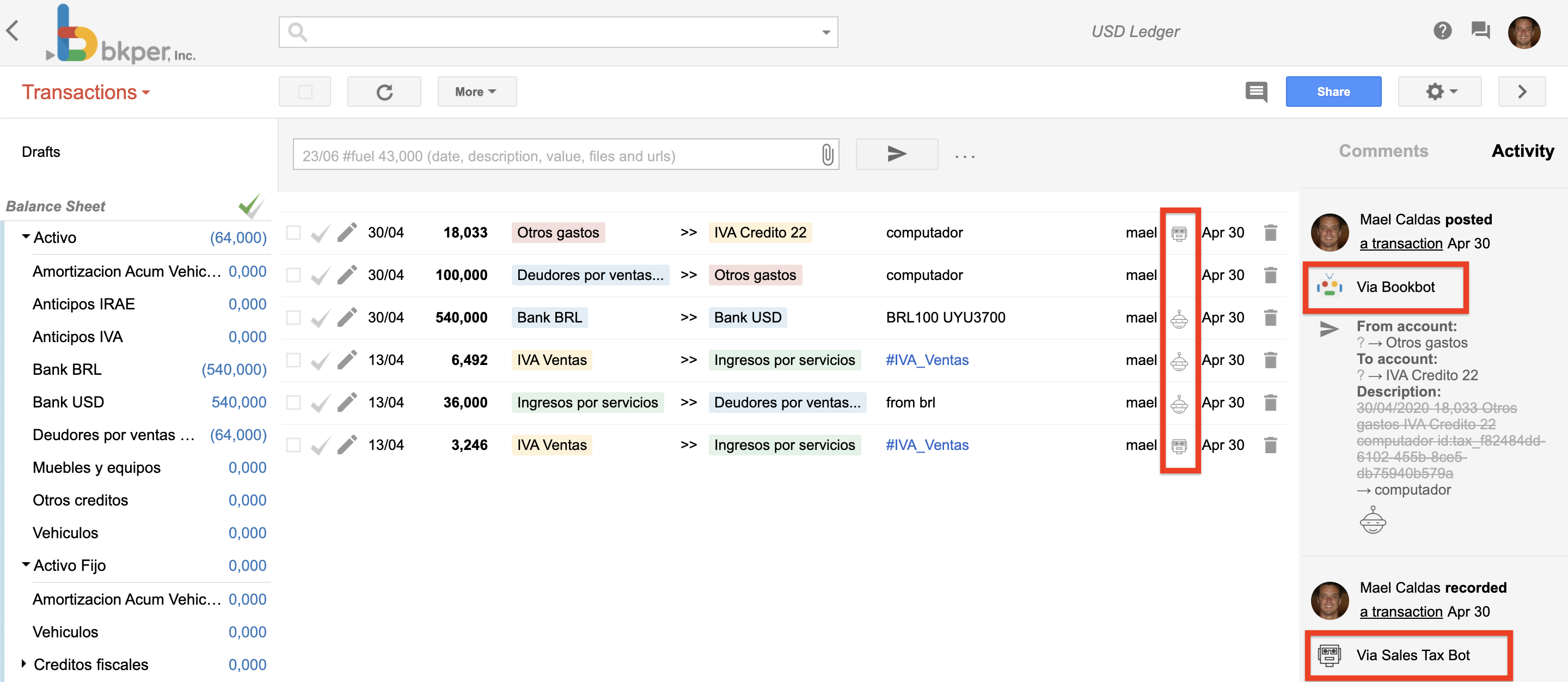
- package/lib/commands/apps/register.js +2 -2
- package/lib/commands/apps/register.js.map +1 -1
- package/lib/dev/miniflare.js +1 -1
- package/lib/dev/miniflare.js.map +1 -1
- package/lib/dev/preflight.js +1 -1
- package/lib/dev/preflight.js.map +1 -1
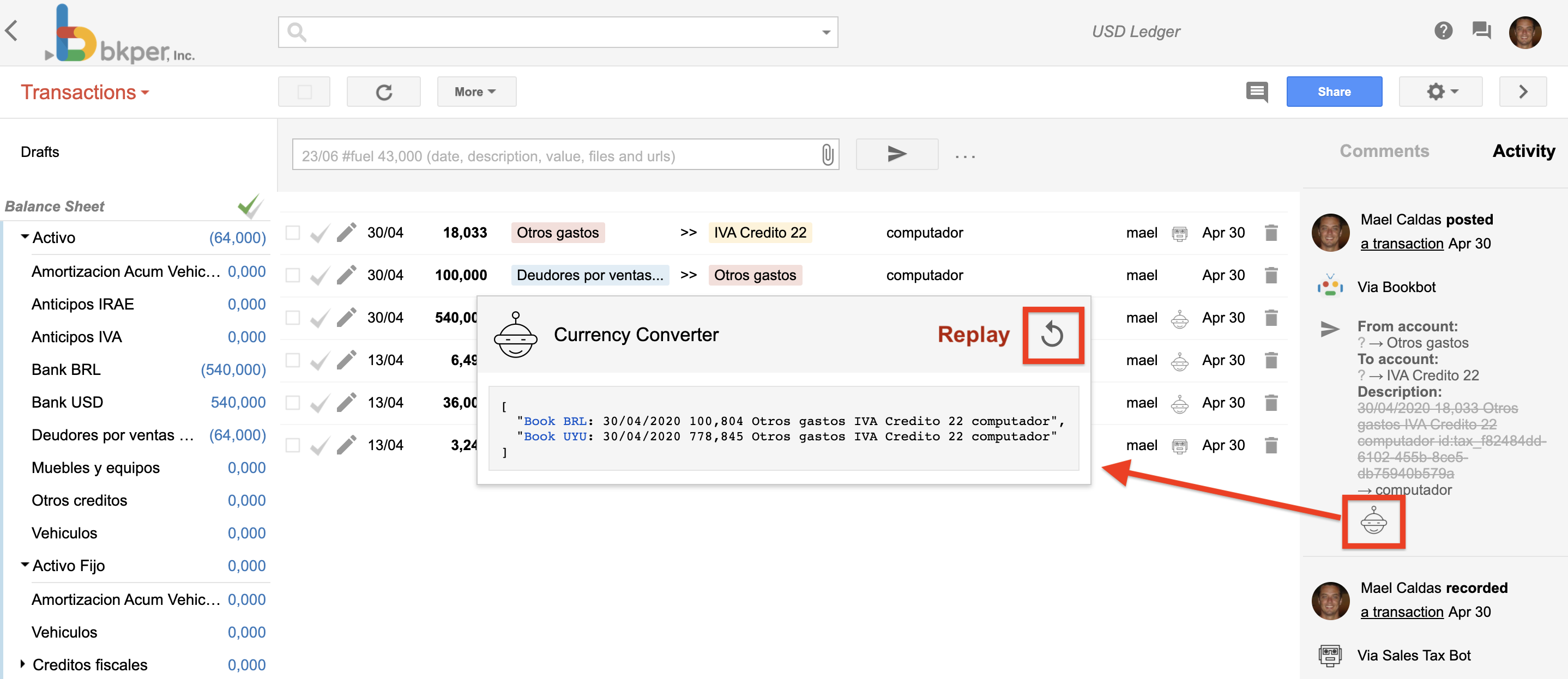
- package/lib/dev/shared.js +1 -1
- package/lib/dev/shared.js.map +1 -1
- package/lib/docs/apps/app-listing.md +86 -0
- package/lib/docs/apps/architecture.md +188 -0
- package/lib/docs/apps/configuration.md +171 -0
- package/lib/docs/apps/context-menu.md +69 -0
- package/lib/docs/apps/deploying.md +181 -0
- package/lib/docs/apps/development.md +122 -0
- package/lib/docs/apps/event-handlers.md +248 -0
- package/lib/docs/apps/first-app.md +76 -0
- package/lib/docs/apps/overview.md +100 -0
- package/lib/docs/apps/self-hosted.md +63 -0
- package/lib/docs/apps/shared-app-source.md +85 -0
- package/lib/docs/cli/app-management.md +16 -4
- package/lib/docs/index.md +11 -1
- package/lib/docs/sdk/bkper-js.md +5 -0
- package/lib/upgrade/index.d.ts +1 -1
- package/lib/upgrade/index.d.ts.map +1 -1
- package/lib/upgrade/index.js +1 -1
- package/lib/upgrade/index.js.map +1 -1
- package/lib/upgrade/installation.d.ts +4 -0
- package/lib/upgrade/installation.d.ts.map +1 -1
- package/lib/upgrade/installation.js +23 -0
- package/lib/upgrade/installation.js.map +1 -1
- package/package.json +3 -3
- package/lib/docs/apps/app-building.md +0 -1429
|
@@ -0,0 +1,181 @@
|
|
|
1
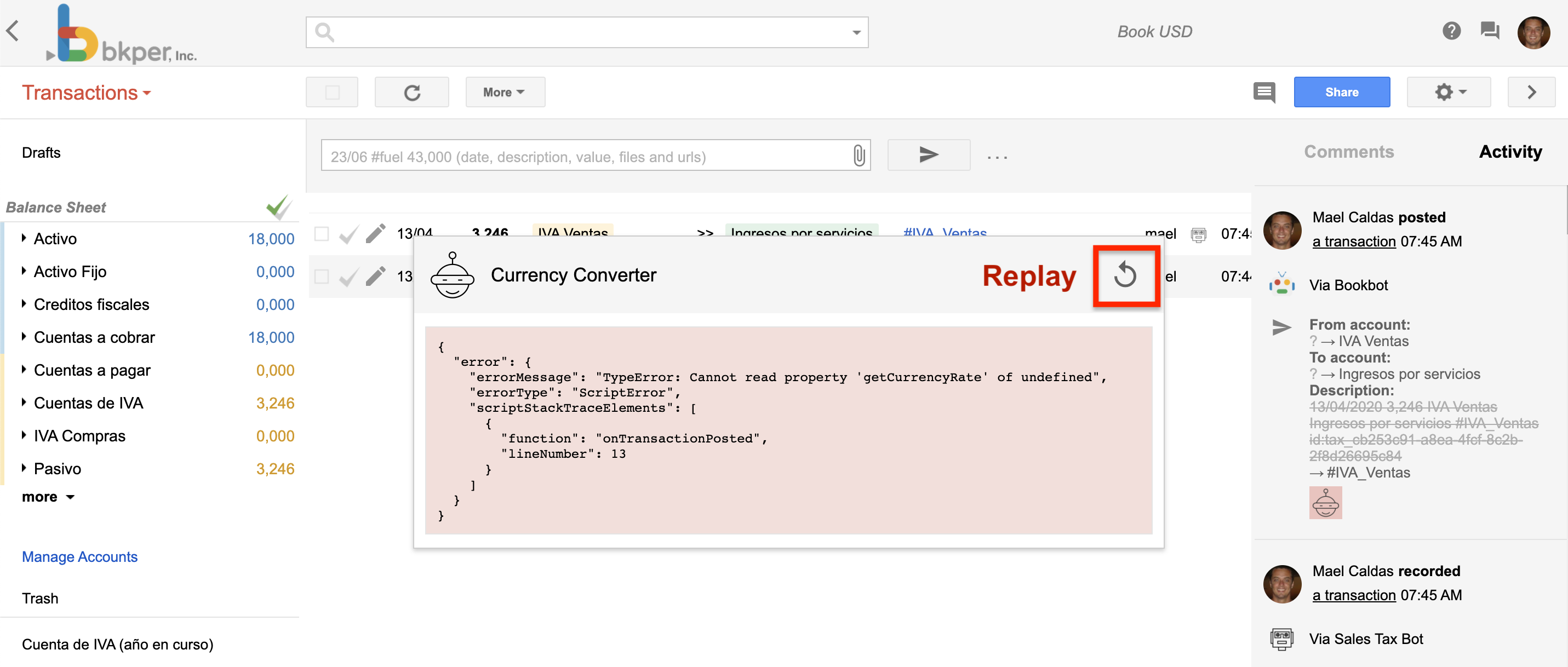
|
+
# Building & Deploying
|
|
2
|
+
|
|
3
|
+
## The deployment workflow
|
|
4
|
+
|
|
5
|
+
Run the template's deterministic checks before releasing:
|
|
6
|
+
|
|
7
|
+
```bash
|
|
8
|
+
npm run check
|
|
9
|
+
```
|
|
10
|
+
|
|
11
|
+
1. **Build** — Compile your code
|
|
12
|
+
|
|
13
|
+
```bash
|
|
14
|
+
npm run build
|
|
15
|
+
```
|
|
16
|
+
|
|
17
|
+
This runs two build steps:
|
|
18
|
+
- Client (Vite) to static assets in `dist/client/`
|
|
19
|
+
- Server Worker bundle (esbuild) to `dist/server/`
|
|
20
|
+
|
|
21
|
+
Build output includes size reporting so you can monitor bundle sizes.
|
|
22
|
+
|
|
23
|
+
2. **Sync** — Update app metadata and managed source
|
|
24
|
+
|
|
25
|
+
```bash
|
|
26
|
+
bkper app sync
|
|
27
|
+
```
|
|
28
|
+
|
|
29
|
+
Syncs your `bkper.yaml` configuration to Bkper — name, description, menu URLs, webhook URLs, access control, and branding. For an app using Bkper-managed source, it also safely pushes the current clean, committed branch. Sync does not build or deploy the app.
|
|
30
|
+
|
|
31
|
+
3. **Deploy** — Upload the local build to the platform
|
|
32
|
+
|
|
33
|
+
```bash
|
|
34
|
+
bkper app deploy
|
|
35
|
+
```
|
|
36
|
+
|
|
37
|
+
For a managed-source app, deploy safely pushes and verifies the current commit. It then uploads your existing pre-built code from `dist/` to the Bkper Platform. The command does not run a build. Your app is live at `https://{appId}.bkper.app`.
|
|
38
|
+
|
|
39
|
+
The app template combines all three after source changes are committed:
|
|
40
|
+
|
|
41
|
+
```bash
|
|
42
|
+
npm run deploy
|
|
43
|
+
```
|
|
44
|
+
|
|
45
|
+
Use `npm run deploy:preview` for the preview environment.
|
|
46
|
+
|
|
47
|
+
> **Caution: Source is not deployment**
|
|
48
|
+
> An ordinary `git push` stores source only and never deploys. `bkper app sync` also does not deploy. Run `bkper app deploy` explicitly when the local build is ready to release.
|
|
49
|
+
See [Shared App Source](https://bkper.com/docs/build/apps/shared-app-source.md) for managed-source setup, cloning, access, and external Git workflows.
|
|
50
|
+
|
|
51
|
+
### Production
|
|
52
|
+
|
|
53
|
+
The default deployment target. Your app runs at `https://{appId}.bkper.app`.
|
|
54
|
+
|
|
55
|
+
```bash
|
|
56
|
+
bkper app deploy
|
|
57
|
+
```
|
|
58
|
+
|
|
59
|
+
Production serves:
|
|
60
|
+
|
|
61
|
+
```txt
|
|
62
|
+
Client: https://{appId}.bkper.app
|
|
63
|
+
API routes: https://{appId}.bkper.app/api/*
|
|
64
|
+
OpenAPI spec: https://{appId}.bkper.app/openapi.json
|
|
65
|
+
Events: https://{appId}.bkper.app/events
|
|
66
|
+
```
|
|
67
|
+
|
|
68
|
+
### Preview
|
|
69
|
+
|
|
70
|
+
Deploy to a separate preview environment for testing before production:
|
|
71
|
+
|
|
72
|
+
```bash
|
|
73
|
+
bkper app deploy --preview
|
|
74
|
+
```
|
|
75
|
+
|
|
76
|
+
Preview URLs use a dash suffix: `https://{appId}-preview.bkper.app`. For example, an app with `id: my-app` deploys to `https://my-app-preview.bkper.app`.
|
|
77
|
+
|
|
78
|
+
Preview serves:
|
|
79
|
+
|
|
80
|
+
```txt
|
|
81
|
+
Client: https://{appId}-preview.bkper.app
|
|
82
|
+
API routes: https://{appId}-preview.bkper.app/api/*
|
|
83
|
+
OpenAPI spec: https://{appId}-preview.bkper.app/openapi.json
|
|
84
|
+
Events: https://{appId}-preview.bkper.app/events
|
|
85
|
+
```
|
|
86
|
+
|
|
87
|
+
Preview has independent secrets and KV storage from production.
|
|
88
|
+
|
|
89
|
+
There is one app deployment per environment. `/events` is handled by the same Worker as the client assets and `/api/*` routes.
|
|
90
|
+
|
|
91
|
+
## Secrets management
|
|
92
|
+
|
|
93
|
+
Secrets are environment variables stored securely on the platform. Declare them in `bkper.yaml`:
|
|
94
|
+
|
|
95
|
+
```yaml
|
|
96
|
+
deployment:
|
|
97
|
+
secrets:
|
|
98
|
+
- EXTERNAL_SERVICE_TOKEN
|
|
99
|
+
```
|
|
100
|
+
|
|
101
|
+
### Setting secrets
|
|
102
|
+
|
|
103
|
+
```bash
|
|
104
|
+
# Set for production
|
|
105
|
+
bkper app secrets put EXTERNAL_SERVICE_TOKEN
|
|
106
|
+
|
|
107
|
+
# Set for preview
|
|
108
|
+
bkper app secrets put EXTERNAL_SERVICE_TOKEN --preview
|
|
109
|
+
```
|
|
110
|
+
|
|
111
|
+
You'll be prompted to enter the value.
|
|
112
|
+
|
|
113
|
+
### Listing and deleting
|
|
114
|
+
|
|
115
|
+
```bash
|
|
116
|
+
# List all secrets
|
|
117
|
+
bkper app secrets list
|
|
118
|
+
|
|
119
|
+
# Delete a secret
|
|
120
|
+
bkper app secrets delete EXTERNAL_SERVICE_TOKEN
|
|
121
|
+
```
|
|
122
|
+
|
|
123
|
+
### Accessing in code
|
|
124
|
+
|
|
125
|
+
Secrets are available as `c.env.SECRET_NAME` in your Hono handlers:
|
|
126
|
+
|
|
127
|
+
```ts
|
|
128
|
+
app.get('/api/data', async c => {
|
|
129
|
+
const token = c.env.EXTERNAL_SERVICE_TOKEN;
|
|
130
|
+
// use token
|
|
131
|
+
});
|
|
132
|
+
```
|
|
133
|
+
|
|
134
|
+
During local development, use the `.dev.vars` file instead. See [Development Experience](https://bkper.com/docs/build/apps/development.md#local-secrets).
|
|
135
|
+
|
|
136
|
+
### KV storage
|
|
137
|
+
|
|
138
|
+
Declare KV in `bkper.yaml`:
|
|
139
|
+
|
|
140
|
+
```yaml
|
|
141
|
+
deployment:
|
|
142
|
+
services:
|
|
143
|
+
- KV
|
|
144
|
+
```
|
|
145
|
+
|
|
146
|
+
The platform provisions a KV namespace for your app. Access it via `c.env.KV`:
|
|
147
|
+
|
|
148
|
+
```ts
|
|
149
|
+
await c.env.KV.put('key', 'value', { expirationTtl: 3600 });
|
|
150
|
+
const value = await c.env.KV.get('key');
|
|
151
|
+
```
|
|
152
|
+
|
|
153
|
+
KV storage is separate between production and preview environments.
|
|
154
|
+
|
|
155
|
+
## Deployment status
|
|
156
|
+
|
|
157
|
+
Check the current state of your deployment:
|
|
158
|
+
|
|
159
|
+
```bash
|
|
160
|
+
bkper app status
|
|
161
|
+
```
|
|
162
|
+
|
|
163
|
+
## Installing on books
|
|
164
|
+
|
|
165
|
+
After deploying, install the app on specific books to activate it:
|
|
166
|
+
|
|
167
|
+
```bash
|
|
168
|
+
# Install on a book
|
|
169
|
+
bkper app install <appId> -b <bookId>
|
|
170
|
+
|
|
171
|
+
# Uninstall from a book
|
|
172
|
+
bkper app uninstall <appId> -b <bookId>
|
|
173
|
+
```
|
|
174
|
+
|
|
175
|
+
Once installed, the app's [event handlers](https://bkper.com/docs/build/apps/event-handlers.md) receive events from that book at `/events`, and the app's [context menu](https://bkper.com/docs/build/apps/context-menu.md) appears in the book's UI.
|
|
176
|
+
|
|
177
|
+
## Next steps
|
|
178
|
+
|
|
179
|
+
- [Shared App Source](https://bkper.com/docs/build/apps/shared-app-source.md) — Share private source without coupling Git pushes to deployment
|
|
180
|
+
- [Development Experience](https://bkper.com/docs/build/apps/development.md) — Run the app and event delivery locally
|
|
181
|
+
- [App Listing](https://bkper.com/docs/build/apps/app-listing.md) — Prepare the app for installation
|
|
@@ -0,0 +1,122 @@
|
|
|
1
|
+
# Development Experience
|
|
2
|
+
|
|
3
|
+
Local development uses two composable processes — the worker runtime and the client dev server — that run concurrently.
|
|
4
|
+
|
|
5
|
+
## What runs
|
|
6
|
+
|
|
7
|
+
```bash
|
|
8
|
+
npm run dev
|
|
9
|
+
```
|
|
10
|
+
|
|
11
|
+
The project template runs both processes via `concurrently`:
|
|
12
|
+
|
|
13
|
+
1. **`vite dev`** — Client dev server with HMR. Changes to Lit components reflect instantly in the browser. Configured in `client/vite.config.ts`.
|
|
14
|
+
2. **`bkper app dev`** — The worker runtime:
|
|
15
|
+
- **Miniflare** — Simulates the single Cloudflare Worker locally.
|
|
16
|
+
- **Cloudflare tunnel** — Exposes `/events` via a public URL so Bkper can route webhook events to your machine.
|
|
17
|
+
- **File watching** — Server changes trigger automatic rebuilds via esbuild.
|
|
18
|
+
|
|
19
|
+
You can also run them independently: `npm run dev:client` for just the UI, or `npm run dev:server` for the local Worker.
|
|
20
|
+
|
|
21
|
+
## URLs
|
|
22
|
+
|
|
23
|
+
| Endpoint | URL |
|
|
24
|
+
| -------------------------------------- | ------------------------------------------- |
|
|
25
|
+
| Client (Vite dev server) | `http://localhost:5173` |
|
|
26
|
+
| Server Worker (Miniflare) | `http://localhost:8787` |
|
|
27
|
+
| App API routes | `http://localhost:8787/api/*` |
|
|
28
|
+
| App OpenAPI spec | `http://localhost:8787/openapi.json` |
|
|
29
|
+
| Events (via tunnel to the same Worker) | `https://<random>.trycloudflare.com/events` |
|
|
30
|
+
|
|
31
|
+
The Vite dev server proxies `/api` requests to `http://localhost:8787` through `client/vite.config.ts`. The app OpenAPI spec is served by the Worker at `http://localhost:8787/openapi.json`. The tunnel URL is automatically registered as `webhookUrlDev`, so development-mode events are routed to your local machine.
|
|
32
|
+
|
|
33
|
+
## Configuration flags
|
|
34
|
+
|
|
35
|
+
There is one local Worker. Override its port when needed:
|
|
36
|
+
|
|
37
|
+
```bash
|
|
38
|
+
bkper app dev --sp 8787
|
|
39
|
+
```
|
|
40
|
+
|
|
41
|
+
## Client configuration
|
|
42
|
+
|
|
43
|
+
The client dev server is configured in `client/vite.config.ts`. This standard Vite configuration registers local auth middleware and proxies `/api` requests to the Worker.
|
|
44
|
+
|
|
45
|
+
### Local development authentication
|
|
46
|
+
|
|
47
|
+
During local development, the Vite dev server runs `createBkperAuthMiddleware()` from `bkper/dev`. It serves the local `/auth/refresh` endpoint used by `@bkper/web-auth`, obtaining OAuth tokens from your CLI credentials.
|
|
48
|
+
|
|
49
|
+
The separate Vite proxy configuration forwards `/api` requests to the Miniflare Worker.
|
|
50
|
+
|
|
51
|
+
Before starting development, run:
|
|
52
|
+
|
|
53
|
+
```bash
|
|
54
|
+
bkper auth login # one-time setup
|
|
55
|
+
```
|
|
56
|
+
|
|
57
|
+
Then `npm run dev` handles local authentication. Direct `bkper-js` calls use `auth.getAccessToken()`, while the typed app API client uses `auth.authenticatedFetch()` to attach and refresh bearer authentication.
|
|
58
|
+
|
|
59
|
+
Local outbound uses your CLI credentials when the app server or event handler calls Bkper.
|
|
60
|
+
|
|
61
|
+
If you see authentication errors in the browser, verify you're logged in:
|
|
62
|
+
|
|
63
|
+
```bash
|
|
64
|
+
bkper auth token # should print a token
|
|
65
|
+
```
|
|
66
|
+
|
|
67
|
+
This is the canonical pattern for local development. Do not manually pass tokens or implement custom auth flows.
|
|
68
|
+
|
|
69
|
+
## Local secrets
|
|
70
|
+
|
|
71
|
+
Environment variables for local development live in a `.dev.vars` file at the project root:
|
|
72
|
+
|
|
73
|
+
```bash
|
|
74
|
+
# .dev.vars (gitignored)
|
|
75
|
+
EXTERNAL_SERVICE_TOKEN=your-token-here
|
|
76
|
+
```
|
|
77
|
+
|
|
78
|
+
Copy from the provided template:
|
|
79
|
+
|
|
80
|
+
```bash
|
|
81
|
+
cp .dev.vars.example .dev.vars
|
|
82
|
+
```
|
|
83
|
+
|
|
84
|
+
These variables are available as `c.env.SECRET_NAME` in your Hono handlers during development.
|
|
85
|
+
|
|
86
|
+
## KV storage
|
|
87
|
+
|
|
88
|
+
KV data persists locally in the `.mf/kv/` directory during development. This means your data survives restarts — useful for testing caching and state patterns.
|
|
89
|
+
|
|
90
|
+
```ts
|
|
91
|
+
// Read
|
|
92
|
+
const value = await c.env.KV.get('my-key');
|
|
93
|
+
|
|
94
|
+
// Write with TTL
|
|
95
|
+
await c.env.KV.put('my-key', 'value', { expirationTtl: 3600 });
|
|
96
|
+
```
|
|
97
|
+
|
|
98
|
+
See the [Cloudflare KV documentation](https://developers.cloudflare.com/kv/) for more usage patterns.
|
|
99
|
+
|
|
100
|
+
## Type generation
|
|
101
|
+
|
|
102
|
+
The `env.d.ts` file provides TypeScript types for the Worker environment — KV bindings, secrets, and other platform services. It's auto-generated based on your `bkper.yaml` configuration and checked into version control.
|
|
103
|
+
|
|
104
|
+
Rebuild it after changing services or secrets in `bkper.yaml`:
|
|
105
|
+
|
|
106
|
+
```bash
|
|
107
|
+
bkper app build
|
|
108
|
+
```
|
|
109
|
+
|
|
110
|
+
## The development loop
|
|
111
|
+
|
|
112
|
+
1. Run `npm run dev`.
|
|
113
|
+
2. Edit client code and use Vite HMR.
|
|
114
|
+
3. Edit server code and let the Worker reload.
|
|
115
|
+
4. Trigger events in Bkper and inspect handler responses in the activity stream.
|
|
116
|
+
5. Run `npm run check` before considering the change complete.
|
|
117
|
+
|
|
118
|
+
## Debugging
|
|
119
|
+
|
|
120
|
+
- **Server errors** — Check the terminal output from `bkper app dev`. Worker runtime errors appear here.
|
|
121
|
+
- **Event handler errors** — Check the Bkper activity stream. Click on an event handler response to see the result or error, and replay failed events.
|
|
122
|
+
- **Client errors** — Use browser DevTools. The Vite dev server provides source maps.
|
|
@@ -0,0 +1,248 @@
|
|
|
1
|
+
# Event Handlers
|
|
2
|
+
|
|
3
|
+
Event handlers are the code that reacts to events in your Bkper Books. When a transaction is checked, an account is created, or any other event occurs, your handler receives it and can take action — calculate taxes, sync data between books, post to external services, and more.
|
|
4
|
+
|
|
5
|
+

|
|
6
|
+
|
|
7
|
+
## How it works
|
|
8
|
+
|
|
9
|
+
1. You declare which events your app handles in [`bkper.yaml`](https://bkper.com/docs/build/apps/configuration.md)
|
|
10
|
+
2. Bkper sends an HTTP POST to your webhook URL when those events fire
|
|
11
|
+
3. Your handler processes the event and returns a response
|
|
12
|
+
|
|
13
|
+
On the [Bkper Platform](https://bkper.com/docs/build/apps/overview.md), events are routed to `/events` on your app's single Worker — including local development via tunnels. For [self-hosted](https://bkper.com/docs/build/apps/self-hosted.md) setups, you configure the webhook URL directly.
|
|
14
|
+
|
|
15
|
+
## Agent identity
|
|
16
|
+
|
|
17
|
+
Event handlers **run on behalf of the user who installed the app**. Their transactions and activities are identified in the UI by the app's logo and name:
|
|
18
|
+
|
|
19
|
+
|
|
20
|
+
|
|
21
|
+
## Responses
|
|
22
|
+
|
|
23
|
+
Handler responses are recorded in the activity that triggered the event. You can view and replay them by clicking the response at the bottom of the activity:
|
|
24
|
+
|
|
25
|
+
|
|
26
|
+
|
|
27
|
+
### Response format
|
|
28
|
+
|
|
29
|
+
Your handler must return a response in this format:
|
|
30
|
+
|
|
31
|
+
```ts
|
|
32
|
+
{ result?: string | string[] | boolean; error?: string; warning?: string }
|
|
33
|
+
```
|
|
34
|
+
|
|
35
|
+
- The `result` is recorded as the handler response in the book activity
|
|
36
|
+
- If you return `{ result: false }`, the response is suppressed and not recorded
|
|
37
|
+
- Errors like `{ error: "This is an error" }` show up as error responses
|
|
38
|
+
|
|
39
|
+
To show the full error stack trace for debugging:
|
|
40
|
+
|
|
41
|
+
```ts
|
|
42
|
+
try {
|
|
43
|
+
// handler logic
|
|
44
|
+
} catch (err) {
|
|
45
|
+
return { error: err instanceof Error ? err.message : String(err) };
|
|
46
|
+
}
|
|
47
|
+
```
|
|
48
|
+
|
|
49
|
+
### HTML in responses
|
|
50
|
+
|
|
51
|
+
If you return an **HTML snippet** (e.g., a link) in the result, it will be rendered in the response popup.
|
|
52
|
+
|
|
53
|
+
## Development mode
|
|
54
|
+
|
|
55
|
+
Event handlers run in _Development Mode_ when executed by the **developer or owner** of the App.
|
|
56
|
+
|
|
57
|
+
In development mode, both successful results and errors are shown as responses:
|
|
58
|
+
|
|
59
|
+
|
|
60
|
+
|
|
61
|
+
You can click a response to **replay** failed executions — useful for debugging without recreating the triggering event.
|
|
62
|
+
|
|
63
|
+
To find transactions with bot errors in a book, run the query:
|
|
64
|
+
|
|
65
|
+
```
|
|
66
|
+
error:true
|
|
67
|
+
```
|
|
68
|
+
|
|
69
|
+
## Preventing loops
|
|
70
|
+
|
|
71
|
+
When your event handler creates or modifies transactions, those changes fire new events. To prevent infinite loops, check the `event.agent.id` field:
|
|
72
|
+
|
|
73
|
+
```ts
|
|
74
|
+
function handleEvent(event: bkper.Event) {
|
|
75
|
+
// Skip events triggered by this app
|
|
76
|
+
if (event.agent?.id === 'your-app-id') {
|
|
77
|
+
return { result: false };
|
|
78
|
+
}
|
|
79
|
+
|
|
80
|
+
// Process the event
|
|
81
|
+
// ...
|
|
82
|
+
}
|
|
83
|
+
```
|
|
84
|
+
|
|
85
|
+
This pattern is essential for any handler that writes back to the same book.
|
|
86
|
+
|
|
87
|
+
## Authentication
|
|
88
|
+
|
|
89
|
+
Platform-hosted event handlers use the same server-side Bkper API pattern as `/api/*` routes:
|
|
90
|
+
|
|
91
|
+
```ts
|
|
92
|
+
const bkper = new Bkper();
|
|
93
|
+
const book = new Book(event.book, bkper.getConfig());
|
|
94
|
+
```
|
|
95
|
+
|
|
96
|
+
Dispatch consumes the event delivery token, strips platform headers before your Worker runs, and platform outbound auth injects the OAuth token and app agent identity on Bkper API calls.
|
|
97
|
+
|
|
98
|
+
Do not read `bkper-oauth-token`, `bkper-agent-id`, or `Authorization` headers in platform app code.
|
|
99
|
+
|
|
100
|
+
> **Note**
|
|
101
|
+
> During local development, events are routed through the Cloudflare tunnel started by `bkper app dev`. Local outbound uses your CLI credentials when the handler calls Bkper.
|
|
102
|
+
For [self-hosted](https://bkper.com/docs/build/apps/self-hosted.md) setups, the event auth headers are sent to both `webhookUrl` and `webhookUrlDev` and must be handled directly by your infrastructure.
|
|
103
|
+
|
|
104
|
+
## Event routing pattern
|
|
105
|
+
|
|
106
|
+
On the Bkper Platform, your server Worker uses [Hono](https://hono.dev) to receive webhook calls at `/events`. A typical pattern routes events by type:
|
|
107
|
+
|
|
108
|
+
```ts
|
|
109
|
+
import { Bkper, Book } from 'bkper-js';
|
|
110
|
+
|
|
111
|
+
app.post('/events', async c => {
|
|
112
|
+
const event: bkper.Event = await c.req.json();
|
|
113
|
+
|
|
114
|
+
if (!event.book) {
|
|
115
|
+
return c.json({ error: 'Missing book in event payload' }, 400);
|
|
116
|
+
}
|
|
117
|
+
|
|
118
|
+
const bkper = new Bkper();
|
|
119
|
+
const book = new Book(event.book, bkper.getConfig());
|
|
120
|
+
|
|
121
|
+
switch (event.type) {
|
|
122
|
+
case 'TRANSACTION_CHECKED':
|
|
123
|
+
return c.json(await handleTransactionChecked(book, event));
|
|
124
|
+
default:
|
|
125
|
+
return c.json({ result: false });
|
|
126
|
+
}
|
|
127
|
+
});
|
|
128
|
+
```
|
|
129
|
+
|
|
130
|
+
## The Event object
|
|
131
|
+
|
|
132
|
+
The event payload has the following structure:
|
|
133
|
+
|
|
134
|
+
```ts
|
|
135
|
+
{
|
|
136
|
+
/** The id of the Book associated to the Event */
|
|
137
|
+
bookId?: string;
|
|
138
|
+
|
|
139
|
+
/** The Book object associated with the Event */
|
|
140
|
+
book?: {
|
|
141
|
+
agentId?: string;
|
|
142
|
+
collection?: Collection;
|
|
143
|
+
createdAt?: string;
|
|
144
|
+
datePattern?: string;
|
|
145
|
+
decimalSeparator?: "DOT" | "COMMA";
|
|
146
|
+
fractionDigits?: number;
|
|
147
|
+
id?: string;
|
|
148
|
+
lastUpdateMs?: string;
|
|
149
|
+
lockDate?: string;
|
|
150
|
+
name?: string;
|
|
151
|
+
ownerName?: string;
|
|
152
|
+
pageSize?: number;
|
|
153
|
+
period?: "MONTH" | "QUARTER" | "YEAR";
|
|
154
|
+
periodStartMonth?: "JANUARY" | "FEBRUARY" | "MARCH" | "APRIL"
|
|
155
|
+
| "MAY" | "JUNE" | "JULY" | "AUGUST" | "SEPTEMBER"
|
|
156
|
+
| "OCTOBER" | "NOVEMBER" | "DECEMBER";
|
|
157
|
+
permission?: "OWNER" | "EDITOR" | "POSTER" | "RECORDER"
|
|
158
|
+
| "VIEWER" | "NONE";
|
|
159
|
+
properties?: { [name: string]: string };
|
|
160
|
+
timeZone?: string;
|
|
161
|
+
timeZoneOffset?: number;
|
|
162
|
+
};
|
|
163
|
+
|
|
164
|
+
/** The user in charge of the Event */
|
|
165
|
+
user?: {
|
|
166
|
+
avatarUrl?: string;
|
|
167
|
+
name?: string;
|
|
168
|
+
username?: string;
|
|
169
|
+
};
|
|
170
|
+
|
|
171
|
+
/** The Event agent, such as the App, Bot or Bank institution */
|
|
172
|
+
agent?: {
|
|
173
|
+
id?: string;
|
|
174
|
+
logo?: string;
|
|
175
|
+
name?: string;
|
|
176
|
+
};
|
|
177
|
+
|
|
178
|
+
/** The creation timestamp, in milliseconds */
|
|
179
|
+
createdAt?: string;
|
|
180
|
+
|
|
181
|
+
/** The event data */
|
|
182
|
+
data?: {
|
|
183
|
+
/** The object payload. Depends on the event type. */
|
|
184
|
+
object?: any;
|
|
185
|
+
/** The object previous attributes when updated */
|
|
186
|
+
previousAttributes?: { [name: string]: string };
|
|
187
|
+
};
|
|
188
|
+
|
|
189
|
+
/** The unique id that identifies the Event */
|
|
190
|
+
id?: string;
|
|
191
|
+
|
|
192
|
+
/** The resource associated to the Event */
|
|
193
|
+
resource?: string;
|
|
194
|
+
|
|
195
|
+
/** The type of the Event */
|
|
196
|
+
type?: EventType;
|
|
197
|
+
}
|
|
198
|
+
```
|
|
199
|
+
|
|
200
|
+
The event payload is the same structure exposed by the [REST API](https://bkper.com/docs/build/scripts/rest-api.md). If you use TypeScript, add the [`@bkper/bkper-api-types`](https://www.npmjs.com/package/@bkper/bkper-api-types) package to your project for full type definitions.
|
|
201
|
+
|
|
202
|
+
For update events, `data.previousAttributes` contains the fields that changed and their previous values — useful for computing diffs or reacting only to specific field changes.
|
|
203
|
+
|
|
204
|
+
## Event types
|
|
205
|
+
|
|
206
|
+
Declare which events your app handles in `bkper.yaml`:
|
|
207
|
+
|
|
208
|
+
```yaml
|
|
209
|
+
events:
|
|
210
|
+
- TRANSACTION_CHECKED
|
|
211
|
+
- TRANSACTION_POSTED
|
|
212
|
+
- ACCOUNT_CREATED
|
|
213
|
+
```
|
|
214
|
+
|
|
215
|
+
The complete current set of event types:
|
|
216
|
+
|
|
217
|
+
| Event | Description |
|
|
218
|
+
| --- | --- |
|
|
219
|
+
| `FILE_CREATED` | A file was attached to the book. |
|
|
220
|
+
| `FILE_UPDATED` | An attached file was updated. |
|
|
221
|
+
| `TRANSACTION_CREATED` | A draft transaction was created. |
|
|
222
|
+
| `TRANSACTION_UPDATED` | A transaction was updated. |
|
|
223
|
+
| `TRANSACTION_DELETED` | A transaction was deleted. |
|
|
224
|
+
| `TRANSACTION_POSTED` | A draft transaction was posted and now affects balances. |
|
|
225
|
+
| `TRANSACTION_CHECKED` | A posted transaction was checked (reviewed and locked). |
|
|
226
|
+
| `TRANSACTION_UNCHECKED` | A checked transaction was unchecked and becomes editable again. |
|
|
227
|
+
| `TRANSACTION_RESTORED` | A deleted transaction was restored. |
|
|
228
|
+
| `ACCOUNT_CREATED` | An account was created. |
|
|
229
|
+
| `ACCOUNT_UPDATED` | An account was updated. |
|
|
230
|
+
| `ACCOUNT_DELETED` | An account was deleted. |
|
|
231
|
+
| `QUERY_CREATED` | A saved query was created. |
|
|
232
|
+
| `QUERY_UPDATED` | A saved query was updated. |
|
|
233
|
+
| `QUERY_DELETED` | A saved query was deleted. |
|
|
234
|
+
| `GROUP_CREATED` | A group was created. |
|
|
235
|
+
| `GROUP_UPDATED` | A group was updated. |
|
|
236
|
+
| `GROUP_DELETED` | A group was deleted. |
|
|
237
|
+
| `COMMENT_CREATED` | A comment was added. |
|
|
238
|
+
| `COMMENT_DELETED` | A comment was deleted. |
|
|
239
|
+
| `COLLABORATOR_ADDED` | A collaborator was added to the book. |
|
|
240
|
+
| `COLLABORATOR_UPDATED` | A collaborator's permissions were updated. |
|
|
241
|
+
| `COLLABORATOR_REMOVED` | A collaborator was removed from the book. |
|
|
242
|
+
| `INTEGRATION_CREATED` | An integration was created in the book. |
|
|
243
|
+
| `INTEGRATION_UPDATED` | An integration was updated. |
|
|
244
|
+
| `INTEGRATION_DELETED` | An integration was deleted. |
|
|
245
|
+
| `BOOK_CREATED` | A book was created. |
|
|
246
|
+
| `BOOK_AUDITED` | A balances audit completed for the book. |
|
|
247
|
+
| `BOOK_UPDATED` | Book settings were updated. |
|
|
248
|
+
| `BOOK_DELETED` | The book was deleted. |
|
|
@@ -0,0 +1,76 @@
|
|
|
1
|
+
# Your First App
|
|
2
|
+
|
|
3
|
+
This tutorial walks you through building and deploying a Bkper app from scratch. For the deep reference on any topic — architecture, configuration, development, events, or deployment — follow the links in each step.
|
|
4
|
+
|
|
5
|
+
## Prerequisites
|
|
6
|
+
|
|
7
|
+
[Development Setup](https://bkper.com/docs/build/getting-started/setup.md) — the CLI installed and authenticated.
|
|
8
|
+
|
|
9
|
+
## Walkthrough
|
|
10
|
+
|
|
11
|
+
1. **Scaffold from the template**
|
|
12
|
+
|
|
13
|
+
```bash
|
|
14
|
+
bkper app init my-app
|
|
15
|
+
cd my-app
|
|
16
|
+
```
|
|
17
|
+
|
|
18
|
+
`bkper app init my-app` creates `./my-app` and uses `my-app` as the app id. The CLI sets your package name, URLs, and event-handler loop guards automatically. See [App Configuration](https://bkper.com/docs/build/apps/configuration.md) for the full `bkper.yaml` reference.
|
|
19
|
+
|
|
20
|
+
2. **Install and start developing**
|
|
21
|
+
|
|
22
|
+
```bash
|
|
23
|
+
npm install
|
|
24
|
+
npm run dev
|
|
25
|
+
```
|
|
26
|
+
|
|
27
|
+
This runs the Vite client dev server and the local Worker runtime with automatic event tunneling. See [Development Experience](https://bkper.com/docs/build/apps/development.md) for details.
|
|
28
|
+
|
|
29
|
+
3. **Open the app**
|
|
30
|
+
|
|
31
|
+
Visit [http://localhost:5173](http://localhost:5173). Select a book to see account balances. No OAuth setup required — the platform handles authentication.
|
|
32
|
+
|
|
33
|
+
4. **Trigger an event**
|
|
34
|
+
|
|
35
|
+
Go to any Bkper book and check a transaction. The event handler creates a 20% draft using the original from and to Accounts. It does not affect balances unless posted. See [Event Handlers](https://bkper.com/docs/build/apps/event-handlers.md) for the full event model.
|
|
36
|
+
|
|
37
|
+
5. **Make a change**
|
|
38
|
+
|
|
39
|
+
Edit `server/src/events/handlers/transaction-checked.ts` and save. The Worker reloads automatically. Check another transaction to see your change.
|
|
40
|
+
|
|
41
|
+
6. **Customize your listing**
|
|
42
|
+
|
|
43
|
+
Update `bkper.yaml` with your app's description and owner details. Replace the placeholder logos in `client/public/images/`. See [App Listing](https://bkper.com/docs/build/apps/app-listing.md) for publishing details.
|
|
44
|
+
|
|
45
|
+
7. **Update the README**
|
|
46
|
+
|
|
47
|
+
Edit `README.md` for end users — what the app does and how to use it. If your app exposes `/api/*` routes for users or integrators, include the app API base URL, `/openapi.json` URL, and one minimal authenticated example. Keep deeper developer docs in `AGENTS.md`.
|
|
48
|
+
|
|
49
|
+
8. **Establish shared source**
|
|
50
|
+
|
|
51
|
+
Review the app, create its first commit, and sync it:
|
|
52
|
+
|
|
53
|
+
```bash
|
|
54
|
+
git add .
|
|
55
|
+
git commit -m "Initial app"
|
|
56
|
+
bkper app sync
|
|
57
|
+
```
|
|
58
|
+
|
|
59
|
+
For an eligible standalone app without an external remote, sync creates private Bkper-managed source and configures it as `origin`. Authorized teammates and coding agents can then clone the same codebase with `bkper app clone my-app`. See [Shared App Source](https://bkper.com/docs/build/apps/shared-app-source.md) for access rules and other source workflows.
|
|
60
|
+
|
|
61
|
+
9. **Check and deploy**
|
|
62
|
+
|
|
63
|
+
```bash
|
|
64
|
+
npm run check
|
|
65
|
+
npm run deploy
|
|
66
|
+
```
|
|
67
|
+
|
|
68
|
+
Deployment is explicit: syncing or pushing source does not deploy the app. Your app is live at `https://my-app.bkper.app`. See [Building & Deploying](https://bkper.com/docs/build/apps/deploying.md) for preview environments, secrets, and KV.
|
|
69
|
+
|
|
70
|
+
## Next steps
|
|
71
|
+
|
|
72
|
+
- [Shared App Source](https://bkper.com/docs/build/apps/shared-app-source.md) — Clone and improve one private app codebase together
|
|
73
|
+
- [App Architecture](https://bkper.com/docs/build/apps/architecture.md) — Understand the single Worker client/server structure
|
|
74
|
+
- [App Configuration](https://bkper.com/docs/build/apps/configuration.md) — Full `bkper.yaml` reference
|
|
75
|
+
- [Event Handlers](https://bkper.com/docs/build/apps/event-handlers.md) — All event types and patterns
|
|
76
|
+
- [Building & Deploying](https://bkper.com/docs/build/apps/deploying.md) — Preview environments and secrets
|