bkper 4.24.3 → 4.26.0
This diff represents the content of publicly available package versions that have been released to one of the supported registries. The information contained in this diff is provided for informational purposes only and reflects changes between package versions as they appear in their respective public registries.
- package/README.md +1 -1
- package/lib/agent/extensions/handoff.d.ts.map +1 -1
- package/lib/agent/extensions/handoff.js +2 -0
- package/lib/agent/extensions/handoff.js.map +1 -1
- package/lib/agent/startup-maintenance.d.ts +1 -0
- package/lib/agent/startup-maintenance.d.ts.map +1 -1
- package/lib/agent/startup-maintenance.js +7 -1
- package/lib/agent/startup-maintenance.js.map +1 -1
- package/lib/agent/system-prompt.js +1 -1
- package/lib/commands/apps/git/clone.js +1 -1
- package/lib/commands/apps/git/clone.js.map +1 -1
- package/lib/commands/apps/git/index.d.ts +2 -2
- package/lib/commands/apps/git/index.d.ts.map +1 -1
- package/lib/commands/apps/git/index.js +1 -1
- package/lib/commands/apps/git/index.js.map +1 -1
- package/lib/commands/apps/git/markers.d.ts +2 -2
- package/lib/commands/apps/git/markers.d.ts.map +1 -1
- package/lib/commands/apps/git/markers.js +10 -2
- package/lib/commands/apps/git/markers.js.map +1 -1
- package/lib/commands/apps/git/mode.d.ts +3 -4
- package/lib/commands/apps/git/mode.d.ts.map +1 -1
- package/lib/commands/apps/git/mode.js +24 -28
- package/lib/commands/apps/git/mode.js.map +1 -1
- package/lib/commands/apps/git/push.d.ts +7 -0
- package/lib/commands/apps/git/push.d.ts.map +1 -1
- package/lib/commands/apps/git/push.js +31 -0
- package/lib/commands/apps/git/push.js.map +1 -1
- package/lib/commands/apps/git/types.d.ts +6 -2
- package/lib/commands/apps/git/types.d.ts.map +1 -1
- package/lib/commands/apps/git/types.js.map +1 -1
- package/lib/commands/apps/init.d.ts +3 -1
- package/lib/commands/apps/init.d.ts.map +1 -1
- package/lib/commands/apps/init.js +105 -58
- package/lib/commands/apps/init.js.map +1 -1
- package/lib/commands/apps/register.js +2 -2
- package/lib/commands/apps/register.js.map +1 -1
- package/lib/commands/apps/source-workflow.d.ts.map +1 -1
- package/lib/commands/apps/source-workflow.js +19 -9
- package/lib/commands/apps/source-workflow.js.map +1 -1
- package/lib/dev/miniflare.js +1 -1
- package/lib/dev/miniflare.js.map +1 -1
- package/lib/dev/preflight.js +1 -1
- package/lib/dev/preflight.js.map +1 -1
- package/lib/dev/shared.js +1 -1
- package/lib/dev/shared.js.map +1 -1
- package/lib/docs/apps/app-listing.md +86 -0
- package/lib/docs/apps/architecture.md +188 -0
- package/lib/docs/apps/configuration.md +171 -0
- package/lib/docs/apps/context-menu.md +69 -0
- package/lib/docs/apps/deploying.md +181 -0
- package/lib/docs/apps/development.md +122 -0
- package/lib/docs/apps/event-handlers.md +248 -0
- package/lib/docs/apps/first-app.md +76 -0
- package/lib/docs/apps/overview.md +100 -0
- package/lib/docs/apps/self-hosted.md +63 -0
- package/lib/docs/apps/shared-app-source.md +85 -0
- package/lib/docs/cli/app-management.md +41 -9
- package/lib/docs/index.md +11 -1
- package/lib/docs/sdk/bkper-js.md +5 -0
- package/lib/upgrade/index.d.ts +1 -1
- package/lib/upgrade/index.d.ts.map +1 -1
- package/lib/upgrade/index.js +1 -1
- package/lib/upgrade/index.js.map +1 -1
- package/lib/upgrade/installation.d.ts +4 -0
- package/lib/upgrade/installation.d.ts.map +1 -1
- package/lib/upgrade/installation.js +23 -0
- package/lib/upgrade/installation.js.map +1 -1
- package/package.json +3 -3
- package/lib/docs/apps/app-building.md +0 -1429
|
@@ -1,1429 +0,0 @@
|
|
|
1
|
-
# Apps (Full)
|
|
2
|
-
|
|
3
|
-
---
|
|
4
|
-
source: /docs/build/apps/app-listing.md
|
|
5
|
-
|
|
6
|
-
# App Listing
|
|
7
|
-
|
|
8
|
-
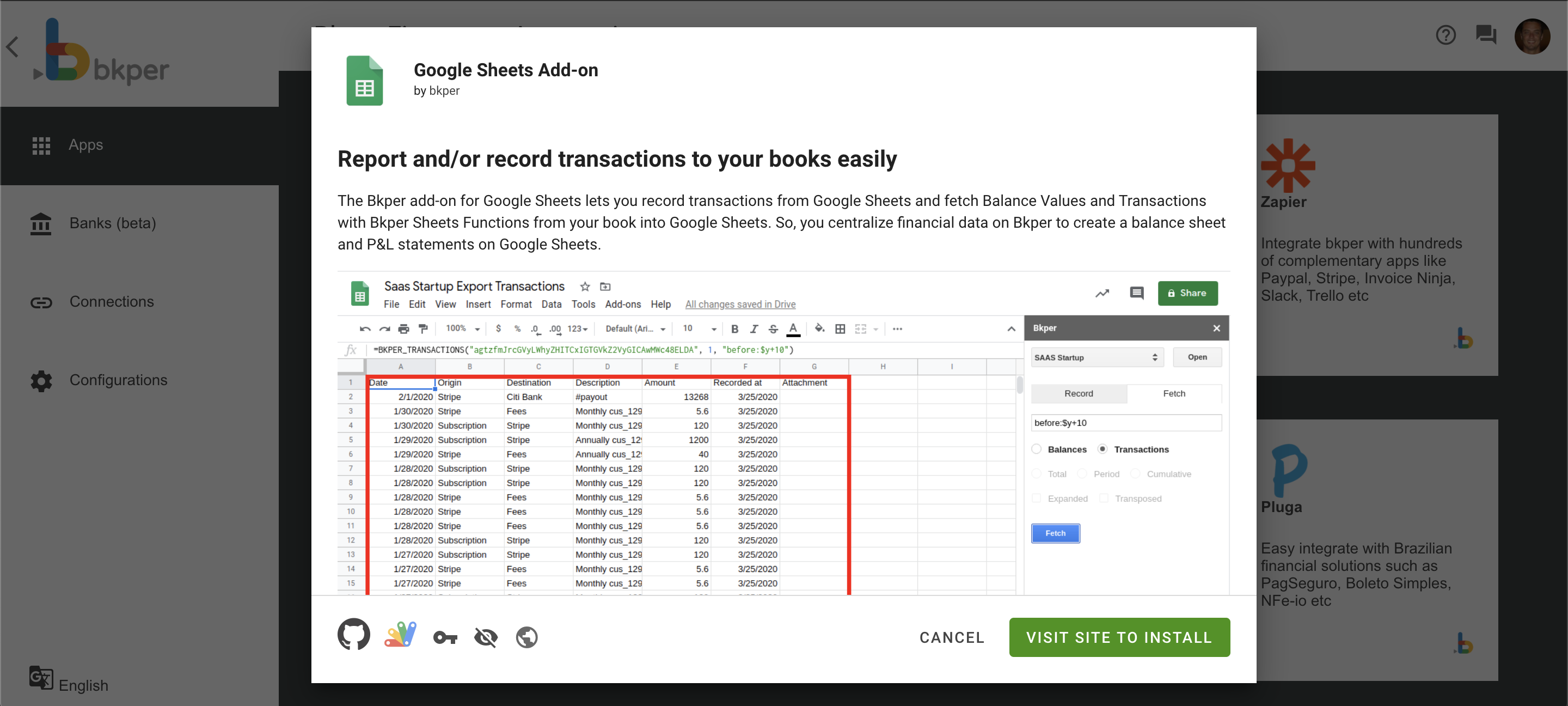
All Bkper apps are listed on the Automations Portal at _[app.bkper.com](https://app.bkper.com/) > Automations > Apps_. Each app has its own page with logo, description, and details:
|
|
9
|
-
|
|
10
|
-
|
|
11
|
-
|
|
12
|
-
App listings are populated from the fields you declare in [`bkper.yaml`](https://bkper.com/docs/build/apps/configuration.md). Sync metadata changes with `bkper app sync`. Deploying code is a separate step.
|
|
13
|
-
|
|
14
|
-
## Listing fields
|
|
15
|
-
|
|
16
|
-
Make sure your `bkper.yaml` has the following fields populated for a complete listing:
|
|
17
|
-
|
|
18
|
-
```yaml
|
|
19
|
-
id: your-app-id
|
|
20
|
-
name: Your App Name
|
|
21
|
-
description: A clear description of what your app does
|
|
22
|
-
|
|
23
|
-
logoUrl: https://your-app.bkper.app/images/logo.svg
|
|
24
|
-
logoUrlDark: https://your-app.bkper.app/images/logo-dark.svg
|
|
25
|
-
|
|
26
|
-
ownerName: Your Name or Organization
|
|
27
|
-
ownerWebsite: https://yourwebsite.com
|
|
28
|
-
|
|
29
|
-
website: https://your-app.bkper.app
|
|
30
|
-
```
|
|
31
|
-
|
|
32
|
-
See [App Configuration](https://bkper.com/docs/build/apps/configuration.md) for the full `bkper.yaml` reference.
|
|
33
|
-
|
|
34
|
-
## Default visibility
|
|
35
|
-
|
|
36
|
-
By default, installation is limited to the users you've declared in `bkper.yaml`:
|
|
37
|
-
|
|
38
|
-
```yaml
|
|
39
|
-
# Specific Bkper usernames
|
|
40
|
-
users: alice bob
|
|
41
|
-
|
|
42
|
-
# Your entire domain
|
|
43
|
-
users: *@yourcompany.com
|
|
44
|
-
```
|
|
45
|
-
|
|
46
|
-
Use Bkper usernames for individual access, not email addresses.
|
|
47
|
-
|
|
48
|
-
Your team can install and use the app, but it doesn't appear in the public Bkper app directory for other users.
|
|
49
|
-
|
|
50
|
-
## Publishing to all users
|
|
51
|
-
|
|
52
|
-
To make your app available to all Bkper users, contact us at [support@bkper.com](mailto:support@bkper.com?subject=Publish+Bkper+App). We'll review your app and, once approved, publish it.
|
|
53
|
-
|
|
54
|
-
### What the review involves
|
|
55
|
-
|
|
56
|
-
- **Functionality check** — The app works correctly and handles errors gracefully
|
|
57
|
-
- **Security review** — Event handlers are idempotent and include loop prevention
|
|
58
|
-
- **Listing quality** — The app has a clear name, description, logo, and user-facing documentation
|
|
59
|
-
|
|
60
|
-
### README matters
|
|
61
|
-
|
|
62
|
-
Your app's `README.md` is displayed to end users on the app listing page. Write it for the people who will install and use your app — not for developers.
|
|
63
|
-
|
|
64
|
-
**README should explain:**
|
|
65
|
-
|
|
66
|
-
- What the app does from a user's perspective
|
|
67
|
-
- How to use it (step-by-step for non-technical users)
|
|
68
|
-
- What features are available
|
|
69
|
-
- API access details when the app intentionally exposes `/api/*` routes for users or integrators
|
|
70
|
-
|
|
71
|
-
**API access details should stay concise:**
|
|
72
|
-
|
|
73
|
-
- App base URL for production and preview
|
|
74
|
-
- OpenAPI spec URL at `/openapi.json`
|
|
75
|
-
- One minimal authenticated example, such as a `curl` call with `Authorization: Bearer <token>`
|
|
76
|
-
|
|
77
|
-
**README should NOT contain:**
|
|
78
|
-
|
|
79
|
-
- Tech stack or architecture details
|
|
80
|
-
- Build commands or development setup
|
|
81
|
-
- Project structure or internal file paths
|
|
82
|
-
- Long API references, generated schemas, SDK internals, or route-by-route developer docs
|
|
83
|
-
|
|
84
|
-
Put developer documentation in `AGENTS.md` or internal docs instead. Keep `README.md` focused on the user experience and any integration entry points users need.
|
|
85
|
-
|
|
86
|
-
### Where published apps appear
|
|
87
|
-
|
|
88
|
-
Once published, your app appears in:
|
|
89
|
-
|
|
90
|
-
- **[bkper.com/apps](https://bkper.com/apps)** — The public app directory
|
|
91
|
-
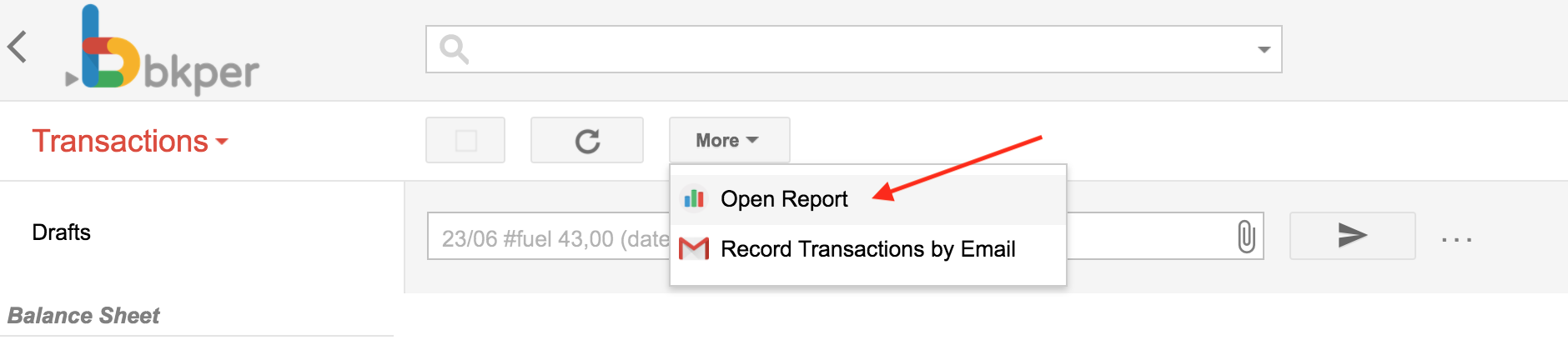
- **Automations Portal** — Inside every Bkper book, users can find and install your app
|
|
92
|
-
|
|
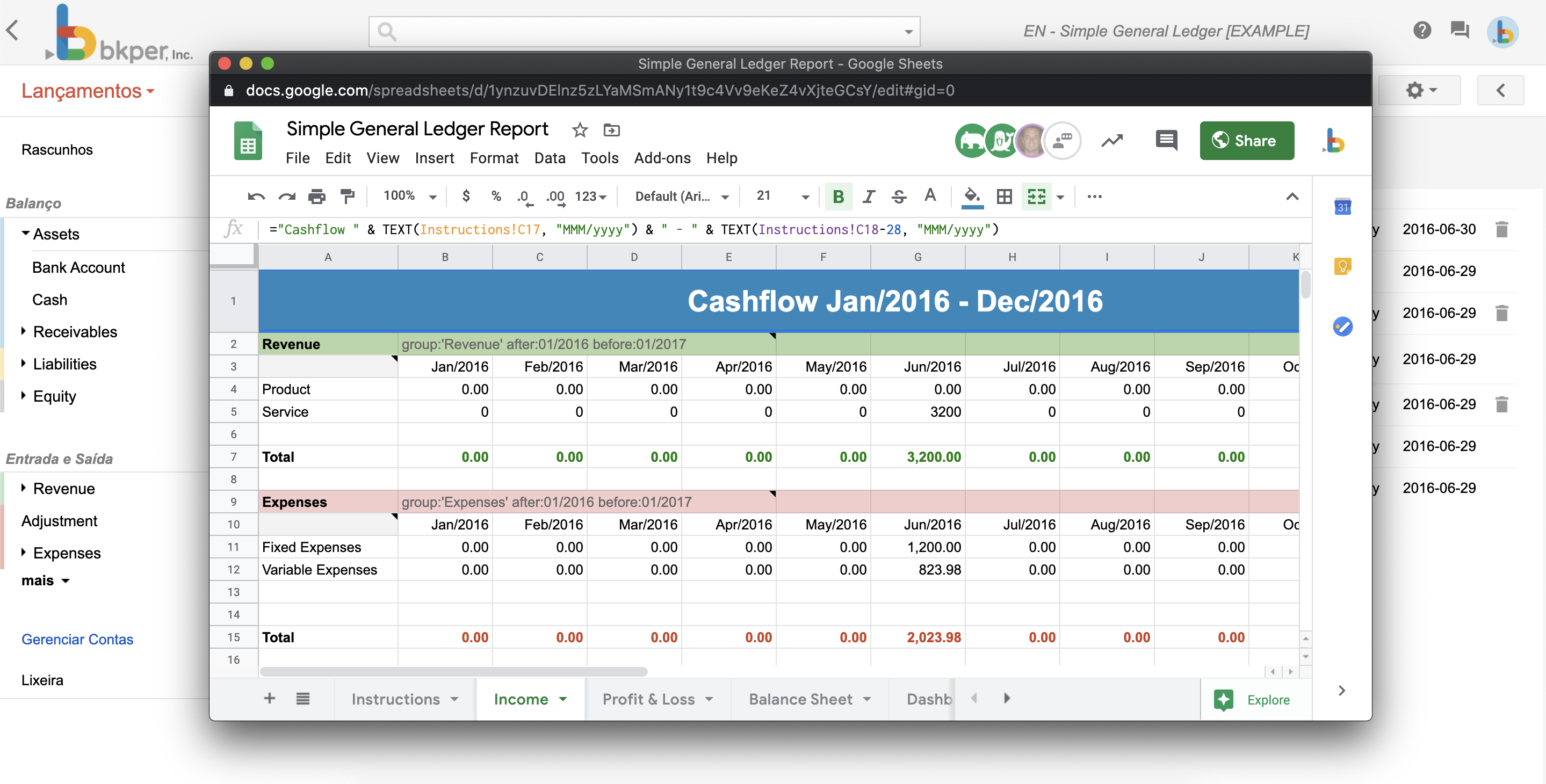
93
|
-
---
|
|
94
|
-
source: /docs/build/apps/architecture.md
|
|
95
|
-
|
|
96
|
-
# App Architecture
|
|
97
|
-
|
|
98
|
-
Bkper platform apps use one Worker bundle per app and environment. The same Worker serves the browser client, app-defined `/api/*` routes, and Bkper event ingress at `/events`.
|
|
99
|
-
|
|
100
|
-
Treat `/api/*` as the reusable surface for app behavior. The bundled web client is one consumer of that API; scripts, external clients, and agents can call the same routes with bearer auth.
|
|
101
|
-
|
|
102
|
-
## Structure
|
|
103
|
-
|
|
104
|
-
```txt
|
|
105
|
-
my-app/
|
|
106
|
-
├── client/
|
|
107
|
-
│ ├── index.html
|
|
108
|
-
│ └── src/ — Frontend UI (Vite + Lit)
|
|
109
|
-
├── server/
|
|
110
|
-
│ └── src/
|
|
111
|
-
│ ├── index.ts
|
|
112
|
-
│ └── handlers/
|
|
113
|
-
├── bkper.yaml
|
|
114
|
-
├── package.json
|
|
115
|
-
├── tsconfig.json
|
|
116
|
-
└── vite.config.ts
|
|
117
|
-
```
|
|
118
|
-
|
|
119
|
-
The default template is intentionally not a monorepo. Add a shared package only when the app actually needs one.
|
|
120
|
-
|
|
121
|
-
## Client
|
|
122
|
-
|
|
123
|
-
The client folder builds a browser UI with [Lit](https://lit.dev/) and [@bkper/web-design](https://www.npmjs.com/package/@bkper/web-design) for consistent Bkper styling.
|
|
124
|
-
|
|
125
|
-
- Built with [Vite](https://vitejs.dev/) — configured in the project's `vite.config.ts` for fast builds and HMR during development
|
|
126
|
-
- Built assets are deployed with the same Worker
|
|
127
|
-
- Communicates with Bkper via `bkper-js`
|
|
128
|
-
|
|
129
|
-
This is where your app's UI lives — book pickers, account lists, reports, forms.
|
|
130
|
-
|
|
131
|
-
### Client authentication
|
|
132
|
-
|
|
133
|
-
The client authenticates users via the [`@bkper/web-auth`](https://www.npmjs.com/package/@bkper/web-auth) SDK. OAuth is pre-configured on the platform — no client IDs, redirect URIs, or consent screens to set up.
|
|
134
|
-
|
|
135
|
-
```ts
|
|
136
|
-
import { Bkper } from 'bkper-js';
|
|
137
|
-
import { BkperAuth } from '@bkper/web-auth';
|
|
138
|
-
|
|
139
|
-
const auth = new BkperAuth({
|
|
140
|
-
baseUrl: isLocalDev ? window.location.origin : undefined,
|
|
141
|
-
onLoginSuccess: () => initializeApp(),
|
|
142
|
-
onLoginRequired: () => showLoginButton(),
|
|
143
|
-
});
|
|
144
|
-
await auth.init();
|
|
145
|
-
|
|
146
|
-
const bkper = new Bkper({
|
|
147
|
-
oauthTokenProvider: async () => auth.getAccessToken(),
|
|
148
|
-
});
|
|
149
|
-
```
|
|
150
|
-
|
|
151
|
-
This is the canonical browser pattern. Do not implement custom OAuth flows, redirect handling, or token refresh — the SDK and platform handle everything. See the [@bkper/web-auth API Reference](https://bkper.com/docs/api/bkper-web-auth.md) for the full SDK documentation.
|
|
152
|
-
|
|
153
|
-
## Server Worker
|
|
154
|
-
|
|
155
|
-
The server folder runs on [Cloudflare Workers](https://developers.cloudflare.com/workers/) using [Hono](https://hono.dev/) as the web framework. It handles:
|
|
156
|
-
|
|
157
|
-
- Serving the client's static assets
|
|
158
|
-
- Custom API routes for your app's backend logic under `/api/*`
|
|
159
|
-
- Bkper event ingress under `/events`
|
|
160
|
-
- Type-safe access to platform services (KV, secrets) via `c.env`
|
|
161
|
-
|
|
162
|
-
```ts
|
|
163
|
-
import { Hono } from 'hono';
|
|
164
|
-
import { Bkper, Book } from 'bkper-js';
|
|
165
|
-
import type { Env } from '../../env.js';
|
|
166
|
-
|
|
167
|
-
const app = new Hono<{ Bindings: Env }>();
|
|
168
|
-
|
|
169
|
-
app.get('/api/v1/books', async c => {
|
|
170
|
-
const bkper = new Bkper();
|
|
171
|
-
const books = await bkper.getBooks();
|
|
172
|
-
return c.json({ books });
|
|
173
|
-
});
|
|
174
|
-
|
|
175
|
-
app.post('/events', async c => {
|
|
176
|
-
const event: bkper.Event = await c.req.json();
|
|
177
|
-
const bkper = new Bkper();
|
|
178
|
-
const book = new Book(event.book, bkper.getConfig());
|
|
179
|
-
// route by event.type
|
|
180
|
-
return c.json({ result: false });
|
|
181
|
-
});
|
|
182
|
-
|
|
183
|
-
app.get('*', c => c.env.ASSETS.fetch(c.req.raw));
|
|
184
|
-
|
|
185
|
-
export default app;
|
|
186
|
-
```
|
|
187
|
-
|
|
188
|
-
### App API contract
|
|
189
|
-
|
|
190
|
-
Expose reusable app behavior through `/api/*` routes when it may be called by more than one client.
|
|
191
|
-
|
|
192
|
-
Use this shape:
|
|
193
|
-
|
|
194
|
-
- **Routes** — Thin Hono handlers under `/api/*`.
|
|
195
|
-
- **Schemas** — Typed request and response schemas for every route.
|
|
196
|
-
- **Services** — Business behavior in server-side service modules.
|
|
197
|
-
- **OpenAPI** — A machine-readable app API spec exposed at `/openapi.json`.
|
|
198
|
-
|
|
199
|
-
The default template starts public routes under `/api/v1/*` and generates typed client code from the same OpenAPI contract used by the shipped web client. Keep that contract current so scripts, external clients, and agents can connect without reverse-engineering the UI.
|
|
200
|
-
|
|
201
|
-
App API endpoints use these URLs:
|
|
202
|
-
|
|
203
|
-
```txt
|
|
204
|
-
Production: https://{appId}.bkper.app/api/*
|
|
205
|
-
Preview: https://{appId}-preview.bkper.app/api/*
|
|
206
|
-
Local: http://localhost:8787/api/*
|
|
207
|
-
```
|
|
208
|
-
|
|
209
|
-
The app OpenAPI spec lives at:
|
|
210
|
-
|
|
211
|
-
```txt
|
|
212
|
-
Production: https://{appId}.bkper.app/openapi.json
|
|
213
|
-
Preview: https://{appId}-preview.bkper.app/openapi.json
|
|
214
|
-
Local: http://localhost:8787/openapi.json
|
|
215
|
-
```
|
|
216
|
-
|
|
217
|
-
Example script call:
|
|
218
|
-
|
|
219
|
-
```bash
|
|
220
|
-
TOKEN="$(bkper auth token)"
|
|
221
|
-
|
|
222
|
-
curl \
|
|
223
|
-
-H "Authorization: Bearer ${TOKEN}" \
|
|
224
|
-
"https://my-app.bkper.app/api/v1/books"
|
|
225
|
-
```
|
|
226
|
-
|
|
227
|
-
Replace `my-app` with the app id from `bkper.yaml`.
|
|
228
|
-
|
|
229
|
-
### Server API authentication
|
|
230
|
-
|
|
231
|
-
For deployed apps, server API routes under `/api/*` require a standard bearer token on the incoming request:
|
|
232
|
-
|
|
233
|
-
```ts
|
|
234
|
-
const token = auth.getAccessToken();
|
|
235
|
-
if (!token) throw new Error('Not authenticated');
|
|
236
|
-
|
|
237
|
-
const response = await fetch('/api/v1/data', {
|
|
238
|
-
headers: { Authorization: `Bearer ${token}` },
|
|
239
|
-
});
|
|
240
|
-
```
|
|
241
|
-
|
|
242
|
-
Dispatch validates the bearer token before your Worker runs. It then strips the `Authorization` header and passes only an internal outbound context, so app code should not read user tokens from request headers.
|
|
243
|
-
|
|
244
|
-
When the server route calls Bkper, use `bkper-js` without a token provider:
|
|
245
|
-
|
|
246
|
-
```ts
|
|
247
|
-
import { Bkper } from 'bkper-js';
|
|
248
|
-
|
|
249
|
-
app.get('/api/v1/books', async c => {
|
|
250
|
-
const bkper = new Bkper();
|
|
251
|
-
const books = await bkper.getBooks();
|
|
252
|
-
return c.json({
|
|
253
|
-
books: books.map(book => ({
|
|
254
|
-
id: book.getId(),
|
|
255
|
-
name: book.getName(),
|
|
256
|
-
})),
|
|
257
|
-
});
|
|
258
|
-
});
|
|
259
|
-
```
|
|
260
|
-
|
|
261
|
-
Platform outbound auth injects the validated user's OAuth token on exact Bkper API requests. Browser sessions only allow access to app web pages; they do not authorize `/api/*` server routes or create outbound auth context.
|
|
262
|
-
|
|
263
|
-
### Event handler authentication
|
|
264
|
-
|
|
265
|
-
On the Bkper Platform, `/events` is an internal Bkper delivery channel on the same Worker. App code must not read `bkper-oauth-token`, `bkper-agent-id`, or `Authorization` headers.
|
|
266
|
-
|
|
267
|
-
Use the same server-side Bkper API pattern as `/api/*` routes:
|
|
268
|
-
|
|
269
|
-
```ts
|
|
270
|
-
const bkper = new Bkper();
|
|
271
|
-
const book = new Book(event.book, bkper.getConfig());
|
|
272
|
-
```
|
|
273
|
-
|
|
274
|
-
Dispatch consumes the Core-sent event access token and strips platform headers before invoking your Worker. Platform outbound auth injects the token and app agent identity when your event handler calls the Bkper API.
|
|
275
|
-
|
|
276
|
-
For [self-hosted](https://bkper.com/docs/build/apps/self-hosted.md) event handlers, you receive and process event auth headers directly because the platform outbound layer is not involved.
|
|
277
|
-
|
|
278
|
-
## Event routing pattern
|
|
279
|
-
|
|
280
|
-
A typical server routes events by type and delegates to small handlers:
|
|
281
|
-
|
|
282
|
-
```ts
|
|
283
|
-
app.post('/events', async c => {
|
|
284
|
-
const event: bkper.Event = await c.req.json();
|
|
285
|
-
|
|
286
|
-
if (!event.book) {
|
|
287
|
-
return c.json({ error: 'Missing book in event payload' }, 400);
|
|
288
|
-
}
|
|
289
|
-
|
|
290
|
-
const bkper = new Bkper();
|
|
291
|
-
const book = new Book(event.book, bkper.getConfig());
|
|
292
|
-
|
|
293
|
-
switch (event.type) {
|
|
294
|
-
case 'TRANSACTION_CHECKED':
|
|
295
|
-
return c.json(await handleTransactionChecked(book, event));
|
|
296
|
-
default:
|
|
297
|
-
return c.json({ result: false });
|
|
298
|
-
}
|
|
299
|
-
});
|
|
300
|
-
```
|
|
301
|
-
|
|
302
|
-
Event handlers run at `https://{appId}.bkper.app/events` in production. During development, a Cloudflare tunnel routes events to the same local Worker.
|
|
303
|
-
|
|
304
|
-
See [Event Handlers](https://bkper.com/docs/build/apps/event-handlers.md) for patterns and details.
|
|
305
|
-
|
|
306
|
-
## When you don't need every part
|
|
307
|
-
|
|
308
|
-
The platform can host different shapes, but the default template starts as a full app because `/api/*` routes give the app a reusable contract as it grows.
|
|
309
|
-
|
|
310
|
-
Use these shapes intentionally:
|
|
311
|
-
|
|
312
|
-
- **Full app** — Client UI, `/api/*` backend logic, and `/events` automation in one Worker. This is the default growth path.
|
|
313
|
-
- **Event-only app** — Keep `server/` and omit `deployment.client`. Automates reactions to book events without a user interface.
|
|
314
|
-
- **UI-only app** — Use `client/` and keep a minimal server Worker for static assets only when the behavior is truly local to the browser. Add `/api/*` as soon as the behavior should be reusable by scripts, external clients, or agents.
|
|
315
|
-
|
|
316
|
-
## Simple App Patterns
|
|
317
|
-
|
|
318
|
-
These are the minimal, canonical patterns for common app tasks. Use them as starting points and resist adding complexity unless the user explicitly asks for it.
|
|
319
|
-
|
|
320
|
-
### Client-only UI with authentication
|
|
321
|
-
|
|
322
|
-
The smallest useful app can keep browser-only display logic in `client/`. No custom server routes, no event handlers, no custom auth logic.
|
|
323
|
-
|
|
324
|
-
If the behavior should be reused by scripts, external clients, or agents, expose it through `/api/*` instead of keeping it only in the UI.
|
|
325
|
-
|
|
326
|
-
```ts
|
|
327
|
-
// client/src/app.ts
|
|
328
|
-
import { Bkper } from 'bkper-js';
|
|
329
|
-
import { BkperAuth } from '@bkper/web-auth';
|
|
330
|
-
|
|
331
|
-
const auth = new BkperAuth({
|
|
332
|
-
baseUrl: window.location.origin.includes('localhost') ? undefined : window.location.origin,
|
|
333
|
-
onLoginSuccess: () => render(),
|
|
334
|
-
onLoginRequired: () => renderLogin(),
|
|
335
|
-
});
|
|
336
|
-
await auth.init();
|
|
337
|
-
|
|
338
|
-
const bkper = new Bkper({
|
|
339
|
-
oauthTokenProvider: async () => auth.getAccessToken(),
|
|
340
|
-
});
|
|
341
|
-
|
|
342
|
-
async function render() {
|
|
343
|
-
const books = await bkper.getBooks();
|
|
344
|
-
// render books
|
|
345
|
-
}
|
|
346
|
-
```
|
|
347
|
-
|
|
348
|
-
Key points:
|
|
349
|
-
|
|
350
|
-
- `BkperAuth` handles OAuth, token refresh, and session management internally.
|
|
351
|
-
- `auth.getAccessToken()` returns a valid token synchronously after `init()` resolves.
|
|
352
|
-
- Do not add server-side `/auth/*` routes. Do not implement `refresh_token` logic yourself.
|
|
353
|
-
|
|
354
|
-
### Fetch and display data
|
|
355
|
-
|
|
356
|
-
```ts
|
|
357
|
-
const book = await bkper.getBook(bookId);
|
|
358
|
-
const accounts = await book.getAccounts();
|
|
359
|
-
// render accounts
|
|
360
|
-
```
|
|
361
|
-
|
|
362
|
-
Use `bkper-js` for all API calls. Do not call the REST API directly when `bkper-js` provides the same method.
|
|
363
|
-
|
|
364
|
-
## Library Usage Reference
|
|
365
|
-
|
|
366
|
-
| Task | Use | Do not use |
|
|
367
|
-
| ---------------------------------------- | ------------------------------------------------------------------------ | ----------------------------------------------------------------------------------------- |
|
|
368
|
-
| Client authentication | `@bkper/web-auth` (`BkperAuth`, `getAccessToken`) | Custom OAuth flows, manual `fetch('/auth/refresh')`, `google-auth-library` in the browser |
|
|
369
|
-
| API calls from client | `bkper-js` (`Bkper`, `Book`, `Account`, `Transaction`) | Direct `fetch()` to REST endpoints |
|
|
370
|
-
| API calls from app server `/api/*` route | Incoming `Authorization: Bearer <token>` + server-side `new Bkper()` | Reading OAuth tokens in server code, relying on browser sessions for API auth |
|
|
371
|
-
| API calls from platform event handler | Server-side `new Bkper()` in `/events` | Reading `bkper-oauth-token` or `bkper-agent-id` in platform app code |
|
|
372
|
-
| Local development server | `npm run dev` (template script) | Manual `miniflare` + `cloudflared` invocations |
|
|
373
|
-
| Event handler routing | `switch (event.type)` in `server/src/index.ts` or `server/src/handlers/` | Middleware frameworks, external webhook routers |
|
|
374
|
-
| UI components | `@bkper/web-design` + Lit | Heavy UI frameworks unless the user explicitly requests them |
|
|
375
|
-
|
|
376
|
-
## Common Pitfalls
|
|
377
|
-
|
|
378
|
-
Avoid these patterns even if they seem necessary. The platform or SDK already solves the problem.
|
|
379
|
-
|
|
380
|
-
1. **Implementing custom OAuth on the server**
|
|
381
|
-
- `@bkper/web-auth` manages the full OAuth lifecycle on the client. The platform handles tokens. Adding a server-side auth layer is unnecessary and will break.
|
|
382
|
-
|
|
383
|
-
2. **Adding `/api/auth/refresh` or similar routes**
|
|
384
|
-
- Token refresh is internal to `@bkper/web-auth`. Exposing it via Hono routes creates security surface area and duplicates platform functionality.
|
|
385
|
-
|
|
386
|
-
3. **Relying on browser sessions for server API auth**
|
|
387
|
-
- Sessions let users open app web pages, but `/api/*` routes require `Authorization: Bearer <token>`. Dispatch validates bearer tokens and platform outbound uses that validated context for Bkper API calls.
|
|
388
|
-
|
|
389
|
-
4. **Modifying `server/` for a simple UI task**
|
|
390
|
-
- If the user only asked for a client-side feature, do not touch server routes. The Vite dev server proxies `/api` to the Miniflare worker automatically. Add routes when the behavior should be reusable by the shipped client, scripts, external clients, or agents.
|
|
391
|
-
|
|
392
|
-
5. **Installing additional auth or HTTP libraries**
|
|
393
|
-
- `bkper-js` and `@bkper/web-auth` are the only packages you need for Bkper API access and authentication. Adding `axios`, `google-auth-library`, or similar is almost always wrong.
|
|
394
|
-
|
|
395
|
-
6. **Creating event handlers when the user asked for a UI-only feature**
|
|
396
|
-
- If the user says "show me a list of books in a popup," that is a client-only task. Do not add `/events` logic or subscribe to webhooks.
|
|
397
|
-
|
|
398
|
-
7. **Calling REST endpoints directly when `bkper-js` has the method**
|
|
399
|
-
- If `bkper-js` exposes `book.getTransactions()`, use it. Do not `fetch('https://api.bkper.com/...')` and parse JSON manually.
|
|
400
|
-
|
|
401
|
-
8. **Reverse-engineering SDK internals**
|
|
402
|
-
- Use the public API surface documented in the API reference. Do not read SDK source to find private methods or internal request patterns.
|
|
403
|
-
|
|
404
|
-
---
|
|
405
|
-
source: /docs/build/apps/configuration.md
|
|
406
|
-
|
|
407
|
-
# App Configuration
|
|
408
|
-
|
|
409
|
-
The `bkper.yaml` file is the single configuration file for your Bkper app. It defines the app's identity, access control, menu integration, event handling, and deployment settings.
|
|
410
|
-
|
|
411
|
-
It lives in the root of your project. Use `bkper app sync` to push metadata changes to Bkper, and use `bkper app deploy` to upload built code to the platform.
|
|
412
|
-
|
|
413
|
-
## Minimal example
|
|
414
|
-
|
|
415
|
-
```yaml
|
|
416
|
-
id: my-app
|
|
417
|
-
name: My App
|
|
418
|
-
description: A Bkper app that does something useful
|
|
419
|
-
developers: myuser
|
|
420
|
-
```
|
|
421
|
-
|
|
422
|
-
## Full example
|
|
423
|
-
|
|
424
|
-
From the [app template](https://github.com/bkper/bkper-app-template):
|
|
425
|
-
|
|
426
|
-
```yaml
|
|
427
|
-
id: my-app
|
|
428
|
-
name: My App
|
|
429
|
-
description: A Bkper app that does something useful
|
|
430
|
-
|
|
431
|
-
logoUrl: https://my-app.bkper.app/images/logo-light.svg
|
|
432
|
-
logoUrlDark: https://my-app.bkper.app/images/logo-dark.svg
|
|
433
|
-
|
|
434
|
-
website: https://bkper.com/apps/bkper-cli
|
|
435
|
-
ownerName: Bkper
|
|
436
|
-
ownerLogoUrl: https://avatars.githubusercontent.com/u/11943086?v=4
|
|
437
|
-
ownerWebsite: https://bkper.com
|
|
438
|
-
|
|
439
|
-
repoUrl: https://github.com/bkper/bkper-app-template
|
|
440
|
-
repoPrivate: true
|
|
441
|
-
|
|
442
|
-
developers: someuser *@yoursite.com
|
|
443
|
-
users: someuser *@yoursite.com
|
|
444
|
-
|
|
445
|
-
menuUrl: https://my-app.bkper.app?bookId=${book.id}
|
|
446
|
-
menuUrlDev: http://localhost:8787?bookId=${book.id}
|
|
447
|
-
|
|
448
|
-
webhookUrl: https://my-app.bkper.app/events
|
|
449
|
-
apiVersion: v5
|
|
450
|
-
events:
|
|
451
|
-
- TRANSACTION_CHECKED
|
|
452
|
-
|
|
453
|
-
deployment:
|
|
454
|
-
server: server/src/index.ts
|
|
455
|
-
client: client
|
|
456
|
-
services:
|
|
457
|
-
- KV
|
|
458
|
-
compatibility_date: '2026-01-28'
|
|
459
|
-
```
|
|
460
|
-
|
|
461
|
-
### App identity
|
|
462
|
-
|
|
463
|
-
| Field | Description |
|
|
464
|
-
| ------------- | --------------------------------------------------------------------------------------------------------- |
|
|
465
|
-
| `id` | Permanent app identifier. Lowercase letters, numbers, and hyphens only. Cannot be changed after creation. |
|
|
466
|
-
| `name` | Display name shown in the Bkper UI. |
|
|
467
|
-
| `description` | Brief description of what the app does. |
|
|
468
|
-
|
|
469
|
-
### Branding
|
|
470
|
-
|
|
471
|
-
| Field | Description |
|
|
472
|
-
| ------------- | ------------------------------------------ |
|
|
473
|
-
| `logoUrl` | App logo for light mode (SVG recommended). |
|
|
474
|
-
| `logoUrlDark` | App logo for dark mode. |
|
|
475
|
-
| `website` | App website or documentation URL. |
|
|
476
|
-
|
|
477
|
-
### Ownership
|
|
478
|
-
|
|
479
|
-
| Field | Description |
|
|
480
|
-
| -------------- | ------------------------------------------------------------ |
|
|
481
|
-
| `ownerName` | Developer or company name. |
|
|
482
|
-
| `ownerLogoUrl` | Owner's logo/avatar URL. |
|
|
483
|
-
| `ownerWebsite` | Owner's website. |
|
|
484
|
-
| `repoUrl` | Source code repository URL. |
|
|
485
|
-
| `repoPrivate` | Whether the repository is private. |
|
|
486
|
-
| `deprecated` | Hides from app listings; existing installs continue working. |
|
|
487
|
-
|
|
488
|
-
### Access control
|
|
489
|
-
|
|
490
|
-
| Field | Description |
|
|
491
|
-
| ------------ | ----------------------------------------------------------------------------------------------------------------------------- |
|
|
492
|
-
| `developers` | Who can update the app and deploy new versions. Comma-separated Bkper usernames. Supports domain wildcards: `*@yoursite.com`. |
|
|
493
|
-
| `users` | Who can install and use the app. Same format as developers. Leave empty for public apps. |
|
|
494
|
-
|
|
495
|
-
### Menu integration
|
|
496
|
-
|
|
497
|
-
| Field | Description |
|
|
498
|
-
| ----------------- | --------------------------------------------------------------------------- |
|
|
499
|
-
| `menuUrl` | Production menu URL. Supports [variable substitution](#menu-url-variables). |
|
|
500
|
-
| `menuUrlDev` | Development menu URL (used when the developer clicks the menu). |
|
|
501
|
-
| `menuText` | Custom menu text (defaults to app name). |
|
|
502
|
-
| `menuOpenMode` | How the app menu opens: `SIDEBAR` (default), `EXPANDED`, or `NEW_TAB`. |
|
|
503
|
-
|
|
504
|
-
See [Context Menu](https://bkper.com/docs/build/apps/context-menu.md) for details on building menu integrations.
|
|
505
|
-
|
|
506
|
-
### Menu URL variables
|
|
507
|
-
|
|
508
|
-
The following variables can be used in `menuUrl` and `menuUrlDev`:
|
|
509
|
-
|
|
510
|
-
| Variable | Description |
|
|
511
|
-
| --------------------------- | ---------------------------------------- |
|
|
512
|
-
| `${book.id}` | Current book ID |
|
|
513
|
-
| `${book.properties.xxx}` | Book property value |
|
|
514
|
-
| `${account.id}` | Selected account ID |
|
|
515
|
-
| `${account.name}` | Selected account name |
|
|
516
|
-
| `${account.properties.xxx}` | Account property value |
|
|
517
|
-
| `${group.id}` | Selected group ID |
|
|
518
|
-
| `${group.name}` | Selected group name |
|
|
519
|
-
| `${group.properties.xxx}` | Group property value |
|
|
520
|
-
| `${transactions.ids}` | Comma-separated selected transaction IDs |
|
|
521
|
-
| `${transactions.query}` | Current search query |
|
|
522
|
-
|
|
523
|
-
### Event handling
|
|
524
|
-
|
|
525
|
-
| Field | Description |
|
|
526
|
-
| --------------- | ------------------------------------------------------------------------------- |
|
|
527
|
-
| `webhookUrl` | Production webhook URL for receiving events. |
|
|
528
|
-
| `webhookUrlDev` | Development webhook URL (auto-updated by `bkper app dev`). |
|
|
529
|
-
| `apiVersion` | API version for event payloads (currently `v5`). |
|
|
530
|
-
| `events` | List of [event types](https://bkper.com/docs/build/apps/event-handlers.md#event-types) to subscribe to. |
|
|
531
|
-
|
|
532
|
-
See [Event Handlers](https://bkper.com/docs/build/apps/event-handlers.md) for details on handling events.
|
|
533
|
-
|
|
534
|
-
### File patterns
|
|
535
|
-
|
|
536
|
-
| Field | Description |
|
|
537
|
-
| -------------- | ---------------------------------------------------------------------------------------------------------------------- |
|
|
538
|
-
| `filePatterns` | List of glob patterns (e.g., `*.ofx`, `*.csv`). When a matching file is uploaded, a `FILE_CREATED` event is triggered. |
|
|
539
|
-
|
|
540
|
-
### Properties schema
|
|
541
|
-
|
|
542
|
-
The `propertiesSchema` field defines autocomplete suggestions for custom properties in the Bkper UI, helping users discover the correct property keys and values for your app.
|
|
543
|
-
|
|
544
|
-
Suggested keys must follow the same custom property rules as user-entered keys, including the 30-character maximum after normalization.
|
|
545
|
-
|
|
546
|
-
```yaml
|
|
547
|
-
propertiesSchema:
|
|
548
|
-
book:
|
|
549
|
-
keys:
|
|
550
|
-
- my_app_enabled
|
|
551
|
-
values:
|
|
552
|
-
- 'true'
|
|
553
|
-
- 'false'
|
|
554
|
-
group:
|
|
555
|
-
keys:
|
|
556
|
-
- my_app_category
|
|
557
|
-
account:
|
|
558
|
-
keys:
|
|
559
|
-
- my_app_sync_id
|
|
560
|
-
transaction:
|
|
561
|
-
keys:
|
|
562
|
-
- my_app_reference
|
|
563
|
-
```
|
|
564
|
-
|
|
565
|
-
### Deployment
|
|
566
|
-
|
|
567
|
-
For apps deployed to the [Bkper Platform](https://bkper.com/docs/build/apps/overview.md):
|
|
568
|
-
|
|
569
|
-
| Field | Description |
|
|
570
|
-
| ------------------------------- | ---------------------------------------------------------------------------------------------------------------------- |
|
|
571
|
-
| `deployment.server` | TypeScript entry point for the single server Worker. It serves `/api/*`, `/events`, and static assets. |
|
|
572
|
-
| `deployment.client` | Optional Vite/static client root. Built assets are deployed with the same Worker. |
|
|
573
|
-
| `deployment.services` | Platform services to provision. Currently: `KV` (key-value storage). |
|
|
574
|
-
| `deployment.secrets` | Secret names used by the app. Managed via `bkper app secrets`. |
|
|
575
|
-
| `deployment.compatibility_date` | [Cloudflare Workers compatibility date](https://developers.cloudflare.com/workers/configuration/compatibility-dates/). |
|
|
576
|
-
|
|
577
|
-
See [Building & Deploying](https://bkper.com/docs/build/apps/deploying.md) for the full deployment workflow.
|
|
578
|
-
|
|
579
|
-
---
|
|
580
|
-
source: /docs/build/apps/context-menu.md
|
|
581
|
-
|
|
582
|
-
# Context Menu
|
|
583
|
-
|
|
584
|
-
Apps can add context menu items on the Transactions page **More** menu in your Books. This lets you open dynamically built URLs with reference to the current Book's context — the active query, selected account, date range, and more.
|
|
585
|
-
|
|
586
|
-
## How it works
|
|
587
|
-
|
|
588
|
-
Once you install an App with a menu configuration, a new menu item appears in your Book:
|
|
589
|
-
|
|
590
|
-
|
|
591
|
-
|
|
592
|
-
When clicked, a popup opens carrying the particular context of that book at that moment:
|
|
593
|
-
|
|
594
|
-
|
|
595
|
-
|
|
596
|
-
## Configuration
|
|
597
|
-
|
|
598
|
-
Configure the menu URL in your [`bkper.yaml`](https://bkper.com/docs/build/apps/configuration.md):
|
|
599
|
-
|
|
600
|
-
```yaml
|
|
601
|
-
menuUrl: https://my-app.bkper.app?bookId=${book.id}&query=${transactions.query}
|
|
602
|
-
```
|
|
603
|
-
|
|
604
|
-
When the user clicks the menu item, the URL expressions `${xxxx}` are replaced with contextual information from the Book:
|
|
605
|
-
|
|
606
|
-
```
|
|
607
|
-
https://my-app.bkper.app?bookId=abc123&query=account:Sales
|
|
608
|
-
```
|
|
609
|
-
|
|
610
|
-
Where `abc123` is the current Book id and `account:Sales` is the current query being executed.
|
|
611
|
-
|
|
612
|
-
### Development URL
|
|
613
|
-
|
|
614
|
-
Use `menuUrlDev` for a separate URL during development:
|
|
615
|
-
|
|
616
|
-
```yaml
|
|
617
|
-
menuUrl: https://my-app.bkper.app?bookId=${book.id}&query=${transactions.query}
|
|
618
|
-
menuUrlDev: http://localhost:8787?bookId=${book.id}&query=${transactions.query}
|
|
619
|
-
```
|
|
620
|
-
|
|
621
|
-
The development URL is used when the app developer is the one clicking the menu item.
|
|
622
|
-
|
|
623
|
-
### Menu open mode
|
|
624
|
-
|
|
625
|
-
Control how the menu opens with `menuOpenMode`:
|
|
626
|
-
|
|
627
|
-
```yaml
|
|
628
|
-
menuOpenMode: SIDEBAR
|
|
629
|
-
```
|
|
630
|
-
|
|
631
|
-
| Mode | Behavior |
|
|
632
|
-
| ---------- | ------------------------------------------------------------------------- |
|
|
633
|
-
| `SIDEBAR` | Opens in a narrow side panel (default). |
|
|
634
|
-
| `EXPANDED` | Opens in a wider panel with more room for complex UIs. |
|
|
635
|
-
| `NEW_TAB` | Opens the menu URL in a new browser tab instead of an embedded panel. |
|
|
636
|
-
|
|
637
|
-
### Available expressions
|
|
638
|
-
|
|
639
|
-
The menu URL supports these dynamic expressions:
|
|
640
|
-
|
|
641
|
-
| Expression | Description |
|
|
642
|
-
| --- | --- |
|
|
643
|
-
| `${book.id}` | The current Book ID |
|
|
644
|
-
| `${transactions.query}` | The current query string |
|
|
645
|
-
| `${account.id}` | The selected account ID |
|
|
646
|
-
| `${account.name}` | The selected account name |
|
|
647
|
-
| `${group.id}` | The selected group ID |
|
|
648
|
-
| `${group.name}` | The selected group name |
|
|
649
|
-
|
|
650
|
-
For the full list of accepted expressions, see the [Menu URL variables](https://bkper.com/docs/build/apps/configuration.md#menu-url-variables) reference.
|
|
651
|
-
|
|
652
|
-
---
|
|
653
|
-
source: /docs/build/apps/deploying.md
|
|
654
|
-
|
|
655
|
-
# Building & Deploying
|
|
656
|
-
|
|
657
|
-
## The deployment workflow
|
|
658
|
-
|
|
659
|
-
1. **Build** — Compile your code
|
|
660
|
-
|
|
661
|
-
```bash
|
|
662
|
-
npm run build
|
|
663
|
-
```
|
|
664
|
-
|
|
665
|
-
This runs two build steps:
|
|
666
|
-
- Client (Vite) to static assets in `dist/client/`
|
|
667
|
-
- Server Worker bundle (esbuild) to `dist/server/`
|
|
668
|
-
|
|
669
|
-
Build output includes size reporting so you can monitor bundle sizes.
|
|
670
|
-
|
|
671
|
-
2. **Sync** — Update app metadata
|
|
672
|
-
|
|
673
|
-
```bash
|
|
674
|
-
bkper app sync
|
|
675
|
-
```
|
|
676
|
-
|
|
677
|
-
Syncs your `bkper.yaml` configuration to Bkper — name, description, menu URLs, webhook URLs, access control, and branding. Run this whenever you change app settings.
|
|
678
|
-
|
|
679
|
-
3. **Deploy** — Upload code to the platform
|
|
680
|
-
|
|
681
|
-
```bash
|
|
682
|
-
bkper app deploy
|
|
683
|
-
```
|
|
684
|
-
|
|
685
|
-
Deploys your pre-built code from `dist/` to the Bkper Platform. Your app is live at `https://{appId}.bkper.app`.
|
|
686
|
-
|
|
687
|
-
The typical workflow combines all three:
|
|
688
|
-
|
|
689
|
-
```bash
|
|
690
|
-
npm run build && bkper app sync && bkper app deploy
|
|
691
|
-
```
|
|
692
|
-
|
|
693
|
-
### Production
|
|
694
|
-
|
|
695
|
-
The default deployment target. Your app runs at `https://{appId}.bkper.app`.
|
|
696
|
-
|
|
697
|
-
```bash
|
|
698
|
-
bkper app deploy
|
|
699
|
-
```
|
|
700
|
-
|
|
701
|
-
Production serves:
|
|
702
|
-
|
|
703
|
-
```txt
|
|
704
|
-
Client: https://{appId}.bkper.app
|
|
705
|
-
API routes: https://{appId}.bkper.app/api/*
|
|
706
|
-
OpenAPI spec: https://{appId}.bkper.app/openapi.json
|
|
707
|
-
Events: https://{appId}.bkper.app/events
|
|
708
|
-
```
|
|
709
|
-
|
|
710
|
-
### Preview
|
|
711
|
-
|
|
712
|
-
Deploy to a separate preview environment for testing before production:
|
|
713
|
-
|
|
714
|
-
```bash
|
|
715
|
-
bkper app deploy --preview
|
|
716
|
-
```
|
|
717
|
-
|
|
718
|
-
Preview URLs use a dash suffix: `https://{appId}-preview.bkper.app`. For example, an app with `id: my-app` deploys to `https://my-app-preview.bkper.app`.
|
|
719
|
-
|
|
720
|
-
Preview serves:
|
|
721
|
-
|
|
722
|
-
```txt
|
|
723
|
-
Client: https://{appId}-preview.bkper.app
|
|
724
|
-
API routes: https://{appId}-preview.bkper.app/api/*
|
|
725
|
-
OpenAPI spec: https://{appId}-preview.bkper.app/openapi.json
|
|
726
|
-
Events: https://{appId}-preview.bkper.app/events
|
|
727
|
-
```
|
|
728
|
-
|
|
729
|
-
Preview has independent secrets and KV storage from production.
|
|
730
|
-
|
|
731
|
-
There is one app deployment per environment. `/events` is handled by the same Worker as the client assets and `/api/*` routes.
|
|
732
|
-
|
|
733
|
-
## Secrets management
|
|
734
|
-
|
|
735
|
-
Secrets are environment variables stored securely on the platform. Declare them in `bkper.yaml`:
|
|
736
|
-
|
|
737
|
-
```yaml
|
|
738
|
-
deployment:
|
|
739
|
-
secrets:
|
|
740
|
-
- EXTERNAL_SERVICE_TOKEN
|
|
741
|
-
```
|
|
742
|
-
|
|
743
|
-
### Setting secrets
|
|
744
|
-
|
|
745
|
-
```bash
|
|
746
|
-
# Set for production
|
|
747
|
-
bkper app secrets put EXTERNAL_SERVICE_TOKEN
|
|
748
|
-
|
|
749
|
-
# Set for preview
|
|
750
|
-
bkper app secrets put EXTERNAL_SERVICE_TOKEN --preview
|
|
751
|
-
```
|
|
752
|
-
|
|
753
|
-
You'll be prompted to enter the value.
|
|
754
|
-
|
|
755
|
-
### Listing and deleting
|
|
756
|
-
|
|
757
|
-
```bash
|
|
758
|
-
# List all secrets
|
|
759
|
-
bkper app secrets list
|
|
760
|
-
|
|
761
|
-
# Delete a secret
|
|
762
|
-
bkper app secrets delete EXTERNAL_SERVICE_TOKEN
|
|
763
|
-
```
|
|
764
|
-
|
|
765
|
-
### Accessing in code
|
|
766
|
-
|
|
767
|
-
Secrets are available as `c.env.SECRET_NAME` in your Hono handlers:
|
|
768
|
-
|
|
769
|
-
```ts
|
|
770
|
-
app.get('/api/data', async c => {
|
|
771
|
-
const token = c.env.EXTERNAL_SERVICE_TOKEN;
|
|
772
|
-
// use token
|
|
773
|
-
});
|
|
774
|
-
```
|
|
775
|
-
|
|
776
|
-
During local development, use the `.dev.vars` file instead. See [Development Experience](https://bkper.com/docs/build/apps/development.md#local-secrets).
|
|
777
|
-
|
|
778
|
-
### KV storage
|
|
779
|
-
|
|
780
|
-
Declare KV in `bkper.yaml`:
|
|
781
|
-
|
|
782
|
-
```yaml
|
|
783
|
-
deployment:
|
|
784
|
-
services:
|
|
785
|
-
- KV
|
|
786
|
-
```
|
|
787
|
-
|
|
788
|
-
The platform provisions a KV namespace for your app. Access it via `c.env.KV`:
|
|
789
|
-
|
|
790
|
-
```ts
|
|
791
|
-
await c.env.KV.put('key', 'value', { expirationTtl: 3600 });
|
|
792
|
-
const value = await c.env.KV.get('key');
|
|
793
|
-
```
|
|
794
|
-
|
|
795
|
-
KV storage is separate between production and preview environments.
|
|
796
|
-
|
|
797
|
-
## Deployment status
|
|
798
|
-
|
|
799
|
-
Check the current state of your deployment:
|
|
800
|
-
|
|
801
|
-
```bash
|
|
802
|
-
bkper app status
|
|
803
|
-
```
|
|
804
|
-
|
|
805
|
-
## Installing on books
|
|
806
|
-
|
|
807
|
-
After deploying, install the app on specific books to activate it:
|
|
808
|
-
|
|
809
|
-
```bash
|
|
810
|
-
# Install on a book
|
|
811
|
-
bkper app install <appId> -b <bookId>
|
|
812
|
-
|
|
813
|
-
# Uninstall from a book
|
|
814
|
-
bkper app uninstall <appId> -b <bookId>
|
|
815
|
-
```
|
|
816
|
-
|
|
817
|
-
Once installed, the app's [event handlers](https://bkper.com/docs/build/apps/event-handlers.md) receive events from that book at `/events`, and the app's [context menu](https://bkper.com/docs/build/apps/context-menu.md) appears in the book's UI.
|
|
818
|
-
|
|
819
|
-
---
|
|
820
|
-
source: /docs/build/apps/development.md
|
|
821
|
-
|
|
822
|
-
# Development Experience
|
|
823
|
-
|
|
824
|
-
Local development uses two composable processes — the worker runtime and the client dev server — that run concurrently.
|
|
825
|
-
|
|
826
|
-
## What runs
|
|
827
|
-
|
|
828
|
-
```bash
|
|
829
|
-
npm run dev
|
|
830
|
-
```
|
|
831
|
-
|
|
832
|
-
The project template runs both processes via `concurrently`:
|
|
833
|
-
|
|
834
|
-
1. **`vite dev`** — Client dev server with HMR. Changes to Lit components reflect instantly in the browser. Configured in `vite.config.ts`.
|
|
835
|
-
2. **`bkper app dev`** — The worker runtime:
|
|
836
|
-
- **Miniflare** — Simulates the single Cloudflare Worker locally.
|
|
837
|
-
- **Cloudflare tunnel** — Exposes `/events` via a public URL so Bkper can route webhook events to your machine.
|
|
838
|
-
- **File watching** — Server changes trigger automatic rebuilds via esbuild.
|
|
839
|
-
|
|
840
|
-
You can also run them independently: `npm run dev:client` for just the UI, or `npm run dev:server` for the local Worker.
|
|
841
|
-
|
|
842
|
-
## URLs
|
|
843
|
-
|
|
844
|
-
| Endpoint | URL |
|
|
845
|
-
| -------------------------------------- | ------------------------------------------- |
|
|
846
|
-
| Client (Vite dev server) | `http://localhost:5173` |
|
|
847
|
-
| Server Worker (Miniflare) | `http://localhost:8787` |
|
|
848
|
-
| App API routes | `http://localhost:8787/api/*` |
|
|
849
|
-
| App OpenAPI spec | `http://localhost:8787/openapi.json` |
|
|
850
|
-
| Events (via tunnel to the same Worker) | `https://<random>.trycloudflare.com/events` |
|
|
851
|
-
|
|
852
|
-
The Vite dev server proxies `/api` requests to `http://localhost:8787` (configured in `vite.config.ts`). The app OpenAPI spec is served by the Worker at `http://localhost:8787/openapi.json`. The tunnel URL is automatically registered as the `webhookUrlDev` in Bkper, so events from books where you're the developer are routed to your local machine.
|
|
853
|
-
|
|
854
|
-
## Configuration flags
|
|
855
|
-
|
|
856
|
-
There is one local Worker. Override its port when needed:
|
|
857
|
-
|
|
858
|
-
```bash
|
|
859
|
-
bkper app dev --sp 8787
|
|
860
|
-
```
|
|
861
|
-
|
|
862
|
-
## Client configuration
|
|
863
|
-
|
|
864
|
-
The client dev server is configured in `vite.config.ts` at the project root. This is a standard Vite config — add plugins, adjust settings, or customize the dev server as needed.
|
|
865
|
-
|
|
866
|
-
### Local development authentication
|
|
867
|
-
|
|
868
|
-
During local development, the Vite dev server runs a Bkper auth middleware plugin (`createBkperAuthMiddleware()` from `bkper/dev`). This plugin:
|
|
869
|
-
|
|
870
|
-
1. Uses your CLI credentials (from `bkper auth login`) to obtain and refresh OAuth tokens
|
|
871
|
-
2. Injects the token into your client code automatically
|
|
872
|
-
3. Proxies `/api` requests to the Miniflare worker
|
|
873
|
-
|
|
874
|
-
Before starting development, run:
|
|
875
|
-
|
|
876
|
-
```bash
|
|
877
|
-
bkper auth login # one-time setup
|
|
878
|
-
```
|
|
879
|
-
|
|
880
|
-
Then `npm run dev` handles authentication automatically. The client calls `auth.getAccessToken()` and the middleware ensures the token is valid.
|
|
881
|
-
|
|
882
|
-
When your client calls an app server route under `/api/*`, include that token as `Authorization: Bearer <token>` to match production dispatch behavior. Local outbound uses your CLI credentials when the app server or event handler calls Bkper.
|
|
883
|
-
|
|
884
|
-
If you see authentication errors in the browser, verify you're logged in:
|
|
885
|
-
|
|
886
|
-
```bash
|
|
887
|
-
bkper auth token # should print a token
|
|
888
|
-
```
|
|
889
|
-
|
|
890
|
-
This is the canonical pattern for local development. Do not manually pass tokens or implement custom auth flows.
|
|
891
|
-
|
|
892
|
-
## Local secrets
|
|
893
|
-
|
|
894
|
-
Environment variables for local development live in a `.dev.vars` file at the project root:
|
|
895
|
-
|
|
896
|
-
```bash
|
|
897
|
-
# .dev.vars (gitignored)
|
|
898
|
-
EXTERNAL_SERVICE_TOKEN=your-token-here
|
|
899
|
-
```
|
|
900
|
-
|
|
901
|
-
Copy from the provided template:
|
|
902
|
-
|
|
903
|
-
```bash
|
|
904
|
-
cp .dev.vars.example .dev.vars
|
|
905
|
-
```
|
|
906
|
-
|
|
907
|
-
These variables are available as `c.env.SECRET_NAME` in your Hono handlers during development.
|
|
908
|
-
|
|
909
|
-
## KV storage
|
|
910
|
-
|
|
911
|
-
KV data persists locally in the `.mf/kv/` directory during development. This means your data survives restarts — useful for testing caching and state patterns.
|
|
912
|
-
|
|
913
|
-
```ts
|
|
914
|
-
// Read
|
|
915
|
-
const value = await c.env.KV.get('my-key');
|
|
916
|
-
|
|
917
|
-
// Write with TTL
|
|
918
|
-
await c.env.KV.put('my-key', 'value', { expirationTtl: 3600 });
|
|
919
|
-
```
|
|
920
|
-
|
|
921
|
-
See the [Cloudflare KV documentation](https://developers.cloudflare.com/kv/) for more usage patterns.
|
|
922
|
-
|
|
923
|
-
## Type generation
|
|
924
|
-
|
|
925
|
-
The `env.d.ts` file provides TypeScript types for the Worker environment — KV bindings, secrets, and other platform services. It's auto-generated based on your `bkper.yaml` configuration and checked into version control.
|
|
926
|
-
|
|
927
|
-
Rebuild it after changing services or secrets in `bkper.yaml`:
|
|
928
|
-
|
|
929
|
-
```bash
|
|
930
|
-
bkper app build
|
|
931
|
-
```
|
|
932
|
-
|
|
933
|
-
## The development loop
|
|
934
|
-
|
|
935
|
-
1. Run `npm run dev`
|
|
936
|
-
2. Edit client code — see changes instantly via Vite HMR
|
|
937
|
-
3. Edit server code — auto-rebuilds and reloads via esbuild watch
|
|
938
|
-
4. Trigger events in Bkper — your local Worker receives them at `/events` via the tunnel
|
|
939
|
-
5. Check the activity stream in Bkper to see handler responses
|
|
940
|
-
6. Iterate
|
|
941
|
-
|
|
942
|
-
## Debugging
|
|
943
|
-
|
|
944
|
-
- **Server errors** — Check the terminal output from `bkper app dev`. Worker runtime errors appear here.
|
|
945
|
-
- **Event handler errors** — Check the Bkper activity stream. Click on an event handler response to see the result or error, and replay failed events.
|
|
946
|
-
- **Client errors** — Use browser DevTools. The Vite dev server provides source maps.
|
|
947
|
-
|
|
948
|
-
---
|
|
949
|
-
source: /docs/build/apps/event-handlers.md
|
|
950
|
-
|
|
951
|
-
# Event Handlers
|
|
952
|
-
|
|
953
|
-
Event handlers are the code that reacts to events in your Bkper Books. When a transaction is checked, an account is created, or any other event occurs, your handler receives it and can take action — calculate taxes, sync data between books, post to external services, and more.
|
|
954
|
-
|
|
955
|
-

|
|
956
|
-
|
|
957
|
-
## How it works
|
|
958
|
-
|
|
959
|
-
1. You declare which events your app handles in [`bkper.yaml`](https://bkper.com/docs/build/apps/configuration.md)
|
|
960
|
-
2. Bkper sends an HTTP POST to your webhook URL when those events fire
|
|
961
|
-
3. Your handler processes the event and returns a response
|
|
962
|
-
|
|
963
|
-
On the [Bkper Platform](https://bkper.com/docs/build/apps/overview.md), events are routed to `/events` on your app's single Worker — including local development via tunnels. For [self-hosted](https://bkper.com/docs/build/apps/self-hosted.md) setups, you configure the webhook URL directly.
|
|
964
|
-
|
|
965
|
-
## Agent identity
|
|
966
|
-
|
|
967
|
-
Event handlers **run on behalf of the user who installed the app**. Their transactions and activities are identified in the UI by the app's logo and name:
|
|
968
|
-
|
|
969
|
-
|
|
970
|
-
|
|
971
|
-
## Responses
|
|
972
|
-
|
|
973
|
-
Handler responses are recorded in the activity that triggered the event. You can view and replay them by clicking the response at the bottom of the activity:
|
|
974
|
-
|
|
975
|
-
|
|
976
|
-
|
|
977
|
-
### Response format
|
|
978
|
-
|
|
979
|
-
Your handler must return a response in this format:
|
|
980
|
-
|
|
981
|
-
```ts
|
|
982
|
-
{ result?: string | string[] | boolean; error?: string; warning?: string }
|
|
983
|
-
```
|
|
984
|
-
|
|
985
|
-
- The `result` is recorded as the handler response in the book activity
|
|
986
|
-
- If you return `{ result: false }`, the response is suppressed and not recorded
|
|
987
|
-
- Errors like `{ error: "This is an error" }` show up as error responses
|
|
988
|
-
|
|
989
|
-
To show the full error stack trace for debugging:
|
|
990
|
-
|
|
991
|
-
```ts
|
|
992
|
-
try {
|
|
993
|
-
// handler logic
|
|
994
|
-
} catch (err) {
|
|
995
|
-
return { error: err instanceof Error ? err.message : String(err) };
|
|
996
|
-
}
|
|
997
|
-
```
|
|
998
|
-
|
|
999
|
-
### HTML in responses
|
|
1000
|
-
|
|
1001
|
-
If you return an **HTML snippet** (e.g., a link) in the result, it will be rendered in the response popup.
|
|
1002
|
-
|
|
1003
|
-
## Development mode
|
|
1004
|
-
|
|
1005
|
-
Event handlers run in _Development Mode_ when executed by the **developer or owner** of the App.
|
|
1006
|
-
|
|
1007
|
-
In development mode, both successful results and errors are shown as responses:
|
|
1008
|
-
|
|
1009
|
-
|
|
1010
|
-
|
|
1011
|
-
You can click a response to **replay** failed executions — useful for debugging without recreating the triggering event.
|
|
1012
|
-
|
|
1013
|
-
To find transactions with bot errors in a book, run the query:
|
|
1014
|
-
|
|
1015
|
-
```
|
|
1016
|
-
error:true
|
|
1017
|
-
```
|
|
1018
|
-
|
|
1019
|
-
## Preventing loops
|
|
1020
|
-
|
|
1021
|
-
When your event handler creates or modifies transactions, those changes fire new events. To prevent infinite loops, check the `event.agent.id` field:
|
|
1022
|
-
|
|
1023
|
-
```ts
|
|
1024
|
-
function handleEvent(event: bkper.Event) {
|
|
1025
|
-
// Skip events triggered by this app
|
|
1026
|
-
if (event.agent?.id === 'your-app-id') {
|
|
1027
|
-
return { result: false };
|
|
1028
|
-
}
|
|
1029
|
-
|
|
1030
|
-
// Process the event
|
|
1031
|
-
// ...
|
|
1032
|
-
}
|
|
1033
|
-
```
|
|
1034
|
-
|
|
1035
|
-
This pattern is essential for any handler that writes back to the same book.
|
|
1036
|
-
|
|
1037
|
-
## Authentication
|
|
1038
|
-
|
|
1039
|
-
Platform-hosted event handlers use the same server-side Bkper API pattern as `/api/*` routes:
|
|
1040
|
-
|
|
1041
|
-
```ts
|
|
1042
|
-
const bkper = new Bkper();
|
|
1043
|
-
const book = new Book(event.book, bkper.getConfig());
|
|
1044
|
-
```
|
|
1045
|
-
|
|
1046
|
-
Dispatch consumes the event delivery token, strips platform headers before your Worker runs, and platform outbound auth injects the OAuth token and app agent identity on Bkper API calls.
|
|
1047
|
-
|
|
1048
|
-
Do not read `bkper-oauth-token`, `bkper-agent-id`, or `Authorization` headers in platform app code.
|
|
1049
|
-
|
|
1050
|
-
> **Note**
|
|
1051
|
-
> During local development, events are routed through the Cloudflare tunnel started by `bkper app dev`. Local outbound uses your CLI credentials when the handler calls Bkper.
|
|
1052
|
-
For [self-hosted](https://bkper.com/docs/build/apps/self-hosted.md) setups, the event auth headers are sent to both `webhookUrl` and `webhookUrlDev` and must be handled directly by your infrastructure.
|
|
1053
|
-
|
|
1054
|
-
## Event routing pattern
|
|
1055
|
-
|
|
1056
|
-
On the Bkper Platform, your server Worker uses [Hono](https://hono.dev) to receive webhook calls at `/events`. A typical pattern routes events by type:
|
|
1057
|
-
|
|
1058
|
-
```ts
|
|
1059
|
-
import { Bkper, Book } from 'bkper-js';
|
|
1060
|
-
|
|
1061
|
-
app.post('/events', async c => {
|
|
1062
|
-
const event: bkper.Event = await c.req.json();
|
|
1063
|
-
|
|
1064
|
-
if (!event.book) {
|
|
1065
|
-
return c.json({ error: 'Missing book in event payload' }, 400);
|
|
1066
|
-
}
|
|
1067
|
-
|
|
1068
|
-
const bkper = new Bkper();
|
|
1069
|
-
const book = new Book(event.book, bkper.getConfig());
|
|
1070
|
-
|
|
1071
|
-
switch (event.type) {
|
|
1072
|
-
case 'TRANSACTION_CHECKED':
|
|
1073
|
-
return c.json(await handleTransactionChecked(book, event));
|
|
1074
|
-
default:
|
|
1075
|
-
return c.json({ result: false });
|
|
1076
|
-
}
|
|
1077
|
-
});
|
|
1078
|
-
```
|
|
1079
|
-
|
|
1080
|
-
## The Event object
|
|
1081
|
-
|
|
1082
|
-
The event payload has the following structure:
|
|
1083
|
-
|
|
1084
|
-
```ts
|
|
1085
|
-
{
|
|
1086
|
-
/** The id of the Book associated to the Event */
|
|
1087
|
-
bookId?: string;
|
|
1088
|
-
|
|
1089
|
-
/** The Book object associated with the Event */
|
|
1090
|
-
book?: {
|
|
1091
|
-
agentId?: string;
|
|
1092
|
-
collection?: Collection;
|
|
1093
|
-
createdAt?: string;
|
|
1094
|
-
datePattern?: string;
|
|
1095
|
-
decimalSeparator?: "DOT" | "COMMA";
|
|
1096
|
-
fractionDigits?: number;
|
|
1097
|
-
id?: string;
|
|
1098
|
-
lastUpdateMs?: string;
|
|
1099
|
-
lockDate?: string;
|
|
1100
|
-
name?: string;
|
|
1101
|
-
ownerName?: string;
|
|
1102
|
-
pageSize?: number;
|
|
1103
|
-
period?: "MONTH" | "QUARTER" | "YEAR";
|
|
1104
|
-
periodStartMonth?: "JANUARY" | "FEBRUARY" | "MARCH" | "APRIL"
|
|
1105
|
-
| "MAY" | "JUNE" | "JULY" | "AUGUST" | "SEPTEMBER"
|
|
1106
|
-
| "OCTOBER" | "NOVEMBER" | "DECEMBER";
|
|
1107
|
-
permission?: "OWNER" | "EDITOR" | "POSTER" | "RECORDER"
|
|
1108
|
-
| "VIEWER" | "NONE";
|
|
1109
|
-
properties?: { [name: string]: string };
|
|
1110
|
-
timeZone?: string;
|
|
1111
|
-
timeZoneOffset?: number;
|
|
1112
|
-
};
|
|
1113
|
-
|
|
1114
|
-
/** The user in charge of the Event */
|
|
1115
|
-
user?: {
|
|
1116
|
-
avatarUrl?: string;
|
|
1117
|
-
name?: string;
|
|
1118
|
-
username?: string;
|
|
1119
|
-
};
|
|
1120
|
-
|
|
1121
|
-
/** The Event agent, such as the App, Bot or Bank institution */
|
|
1122
|
-
agent?: {
|
|
1123
|
-
id?: string;
|
|
1124
|
-
logo?: string;
|
|
1125
|
-
name?: string;
|
|
1126
|
-
};
|
|
1127
|
-
|
|
1128
|
-
/** The creation timestamp, in milliseconds */
|
|
1129
|
-
createdAt?: string;
|
|
1130
|
-
|
|
1131
|
-
/** The event data */
|
|
1132
|
-
data?: {
|
|
1133
|
-
/** The object payload. Depends on the event type. */
|
|
1134
|
-
object?: any;
|
|
1135
|
-
/** The object previous attributes when updated */
|
|
1136
|
-
previousAttributes?: { [name: string]: string };
|
|
1137
|
-
};
|
|
1138
|
-
|
|
1139
|
-
/** The unique id that identifies the Event */
|
|
1140
|
-
id?: string;
|
|
1141
|
-
|
|
1142
|
-
/** The resource associated to the Event */
|
|
1143
|
-
resource?: string;
|
|
1144
|
-
|
|
1145
|
-
/** The type of the Event */
|
|
1146
|
-
type?: EventType;
|
|
1147
|
-
}
|
|
1148
|
-
```
|
|
1149
|
-
|
|
1150
|
-
The event payload is the same structure exposed by the [REST API](https://bkper.com/docs/build/scripts/rest-api.md). If you use TypeScript, add the [`@bkper/bkper-api-types`](https://www.npmjs.com/package/@bkper/bkper-api-types) package to your project for full type definitions.
|
|
1151
|
-
|
|
1152
|
-
For update events, `data.previousAttributes` contains the fields that changed and their previous values — useful for computing diffs or reacting only to specific field changes.
|
|
1153
|
-
|
|
1154
|
-
## Event types
|
|
1155
|
-
|
|
1156
|
-
Declare which events your app handles in `bkper.yaml`:
|
|
1157
|
-
|
|
1158
|
-
```yaml
|
|
1159
|
-
events:
|
|
1160
|
-
- TRANSACTION_CHECKED
|
|
1161
|
-
- TRANSACTION_POSTED
|
|
1162
|
-
- ACCOUNT_CREATED
|
|
1163
|
-
```
|
|
1164
|
-
|
|
1165
|
-
The complete current set of event types:
|
|
1166
|
-
|
|
1167
|
-
| Event | Description |
|
|
1168
|
-
| --- | --- |
|
|
1169
|
-
| `FILE_CREATED` | A file was attached to the book. |
|
|
1170
|
-
| `FILE_UPDATED` | An attached file was updated. |
|
|
1171
|
-
| `TRANSACTION_CREATED` | A draft transaction was created. |
|
|
1172
|
-
| `TRANSACTION_UPDATED` | A transaction was updated. |
|
|
1173
|
-
| `TRANSACTION_DELETED` | A transaction was deleted. |
|
|
1174
|
-
| `TRANSACTION_POSTED` | A draft transaction was posted and now affects balances. |
|
|
1175
|
-
| `TRANSACTION_CHECKED` | A posted transaction was checked (reviewed and locked). |
|
|
1176
|
-
| `TRANSACTION_UNCHECKED` | A checked transaction was unchecked and becomes editable again. |
|
|
1177
|
-
| `TRANSACTION_RESTORED` | A deleted transaction was restored. |
|
|
1178
|
-
| `ACCOUNT_CREATED` | An account was created. |
|
|
1179
|
-
| `ACCOUNT_UPDATED` | An account was updated. |
|
|
1180
|
-
| `ACCOUNT_DELETED` | An account was deleted. |
|
|
1181
|
-
| `QUERY_CREATED` | A saved query was created. |
|
|
1182
|
-
| `QUERY_UPDATED` | A saved query was updated. |
|
|
1183
|
-
| `QUERY_DELETED` | A saved query was deleted. |
|
|
1184
|
-
| `GROUP_CREATED` | A group was created. |
|
|
1185
|
-
| `GROUP_UPDATED` | A group was updated. |
|
|
1186
|
-
| `GROUP_DELETED` | A group was deleted. |
|
|
1187
|
-
| `COMMENT_CREATED` | A comment was added. |
|
|
1188
|
-
| `COMMENT_DELETED` | A comment was deleted. |
|
|
1189
|
-
| `COLLABORATOR_ADDED` | A collaborator was added to the book. |
|
|
1190
|
-
| `COLLABORATOR_UPDATED` | A collaborator's permissions were updated. |
|
|
1191
|
-
| `COLLABORATOR_REMOVED` | A collaborator was removed from the book. |
|
|
1192
|
-
| `INTEGRATION_CREATED` | An integration was created in the book. |
|
|
1193
|
-
| `INTEGRATION_UPDATED` | An integration was updated. |
|
|
1194
|
-
| `INTEGRATION_DELETED` | An integration was deleted. |
|
|
1195
|
-
| `BOOK_CREATED` | A book was created. |
|
|
1196
|
-
| `BOOK_AUDITED` | A balances audit completed for the book. |
|
|
1197
|
-
| `BOOK_UPDATED` | Book settings were updated. |
|
|
1198
|
-
| `BOOK_DELETED` | The book was deleted. |
|
|
1199
|
-
|
|
1200
|
-
---
|
|
1201
|
-
source: /docs/build/apps/first-app.md
|
|
1202
|
-
|
|
1203
|
-
# Your First App
|
|
1204
|
-
|
|
1205
|
-
This tutorial walks you through building and deploying a Bkper app from scratch. For the deep reference on any topic — architecture, configuration, development, events, or deployment — follow the links in each step.
|
|
1206
|
-
|
|
1207
|
-
## Prerequisites
|
|
1208
|
-
|
|
1209
|
-
[Development Setup](https://bkper.com/docs/build/getting-started/setup.md) — the CLI installed and authenticated.
|
|
1210
|
-
|
|
1211
|
-
## Walkthrough
|
|
1212
|
-
|
|
1213
|
-
1. **Scaffold from the template**
|
|
1214
|
-
|
|
1215
|
-
```bash
|
|
1216
|
-
bkper app init my-app
|
|
1217
|
-
cd my-app
|
|
1218
|
-
```
|
|
1219
|
-
|
|
1220
|
-
`bkper app init my-app` creates `./my-app` and uses `my-app` as the app id. The CLI sets your package name, URLs, and event-handler loop guards automatically. See [App Configuration](https://bkper.com/docs/build/apps/configuration.md) for the full `bkper.yaml` reference.
|
|
1221
|
-
|
|
1222
|
-
2. **Start developing**
|
|
1223
|
-
|
|
1224
|
-
```bash
|
|
1225
|
-
npm run dev
|
|
1226
|
-
```
|
|
1227
|
-
|
|
1228
|
-
This runs the Vite client dev server and the local worker runtime with automatic webhook tunneling. See [Development Experience](https://bkper.com/docs/build/apps/development.md) for details.
|
|
1229
|
-
|
|
1230
|
-
3. **Open the app**
|
|
1231
|
-
|
|
1232
|
-
Visit [http://localhost:5173](http://localhost:5173). Select a book to see account balances. No OAuth setup required — the platform handles authentication.
|
|
1233
|
-
|
|
1234
|
-
4. **Trigger an event**
|
|
1235
|
-
|
|
1236
|
-
Go to any Bkper book and check (reconcile) a transaction. Your local event handler receives the webhook via the tunnel and creates a 20% draft transaction. See [Event Handlers](https://bkper.com/docs/build/apps/event-handlers.md) for the full event model.
|
|
1237
|
-
|
|
1238
|
-
5. **Make a change**
|
|
1239
|
-
|
|
1240
|
-
Edit the handler in `server/src/handlers/transaction-checked.ts` and save. The worker reloads automatically. Check another transaction to see your change.
|
|
1241
|
-
|
|
1242
|
-
6. **Customize your listing**
|
|
1243
|
-
|
|
1244
|
-
Update `bkper.yaml` with your app's description, owner details, and repository URL. Replace the placeholder logos in `client/public/images/`. See [App Listing](https://bkper.com/docs/build/apps/app-listing.md) for publishing details.
|
|
1245
|
-
|
|
1246
|
-
7. **Update the README**
|
|
1247
|
-
|
|
1248
|
-
Edit `README.md` for end users — what the app does and how to use it. If your app exposes `/api/*` routes for users or integrators, include the app API base URL, `/openapi.json` URL, and one minimal authenticated example. Keep deeper developer docs in `AGENTS.md`.
|
|
1249
|
-
|
|
1250
|
-
8. **Deploy**
|
|
1251
|
-
|
|
1252
|
-
```bash
|
|
1253
|
-
npm run build
|
|
1254
|
-
bkper app sync
|
|
1255
|
-
bkper app deploy
|
|
1256
|
-
```
|
|
1257
|
-
|
|
1258
|
-
Your app is live at `https://my-app.bkper.app`. See [Building & Deploying](https://bkper.com/docs/build/apps/deploying.md) for preview environments, secrets, and KV.
|
|
1259
|
-
|
|
1260
|
-
## What you built
|
|
1261
|
-
|
|
1262
|
-
| You wrote | Platform handled |
|
|
1263
|
-
| ------------------------ | ------------------------------------ |
|
|
1264
|
-
| ~30 lines of UI | OAuth, consent screen, token refresh |
|
|
1265
|
-
| ~40 lines of event logic | Hosting, SSL, edge routing |
|
|
1266
|
-
| `bkper.yaml` | Webhook tunnels, KV, type generation |
|
|
1267
|
-
|
|
1268
|
-
## Next steps
|
|
1269
|
-
|
|
1270
|
-
- [App Architecture](https://bkper.com/docs/build/apps/architecture.md) — Understand the single Worker client/server structure
|
|
1271
|
-
- [App Configuration](https://bkper.com/docs/build/apps/configuration.md) — Full `bkper.yaml` reference
|
|
1272
|
-
- [Event Handlers](https://bkper.com/docs/build/apps/event-handlers.md) — All event types and patterns
|
|
1273
|
-
- [Building & Deploying](https://bkper.com/docs/build/apps/deploying.md) — Preview environments and secrets
|
|
1274
|
-
|
|
1275
|
-
---
|
|
1276
|
-
source: /docs/build/apps/overview.md
|
|
1277
|
-
|
|
1278
|
-
# The Bkper Platform
|
|
1279
|
-
|
|
1280
|
-
The Bkper Platform is a complete managed environment for building, deploying, and hosting apps on Bkper. It removes infrastructure complexity so you can focus on business logic.
|
|
1281
|
-
|
|
1282
|
-
### Hosting
|
|
1283
|
-
|
|
1284
|
-
Apps are deployed to `{appId}.bkper.app` on a global edge network powered by [Cloudflare Workers for Platforms](https://developers.cloudflare.com/cloudflare-for-platforms/workers-for-platforms/). Your app runs close to your users, with zero infrastructure to manage.
|
|
1285
|
-
|
|
1286
|
-
Preview environments are built in — deploy to a preview URL to test before going to production.
|
|
1287
|
-
|
|
1288
|
-
### App APIs
|
|
1289
|
-
|
|
1290
|
-
The same Worker can expose app-defined `/api/*` routes. Treat those routes as the reusable contract for your app behavior:
|
|
1291
|
-
|
|
1292
|
-
- The bundled web client can call them.
|
|
1293
|
-
- Scripts, external clients, and agents can call them too.
|
|
1294
|
-
- The default template documents them with an app OpenAPI spec at `/openapi.json`.
|
|
1295
|
-
|
|
1296
|
-
### Authentication
|
|
1297
|
-
|
|
1298
|
-
OAuth is pre-configured. No client IDs, no redirect URIs, no consent screens to build.
|
|
1299
|
-
|
|
1300
|
-
- **Web client** — Use `@bkper/web-auth`: `auth.getAccessToken()`. See [App Architecture → Client authentication](https://bkper.com/docs/build/apps/architecture.md#client-authentication).
|
|
1301
|
-
- **Server API routes** — Send `Authorization: Bearer <token>` to `/api/*`; dispatch validates it and platform outbound injects auth for server-side Bkper API calls. See [App Architecture → Server API authentication](https://bkper.com/docs/build/apps/architecture.md#server-api-authentication).
|
|
1302
|
-
- **Event handlers** — Handle `/events` in the same Worker and call Bkper with server-side `new Bkper()`; dispatch/outbound handle auth and agent identity. See [Event Handlers → Authentication](https://bkper.com/docs/build/apps/event-handlers.md#authentication).
|
|
1303
|
-
- **Local development** — The Vite auth middleware uses your CLI credentials. See [Development Experience → Local development authentication](https://bkper.com/docs/build/apps/development.md#local-development-authentication).
|
|
1304
|
-
|
|
1305
|
-
### Services
|
|
1306
|
-
|
|
1307
|
-
Declare the services you need in [`bkper.yaml`](https://bkper.com/docs/build/apps/configuration.md) and the platform provisions them:
|
|
1308
|
-
|
|
1309
|
-
- **KV storage** — Key-value storage for caching and state. Access via `c.env.KV` in your handlers.
|
|
1310
|
-
- **Secrets** — Securely stored environment variables. Set via `bkper app secrets put`, access via `c.env.SECRET_NAME`.
|
|
1311
|
-
|
|
1312
|
-
### Developer experience
|
|
1313
|
-
|
|
1314
|
-
The project template composes the full development environment:
|
|
1315
|
-
|
|
1316
|
-
```bash
|
|
1317
|
-
npm run dev
|
|
1318
|
-
```
|
|
1319
|
-
|
|
1320
|
-
This runs two processes concurrently: `vite dev` for the client UI (HMR), and `bkper app dev` for the Worker runtime (Miniflare for `/api/*` and `/events`, plus a Cloudflare tunnel so Bkper can route webhook events to your laptop). Your entire development environment, running locally.
|
|
1321
|
-
|
|
1322
|
-
### Deployment
|
|
1323
|
-
|
|
1324
|
-
Build and deploy your app:
|
|
1325
|
-
|
|
1326
|
-
```bash
|
|
1327
|
-
npm run build && bkper app sync && bkper app deploy
|
|
1328
|
-
```
|
|
1329
|
-
|
|
1330
|
-
Your app is live at `{appId}.bkper.app`. The platform handles routing, SSL, and edge distribution.
|
|
1331
|
-
|
|
1332
|
-
## What you'd build yourself without it
|
|
1333
|
-
|
|
1334
|
-
Without the platform, creating a Bkper app with a UI, event handling, and authentication requires:
|
|
1335
|
-
|
|
1336
|
-
| Concern | Without the platform | With the platform |
|
|
1337
|
-
| ------------------------ | --------------------------------------------------------------------------------------- | ----------------------------------------------- |
|
|
1338
|
-
| **Hosting** | Provision servers, configure domains, SSL, CDN | `bkper app deploy` |
|
|
1339
|
-
| **Authentication** | Register OAuth client, build consent screen, handle token refresh, manage redirect URIs | `auth.getAccessToken()` |
|
|
1340
|
-
| **Event webhooks** | Set up a public endpoint, configure DNS, handle JWT verification | Declare in `bkper.yaml`, platform routes events |
|
|
1341
|
-
| **Local dev webhooks** | Install ngrok or similar, manually configure tunnel URL | `bkper app dev` starts tunnel automatically |
|
|
1342
|
-
| **Secrets** | Set up a secrets manager, configure access | `bkper app secrets put` |
|
|
1343
|
-
| **KV storage** | Deploy Redis/Memcached, manage connections | Declare `KV` in `bkper.yaml` |
|
|
1344
|
-
| **Preview environments** | Build a staging pipeline | `bkper app deploy --preview` |
|
|
1345
|
-
| **Type safety** | Manually create type definitions | `env.d.ts` auto-generated |
|
|
1346
|
-
|
|
1347
|
-
The platform eliminates all of this. You write business logic, the platform handles infrastructure.
|
|
1348
|
-
|
|
1349
|
-
## Getting started
|
|
1350
|
-
|
|
1351
|
-
```bash
|
|
1352
|
-
# Create a new app from the template
|
|
1353
|
-
bkper app init my-app
|
|
1354
|
-
cd my-app
|
|
1355
|
-
|
|
1356
|
-
# Start developing
|
|
1357
|
-
npm run dev
|
|
1358
|
-
```
|
|
1359
|
-
|
|
1360
|
-
This gives you a working app with a client UI, server API routes, and `/events` handling in one Worker — all running locally with full HMR and webhook tunneling.
|
|
1361
|
-
|
|
1362
|
-
See [Your First App](https://bkper.com/docs/build/apps/first-app.md) for a complete walkthrough, or continue to [App Architecture](https://bkper.com/docs/build/apps/architecture.md) to understand how platform apps are structured.
|
|
1363
|
-
|
|
1364
|
-
---
|
|
1365
|
-
source: /docs/build/apps/self-hosted.md
|
|
1366
|
-
|
|
1367
|
-
# Self-Hosted Alternative
|
|
1368
|
-
|
|
1369
|
-
The [Bkper Platform](https://bkper.com/docs/build/apps/overview.md) handles hosting, authentication, and deployment for you. However, you can host event handlers on your own infrastructure if you have specific requirements — existing cloud setup, compliance constraints, or legacy apps.
|
|
1370
|
-
|
|
1371
|
-
> **Tip**
|
|
1372
|
-
> Use the Bkper Platform unless you have a specific reason to self-host. It eliminates the need to manage authentication, secrets, hosting, and deployment yourself.
|
|
1373
|
-
## Cloud Functions
|
|
1374
|
-
|
|
1375
|
-
A Bkper event handler running on [Google Cloud Functions](https://cloud.google.com/functions/) receives authenticated calls from the `bkper-hrd@appspot.gserviceaccount.com` service account. You need to grant this service account the [Cloud Functions Invoker IAM role](https://cloud.google.com/functions/docs/securing/managing-access-iam) (`roles/cloudfunctions.invoker`).
|
|
1376
|
-
|
|
1377
|
-
Set the production endpoint in [`bkper.yaml`](https://bkper.com/docs/build/apps/configuration.md):
|
|
1378
|
-
|
|
1379
|
-
```yaml
|
|
1380
|
-
webhookUrl: https://us-central1-my-project.cloudfunctions.net/events
|
|
1381
|
-
```
|
|
1382
|
-
|
|
1383
|
-
### Authentication
|
|
1384
|
-
|
|
1385
|
-
An OAuth Access Token **of the user who installed the app** is sent to the production `webhookUrl` endpoint in the `bkper-oauth-token` HTTP header, along with the agent identifier in `bkper-agent-id`, on each event. Your handler uses this token to call the API back on behalf of the user.
|
|
1386
|
-
|
|
1387
|
-
Both production (`webhookUrl`) and development (`webhookUrlDev`) endpoints receive OAuth tokens in the `bkper-oauth-token` header.
|
|
1388
|
-
|
|
1389
|
-
### Throughput and scaling
|
|
1390
|
-
|
|
1391
|
-
Event throughput can be high, especially when processing large batches. Set the [max instance limit](https://cloud.google.com/functions/docs/max-instances#setting_max_instances_limits) — usually **1-2 is enough**. When the function returns `429 Too Many Requests`, the event is automatically retried with incremental backoff until it receives an HTTP `200`.
|
|
1392
|
-
|
|
1393
|
-
### Response format
|
|
1394
|
-
|
|
1395
|
-
The function response must follow the standard format:
|
|
1396
|
-
|
|
1397
|
-
```ts
|
|
1398
|
-
{ result?: any, error?: any }
|
|
1399
|
-
```
|
|
1400
|
-
|
|
1401
|
-
See [Event Handlers](https://bkper.com/docs/build/apps/event-handlers.md#response-format) for details on response handling.
|
|
1402
|
-
|
|
1403
|
-
### Considerations
|
|
1404
|
-
|
|
1405
|
-
- Execution environment is subject to [Cloud Function Quotas](https://cloud.google.com/functions/quotas) — quota counts against the developer account, not the end user
|
|
1406
|
-
- Recommended for scenarios where event throughput exceeds **1 event/second/user** and processing can be handled asynchronously
|
|
1407
|
-
- Can be combined with context menus built with [Apps Script HTML Service](https://developers.google.com/apps-script/guides/html) or any other UI infrastructure
|
|
1408
|
-
|
|
1409
|
-
---
|
|
1410
|
-
|
|
1411
|
-
## Generic Webhooks
|
|
1412
|
-
|
|
1413
|
-
You can host event handlers on any infrastructure — other cloud providers, containers, on-premise servers.
|
|
1414
|
-
|
|
1415
|
-
Configure the same `webhookUrl` property in [`bkper.yaml`](https://bkper.com/docs/build/apps/configuration.md):
|
|
1416
|
-
|
|
1417
|
-
```yaml
|
|
1418
|
-
webhookUrl: https://my-server.example.com/bkper/events
|
|
1419
|
-
```
|
|
1420
|
-
|
|
1421
|
-
### Authentication
|
|
1422
|
-
|
|
1423
|
-
Calls to the production webhook URL are signed with a JWT token using the [Service to Function](https://cloud.google.com/functions/docs/securing/authenticating#service-to-function) method. You can verify this token to assert the identity of the Bkper service.
|
|
1424
|
-
|
|
1425
|
-
> **Note**
|
|
1426
|
-
> Cloud Functions handles JWT verification automatically. For other infrastructure, you need to implement verification yourself. We strongly recommend Cloud Functions for this reason.
|
|
1427
|
-
### Retry behavior
|
|
1428
|
-
|
|
1429
|
-
If your infrastructure returns an HTTP `429` status, the event is automatically retried with incremental backoff until it receives an HTTP `200`. Use this to handle temporary overload gracefully.
|