bkper 4.12.21 → 4.12.23
This diff represents the content of publicly available package versions that have been released to one of the supported registries. The information contained in this diff is provided for informational purposes only and reflects changes between package versions as they appear in their respective public registries.
- package/lib/agent/run-agent-mode.d.ts +8 -0
- package/lib/agent/run-agent-mode.d.ts.map +1 -1
- package/lib/agent/run-agent-mode.js +26 -7
- package/lib/agent/run-agent-mode.js.map +1 -1
- package/lib/agent/system-prompt.d.ts.map +1 -1
- package/lib/agent/system-prompt.js +1 -0
- package/lib/agent/system-prompt.js.map +1 -1
- package/lib/commands/agent-command.d.ts +2 -1
- package/lib/commands/agent-command.d.ts.map +1 -1
- package/lib/commands/agent-command.js +62 -4
- package/lib/commands/agent-command.js.map +1 -1
- package/lib/docs/app-building.md +1236 -0
- package/lib/docs/app-management.md +54 -2
- package/lib/docs/index.md +1 -0
- package/package.json +4 -3
|
@@ -0,0 +1,1236 @@
|
|
|
1
|
+
# Apps (Full)
|
|
2
|
+
|
|
3
|
+
---
|
|
4
|
+
source: /docs/build/apps/app-listing.md
|
|
5
|
+
|
|
6
|
+
# App Listing
|
|
7
|
+
|
|
8
|
+
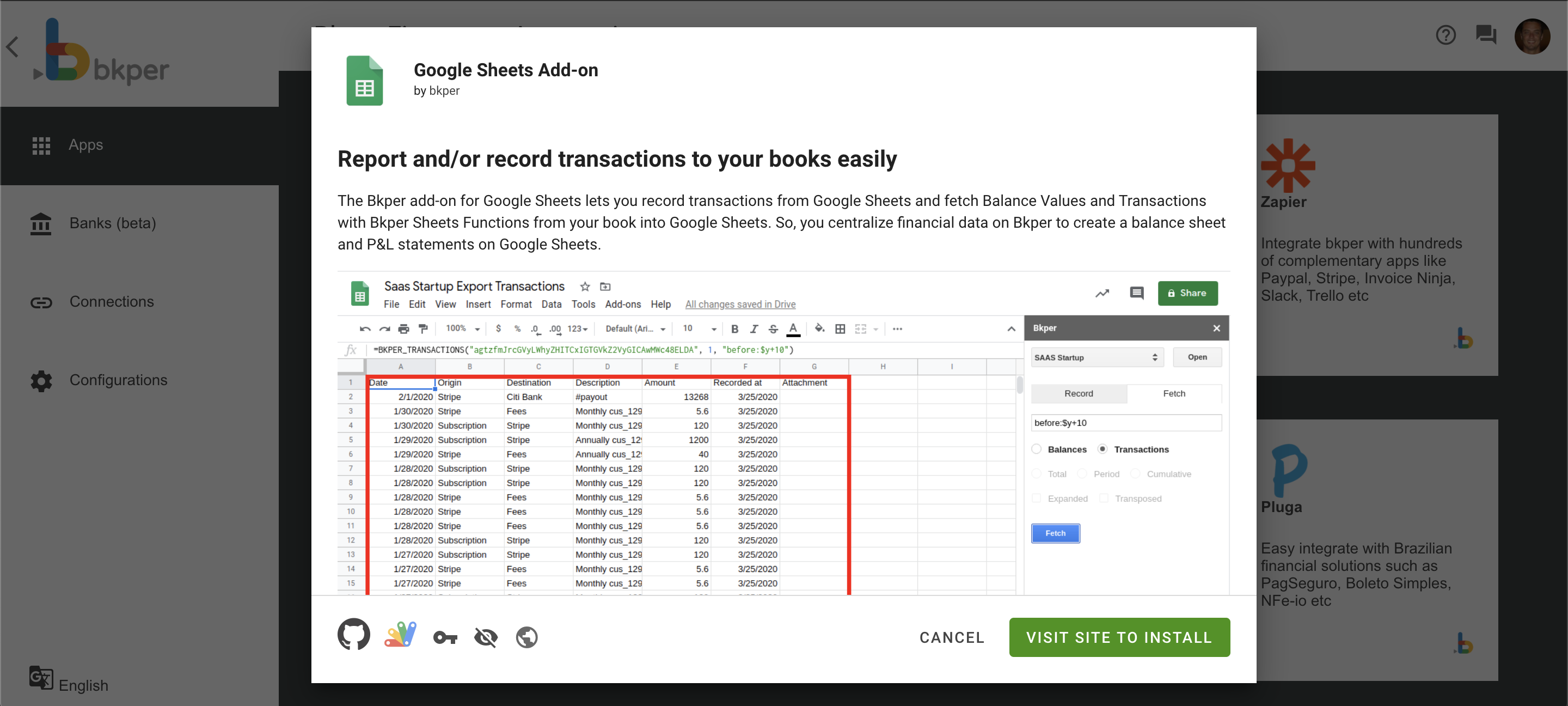
All Bkper apps are listed on the Automations Portal at _[app.bkper.com](https://app.bkper.com/) > Automations > Apps_. Each app has its own page with logo, description, and details:
|
|
9
|
+
|
|
10
|
+
|
|
11
|
+
|
|
12
|
+
App listings are populated from the fields you declare in [`bkper.yaml`](https://bkper.com/docs/build/apps/configuration.md). Sync metadata changes with `bkper app sync`. Deploying code is a separate step.
|
|
13
|
+
|
|
14
|
+
## Listing fields
|
|
15
|
+
|
|
16
|
+
Make sure your `bkper.yaml` has the following fields populated for a complete listing:
|
|
17
|
+
|
|
18
|
+
```yaml
|
|
19
|
+
id: your-app-id
|
|
20
|
+
name: Your App Name
|
|
21
|
+
description: A clear description of what your app does
|
|
22
|
+
|
|
23
|
+
logoUrl: https://your-app.bkper.app/images/logo.svg
|
|
24
|
+
logoUrlDark: https://your-app.bkper.app/images/logo-dark.svg
|
|
25
|
+
|
|
26
|
+
ownerName: Your Name or Organization
|
|
27
|
+
ownerWebsite: https://yourwebsite.com
|
|
28
|
+
|
|
29
|
+
website: https://your-app.bkper.app
|
|
30
|
+
```
|
|
31
|
+
|
|
32
|
+
See [App Configuration](https://bkper.com/docs/build/apps/configuration.md) for the full `bkper.yaml` reference.
|
|
33
|
+
|
|
34
|
+
## Default visibility
|
|
35
|
+
|
|
36
|
+
By default, installation is limited to the users you've declared in `bkper.yaml`:
|
|
37
|
+
|
|
38
|
+
```yaml
|
|
39
|
+
# Specific Bkper usernames
|
|
40
|
+
users: alice bob
|
|
41
|
+
|
|
42
|
+
# Your entire domain
|
|
43
|
+
users: *@yourcompany.com
|
|
44
|
+
```
|
|
45
|
+
|
|
46
|
+
Use Bkper usernames for individual access, not email addresses.
|
|
47
|
+
|
|
48
|
+
Your team can install and use the app, but it doesn't appear in the public Bkper app directory for other users.
|
|
49
|
+
|
|
50
|
+
## Publishing to all users
|
|
51
|
+
|
|
52
|
+
To make your app available to all Bkper users, contact us at [support@bkper.com](mailto:support@bkper.com?subject=Publish+Bkper+App). We'll review your app and, once approved, publish it.
|
|
53
|
+
|
|
54
|
+
### What the review involves
|
|
55
|
+
|
|
56
|
+
- **Functionality check** — The app works correctly and handles errors gracefully
|
|
57
|
+
- **Security review** — Event handlers are idempotent and include loop prevention
|
|
58
|
+
- **Listing quality** — The app has a clear name, description, and logo
|
|
59
|
+
|
|
60
|
+
### Where published apps appear
|
|
61
|
+
|
|
62
|
+
Once published, your app appears in:
|
|
63
|
+
|
|
64
|
+
- **[bkper.com/apps](https://bkper.com/apps)** — The public app directory
|
|
65
|
+
- **Automations Portal** — Inside every Bkper book, users can find and install your app
|
|
66
|
+
|
|
67
|
+
---
|
|
68
|
+
source: /docs/build/apps/architecture.md
|
|
69
|
+
|
|
70
|
+
# App Architecture
|
|
71
|
+
|
|
72
|
+
Bkper platform apps follow a three-package monorepo pattern. Each package handles a distinct concern, all deployed to the same `{appId}.bkper.app` domain.
|
|
73
|
+
|
|
74
|
+
## Structure
|
|
75
|
+
|
|
76
|
+
```
|
|
77
|
+
packages/
|
|
78
|
+
├── shared/ — Shared types and utilities
|
|
79
|
+
├── web/
|
|
80
|
+
│ ├── client/ — Frontend UI (Vite + Lit)
|
|
81
|
+
│ └── server/ — Backend API (Hono)
|
|
82
|
+
└── events/ — Event handler (webhooks)
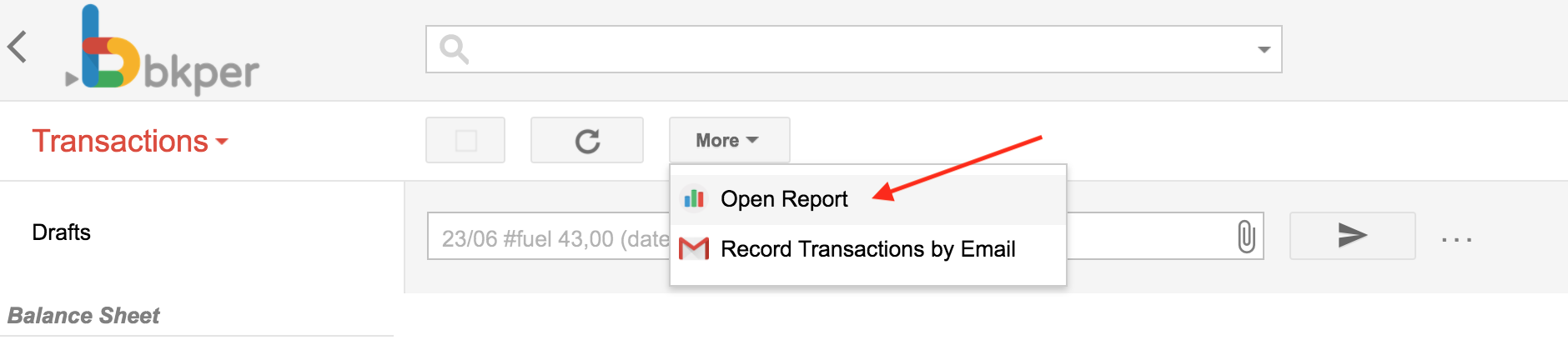
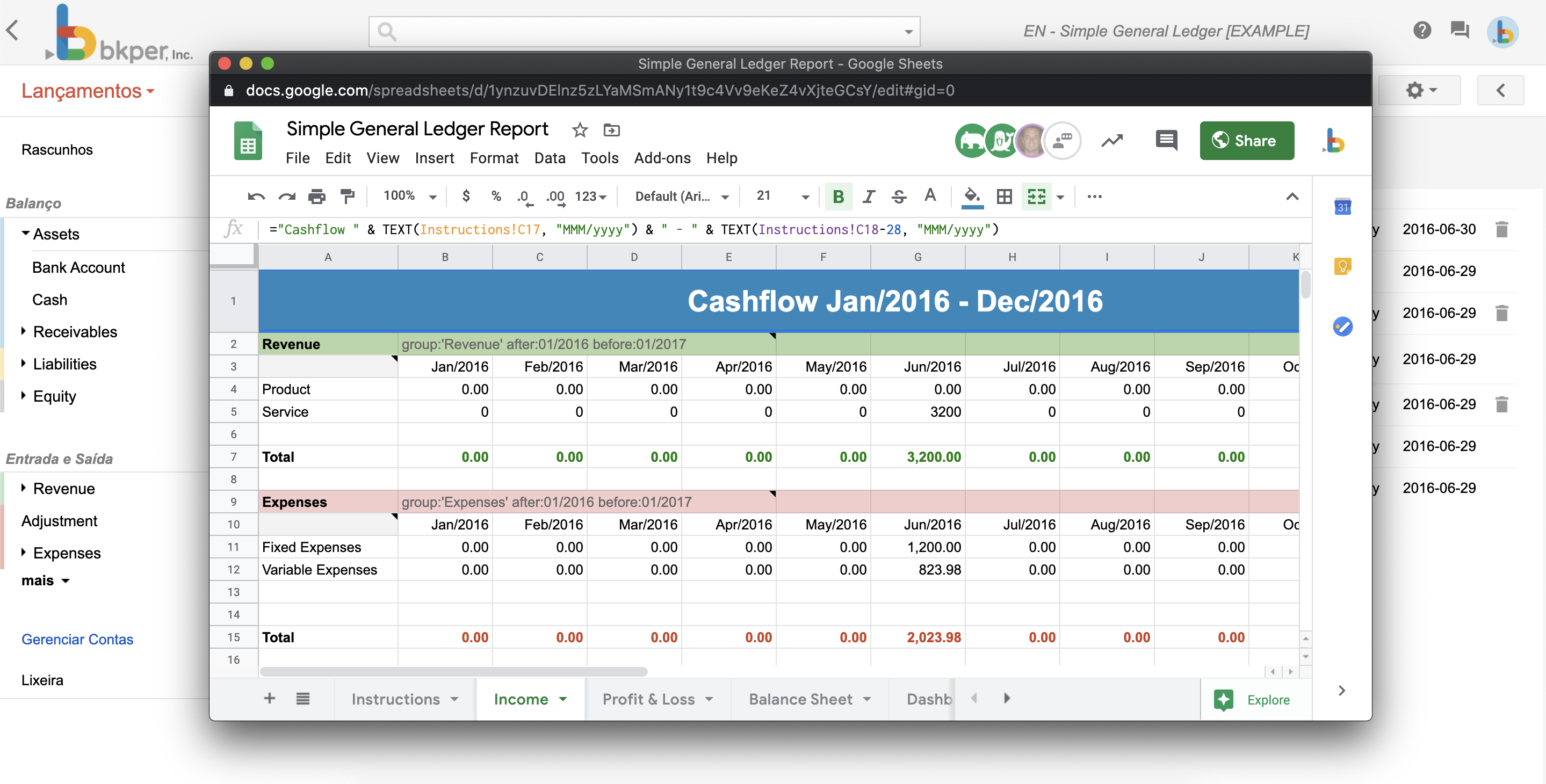
|
|
83
|
+
```
|
|
84
|
+
|
|
85
|
+
The packages are connected via [Bun workspaces](https://bun.sh/docs/install/workspaces). Import shared code from `@my-app/shared` in any package.
|
|
86
|
+
|
|
87
|
+
## Web client
|
|
88
|
+
|
|
89
|
+
The client package builds a browser UI with [Lit](https://lit.dev/) and [@bkper/web-design](https://www.npmjs.com/package/@bkper/web-design) for consistent Bkper styling.
|
|
90
|
+
|
|
91
|
+
- Built with [Vite](https://vitejs.dev/) — configured in the project's `vite.config.ts` for fast builds and HMR during development
|
|
92
|
+
- Static assets served by the web server handler
|
|
93
|
+
- Communicates with Bkper via `bkper-js`
|
|
94
|
+
|
|
95
|
+
This is where your app's UI lives — book pickers, account lists, reports, forms.
|
|
96
|
+
|
|
97
|
+
### Web client authentication
|
|
98
|
+
|
|
99
|
+
The client authenticates users via the [`@bkper/web-auth`](https://www.npmjs.com/package/@bkper/web-auth) SDK. OAuth is pre-configured on the platform — no client IDs, redirect URIs, or consent screens to set up.
|
|
100
|
+
|
|
101
|
+
```ts
|
|
102
|
+
import { Bkper } from 'bkper-js';
|
|
103
|
+
import { BkperAuth } from '@bkper/web-auth';
|
|
104
|
+
|
|
105
|
+
const auth = new BkperAuth({
|
|
106
|
+
baseUrl: isLocalDev ? window.location.origin : undefined,
|
|
107
|
+
onLoginSuccess: () => initializeApp(),
|
|
108
|
+
onLoginRequired: () => showLoginButton(),
|
|
109
|
+
});
|
|
110
|
+
await auth.init();
|
|
111
|
+
|
|
112
|
+
const bkper = new Bkper({
|
|
113
|
+
oauthTokenProvider: async () => auth.getAccessToken(),
|
|
114
|
+
});
|
|
115
|
+
```
|
|
116
|
+
|
|
117
|
+
This is the canonical pattern. Do not implement custom OAuth flows, redirect handling, or token refresh — the SDK and platform handle everything. See the [@bkper/web-auth API Reference](https://bkper.com/docs/api/bkper-web-auth.md) for the full SDK documentation.
|
|
118
|
+
|
|
119
|
+
## Web server
|
|
120
|
+
|
|
121
|
+
The server package runs on [Cloudflare Workers](https://developers.cloudflare.com/workers/) using [Hono](https://hono.dev/) as the web framework. It handles:
|
|
122
|
+
|
|
123
|
+
- Serving the client's static assets
|
|
124
|
+
- Custom API routes for your app's backend logic
|
|
125
|
+
- Type-safe access to platform services (KV, secrets) via `c.env`
|
|
126
|
+
|
|
127
|
+
```ts
|
|
128
|
+
import { Hono } from 'hono';
|
|
129
|
+
import type { Env } from '../../../../env.js';
|
|
130
|
+
|
|
131
|
+
const app = new Hono<{ Bindings: Env }>();
|
|
132
|
+
|
|
133
|
+
app.get('/api/data', async c => {
|
|
134
|
+
const cached = await c.env.KV.get('my-key');
|
|
135
|
+
return c.json({ data: cached });
|
|
136
|
+
});
|
|
137
|
+
|
|
138
|
+
export default app;
|
|
139
|
+
```
|
|
140
|
+
|
|
141
|
+
## Events handler
|
|
142
|
+
|
|
143
|
+
The events package receives webhook calls from Bkper when subscribed [events](https://bkper.com/docs/build/apps/event-handlers.md) occur. It's a separate Hono app that processes events and returns responses.
|
|
144
|
+
|
|
145
|
+
```ts
|
|
146
|
+
import { Hono } from 'hono';
|
|
147
|
+
import { Bkper, Book } from 'bkper-js';
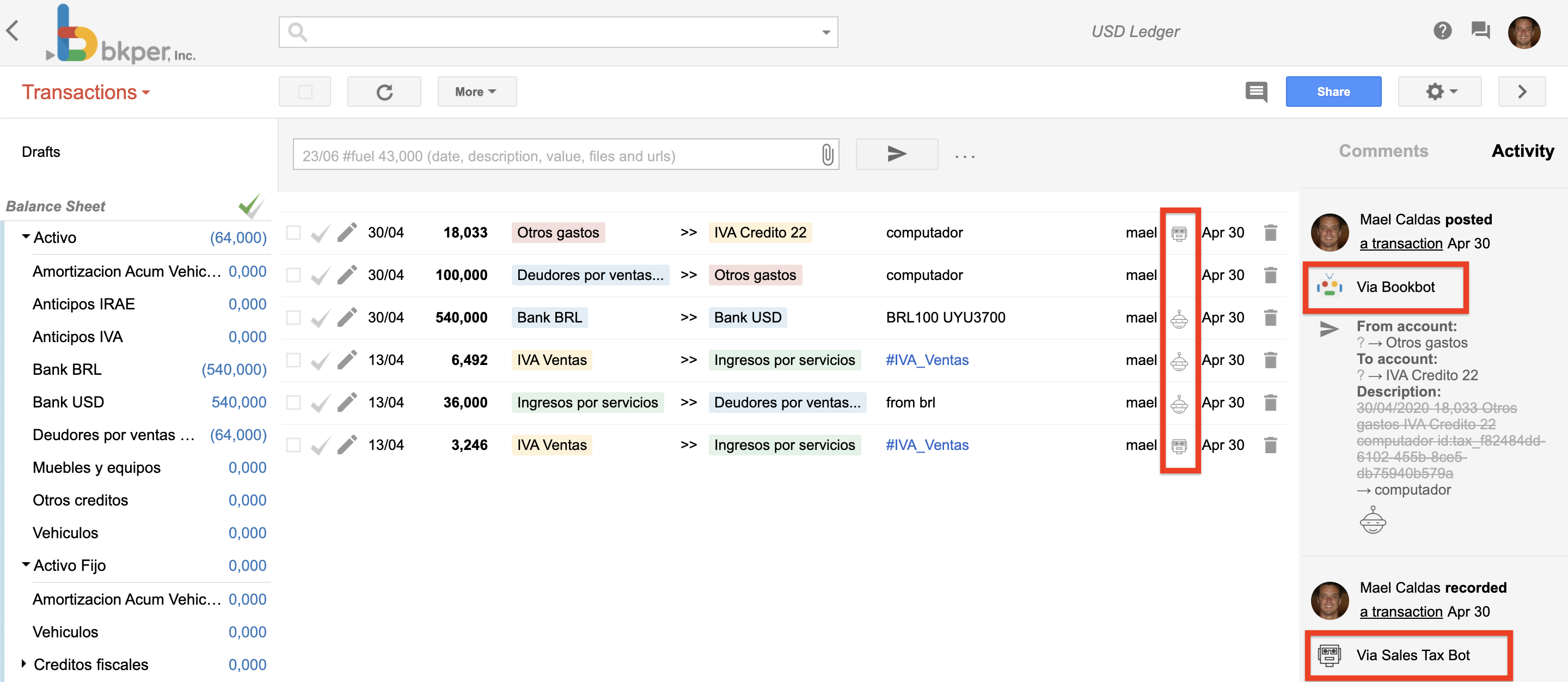
|
|
148
|
+
import { handleTransactionChecked } from './handlers/transaction-checked.js';
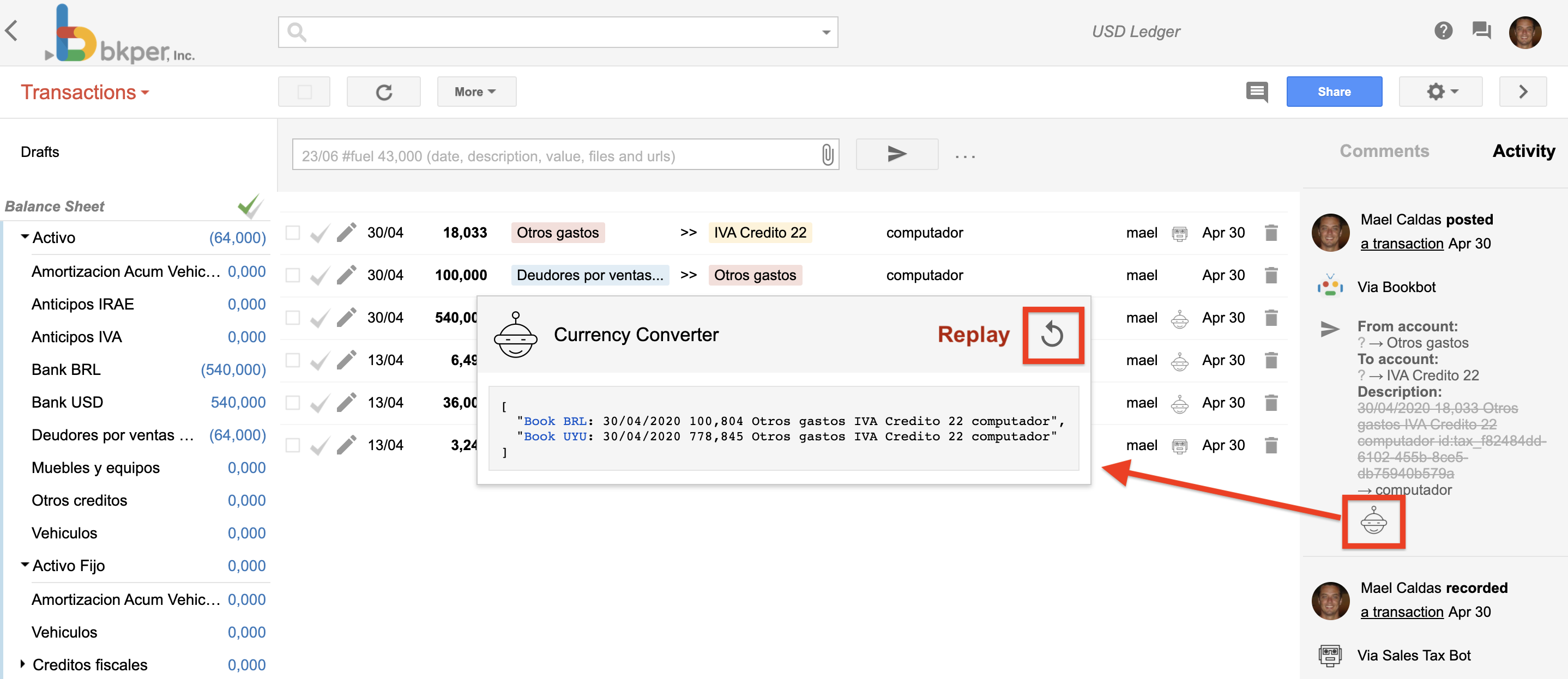
|
|
149
|
+
import type { Env } from '../../../env.js';
|
|
150
|
+
|
|
151
|
+
const app = new Hono<{ Bindings: Env }>().basePath('/events');
|
|
152
|
+
|
|
153
|
+
app.post('/', async c => {
|
|
154
|
+
const event: bkper.Event = await c.req.json();
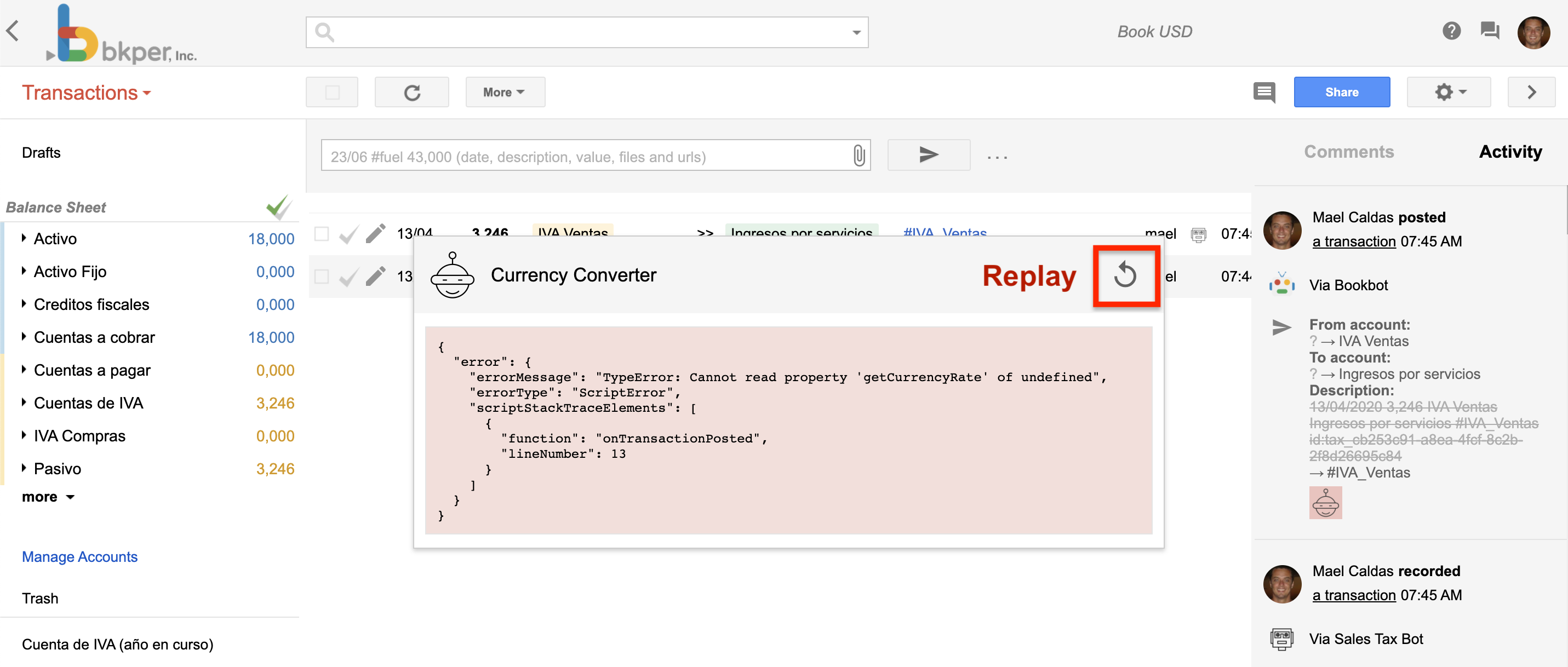
|
|
155
|
+
|
|
156
|
+
if (!event.book) {
|
|
157
|
+
return c.json({ error: 'Missing book in event payload' }, 400);
|
|
158
|
+
}
|
|
159
|
+
|
|
160
|
+
const bkper = new Bkper({
|
|
161
|
+
oauthTokenProvider: async () => c.req.header('bkper-oauth-token'),
|
|
162
|
+
agentIdProvider: async () => c.req.header('bkper-agent-id'),
|
|
163
|
+
});
|
|
164
|
+
const book = new Book(event.book, bkper.getConfig());
|
|
165
|
+
|
|
166
|
+
switch (event.type) {
|
|
167
|
+
case 'TRANSACTION_CHECKED':
|
|
168
|
+
return c.json(await handleTransactionChecked(book, event));
|
|
169
|
+
default:
|
|
170
|
+
return c.json({ result: false });
|
|
171
|
+
}
|
|
172
|
+
});
|
|
173
|
+
|
|
174
|
+
export default app;
|
|
175
|
+
```
|
|
176
|
+
|
|
177
|
+
Event handlers run at `https://{appId}.bkper.app/events` in production. During development, a Cloudflare tunnel routes events to your local machine.
|
|
178
|
+
|
|
179
|
+
See [Event Handlers](https://bkper.com/docs/build/apps/event-handlers.md) for patterns and details.
|
|
180
|
+
|
|
181
|
+
## Shared package
|
|
182
|
+
|
|
183
|
+
Common types, utilities, and constants used across packages:
|
|
184
|
+
|
|
185
|
+
```ts
|
|
186
|
+
// packages/shared/src/types.ts
|
|
187
|
+
export interface EventResult {
|
|
188
|
+
result?: string | string[] | boolean;
|
|
189
|
+
error?: string;
|
|
190
|
+
warning?: string;
|
|
191
|
+
}
|
|
192
|
+
|
|
193
|
+
// packages/shared/src/constants.ts
|
|
194
|
+
export const APP_NAME = 'my-app';
|
|
195
|
+
```
|
|
196
|
+
|
|
197
|
+
Import in any package:
|
|
198
|
+
|
|
199
|
+
```ts
|
|
200
|
+
import type { EventResult } from '@my-app/shared';
|
|
201
|
+
```
|
|
202
|
+
|
|
203
|
+
> **Note:** The `Env` type (KV bindings, secrets) lives in the root `env.d.ts` file, auto-generated from `bkper.yaml`. Import it as `import type { Env } from '../../../env.js'` — it is not part of the shared package.
|
|
204
|
+
|
|
205
|
+
## When you don't need all three
|
|
206
|
+
|
|
207
|
+
Not every app needs a UI, API, and event handler:
|
|
208
|
+
|
|
209
|
+
- **Event-only app** — Just the `events` package. Automates reactions to book events without a user interface. Remove the `web` section from `bkper.yaml`.
|
|
210
|
+
- **UI-only app** — Just the `web` packages. Opens via a [context menu](https://bkper.com/docs/build/apps/context-menu.md) to display data or collect input. Remove the `events` section from `bkper.yaml`.
|
|
211
|
+
- **Full app** — All three packages. Interactive UI with backend logic and event-driven automation.
|
|
212
|
+
|
|
213
|
+
The template includes all three by default. Remove what you don't need.
|
|
214
|
+
|
|
215
|
+
## Simple App Patterns
|
|
216
|
+
|
|
217
|
+
These are the minimal, canonical patterns for common app tasks. Use them as starting points and resist adding complexity unless the user explicitly asks for it.
|
|
218
|
+
|
|
219
|
+
### Client-only UI with authentication
|
|
220
|
+
|
|
221
|
+
The smallest useful app needs only the `packages/web/client/` directory. No server routes, no event handlers, no custom auth logic.
|
|
222
|
+
|
|
223
|
+
```ts
|
|
224
|
+
// packages/web/client/src/app.ts
|
|
225
|
+
import { Bkper } from 'bkper-js';
|
|
226
|
+
import { BkperAuth } from '@bkper/web-auth';
|
|
227
|
+
|
|
228
|
+
const auth = new BkperAuth({
|
|
229
|
+
baseUrl: window.location.origin.includes('localhost') ? undefined : window.location.origin,
|
|
230
|
+
onLoginSuccess: () => render(),
|
|
231
|
+
onLoginRequired: () => renderLogin(),
|
|
232
|
+
});
|
|
233
|
+
await auth.init();
|
|
234
|
+
|
|
235
|
+
const bkper = new Bkper({
|
|
236
|
+
oauthTokenProvider: async () => auth.getAccessToken(),
|
|
237
|
+
});
|
|
238
|
+
|
|
239
|
+
async function render() {
|
|
240
|
+
const books = await bkper.getBooks();
|
|
241
|
+
// render books
|
|
242
|
+
}
|
|
243
|
+
```
|
|
244
|
+
|
|
245
|
+
Key points:
|
|
246
|
+
- `BkperAuth` handles OAuth, token refresh, and session management internally.
|
|
247
|
+
- `auth.getAccessToken()` returns a valid token synchronously after `init()` resolves.
|
|
248
|
+
- Do not add server-side `/auth/*` routes. Do not implement `refresh_token` logic yourself.
|
|
249
|
+
|
|
250
|
+
### Fetch and display data
|
|
251
|
+
|
|
252
|
+
```ts
|
|
253
|
+
const book = await bkper.getBook(bookId);
|
|
254
|
+
const accounts = await book.getAccounts();
|
|
255
|
+
// render accounts
|
|
256
|
+
```
|
|
257
|
+
|
|
258
|
+
Use `bkper-js` for all API calls. Do not call the REST API directly when `bkper-js` provides the same method.
|
|
259
|
+
|
|
260
|
+
## Library Usage Reference
|
|
261
|
+
|
|
262
|
+
| Task | Use | Do not use |
|
|
263
|
+
|------|-----|------------|
|
|
264
|
+
| Client authentication | `@bkper/web-auth` (`BkperAuth`, `getAccessToken`) | Custom OAuth flows, manual `fetch('/auth/refresh')`, `google-auth-library` in the browser |
|
|
265
|
+
| API calls from client | `bkper-js` (`Bkper`, `Book`, `Account`, `Transaction`) | Direct `fetch()` to REST endpoints |
|
|
266
|
+
| API calls from event handler | `bkper-js` with `oauthTokenProvider` from `bkper-oauth-token` header | Hard-coding API keys, calling REST directly |
|
|
267
|
+
| Local development server | `npm run dev` (template script) | Manual `miniflare` + `cloudflared` invocations |
|
|
268
|
+
| Event handler routing | `switch (event.type)` in `packages/events/src/index.ts` | Middleware frameworks, external webhook routers |
|
|
269
|
+
| UI components | `@bkper/web-design` + Lit | Heavy UI frameworks unless the user explicitly requests them |
|
|
270
|
+
|
|
271
|
+
## Common Pitfalls
|
|
272
|
+
|
|
273
|
+
Avoid these patterns even if they seem necessary. The platform or SDK already solves the problem.
|
|
274
|
+
|
|
275
|
+
1. **Implementing custom OAuth on the server**
|
|
276
|
+
- `@bkper/web-auth` manages the full OAuth lifecycle on the client. The platform handles tokens. Adding a server-side auth layer is unnecessary and will break.
|
|
277
|
+
|
|
278
|
+
2. **Adding `/api/auth/refresh` or similar routes**
|
|
279
|
+
- Token refresh is internal to `@bkper/web-auth`. Exposing it via Hono routes creates security surface area and duplicates platform functionality.
|
|
280
|
+
|
|
281
|
+
3. **Modifying `packages/web/server/` for a simple UI task**
|
|
282
|
+
- If the user only asked for a client-side feature, do not touch the server package. The Vite dev server proxies `/api` to the Miniflare worker automatically; you do not need to add routes unless the user explicitly asks for custom backend logic.
|
|
283
|
+
|
|
284
|
+
4. **Installing additional auth or HTTP libraries**
|
|
285
|
+
- `bkper-js` and `@bkper/web-auth` are the only packages you need for Bkper API access and authentication. Adding `axios`, `google-auth-library`, or similar is almost always wrong.
|
|
286
|
+
|
|
287
|
+
5. **Creating event handlers when the user asked for a UI-only feature**
|
|
288
|
+
- If the user says "show me a list of books in a popup," that is a client-only task. Do not scaffold `packages/events/` handlers or subscribe to webhooks.
|
|
289
|
+
|
|
290
|
+
6. **Calling REST endpoints directly when `bkper-js` has the method**
|
|
291
|
+
- If `bkper-js` exposes `book.getTransactions()`, use it. Do not `fetch('https://api.bkper.com/...')` and parse JSON manually.
|
|
292
|
+
|
|
293
|
+
7. **Reverse-engineering SDK internals**
|
|
294
|
+
- Use the public API surface documented in the API reference. Do not read SDK source to find private methods or internal request patterns.
|
|
295
|
+
|
|
296
|
+
---
|
|
297
|
+
source: /docs/build/apps/configuration.md
|
|
298
|
+
|
|
299
|
+
# App Configuration
|
|
300
|
+
|
|
301
|
+
The `bkper.yaml` file is the single configuration file for your Bkper app. It defines the app's identity, access control, menu integration, event handling, and deployment settings.
|
|
302
|
+
|
|
303
|
+
It lives in the root of your project. Use `bkper app sync` to push metadata changes to Bkper, and use `bkper app deploy` to upload built code to the platform.
|
|
304
|
+
|
|
305
|
+
## Minimal example
|
|
306
|
+
|
|
307
|
+
```yaml
|
|
308
|
+
id: my-app
|
|
309
|
+
name: My App
|
|
310
|
+
description: A Bkper app that does something useful
|
|
311
|
+
developers: myuser
|
|
312
|
+
```
|
|
313
|
+
|
|
314
|
+
## Full example
|
|
315
|
+
|
|
316
|
+
From the [app template](https://github.com/bkper/bkper-app-template):
|
|
317
|
+
|
|
318
|
+
```yaml
|
|
319
|
+
id: my-app
|
|
320
|
+
name: My App
|
|
321
|
+
description: A Bkper app that does something useful
|
|
322
|
+
|
|
323
|
+
logoUrl: https://my-app.bkper.app/images/logo-light.svg
|
|
324
|
+
logoUrlDark: https://my-app.bkper.app/images/logo-dark.svg
|
|
325
|
+
|
|
326
|
+
website: https://bkper.com/apps/bkper-cli
|
|
327
|
+
ownerName: Bkper
|
|
328
|
+
ownerLogoUrl: https://avatars.githubusercontent.com/u/11943086?v=4
|
|
329
|
+
ownerWebsite: https://bkper.com
|
|
330
|
+
|
|
331
|
+
repoUrl: https://github.com/bkper/bkper-app-template
|
|
332
|
+
repoPrivate: true
|
|
333
|
+
|
|
334
|
+
developers: someuser *@yoursite.com
|
|
335
|
+
users: someuser *@yoursite.com
|
|
336
|
+
|
|
337
|
+
menuUrl: https://my-app.bkper.app?bookId=${book.id}
|
|
338
|
+
menuUrlDev: http://localhost:8787?bookId=${book.id}
|
|
339
|
+
menuPopupWidth: 500
|
|
340
|
+
menuPopupHeight: 300
|
|
341
|
+
|
|
342
|
+
webhookUrl: https://my-app.bkper.app/events
|
|
343
|
+
apiVersion: v5
|
|
344
|
+
events:
|
|
345
|
+
- TRANSACTION_CHECKED
|
|
346
|
+
|
|
347
|
+
deployment:
|
|
348
|
+
web:
|
|
349
|
+
main: packages/web/server/src/index.ts
|
|
350
|
+
client: packages/web/client
|
|
351
|
+
events:
|
|
352
|
+
main: packages/events/src/index.ts
|
|
353
|
+
services:
|
|
354
|
+
- KV
|
|
355
|
+
compatibility_date: '2026-01-28'
|
|
356
|
+
```
|
|
357
|
+
|
|
358
|
+
### App identity
|
|
359
|
+
|
|
360
|
+
| Field | Description |
|
|
361
|
+
| ------------- | --------------------------------------------------------------------------------------------------------- |
|
|
362
|
+
| `id` | Permanent app identifier. Lowercase letters, numbers, and hyphens only. Cannot be changed after creation. |
|
|
363
|
+
| `name` | Display name shown in the Bkper UI. |
|
|
364
|
+
| `description` | Brief description of what the app does. |
|
|
365
|
+
|
|
366
|
+
### Branding
|
|
367
|
+
|
|
368
|
+
| Field | Description |
|
|
369
|
+
| ------------- | ------------------------------------------ |
|
|
370
|
+
| `logoUrl` | App logo for light mode (SVG recommended). |
|
|
371
|
+
| `logoUrlDark` | App logo for dark mode. |
|
|
372
|
+
| `website` | App website or documentation URL. |
|
|
373
|
+
|
|
374
|
+
### Ownership
|
|
375
|
+
|
|
376
|
+
| Field | Description |
|
|
377
|
+
| -------------- | ------------------------------------------------------------ |
|
|
378
|
+
| `ownerName` | Developer or company name. |
|
|
379
|
+
| `ownerLogoUrl` | Owner's logo/avatar URL. |
|
|
380
|
+
| `ownerWebsite` | Owner's website. |
|
|
381
|
+
| `repoUrl` | Source code repository URL. |
|
|
382
|
+
| `repoPrivate` | Whether the repository is private. |
|
|
383
|
+
| `deprecated` | Hides from app listings; existing installs continue working. |
|
|
384
|
+
|
|
385
|
+
### Access control
|
|
386
|
+
|
|
387
|
+
| Field | Description |
|
|
388
|
+
| ------------ | ----------------------------------------------------------------------------------------------------------------------------- |
|
|
389
|
+
| `developers` | Who can update the app and deploy new versions. Comma-separated Bkper usernames. Supports domain wildcards: `*@yoursite.com`. |
|
|
390
|
+
| `users` | Who can install and use the app. Same format as developers. Leave empty for public apps. |
|
|
391
|
+
|
|
392
|
+
### Menu integration
|
|
393
|
+
|
|
394
|
+
| Field | Description |
|
|
395
|
+
| ----------------- | --------------------------------------------------------------------------- |
|
|
396
|
+
| `menuUrl` | Production menu URL. Supports [variable substitution](#menu-url-variables). |
|
|
397
|
+
| `menuUrlDev` | Development menu URL (used when the developer clicks the menu). |
|
|
398
|
+
| `menuText` | Custom menu text (defaults to app name). |
|
|
399
|
+
| `menuPopupWidth` | Popup width in pixels. |
|
|
400
|
+
| `menuPopupHeight` | Popup height in pixels. |
|
|
401
|
+
|
|
402
|
+
See [Context Menu](https://bkper.com/docs/build/apps/context-menu.md) for details on building menu integrations.
|
|
403
|
+
|
|
404
|
+
### Menu URL variables
|
|
405
|
+
|
|
406
|
+
The following variables can be used in `menuUrl` and `menuUrlDev`:
|
|
407
|
+
|
|
408
|
+
| Variable | Description |
|
|
409
|
+
| --------------------------- | ---------------------------------------- |
|
|
410
|
+
| `${book.id}` | Current book ID |
|
|
411
|
+
| `${book.properties.xxx}` | Book property value |
|
|
412
|
+
| `${account.id}` | Selected account ID |
|
|
413
|
+
| `${account.name}` | Selected account name |
|
|
414
|
+
| `${account.properties.xxx}` | Account property value |
|
|
415
|
+
| `${group.id}` | Selected group ID |
|
|
416
|
+
| `${group.name}` | Selected group name |
|
|
417
|
+
| `${group.properties.xxx}` | Group property value |
|
|
418
|
+
| `${transactions.ids}` | Comma-separated selected transaction IDs |
|
|
419
|
+
| `${transactions.query}` | Current search query |
|
|
420
|
+
|
|
421
|
+
### Event handling
|
|
422
|
+
|
|
423
|
+
| Field | Description |
|
|
424
|
+
| --------------- | ------------------------------------------------------------------------------- |
|
|
425
|
+
| `webhookUrl` | Production webhook URL for receiving events. |
|
|
426
|
+
| `webhookUrlDev` | Development webhook URL (auto-updated by `bkper app dev`). |
|
|
427
|
+
| `apiVersion` | API version for event payloads (currently `v5`). |
|
|
428
|
+
| `events` | List of [event types](https://bkper.com/docs/build/apps/event-handlers.md#event-types) to subscribe to. |
|
|
429
|
+
|
|
430
|
+
See [Event Handlers](https://bkper.com/docs/build/apps/event-handlers.md) for details on handling events.
|
|
431
|
+
|
|
432
|
+
### File patterns
|
|
433
|
+
|
|
434
|
+
| Field | Description |
|
|
435
|
+
| -------------- | ---------------------------------------------------------------------------------------------------------------------- |
|
|
436
|
+
| `filePatterns` | List of glob patterns (e.g., `*.ofx`, `*.csv`). When a matching file is uploaded, a `FILE_CREATED` event is triggered. |
|
|
437
|
+
|
|
438
|
+
### Properties schema
|
|
439
|
+
|
|
440
|
+
The `propertiesSchema` field defines autocomplete suggestions for custom properties in the Bkper UI, helping users discover the correct property keys and values for your app:
|
|
441
|
+
|
|
442
|
+
```yaml
|
|
443
|
+
propertiesSchema:
|
|
444
|
+
book:
|
|
445
|
+
keys:
|
|
446
|
+
- my_app_enabled
|
|
447
|
+
values:
|
|
448
|
+
- 'true'
|
|
449
|
+
- 'false'
|
|
450
|
+
group:
|
|
451
|
+
keys:
|
|
452
|
+
- my_app_category
|
|
453
|
+
account:
|
|
454
|
+
keys:
|
|
455
|
+
- my_app_sync_id
|
|
456
|
+
transaction:
|
|
457
|
+
keys:
|
|
458
|
+
- my_app_reference
|
|
459
|
+
```
|
|
460
|
+
|
|
461
|
+
### Deployment
|
|
462
|
+
|
|
463
|
+
For apps deployed to the [Bkper Platform](https://bkper.com/docs/build/apps/overview.md):
|
|
464
|
+
|
|
465
|
+
| Field | Description |
|
|
466
|
+
| ------------------------------- | ---------------------------------------------------------------------------------------------------------------------- |
|
|
467
|
+
| `deployment.web.main` | Entry point for the web handler (serves UI and API). |
|
|
468
|
+
| `deployment.web.client` | Directory for static client assets. |
|
|
469
|
+
| `deployment.events.main` | Entry point for the events handler (processes webhooks). |
|
|
470
|
+
| `deployment.services` | Platform services to provision. Currently: `KV` (key-value storage). |
|
|
471
|
+
| `deployment.secrets` | Secret names used by the app. Managed via `bkper app secrets`. |
|
|
472
|
+
| `deployment.compatibility_date` | [Cloudflare Workers compatibility date](https://developers.cloudflare.com/workers/configuration/compatibility-dates/). |
|
|
473
|
+
|
|
474
|
+
See [Building & Deploying](https://bkper.com/docs/build/apps/deploying.md) for the full deployment workflow.
|
|
475
|
+
|
|
476
|
+
---
|
|
477
|
+
source: /docs/build/apps/context-menu.md
|
|
478
|
+
|
|
479
|
+
# Context Menu
|
|
480
|
+
|
|
481
|
+
Apps can add context menu items on the Transactions page **More** menu in your Books. This lets you open dynamically built URLs with reference to the current Book's context — the active query, selected account, date range, and more.
|
|
482
|
+
|
|
483
|
+
## How it works
|
|
484
|
+
|
|
485
|
+
Once you install an App with a menu configuration, a new menu item appears in your Book:
|
|
486
|
+
|
|
487
|
+
|
|
488
|
+
|
|
489
|
+
When clicked, a popup opens carrying the particular context of that book at that moment:
|
|
490
|
+
|
|
491
|
+
|
|
492
|
+
|
|
493
|
+
## Configuration
|
|
494
|
+
|
|
495
|
+
Configure the menu URL in your [`bkper.yaml`](https://bkper.com/docs/build/apps/configuration.md):
|
|
496
|
+
|
|
497
|
+
```yaml
|
|
498
|
+
menuUrl: https://my-app.bkper.app?bookId=${book.id}&query=${transactions.query}
|
|
499
|
+
```
|
|
500
|
+
|
|
501
|
+
When the user clicks the menu item, the URL expressions `${xxxx}` are replaced with contextual information from the Book:
|
|
502
|
+
|
|
503
|
+
```
|
|
504
|
+
https://my-app.bkper.app?bookId=abc123&query=account:Sales
|
|
505
|
+
```
|
|
506
|
+
|
|
507
|
+
Where `abc123` is the current Book id and `account:Sales` is the current query being executed.
|
|
508
|
+
|
|
509
|
+
### Development URL
|
|
510
|
+
|
|
511
|
+
Use `menuUrlDev` for a separate URL during development:
|
|
512
|
+
|
|
513
|
+
```yaml
|
|
514
|
+
menuUrl: https://my-app.bkper.app?bookId=${book.id}&query=${transactions.query}
|
|
515
|
+
menuUrlDev: http://localhost:8787?bookId=${book.id}&query=${transactions.query}
|
|
516
|
+
```
|
|
517
|
+
|
|
518
|
+
The development URL is used when the app developer is the one clicking the menu item.
|
|
519
|
+
|
|
520
|
+
### Popup dimensions
|
|
521
|
+
|
|
522
|
+
Control the popup size with:
|
|
523
|
+
|
|
524
|
+
```yaml
|
|
525
|
+
menuPopupWidth: 800
|
|
526
|
+
menuPopupHeight: 600
|
|
527
|
+
```
|
|
528
|
+
|
|
529
|
+
### Available expressions
|
|
530
|
+
|
|
531
|
+
The menu URL supports these dynamic expressions:
|
|
532
|
+
|
|
533
|
+
| Expression | Description |
|
|
534
|
+
| --- | --- |
|
|
535
|
+
| `${book.id}` | The current Book ID |
|
|
536
|
+
| `${transactions.query}` | The current query string |
|
|
537
|
+
| `${account.id}` | The selected account ID |
|
|
538
|
+
| `${account.name}` | The selected account name |
|
|
539
|
+
| `${group.id}` | The selected group ID |
|
|
540
|
+
| `${group.name}` | The selected group name |
|
|
541
|
+
|
|
542
|
+
For the full list of accepted expressions, see the [Menu URL variables](https://bkper.com/docs/build/apps/configuration.md#menu-url-variables) reference.
|
|
543
|
+
|
|
544
|
+
---
|
|
545
|
+
source: /docs/build/apps/deploying.md
|
|
546
|
+
|
|
547
|
+
# Building & Deploying
|
|
548
|
+
|
|
549
|
+
## The deployment workflow
|
|
550
|
+
|
|
551
|
+
1. **Build** — Compile your code
|
|
552
|
+
|
|
553
|
+
```bash
|
|
554
|
+
npm run build
|
|
555
|
+
```
|
|
556
|
+
|
|
557
|
+
This runs two build steps:
|
|
558
|
+
- Client (Vite) to static assets in `dist/web/client/`
|
|
559
|
+
- Worker bundles (esbuild) — web server to `dist/web/server/`, events handler to `dist/events/`
|
|
560
|
+
|
|
561
|
+
Build output includes size reporting so you can monitor bundle sizes.
|
|
562
|
+
|
|
563
|
+
2. **Sync** — Update app metadata
|
|
564
|
+
|
|
565
|
+
```bash
|
|
566
|
+
bkper app sync
|
|
567
|
+
```
|
|
568
|
+
|
|
569
|
+
Syncs your `bkper.yaml` configuration to Bkper — name, description, menu URLs, webhook URLs, access control, and branding. Run this whenever you change app settings.
|
|
570
|
+
|
|
571
|
+
3. **Deploy** — Upload code to the platform
|
|
572
|
+
|
|
573
|
+
```bash
|
|
574
|
+
bkper app deploy
|
|
575
|
+
```
|
|
576
|
+
|
|
577
|
+
Deploys your pre-built code from `dist/` to the Bkper Platform. Your app is live at `https://{appId}.bkper.app`.
|
|
578
|
+
|
|
579
|
+
The typical workflow combines all three:
|
|
580
|
+
|
|
581
|
+
```bash
|
|
582
|
+
npm run build && bkper app sync && bkper app deploy
|
|
583
|
+
```
|
|
584
|
+
|
|
585
|
+
### Production
|
|
586
|
+
|
|
587
|
+
The default deployment target. Your app runs at `https://{appId}.bkper.app`.
|
|
588
|
+
|
|
589
|
+
```bash
|
|
590
|
+
bkper app deploy
|
|
591
|
+
```
|
|
592
|
+
|
|
593
|
+
### Preview
|
|
594
|
+
|
|
595
|
+
Deploy to a separate preview environment for testing before production:
|
|
596
|
+
|
|
597
|
+
```bash
|
|
598
|
+
bkper app deploy --preview
|
|
599
|
+
```
|
|
600
|
+
|
|
601
|
+
Preview has independent secrets and KV storage from production.
|
|
602
|
+
|
|
603
|
+
### Independent handler deployment
|
|
604
|
+
|
|
605
|
+
Deploy only the events handler:
|
|
606
|
+
|
|
607
|
+
```bash
|
|
608
|
+
bkper app deploy --events
|
|
609
|
+
```
|
|
610
|
+
|
|
611
|
+
Useful when you've only changed the events handler and want a faster deployment. Web is deployed by default.
|
|
612
|
+
|
|
613
|
+
## Secrets management
|
|
614
|
+
|
|
615
|
+
Secrets are environment variables stored securely on the platform. Declare them in `bkper.yaml`:
|
|
616
|
+
|
|
617
|
+
```yaml
|
|
618
|
+
deployment:
|
|
619
|
+
secrets:
|
|
620
|
+
- EXTERNAL_SERVICE_TOKEN
|
|
621
|
+
```
|
|
622
|
+
|
|
623
|
+
### Setting secrets
|
|
624
|
+
|
|
625
|
+
```bash
|
|
626
|
+
# Set for production
|
|
627
|
+
bkper app secrets put EXTERNAL_SERVICE_TOKEN
|
|
628
|
+
|
|
629
|
+
# Set for preview
|
|
630
|
+
bkper app secrets put EXTERNAL_SERVICE_TOKEN --preview
|
|
631
|
+
```
|
|
632
|
+
|
|
633
|
+
You'll be prompted to enter the value.
|
|
634
|
+
|
|
635
|
+
### Listing and deleting
|
|
636
|
+
|
|
637
|
+
```bash
|
|
638
|
+
# List all secrets
|
|
639
|
+
bkper app secrets list
|
|
640
|
+
|
|
641
|
+
# Delete a secret
|
|
642
|
+
bkper app secrets delete EXTERNAL_SERVICE_TOKEN
|
|
643
|
+
```
|
|
644
|
+
|
|
645
|
+
### Accessing in code
|
|
646
|
+
|
|
647
|
+
Secrets are available as `c.env.SECRET_NAME` in your Hono handlers:
|
|
648
|
+
|
|
649
|
+
```ts
|
|
650
|
+
app.get('/api/data', async (c) => {
|
|
651
|
+
const token = c.env.EXTERNAL_SERVICE_TOKEN;
|
|
652
|
+
// use token
|
|
653
|
+
});
|
|
654
|
+
```
|
|
655
|
+
|
|
656
|
+
During local development, use the `.dev.vars` file instead. See [Development Experience](https://bkper.com/docs/build/apps/development.md#local-secrets).
|
|
657
|
+
|
|
658
|
+
### KV storage
|
|
659
|
+
|
|
660
|
+
Declare KV in `bkper.yaml`:
|
|
661
|
+
|
|
662
|
+
```yaml
|
|
663
|
+
deployment:
|
|
664
|
+
services:
|
|
665
|
+
- KV
|
|
666
|
+
```
|
|
667
|
+
|
|
668
|
+
The platform provisions a KV namespace for your app. Access it via `c.env.KV`:
|
|
669
|
+
|
|
670
|
+
```ts
|
|
671
|
+
await c.env.KV.put('key', 'value', { expirationTtl: 3600 });
|
|
672
|
+
const value = await c.env.KV.get('key');
|
|
673
|
+
```
|
|
674
|
+
|
|
675
|
+
KV storage is separate between production and preview environments.
|
|
676
|
+
|
|
677
|
+
## Deployment status
|
|
678
|
+
|
|
679
|
+
Check the current state of your deployment:
|
|
680
|
+
|
|
681
|
+
```bash
|
|
682
|
+
bkper app status
|
|
683
|
+
```
|
|
684
|
+
|
|
685
|
+
## Installing on books
|
|
686
|
+
|
|
687
|
+
After deploying, install the app on specific books to activate it:
|
|
688
|
+
|
|
689
|
+
```bash
|
|
690
|
+
# Install on a book
|
|
691
|
+
bkper app install <appId> -b <bookId>
|
|
692
|
+
|
|
693
|
+
# Uninstall from a book
|
|
694
|
+
bkper app uninstall <appId> -b <bookId>
|
|
695
|
+
```
|
|
696
|
+
|
|
697
|
+
Once installed, the app's [event handlers](https://bkper.com/docs/build/apps/event-handlers.md) receive events from that book, and the app's [context menu](https://bkper.com/docs/build/apps/context-menu.md) appears in the book's UI.
|
|
698
|
+
|
|
699
|
+
---
|
|
700
|
+
source: /docs/build/apps/development.md
|
|
701
|
+
|
|
702
|
+
# Development Experience
|
|
703
|
+
|
|
704
|
+
Local development uses two composable processes — the worker runtime and the client dev server — that run concurrently.
|
|
705
|
+
|
|
706
|
+
## What runs
|
|
707
|
+
|
|
708
|
+
```bash
|
|
709
|
+
npm run dev
|
|
710
|
+
```
|
|
711
|
+
|
|
712
|
+
The project template runs both processes via `concurrently`:
|
|
713
|
+
|
|
714
|
+
1. **`vite dev`** — Client dev server with HMR. Changes to Lit components reflect instantly in the browser. Configured in `vite.config.ts`.
|
|
715
|
+
2. **`bkper app dev`** — The worker runtime:
|
|
716
|
+
- **Miniflare** — Simulates the Cloudflare Workers runtime locally for the web server and events handler.
|
|
717
|
+
- **Cloudflare tunnel** — Exposes the events handler via a public URL so Bkper can route webhook events to your machine.
|
|
718
|
+
- **File watching** — Server and shared package changes trigger automatic rebuilds via esbuild.
|
|
719
|
+
|
|
720
|
+
You can also run them independently: `npm run dev:client` for just the UI, or `npm run dev:server` / `npm run dev:events` for specific workers.
|
|
721
|
+
|
|
722
|
+
## URLs
|
|
723
|
+
|
|
724
|
+
| Handler | URL |
|
|
725
|
+
| --- | --- |
|
|
726
|
+
| Client (Vite dev server) | `http://localhost:5173` |
|
|
727
|
+
| Web server (Miniflare) | `http://localhost:8787` |
|
|
728
|
+
| Events (via tunnel) | `https://<random>.trycloudflare.com/events` |
|
|
729
|
+
|
|
730
|
+
The Vite dev server proxies `/api` requests to `http://localhost:8787` (configured in `vite.config.ts`). The tunnel URL is automatically registered as the `webhookUrlDev` in Bkper, so events from books where you're the developer are routed to your local machine.
|
|
731
|
+
|
|
732
|
+
## Configuration flags
|
|
733
|
+
|
|
734
|
+
You can run specific handlers independently:
|
|
735
|
+
|
|
736
|
+
```bash
|
|
737
|
+
# Start only the web worker
|
|
738
|
+
bkper app dev --web
|
|
739
|
+
|
|
740
|
+
# Start only the events worker
|
|
741
|
+
bkper app dev --events
|
|
742
|
+
|
|
743
|
+
# Override default ports
|
|
744
|
+
bkper app dev --sp 8787 --ep 8791
|
|
745
|
+
```
|
|
746
|
+
|
|
747
|
+
## Client configuration
|
|
748
|
+
|
|
749
|
+
The client dev server is configured in `vite.config.ts` at the project root. This is a standard Vite config — add plugins, adjust settings, or customize the dev server as needed.
|
|
750
|
+
|
|
751
|
+
### Local development authentication
|
|
752
|
+
|
|
753
|
+
During local development, the Vite dev server runs a Bkper auth middleware plugin (`createBkperAuthMiddleware()` from `bkper/dev`). This plugin:
|
|
754
|
+
|
|
755
|
+
1. Uses your CLI credentials (from `bkper auth login`) to obtain and refresh OAuth tokens
|
|
756
|
+
2. Injects the token into your client code automatically
|
|
757
|
+
3. Proxies `/api` requests to the Miniflare worker
|
|
758
|
+
|
|
759
|
+
Before starting development, run:
|
|
760
|
+
|
|
761
|
+
```bash
|
|
762
|
+
bkper auth login # one-time setup
|
|
763
|
+
```
|
|
764
|
+
|
|
765
|
+
Then `npm run dev` handles authentication automatically. The client calls `auth.getAccessToken()` and the middleware ensures the token is valid.
|
|
766
|
+
|
|
767
|
+
If you see authentication errors in the browser, verify you're logged in:
|
|
768
|
+
|
|
769
|
+
```bash
|
|
770
|
+
bkper auth token # should print a token
|
|
771
|
+
```
|
|
772
|
+
|
|
773
|
+
This is the canonical pattern for local development. Do not manually pass tokens or implement custom auth flows.
|
|
774
|
+
|
|
775
|
+
## Local secrets
|
|
776
|
+
|
|
777
|
+
Environment variables for local development live in a `.dev.vars` file at the project root:
|
|
778
|
+
|
|
779
|
+
```bash
|
|
780
|
+
# .dev.vars (gitignored)
|
|
781
|
+
EXTERNAL_SERVICE_TOKEN=your-token-here
|
|
782
|
+
```
|
|
783
|
+
|
|
784
|
+
Copy from the provided template:
|
|
785
|
+
|
|
786
|
+
```bash
|
|
787
|
+
cp .dev.vars.example .dev.vars
|
|
788
|
+
```
|
|
789
|
+
|
|
790
|
+
These variables are available as `c.env.SECRET_NAME` in your Hono handlers during development.
|
|
791
|
+
|
|
792
|
+
## KV storage
|
|
793
|
+
|
|
794
|
+
KV data persists locally in the `.mf/kv/` directory during development. This means your data survives restarts — useful for testing caching and state patterns.
|
|
795
|
+
|
|
796
|
+
```ts
|
|
797
|
+
// Read
|
|
798
|
+
const value = await c.env.KV.get('my-key');
|
|
799
|
+
|
|
800
|
+
// Write with TTL
|
|
801
|
+
await c.env.KV.put('my-key', 'value', { expirationTtl: 3600 });
|
|
802
|
+
```
|
|
803
|
+
|
|
804
|
+
See the [Cloudflare KV documentation](https://developers.cloudflare.com/kv/) for more usage patterns.
|
|
805
|
+
|
|
806
|
+
## Type generation
|
|
807
|
+
|
|
808
|
+
The `env.d.ts` file provides TypeScript types for the Worker environment — KV bindings, secrets, and other platform services. It's auto-generated based on your `bkper.yaml` configuration and checked into version control.
|
|
809
|
+
|
|
810
|
+
Rebuild it after changing services or secrets in `bkper.yaml`:
|
|
811
|
+
|
|
812
|
+
```bash
|
|
813
|
+
bkper app build
|
|
814
|
+
```
|
|
815
|
+
|
|
816
|
+
## The development loop
|
|
817
|
+
|
|
818
|
+
1. Run `npm run dev`
|
|
819
|
+
2. Edit client code — see changes instantly via Vite HMR
|
|
820
|
+
3. Edit server code — auto-rebuilds and reloads via esbuild watch
|
|
821
|
+
4. Trigger events in Bkper — your local handler receives them via the tunnel
|
|
822
|
+
5. Check the activity stream in Bkper to see handler responses
|
|
823
|
+
6. Iterate
|
|
824
|
+
|
|
825
|
+
## Debugging
|
|
826
|
+
|
|
827
|
+
- **Server errors** — Check the terminal output from `bkper app dev`. Worker runtime errors appear here.
|
|
828
|
+
- **Event handler errors** — Check the Bkper activity stream. Click on an event handler response to see the result or error, and replay failed events.
|
|
829
|
+
- **Client errors** — Use browser DevTools. The Vite dev server provides source maps.
|
|
830
|
+
|
|
831
|
+
---
|
|
832
|
+
source: /docs/build/apps/event-handlers.md
|
|
833
|
+
|
|
834
|
+
# Event Handlers
|
|
835
|
+
|
|
836
|
+
Event handlers are the code that reacts to events in your Bkper Books. When a transaction is checked, an account is created, or any other event occurs, your handler receives it and can take action — calculate taxes, sync data between books, post to external services, and more.
|
|
837
|
+
|
|
838
|
+

|
|
839
|
+
|
|
840
|
+
## How it works
|
|
841
|
+
|
|
842
|
+
1. You declare which events your app handles in [`bkper.yaml`](https://bkper.com/docs/build/apps/configuration.md)
|
|
843
|
+
2. Bkper sends an HTTP POST to your webhook URL when those events fire
|
|
844
|
+
3. Your handler processes the event and returns a response
|
|
845
|
+
|
|
846
|
+
On the [Bkper Platform](https://bkper.com/docs/build/apps/overview.md), events are routed to your `events` package automatically — including local development via tunnels. For [self-hosted](https://bkper.com/docs/build/apps/self-hosted.md) setups, you configure the webhook URL directly.
|
|
847
|
+
|
|
848
|
+
## Agent identity
|
|
849
|
+
|
|
850
|
+
Event handlers **run on behalf of the user who installed the app**. Their transactions and activities are identified in the UI by the app's logo and name:
|
|
851
|
+
|
|
852
|
+
|
|
853
|
+
|
|
854
|
+
## Responses
|
|
855
|
+
|
|
856
|
+
Handler responses are recorded in the activity that triggered the event. You can view and replay them by clicking the response at the bottom of the activity:
|
|
857
|
+
|
|
858
|
+
|
|
859
|
+
|
|
860
|
+
### Response format
|
|
861
|
+
|
|
862
|
+
Your handler must return a response in this format:
|
|
863
|
+
|
|
864
|
+
```ts
|
|
865
|
+
{ result?: string | string[] | boolean; error?: string; warning?: string }
|
|
866
|
+
```
|
|
867
|
+
|
|
868
|
+
- The `result` is recorded as the handler response in the book activity
|
|
869
|
+
- If you return `{ result: false }`, the response is suppressed and not recorded
|
|
870
|
+
- Errors like `{ error: "This is an error" }` show up as error responses
|
|
871
|
+
|
|
872
|
+
To show the full error stack trace for debugging:
|
|
873
|
+
|
|
874
|
+
```ts
|
|
875
|
+
try {
|
|
876
|
+
// handler logic
|
|
877
|
+
} catch (err) {
|
|
878
|
+
return { error: err instanceof Error ? err.message : String(err) };
|
|
879
|
+
}
|
|
880
|
+
```
|
|
881
|
+
|
|
882
|
+
### HTML in responses
|
|
883
|
+
|
|
884
|
+
If you return an **HTML snippet** (e.g., a link) in the result, it will be rendered in the response popup.
|
|
885
|
+
|
|
886
|
+
## Development mode
|
|
887
|
+
|
|
888
|
+
Event handlers run in _Development Mode_ when executed by the **developer or owner** of the App.
|
|
889
|
+
|
|
890
|
+
In development mode, both successful results and errors are shown as responses:
|
|
891
|
+
|
|
892
|
+
|
|
893
|
+
|
|
894
|
+
You can click a response to **replay** failed executions — useful for debugging without recreating the triggering event.
|
|
895
|
+
|
|
896
|
+
To find transactions with bot errors in a book, run the query:
|
|
897
|
+
|
|
898
|
+
```
|
|
899
|
+
error:true
|
|
900
|
+
```
|
|
901
|
+
|
|
902
|
+
## Preventing loops
|
|
903
|
+
|
|
904
|
+
When your event handler creates or modifies transactions, those changes fire new events. To prevent infinite loops, check the `event.agent.id` field:
|
|
905
|
+
|
|
906
|
+
```ts
|
|
907
|
+
function handleEvent(event: bkper.Event) {
|
|
908
|
+
// Skip events triggered by this app
|
|
909
|
+
if (event.agent?.id === 'your-app-id') {
|
|
910
|
+
return { result: false };
|
|
911
|
+
}
|
|
912
|
+
|
|
913
|
+
// Process the event
|
|
914
|
+
// ...
|
|
915
|
+
}
|
|
916
|
+
```
|
|
917
|
+
|
|
918
|
+
This pattern is essential for any handler that writes back to the same book.
|
|
919
|
+
|
|
920
|
+
## Authentication
|
|
921
|
+
|
|
922
|
+
When Bkper calls your event handler's webhook URL, it sends two headers on every request:
|
|
923
|
+
|
|
924
|
+
- `bkper-oauth-token` — The OAuth access token of the user who installed the app. Use this to call the API back on behalf of the user.
|
|
925
|
+
- `bkper-agent-id` — Your app's agent identifier.
|
|
926
|
+
|
|
927
|
+
Pass these directly to `bkper-js`:
|
|
928
|
+
|
|
929
|
+
```ts
|
|
930
|
+
const bkper = new Bkper({
|
|
931
|
+
oauthTokenProvider: async () => c.req.header('bkper-oauth-token'),
|
|
932
|
+
agentIdProvider: async () => c.req.header('bkper-agent-id'),
|
|
933
|
+
});
|
|
934
|
+
const book = new Book(event.book, bkper.getConfig());
|
|
935
|
+
```
|
|
936
|
+
|
|
937
|
+
This is the canonical pattern. Do not implement custom authentication for event handlers.
|
|
938
|
+
|
|
939
|
+
> **Note**
|
|
940
|
+
> Both production (`webhookUrl`) and development (`webhookUrlDev`) endpoints receive OAuth tokens in the `bkper-oauth-token` header. During local development, events are routed through the Cloudflare tunnel started by `bkper app dev`.
|
|
941
|
+
For [self-hosted](https://bkper.com/docs/build/apps/self-hosted.md) setups, the same headers are sent to your production `webhookUrl`.
|
|
942
|
+
|
|
943
|
+
## Event routing pattern
|
|
944
|
+
|
|
945
|
+
On the Bkper Platform, the `events` package uses [Hono](https://hono.dev) to receive webhook calls. A typical pattern routes events by type:
|
|
946
|
+
|
|
947
|
+
```ts
|
|
948
|
+
import { Bkper, Book } from 'bkper-js';
|
|
949
|
+
|
|
950
|
+
app.post('/', async c => {
|
|
951
|
+
const event: bkper.Event = await c.req.json();
|
|
952
|
+
|
|
953
|
+
if (!event.book) {
|
|
954
|
+
return c.json({ error: 'Missing book in event payload' }, 400);
|
|
955
|
+
}
|
|
956
|
+
|
|
957
|
+
const bkper = new Bkper({
|
|
958
|
+
oauthTokenProvider: async () => c.req.header('bkper-oauth-token'),
|
|
959
|
+
agentIdProvider: async () => c.req.header('bkper-agent-id'),
|
|
960
|
+
});
|
|
961
|
+
const book = new Book(event.book, bkper.getConfig());
|
|
962
|
+
|
|
963
|
+
switch (event.type) {
|
|
964
|
+
case 'TRANSACTION_CHECKED':
|
|
965
|
+
return c.json(await handleTransactionChecked(book, event));
|
|
966
|
+
default:
|
|
967
|
+
return c.json({ result: false });
|
|
968
|
+
}
|
|
969
|
+
});
|
|
970
|
+
```
|
|
971
|
+
|
|
972
|
+
## The Event object
|
|
973
|
+
|
|
974
|
+
The event payload has the following structure:
|
|
975
|
+
|
|
976
|
+
```ts
|
|
977
|
+
{
|
|
978
|
+
/** The id of the Book associated to the Event */
|
|
979
|
+
bookId?: string;
|
|
980
|
+
|
|
981
|
+
/** The Book object associated with the Event */
|
|
982
|
+
book?: {
|
|
983
|
+
agentId?: string;
|
|
984
|
+
collection?: Collection;
|
|
985
|
+
createdAt?: string;
|
|
986
|
+
datePattern?: string;
|
|
987
|
+
decimalSeparator?: "DOT" | "COMMA";
|
|
988
|
+
fractionDigits?: number;
|
|
989
|
+
id?: string;
|
|
990
|
+
lastUpdateMs?: string;
|
|
991
|
+
lockDate?: string;
|
|
992
|
+
name?: string;
|
|
993
|
+
ownerName?: string;
|
|
994
|
+
pageSize?: number;
|
|
995
|
+
period?: "MONTH" | "QUARTER" | "YEAR";
|
|
996
|
+
periodStartMonth?: "JANUARY" | "FEBRUARY" | "MARCH" | "APRIL"
|
|
997
|
+
| "MAY" | "JUNE" | "JULY" | "AUGUST" | "SEPTEMBER"
|
|
998
|
+
| "OCTOBER" | "NOVEMBER" | "DECEMBER";
|
|
999
|
+
permission?: "OWNER" | "EDITOR" | "POSTER" | "RECORDER"
|
|
1000
|
+
| "VIEWER" | "NONE";
|
|
1001
|
+
properties?: { [name: string]: string };
|
|
1002
|
+
timeZone?: string;
|
|
1003
|
+
timeZoneOffset?: number;
|
|
1004
|
+
};
|
|
1005
|
+
|
|
1006
|
+
/** The user in charge of the Event */
|
|
1007
|
+
user?: {
|
|
1008
|
+
avatarUrl?: string;
|
|
1009
|
+
name?: string;
|
|
1010
|
+
username?: string;
|
|
1011
|
+
};
|
|
1012
|
+
|
|
1013
|
+
/** The Event agent, such as the App, Bot or Bank institution */
|
|
1014
|
+
agent?: {
|
|
1015
|
+
id?: string;
|
|
1016
|
+
logo?: string;
|
|
1017
|
+
name?: string;
|
|
1018
|
+
};
|
|
1019
|
+
|
|
1020
|
+
/** The creation timestamp, in milliseconds */
|
|
1021
|
+
createdAt?: string;
|
|
1022
|
+
|
|
1023
|
+
/** The event data */
|
|
1024
|
+
data?: {
|
|
1025
|
+
/** The object payload. Depends on the event type. */
|
|
1026
|
+
object?: any;
|
|
1027
|
+
/** The object previous attributes when updated */
|
|
1028
|
+
previousAttributes?: { [name: string]: string };
|
|
1029
|
+
};
|
|
1030
|
+
|
|
1031
|
+
/** The unique id that identifies the Event */
|
|
1032
|
+
id?: string;
|
|
1033
|
+
|
|
1034
|
+
/** The resource associated to the Event */
|
|
1035
|
+
resource?: string;
|
|
1036
|
+
|
|
1037
|
+
/** The type of the Event */
|
|
1038
|
+
type?: EventType;
|
|
1039
|
+
}
|
|
1040
|
+
```
|
|
1041
|
+
|
|
1042
|
+
The event payload is the same structure exposed by the [REST API](https://bkper.com/docs/build/scripts/rest-api.md). If you use TypeScript, add the [`@bkper/bkper-api-types`](https://www.npmjs.com/package/@bkper/bkper-api-types) package to your project for full type definitions.
|
|
1043
|
+
|
|
1044
|
+
For update events, `data.previousAttributes` contains the fields that changed and their previous values — useful for computing diffs or reacting only to specific field changes.
|
|
1045
|
+
|
|
1046
|
+
## Event types
|
|
1047
|
+
|
|
1048
|
+
Declare which events your app handles in `bkper.yaml`:
|
|
1049
|
+
|
|
1050
|
+
```yaml
|
|
1051
|
+
events:
|
|
1052
|
+
- TRANSACTION_CHECKED
|
|
1053
|
+
- TRANSACTION_POSTED
|
|
1054
|
+
- ACCOUNT_CREATED
|
|
1055
|
+
```
|
|
1056
|
+
|
|
1057
|
+
The complete current set of event types:
|
|
1058
|
+
|
|
1059
|
+
| Event | Description |
|
|
1060
|
+
| --- | --- |
|
|
1061
|
+
| `FILE_CREATED` | A file was attached to the book. |
|
|
1062
|
+
| `FILE_UPDATED` | An attached file was updated. |
|
|
1063
|
+
| `TRANSACTION_CREATED` | A draft transaction was created. |
|
|
1064
|
+
| `TRANSACTION_UPDATED` | A transaction was updated. |
|
|
1065
|
+
| `TRANSACTION_DELETED` | A transaction was deleted. |
|
|
1066
|
+
| `TRANSACTION_POSTED` | A draft transaction was posted and now affects balances. |
|
|
1067
|
+
| `TRANSACTION_CHECKED` | A posted transaction was checked (reviewed and locked). |
|
|
1068
|
+
| `TRANSACTION_UNCHECKED` | A checked transaction was unchecked and becomes editable again. |
|
|
1069
|
+
| `TRANSACTION_RESTORED` | A deleted transaction was restored. |
|
|
1070
|
+
| `ACCOUNT_CREATED` | An account was created. |
|
|
1071
|
+
| `ACCOUNT_UPDATED` | An account was updated. |
|
|
1072
|
+
| `ACCOUNT_DELETED` | An account was deleted. |
|
|
1073
|
+
| `QUERY_CREATED` | A saved query was created. |
|
|
1074
|
+
| `QUERY_UPDATED` | A saved query was updated. |
|
|
1075
|
+
| `QUERY_DELETED` | A saved query was deleted. |
|
|
1076
|
+
| `GROUP_CREATED` | A group was created. |
|
|
1077
|
+
| `GROUP_UPDATED` | A group was updated. |
|
|
1078
|
+
| `GROUP_DELETED` | A group was deleted. |
|
|
1079
|
+
| `COMMENT_CREATED` | A comment was added. |
|
|
1080
|
+
| `COMMENT_DELETED` | A comment was deleted. |
|
|
1081
|
+
| `COLLABORATOR_ADDED` | A collaborator was added to the book. |
|
|
1082
|
+
| `COLLABORATOR_UPDATED` | A collaborator's permissions were updated. |
|
|
1083
|
+
| `COLLABORATOR_REMOVED` | A collaborator was removed from the book. |
|
|
1084
|
+
| `INTEGRATION_CREATED` | An integration was created in the book. |
|
|
1085
|
+
| `INTEGRATION_UPDATED` | An integration was updated. |
|
|
1086
|
+
| `INTEGRATION_DELETED` | An integration was deleted. |
|
|
1087
|
+
| `BOOK_CREATED` | A book was created. |
|
|
1088
|
+
| `BOOK_AUDITED` | A balances audit completed for the book. |
|
|
1089
|
+
| `BOOK_UPDATED` | Book settings were updated. |
|
|
1090
|
+
| `BOOK_DELETED` | The book was deleted. |
|
|
1091
|
+
|
|
1092
|
+
---
|
|
1093
|
+
source: /docs/build/apps/overview.md
|
|
1094
|
+
|
|
1095
|
+
# The Bkper Platform
|
|
1096
|
+
|
|
1097
|
+
The Bkper Platform is a complete managed environment for building, deploying, and hosting apps on Bkper. It removes infrastructure complexity so you can focus on business logic.
|
|
1098
|
+
|
|
1099
|
+
### Hosting
|
|
1100
|
+
|
|
1101
|
+
Apps are deployed to `{appId}.bkper.app` on a global edge network powered by [Cloudflare Workers for Platforms](https://developers.cloudflare.com/cloudflare-for-platforms/workers-for-platforms/). Your app runs close to your users, with zero infrastructure to manage.
|
|
1102
|
+
|
|
1103
|
+
Preview environments are built in — deploy to a preview URL to test before going to production.
|
|
1104
|
+
|
|
1105
|
+
### Authentication
|
|
1106
|
+
|
|
1107
|
+
OAuth is pre-configured. No client IDs, no redirect URIs, no consent screens to build.
|
|
1108
|
+
|
|
1109
|
+
- **Web client** — Use `@bkper/web-auth`: `auth.getAccessToken()`. See [App Architecture → Web client authentication](https://bkper.com/docs/build/apps/architecture.md#web-client-authentication).
|
|
1110
|
+
- **Event handlers** — The user's OAuth token arrives in the `bkper-oauth-token` header. See [Event Handlers → Authentication](https://bkper.com/docs/build/apps/event-handlers.md#authentication).
|
|
1111
|
+
- **Local development** — The Vite auth middleware uses your CLI credentials. See [Development Experience → Local development authentication](https://bkper.com/docs/build/apps/development.md#local-development-authentication).
|
|
1112
|
+
|
|
1113
|
+
### Services
|
|
1114
|
+
|
|
1115
|
+
Declare the services you need in [`bkper.yaml`](https://bkper.com/docs/build/apps/configuration.md) and the platform provisions them:
|
|
1116
|
+
|
|
1117
|
+
- **KV storage** — Key-value storage for caching and state. Access via `c.env.KV` in your handlers.
|
|
1118
|
+
- **Secrets** — Securely stored environment variables. Set via `bkper app secrets put`, access via `c.env.SECRET_NAME`.
|
|
1119
|
+
|
|
1120
|
+
### Developer experience
|
|
1121
|
+
|
|
1122
|
+
The project template composes the full development environment:
|
|
1123
|
+
|
|
1124
|
+
```bash
|
|
1125
|
+
npm run dev
|
|
1126
|
+
```
|
|
1127
|
+
|
|
1128
|
+
This runs two processes concurrently: `vite dev` for the client UI (HMR), and `bkper app dev` for the worker runtime (Miniflare for your server and event handlers, plus a Cloudflare tunnel so Bkper can route webhook events to your laptop). Your entire development environment, running locally.
|
|
1129
|
+
|
|
1130
|
+
### Deployment
|
|
1131
|
+
|
|
1132
|
+
Build and deploy your app:
|
|
1133
|
+
|
|
1134
|
+
```bash
|
|
1135
|
+
npm run build && bkper app sync && bkper app deploy
|
|
1136
|
+
```
|
|
1137
|
+
|
|
1138
|
+
Your app is live at `{appId}.bkper.app`. The platform handles routing, SSL, and edge distribution.
|
|
1139
|
+
|
|
1140
|
+
## What you'd build yourself without it
|
|
1141
|
+
|
|
1142
|
+
Without the platform, creating a Bkper app with a UI, event handling, and authentication requires:
|
|
1143
|
+
|
|
1144
|
+
| Concern | Without the platform | With the platform |
|
|
1145
|
+
| --- | --- | --- |
|
|
1146
|
+
| **Hosting** | Provision servers, configure domains, SSL, CDN | `bkper app deploy` |
|
|
1147
|
+
| **Authentication** | Register OAuth client, build consent screen, handle token refresh, manage redirect URIs | `auth.getAccessToken()` |
|
|
1148
|
+
| **Event webhooks** | Set up a public endpoint, configure DNS, handle JWT verification | Declare in `bkper.yaml`, platform routes events |
|
|
1149
|
+
| **Local dev webhooks** | Install ngrok or similar, manually configure tunnel URL | `bkper app dev` starts tunnel automatically |
|
|
1150
|
+
| **Secrets** | Set up a secrets manager, configure access | `bkper app secrets put` |
|
|
1151
|
+
| **KV storage** | Deploy Redis/Memcached, manage connections | Declare `KV` in `bkper.yaml` |
|
|
1152
|
+
| **Preview environments** | Build a staging pipeline | `bkper app deploy --preview` |
|
|
1153
|
+
| **Type safety** | Manually create type definitions | `env.d.ts` auto-generated |
|
|
1154
|
+
|
|
1155
|
+
The platform eliminates all of this. You write business logic, the platform handles infrastructure.
|
|
1156
|
+
|
|
1157
|
+
## Getting started
|
|
1158
|
+
|
|
1159
|
+
```bash
|
|
1160
|
+
# Create a new app from the template
|
|
1161
|
+
bkper app init my-app
|
|
1162
|
+
|
|
1163
|
+
# Start developing
|
|
1164
|
+
npm run dev
|
|
1165
|
+
```
|
|
1166
|
+
|
|
1167
|
+
This gives you a working app with a client UI, server API, and event handler — all running locally with full HMR and webhook tunneling.
|
|
1168
|
+
|
|
1169
|
+
See [Your First App](https://bkper.com/docs/build/getting-started/first-app.md) for a complete walkthrough, or continue to [App Architecture](https://bkper.com/docs/build/apps/architecture.md) to understand how platform apps are structured.
|
|
1170
|
+
|
|
1171
|
+
---
|
|
1172
|
+
source: /docs/build/apps/self-hosted.md
|
|
1173
|
+
|
|
1174
|
+
# Self-Hosted Alternative
|
|
1175
|
+
|
|
1176
|
+
The [Bkper Platform](https://bkper.com/docs/build/apps/overview.md) handles hosting, authentication, and deployment for you. However, you can host event handlers on your own infrastructure if you have specific requirements — existing cloud setup, compliance constraints, or legacy apps.
|
|
1177
|
+
|
|
1178
|
+
> **Tip**
|
|
1179
|
+
> Use the Bkper Platform unless you have a specific reason to self-host. It eliminates the need to manage authentication, secrets, hosting, and deployment yourself.
|
|
1180
|
+
## Cloud Functions
|
|
1181
|
+
|
|
1182
|
+
A Bkper event handler running on [Google Cloud Functions](https://cloud.google.com/functions/) receives authenticated calls from the `bkper-hrd@appspot.gserviceaccount.com` service account. You need to grant this service account the [Cloud Functions Invoker IAM role](https://cloud.google.com/functions/docs/securing/managing-access-iam) (`roles/cloudfunctions.invoker`).
|
|
1183
|
+
|
|
1184
|
+
Set the production endpoint in [`bkper.yaml`](https://bkper.com/docs/build/apps/configuration.md):
|
|
1185
|
+
|
|
1186
|
+
```yaml
|
|
1187
|
+
webhookUrl: https://us-central1-my-project.cloudfunctions.net/events
|
|
1188
|
+
```
|
|
1189
|
+
|
|
1190
|
+
### Authentication
|
|
1191
|
+
|
|
1192
|
+
An OAuth Access Token **of the user who installed the app** is sent to the production `webhookUrl` endpoint in the `bkper-oauth-token` HTTP header, along with the agent identifier in `bkper-agent-id`, on each event. Your handler uses this token to call the API back on behalf of the user.
|
|
1193
|
+
|
|
1194
|
+
Both production (`webhookUrl`) and development (`webhookUrlDev`) endpoints receive OAuth tokens in the `bkper-oauth-token` header.
|
|
1195
|
+
|
|
1196
|
+
### Throughput and scaling
|
|
1197
|
+
|
|
1198
|
+
Event throughput can be high, especially when processing large batches. Set the [max instance limit](https://cloud.google.com/functions/docs/max-instances#setting_max_instances_limits) — usually **1-2 is enough**. When the function returns `429 Too Many Requests`, the event is automatically retried with incremental backoff until it receives an HTTP `200`.
|
|
1199
|
+
|
|
1200
|
+
### Response format
|
|
1201
|
+
|
|
1202
|
+
The function response must follow the standard format:
|
|
1203
|
+
|
|
1204
|
+
```ts
|
|
1205
|
+
{ result?: any, error?: any }
|
|
1206
|
+
```
|
|
1207
|
+
|
|
1208
|
+
See [Event Handlers](https://bkper.com/docs/build/apps/event-handlers.md#response-format) for details on response handling.
|
|
1209
|
+
|
|
1210
|
+
### Considerations
|
|
1211
|
+
|
|
1212
|
+
- Execution environment is subject to [Cloud Function Quotas](https://cloud.google.com/functions/quotas) — quota counts against the developer account, not the end user
|
|
1213
|
+
- Recommended for scenarios where event throughput exceeds **1 event/second/user** and processing can be handled asynchronously
|
|
1214
|
+
- Can be combined with context menus built with [Apps Script HTML Service](https://developers.google.com/apps-script/guides/html) or any other UI infrastructure
|
|
1215
|
+
|
|
1216
|
+
---
|
|
1217
|
+
|
|
1218
|
+
## Generic Webhooks
|
|
1219
|
+
|
|
1220
|
+
You can host event handlers on any infrastructure — other cloud providers, containers, on-premise servers.
|
|
1221
|
+
|
|
1222
|
+
Configure the same `webhookUrl` property in [`bkper.yaml`](https://bkper.com/docs/build/apps/configuration.md):
|
|
1223
|
+
|
|
1224
|
+
```yaml
|
|
1225
|
+
webhookUrl: https://my-server.example.com/bkper/events
|
|
1226
|
+
```
|
|
1227
|
+
|
|
1228
|
+
### Authentication
|
|
1229
|
+
|
|
1230
|
+
Calls to the production webhook URL are signed with a JWT token using the [Service to Function](https://cloud.google.com/functions/docs/securing/authenticating#service-to-function) method. You can verify this token to assert the identity of the Bkper service.
|
|
1231
|
+
|
|
1232
|
+
> **Note**
|
|
1233
|
+
> Cloud Functions handles JWT verification automatically. For other infrastructure, you need to implement verification yourself. We strongly recommend Cloud Functions for this reason.
|
|
1234
|
+
### Retry behavior
|
|
1235
|
+
|
|
1236
|
+
If your infrastructure returns an HTTP `429` status, the event is automatically retried with incremental backoff until it receives an HTTP `200`. Use this to handle temporary overload gracefully.
|