binance 3.0.7 → 3.0.8
This diff represents the content of publicly available package versions that have been released to one of the supported registries. The information contained in this diff is provided for informational purposes only and reflects changes between package versions as they appear in their respective public registries.
- package/lib/main-client.d.ts +12 -0
- package/lib/main-client.js +11 -0
- package/lib/main-client.js.map +1 -1
- package/llms.txt +1258 -1245
- package/package.json +1 -1
package/llms.txt
CHANGED
|
@@ -881,6 +881,75 @@ import {
|
|
|
881
881
|
⋮----
|
|
882
882
|
// wsClient.subscribeAllRollingWindowTickers('spot', '1d');
|
|
883
883
|
|
|
884
|
+
================
|
|
885
|
+
File: examples/WebSockets/ws-api-raw-promises.ts
|
|
886
|
+
================
|
|
887
|
+
/* eslint-disable @typescript-eslint/no-unused-vars */
|
|
888
|
+
import {
|
|
889
|
+
DefaultLogger,
|
|
890
|
+
WebsocketClient,
|
|
891
|
+
WS_KEY_MAP,
|
|
892
|
+
WSAPIWsKey,
|
|
893
|
+
} from '../../src/index';
|
|
894
|
+
⋮----
|
|
895
|
+
// or
|
|
896
|
+
// import { DefaultLogger, WS_KEY_MAP, WebsocketClient, WSAPIWsKey } from 'binance';
|
|
897
|
+
⋮----
|
|
898
|
+
// For a more detailed view of the WebsocketClient, enable the `trace` level by uncommenting the below line:
|
|
899
|
+
⋮----
|
|
900
|
+
// testnet: true,
|
|
901
|
+
⋮----
|
|
902
|
+
logger, // Optional: inject a custom logger
|
|
903
|
+
⋮----
|
|
904
|
+
/**
|
|
905
|
+
* General event handlers for monitoring the WebsocketClient
|
|
906
|
+
*/
|
|
907
|
+
⋮----
|
|
908
|
+
// WS API responses can be processed here too, but that is optional
|
|
909
|
+
// console.log('ws response: ', JSON.stringify(data));
|
|
910
|
+
⋮----
|
|
911
|
+
async function main()
|
|
912
|
+
⋮----
|
|
913
|
+
/**
|
|
914
|
+
*
|
|
915
|
+
* If you haven't connected yet, the WebsocketClient will automatically connect and authenticate you as soon as you send
|
|
916
|
+
* your first command. That connection will then be reused for every command you send, unless the connection drops - then
|
|
917
|
+
* it will automatically be replaced with a healthy connection.
|
|
918
|
+
*
|
|
919
|
+
* This "not connected yet" scenario can add an initial delay to your first command. If you want to prepare a connection
|
|
920
|
+
* in advance, you can ask the WebsocketClient to prepare it before you start submitting commands (using the connectWSAPI() method shown below). This is optional.
|
|
921
|
+
*
|
|
922
|
+
*/
|
|
923
|
+
⋮----
|
|
924
|
+
/**
|
|
925
|
+
* Websockets (with their unique URLs) are tracked using the concept of a "WsKey".
|
|
926
|
+
*
|
|
927
|
+
* This WsKey identifies the "main" WS API connection URL (e.g. for spot & margin markets):
|
|
928
|
+
* wss://ws-api.binance.com:443/ws-api/v3
|
|
929
|
+
*
|
|
930
|
+
* Other notable keys:
|
|
931
|
+
* - mainWSAPI2: alternative for "main"
|
|
932
|
+
* - mainWSAPITestnet: "main" testnet
|
|
933
|
+
* - usdmWSAPI: usdm futures
|
|
934
|
+
* - usdmWSAPITestnet: usdm futures testnet
|
|
935
|
+
* - coinmWSAPI: coinm futures
|
|
936
|
+
* - coinmWSAPITestnet: coinm futures testnet
|
|
937
|
+
*/
|
|
938
|
+
⋮----
|
|
939
|
+
// Note: if you set "testnet: true" in the config, this will automatically resolve to WS_KEY_MAP.mainWSAPITestnet (you can keep using mainWSAPI).
|
|
940
|
+
⋮----
|
|
941
|
+
// Optional, if you see RECV Window errors, you can use this to manage time issues. However, make sure you sync your system clock first!
|
|
942
|
+
// https://github.com/tiagosiebler/awesome-crypto-examples/wiki/Timestamp-for-this-request-is-outside-of-the-recvWindow
|
|
943
|
+
// wsClient.setTimeOffsetMs(-5000);
|
|
944
|
+
⋮----
|
|
945
|
+
// Optional, see above. Can be used to prepare a connection before sending commands. This is not required and will happen automatically
|
|
946
|
+
// await wsClient.connectWSAPI(WS_API_WS_KEY);
|
|
947
|
+
⋮----
|
|
948
|
+
// rateLimits: wsAPIResponse.result.rateLimits,
|
|
949
|
+
// symbols: wsAPIResponse.result.symbols,
|
|
950
|
+
⋮----
|
|
951
|
+
// Start executing the example workflow
|
|
952
|
+
|
|
884
953
|
================
|
|
885
954
|
File: examples/WebSockets/ws-proxy-socks.ts
|
|
886
955
|
================
|
|
@@ -1148,6 +1217,47 @@ function onUserDataEvent(data: WsUserDataEvents)
|
|
|
1148
1217
|
// wsClient.closeAll();
|
|
1149
1218
|
// }, 1000 * 15);
|
|
1150
1219
|
|
|
1220
|
+
================
|
|
1221
|
+
File: examples/WebSockets/ws-userdata-README.MD
|
|
1222
|
+
================
|
|
1223
|
+
# User Data Streams - Binance
|
|
1224
|
+
|
|
1225
|
+
The user data streams are the WebSocket method for asynchronously receiving events when any changes happen on your account. Including but not limited to:
|
|
1226
|
+
- order events (filled/cancelled/updated/etc)
|
|
1227
|
+
- position events
|
|
1228
|
+
- balance events (deposit/withdraw/etc)
|
|
1229
|
+
- misc events (leverage changed, position mode changed, etc)
|
|
1230
|
+
|
|
1231
|
+
## Mechanisms
|
|
1232
|
+
|
|
1233
|
+
There are currently two key mechanisms for subscribing to user data events
|
|
1234
|
+
|
|
1235
|
+
### Mechanisms - Listen Key
|
|
1236
|
+
|
|
1237
|
+
The older and original mechanism involves a listen key. This is requested via the REST API and then used when opening a connection to the user data stream.
|
|
1238
|
+
|
|
1239
|
+
The listen key can expire and needs a regular "ping" (a REST API call) to keep it alive.
|
|
1240
|
+
|
|
1241
|
+
With the "binance" Node.js & JavaScript SDK, you can easily subscribe to the user data stream via the listen key workflow, through just one function call.
|
|
1242
|
+
|
|
1243
|
+
The SDK will automatically:
|
|
1244
|
+
- fetch a listen key
|
|
1245
|
+
- perform regular keep alive requests on the listen key
|
|
1246
|
+
- handle listen key expiry/refresh
|
|
1247
|
+
- handle reconnects, if a connection is temporarily lost
|
|
1248
|
+
|
|
1249
|
+
All you have to do is ask for the user data stream and process incoming events - the SDK will handle the rest!
|
|
1250
|
+
|
|
1251
|
+
For a working example, refer to the [ws-userdata-listenkey](./ws-userdata-listenkey.ts) example.
|
|
1252
|
+
|
|
1253
|
+
**Deprecation warning: As of April 2025, the listen key workflow is also deprecated for Spot markets (no known ETA for removal).** Refer to the changelog for details: https://developers.binance.com/docs/binance-spot-api-docs/CHANGELOG#2025-04-07
|
|
1254
|
+
|
|
1255
|
+
### Mechanisms - WS API User Data Stream
|
|
1256
|
+
|
|
1257
|
+
The newer mechanism for the user data stream is via an active WebSocket API connection. This is a simpler mechanism in that it does not require a listen key. You can easily use this new mechanism via the WebsocketClient (or WebsocketAPIClient) within this SDK.
|
|
1258
|
+
|
|
1259
|
+
For a working example, refer to the [ws-userdata-wsapi](./ws-userdata-wsapi.ts) example.
|
|
1260
|
+
|
|
1151
1261
|
================
|
|
1152
1262
|
File: src/types/websockets/ws-events-formatted.ts
|
|
1153
1263
|
================
|
|
@@ -5029,6 +5139,34 @@ private validateOrderId(
|
|
|
5029
5139
|
orderIdProperty: OrderIdProperty,
|
|
5030
5140
|
): void
|
|
5031
5141
|
|
|
5142
|
+
================
|
|
5143
|
+
File: webpack/webpack.config.js
|
|
5144
|
+
================
|
|
5145
|
+
function generateConfig(name) {
|
|
5146
|
+
⋮----
|
|
5147
|
+
path: path.resolve(__dirname, '../dist'),
|
|
5148
|
+
⋮----
|
|
5149
|
+
// Add '.ts' and '.tsx' as resolvable extensions.
|
|
5150
|
+
⋮----
|
|
5151
|
+
[path.resolve(__dirname, "../lib/util/node-support.js")]:
|
|
5152
|
+
path.resolve(__dirname, "../lib/util/browser-support.js"),
|
|
5153
|
+
⋮----
|
|
5154
|
+
// All files with a '.ts' or '.tsx' extension will be handled by 'ts-loader'.
|
|
5155
|
+
⋮----
|
|
5156
|
+
// All output '.js' files will have any sourcemaps re-processed by 'source-map-loader'.
|
|
5157
|
+
⋮----
|
|
5158
|
+
// new webpack.DefinePlugin({
|
|
5159
|
+
// 'process.env.NODE_ENV': JSON.stringify(process.env.NODE_ENV)
|
|
5160
|
+
// }),
|
|
5161
|
+
// new BundleAnalyzerPlugin({
|
|
5162
|
+
// defaultSizes: 'stat',
|
|
5163
|
+
// analyzerMode: 'static',
|
|
5164
|
+
// reportFilename: '../doc/bundleReport.html',
|
|
5165
|
+
// openAnalyzer: false,
|
|
5166
|
+
// })
|
|
5167
|
+
⋮----
|
|
5168
|
+
module.exports = generateConfig('binanceapi');
|
|
5169
|
+
|
|
5032
5170
|
================
|
|
5033
5171
|
File: .jshintrc
|
|
5034
5172
|
================
|
|
@@ -5547,47 +5685,6 @@ import { DefaultLogger, WebsocketClient } from '../../src/index';
|
|
|
5547
5685
|
⋮----
|
|
5548
5686
|
// arrays also supported:
|
|
5549
5687
|
|
|
5550
|
-
================
|
|
5551
|
-
File: examples/WebSockets/ws-userdata-README.MD
|
|
5552
|
-
================
|
|
5553
|
-
# User Data Streams - Binance
|
|
5554
|
-
|
|
5555
|
-
The user data streams are the WebSocket method for asynchronously receiving events when any changes happen on your account. Including but not limited to:
|
|
5556
|
-
- order events (filled/cancelled/updated/etc)
|
|
5557
|
-
- position events
|
|
5558
|
-
- balance events (deposit/withdraw/etc)
|
|
5559
|
-
- misc events (leverage changed, position mode changed, etc)
|
|
5560
|
-
|
|
5561
|
-
## Mechanisms
|
|
5562
|
-
|
|
5563
|
-
There are currently two key mechanisms for subscribing to user data events
|
|
5564
|
-
|
|
5565
|
-
### Mechanisms - Listen Key
|
|
5566
|
-
|
|
5567
|
-
The older and original mechanism involves a listen key. This is requested via the REST API and then used when opening a connection to the user data stream.
|
|
5568
|
-
|
|
5569
|
-
The listen key can expire and needs a regular "ping" (a REST API call) to keep it alive.
|
|
5570
|
-
|
|
5571
|
-
With the "binance" Node.js & JavaScript SDK, you can easily subscribe to the user data stream via the listen key workflow, through just one function call.
|
|
5572
|
-
|
|
5573
|
-
The SDK will automatically:
|
|
5574
|
-
- fetch a listen key
|
|
5575
|
-
- perform regular keep alive requests on the listen key
|
|
5576
|
-
- handle listen key expiry/refresh
|
|
5577
|
-
- handle reconnects, if a connection is temporarily lost
|
|
5578
|
-
|
|
5579
|
-
All you have to do is ask for the user data stream and process incoming events - the SDK will handle the rest!
|
|
5580
|
-
|
|
5581
|
-
For a working example, refer to the [ws-userdata-listenkey](./ws-userdata-listenkey.ts) example.
|
|
5582
|
-
|
|
5583
|
-
**Deprecation warning: As of April 2025, the listen key workflow is also deprecated for Spot markets (no known ETA for removal).** Refer to the changelog for details: https://developers.binance.com/docs/binance-spot-api-docs/CHANGELOG#2025-04-07
|
|
5584
|
-
|
|
5585
|
-
### Mechanisms - WS API User Data Stream
|
|
5586
|
-
|
|
5587
|
-
The newer mechanism for the user data stream is via an active WebSocket API connection. This is a simpler mechanism in that it does not require a listen key. You can easily use this new mechanism via the WebsocketClient (or WebsocketAPIClient) within this SDK.
|
|
5588
|
-
|
|
5589
|
-
For a working example, refer to the [ws-userdata-wsapi](./ws-userdata-wsapi.ts) example.
|
|
5590
|
-
|
|
5591
5688
|
================
|
|
5592
5689
|
File: examples/WebSockets/ws-userdata-wsapi.ts
|
|
5593
5690
|
================
|
|
@@ -7708,289 +7805,59 @@ export type WsRawMessage =
|
|
|
7708
7805
|
| WsMessageFuturesUserDataCondOrderTriggerRejectEventRaw;
|
|
7709
7806
|
|
|
7710
7807
|
================
|
|
7711
|
-
File: src/types/
|
|
7808
|
+
File: src/types/futures.ts
|
|
7712
7809
|
================
|
|
7713
|
-
import {
|
|
7714
|
-
|
|
7810
|
+
import {
|
|
7811
|
+
BooleanString,
|
|
7812
|
+
BooleanStringCapitalised,
|
|
7813
|
+
ExchangeFilter,
|
|
7814
|
+
KlineInterval,
|
|
7815
|
+
numberInString,
|
|
7816
|
+
OrderBookRow,
|
|
7817
|
+
OrderSide,
|
|
7818
|
+
OrderStatus,
|
|
7819
|
+
OrderTimeInForce,
|
|
7820
|
+
OrderType,
|
|
7821
|
+
RateLimiter,
|
|
7822
|
+
SelfTradePreventionMode,
|
|
7823
|
+
SymbolIcebergPartsFilter,
|
|
7824
|
+
SymbolLotSizeFilter,
|
|
7825
|
+
SymbolMarketLotSizeFilter,
|
|
7826
|
+
SymbolMaxIcebergOrdersFilter,
|
|
7827
|
+
SymbolMaxPositionFilter,
|
|
7828
|
+
SymbolPriceFilter,
|
|
7829
|
+
} from './shared';
|
|
7715
7830
|
⋮----
|
|
7716
|
-
|
|
7717
|
-
|
|
7831
|
+
export type FuturesContractType =
|
|
7832
|
+
| 'PERPETUAL'
|
|
7833
|
+
| 'CURRENT_MONTH'
|
|
7834
|
+
| 'NEXT_MONTH'
|
|
7835
|
+
| 'CURRENT_QUARTER'
|
|
7836
|
+
| 'NEXT_QUARTER';
|
|
7718
7837
|
⋮----
|
|
7719
|
-
export interface
|
|
7720
|
-
|
|
7721
|
-
|
|
7722
|
-
|
|
7838
|
+
export interface ContinuousContractKlinesParams {
|
|
7839
|
+
pair: string;
|
|
7840
|
+
contractType: FuturesContractType;
|
|
7841
|
+
interval: KlineInterval;
|
|
7842
|
+
startTime?: number;
|
|
7843
|
+
endTime?: number;
|
|
7844
|
+
limit?: number;
|
|
7723
7845
|
}
|
|
7724
7846
|
⋮----
|
|
7725
|
-
export
|
|
7726
|
-
|
|
7727
|
-
|
|
7728
|
-
|
|
7729
|
-
|
|
7730
|
-
|
|
7731
|
-
|
|
7732
|
-
| 'riskDataMargin'
|
|
7733
|
-
| 'usdm'
|
|
7734
|
-
| 'usdmTestnet'
|
|
7735
|
-
| 'coinm'
|
|
7736
|
-
| 'coinmTestnet'
|
|
7737
|
-
| 'options'
|
|
7738
|
-
| 'optionsTestnet'
|
|
7739
|
-
| 'portfoliom';
|
|
7847
|
+
export interface IndexPriceKlinesParams {
|
|
7848
|
+
pair: string;
|
|
7849
|
+
interval: KlineInterval;
|
|
7850
|
+
startTime?: number;
|
|
7851
|
+
endTime?: number;
|
|
7852
|
+
limit?: number;
|
|
7853
|
+
}
|
|
7740
7854
|
⋮----
|
|
7741
|
-
export interface
|
|
7742
|
-
|
|
7743
|
-
|
|
7744
|
-
|
|
7745
|
-
|
|
7746
|
-
|
|
7747
|
-
export interface WsResponse {
|
|
7748
|
-
type: 'message';
|
|
7749
|
-
data: {
|
|
7750
|
-
result: boolean | string[] | null;
|
|
7751
|
-
id: number;
|
|
7752
|
-
isWSAPIResponse: boolean;
|
|
7753
|
-
wsKey: WsKey;
|
|
7754
|
-
};
|
|
7755
|
-
}
|
|
7756
|
-
⋮----
|
|
7757
|
-
// Same as inverse futures
|
|
7758
|
-
export type WsPublicInverseTopic =
|
|
7759
|
-
| 'orderBookL2_25'
|
|
7760
|
-
| 'orderBookL2_200'
|
|
7761
|
-
| 'trade'
|
|
7762
|
-
| 'insurance'
|
|
7763
|
-
| 'instrument_info'
|
|
7764
|
-
| 'klineV2';
|
|
7765
|
-
⋮----
|
|
7766
|
-
export type WsPublicUSDTPerpTopic =
|
|
7767
|
-
| 'orderBookL2_25'
|
|
7768
|
-
| 'orderBookL2_200'
|
|
7769
|
-
| 'trade'
|
|
7770
|
-
| 'insurance'
|
|
7771
|
-
| 'instrument_info'
|
|
7772
|
-
| 'kline';
|
|
7773
|
-
⋮----
|
|
7774
|
-
export type WsPublicSpotV1Topic =
|
|
7775
|
-
| 'trade'
|
|
7776
|
-
| 'realtimes'
|
|
7777
|
-
| 'kline'
|
|
7778
|
-
| 'depth'
|
|
7779
|
-
| 'mergedDepth'
|
|
7780
|
-
| 'diffDepth';
|
|
7781
|
-
⋮----
|
|
7782
|
-
export type WsPublicSpotV2Topic =
|
|
7783
|
-
| 'depth'
|
|
7784
|
-
| 'kline'
|
|
7785
|
-
| 'trade'
|
|
7786
|
-
| 'bookTicker'
|
|
7787
|
-
| 'realtimes';
|
|
7788
|
-
⋮----
|
|
7789
|
-
export type WsPublicTopics =
|
|
7790
|
-
| WsPublicInverseTopic
|
|
7791
|
-
| WsPublicUSDTPerpTopic
|
|
7792
|
-
| WsPublicSpotV1Topic
|
|
7793
|
-
| WsPublicSpotV2Topic
|
|
7794
|
-
| string;
|
|
7795
|
-
⋮----
|
|
7796
|
-
// Same as inverse futures
|
|
7797
|
-
export type WsPrivateInverseTopic =
|
|
7798
|
-
| 'position'
|
|
7799
|
-
| 'execution'
|
|
7800
|
-
| 'order'
|
|
7801
|
-
| 'stop_order';
|
|
7802
|
-
⋮----
|
|
7803
|
-
export type WsPrivateUSDTPerpTopic =
|
|
7804
|
-
| 'position'
|
|
7805
|
-
| 'execution'
|
|
7806
|
-
| 'order'
|
|
7807
|
-
| 'stop_order'
|
|
7808
|
-
| 'wallet';
|
|
7809
|
-
⋮----
|
|
7810
|
-
export type WsPrivateSpotTopic =
|
|
7811
|
-
| 'outboundAccountInfo'
|
|
7812
|
-
| 'executionReport'
|
|
7813
|
-
| 'ticketInfo';
|
|
7814
|
-
⋮----
|
|
7815
|
-
export type WsPrivateTopic =
|
|
7816
|
-
| WsPrivateInverseTopic
|
|
7817
|
-
| WsPrivateUSDTPerpTopic
|
|
7818
|
-
| WsPrivateSpotTopic
|
|
7819
|
-
| string;
|
|
7820
|
-
⋮----
|
|
7821
|
-
export type WsTopic = WsPublicTopics | WsPrivateTopic;
|
|
7822
|
-
⋮----
|
|
7823
|
-
export interface WSClientConfigurableOptions {
|
|
7824
|
-
/** Your API key */
|
|
7825
|
-
api_key?: string;
|
|
7826
|
-
|
|
7827
|
-
/** Your API secret */
|
|
7828
|
-
api_secret?: string;
|
|
7829
|
-
|
|
7830
|
-
beautify?: boolean;
|
|
7831
|
-
|
|
7832
|
-
/**
|
|
7833
|
-
* If true, log a warning if the beautifier is missing anything for an event
|
|
7834
|
-
*/
|
|
7835
|
-
beautifyWarnIfMissing?: boolean;
|
|
7836
|
-
|
|
7837
|
-
/**
|
|
7838
|
-
* Set to `true` to connect to Binance's testnet environment.
|
|
7839
|
-
*
|
|
7840
|
-
* Notes:
|
|
7841
|
-
* - Not all WebSocket categories support testnet.
|
|
7842
|
-
* - If testing a strategy, this is not recommended. Testnet market data is very different from real market conditions. More guidance here: https://github.com/tiagosiebler/awesome-crypto-examples/wiki/CEX-Testnets
|
|
7843
|
-
*/
|
|
7844
|
-
testnet?: boolean;
|
|
7845
|
-
|
|
7846
|
-
/**
|
|
7847
|
-
* Default: false. If true, use market maker endpoints when available.
|
|
7848
|
-
* Eligible for high-frequency trading users who have enrolled and qualified
|
|
7849
|
-
* in at least one of the Futures Liquidity Provider Programs.
|
|
7850
|
-
* More info: https://www.binance.com/en/support/faq/detail/7df7f3838c3b49e692d175374c3a3283
|
|
7851
|
-
*/
|
|
7852
|
-
useMMEndpoints?: boolean;
|
|
7853
|
-
|
|
7854
|
-
/** Define a recv window when preparing a private websocket signature. This is in milliseconds, so 5000 == 5 seconds */
|
|
7855
|
-
recvWindow?: number;
|
|
7856
|
-
|
|
7857
|
-
// Disable ping/pong ws heartbeat mechanism (not recommended)
|
|
7858
|
-
disableHeartbeat?: boolean;
|
|
7859
|
-
|
|
7860
|
-
/** How often to check if the connection is alive */
|
|
7861
|
-
pingInterval?: number;
|
|
7862
|
-
|
|
7863
|
-
/** How long to wait for a pong (heartbeat reply) before assuming the connection is dead */
|
|
7864
|
-
pongTimeout?: number;
|
|
7865
|
-
|
|
7866
|
-
/** Delay in milliseconds before respawning the connection */
|
|
7867
|
-
reconnectTimeout?: number;
|
|
7868
|
-
|
|
7869
|
-
restOptions?: RestClientOptions;
|
|
7870
|
-
|
|
7871
|
-
requestOptions?: AxiosRequestConfig;
|
|
7872
|
-
|
|
7873
|
-
wsOptions?: {
|
|
7874
|
-
protocols?: string[];
|
|
7875
|
-
agent?: any;
|
|
7876
|
-
};
|
|
7877
|
-
|
|
7878
|
-
wsUrl?: string;
|
|
7879
|
-
|
|
7880
|
-
/**
|
|
7881
|
-
* Allows you to provide a custom "signMessage" function, e.g. to use node's much faster createHmac method
|
|
7882
|
-
*
|
|
7883
|
-
* Look in the examples folder for a demonstration on using node's createHmac instead.
|
|
7884
|
-
*/
|
|
7885
|
-
customSignMessageFn?: (message: string, secret: string) => Promise<string>;
|
|
7886
|
-
}
|
|
7887
|
-
⋮----
|
|
7888
|
-
/** Your API key */
|
|
7889
|
-
⋮----
|
|
7890
|
-
/** Your API secret */
|
|
7891
|
-
⋮----
|
|
7892
|
-
/**
|
|
7893
|
-
* If true, log a warning if the beautifier is missing anything for an event
|
|
7894
|
-
*/
|
|
7895
|
-
⋮----
|
|
7896
|
-
/**
|
|
7897
|
-
* Set to `true` to connect to Binance's testnet environment.
|
|
7898
|
-
*
|
|
7899
|
-
* Notes:
|
|
7900
|
-
* - Not all WebSocket categories support testnet.
|
|
7901
|
-
* - If testing a strategy, this is not recommended. Testnet market data is very different from real market conditions. More guidance here: https://github.com/tiagosiebler/awesome-crypto-examples/wiki/CEX-Testnets
|
|
7902
|
-
*/
|
|
7903
|
-
⋮----
|
|
7904
|
-
/**
|
|
7905
|
-
* Default: false. If true, use market maker endpoints when available.
|
|
7906
|
-
* Eligible for high-frequency trading users who have enrolled and qualified
|
|
7907
|
-
* in at least one of the Futures Liquidity Provider Programs.
|
|
7908
|
-
* More info: https://www.binance.com/en/support/faq/detail/7df7f3838c3b49e692d175374c3a3283
|
|
7909
|
-
*/
|
|
7910
|
-
⋮----
|
|
7911
|
-
/** Define a recv window when preparing a private websocket signature. This is in milliseconds, so 5000 == 5 seconds */
|
|
7912
|
-
⋮----
|
|
7913
|
-
// Disable ping/pong ws heartbeat mechanism (not recommended)
|
|
7914
|
-
⋮----
|
|
7915
|
-
/** How often to check if the connection is alive */
|
|
7916
|
-
⋮----
|
|
7917
|
-
/** How long to wait for a pong (heartbeat reply) before assuming the connection is dead */
|
|
7918
|
-
⋮----
|
|
7919
|
-
/** Delay in milliseconds before respawning the connection */
|
|
7920
|
-
⋮----
|
|
7921
|
-
/**
|
|
7922
|
-
* Allows you to provide a custom "signMessage" function, e.g. to use node's much faster createHmac method
|
|
7923
|
-
*
|
|
7924
|
-
* Look in the examples folder for a demonstration on using node's createHmac instead.
|
|
7925
|
-
*/
|
|
7926
|
-
⋮----
|
|
7927
|
-
/**
|
|
7928
|
-
* WS configuration that's always defined, regardless of user configuration
|
|
7929
|
-
* (usually comes from defaults if there's no user-provided values)
|
|
7930
|
-
*/
|
|
7931
|
-
export interface WebsocketClientOptions extends WSClientConfigurableOptions {
|
|
7932
|
-
pongTimeout: number;
|
|
7933
|
-
pingInterval: number;
|
|
7934
|
-
reconnectTimeout: number;
|
|
7935
|
-
recvWindow: number;
|
|
7936
|
-
authPrivateConnectionsOnConnect: boolean;
|
|
7937
|
-
authPrivateRequests: boolean;
|
|
7938
|
-
}
|
|
7939
|
-
|
|
7940
|
-
================
|
|
7941
|
-
File: src/types/futures.ts
|
|
7942
|
-
================
|
|
7943
|
-
import {
|
|
7944
|
-
BooleanString,
|
|
7945
|
-
BooleanStringCapitalised,
|
|
7946
|
-
ExchangeFilter,
|
|
7947
|
-
KlineInterval,
|
|
7948
|
-
numberInString,
|
|
7949
|
-
OrderBookRow,
|
|
7950
|
-
OrderSide,
|
|
7951
|
-
OrderStatus,
|
|
7952
|
-
OrderTimeInForce,
|
|
7953
|
-
OrderType,
|
|
7954
|
-
RateLimiter,
|
|
7955
|
-
SelfTradePreventionMode,
|
|
7956
|
-
SymbolIcebergPartsFilter,
|
|
7957
|
-
SymbolLotSizeFilter,
|
|
7958
|
-
SymbolMarketLotSizeFilter,
|
|
7959
|
-
SymbolMaxIcebergOrdersFilter,
|
|
7960
|
-
SymbolMaxPositionFilter,
|
|
7961
|
-
SymbolPriceFilter,
|
|
7962
|
-
} from './shared';
|
|
7963
|
-
⋮----
|
|
7964
|
-
export type FuturesContractType =
|
|
7965
|
-
| 'PERPETUAL'
|
|
7966
|
-
| 'CURRENT_MONTH'
|
|
7967
|
-
| 'NEXT_MONTH'
|
|
7968
|
-
| 'CURRENT_QUARTER'
|
|
7969
|
-
| 'NEXT_QUARTER';
|
|
7970
|
-
⋮----
|
|
7971
|
-
export interface ContinuousContractKlinesParams {
|
|
7972
|
-
pair: string;
|
|
7973
|
-
contractType: FuturesContractType;
|
|
7974
|
-
interval: KlineInterval;
|
|
7975
|
-
startTime?: number;
|
|
7976
|
-
endTime?: number;
|
|
7977
|
-
limit?: number;
|
|
7978
|
-
}
|
|
7979
|
-
⋮----
|
|
7980
|
-
export interface IndexPriceKlinesParams {
|
|
7981
|
-
pair: string;
|
|
7982
|
-
interval: KlineInterval;
|
|
7983
|
-
startTime?: number;
|
|
7984
|
-
endTime?: number;
|
|
7985
|
-
limit?: number;
|
|
7986
|
-
}
|
|
7987
|
-
⋮----
|
|
7988
|
-
export interface SymbolKlinePaginatedParams {
|
|
7989
|
-
symbol: string;
|
|
7990
|
-
interval: KlineInterval;
|
|
7991
|
-
startTime?: number;
|
|
7992
|
-
endTime?: number;
|
|
7993
|
-
limit?: number;
|
|
7855
|
+
export interface SymbolKlinePaginatedParams {
|
|
7856
|
+
symbol: string;
|
|
7857
|
+
interval: KlineInterval;
|
|
7858
|
+
startTime?: number;
|
|
7859
|
+
endTime?: number;
|
|
7860
|
+
limit?: number;
|
|
7994
7861
|
}
|
|
7995
7862
|
⋮----
|
|
7996
7863
|
export interface FuturesDataPaginatedParams {
|
|
@@ -10085,39 +9952,11 @@ public async subscribeCoinFuturesUserDataStream(
|
|
|
10085
9952
|
// Start & store timer to keep alive listen key (and handle expiration)
|
|
10086
9953
|
|
|
10087
9954
|
================
|
|
10088
|
-
File:
|
|
9955
|
+
File: .eslintrc.cjs
|
|
10089
9956
|
================
|
|
10090
|
-
|
|
10091
|
-
⋮----
|
|
10092
|
-
path: path.resolve(__dirname, '../dist'),
|
|
9957
|
+
// 'require-extensions', // only once moved to ESM
|
|
10093
9958
|
⋮----
|
|
10094
|
-
//
|
|
10095
|
-
⋮----
|
|
10096
|
-
[path.resolve(__dirname, "../lib/util/node-support.js")]:
|
|
10097
|
-
path.resolve(__dirname, "../lib/util/browser-support.js"),
|
|
10098
|
-
⋮----
|
|
10099
|
-
// All files with a '.ts' or '.tsx' extension will be handled by 'ts-loader'.
|
|
10100
|
-
⋮----
|
|
10101
|
-
// All output '.js' files will have any sourcemaps re-processed by 'source-map-loader'.
|
|
10102
|
-
⋮----
|
|
10103
|
-
// new webpack.DefinePlugin({
|
|
10104
|
-
// 'process.env.NODE_ENV': JSON.stringify(process.env.NODE_ENV)
|
|
10105
|
-
// }),
|
|
10106
|
-
// new BundleAnalyzerPlugin({
|
|
10107
|
-
// defaultSizes: 'stat',
|
|
10108
|
-
// analyzerMode: 'static',
|
|
10109
|
-
// reportFilename: '../doc/bundleReport.html',
|
|
10110
|
-
// openAnalyzer: false,
|
|
10111
|
-
// })
|
|
10112
|
-
⋮----
|
|
10113
|
-
module.exports = generateConfig('binanceapi');
|
|
10114
|
-
|
|
10115
|
-
================
|
|
10116
|
-
File: .eslintrc.cjs
|
|
10117
|
-
================
|
|
10118
|
-
// 'require-extensions', // only once moved to ESM
|
|
10119
|
-
⋮----
|
|
10120
|
-
// 'plugin:require-extensions/recommended', // only once moved to ESM
|
|
9959
|
+
// 'plugin:require-extensions/recommended', // only once moved to ESM
|
|
10121
9960
|
⋮----
|
|
10122
9961
|
// 'no-unused-vars': ['warn'],
|
|
10123
9962
|
|
|
@@ -10256,75 +10095,236 @@ async function main()
|
|
|
10256
10095
|
// Start executing the example workflow
|
|
10257
10096
|
|
|
10258
10097
|
================
|
|
10259
|
-
File:
|
|
10098
|
+
File: src/types/websockets/ws-general.ts
|
|
10260
10099
|
================
|
|
10261
|
-
|
|
10262
|
-
import
|
|
10263
|
-
DefaultLogger,
|
|
10264
|
-
WebsocketClient,
|
|
10265
|
-
WS_KEY_MAP,
|
|
10266
|
-
WSAPIWsKey,
|
|
10267
|
-
} from '../../src/index';
|
|
10100
|
+
import { AxiosRequestConfig } from 'axios';
|
|
10101
|
+
import WebSocket from 'isomorphic-ws';
|
|
10268
10102
|
⋮----
|
|
10269
|
-
|
|
10270
|
-
|
|
10103
|
+
import { RestClientOptions } from '../../util/requestUtils';
|
|
10104
|
+
import { WsKey } from '../../util/websockets/websocket-util';
|
|
10271
10105
|
⋮----
|
|
10272
|
-
|
|
10106
|
+
export interface MessageEventLike {
|
|
10107
|
+
target: WebSocket;
|
|
10108
|
+
type: 'message';
|
|
10109
|
+
data: string;
|
|
10110
|
+
}
|
|
10273
10111
|
⋮----
|
|
10274
|
-
|
|
10112
|
+
export function isMessageEvent(msg: unknown): msg is MessageEventLike
|
|
10275
10113
|
⋮----
|
|
10276
|
-
|
|
10114
|
+
export type WsMarket =
|
|
10115
|
+
| 'spot'
|
|
10116
|
+
| 'spotTestnet'
|
|
10117
|
+
| 'crossMargin'
|
|
10118
|
+
| 'isolatedMargin'
|
|
10119
|
+
| 'riskDataMargin'
|
|
10120
|
+
| 'usdm'
|
|
10121
|
+
| 'usdmTestnet'
|
|
10122
|
+
| 'coinm'
|
|
10123
|
+
| 'coinmTestnet'
|
|
10124
|
+
| 'options'
|
|
10125
|
+
| 'optionsTestnet'
|
|
10126
|
+
| 'portfoliom';
|
|
10277
10127
|
⋮----
|
|
10278
|
-
|
|
10279
|
-
|
|
10280
|
-
|
|
10128
|
+
export interface WsSharedBase {
|
|
10129
|
+
wsMarket: WsMarket;
|
|
10130
|
+
wsKey: WsKey;
|
|
10131
|
+
streamName: string;
|
|
10132
|
+
}
|
|
10281
10133
|
⋮----
|
|
10282
|
-
|
|
10283
|
-
|
|
10134
|
+
export interface WsResponse {
|
|
10135
|
+
type: 'message';
|
|
10136
|
+
data: {
|
|
10137
|
+
result: boolean | string[] | null;
|
|
10138
|
+
id: number;
|
|
10139
|
+
isWSAPIResponse: boolean;
|
|
10140
|
+
wsKey: WsKey;
|
|
10141
|
+
};
|
|
10142
|
+
}
|
|
10284
10143
|
⋮----
|
|
10285
|
-
|
|
10144
|
+
// Same as inverse futures
|
|
10145
|
+
export type WsPublicInverseTopic =
|
|
10146
|
+
| 'orderBookL2_25'
|
|
10147
|
+
| 'orderBookL2_200'
|
|
10148
|
+
| 'trade'
|
|
10149
|
+
| 'insurance'
|
|
10150
|
+
| 'instrument_info'
|
|
10151
|
+
| 'klineV2';
|
|
10286
10152
|
⋮----
|
|
10287
|
-
|
|
10288
|
-
|
|
10289
|
-
|
|
10290
|
-
|
|
10291
|
-
|
|
10153
|
+
export type WsPublicUSDTPerpTopic =
|
|
10154
|
+
| 'orderBookL2_25'
|
|
10155
|
+
| 'orderBookL2_200'
|
|
10156
|
+
| 'trade'
|
|
10157
|
+
| 'insurance'
|
|
10158
|
+
| 'instrument_info'
|
|
10159
|
+
| 'kline';
|
|
10160
|
+
⋮----
|
|
10161
|
+
export type WsPublicSpotV1Topic =
|
|
10162
|
+
| 'trade'
|
|
10163
|
+
| 'realtimes'
|
|
10164
|
+
| 'kline'
|
|
10165
|
+
| 'depth'
|
|
10166
|
+
| 'mergedDepth'
|
|
10167
|
+
| 'diffDepth';
|
|
10168
|
+
⋮----
|
|
10169
|
+
export type WsPublicSpotV2Topic =
|
|
10170
|
+
| 'depth'
|
|
10171
|
+
| 'kline'
|
|
10172
|
+
| 'trade'
|
|
10173
|
+
| 'bookTicker'
|
|
10174
|
+
| 'realtimes';
|
|
10175
|
+
⋮----
|
|
10176
|
+
export type WsPublicTopics =
|
|
10177
|
+
| WsPublicInverseTopic
|
|
10178
|
+
| WsPublicUSDTPerpTopic
|
|
10179
|
+
| WsPublicSpotV1Topic
|
|
10180
|
+
| WsPublicSpotV2Topic
|
|
10181
|
+
| string;
|
|
10182
|
+
⋮----
|
|
10183
|
+
// Same as inverse futures
|
|
10184
|
+
export type WsPrivateInverseTopic =
|
|
10185
|
+
| 'position'
|
|
10186
|
+
| 'execution'
|
|
10187
|
+
| 'order'
|
|
10188
|
+
| 'stop_order';
|
|
10189
|
+
⋮----
|
|
10190
|
+
export type WsPrivateUSDTPerpTopic =
|
|
10191
|
+
| 'position'
|
|
10192
|
+
| 'execution'
|
|
10193
|
+
| 'order'
|
|
10194
|
+
| 'stop_order'
|
|
10195
|
+
| 'wallet';
|
|
10196
|
+
⋮----
|
|
10197
|
+
export type WsPrivateSpotTopic =
|
|
10198
|
+
| 'outboundAccountInfo'
|
|
10199
|
+
| 'executionReport'
|
|
10200
|
+
| 'ticketInfo';
|
|
10201
|
+
⋮----
|
|
10202
|
+
export type WsPrivateTopic =
|
|
10203
|
+
| WsPrivateInverseTopic
|
|
10204
|
+
| WsPrivateUSDTPerpTopic
|
|
10205
|
+
| WsPrivateSpotTopic
|
|
10206
|
+
| string;
|
|
10207
|
+
⋮----
|
|
10208
|
+
export type WsTopic = WsPublicTopics | WsPrivateTopic;
|
|
10209
|
+
⋮----
|
|
10210
|
+
export interface WSClientConfigurableOptions {
|
|
10211
|
+
/** Your API key */
|
|
10212
|
+
api_key?: string;
|
|
10213
|
+
|
|
10214
|
+
/** Your API secret */
|
|
10215
|
+
api_secret?: string;
|
|
10216
|
+
|
|
10217
|
+
beautify?: boolean;
|
|
10218
|
+
|
|
10219
|
+
/**
|
|
10220
|
+
* If true, log a warning if the beautifier is missing anything for an event
|
|
10221
|
+
*/
|
|
10222
|
+
beautifyWarnIfMissing?: boolean;
|
|
10223
|
+
|
|
10224
|
+
/**
|
|
10225
|
+
* Set to `true` to connect to Binance's testnet environment.
|
|
10292
10226
|
*
|
|
10293
|
-
*
|
|
10294
|
-
*
|
|
10227
|
+
* Notes:
|
|
10228
|
+
* - Not all WebSocket categories support testnet.
|
|
10229
|
+
* - If testing a strategy, this is not recommended. Testnet market data is very different from real market conditions. More guidance here: https://github.com/tiagosiebler/awesome-crypto-examples/wiki/CEX-Testnets
|
|
10230
|
+
*/
|
|
10231
|
+
testnet?: boolean;
|
|
10232
|
+
|
|
10233
|
+
/**
|
|
10234
|
+
* Default: false. If true, use market maker endpoints when available.
|
|
10235
|
+
* Eligible for high-frequency trading users who have enrolled and qualified
|
|
10236
|
+
* in at least one of the Futures Liquidity Provider Programs.
|
|
10237
|
+
* More info: https://www.binance.com/en/support/faq/detail/7df7f3838c3b49e692d175374c3a3283
|
|
10238
|
+
*/
|
|
10239
|
+
useMMSubdomain?: boolean;
|
|
10240
|
+
|
|
10241
|
+
/** Define a recv window when preparing a private websocket signature. This is in milliseconds, so 5000 == 5 seconds */
|
|
10242
|
+
recvWindow?: number;
|
|
10243
|
+
|
|
10244
|
+
// Disable ping/pong ws heartbeat mechanism (not recommended)
|
|
10245
|
+
disableHeartbeat?: boolean;
|
|
10246
|
+
|
|
10247
|
+
/** How often to check if the connection is alive */
|
|
10248
|
+
pingInterval?: number;
|
|
10249
|
+
|
|
10250
|
+
/** How long to wait for a pong (heartbeat reply) before assuming the connection is dead */
|
|
10251
|
+
pongTimeout?: number;
|
|
10252
|
+
|
|
10253
|
+
/** Delay in milliseconds before respawning the connection */
|
|
10254
|
+
reconnectTimeout?: number;
|
|
10255
|
+
|
|
10256
|
+
restOptions?: RestClientOptions;
|
|
10257
|
+
|
|
10258
|
+
requestOptions?: AxiosRequestConfig;
|
|
10259
|
+
|
|
10260
|
+
wsOptions?: {
|
|
10261
|
+
protocols?: string[];
|
|
10262
|
+
agent?: any;
|
|
10263
|
+
};
|
|
10264
|
+
|
|
10265
|
+
wsUrl?: string;
|
|
10266
|
+
|
|
10267
|
+
/**
|
|
10268
|
+
* Allows you to provide a custom "signMessage" function, e.g. to use node's much faster createHmac method
|
|
10295
10269
|
*
|
|
10270
|
+
* Look in the examples folder for a demonstration on using node's createHmac instead.
|
|
10296
10271
|
*/
|
|
10272
|
+
customSignMessageFn?: (message: string, secret: string) => Promise<string>;
|
|
10273
|
+
}
|
|
10274
|
+
⋮----
|
|
10275
|
+
/** Your API key */
|
|
10276
|
+
⋮----
|
|
10277
|
+
/** Your API secret */
|
|
10297
10278
|
⋮----
|
|
10298
10279
|
/**
|
|
10299
|
-
*
|
|
10300
|
-
|
|
10301
|
-
|
|
10302
|
-
|
|
10280
|
+
* If true, log a warning if the beautifier is missing anything for an event
|
|
10281
|
+
*/
|
|
10282
|
+
⋮----
|
|
10283
|
+
/**
|
|
10284
|
+
* Set to `true` to connect to Binance's testnet environment.
|
|
10303
10285
|
*
|
|
10304
|
-
*
|
|
10305
|
-
* -
|
|
10306
|
-
* -
|
|
10307
|
-
* - usdmWSAPI: usdm futures
|
|
10308
|
-
* - usdmWSAPITestnet: usdm futures testnet
|
|
10309
|
-
* - coinmWSAPI: coinm futures
|
|
10310
|
-
* - coinmWSAPITestnet: coinm futures testnet
|
|
10286
|
+
* Notes:
|
|
10287
|
+
* - Not all WebSocket categories support testnet.
|
|
10288
|
+
* - If testing a strategy, this is not recommended. Testnet market data is very different from real market conditions. More guidance here: https://github.com/tiagosiebler/awesome-crypto-examples/wiki/CEX-Testnets
|
|
10311
10289
|
*/
|
|
10312
10290
|
⋮----
|
|
10313
|
-
|
|
10291
|
+
/**
|
|
10292
|
+
* Default: false. If true, use market maker endpoints when available.
|
|
10293
|
+
* Eligible for high-frequency trading users who have enrolled and qualified
|
|
10294
|
+
* in at least one of the Futures Liquidity Provider Programs.
|
|
10295
|
+
* More info: https://www.binance.com/en/support/faq/detail/7df7f3838c3b49e692d175374c3a3283
|
|
10296
|
+
*/
|
|
10314
10297
|
⋮----
|
|
10315
|
-
|
|
10316
|
-
// https://github.com/tiagosiebler/awesome-crypto-examples/wiki/Timestamp-for-this-request-is-outside-of-the-recvWindow
|
|
10317
|
-
// wsClient.setTimeOffsetMs(-5000);
|
|
10298
|
+
/** Define a recv window when preparing a private websocket signature. This is in milliseconds, so 5000 == 5 seconds */
|
|
10318
10299
|
⋮----
|
|
10319
|
-
//
|
|
10320
|
-
// await wsClient.connectWSAPI(WS_API_WS_KEY);
|
|
10300
|
+
// Disable ping/pong ws heartbeat mechanism (not recommended)
|
|
10321
10301
|
⋮----
|
|
10322
|
-
|
|
10323
|
-
// symbols: wsAPIResponse.result.symbols,
|
|
10302
|
+
/** How often to check if the connection is alive */
|
|
10324
10303
|
⋮----
|
|
10325
|
-
|
|
10326
|
-
|
|
10327
|
-
|
|
10304
|
+
/** How long to wait for a pong (heartbeat reply) before assuming the connection is dead */
|
|
10305
|
+
⋮----
|
|
10306
|
+
/** Delay in milliseconds before respawning the connection */
|
|
10307
|
+
⋮----
|
|
10308
|
+
/**
|
|
10309
|
+
* Allows you to provide a custom "signMessage" function, e.g. to use node's much faster createHmac method
|
|
10310
|
+
*
|
|
10311
|
+
* Look in the examples folder for a demonstration on using node's createHmac instead.
|
|
10312
|
+
*/
|
|
10313
|
+
⋮----
|
|
10314
|
+
/**
|
|
10315
|
+
* WS configuration that's always defined, regardless of user configuration
|
|
10316
|
+
* (usually comes from defaults if there's no user-provided values)
|
|
10317
|
+
*/
|
|
10318
|
+
export interface WebsocketClientOptions extends WSClientConfigurableOptions {
|
|
10319
|
+
pongTimeout: number;
|
|
10320
|
+
pingInterval: number;
|
|
10321
|
+
reconnectTimeout: number;
|
|
10322
|
+
recvWindow: number;
|
|
10323
|
+
authPrivateConnectionsOnConnect: boolean;
|
|
10324
|
+
authPrivateRequests: boolean;
|
|
10325
|
+
}
|
|
10326
|
+
|
|
10327
|
+
================
|
|
10328
10328
|
File: examples/WebSockets/ws-userdata-listenkey.ts
|
|
10329
10329
|
================
|
|
10330
10330
|
// or
|
|
@@ -19083,6 +19083,8 @@ getWithdrawHistory(
|
|
|
19083
19083
|
⋮----
|
|
19084
19084
|
getWithdrawAddresses(): Promise<WithdrawAddress[]>
|
|
19085
19085
|
⋮----
|
|
19086
|
+
getWithdrawQuota(): Promise<
|
|
19087
|
+
⋮----
|
|
19086
19088
|
getDepositHistory(params?: DepositHistoryParams): Promise<DepositHistory[]>
|
|
19087
19089
|
⋮----
|
|
19088
19090
|
getDepositAddress(
|
|
@@ -20398,10 +20400,18 @@ getPortfolioMarginProAccountBalance(params?: {
|
|
|
20398
20400
|
asset?: string;
|
|
20399
20401
|
}): Promise<PortfolioMarginProAccountBalance[]>
|
|
20400
20402
|
⋮----
|
|
20403
|
+
/**
|
|
20404
|
+
* @deprecated
|
|
20405
|
+
* Check Simple Earn endpoints for new way of doing it
|
|
20406
|
+
*/
|
|
20401
20407
|
mintPortfolioMarginBFUSD(
|
|
20402
20408
|
params: PMProMintBFUSDParams,
|
|
20403
20409
|
): Promise<PMProMintBFUSDResponse>
|
|
20404
20410
|
⋮----
|
|
20411
|
+
/**
|
|
20412
|
+
* @deprecated
|
|
20413
|
+
* Check Simple Earn endpointsfor new way of doing it
|
|
20414
|
+
*/
|
|
20405
20415
|
redeemPortfolioMarginBFUSD(params: {
|
|
20406
20416
|
fromAsset: string; // BFUSD only
|
|
20407
20417
|
targetAsset: string; // USDT only
|
|
@@ -21873,858 +21883,124 @@ private handleWSReconnectedEvent(params:
|
|
|
21873
21883
|
// Queue resubscribe workflow
|
|
21874
21884
|
|
|
21875
21885
|
================
|
|
21876
|
-
File:
|
|
21886
|
+
File: src/websocket-client.ts
|
|
21877
21887
|
================
|
|
21878
|
-
|
|
21879
|
-
|
|
21880
|
-
|
|
21881
|
-
|
|
21882
|
-
|
|
21883
|
-
|
|
21884
|
-
|
|
21885
|
-
|
|
21886
|
-
|
|
21887
|
-
|
|
21888
|
-
|
|
21889
|
-
|
|
21890
|
-
|
|
21891
|
-
|
|
21892
|
-
|
|
21893
|
-
|
|
21894
|
-
|
|
21895
|
-
|
|
21896
|
-
|
|
21897
|
-
|
|
21898
|
-
|
|
21899
|
-
|
|
21900
|
-
|
|
21901
|
-
|
|
21902
|
-
|
|
21903
|
-
|
|
21904
|
-
|
|
21905
|
-
|
|
21906
|
-
|
|
21907
|
-
|
|
21908
|
-
|
|
21909
|
-
|
|
21910
|
-
|
|
21911
|
-
|
|
21912
|
-
|
|
21913
|
-
|
|
21914
|
-
|
|
21915
|
-
|
|
21916
|
-
|
|
21917
|
-
|
|
21918
|
-
|
|
21919
|
-
|
|
21920
|
-
|
|
21921
|
-
|
|
21922
|
-
|
|
21923
|
-
|
|
21924
|
-
|
|
21925
|
-
|
|
21926
|
-
|
|
21927
|
-
|
|
21928
|
-
|
|
21929
|
-
|
|
21930
|
-
|
|
21931
|
-
|
|
21932
|
-
|
|
21933
|
-
|
|
21934
|
-
|
|
21935
|
-
|
|
21936
|
-
|
|
21937
|
-
|
|
21938
|
-
|
|
21939
|
-
|
|
21940
|
-
|
|
21941
|
-
|
|
21942
|
-
|
|
21943
|
-
|
|
21944
|
-
|
|
21945
|
-
|
|
21946
|
-
|
|
21947
|
-
|
|
21948
|
-
- [REST COIN-M Futures](#rest-coin-m-futures)
|
|
21949
|
-
- [WebSockets](#websockets)
|
|
21950
|
-
- [WebSocket Consumers](#websocket-consumers)
|
|
21951
|
-
- [WebSocket API](#websocket-api)
|
|
21952
|
-
- [Event Driven API](#event-driven-api)
|
|
21953
|
-
- [Promise Driven API](#async-await-api)
|
|
21954
|
-
- [Customise Logging](#customise-logging)
|
|
21955
|
-
- [Frontend Usage](#browserfrontend-usage)
|
|
21956
|
-
- [Import](#import)
|
|
21957
|
-
- [Webpack](#webpack)
|
|
21958
|
-
- [LLMs & AI](#use-with-llms--ai)
|
|
21959
|
-
- [Contributions & Thanks](#contributions--thanks)
|
|
21960
|
-
|
|
21961
|
-
## Installation
|
|
21962
|
-
|
|
21963
|
-
`npm install binance --save`
|
|
21964
|
-
|
|
21965
|
-
## Examples
|
|
21966
|
-
|
|
21967
|
-
Refer to the [examples](./examples) folder for implementation demos.
|
|
21968
|
-
|
|
21969
|
-
## Issues & Discussion
|
|
21970
|
-
|
|
21971
|
-
- Issues? Check the [issues tab](https://github.com/tiagosiebler/binance/issues).
|
|
21972
|
-
- Discuss & collaborate with other node devs? Join our [Node.js Algo Traders](https://t.me/nodetraders) engineering community on telegram.
|
|
21973
|
-
- Questions about Binance APIs & WebSockets? Ask in the official [Binance API](https://t.me/binance_api_english) group on telegram.
|
|
21974
|
-
- Follow our announcement channel for real-time updates on [X/Twitter](https://x.com/sieblyio)
|
|
21975
|
-
|
|
21976
|
-
<!-- template_related_projects -->
|
|
21977
|
-
|
|
21978
|
-
## Related projects
|
|
21979
|
-
|
|
21980
|
-
Check out my related JavaScript/TypeScript/Node.js projects:
|
|
21981
|
-
|
|
21982
|
-
- Try my REST API & WebSocket SDKs:
|
|
21983
|
-
- [Bybit-api Node.js SDK](https://www.npmjs.com/package/bybit-api)
|
|
21984
|
-
- [Okx-api Node.js SDK](https://www.npmjs.com/package/okx-api)
|
|
21985
|
-
- [Binance Node.js SDK](https://www.npmjs.com/package/binance)
|
|
21986
|
-
- [Gateio-api Node.js SDK](https://www.npmjs.com/package/gateio-api)
|
|
21987
|
-
- [Bitget-api Node.js SDK](https://www.npmjs.com/package/bitget-api)
|
|
21988
|
-
- [Kucoin-api Node.js SDK](https://www.npmjs.com/package/kucoin-api)
|
|
21989
|
-
- [Coinbase-api Node.js SDK](https://www.npmjs.com/package/coinbase-api)
|
|
21990
|
-
- [Bitmart-api Node.js SDK](https://www.npmjs.com/package/bitmart-api)
|
|
21991
|
-
- Try my misc utilities:
|
|
21992
|
-
- [OrderBooks Node.js](https://www.npmjs.com/package/orderbooks)
|
|
21993
|
-
- [Crypto Exchange Account State Cache](https://www.npmjs.com/package/accountstate)
|
|
21994
|
-
- Check out my examples:
|
|
21995
|
-
- [awesome-crypto-examples Node.js](https://github.com/tiagosiebler/awesome-crypto-examples)
|
|
21996
|
-
<!-- template_related_projects_end -->
|
|
21997
|
-
|
|
21998
|
-
## Documentation
|
|
21999
|
-
|
|
22000
|
-
Most methods accept JS objects. These can be populated using parameters specified by Binance's API documentation.
|
|
22001
|
-
|
|
22002
|
-
- Binance API Documentation
|
|
22003
|
-
- [ Spot ](https://developers.binance.com/docs/binance-spot-api-docs)
|
|
22004
|
-
- [ Derivatives ](https://developers.binance.com/docs/derivatives)
|
|
22005
|
-
- [ Margin ](https://developers.binance.com/docs/margin_trading)
|
|
22006
|
-
- [ Wallet ](https://developers.binance.com/docs/wallet)
|
|
22007
|
-
- [Find all products here](https://developers.binance.com/en)
|
|
22008
|
-
- [REST Endpoint Function List](./docs/endpointFunctionList.md)
|
|
22009
|
-
- [TSDoc Documentation (autogenerated using typedoc)](https://tsdocs.dev/docs/binance)
|
|
22010
|
-
|
|
22011
|
-
## Structure
|
|
22012
|
-
|
|
22013
|
-
This project uses typescript. Resources are stored in 3 key structures:
|
|
22014
|
-
|
|
22015
|
-
- [src](./src) - the whole connector written in typescript
|
|
22016
|
-
- [lib](./lib) - the javascript version of the project (compiled from typescript). This should not be edited directly, as it will be overwritten with each release.
|
|
22017
|
-
- [dist](./dist) - the packed bundle of the project for use in browser environments.
|
|
22018
|
-
|
|
22019
|
-
---
|
|
22020
|
-
|
|
22021
|
-
# Usage
|
|
22022
|
-
|
|
22023
|
-
Create API credentials at Binance
|
|
22024
|
-
|
|
22025
|
-
- [Livenet](https://www.binance.com/en/support/faq/360002502072?ref=IVRLUZJO)
|
|
22026
|
-
- [Testnet](https://testnet.binance.vision/).
|
|
22027
|
-
- [Testnet Futures](testnet.binancefuture.com).
|
|
22028
|
-
|
|
22029
|
-
## REST API Clients
|
|
22030
|
-
|
|
22031
|
-
There are several REST API modules as there are some differences in each API group.
|
|
22032
|
-
|
|
22033
|
-
1. `MainClient` for most APIs, including: spot, margin, isolated margin, mining, BLVT, BSwap, Fiat & sub-account management.
|
|
22034
|
-
2. `USDMClient` for USD-M futures APIs.
|
|
22035
|
-
3. `CoinMClient` for COIN-M futures APIs.
|
|
22036
|
-
4. `PortfolioClient` for Portfolio Margin APIs.
|
|
22037
|
-
|
|
22038
|
-
Vanilla Options is not yet available. Please get in touch if you're looking for this.
|
|
22039
|
-
|
|
22040
|
-
### REST Main Client
|
|
22041
|
-
|
|
22042
|
-
The MainClient covers all endpoints under the main "api\*.binance.com" subdomains, including but not limited to endpoints in the following product groups:
|
|
22043
|
-
|
|
22044
|
-
- Spot
|
|
22045
|
-
- Cross & isolated margin
|
|
22046
|
-
- Convert
|
|
22047
|
-
- Wallet
|
|
22048
|
-
- Futures management (transfers & history)
|
|
22049
|
-
- Sub account management
|
|
22050
|
-
- Misc transfers
|
|
22051
|
-
- Auto & dual invest
|
|
22052
|
-
- Staking
|
|
22053
|
-
- Mining
|
|
22054
|
-
- Loans & VIP loans
|
|
22055
|
-
- Simple Earn
|
|
22056
|
-
- NFTs
|
|
22057
|
-
- C2C
|
|
22058
|
-
- Exchange Link
|
|
22059
|
-
- Alpha trading
|
|
22060
|
-
|
|
22061
|
-
Refer to the following links for a complete list of available endpoints:
|
|
22062
|
-
|
|
22063
|
-
- [Binance Node.js & JavaScript SDK Endpoint Map](https://github.com/tiagosiebler/binance/blob/master/docs/endpointFunctionList.md)
|
|
22064
|
-
- [Binance Spot API Docs](https://developers.binance.com/docs/binance-spot-api-docs/rest-api/general-endpoints)
|
|
22065
|
-
|
|
22066
|
-
Start by importing the `MainClient` class. API credentials are optional, unless you plan on making private API calls. More Node.js & JavaScript examples for Binance's REST APIs & WebSockets can be found in the [examples](./examples) folder on GitHub.
|
|
22067
|
-
|
|
22068
|
-
```javascript
|
|
22069
|
-
import { MainClient } from 'binance';
|
|
22070
|
-
|
|
22071
|
-
// or, if you prefer `require()`:
|
|
22072
|
-
// const { MainClient } = require('binance');
|
|
22073
|
-
|
|
22074
|
-
const API_KEY = 'xxx';
|
|
22075
|
-
const API_SECRET = 'yyy';
|
|
22076
|
-
|
|
22077
|
-
const client = new MainClient({
|
|
22078
|
-
api_key: API_KEY,
|
|
22079
|
-
api_secret: API_SECRET,
|
|
22080
|
-
// Connect to testnet environment
|
|
22081
|
-
// testnet: true,
|
|
22082
|
-
});
|
|
22083
|
-
|
|
22084
|
-
client
|
|
22085
|
-
.getAccountTradeList({ symbol: 'BTCUSDT' })
|
|
22086
|
-
.then((result) => {
|
|
22087
|
-
console.log('getAccountTradeList result: ', result);
|
|
22088
|
-
})
|
|
22089
|
-
.catch((err) => {
|
|
22090
|
-
console.error('getAccountTradeList error: ', err);
|
|
22091
|
-
});
|
|
22092
|
-
|
|
22093
|
-
client
|
|
22094
|
-
.getExchangeInfo()
|
|
22095
|
-
.then((result) => {
|
|
22096
|
-
console.log('getExchangeInfo inverse result: ', result);
|
|
22097
|
-
})
|
|
22098
|
-
.catch((err) => {
|
|
22099
|
-
console.error('getExchangeInfo inverse error: ', err);
|
|
22100
|
-
});
|
|
22101
|
-
```
|
|
22102
|
-
|
|
22103
|
-
See [main-client.ts](./src/main-client.ts) for further information on the available REST API endpoints for spot/margin/etc.
|
|
22104
|
-
|
|
22105
|
-
### REST USD-M Futures
|
|
22106
|
-
|
|
22107
|
-
Start by importing the USDM client. API credentials are optional, unless you plan on making private API calls.
|
|
22108
|
-
|
|
22109
|
-
```javascript
|
|
22110
|
-
import { USDMClient } from 'binance';
|
|
22111
|
-
|
|
22112
|
-
// or, if you prefer `require()`:
|
|
22113
|
-
// const { USDMClient } = require('binance');
|
|
22114
|
-
|
|
22115
|
-
const API_KEY = 'xxx';
|
|
22116
|
-
const API_SECRET = 'yyy';
|
|
22117
|
-
|
|
22118
|
-
const client = new USDMClient({
|
|
22119
|
-
api_key: API_KEY,
|
|
22120
|
-
api_secret: API_SECRET,
|
|
22121
|
-
// Connect to testnet environment
|
|
22122
|
-
// testnet: true,
|
|
22123
|
-
});
|
|
22124
|
-
|
|
22125
|
-
client
|
|
22126
|
-
.getBalance()
|
|
22127
|
-
.then((result) => {
|
|
22128
|
-
console.log('getBalance result: ', result);
|
|
22129
|
-
})
|
|
22130
|
-
.catch((err) => {
|
|
22131
|
-
console.error('getBalance error: ', err);
|
|
22132
|
-
});
|
|
22133
|
-
|
|
22134
|
-
client
|
|
22135
|
-
.submitNewOrder({
|
|
22136
|
-
side: 'SELL',
|
|
22137
|
-
symbol: 'BTCUSDT',
|
|
22138
|
-
type: 'MARKET',
|
|
22139
|
-
quantity: 0.001,
|
|
22140
|
-
})
|
|
22141
|
-
.then((result) => {
|
|
22142
|
-
console.log('submitNewOrder result: ', result);
|
|
22143
|
-
})
|
|
22144
|
-
.catch((err) => {
|
|
22145
|
-
console.error('submitNewOrder error: ', err);
|
|
22146
|
-
});
|
|
22147
|
-
```
|
|
22148
|
-
|
|
22149
|
-
See [usdm-client.ts](./src/usdm-client.ts) for further information.
|
|
22150
|
-
|
|
22151
|
-
### REST COIN-M Futures
|
|
22152
|
-
|
|
22153
|
-
Start by importing the coin-m client. API credentials are optional, though an error is thrown when attempting any private API calls without credentials.
|
|
22154
|
-
|
|
22155
|
-
```javascript
|
|
22156
|
-
import { CoinMClient } from 'binance';
|
|
22157
|
-
|
|
22158
|
-
// or, if you prefer `require()`:
|
|
22159
|
-
// const { CoinMClient } = require('binance');
|
|
22160
|
-
|
|
22161
|
-
const API_KEY = 'xxx';
|
|
22162
|
-
const API_SECRET = 'yyy';
|
|
22163
|
-
|
|
22164
|
-
const client = new CoinMClient({
|
|
22165
|
-
api_key: API_KEY,
|
|
22166
|
-
api_secret: API_SECRET,
|
|
22167
|
-
// Connect to testnet environment
|
|
22168
|
-
// testnet: true,
|
|
22169
|
-
});
|
|
22170
|
-
|
|
22171
|
-
client
|
|
22172
|
-
.getSymbolOrderBookTicker()
|
|
22173
|
-
.then((result) => {
|
|
22174
|
-
console.log('getSymbolOrderBookTicker result: ', result);
|
|
22175
|
-
})
|
|
22176
|
-
.catch((err) => {
|
|
22177
|
-
console.error('getSymbolOrderBookTicker error: ', err);
|
|
22178
|
-
});
|
|
22179
|
-
```
|
|
22180
|
-
|
|
22181
|
-
See [coinm-client.ts](./src/coinm-client.ts) for further information.
|
|
22182
|
-
|
|
22183
|
-
## Market Maker Endpoints
|
|
22184
|
-
|
|
22185
|
-
Binance provides specialized market maker endpoints for qualified high-frequency trading users who have enrolled in at least one of the Futures Liquidity Provider Programs, including the USDⓈ-M Futures Maker Program, COIN-M Futures Maker Program, and USDⓈ-M Futures Taker Program.
|
|
22186
|
-
|
|
22187
|
-
These endpoints provide the same functionality as regular endpoints but with optimized routing for market makers. For more information about eligibility and enrollment, visit: https://www.binance.com/en/support/faq/detail/7df7f3838c3b49e692d175374c3a3283
|
|
22188
|
-
|
|
22189
|
-
### Using Market Maker Endpoints
|
|
22190
|
-
|
|
22191
|
-
To use market maker endpoints, simply add the `useMMEndpoints: true` option when initializing any client (REST API clients, WebSocket clients, or WebSocket API clients):
|
|
22192
|
-
|
|
22193
|
-
#### REST API Clients
|
|
22194
|
-
|
|
22195
|
-
```javascript
|
|
22196
|
-
import { USDMClient, CoinMClient } from 'binance';
|
|
22197
|
-
|
|
22198
|
-
// USD-M Futures with MM endpoints
|
|
22199
|
-
const usdmClient = new USDMClient({
|
|
22200
|
-
api_key: API_KEY,
|
|
22201
|
-
api_secret: API_SECRET,
|
|
22202
|
-
useMMEndpoints: true, // Enable market maker endpoints
|
|
22203
|
-
});
|
|
22204
|
-
|
|
22205
|
-
// COIN-M Futures with MM endpoints
|
|
22206
|
-
const coinmClient = new CoinMClient({
|
|
22207
|
-
api_key: API_KEY,
|
|
22208
|
-
api_secret: API_SECRET,
|
|
22209
|
-
useMMEndpoints: true, // Enable market maker endpoints
|
|
22210
|
-
});
|
|
22211
|
-
```
|
|
22212
|
-
|
|
22213
|
-
#### WebSocket Clients
|
|
22214
|
-
|
|
22215
|
-
```javascript
|
|
22216
|
-
import { WebsocketClient, WebsocketAPIClient } from 'binance';
|
|
22217
|
-
|
|
22218
|
-
// WebSocket consumer with MM endpoints
|
|
22219
|
-
const wsClient = new WebsocketClient({
|
|
22220
|
-
api_key: API_KEY,
|
|
22221
|
-
api_secret: API_SECRET,
|
|
22222
|
-
useMMEndpoints: true, // Enable market maker endpoints
|
|
22223
|
-
});
|
|
22224
|
-
|
|
22225
|
-
// WebSocket API client with MM endpoints
|
|
22226
|
-
const wsApiClient = new WebsocketAPIClient({
|
|
22227
|
-
api_key: API_KEY,
|
|
22228
|
-
api_secret: API_SECRET,
|
|
22229
|
-
useMMEndpoints: true, // Enable market maker endpoints
|
|
22230
|
-
});
|
|
22231
|
-
```
|
|
22232
|
-
|
|
22233
|
-
**Note:** Market maker endpoints are only available for futures products (USD-M and COIN-M). Spot, margin, and other product groups use the regular endpoints regardless of the `useMMEndpoints` setting. Market maker endpoints are also not available on testnet environments.
|
|
22234
|
-
|
|
22235
|
-
### Best practice
|
|
22236
|
-
|
|
22237
|
-
Since market maker endpoints are only available for some of the futures endpoints, you may need to use multiple client instances if your algorithm needs to use both regular and MM endpoints.
|
|
22238
|
-
|
|
22239
|
-
```javascript
|
|
22240
|
-
import { USDMClient } from 'binance';
|
|
22241
|
-
|
|
22242
|
-
// MM client for USD-M futures
|
|
22243
|
-
const futuresMMClient = new USDMClient({
|
|
22244
|
-
api_key: API_KEY,
|
|
22245
|
-
api_secret: API_SECRET,
|
|
22246
|
-
useMMEndpoints: true, // Use MM endpoints for futures
|
|
22247
|
-
});
|
|
22248
|
-
|
|
22249
|
-
// Regular client for USD-M futures
|
|
22250
|
-
const futuresRegularClient = new USDMClient({
|
|
22251
|
-
api_key: API_KEY,
|
|
22252
|
-
api_secret: API_SECRET,
|
|
22253
|
-
useMMEndpoints: false, // Use regular endpoints for futures
|
|
22254
|
-
});
|
|
22255
|
-
```
|
|
22256
|
-
|
|
22257
|
-
## WebSockets
|
|
22258
|
-
|
|
22259
|
-
### WebSocket Consumers
|
|
22260
|
-
|
|
22261
|
-
All websockets are accessible via the shared `WebsocketClient`. As before, API credentials are optional unless the user data stream is required.
|
|
22262
|
-
|
|
22263
|
-
The below example demonstrates connecting as a consumer, to receive WebSocket events from Binance:
|
|
22264
|
-
|
|
22265
|
-
```javascript
|
|
22266
|
-
import { WebsocketClient } from 'binance';
|
|
22267
|
-
|
|
22268
|
-
// or, if you prefer `require()`:
|
|
22269
|
-
// const { WebsocketClient } = require('binance');
|
|
22270
|
-
|
|
22271
|
-
const API_KEY = 'xxx';
|
|
22272
|
-
const API_SECRET = 'yyy';
|
|
22273
|
-
|
|
21888
|
+
import WebSocket from 'isomorphic-ws';
|
|
21889
|
+
⋮----
|
|
21890
|
+
import { KlineInterval } from './types/shared';
|
|
21891
|
+
import {
|
|
21892
|
+
Exact,
|
|
21893
|
+
WsAPIOperationResponseMap,
|
|
21894
|
+
WsAPITopicRequestParamMap,
|
|
21895
|
+
WsAPIWsKeyTopicMap,
|
|
21896
|
+
WsOperation,
|
|
21897
|
+
WsRequestOperationBinance,
|
|
21898
|
+
} from './types/websockets/ws-api';
|
|
21899
|
+
import {
|
|
21900
|
+
MessageEventLike,
|
|
21901
|
+
WSClientConfigurableOptions,
|
|
21902
|
+
WsMarket,
|
|
21903
|
+
WsTopic,
|
|
21904
|
+
} from './types/websockets/ws-general';
|
|
21905
|
+
import {
|
|
21906
|
+
BaseWebsocketClient,
|
|
21907
|
+
EmittableEvent,
|
|
21908
|
+
MidflightWsRequestEvent,
|
|
21909
|
+
} from './util/BaseWSClient';
|
|
21910
|
+
import Beautifier from './util/beautifier';
|
|
21911
|
+
import { DefaultLogger } from './util/logger';
|
|
21912
|
+
import { signMessage } from './util/node-support';
|
|
21913
|
+
import {
|
|
21914
|
+
appendEventIfMissing,
|
|
21915
|
+
requiresWSAPINewClientOID,
|
|
21916
|
+
RestClientOptions,
|
|
21917
|
+
serialiseParams,
|
|
21918
|
+
validateWSAPINewClientOID,
|
|
21919
|
+
} from './util/requestUtils';
|
|
21920
|
+
import { neverGuard } from './util/typeGuards';
|
|
21921
|
+
import { SignAlgorithm } from './util/webCryptoAPI';
|
|
21922
|
+
import { RestClientCache } from './util/websockets/rest-client-cache';
|
|
21923
|
+
import { UserDataStreamManager } from './util/websockets/user-data-stream-manager';
|
|
21924
|
+
import {
|
|
21925
|
+
EVENT_TYPES_USER_DATA,
|
|
21926
|
+
getLegacyWsKeyContext,
|
|
21927
|
+
getLegacyWsStoreKeyWithContext,
|
|
21928
|
+
getMaxTopicsPerSubscribeEvent,
|
|
21929
|
+
getNormalisedTopicRequests,
|
|
21930
|
+
getPromiseRefForWSAPIRequest,
|
|
21931
|
+
getRealWsKeyFromDerivedWsKey,
|
|
21932
|
+
getTestnetWsKey,
|
|
21933
|
+
getWsUrl,
|
|
21934
|
+
getWsURLSuffix,
|
|
21935
|
+
isPrivateWsTopic,
|
|
21936
|
+
isWSPingFrameAvailable,
|
|
21937
|
+
isWSPongFrameAvailable,
|
|
21938
|
+
MiscUserDataConnectionState,
|
|
21939
|
+
parseEventTypeFromMessage,
|
|
21940
|
+
parseRawWsMessage,
|
|
21941
|
+
resolveUserDataMarketForWsKey,
|
|
21942
|
+
resolveWsKeyForLegacyMarket,
|
|
21943
|
+
WS_AUTH_ON_CONNECT_KEYS,
|
|
21944
|
+
WS_KEY_MAP,
|
|
21945
|
+
WSAPIWsKey,
|
|
21946
|
+
WsKey,
|
|
21947
|
+
WsTopicRequest,
|
|
21948
|
+
} from './util/websockets/websocket-util';
|
|
21949
|
+
import { WSConnectedResult } from './util/websockets/WsStore.types';
|
|
21950
|
+
⋮----
|
|
21951
|
+
export interface WSAPIRequestFlags {
|
|
21952
|
+
/** If true, will skip auth requirement for WS API connection */
|
|
21953
|
+
authIsOptional?: boolean | undefined;
|
|
21954
|
+
}
|
|
21955
|
+
⋮----
|
|
21956
|
+
/** If true, will skip auth requirement for WS API connection */
|
|
21957
|
+
⋮----
|
|
22274
21958
|
/**
|
|
22275
|
-
*
|
|
22276
|
-
*
|
|
21959
|
+
* Multiplex Node.js, JavaScript & TypeScript Websocket Client for all of Binance's available WebSockets.
|
|
21960
|
+
*
|
|
21961
|
+
* When possible, it will subscribe to all requested topics on a single websocket connection. A list of
|
|
21962
|
+
* all available streams can be seen in the WS_KEY_URL_MAP found in util/websockets/websocket-util.ts.
|
|
21963
|
+
*
|
|
21964
|
+
* Connectivity is automatically maintained. If disconnected, the WebsocketClient will automatically
|
|
21965
|
+
* clean out the old dead connection, respawn a fresh one and resubscribe to all the requested topics.
|
|
21966
|
+
*
|
|
21967
|
+
* If any connection is reconnected, the WS client will:
|
|
21968
|
+
* - Emit the "reconnecting" event when the process begins.
|
|
21969
|
+
* - Emit the "reconnected" event, when the process has completed. When this event arrives, it is often a
|
|
21970
|
+
* good time to execute any synchorisation workflow (e.g. via the REST API) if any information was missed
|
|
21971
|
+
* while disconnected.
|
|
21972
|
+
*
|
|
21973
|
+
* User data streams will use a dedicated connection per stream for increased resilience.
|
|
22277
21974
|
*/
|
|
22278
|
-
|
|
22279
|
-
|
|
22280
|
-
|
|
22281
|
-
|
|
22282
|
-
|
|
22283
|
-
beautify: true,
|
|
22284
|
-
// Disable ping/pong ws heartbeat mechanism (not recommended)
|
|
22285
|
-
// disableHeartbeat: true,
|
|
22286
|
-
// Connect to testnet environment
|
|
22287
|
-
// testnet: true,
|
|
22288
|
-
});
|
|
22289
|
-
|
|
22290
|
-
// receive raw events
|
|
22291
|
-
wsClient.on('message', (data) => {
|
|
22292
|
-
console.log('raw message received ', JSON.stringify(data, null, 2));
|
|
22293
|
-
});
|
|
22294
|
-
|
|
22295
|
-
// notification when a connection is opened
|
|
22296
|
-
wsClient.on('open', (data) => {
|
|
22297
|
-
console.log('connection opened open:', data.wsKey, data.wsUrl);
|
|
22298
|
-
});
|
|
22299
|
-
|
|
22300
|
-
// receive formatted events with beautified keys. Any "known" floats stored in strings as parsed as floats.
|
|
22301
|
-
wsClient.on('formattedMessage', (data) => {
|
|
22302
|
-
console.log('formattedMessage: ', data);
|
|
22303
|
-
});
|
|
22304
|
-
|
|
22305
|
-
// read response to command sent via WS stream (e.g LIST_SUBSCRIPTIONS)
|
|
22306
|
-
wsClient.on('response', (data) => {
|
|
22307
|
-
console.log('log response: ', JSON.stringify(data, null, 2));
|
|
22308
|
-
});
|
|
22309
|
-
|
|
22310
|
-
// receive notification when a ws connection is reconnecting automatically
|
|
22311
|
-
wsClient.on('reconnecting', (data) => {
|
|
22312
|
-
console.log('ws automatically reconnecting.... ', data?.wsKey);
|
|
22313
|
-
});
|
|
22314
|
-
|
|
22315
|
-
// receive notification that a reconnection completed successfully (e.g use REST to check for missing data)
|
|
22316
|
-
wsClient.on('reconnected', (data) => {
|
|
22317
|
-
console.log('ws has reconnected ', data?.wsKey);
|
|
22318
|
-
});
|
|
22319
|
-
|
|
22320
|
-
// Recommended: receive error events (e.g. first reconnection failed)
|
|
22321
|
-
wsClient.on('exception', (data) => {
|
|
22322
|
-
console.log('ws saw error ', data?.wsKey);
|
|
22323
|
-
});
|
|
22324
|
-
|
|
21975
|
+
⋮----
|
|
21976
|
+
export class WebsocketClient extends BaseWebsocketClient<
|
|
21977
|
+
⋮----
|
|
21978
|
+
constructor(options?: WSClientConfigurableOptions, logger?: DefaultLogger)
|
|
21979
|
+
⋮----
|
|
22325
21980
|
/**
|
|
22326
|
-
|
|
22327
|
-
|
|
22328
|
-
|
|
22329
|
-
|
|
22330
|
-
|
|
22331
|
-
|
|
22332
|
-
|
|
22333
|
-
|
|
22334
|
-
|
|
22335
|
-
|
|
22336
|
-
|
|
22337
|
-
)
|
|
22338
|
-
|
|
22339
|
-
|
|
22340
|
-
|
|
22341
|
-
wsClient.subscribe(
|
|
22342
|
-
[
|
|
22343
|
-
// All Market Rolling Window Statistics Streams
|
|
22344
|
-
// https://developers.binance.com/docs/binance-spot-api-docs/web-socket-streams#all-market-rolling-window-statistics-streams
|
|
22345
|
-
'!ticker_1h@arr',
|
|
22346
|
-
// Individual Symbol Book Ticker Streams
|
|
22347
|
-
// https://developers.binance.com/docs/binance-spot-api-docs/web-socket-streams#individual-symbol-book-ticker-streams
|
|
22348
|
-
'btcusdt@bookTicker',
|
|
22349
|
-
// Average Price
|
|
22350
|
-
// https://developers.binance.com/docs/binance-spot-api-docs/web-socket-streams#average-price
|
|
22351
|
-
'btcusdt@avgPrice',
|
|
22352
|
-
// Partial Book Depth Streams
|
|
22353
|
-
// https://developers.binance.com/docs/binance-spot-api-docs/web-socket-streams#partial-book-depth-streams
|
|
22354
|
-
'btcusdt@depth10@100ms',
|
|
22355
|
-
// Diff. Depth Stream
|
|
22356
|
-
// https://developers.binance.com/docs/binance-spot-api-docs/web-socket-streams#diff-depth-stream
|
|
22357
|
-
'btcusdt@depth',
|
|
22358
|
-
],
|
|
22359
|
-
// Look at the `WS_KEY_URL_MAP` for a list of values here:
|
|
22360
|
-
// https://github.com/tiagosiebler/binance/blob/master/src/util/websockets/websocket-util.ts
|
|
22361
|
-
// "main" connects to wss://stream.binance.com:9443/stream
|
|
22362
|
-
// https://developers.binance.com/docs/binance-spot-api-docs/web-socket-streams
|
|
22363
|
-
'main',
|
|
22364
|
-
);
|
|
22365
|
-
|
|
21981
|
+
* Binance uses native WebSocket ping/pong frames, which cannot be directly used in
|
|
21982
|
+
* some environents (e.g. most browsers do not support sending raw ping/pong frames).
|
|
21983
|
+
*
|
|
21984
|
+
* This disables heartbeats in those environments, if ping/pong frames are unavailable.
|
|
21985
|
+
*
|
|
21986
|
+
* Some browsers may still handle these automatically. Some discussion around this can
|
|
21987
|
+
* be found here: https://stackoverflow.com/questions/10585355/sending-websocket-ping-pong-frame-from-browser
|
|
21988
|
+
*/
|
|
21989
|
+
⋮----
|
|
21990
|
+
// fn pointers:
|
|
21991
|
+
⋮----
|
|
21992
|
+
private getUserDataStreamManager(): UserDataStreamManager
|
|
21993
|
+
⋮----
|
|
21994
|
+
private getRestClientOptions(): RestClientOptions
|
|
21995
|
+
⋮----
|
|
22366
21996
|
/**
|
|
22367
|
-
|
|
22368
|
-
|
|
22369
|
-
|
|
22370
|
-
|
|
22371
|
-
|
|
22372
|
-
|
|
22373
|
-
|
|
22374
|
-
wsClient.subscribeUsdFuturesUserDataStream();
|
|
22375
|
-
```
|
|
22376
|
-
|
|
22377
|
-
See [websocket-client.ts](./src/websocket-client.ts) for further information. Also see [ws-userdata.ts](./examples/ws-userdata.ts) for user data examples.
|
|
22378
|
-
|
|
22379
|
-
### WebSocket API
|
|
22380
|
-
|
|
22381
|
-
Some of the product groups available on Binance also support sending requests (commands) over an active WebSocket connection. This is called the WebSocket API.
|
|
22382
|
-
|
|
22383
|
-
Note: the WebSocket API requires the use of Ed25519 keys. HMAC & RSA keys are not supported by Binance for the WebSocket API (as of Apr 2025).
|
|
22384
|
-
|
|
22385
|
-
#### Event Driven API
|
|
22386
|
-
|
|
22387
|
-
The WebSocket API is available in the [WebsocketClient](./src/websocket-client.ts) via the `sendWSAPIRequest(wsKey, command, commandParameters)` method.
|
|
22388
|
-
|
|
22389
|
-
Each call to this method is wrapped in a promise, which you can async await for a response, or handle it in a raw event-driven design.
|
|
22390
|
-
|
|
22391
|
-
#### Async Await API
|
|
22392
|
-
|
|
22393
|
-
The WebSocket API is also available in a promise-wrapped REST-like format. Either, as above, await any calls to `sendWSAPIRequest(...)`, or directly use the convenient WebsocketAPIClient. This class is very similar to existing REST API classes (such as the MainClient or USDMClient).
|
|
22394
|
-
|
|
22395
|
-
It provides one function per endpoint, feels like a REST API and will automatically route your request via an automatically persisted, authenticated and health-checked WebSocket API connection.
|
|
22396
|
-
|
|
22397
|
-
Below is an example showing how easy it is to use the WebSocket API without any concern for the complexity of managing WebSockets.
|
|
22398
|
-
|
|
22399
|
-
```typescript
|
|
22400
|
-
import { WebsocketAPIClient } from 'binance';
|
|
22401
|
-
|
|
22402
|
-
// or, if you prefer `require()`:
|
|
22403
|
-
// const { WebsocketAPIClient } = require('binance');
|
|
22404
|
-
|
|
22405
|
-
/**
|
|
22406
|
-
* The WS API only works with an Ed25519 API key.
|
|
22407
|
-
*
|
|
22408
|
-
* Check the rest-private-ed25519.md in this folder for more guidance
|
|
22409
|
-
* on preparing this Ed25519 API key.
|
|
22410
|
-
*/
|
|
22411
|
-
|
|
22412
|
-
const publicKey = `-----BEGIN PUBLIC KEY-----
|
|
22413
|
-
MCexampleQTxwLU9o=
|
|
22414
|
-
-----END PUBLIC KEY-----
|
|
22415
|
-
`;
|
|
22416
|
-
|
|
22417
|
-
const privateKey = `-----BEGIN PRIVATE KEY-----
|
|
22418
|
-
MC4CAQAexamplewqj5CzUuTy1
|
|
22419
|
-
-----END PRIVATE KEY-----
|
|
22420
|
-
`;
|
|
22421
|
-
|
|
22422
|
-
// API Key returned by binance, generated using the publicKey (above) via Binance's website
|
|
22423
|
-
const apiKey = 'TQpJexamplerobdG';
|
|
22424
|
-
|
|
22425
|
-
// Make an instance of the WS API Client
|
|
22426
|
-
const wsClient = new WebsocketAPIClient({
|
|
22427
|
-
api_key: apiKey,
|
|
22428
|
-
api_secret: privateKey,
|
|
22429
|
-
beautify: true,
|
|
22430
|
-
|
|
22431
|
-
// Enforce testnet ws connections, regardless of supplied wsKey
|
|
22432
|
-
// testnet: true,
|
|
22433
|
-
});
|
|
22434
|
-
|
|
22435
|
-
// Optional, if you see RECV Window errors, you can use this to manage time issues. However, make sure you sync your system clock first!
|
|
22436
|
-
// https://github.com/tiagosiebler/awesome-crypto-examples/wiki/Timestamp-for-this-request-is-outside-of-the-recvWindow
|
|
22437
|
-
// wsClient.setTimeOffsetMs(-5000);
|
|
22438
|
-
|
|
22439
|
-
// Optional, see above. Can be used to prepare a connection before sending commands
|
|
22440
|
-
// await wsClient.connectWSAPI(WS_KEY_MAP.mainWSAPI);
|
|
22441
|
-
|
|
22442
|
-
// Make WebSocket API calls, very similar to a REST API:
|
|
22443
|
-
|
|
22444
|
-
wsClient
|
|
22445
|
-
.getFuturesAccountBalanceV2({
|
|
22446
|
-
timestamp: Date.now(),
|
|
22447
|
-
recvWindow: 5000,
|
|
22448
|
-
})
|
|
22449
|
-
.then((result) => {
|
|
22450
|
-
console.log('getFuturesAccountBalanceV2 result: ', result);
|
|
22451
|
-
})
|
|
22452
|
-
.catch((err) => {
|
|
22453
|
-
console.error('getFuturesAccountBalanceV2 error: ', err);
|
|
22454
|
-
});
|
|
22455
|
-
|
|
22456
|
-
wsClient
|
|
22457
|
-
.submitNewFuturesOrder('usdm', {
|
|
22458
|
-
side: 'SELL',
|
|
22459
|
-
symbol: 'BTCUSDT',
|
|
22460
|
-
type: 'MARKET',
|
|
22461
|
-
quantity: 0.001,
|
|
22462
|
-
timestamp: Date.now(),
|
|
22463
|
-
// recvWindow: 5000,
|
|
22464
|
-
})
|
|
22465
|
-
.then((result) => {
|
|
22466
|
-
console.log('getFuturesAccountBalanceV2 result: ', result);
|
|
22467
|
-
})
|
|
22468
|
-
.catch((err) => {
|
|
22469
|
-
console.error('getFuturesAccountBalanceV2 error: ', err);
|
|
22470
|
-
});
|
|
22471
|
-
```
|
|
22472
|
-
|
|
22473
|
-
---
|
|
22474
|
-
|
|
22475
|
-
## Customise Logging
|
|
22476
|
-
|
|
22477
|
-
Pass a custom logger which supports the log methods `trace`, `info` and `error`, or override methods from the default logger as desired.
|
|
22478
|
-
|
|
22479
|
-
```javascript
|
|
22480
|
-
import { WebsocketClient, DefaultLogger } from 'binance';
|
|
22481
|
-
|
|
22482
|
-
// or, if you prefer `require()`:
|
|
22483
|
-
// const { WebsocketClient, DefaultLogger } = require('binance');
|
|
22484
|
-
|
|
22485
|
-
// Enable all logging on the trace level (disabled by default)
|
|
22486
|
-
DefaultLogger.trace = (...params) => {
|
|
22487
|
-
console.trace('trace: ', params);
|
|
22488
|
-
};
|
|
22489
|
-
|
|
22490
|
-
// Pass the updated logger as the 2nd parameter
|
|
22491
|
-
const ws = new WebsocketClient(
|
|
22492
|
-
{
|
|
22493
|
-
api_key: key,
|
|
22494
|
-
api_secret: secret,
|
|
22495
|
-
beautify: true,
|
|
22496
|
-
},
|
|
22497
|
-
DefaultLogger
|
|
22498
|
-
);
|
|
22499
|
-
|
|
22500
|
-
// Or, create a completely custom logger with the 3 available functions
|
|
22501
|
-
const customLogger = {
|
|
22502
|
-
trace: (...params: LogParams): void => {
|
|
22503
|
-
console.trace(new Date(), params);
|
|
22504
|
-
},
|
|
22505
|
-
info: (...params: LogParams): void => {
|
|
22506
|
-
console.info(new Date(), params);
|
|
22507
|
-
},
|
|
22508
|
-
error: (...params: LogParams): void => {
|
|
22509
|
-
console.error(new Date(), params);
|
|
22510
|
-
},
|
|
22511
|
-
}
|
|
22512
|
-
|
|
22513
|
-
// Pass the custom logger as the 2nd parameter
|
|
22514
|
-
const ws = new WebsocketClient(
|
|
22515
|
-
{
|
|
22516
|
-
api_key: key,
|
|
22517
|
-
api_secret: secret,
|
|
22518
|
-
beautify: true,
|
|
22519
|
-
},
|
|
22520
|
-
customLogger
|
|
22521
|
-
);
|
|
22522
|
-
```
|
|
22523
|
-
|
|
22524
|
-
## Browser/Frontend Usage
|
|
22525
|
-
|
|
22526
|
-
### Import
|
|
22527
|
-
|
|
22528
|
-
This is the "modern" way, allowing the package to be directly imported into frontend projects with full typescript support.
|
|
22529
|
-
|
|
22530
|
-
1. Install these dependencies
|
|
22531
|
-
```sh
|
|
22532
|
-
npm install crypto-browserify stream-browserify
|
|
22533
|
-
```
|
|
22534
|
-
2. Add this to your `tsconfig.json`
|
|
22535
|
-
```json
|
|
22536
|
-
{
|
|
22537
|
-
"compilerOptions": {
|
|
22538
|
-
"paths": {
|
|
22539
|
-
"crypto": [
|
|
22540
|
-
"./node_modules/crypto-browserify"
|
|
22541
|
-
],
|
|
22542
|
-
"stream": [
|
|
22543
|
-
"./node_modules/stream-browserify"
|
|
22544
|
-
]
|
|
22545
|
-
}
|
|
22546
|
-
```
|
|
22547
|
-
3. Declare this in the global context of your application (ex: in polyfills for angular)
|
|
22548
|
-
```js
|
|
22549
|
-
(window as any).global = window;
|
|
22550
|
-
```
|
|
22551
|
-
|
|
22552
|
-
### Webpack
|
|
22553
|
-
|
|
22554
|
-
This is the "old" way of using this package on webpages. This will build a minified js bundle that can be pulled in using a script tag on a website.
|
|
22555
|
-
|
|
22556
|
-
Build a bundle using webpack:
|
|
22557
|
-
|
|
22558
|
-
- `npm install`
|
|
22559
|
-
- `npm build`
|
|
22560
|
-
- `npm pack`
|
|
22561
|
-
|
|
22562
|
-
The bundle can be found in `dist/`. Altough usage should be largely consistent, smaller differences will exist. Documentation is still TODO.
|
|
22563
|
-
|
|
22564
|
-
## Use with LLMs & AI
|
|
22565
|
-
|
|
22566
|
-
This SDK includes a bundled `llms.txt` file in the root of the repository. If you're developing with LLMs, use the included `llms.txt` with your LLM - it will significantly improve the LLMs understanding of how to correctly use this SDK.
|
|
22567
|
-
|
|
22568
|
-
This file contains AI optimised structure of all the functions in this package, and their parameters for easier use with any learning models or artificial intelligence.
|
|
22569
|
-
|
|
22570
|
-
---
|
|
22571
|
-
|
|
22572
|
-
<!-- template_contributions -->
|
|
22573
|
-
|
|
22574
|
-
### Contributions & Thanks
|
|
22575
|
-
|
|
22576
|
-
Have my projects helped you? Share the love, there are many ways you can show your thanks:
|
|
22577
|
-
|
|
22578
|
-
- Star & share my projects.
|
|
22579
|
-
- Are my projects useful? Sponsor me on Github and support my effort to maintain & improve them: https://github.com/sponsors/tiagosiebler
|
|
22580
|
-
- Have an interesting project? Get in touch & invite me to it.
|
|
22581
|
-
- Or buy me all the coffee:
|
|
22582
|
-
- ETH(ERC20): `0xA3Bda8BecaB4DCdA539Dc16F9C54a592553Be06C` <!-- metamask -->
|
|
22583
|
-
|
|
22584
|
-
<!---
|
|
22585
|
-
old ones:
|
|
22586
|
-
- BTC: `1C6GWZL1XW3jrjpPTS863XtZiXL1aTK7Jk`
|
|
22587
|
-
- BTC(SegWit): `bc1ql64wr9z3khp2gy7dqlmqw7cp6h0lcusz0zjtls`
|
|
22588
|
-
- ETH(ERC20): `0xe0bbbc805e0e83341fadc210d6202f4022e50992`
|
|
22589
|
-
- USDT(TRC20): `TA18VUywcNEM9ahh3TTWF3sFpt9rkLnnQa
|
|
22590
|
-
-->
|
|
22591
|
-
<!-- template_contributions_end -->
|
|
22592
|
-
|
|
22593
|
-
### Contributions & Pull Requests
|
|
22594
|
-
|
|
22595
|
-
Contributions are encouraged, I will review any incoming pull requests. See the issues tab for todo items.
|
|
22596
|
-
|
|
22597
|
-
## Used By
|
|
22598
|
-
|
|
22599
|
-
[](https://github.com/tiagosiebler/binance/network/dependents)
|
|
22600
|
-
|
|
22601
|
-
<!-- template_star_history -->
|
|
22602
|
-
|
|
22603
|
-
## Star History
|
|
22604
|
-
|
|
22605
|
-
[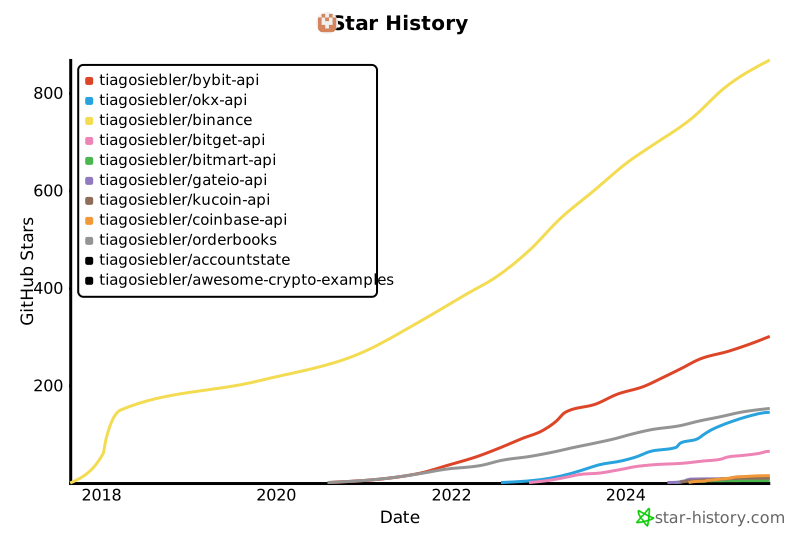](https://star-history.com/#tiagosiebler/bybit-api&tiagosiebler/okx-api&tiagosiebler/binance&tiagosiebler/bitget-api&tiagosiebler/bitmart-api&tiagosiebler/gateio-api&tiagosiebler/kucoin-api&tiagosiebler/coinbase-api&tiagosiebler/orderbooks&tiagosiebler/accountstate&tiagosiebler/awesome-crypto-examples&Date)
|
|
22606
|
-
|
|
22607
|
-
<!-- template_star_history_end -->
|
|
22608
|
-
|
|
22609
|
-
================
|
|
22610
|
-
File: src/websocket-client.ts
|
|
22611
|
-
================
|
|
22612
|
-
import WebSocket from 'isomorphic-ws';
|
|
22613
|
-
⋮----
|
|
22614
|
-
import { KlineInterval } from './types/shared';
|
|
22615
|
-
import {
|
|
22616
|
-
Exact,
|
|
22617
|
-
WsAPIOperationResponseMap,
|
|
22618
|
-
WsAPITopicRequestParamMap,
|
|
22619
|
-
WsAPIWsKeyTopicMap,
|
|
22620
|
-
WsOperation,
|
|
22621
|
-
WsRequestOperationBinance,
|
|
22622
|
-
} from './types/websockets/ws-api';
|
|
22623
|
-
import {
|
|
22624
|
-
MessageEventLike,
|
|
22625
|
-
WSClientConfigurableOptions,
|
|
22626
|
-
WsMarket,
|
|
22627
|
-
WsTopic,
|
|
22628
|
-
} from './types/websockets/ws-general';
|
|
22629
|
-
import {
|
|
22630
|
-
BaseWebsocketClient,
|
|
22631
|
-
EmittableEvent,
|
|
22632
|
-
MidflightWsRequestEvent,
|
|
22633
|
-
} from './util/BaseWSClient';
|
|
22634
|
-
import Beautifier from './util/beautifier';
|
|
22635
|
-
import { DefaultLogger } from './util/logger';
|
|
22636
|
-
import { signMessage } from './util/node-support';
|
|
22637
|
-
import {
|
|
22638
|
-
appendEventIfMissing,
|
|
22639
|
-
requiresWSAPINewClientOID,
|
|
22640
|
-
RestClientOptions,
|
|
22641
|
-
serialiseParams,
|
|
22642
|
-
validateWSAPINewClientOID,
|
|
22643
|
-
} from './util/requestUtils';
|
|
22644
|
-
import { neverGuard } from './util/typeGuards';
|
|
22645
|
-
import { SignAlgorithm } from './util/webCryptoAPI';
|
|
22646
|
-
import { RestClientCache } from './util/websockets/rest-client-cache';
|
|
22647
|
-
import { UserDataStreamManager } from './util/websockets/user-data-stream-manager';
|
|
22648
|
-
import {
|
|
22649
|
-
EVENT_TYPES_USER_DATA,
|
|
22650
|
-
getLegacyWsKeyContext,
|
|
22651
|
-
getLegacyWsStoreKeyWithContext,
|
|
22652
|
-
getMaxTopicsPerSubscribeEvent,
|
|
22653
|
-
getNormalisedTopicRequests,
|
|
22654
|
-
getPromiseRefForWSAPIRequest,
|
|
22655
|
-
getRealWsKeyFromDerivedWsKey,
|
|
22656
|
-
getTestnetWsKey,
|
|
22657
|
-
getWsUrl,
|
|
22658
|
-
getWsURLSuffix,
|
|
22659
|
-
isPrivateWsTopic,
|
|
22660
|
-
isWSPingFrameAvailable,
|
|
22661
|
-
isWSPongFrameAvailable,
|
|
22662
|
-
MiscUserDataConnectionState,
|
|
22663
|
-
parseEventTypeFromMessage,
|
|
22664
|
-
parseRawWsMessage,
|
|
22665
|
-
resolveUserDataMarketForWsKey,
|
|
22666
|
-
resolveWsKeyForLegacyMarket,
|
|
22667
|
-
WS_AUTH_ON_CONNECT_KEYS,
|
|
22668
|
-
WS_KEY_MAP,
|
|
22669
|
-
WSAPIWsKey,
|
|
22670
|
-
WsKey,
|
|
22671
|
-
WsTopicRequest,
|
|
22672
|
-
} from './util/websockets/websocket-util';
|
|
22673
|
-
import { WSConnectedResult } from './util/websockets/WsStore.types';
|
|
22674
|
-
⋮----
|
|
22675
|
-
export interface WSAPIRequestFlags {
|
|
22676
|
-
/** If true, will skip auth requirement for WS API connection */
|
|
22677
|
-
authIsOptional?: boolean | undefined;
|
|
22678
|
-
}
|
|
22679
|
-
⋮----
|
|
22680
|
-
/** If true, will skip auth requirement for WS API connection */
|
|
22681
|
-
⋮----
|
|
22682
|
-
/**
|
|
22683
|
-
* Multiplex Node.js, JavaScript & TypeScript Websocket Client for all of Binance's available WebSockets.
|
|
22684
|
-
*
|
|
22685
|
-
* When possible, it will subscribe to all requested topics on a single websocket connection. A list of
|
|
22686
|
-
* all available streams can be seen in the WS_KEY_URL_MAP found in util/websockets/websocket-util.ts.
|
|
22687
|
-
*
|
|
22688
|
-
* Connectivity is automatically maintained. If disconnected, the WebsocketClient will automatically
|
|
22689
|
-
* clean out the old dead connection, respawn a fresh one and resubscribe to all the requested topics.
|
|
22690
|
-
*
|
|
22691
|
-
* If any connection is reconnected, the WS client will:
|
|
22692
|
-
* - Emit the "reconnecting" event when the process begins.
|
|
22693
|
-
* - Emit the "reconnected" event, when the process has completed. When this event arrives, it is often a
|
|
22694
|
-
* good time to execute any synchorisation workflow (e.g. via the REST API) if any information was missed
|
|
22695
|
-
* while disconnected.
|
|
22696
|
-
*
|
|
22697
|
-
* User data streams will use a dedicated connection per stream for increased resilience.
|
|
22698
|
-
*/
|
|
22699
|
-
⋮----
|
|
22700
|
-
export class WebsocketClient extends BaseWebsocketClient<
|
|
22701
|
-
⋮----
|
|
22702
|
-
constructor(options?: WSClientConfigurableOptions, logger?: DefaultLogger)
|
|
22703
|
-
⋮----
|
|
22704
|
-
/**
|
|
22705
|
-
* Binance uses native WebSocket ping/pong frames, which cannot be directly used in
|
|
22706
|
-
* some environents (e.g. most browsers do not support sending raw ping/pong frames).
|
|
22707
|
-
*
|
|
22708
|
-
* This disables heartbeats in those environments, if ping/pong frames are unavailable.
|
|
22709
|
-
*
|
|
22710
|
-
* Some browsers may still handle these automatically. Some discussion around this can
|
|
22711
|
-
* be found here: https://stackoverflow.com/questions/10585355/sending-websocket-ping-pong-frame-from-browser
|
|
22712
|
-
*/
|
|
22713
|
-
⋮----
|
|
22714
|
-
// fn pointers:
|
|
22715
|
-
⋮----
|
|
22716
|
-
private getUserDataStreamManager(): UserDataStreamManager
|
|
22717
|
-
⋮----
|
|
22718
|
-
private getRestClientOptions(): RestClientOptions
|
|
22719
|
-
⋮----
|
|
22720
|
-
/**
|
|
22721
|
-
* Request connection of all dependent (public & WS API) websockets in prod, instead of waiting
|
|
22722
|
-
* for automatic connection by SDK.
|
|
22723
|
-
*
|
|
22724
|
-
* For the Binance SDK, this will only open public connections (without auth), but is almost definitely overkill if you're only working with one product group.
|
|
22725
|
-
*/
|
|
22726
|
-
public connectAll(): Promise<WSConnectedResult | undefined>[]
|
|
22727
|
-
⋮----
|
|
21997
|
+
* Request connection of all dependent (public & WS API) websockets in prod, instead of waiting
|
|
21998
|
+
* for automatic connection by SDK.
|
|
21999
|
+
*
|
|
22000
|
+
* For the Binance SDK, this will only open public connections (without auth), but is almost definitely overkill if you're only working with one product group.
|
|
22001
|
+
*/
|
|
22002
|
+
public connectAll(): Promise<WSConnectedResult | undefined>[]
|
|
22003
|
+
⋮----
|
|
22728
22004
|
/**
|
|
22729
22005
|
* Request connection to all public websockets in prod (spot, margin, futures, options). Overkill if
|
|
22730
22006
|
* you're only working with one product group.
|
|
@@ -23631,12 +22907,749 @@ public subscribeSpotDiffBookDepth(
|
|
|
23631
22907
|
updateMs: 1000 | 100 = 1000,
|
|
23632
22908
|
): Promise<unknown>
|
|
23633
22909
|
|
|
22910
|
+
================
|
|
22911
|
+
File: README.md
|
|
22912
|
+
================
|
|
22913
|
+
# Node.js & JavaScript SDK for Binance REST APIs & WebSockets
|
|
22914
|
+
|
|
22915
|
+
[](https://github.com/tiagosiebler/binance/actions/workflows/test.yml)
|
|
22916
|
+
[][1]
|
|
22917
|
+
[][1]
|
|
22918
|
+
[](https://dependents.info/tiagosiebler/binance)
|
|
22919
|
+
[][1]
|
|
22920
|
+
[][1]
|
|
22921
|
+
[](https://www.codefactor.io/repository/github/tiagosiebler/binance)
|
|
22922
|
+
[](https://t.me/nodetraders)
|
|
22923
|
+
|
|
22924
|
+
<p align="center">
|
|
22925
|
+
<a href="https://www.npmjs.com/package/binance">
|
|
22926
|
+
<picture>
|
|
22927
|
+
<source media="(prefers-color-scheme: dark)" srcset="https://github.com/tiagosiebler/binance/blob/master/docs/images/logoDarkMode2.svg?raw=true#gh-dark-mode-only">
|
|
22928
|
+
<img alt="SDK Logo" src="https://github.com/tiagosiebler/binance/blob/master/docs/images/logoBrightMode2.svg?raw=true#gh-light-mode-only">
|
|
22929
|
+
</picture>
|
|
22930
|
+
</a>
|
|
22931
|
+
</p>
|
|
22932
|
+
|
|
22933
|
+
[1]: https://www.npmjs.com/package/binance
|
|
22934
|
+
|
|
22935
|
+
Updated & performant JavaScript & Node.js SDK for the Binance REST APIs and WebSockets:
|
|
22936
|
+
|
|
22937
|
+
- Professional, robust & performant Binance SDK with leading trading volume in production (livenet).
|
|
22938
|
+
- Extensive integration with Binance REST APIs, WebSockets & WebSocket APIs.
|
|
22939
|
+
- Complete TypeScript support (with type declarations for all API requests & responses).
|
|
22940
|
+
- Supports Binance REST APIs for Binance Spot, Margin, Isolated Margin, Options, USDM & CoinM Futures.
|
|
22941
|
+
- Strongly typed requests and responses.
|
|
22942
|
+
- Automated end-to-end tests on most API calls, ensuring no breaking changes are released to npm.
|
|
22943
|
+
- Actively maintained with a modern, promise-driven interface.
|
|
22944
|
+
- Support for all authentication mechanisms available on Binance:
|
|
22945
|
+
- HMAC
|
|
22946
|
+
- RSA
|
|
22947
|
+
- Ed25519 (required for WS API).
|
|
22948
|
+
- Passing a private key as a secret will automatically detect whether to switch to RSA or Ed25519 authentication.
|
|
22949
|
+
- Supports WebSockets for all available product groups on Binance including Spot, Margin, Isolated Margin, Portfolio, Options, USDM & CoinM Futures.
|
|
22950
|
+
- Event driven messaging.
|
|
22951
|
+
- Smart WebSocket persistence
|
|
22952
|
+
- Automatically handle silent WebSocket disconnections through timed heartbeats, including the scheduled 24hr disconnect.
|
|
22953
|
+
- Automatically handle listenKey persistence and expiration/refresh.
|
|
22954
|
+
- Emit `reconnected` event when dropped connection is restored.
|
|
22955
|
+
- Strongly typed on most WebSocket events, with typeguards available for TypeScript users.
|
|
22956
|
+
- Optional:
|
|
22957
|
+
- Automatic beautification of WebSocket events (from one-letter keys to descriptive words, and strings with floats to numbers).
|
|
22958
|
+
- Automatic beautification of REST responses (parsing numbers in strings to numbers).
|
|
22959
|
+
- Supports WebSocket API on all available product groups, including Spot & Futures:
|
|
22960
|
+
- Use the WebsocketClient's event-driven `sendWSAPIRequest()` method, or;
|
|
22961
|
+
- Use the WebsocketAPIClient for a REST-like experience. Use the WebSocket API like a REST API! See [examples/ws-api-client.ts](./examples/ws-api-client.ts) for a demonstration.
|
|
22962
|
+
- Heavy automated end-to-end testing with real API calls.
|
|
22963
|
+
- End-to-end testing before any release.
|
|
22964
|
+
- Real API calls in e2e tests.
|
|
22965
|
+
- Proxy support via axios integration.
|
|
22966
|
+
- Active community support & collaboration in telegram: [Node.js Algo Traders](https://t.me/nodetraders).
|
|
22967
|
+
|
|
22968
|
+
## Table of Contents
|
|
22969
|
+
|
|
22970
|
+
- [Installation](#installation)
|
|
22971
|
+
- [Examples](#examples)
|
|
22972
|
+
- [REST API Examples](./examples/REST)
|
|
22973
|
+
- [WebSocket Examples](./examples/WebSockets)
|
|
22974
|
+
- [WebSocket Consumers](./examples/WebSockets/)
|
|
22975
|
+
- [WebSocket API](./examples/WebSockets/ws-api-client.ts)
|
|
22976
|
+
- [Issues & Discussion](#issues--discussion)
|
|
22977
|
+
- [Related Projects](#related-projects)
|
|
22978
|
+
- [Documentation Links](#documentation)
|
|
22979
|
+
- [Usage](#usage)
|
|
22980
|
+
- [REST API Clients](#rest-api-clients)
|
|
22981
|
+
- [REST Main Client](#rest-main-client)
|
|
22982
|
+
- [REST USD-M Futures](#rest-usd-m-futures)
|
|
22983
|
+
- [REST COIN-M Futures](#rest-coin-m-futures)
|
|
22984
|
+
- [WebSockets](#websockets)
|
|
22985
|
+
- [WebSocket Consumers](#websocket-consumers)
|
|
22986
|
+
- [WebSocket API](#websocket-api)
|
|
22987
|
+
- [Event Driven API](#event-driven-api)
|
|
22988
|
+
- [Promise Driven API](#async-await-api)
|
|
22989
|
+
- [Market Maker Endpoints](#market-maker-endpoints)
|
|
22990
|
+
- [Using Market Maker Endpoints](#using-market-maker-endpoints)
|
|
22991
|
+
- [Best practice](#best-practice)
|
|
22992
|
+
- [Customise Logging](#customise-logging)
|
|
22993
|
+
- [Frontend Usage](#browserfrontend-usage)
|
|
22994
|
+
- [Import](#import)
|
|
22995
|
+
- [Webpack](#webpack)
|
|
22996
|
+
- [LLMs & AI](#use-with-llms--ai)
|
|
22997
|
+
- [Contributions & Thanks](#contributions--thanks)
|
|
22998
|
+
|
|
22999
|
+
## Installation
|
|
23000
|
+
|
|
23001
|
+
`npm install binance --save`
|
|
23002
|
+
|
|
23003
|
+
## Examples
|
|
23004
|
+
|
|
23005
|
+
Refer to the [examples](./examples) folder for implementation demos.
|
|
23006
|
+
|
|
23007
|
+
## Issues & Discussion
|
|
23008
|
+
|
|
23009
|
+
- Issues? Check the [issues tab](https://github.com/tiagosiebler/binance/issues).
|
|
23010
|
+
- Discuss & collaborate with other node devs? Join our [Node.js Algo Traders](https://t.me/nodetraders) engineering community on telegram.
|
|
23011
|
+
- Questions about Binance APIs & WebSockets? Ask in the official [Binance API](https://t.me/binance_api_english) group on telegram.
|
|
23012
|
+
- Follow our announcement channel for real-time updates on [X/Twitter](https://x.com/sieblyio)
|
|
23013
|
+
|
|
23014
|
+
<!-- template_related_projects -->
|
|
23015
|
+
|
|
23016
|
+
## Related projects
|
|
23017
|
+
|
|
23018
|
+
Check out my related JavaScript/TypeScript/Node.js projects:
|
|
23019
|
+
|
|
23020
|
+
- Try my REST API & WebSocket SDKs:
|
|
23021
|
+
- [Bybit-api Node.js SDK](https://www.npmjs.com/package/bybit-api)
|
|
23022
|
+
- [Okx-api Node.js SDK](https://www.npmjs.com/package/okx-api)
|
|
23023
|
+
- [Binance Node.js SDK](https://www.npmjs.com/package/binance)
|
|
23024
|
+
- [Gateio-api Node.js SDK](https://www.npmjs.com/package/gateio-api)
|
|
23025
|
+
- [Bitget-api Node.js SDK](https://www.npmjs.com/package/bitget-api)
|
|
23026
|
+
- [Kucoin-api Node.js SDK](https://www.npmjs.com/package/kucoin-api)
|
|
23027
|
+
- [Coinbase-api Node.js SDK](https://www.npmjs.com/package/coinbase-api)
|
|
23028
|
+
- [Bitmart-api Node.js SDK](https://www.npmjs.com/package/bitmart-api)
|
|
23029
|
+
- Try my misc utilities:
|
|
23030
|
+
- [OrderBooks Node.js](https://www.npmjs.com/package/orderbooks)
|
|
23031
|
+
- [Crypto Exchange Account State Cache](https://www.npmjs.com/package/accountstate)
|
|
23032
|
+
- Check out my examples:
|
|
23033
|
+
- [awesome-crypto-examples Node.js](https://github.com/tiagosiebler/awesome-crypto-examples)
|
|
23034
|
+
<!-- template_related_projects_end -->
|
|
23035
|
+
|
|
23036
|
+
## Documentation
|
|
23037
|
+
|
|
23038
|
+
Most methods accept JS objects. These can be populated using parameters specified by Binance's API documentation.
|
|
23039
|
+
|
|
23040
|
+
- Binance API Documentation
|
|
23041
|
+
- [ Spot ](https://developers.binance.com/docs/binance-spot-api-docs)
|
|
23042
|
+
- [ Derivatives ](https://developers.binance.com/docs/derivatives)
|
|
23043
|
+
- [ Margin ](https://developers.binance.com/docs/margin_trading)
|
|
23044
|
+
- [ Wallet ](https://developers.binance.com/docs/wallet)
|
|
23045
|
+
- [Find all products here](https://developers.binance.com/en)
|
|
23046
|
+
- [REST Endpoint Function List](./docs/endpointFunctionList.md)
|
|
23047
|
+
- [TSDoc Documentation (autogenerated using typedoc)](https://tsdocs.dev/docs/binance)
|
|
23048
|
+
|
|
23049
|
+
## Structure
|
|
23050
|
+
|
|
23051
|
+
This project uses typescript. Resources are stored in 3 key structures:
|
|
23052
|
+
|
|
23053
|
+
- [src](./src) - the whole connector written in typescript
|
|
23054
|
+
- [lib](./lib) - the javascript version of the project (compiled from typescript). This should not be edited directly, as it will be overwritten with each release.
|
|
23055
|
+
- [dist](./dist) - the packed bundle of the project for use in browser environments.
|
|
23056
|
+
|
|
23057
|
+
---
|
|
23058
|
+
|
|
23059
|
+
# Usage
|
|
23060
|
+
|
|
23061
|
+
Create API credentials at Binance
|
|
23062
|
+
|
|
23063
|
+
- [Livenet](https://www.binance.com/en/support/faq/360002502072?ref=IVRLUZJO)
|
|
23064
|
+
- [Testnet](https://testnet.binance.vision/).
|
|
23065
|
+
- [Testnet Futures](testnet.binancefuture.com).
|
|
23066
|
+
|
|
23067
|
+
## REST API Clients
|
|
23068
|
+
|
|
23069
|
+
There are several REST API modules as there are some differences in each API group.
|
|
23070
|
+
|
|
23071
|
+
1. `MainClient` for most APIs, including: spot, margin, isolated margin, mining, BLVT, BSwap, Fiat & sub-account management.
|
|
23072
|
+
2. `USDMClient` for USD-M futures APIs.
|
|
23073
|
+
3. `CoinMClient` for COIN-M futures APIs.
|
|
23074
|
+
4. `PortfolioClient` for Portfolio Margin APIs.
|
|
23075
|
+
|
|
23076
|
+
Vanilla Options is not yet available. Please get in touch if you're looking for this.
|
|
23077
|
+
|
|
23078
|
+
### REST Main Client
|
|
23079
|
+
|
|
23080
|
+
The MainClient covers all endpoints under the main "api\*.binance.com" subdomains, including but not limited to endpoints in the following product groups:
|
|
23081
|
+
|
|
23082
|
+
- Spot
|
|
23083
|
+
- Cross & isolated margin
|
|
23084
|
+
- Convert
|
|
23085
|
+
- Wallet
|
|
23086
|
+
- Futures management (transfers & history)
|
|
23087
|
+
- Sub account management
|
|
23088
|
+
- Misc transfers
|
|
23089
|
+
- Auto & dual invest
|
|
23090
|
+
- Staking
|
|
23091
|
+
- Mining
|
|
23092
|
+
- Loans & VIP loans
|
|
23093
|
+
- Simple Earn
|
|
23094
|
+
- NFTs
|
|
23095
|
+
- C2C
|
|
23096
|
+
- Exchange Link
|
|
23097
|
+
- Alpha trading
|
|
23098
|
+
|
|
23099
|
+
Refer to the following links for a complete list of available endpoints:
|
|
23100
|
+
|
|
23101
|
+
- [Binance Node.js & JavaScript SDK Endpoint Map](https://github.com/tiagosiebler/binance/blob/master/docs/endpointFunctionList.md)
|
|
23102
|
+
- [Binance Spot API Docs](https://developers.binance.com/docs/binance-spot-api-docs/rest-api/general-endpoints)
|
|
23103
|
+
|
|
23104
|
+
Start by importing the `MainClient` class. API credentials are optional, unless you plan on making private API calls. More Node.js & JavaScript examples for Binance's REST APIs & WebSockets can be found in the [examples](./examples) folder on GitHub.
|
|
23105
|
+
|
|
23106
|
+
```javascript
|
|
23107
|
+
import { MainClient } from 'binance';
|
|
23108
|
+
|
|
23109
|
+
// or, if you prefer `require()`:
|
|
23110
|
+
// const { MainClient } = require('binance');
|
|
23111
|
+
|
|
23112
|
+
const API_KEY = 'xxx';
|
|
23113
|
+
const API_SECRET = 'yyy';
|
|
23114
|
+
|
|
23115
|
+
const client = new MainClient({
|
|
23116
|
+
api_key: API_KEY,
|
|
23117
|
+
api_secret: API_SECRET,
|
|
23118
|
+
// Connect to testnet environment
|
|
23119
|
+
// testnet: true,
|
|
23120
|
+
});
|
|
23121
|
+
|
|
23122
|
+
client
|
|
23123
|
+
.getAccountTradeList({ symbol: 'BTCUSDT' })
|
|
23124
|
+
.then((result) => {
|
|
23125
|
+
console.log('getAccountTradeList result: ', result);
|
|
23126
|
+
})
|
|
23127
|
+
.catch((err) => {
|
|
23128
|
+
console.error('getAccountTradeList error: ', err);
|
|
23129
|
+
});
|
|
23130
|
+
|
|
23131
|
+
client
|
|
23132
|
+
.getExchangeInfo()
|
|
23133
|
+
.then((result) => {
|
|
23134
|
+
console.log('getExchangeInfo inverse result: ', result);
|
|
23135
|
+
})
|
|
23136
|
+
.catch((err) => {
|
|
23137
|
+
console.error('getExchangeInfo inverse error: ', err);
|
|
23138
|
+
});
|
|
23139
|
+
```
|
|
23140
|
+
|
|
23141
|
+
See [main-client.ts](./src/main-client.ts) for further information on the available REST API endpoints for spot/margin/etc.
|
|
23142
|
+
|
|
23143
|
+
### REST USD-M Futures
|
|
23144
|
+
|
|
23145
|
+
Start by importing the USDM client. API credentials are optional, unless you plan on making private API calls.
|
|
23146
|
+
|
|
23147
|
+
```javascript
|
|
23148
|
+
import { USDMClient } from 'binance';
|
|
23149
|
+
|
|
23150
|
+
// or, if you prefer `require()`:
|
|
23151
|
+
// const { USDMClient } = require('binance');
|
|
23152
|
+
|
|
23153
|
+
const API_KEY = 'xxx';
|
|
23154
|
+
const API_SECRET = 'yyy';
|
|
23155
|
+
|
|
23156
|
+
const client = new USDMClient({
|
|
23157
|
+
api_key: API_KEY,
|
|
23158
|
+
api_secret: API_SECRET,
|
|
23159
|
+
// Connect to testnet environment
|
|
23160
|
+
// testnet: true,
|
|
23161
|
+
});
|
|
23162
|
+
|
|
23163
|
+
client
|
|
23164
|
+
.getBalance()
|
|
23165
|
+
.then((result) => {
|
|
23166
|
+
console.log('getBalance result: ', result);
|
|
23167
|
+
})
|
|
23168
|
+
.catch((err) => {
|
|
23169
|
+
console.error('getBalance error: ', err);
|
|
23170
|
+
});
|
|
23171
|
+
|
|
23172
|
+
client
|
|
23173
|
+
.submitNewOrder({
|
|
23174
|
+
side: 'SELL',
|
|
23175
|
+
symbol: 'BTCUSDT',
|
|
23176
|
+
type: 'MARKET',
|
|
23177
|
+
quantity: 0.001,
|
|
23178
|
+
})
|
|
23179
|
+
.then((result) => {
|
|
23180
|
+
console.log('submitNewOrder result: ', result);
|
|
23181
|
+
})
|
|
23182
|
+
.catch((err) => {
|
|
23183
|
+
console.error('submitNewOrder error: ', err);
|
|
23184
|
+
});
|
|
23185
|
+
```
|
|
23186
|
+
|
|
23187
|
+
See [usdm-client.ts](./src/usdm-client.ts) for further information.
|
|
23188
|
+
|
|
23189
|
+
### REST COIN-M Futures
|
|
23190
|
+
|
|
23191
|
+
Start by importing the coin-m client. API credentials are optional, though an error is thrown when attempting any private API calls without credentials.
|
|
23192
|
+
|
|
23193
|
+
```javascript
|
|
23194
|
+
import { CoinMClient } from 'binance';
|
|
23195
|
+
|
|
23196
|
+
// or, if you prefer `require()`:
|
|
23197
|
+
// const { CoinMClient } = require('binance');
|
|
23198
|
+
|
|
23199
|
+
const API_KEY = 'xxx';
|
|
23200
|
+
const API_SECRET = 'yyy';
|
|
23201
|
+
|
|
23202
|
+
const client = new CoinMClient({
|
|
23203
|
+
api_key: API_KEY,
|
|
23204
|
+
api_secret: API_SECRET,
|
|
23205
|
+
// Connect to testnet environment
|
|
23206
|
+
// testnet: true,
|
|
23207
|
+
});
|
|
23208
|
+
|
|
23209
|
+
client
|
|
23210
|
+
.getSymbolOrderBookTicker()
|
|
23211
|
+
.then((result) => {
|
|
23212
|
+
console.log('getSymbolOrderBookTicker result: ', result);
|
|
23213
|
+
})
|
|
23214
|
+
.catch((err) => {
|
|
23215
|
+
console.error('getSymbolOrderBookTicker error: ', err);
|
|
23216
|
+
});
|
|
23217
|
+
```
|
|
23218
|
+
|
|
23219
|
+
See [coinm-client.ts](./src/coinm-client.ts) for further information.
|
|
23220
|
+
|
|
23221
|
+
## WebSockets
|
|
23222
|
+
|
|
23223
|
+
### WebSocket Consumers
|
|
23224
|
+
|
|
23225
|
+
All websockets are accessible via the shared `WebsocketClient`. As before, API credentials are optional unless the user data stream is required.
|
|
23226
|
+
|
|
23227
|
+
The below example demonstrates connecting as a consumer, to receive WebSocket events from Binance:
|
|
23228
|
+
|
|
23229
|
+
```javascript
|
|
23230
|
+
import { WebsocketClient } from 'binance';
|
|
23231
|
+
|
|
23232
|
+
// or, if you prefer `require()`:
|
|
23233
|
+
// const { WebsocketClient } = require('binance');
|
|
23234
|
+
|
|
23235
|
+
const API_KEY = 'xxx';
|
|
23236
|
+
const API_SECRET = 'yyy';
|
|
23237
|
+
|
|
23238
|
+
/**
|
|
23239
|
+
* The WebsocketClient will manage individual connections for you, under the hood.
|
|
23240
|
+
* Just make an instance of the WS Client and subscribe to topics. It'll handle the rest.
|
|
23241
|
+
*/
|
|
23242
|
+
const wsClient = new WebsocketClient({
|
|
23243
|
+
api_key: key,
|
|
23244
|
+
api_secret: secret,
|
|
23245
|
+
// Optional: when enabled, the SDK will try to format incoming data into more readable objects.
|
|
23246
|
+
// Beautified data is emitted via the "formattedMessage" event
|
|
23247
|
+
beautify: true,
|
|
23248
|
+
// Disable ping/pong ws heartbeat mechanism (not recommended)
|
|
23249
|
+
// disableHeartbeat: true,
|
|
23250
|
+
// Connect to testnet environment
|
|
23251
|
+
// testnet: true,
|
|
23252
|
+
});
|
|
23253
|
+
|
|
23254
|
+
// receive raw events
|
|
23255
|
+
wsClient.on('message', (data) => {
|
|
23256
|
+
console.log('raw message received ', JSON.stringify(data, null, 2));
|
|
23257
|
+
});
|
|
23258
|
+
|
|
23259
|
+
// notification when a connection is opened
|
|
23260
|
+
wsClient.on('open', (data) => {
|
|
23261
|
+
console.log('connection opened open:', data.wsKey, data.wsUrl);
|
|
23262
|
+
});
|
|
23263
|
+
|
|
23264
|
+
// receive formatted events with beautified keys. Any "known" floats stored in strings as parsed as floats.
|
|
23265
|
+
wsClient.on('formattedMessage', (data) => {
|
|
23266
|
+
console.log('formattedMessage: ', data);
|
|
23267
|
+
});
|
|
23268
|
+
|
|
23269
|
+
// read response to command sent via WS stream (e.g LIST_SUBSCRIPTIONS)
|
|
23270
|
+
wsClient.on('response', (data) => {
|
|
23271
|
+
console.log('log response: ', JSON.stringify(data, null, 2));
|
|
23272
|
+
});
|
|
23273
|
+
|
|
23274
|
+
// receive notification when a ws connection is reconnecting automatically
|
|
23275
|
+
wsClient.on('reconnecting', (data) => {
|
|
23276
|
+
console.log('ws automatically reconnecting.... ', data?.wsKey);
|
|
23277
|
+
});
|
|
23278
|
+
|
|
23279
|
+
// receive notification that a reconnection completed successfully (e.g use REST to check for missing data)
|
|
23280
|
+
wsClient.on('reconnected', (data) => {
|
|
23281
|
+
console.log('ws has reconnected ', data?.wsKey);
|
|
23282
|
+
});
|
|
23283
|
+
|
|
23284
|
+
// Recommended: receive error events (e.g. first reconnection failed)
|
|
23285
|
+
wsClient.on('exception', (data) => {
|
|
23286
|
+
console.log('ws saw error ', data?.wsKey);
|
|
23287
|
+
});
|
|
23288
|
+
|
|
23289
|
+
/**
|
|
23290
|
+
* Subscribe to public topics either one at a time or many in an array
|
|
23291
|
+
*/
|
|
23292
|
+
|
|
23293
|
+
// E.g. one at a time, routed to the coinm futures websockets:
|
|
23294
|
+
wsClient.subscribe('btcusd@indexPrice', 'coinm');
|
|
23295
|
+
wsClient.subscribe('btcusd@miniTicker', 'coinm');
|
|
23296
|
+
|
|
23297
|
+
// Or send many topics at once to a stream, e.g. the usdm futures stream:
|
|
23298
|
+
wsClient.subscribe(
|
|
23299
|
+
['btcusdt@aggTrade', 'btcusdt@markPrice', '!ticker@arr', '!miniTicker@arr'],
|
|
23300
|
+
'usdm',
|
|
23301
|
+
);
|
|
23302
|
+
|
|
23303
|
+
// spot & margin topics should go to "main"
|
|
23304
|
+
// (similar how the MainClient is for REST APIs in that product group)
|
|
23305
|
+
wsClient.subscribe(
|
|
23306
|
+
[
|
|
23307
|
+
// All Market Rolling Window Statistics Streams
|
|
23308
|
+
// https://developers.binance.com/docs/binance-spot-api-docs/web-socket-streams#all-market-rolling-window-statistics-streams
|
|
23309
|
+
'!ticker_1h@arr',
|
|
23310
|
+
// Individual Symbol Book Ticker Streams
|
|
23311
|
+
// https://developers.binance.com/docs/binance-spot-api-docs/web-socket-streams#individual-symbol-book-ticker-streams
|
|
23312
|
+
'btcusdt@bookTicker',
|
|
23313
|
+
// Average Price
|
|
23314
|
+
// https://developers.binance.com/docs/binance-spot-api-docs/web-socket-streams#average-price
|
|
23315
|
+
'btcusdt@avgPrice',
|
|
23316
|
+
// Partial Book Depth Streams
|
|
23317
|
+
// https://developers.binance.com/docs/binance-spot-api-docs/web-socket-streams#partial-book-depth-streams
|
|
23318
|
+
'btcusdt@depth10@100ms',
|
|
23319
|
+
// Diff. Depth Stream
|
|
23320
|
+
// https://developers.binance.com/docs/binance-spot-api-docs/web-socket-streams#diff-depth-stream
|
|
23321
|
+
'btcusdt@depth',
|
|
23322
|
+
],
|
|
23323
|
+
// Look at the `WS_KEY_URL_MAP` for a list of values here:
|
|
23324
|
+
// https://github.com/tiagosiebler/binance/blob/master/src/util/websockets/websocket-util.ts
|
|
23325
|
+
// "main" connects to wss://stream.binance.com:9443/stream
|
|
23326
|
+
// https://developers.binance.com/docs/binance-spot-api-docs/web-socket-streams
|
|
23327
|
+
'main',
|
|
23328
|
+
);
|
|
23329
|
+
|
|
23330
|
+
/**
|
|
23331
|
+
* For the user data stream, these convenient subscribe methods open a dedicated
|
|
23332
|
+
* connection with the listen key workflow:
|
|
23333
|
+
*/
|
|
23334
|
+
|
|
23335
|
+
wsClient.subscribeSpotUserDataStream();
|
|
23336
|
+
wsClient.subscribeMarginUserDataStream();
|
|
23337
|
+
wsClient.subscribeIsolatedMarginUserDataStream('BTCUSDT');
|
|
23338
|
+
wsClient.subscribeUsdFuturesUserDataStream();
|
|
23339
|
+
```
|
|
23340
|
+
|
|
23341
|
+
See [websocket-client.ts](./src/websocket-client.ts) for further information. Also see [ws-userdata.ts](./examples/ws-userdata.ts) for user data examples.
|
|
23342
|
+
|
|
23343
|
+
### WebSocket API
|
|
23344
|
+
|
|
23345
|
+
Some of the product groups available on Binance also support sending requests (commands) over an active WebSocket connection. This is called the WebSocket API.
|
|
23346
|
+
|
|
23347
|
+
Note: the WebSocket API requires the use of Ed25519 keys. HMAC & RSA keys are not supported by Binance for the WebSocket API (as of Apr 2025).
|
|
23348
|
+
|
|
23349
|
+
#### Event Driven API
|
|
23350
|
+
|
|
23351
|
+
The WebSocket API is available in the [WebsocketClient](./src/websocket-client.ts) via the `sendWSAPIRequest(wsKey, command, commandParameters)` method.
|
|
23352
|
+
|
|
23353
|
+
Each call to this method is wrapped in a promise, which you can async await for a response, or handle it in a raw event-driven design.
|
|
23354
|
+
|
|
23355
|
+
#### Async Await API
|
|
23356
|
+
|
|
23357
|
+
The WebSocket API is also available in a promise-wrapped REST-like format. Either, as above, await any calls to `sendWSAPIRequest(...)`, or directly use the convenient WebsocketAPIClient. This class is very similar to existing REST API classes (such as the MainClient or USDMClient).
|
|
23358
|
+
|
|
23359
|
+
It provides one function per endpoint, feels like a REST API and will automatically route your request via an automatically persisted, authenticated and health-checked WebSocket API connection.
|
|
23360
|
+
|
|
23361
|
+
Below is an example showing how easy it is to use the WebSocket API without any concern for the complexity of managing WebSockets.
|
|
23362
|
+
|
|
23363
|
+
```typescript
|
|
23364
|
+
import { WebsocketAPIClient } from 'binance';
|
|
23365
|
+
|
|
23366
|
+
// or, if you prefer `require()`:
|
|
23367
|
+
// const { WebsocketAPIClient } = require('binance');
|
|
23368
|
+
|
|
23369
|
+
/**
|
|
23370
|
+
* The WS API only works with an Ed25519 API key.
|
|
23371
|
+
*
|
|
23372
|
+
* Check the rest-private-ed25519.md in this folder for more guidance
|
|
23373
|
+
* on preparing this Ed25519 API key.
|
|
23374
|
+
*/
|
|
23375
|
+
|
|
23376
|
+
const publicKey = `-----BEGIN PUBLIC KEY-----
|
|
23377
|
+
MCexampleQTxwLU9o=
|
|
23378
|
+
-----END PUBLIC KEY-----
|
|
23379
|
+
`;
|
|
23380
|
+
|
|
23381
|
+
const privateKey = `-----BEGIN PRIVATE KEY-----
|
|
23382
|
+
MC4CAQAexamplewqj5CzUuTy1
|
|
23383
|
+
-----END PRIVATE KEY-----
|
|
23384
|
+
`;
|
|
23385
|
+
|
|
23386
|
+
// API Key returned by binance, generated using the publicKey (above) via Binance's website
|
|
23387
|
+
const apiKey = 'TQpJexamplerobdG';
|
|
23388
|
+
|
|
23389
|
+
// Make an instance of the WS API Client
|
|
23390
|
+
const wsClient = new WebsocketAPIClient({
|
|
23391
|
+
api_key: apiKey,
|
|
23392
|
+
api_secret: privateKey,
|
|
23393
|
+
beautify: true,
|
|
23394
|
+
|
|
23395
|
+
// Enforce testnet ws connections, regardless of supplied wsKey
|
|
23396
|
+
// testnet: true,
|
|
23397
|
+
});
|
|
23398
|
+
|
|
23399
|
+
// Optional, if you see RECV Window errors, you can use this to manage time issues. However, make sure you sync your system clock first!
|
|
23400
|
+
// https://github.com/tiagosiebler/awesome-crypto-examples/wiki/Timestamp-for-this-request-is-outside-of-the-recvWindow
|
|
23401
|
+
// wsClient.setTimeOffsetMs(-5000);
|
|
23402
|
+
|
|
23403
|
+
// Optional, see above. Can be used to prepare a connection before sending commands
|
|
23404
|
+
// await wsClient.connectWSAPI(WS_KEY_MAP.mainWSAPI);
|
|
23405
|
+
|
|
23406
|
+
// Make WebSocket API calls, very similar to a REST API:
|
|
23407
|
+
|
|
23408
|
+
wsClient
|
|
23409
|
+
.getFuturesAccountBalanceV2({
|
|
23410
|
+
timestamp: Date.now(),
|
|
23411
|
+
recvWindow: 5000,
|
|
23412
|
+
})
|
|
23413
|
+
.then((result) => {
|
|
23414
|
+
console.log('getFuturesAccountBalanceV2 result: ', result);
|
|
23415
|
+
})
|
|
23416
|
+
.catch((err) => {
|
|
23417
|
+
console.error('getFuturesAccountBalanceV2 error: ', err);
|
|
23418
|
+
});
|
|
23419
|
+
|
|
23420
|
+
wsClient
|
|
23421
|
+
.submitNewFuturesOrder('usdm', {
|
|
23422
|
+
side: 'SELL',
|
|
23423
|
+
symbol: 'BTCUSDT',
|
|
23424
|
+
type: 'MARKET',
|
|
23425
|
+
quantity: 0.001,
|
|
23426
|
+
timestamp: Date.now(),
|
|
23427
|
+
// recvWindow: 5000,
|
|
23428
|
+
})
|
|
23429
|
+
.then((result) => {
|
|
23430
|
+
console.log('getFuturesAccountBalanceV2 result: ', result);
|
|
23431
|
+
})
|
|
23432
|
+
.catch((err) => {
|
|
23433
|
+
console.error('getFuturesAccountBalanceV2 error: ', err);
|
|
23434
|
+
});
|
|
23435
|
+
```
|
|
23436
|
+
|
|
23437
|
+
---
|
|
23438
|
+
|
|
23439
|
+
## Market Maker Endpoints
|
|
23440
|
+
|
|
23441
|
+
Binance provides specialized market maker endpoints for qualified high-frequency trading users who have enrolled in at least one of the Futures Liquidity Provider Programs, including the USDⓈ-M Futures Maker Program, COIN-M Futures Maker Program, and USDⓈ-M Futures Taker Program.
|
|
23442
|
+
|
|
23443
|
+
These endpoints provide the same functionality as regular endpoints but with optimized routing for market makers. For more information about eligibility and enrollment, visit: https://www.binance.com/en/support/faq/detail/7df7f3838c3b49e692d175374c3a3283
|
|
23444
|
+
|
|
23445
|
+
### Using Market Maker Endpoints
|
|
23446
|
+
|
|
23447
|
+
To use market maker endpoints, simply add the `useMMSubdomain: true` option when initializing any client (REST API clients, WebSocket clients, or WebSocket API clients):
|
|
23448
|
+
|
|
23449
|
+
#### Market Maker REST API Clients
|
|
23450
|
+
|
|
23451
|
+
```javascript
|
|
23452
|
+
import { USDMClient, CoinMClient } from 'binance';
|
|
23453
|
+
|
|
23454
|
+
// USD-M Futures with MM endpoints
|
|
23455
|
+
const usdmClient = new USDMClient({
|
|
23456
|
+
api_key: API_KEY,
|
|
23457
|
+
api_secret: API_SECRET,
|
|
23458
|
+
useMMSubdomain: true, // Enable market maker endpoints
|
|
23459
|
+
});
|
|
23460
|
+
|
|
23461
|
+
// COIN-M Futures with MM endpoints
|
|
23462
|
+
const coinmClient = new CoinMClient({
|
|
23463
|
+
api_key: API_KEY,
|
|
23464
|
+
api_secret: API_SECRET,
|
|
23465
|
+
useMMSubdomain: true, // Enable market maker endpoints
|
|
23466
|
+
});
|
|
23467
|
+
```
|
|
23468
|
+
|
|
23469
|
+
#### Market Maker WebSocket Clients
|
|
23470
|
+
|
|
23471
|
+
```javascript
|
|
23472
|
+
import { WebsocketClient, WebsocketAPIClient } from 'binance';
|
|
23473
|
+
|
|
23474
|
+
// WebSocket consumer with MM endpoints
|
|
23475
|
+
const wsClient = new WebsocketClient({
|
|
23476
|
+
api_key: API_KEY,
|
|
23477
|
+
api_secret: API_SECRET,
|
|
23478
|
+
useMMSubdomain: true, // Enable market maker endpoints
|
|
23479
|
+
});
|
|
23480
|
+
|
|
23481
|
+
// WebSocket API client with MM endpoints
|
|
23482
|
+
const wsApiClient = new WebsocketAPIClient({
|
|
23483
|
+
api_key: API_KEY,
|
|
23484
|
+
api_secret: API_SECRET,
|
|
23485
|
+
useMMSubdomain: true, // Enable market maker endpoints
|
|
23486
|
+
});
|
|
23487
|
+
```
|
|
23488
|
+
|
|
23489
|
+
**Note:** Market maker endpoints are only available for futures products (USD-M and COIN-M). Spot, margin, and other product groups use the regular endpoints regardless of the `useMMSubdomain` setting. Market maker endpoints are also not available on testnet environments.
|
|
23490
|
+
|
|
23491
|
+
### Best practice
|
|
23492
|
+
|
|
23493
|
+
Since market maker endpoints are only available for some of the futures endpoints, you may need to use multiple client instances if your algorithm needs to use both regular and MM endpoints.
|
|
23494
|
+
|
|
23495
|
+
```javascript
|
|
23496
|
+
import { USDMClient } from 'binance';
|
|
23497
|
+
|
|
23498
|
+
// MM client for USD-M futures
|
|
23499
|
+
const futuresMMClient = new USDMClient({
|
|
23500
|
+
api_key: API_KEY,
|
|
23501
|
+
api_secret: API_SECRET,
|
|
23502
|
+
useMMEndpoints: true, // Use MM endpoints for futures
|
|
23503
|
+
});
|
|
23504
|
+
|
|
23505
|
+
// Regular client for USD-M futures
|
|
23506
|
+
const futuresRegularClient = new USDMClient({
|
|
23507
|
+
api_key: API_KEY,
|
|
23508
|
+
api_secret: API_SECRET,
|
|
23509
|
+
useMMEndpoints: false, // Use regular endpoints for futures
|
|
23510
|
+
});
|
|
23511
|
+
```
|
|
23512
|
+
|
|
23513
|
+
## Customise Logging
|
|
23514
|
+
|
|
23515
|
+
Pass a custom logger which supports the log methods `trace`, `info` and `error`, or override methods from the default logger as desired.
|
|
23516
|
+
|
|
23517
|
+
```javascript
|
|
23518
|
+
import { WebsocketClient, DefaultLogger } from 'binance';
|
|
23519
|
+
|
|
23520
|
+
// or, if you prefer `require()`:
|
|
23521
|
+
// const { WebsocketClient, DefaultLogger } = require('binance');
|
|
23522
|
+
|
|
23523
|
+
// Enable all logging on the trace level (disabled by default)
|
|
23524
|
+
DefaultLogger.trace = (...params) => {
|
|
23525
|
+
console.trace('trace: ', params);
|
|
23526
|
+
};
|
|
23527
|
+
|
|
23528
|
+
// Pass the updated logger as the 2nd parameter
|
|
23529
|
+
const ws = new WebsocketClient(
|
|
23530
|
+
{
|
|
23531
|
+
api_key: key,
|
|
23532
|
+
api_secret: secret,
|
|
23533
|
+
beautify: true,
|
|
23534
|
+
},
|
|
23535
|
+
DefaultLogger
|
|
23536
|
+
);
|
|
23537
|
+
|
|
23538
|
+
// Or, create a completely custom logger with the 3 available functions
|
|
23539
|
+
const customLogger = {
|
|
23540
|
+
trace: (...params: LogParams): void => {
|
|
23541
|
+
console.trace(new Date(), params);
|
|
23542
|
+
},
|
|
23543
|
+
info: (...params: LogParams): void => {
|
|
23544
|
+
console.info(new Date(), params);
|
|
23545
|
+
},
|
|
23546
|
+
error: (...params: LogParams): void => {
|
|
23547
|
+
console.error(new Date(), params);
|
|
23548
|
+
},
|
|
23549
|
+
}
|
|
23550
|
+
|
|
23551
|
+
// Pass the custom logger as the 2nd parameter
|
|
23552
|
+
const ws = new WebsocketClient(
|
|
23553
|
+
{
|
|
23554
|
+
api_key: key,
|
|
23555
|
+
api_secret: secret,
|
|
23556
|
+
beautify: true,
|
|
23557
|
+
},
|
|
23558
|
+
customLogger
|
|
23559
|
+
);
|
|
23560
|
+
```
|
|
23561
|
+
|
|
23562
|
+
## Browser/Frontend Usage
|
|
23563
|
+
|
|
23564
|
+
### Import
|
|
23565
|
+
|
|
23566
|
+
This is the "modern" way, allowing the package to be directly imported into frontend projects with full typescript support.
|
|
23567
|
+
|
|
23568
|
+
1. Install these dependencies
|
|
23569
|
+
```sh
|
|
23570
|
+
npm install crypto-browserify stream-browserify
|
|
23571
|
+
```
|
|
23572
|
+
2. Add this to your `tsconfig.json`
|
|
23573
|
+
```json
|
|
23574
|
+
{
|
|
23575
|
+
"compilerOptions": {
|
|
23576
|
+
"paths": {
|
|
23577
|
+
"crypto": [
|
|
23578
|
+
"./node_modules/crypto-browserify"
|
|
23579
|
+
],
|
|
23580
|
+
"stream": [
|
|
23581
|
+
"./node_modules/stream-browserify"
|
|
23582
|
+
]
|
|
23583
|
+
}
|
|
23584
|
+
```
|
|
23585
|
+
3. Declare this in the global context of your application (ex: in polyfills for angular)
|
|
23586
|
+
```js
|
|
23587
|
+
(window as any).global = window;
|
|
23588
|
+
```
|
|
23589
|
+
|
|
23590
|
+
### Webpack
|
|
23591
|
+
|
|
23592
|
+
This is the "old" way of using this package on webpages. This will build a minified js bundle that can be pulled in using a script tag on a website.
|
|
23593
|
+
|
|
23594
|
+
Build a bundle using webpack:
|
|
23595
|
+
|
|
23596
|
+
- `npm install`
|
|
23597
|
+
- `npm build`
|
|
23598
|
+
- `npm pack`
|
|
23599
|
+
|
|
23600
|
+
The bundle can be found in `dist/`. Altough usage should be largely consistent, smaller differences will exist. Documentation is still TODO.
|
|
23601
|
+
|
|
23602
|
+
## Use with LLMs & AI
|
|
23603
|
+
|
|
23604
|
+
This SDK includes a bundled `llms.txt` file in the root of the repository. If you're developing with LLMs, use the included `llms.txt` with your LLM - it will significantly improve the LLMs understanding of how to correctly use this SDK.
|
|
23605
|
+
|
|
23606
|
+
This file contains AI optimised structure of all the functions in this package, and their parameters for easier use with any learning models or artificial intelligence.
|
|
23607
|
+
|
|
23608
|
+
---
|
|
23609
|
+
|
|
23610
|
+
<!-- template_contributions -->
|
|
23611
|
+
|
|
23612
|
+
### Contributions & Thanks
|
|
23613
|
+
|
|
23614
|
+
Have my projects helped you? Share the love, there are many ways you can show your thanks:
|
|
23615
|
+
|
|
23616
|
+
- Star & share my projects.
|
|
23617
|
+
- Are my projects useful? Sponsor me on Github and support my effort to maintain & improve them: https://github.com/sponsors/tiagosiebler
|
|
23618
|
+
- Have an interesting project? Get in touch & invite me to it.
|
|
23619
|
+
- Or buy me all the coffee:
|
|
23620
|
+
- ETH(ERC20): `0xA3Bda8BecaB4DCdA539Dc16F9C54a592553Be06C` <!-- metamask -->
|
|
23621
|
+
|
|
23622
|
+
<!---
|
|
23623
|
+
old ones:
|
|
23624
|
+
- BTC: `1C6GWZL1XW3jrjpPTS863XtZiXL1aTK7Jk`
|
|
23625
|
+
- BTC(SegWit): `bc1ql64wr9z3khp2gy7dqlmqw7cp6h0lcusz0zjtls`
|
|
23626
|
+
- ETH(ERC20): `0xe0bbbc805e0e83341fadc210d6202f4022e50992`
|
|
23627
|
+
- USDT(TRC20): `TA18VUywcNEM9ahh3TTWF3sFpt9rkLnnQa
|
|
23628
|
+
-->
|
|
23629
|
+
<!-- template_contributions_end -->
|
|
23630
|
+
|
|
23631
|
+
### Contributions & Pull Requests
|
|
23632
|
+
|
|
23633
|
+
Contributions are encouraged, I will review any incoming pull requests. See the issues tab for todo items.
|
|
23634
|
+
|
|
23635
|
+
## Used By
|
|
23636
|
+
|
|
23637
|
+
[](https://github.com/tiagosiebler/binance/network/dependents)
|
|
23638
|
+
|
|
23639
|
+
<!-- template_star_history -->
|
|
23640
|
+
|
|
23641
|
+
## Star History
|
|
23642
|
+
|
|
23643
|
+
[](https://star-history.com/#tiagosiebler/bybit-api&tiagosiebler/okx-api&tiagosiebler/binance&tiagosiebler/bitget-api&tiagosiebler/bitmart-api&tiagosiebler/gateio-api&tiagosiebler/kucoin-api&tiagosiebler/coinbase-api&tiagosiebler/orderbooks&tiagosiebler/accountstate&tiagosiebler/awesome-crypto-examples&Date)
|
|
23644
|
+
|
|
23645
|
+
<!-- template_star_history_end -->
|
|
23646
|
+
|
|
23634
23647
|
================
|
|
23635
23648
|
File: package.json
|
|
23636
23649
|
================
|
|
23637
23650
|
{
|
|
23638
23651
|
"name": "binance",
|
|
23639
|
-
"version": "3.0.
|
|
23652
|
+
"version": "3.0.8",
|
|
23640
23653
|
"description": "Professional Node.js & JavaScript SDK for Binance REST APIs & WebSockets, with TypeScript & end-to-end tests.",
|
|
23641
23654
|
"main": "lib/index.js",
|
|
23642
23655
|
"types": "lib/index.d.ts",
|