befly 3.9.38 → 3.9.39
This diff represents the content of publicly available package versions that have been released to one of the supported registries. The information contained in this diff is provided for informational purposes only and reflects changes between package versions as they appear in their respective public registries.
- package/README.md +37 -38
- package/befly.config.ts +62 -40
- package/checks/checkApi.ts +16 -16
- package/checks/checkApp.ts +19 -25
- package/checks/checkTable.ts +42 -42
- package/docs/README.md +42 -35
- package/docs/{api.md → api/api.md} +223 -231
- package/docs/cipher.md +71 -69
- package/docs/database.md +143 -141
- package/docs/{examples.md → guide/examples.md} +181 -181
- package/docs/guide/quickstart.md +331 -0
- package/docs/hooks/auth.md +38 -0
- package/docs/hooks/cors.md +28 -0
- package/docs/{hook.md → hooks/hook.md} +140 -57
- package/docs/hooks/parser.md +19 -0
- package/docs/hooks/rateLimit.md +47 -0
- package/docs/{redis.md → infra/redis.md} +84 -93
- package/docs/plugins/cipher.md +61 -0
- package/docs/plugins/database.md +128 -0
- package/docs/{plugin.md → plugins/plugin.md} +83 -81
- package/docs/quickstart.md +26 -26
- package/docs/{addon.md → reference/addon.md} +46 -46
- package/docs/{config.md → reference/config.md} +32 -80
- package/docs/{logger.md → reference/logger.md} +52 -52
- package/docs/{sync.md → reference/sync.md} +32 -35
- package/docs/{table.md → reference/table.md} +1 -1
- package/docs/{validator.md → reference/validator.md} +57 -57
- package/hooks/auth.ts +8 -4
- package/hooks/cors.ts +13 -13
- package/hooks/parser.ts +37 -17
- package/hooks/permission.ts +26 -14
- package/hooks/rateLimit.ts +276 -0
- package/hooks/validator.ts +7 -7
- package/lib/asyncContext.ts +43 -0
- package/lib/cacheHelper.ts +212 -77
- package/lib/cacheKeys.ts +38 -0
- package/lib/cipher.ts +30 -30
- package/lib/connect.ts +28 -28
- package/lib/dbHelper.ts +183 -102
- package/lib/jwt.ts +16 -16
- package/lib/logger.ts +610 -19
- package/lib/redisHelper.ts +185 -44
- package/lib/sqlBuilder.ts +90 -91
- package/lib/validator.ts +59 -39
- package/loader/loadApis.ts +48 -44
- package/loader/loadHooks.ts +40 -14
- package/loader/loadPlugins.ts +16 -17
- package/main.ts +57 -47
- package/package.json +47 -45
- package/paths.ts +15 -14
- package/plugins/cache.ts +5 -4
- package/plugins/cipher.ts +3 -3
- package/plugins/config.ts +2 -2
- package/plugins/db.ts +9 -9
- package/plugins/jwt.ts +3 -3
- package/plugins/logger.ts +8 -12
- package/plugins/redis.ts +8 -8
- package/plugins/tool.ts +6 -6
- package/router/api.ts +85 -56
- package/router/static.ts +12 -12
- package/sync/syncAll.ts +12 -12
- package/sync/syncApi.ts +55 -52
- package/sync/syncDb/apply.ts +20 -19
- package/sync/syncDb/constants.ts +25 -23
- package/sync/syncDb/ddl.ts +35 -36
- package/sync/syncDb/helpers.ts +6 -9
- package/sync/syncDb/schema.ts +10 -9
- package/sync/syncDb/sqlite.ts +7 -8
- package/sync/syncDb/table.ts +37 -35
- package/sync/syncDb/tableCreate.ts +21 -20
- package/sync/syncDb/types.ts +23 -20
- package/sync/syncDb/version.ts +10 -10
- package/sync/syncDb.ts +43 -36
- package/sync/syncDev.ts +74 -65
- package/sync/syncMenu.ts +190 -55
- package/tests/api-integration-array-number.test.ts +282 -0
- package/tests/befly-config-env.test.ts +78 -0
- package/tests/cacheHelper.test.ts +135 -104
- package/tests/cacheKeys.test.ts +41 -0
- package/tests/cipher.test.ts +90 -89
- package/tests/dbHelper-advanced.test.ts +140 -134
- package/tests/dbHelper-all-array-types.test.ts +316 -0
- package/tests/dbHelper-array-serialization.test.ts +258 -0
- package/tests/dbHelper-columns.test.ts +56 -55
- package/tests/dbHelper-execute.test.ts +45 -44
- package/tests/dbHelper-joins.test.ts +124 -119
- package/tests/fields-redis-cache.test.ts +29 -27
- package/tests/fields-validate.test.ts +38 -38
- package/tests/getClientIp.test.ts +54 -0
- package/tests/integration.test.ts +69 -67
- package/tests/jwt.test.ts +27 -26
- package/tests/logger.test.ts +267 -34
- package/tests/rateLimit-hook.test.ts +477 -0
- package/tests/redisHelper.test.ts +187 -188
- package/tests/redisKeys.test.ts +6 -73
- package/tests/scanConfig.test.ts +144 -0
- package/tests/sqlBuilder-advanced.test.ts +217 -215
- package/tests/sqlBuilder.test.ts +92 -91
- package/tests/sync-connection.test.ts +29 -29
- package/tests/syncDb-apply.test.ts +97 -96
- package/tests/syncDb-array-number.test.ts +160 -0
- package/tests/syncDb-constants.test.ts +48 -47
- package/tests/syncDb-ddl.test.ts +99 -98
- package/tests/syncDb-helpers.test.ts +29 -28
- package/tests/syncDb-schema.test.ts +61 -60
- package/tests/syncDb-types.test.ts +60 -59
- package/tests/syncMenu-paths.test.ts +68 -0
- package/tests/util.test.ts +42 -41
- package/tests/validator-array-number.test.ts +310 -0
- package/tests/validator-default.test.ts +373 -0
- package/tests/validator.test.ts +271 -266
- package/tsconfig.json +4 -5
- package/types/api.d.ts +7 -12
- package/types/befly.d.ts +60 -13
- package/types/cache.d.ts +8 -4
- package/types/common.d.ts +17 -9
- package/types/context.d.ts +2 -2
- package/types/crypto.d.ts +23 -0
- package/types/database.d.ts +19 -19
- package/types/hook.d.ts +2 -2
- package/types/jwt.d.ts +118 -0
- package/types/logger.d.ts +30 -0
- package/types/plugin.d.ts +4 -4
- package/types/redis.d.ts +7 -3
- package/types/roleApisCache.ts +23 -0
- package/types/sync.d.ts +10 -10
- package/types/table.d.ts +50 -9
- package/types/validate.d.ts +69 -0
- package/utils/addonHelper.ts +90 -0
- package/utils/arrayKeysToCamel.ts +18 -0
- package/utils/calcPerfTime.ts +13 -0
- package/utils/configTypes.ts +3 -0
- package/utils/cors.ts +19 -0
- package/utils/fieldClear.ts +75 -0
- package/utils/genShortId.ts +12 -0
- package/utils/getClientIp.ts +45 -0
- package/utils/keysToCamel.ts +22 -0
- package/utils/keysToSnake.ts +22 -0
- package/utils/modules.ts +98 -0
- package/utils/pickFields.ts +19 -0
- package/utils/process.ts +56 -0
- package/utils/regex.ts +225 -0
- package/utils/response.ts +115 -0
- package/utils/route.ts +23 -0
- package/utils/scanConfig.ts +142 -0
- package/utils/scanFiles.ts +48 -0
- package/.prettierignore +0 -2
- package/.prettierrc +0 -12
- package/docs/1-/345/237/272/346/234/254/344/273/213/347/273/215.md +0 -35
- package/docs/2-/345/210/235/346/255/245/344/275/223/351/252/214.md +0 -64
- package/docs/3-/347/254/254/344/270/200/344/270/252/346/216/245/345/217/243.md +0 -46
- package/docs/4-/346/223/215/344/275/234/346/225/260/346/215/256/345/272/223.md +0 -172
- package/hooks/requestLogger.ts +0 -84
- package/types/index.ts +0 -24
- package/util.ts +0 -283
|
@@ -0,0 +1,48 @@
|
|
|
1
|
+
import { existsSync } from "node:fs";
|
|
2
|
+
|
|
3
|
+
import { relative, normalize, parse, join } from "pathe";
|
|
4
|
+
|
|
5
|
+
export interface ScanFileResult {
|
|
6
|
+
filePath: string; // 绝对路径
|
|
7
|
+
relativePath: string; // 相对路径(无扩展名)
|
|
8
|
+
fileName: string; // 文件名(无扩展名)
|
|
9
|
+
}
|
|
10
|
+
|
|
11
|
+
/**
|
|
12
|
+
* 扫描指定目录下的文件
|
|
13
|
+
* @param dir 目录路径
|
|
14
|
+
* @param pattern Glob 模式
|
|
15
|
+
*/
|
|
16
|
+
export async function scanFiles(dir: string, pattern: string = "**/*.ts"): Promise<ScanFileResult[]> {
|
|
17
|
+
if (!existsSync(dir)) return [];
|
|
18
|
+
|
|
19
|
+
const normalizedDir = normalize(dir);
|
|
20
|
+
const glob = new Bun.Glob(pattern);
|
|
21
|
+
const results: ScanFileResult[] = [];
|
|
22
|
+
|
|
23
|
+
for await (const file of glob.scan({ cwd: dir, onlyFiles: true, absolute: true })) {
|
|
24
|
+
if (file.endsWith(".d.ts")) continue;
|
|
25
|
+
|
|
26
|
+
// 使用 pathe.normalize 统一路径分隔符为 /
|
|
27
|
+
const normalizedFile = normalize(file);
|
|
28
|
+
|
|
29
|
+
// 获取文件名(去除扩展名)
|
|
30
|
+
const fileName = parse(normalizedFile).name;
|
|
31
|
+
|
|
32
|
+
// 计算相对路径(去除扩展名)
|
|
33
|
+
const relativePathWithExt = relative(normalizedDir, normalizedFile);
|
|
34
|
+
const parsedRelativePath = parse(relativePathWithExt);
|
|
35
|
+
const relativePath = parsedRelativePath.dir ? join(parsedRelativePath.dir, parsedRelativePath.name) : parsedRelativePath.name;
|
|
36
|
+
|
|
37
|
+
// 固定默认过滤(不可关闭):忽略下划线开头的文件/目录
|
|
38
|
+
if (fileName.startsWith("_")) continue;
|
|
39
|
+
if (relativePath.split("/").some((part) => part.startsWith("_"))) continue;
|
|
40
|
+
|
|
41
|
+
results.push({
|
|
42
|
+
filePath: normalizedFile,
|
|
43
|
+
relativePath: relativePath,
|
|
44
|
+
fileName: fileName
|
|
45
|
+
});
|
|
46
|
+
}
|
|
47
|
+
return results;
|
|
48
|
+
}
|
package/.prettierignore
DELETED
package/.prettierrc
DELETED
|
@@ -1,35 +0,0 @@
|
|
|
1
|
-
# Befly - 野蜂飞舞
|
|
2
|
-
|
|
3
|
-

|
|
4
|
-
|
|
5
|
-
Befly 是专为 Bun 运行时设计的快速开发 API 框架,并配套一个完整的后台管理系统。
|
|
6
|
-
|
|
7
|
-
## 🎯 特性
|
|
8
|
-
|
|
9
|
-
- ⚡ **原生 TypeScript 支持** - 完整的类型定义和智能提示
|
|
10
|
-
- 🚀 **高性能** - 基于 Bun 运行时,超快的启动和执行速度
|
|
11
|
-
- 🔌 **插件化架构** - 灵活的插件系统,轻松扩展功能
|
|
12
|
-
- 🗄️ **多数据库支持** - MySQL、PostgreSQL、SQLite 统一接口
|
|
13
|
-
- 📝 **自动化表管理** - 基于 JSON 的表定义,自动同步数据库结构
|
|
14
|
-
- 🔐 **内置身份验证** - JWT 认证,角色权限管理
|
|
15
|
-
- 📊 **完整日志系统** - 结构化日志,敏感字段过滤
|
|
16
|
-
|
|
17
|
-
## 📦 限制
|
|
18
|
-
|
|
19
|
-
- 为单机部署,单数据库,单缓存,小系统,小项目而设计。
|
|
20
|
-
- 大型项目,多数据库,复杂系统请勿用本项目。
|
|
21
|
-
|
|
22
|
-
## 🤝 贡献
|
|
23
|
-
|
|
24
|
-
- [github👉https://github.com/chenbimo/befly](https://github.com/chenbimo/befly)
|
|
25
|
-
- [gitee👉https://gitee.com/chenbimo/befly](https://gitee.com/chenbimo/befly)
|
|
26
|
-
|
|
27
|
-
欢迎提交 Issue 和 Pull Request!
|
|
28
|
-
|
|
29
|
-
## 📄 许可
|
|
30
|
-
|
|
31
|
-
MIT License
|
|
32
|
-
|
|
33
|
-
## 🌟 致谢
|
|
34
|
-
|
|
35
|
-
感谢所有为 Befly 做出贡献的开发者!
|
|
@@ -1,64 +0,0 @@
|
|
|
1
|
-
> 注意:befly 开发后端服务统一使用`.ts`文件和`TypeScript`写法。
|
|
2
|
-
|
|
3
|
-
由于 Befly 只支持 `Bun` 环境,所以我们可以在一个空目录下,用 `bun init` 命令创建一个新项目。
|
|
4
|
-
|
|
5
|
-
创建的初始项目结构如下:
|
|
6
|
-
|
|
7
|
-
```bash
|
|
8
|
-
befly-demo/
|
|
9
|
-
├── node_modules
|
|
10
|
-
├── bun.lock
|
|
11
|
-
├── index.ts
|
|
12
|
-
├── package.json
|
|
13
|
-
└── tsconfig.json
|
|
14
|
-
```
|
|
15
|
-
|
|
16
|
-
下一步,使用 `bun add befly` 安装 `befly` 依赖。
|
|
17
|
-
|
|
18
|
-
```json
|
|
19
|
-
{
|
|
20
|
-
"name": "befly-demo",
|
|
21
|
-
"module": "index.ts",
|
|
22
|
-
"type": "module",
|
|
23
|
-
"private": true,
|
|
24
|
-
"devDependencies": {
|
|
25
|
-
"@types/bun": "latest"
|
|
26
|
-
},
|
|
27
|
-
"peerDependencies": {
|
|
28
|
-
"typescript": "^5.9.3"
|
|
29
|
-
},
|
|
30
|
-
"dependencies": {
|
|
31
|
-
"befly": "^3.8.14"
|
|
32
|
-
}
|
|
33
|
-
}
|
|
34
|
-
```
|
|
35
|
-
|
|
36
|
-
接下来,在 `index.ts` 文件中,导入 `befly` 并运行。
|
|
37
|
-
|
|
38
|
-
```js
|
|
39
|
-
import { Befly } from 'befly';
|
|
40
|
-
|
|
41
|
-
const app = new Befly();
|
|
42
|
-
await app.listen();
|
|
43
|
-
```
|
|
44
|
-
|
|
45
|
-
最后,在终端执行 `bun run index.ts`,运行后端服务。
|
|
46
|
-
|
|
47
|
-
```bash
|
|
48
|
-
D:\codes\_test\t10>bun run main.ts
|
|
49
|
-
[2025-11-19 20:08:31] WARN - 数据库未启用,跳过初始化
|
|
50
|
-
[2025-11-19 20:08:31] WARN - Redis 未启用,跳过初始化
|
|
51
|
-
[2025-11-19 20:08:31] INFO - 野蜂飞舞开发环境 启动成功!
|
|
52
|
-
[2025-11-19 20:08:31] INFO - 服务器启动耗时: 2.06 毫秒
|
|
53
|
-
[2025-11-19 20:08:31] INFO - 服务器监听地址: http://127.0.0.1:3000
|
|
54
|
-
```
|
|
55
|
-
|
|
56
|
-
`befly` 默认监听 `3000` 端口,如果显示以上信息,则表示接口服务启动了。
|
|
57
|
-
|
|
58
|
-
服务启动后,在浏览器访问 `http://127.0.0.1:3000`,将会看到如下信息。
|
|
59
|
-
|
|
60
|
-
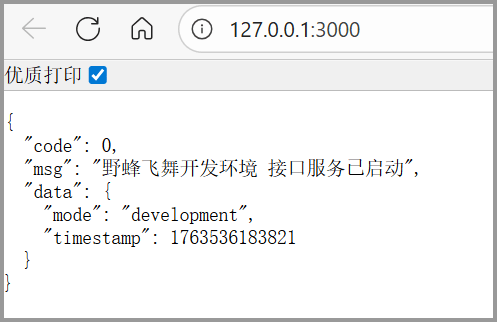
|
|
61
|
-
|
|
62
|
-
由于 `数据库` 和 `Redis` 默认为关闭状态,所以此时的服务是纯接口服务,可以用来写一些不需要数据库,不需要缓存的接口功能。
|
|
63
|
-
|
|
64
|
-
后续文章,我们将会详细了解到`接口开发`、`数据定义`、`增删改查` 等等。
|
|
@@ -1,46 +0,0 @@
|
|
|
1
|
-
`befly` 采用的是 `约定大于配置` 的思路,所有项目相关的接口都要按照约定放在 `apis` 目录下。
|
|
2
|
-
|
|
3
|
-
接下来我们实现一个简单的 `复读机` 接口 `apis/echo.ts`,文件结构如下:
|
|
4
|
-
|
|
5
|
-
```bash
|
|
6
|
-
befly-demo/
|
|
7
|
-
├── apis
|
|
8
|
-
│ ├── echo.ts # 复读机接口
|
|
9
|
-
├── node_modules
|
|
10
|
-
├── bun.lock
|
|
11
|
-
├── index.ts
|
|
12
|
-
├── package.json
|
|
13
|
-
└── tsconfig.json
|
|
14
|
-
```
|
|
15
|
-
|
|
16
|
-
接口文件的写法如下:
|
|
17
|
-
|
|
18
|
-
```typescript
|
|
19
|
-
import { Yes } from 'befly';
|
|
20
|
-
|
|
21
|
-
export default {
|
|
22
|
-
name: '复读机接口',
|
|
23
|
-
method: 'get',
|
|
24
|
-
auth: false,
|
|
25
|
-
fields: {
|
|
26
|
-
words: {
|
|
27
|
-
name: '文字内容',
|
|
28
|
-
type: 'string',
|
|
29
|
-
min: 0,
|
|
30
|
-
max: 999
|
|
31
|
-
}
|
|
32
|
-
},
|
|
33
|
-
handler: async (befly, ctx) => {
|
|
34
|
-
return Yes(ctx.body.words, {
|
|
35
|
-
timestamp: Date.now(),
|
|
36
|
-
message: '欢迎使用 Befly 框架'
|
|
37
|
-
});
|
|
38
|
-
}
|
|
39
|
-
};
|
|
40
|
-
```
|
|
41
|
-
|
|
42
|
-
访问:`http://127.0.0.1:3001/api/echo?words=我是复读机`,将会看到如下内容:
|
|
43
|
-
|
|
44
|
-
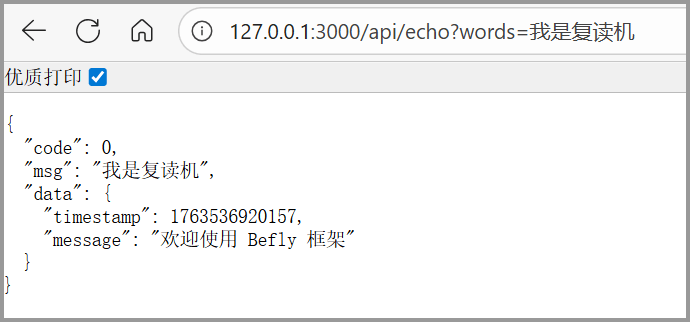
|
|
45
|
-
|
|
46
|
-
这就是接口的定义和写法。
|
|
@@ -1,172 +0,0 @@
|
|
|
1
|
-
要操作数据,需要在项目中创建一个`env.ts` 或 `env.js` 文件,示例如下:
|
|
2
|
-
|
|
3
|
-
```js
|
|
4
|
-
import type { EnvConfig } from './types/env.js';
|
|
5
|
-
|
|
6
|
-
export const Env: Partial<EnvConfig> = {
|
|
7
|
-
// 启用数据库
|
|
8
|
-
DATABASE_ENABLE: 1,
|
|
9
|
-
// 数据库配置
|
|
10
|
-
DB_TYPE: 'mysql',
|
|
11
|
-
DB_HOST: '127.0.0.1',
|
|
12
|
-
DB_PORT: 3306,
|
|
13
|
-
DB_USER: 'root',
|
|
14
|
-
DB_PASS: 'root',
|
|
15
|
-
DB_NAME: 'befly_demo',
|
|
16
|
-
// Redis 配置
|
|
17
|
-
REDIS_HOST: '127.0.0.1',
|
|
18
|
-
REDIS_PORT: 6379,
|
|
19
|
-
REDIS_USERNAME: '',
|
|
20
|
-
REDIS_PASSWORD: '',
|
|
21
|
-
REDIS_DB: 0,
|
|
22
|
-
REDIS_KEY_PREFIX: 'befly_demo'
|
|
23
|
-
};
|
|
24
|
-
```
|
|
25
|
-
|
|
26
|
-
需要注意的是,数据库配置和 Redis 缓存配置都要设置,不能只设置一个,`DATABASE_ENABLE` 设置为 `1` 后,将会开启数据库功能,如果配置错误则会报错,配置正确再次运行 `bun run main.ts` 则会显示如下信息:
|
|
27
|
-
|
|
28
|
-
```bash
|
|
29
|
-
D:\codes\_test\t10>bun run index.ts
|
|
30
|
-
[2025-11-19 20:33:09] INFO - 野蜂飞舞开发环境 服务器启动成功!
|
|
31
|
-
[2025-11-19 20:33:09] INFO - 服务器启动耗时: 2.04 毫秒
|
|
32
|
-
[2025-11-19 20:33:09] INFO - 服务器监听地址: http://127.0.0.1:3000
|
|
33
|
-
```
|
|
34
|
-
|
|
35
|
-
可以看到,没有 `数据库未启用,跳过初始化` 和 `Redis 未启用,跳过初始化` 的提示信息了。
|
|
36
|
-
|
|
37
|
-
正确配置和连接数据库后,下一步就是设计`数据库表结构了`,同样也是 `约定大于配置` 的思路,`数据库字段` 全部在 根目录下的 `tables` 目录下创建和定义。
|
|
38
|
-
|
|
39
|
-
```bash
|
|
40
|
-
befly-demo/
|
|
41
|
-
├── apis
|
|
42
|
-
│ ├── echo.ts # 复读机接口
|
|
43
|
-
│ └── save.ts # 保存接口
|
|
44
|
-
├── tables
|
|
45
|
-
│ └── info.json # 信息表
|
|
46
|
-
├── node_modules
|
|
47
|
-
├── bun.lock
|
|
48
|
-
├── index.ts
|
|
49
|
-
├── package.json
|
|
50
|
-
└── tsconfig.json
|
|
51
|
-
```
|
|
52
|
-
|
|
53
|
-
如上,在 `tables` 目录下创建了一个 `info.json` 表,定义如下:
|
|
54
|
-
|
|
55
|
-
```json
|
|
56
|
-
{
|
|
57
|
-
"name": {
|
|
58
|
-
"name": "姓名",
|
|
59
|
-
"type": "string",
|
|
60
|
-
"min": 2,
|
|
61
|
-
"max": 50
|
|
62
|
-
},
|
|
63
|
-
"code": {
|
|
64
|
-
"name": "年龄",
|
|
65
|
-
"type": "number",
|
|
66
|
-
"min": 0,
|
|
67
|
-
"max": 120
|
|
68
|
-
},
|
|
69
|
-
"value": {
|
|
70
|
-
"name": "身高",
|
|
71
|
-
"type": "number",
|
|
72
|
-
"min": 0,
|
|
73
|
-
"max": 300
|
|
74
|
-
},
|
|
75
|
-
"sort": {
|
|
76
|
-
"name": "体重",
|
|
77
|
-
"type": "number",
|
|
78
|
-
"min": 0,
|
|
79
|
-
"max": 9999
|
|
80
|
-
}
|
|
81
|
-
}
|
|
82
|
-
```
|
|
83
|
-
|
|
84
|
-
`befly` 的表结构定义全部在文件中定义即可,那么要同步到数据库中,需要用到 `befly-cli` 依赖,使用 `bun add befly-cli` 安装即可。
|
|
85
|
-
|
|
86
|
-
安装完毕后,执行 `bunx befly sync` 命令,同步数据库字段到真实数据库中,终端显示的内容如下:
|
|
87
|
-
|
|
88
|
-
```bash
|
|
89
|
-
D:\codes\_test\t10>bunx befly sync
|
|
90
|
-
========================================
|
|
91
|
-
开始执行完整同步流程
|
|
92
|
-
当前环境: development
|
|
93
|
-
项目名称: 野蜂飞舞开发环境
|
|
94
|
-
数据库地址: 127.0.0.1
|
|
95
|
-
数据库名称: befly_demo
|
|
96
|
-
========================================
|
|
97
|
-
|
|
98
|
-
🔍 正在检查项目结构...
|
|
99
|
-
✓ 项目结构检查完成
|
|
100
|
-
|
|
101
|
-
开始执行同步任务...
|
|
102
|
-
|
|
103
|
-
📦 正在同步数据库...
|
|
104
|
-
MySQL 版本: 8.0.31
|
|
105
|
-
🧹 清理 1 个表的字段缓存...
|
|
106
|
-
✓ 已清理表字段缓存
|
|
107
|
-
✓ 数据库同步完成
|
|
108
|
-
|
|
109
|
-
🔌 正在同步接口...
|
|
110
|
-
表 addon_admin_api 不存在,跳过 API 同步(需要安装 addon-admin 组件)
|
|
111
|
-
✓ 接口同步完成
|
|
112
|
-
|
|
113
|
-
📋 正在同步菜单...
|
|
114
|
-
表 addon_admin_menu 不存在,跳过菜单同步(需要安装 addon-admin 组件)
|
|
115
|
-
✓ 菜单同步完成
|
|
116
|
-
|
|
117
|
-
👤 正在同步开发账号...
|
|
118
|
-
✓ 开发账号同步完成
|
|
119
|
-
|
|
120
|
-
━━━━━━━━━━━━━━━━━━━━━━━━━━━━━━━━━━━━━━━━
|
|
121
|
-
✅ 同步完成!总耗时: 0.08 秒
|
|
122
|
-
━━━━━━━━━━━━━━━━━━━━━━━━━━━━━━━━━━━━━━━━
|
|
123
|
-
```
|
|
124
|
-
|
|
125
|
-
同步完毕后,使用数据库工具查看,我这里使用的是 `HeidiSQL`,如下图。
|
|
126
|
-
|
|
127
|
-
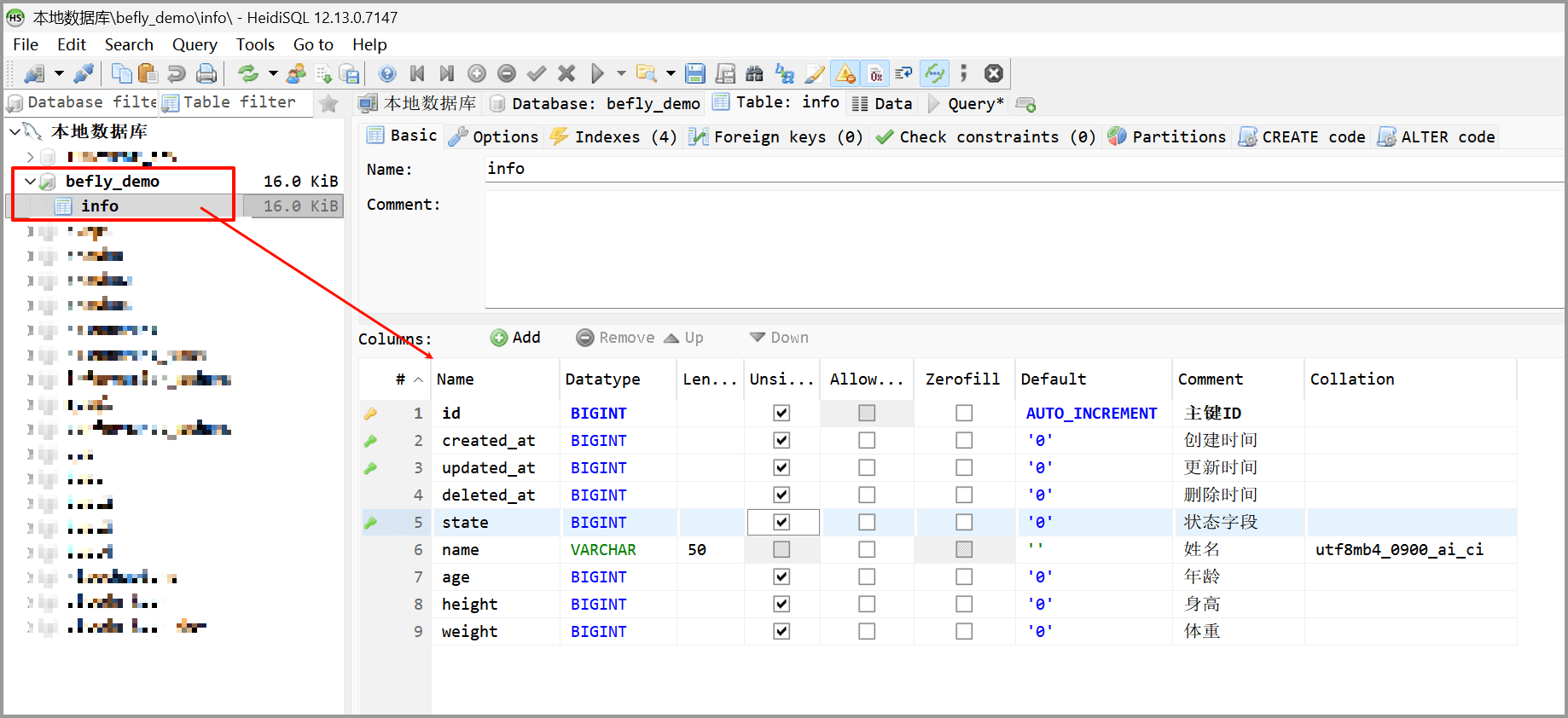
|
|
128
|
-
|
|
129
|
-
需要注意,改动数据库定义后,都要执行 `bunx befly sync` 命令同步到实际数据库结构中才会生效。
|
|
130
|
-
|
|
131
|
-
数据库同步完毕,下一步就是写保存信息接口 `apis/save.ts`,接收从客户端传入的参数,并保存到数据库中,如下:
|
|
132
|
-
|
|
133
|
-
```js
|
|
134
|
-
import { Yes } from 'befly';
|
|
135
|
-
import infoTable from '../tables/info.json';
|
|
136
|
-
|
|
137
|
-
export default {
|
|
138
|
-
name: '保存信息接口',
|
|
139
|
-
method: 'get',
|
|
140
|
-
auth: false,
|
|
141
|
-
fields: infoTable,
|
|
142
|
-
handler: async (befly, ctx) => {
|
|
143
|
-
const res = await befly.db.insData({
|
|
144
|
-
table: 'info',
|
|
145
|
-
data: {
|
|
146
|
-
name: ctx.body.name,
|
|
147
|
-
age: ctx.body.age,
|
|
148
|
-
height: ctx.body.height,
|
|
149
|
-
weight: ctx.body.weight
|
|
150
|
-
}
|
|
151
|
-
});
|
|
152
|
-
return Yes('信息保存成功', {
|
|
153
|
-
id: 17635656770001
|
|
154
|
-
});
|
|
155
|
-
}
|
|
156
|
-
};
|
|
157
|
-
```
|
|
158
|
-
|
|
159
|
-
在浏览器访问 `http://127.0.0.1:3000/api/save?name=张三&age=18&height=160&weight=70`,返回内容如下图。
|
|
160
|
-
|
|
161
|
-
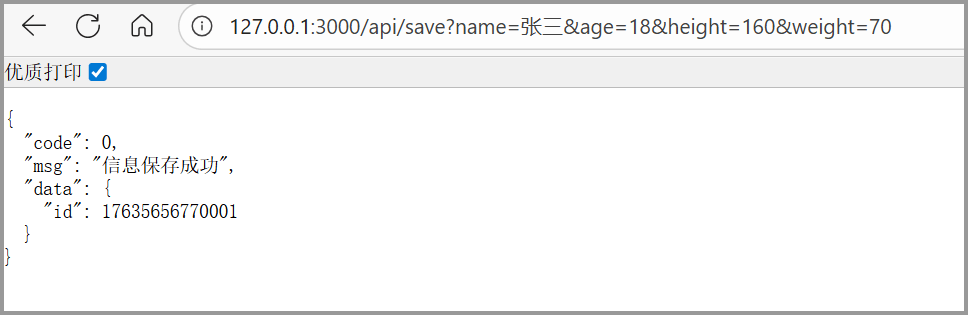
|
|
162
|
-
|
|
163
|
-
同时呢,查看数据库的 `info` 表数据库,如下图,可以看到数据已经正确保存到了数据库中。
|
|
164
|
-
|
|
165
|
-

|
|
166
|
-
|
|
167
|
-
这就是使用`Befly`框架来写接口,操作数据库的基本流程,简单来说其实只有 2 个主要步骤。
|
|
168
|
-
|
|
169
|
-
1. 定义数据库表,同步表结构。
|
|
170
|
-
2. 写增删改查接口,操作数据库。
|
|
171
|
-
|
|
172
|
-
这就是 `Belfy` 的极简主义,没有那么多花里胡哨的概念,当然更多使用和配置细节,将在后续文章一一说明。
|
package/hooks/requestLogger.ts
DELETED
|
@@ -1,84 +0,0 @@
|
|
|
1
|
-
// 相对导入
|
|
2
|
-
import { Logger } from '../lib/logger.js';
|
|
3
|
-
|
|
4
|
-
// 类型导入
|
|
5
|
-
import type { Hook } from '../types/hook.js';
|
|
6
|
-
|
|
7
|
-
/** 单个字段最大记录长度(字符数) */
|
|
8
|
-
const MAX_FIELD_LENGTH = 500;
|
|
9
|
-
|
|
10
|
-
/**
|
|
11
|
-
* 截断单个值
|
|
12
|
-
*/
|
|
13
|
-
function truncateValue(value: any): any {
|
|
14
|
-
if (value === null || value === undefined) {
|
|
15
|
-
return value;
|
|
16
|
-
}
|
|
17
|
-
|
|
18
|
-
if (typeof value === 'string') {
|
|
19
|
-
if (value.length > MAX_FIELD_LENGTH) {
|
|
20
|
-
return value.substring(0, MAX_FIELD_LENGTH) + `... [truncated, total ${value.length} chars]`;
|
|
21
|
-
}
|
|
22
|
-
return value;
|
|
23
|
-
}
|
|
24
|
-
|
|
25
|
-
if (Array.isArray(value)) {
|
|
26
|
-
const str = JSON.stringify(value);
|
|
27
|
-
if (str.length > MAX_FIELD_LENGTH) {
|
|
28
|
-
return `[Array, ${value.length} items, ${str.length} chars]`;
|
|
29
|
-
}
|
|
30
|
-
return value;
|
|
31
|
-
}
|
|
32
|
-
|
|
33
|
-
if (typeof value === 'object') {
|
|
34
|
-
const str = JSON.stringify(value);
|
|
35
|
-
if (str.length > MAX_FIELD_LENGTH) {
|
|
36
|
-
return `[Object, ${Object.keys(value).length} keys, ${str.length} chars]`;
|
|
37
|
-
}
|
|
38
|
-
return value;
|
|
39
|
-
}
|
|
40
|
-
|
|
41
|
-
return value;
|
|
42
|
-
}
|
|
43
|
-
|
|
44
|
-
/**
|
|
45
|
-
* 截断 body 对象的每个字段
|
|
46
|
-
*/
|
|
47
|
-
function truncateBody(body: Record<string, any>): Record<string, any> {
|
|
48
|
-
const result: Record<string, any> = {};
|
|
49
|
-
for (const key in body) {
|
|
50
|
-
result[key] = truncateValue(body[key]);
|
|
51
|
-
}
|
|
52
|
-
return result;
|
|
53
|
-
}
|
|
54
|
-
|
|
55
|
-
/**
|
|
56
|
-
* 请求日志钩子
|
|
57
|
-
* 在认证和解析之后记录完整的请求日志
|
|
58
|
-
* order: 5 (在 parser 之后、validator 之前)
|
|
59
|
-
*/
|
|
60
|
-
const hook: Hook = {
|
|
61
|
-
order: 5,
|
|
62
|
-
handler: async (befly, ctx) => {
|
|
63
|
-
// 只记录有效的 API 请求
|
|
64
|
-
if (!ctx.api) return;
|
|
65
|
-
|
|
66
|
-
const logData: Record<string, any> = {
|
|
67
|
-
requestId: ctx.requestId,
|
|
68
|
-
route: ctx.route,
|
|
69
|
-
ip: ctx.ip,
|
|
70
|
-
userId: ctx.user?.id || '',
|
|
71
|
-
nickname: ctx.user?.nickname || '',
|
|
72
|
-
roleCode: ctx.user?.roleCode || '',
|
|
73
|
-
roleType: ctx.user?.roleType || ''
|
|
74
|
-
};
|
|
75
|
-
|
|
76
|
-
// 截断大请求体
|
|
77
|
-
if (ctx.body && Object.keys(ctx.body).length > 0) {
|
|
78
|
-
logData.body = truncateBody(ctx.body);
|
|
79
|
-
}
|
|
80
|
-
|
|
81
|
-
Logger.info(logData, '请求日志');
|
|
82
|
-
}
|
|
83
|
-
};
|
|
84
|
-
export default hook;
|
package/types/index.ts
DELETED
|
@@ -1,24 +0,0 @@
|
|
|
1
|
-
/**
|
|
2
|
-
* 类型定义导出
|
|
3
|
-
*
|
|
4
|
-
* 注意:通用类型已迁移到 befly-shared/types
|
|
5
|
-
* - addon, crypto, jwt, logger, tool 等类型请从 befly-shared/types 导入
|
|
6
|
-
*/
|
|
7
|
-
|
|
8
|
-
export * from './api.js';
|
|
9
|
-
export * from './befly.js';
|
|
10
|
-
export * from './cache.js';
|
|
11
|
-
export * from './context.js';
|
|
12
|
-
export * from './hook.js';
|
|
13
|
-
export * from './plugin.js';
|
|
14
|
-
export * from './redis.js';
|
|
15
|
-
export * from './table.js';
|
|
16
|
-
|
|
17
|
-
// common.js 包含基础类型
|
|
18
|
-
export * from './common.js';
|
|
19
|
-
|
|
20
|
-
// database.js 中除了与 common.js 重复的类型外,其他都导出
|
|
21
|
-
export type { TypedQueryOptions, TypedInsertOptions, TypedUpdateOptions, TypedDeleteOptions, QueryOptions, InsertOptions, UpdateOptions, DeleteOptions, ListResult, TransactionCallback, DbType, ColumnInfo, IndexInfo } from './database.js';
|
|
22
|
-
|
|
23
|
-
// sync.js 中不重复的类型
|
|
24
|
-
export type { SyncDbOptions, SyncOptions, SyncMenuOptions, MenuConfig, SyncDevOptions, SyncApiOptions, ApiInfo, SyncMenuStats, SyncApiStats, GlobalStats, PhaseStats, SyncReport, SyncReportMeta, DatabaseReport, ApiReport, MenuReport } from './sync.js';
|