bash-explainer 0.1.1 → 0.2.0
This diff represents the content of publicly available package versions that have been released to one of the supported registries. The information contained in this diff is provided for informational purposes only and reflects changes between package versions as they appear in their respective public registries.
- package/README.md +59 -2
- package/dist/cli.js +93 -82
- package/package.json +1 -1
package/README.md
CHANGED
|
@@ -46,11 +46,68 @@ bash-explainer --check install.sh # constructs its shell (#!/bin/sh: dash…
|
|
|
46
46
|
| `--shell <name>` | the script's shell: `bash`, `sh`, `dash`, `ash`, `yash`, `ksh`, `mksh`, `zsh` (default: from the shebang or the file name) |
|
|
47
47
|
| `--kind <kind>` | what the file is: `shell`, `dockerfile`, `makefile`, `yaml`, `npm`, `markdown`, `python` (default: from the file name) |
|
|
48
48
|
| `--lang <en\|ja>` | language (default: from `LANG`) |
|
|
49
|
-
| `--format <format>` | `text`, `markdown` or `json` |
|
|
49
|
+
| `--format <format>` | `text`, `markdown` or `json`; with `--check`, also `github` (annotations in GitHub Actions) or `sarif` (for code scanning) |
|
|
50
50
|
| `--no-examples` | leave out worked examples |
|
|
51
|
+
| `--lsp` | run as a Language Server on standard input and output (see [In your editor](#in-your-editor-language-server)) |
|
|
51
52
|
| `--color`, `--no-color` | colour the text output (default: when writing to a terminal; `NO_COLOR` turns it off) |
|
|
52
53
|
|
|
53
|
-
`--check` prints problems as compilers do (`file:line:column: warning: … [code]`), so editors and CI can pick them up.
|
|
54
|
+
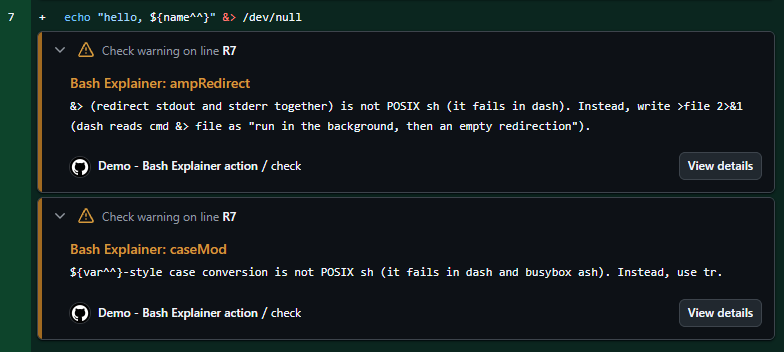
`--check` prints problems as compilers do (`file:line:column: warning: … [code]`), so editors and CI can pick them up. With `--format github` they become GitHub Actions annotations, shown on the pull request's diff; with `--format sarif`, a SARIF file for code scanning.
|
|
55
|
+
|
|
56
|
+
## In CI (GitHub Actions)
|
|
57
|
+
|
|
58
|
+
The repository is also a GitHub Action, which runs this tool at its own version:
|
|
59
|
+
|
|
60
|
+
```yaml
|
|
61
|
+
- uses: actions/checkout@v5
|
|
62
|
+
- uses: sf624/bash-explainer@v0
|
|
63
|
+
with:
|
|
64
|
+
files: '**/*.sh Dockerfile .github/workflows/*.yml'
|
|
65
|
+
```
|
|
66
|
+
|
|
67
|
+
`@v0` follows the latest 0.x release. To stay on one version, use its tag (`@v0.2.0`); to be sure the code cannot change, its commit SHA (`@<sha> # v0.2.0`), which Dependabot can keep up to date.
|
|
68
|
+
|
|
69
|
+
|
|
70
|
+
|
|
71
|
+
Warnings appear on the pull request's diff, and fail the step (`fail-on-warning: 'false'` keeps it green). The inputs: `files` (bash globs; default `**/*.sh`), `shell` (default: from each script), `fail-on-warning`, `sarif` (also write a SARIF file, for `github/codeql-action/upload-sarif`) and `package` (another npm package spec to run). The output `warnings` is the number of warnings. In other CI systems, run `npx bash-explainer --check <files>` and use the exit status.
|
|
72
|
+
|
|
73
|
+
## In your editor (Language Server)
|
|
74
|
+
|
|
75
|
+
`bash-explainer --lsp` is a Language Server on standard input and output: hover a line for its explanation, and get the warnings with their quick fixes, in any editor that speaks LSP. It handles shell scripts (language IDs `sh`, `bash`, `zsh`, `shellscript`…) and the shell code in Dockerfiles, Makefiles, YAML, `package.json`, Markdown and Python. It runs next to other servers, such as bash-language-server.
|
|
76
|
+
|
|
77
|
+
Install it with `npm install --global bash-explainer` (see [Installation](#installation)), so the editor does not wait for `npx`.
|
|
78
|
+
|
|
79
|
+
**Neovim** (0.11 or later), in `init.lua`:
|
|
80
|
+
|
|
81
|
+
```lua
|
|
82
|
+
vim.lsp.config('bash_explainer', {
|
|
83
|
+
cmd = { 'bash-explainer', '--lsp' },
|
|
84
|
+
filetypes = { 'sh', 'bash', 'zsh', 'dockerfile', 'make', 'yaml' },
|
|
85
|
+
root_markers = { '.git' },
|
|
86
|
+
-- init_options = { language = 'ja', shell = 'dash' },
|
|
87
|
+
})
|
|
88
|
+
vim.lsp.enable('bash_explainer')
|
|
89
|
+
```
|
|
90
|
+
|
|
91
|
+
**Helix**, in `languages.toml`:
|
|
92
|
+
|
|
93
|
+
```toml
|
|
94
|
+
[language-server.bash-explainer]
|
|
95
|
+
command = "bash-explainer"
|
|
96
|
+
args = ["--lsp"]
|
|
97
|
+
|
|
98
|
+
[[language]]
|
|
99
|
+
name = "bash"
|
|
100
|
+
language-servers = ["bash-language-server", "bash-explainer"]
|
|
101
|
+
```
|
|
102
|
+
|
|
103
|
+
**Emacs** (Eglot, one server per mode):
|
|
104
|
+
|
|
105
|
+
```elisp
|
|
106
|
+
(with-eval-after-load 'eglot
|
|
107
|
+
(add-to-list 'eglot-server-programs '((sh-mode bash-ts-mode) . ("bash-explainer" "--lsp"))))
|
|
108
|
+
```
|
|
109
|
+
|
|
110
|
+
Settings, as `initializationOptions` or through `workspace/didChangeConfiguration` (under `bashExplainer`): `language` (`en` or `ja`; default from `LANG`), `shell` (the shell to check for; default: from the file), `examples` (`false` leaves out worked examples).
|
|
54
111
|
|
|
55
112
|
## Privacy
|
|
56
113
|
|