badger-db-mcp 0.19.0 → 0.19.7
This diff represents the content of publicly available package versions that have been released to one of the supported registries. The information contained in this diff is provided for informational purposes only and reflects changes between package versions as they appear in their respective public registries.
- package/README.md +30 -30
- package/dist/chunk-B2NFHSQA.js +2544 -0
- package/dist/demo/employee-sqlite/employee.sql +117 -0
- package/dist/demo/employee-sqlite/load_department.sql +10 -0
- package/dist/demo/employee-sqlite/load_dept_emp.sql +1103 -0
- package/dist/demo/employee-sqlite/load_dept_manager.sql +17 -0
- package/dist/demo/employee-sqlite/load_employee.sql +1000 -0
- package/dist/demo/employee-sqlite/load_salary1.sql +9488 -0
- package/dist/demo/employee-sqlite/load_title.sql +1470 -0
- package/dist/demo-loader-PSMTLZ2T.js +46 -0
- package/dist/index.d.ts +1 -0
- package/dist/index.js +3828 -0
- package/dist/registry-IWU3LSYK.js +10 -0
- package/package.json +5 -2
package/README.md
CHANGED
|
@@ -2,35 +2,35 @@
|
|
|
2
2
|
> Brought to you by [Bytebase](https://www.bytebase.com/), open-source database DevSecOps platform.
|
|
3
3
|
|
|
4
4
|
<p align="center">
|
|
5
|
-
<
|
|
6
|
-
<
|
|
7
|
-
<source media="(prefers-color-scheme: dark)" srcset="https://raw.githubusercontent.com/bytebase/dbhub/main/docs/images/logo/full-dark.svg" width="75%">
|
|
8
|
-
<source media="(prefers-color-scheme: light)" srcset="https://raw.githubusercontent.com/bytebase/dbhub/main/docs/images/logo/full-light.svg" width="75%">
|
|
9
|
-
<img src="https://raw.githubusercontent.com/bytebase/dbhub/main/docs/images/logo/full-light.svg" width="75%" alt="DBHub Logo">
|
|
10
|
-
</picture>
|
|
11
|
-
</a>
|
|
5
|
+
<img src="assets/badgerlogo.svg" alt="" height="80" style="vertical-align: middle;" />
|
|
6
|
+
<span style="font-size: 2.5rem; font-weight: 700; vertical-align: middle; margin-left: 0.5rem;">Badger DB MCP</span>
|
|
12
7
|
</p>
|
|
13
8
|
|
|
14
|
-
```
|
|
15
|
-
|
|
16
|
-
|
|
17
|
-
|
|
18
|
-
|
|
19
|
-
|
|
20
|
-
|
|
21
|
-
|
|
22
|
-
|
|
23
|
-
|
|
24
|
-
|
|
25
|
-
|
|
26
|
-
|
|
27
|
-
|
|
28
|
-
|
|
29
|
-
|
|
30
|
-
|
|
9
|
+
```mermaid
|
|
10
|
+
flowchart LR
|
|
11
|
+
subgraph clients["MCP Clients"]
|
|
12
|
+
c1[Claude Desktop]
|
|
13
|
+
c2[Claude Code]
|
|
14
|
+
c3[Cursor]
|
|
15
|
+
c4[VS Code]
|
|
16
|
+
c5[Copilot CLI]
|
|
17
|
+
end
|
|
18
|
+
|
|
19
|
+
S[Badger DB MCP]
|
|
20
|
+
|
|
21
|
+
subgraph databases["Databases"]
|
|
22
|
+
d1[PostgreSQL]
|
|
23
|
+
d2[SQL Server]
|
|
24
|
+
d3[SQLite]
|
|
25
|
+
d4[MySQL]
|
|
26
|
+
d5[MariaDB]
|
|
27
|
+
end
|
|
28
|
+
|
|
29
|
+
clients --> S
|
|
30
|
+
S --> databases
|
|
31
31
|
```
|
|
32
32
|
|
|
33
|
-
|
|
33
|
+
Badger DB MCP is a zero-dependency, token efficient MCP server implementing the Model Context Protocol (MCP) server interface. This lightweight gateway allows MCP-compatible clients to connect to and explore different databases. It is a fork of [DBHub](https://github.com/bytebase/dbhub).
|
|
34
34
|
|
|
35
35
|
- **Local Development First**: Zero dependency, token efficient with just two MCP tools to maximize context window
|
|
36
36
|
- **Multi-Database**: PostgreSQL, MySQL, MariaDB, SQL Server, and SQLite through a single interface
|
|
@@ -44,7 +44,7 @@ PostgreSQL, MySQL, SQL Server, MariaDB, and SQLite.
|
|
|
44
44
|
|
|
45
45
|
## MCP Tools
|
|
46
46
|
|
|
47
|
-
|
|
47
|
+
Badger DB MCP implements MCP tools for database operations:
|
|
48
48
|
|
|
49
49
|
- **[execute_sql](https://dbhub.ai/tools/execute-sql)**: Execute SQL queries with transaction support and safety controls
|
|
50
50
|
- **[search_objects](https://dbhub.ai/tools/search-objects)**: Search and explore database schemas, tables, columns, indexes, and procedures with progressive disclosure
|
|
@@ -52,7 +52,7 @@ DBHub implements MCP tools for database operations:
|
|
|
52
52
|
|
|
53
53
|
## Workbench
|
|
54
54
|
|
|
55
|
-
|
|
55
|
+
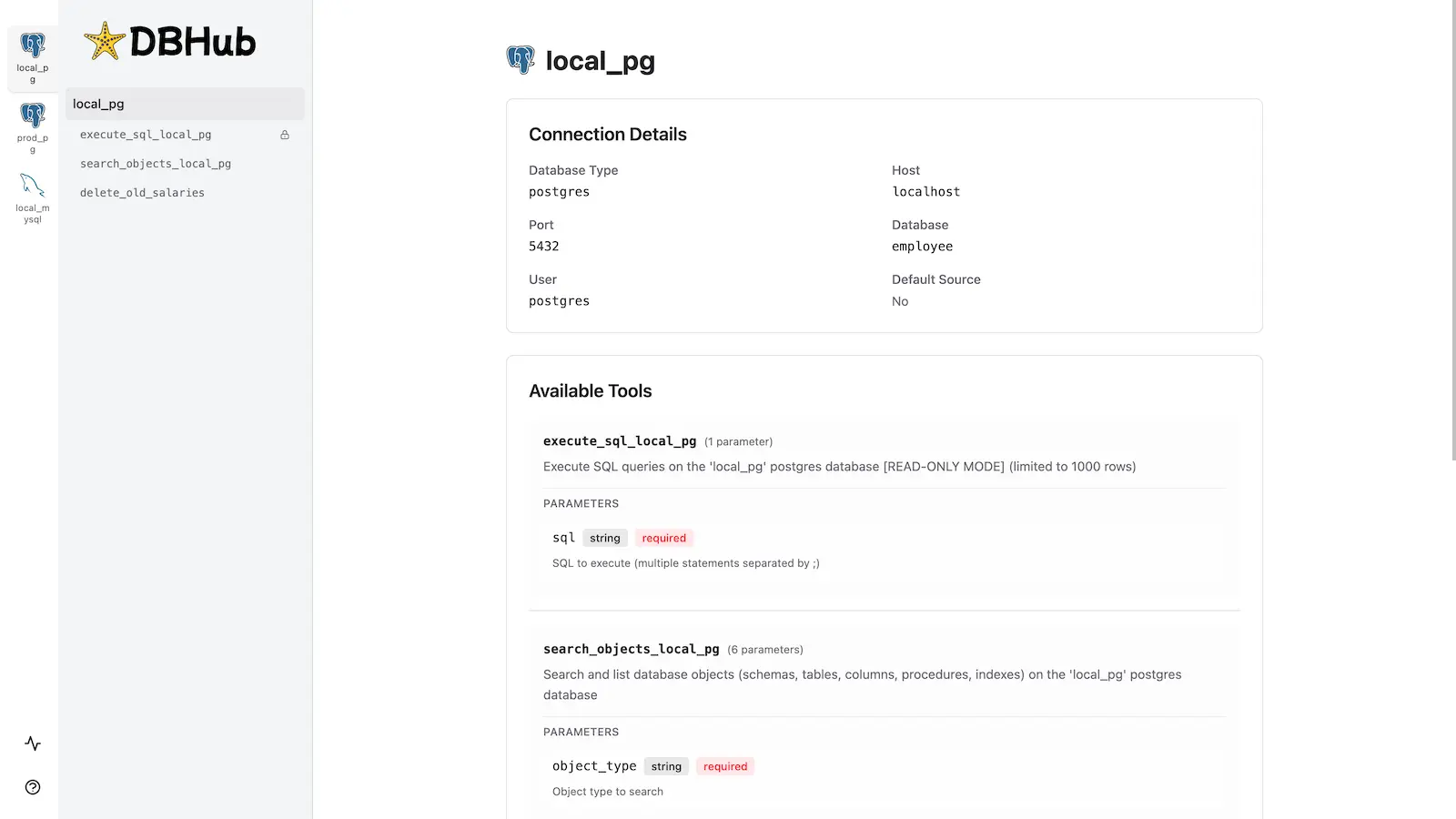
Badger DB MCP includes a [built-in web interface](https://dbhub.ai/workbench/overview) for interacting with your database tools. It provides a visual way to execute queries, run custom tools, and view request traces without requiring an MCP client.
|
|
56
56
|
|
|
57
57
|
|
|
58
58
|
|
|
@@ -66,7 +66,7 @@ See the full [Installation Guide](https://dbhub.ai/installation) for detailed in
|
|
|
66
66
|
|
|
67
67
|
```bash
|
|
68
68
|
docker run --rm --init \
|
|
69
|
-
--name
|
|
69
|
+
--name badger-db-mcp \
|
|
70
70
|
--publish 8080:8080 \
|
|
71
71
|
bytebase/dbhub \
|
|
72
72
|
--transport http \
|
|
@@ -90,7 +90,7 @@ See [Command-Line Options](https://dbhub.ai/config/command-line) for all availab
|
|
|
90
90
|
|
|
91
91
|
### Multi-Database Setup
|
|
92
92
|
|
|
93
|
-
Connect to multiple databases simultaneously using TOML configuration files. Perfect for managing production, staging, and development databases from a single
|
|
93
|
+
Connect to multiple databases simultaneously using TOML configuration files. Perfect for managing production, staging, and development databases from a single Badger DB MCP instance.
|
|
94
94
|
|
|
95
95
|
See [Multi-Database Configuration](https://dbhub.ai/config/toml) for complete setup instructions.
|
|
96
96
|
|
|
@@ -107,7 +107,7 @@ pnpm dev
|
|
|
107
107
|
pnpm build && pnpm start --transport stdio --dsn "postgres://user:password@localhost:5432/dbname"
|
|
108
108
|
```
|
|
109
109
|
|
|
110
|
-
See [Testing](.claude/skills/testing/SKILL.md) and [Debug](https://dbhub.ai/config/debug).
|
|
110
|
+
See [Testing](.claude/skills/testing/SKILL.md) and [Debug](https://dbhub.ai/config/debug) for Badger DB MCP.
|
|
111
111
|
|
|
112
112
|
## Contributors
|
|
113
113
|
|